Samsung Answering Machine Smt I5210 Users Manual
Smt-i5210 to the manual 94baa3b3-7964-4740-82f7-2c18b0bb4ce3
2015-01-23
: Samsung Samsung-Samsung-Answering-Machine-Smt-I5210-Users-Manual-275328 samsung-samsung-answering-machine-smt-i5210-users-manual-275328 samsung pdf
Open the PDF directly: View PDF  .
.
Page Count: 8
SMT-i5210 Quick Reference Guide _1
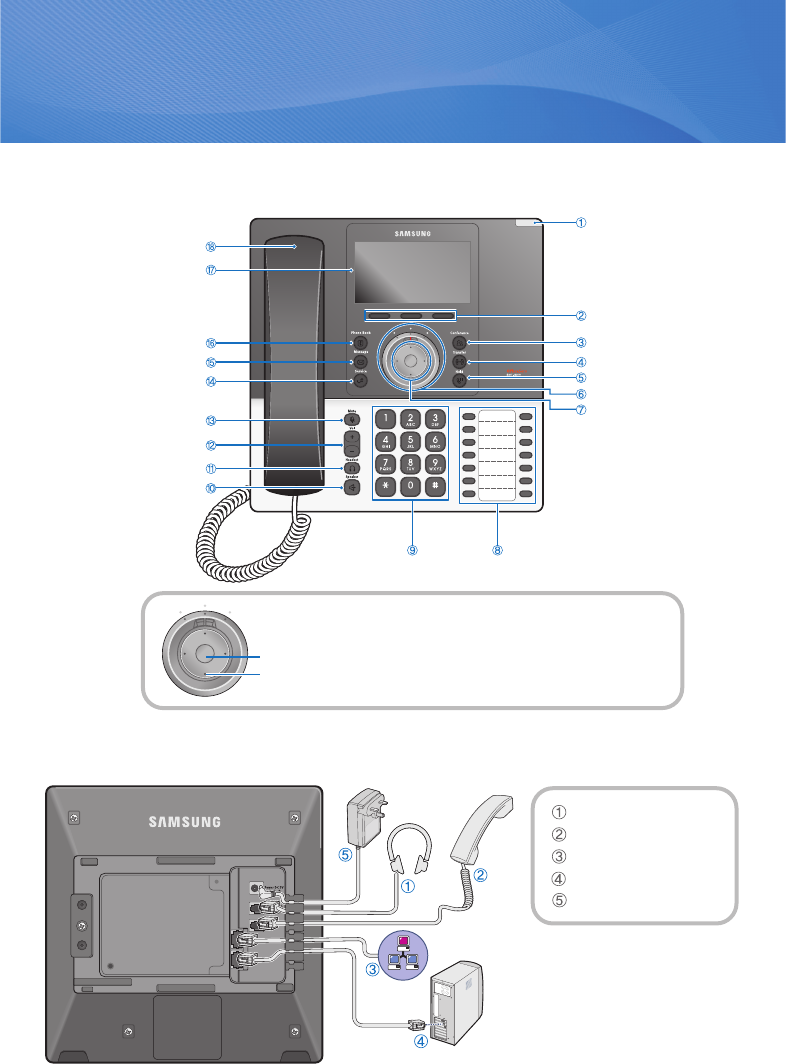
Parts and Names
SMT-i5210 Quick Reference Guide
LED
Soft Button
Conference Button
Transfer Button
Hold Button
UC dial
Navigation Button
AOM ButtonDial Button
Phonebook Button
Message Button
Service Button
Mute Button
Volume Button
Headset Button
Speaker Button
Handset
LCD screen
OK
UC Dial and Navigation Button
- Left: Unconditional call transfer
- Center: Standby status
- Right: ‘Do Not Disturb’ and buddy rejection status
Direction key
Phone Installation
Headset connection
Handset connection
Network connection
PC connection
Power connection
2_ © SAMSUNG Electronics Co., Ltd.
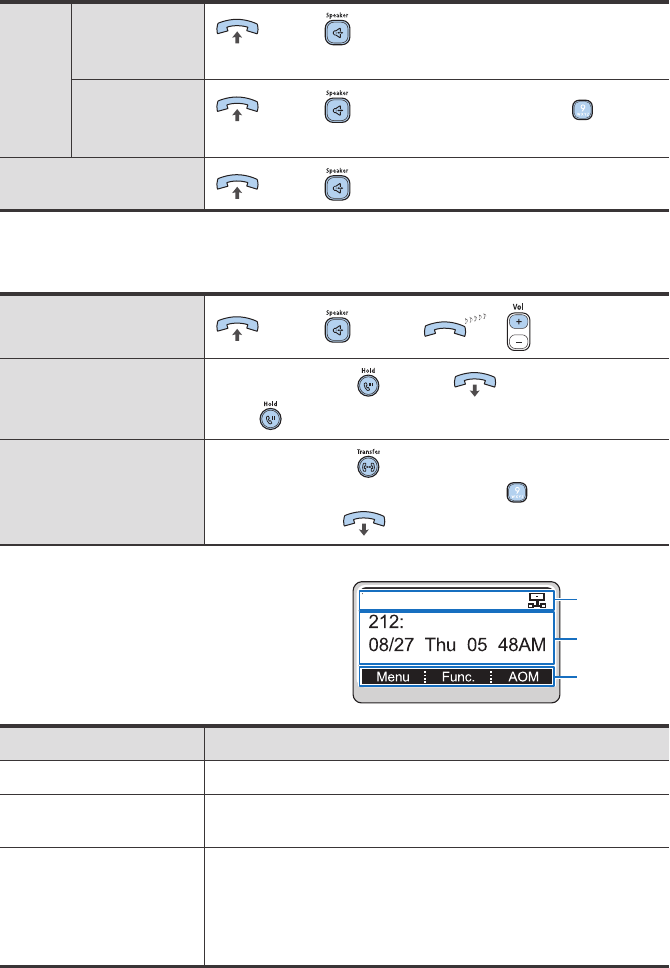
Making & Receiving a Call
Dialing Station Line or press button Enter phone number
Select [Call] from the soft menu.
Extension Line or press button Press the dial button
Enter phone number Select [Call] from the soft menu.
Receiving a call or press button
Basic Functions
Volume Control
or press button or button
Call Hold Busy state Press button (To cancel holding,
press button)
Call Transfer Busy state Press button Enter the phone No.
(for an external call, press the dial button , and enter
the phone No.)
Screen Structure
Area Description
Icon area
Displays various icons.
Text area
Displays the information (e.g., message, phone number)
entered by a user as well as the date, time, etc.
Soft menu area
Displays the functions allocated to the 3 soft buttons.
Function menus are provided depending on the situation
-busy or standby-as defined in the phone.
A user can use the function menus by pressing the [Func.]
soft button.
Icon area
Text area
Soft menu area

SMT-i5210 Quick Reference Guide _3
Correct Disposal of This Product
(Waste Electrical & Electronic Equipment)
(Applicable in the European Union and other European countries with separate collection
systems)
This marking on the product, accessories or literature indicates that the product and its electronic
accessories (e.g. charger, headset, USB cable) should not be disposed of with other household
waste at the end of their working life. To prevent possible harm to the environment or human health
from uncontrolled waste disposal, please separate these items from other types of waste and
recycle them responsibly to promote the sustainable reuse of material resources.
Household users should contact either the retailer where they purchased this product, or their
local government office, for details of where and how they can take this item for environmentally
safe recycling.
Business users should contact their supplier and check the terms and conditions of the purchase
contract. This product should not be mixed with other commercial wastes for disposal.
Information in this document is proprietary to SAMSUNG Electronics Co., Ltd.
No information contained here may be copied, translated, transcribed or
duplicated by any form without the prior written consent of SAMSUNG.
Information in this document is subject to change without notice.
Part No. GB68-00167A(Ed.01)

Deutsch _1
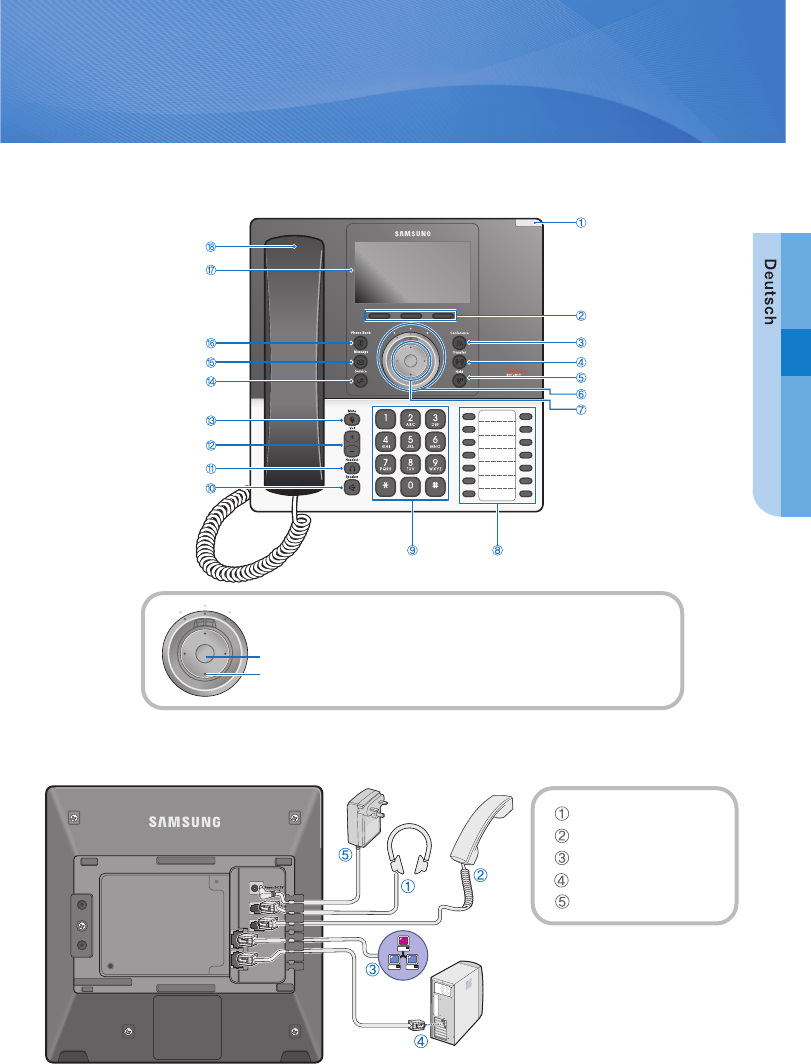
Parts and Names
SMT-i5210 Kurzanleitung
Addressbuchtaste
Nachrichtentaste
Handhörer
LCD-Anzeige
Telefoninstallation
UC Service-Taste
Stummtaste
Lautstärketaste
Kopfhörertaste
Lautsprechertaste
Statusanzeige
Auswahltasten
Konferenztaste
Weiterleitungstaste
Haltentaste
UC-Wahl
Navigationstaste
FunktionstastennWähltasten
OK-Taste
UC-Wahl- und Navigationstasten
- Links: Anrufweiterleitung
- Mittlere: Im Büro erreichbar
- Rechts: Nicht Stören
4-Wegetaste
Kofhöreranschluss
Handhöreranschluss
Netzwerkanschluss
PC-Anschluss
Netzteilanschluss
2_ © SAMSUNG Electronics Co., Ltd.
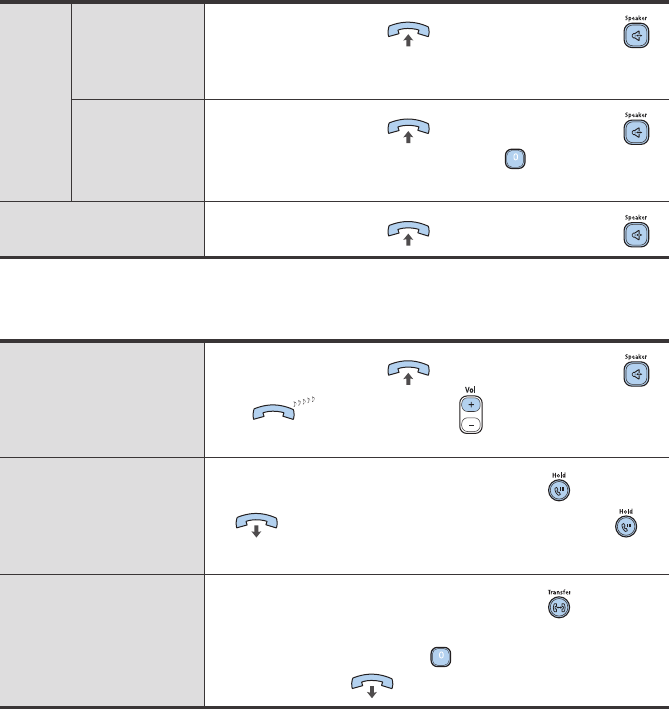
Anruf tätigen/Anruf annehmen
Anruf Interner Ruf Heben Sie den Hörer ab oder drücken Sie die Taste
Wählen Sie die interne Rufnummer Wählen Sie [Send] vom
Soft-Menü.
Amtsruf Heben Sie den Hörer ab oder drücken Sie die Taste
Wählen Sie die Amtsholungskennziffer Externe
Rufnummer eingeben Wählen Sie [Send] vom Soft-Menü.
Anrufannahme Heben Sie den Hörer ab oder drücken Sie die Taste
Basisfunktionen
Lautstärke- einstellung Heben Sie den Hörer ab oder drücken Sie die Taste
bzw. nun mit der Taste die gewünschte
Lautstärke einstellen
Halten Im Gesprächszustand drücken Sie die Taste
(um Halten aufzuheben , noch einmal die Taste
drücken)
Weiterleiten eines Anrufs Im Gesprächszustand drücken Sie die Taste
wählen Sie die interne Rufnummer (für externe Gespräche,
wählen Sie die Amtskennziffer , und geben Sie die externe
Rufnummer ein)
Deutsch _3
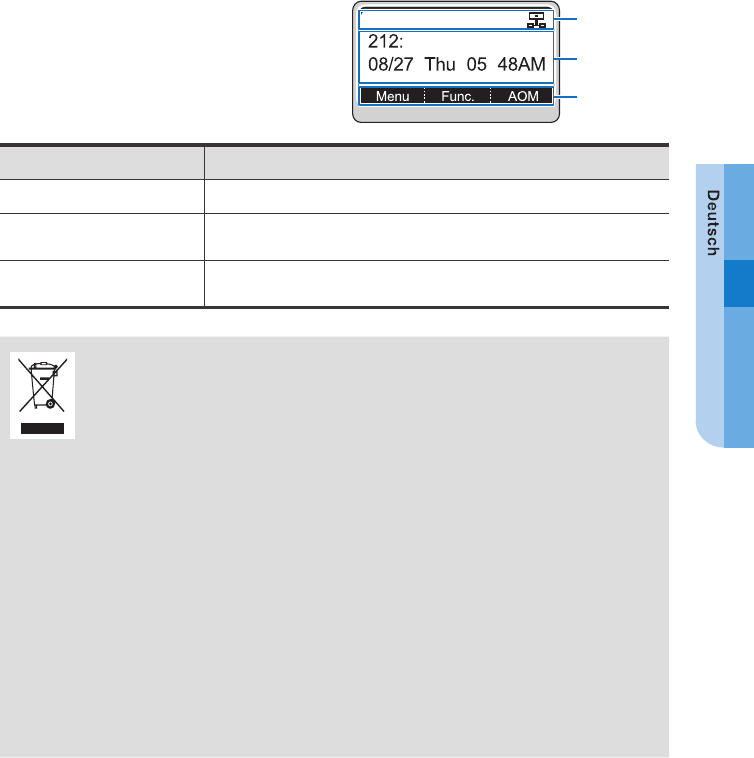
Screen Structure
Area Description
Statusleiste Symbole zur Anzeige der aktivierten Telefonfunktionen.
Hauptanzeige Menüs, Anrufmanagement und diverse Nachrichtenstati werden an-
gezeigt.
Soft-Leiste Menüs die der Anwender entsprechend dem aktuellen Status auswählen
kann.
Korrekte Entsorgung von Altgeräten
(Elektroschrott)
(In den Ländern der Europäischen Union und anderen europäischen Ländern mit einem separ-
aten Sammelsystem)
Die Kennzeichnung auf dem Produkt, Zubehörteilen bzw. auf der dazugehörigen Dokumentation
gibt an, dass das Produkt und Zubehörteile (z. B. Ladegerät, Kopfhörer, USB-Kabel) nach ihrer
Lebensdauer nicht zusammen mit dem normalen Haushaltsmüll entsorgt werden dürfen. Entsor-
gen Sie dieses Gerät und Zubehörteile bitte getrennt von anderen Abfällen, um der Umwelt bzw.
der menschlichen Gesundheit nicht durch unkontrollierte Müllbeseitigung zu schaden. Helfen Sie
mit, das Altgerät und Zubehörteile fachgerecht zu entsorgen, um die nachhaltige Wiederverwer-
tung von stofflichen Ressourcen zu fördern.
Private Nutzer wenden sich an den Händler, bei dem das Produkt gekauft wurde, oder kontaktieren
die zuständigen Behörden, um in Erfahrung zu bringen, wo Sie das Altgerät bzw. Zubehörteile für
eine umweltfreundliche Entsorgung abgeben können.
Gewerbliche Nutzer wenden sich an ihren Lieferanten und gehen nach den Bedingungen des
Verkaufsvertrags vor. Dieses Produkt und elektronische Zubehörteile dürfen nicht zusammen mit
anderem Gewerbemüll entsorgt werden.
Statusleiste
Hauptanzeige
Soft-Leiste