Samtech SD6 Wireless Earbuds User Manual

Shenzhen Samtech Co., Ltd. Wireless Earbuds

User Manual

Instruction ManualSD6 Wireless Earbuds
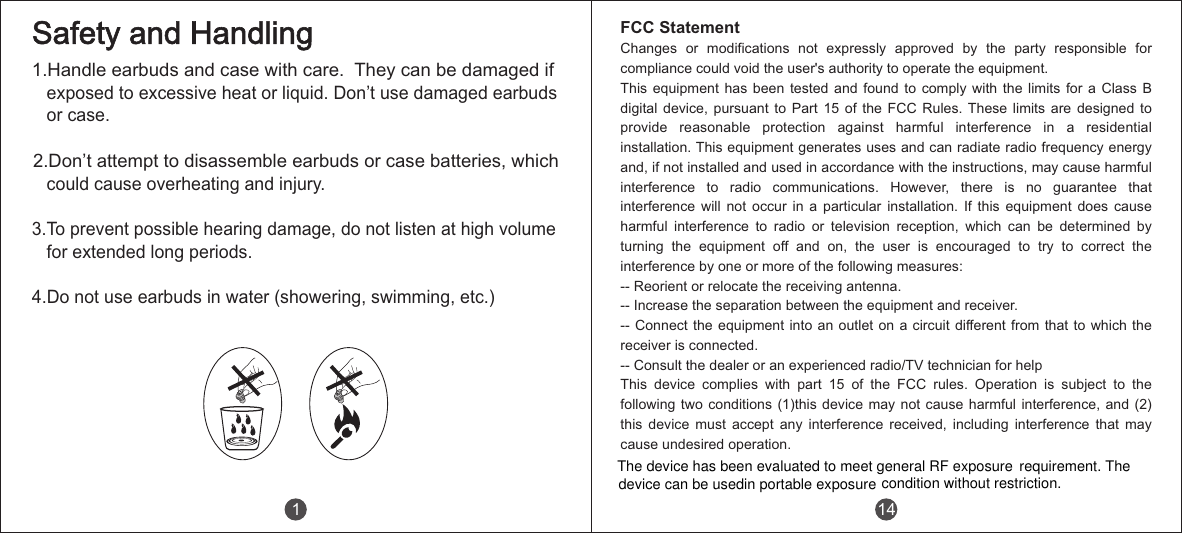
1.Handle earbuds and case with care.  They can be damaged if    exposed to excessive heat or liquid. Don’t use damaged earbuds   or case.2.Don’t attempt to disassemble earbuds or case batteries, which    could cause overheating and injury.3.To prevent possible hearing damage, do not listen at high volume   for extended long periods.4.Do not use earbuds in water (showering, swimming, etc.)Safety and Handling1 14FCC StatementChanges  or  modifications  not  expressly  approved  by  the  party  responsible  for compliance could void the user's authority to operate the equipment.This equipment has been tested and found to comply with the limits for a Class B digital  device,  pursuant  to  Part  15  of  the  FCC  Rules. These  limits  are  designed  to provide  reasonable  protection  against  harmful  interference  in  a  residential installation. This equipment generates uses and can radiate radio frequency energy and, if not installed and used in accordance with the instructions, may cause harmful interference  to  radio  communications.  However,  there  is  no  guarantee  that interference  will  not  occur  in  a  particular  installation.  If  this  equipment  does  cause harmful  interference  to  radio  or  television  reception,  which  can  be  determined  by turning  the  equipment  off  and  on,  the  user  is  encouraged  to  try  to  correct  the interference by one or more of the following measures:-- Reorient or relocate the receiving antenna.-- Increase the separation between the equipment and receiver.-- Connect the  equipment into an  outlet on a circuit different from  that to which  the receiver is connected.-- Consult the dealer or an experienced radio/TV technician for helpThis  device  complies  with  part  15  of  the  FCC  rules.  Operation  is  subject  to  the following two conditions (1)this  device may not cause harmful  interference,  and (2) this  device  must  accept  any  interference  received,  including  interference  that  may cause undesired operation.The device has been evaluated to meet general RF exposuredevice can be usedin portable exposure condition without restriction.requirement. The
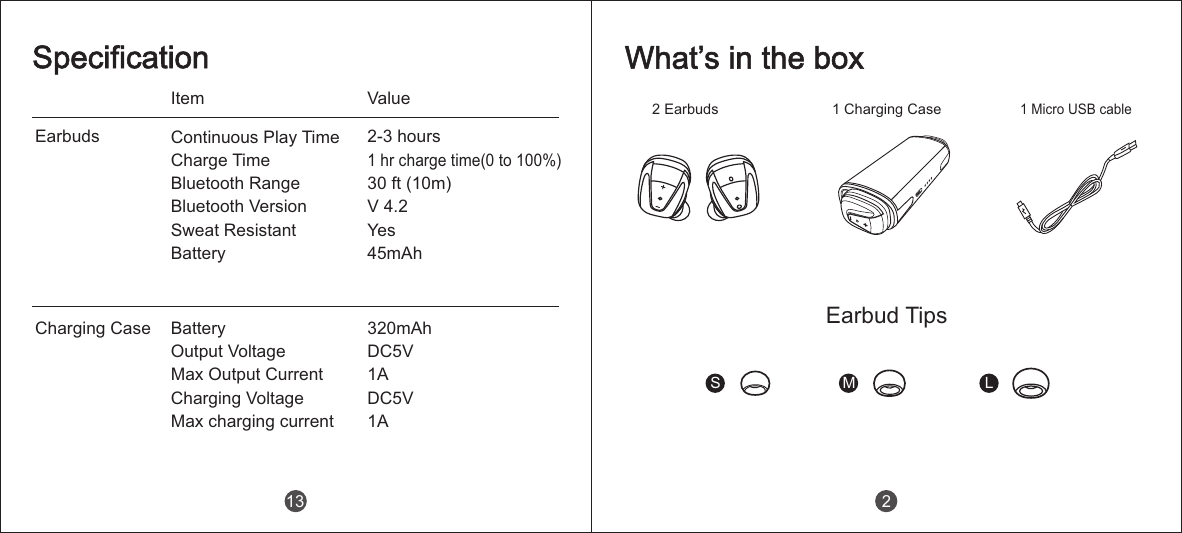
EarbudsCharging CaseItem ValueSpecificationContinuous Play Time                Charge TimeBluetooth Range        Bluetooth Version                       Sweat Resistant                 Battery 2-3 hours1 hr charge time(0 to 100%)30 ft (10m)V 4.2Yes45mAh Battery                 Output Voltage                 Max Output Current                 Charging Voltage                 Max charging current320mAhDC5V1ADC5V1A13 2 Earbuds 1 Charging Case1 Micro USB cableS M LWhat’s in the boxEarbud Tips2
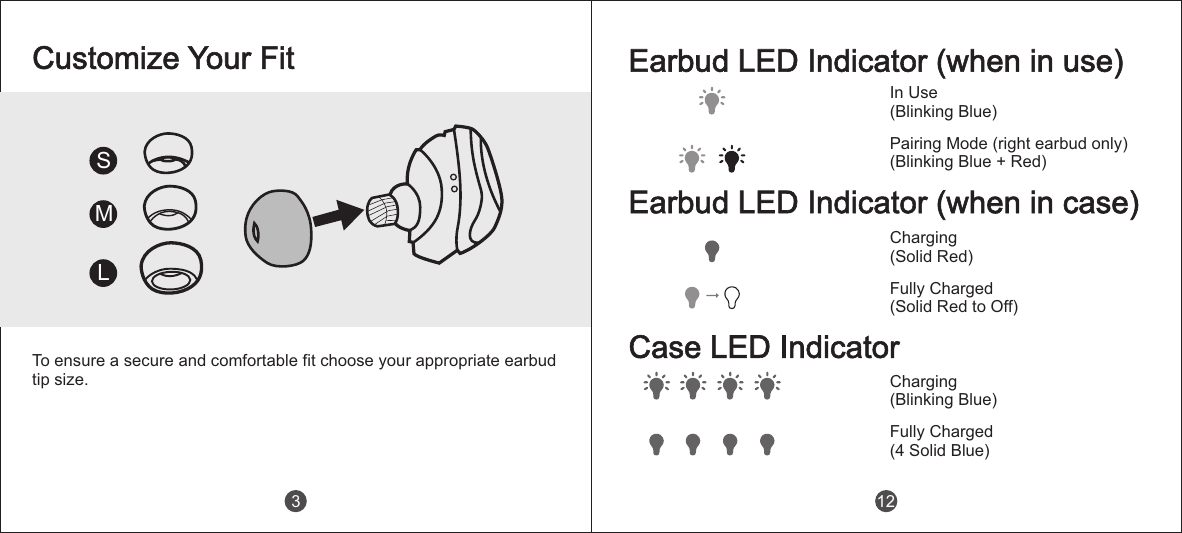
To ensure a secure and comfortable fit choose your appropriate earbud tip size.SMLCustomize Your Fit3Earbud LED Indicator (when in use)In Use(Blinking Blue)Pairing Mode (right earbud only)(Blinking Blue + Red)Earbud LED Indicator (when in case)Charging(Solid Red)Fully Charged(Solid Red to Off)Case LED IndicatorCharging(Blinking Blue)Fully Charged(4 Solid Blue)12
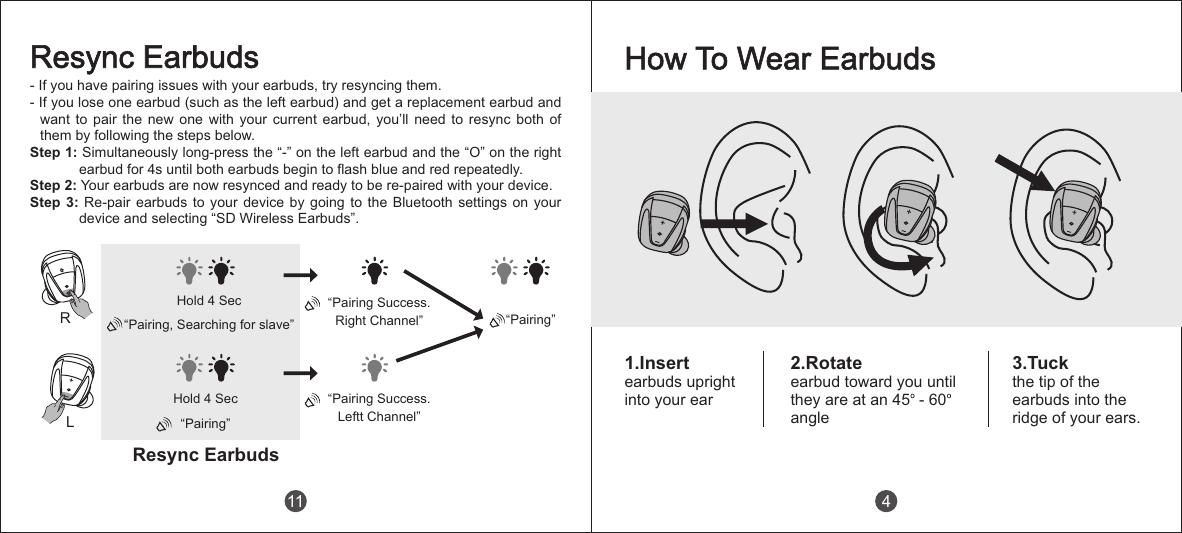
LRHold 4 Sec“Pairing, Searching for slave”Hold 4 Sec“Pairing”Resync EarbudsResync Earbuds“Pairing”- If you have pairing issues with your earbuds, try resyncing them.- If you lose one earbud (such as the left earbud) and get a replacement earbud and want  to  pair  the  new  one  with  your  current  earbud,  you’ll  need  to  resync  both  of them by following the steps below.Step 1: Simultaneously long-press the “-” on the left earbud and the “O” on the right earbud for 4s until both earbuds begin to flash blue and red repeatedly.Step 2: Your earbuds are now resynced and ready to be re-paired with your device.Step 3: Re-pair earbuds to your device by going to the  Bluetooth  settings  on  your device and selecting “SD Wireless Earbuds”.“Pairing Success.Leftt Channel”“Pairing Success.Right Channel”11How To Wear Earbuds1.Insertearbuds upright into your ear3.Tuckthe tip of theearbuds into theridge of your ears.2.Rotateearbud toward you they are at an 45  - 60angleuntil4
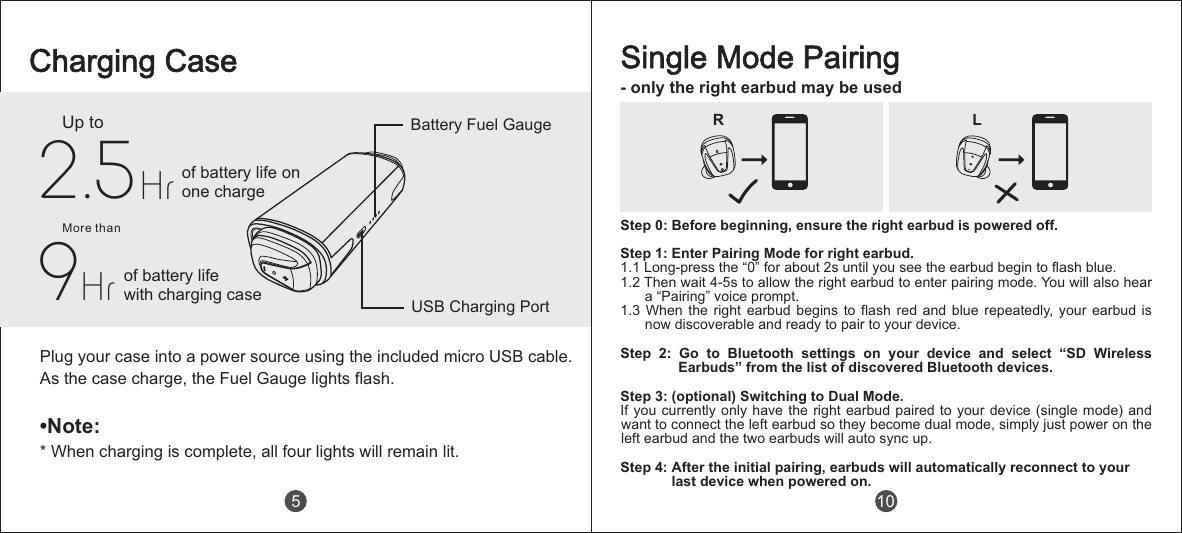
Single Mode Pairing- only the right earbud may be usedStep 0: Before beginning, ensure the right earbud is powered off. Step 1: Enter Pairing Mode for right earbud.1.1 Long-press the “0” for about 2s until you see the earbud begin to flash blue.1.2 Then wait 4-5s to allow the right earbud to enter pairing mode. You will also hear a “Pairing” voice prompt.1.3 When the  right  earbud  begins  to  flash  red  and  blue  repeatedly, your earbud is now discoverable and ready to pair to your device.Step  2:  Go  to  Bluetooth  settings  on  your  device  and  select  “SD  Wireless Earbuds” from the list of discovered Bluetooth devices.Step 3: (optional) Switching to Dual Mode.If you currently only have the right earbud paired to your device (single mode) and want to connect the left earbud so they become dual mode, simply just power on the left earbud and the two earbuds will auto sync up.Step 4: After the initial pairing, earbuds will automatically reconnect to your               last device when powered on.R L10Charging CaseUp to2.5 of battery life onone chargeof battery lifewith charging case9HrMore thanPlug your case into a power source using the included micro USB cable. As the case charge, the Fuel Gauge lights flash.•Note:* When charging is complete, all four lights will remain lit.Hr5Battery Fuel GaugeUSB Charging Port
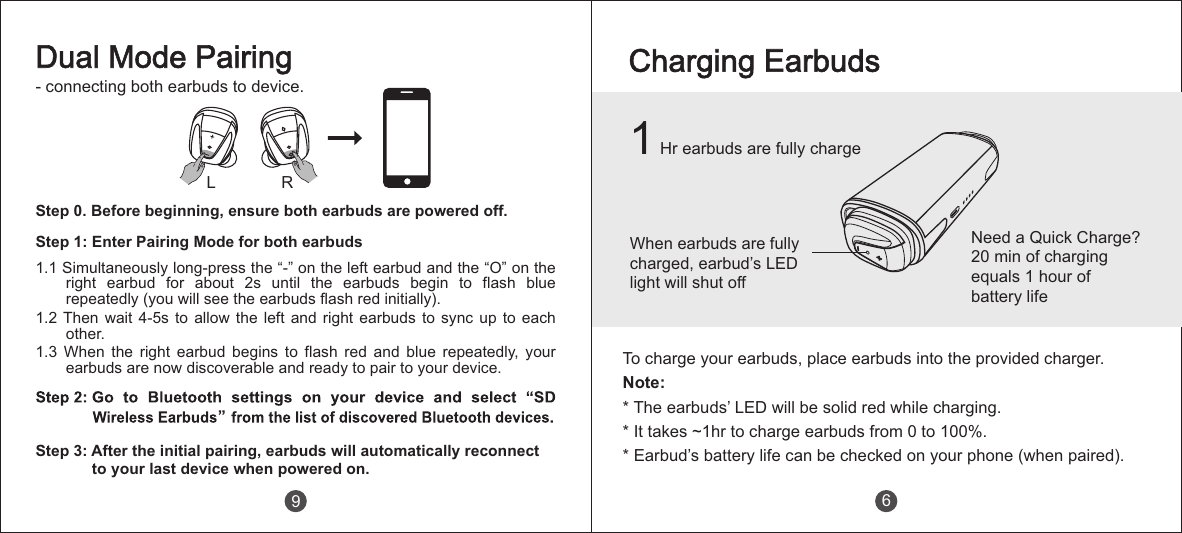
Charging EarbudsWhen earbuds are fully charged, earbud’s LED light will shut offTo charge your earbuds, place earbuds into the provided charger. Note: * The earbuds’ LED will be solid red while charging.* It takes ~1hr to charge earbuds from 0 to 100%.* Earbud’s battery life can be checked on your phone (when paired). 6Step 0. Before beginning, ensure both earbuds are powered off. Step 1: Enter Pairing Mode for both earbuds1.1 Simultaneously long-press the “-” on the left earbud and the “O” on the right  earbud  for  about  2s  until  the  earbuds  begin  to  flash  blue repeatedly (you will see the earbuds flash red initially).1.2 Then wait 4-5s  to  allow  the left  and  right  earbuds to  sync  up  to each other.1.3  When  the  right  earbud  begins  to  flash  red  and  blue  repeatedly,  your earbuds are now discoverable and ready to pair to your device.Step 3: After the initial pairing, earbuds will automatically reconnect             to your last device when powered on.Dual Mode Pairing- connecting both earbuds to device.L R9Need a Quick Charge? 20 min of charging equals 1 hour of battery life1 Hr earbuds are fully charge
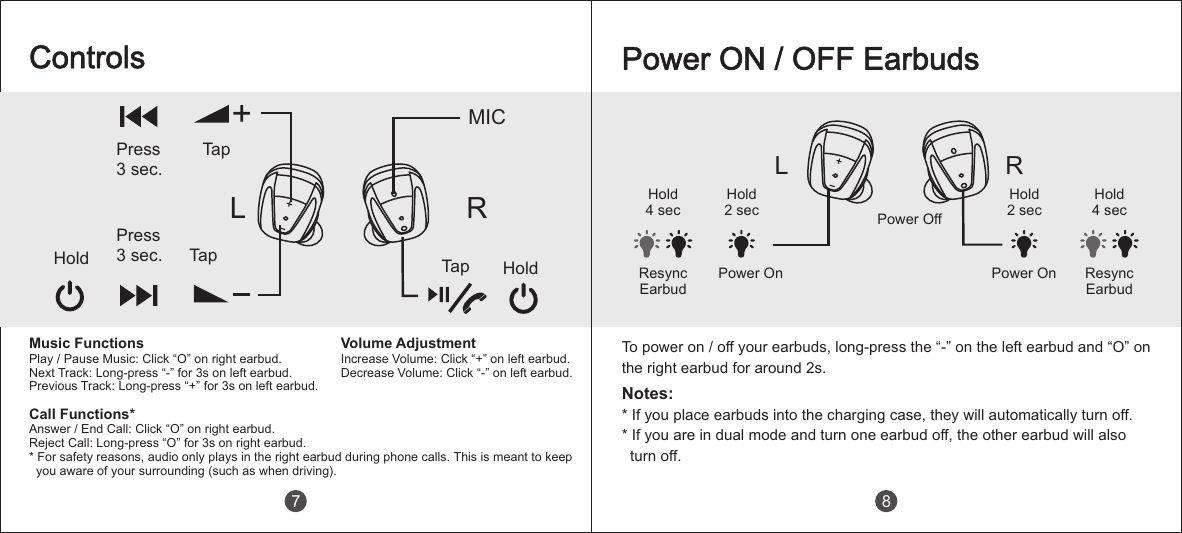
L RHold2 secHold4 secPower OnHold4 secPower OffPower OnHold2 secPower ON / OFF EarbudsNotes:* If you place earbuds into the charging case, they will automatically turn off.* If you are in dual mode and turn one earbud off, the other earbud will also   turn off.Resync EarbudResync Earbud8To power on / off your earbuds, long-press the “-” on the left earbud and “O” on the right earbud for around 2s.ControlsPress3 sec.TapLHold TapPress3 sec. Tap HoldRMICMusic FunctionsPlay / Pause Music: Click “O” on right earbud.Next Track: Long-press “-” for 3s on left earbud.Previous Track: Long-press “+  for 3s on left earbud.”Call Functions*Answer / End Call: Click “O” on right earbud.Reject Call: Long-press “O” for 3s on right earbud.* For safety reasons, audio only plays in the right earbud during phone calls. This is meant to keep   you aware of your surrounding (such as when driving).Volume AdjustmentIncrease Volume: Click “+” on left earbud.Decrease Volume: Click “-  on left earbud.”7

Navigation menu