Samzuk Technology Development Co FPCN30AA Walkie talkie User Manual FPCN30A MANUAL 20180224x

Guangdong Samzuk Technology Development Co,Ltd Walkie talkie FPCN30A MANUAL 20180224x

User Manual

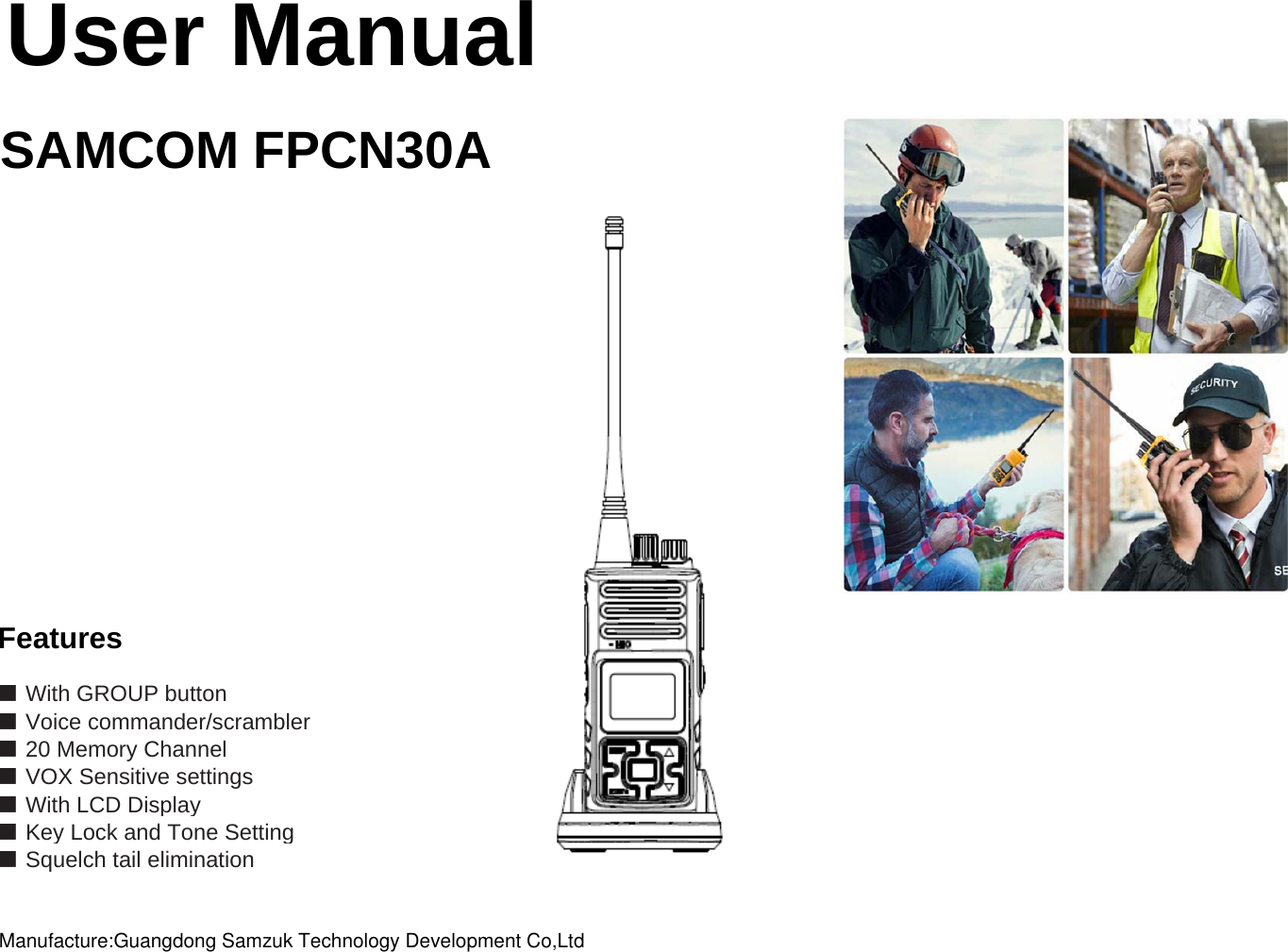
User ManualSAMCOM FPCN30AFeatures■ With GROUP button■ Voice commander/scrambler■ VOX Sensitive settings■ With LCD Display■ Key Lock and Tone Setting■ Squelch tail elimination ■ 20 Memory ChannelManufacture:Guangdong Samzuk Technology Development Co,Ltd
User Security InformationHandheld transceiver product safety and RF radiationWarning: Please read the manual carefully before using. It contains the important safety using operationinstruction, and RF energy and control information contributing to meet the RF radiation limitationrequirement of national and international standards. Information provided in this manual may replace the general safetyinformation of the editions before.Handheld Transceiver Safety Guidelines and InstructionTo control the transceiver radiation, ensure to meet the general or controlled environment radiation limitation standard, p leaseoperate following below procedures. Press PTT key when talking; and release PTT key when receiving.Because measured RF energy radiation will be generated when transmitting, so transmitting time should not exceed 50% of theusing time.Place the transceiver vertically on the front, make sure the microphone (and other parts including the antenna) is no less thany, p(pg )1 to 2 inches (i.e. 2.5 to 5cm) away from your lips when transmitting signals. It is very important to keep the correct distance from thetransceiver, since the farther away the less radiation. If you carry the portable transceiver around your body, please putinto SANCON specially designed fixture, leather, box or other annex. If not, the body by radiation will be out of range of general or non-controlled environment RF radiation limitation that required by Radio Authority, Ministry of Information Industry.If you do not use any accessories, not place the transceiver on the front specified location, please make sure that it is no less than 1inch (about 2.5cm) away from your body when transmitting signals. It is very important to keep the correct distance from the transceiver,since the farther away the less radiation. Only use the certified and provision antenna, battery andaccessories or other alternatives by SANCON. If not, the radiation will be out of range of RF radiation that required by Radio Authority,Ministry of Information Industry. Below web site lists the approved parts and accessories by SANCON
Electromagnetic Interference / Electromagnetic CompatibilityRemark: Electromagnetic Interference (EMI) occurs in nearly every electronic equipment, by not enough shielding, improper design orincorrect electromagnetic compatibility configuration. Not allowed to change the transmitting frequency, to increase thetransmission power (including the installation of additional RF power amplifier).Not allowed to use an external antenna or other transmitting antenna.Shall not cause harmful interference to a variety of legitimate radio services while using, if found harmful interference, shouldimmediately stop using, and to take measures to eliminate the interference before continuing.Prohibition of interconnection with the public telephone network, public mobile communication network and other telecommunicationnetworks.PlaceTo avoid electromagnetic interference and other problems caused by electromagnetic incompatibility, please turn off the transceiverin the place where there is a sign showing “No transceiver". Hospitals or medical institutions may use external RF energy verysensitive equipment. Prohibit the use of airports and aircraft radio.Medical devicesPacemakerAdvanced Medical Technology Association of the United States proposes holding the handheld transceiver with pacemakers shouldbe kept the distance of at least 6 inches (15cm). These proposals are consistent with the provisions by the U.S. Food and DrugAdministration.With pacemakers should observe the following items:When the transceiver is turned on, the distance between the pacemaker and the transceiver at least 6 inches (15cm);Do not put the transceiver in a breast pocket; Please use the pacemaker the other side of the ear to listen, tominimize potential interference;If you suspect transceiver interference with the pacemaker, immediately turn off it.Hearing AidsSome transceivers may interfere with some hearing aids. When there is such interference, you can consult the hearing aidmanufacturer to discuss alternatives.Other Medical EquipmentsIf you use other personal medical device, consult the device manufacturer to determine whether these devices can effectivelyshield radio frequency energy. Your doctor can provide you with such help.Safe DrivingCheck your car seat using the transceiver the relevant laws and regulations, and follow the regulations.
If you use the transceiver while driving, please note the following:Concentrate on driving, pay attention to the situation of the road. If possible, try to use the walkie-talkie-free function operation.If the provision of using the transceiver while driving prohibited, please drive the car to the roadside stop, and then make a call.Operation warningCar with an airbagIn the car with an airbag, do not put the transceiver within the reach of the expansion of the airbag, becausethe airbag inflates with great force. If the transceiver put within the reach of expansion of the air bag, when theairbag inflates, the transceiver may be driven by the tremendous force generated, resulting in severe injuriesinside the vehicle.Possible gas explosionSome places have potentially explosive gas, if your handheld transceiver can not be safely used in thesetypes of places (such as factory, CSA, UL or ENELEC), please power off it before entering the places. Shallnot remove, install the battery or charge to the battery in these areas. Because of such gases in the sparkwill cause an explosion or fire resulting in casualties. Mentioned above with a potentially explosive gas areasinclude:Fuel zone, like the area below deck on boats, and the transmission or storage sites for fuel or chemicalagents; places where air contains particles, like chemicals or such as straw, dust or metal powders.g;p p , , pAreas contain potentially explosive gases will have general warning, but not all areas have this warning.Fuse and blasting areasTo avoid possible interference with blasting operations, please switch off your transceiver when get close toblasting areas and areas where deployed some detonators. Those places posted with the words toswitch off wireless radio, you have to turn off it. Please observe all signs and instructions.      To prevent the magnetization       With weak external magnetic of transceiver speakers, please keep your transceiver larger than 10cm away from TV sets, computer       monitors etc, to avoid being magnetized.NotesAntenna       Caution Not use the handheld transceiver with damaged antenna. It will cause skin mild burns if touch the damaged antenna.
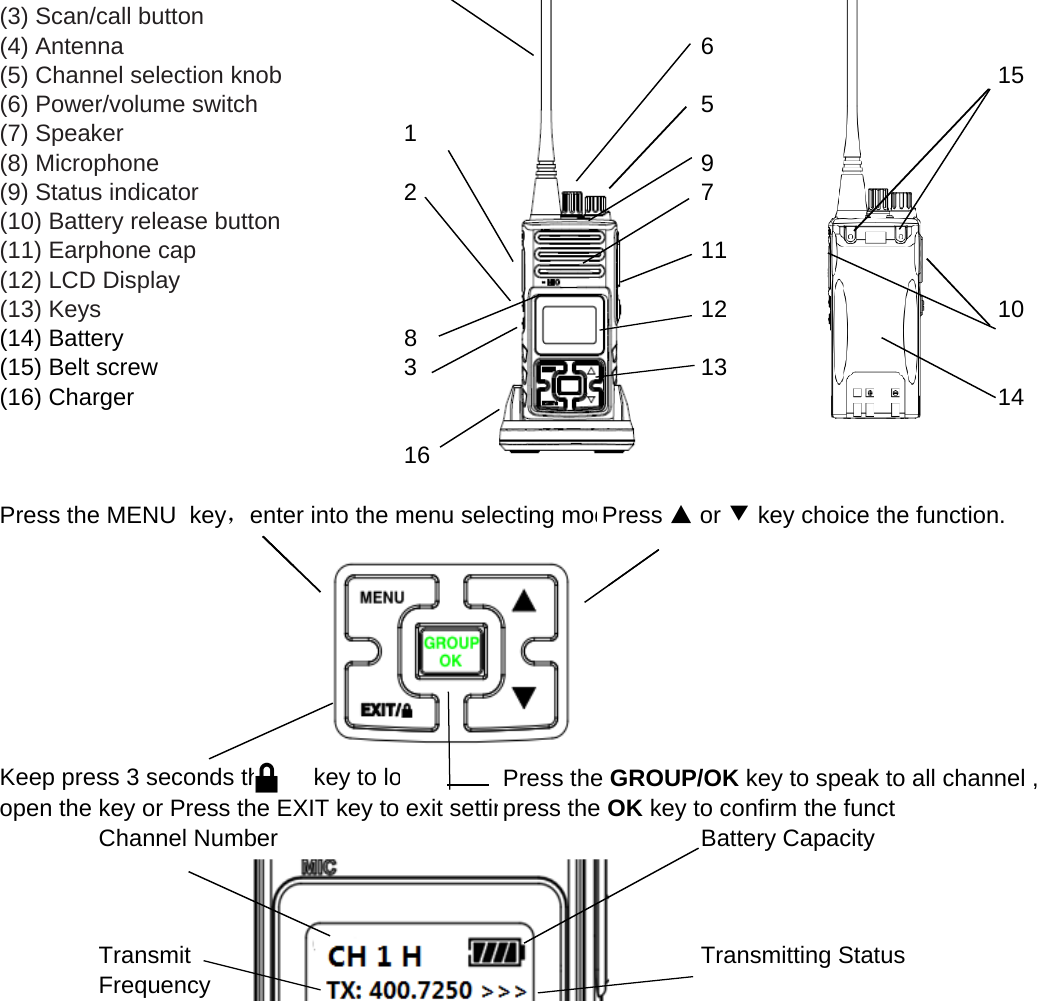
BatteryIf some of your body exposed conductive material contact the battery outside terminals, it will cause damage toproperty, or burns on human body. These conductive materials include jewelry, keys, or beaded necklace, theywill form a loop with the battery (causes short circuit), generate considerable heat. Rechargeable battery storagemust be very careful, especially been put in the pocket, purse or other container with metal objects. Waste batteriesshould not be abandoned in a fire.EarphoneBefore using the earphone, first turn the volume down so as to avoid excessive hearing damage.SpeakerWhen the volume setting is high, the transceiver can not be too close to your ear, otherwise it will damage hearing.Charging Equipment Notes1. Do not expose the charger to rain or snow.2. Chargers by severe impact, or has been dropped, or subject to any damaged, do not use again.3. Can not disassemble the chargers by severe impact, or has been dropped, or subject to any damaged.4. Can not replace the original power cord and plug provided. If plugs and sockets do not match, please ask the qualified    electrician to install an outlet to avoid electric shock.5. To avoid damage to the power cord or outlet, holding and pull out the plug from the wall socket, do not pull the power cord to pullgp ,gp pg ,pp p    the plug.6. To avoid electric shock, pulling out the charger plug from the wall socket prior to maintenance or cleaning.7. The use of non proposed or supply attachments may cause fire, electric shock or personal injury.8. Take care the power cord location, it should not be trampled, do not stumble, will not suffer damage or compression.9. Unless absolutely necessary, do not use extension cords. Improper use of extension cords can cause fire or electric shock.    If you must use an extension cord, make sure:    to use the same extension cord plug pins.    plug specifications same as the charger plug.    length of 30 meters or less using 18AWG wire, the length of 45 meters or less using 16AWG wire.10. Can not replace the charger power cord. When the power cord is damaged, should immediately stop using the charger.Get Familiar with the transceiver(1) PTT Transmitting(2) MONI (monitor) button 4
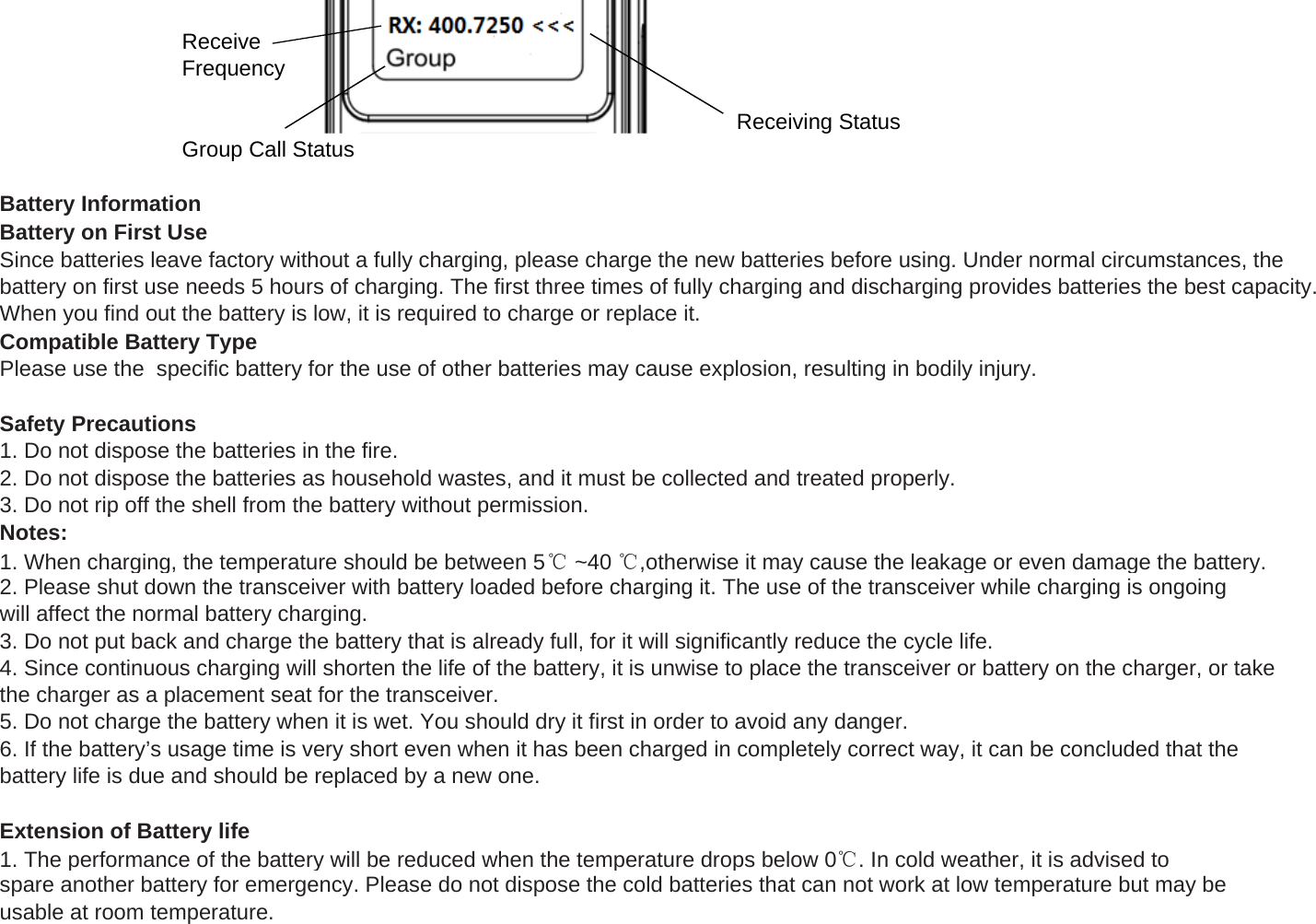
(3) Scan/call button(4) Antenna 6(5) Channel selection knob 15(6) Power/volume switch 5(7) Speaker 1(8) Microphone  9(9) Status indicator 27(10) Battery release button(11) Earphone cap 11(12) LCD Display(13) Keys 12 10(14) Battery                      8(15) Belt screw 3 13(16) Charger 1416Press the MENU  key,enter into the menu selecting modPress ▲ or ▼key choice the function.Press the GROUP/OK key to speak to all channel ,open the key or Press the EXIT key to exit settinChannel Number Battery CapacityTransmit Transmitting StatusFrequencyKeep press 3 seconds the      key to lopress the OK key to confirm the funct
ReceiveFrequencyReceiving StatusGroup Call StatusBattery InformationBattery on First UseSince batteries leave factory without a fully charging, please charge the new batteries before using. Under normal circumstances, thebattery on first use needs 5 hours of charging. The first three times of fully charging and discharging provides batteries the best capacity.When you find out the battery is low, it is required to charge or replace it.Compatible Battery TypePlease use the  specific battery for the use of other batteries may cause explosion, resulting in bodily injury.Safety Precautions1. Do not dispose the batteries in the fire.2. Do not dispose the batteries as household wastes, and it must be collected and treated properly.3. Do not rip off the shell from the battery without permission.pypNotes:1. When charging, the temperature should be between 5℃~40 ℃,otherwise it may cause the leakage or even damage the battery.2. Please shut down the transceiver with battery loaded before charging it. The use of the transceiver while charging is ongoingwill affect the normal battery charging.3. Do not put back and charge the battery that is already full, for it will significantly reduce the cycle life.4. Since continuous charging will shorten the life of the battery, it is unwise to place the transceiver or battery on the charger, or takethe charger as a placement seat for the transceiver.5. Do not charge the battery when it is wet. You should dry it first in order to avoid any danger.6. If the battery’s usage time is very short even when it has been charged in completely correct way, it can be concluded that thebattery life is due and should be replaced by a new one.Extension of Battery life1. The performance of the battery will be reduced when the temperature drops below 0℃. In cold weather, it is advised tospare another battery for emergency. Please do not dispose the cold batteries that can not work at low temperature but may beusable at room temperature.
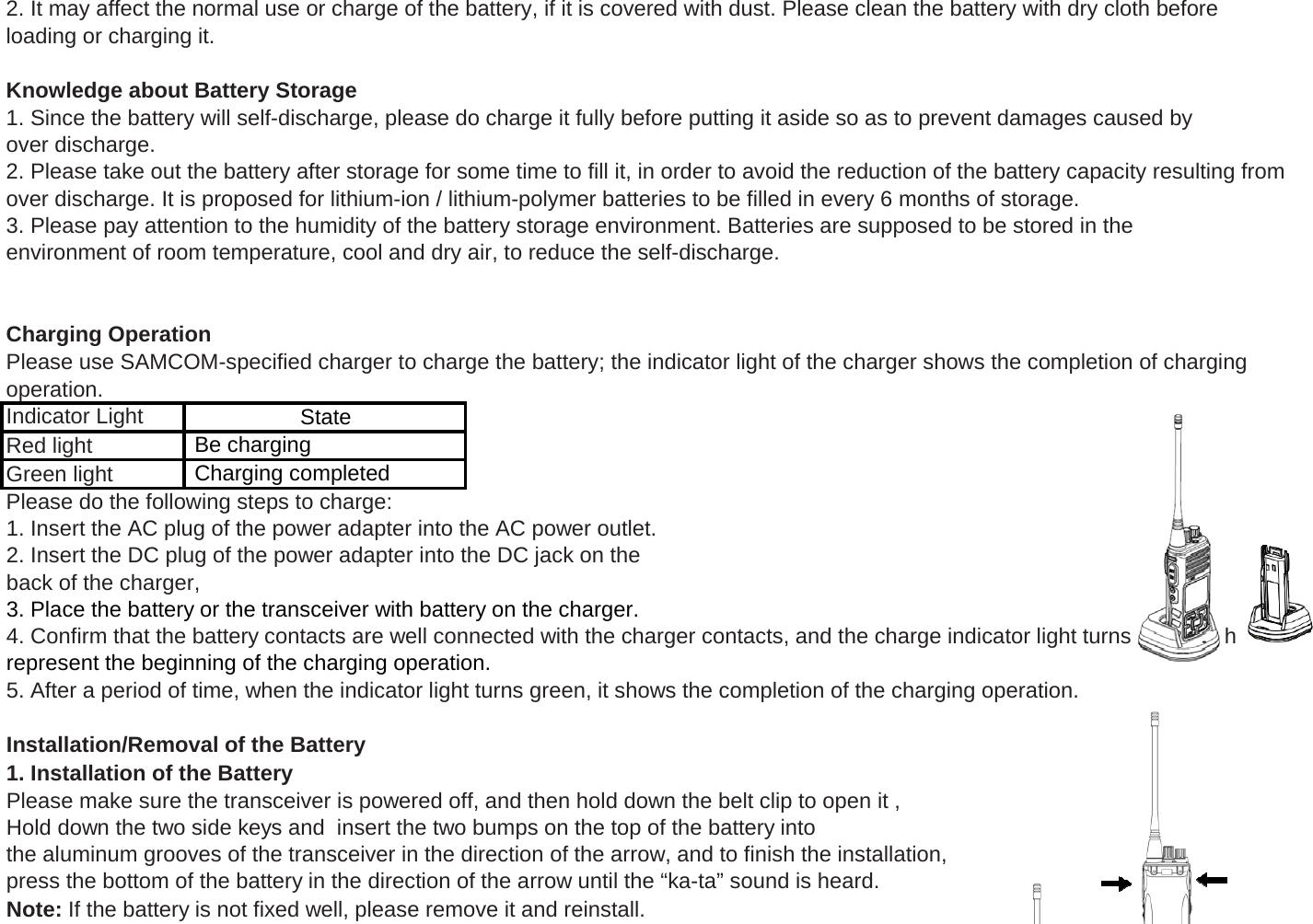
2. It may affect the normal use or charge of the battery, if it is covered with dust. Please clean the battery with dry cloth beforeloading or charging it.Knowledge about Battery Storage1. Since the battery will self-discharge, please do charge it fully before putting it aside so as to prevent damages caused byover discharge.2. Please take out the battery after storage for some time to fill it, in order to avoid the reduction of the battery capacity resulting fromover discharge. It is proposed for lithium-ion / lithium-polymer batteries to be filled in every 6 months of storage.3. Please pay attention to the humidity of the battery storage environment. Batteries are supposed to be stored in theenvironment of room temperature, cool and dry air, to reduce the self-discharge.Charging OperationPlease use SAMCOM-specified charger to charge the battery; the indicator light of the charger shows the completion of charging operation.Red light                Green light            Please do the following steps to charge:State Be charging Charging completedIndicator Light       gp g1. Insert the AC plug of the power adapter into the AC power outlet.2. Insert the DC plug of the power adapter into the DC jack on theback of the charger, 3. Place the battery or the transceiver with battery on the charger.4. Confirm that the battery contacts are well connected with the charger contacts, and the charge indicator light turns red, whichrepresent the beginning of the charging operation.5. After a period of time, when the indicator light turns green, it shows the completion of the charging operation.Installation/Removal of the Battery1. Installation of the BatteryPlease make sure the transceiver is powered off, and then hold down the belt clip to open it , Hold down the two side keys and  insert the two bumps on the top of the battery into the aluminum grooves of the transceiver in the direction of the arrow, and to finish the installation, press the bottom of the battery in the direction of the arrow until the “ka-ta” sound is heard.Note: If the battery is not fixed well, please remove it and reinstall.
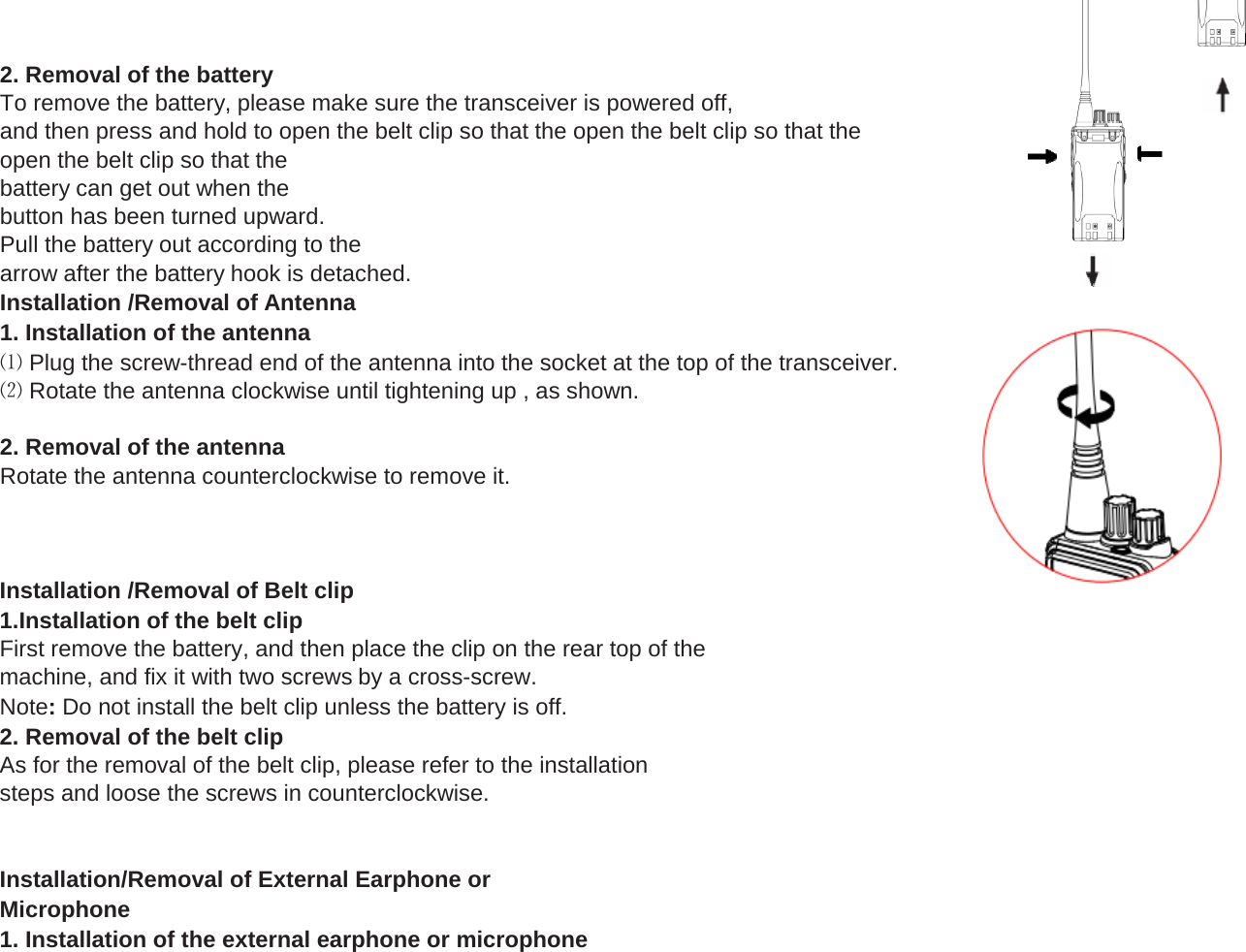
2. Removal of the batteryTo remove the battery, please make sure the transceiver is powered off,and then press and hold to open the belt clip so that the open the belt clip so that theopen the belt clip so that thebattery can get out when thebutton has been turned upward.Pull the battery out according to thearrow after the battery hook is detached.Installation /Removal of Antenna1. Installation of the antenna⑴ Plug the screw-thread end of the antenna into the socket at the top of the transceiver.⑵ Rotate the antenna clockwise until tightening up , as shown.2. Removal of the antennaRotate the antenna counterclockwise to remove it.Installation /Removal of Belt clip1.Installation of the belt clipFirst remove the battery, and then place the clip on the rear top of themachine, and fix it with two screws by a cross-screw.Note: Do not install the belt clip unless the battery is off.2. Removal of the belt clipAs for the removal of the belt clip, please refer to the installationsteps and loose the screws in counterclockwise.Installation/Removal of External Earphone orMicrophone1. Installation of the external earphone or microphone
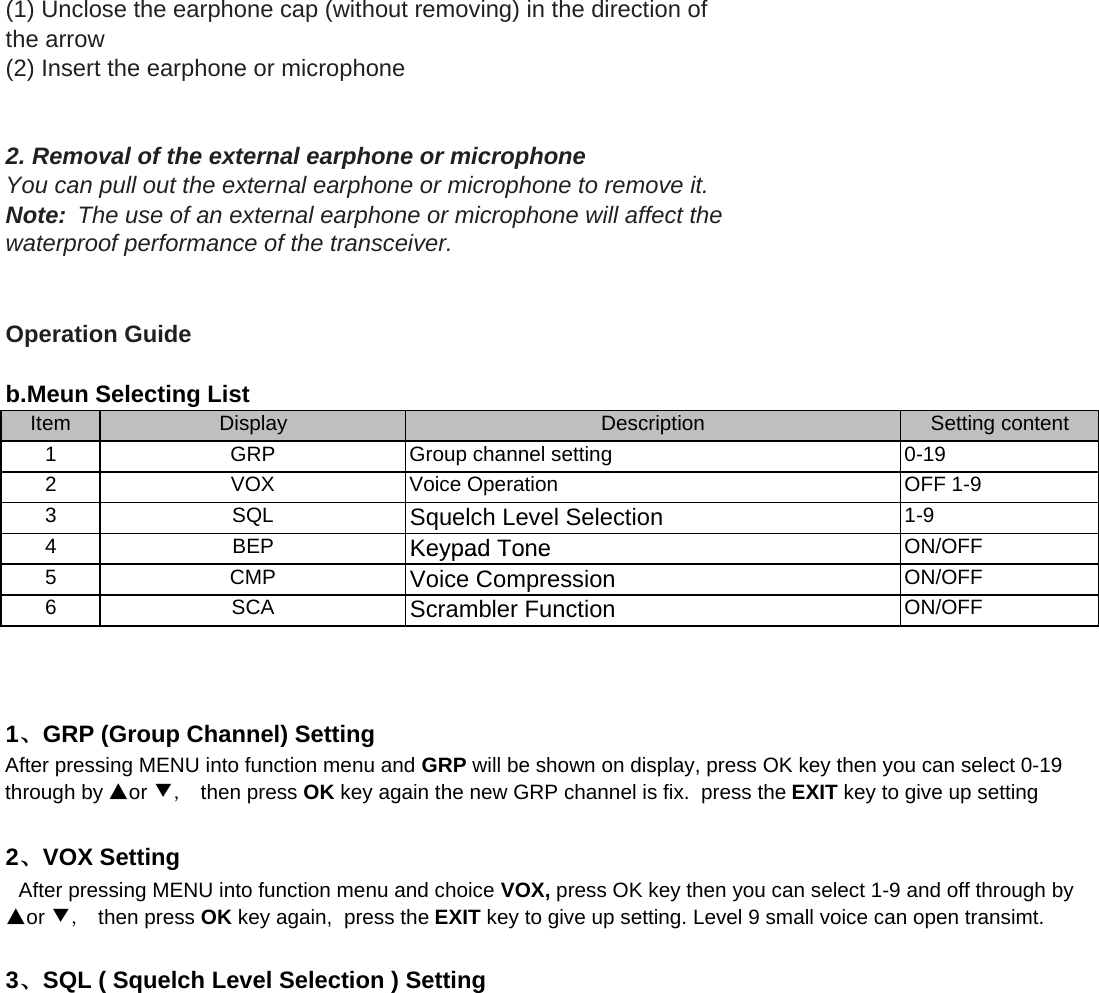
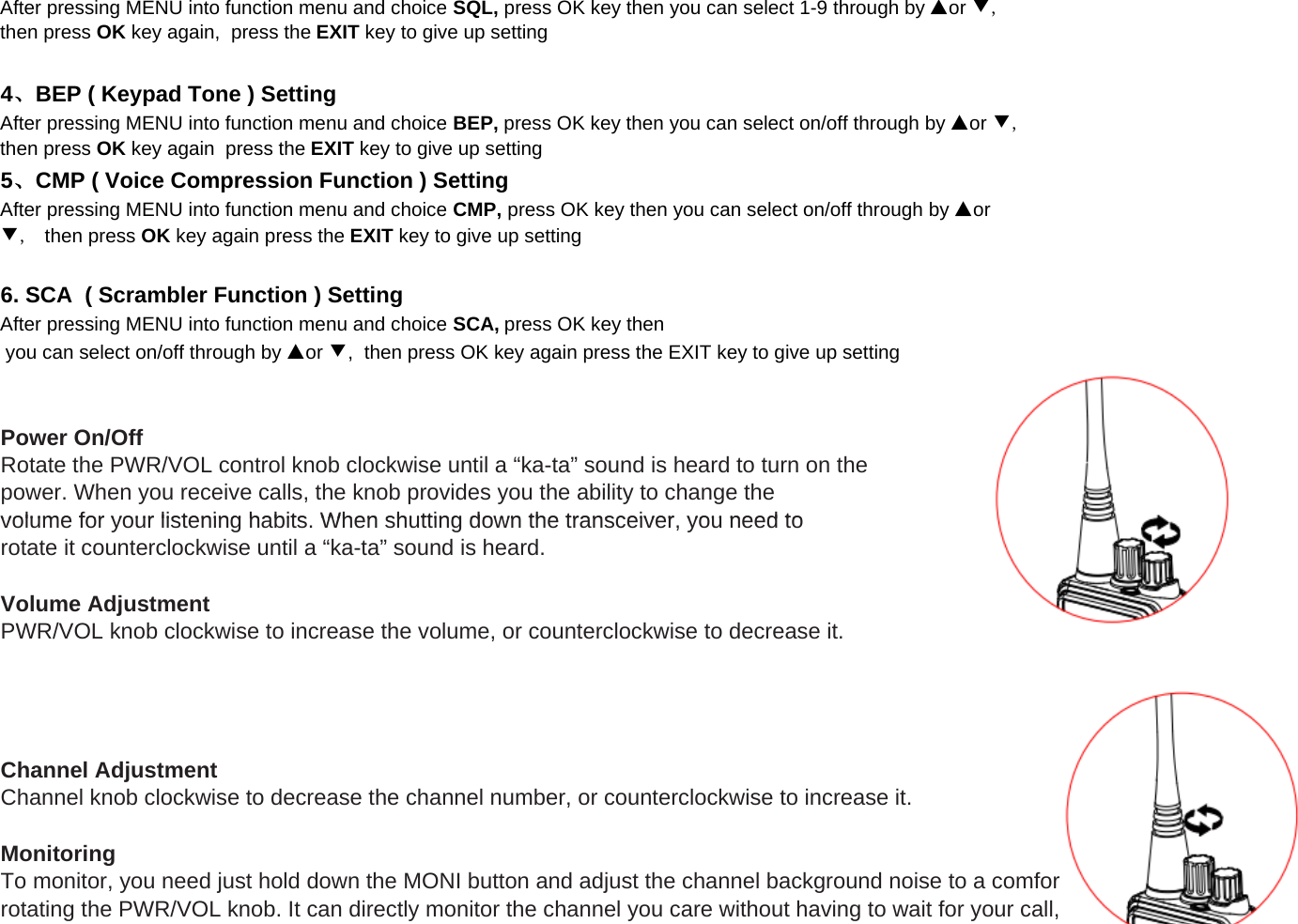
(1) Unclose the earphone cap (without removing) in the direction ofthe arrow(2) Insert the earphone or microphone 2. Removal of the external earphone or microphoneYou can pull out the external earphone or microphone to remove it.Note:  The use of an external earphone or microphone will affect thewaterproof performance of the transceiver.Operation GuideItem1234Squelch Level SelectionBEPKeypad ToneON/OFFDisplayGRPVOXSQLDescriptionb.Meun Selecting ListSetting content0-19OFF 1-91-9Group channel settingVoice Operation456BEPCMPSCAAfter pressing MENU into function menu and GRP will be shown on display, press OK key then you can select 0-19through by ▲or ▼,  then press OK key again the new GRP channel is fix.  press the EXIT key to give up setting  After pressing MENU into function menu and choice VOX, press OK key then you can select 1-9 and off through by▲or ▼,  then press OK key again,  press the EXIT key to give up setting. Level 9 small voice can open transimt.1、GRP (Group Channel) Setting2、VOX SettingKeypad ToneVoice CompressionScrambler FunctionON/OFFON/OFFON/OFF3、SQL ( Squelch Level Selection ) Setting
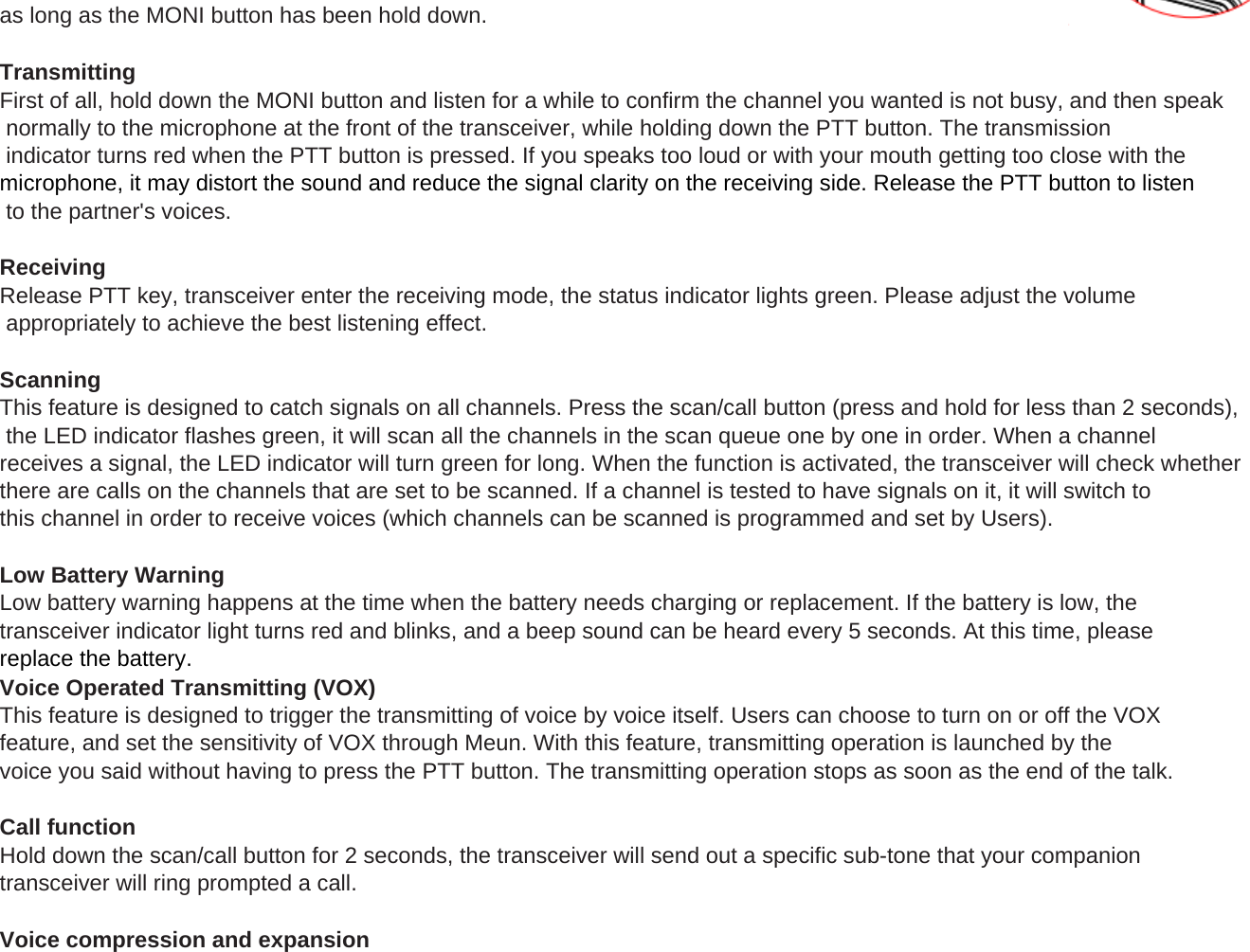
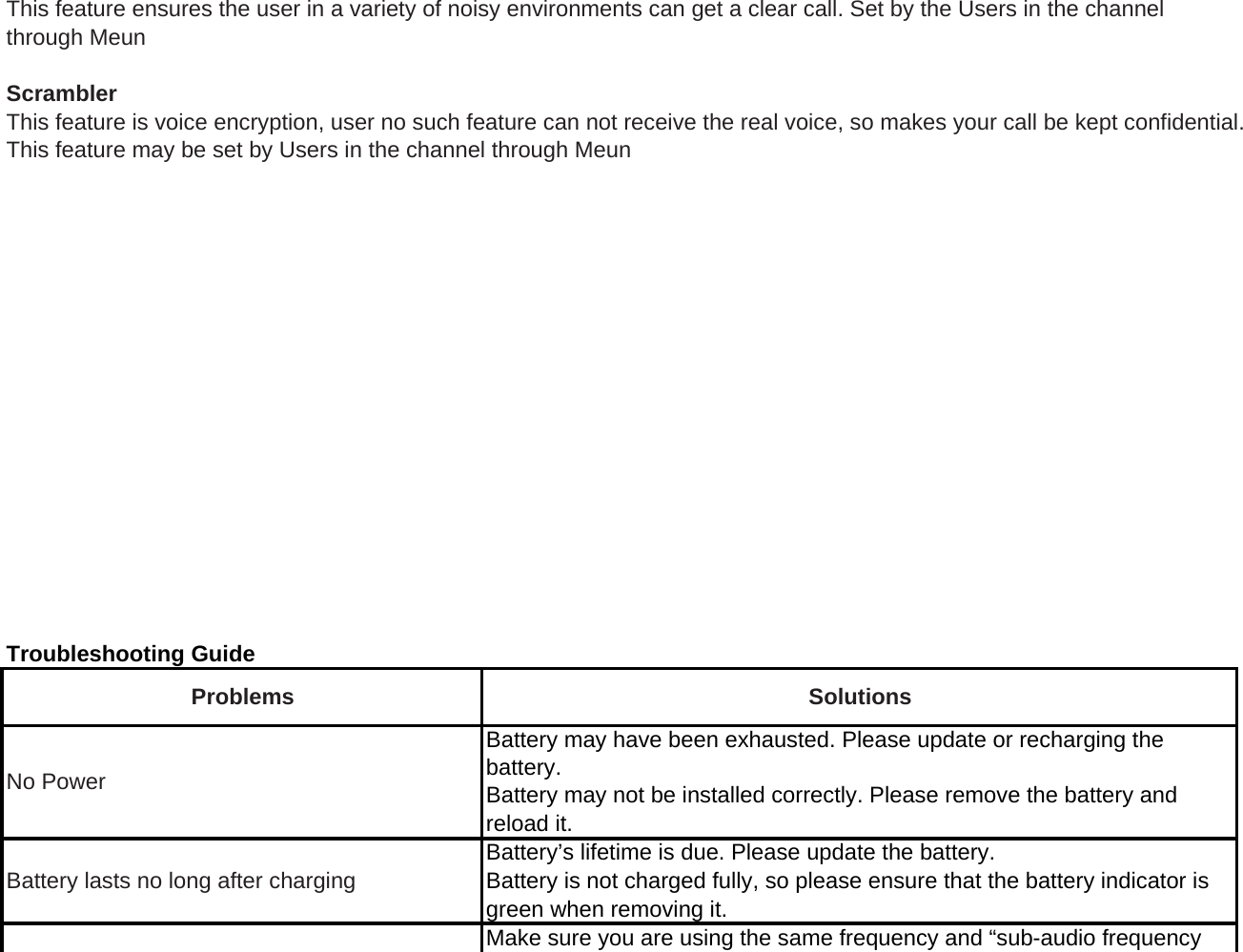
After pressing MENU into function menu and choice SCA, press OK key thenPower On/OffRotate the PWR/VOL control knob clockwise until a “ka-ta” sound is heard to turn on thepower. When you receive calls, the knob provides you the ability to change thevolume for your listening habits When shutting down the transceiver you need to you can select on/off through by ▲or ▼,  then press OK key again press the EXIT key to give up settingAfter pressing MENU into function menu and choice CMP, press OK key then you can select on/off through by ▲or▼,  then press OK key again press the EXIT key to give up setting6. SCA  ( Scrambler Function ) Setting5、CMP ( Voice Compression Function ) SettingAfter pressing MENU into function menu and choice SQL, press OK key then you can select 1-9 through by ▲or ▼,then press OK key again,  press the EXIT key to give up settingAfter pressing MENU into function menu and choice BEP, press OK key then you can select on/off through by ▲or ▼,then press OK key again  press the EXIT key to give up setting4、BEP ( Keypad Tone ) Settingvolume for your listening habits. When shutting down the transceiver, you need torotate it counterclockwise until a “ka-ta” sound is heard.Volume AdjustmentPWR/VOL knob clockwise to increase the volume, or counterclockwise to decrease it.Channel AdjustmentChannel knob clockwise to decrease the channel number, or counterclockwise to increase it.MonitoringTo monitor, you need just hold down the MONI button and adjust the channel background noise to a comfortable level by rotating the PWR/VOL knob. It can directly monitor the channel you care without having to wait for your call,
as long as the MONI button has been hold down.TransmittingFirst of all, hold down the MONI button and listen for a while to confirm the channel you wanted is not busy, and then speak normally to the microphone at the front of the transceiver, while holding down the PTT button. The transmission indicator turns red when the PTT button is pressed. If you speaks too loud or with your mouth getting too close with the microphone, it may distort the sound and reduce the signal clarity on the receiving side. Release the PTT button to listen to the partner's voices.ReceivingRelease PTT key, transceiver enter the receiving mode, the status indicator lights green. Please adjust the volume appropriately to achieve the best listening effect.ScanningThis feature is designed to catch signals on all channels. Press the scan/call button (press and hold for less than 2 seconds), the LED indicator flashes green, it will scan all the channels in the scan queue one by one in order. When a channel receives a signal, the LED indicator will turn green for long. When the function is activated, the transceiver will check whetherthere are calls on the channels that are set to be scanned. If a channel is tested to have signals on it, it will switch to this channel in order to receive voices (which channels can be scanned is programmed and set by Users).(pgy)Low Battery WarningLow battery warning happens at the time when the battery needs charging or replacement. If the battery is low, the transceiver indicator light turns red and blinks, and a beep sound can be heard every 5 seconds. At this time, please replace the battery.Voice Operated Transmitting (VOX)This feature is designed to trigger the transmitting of voice by voice itself. Users can choose to turn on or off the VOX feature, and set the sensitivity of VOX through Meun. With this feature, transmitting operation is launched by the voice you said without having to press the PTT button. The transmitting operation stops as soon as the end of the talk.Call functionHold down the scan/call button for 2 seconds, the transceiver will send out a specific sub-tone that your companion transceiver will ring prompted a call.Voice compression and expansion
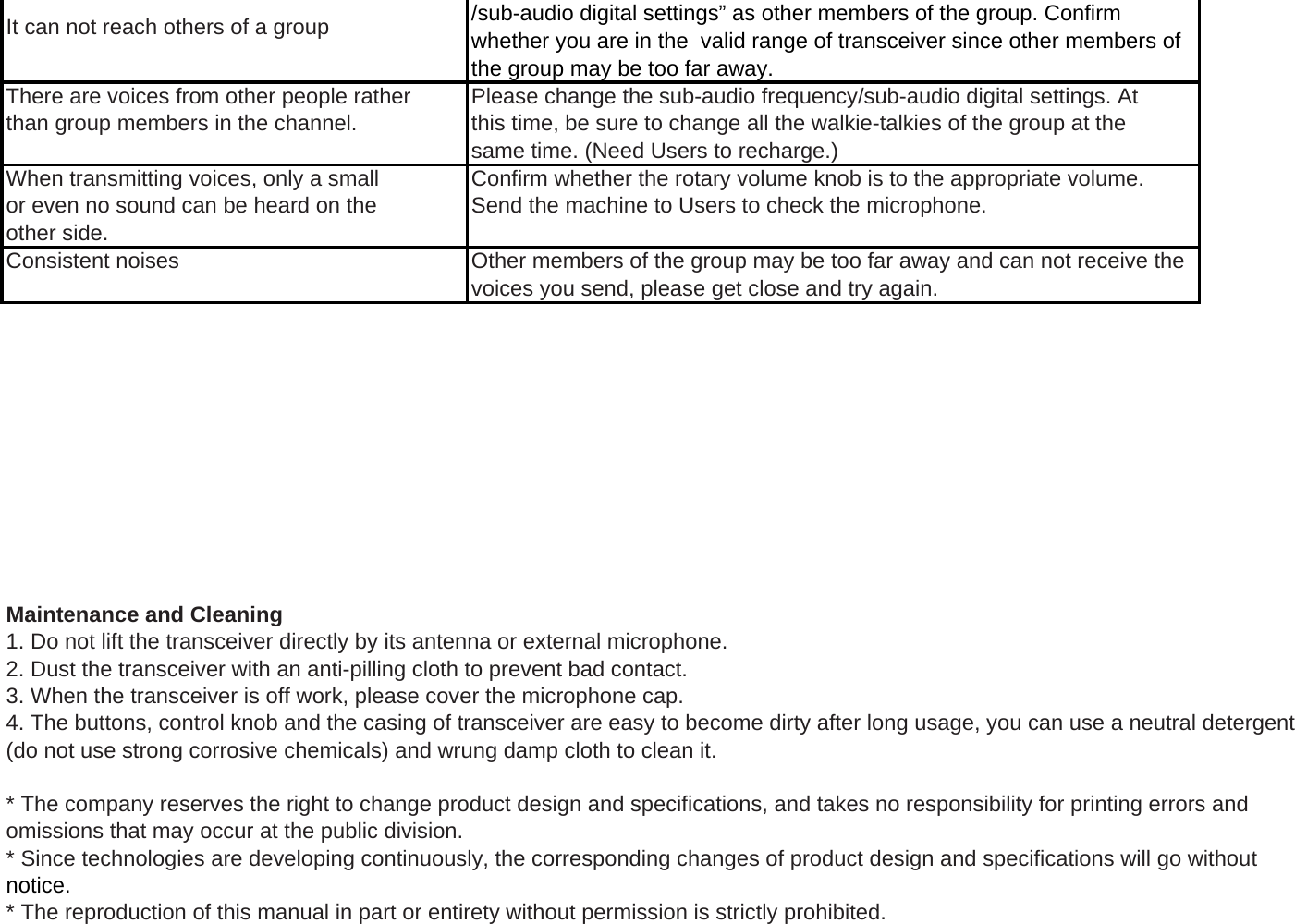
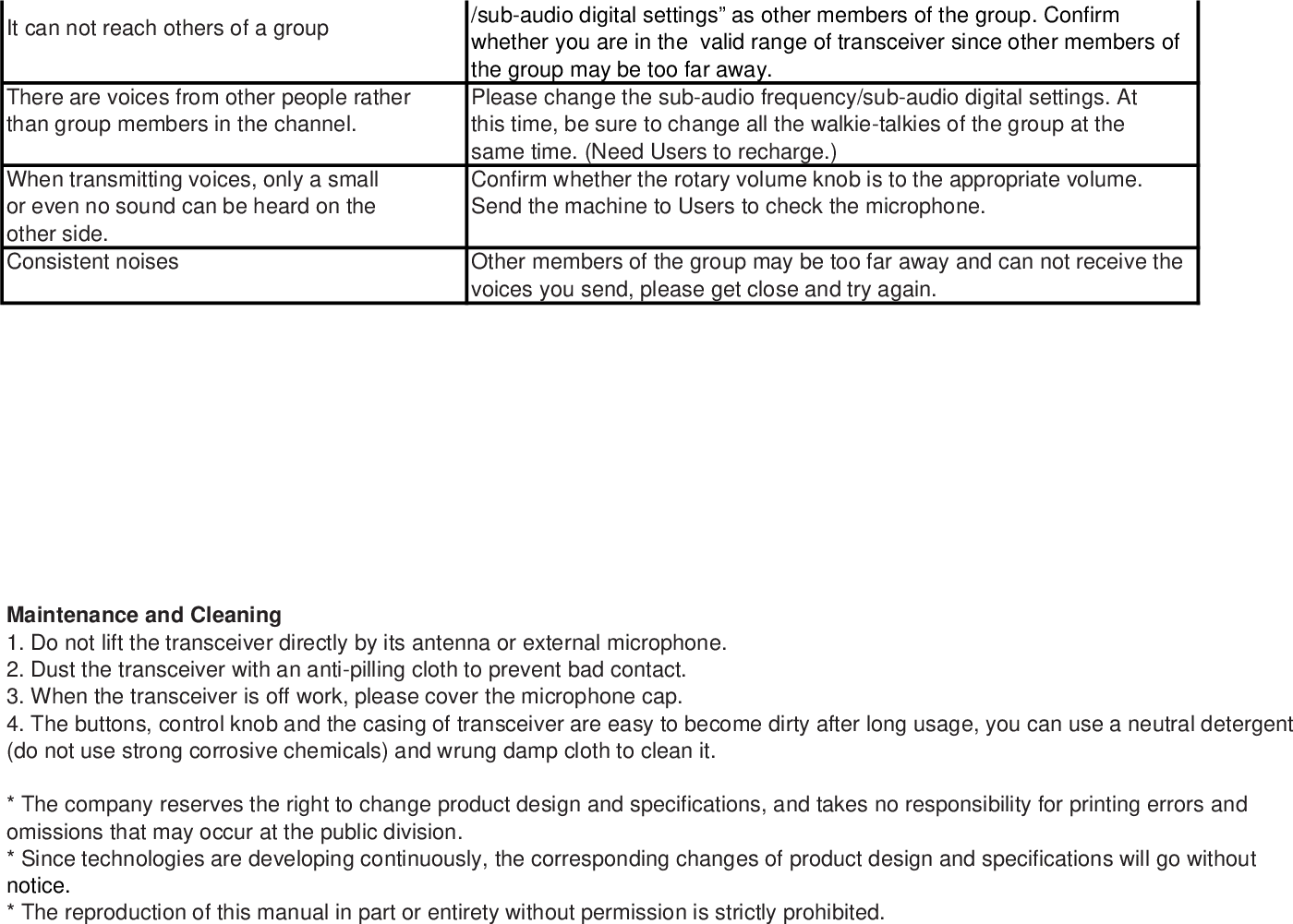
This feature ensures the user in a variety of noisy environments can get a clear call. Set by the Users in the channel through MeunScramblerThis feature is voice encryption, user no such feature can not receive the real voice, so makes your call be kept confidential.This feature may be set by Users in the channel through MeunTroubleshooting GuideBattery may have been exhausted. Please update or recharging thebattery.Battery may not be installed correctly. Please remove the battery and reload it.Battery’s lifetime is due. Please update the battery.Battery is not charged fully, so please ensure that the battery indicator isgreen when removing it.Make sure you are using the same frequency and “sub-audio frequencyBattery lasts no long after chargingSolutionsProblemsNo Power
/sub-audio digital settings” as other members of the group. Confirm whether you are in the  valid range of transceiver since other members of the group may be too far away.There are voices from other people rather Please change the sub-audio frequency/sub-audio digital settings. Atthan group members in the channel. this time, be sure to change all the walkie-talkies of the group at thesame time. (Need Users to recharge.)When transmitting voices, only a small Confirm whether the rotary volume knob is to the appropriate volume.or even no sound can be heard on the Send the machine to Users to check the microphone.other side.Consistent noises Other members of the group may be too far away and can not receive the voices you send, please get close and try again.It can not reach others of a groupMaintenance and Cleaning1. Do not lift the transceiver directly by its antenna or external microphone.2. Dust the transceiver with an anti-pilling cloth to prevent bad contact.3. When the transceiver is off work, please cover the microphone cap.4. The buttons, control knob and the casing of transceiver are easy to become dirty after long usage, you can use a neutral detergent(do not use strong corrosive chemicals) and wrung damp cloth to clean it.* The company reserves the right to change product design and specifications, and takes no responsibility for printing errors and omissions that may occur at the public division.* Since technologies are developing continuously, the corresponding changes of product design and specifications will go without notice.* The reproduction of this manual in part or entirety without permission is strictly prohibited.
* Our company reserves the right of final explanation to these commitments above.
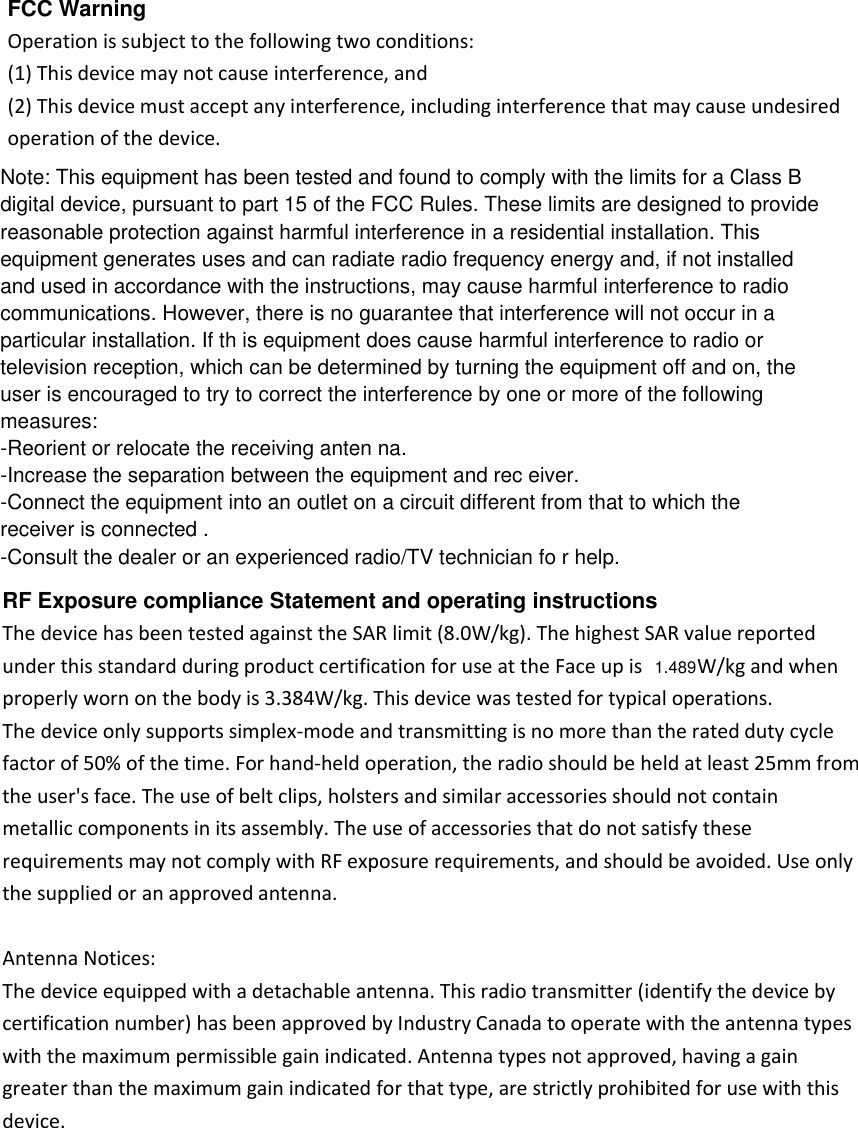
FCC Warning Operation is subject to the following two conditions: (1) This device may not cause interference, and (2) This device must accept any interference, including interference that may cause undesired operation of the device. RF Exposure compliance Statement and operating instructions The device has been tested against the SAR limit (8.0W/kg). The highest SAR value reported under this standard during product certification for use at the Face up is  W/kg and when properly worn on the body is 3.384W/kg. This device was tested for typical operations. The device only supports simplex-mode and transmitting is no more than the rated duty cycle factor of 50% of the time. For hand-held operation, the radio should be held at least 25mm from the user's face. The use of belt clips, holsters and similar accessories should not contain metallic components in its assembly. The use of accessories that do not satisfy these requirements may not comply with RF exposure requirements, and should be avoided. Use only the supplied or an approved antenna.  Antenna Notices: The device equipped with a detachable antenna. This radio transmitter (identify the device by certification number) has been approved by Industry Canada to operate with the antenna types with the maximum permissible gain indicated. Antenna types not approved, having a gain greater than the maximum gain indicated for that type, are strictly prohibited for use with this device.   Note: This equipment has been tested and found to comply with the limits for a Class Bdigital device, pursuant to part 15 of the FCC Rules. These limits are designed to providereasonable protection against harmful interference in a residential installation. Thisequipment generates uses and can radiate radio frequency energy and, if not installedand used in accordance with the instructions, may cause harmful interference to radiocommunications. However, there is no guarantee that interference will not occur in aparticular installation. If th is equipment does cause harmful interference to radio ortelevision reception, which can be determined by turning the equipment off and on, theuser is encouraged to try to correct the interference by one or more of the followingmeasures:-Reorient or relocate the receiving anten na.-Increase the separation between the equipment and rec eiver.-Connect the equipment into an outlet on a circuit different from that to which thereceiver is connected .-Consult the dealer or an experienced radio/TV technician fo r help.1.489

Navigation menu