Sang Fei Consumer Communications CTE105 Mobile Phone User Manual E105 ENG flyer

Shenzhen Sang Fei Consumer Communications Co., Ltd. Mobile Phone E105 ENG flyer

Users Manual

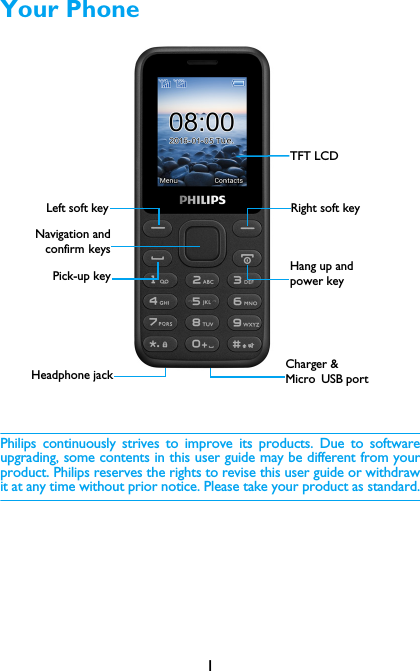
1Your PhonePhilips continuously strives to improve its products. Due to softwareupgrading, some contents in this user guide may be different from yourproduct. Philips reserves the rights to revise this user guide or withdrawit at any time without prior notice. Please take your product as standard.TFT LCDHeadphone jackLeft soft keyNavigation andconfirm keysPick-up keyRight soft keyHang up and power keyCharger & Micro USB port
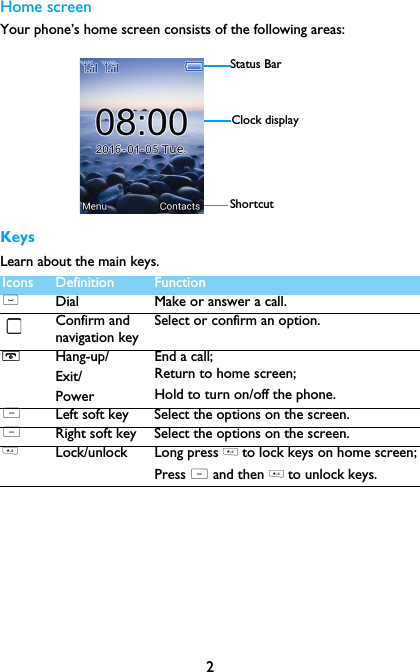
2Home screenYour phone’s home screen consists of the following areas:KeysLearn about the main keys.Icons Definition Function(Dial Make or answer a call.Confirm and navigation keySelect or confirm an option.HHang-up/Exit/PowerEnd a call; Return to home screen;Hold to turn on/off the phone.LLeft soft key Select the options on the screen.LRight soft key Select the options on the screen.* Lock/unlock Long press * to lock keys on home screen;Press L and then * to unlock keys.Status BarShortcutClock display
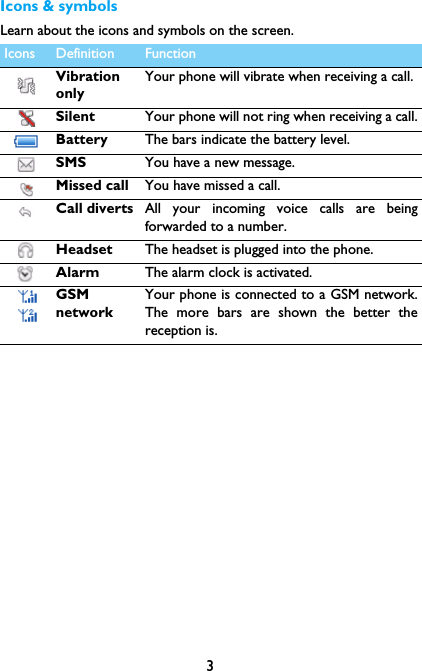
3Icons & symbolsLearn about the icons and symbols on the screen.  Icons Definition FunctionVibrationonlyYour phone will vibrate when receiving a call. Silent Your phone will not ring when receiving a call.Battery The bars indicate the battery level. SMS You have a new message.Missed call  You have missed a call.Call diverts All your incoming voice calls are beingforwarded to a number.Headset  The headset is plugged into the phone.Alarm  The alarm clock is activated.GSMnetworkYour phone is connected to a GSM network.The more bars are shown the better thereception is.
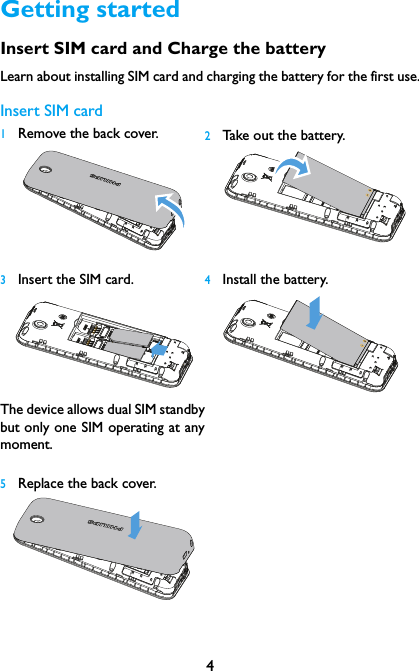
4Getting startedInsert SIM card and Charge the batteryLearn about installing SIM card and charging the battery for the first use.Insert SIM card1Remove the back cover.   2Take out the battery.3Insert the SIM card.  The device allows dual SIM standbybut only one SIM operating at anymoment.4Install the battery.5Replace the back cover.
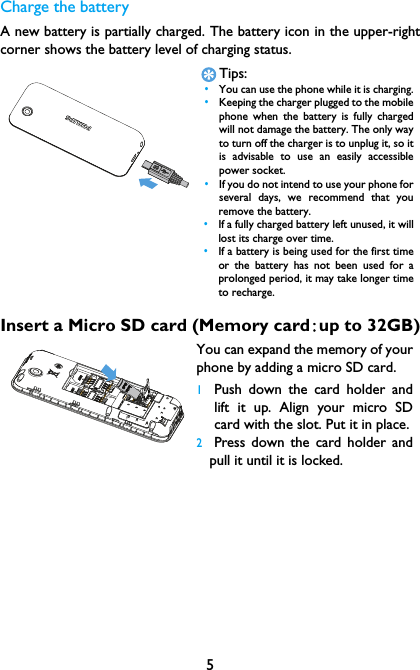
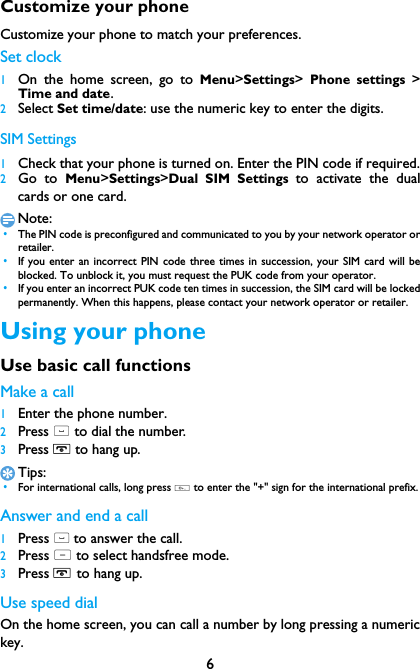
5Charge the batteryA new battery is partially charged. The battery icon in the upper-rightcorner shows the battery level of charging status.Insert a Micro SD card (Memory card:up to 32GB)Tips: •You can use the phone while it is charging. •Keeping the charger plugged to the mobilephone when the battery is fully chargedwill not damage the battery. The only wayto turn off the charger is to unplug it, so itis advisable to use an easily accessiblepower socket.  •If you do not intend to use your phone forseveral days, we recommend that youremove the battery. •If a fully charged battery left unused, it willlost its charge over time. •If a battery is being used for the first timeor the battery has not been used for aprolonged period, it may take longer timeto recharge.You can expand the memory of yourphone by adding a micro SD card. 1Push down the card holder andlift it up. Align your micro SDcard with the slot. Put it in place.2Press down the card holder andpull it until it is locked.
6Customize your phoneCustomize your phone to match your preferences.Set clock 1On the home screen, go to Menu>Settings>  Phone settings >Time and date.2Select Set time/date: use the numeric key to enter the digits.SIM Settings1Check that your phone is turned on. Enter the PIN code if required.2Go to Menu>Settings>Dual SIM Settings to activate the dualcards or one card.Note: •The PIN code is preconfigured and communicated to you by your network operator orretailer. •If you enter an incorrect PIN code three times in succession, your SIM card will beblocked. To unblock it, you must request the PUK code from your operator. •If you enter an incorrect PUK code ten times in succession, the SIM card will be lockedpermanently. When this happens, please contact your network operator or retailer.Using your phoneUse basic call functionsMake a call1Enter the phone number.2Press ( to dial the number.3Press H to hang up.Tips: •For international calls, long press 0 to enter the "+" sign for the international prefix.Answer and end a call 1Press ( to answer the call.2Press L to select handsfree mode.3Press H to hang up.Use speed dialOn the home screen, you can call a number by long pressing a numerickey.
7To assign a contact to a speed-dial key:1Select  Phonebook>Options>Phonebook settings>Speed dial toturn on the function.2Press Set numbers to Choose a numeric key to add a number.Make an emergency callWithout a SIM card in phone, you can press numeric keys to make theemergency call. In Europe, the standard emergency number is 112; in theUK, it is 999.Receive and send messagesYou can use the Messaging menu to send text message.New SMS1Select Messaging> Write message.2Write your text message.3Press confirm key to send the message.Enter textYour mobile phone supports a number of text entry methods, Englishinput, numeric input and symbol input.Keys:Note: •Depending on the language you select for your phone, the supported input methodsmay vary.Keys Function* Enter symbols and punctuations.LDelete the previous character.LSelect the character on the screen.Select or confirm a character.To browse the candidate character on the previous ornext page.
8Manage your phonebookLearn about basic phonebook function.Add a new contact1Go to Phonebook, select Add new contact.2Select a location. (To SIM1/To SIM2/To Phone).3Enter the number, and add details as desired.4Press Options> Save to finish saving.Search for a contact1Go to Phonebook.2Enter the first few letters of the name in the search bar. 3Select the contact from the list.Manage your contactsYou can copy or move contacts between the SIM card and phone, ordelete contacts. Go to Phonebook>Options>Phonebook settings,press navigation keys to select the desired option.MultimediaMedia playerSave MP3 music files under the Music folder on your memory card. Play music1Go to Multimedia>Audio Player, select your desired song in thefolder.2Press Options>Settings>Repeat to turn on repeat playing.3Using the following keys to control playback:Function DefinitionPause and resume playback.Press the left/right navigation key to select previousor next track.Press the up/down navigation key to adjust volume.
9Note: •When listening to music, adjust the volume to a moderate level. Continuous exposureto high volume may impair your hearing. CameraLearn about camera function. Let you take photos as desired by usingyour phone.Take a photo1In the application list, select Camera. 2Tap up/down navigation key to zoom in or zoom out.3Tap confirm key to take a photo and the phone will save the pictureautomatically.FM radioListen to a radio station1Plug the supplied headset into your phone.2Go to Multimedia>FM radio>Options>Auto search. It startsscanning automatically and select Yes to save the available channels.3Press the left/right navigation key to select a channel.4Press the up/down navigation key to adjust the volume.5Press confirm key to turn off FM radio.ToolsAlarm Learn about how to set and use an alarm. You can set up five alarms.Set an alarm  1Go to Organizer>Alarm.2Select an alarm, press confirm key to edit the alarm.3Press left soft key L to save it.LReturn to the previous menu.HReturn to the home screen.
10Turn off an alarm1Go to Organizer>Alarm.2Select the alarm you want to turn off, press  LStop.Stop an alarmWhen the alarm rings,•Select Off: The alarm stops.•Select  Snooze: The alarm will sound again after the set Snooze(you can choose the time of snooze when set the alarm) interval.SettingsProfilesThe profiles are defined for several scenes. They consist of the settingsfor ringtone, volume, and others. With preset profiles, you can easilyadjust the settings for incoming calls and messages as desired.  1Go to Settings>Profiles, press LOptions>Activate to activatethe profile.2Go to Customize to modify ringtone, volume and others.To activate Silent mode, long press # on the home screen.Dual SIM settingsGo to Menu>Settings>Dual SIM settings to set reply call/message ortransfer data by SIM1/SIM2.Call settingsFunction Definition Call waiting Get informed of an incoming call when on the phone(network-dependent).Call divert Divert incoming calls to your voice mailbox oranother phone number.Call barring Set limits to your incoming and outgoing calls.Line switching Switch between Line 1 & Line 2.
11Phone settings Blacklist Turn on/off blacklist function and set the numbers tobe rejected.Auto redial Keep redialing the number that fails to go through.Call time reminderSet reminder when the call time reaches the settingtime.Answer mode Set your answer mode (Any key or Auto answerwhen headset mode).Function Definition Time and date Set the clock of the phone.Schedule  power on/offSet time for the phone to be switched on/offautomatically. Language Select a language for your phone.Pref.input methodSet your preferred input method.Wallpaper Choose an image as the wallpaper of your phone.Screen auto lockTurn on screen auto lock and set the time interval forit.Show date and time Choose whether to show date or time on yourscreen.Shortcuts  Select a navigation key as direct access to a menu.Dedicated keysSet your dedicated keys.Flight mode Turn on/off flight mode.LCD backlight Set the brightness and time of LCD backlight.Key backlight Turn on key backlight and set the time quantum for it.
12Other settingsFunction Definition SecuritySettingsThis menu allows you to use passwords or pin lock toprotect your phone.NetworksettingsSelect the network for your phone (servicesubscription dependent). Automatic search mode isrecommended.RestoresettingsRestore your phone settings to the default values.Youneed to enter your phone lock password (1122 bydefault).
13Safety & PrecautionPrecautionKeep your phone away from small childrenKeep your phone and all accessories out of the reach of small children. Small parts may causechoking or serious injury if swallowed.Radio WavesYour phone transmits/receives radio waves in the GSM (850/1900MHz).Check with the vehicle manufacturer that electronic equipment used in your vehicle will not beaffected by radio energy.Switch off your phone...Turn off the phone when in an aircraft. The use of mobile phones in an aircraft may be dangerousfor the operation of the aircraft, disrupt the mobile phones network and may be illegal.In hospitals, clinics, other health care centers and anywhere else where you may be in the closevicinity of medical equipment.In areas with a potentially explosive atmosphere (e.g. petrol stations and also areas where theair contains dust particles, such as metal powders).In a vehicle transporting flammable productsor a vehicle powered by liquefied petroleum gas (LPG).In quarries or other areas where blastingoperations are in progress.Your mobile phone and your carAvoid using your phone while driving and obey all regulations that restrict the use of mobilephones while driving. Use hands free accessories to increase your safety when possible. Ensurethat your phone and car kit do not block any air bags or other security devices fitted in your car.Handle your phone carefully and sensiblyFor the optimal and satisfactory operation of the phone you are recommended to use thephone in the normal operating position.•Do not expose your phone to extreme temperatures.•Do not immerse the phone in any liquid; if your phone is damp, switch it off, remove the batteryand let them dry for 24hrs before using them again.•To clean the phone, wipe it with a soft cloth.•In hot weather or after prolonged exposure to the sun (e.g., behind a window or a windscreen),the temperature of your phone's casing might increase. Be very careful in this case when pickingup your phone and also avoid using it with an ambient temperature over 40° C.Protect batteries from damageYou should only use Philips Authentic Accessories, as the use of any other accessories maydamage your phone and may be dangerous, and will make all guarantees for your Philips phonenull and void. The use of an unspecified type of battery may also cause an explosion.Make sure damaged parts are replaced immediately by a qualified technician and that they arereplaced with genuine Philips replacement parts.•Your phone is powered by a rechargeable battery.•Use specified charger only.•Do not incinerate.•Do not deform or open the battery.•Do not allow metal objects (such as keys in your pocket) to short circuit the battery contacts.•Avoid exposure to excessive heat (>60° C or 140° F), moisture or caustic environments.Environmental careRemember to observe the local regulations regarding the disposal of the packaging materials,exhausted batteries and old phone and please promote their recycling.Philips has marked thebattery and packaging with standard symbols designed to promote the recycling and appropriatedisposal of your eventual waste.:The labeled packaging material is recyclable.
14:A financial contribution has been made to the associated national packaging recovery andrecycling system.:The plastic material is recyclable (also identifies the type of plastic).Hearing ProtectionWhen listening to music, adjust the volume to a moderate level. Continuous exposure to high volume may impair your hearing.WEEE Marking in the DFU: “Information to the Consumer”Disposal of your old productYour product is designed and manufactured with high quality materials and components, which canbe recycled and reused. When this crossed-out wheeled bin symbol is attached to a product it means the product iscovered by the European Directive 2002/96/ECPlease inform yourself about the local separate collection system for electrical and electronicproducts.Please act according to your local rules and do not dispose of your old products with yournormal household waste. The correct disposal of your old product will help prevent potentialnegative consequences for the environment and human health.This device may contain commodities, technology or software subject to export laws and regulationsfrom the US and other countries. Diversion contrary to law is prohibited.TipsPacemakersIf you have a pacemaker:•Always keep the phone more than 15 cm from your pacemaker when the phone is switched on,in order to avoid potential interference.•Do not carry the phone in a breast pocket.•Use the ear opposite to the pacemaker to minimize the potential interference.•Switch off your phone if you suspect that interference is taking place.Hearing aidsIf you are a user of a hearing aid, consult your physician and hearing aid manufacturer to learnwhether your particular device is susceptible to cellular phone interference.How to prolong the battery life of your phone To have your mobile phone function properly, sufficient battery power is important. For the power-saving purpose, do the following, if applicable:•Turn off the Bluetooth function of your phone. •Set the backlight level and duration of your phone to a low value. •Turn on the auto keypad lock, turn off the key sounds, tap vibration, or vibration alerts. •Establish GPRS connection when needed. Otherwise, your phone will keep searching for GPRSconnection, and drain your battery power. •Turn off your phone if there is no coverage. Otherwise, the phone will keep searching fornetwork, and drain your battery power. TroubleshootingThe phone does not switch onRemove/reinstall the battery. Then charge the phone until the battery icon stops scrolling. Unplugthe charger and try to switch the mobile on.The display shows BLOCKED when you switch on the phoneSomebody tried to use your phone but didn’t know the PIN code nor the unblocking code (PUK).Contact your service provider.The display shows IMSI failureThis problem is related to your subscription. Contact your operator.
15Your phone doesn’t return to idle screenLong press the hang-up key or switch off the phone, check that the SIM card and the battery areinstalled correctly and switch it on again.The network symbol is not displayedThe network connection is lost. Either you are in a radio shadow (in a tunnel or between tallbuildings) or you are outside the network coverage area. Try from another place, try to reconnectto the network (especially when abroad), check that the antenna is in place if your mobile has anexternal antenna, or contact your network operator for assistance/information.The display doesn’t respond (or the display responds slowly) to key pressesThe display responds more slowly at very low temperatures. This is normal and does not affect theoperation of the phone. Take the phone to a warmer place and try again. In other cases pleasecontact your phone supplier.Your battery seems to over heatYou might be using a charger that was not intended for use with your phone. Make sure you alwaysuse the Philips authentic accessory shipped with your phone.Your phone doesn’t display the phone numbers of incoming callsThis feature is network and subscription dependent. If the network doesn’t send the caller’s number,the phone will display Call 1 or Withheld instead. Contact your operator for detailed information onthis subject.You can’t send text messagesSome networks don’t allow message exchanges with other networks. First check that you haveentered the number of your SMS centre, or contact your operator for detailed information on thissubject.You can’t receive and/or store JPEG picturesA picture may not be accepted by your mobile phone if it is too large, if its name is too long, or if itdoesn’t have the correct file format.You feel that you have missed some callsCheck your call divert options.When charging, the battery icon shows no bar and the outline is flashingOnly charge the battery in an environment where the temperature does not go below 0°C (32°F) orabove 50°C (113°F).In other cases please contact your phone supplier.The display shows SIM failureCheck that the SIM card has been inserted correctly. If the problem persists, your SIM card may bedamaged. Contact your operator.When attempting to use a feature in the menu, the display shows NOT ALLOWEDSome features are network dependent. They are only available, therefore, if the network or yoursubscription supports them. Contact your operator for detailed information on this subject.The display shows INSERT YOUR SIM CARDCheck that the SIM card has been inserted correctly. If the problem persists, your SIM card may bedamaged. Contact your operator.The autonomy of your phone seems lower than indicated on the user guideThe autonomy is linked to your settings (e.g., ringer volume, backlight duration) and the features youuse. To increase the autonomy, and whenever possible, you must deactivate features you do not use.Your phone doesn’t work well in your carA car contains many metallic parts that absorb electromagnetic waves which can affect the phone’sperformance. A car kit is available to provide you with an external antenna and enables you to makeand receive phone calls without handling the handset.Note: •Check with the local authorities whether or not you are allowed to use the phone while driving.
16Your phone is not chargingIf the battery is completely flat, it might take several minutes of pre-charge (up to 5 minutes in somecases) before the charging icon is displayed on the screen.The picture captured with the phone camera is not clearMake sure that the camera lens on both sides is clean.Trademark DeclarationFCC ComplianceThis mobile phone complies with part 15 of the FCC Rules. Operation is subject to the following twoconditions: (1) This device may not cause harmful interference, and (2) this device must accept anyinterference received, including interference that may cause undesired operation.This mobile phone has been tested and found to comply with the limits for a Class B digital device,pursuant to part 15 of the FCC Rules. These limits are designed to provide reasonable protectionagainst harmful interference in a residential installation. This equipment generates, uses and canradiate radio frequency energy and, if not installed and used in accordance with the instructions, maycause harmful interference to radio communications. However, there is no guarantee thatinterference will not occur in a particular installation. If this equipment does cause harmfulinterference to radio or television reception, which can be determined by turning the equipment offand on, the user is encouraged to try to correct the interference by one or more of the followingmeasures:—Reorient or relocate the receiving antenna.—Increase the separation between the equipment and receiver.—Connect the equipment into an outlet on a circuit different from that to which the receiver isconnected.—Consult the dealer or an experienced radio/ TV technician for help.FCC Note:Caution: Changes or modifications not expressly approved by the party responsible for compliance could void the user’sauthority to operate the equipment.RF exposure information (SAR)This phone is designed and manufactured not to exceed the emission limits for exposure to radiofrequency (RF) energy set by the Federal Communications Commission of the United States. DuringSAR testing, this device was set to transmit at its highest certified power level in all tested frequencybands, and placed in positions that simulate RF exposure in usage against the head with noserparation, and near the body with the separation of 10 mm. Although the SAR is determined at thehighest certified power level, the actual SAR level ofthe device while operating can be well below themaximum value. This is because the phone is designed to operate at multiple power levels so as touse only the poser required to reach the network. In general, the closer you are to a wireless basestation antenna, the lower the power output.The exposure standard for wireless devices employing a unit of measurement is known as the SpecificAbsorption Rate, or SAR. The SAR limit set by the FCC is 1.6W/kg.This device is complied with SAR for general population/uncontrolled exposure limits in ANSI/IEEEC95.1 and had been tested in accordance with the measurement methods and procedures specifiedin IEEE1528. This device has been tested and meets the FCC RF exposure guidelines when testedwith the device directly contacted to the body.Android Android is a trademark of Google, Inc.Bluetooth™ Bluetooth™ is a trade-mark owned by telefonaktiebolaget L M Ericsson, Swedenand licensed to Philips.Philips PHILIPS and PHILIPS’ Shield Emblem are registered trademarks of KoninklijkePhilips N.V. manufactured by Shenzhen Sang Fei Consumer Communications Co.,Ltd.  Under license from Koninklijke Philips N.V..
17The FCC has granted an Equipment Authorization for this model phone with all reported SAR levelsevaluated as in compliance with the FCC RF exposure guidelines.  SAR information on this modelphone is on file with the FCC and can be found under the Display Grant section of http://www.fcc.gov/oet/ea/fccid after searching on FCC ID: VQRCTE105For this device, the highest reported SAR value for usage against the head is 1.227W/kg, for usagenear the body is 1.139W/kg. While there may be differences between the SAR level of various phonesand at various positions, they all meet the government requirements. SAR compliance for body-wornoperation is based on a separation distance of 10 mm between the unit and the human body. Carrythis device at least 10 mm away from your body to ensure RF exposure level compliant or lower tothe reported level. To support body-worn operation, choose the belt clips or holsters, which do notcontain metallic componnets, to maintain a serparation of 10 mm between this device and your body.RF exposure complicance with any body-worn accessory, which contains metal, was not tested andcertified, and use such body-worn accessory should be avoided.

Navigation menu