Sang Fei Consumer Communications CTE130 GSM digital mobile phone User Manual E130 ENG Book

Shenzhen Sang Fei Consumer Communications Co., Ltd. GSM digital mobile phone E130 ENG Book

User Manual

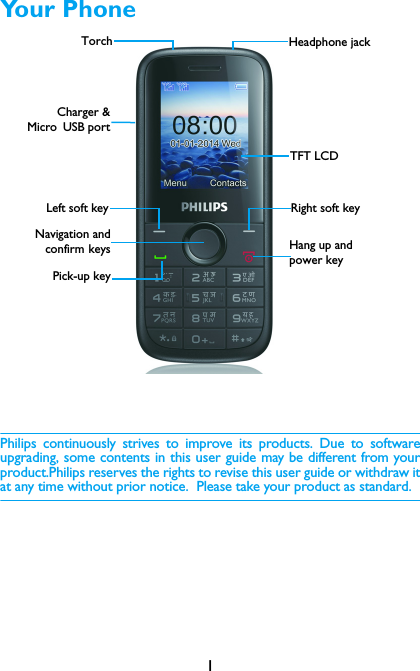
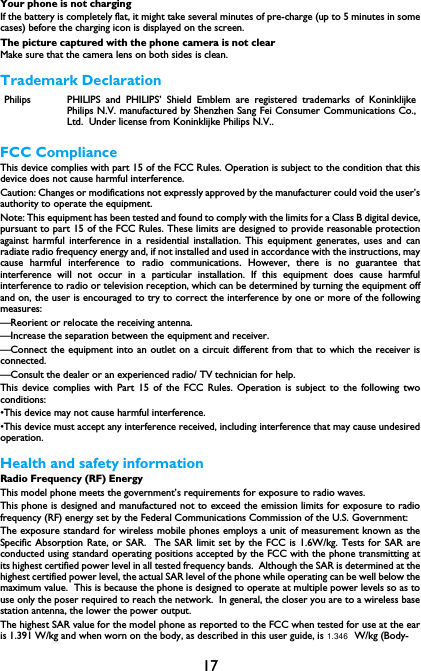
1Your PhonePhilips continuously strives to improve its products. Due to softwareupgrading, some contents in this user guide may be different from yourproduct.Philips reserves the rights to revise this user guide or withdraw itat any time without prior notice.  Please take your product as standard.TFT LCDHeadphone jackLeft soft keyNavigation andconfirm keysPick-up keyRight soft keyHang up and power keyCharger &Micro USB portTorch
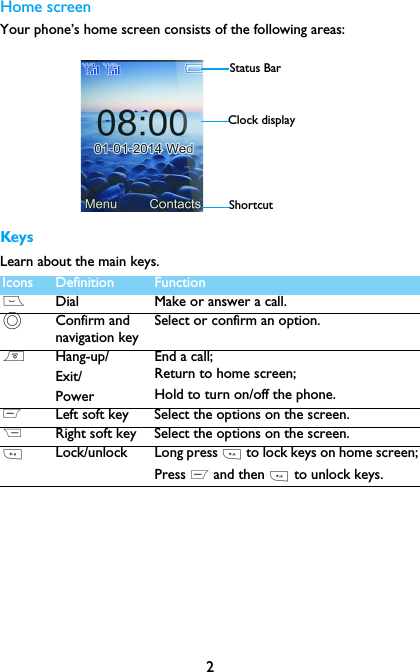
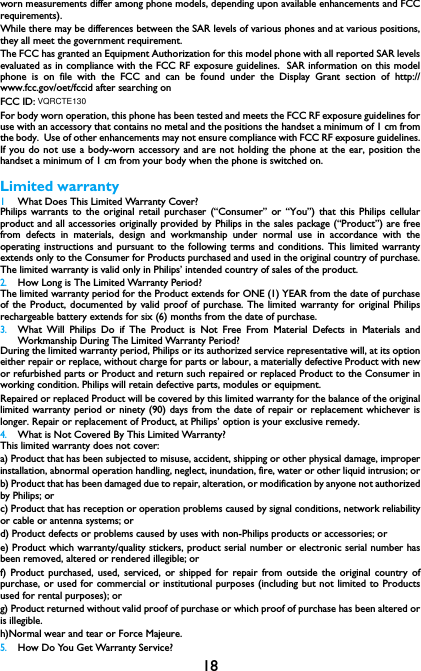
2Home screenYour phone’s home screen consists of the following areas:KeysLearn about the main keys.Icons Definition Function(Dial Make or answer a call.,Confirm and navigation keySelect or confirm an option.)Hang-up/Exit/PowerEnd a call; Return to home screen;Hold to turn on/off the phone.LLeft soft key Select the options on the screen.RRight soft key Select the options on the screen.*Lock/unlock Long press * to lock keys on home screen;Press L and then * to unlock keys.Status BarShortcutClock display
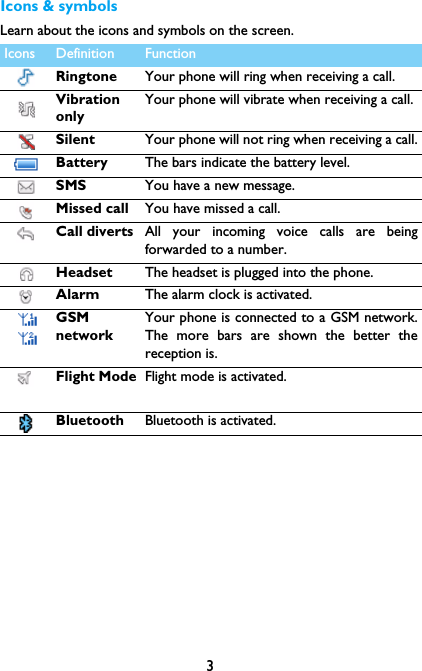
3Icons & symbolsLearn about the icons and symbols on the screen.  Icons Definition FunctionRingtone Your phone will ring when receiving a call. VibrationonlyYour phone will vibrate when receiving a call. Silent Your phone will not ring when receiving a call.Battery The bars indicate the battery level. SMS You have a new message.Missed call  You have missed a call.Call diverts All your incoming voice calls are beingforwarded to a number.Headset  The headset is plugged into the phone.Alarm  The alarm clock is activated.GSMnetworkYour phone is connected to a GSM network.The more bars are shown the better thereception is.Flight Mode Flight mode is activated.Bluetooth Bluetooth is activated.
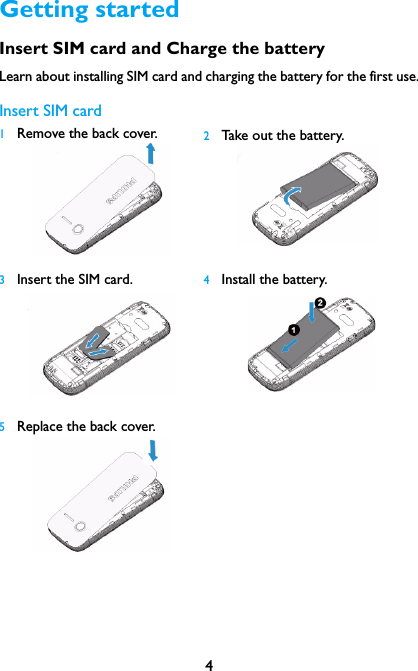
4Getting startedInsert SIM card and Charge the batteryLearn about installing SIM card and charging the battery for the first use.Insert SIM card1Remove the back cover.   2Take out the battery.3Insert the SIM card.  4Install the battery.5Replace the back cover.
5Charge the batteryA new battery is partially charged. The battery icon in the upper-rightcorner shows the battery level of charging status.Insert a Micro SD card (Memory card)Tips: •You can use the phone while it is charging. •Keeping the charger plugged to the mobilephone when the battery is fully chargedwill not damage the battery. The only wayto turn off the charger is to unplug it, so itis advisable to use an easily accessiblepower socket.  •If you do not intend to use your phone forseveral days, we recommend that youremove the battery. •If a fully charged battery left unused, it willlost its charge over time. •If a battery is being used for the first timeor the battery has not been used for aprolonged period, it may take longer timeto recharge.You can expand the memory of yourphone by adding a micro SD card. 1Push down the card holder and liftit up. Align your micro SD cardwith the slot. Put it in place.2Press down the card holder andpull it until it is locked.
6Customize your phoneCustomize your phone to match your preferences.Set clock 1On the home screen, go to Menu>Settings>  Phone settings >Time & date.2Select Set time/date: use the numeric key to enter the digits.SIM Settings1Check that your phone is turned on. Enter the PIN code if required.2Go to Menu>Settings>Dual SIM>Set SIM name, name your SIMcard.3Go to Menu>Settings>Dual SIM>Standby mode to activate thedual cards or one card.Note: •The PIN code is preconfigured and communicated to you by your network operator orretailer. •If you enter an incorrect PIN code three times in succession, your SIM card will beblocked. To unblock it, you must request the PUK code from your operator. •If you enter an incorrect PUK code ten times in succession, the SIM card will be lockedpermanently. When this happens, please contact your network operator or retailer.Using your phoneUse basic call functionsMake a call1Enter the phone number.2Press ( to dial the number.3Press ) to hang up.Tips: •For international calls, long press 0 to enter the "+" sign for the international prefix.Answer and end a call 1Press (to answer the call.2Press right soft key R to select handsfree mode.3Press)to hang up.
7Use speed dialOn the home screen, you can call a number by long pressing a numerickey.To assign a contact to a speed-dial key:1Select Contacts>Options>Others>Speed dial.2Choose a numeric key to add a number.Make an emergency callWithout a SIM card in phone, you can press numeric keys to make theemergency call. In Europe, the standard emergency number is 112; in theUK, it is 999.Receive and send messagesYou can use the Message menu to send text message.1Select Message> Write message>New SMS/MMS.2Write your text message.3Press  Options>Add to add multimedia contents (picture, sound,attachment or bookmark text).4Press Options>Send to send the message.Enter textYour mobile phone supports a number of text entry methods, Englishinput, numeric input and symbol input.Keys:Keys Function*Enter symbols and punctuations.RDelete the previous character.LSelect the character on the screen.,Select or confirm a character.< >To browse the candidate character on the previous ornext page.
8Note: •Depending on the language you select for your phone, the supported input methodsmay vary.Manage your phonebookLearn about basic phonebook function.Add a new contact1Go to Contacts, select Options>New.2Select a location. (SIM1/SIM2/Phone).3Enter the number, and add details as desired.4Press L Save to finish saving.Search for a contact1Go to Contacts.2Enter the first few letters of the name in the search bar. 3Select the contact from the list.Manage your contactsYou can copy or move contacts between the SIM card and phone, ordelete contacts. Go to Contacts, press < or > to select the desiredoption.MultimediaMedia playerSave MP3 music files under the Audio folder on your memory card. Play music1Go to Multimedia>Audio, select your desired song in the folder.2Press Options> Repeat to repeat playing.3Using the following keys to control playback:Function Definition,Pause and resume playback.
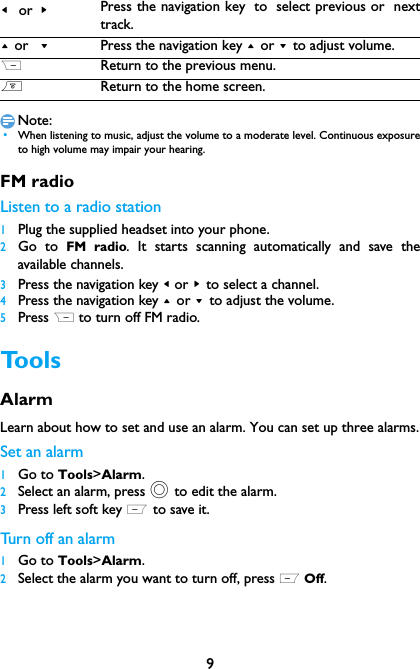
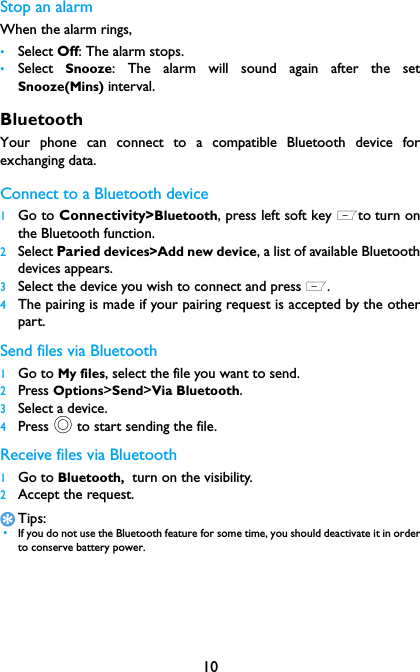
9Note: •When listening to music, adjust the volume to a moderate level. Continuous exposureto high volume may impair your hearing. FM radioListen to a radio station1Plug the supplied headset into your phone.2Go to FM radio. It starts scanning automatically and save theavailable channels.3Press the navigation key < or > to select a channel.4Press the navigation key + or - to adjust the volume.5Press R to turn off FM radio.ToolsAlarm Learn about how to set and use an alarm. You can set up three alarms.Set an alarm  1Go to Tools>Alarm.2Select an alarm, press , to edit the alarm.3Press left soft key L to save it.Turn off an alarm1Go to Tools>Alarm.2Select the alarm you want to turn off, press L Off.< or >Press the navigation key to select previous or nexttrack.+ or  -Press the navigation key + or - to adjust volume.RReturn to the previous menu.)Return to the home screen.
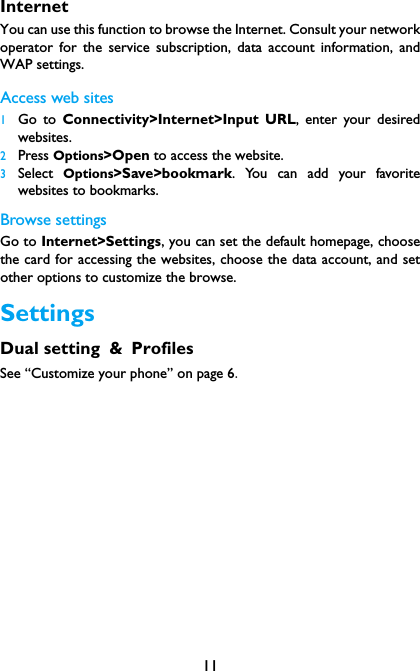
10Stop an alarmWhen the alarm rings,•Select Off: The alarm stops.•Select  Snooze: The alarm will sound again after the setSnooze(Mins) interval.BluetoothYour phone can connect to a compatible Bluetooth device forexchanging data.Connect to a Bluetooth device 1Go to Connectivity>Bluetooth, press left soft key Lto turn onthe Bluetooth function. 2Select Paried devices>Add new device, a list of available Bluetoothdevices appears.3Select the device you wish to connect and press L.4The pairing is made if your pairing request is accepted by the otherpart.Send files via Bluetooth1Go to My files, select the file you want to send.2Press Options>Send>Via Bluetooth.3Select a device.4Press , to start sending the file.Receive files via Bluetooth1Go to Bluetooth,  turn on the visibility. 2Accept the request.Tips: •If you do not use the Bluetooth feature for some time, you should deactivate it in orderto conserve battery power.
11InternetYou can use this function to browse the Internet. Consult your networkoperator for the service subscription, data account information, andWAP settings. Access web sites1Go to Connectivity>Internet>Input URL, enter your desiredwebsites.2Press Options>Open to access the website.3Select  Options>Save>bookmark. You can add your favoritewebsites to bookmarks.Browse settingsGo to Internet>Settings, you can set the default homepage, choosethe card for accessing the websites, choose the data account, and setother options to customize the browse.SettingsDual setting & ProfilesSee “Customize your phone” on page 6.
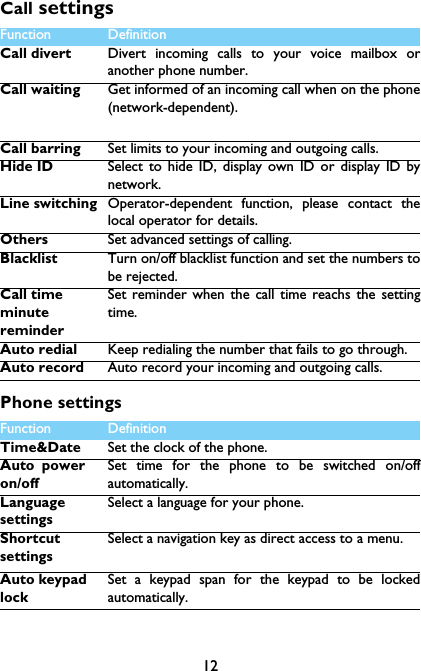
12Call settingsPhone settings Function Definition Call divert Divert incoming calls to your voice mailbox oranother phone number.Call waiting Get informed of an incoming call when on the phone(network-dependent).Call barring Set limits to your incoming and outgoing calls.Hide ID Select to hide ID, display own ID or display ID bynetwork.Line switching Operator-dependent function, please contact thelocal operator for details.Others Set advanced settings of calling.Blacklist Turn on/off blacklist function and set the numbers tobe rejected.Call time minute reminderSet reminder when the call time reachs the settingtime.Auto redial Keep redialing the number that fails to go through.Auto record Auto record your incoming and outgoing calls.Function Definition Time&Date Set the clock of the phone.Auto power on/offSet time for the phone to be switched on/offautomatically. Language settingsSelect a language for your phone.Shortcut settingsSelect a navigation key as direct access to a menu.Auto keypad lockSet a keypad span for the keypad to be lockedautomatically.
13DisplayNetwork settingsSecurity  This menu allows you to use passwords to protectyour phone.RestorefactorysettingsRestore your phone settings to the default values.Youneed to enter your phone lock password(1122 bydefault).Function Definition Wallpaper Select an image as the wall paper of your phone.Contrast Set the brightness of backlight.Backlight  Set the duration of backlight.Function Definition NetworkaccountSet the network account.NetworkselectionSelect the network for your phone (servicesubscription dependent). Automatic search mode isrecommended.
14Safety & PrecautionPrecautionKeep your phone away from small childrenKeep your phone and all accessories out of the reach of small children. Small parts may causechoking or serious injury if swallowed.Radio WavesYour phone transmits/receives radio waves in the GSM frequency.Check with the vehicle manufacturer that electronic equipment used in your vehicle will not beaffected by radio energy.Switch off your phone...Turn off the phone when in an aircraft. The use of mobile phones in an aircraft may be dangerousfor the operation of the aircraft, disrupt the mobile phones network and may be illegal.In hospitals, clinics, other health care centers and anywhere else where you may be in the closevicinity of medical equipment.In areas with a potentially explosive atmosphere (e.g. petrol stations and also areas where theair contains dust particles, such as metal powders).In a vehicle transporting flammable productsor a vehicle powered by liquefied petroleum gas (LPG).In quarries or other areas where blastingoperations are in progress.Your mobile phone and your carAvoid using your phone while driving and obey all regulations that restrict the use of mobilephones while driving. Use hands free accessories to increase your safety when possible. Ensurethat your phone and car kit do not block any air bags or other security devices fitted in your car.Handle your phone carefully and sensiblyFor the optimal and satisfactory operation of the phone you are recommended to use thephone in the normal operating position.•Do not expose your phone to extreme temperatures.•Do not immerse the phone in any liquid; if your phone is damp, switch it off, remove the batteryand let them dry for 24hrs before using them again.•To clean the phone, wipe it with a soft cloth.•In hot weather or after prolonged exposure to the sun(e.g.,behind a window or a windscreen),the temperature of your phone's cashing mighe increase.Be very careful in this case whenpicking up your phone and also avoid using it with an ambient temperature over 40°.Protect batteries from damageYou should only use Philips Authentic Accessories, as the use of any other accessories maydamage your phone and may be dangerous, and will make all guarantees for your Philips phonenull and void. The use of an unspecified type of battery may also cause an explosion.Make sure damaged parts are replaced immediately by a qualified technician and that they arereplaced with genuine Philips replacement parts.•Your phone is powered by a rechargeable battery.•Use specified charger only.•Do not incinerate.•Do not deform or open the battery.•Do not allow metal objects (such as keys in your pocket) to short circuit the battery contacts.•Avoid exposure to excessive heat (>60° C or 140° F), moisture or caustic environments.Environmental careRemember to observe the local regulations regarding the disposal of the packaging materials,exhausted batteries and old phone and please promote their recycling.Philips has marked thebattery and packaging with standard symbols designed to promote the recycling and appropriatedisposal of your eventual waste.:The labeled packaging material is recyclable.:A financial contribution has been made to the associated national packaging recovery andrecycling system.
15:The plastic material is recyclable (also identifies the type of plastic).Hearing ProtectionWhen listening to music, adjust the volume to a moderate level. Continuous exposure to high volume may impair your hearing.WEEE Marking in the DFU: “Information to the Consumer”Disposal of your old productYour product is designed and manufactured with high quality materials and components, which canbe recycled and reused. When this crossed-out wheeled bin symbol is attached to a product it means the product iscovered by the European Directive 2002/96/ECPlease inform yourself about the local separate collection system for electrical and electronicproducts.Please act according to your local rules and do not dispose of your old products with your normalhousehold waste. The correct disposal of your old product will help prevent potential negativeconsequences for the environment and human health.This device may contain commodities, technology or software subject to export laws and regulationsfrom the US and other countries. Diversion contrary to law is prohibited.TipsPacemakersIf you have a pacemaker:•Always keep the phone more than 15 cm from your pacemaker when the phone is switched on,in order to avoid potential interference.•Do not carry the phone in a breast pocket.•Use the ear opposite to the pacemaker to minimize the potential interference.•Switch off your phone if you suspect that interference is taking place.Hearing aidsIf you are a user of a hearing aid, consult your physician and hearing aid manufacturer to learnwhether your particular device is susceptible to cellular phone interference.How to prolong the battery life of your phone To have your mobile phone function properly, sufficient battery power is important. For the power-saving purpose, do the following, if applicable:•Turn off the Bluetooth function of your phone. •Set the backlight level and duration of your phone to a low value. •Turn on the auto keypad lock, turn off the key sounds, tap vibration, or vibration alerts. •Establish GPRS connection when needed. Otherwise, your phone will keep searching for GPRSconnection, and drain your battery power. •Turn off your phone if there is no coverage. Otherwise, the phone will keep searching fornetwork, and drain your battery power. TroubleshootingThe phone does not switch onRemove/reinstall the battery. Then charge the phone until the battery icon stops scrolling. Unplugthe charger and try to switch the mobile on.The display shows BLOCKED when you switch on the phoneSomebody tried to use your phone but didn’t know the PIN code nor the unblocking code (PUK).Contact your service provider.The display shows IMSI failureThis problem is related to your subscription. Contact your operator.
16Your phone doesn’t return to idle screenLong press the hang-up key or switch off the phone, check that the SIM card and the battery areinstalled correctly and switch it on again.The network symbol is not displayedThe network connection is lost. Either you are in a radio shadow (in a tunnel or between tallbuildings) or you are outside the network coverage area. Try from another place, try to reconnectto the network (especially when abroad), check that the antenna is in place if your mobile has anexternal antenna, or contact your network operator for assistance/information.The display doesn’t respond (or the display responds slowly) to key pressesThe display responds more slowly at very low temperatures. This is normal and does not affect theoperation of the phone. Take the phone to a warmer place and try again. In other cases pleasecontact your phone supplier.Your battery seems to over heatYou might be using a charger that was not intended for use with your phone. Make sure you alwaysuse the Philips authentic accessory shipped with your phone.Your phone doesn’t display the phone numbers of incoming callsThis feature is network and subscription dependent. If the network doesn’t send the caller’s number,the phone will display Call 1 or Withheld instead. Contact your operator for detailed information onthis subject.You can’t send text messagesSome networks don’t allow message exchanges with other networks. First check that you haveentered the number of your SMS centre, or contact your operator for detailed information on thissubject.You can’t receive and/or store JPEG picturesA picture may not be accepted by your mobile phone if it is too large, if its name is too long, or if itdoesn’t have the correct file format.You feel that you have missed some callsCheck your call divert options.When charging, the battery icon shows no bar and the outline is flashingOnly charge the battery in an environment where the temperature does not go below 0°C (32°F) orabove 50°C (113°F).In other cases please contact your phone supplier.The display shows SIM failureCheck that the SIM card has been inserted correctly. If the problem persists, your SIM card may bedamaged. Contact your operator.When attempting to use a feature in the menu, the display shows NOT ALLOWEDSome features are network dependent. They are only available, therefore, if the network or yoursubscription supports them. Contact your operator for detailed information on this subject.The display shows INSERT YOUR SIM CARDCheck that the SIM card has been inserted correctly. If the problem persists, your SIM card may bedamaged. Contact your operator.The autonomy of your phone seems lower than indicated on the user guideThe autonomy is linked to your settings (e.g., ringer volume, backlight duration) and the features youuse. To increase the autonomy, and whenever possible, you must deactivate features you do not use.Your phone doesn’t work well in your carA car contains many metallic parts that absorb electromagnetic waves which can affect the phone’sperformance. A car kit is available to provide you with an external antenna and enables you to makeand receive phone calls without handling the handset.Note: •Check with the local authorities whether or not you are allowed to use the phone while driving.
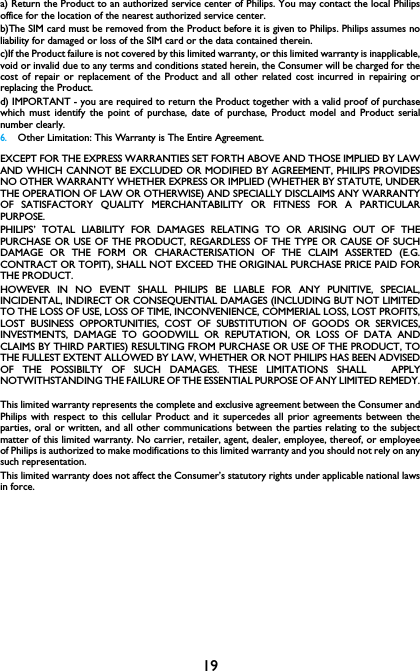
is 1.391 W/kg and when worn on the body, as described in this user guide, is 17Your phone is not chargingIf the battery is completely flat, it might take several minutes of pre-charge (up to 5 minutes in somecases) before the charging icon is displayed on the screen.The picture captured with the phone camera is not clearMake sure that the camera lens on both sides is clean.Trademark DeclarationFCC ComplianceThis device complies with part 15 of the FCC Rules. Operation is subject to the condition that thisdevice does not cause harmful interference.Caution: Changes or modifications not expressly approved by the manufacturer could void the user’sauthority to operate the equipment.Note: This equipment has been tested and found to comply with the limits for a Class B digital device,pursuant to part 15 of the FCC Rules. These limits are designed to provide reasonable protectionagainst harmful interference in a residential installation. This equipment generates, uses and canradiate radio frequency energy and, if not installed and used in accordance with the instructions, maycause harmful interference to radio communications. However, there is no guarantee thatinterference will not occur in a particular installation. If this equipment does cause harmfulinterference to radio or television reception, which can be determined by turning the equipment offand on, the user is encouraged to try to correct the interference by one or more of the followingmeasures:—Reorient or relocate the receiving antenna.—Increase the separation between the equipment and receiver.—Connect the equipment into an outlet on a circuit different from that to which the receiver isconnected.—Consult the dealer or an experienced radio/ TV technician for help.This device complies with Part 15 of the FCC Rules. Operation is subject to the following twoconditions: •This device may not cause harmful interference. •This device must accept any interference received, including interference that may cause undesiredoperation.Health and safety informationRadio Frequency (RF) EnergyThis model phone meets the government’s requirements for exposure to radio waves.This phone is designed and manufactured not to exceed the emission limits for exposure to radiofrequency (RF) energy set by the Federal Communications Commission of the U.S. Government:The exposure standard for wireless mobile phones employs a unit of measurement known as theSpecific Absorption Rate, or SAR.  The SAR limit set by the FCC is 1.6W/kg. Tests for SAR areconducted using standard operating positions accepted by the FCC with the phone transmitting atits highest certified power level in all tested frequency bands.  Although the SAR is determined at thehighest certified power level, the actual SAR level of the phone while operating can be well below themaximum value.  This is because the phone is designed to operate at multiple power levels so as touse only the poser required to reach the network.  In general, the closer you are to a wireless basestation antenna, the lower the power output.The highest SAR value for the model phone as reported to the FCC when tested for use at the ear W/kg (Body-Philips PHILIPS and PHILIPS’ Shield Emblem are registered trademarks of KoninklijkePhilips N.V. manufactured by Shenzhen Sang Fei Consumer Communications Co.,Ltd.  Under license from Koninklijke Philips N.V..1.346
18worn measurements differ among phone models, depending upon available enhancements and FCCrequirements).While there may be differences between the SAR levels of various phones and at various positions,they all meet the government requirement.The FCC has granted an Equipment Authorization for this model phone with all reported SAR levelsevaluated as in compliance with the FCC RF exposure guidelines.  SAR information on this modelphone is on file with the FCC and can be found under the Display Grant section of http://www.fcc.gov/oet/fccid after searching on FCC ID: For body worn operation, this phone has been tested and meets the FCC RF exposure guidelines foruse with an accessory that contains no metal and the positions the handset a minimum of 1 cm fromthe body.  Use of other enhancements may not ensure compliance with FCC RF exposure guidelines.If you do not use a body-worn accessory and are not holding the phone at the ear, position thehandset a minimum of 1 cm from your body when the phone is switched on.Limited warranty1 What Does This Limited Warranty Cover?Philips warrants to the original retail purchaser (“Consumer” or “You”) that this Philips cellularproduct and all accessories originally provided by Philips in the sales package (“Product”) are freefrom defects in materials, design and workmanship under normal use in accordance with theoperating instructions and pursuant to the following terms and conditions. This limited warrantyextends only to the Consumer for Products purchased and used in the original country of purchase.The limited warranty is valid only in Philips’ intended country of sales of the product.2.How Long is The Limited Warranty Period?The limited warranty period for the Product extends for ONE (1) YEAR from the date of purchaseof the Product, documented by valid proof of purchase. The limited warranty for original Philipsrechargeable battery extends for six (6) months from the date of purchase.3.What Will Philips Do if The Product is Not Free From Material Defects in Materials andWorkmanship During The Limited Warranty Period?During the limited warranty period, Philips or its authorized service representative will, at its optioneither repair or replace, without charge for parts or labour, a materially defective Product with newor refurbished parts or Product and return such repaired or replaced Product to the Consumer inworking condition. Philips will retain defective parts, modules or equipment.Repaired or replaced Product will be covered by this limited warranty for the balance of the originallimited warranty period or ninety (90) days from the date of repair or replacement whichever islonger. Repair or replacement of Product, at Philips’ option is your exclusive remedy.4.What is Not Covered By This Limited Warranty?This limited warranty does not cover:a) Product that has been subjected to misuse, accident, shipping or other physical damage, improperinstallation, abnormal operation handling, neglect, inundation, fire, water or other liquid intrusion; orb) Product that has been damaged due to repair, alteration, or modification by anyone not authorizedby Philips; orc) Product that has reception or operation problems caused by signal conditions, network reliabilityor cable or antenna systems; ord) Product defects or problems caused by uses with non-Philips products or accessories; or e) Product which warranty/quality stickers, product serial number or electronic serial number hasbeen removed, altered or rendered illegible; or f) Product purchased, used, serviced, or shipped for repair from outside the original country ofpurchase, or used for commercial or institutional purposes (including but not limited to Productsused for rental purposes); or g) Product returned without valid proof of purchase or which proof of purchase has been altered oris illegible.h)Normal wear and tear or Force Majeure.5.How Do You Get Warranty Service?VQRCTE130
19a) Return the Product to an authorized service center of Philips. You may contact the local Philipsoffice for the location of the nearest authorized service center.b)The SIM card must be removed from the Product before it is given to Philips. Philips assumes noliability for damaged or loss of the SIM card or the data contained therein.c)If the Product failure is not covered by this limited warranty, or this limited warranty is inapplicable,void or invalid due to any terms and conditions stated herein, the Consumer will be charged for thecost of repair or replacement of the Product and all other related cost incurred in repairing orreplacing the Product.d) IMPORTANT - you are required to return the Product together with a valid proof of purchasewhich must identify the point of purchase, date of purchase, Product model and Product serialnumber clearly.6.Other Limitation: This Warranty is The Entire Agreement.EXCEPT FOR THE EXPRESS WARRANTIES SET FORTH ABOVE AND THOSE IMPLIED BY LAWAND WHICH CANNOT BE EXCLUDED OR MODIFIED BY AGREEMENT, PHILIPS PROVIDESNO OTHER WARRANTY WHETHER EXPRESS OR IMPLIED (WHETHER BY STATUTE, UNDERTHE OPERATION OF LAW OR OTHERWISE) AND SPECIALLY DISCLAIMS ANY WARRANTYOF SATISFACTORY QUALITY MERCHANTABILITY OR FITNESS FOR A PARTICULARPURPOSE.PHILIPS’ TOTAL LIABILITY FOR DAMAGES RELATING TO OR ARISING OUT OF THEPURCHASE OR USE OF THE PRODUCT, REGARDLESS OF THE TYPE OR CAUSE OF SUCHDAMAGE OR THE FORM OR CHARACTERISATION OF THE CLAIM ASSERTED (E.G.CONTRACT OR TOPIT), SHALL NOT EXCEED THE ORIGINAL PURCHASE PRICE PAID FORTHE PRODUCT.HOWEVER IN NO EVENT SHALL PHILIPS BE LIABLE FOR ANY PUNITIVE, SPECIAL,INCIDENTAL, INDIRECT OR CONSEQUENTIAL DAMAGES (INCLUDING BUT NOT LIMITEDTO THE LOSS OF USE, LOSS OF TIME, INCONVENIENCE, COMMERIAL LOSS, LOST PROFITS,LOST BUSINESS OPPORTUNITIES, COST OF SUBSTITUTION OF GOODS OR SERVICES,INVESTMENTS, DAMAGE TO GOODWILL OR REPUTATION, OR LOSS OF DATA ANDCLAIMS BY THIRD PARTIES) RESULTING FROM PURCHASE OR USE OF THE PRODUCT, TOTHE FULLEST EXTENT ALLOWED BY LAW, WHETHER OR NOT PHILIPS HAS BEEN ADVISEDOF THE POSSIBILTY OF SUCH DAMAGES. THESE LIMITATIONS SHALL  APPLYNOTWITHSTANDING THE FAILURE OF THE ESSENTIAL PURPOSE OF ANY LIMITED REMEDY.This limited warranty represents the complete and exclusive agreement between the Consumer andPhilips with respect to this cellular Product and it supercedes all prior agreements between theparties, oral or written, and all other communications between the parties relating to the subjectmatter of this limited warranty. No carrier, retailer, agent, dealer, employee, thereof, or employeeof Philips is authorized to make modifications to this limited warranty and you should not rely on anysuch representation.This limited warranty does not affect the Consumer’s statutory rights under applicable national lawsin force.

Navigation menu