Sang Fei Consumer Communications CTS326 Mobile Phone User Manual S326 ENG Book

Shenzhen Sang Fei Consumer Communications Co., Ltd. Mobile Phone S326 ENG Book

user manual

1Congratulations on your purchase and welcome to Philips!To get the most of your product and enjoy all Philips hasto offer, register your product at:www. philips. com/mobilephonesFor futher information, read the complete user manual,please access:www.philips.com/supportNote: •Please read the safety instructions in the “Safety & Precaution” sectionbefore use. Tips: •Philips continuously strives to improve its products. Due to softwareupgrading, some contents in this user guide may be different from yourproduct.Philips reserves the rights to revise this user guide orwithdraw it at any time without prior notice.  Please take your productas standard.Trademark DeclarationNote: •This guide is protected under copyright law, reproduction in whole orin part without permission is prohibited.Android Android is a trademark of Google, Inc.Bluetooth™Bluetooth™is a trade-mark owned by telefonaktiebolaget L MEricsson, Sweden and licensed to Philips.Philips PHILIPS and PHILIPS’ Shield Emblem are registered trademarks ofKoninklijke PhilipsN.V. manufactured by Shenzhen Sang FeiConsumer Communications Co., Ltd.  Under license fromKoninklijke PhilipsN.V.
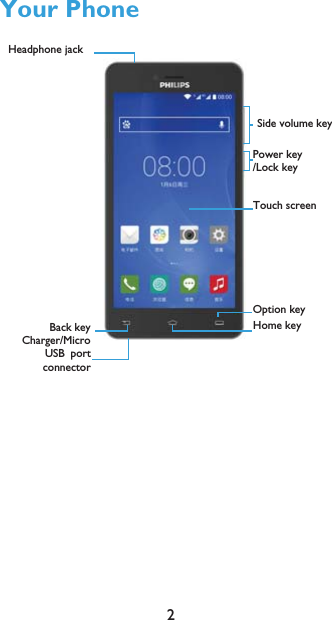
2Your PhoneTouch screenSide volume keyPower key/Lock keyCharger/MicroUSBportconnectorHeadphone jack Back key Home keyOption key
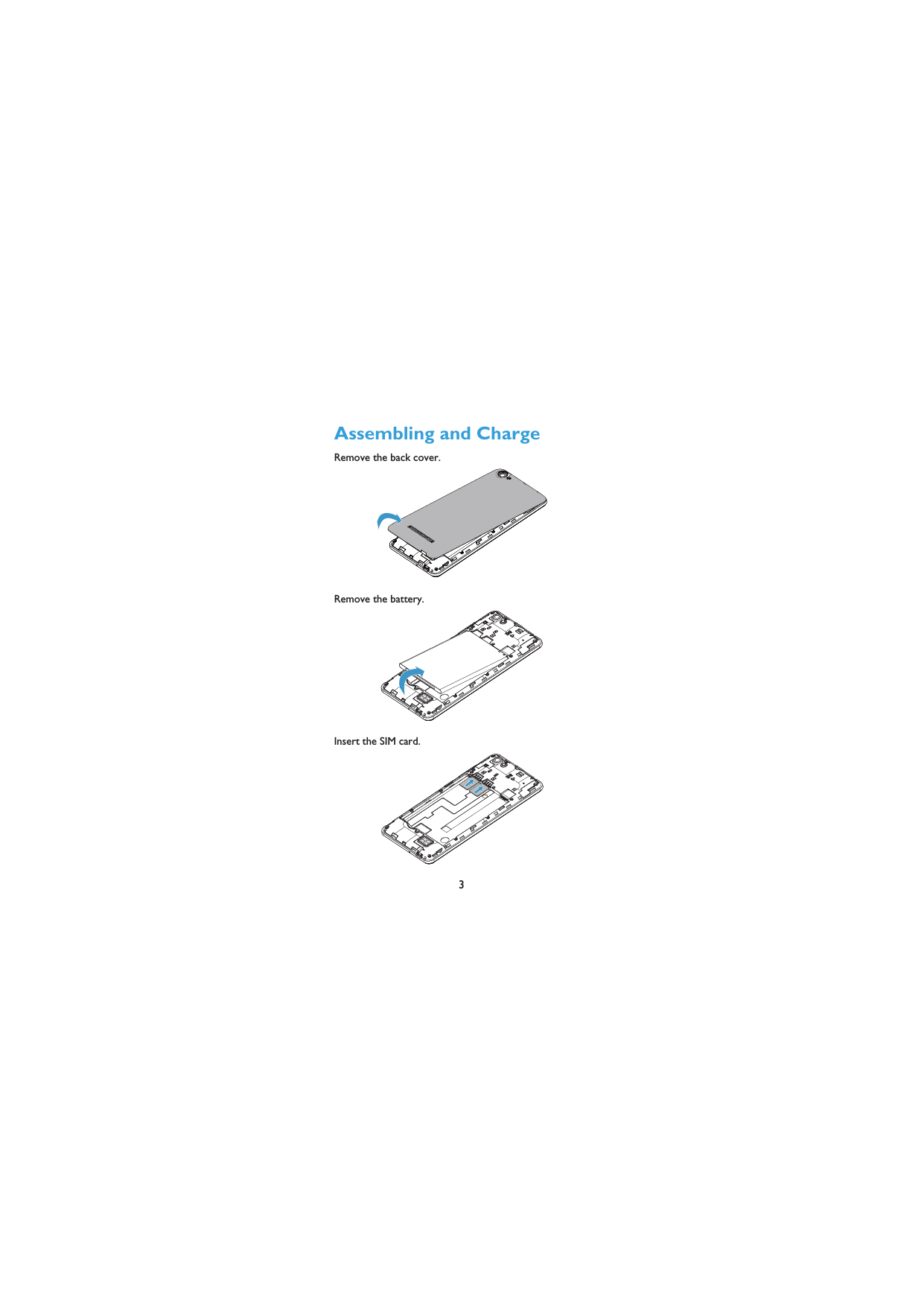
3Assembling and ChargeRemove the back cover.  Remove the battery.Insert the SIM card.
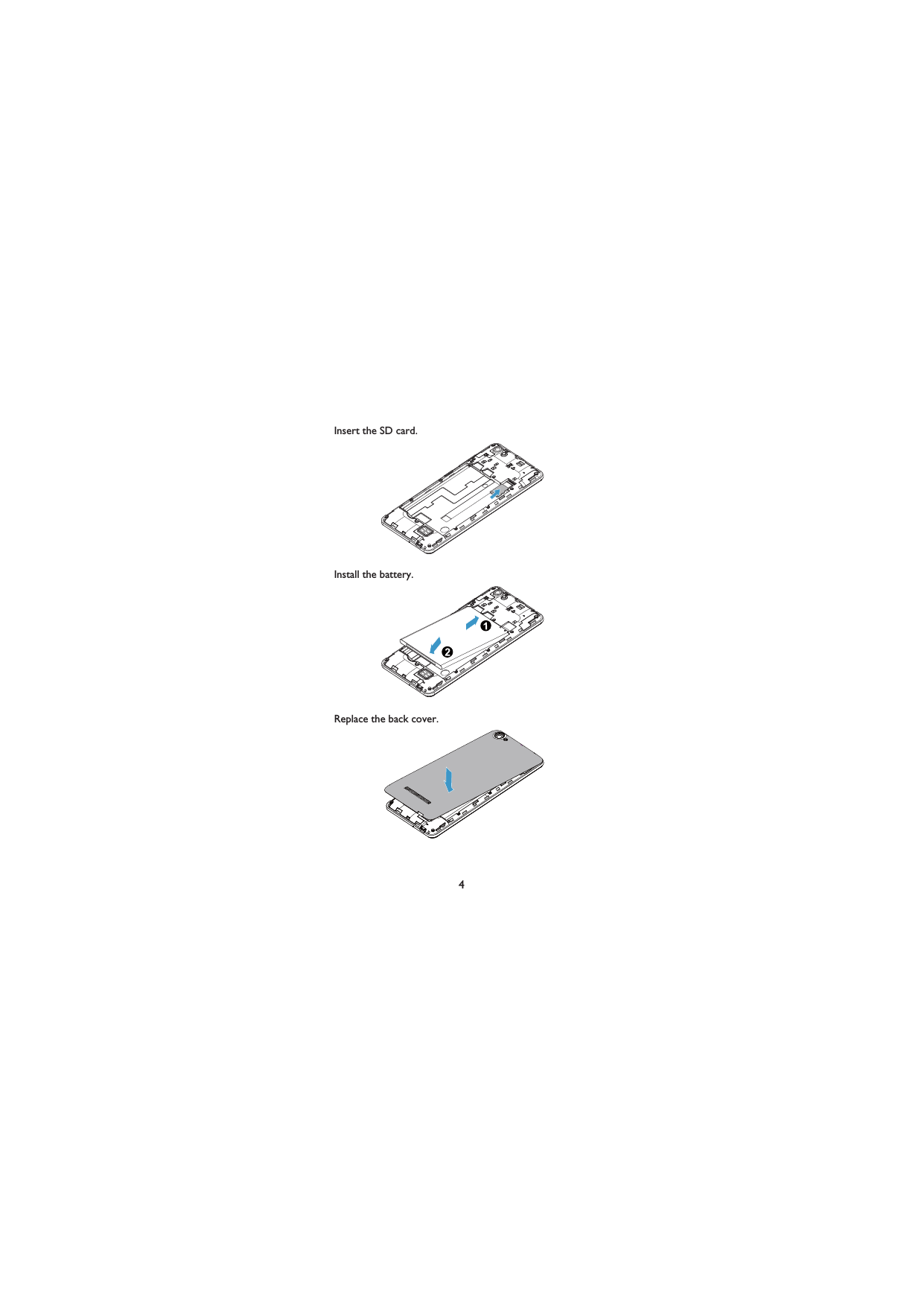
4Insert the SD card. Install the battery. Replace the back cover.
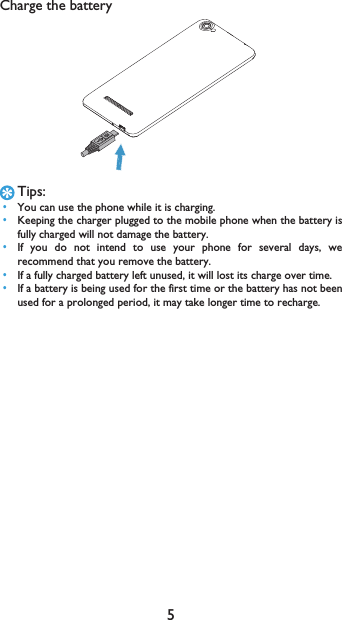
5Charge the batteryTips: •You can use the phone while it is charging. •Keeping the charger plugged to the mobile phone when the battery isfully charged will not damage the battery.  •If you do not intend to use your phone for several days, werecommend that you remove the battery. •If a fully charged battery left unused, it will lost its charge over time. •If a battery is being used for the first time or the battery has not beenused for a prolonged period, it may take longer time to recharge.
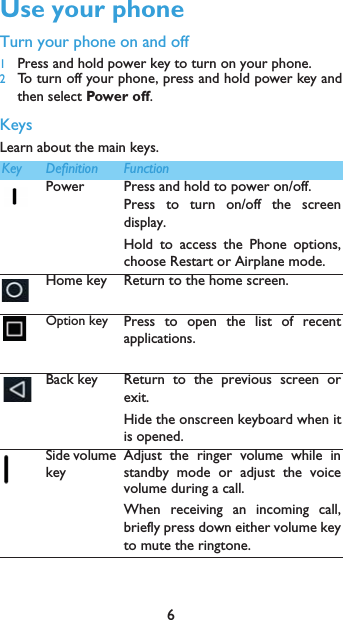
6Use your phoneTurn your phone on and off1Press and hold power key to turn on your phone.2To turn off your phone, press and hold power key andthen select Power off.KeysLearn about the main keys.mKey Definition FunctionPower Press and hold to power on/off.Press to turn on/off the screendisplay.Hold to access the Phone options,choose Restart or Airplane mode.Home key Return to the home screen.Option key Press to open the list of recentapplications.Back key Return to the previous screen orexit.Hide the onscreen keyboard when itis opened.Side volume keyAdjust the ringer volume while instandby mode or adjust the voicevolume during a call.When receiving an incoming call,briefly press down either volume keyto mute the ringtone.
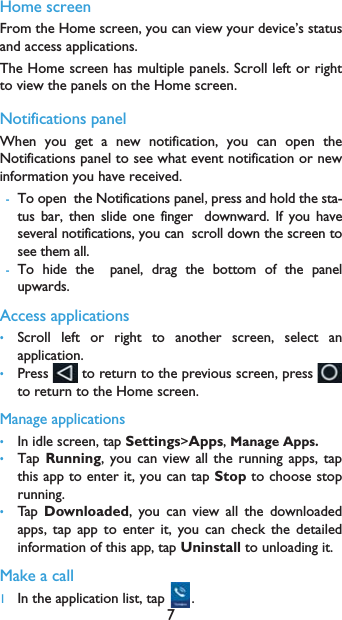
7Home screenFrom the Home screen, you can view your device’s statusand access applications.The Home screen has multiple panels. Scroll left or rightto view the panels on the Home screen. Notifications panelWhen you get a new notification, you can open theNotifications panel to see what event notification or newinformation you have received. -To openthe Notifications panelpress and hold the sta-tus bar, then slide one fingerdownward. If you haveseveral notifications, you canscroll down the screen tosee them all. -To hide thepanel, drag the bottom of the panelupwards.Access applications•Scroll left or right to another screen, select anapplication.•Press   to return to the previous screen, press to return to the Home screen.Manage applications•In idle screen, tap Settings>Apps, Manage Apps.•Tap Running, you can view all the running apps, tapthis app to enter it, you can tap Stop to choose stoprunning.•Tap   Downloaded, you can view all the downloadedapps, tap app to enter it, you can check the detailedinformation of this app, tap Uninstall to unloading it.Make a call 1In the application list, tap  .
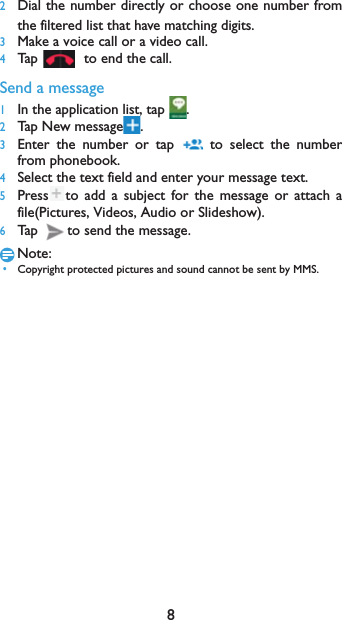
82Dial the number directly or choose one number fromthe filtered list that have matching digits.3Make a voice call or a video call.4Tap  to end the call.Send a message1In the application list, tap  .2Tap New message .3Enter the number or tap   to select the numberfrom phonebook.4Select the text field and enter your message text.5Press to add a subject for the message or attach afile(Pictures, Videos, Audio or Slideshow).6Tap  to send the message.Note: •Copyright protected pictures and sound cannot be sent by MMS.
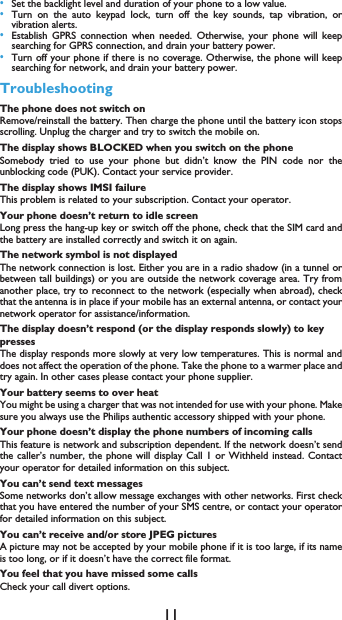
9Safety & PrecautionPrecautionKeep your phone away from small childrenKeep your phone and all accessories out of the reach of small children. Smallparts may cause choking or serious injury if swallowed.Radio WavesYour phone transmits/receives radio waves in the GSM (B2/B3/B5/B8)WCDMA(B2/B5)/FDD-LTE(B2/B4/B7/B28)Check with the vehicle manufacturer that electronic equipment used in yourvehicle will not be affected by radio energy.Switch off your phone...Turn off the phone when in an aircraft. The use of mobile phones in an aircraftmay be dangerous for the operation of the aircraft, disrupt the mobile phonesnetwork and may be illegal.In hospitals, clinics, other health care centers and anywhere else where youmay be in the close vicinity of medical equipment.In areas with a potentially explosive atmosphere (e.g. petrol stations and alsoareas where the air contains dust particles, such as metal powders).In avehicle transporting flammable products or a vehicle powered by liquefiedpetroleum gas (LPG).In quarries or other areas where blasting operations are inprogress.Your mobile phone and your carAvoid using your phone while driving and obey all regulations that restrictthe use of mobile phones while driving. Use hands free accessories toincrease your safety when possible. Ensure that your phone and car kit do notblock any air bags or other security devices fitted in your car.Handle your phone carefully and sensiblyFor the optimal and satisfactory operation of the phone you arerecommended to use the phone in the normal operating position.•Do not expose your phone to extreme temperatures.•Do not immerse the phone in any liquid; if your phone is damp, switch it off,remove the battery and let them dry for 24hrs before using them again.•To clean the phone, wipe it with a soft cloth.•In hot weather or after prolonged exposure to the sun (e.g., behind a windowor a windscreen), the temperature of your phone's casing might increase. Bevery careful in this case when picking up your phone and also avoid using itwith an ambient temperature over 40° C.Protect batteries from damageYou should only use Philips Authentic Accessories, as the use of any otheraccessories may damage your phone and may be dangerous, and will makeall guarantees for your Philips phone null and void. The use of an unspecified typeof battery may also cause an explosion.Make sure damaged parts are replaced immediately by a qualified technician andthat they are replaced with genuine Philips replacement parts.•Your phone is powered by a rechargeable battery.•Use specified charger only.•Do not incinerate.•Do not deform or open the battery.
10•Do not allow metal objects (such as keys in your pocket) to short circuit thebattery contacts.•Avoid exposure to excessive heat (>60° C or 140° F), moisture or causticenvironments.Environmental careRemember to observe the local regulations regarding the disposal of thepackaging materials, exhausted batteries and old phone and please promotetheir recycling.Philips has marked the battery and packaging with standard symbolsdesigned to promote the recycling and appropriate disposal of your eventualwaste.:The labeled packaging material is recyclable.:A financial contribution has been made to the associated national packagingrecovery and recycling system.:The plastic material is recyclable (also identifies the type of plastic).Hearing ProtectionWhen listening to music, adjust the volume to a moderate level. Continuous exposure to high volume may impair your hearing.WEEE Marking in the DFU: “Information to the Consumer”Disposal of your old productYour product is designed and manufactured with high quality materials andcomponents, which can be recycled and reused. When this crossed-out wheeled bin symbol is attached to a product itmeans the product is covered by the European Directive 2002/96/ECPlease inform yourself about the local separate collection system forelectrical and electronic products.Please act according to your local rules and do not dispose of your oldproducts with your normal household waste. The correct disposal of your oldproduct will help prevent potential negative consequences for the environmentand human health.This device may contain commodities, technology or software subject to exportlaws and regulations from the US and other countries. Diversion contrary to lawis prohibited.TipsPacemakersIf you have a pacemaker:•Always keep the phone more than 15 cm from your pacemaker when thephone is switched on, in order to avoid potential interference.•Do not carry the phone in a breast pocket.•Use the ear opposite to the pacemaker to minimize the potential interference.•Switch off your phone if you suspect that interference is taking place.Hearing aidsIf you are a user of a hearing aid, consult your physician and hearing aidmanufacturer to learn whether your particular device is susceptible to cellularphone interference.How to prolong the battery life of your phone To have your mobile phone function properly, sufficient battery power isimportant. For the power-saving purpose, do the following, if applicable:•Turn off the Bluetooth function of your phone.
11•Set the backlight level and duration of your phone to a low value. •Turn on the auto keypad lock, turn off the key sounds, tap vibration, orvibration alerts. •Establish GPRS connection when needed. Otherwise, your phone will keepsearching for GPRS connection, and drain your battery power. •Turn off your phone if there is no coverage. Otherwise, the phone will keepsearching for network, and drain your battery power.TroubleshootingThe phone does not switch onRemove/reinstall the battery. Then charge the phone until the battery icon stopsscrolling. Unplug the charger and try to switch the mobile on.The display shows BLOCKED when you switch on the phoneSomebody tried to use your phone but didn’t know the PIN code nor theunblocking code (PUK). Contact your service provider.The display shows IMSI failureThis problem is related to your subscription. Contact your operator.Your phone doesn’t return to idle screenLong press the hang-up key or switch off the phone, check that the SIM card andthe battery are installed correctly and switch it on again.The network symbol is not displayedThe network connection is lost. Either you are in a radio shadow (in a tunnel orbetween tall buildings) or you are outside the network coverage area. Try fromanother place, try to reconnect to the network (especially when abroad), checkthat the antenna is in place if your mobile has an external antenna, or contact yournetwork operator for assistance/information.The display doesn’t respond (or the display responds slowly) to key pressesThe display responds more slowly at very low temperatures. This is normal anddoes not affect the operation of the phone. Take the phone to a warmer place andtry again. In other cases please contact your phone supplier.Your battery seems to over heatYou might be using a charger that was not intended for use with your phone. Makesure you always use the Philips authentic accessory shipped with your phone.Your phone doesn’t display the phone numbers of incoming callsThis feature is network and subscription dependent. If the network doesn’t sendthe caller’s number, the phone will display Call 1 or Withheld instead. Contactyour operator for detailed information on this subject.You can’t send text messagesSome networks don’t allow message exchanges with other networks. First checkthat you have entered the number of your SMS centre, or contact your operatorfor detailed information on this subject.You can’t receive and/or store JPEG picturesA picture may not be accepted by your mobile phone if it is too large, if its nameis too long, or if it doesn’t have the correct file format.You feel that you have missed some callsCheck your call divert options.
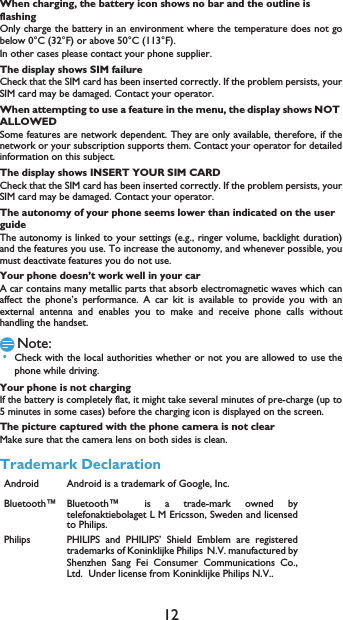
12When charging, the battery icon shows no bar and the outline is flashingOnly charge the battery in an environment where the temperature does not gobelow 0°C (32°F) or above 50°C (113°F).In other cases please contact your phone supplier.The display shows SIM failureCheck that the SIM card has been inserted correctly. If the problem persists, yourSIM card may be damaged. Contact your operator.When attempting to use a feature in the menu, the display shows NOT ALLOWEDSome features are network dependent. They are only available, therefore, if thenetwork or your subscription supports them. Contact your operator for detailedinformation on this subject.The display shows INSERT YOUR SIM CARDCheck that the SIM card has been inserted correctly. If the problem persists, yourSIM card may be damaged. Contact your operator.The autonomy of your phone seems lower than indicated on the user guideThe autonomy is linked to your settings (e.g., ringer volume, backlight duration)and the features you use. To increase the autonomy, and whenever possible, youmust deactivate features you do not use.Your phone doesn’t work well in your carA car contains many metallic parts that absorb electromagnetic waves which canaffect the phone’s performance. A car kit is available to provide you with anexternal antenna and enables you to make and receive phone calls withouthandling the handset.Note: •Check with the local authorities whether or not you are allowed to use thephone while driving.Your phone is not chargingIf the battery is completely flat, it might take several minutes of pre-charge (up to5 minutes in some cases) before the charging icon is displayed on the screen.The picture captured with the phone camera is not clearMake sure that the camera lens on both sides is clean.Trademark DeclarationAndroid Android is a trademark of Google, Inc.Bluetooth™ Bluetooth™is a trade-mark owned bytelefonaktiebolaget L M Ericsson, Sweden and licensedto Philips.Philips PHILIPS and PHILIPS’ Shield Emblem are registeredtrademarks of Koninklijke PhilipsN.V. manufactured byShenzhen Sang Fei Consumer Communications Co.,Ltd.  Under license from Koninklijke Philips N.V..
13Limited warranty1 What Does This Limited Warranty Cover?Manufacturer warrants to the original retail purchaser (“Consumer” or “You”)that this Philips cellular product and all accessories originally provided bymanufacturer in the sales package (“Product”) are free from defects in materials,design and workmanship under normal use in accordance with the operatinginstructions and pursuant to the following terms and conditions. This limitedwarranty extends only to the Consumer for Products purchased and used in theoriginal country of purchase. The limited warranty is valid only in manufacturer’sintended country of sales of the product.2.How Long is The Limited Warranty Period?The limited warranty period for the Product extends for ONE (1) YEAR from thedate of purchase of the Product, documented by valid proof of purchase. Thelimited warranty for original Philips rechargeable battery extends for six (6)months from the date of purchase.3.What Will Manufacturer Do if The Product is Not Free From MaterialDefects in Materials and Workmanship During The Limited Warranty Period?During the limited warranty period, manufacturer or its authorized servicerepresentative will, at its option either repair or replace, without charge for partsor labour, a materially defective Product with new or refurbished parts or Productand return such repaired or replaced Product to the Consumer in workingcondition. Manufacturer will retain defective parts, modules or equipment.Repaired or replaced Product will be covered by this limited warranty for thebalance of the original limited warranty period or ninety (90) days from the dateof repair or replacement whichever is longer. Repair or replacement of Product,at manufacturer’s option is your exclusive remedy.4.What is Not Covered By This Limited Warranty?This limited warranty does not cover:a) Product that has been subjected to misuse, accident, shipping or other physicaldamage, improper installation, abnormal operation handling, neglect, inundation,fire, water or other liquid intrusion; orb) Product that has been damaged due to repair, alteration, or modification byanyone not authorized by manufacturer; orc) Product that has reception or operation problems caused by signal conditions,network reliability or cable or antenna systems; ord) Product defects or problems caused by uses with non-Philips products oraccessories; or e) Product which warranty/quality stickers, product serial number or electronicserial number has been removed, altered or rendered illegible; or f) Product purchased, used, serviced, or shipped for repair from outside theoriginal country of purchase, or used for commercial or institutional purposes(including but not limited to Products used for rental purposes); or g) Product returned without valid proof of purchase or which proof of purchasehas been altered or is illegible.h)Normal wear and tear or Force Majeure.5.How Do You Get Warranty Service?a) Return the Product to an authorized service center of manufacturer. You maycontact the local manufacturer office for the location of the nearest authorizedservice center.
14b)The SIM card must be removed from the Product before it is given tomanufacturer. Manufacturer assumes no liability for damaged or loss of the SIMcard or the data contained therein.c)If the Product failure is not covered by this limited warranty, or this limitedwarranty is inapplicable, void or invalid due to any terms and conditions statedherein, the Consumer will be charged for the cost of repair or replacement of theProduct and all other related cost incurred in repairing or replacing the Product.d) IMPORTANT - you are required to return the Product together with a validproof of purchase which must identify the point of purchase, date of purchase,Product model and Product serial number clearly.6.Other Limitation: This Warranty is The Entire Agreement.EXCEPT FOR THE EXPRESS WARRANTIES SET FORTH ABOVE AND THOSEIMPLIED BY LAW AND WHICH CANNOT BE EXCLUDED OR MODIFIED BYAGREEMENT, MANUFACTURER PROVIDES NO OTHER WARRANTYWHETHER EXPRESS OR IMPLIED (WHETHER BY STATUTE, UNDER THEOPERATION OF LAW OR OTHERWISE) AND SPECIALLY DISCLAIMS ANYWARRANTY OF SATISFACTORY QUALITY MERCHANTABILITY OR FITNESSFOR A PARTICULAR PURPOSE.MANUFACTURER’ TOTAL LIABILITY FOR DAMAGES RELATING TO ORARISING OUT OF THE PURCHASE OR USE OF THE PRODUCT, REGARDLESSOF THE TYPE OR CAUSE OF SUCH DAMAGE OR THE FORM ORCHARACTERISATION OF THE CLAIM ASSERTED (E.G. CONTRACT), SHALLNOT EXCEED THE ORIGINAL PURCHASE PRICE PAID FOR THE PRODUCT.HOWEVER IN NO EVENT SHALL MANUFACTURER BE LIABLE FOR ANYPUNITIVE, SPECIAL, INCIDENTAL, INDIRECT OR CONSEQUENTIALDAMAGES (INCLUDING BUT NOT LIMITED TO THE LOSS OF USE, LOSS OFTIME, INCONVENIENCE, COMMERIAL LOSS, LOST PROFITS, LOST BUSINESSOPPORTUNITIES, COST OF SUBSTITUTION OF GOODS OR SERVICES,INVESTMENTS, DAMAGE TO GOODWILL OR REPUTATION, OR LOSS OFDATA AND CLAIMS BY THIRD PARTIES) RESULTING FROM PURCHASE ORUSE OF THE PRODUCT, TO THE FULLEST EXTENT ALLOWED BY LAW,WHETHER OR NOT MANUFACTURER HAS BEEN ADVISED OF THEPOSSIBILTY OF SUCH DAMAGES. THESE LIMITATIONS SHALL APPLYNOTWITHSTANDING THE FAILURE OF THE ESSENTIAL PURPOSE OF ANYLIMITED REMEDY.This limited warranty represents the complete and exclusive agreement betweenthe Consumer and Manufacturer with respect to this cellular Product and itsupercedes all prior agreements between the parties, oral or written, and all othercommunications between the parties relating to the subject matter of this limitedwarranty. No carrier, retailer, agent, dealer, employee, thereof, or employee ofmanufacturer is authorized to make modifications to this limited warranty and youshould not rely on any such representation.This limited warranty does not affect the Consumer’s statutory rights underapplicable national laws in force.
15FCC ComplianceThis device complies with part 15 of the FCC Rules. Operation is subject to thecondition that this device does not cause harmful interference.Caution: Changes or modifications not expressly approved by the manufacturercould void the user’s authority to operate the equipment.Note: This equipment has been tested and found to comply with the limits for aClass B digital device, pursuant to part 15 of the FCC Rules. These limits aredesigned to provide reasonable protection against harmful interference in aresidential installation. This equipment generates, uses and can radiate radiofrequency energy and, if not installed and used in accordance with the instructions,may cause harmful interference to radio communications. However, there is noguarantee that interference will not occur in a particular installation. If thisequipment does cause harmful interference to radio or television reception, whichcan be determined by turning the equipment off and on, the user is encouraged totry to correct the interference by one or more of the following measures:—Reorient or relocate the receiving antenna.—Increase the separation between the equipment and receiver.—Connect the equipment into an outlet on a circuit different from that to whichthe receiver is connected.—Consult the dealer or an experienced radio/ TV technician for help.This device complies with Part 15 of the FCC Rules. Operation is subject to thefollowing two conditions: •This device may not cause harmful interference. •This device must accept any interference received, including interference thatmay cause undesired operation.Health and safety informationRadio Frequency (RF) EnergyThis model phone meets the government’s requirements for exposure to radiowaves.This phone is designed and manufactured not to exceed the emission limits forexposure to radio frequency (RF) energy set by the Federal CommunicationsCommission of the U.S. Government:The exposure standard for wireless mobile phones employs a unit of measurementknown as the Specific Absorption Rate, or SAR.  The SAR limit set by the FCC is1.6W/kg. Tests for SAR are conducted using standard operating positionsaccepted by the FCC with the phone transmitting at its highest certified powerlevel in all tested frequency bands.  Although the SAR is determined at the highestcertified power level, the actual SAR level of the phone while operating can be wellbelow the maximum value.  This is because the phone is designed to operate atmultiple power levels so as to use only the poser required to reach the network.In general, the closer you are to a wireless base station antenna, the lower thepower output.The highest SAR value for the model phone as reported to the FCC when testedfor use at the ear is X.XXX W/kg and when worn on the body, as described inthis user guide, is X.XXX W/kg (Body-worn measurements differ among phonemodels, depending upon available enhancements and FCC requirements).While there may be differences between the SAR levels of various phones and atvarious positions, they all meet the government requirement.
The SAR limit of USA (FCC) is 1.6 W/kg averaged over one gram of tissue. Device types Philips S326 has also been tested against this SAR limit. The highest SAR value reported under this standard during product certification for use when properly worn on the body is 1.316 W/kg and for head is 0.311 W/kg. Hotspot SAR is 1.396W/kg, simultaneous RF exposure is 1.513W/kg. . This device was tested for typical body‐worn operations with the back of the handset kept 5mm from the body. To maintain compliance with FCC RF exposure requirements, use accessories that maintain a 10mm separation distance between the user's body and the back of the handset. The use of belt clips, holsters and similar accessories should not contain metallic components in its assembly. The use of accessories that do not satisfy these requirements may not comply with FCC RF exposure requirements, and should be avoided.
16The FCC has granted an Equipment Authorization for this model phone with allreported SAR levels evaluated as in compliance with the FCC RF exposureguidelines.  SAR information on this model phone is on file with the FCC and canbe found under the Display Grant section of http://www.fcc.gov/oet/fccid aftersearching on FCC ID: VQRCTS326For body worn operation, this phone has been tested and meets the FCC RFexposure guidelines for use with an accessory that contains no metal and thepositions the handset a minimum of 1 cm from the body.  Use of otherenhancements may not ensure compliance with FCC RF exposure guidelines.  Ifyou do not use a body-worn accessory and are not holding the phone at the ear,position the handset a minimum of 1 cm from your body when the phone isswitched on.

Navigation menu