Sanji Electronics MED2XKEY Wireless Keyboard User Manual

Sanji Electronics(pty)., Ltd. Wireless Keyboard Users Manual

Users Manual

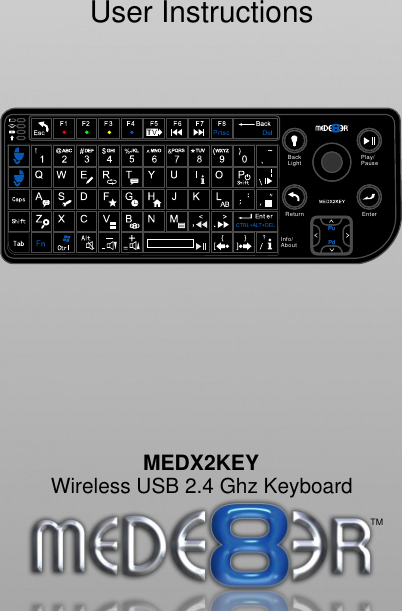
User InstructionsEnterPlay/PauseBackLightReturnTMInfo/AboutMEDX2KEYTMWireless USB 2.4 Ghz Keyboard
INDEXpage 1page 2page 3page 4General Overview / Charging the keyboardConnecting the USB Receiver General OperationUsing the Keyboard
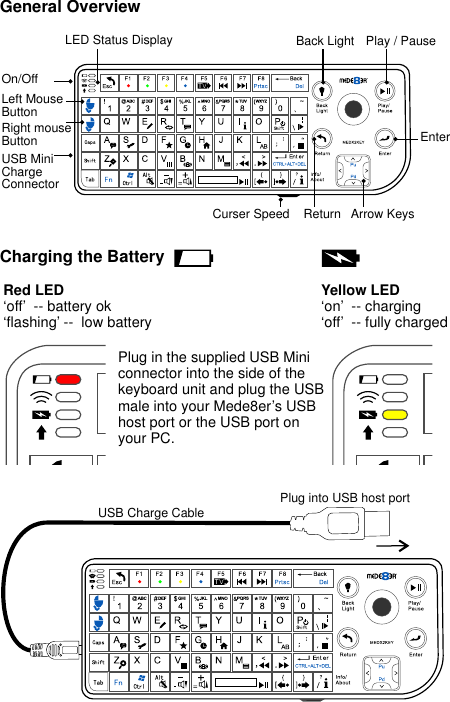
Red LED‘off’  -- battery ok‘flashing’ --  low battery  Yellow LED‘on’  -- charging  ‘off’  -- fully chargedPlug in the supplied USB Mini connector into the side of the keyboard unit and plug the USB male into your Mede8er’s USB host port or the USB port on your PC.USB Charge CableCharging the Battery Curser Speed    Return   Arrow KeysLeft Mouse ButtonRight mouseButtonOn/Off USB Mini ChargeConnector General OverviewBack Light  Play / PauseEnterLED Status DisplayPlug into USB host port
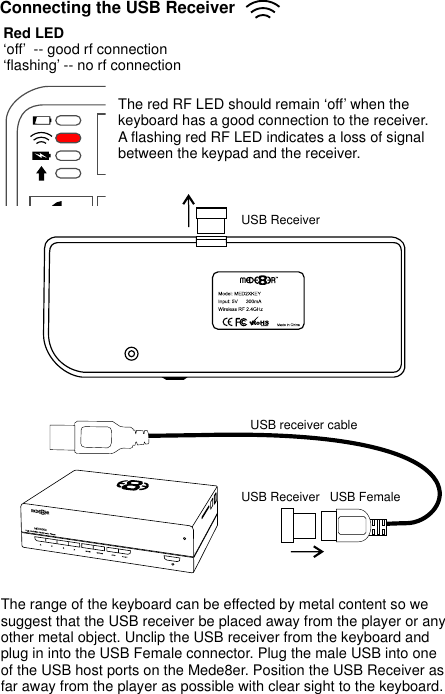
USB ReceiverThe range of the keyboard can be effected by metal content so we suggest that the USB receiver be placed away from the player or any other metal object. Unclip the USB receiver from the keyboard and plug in into the USB Female connector. Plug the male USB into one of the USB host ports on the Mede8er. Position the USB Receiver as far away from the player as possible with clear sight to the keyboard.USB FemaleUSB Receiver The red RF LED should remain ‘off’ when the keyboard has a good connection to the receiver. A flashing red RF LED indicates a loss of signal between the keypad and the receiver.Connecting the USB ReceiverRed LED‘off’  -- good rf connection‘flashing’ -- no rf connection  USB receiver cable
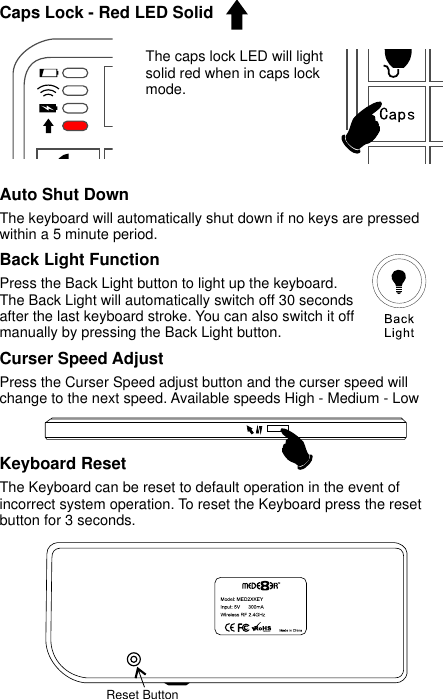
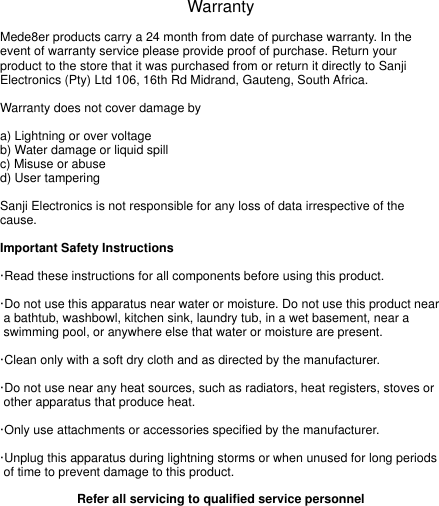
 Caps Lock - Red LED SolidReset Button Curser Speed Adjust Press the Curser Speed adjust button and the curser speed will change to the next speed. Available speeds High - Medium - LowKeyboard Reset The Keyboard can be reset to default operation in the event of incorrect system operation. To reset the Keyboard press the reset button for 3 seconds.  Back Light FunctionPress the Back Light button to light up the keyboard. The Back Light will automatically switch off 30 seconds after the last keyboard stroke. You can also switch it off manually by pressing the Back Light button.   The caps lock LED will light solid red when in caps lock mode.Auto Shut DownThe keyboard will automatically shut down if no keys are pressed within a 5 minute period.
Using the KeyboardThe preferred way of using the MEDX2KEY for Internet Media browsing is to hold the keyboard with both hands. Use your left thumb to control the left/right mouse buttons and your right thumb to control the trackball and the arrow buttons. ESC:    RETURN  SPACE:  PLAY ENTER:  SELECT(ENTER) '0': 0'1': 1'2': 2'3': 3'4': 4'5': 5'6': 6'7': 7'8': 8'9': 9'-': VOL_DOWN'+': VOL_UP  'P': SHIFT + ‘P’ = POWER OFF   'R(r)': REPEAT 'T(t)': SUBTITLE  'I(i)': INFO       'A(a)': AUDIO     'G(g)': GOTO      'H(h)': HOME            'Z(z)': ZOOM ',(<)': FRWD     '.(>)': FFWD      '/(?)': Info / About 'F(f)': Favourite  'E(e)': EDIT   'M(m)': MENU    'S(s)': Setup 'V(v)': View 'L(l)': AB '\(|)': SLOW'’(”)': STOP'/(?)': Info / About'[({)': Back Skip'](})': Forward Skip'B(b)': Browser - Devices'Alt': Mute'FI': Red button'F2': Green button'F3': Yellow button'F4': Blue button'F5': TV Sys'F6': Previous Chapter 'F7': Next ChapterKeyboard Commands
WarrantyMede8er products carry a 24 month from date of purchase warranty. In the event of warranty service please provide proof of purchase. Return your product to the store that it was purchased from or return it directly to Sanji Electronics (Pty) Ltd 106, 16th Rd Midrand, Gauteng, South Africa. Warranty does not cover damage bya) Lightning or over voltageb) Water damage or liquid spillc) Misuse or abused) User tamperingSanji Electronics is not responsible for any loss of data irrespective of the cause.Important Safety Instructions·Read these instructions for all components before using this product.·Do not use this apparatus near water or moisture. Do not use this product near   a bathtub, washbowl, kitchen sink, laundry tub, in a wet basement, near a   swimming pool, or anywhere else that water or moisture are present.·Clean only with a soft dry cloth and as directed by the manufacturer. ·Do not use near any heat sources, such as radiators, heat registers, stoves or  other apparatus that produce heat.·Only use attachments or accessories specified by the manufacturer.·Unplug this apparatus during lightning storms or when unused for long periods  of time to prevent damage to this product.Refer all servicing to qualified service personnel
FCC Statement This equipment has been tested and found to comply with the limits for a Class B digital device, pursuant to part 15 of the FCC rules. These limits are designed to provide reasonable protection against harmful interference in a residential installation. This equipment generates, uses and can radiate radio frequency energy and, if not installed and used in accordance with the instructions, may cause harmful interference to radio communications. However, there is no guarantee that interference will not occur in a particular installation. If this equipment does cause harmful interference to radio or television reception, which can be determined by turning the equipment off and on, the user is encouraged to try to correct the interference by one or more of the following measures: -Reorient or relocate the receiving antenna. -Increase the separation between the equipment and receiver. -Connect the equipment into an outlet on a circuit different from that to which the receiver is connected. -Consult the dealer or an experienced radio/TV technician for help. To assure continued compliance, any changes or modifications not expressly approved by the party Responsible for compliance could void the user’s authority to operate this equipment. (Example- use only shielded interface cables when connecting to computer or peripheral devices).  Declaration of Conformity Hereby, Sanji Electronics(pty)., Ltd. declares that this device is in compliance with the essential requirements and other relevant provisions of Directive 1999/5/EC.
MEDX2KEYWireless USB 2.4 Ghz KeyboardSanji Electronics (Pty) Ltd 106 16th Road, Midrand, Gauteng, South Africa. Tel +27(11)266 7500 E Mail: sales@mede8er.com Europe: I Tel: +31(10)7142861. Trade: sales@mede8er.eu Warranty and support: support@mede8er.euBDL BV. Fermiweg 9-11, 3208KT Spijkenisse, Netherlands. Mede8er_medx2key_user_rev1www.mede8er.com  www.mede8er.euwww.mede8erforum.comFor more information or support please visit www.mede8er.eu/support/ or call +31(0)10-7142861 during business hours.* Specifications subject to change without notice.

Navigation menu