Sanus Systems Vm1 Users Manual
Sanus VM1 VM1 VM1 VM1b_VM1ins_ML
VM1 to the manual aa5afcd9-c844-469b-97bb-69766246ffd6
2015-02-06
: Sanus-Systems Sanus-Systems-Sanus-Vm1-Vm1-Vm1-Users-Manual-526222 sanus-systems-sanus-vm1-vm1-vm1-users-manual-526222 sanus-systems pdf
Open the PDF directly: View PDF  .
.
Page Count: 18
ESPAÑOL DEUTSCH FRANÇAIS ITALIANO PYCCKO
Spanish German French Italian Russian Japanese Mandarin
Sanus Systems 2221 Hwy 36 West, Saint Paul, MN 55113 7.05.05
Customer Service: (800) 359-5520 • (651) 484-7988 • fax (651) 636-0367
Customer Service Europe: 31 (0)20 5708938 • fax 31 (0)20 5708989
See complementary Sanus products at www.sanus.com
中文
ENGLISH
International Assembly Instructions for models VM1
ENGLISH
Assembly Instructions for Model: VM1
Thank you for choosing Sanus Systems Vision Mount. This product is designed to
mount VESA 75/100 compatible LCD televisions up to 50 pounds onto a vertical wall.
It allows you to effortlessly tilt and swivel your new television up to 15° in either
direction without the use of tools. Check carefully to make sure there are no missing
or defective parts. Never use defective parts. Improper installation may cause dam-
age or serious injury. If you do not understand these directions, or have any doubts
about the safety of the installation, please call a qualied contractor or contact Sanus
at 800.359.5520 or www.sanus.com. We can quickly assist you with installation ques-
tions and missing or damaged parts. Replacement parts for Sanus products purchased
through authorized dealers will be shipped directly to you.
Required Tools: Drill with 3/16” bit, Phillips screw driver
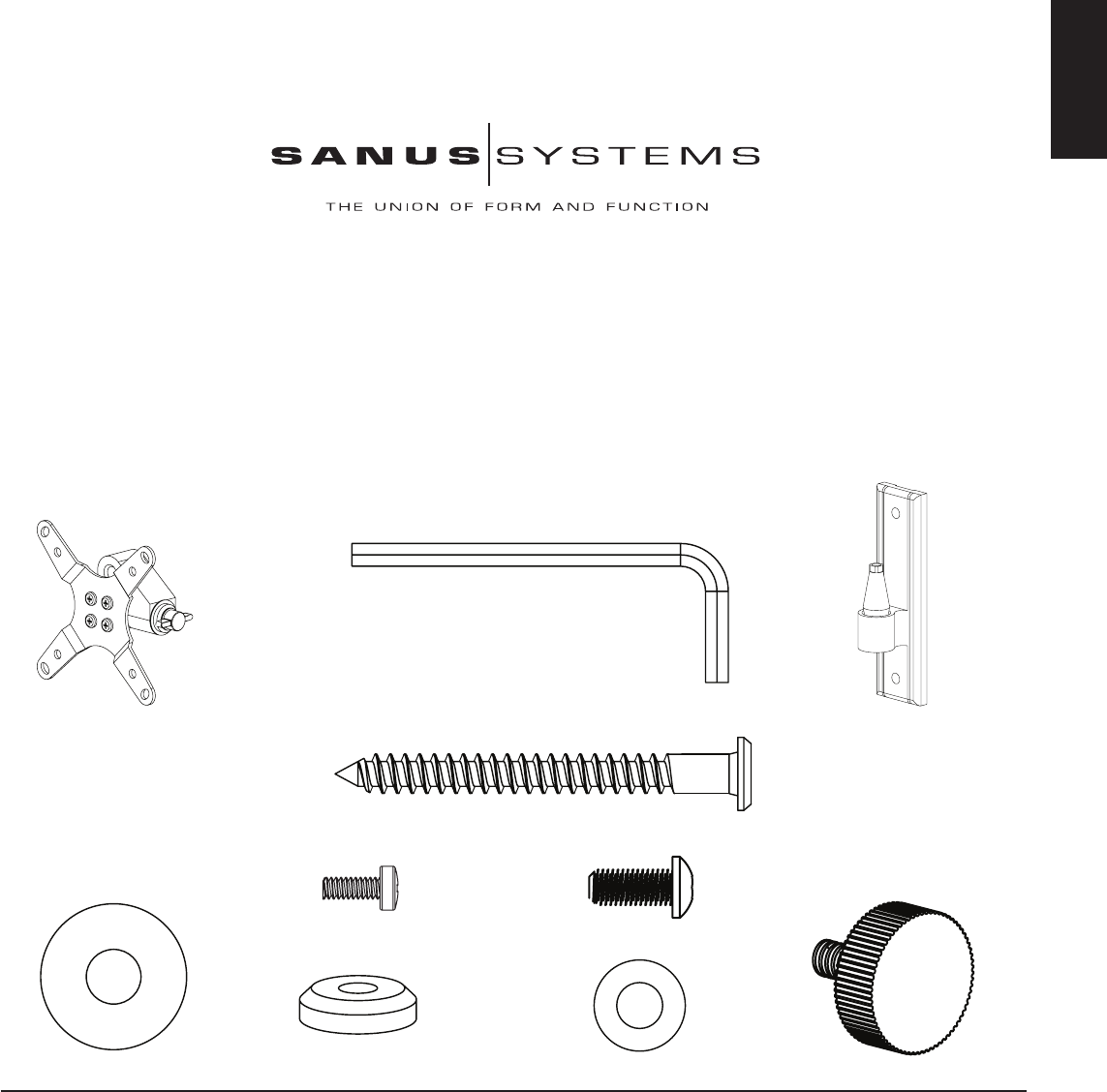
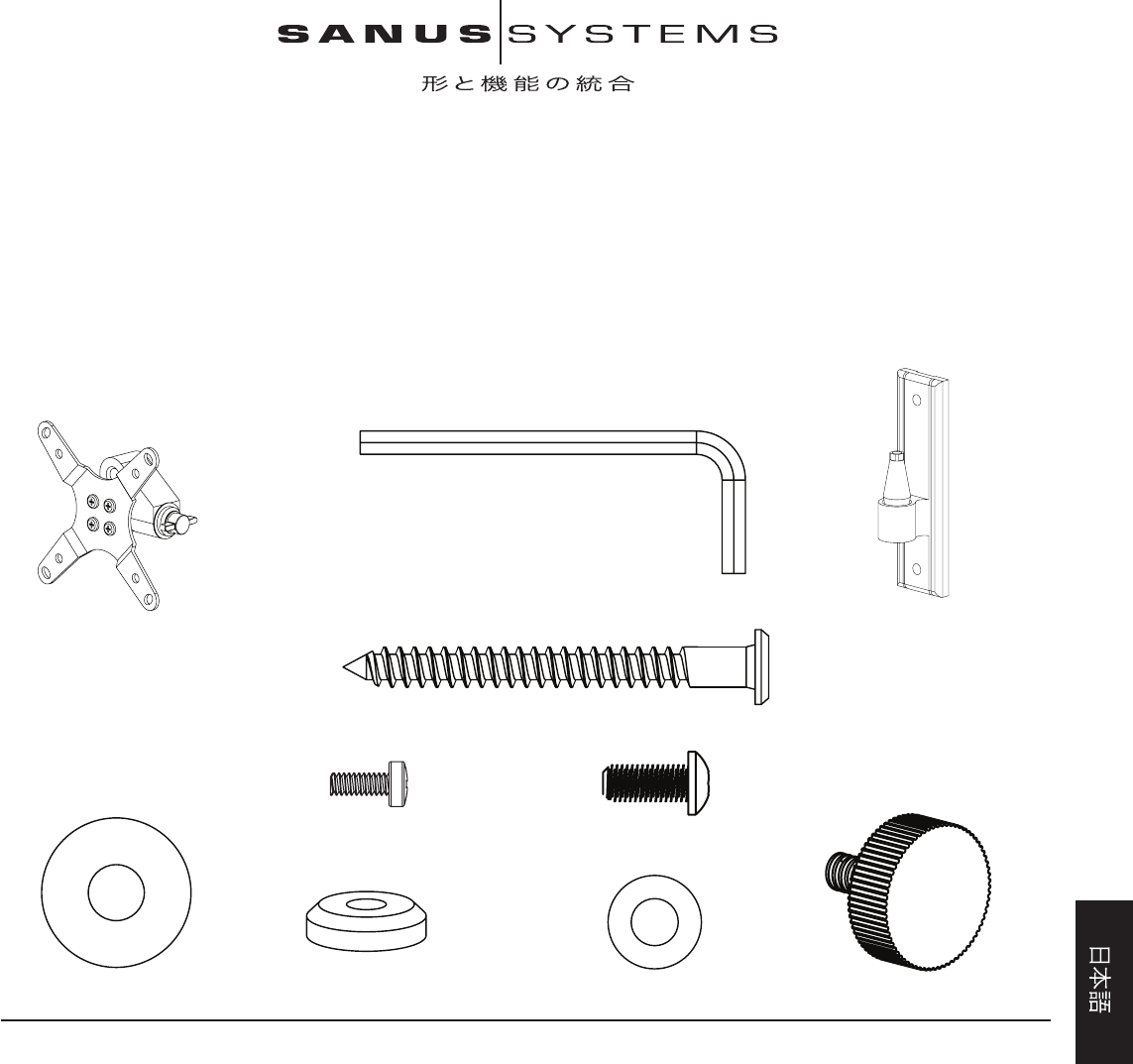
Parts and Hardware: *Not shown as actual size
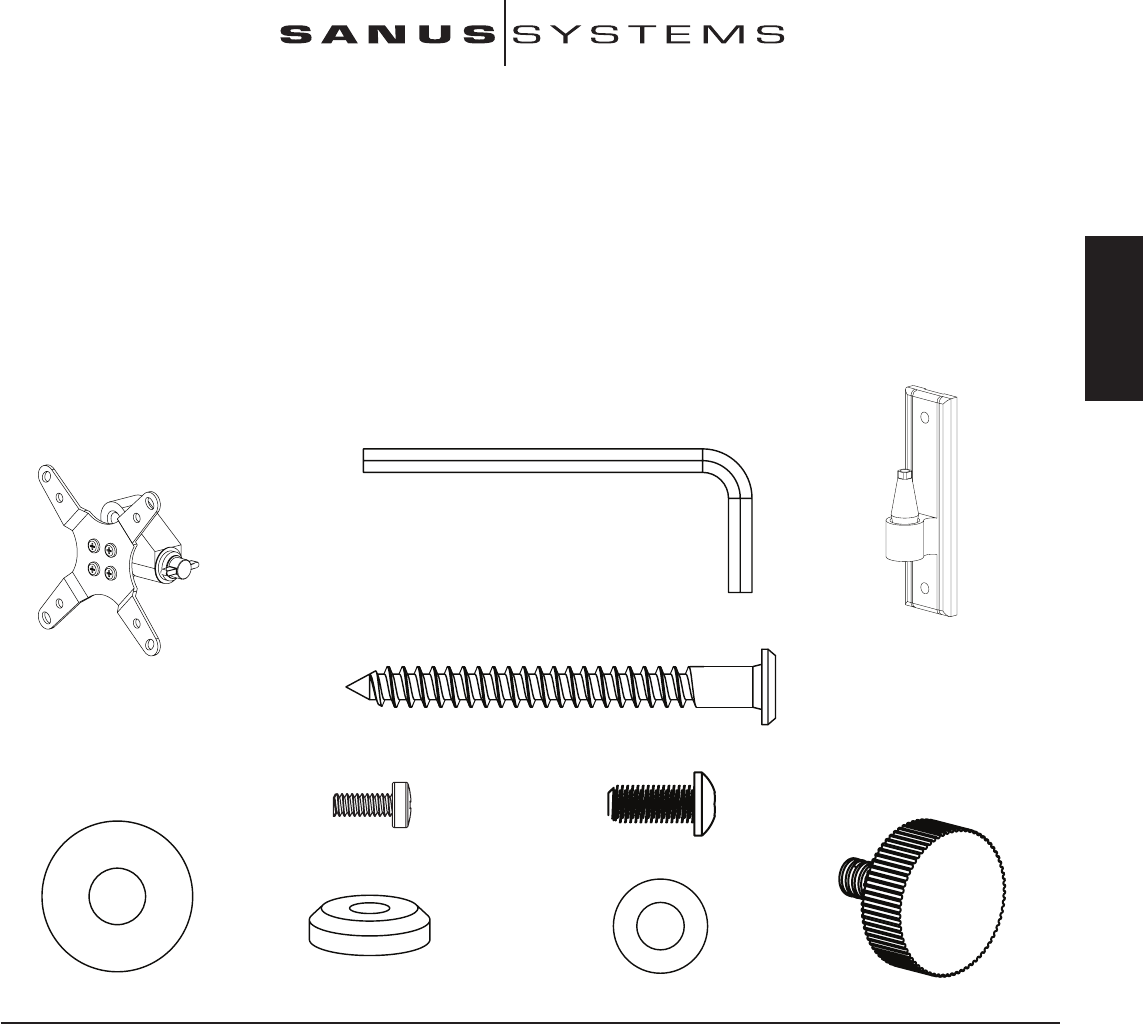
(1) Allen Key - b
(1) Monitor Mount - a* (1) Wall Plate - c*
(2) Lag Bolt - d
(4) M4 x 10 Bolt - e (4) Knob Replacement Bolt - f
(1) Large Washer - g (1) Cap - h (1) Small Washer - i (1) Knob - j
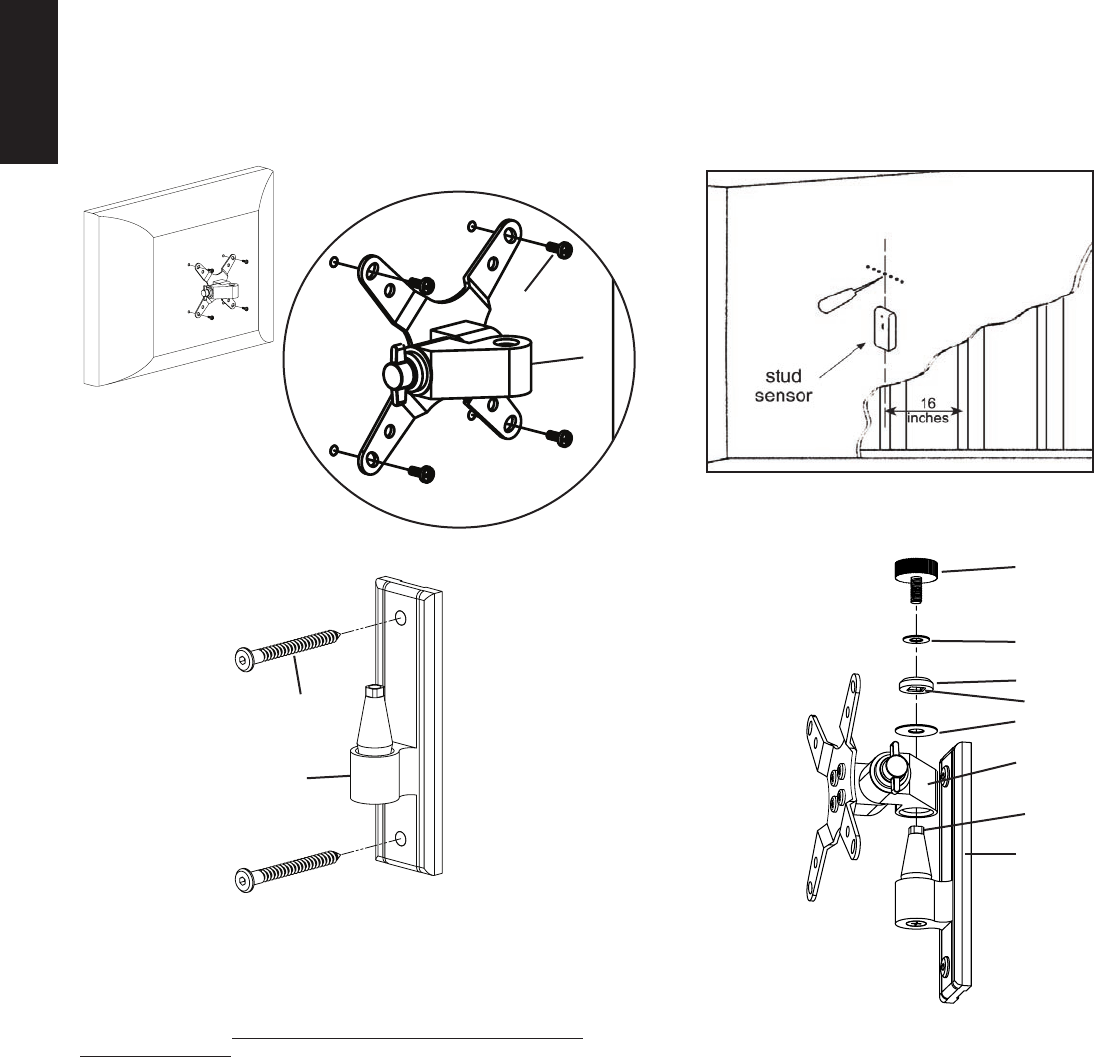
Step 1 - Attaching to the Television: Attach the Monitor Mount (a) to the back of your LCD television using the M4 x 10 Bolt (e) as shown in Diagram 1. Place 4 bolts through the
Monitor Mount and tighten snugly into the VESA bolt mounting pattern on the back of the television. Make sure the large side of the tapered hole on the Monitor Mount faces toward
the bottom of the television.
Step 2 - Attaching to the Wall: Hardware for wood stud mounting is provided. For all other mounting applications contact a local contractor or hardware store. Use a high quality
stud sensor to locate a stud. It is a good idea to verify the stud location with an awl or thin nail as shown in Diagram 2a. Use the Wall Plate (c) as a template to mark the two hole loca-
tions on the wall. Make sure these holes are aligned vertically and centered over the stud. Pre-drill the two holes to a depth of 2.5” using a 3/16” drill bit. Attach the Wall Plate to the
wall using the two Lag Bolts (d) as shown in Diagram 2b. Tighten the Lag Bolts rmly with the Allen Key (b).
ENGLISH
Diagram 1 Diagram 2a
Detailed View
e
a
Diagram 3
Diagram 2b
j
i
h
d square cut in cap
g
a
c
square end of
bushing
c
Step 3 - Add Monitor Mount to Wall Plate: Once the LCD TV is attached to the
Monitor Mount (a), and the Wall Plate (c) is properly installed, set the tapered hole in
the Monitor Mount down over the cone shaped bushing on the Wall plate. This process
is shown without the TV in Diagram 3 so that you can see the parts more clearly. Make
sure the Monitor Mount is seated completely onto the Wall Plate. Add the Large Washer
(g). Next add the Cap (h). Make sure the square cut into the cap ts over the square top
of the Wall Plate bushing. Finally place the Knob (j) through the Small Washer (i), the
Cap and into the cone shaped bushing. You can now set each of the knobs to the desired
level of tension.
Note: For institutional or heavy load applications a Knob Replacement
bolt (f) may be used in place of each Knob and tightened with the Allen
Key provided. This will allow you to get greater tension while still being
able to adjust the position of your TV.
ESPAÑOL
Instrucciones de armado del modelo: VM1
Gracias por elegir el soporte Vision Mount de Sanus Systems. Este producto ha sido
diseñado para montar televisores con pantalla de cristal líquido compatibles con el
modelo VESA 75/100 con un peso de hasta 22,7 kg (50 lb) en una pared vertical.
El modelo permite la inclinación y giro fácil del televisor hasta en 15 ° y en cualquier
dirección, sin el uso de herramientas. Revise cuidadosamente para asegurarse de que no
hayan piezas faltantes ni defectuosas. Nunca use piezas que presenten algún defecto.
La instalación incorrecta puede provocar daño o lesiones graves. Si no entiende estas
instrucciones o si tiene alguna duda con respecto a la seguridad de la instalación,
llame a un contratista calicado o llámenos al 800.359.5520 (en EE.UU.) o al 31 (0)
20 5708938 (en Europa). También nos puede visitar en nuestro sitio www.sanus.com.
Podemos ayudarle rápidamente a responder sus preguntas sobre la instalación o con
respecto a las piezas faltantes o dañadas. Las piezas de repuesto para los productos Sanus
comprados a través de un distribuidor autorizado se enviarán directamente a usted.
Herramientas necesarias: Taladro con broca de 0,5 cm (3/16 pulg.), destornillador Phillips
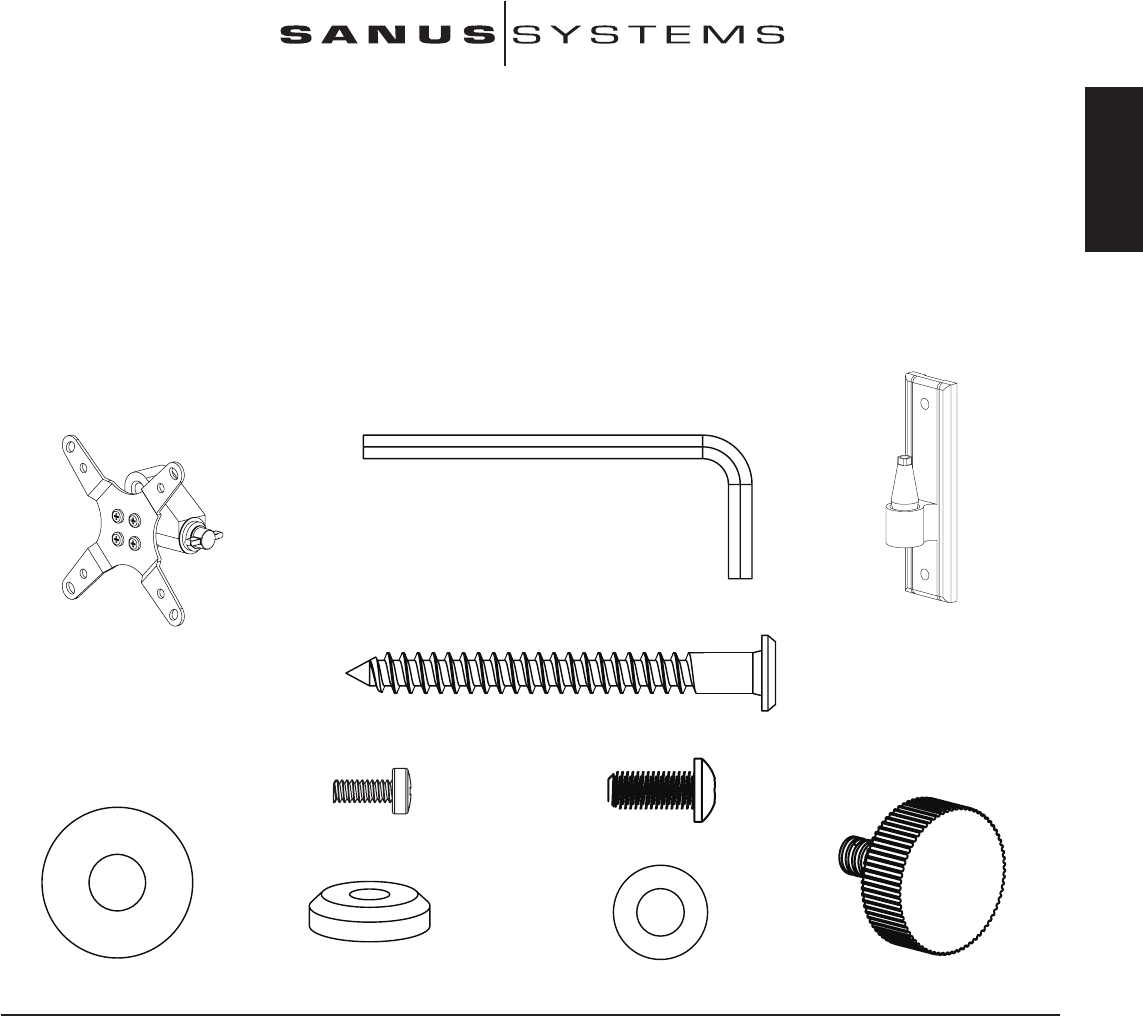
Piezas y tornillería: *No es el tamaño real
(1) Llave allen - b
(1) Soporte de monitor - a* (1) Placa de pared - c*
(2) Tirafondo - d
(4) Perno M4 x 10 - e (4) Perno de reemplazo de perilla - f
(1) Arandela grande - g (1) Tapa - h (1) Arandela pequeña - i (1) Perilla - j
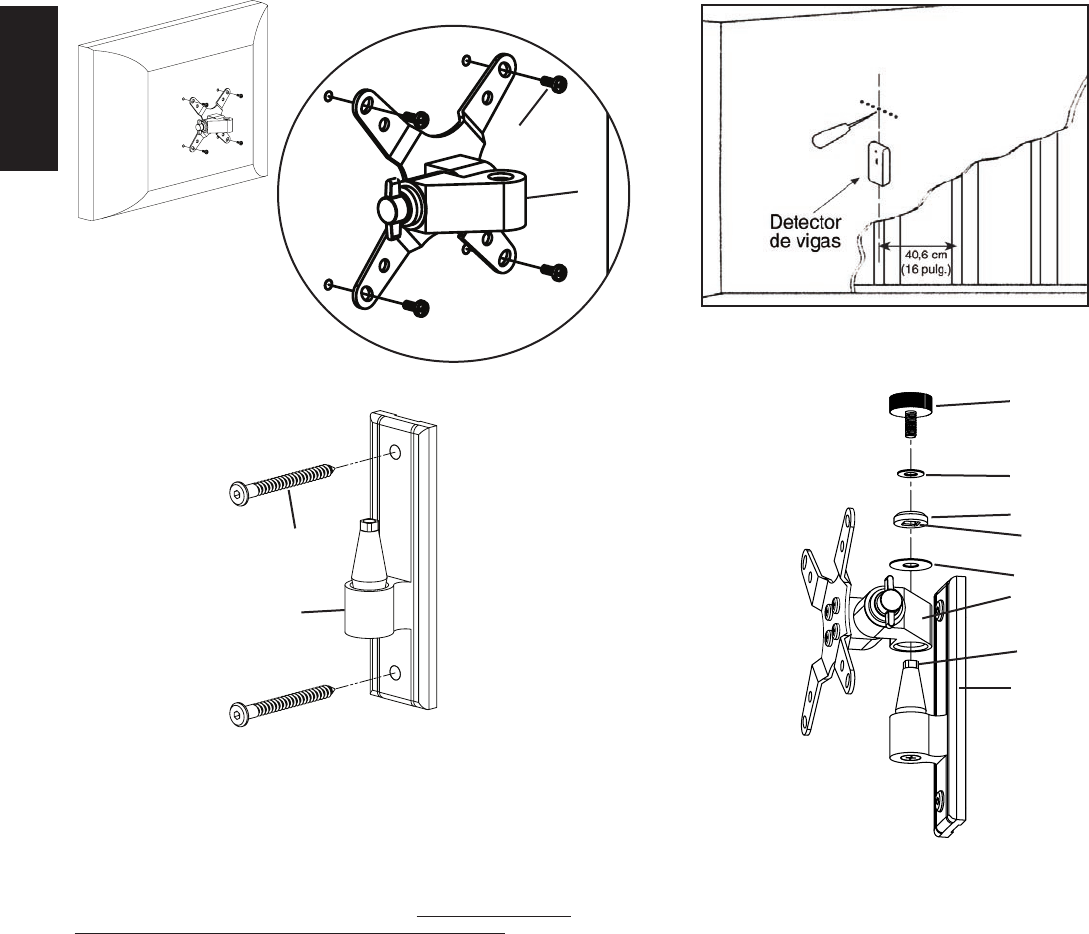
Paso 1 - Conexión al televisor: Conectar el soporte de monitor (a) a la parte trasera del televisor con pantalla de cristal líquido utilizando el perno M4 x 10 (e), como se ilustra en el
diagrama 1. Pasar 4 pernos por el soporte de monitor y apretarlos rmemente en la estructura de montaje VESA en la parte trasera del televisor. Asegurarse de que el lado grande del agujero
cónico en el soporte de monitor quede orientado hacia la base del televisor.
Paso 2 - Conexión a la pared: Se suministra la tornillería para el montaje en un pie derecho de madera. Para todas las demás aplicaciones de montaje, ponerse en contacto con un
contratista o una ferretería local. Utilizar un detector de vigas de alta calidad para localizar el pie derecho. Es una buena idea vericar la ubicación del pie derecho con un punzón o clavo
delgado, como se ilustra en el diagrama 2a. Utilizar la placa de pared (c) como una plantilla para marcar las dos posiciones de los agujeros en la pared. Asegurarse de que los dos agujeros
queden alineados verticalmente y centrados en el pie derecho. Perforar con antelación dos agujeros a una profundidad de 6,4 cm (2,5 pulg.) utilizando una broca de 0,5 cm (3/16 pulg.).
Conectar la placa en la pared con los dos tirafondos (d), como se ilustra en el diagrama 2b. Apretar rmemente los tirafondos con una llave allen (b).
LA UNIÓN DE FORMA Y FUNCIÓN
ESPAÑOL
Diagrama 1 Diagrama 2a
Vista detallada
e
a
Diagrama 3
Diagrama 2b
j
i
h
d corte cuadrado
en la tapa
g
a
c
extremo cuadrado
de buje
c
Paso 3 - Agregar el soporte de monitor a la placa de pared: Una vez que el
televisor con pantalla de cristal líquido se conecta en el soporte de monitor (a), y la placa
de pared (c) se instala correctamente, poner el agujero cónico del soporte de monitor
sobre el buje en forma de cono que se encuentra en la placa de pared. Este proceso se
muestra sin el televisor en el diagrama 3 para que las piezas puedan verse más claramente.
Asegurarse de que el soporte de monitor se asiente completamente en la placa de pared.
Agregar la arandela grande (g). Luego agregar la tapa (h). Asegurarse de que el corte
cuadrado de la tapa encaje en la parte superior del buje de la placa de pared. Finalmente
pasar la perilla (j) a través de la arandela pequeña (i) y la tapa e insertarla en el buje en
forma de cono. Ahora las perillas se pueden ajustar al nivel de tensión deseado.
Nota: Para aplicaciones de carga pesada o en instituciones se puede
utilizar un perno (f) en reemplazo de cada una de las perillas. Apretar los
pernos con la llave allen suministrada. Esto permite obtener una mayor
resistencia y aún así poder ajustar la posición del televisor.
DEUTSCH
Montageanweisungen für das Modell: VM1
Wir freuen uns, dass Sie sich für ein Vision Mount-Produkt von Sanus Systems entschieden haben.
Dieses Gerät ist für die Montagehalterung VESA 75/100 und damit kompatible LCD-Fernseher mit
einem Gewicht von bis 22,7 kg (50 lb) an einer vertikalen Wand vorgesehen. Der neue Fernseher
kann somit ohne Mühe bis zu 15° in jede Richtung ohne Verwendung von Werkzeugen geneigt
und geschwenkt werden. Es dürfen keine Bauteile fehlen oder defekt sein. Verwenden Sie niemals
beschädigte Teile! Unsachgemäße Montage kann Schäden am Gerät und schwere Verletzungen
hervorrufen! Wenn Sie diese Anweisungen nicht verstehen oder Zweifel an der Sicherheit
der Montage haben, rufen Sie einen Fachmann an oder kontaktieren Sie Sanus Systems
telefonisch unter +1-800-359-5520 (USA) oder +31-(0)20-570-8938 (Europa). Oder
besuchen Sie uns im Internet unter www.sanus.com. Wir können Ihnen bei Fragen zur
Montage und zu beschädigten oder fehlenden Teilen schnell helfen. Ersatzteile für bei autorisierten
Fachhändlern gekaufte Sanus-Produkte werden direkt an Ihre Adresse versendet.
Erforderliche Werkzeuge: Bohrmaschine mit einem Bohrer 0,5 cm (3/16"), Kreuzschlitzschraubendreher
Teile und Zubehör: *Nicht maßstäblich dargestellt.
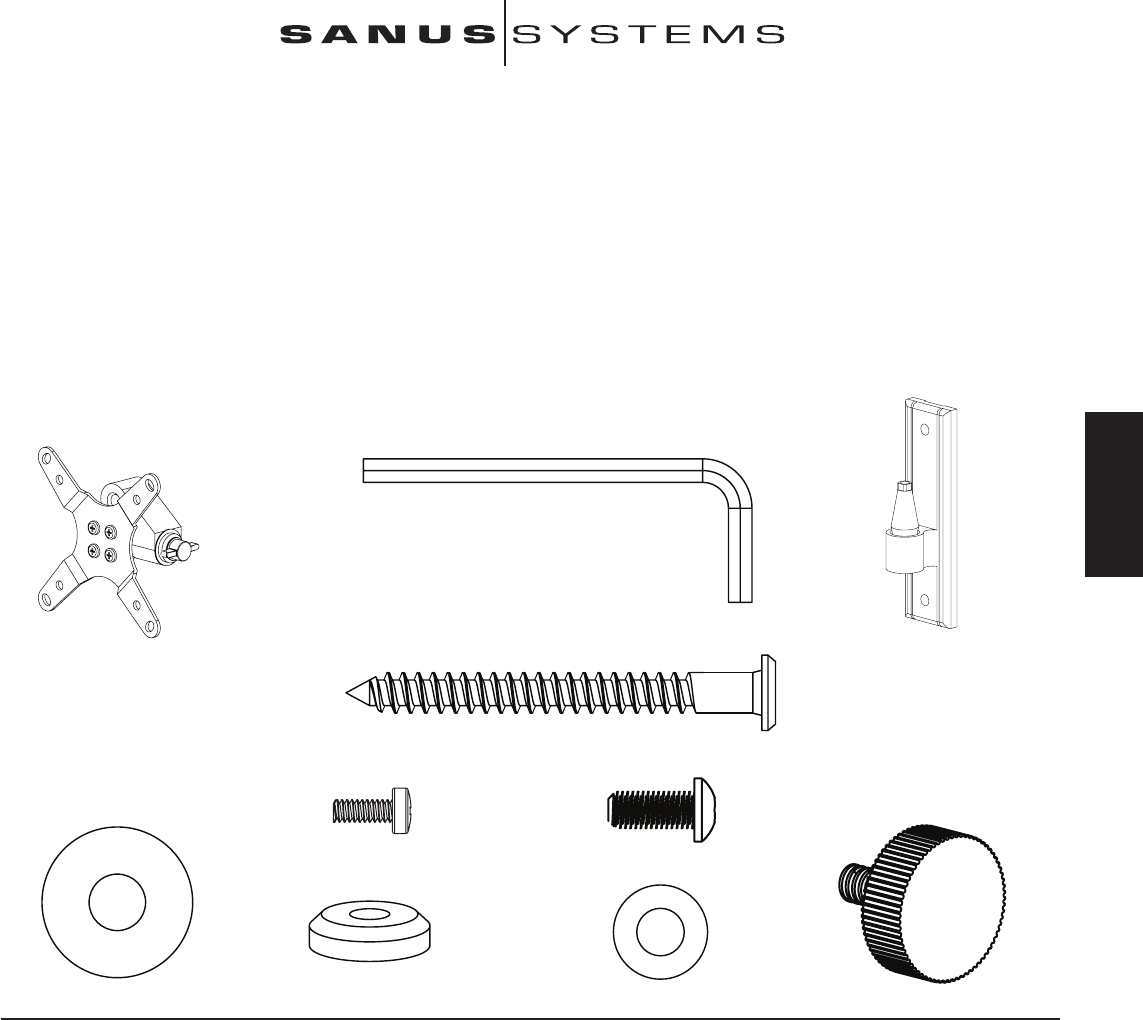
(1) Inbusschlüssel – b
(1) Monitorhalterung – a* (1) Wandplatte – c*
(2) Holzschraube – d
(4) Schraube M4 x 10 – e (4) Rändelersatzschraube – f
(1) Große Unterlegscheibe – g (1) Kappe – h (1) Kleine Unterlegscheibe – i (1) Rändelschraube – j
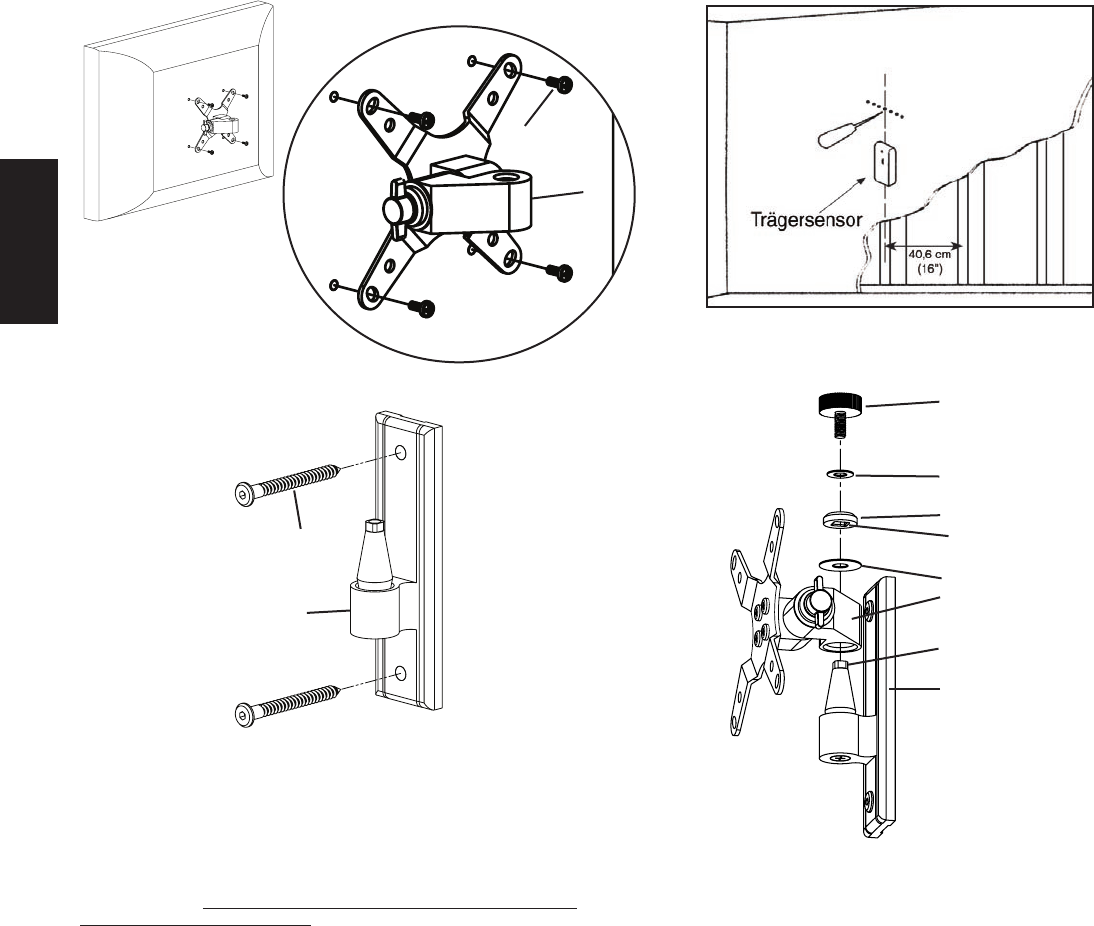
Schritt 1 – Anbau am Fernseher: Die Monitorhalterung (a) an der Rückseite des LCD-Fernsehers mit der Schraube M4 x 10 (e) wie in Abbildung 1 anbauen. Vier Schrauben durch
die Monitorhalterung schieben und fest in den VESA-Schraubanschluss an der Rückseite des Fernsehers eindrehen. Die große Seite der konischen Bohrung an der Monitorhalterung muss zum
Fernseherboden zeigen.
Schritt 2 – Anbau an der Wand: Es wird Zubehör für die Montage an einem Holzbalkenträger mitgeliefert. Bei allen anderen Montagevarianten die Teile im Fachhandel oder beim
Vertragshändler erwerben. Einen Träger mit einem hochwertigen Sensor suchen. Die Lage des Trägers kann am besten mit einer Ahle oder einem dünnen Nagel wie in Abbildung 2a überprüft
werden. Die Wandplatte (c) als Vorlage zur Markierung der beiden Bohrungen an der Wand verwenden. Die beiden Bohrungen müssen vertikal und mittig auf den Träger ausgerichtet sein. Die
beiden Löcher mit einem Bohrer 0,5 cm (3/16") bis zu einer Tiefe von 6,4 cm (2,5") vorbohren. Die Wandplatte mit den beiden Holzschrauben (d) wie in Abbildung 2b an der Wand montieren.
Die Holzschrauben mit dem Inbusschlüssel (b) festziehen.
DIE EINHEIT VON FORM UND FUNKTION
DEUTSCH
Abbildung 1 Abbildung 2a
Detailansicht
e
a
Abbildung 3
Abbildung 2b
j
i
h
d Vierkant-Aussparung
in der Kappe
g
a
c
Vierkant-Ende der
Buchse
c
Schritt 3 – Anbau der Monitorhalterung an der Wandplatte: Sobald der LCD-
Fernseher an der Monitorhalterung (a) angebaut und die Wandplatte (c) ordnungsgemäß
installiert ist, die konische Bohrung in der Monitorhalterung über der konischen Buchse
der Wandplatte platzieren. In Abbildung 3 ist dieser Arbeitsschritt ohne Fernseher
dargestellt, so dass die Teile besser erkennbar sind. Die gesamte Monitorhalterung muss
sicher auf der Wandplatte sitzen. Die große Unterlegscheibe (g) anbauen. Danach die
Kappe (h) anbauen. Die Vierkant-Aussparung in der Kappe muss auf die Vierkant-
Oberseite der Wandplattenbuchse passen. Zuletzt die Rändelschraube (j) durch die kleine
Unterlegscheibe (i) und die Kappe in die konische Buchse eindrehen. Jetzt können die
Rändelschrauben wie gewünscht festgezogen werden.
Hinweis: In öffentlichen Räumen oder bei starker Belastung kann anstelle
der Rändelschrauben eine Rändelersatzschraube (f) verwendet und mit dem
mitgelieferten Inbusschlüssel festgezogen werden. Auf diese Weise lässt
sich der Fernseher stärker festziehen und dennoch die Position einstellen.
FRANÇAIS
Instructions d’assemblage pour le modèle : VM1
Nous vous remercions d’avoir choisi un montant Vision Mount de Sanus Systems.
Ce produit est conçu pour xer au mur des téléviseurs LCD compatibles à VESA 75/100
d’un poids maximal de 22,7 kg (50 lb). Il vous permet d’incliner et de faire pivoter sans
effort votre nouveau téléviseur jusqu’à 15 ° dans n’importe quelle direction sans utiliser
d’outils. Vériez soigneusement qu’il n’y a aucune pièce manquante ou défectueuse.
N’utilisez jamais de pièces défectueuses. Une installation incorrecte peut entraîner des
dommages ou des blessures graves.Si vous ne comprenez pas ces instructions ou si vous
avez un doute quant à la sécurité de cette installation, veuillez faire appel à un technicien
qualié ou communiquez avec Sanus en composant le 1-800-359-5520 (aux É.-U.), ou le
31 (0) 20 5708938 (pour l’Europe). Vous pouvez aussi allez sur notre site Web au www.
sanus.com. Nous pourrons répondre rapidement à toute question concernant l’installation
ou des pièces manquantes ou endommagées. Les pièces de rechange de produits Sanus
achetés auprès de distributeurs agréés vous seront livrées directement.
Outils nécessaires : Perceuse avec mèche de 0,5 cm (3/16 po), tournevis cruciforme
Les pièces et le matériel : *Non illustré en grandeur réelle
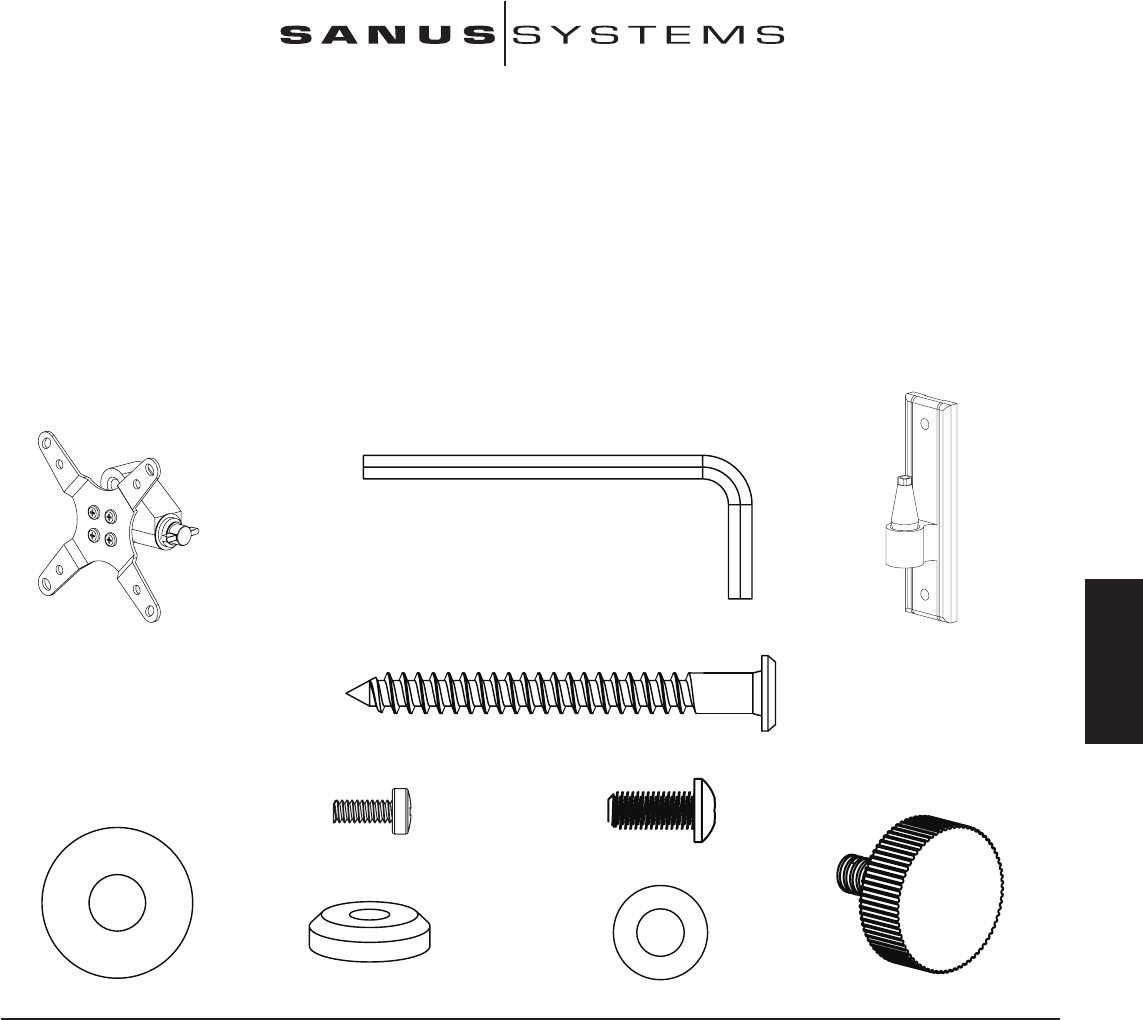
(1) Clé Allen - b
(1) Support d’écran - a* (1) Plaque murale - c*
(2) Tire-fond - d
(4) Boulon M4 x 10 - e (4) Boulon de remplacement de bouton - f
(1) Grosse rondelle - g (1) Capuchon - h (1) Petite rondelle - i (1) Bouton - j
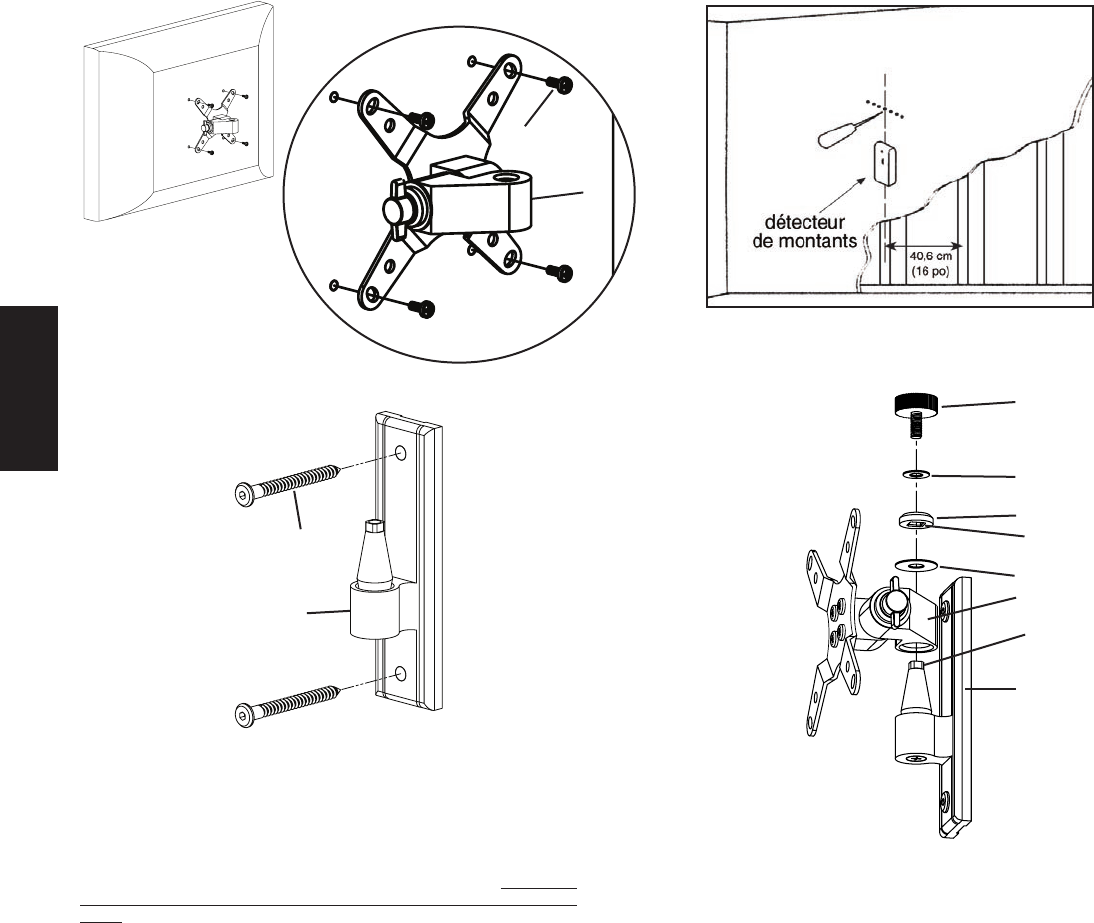
Etape 1 - Fixation au téléviseur : Fixez le support d’écran (a) à l’arrière de votre téléviseur LCD à l’aide du boulon M4 x 10 (e), tel qu’illustré au schéma 1. Insérez 4 boulons à travers
le support d’écran et serrez-les bien dans la conguration de montage VESA pour insertion de boulons à l’arrière du téléviseur. Assurez-vous que l’ouverture la plus large du trou conique du
support d’écran est orientée vers le bas du téléviseur.
Etape 2 - Fixation au mur : Le matériel de xation pour ossature de bois est fourni. Pour tous les autres montages, communiquez avec un entrepreneur local ou une quincaillerie.
Servez-vous d’un détecteur de montants de haute qualité pour repérer un montant. Il est préférable de vérier l’emplacement des montants à l’aide d’un poinçon ou d’un clou mince tel
qu’indiqué au schéma 2a. Servez-vous de la plaque murale (c) comme modèle pour marquer les deux emplacements de trous sur le mur. Assurez-vous que les trous sont alignés verticalement
et centrés sur le montant. Percez au préalable deux trous d’une profondeur de 6,4 cm (2,5 po) à l’aide d’une mèche de 0,5 cm (3/16 po). Fixez la plaque murale au mur à l’aide des deux tire-
fonds (d), tel qu’illustré sur le schéma 2b. Serrez les tire-fonds fermement à l’aide de la clé Allen (b).
L’UNION DE LA FORME ET DE LA FONCTION
FRANÇAIS
Schéma 1 Schéma 2a
Vue détaillée
e
a
Schéma 3
Schéma 2b
j
i
h
d ouverture carrée
du capuchon
g
a
c
bout carré du
raccord
c
Etape 3 - Ajout du support d’écran à la plaque murale : Une fois le téléviseur
LCD xé au support d’écran (a) et la plaque murale (c) correctement installée, placez
le trou conique du support d’écran sur le raccord conique de la plaque murale. Cette
procédure est illustrée sans le téléviseur sur le schéma 3 an que vous puissiez mieux
distinguer les pièces. Assurez-vous que le support d’écran est bien logé sur la plaque
murale. Ajoutez la grosse rondelle (g). Ajoutez ensuite le capuchon (h). Assurez-vous
que l’ouverture carrée du capuchon enveloppe bien le bout carré du raccord de la plaque
murale. Insérez enn le bouton (j) dans la petite rondelle (i), dans le capuchon et dans le
raccord conique. Vous pouvez à présent régler chacun des boutons au niveau de tension
voulu.
Remarque : Pour une installation dans un organisme institutionnel
ou prévue pour supporter une lourde charge, utilisez un boulon de
remplacement de bouton (f) à la place de chaque bouton et serrez-les à
l’aide de la clé Allen fournie. Ceci permettra d’avoir plus de tension tout en
ITALIANO
Istruzioni di montaggio per il modello: VM1
Grazie per aver scelto un prodotto Sanus Systems Vision Mount. Questo prodotto è
progettato per montare su pareti verticali televisori LCD compatibili VESA 75/100
no a 22,7 kg (50 libbre). In tal modo sarà possibile inclinare e orientare senza sforzi
la nuova televisione no a 15° in ogni direzione senza usare strumenti. Controllare
attentamente che non vi siano parti mancanti o difettose. Non utilizzare parti difettose.
L’installazione errata può causare danni o lesioni gravi. Se non si comprendono
queste istruzioni o si hanno dubbi sulla sicurezza dell’installazione, rivolgersi a un
installatore specializzato o contattare la Sanus al numero verde USA 800.359.5520
o, in Europa, al numero +31 (0) 20 5708938. È anche possibile visitare il sito www.
sanus.com. Possiamo rispondere rapidamente alle domande relative all’installazione
o alle parti mancanti o difettose. Le parti di ricambio per i prodotti Sanus acquistati
attraverso i rivenditori autorizzati verranno spedite direttamente al cliente.
Strumenti necessari: trapano con punta da 0,5 cm (3/16”), cacciavite Phillips
Parti e minuteria: *in gura non delle dimensioni reali
(1) Chiave a brugola - b
(1) Staffa per monitor - a* (1) Piastra per parete - c*
(2) Tirafondi - d
(4) Bullone M4 x 10 - e (4) Bullone per la sostituzione della manopola - f
(1) Rondella grande - g (1) Coprivite - h (1) Rondella piccola - i (1) Manopola - j
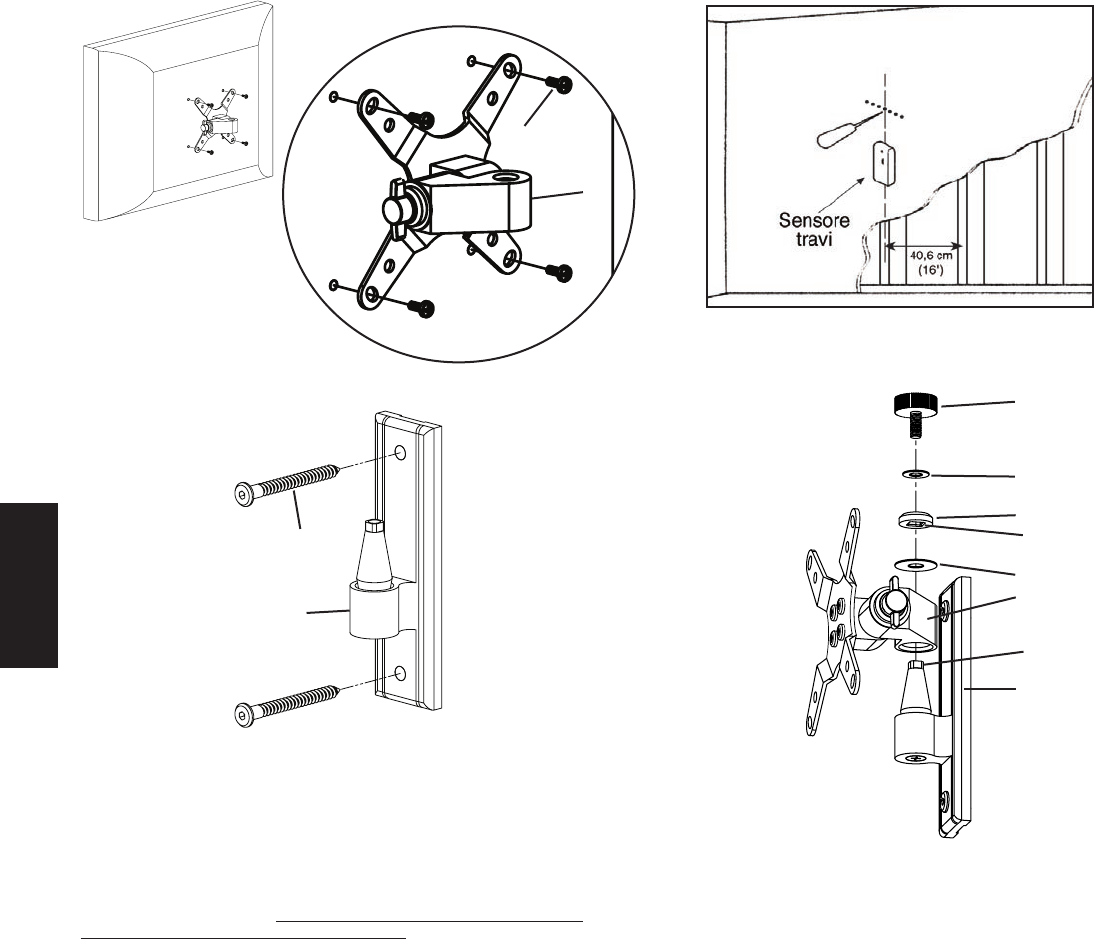
Fase 1 – Collegamento al televisore: collegare la staffa del monitor (a) sul retro del televisore LCD usando il bullone M4 x 10 (e) come mostrato nella Figura 1. Inserire i 4 bulloni
attraverso la staffa del monitor e serrare bene nella dima VESA di montaggio per bulloni presente sul retro del televisore. Assicurarsi che il lato largo del foro conico sulla staffa del monitor
sia rivolto verso la parte inferiore del televisore.
Fase 2 – Collegamento alla parete: in dotazione viene fornita la minuteria per il perno in legno. Per tutte le altre applicazioni di montaggio rivolgersi al rappresentante locale o a un
negozio di ferramenta. Usare un rilevatore di perni metallici di alta qualità per individuare eventuali pezzi metallici nella parete. È una buona idea vericare la posizione dei pezzi metallici
con un punteruolo o con un chiodo sottile come nella Figura 2a. Utilizzare la piastra a parete (c) come maschera per contrassegnare le posizioni dei due fori sulla parete. Assicurarsi
che questi fori siano allineati in verticale e centrati sopra al perno. Forare in precedenza i due fori ad una profondità di 6,4 cm (2,5”) usando una punta per trapano da 0,5 cm (3/16”).
Collegare la piastra per parete alla parete usando i due tirafondi (d) come mostrato nella Figura 2b. Serrare i tirafondi fermamente con la chiave a brugola (b).
L'UNIONE DI FORMA E FUNZIONE
ITALIANO
Figura 1 Figura 2a
Vista dettagliata
e
a
Figura 3
Figura 2b
j
i
h
d taglio quadrato
nel coprivite
g
a
c
estremità
quadrata
della boccola
c
Fase 3 – Aggiunta della staffa per monitor alla piastra per parete: una volta che
la TV a LCD è collegata alla staffa per monitor (a) e la piastra per parete (c) è installata
in modo corretto, posizionare il foro conico nella staffa per monitor in basso verso la
boccola conica sulla piastra per parete. Nella gura 3 questa operazione è mostrata senza
TV in modo da poter vedere le parti più chiaramente. Assicurarsi che la staffa per monitor
sia sistemata completamente sulla piastra per parete. Aggiungere la rondella grande (g).
Quindi aggiungere il coprivite (h). Assicurarsi che il taglio quadrato nel coprivite si adatti
alla parte quadrata della boccola della piastra per parete. Inne inserire la manopola (j)
attraverso la rondella piccola (i), nel coprivite e nella boccola a forma di cono. A questo
punto è possibile impostare ogni manopola al livello di tensione desiderato.
Nota: per applicazioni in istituti o per carichi pesanti è possibile usare un
bullone di ricambio per manopola (f) al posto di ogni manopola e serrare con
la chiave a brugola fornita. In tal modo la tensione è più alta mentre è ancora
possibile regolare la posizione della TV.
PYCCKO
Инструкция по сборке крепления модели: VM1
Благодарим Вас за приобретение крепления для телевизора Sanus Systems Vision Mount. Крепление предназначено для установки жидкокристаллических
телевизоров, соответствующих стандарту VESA 75/100, весом до 22,7 кг (50 фунтов) на вертикальные стены. Устройство позволяет легко регулировать ориентацию
телеэкрана в пределах 15° во всех направлениях без использования инструментов. Тщательно проверьте наличие всех деталей и отсутствие заводского брака.
Не используйте бракованные детали. Неправильная установка крепления связана с опасностью травмирования людей и порчи имущества. Если Вам непонятны
приведенные ниже инструкции, или если возникают любые сомнения по поводу безопасности использования установленного устройства, обратитесь к
квалифицированному специалисту или в компанию Sanus по телефону 800-359-5520 (США) или 31 (0) 20 5708938 (Европа). Вы также можете посетить наш веб-
сайт www.sanus.com. Мы незамедлительно поможем Вам разрешить вопросы по поводу установки устройства и недостающих либо поврежденных его частей.
Запасные части к изделиям компании Sanus, приобретенным через уполномоченных агентов по продаже, будут доставлены непосредственно по указанному
Вами адресу.
Необходимые инструменты: Дрель со сверлом 0,5 см (3/16”), отвертка Phillips.
Детали устройства и инструменты: *Изображены в масштабе
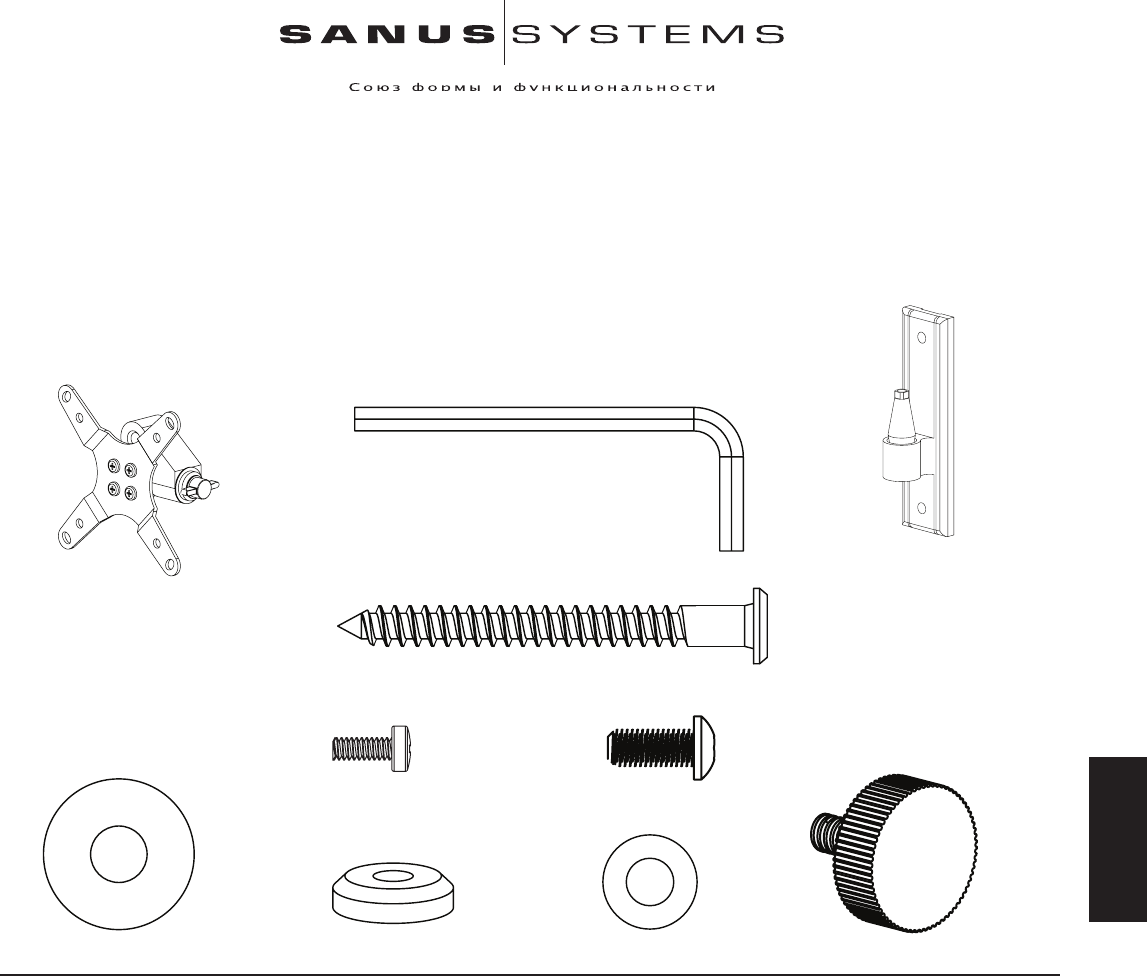
Ключ торцовый (b) – 1 шт.
Настенная пластина (c*) – 1 шт.
Крепежное устройство для монитора (a*) – 1 шт.
Шуруп под ключ (d) – 1 шт.
Винт M4 x 10 (e) – 1 шт. Винт для использования вместо
фиксирующей ручки (f) - 4 шт.
Большая шайба (g) – 1 шт. Колпачок (h) – 1 шт. Малая шайба (i) – 1 шт. Фиксирующая ручка (j) – 1 шт.
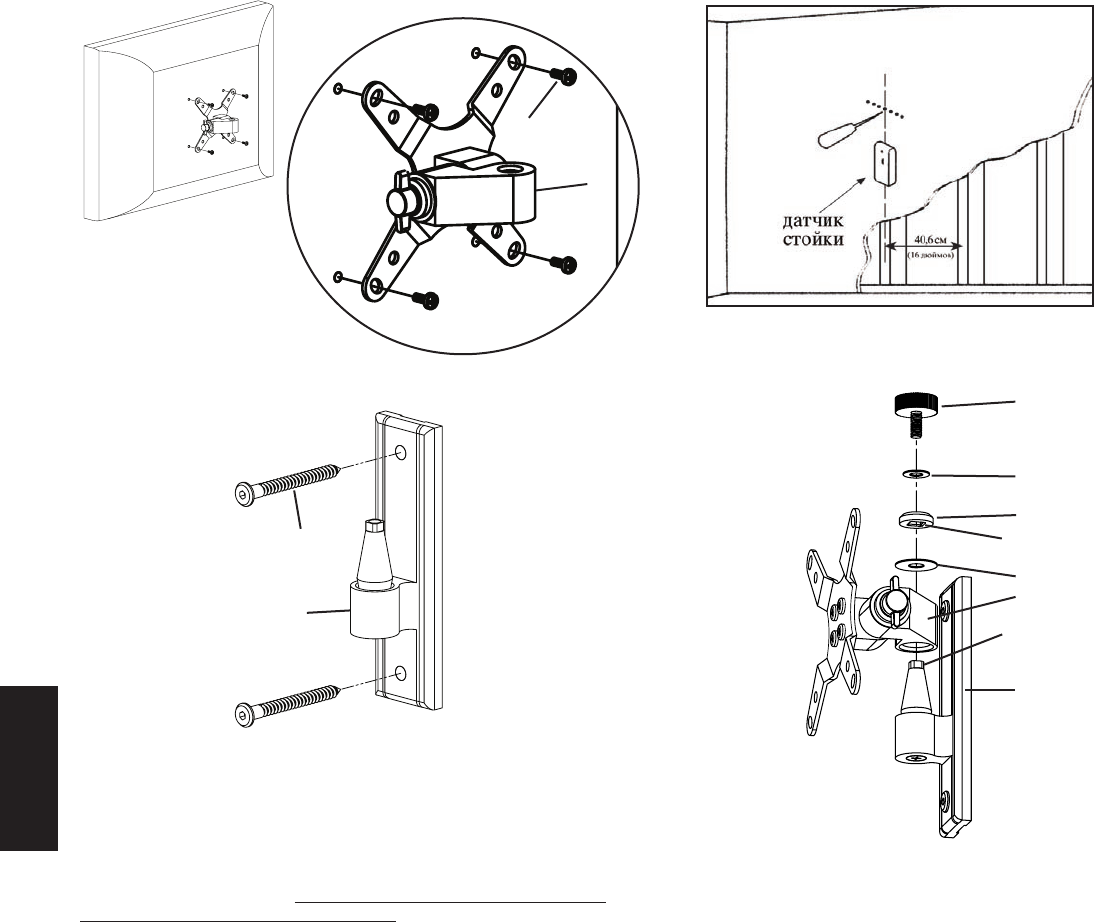
Шаг 1 - Прикрепление устройства к телевизору: Прикрепите крепежное устройство для монитора (a) к задней панели жидкокристаллического телевизора
посредством винта M4 x 10 (e), как показано на рисунке 1. Четыре винта следует завинтить через отверстия в крепежном устройстве в крепежный блок VESA и
туго затянуть. Коническое отверстие в крепежном устройстве должно быть обращено широкой стороной к нижней части телевизора.
Шаг 2 - Прикрепление устройства к стене: Устройство предназначено для крепления исключительно к деревянным стойками каркасных стен. Если
требуется прикрепить устройство к иной несущей конструкции, обратитесь к региональному дистрибьютору или в магазин бытовой техники. Для
определения местонахождения деревянной стойки следует использовать высокочувствительный датчик. Целесообразно проверить, правильно ли определено
местонахождение стойки, с помощью шила или тонкого гвоздя, как показано на рисунке 2а. Отметьте две точки, в которых следует просверлить в стене
отверстия, используя в качестве шаблона настенную пластину (c). Отверстия должны находиться на вертикальной линии и по центру деревянной стойки.
Сначала просверлите с помощью сверла 0,5 см (3/16”), два черновых отверстия глубиной 6,4 см (2,5”). Прикрепите пластину к стене посредством двух шурупов
под ключ (d), как показано на рисунке 2b. Крепко затяните шурупы с помощью торцового ключа (b).
PYCCKO
Рисунок 1 Увеличенное изображение Рисунок 2а
e
a
Рисунок 3
Рисунок 2b
j
i
h
d квадратная прорезь
в колпачке
g
a
c
квадратная головка
втулки
c
Шаг 3 - Установка крепежного устройства на настенную пластину: После того,
как к жидкокристаллическому телевизору прикреплено крепежное устройство
(a), а настенная пластина (c) надлежащим образом установлена, следует насадить
отверстие конического профиля в крепежном устройстве на соответствующую
коническую втулку в настенной пластине. На рисунке 3 эти действия показаны
без телевизора для большей наглядности. Крепежное устройство должно
полностью сесть на настенную пластину Wall Plate. Установите большую шайбу
(g). Затем насадите колпачок (h). Квадратная прорезь в колпачке должна сесть на
квадратную головку втулки настенной пластины. Затем завинтите фиксирующую
ручку (j) через маленькую шайбу (i) и колпачок в коническую втулку. Теперь
можно затянуть каждую фиксирующую ручку нужным образом.
Примечание: Если устройство планируется использовать в общественных
учреждениях или под значительной нагрузкой, вместо каждой фиксирующей ручки
можно использовать винт (f). Винты следует затягивать с помощью торцового
ключа. Благодаря использованию винтов соединения можно будет сильнее
затянуть, не ограничивая возможностей регулировки ориентации телеэкрана.
VM1 モデルの組み立て説明書
Sanus Systems Vision Mount 製品をお買い上げいただきありがとうございます。本
製品は、22.7 Kg (50 lbs)までのVESA 75/100 対応液晶テレビを垂直な壁面に取
り付けるよう設計されています。当製品を利用すると、新型のテレビを道具なしで
も最大 15 度まで傾けたり、回転させたりすることができます。不足や破損してい
る部品がないかよく確認してください。破損した部品は絶対に使用しないでくださ
い。設置方法が不適切な場合、破損や深刻なケガを引き起こすおそれがあります。
ここに記載されている説明ではよくわからない場合、もしくは設置上の安全性に
ついて疑問がある場合は、有資格の契約業者にお電話いただくか、Sanus (米国:
800-359-5520 もしくは、ヨーロッパ: 31-(0)-20-5708938) までご連絡くださ
い。弊社ウェブサイト www.sanus.com もご覧いただけます。 指定販売店でお求
めいただいた製品については、交換部品をお客様に直接お届けいたします。
必要な工具: 0.5 cm (3/16 インチ)のビットのついたドリル、プラスドライバー
部品および金具:*表示は実サイズではありません。
(1) アレンキー - b
(1) モニターマウント - a* (1) 壁面プレート - c
(2) ラグボルト- d
(4) M4 x 10 ボルト - e (4) ノブ取り換えボルト - f
(1) ワッシャー (大) - g (1) キャップ - h (1) ワッシャー (小) - i (1) ノブ - j
順序 1- テレビに取り付ける:図 1 のように、M4 x 10 ボルト (e) を使ってモニターマウント (a) を液晶テレビの背面に取り付けます。4 本のボルトを、モニターマウントに通し、テレ
ビの背面の VESA 規格のボルトの取り付け位置にぴったり合わせて締めつけます。モニターマウントのテーパー穴の広がっている方がテレビの下部に向いていることを確認します。
順序 2- 壁面に取り付ける:木製の間柱に取り付けるための金具が同梱されています。木製の間柱以外に取り付ける場合は、お近くの契約業者あるいは工具店にお問い合わせく
ださい。高性能の間柱探知機を使って、間柱の位置を調べます。図 2a のように、千枚通しか細い釘で間柱の位置を再確認しておくとよいでしょう。壁面プレート (c) をテンプレ
ートにして、壁に開ける 2 つの穴の位置に印を付けます。 2 つの穴が垂直に並び、かつ間柱の中央にあることを確認します。0.5 cm (3/16 インチ)のドリルビットを使って、奥行
き 6.4 cm (2.5
インチ) の穴を予め開けておきます。図 2b のように、2 本のラグボルト(d)を使って、壁面プレートを壁に取り付けます。アレンキー (b) を使って、ラグボルトをし
っかりと固定します。
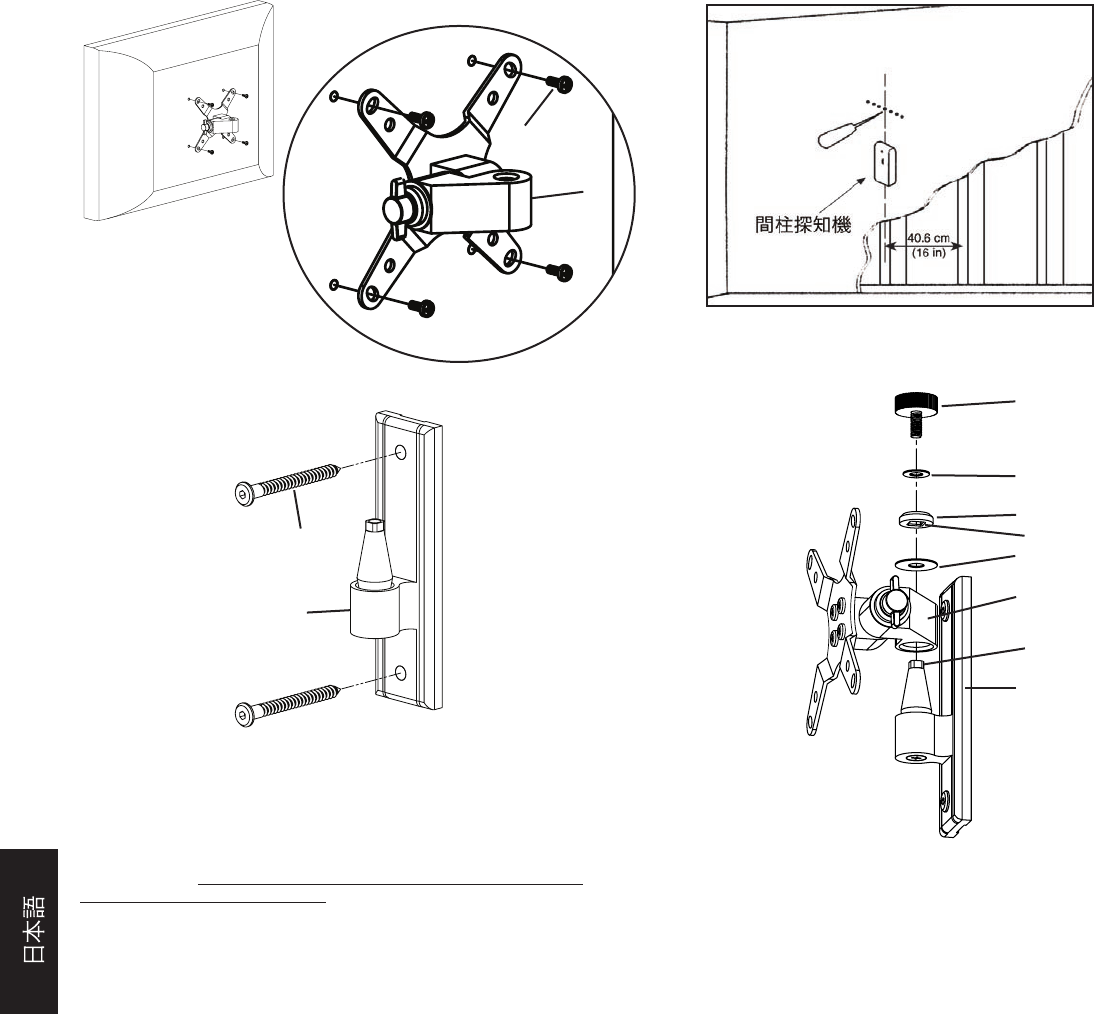
図 1 図 2a
詳細図
e
a
図 3
図 2b
j
i
h
d キャップの四角穴
g
a
c
ブッシュの
四角い先端部
c
順序 3 - モニターマウントを壁面プレートに取り付ける:液晶テレビをモニターマウ
ント(a) に取り付け、壁面プレート (c) を正しく設置したら、モニターマウントのテー
パー穴を下向きにして円錐型ブッシュ上に載せます。 図 3 は、テレビを省いてこの
操作の部品を見やすくしたものです。モニターマウントが完全に壁面プレートの上
に載っていることを確認します。その上にワッシャー (大) (g) を載せます。次にキャッ
プ (h) を載せます。キャップの四角穴が、壁面プレートのブッシュの四角い先端部の
上にはめ込まれていることを確認します。最後にノブ (j) をワッシャー (小) (i) とキャ
ップに通して、円錐形ブッシュに取り付けます。ここで、各ノブを適当な締め具合に調
整できます。
注意:施設でのご利用または使用頻度が高い場合は、各ノブの代わりにノブ取り
換えボルト (f) を使用し、付属のアレンキーで固定します。 取り換えボルトを使う
と、さらに固く締めても、テレビの位置を調節することができます。
中文
VM1 型号装配说明
感谢您选用 Sanus Systems Vision Mount。此产品设计用于将 VESA 75/100 可兼
容液晶电视机安装到垂直墙面上,承重达 22.7 公斤(50 磅)。使用此产品后,
您不必使用任何工具就可毫不费力地以 15°角在任意方向上倾斜或旋转新电视
机。请仔细检查以确保零件无缺少或缺陷。切勿使用有缺陷的零件。安装不正
确可能会导致损坏或严重受伤。如果您不理解这些说明或对安装的安全性有任
何疑问,请致电有资格的承包商或与 Sanus 联系,联系电话:800.359.5520(美国)或
31 (0) 20 5708938(欧洲)。您也可以访问我们的网站 www.sanus.com。我们会迅
速为您的安装问题提供协助,以及解决零件缺少或损坏的问题。通过授权经销
商所购 Sanus 产品的替换零件将直接送货上门。
必需的工具:带 0.5 厘米(3/16 英寸)钻头的钻孔机,Phillips 螺丝刀
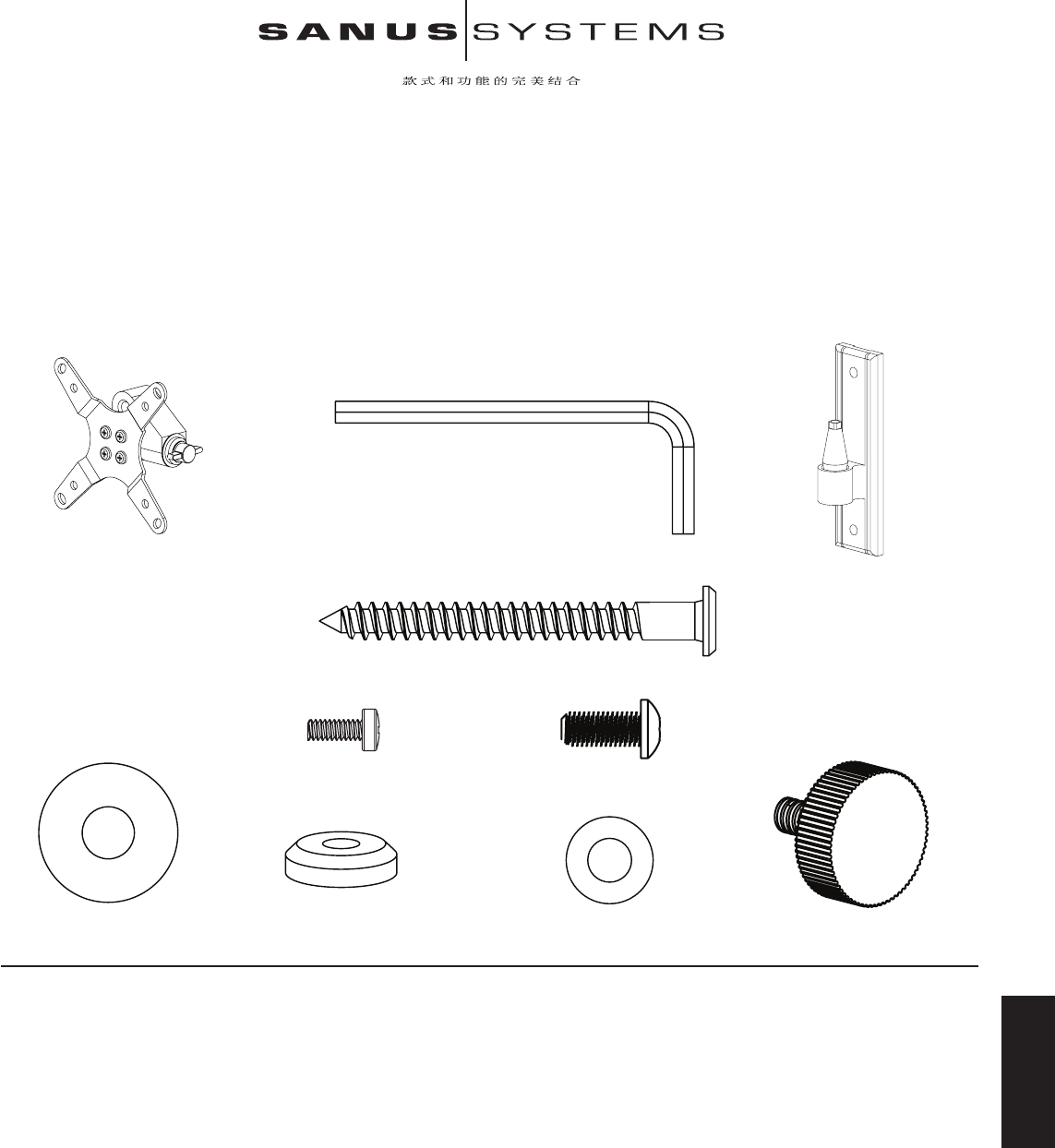
零件和五金件:*非实物大小
(1) 内六角扳手 - b
(1) 显示器架 - a*
(1) 墙板 - c*
(2) 方头螺栓 - d
(4) M4 x 10 螺钉 - e (4) 旋钮替换螺钉 - f
(1) 大垫圈 - g (1) 顶盖 - h (1) 小垫圈 - i (1) 旋钮 - j
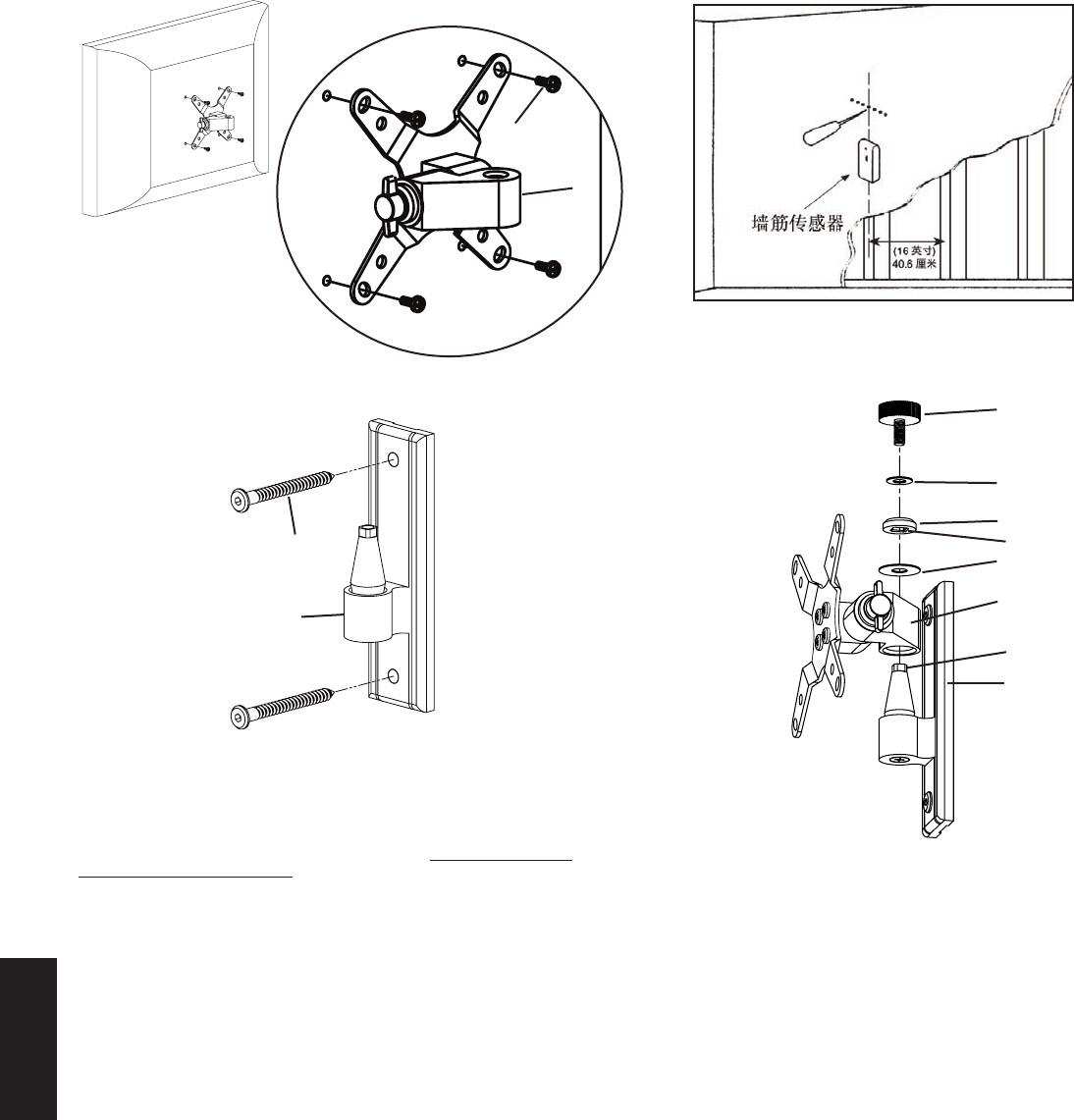
步骤 1 - 安装到电视机上: 使用 M4 x 10 螺钉 (e) 将显示器架 (a) 安装到液晶电视机背面。将 4 枚 螺钉穿过显示器架,然后紧紧旋入电视机背面的 VESA 螺钉安装框架中
(如图 1 所示)。请确保显示器架上锥孔的长边朝向电视机的底部。
步骤 2 - 安装到墙上: 提供木立筋安装所需的五金件。其它安装所需的工具请联系当地的承包商或者从五金店购买。使用高质的墙筋传感器找到墙筋。最好先使用锥子或
者细钉确定墙筋的位置(如图 2a 所示)。将墙板 (c) 作为模板先在墙上标出两个孔的位置。请确保这两个孔垂直对齐,并位于墙筋的中心。使用 0.5 厘米(3/16 英寸)
钻头
预先钻出两个深度为 6.4 厘米(2.5 英寸)的孔。然后使用两个方头螺栓 (d) 将墙板安装到墙上(如图 2b 所示)。 最后使用内六角扳手 (b) 旋紧方头螺栓。
中文
图 1 详细视图 图 2a
e
a
图 3
图 2b
j
i
h
d 方形内切顶盖
g
a
c
轴衬的方形
末端
c
步骤 3 - 安装显示器架到墙板上:液晶电视机上安装了显示器架 (a) 并且墙板
(c) 正确安装到墙面上后,将显示器架上的锥孔向下套入墙板上的锥形轴衬。 表
示此过程的图 3 未显示电视机以便使您看清各零件。请确保显示器架在墙板上
完全安放到位。安放大垫圈 (g)。然后再安放顶盖 (h)。请确保顶盖的方形内切
口与墙板轴衬的方形末端相吻合。最后,将旋钮 (j) 穿过小垫圈 (i) 和顶盖旋入
锥形轴衬内。 现在您可根据所需的紧度来旋紧每个旋钮。
注意:对于机构安装或者重负荷安装,旋钮替换螺钉 (f) 将取代每个旋钮,并使
用所提供的内六角扳手将其旋紧。这样螺钉可旋得更紧,但是不影响对电视机
位置的调整。
