Schlage Electronics M490DE Installation Manual 102807
User Manual: Schlage Electronics M490DE Installation Manual Installation Manuals
Open the PDF directly: View PDF  .
.
Page Count: 12

*23697279*
23697279
Electromagnetic Locks
M490DE
Installation Instructions
Cover Screws (4)
Cover
Mounting Bracket
Outside Mounting
Bracket Screws** (4)
Inside Mounting
Bracket Screws** (2)
Magnet Assembly
Magnet Screws (2)
Armature Plate
Armature Holder
Sex Nut
Armature Bolt*
Conical Washer
Star Locking Washer Flat Washer
Armature Holder
Screws (2)
* Two armature bolts may be included in the package, but only one is used. There may be one left over after proper installation.
** Screwsforbothreinforcedmetalandsheetmetalareincluded.Somescrewswillbeleftoverafterproperinstallation.Seeindividualstepsforscrewidentication.
2
Features
Delayed Egress
Unlocking is delayed 15
seconds while an alarm sounds.
Automatic Voltage Selection
Magnet immediately detects
12VDC or 24VDC when power
is connected.
Fire Unlock
Inputfromresystemthatwill
unlock the magnet immediately.
Auxiliary Inputs
Allows use of an auxiliary switch
such as an exit device or push
button.
Alarm Output
Activates external alarm, when
in alarm state.
*Indicators
LED Status and Audible Alarm
*Magnetic Bond Sensor (MBS)
Detects proper bond between
magnet and armature. It can be
monitored remotely and locally
with an LED.
*Door Position Switch (DPS)
Indicates whether door is open
or closed. This feature is used
in conjunction with the MBS.
*Relock Time Delay
Relock time can be changed.
Range is 1 - 30 seconds.
*Door Prop Timer
Allows adjustment of the
amount of time a door can be
propped open before alarm
sounds. Range is 0 - 150
seconds.
* Plus Version Only
Models
M490DE (Single Lock Basic)
Delayed Egress, Automatic
Voltage Selection
M490DEP (Single Lock Plus)
Basic features + Magnetic Bond
Sensor (MBS), Door Position
Switch (DPS), Relock Time
Delay, Door Prop Timer, and
Indicators
M490DE-2 (Double Lock Basic)
Double lock with same features
as the Basic single lock
M490DEP-2 (Double Lock Plus)
Double lock with same features
as the Plus single lock
Notes:
• BOCA is a Plus only lock option.
• If BOCA option model is provided,
see page 12 for operational
description.
UL Requirements
• Units shall not impair operation of panic hardware mounted on door.
• Units shall not impair intended operation of an emergency exit.
• Not to be used without UL approved latching hardware.
• Units/Models are intended to be connected to UL Listed Equipment, not
intended for Burglar or Fire Alarm Initiating or Indicating Devices.
• Ambient Conditions - “For Indoor Use Only”.
• Wiring methods shall be in accordance with the National Electrical Code,
ANSI/NFPA 70.
• This device complies with part 15 of FCC rules.
Operation is subject to following two conditions:
1. This device may not cause harmful interference.
2. This device must accept any interference received, including any
interference that may cause undesired operation. Changes or
modicationsnotexpresslyapprovedbypartyresponsibleforcompliance
could void user’s authority to operate equipment.
Electrical Specifications
Model
M490DE
M490DEP
M490DE-2
M490DEP-2
Input Current @ 12VDC Input .75ADC 1.25ADC
Input Current @ 24VDC Input .45ADC .76ADC
Holding Force Per Door Leaf 1500 lbs. 1500 lbs.
Size 3” x 12 1/2” 3” x 25 1/16”
Wire Gauge and Length Specifications
Max. Wire Length
Single Lock Double lock
Wire Gauge 12VDC 24VDC 12VDC 24VDC
14 1000 feet 4000 feet 500 feet 2000 feet
18 400 feet 1600 feet 200 feet 800 feet
Warnings and Cautions
WARNING
Warnings indicate potentially hazardous conditions, which if not
avoided or corrected, may cause death or serious injury.
CAUTION
Cautions indicate potentially hazardous conditions, which if
not avoided or corrected, may cause minor or moderate injury.
Cautions may also warn against unsafe practices.
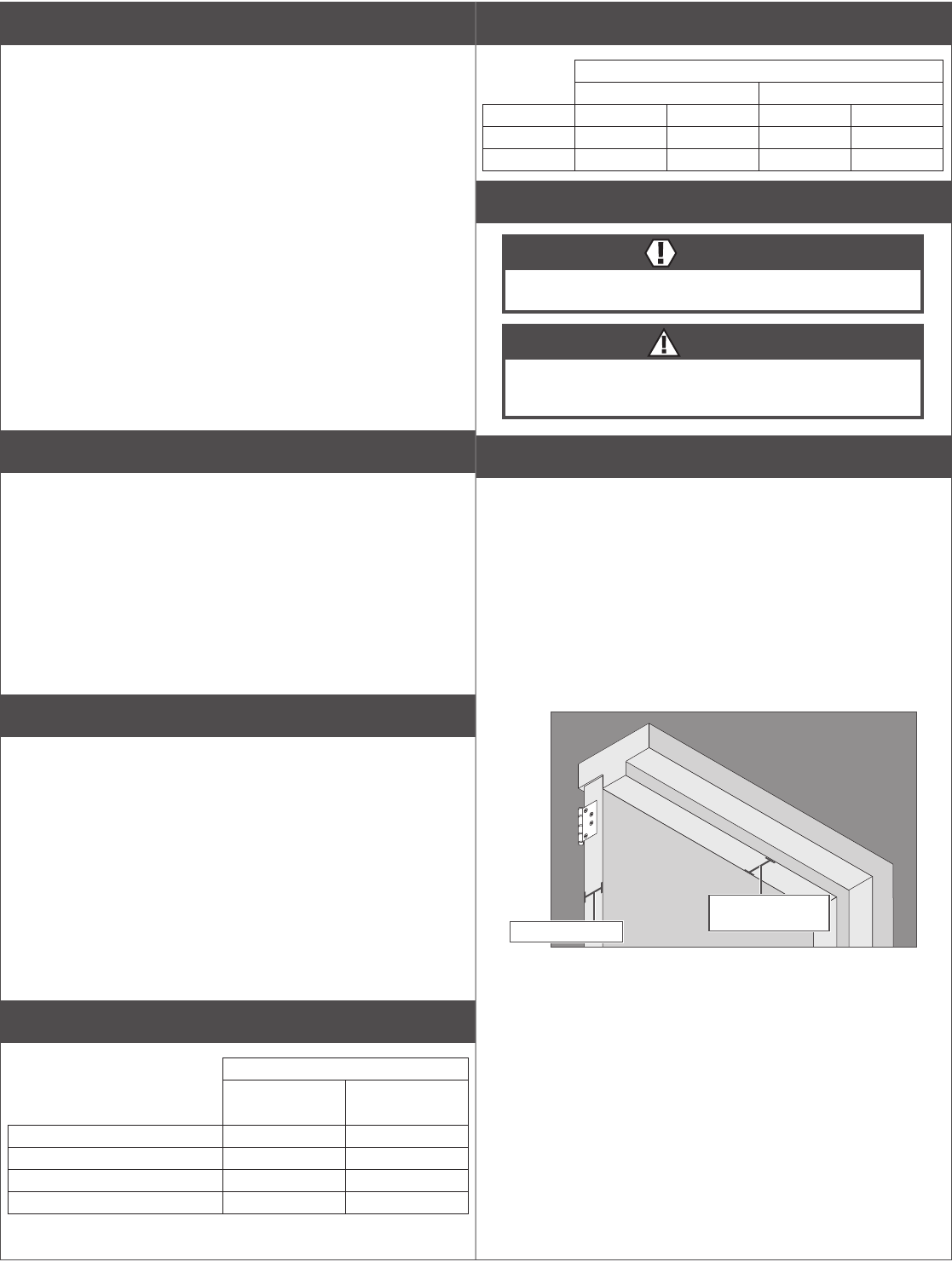
Pre-Installation Considerations
• Use ONLY the hardware provided for mounting this product
(NOTE: Non-standard Door thickness may require different sex nut
hardware-seespecicinstructionsforrequiredhardware).
• Follow the installation procedure as described in this manual.
• Check door thickness. If the door is not 1C\v” thick, a different sex nut
will be required. Contact customer service at 1-877-671-7011.
• Check door header. A minimum 2C\v”thick,atsurfaceisneededto
securely mount all screws for the magnet. If you do not have the
requiredsurface,youwillneedllerplatesand/oranglebracketsto
properly mount the magnet.
Contact customer service at 1-877-671-7011.
Door: 1C\v” Thick
Header: At least
2C\v”thick,at

3
Lock Installation
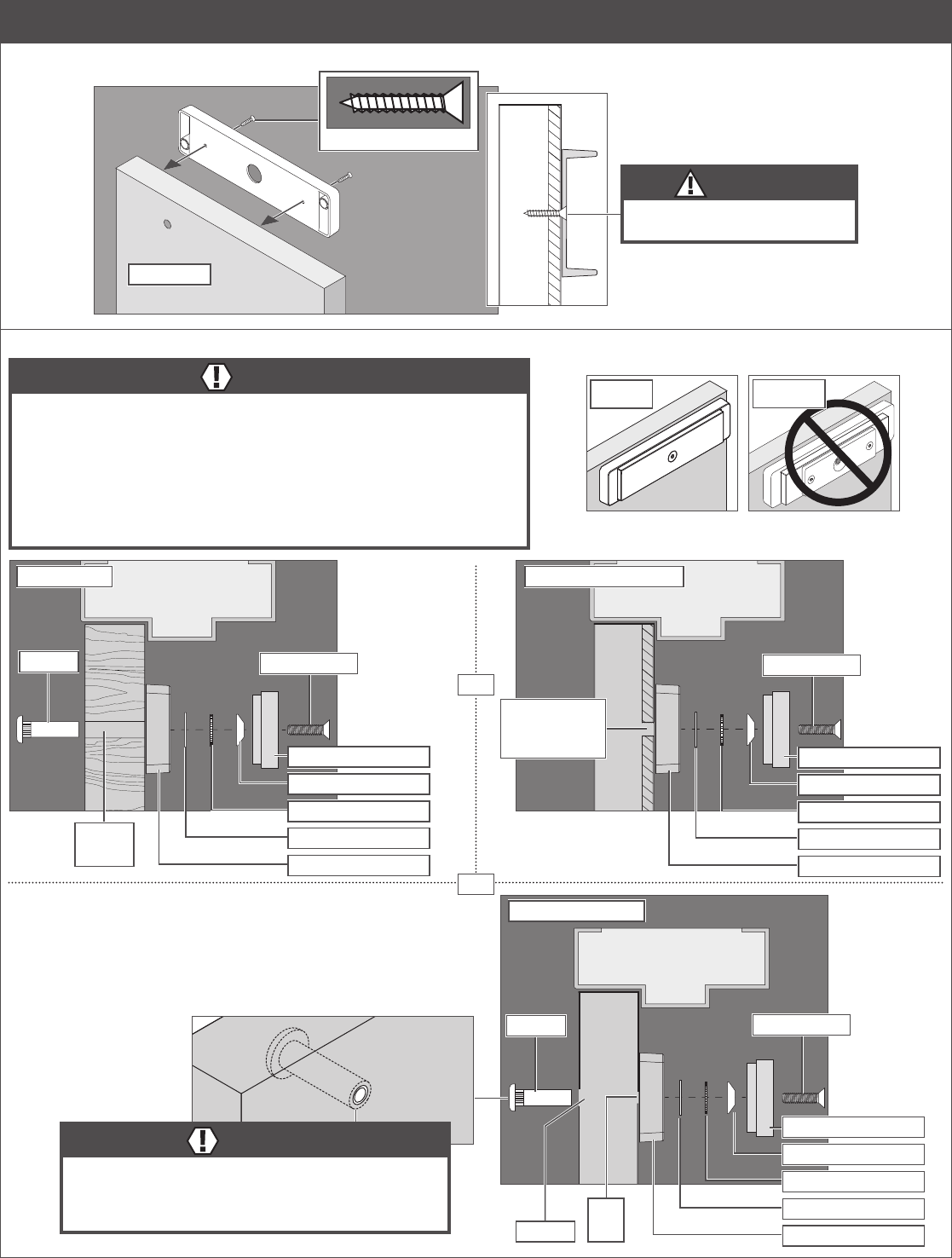
1 Prepare for installation.
1a Determine proper magnet orientation.
Single Door
Wiring Cover
Magnet
LHR Door - Shown from Exterior
Wiring Cover
Magnet
RHR Door - Shown from Exterior
Magnet should be placed
opposite of door hinges.
OR
Double Door
Locks should be installed with wiring covers in the middle, so the magnet in one of the locks must be reoriented.
Shown from Exterior
Magnet MagnetWiring Covers

4
1b Reorient magnet and board (if necessary).
End Block
Wiring Cover
Magnet
Spacer
End Block
(with screw holes)
Front Side
of Lock
c. Rotate magnet, end
blocks and wiring cover as
shown, then reassemble.
d. Rotate board 180°,
then reassemble.
End Block
(with screw holes)
Magnet
End Block
Wiring Cover
Spacer
Board
Front Side
of Lock
a. Remove screws, wiring
cover and end blocks.
b. Remove board.
1c Place template and mark holes.
a. Place template on top corner, opposite of hinges.
b. Mark holes and prepare them per template.
LHR RHR Double
OR OR
5
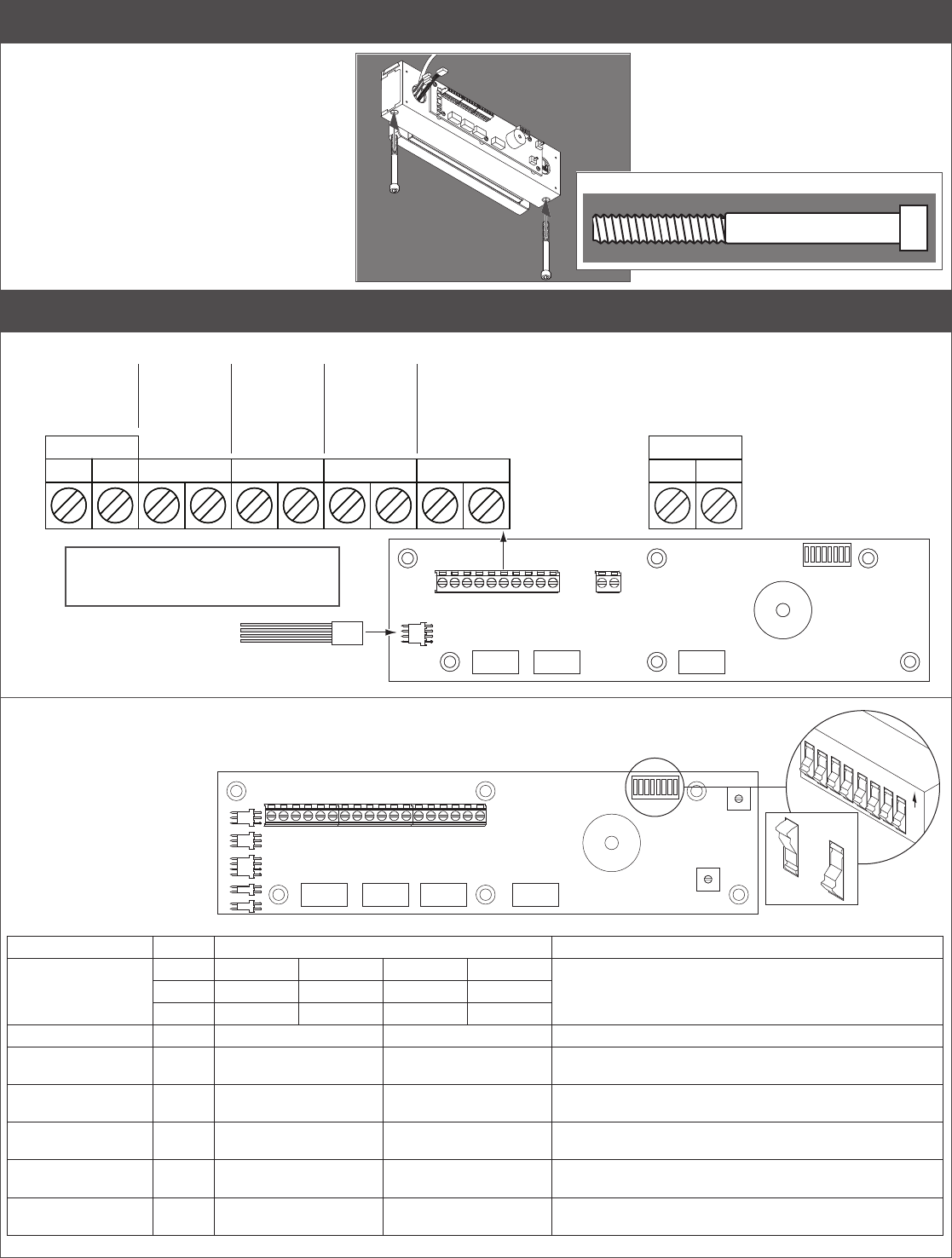
2 Attach armature to door.
2a Install armature holder.
OUTSIDE
CAUTION
Armature holder screws must be
ushtoinsideofarmatureholder.
2x
2b Install armature plate as shown for door type (M420/M450 shown).
WARNING
Armature bolt must be tightened to at least 120 in.-lbs. for all doors except
compositewooddoors.Forcompositewooddoors,tightenonlytotightandush.
120 in.-lbs. may damage composite wood doors.
DO NOT back off bolt after tightening! Backing off the bolt after tightening will
loosen the thread-locking patch, which may allow the bolt to loosen over time.
The included sex nut is for 1C\v” (45 mm) doors ONLY. For other door thicknesses,
please contact customer service, 1-877-671-7011. Using the incorrect sex nut for
your door thickness will lead to improper function and possible injury.
OR
OR
Armature Bolt
Drill and tap
for B\zn - 18
machine screw
Flat Washer
Star Locking Washer
Cone Washer
Armature Holder
Armature Plate
Reinforced Metal Door
Sex Nut Armature Bolt
Z\x” hole
through
Wood Door
Flat Washer
Star Locking Washer
Cone Washer
Armature Holder
Armature Plate
ZZ\cx”
hole
Sex Nut Armature Bolt
Z\x” hole
Hollow Metal Door
WARNING
Sex nut must extend all the way through hollow metal door
for proper installation. Improper Sex nut or installation may
lead to malfunction and injury. Extended lengths available
from customer service, 1-877-671-7011. Flat Washer
Star Locking Washer
Cone Washer
Armature Holder
Armature Plate
Correct Incorrect

6
3 Install mounting bracket into frame.
3a Attach mounting bracket temporarily.
Install two middle screws into slots and partially tighten.
Partially tighten
Pull wires
Oustide
Actual Size
Reinforced Metal Sheet Metal
3b Slide magnet onto bracket.
Outside
3c Align magnet to armature.
a. Close door.
b. Press magnet to fully engage with armature.
c. Mark bracket location.
Inside
Mark here
Press magnet to armature
3d Verify that DE plunger aligns with screw head on armature.
WARNING
Do not loosen the armature bolt in an attempt to adjust
activation of plunger switch. Only re-adjust the mounting
bracket.
Backing off the bolt after tightening will loosen the thread-
locking patch, which may allow the bolt to loosen over time.
Verify DE plunger switch is activated
when door is closed. Re-adjust position
of mounting bracket to achieve proper
switch activation if necessary.
3e Fully attach bracket.
a. Remove magnet from bracket.
b. Check bracket alignment with marks.
c. Fully tighten two screws in slotted holes.
d. Drill four (4) remaining holes.
e. Fully tighten all screws.
CAUTION
All four screws MUST be installed for proper
operation and safety!
If you do not have enough room to securely
fastenallscrews,youwillneedllerplatesand/or
angle brackets to properly mount the magnet.
Failure to properly install the screws may lead to
injury or property damage.
Contact customer service at 1-877-671-7011.
Outside
Fully tighten all screws
Use 10-24 tap if metal
reinforced.
Drill four (4) holes
Check alignment
Actual Size
Reinforced Metal Sheet Metal
7
4 Install lock
4a Install magnet and secure with screws.
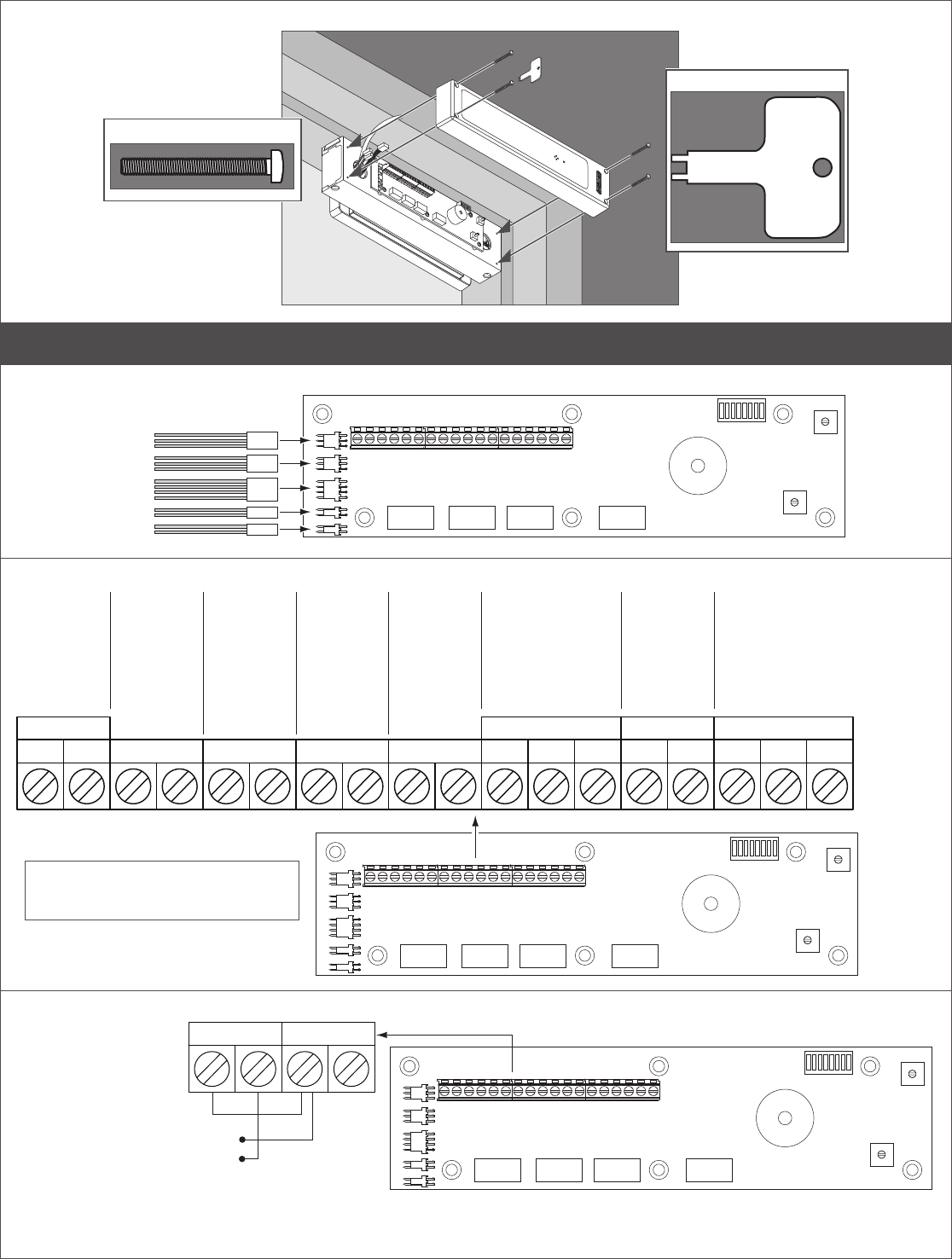
5 Connect wiring to board (basic model).
5a Connect plug and wires to board.
COILS
+ - FIRE AUX
PWR
RLS
Power Input
12/24V DC
UL 294 Listed, power
limited, Class 2, power
supply must be used
RST
Fire Alarm Input
Apply a
normally closed
dry contact or a
jumper if not
connected to fire
alarm.
Release Input
Dry contact
closure will
release lock for
the time delay
period.
Reset Input
Dry contact
closure resets
lock in alarm
condition.
Auxiliary Input
Apply a normally
closed dry contact or
a jumper if not using.
Opening dry contact
places lock into delayed
egress countdown.
COILS
+ - FIRE AUX
PWR
RLSRST NOC
ALRM
Alarm Output (Optional)
Contacts change state
during an alarm condition.
30V@1A resistive
Forwiregaugeandlengthspecications,
see “Wire Gauge and Length
Specications” on page 2.
5b Set SW2 dip switches.
LNOTE: Dip switch panel may be upside-down, depending on installation. Look for the “OFF” label and
compare to the images below for correct dip switch positions.
Feature Switch Setting Description
Nuisance Delay 0 seconds 1 second 2 seconds 3 seconds Nuisance delay is the amount of time the door must be pushed
or aux input must be pressed before triggering the Delayed
Egress Cycle. Programmable to 0-3 seconds.
1Off On Off On
2Off Off On On
Nuisance Alert 3 Off=Disabled On=Enabled Causes horn to sound during nuisance delay
Auto Relock 4 Off=Disabled On=Enabled When enabled, lock will energize upon regaining power or
afterarealarmconditionclears.
Anti-Tailgate
(Plus Model Only)
5 Off=Disabled On=Enabled Door will relock as soon as it closes – even if the relock time
delay has not ended.
Door Propped/Forced
(Plus Model Only)
6 Off=Disabled On=Enabled Enables door propped and door forced alarms
Unlock Alert 7 Off=Disabled On=Enabled Horn sounds whenever door is unlocked and power is still
applied to the door
DEL Enabled 8 Off=Disabled On=Enabled Enables or disables the DEL plunger switch. Aux Input will
always function even if DEL plunger switch is disabled.
Actual Size
Rocker Down
O
F
F
OFF
ON
8
5c Install cover using spanner wrench and security screws.
Actual Size
Spanner Wrench
6 Connect wiring to board (plus model).
6a Connect plugs to board.
DPS2
DPS1
COILS
MBS2
MBS1
6b Connect wires to board.
+ - FIRE AUX CNO NOCNC NO C NC
PWR ALRMDPS MBS
RLS
Power Input
12/24V DC
UL 294 Listed,
power limited,
Class 2, power
supply must be
used
RST
Fire Alarm Input
Apply a
normally closed
dry contact or a
jumper if not
connected to fire
alarm.
Release Input
Dry contact
closure will
release lock for
the time delay
period.
Reset Input
Dry contact
closure resets
lock in alarm
condition.
Alarm Output
(Optional)
Contacts change
state during an
alarm condition.
30V@1A
resistive
DPS Output
(Optional)
Contacts change
state when door is
closed.
12V@200mA
24V@100mA
resistive
MBS Output
(Optional)
Contacts change state when magnet
is properly bonded to its armature. Poor
bond can be caused by low voltage,
misalignment, or damaged mating surfaces.
30V@1A
resistive
Auxiliary Input
Apply a
normally closed
dry contact or a
jumper if not
using. Opening
dry contact
places lock into
delayed egress
countdown.
For wire gauge and length
specifications, see page 2.
Forwiregaugeandlengthspecications,
see “Wire Gauge and Length
Specications” on page 2.
6c (Optional) To use one access control for both Reset and Release, wire as shown.
RLSRST
Dry contact closure
From any access control system
Will release lock in locked condition
or reset lock in alarm condition

9
6d Set SW2 dip switches.
LNOTE: Dip switch panel may be upside-down, depending on installation. Look for the “OFF” label and
compare to the images below for correct dip switch positions.
Feature Switch Setting Description
Nuisance Delay 0 seconds 1 second 2 seconds 3 seconds Nuisance delay is the amount of time the door must be pushed or
aux input must be pressed before triggering the Delayed Egress
Cycle.
Programmable to 0-3 seconds.
1Off On Off On
2Off Off On On
Nuisance Alert 3 Off=Disabled On=Enabled Causes horn to sound during nuisance delay
Auto Relock 4 Off=Disabled On=Enabled Whenenabled,lockwillenergizeuponregainingpowerorafterare
alarm condition clears.
Anti-Tailgate 5 Off=Disabled On=Enabled Door will relock as soon as it closes – even if the relock time delay
has not ended.
Door Propped/Forced 6 Off=Disabled On=Enabled Enables door propped and door forced alarms
Unlock Alert 7 Off=Disabled On=Enabled Horn sounds whenever door is unlocked and power is still applied to
the door
DEL Enabled 8 Off=Disabled On=Enabled Enables or disables the DEL plunger switch. Aux Input will always
function even if DEL plunger switch is disabled.
6e Set relock time - SW4.
Relock time is the amount of time
the lock is de-energized after a valid
release. If auto relock is enabled, it
also controls the amount of time the
lock is unlocked before it automatically
relocksafterapower-onorrealarm
reset. Programmable 0-30 seconds in
2 second increments.
Setting Delay in Seconds
0 0
1 2
2 4
3 6
Setting Delay in Seconds
4 8
5 10
6 12
7 14
Setting Delay in Seconds
8 16
9 18
A 20
B 22
Setting Delay in Seconds
C 24
D 26
E 28
F 30
6f Set door prop time - SW3.
The amount of time the door must be
propped open (after normal release time
delay has ended) before triggering the
alarm. The alarm will clear as soon as the
door closes again. Programmable 0-150
seconds in 10 second increments.
Setting Delay in Seconds
0 0
1 10
2 20
3 30
Setting Delay in Seconds
4 40
5 50
6 60
7 70
Setting Delay in Seconds
8 80
9 90
A 100
B110
Setting Delay in Seconds
C 120
D 130
E 140
F 150
8
7
6
5
4
3
2
1
0
C
A
E
9
B
D
F
8
7
6
5
4
3
2
1
0
C
A
E
9
B
D
F
10
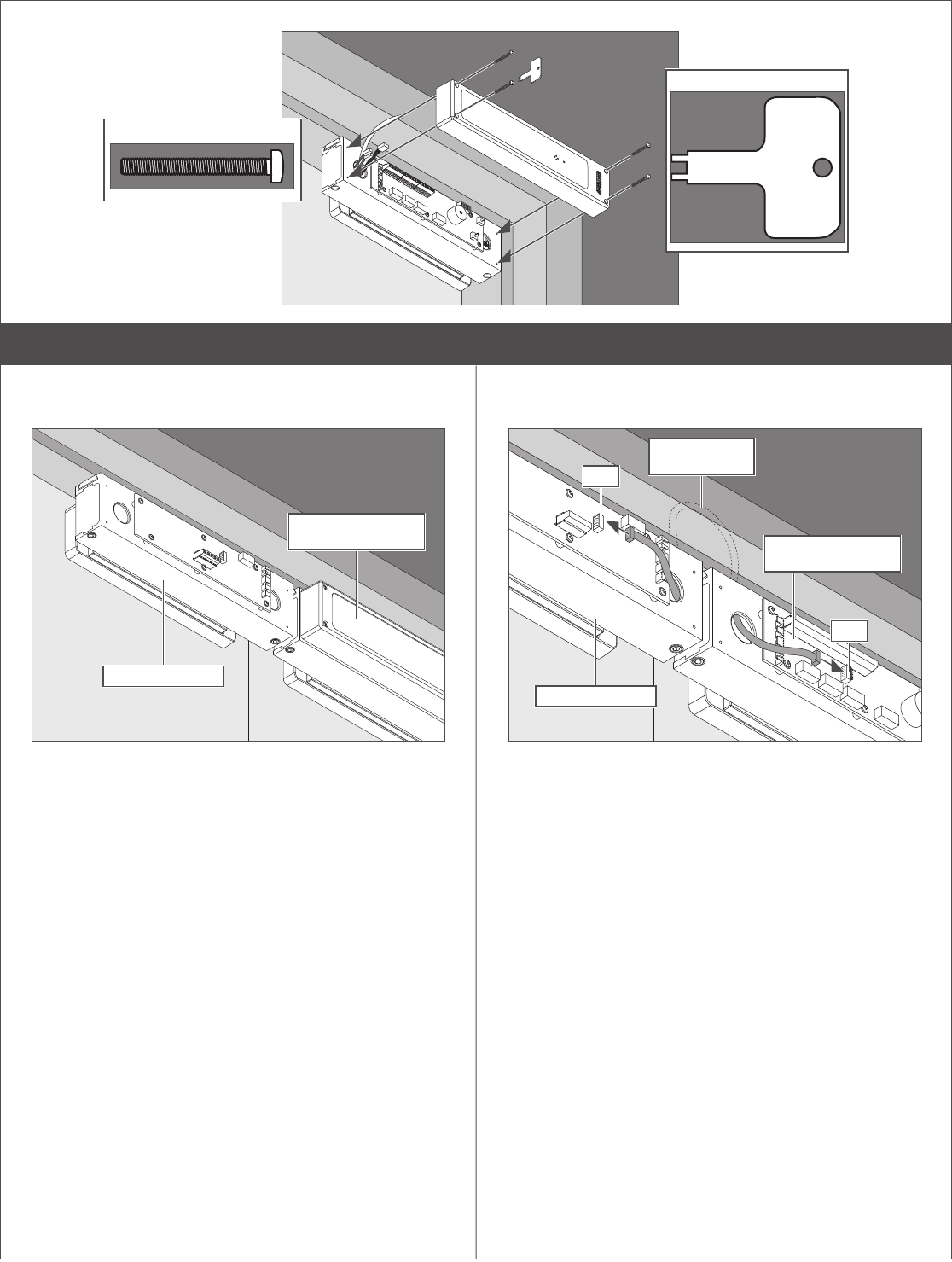
6g Install cover.
Actual Size
Spanner Wrench
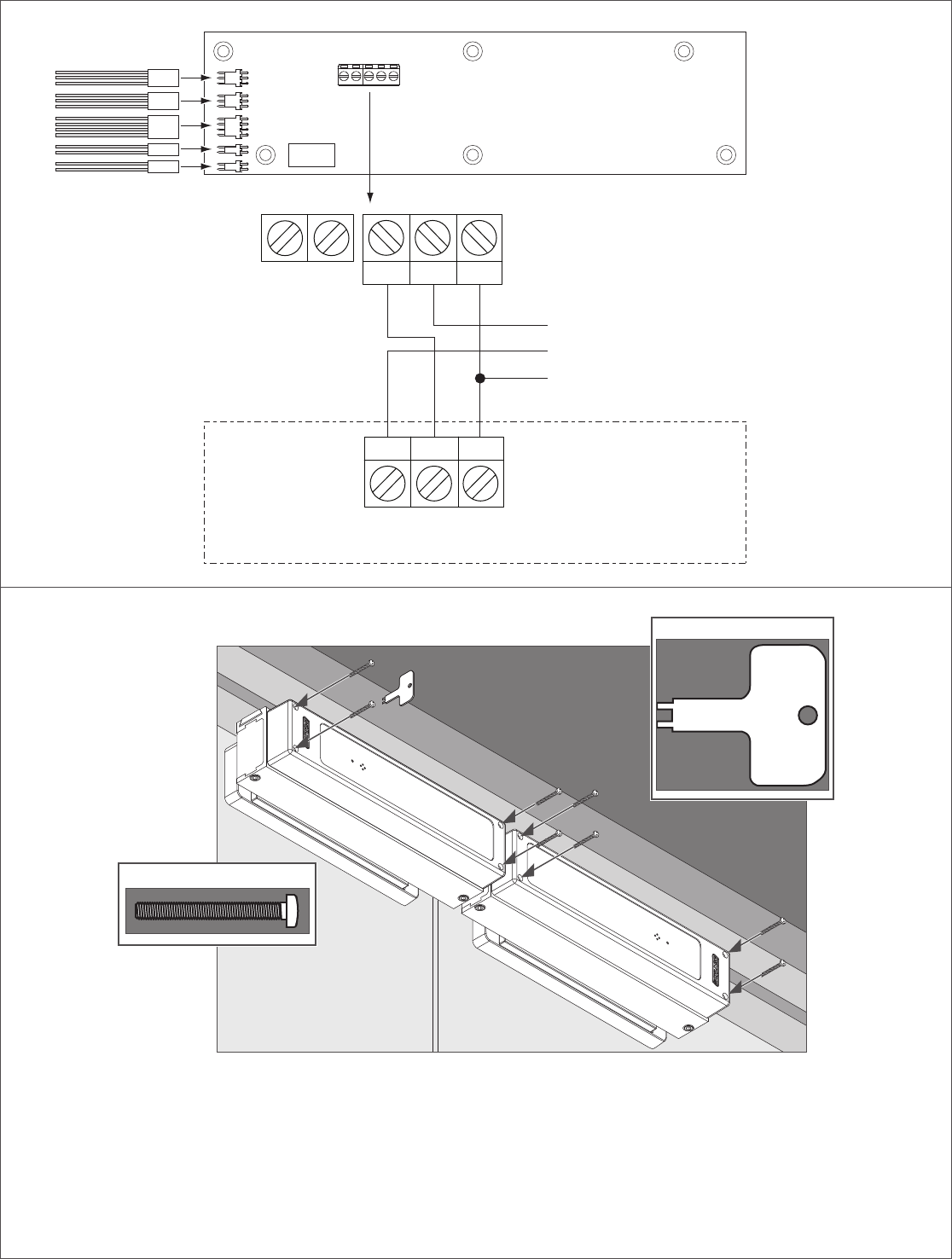
7 If double door, install second lock (M490DE-2 or M490DEP-2).
7a Install second lock.
a. Reorient as needed as shown in step 1b.
b. Install lock as shown in steps 2-4.
Master Lock (Basic
or Plus Model
Companion Lock
7b Install communication cable.
a. Route cable (supplied) through frame.
b. Connect cable to each lock.
Master Lock (Basic
or Plus Model
Companion Lock
Route Through
Frame
J10
J10
11
7c Connect wiring to second lock.
*DPS2
*DPS1
COILS
*MBS2
*MBS1
NO C NC
DPS
NO CNC
DPS
AUX
Master Lock
(Basic or Plus)
(C)
(NO)
(NC)
Second
auxiliary input
Both doors closed.
If either or both doors
open, contacts will change
}
DPS Output
12V@200mA
24V@100mA
resistive
*DPS Wiring in Parallel
(Plus Models Only)
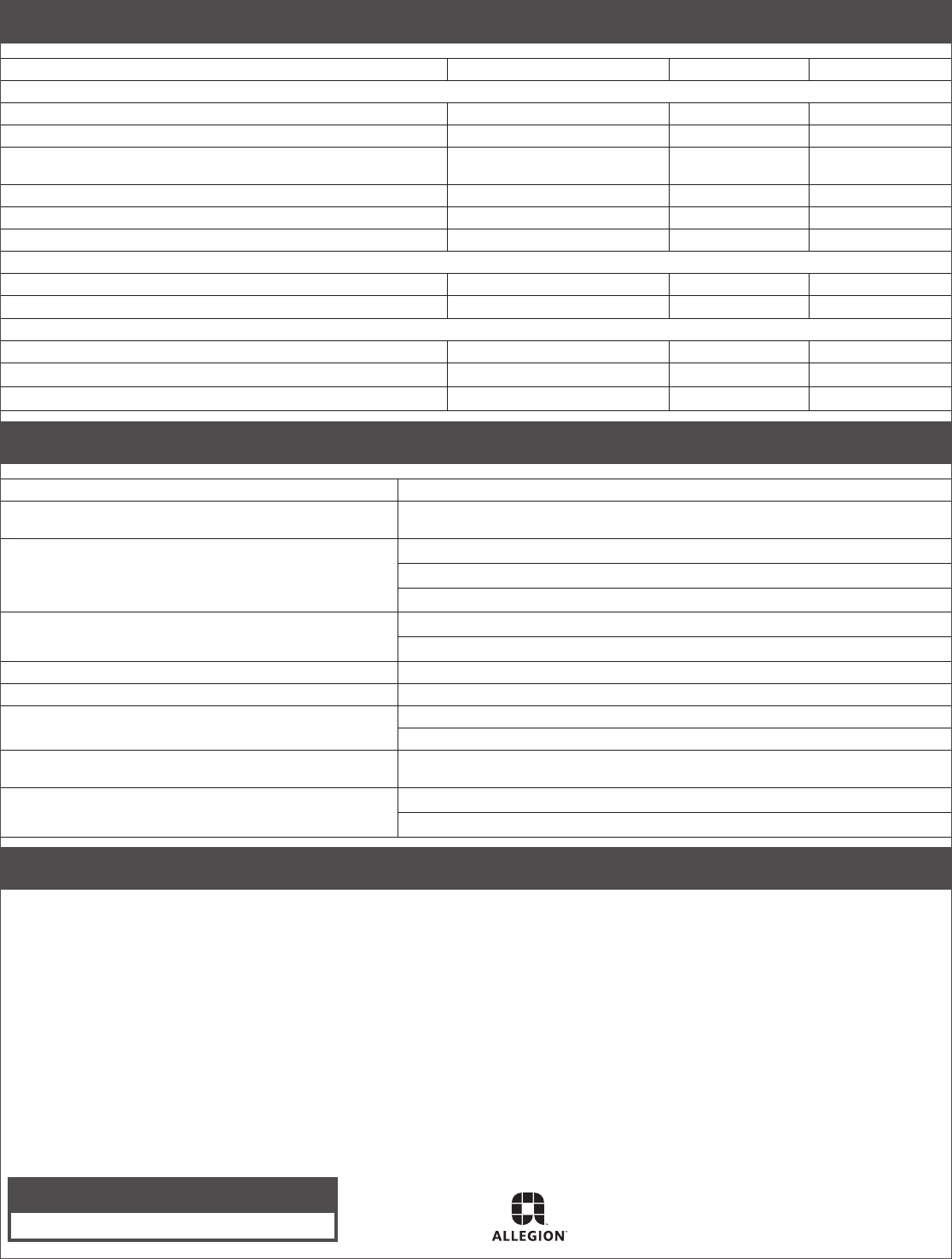
7d Install covers.
Actual Size
Spanner Wrench
LNote: Some warming of the device under routine operation is normal.
© Allegion 2015
Printed in U.S.A.
23697279 Rev. 11/15-f
Customer Service
1-877-671-7011 www.allegion.com/us
Indicator Table
Condition LED Indicator Audible Alarm Relay State
Standard Features
Lock Secure Off Off Open
Authorized Release Input Steady Green Off Open
During Nuisance Delay Steady Red Off (Default)
Set by SW2-3
Open
During Fire Alarm Steady Green Off Closed
During Delayed Egress Flashing Red Beeping Closed
After Delayed Egress Steady Green Steady Tone Closed
Switch Selectable Features
SW2-7 "ON" = Unlock Alert whenever lock is unlocked Steady Green Steady Tone Open
SW2-3 "ON" = Horn will sound during nuisance alert Steady Red Steady Tone Open
Optional Switch Selectable Features - Plus Model Required
Door Propped Open Alarm Flashing Green Beeping Closed
Door Forced Open Alarm Flashing Red Steady Tone Closed
Door Forced Open Alarm followed by Delayed Egress Input Steady Green + Flashing Red Steady Tone Closed
Troubleshooting
Condition LED Indicator
Lock has power but won’t lock. LED (on lock) is Green. Fire alarm not connected or open connection. SW4-7 not ON (set switch, remove and
re-apply power).
Won’t go into delayed egress. Check dipswitch settings
Armature washers not installed properly
Magnet not properly aligned with armature.
Goes into delayed egress upon powerup. Armature washers not installed properly
Improper gap between magnet and armature
Lock can be pushed open with minimal resistance. Magnet/Armature/washers not installed properly
Lock “hums” or vibrates noisily when energized. Magnet/Armature/washers not installed properly
LED(s)ashoncequickly. Relock delay set to 0 sec.
Keypad not initialized
MBS doesn’t change state when locked. Low voltage. Mechanical misalignment. Debris between lock and armature. Armature/
magnet not installed properly
DPS option not working properly. Armature holder not aligned with DPS switch.
Switch not plugged into correct jack
BOCA Operational Description
LBOCA Option is Applicable in United States Jurisdictions Only
a. Lock the door and start the release process by pushing on the actuating bar (or door if no actuating bar provided) for at least 1 second.
The door will release within 15 seconds.
b. The door will not relock until the door has been opened, and returned to the closed position for not less than 30 seconds. Any reopening
of the door during this time will restart the 30 second relocking cycle.
c. A30secondreleasetimedelaymaybeprovidedwithcodeofcialapproval.
