Seav s r l BEFREE Remote Control Transmitter User Manual TX MULTICANALE
Seav s.r.l. Remote Control Transmitter TX MULTICANALE
Contents
- 1. User Manual 1
- 2. User Manual 3
- 3. User Manual 6
User Manual 3
GB
BEFREE X3 RADIO CONTROL
The radio control in the BeFree x3 series can be used to
control 3 different (Up – Stop – Down) user commands.
Codes are transmitted using an 18-bit random system,
which can be used in conjunction with other transmitters
in the same series and may be integrated perfectly with
SEAV receivers and electronic control units.
- Mod. BeFree S3: 433.92 MHz
- Mod. BeFree H3: 868.30 MHz
TECHNICAL DATA
- Alkaline battery powered : 12 V mod. 23 A
- Operating frequency : see model
- Combinations : 32768
- Max. consumption : 25 mA
- Operating temperature : -10 to + 70 °C
- Dimensions : 120 x 45 x 15 mm.
OPERATING DESCRIPTION
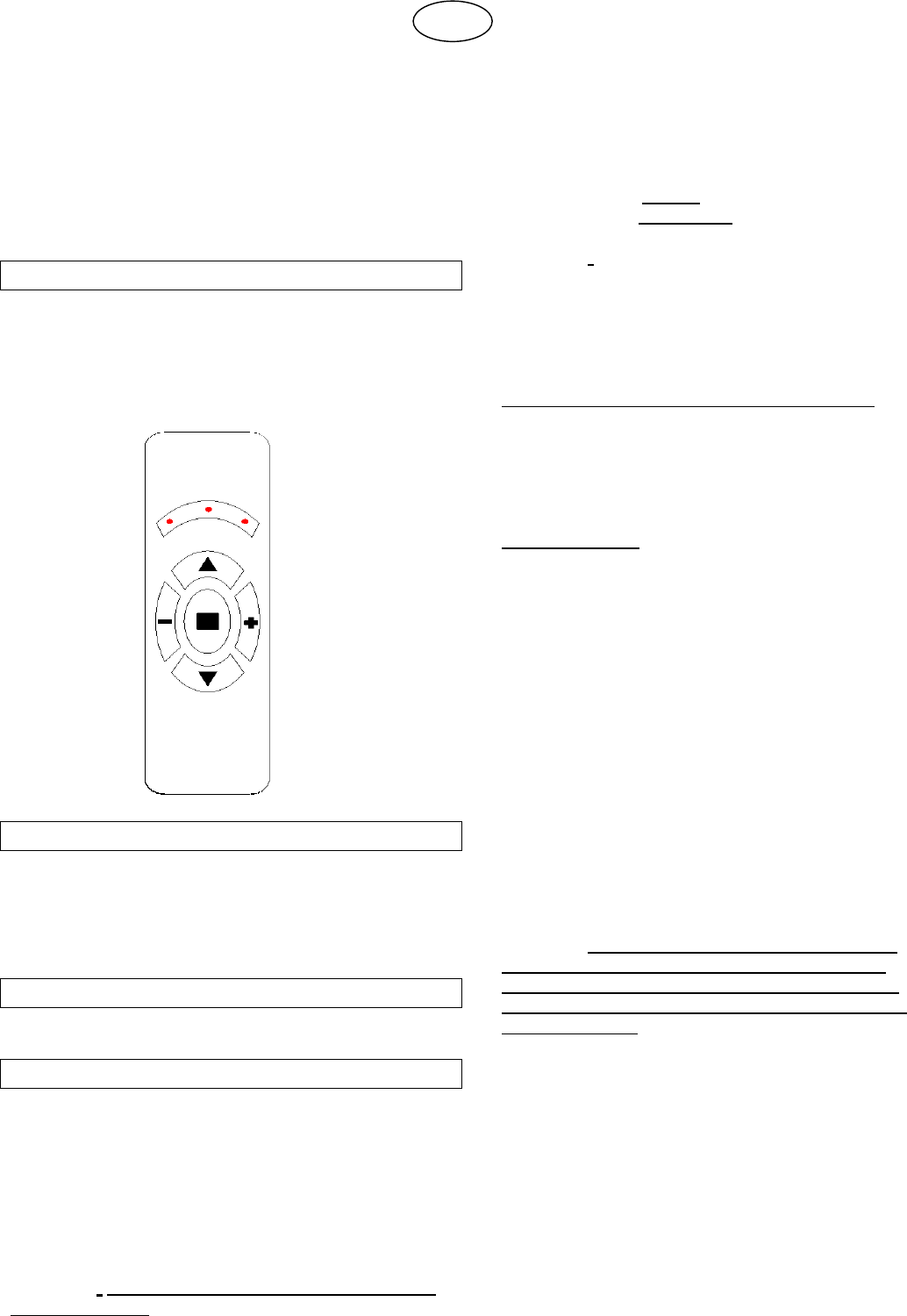
The radio control has 3 command buttons: UP, STOP
and DOWN, and corresponding red indicator LEDs.
There are 2 other function buttons (–) and (+) which are
used to select one of the 3 different user commands or
the special functions. The LED flickers when a
transmission code is being sent.
INITIAL OPERATING CONDITION
The radio control is supplied by the manufacturer with
default random codes.
OPERATING MODES
Creating a new random code (Reset):
The radio control is supplied by the manufacturer with
default random codes. If you want to create a new set of
random codes, perform the RESET procedure as
follows: press and hold the UP, STOP and DOWN
buttons simultaneously for 2 seconds. After the LEDs
light up, press the UP and DOWN buttons within 5
seconds. The LEDs will flash 3 times to indicate that the
process is complete.
WARNING! The RESET procedure completely deletes
the default codes.
Copying all the information contained in the radio
control:
It is only possible to copy all the transmission codes on
the radio control if the products are the same model.
To copy all the information between radio controls,
proceed as follows: connect the two radio controls with
the cable supplied as an “optional extra”; press and hold
any button on the source radio control for 2 seconds.
The LEDs on the destination radio control will flash 3
times to indicate that the operation is complete.
WARNING! The default configuration of the radio
control has no password protection; it is therefore
possible to copy all information. If the radio control is
supplied with a password enabled it will not be possible
to carry out the copying process.
“-” and “+” function buttons:
Selecting one of the 3 different user commands:
The radio control has two function buttons, (–) and (+),
which are used to select the required transmission
channel and operate in conjunction with the indicator
LEDs.
This means that 3 different user commands can be
operated at once.
Special functions:
The radio control has two function buttons, (–) and (+),
used to control the special functions. By pressing and
holding the (-) or (+) button for at least 2 seconds, a
special code is activated and transmitted (this is different
for each user command). The special codes may be used
in conjunction with the control units that have been set to
this type of operation.
(For example: in the BeSun control unit, the function
buttons are used to activate and deactivate the sun
sensor).
Simultaneous transmission of all codes:
The radio control allows all 3 transmission codes to be
sent at the same time (UP, STOP or DOWN).
To select this function, press and hold the (–) and (+)
buttons for 3 seconds. All the indicator LEDs will light up
at the same time, showing that the radio control is ready
to send all 3 transmission codes simultaneously. Repeat
the above process to restore normal operation.
WARNING! The simultaneous transmission of all 3
codes is in fact carried out in sequence with a 0.5
second gap between each transmission. You must
therefore wait a few moments before attempting any
other commands.
Other functions using a PC:
The radio control can be connected to a Personal
Computer using the “SW 2188” software package which
is supplied as an optional extra and enables you to
utilise further functions.
Other functions using a Programmer:
The radio control can be connected to a “PGM 2191”
portable Programmer which is supplied as an optional
extra and enables you to utilise further functions.
-1- Rev. 2.0 27 April 2007
WARNING
− The battery should be replaced every year to
guarantee the optimal range of the transmitter.
− To replace the exhausted battery, take the plastic lid
off, remove the battery and replace it with a new one,
observing the correct battery polarities.
− Used batteries should be discarded in special
collection bins.
SEAV s.r.l. hereby declares that the below product:
BeFree Series Radio Control
complies with the specifications set out in the Directive
R&TTE 99/5/EC.
FCC ID: QUS-BEFREE
This device complies with Part 15 of the FCC Rules.
Operation is subject to the following two conditions:
(1) this device may not cause harmful interference, and
(2) this device must accept any interference received,
including interference that may cause undesired
operation.
WARNING
Any adjustments or modifications that have not been
expressly approved by the holder of the legal conformity
certificate may invalidate the user’s rights relating to the
operation of the device.
2