Seba Dynatronic Mess und Ortungstechnik CORC300RI Portable Radio Interface For COR MS-3 & COR PT-3 User Manual manual c 300 RI en

Seba Dynatronic Mess- und Ortungstechnik GmbH Portable Radio Interface For COR MS-3 & COR PT-3 manual c 300 RI en

Users manual
Consultation with SebaKMT    1 User Manual Correlator COR C-300-RI                  Issue:  0.9 (03/2017) - EN Article number:  88888 Mess- und Ortungstechnik Measuring and Locating Technologies Elektrizitätsnetze Power Networks  Kommunikationsnetze Communication Networks  Rohrleitungsnetze Water Networks  Abwassernetze Sewer Systems  Leitungsortung Line Locating
Consultation with SebaKMT    3 Consultation with SebaKMT The  present  system  manual  has  been  designed  as  an  operating  guide  and  for reference. It is meant to answer your questions and solve your problems in as fast and easy a  way as possible.  Please start  with referring  to  this manual should  any  trouble occur. In  doing  so,  make  use  of  the  table  of  contents  and  read  the  relevant  paragraph  with great  attention.  Furthermore,  check  all  terminals  and  connections  of  the  instruments involved. Should any question remain unanswered or should you need the help of an authorized service station, please contact: Seba Dynatronic Mess- und Ortungstechnik GmbH Hagenuk KMT Kabelmesstechnik GmbH Dr.-Herbert-Iann-Str. 6 D - 96148 Baunach  Phone: +49 /  9544 / 68 – 0 Fax: +49 /  9544 / 22 73 Röderaue 41 D - 01471 Radeburg / Dresden Phone: +49 / 35208 /  84 – 0 Fax: +49 / 35208 /  84 249 E-Mail: sales@sebakmt.com http://www.sebakmt.com                   SebaKMT All rights reserved. No part of this handbook may be copied by photographic or other means unless SebaKMT have before-hand declared their consent in writing. The content of this handbook is subject to change without notice.  SebaKMT cannot  be made  liable  for  technical  or  printing  errors  or  shortcomings  of  this  handbook. SebaKMT also disclaims all responsibility for damage resulting directly or indirectly from the delivery, supply, or use of this matter.
  Terms of Warranty   4 Terms of Warranty SebaKMT accept  responsibility  for  a  claim  under  warranty  brought  forward  by  a customer for a product sold by SebaKMT under the terms stated below. SebaKMT  warrant  that  at  the  time  of  delivery  SebaKMT  products  are  free  from manufacturing  or  material  defects  which  might  considerably  reduce  their  value  or usability.  This  warranty  does  not  apply  to  faults  in  the  software  supplied.  During  the period of warranty, SebaKMT agree to repair faulty parts or replace them with new parts or parts as new (with the same usability and life as new parts) according to their choice.  This warranty does not cover wear parts, lamps, fuses, batteries and accumulators. SebaKMT reject all further claims under warranty, in particular those from consequential damage.  Each  component  and  product  replaced  in  accordance  with  this  warranty becomes the property of SebaKMT. All warranty claims versus SebaKMT are hereby limited to a period of 12 months from the  date  of  delivery.  Each  component  supplied  by  SebaKMT  within  the  context  of warranty will also be covered by this warranty for the remaining period of time but for 90 days at least. Each  measure  to  remedy  a  claim  under  warranty  shall  exclusively  be  carried  out  by SebaKMT or an authorized service station. This warranty does not apply to any fault or damage caused by exposing a product to conditions not in accordance with this specification, by storing, transporting, or using it improperly, or having it serviced or installed by a workshop not authorized by SebaKMT. All  responsibility  is  disclaimed  for  damage  due  to  wear,  will  of  God,  or  connection  to foreign components.  For  damage  resulting  from  a  violation  of  their  duty  to  repair  or  re-supply  items, SebaKMT can be made liable only in case of severe negligence or intention. Any liability for slight negligence is disclaimed. Since some states do not allow the exclusion or limitation of an implied warranty or of consequential  damage,  the  limitations  of  liability  described  above  perhaps  may  not apply to you.
Terms of Warranty    5 Contents Consultation with SebaKMT ........................................................................................... 3 Terms of Warranty ........................................................................................................... 4 1 Safety Instructions ........................................................................................... 8 1.1 General Safety Instructions and Warnings ......................................................... 8 1.2 General Notes .................................................................................................... 8 2 Technical description .................................................................................... 10 2.1 Function ............................................................................................................ 10 2.2 Features of the set ........................................................................................... 11 2.3 Power supply .................................................................................................... 11 2.4 Scope of delivery .............................................................................................. 13 3 COR C-300-RI .................................................................................................. 16 3.1 Function and design ......................................................................................... 16 3.2 Power supply .................................................................................................... 16 4 The Power transmitters ................................................................................. 17 4.1 Function and Design ........................................................................................ 17 4.2 Identification number (ID) ................................................................................. 19 4.3 Power supply .................................................................................................... 19 4.4 Commissioning ................................................................................................. 20 4.5 Installation ........................................................................................................ 20 5 The Multi sensors ........................................................................................... 21 5.1 Design and function .......................................................................................... 21 5.2 Identification number (ID) ................................................................................. 21 5.3 Power supply .................................................................................................... 22 5.4 Switching ON/OFF ........................................................................................... 22 5.5 Installation ........................................................................................................ 23 5.6 Angle adapter ................................................................................................... 23 6 CorreluxView Software .................................................................................. 25 6.1 User interface ................................................................................................... 25 6.2 Basic settings ................................................................................................... 27 6.2.1 Storage location for application database ........................................................ 27 6.2.2 GPS receiver port ............................................................................................. 27 6.2.3 System of units ................................................................................................. 27 6.2.4 Logarithmic or linear coherence display ........................................................... 28 6.3 Creating, renaming and deleting directories .................................................... 28 6.4 Importing data .................................................................................................. 29 6.5 Editing a map ................................................................................................... 29
  Terms of Warranty   6 6.6 Correlation ........................................................................................................ 31 6.6.1 Perform and display a correlation .................................................................... 31 6.6.2 Display and select audio blocks (Offline measurements only) ......................... 32 6.6.3 Call up the correlation analysis menu .............................................................. 33 6.6.4 Select a correlation method (Offline measurements only) ............................... 34
Terms of Warranty    7
  Safety Instructions   8 1  Safety Instructions 1.1  General Safety Instructions and Warnings  • Do not drop the device / the system’s components or subject it / them to strong impacts or mechanical shocks. • The limits described under Technical Data may not be exceeded.  • The device / system must be in a technically perfect condition for measurement. • The indicated degree of protection can only be ensured if plugs or the provided protection caps are put in all sockets of the device. • The plugs of the supplied connection cables are only compliant to the indicated degree of protection as long as they are plugged in. Plugs which are not connected or which are connected in a wrong way are not protected from water and dust ingress. • If the O-ring seal of a socket is obviously damaged, it must be replaced in order to ensure the total protection against water and dust ingress.   1.2  General Notes This  manual  contains  basic  instructions  for  the  commissioning  and  operation  of  the device  /  system.  For  this  reason,  it  is  important  to  ensure  that  the  manual  is  always available  to  the  authorised  and  trained  operator.  He  needs  to  read  the  manual thoroughly. The manufacturer is not liable for damage to material or humans due to non-observance of the instructions and safety advices provided by this manual. Locally applying regulations have to be observed! The  following  signal  words  and  symbols  are  used  in  this  manual  and  on  the  product itself: Signal word / symbol Description CAUTION  Indicates a potential hazard which may result in moderate or minor injury if not avoided. NOTICE  Indicates a potential hazard which may result in material damage if not avoided.  Serves to highlight warnings and safety instructions. As a warning label on the product it is used to draw attention to potential hazards which have to be avoided by reading the manual.  Serves to highlight important information and useful tips on the operation of the device/system. Failure to observe may lead to unusable measurement results.  Check  the  contents  of  the  package  for  completeness  and  visible  damage  right  after receipt. In the case of visible damage, the device must under no circumstances be taken into  operation.  If  something  is  missing  or  damaged,  please  contact  your  local  sales representative. It is important to observe the generally applicable regulations of the country in which the device will be operated, as well as the current national accident prevention regulations and internal company directives (work, operating and safety regulations). Safety precautions Labelling of safety instructions Check contents Working with products from SebaKMT
Safety Instructions    9 Use  genuine  accessories  to  ensure  system  safety  and  reliable  operation.  The  use  of other parts is not permitted and invalidates the warranty. Repair and maintenance work has to be carried out by SebaKMT or authorised service partners  using  original  spare  parts  only.  SebaKMT  recommends  having  the  system tested and maintained at a SebaKMT service centre once a year. SebaKMT also offers its customers on-site service. Please contact your service centre if needed. The lithium batteries of the device are dangerous goods. The transport of the batteries itselves and of devices which contain such batteries is subject to regulations based on the UN Model Regulations “Transport of Dangerous Goods” (ST/SG/AC.10-1). Please  inform  yourself  about  the  transportation  requirements  and  follow  them  when shipping the device. This  device  is  designed  for  industrial  use.  When  used  at  home  it  could  cause interference to other equipment, such as the radio or television. The  interference  level  from  the  line  complies  with  the  limit  curve  B  (living  area),  the radiation level complies with the limit curve A (industrial area) according to EN 55011. Given  that  living  areas  are  sufficiently  far  away  from  the  planned  area  of  operation (industrial area), equipment in living areas will not be impaired.   For FCC:User Information gem. FCC 15.2:  Changes or modifications not expressly approved by the party responsible for compliance could void the user’s authority to operate the equipment  Part 15 Statement gem. FCC 15.19/RSS Gen Issue 4 Sect. 8.4 This device complies with Part 15 of the FCC Rules. Operation is subject to the following two conditions: (1) this device may not cause harmful interference, and (2) this device must accept any interference received, including interference that may cause undesired operation. Repair and maintenance Special transportation requirements Electromagnetic radiation
  Technical description   10 2  Technical description  2.1  Function The  Correlux C-300-RI  is a digital correlation system to  locate  leaks in drinking water pipes.  Pressurized water at the leak location creates a noise which travels out in all directions of  the  pipe.  This  noise  is  recorded,  amplified  and  sent  wirelessly  to  the  correlation system by two sensors (piezo microphone, hydrophone) which are attached to the pipe (e.g. valve, hydrants).  The PC software compares both signals (correlation) and calculates the exact distance to the leakage on the basis of the delay time of the signals, the sensor spacing and the sound velocity in the pipe. The  Correlux C-300-RI  is  suitable  for  both  immediate  measurement ("Online measurement") as well as time-delayed measurement ("Offline measurement").  Online measurement In a so-called Online measurement, the noise recording and the correlation of the data take place at the same time. Step Description 1  Installing the Power transmitters "A" and "B" at two measuring points. 2  Noise recording, at the same time data transfer and live data correlation on the Correlator.    Offline measurement In  a  so-called  Offline measurement,  the  correlation  of  the  measured  data  takes  place only after the noise recording has been terminated. Step Description 1  Programming the sensors (Multi sensors and Power transmitters) 2  Installing the Power transmitters and/or Multi sensors at up to 8 measuring points. 3  Noise recording, immediately or at a preset time (e.g. at night).  4  Collecting the sensors.  5  Reading and analyzing the measured data using the Correlator.   Pinpointing To determine the exact location of the leak after the correlation, a pinpoint search can be  performed  using  the  Multi sensors  or  the  ground  microphone  connected  to  the Correlator.
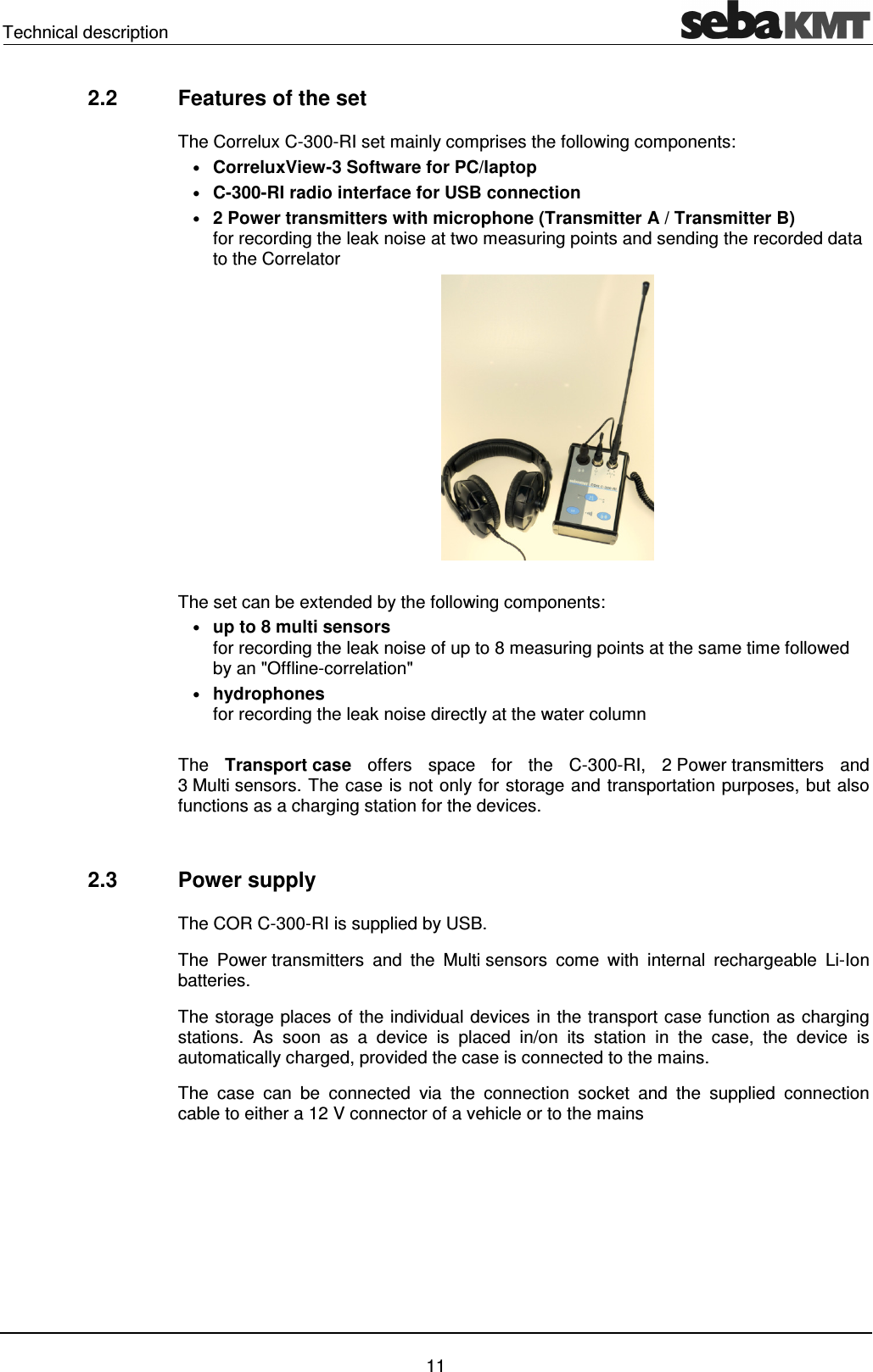
Technical description    11 2.2  Features of the set The Correlux C-300-RI set mainly comprises the following components: • CorreluxView-3 Software for PC/laptop • C-300-RI radio interface for USB connection • 2 Power transmitters with microphone (Transmitter A / Transmitter B)  for recording the leak noise at two measuring points and sending the recorded data to the Correlator    The set can be extended by the following components: • up to 8 multi sensors  for recording the leak noise of up to 8 measuring points at the same time followed by an "Offline-correlation"   • hydrophones for recording the leak noise directly at the water column  The  Transport case  offers  space  for  the  C-300-RI,  2 Power transmitters  and 3 Multi sensors. The case is not only for storage and transportation purposes, but also functions as a charging station for the devices.   2.3  Power supply The COR C-300-RI is supplied by USB. The  Power transmitters  and  the  Multi sensors  come  with  internal  rechargeable  Li-Ion batteries.  The storage places of the individual devices in the transport case function as charging stations.  As  soon  as  a  device  is  placed  in/on  its  station  in  the  case,  the  device  is automatically charged, provided the case is connected to the mains. The  case  can  be  connected  via  the  connection  socket  and  the  supplied  connection cable to either a 12 V connector of a vehicle or to the mains
  Technical description   12  NOTE When connected to the electrical system of a car, the transport case is powered by the vehicle's battery, even while the vehicle is not in operation. This could result in the complete discharge of the vehicle battery. When you park the car, disconnect the Correlux transport case from the vehicle power supply.  You can find more information in the chapters which describe the individual devices.
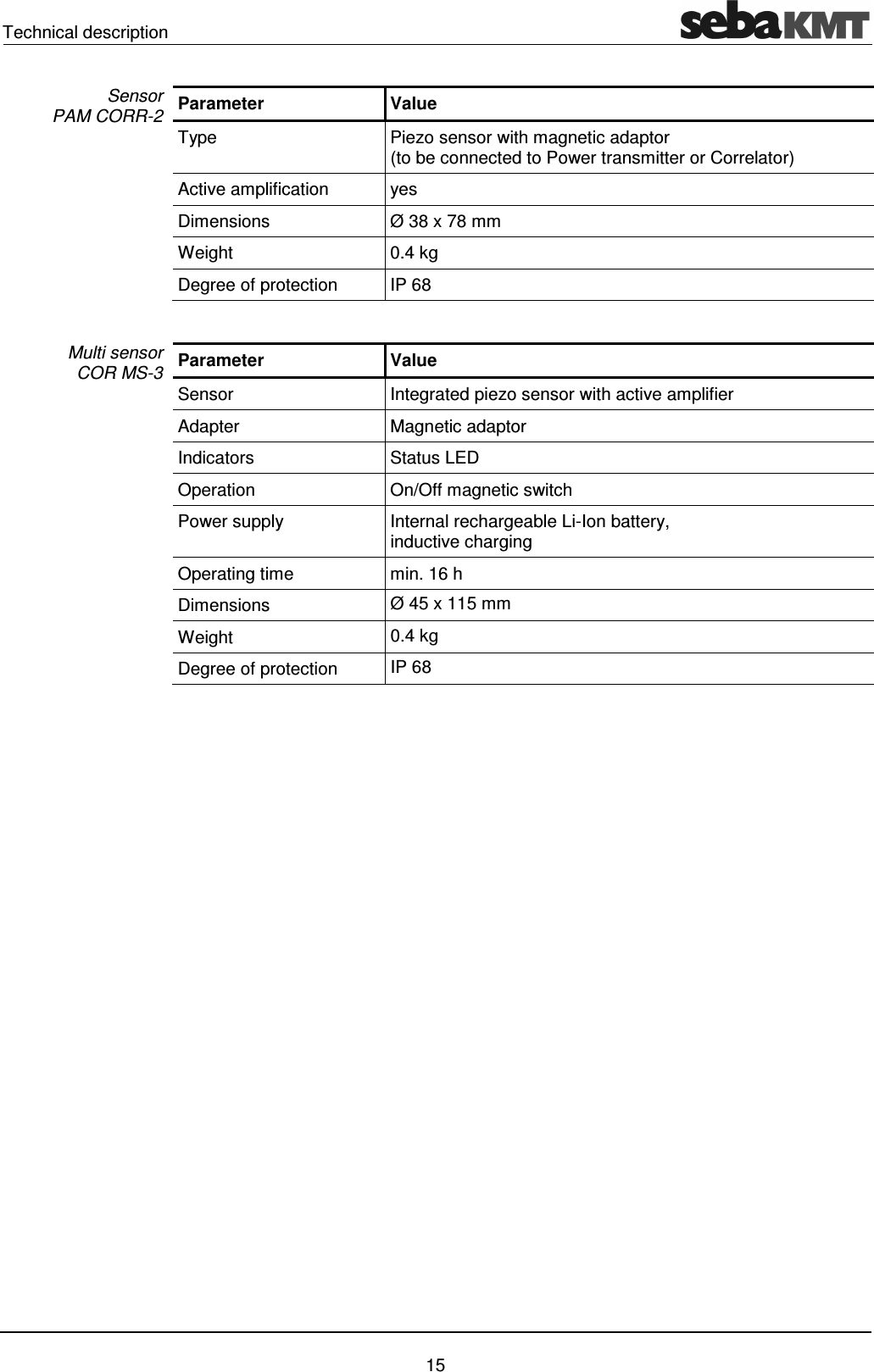
Technical description    13 2.4  Scope of delivery The basic set comprises the following devices and accessories:  Accessory  Description  Art.no. COR C-300-RI  USB interface  1008480 COR PT-3A  Power transmitter A   1004779 COR PT-3B  Power transmitter B  1004780 PAM CORR-2  2 x active universal microphone for PT-3  820019615 LG  C-3  Charging unit for CPK 3/CMK 3  1006646 LK  13  Car charging adaptor, 3.5m  810000006 KR 22-5  Stereo headphones  810002087 VST T-1  2 x extension rod for PAM CORR-2  810000103   2 x nylon cord 3mm blue, 2m  304035025 CSW CorreluxView   PC software  1006584  The following devices and accessories are available to extend the basic set. Accessory  Description  Art.no. COR MS-3  Multi sensor  1004815 CMK 3-8-MS  Case for 8 Multi sensors COR MS-3  2005301 LOG TP  Trivet adaptor for Sebalog Corr  128309877 LOG MWA  Magnetic angled adaptor  118303355   Mounting set for COR MWA (Screws for angled adapters)  2007393   Set of labels COR MS-3 (1 - 8)  2007321  Correlux C-300-RI is specified by the following parameters: dimensions  170 x 110 x 60 mm (without antenna) Weight  0.6 kg Connector / Supply  USB  Parameter  Value Sensor  Piezo sensor with active amplifier (standard) /  hydrophone (optional) Indicators  I/O LED (device On/Off) Radio LED (radio module On/Off)) Row of LEDs (battery status or measured noise level) Operation  On/Off pushbutton Power supply  Internal rechargeable Li-Ion battery, inductive charging Standard accessory Additional accessory Technical data Power transmitter  COR PT-3A/B
  Technical description   14 Parameter  Value Operating time  min. 12 h Connections  Sensor (microphone/hydrophone),  Radio antenna Dimensions (without handle) Ø 125 x 111 mm  Weight (without sensor)  0.9 kg Degree of protection  IP 65
Technical description    15 Parameter  Value Type  Piezo sensor with magnetic adaptor  (to be connected to Power transmitter or Correlator) Active amplification  yes Dimensions  Ø 38 x 78 mm Weight  0.4 kg Degree of protection  IP 68  Parameter  Value Sensor  Integrated piezo sensor with active amplifier Adapter  Magnetic adaptor Indicators  Status LED Operation  On/Off magnetic switch Power supply  Internal rechargeable Li-Ion battery,  inductive charging Operating time  min. 16 h Dimensions   Ø 45 x 115 mm  Weight   0.4 kg Degree of protection  IP 68   Sensor  PAM CORR-2 Multi sensor  COR MS-3
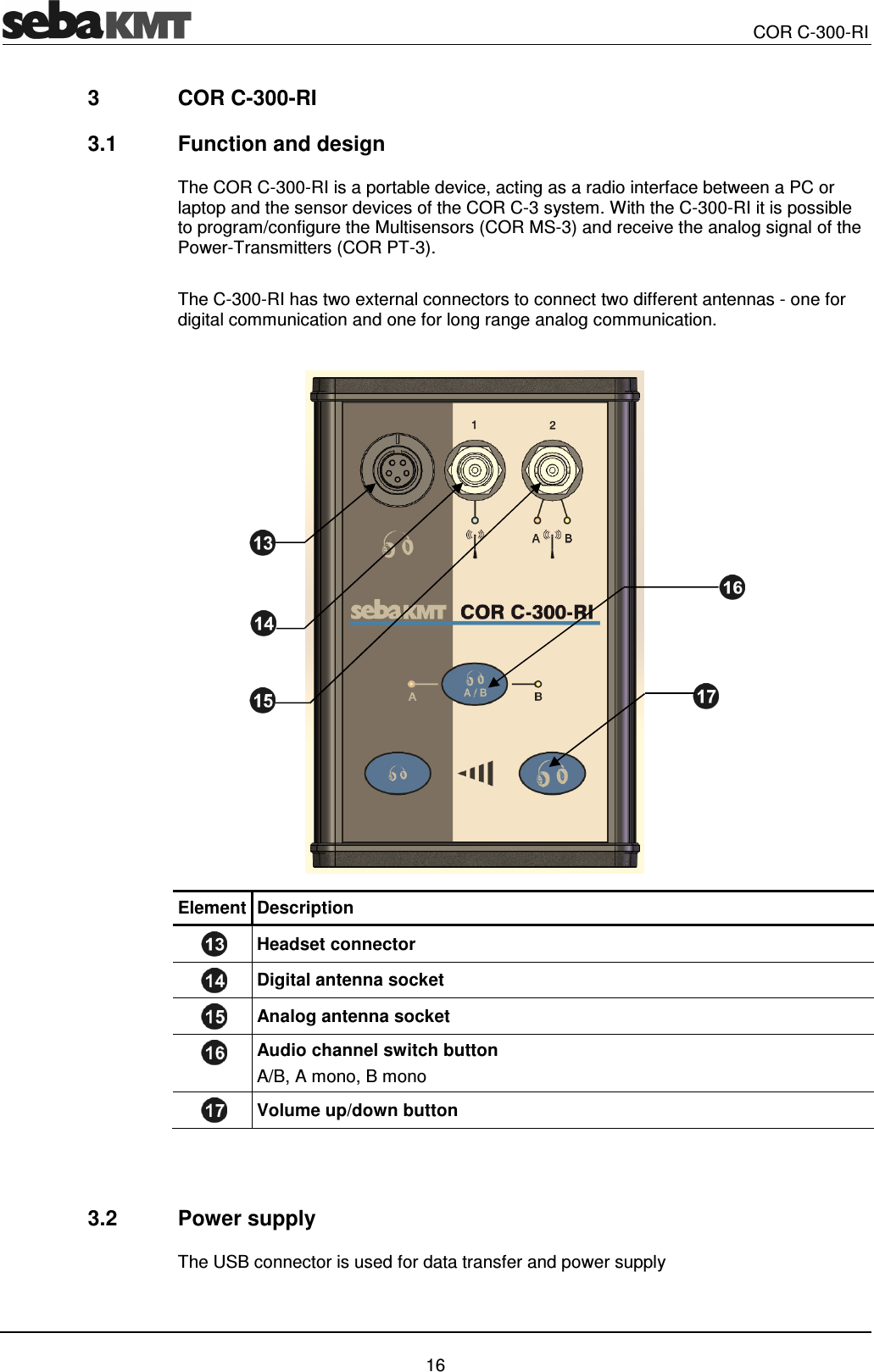
  COR C-300-RI   16 3  COR C-300-RI 3.1  Function and design The COR C-300-RI is a portable device, acting as a radio interface between a PC or laptop and the sensor devices of the COR C-3 system. With the C-300-RI it is possible to program/configure the Multisensors (COR MS-3) and receive the analog signal of the Power-Transmitters (COR PT-3).  The C-300-RI has two external connectors to connect two different antennas - one for digital communication and one for long range analog communication.   Element Description  Headset connector  Digital antenna socket  Analog antenna socket  Audio channel switch button A/B, A mono, B mono  Volume up/down button    3.2  Power supply The USB connector is used for data transfer and power supply
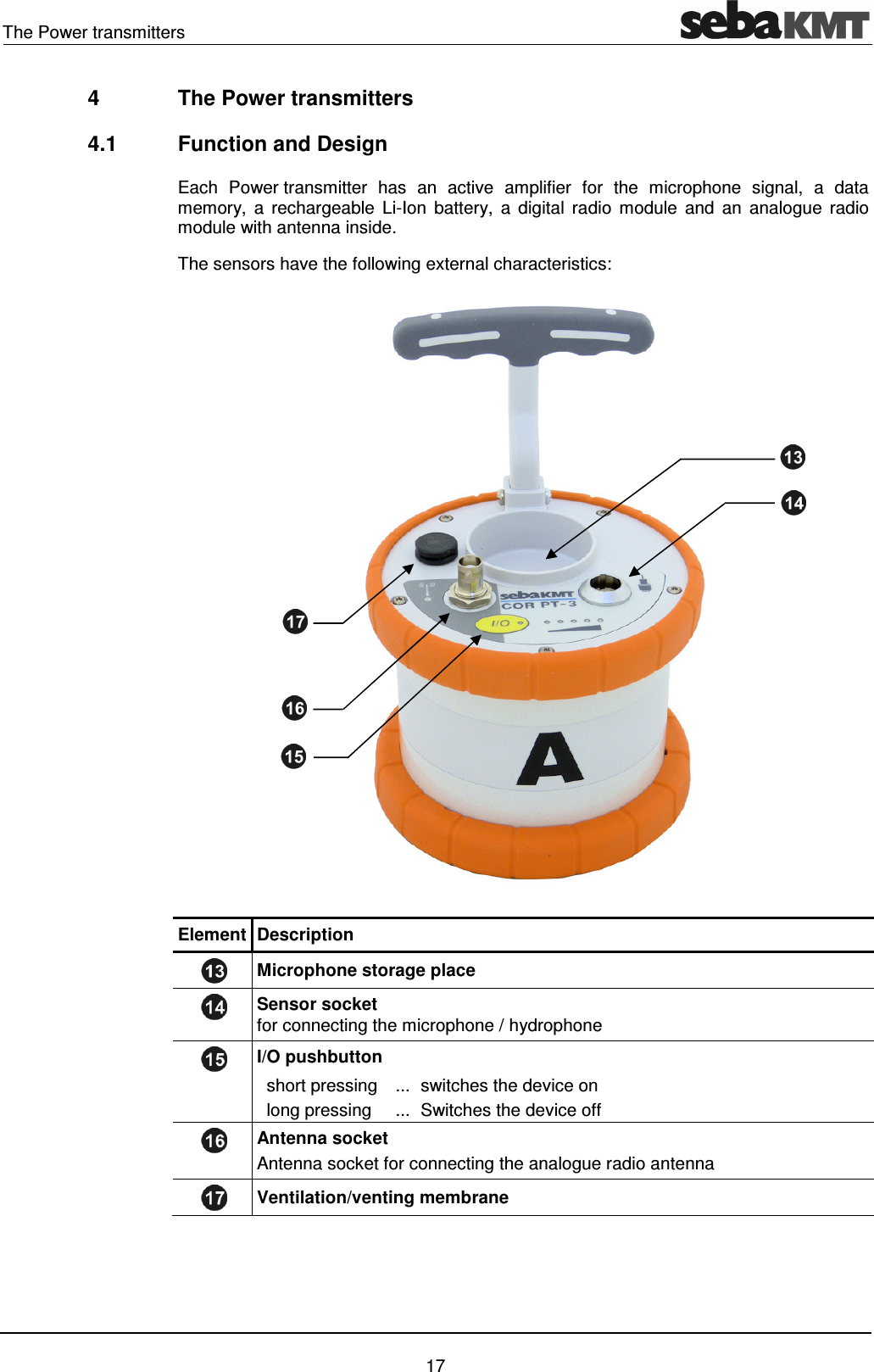
The Power transmitters    17 4  The Power transmitters 4.1  Function and Design Each  Power transmitter  has  an  active  amplifier  for  the  microphone  signal,  a  data memory,  a  rechargeable  Li-Ion  battery,  a  digital  radio  module  and  an  analogue  radio module with antenna inside. The sensors have the following external characteristics:   Element Description  Microphone storage place  Sensor socket for connecting the microphone / hydrophone  I/O pushbutton   short pressing  ... switches the device on    long pressing  ... Switches the device off  Antenna socket Antenna socket for connecting the analogue radio antenna  Ventilation/venting membrane
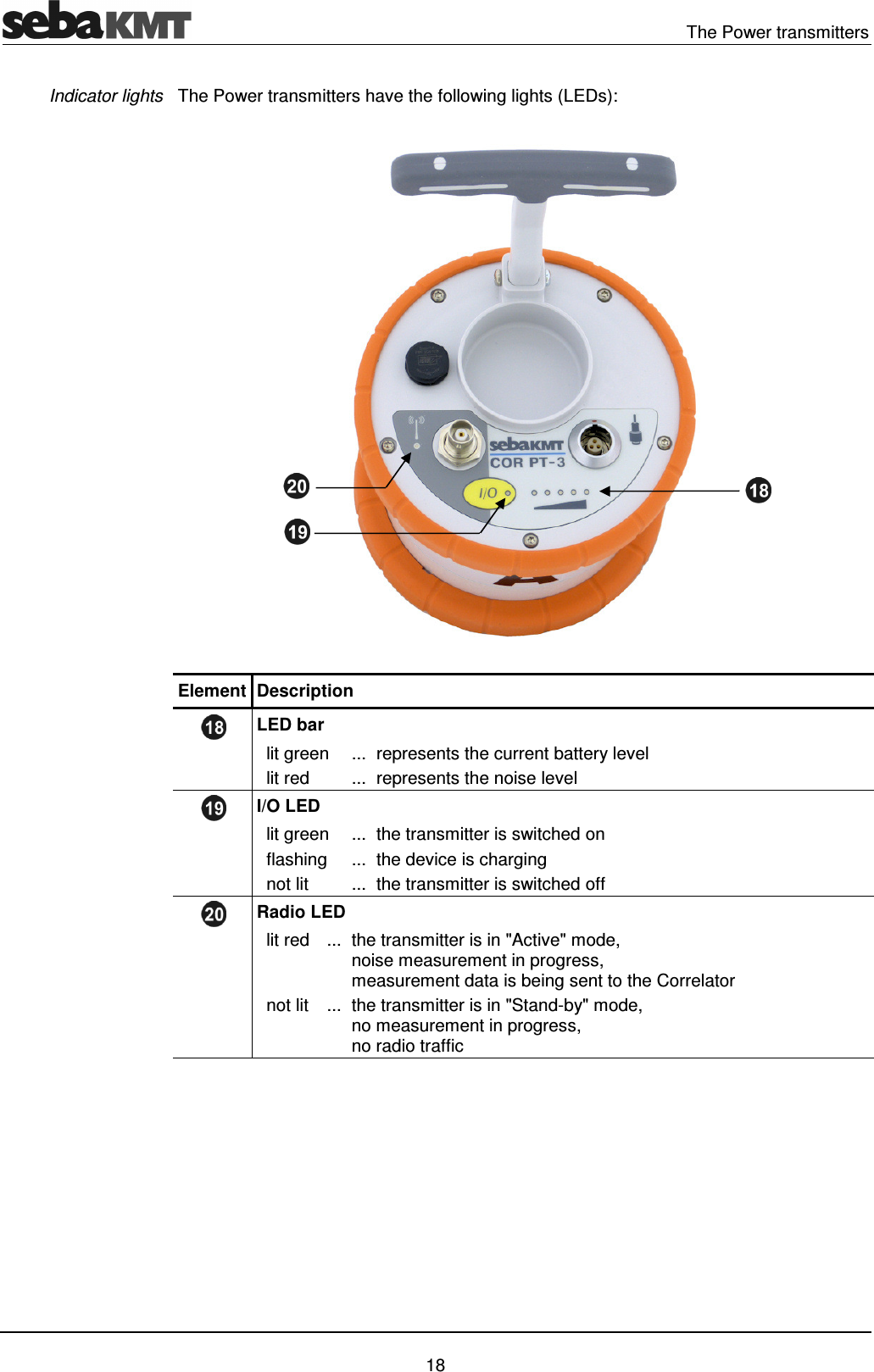
  The Power transmitters   18 The Power transmitters have the following lights (LEDs):   Element Description  LED bar   lit green  ... represents the current battery level   lit red  ... represents the noise level  I/O LED   lit green  ... the transmitter is switched on   flashing  ... the device is charging   not lit  ... the transmitter is switched off  Radio LED   lit red  ... the transmitter is in "Active" mode,  noise measurement in progress,  measurement data is being sent to the Correlator   not lit  ... the transmitter is in "Stand-by" mode,  no measurement in progress,  no radio traffic   Indicator lights
The Power transmitters    19 4.2  Identification number (ID) Each Power transmitter has its own six-digit identification number (short: ID). Using this ID  the  device  can  be  managed  and  clearly  identified  in  the  Correlator,  computer  and within the SebaKMT-Cloud. The ID is deduced from the last six digits of the device's serial number (short: SN). You find the serial number on the nameplate of the device. When entering an ID  on the Correlator  or  computer, the  preceding zero digits  can be omitted.  4.3  Power supply The  Power transmitters  are  fitted  with  internal  rechargeable  Li-Ion  batteries  This  can power the device for approximately 12 hours.  In the Start menu of the Correlator two battery icons indicate the current battery status of the Power transmitters. On  the  Power transmitters,  the  current  battery  status  is  indicated  by  the  LED bar   when it is green. If only one of five LEDs is lit, the device should be charged. Otherwise, it switches itself off automatically. Red  light  represents  the  recorded  noise  during  the  measurement  and  not  the  battery status. The Power transmitters are charged wirelessly in the transport case. The case must be connected  to a power supply. As soon as  the  Power  transmitters are situated  at their storage places in the case, they are recharged inductively.  Charging  takes  approximately  12 hours.  The  I/O LED    flashes  when  loading.  The LED bar    indicates  the  progress of charging The I/O LED turns back  to permanent light as soon as the battery is full.  CAUTION No objects must be put into empty charging stations.  Risk of fire! The charging stations are for transport and charging of the devices only.   NOTE Any repairs must be carried out by SebaKMT or an authorized service partner.  Otherwise, the devices' resistance against water and dirt cannot be guaranteed. Do not open the device yourself. If you have problems with the battery, please contact your SebaKMT service partner.    Battery level Charging
  The Power transmitters   20 4.4  Commissioning To  turn  on,  briefly  press  the I/O pushbutton  .  The  I/O LED  is  lit  green  when  the device is turned on. To turn the device off, press the button until the LED goes out.  The  microphone's  storage  place    is  fitted  with  a  magnetic  switch.  As  a  result,  the Power transmitter "knows" whether the microphone is currently in use or not.  As long as the microphone rests in its storage place, the Power transmitter remains in "Stand-by" mode. The internal analogue radio module stays off as no measuring data needs to be transferred to the Correlator. This saves battery power. As  soon  as  the  microphone  is  taken  from  the  storage  place,  the  Power transmitter switches from "Stand-by" to "Active" mode. The radio module is activated. From now on, the recorded data  are directly sent  to  the  Correlator.  The  row of  LEDs  switches  from green to red and represents the recorded noise level.  4.5  Installation The sensors should be installed directly on the pipe but, however, you can also attach them to valve rods or hydrants, for example, or any other position along the pipeline that is easily accessible.  There  must  be  the  best  possible  contact  between  the  sensor  foot  or  the  mounted adapter  (see  below)  and  the  pipe.  If  need  be,  clean  the  contact  point  thoroughly (preferably with a wire brush).  In  some  situations  it  might  be  helpful  to  use  one  of  the  supplied  magnetic  angle adapters.  Switching ON/OFF Stand-by
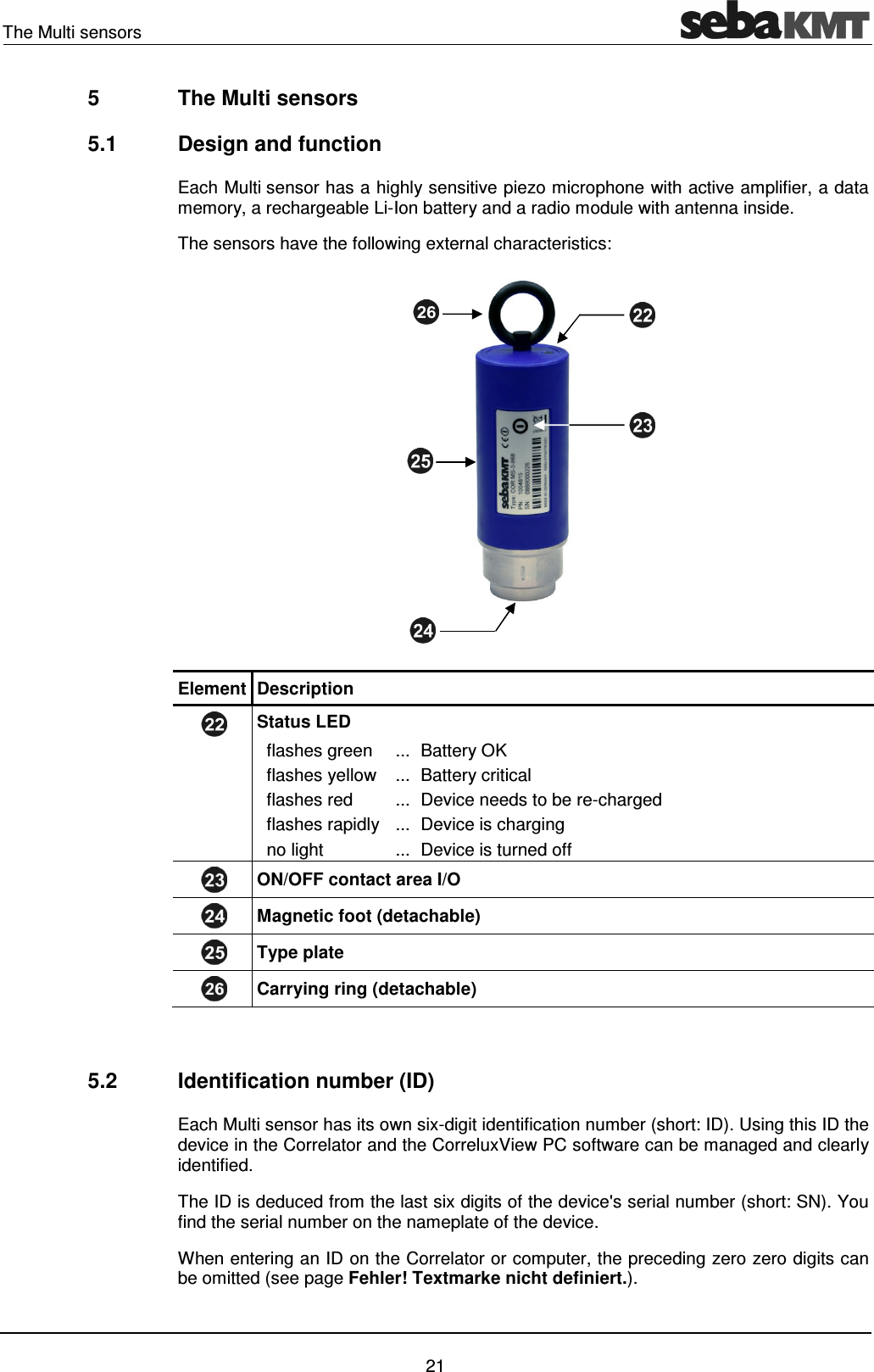
The Multi sensors    21 5  The Multi sensors 5.1  Design and function Each Multi sensor has a highly sensitive piezo microphone with active amplifier, a data memory, a rechargeable Li-Ion battery and a radio module with antenna inside. The sensors have the following external characteristics:   Element Description  Status LED   flashes green  ... Battery OK   flashes yellow  ... Battery critical   flashes red  ... Device needs to be re-charged   flashes rapidly  ... Device is charging   no light  ... Device is turned off  ON/OFF contact area I/O  Magnetic foot (detachable)  Type plate   Carrying ring (detachable)   5.2  Identification number (ID) Each Multi sensor has its own six-digit identification number (short: ID). Using this ID the device in the Correlator and the CorreluxView PC software can be managed and clearly identified. The ID is deduced from the last six digits of the device's serial number (short: SN). You find the serial number on the nameplate of the device. When entering an ID on the Correlator or computer, the preceding zero zero digits can be omitted (see page Fehler! Textmarke nicht definiert.).
  The Multi sensors   22 5.3  Power supply The  Multi sensors  are fitted with internal rechargeable  Li-Ion  batteries  This  can  power the device for at least 16 hours.  In the Start menu of the Correlator up to eight battery icons can be seen. They indicate the current  battery status  of  the  registered  Multi sensors in reach.  To know  the exact battery state of a Multi sensor, read  the  unit's  configurations menu  (see  page Fehler! Textmarke nicht definiert.). In the line battery status the battery level of the sensor is shown as a percentage.  When  the  battery  level  of  a  Multi sensor  falls  below  a  certain  threshold,  the  indicator light  of  the  device  will  flash  red.  The  device  must  be  charged.  Otherwise,  it  switches itself off automatically.  To charge the Power transmitters place them in the transport case. The case must be connected  to  a  power  supply.  As  soon  as  the  sensors  are  situated  at  their  storage places in the case, they are recharged inductively.  Charging  takes  approximately  6 hours.  The  units'  indicator  lights  are  rapidly  flashing during the charging process. The indicator lights turn to permanent green light as soon as the battery is full.  CAUTION No objects must be put into empty charging stations.  Risk of fire! The charging stations are for transport and charging of the devices only.   NOTE Any repairs must be carried out by an authorized service partner.  Otherwise, the devices' resistance against water and dirt cannot be guaranteed. Do not open the Multi sensors yourself. If you have problems with the battery, please contact your SebaKMT service partner.   5.4  Switching ON/OFF The Multi sensors have an internal magnetic switch.  To turn a Multi sensor on, briefly hold a magnet (e.g. the foot of another Multi sensor) in front  of  the  sensor's  I/O area  .  The  device  turns  on.  The  indicator  light  flashes 3 times.  To  turn  the  device  off,  hold  a  magnet  in  front  of  the  I/O area  for  approximately 2 seconds. The indicator light will flash 2 times before it goes out.   Battery level Charging
The Multi sensors    23 5.5  Installation The Multi sensors should be installed directly on the pipe However, you can also attach them to valve rods or hydrants, for example, or any other position along the pipeline that is  easily  accessible.  Due  to  their  powerful  magnet,  the  sensors  can  also  be  attached horizontally. There  must  be  the  best  possible  contact  between  the  sensor  foot  or  the  mounted adapter  (see  below)  and  the  pipe.  If  need  be,  clean  the  contact  point  thoroughly (preferably with a wire brush).   5.6  Angle adapter In  some  situations,  the  Multi sensor  cannot  be  attached  directly  to  the  desired measurement point due to its size, e.g. in very narrow shafts or similar. In such cases, it can be helpful to use one of the supplied angle adapters.  Thanks to its magnetic foot, the sensor is simply placed on the adapter.  Then,  the  magnetic  adapter  can  be  attached  to  the pipe or fitting etc.   NOTE The sensor's type plate and I/O area   must face away from the angle adapter - as can be seen on the picture.  Otherwise, the magnet of the angle adapter would turn off the Multi sensor unintentionally.    You can screw the angle adapter firmly to the sensor. This can be useful as the holding strength between the angle adapter and the pipe in general is higher than the holding strength between the angle adapter and the sensor. When  collecting  the  sensors,  it  may  happen  that  you  pull  the  sensor  from  the  angle without  intention.  The  adapter  then  remains  on  the  pipe  and  it  could  be  difficult  to remove it.  Unscrew  the  magnetic  foot  from  the  sensor.  Take  one  of  the supplied screws from the COR C-300-RI set to screw the angle adapter on the sensor. Make sure that the sensor's type plate does face away from the angle adapter.      Magnetic connection Screw connection
  The Multi sensors   24
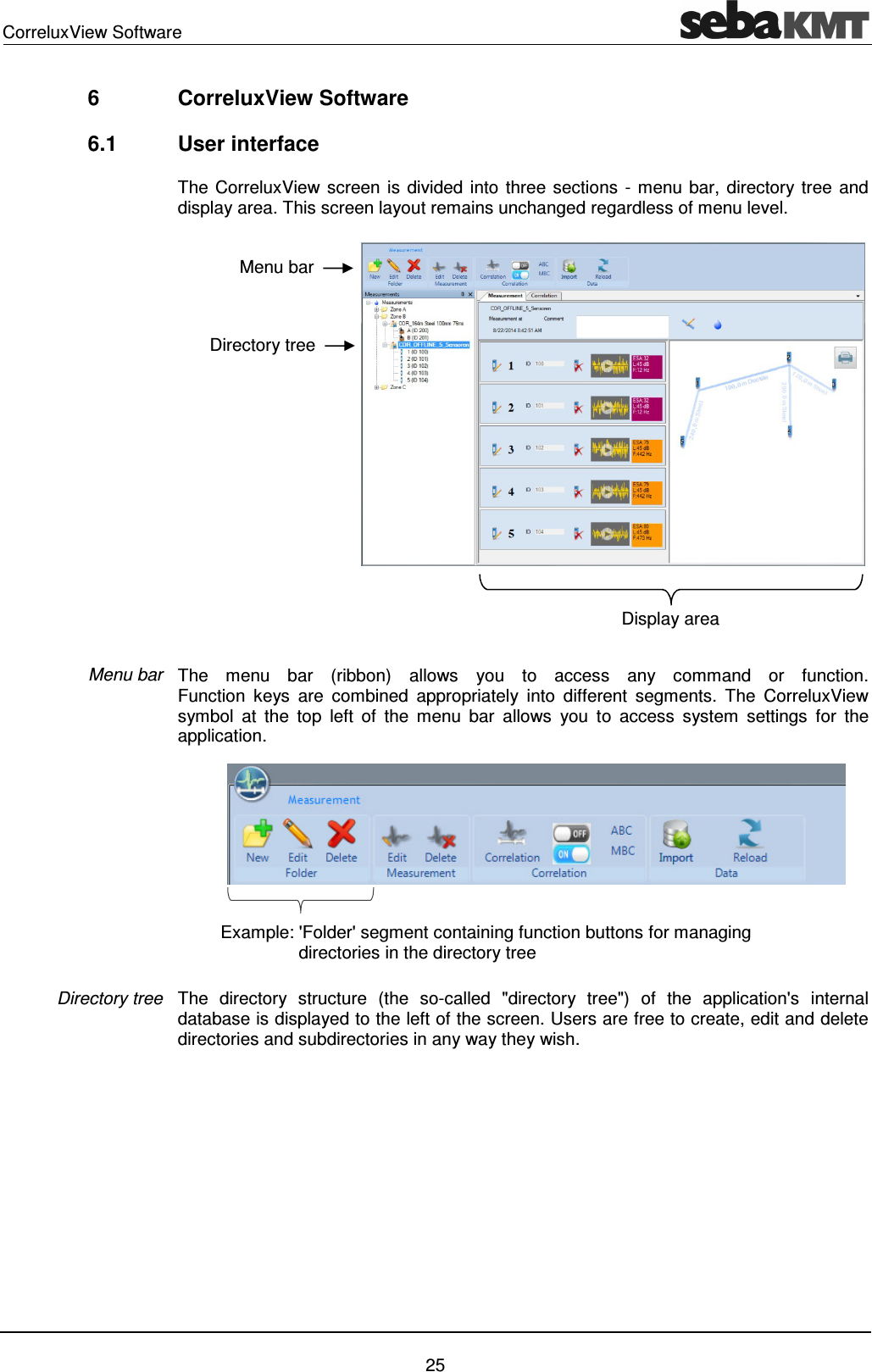
CorreluxView Software    25 6  CorreluxView Software 6.1  User interface The CorreluxView screen is divided into three sections - menu bar, directory tree and display area. This screen layout remains unchanged regardless of menu level.  The  menu  bar  (ribbon)  allows  you  to  access  any  command  or  function.  Function  keys  are  combined  appropriately  into  different  segments.  The  CorreluxView symbol  at  the  top  left  of  the  menu  bar  allows  you  to  access  system  settings  for  the application.  The  directory  structure  (the  so-called  "directory  tree")  of  the  application's  internal database is displayed to the left of the screen. Users are free to create, edit and delete directories and subdirectories in any way they wish.  Menu bar Directory tree Menu bar Display area Directory tree Example: 'Folder' segment containing function buttons for managing       directories in the directory tree
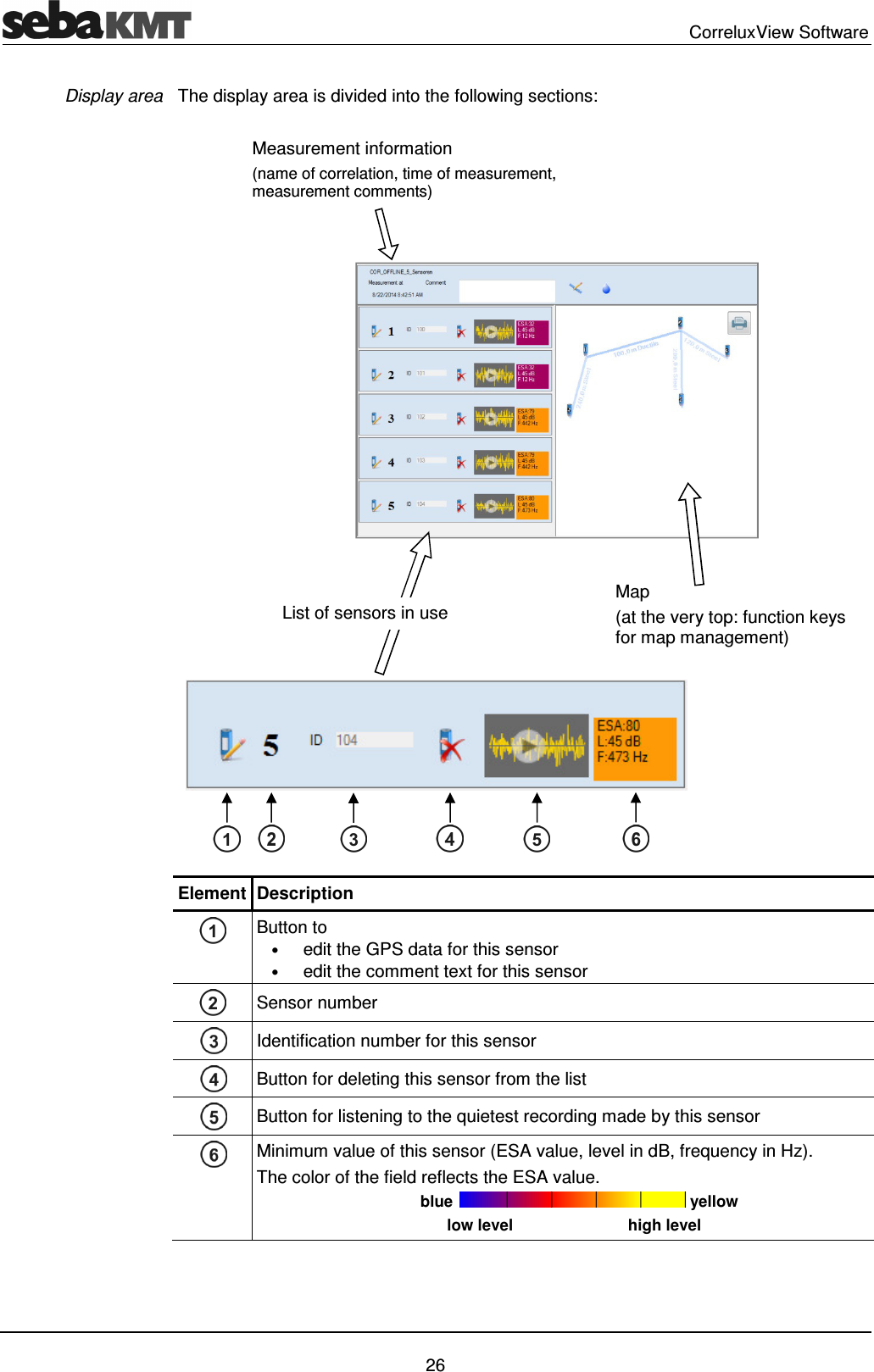
  CorreluxView Software   26 The display area is divided into the following sections:  Element Description  Button to  • edit the GPS data for this sensor • edit the comment text for this sensor  Sensor number   Identification number for this sensor  Button for deleting this sensor from the list  Button for listening to the quietest recording made by this sensor  Minimum value of this sensor (ESA value, level in dB, frequency in Hz). The color of the field reflects the ESA value.                                      blue   yellow                                            low level                          high level  Display area Measurement information  (name of correlation, time of measurement, measurement comments) Map (at the very top: function keys for map management) List of sensors in use
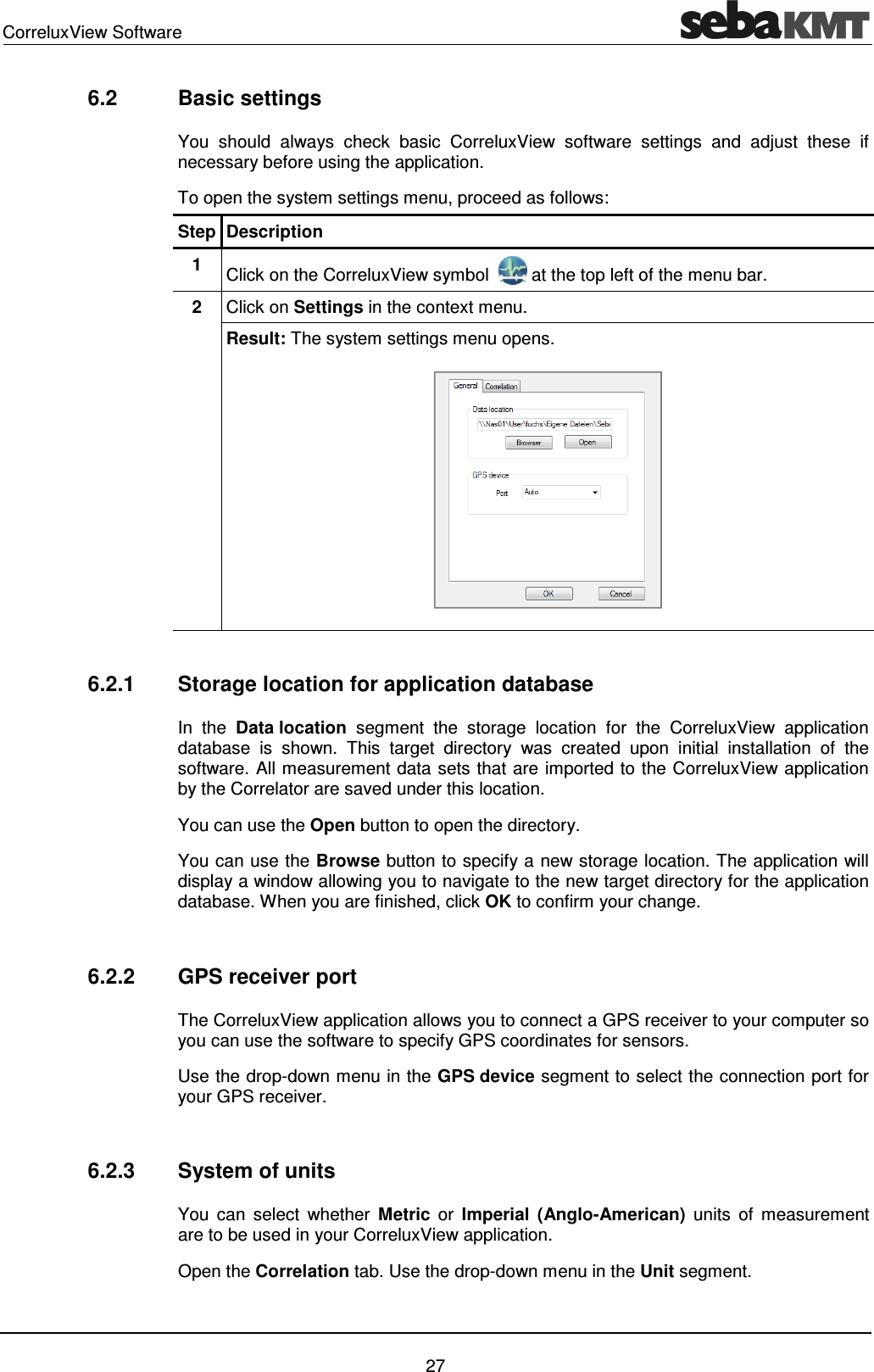
CorreluxView Software    27 6.2  Basic settings You  should  always  check  basic  CorreluxView  software  settings  and  adjust  these  if necessary before using the application.  To open the system settings menu, proceed as follows: Step Description 1  Click on the CorreluxView symbol   at the top left of the menu bar. 2  Click on Settings in the context menu. Result: The system settings menu opens.   6.2.1  Storage location for application database In  the  Data location  segment  the  storage  location  for  the  CorreluxView  application database  is  shown.  This  target  directory  was  created  upon  initial  installation  of  the software. All measurement data sets that are imported to the CorreluxView application by the Correlator are saved under this location.  You can use the Open button to open the directory. You can use the Browse button to specify a new storage location. The application will display a window allowing you to navigate to the new target directory for the application database. When you are finished, click OK to confirm your change.  6.2.2  GPS receiver port  The CorreluxView application allows you to connect a GPS receiver to your computer so you can use the software to specify GPS coordinates for sensors. Use the drop-down menu in the GPS device segment to select the connection port for your GPS receiver.   6.2.3  System of units You  can  select  whether  Metric  or  Imperial  (Anglo-American)  units  of  measurement are to be used in your CorreluxView application. Open the Correlation tab. Use the drop-down menu in the Unit segment.
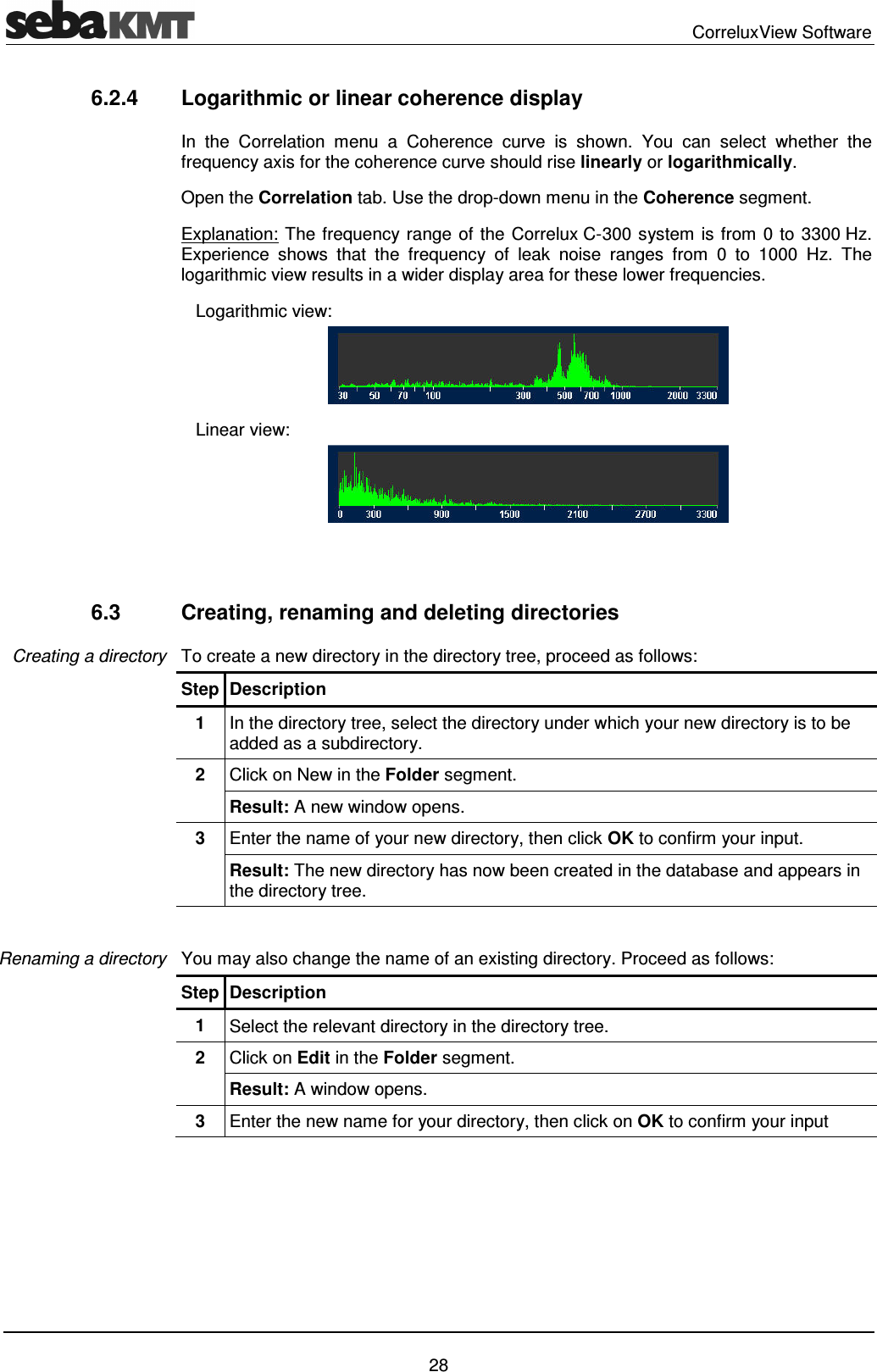
  CorreluxView Software   28 6.2.4  Logarithmic or linear coherence display  In  the  Correlation  menu  a  Coherence  curve  is  shown.  You  can  select  whether  the frequency axis for the coherence curve should rise linearly or logarithmically. Open the Correlation tab. Use the drop-down menu in the Coherence segment. Explanation: The frequency range of the Correlux C-300 system is from 0 to 3300 Hz. Experience  shows  that  the  frequency  of  leak  noise  ranges  from  0  to  1000  Hz.  The logarithmic view results in a wider display area for these lower frequencies.    Logarithmic view:     Linear view:    6.3  Creating, renaming and deleting directories To create a new directory in the directory tree, proceed as follows: Step Description 1  In the directory tree, select the directory under which your new directory is to be added as a subdirectory.  2  Click on New in the Folder segment. Result: A new window opens. 3  Enter the name of your new directory, then click OK to confirm your input. Result: The new directory has now been created in the database and appears in the directory tree.  You may also change the name of an existing directory. Proceed as follows: Step Description 1  Select the relevant directory in the directory tree. 2  Click on Edit in the Folder segment. Result: A window opens. 3  Enter the new name for your directory, then click on OK to confirm your input  Creating a directory Renaming a directory
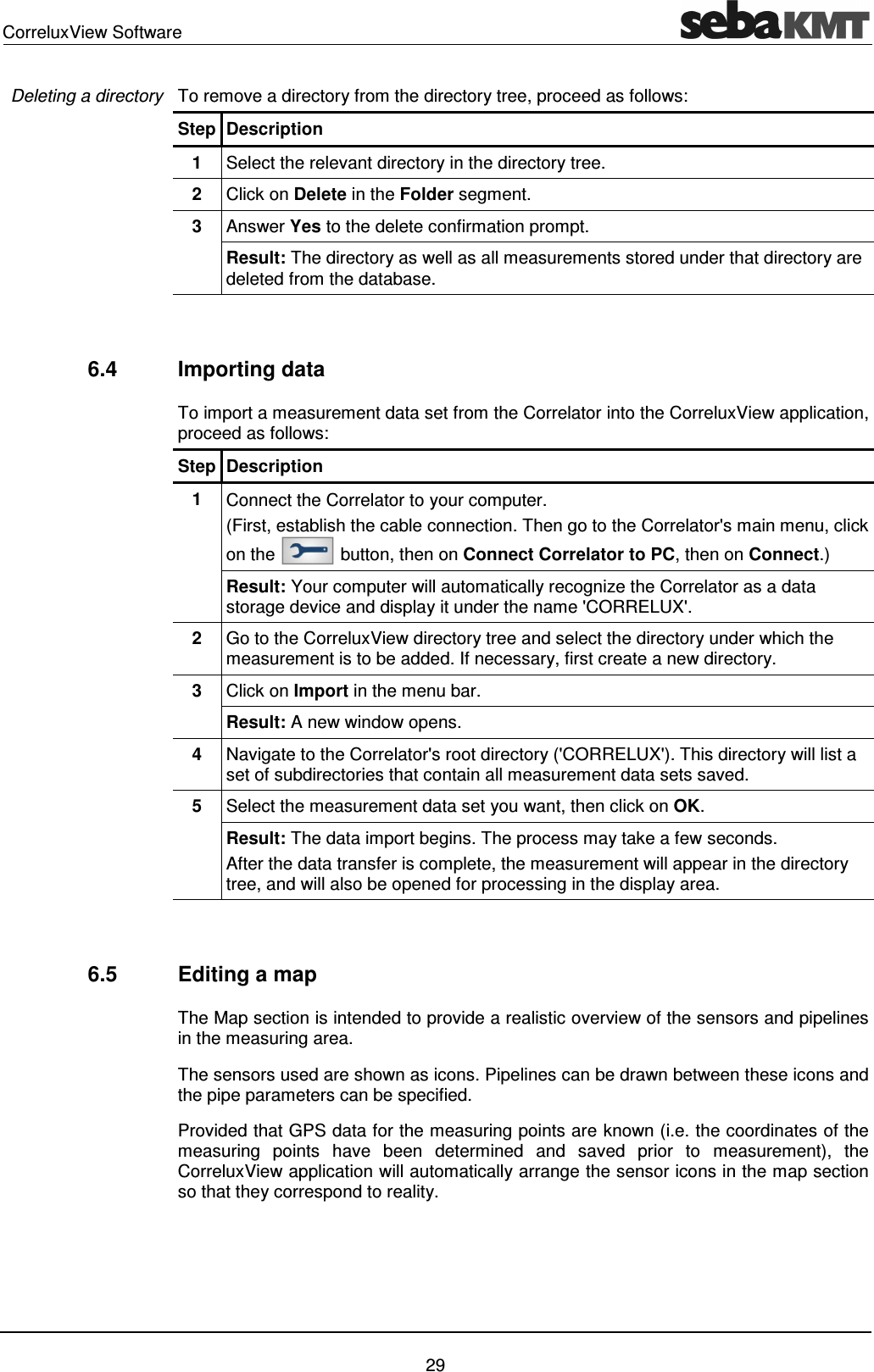
CorreluxView Software    29 To remove a directory from the directory tree, proceed as follows: Step Description 1  Select the relevant directory in the directory tree. 2  Click on Delete in the Folder segment. 3  Answer Yes to the delete confirmation prompt. Result: The directory as well as all measurements stored under that directory are deleted from the database.    6.4  Importing data To import a measurement data set from the Correlator into the CorreluxView application, proceed as follows: Step Description 1  Connect the Correlator to your computer.  (First, establish the cable connection. Then go to the Correlator's main menu, click on the   button, then on Connect Correlator to PC, then on Connect.) Result: Your computer will automatically recognize the Correlator as a data storage device and display it under the name 'CORRELUX'.  2  Go to the CorreluxView directory tree and select the directory under which the measurement is to be added. If necessary, first create a new directory. 3  Click on Import in the menu bar. Result: A new window opens. 4  Navigate to the Correlator's root directory ('CORRELUX'). This directory will list a set of subdirectories that contain all measurement data sets saved. 5  Select the measurement data set you want, then click on OK. Result: The data import begins. The process may take a few seconds. After the data transfer is complete, the measurement will appear in the directory tree, and will also be opened for processing in the display area.    6.5  Editing a map The Map section is intended to provide a realistic overview of the sensors and pipelines in the measuring area. The sensors used are shown as icons. Pipelines can be drawn between these icons and the pipe parameters can be specified. Provided that GPS data for the measuring points are known (i.e. the coordinates of the measuring  points  have  been  determined  and  saved  prior  to  measurement),  the CorreluxView application will automatically arrange the sensor icons in the map section so that they correspond to reality.  Deleting a directory
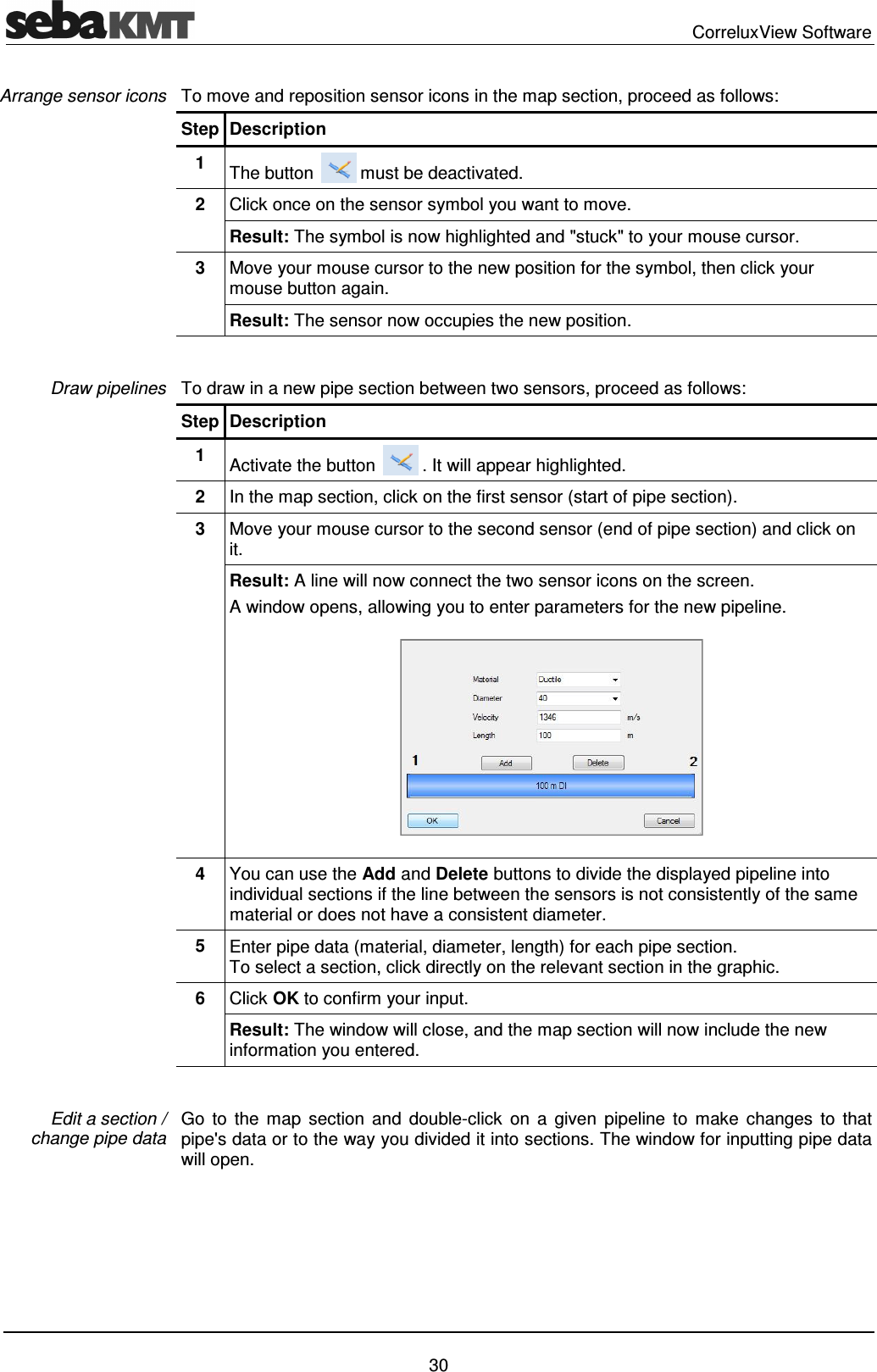
  CorreluxView Software   30 To move and reposition sensor icons in the map section, proceed as follows:  Step Description 1  The button   must be deactivated. 2  Click once on the sensor symbol you want to move. Result: The symbol is now highlighted and "stuck" to your mouse cursor. 3  Move your mouse cursor to the new position for the symbol, then click your mouse button again. Result: The sensor now occupies the new position.  To draw in a new pipe section between two sensors, proceed as follows: Step Description 1  Activate the button   . It will appear highlighted. 2  In the map section, click on the first sensor (start of pipe section). 3  Move your mouse cursor to the second sensor (end of pipe section) and click on it.  Result: A line will now connect the two sensor icons on the screen.  A window opens, allowing you to enter parameters for the new pipeline.  4  You can use the Add and Delete buttons to divide the displayed pipeline into individual sections if the line between the sensors is not consistently of the same material or does not have a consistent diameter.  5  Enter pipe data (material, diameter, length) for each pipe section.  To select a section, click directly on the relevant section in the graphic. 6  Click OK to confirm your input. Result: The window will close, and the map section will now include the new information you entered.   Go  to  the  map  section  and  double-click  on  a  given  pipeline  to  make  changes  to  that pipe's data or to the way you divided it into sections. The window for inputting pipe data will open.  Arrange sensor icons Draw pipelines Edit a section /  change pipe data
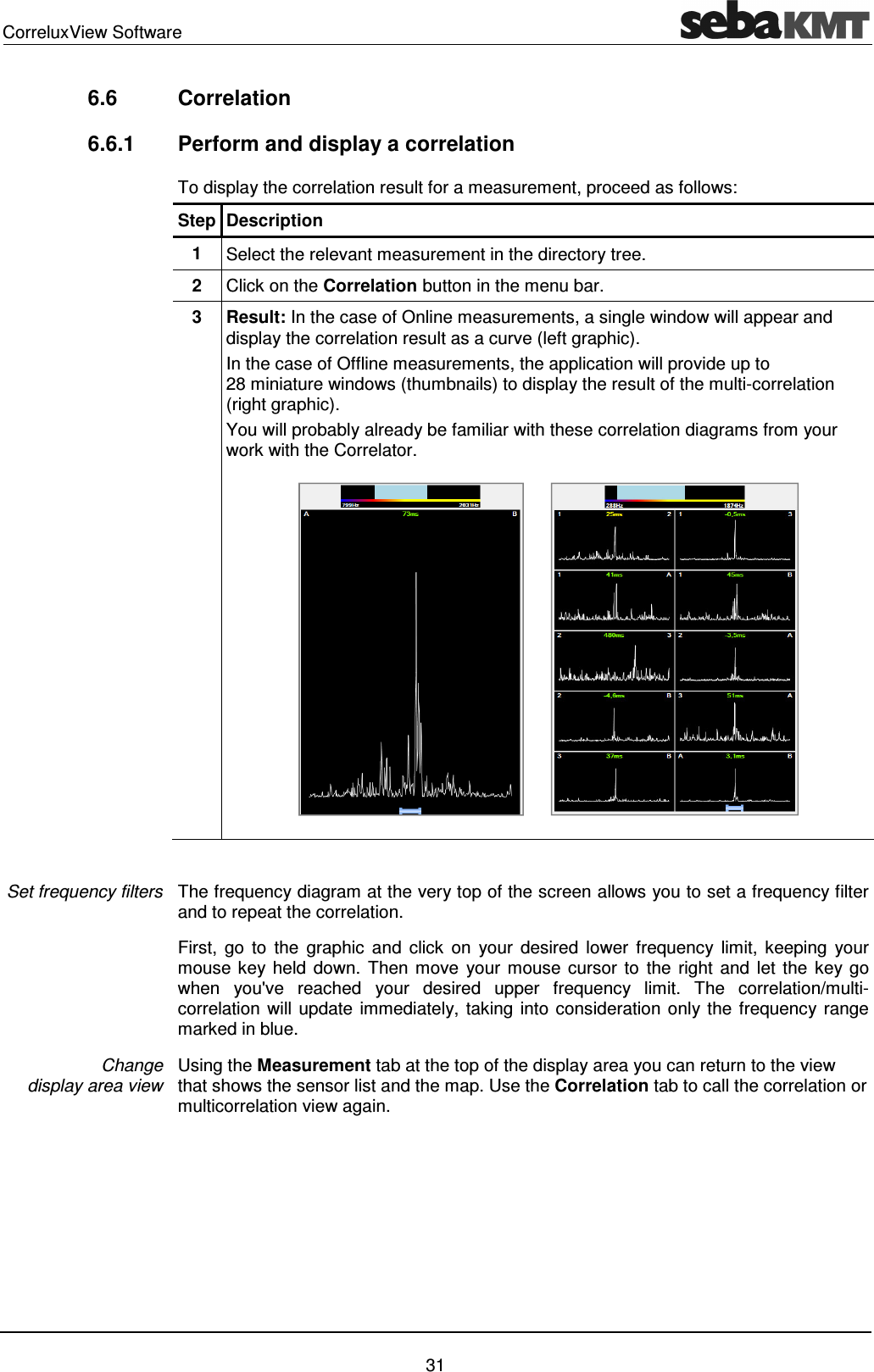
CorreluxView Software    31 6.6  Correlation  6.6.1  Perform and display a correlation  To display the correlation result for a measurement, proceed as follows: Step Description 1  Select the relevant measurement in the directory tree. 2  Click on the Correlation button in the menu bar. 3  Result: In the case of Online measurements, a single window will appear and display the correlation result as a curve (left graphic). In the case of Offline measurements, the application will provide up to 28 miniature windows (thumbnails) to display the result of the multi-correlation (right graphic). You will probably already be familiar with these correlation diagrams from your work with the Correlator.         The frequency diagram at the very top of the screen allows you to set a frequency filter and to repeat the correlation.  First,  go  to  the  graphic  and  click  on  your  desired  lower  frequency  limit,  keeping  your mouse key held  down. Then move  your  mouse cursor  to  the right  and  let  the key go when  you've  reached  your  desired  upper  frequency  limit.  The  correlation/multi-correlation will update immediately, taking into consideration only the frequency range marked in blue. Using the Measurement tab at the top of the display area you can return to the view that shows the sensor list and the map. Use the Correlation tab to call the correlation or multicorrelation view again. Set frequency filters Change  display area view
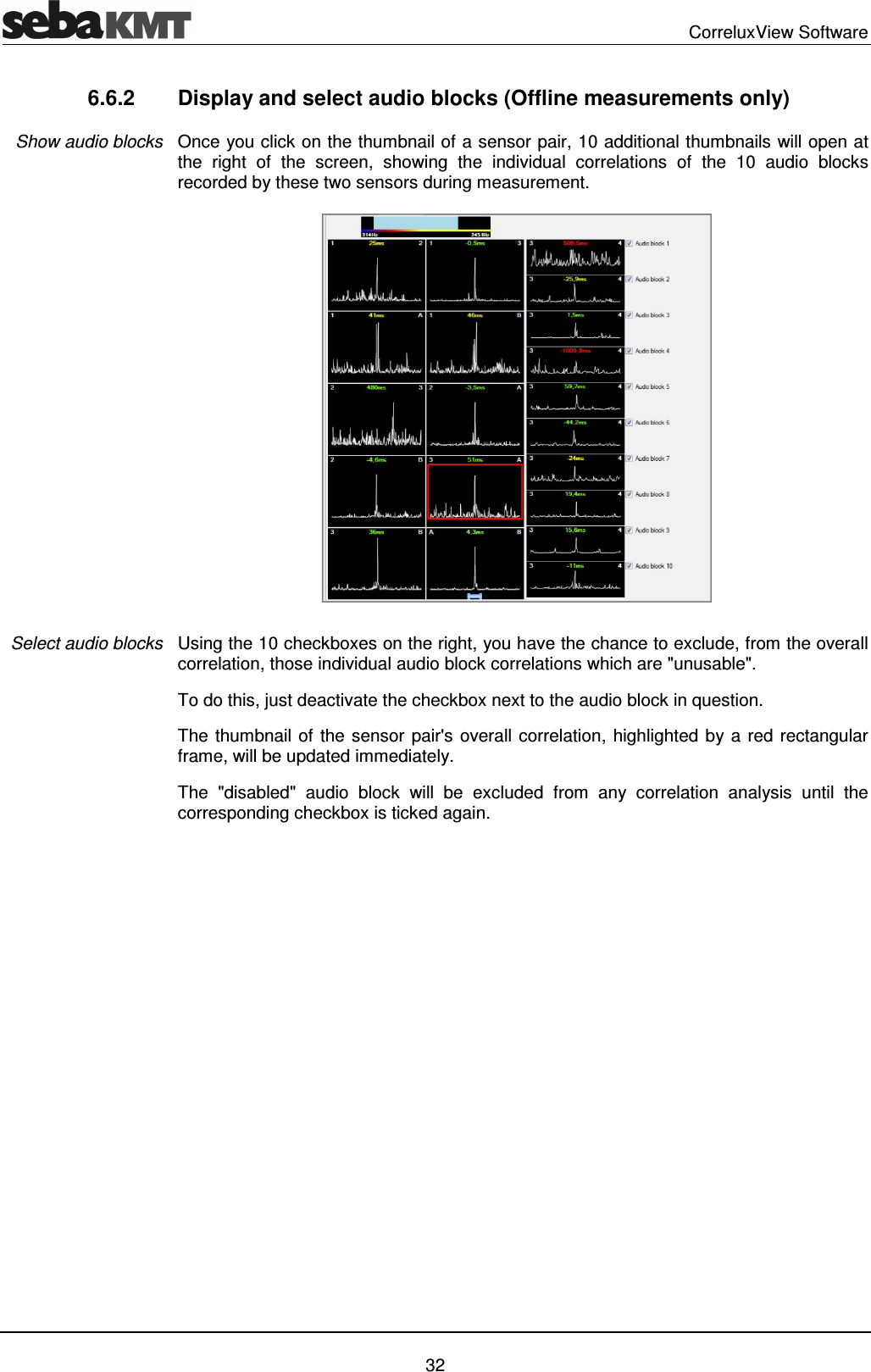
  CorreluxView Software   32 6.6.2  Display and select audio blocks (Offline measurements only) Once you click on the thumbnail of a sensor pair, 10 additional thumbnails will open at the  right  of  the  screen,  showing  the  individual  correlations  of  the  10  audio  blocks recorded by these two sensors during measurement.   Using the 10 checkboxes on the right, you have the chance to exclude, from the overall correlation, those individual audio block correlations which are "unusable".  To do this, just deactivate the checkbox next to the audio block in question.  The thumbnail of the sensor pair's overall correlation, highlighted by a red rectangular frame, will be updated immediately. The  "disabled"  audio  block  will  be  excluded  from  any  correlation  analysis  until  the corresponding checkbox is ticked again.  Show audio blocks Select audio blocks
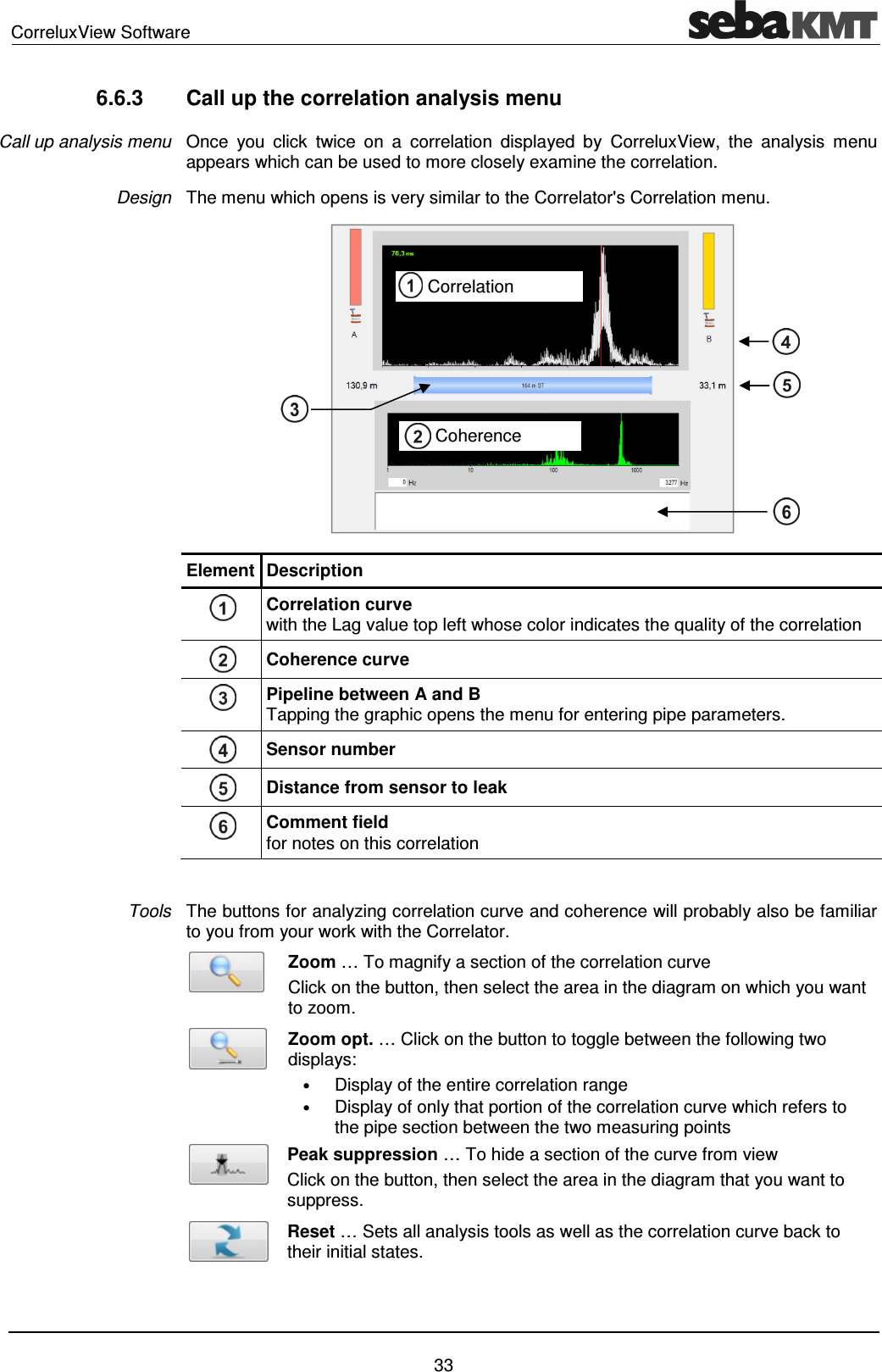
CorreluxView Software    33 6.6.3  Call up the correlation analysis menu Once  you  click  twice  on  a  correlation  displayed  by  CorreluxView,  the  analysis  menu appears which can be used to more closely examine the correlation. The menu which opens is very similar to the Correlator's Correlation menu.   Element Description  Correlation curve  with the Lag value top left whose color indicates the quality of the correlation  Coherence curve   Pipeline between A and B  Tapping the graphic opens the menu for entering pipe parameters.  Sensor number  Distance from sensor to leak  Comment field  for notes on this correlation  The buttons for analyzing correlation curve and coherence will probably also be familiar to you from your work with the Correlator.  Zoom … To magnify a section of the correlation curve Click on the button, then select the area in the diagram on which you want to zoom.  Zoom opt. … Click on the button to toggle between the following two displays: • Display of the entire correlation range • Display of only that portion of the correlation curve which refers to the pipe section between the two measuring points  Peak suppression … To hide a section of the curve from view Click on the button, then select the area in the diagram that you want to suppress.  Reset … Sets all analysis tools as well as the correlation curve back to their initial states.   Call up analysis menu Design Tools     Correlation       Coherence
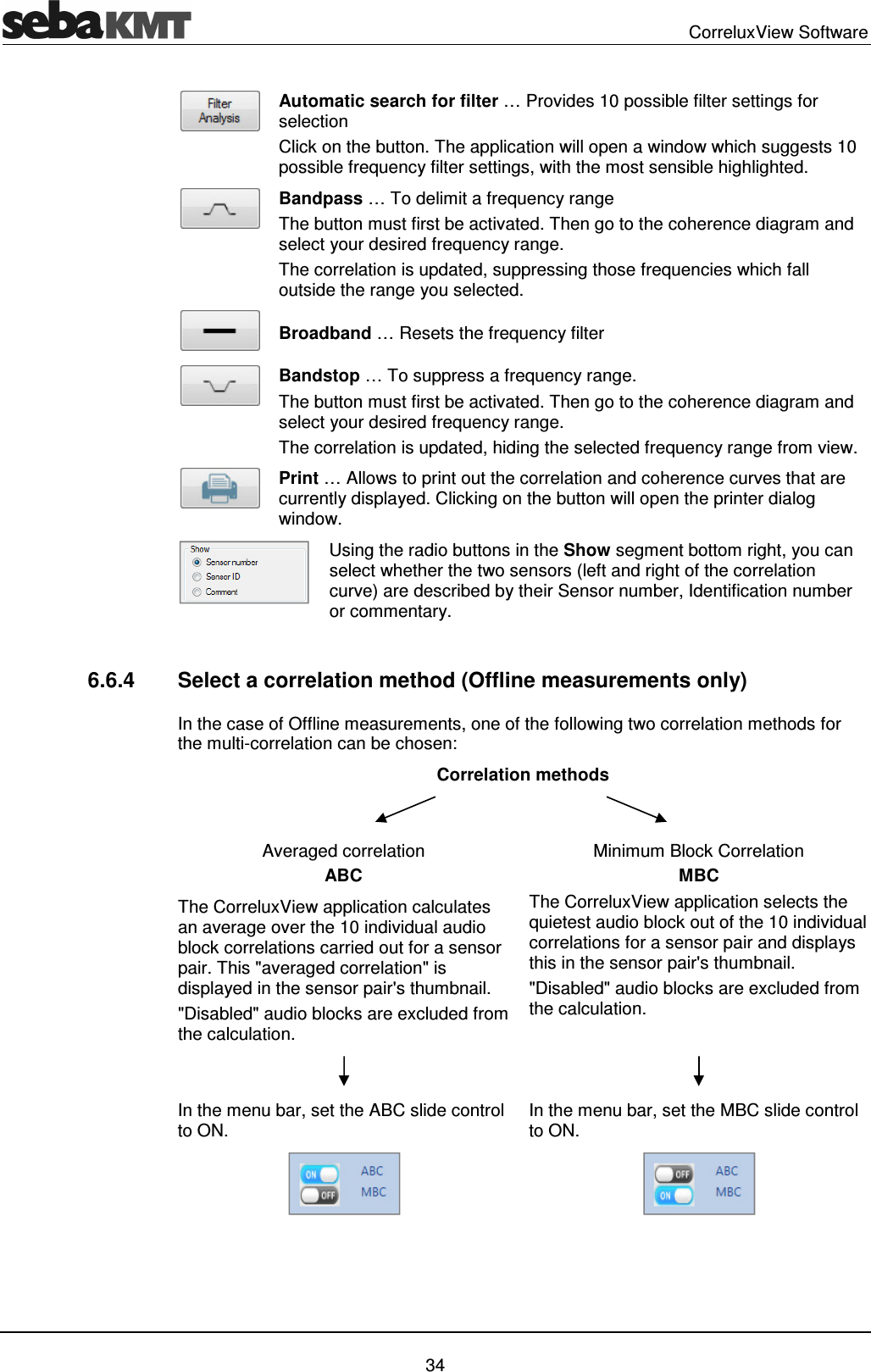
  CorreluxView Software   34  Automatic search for filter … Provides 10 possible filter settings for selection Click on the button. The application will open a window which suggests 10 possible frequency filter settings, with the most sensible highlighted.   Bandpass … To delimit a frequency range The button must first be activated. Then go to the coherence diagram and select your desired frequency range.  The correlation is updated, suppressing those frequencies which fall outside the range you selected.  Broadband … Resets the frequency filter  Bandstop … To suppress a frequency range.  The button must first be activated. Then go to the coherence diagram and select your desired frequency range.  The correlation is updated, hiding the selected frequency range from view.  Print … Allows to print out the correlation and coherence curves that are currently displayed. Clicking on the button will open the printer dialog window.  Using the radio buttons in the Show segment bottom right, you can select whether the two sensors (left and right of the correlation curve) are described by their Sensor number, Identification number or commentary.  6.6.4  Select a correlation method (Offline measurements only) In the case of Offline measurements, one of the following two correlation methods for the multi-correlation can be chosen: Correlation methods    Averaged correlation ABC Minimum Block Correlation MBC The CorreluxView application calculates an average over the 10 individual audio block correlations carried out for a sensor pair. This "averaged correlation" is displayed in the sensor pair's thumbnail.  "Disabled" audio blocks are excluded from the calculation. The CorreluxView application selects the quietest audio block out of the 10 individual correlations for a sensor pair and displays this in the sensor pair's thumbnail. "Disabled" audio blocks are excluded from the calculation.    In the menu bar, set the ABC slide control to ON.  In the menu bar, set the MBC slide control to ON.
CorreluxView Software    35     Tento  symbol  indikuje,  že  výrobek  nesoucí  takovéto  označení  nelze  likvidovat  společně  s  běžným domovním  odpadem.  Jelikož se  jedná  o  produkt  obchodovaný  mezi podnikatelskými subjekty (B2B), nelze jej likvidovat ani ve veřejných sběrných dvorech. Pokud se potřebujete tohoto výrobku zbavit, obraťte se na organizaci specializující se na likvidaci starých elektrických spotřebičů v blízkosti svého působiště.  Dit symbool duidt aan dat het product met dit symbool niet verwijderd mag worden als gewoon huishoudelijk afval. Dit is een product voor industrieel gebruik, wat betekent dat het ook niet afgeleverd mag worden aan afvalcentra voor huishoudelijk afval. Als u dit product wilt verwijderen, gelieve dit op de juiste manier te doen en het naar een nabij gelegen organisatie te brengen gespecialiseerd in de verwijdering van oud elektrisch materiaal.  This symbol indicates that the product which is marked in this way should not be disposed of as normal household waste. As it is a B2B product, it may also not be disposed of at civic disposal centres. If you wish to dispose of this product, please do so properly by taking it to an organisation specialising in the disposal of old electrical equipment near you.  Този знак означава, че продуктът, обозначен по този начин, не трябва да се изхвърля като битов отпадък. Тъй като е B2B продукт, не бива да се изхърля  и в градски пунктове за отпадъци. Ако желаете да извърлите продукта, го занесете в пункт, специализиран в изхвърлянето на старо електрическо оборудване.  Dette symbol viser, at det produkt, der er markeret på denne måde, ikke må kasseres som almindeligt husholdningsaffald. Eftersom det er et B2B produkt, må det heller ikke bortskaffes på offentlige genbrugsstationer. Skal dette produkt kasseres, skal det gøres ordentligt ved at bringe det til en nærliggende organisation, der er specialiseret i at bortskaffe gammelt el-udstyr.  Sellise sümboliga tähistatud toodet ei tohi käidelda tavalise olmejäätmena. Kuna tegemist on B2B-klassi kuuluva tootega, siis ei tohi seda viia kohalikku jäätmekäitluspunkti. Kui soovite selle toote ära visata, siis viige see lähimasse vanade elektriseadmete käitlemisele spetsialiseerunud ettevõttesse.  Tällä merkinnällä ilmoitetaan, että kyseisellä merkinnällä varustettua tuotetta ei saa hävittää tavallisen kotitalousjätteen seassa. Koska kyseessä on yritysten välisen kaupan tuote,  sitä  ei  saa  myöskään  viedä  kuluttajien  käyttöön  tarkoitettuihin  keräyspisteisiin.  Jos  haluatte  hävittää  tämän  tuotteen,  ottakaa  yhteys  lähimpään  vanhojen sähkölaitteiden hävittämiseen erikoistuneeseen organisaatioon.  Ce symbole indique que le produit sur lequel il figure ne peut pas être éliminé comme un déchet ménager ordinaire. Comme il s’agit d’un produit B2B, il ne peut pas non plus être déposé dans une déchetterie municipale. Pour éliminer ce produit, amenez-le à l’organisation spécialisée dans l’élimination d’anciens équipements électriques la plus proche de chez vous.  Cuireann an siombail seo in iúl nár cheart an táirgeadh atá marcáilte sa tslí seo a dhiúscairt sa chóras fuíoll teaghlaigh. Os rud é gur táirgeadh ghnó le gnó (B2B) é, ní féidir é a dhiúscairt ach oiread in ionaid dhiúscartha phobail. Más mian leat an táirgeadh seo a dhiúscairt, déan é a thógáil ag eagraíocht gar duit a sainfheidhmíonn i ndiúscairt sean-fhearas leictrigh.  Dieses Symbol zeigt an, dass das damit gekennzeichnete Produkt nicht als normaler Haushaltsabfall entsorgt werden soll. Da es sich um ein B2B-Gerät handelt, darf es auch  nicht  bei  kommunalen  Wertstoffhöfen  abgegeben  werden.  Wenn  Sie  dieses  Gerät  entsorgen  möchten,  bringen  Sie  es  bitte  sachgemäß  zu  einem  Entsorger  für Elektroaltgeräte in Ihrer Nähe.  Αυτό το σύµβολο υποδεικνύει ότι το προϊόν που φέρει τη σήµανση αυτή δεν πρέπει να απορρίπτεται µαζί µε τα οικιακά απορρίµατα. Καθώς πρόκειται για προϊόν B2B, δεν πρέπει να απορρίπτεται σε δηµοτικά σηµεία απόρριψης. Εάν θέλετε να απορρίψετε το προϊόν αυτό, παρακαλούµε όπως να το παραδώσετε σε µία υπηρεσία συλλογής ηλεκτρικού εξοπλισµού της περιοχής σας.  Ez  a  jelzés  azt  jelenti,  hogy  az ilyen  jelzéssel  ellátott  terméket tilos  a  háztartási  hulladékokkal  együtt  kidobni.  Mivel  ez  vállalati  felhasználású  termék,  tilos  a  lakosság számára  fenntartott  hulladékgyűjtőkbe  dobni.Ha  a  terméket  ki  szeretné  dobni,  akkor  vigye  azt  el  a  lakóhelyéhez  közel  működő,  elhasznált  elektromos  berendezések begyűjtésével foglalkozó hulladékkezelő központhoz.  Questo simbolo indica  che il prodotto non deve essere smaltito come un normale rifiuto domestico. In quanto prodotto  B2B, può anche non essere smaltito in centri di smaltimento cittadino. Se si desidera smaltire il prodotto, consegnarlo a un organismo specializzato in smaltimento di apparecchiature elettriche vecchie.  Šī zīme norāda, ka iztrādājumu, uz kura tā atrodas, nedrīkst izmest kopā ar parastiem mājsaimniecības atkritumiem. Tā kā tas ir izstrādājums, ko cits citam pārdod un lieto tikai uzņēmumi, tad to nedrīkst arī izmest atkritumos tādās izgāztuvēs un atkritumu savāktuvēs, kas paredzētas vietējiem iedzīvotājiem. Ja būs vajadzīgs šo izstrādājumu izmest atkritumos, tad rīkojieties pēc noteikumiem un nogādājiet to tuvākajā vietā, kur īpaši nodarbojas ar vecu elektrisku ierīču savākšanu.  Šis simbolis rodo, kad juo paženklinto gaminio negalima išmesti kaip paprastų buitinių atliekų. Kadangi tai B2B (verslas verslui) produktas, jo negalima atiduoti ir buitinių atliekų tvarkymo įmonėms. Jei norite išmesti šį gaminį, atlikite tai tinkamai, atiduodami jį arti jūsų esančiai specializuotai senos elektrinės įrangos utilizavimo organizacijai.  Dan is-simbolu jindika li l-prodott li huwa mmarkat b’dan il-mod m’għandux  jintrema bħal skart normali tad-djar. Minħabba li  huwa prodott B2B , ma jistax jintrema wkoll f’ċentri ċiviċi għar-rimi ta’ l-iskart. Jekk tkun tixtieq tarmi dan il-prodott, jekk jogħġbok għamel dan kif suppost billi tieħdu għand organizzazzjoni fil-qrib li tispeċjalizza fir-rimi ta’ tagħmir qadim ta’ l-elettriku.  Dette symbolet indikerer at produktet som er merket på denne måten ikke skal kastes som vanlig husholdningsavfall. Siden dette er et bedriftsprodukt, kan det heller ikke kastes ved en vanlig miljøstasjon. Hvis du ønsker å kaste dette produktet, er den riktige måten å gi det til en organisasjon i nærheten som spesialiserer seg på kassering av gammelt elektrisk utstyr.  Ten symbol oznacza, że produktu nim opatrzonego nie należy usuwać z typowymi odpadami z gospodarstwa domowego. Jest to produkt typu B2B, nie należy go więc przekazywać  na  komunalne  składowiska  odpadów.  Aby  we  właściwy  sposób  usunąć  ten  produkt,  należy  przekazać  go  do  najbliższej  placówki  specjalizującej  się  w usuwaniu starych urządzeń elektrycznych.  Este símbolo indica que o produto com esta marcação não deve ser deitado fora juntamente com o lixo doméstico normal. Como se trata de um produto B2B, também não pode ser deitado fora em centros cívicos de recolha de lixo. Se quiser desfazer-se deste produto, faça-o correctamente entregando-o a uma organização especializada na eliminação de equipamento eléctrico antigo, próxima de si.  Acest simbol indică faptul că produsul marcat în acest fel nu trebuie aruncat ca şi un gunoi menajer obişnuit. Deoarece acesta este un produs B2B, el nu trebuie aruncat nici la centrele de colectare urbane. Dacă vreţi să aruncaţi acest produs, vă rugăm s-o faceţi într-un mod adecvat, ducând-ul la cea mai apropiată firmă specializată în colectarea echipamentelor electrice uzate.  Tento symbol znamená, že takto označený výrobok sa nesmie likvidovať ako bežný komunálny odpad.Keďže sa jedná o výrobok triedy B2B, nesmie sa likvidovať ani na mestských skládkach odpadu. Ak chcete tento výrobok likvidovať, odneste ho do najbližšej organizácie, ktorá sa špecializuje na likvidáciu starých elektrických zariadení.  Ta  simbol pomeni, da izdelka, ki je z njim označen, ne smete zavreči kot običajne gospodinjske odpadke. Ker je to izdelek, namenjen za druge proizvajalce, ga ni dovoljeno odlagati  v  centrih  za  civilno  odlaganje  odpadkov.  Če  želite izdelek  zavreči, prosimo,  da  to  storite  v  skladu  s predpisi,  tako  da  ga  odpeljete v  bližnjo  organizacijo,  ki  je specializirana za odlaganje stare električne opreme.  Este  símbolo  indica  que  el  producto  así señalizado  no debe  desecharse  como  los  residuos  domésticos  normales.  Dado  que  es  un producto  de  consumo  profesional, tampoco debe llevarse a centros de recogida selectiva municipales. Si desea desechar este producto, hágalo debidamente acudiendo a una organización de su zona que esté especializada en el tratamiento de residuos de aparatos eléctricos usados.  Den här symbolen indikerar att produkten inte får blandas med normalt hushållsavfall  då den är förbrukad. Eftersom produkten  är en så kallad B2B-produkt är den inte avsedd för privata konsumenter, den får således inte avfallshanteras på allmänna miljö- eller återvinningsstationer då den är förbrukad. Om ni vill avfallshantera den här produkten på rätt sätt, ska ni lämna den till myndighet eller företag, specialiserad på avfallshantering av förbrukad elektrisk utrustning i ert närområde.

Navigation menu