Securitron QT DK 16 26 4 Visual Audit Trail (145 K B)
here QT-DK-16_26_4_VisualAuditTrail DK-26
User Manual: Securitron Visual Audit Trail (145 kB) Quick Tips
Open the PDF directly: View PDF  .
.
Page Count: 1
≡
SECURITRON QUICK TIP
≡
QUICK TIP NUMBER: QT-DK-16/26-4
PRODUCT: DK-16 or DK-26 Series Digital Keypads
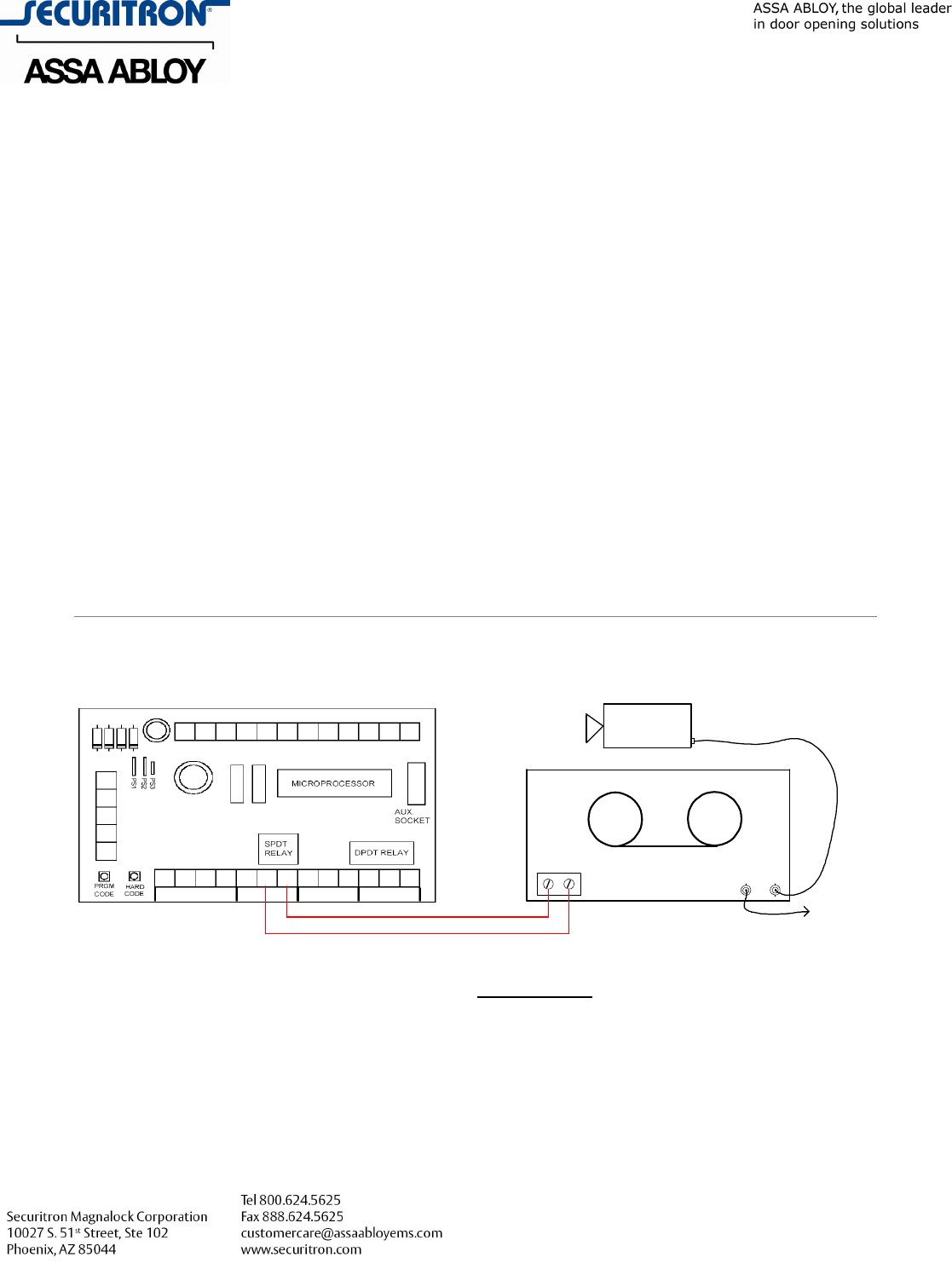
DESCRIPTION: It is possible to use the Digital Keypad’s Programmable
Relay to trigger a Time Lapse Video Recorder or Digital
Video Recorder (DVR) equipped with an alarm input to record each transaction of
the keypad. Any time a key on the keypad is pushed the programmable relay will
fire for five seconds to activate the recorder or DVR giving you a visual record of
the entry or attempted entry.
The first thing that you must do is wire the Digital Keypad as shown below (this is
in addition to wiring for power, locks, etc). Enter the Program Mode and press in
code 76 at the keypad. Code 76 will activate the programmable relay function.
Please note that the Door Bell Function or any other function involving the
programmable relay will not be available once this function is programmed.
REXSRC UCDHCD NO2 NC1 C1 NO1
WHT
NCX CX NOX NC2 C2
BLK BRN VIOPNKORGBLURED
YELGRN
IN/OUT
GRY BGE
DC
FINAC
+
-
DK-16/26
Alarm In VIDEO
INOUT
DVR
VIDEO CAMERA
(Viewing Door) Coaxial
Cable
To Video
Monitor
Wiring a DK-16 or DK-26 to Activate the Alarm input of Time Lapse Video Recorder
or Digital Video Recorder (DVR) for a Visual Audit of Entries at the Keypad.
