Semilink SP-01M SHUTTERPOP MULTIMEDIA User Manual POP Multimedia Manual

Semilink Inc. SHUTTERPOP MULTIMEDIA POP Multimedia Manual

Users Manual

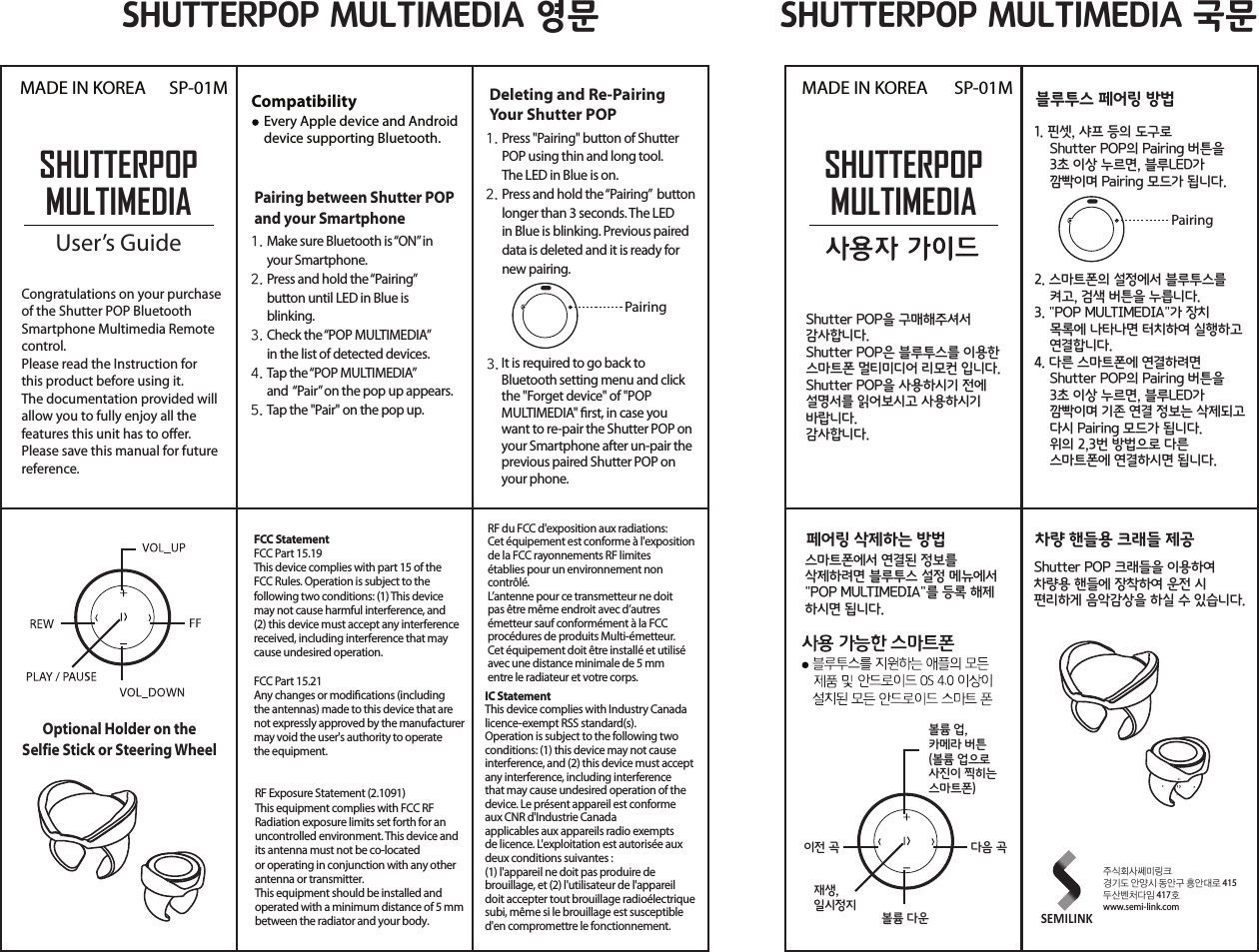
SHUTTERPOPMULTIMEDIAUser’s GuideSP-01MMADE IN KOREA MADE IN KOREACongratulations on your purchase of the Shutter POP Bluetooth Smartphone Multimedia Remotecontrol.Please read the Instruction for this product before using it.The documentation provided will allow you to fully enjoy all the features this unit has to oer.Please save this manual for future reference.Compatibility    Every Apple device and Android     device supporting Bluetooth.Pairing between Shutter POP and your SmartphoneOptional Holder on theSelfie Stick or Steering WheelMake sure Bluetooth is “ON” in your Smartphone.Press and hold the “Pairing” button until LED in Blue is blinking.Check the “POP MULTIMEDIA” in the list of detected devices.Tap the “POP MULTIMEDIA” and  “Pair” on the pop up appears.Tap the "Pair" on the pop up.1.2.3.4.5.Deleting and Re-PairingYour Shutter POPPress "Pairing" button of Shutter POP using thin and long tool. The LED in Blue is on.Press and hold the “Pairing”  button longer than 3 seconds. The LED in Blue is blinking. Previous paired data is deleted and it is ready fornew pairing.1.2.It is required to go back to Bluetooth setting menu and click the "Forget device" of "POP MULTIMEDIA" rst, in case you want to re-pair the Shutter POP onyour Smartphone after un-pair the previous paired Shutter POP onyour phone.3.PairingFCC StatementFCC Part 15.19This device complies with part 15 of the FCC Rules. Operation is subject to the following two conditions: (1) This device may not cause harmful interference, and (2) this device must accept any interference received, including interference that may cause undesired operation.FCC Part 15.21Any changes or modications (including the antennas) made to this device that are not expressly approved by the manufacturer may void the user's authority to operate the equipment.RF Exposure Statement (2.1091)This equipment complies with FCC RF Radiation exposure limits set forth for an uncontrolled environment. This device and its antenna must not be co-located or operating in conjunction with any other antenna or transmitter.This equipment should be installed and operated with a minimum distance of 5 mm between the radiator and your body.RF du FCC d'exposition aux radiations: Cet équipement est conforme à l'exposition de la FCC rayonnements RF limites établies pour un environnement non contrôlé. L’antenne pour ce transmetteur ne doit pas être même endroit avec d’autres émetteur sauf conformément à la FCC procédures de produits Multi-émetteur.Cet équipement doit être installé et utilisé avec une distance minimale de 5 mm entre le radiateur et votre corps.IC StatementThis device complies with Industry Canada licence-exempt RSS standard(s).Operation is subject to the following two conditions: (1) this device may not cause interference, and (2) this device must accept any interference, including interference that may cause undesired operation of the device. Le présent appareil est conforme aux CNR d'Industrie Canada applicables aux appareils radio exempts de licence. L'exploitation est autorisée aux deux conditions suivantes : (1) l'appareil ne doit pas produire de brouillage, et (2) l'utilisateur de l'appareil doit accepter tout brouillage radioélectrique subi, même si le brouillage est susceptible d'en compromettre le fonctionnement.SHUTTERPOPMULTIMEDIASP-01MShutter POP을 구매해주셔서 감사합니다.Shutter POP은 블루투스를 이용한 스마트폰 멀티미디어 리모컨 입니다. Shutter POP을 사용하시기 전에설명서를 읽어보시고 사용하시기 바랍니다.감사합니다.1. 핀셋, 샤프 등의 도구로Shutter POP의 Pairing 버튼을3초 이상 누르면, 블루LED가 깜빡이며 Pairing 모드가 됩니다.2. 스마트폰의 설정에서 블루투스를 켜고, 검색 버튼을 누릅니다.3. "POP MULTIMEDIA"가 장치 목록에 나타나면 터치하여 실행하고 연결합니다.4. 다른 스마트폰에 연결하려면 Shutter POP의 Pairing 버튼을3초 이상 누르면, 블루LED가 깜빡이며 기존 연결 정보는 삭제되고다시 Pairing 모드가 됩니다. 위의 2,3번 방법으로 다른 스마트폰에 연결하시면 됩니다.블루투스 페어링 방법스마트폰에서 연결된 정보를 삭제하려면 블루투스 설정 메뉴에서"POP MULTIMEDIA"를 등록 해제 하시면 됩니다.페어링 삭제하는 방법Shutter POP 크래들을 이용하여 차량용 핸들에 장착하여 운전 시 편리하게 음악감상을 하실 수 있습니다.차량 핸들용 크래들 제공PairingSHUTTERPOP MULTIMEDIA 영문 SHUTTERPOP MULTIMEDIA 국문볼륨 업, 카메라 버튼 (볼륨 업으로 사진이 찍히는 스마트폰)재생, 일시정지다음 곡볼륨 다운이전 곡주식회사쎄미링크경기도 안양시 동안구 흥안대로 415두산벤처다임 417호www.semi-link.comSEMILINK

Navigation menu