Sharp HT SB350 User Manual SPEAKER Manuals And Guides 1505427L
User Manual: Sharp HT-SB350 HT-SB350 SHARP SPEAKER - Manuals and Guides View the owners manual for your SHARP SPEAKER #HTSB350. Home:Electronics Parts:Sharp Parts:Sharp SPEAKER Manual
Open the PDF directly: View PDF  .
.
Page Count: 16

[X] DOLBY
B|G|TAL 1
V|RTUAL 1
SPEAKER
PRO LOG|E m| ]
DigitaMSurround
SfS_f is a trad .... k of SRS Labs, lnc,
WOW HB
WOW HD technology is incorporated under license from SRS Labs Inc.
Note: This product is recommended for flat paneF TV (LED, LCD and plasma).
Pleaseconfirmthat only thefollowingaccessoriesareincluded,
Remote control x 1 AC/DC adaptor x 1 AC power cord x 1 RCA cable (2pins-2pins) x 1
(RRMOGA251AWSA) (RADPAA061AWZZ) (OACCDA005AWZZ) (OCNWGA041AWPZ)
o o ...../
Wall mount at_gle x 2 Foot cushion x 4 Pattern paper x 1 ( Spike + Nut ) x 4
(LANGKA167AWFW) (PCUSSAl18AWZZ) (TCAUHA022AWZZ) (CLEGMA005AW02, Length: 25 ram)
SHARP CORPORATmON
IIIIIIIIIIIIIIIIIIIIIIINIIIIIIIIIIIIIIIIIIIIIIIII Pr,oto_,oMo,oys,o
TINSZA814AWZZ !0L R MW @
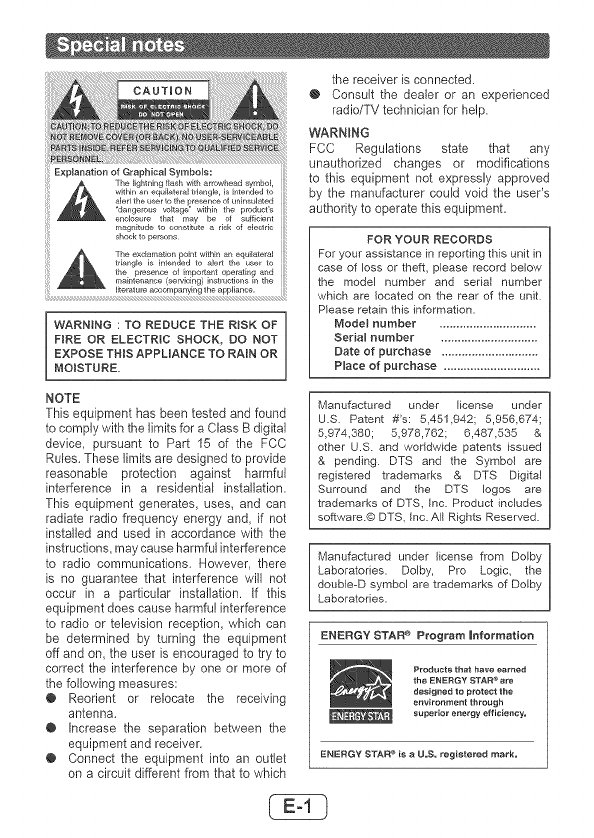
E×pJanation of QraphicaI Symbols:
The lightning flash with arrowhead symbol,
wkNn an equilateral triangle, is intended to
alert the user to the presence of _Nnsulated
'dangerous voltage" within the product's
enclosure that may be of sufficient
magnitude to constitute a risk of eJectdc
shock to persons
The exclamation poir_t within an equilateral
triangle is intended to alert the u_r to
the pr÷aen_ of h_portanl operating and
mai_tenanee (servicing} instructions in the
literat u_e ace omparNing the appliarEc e.
[ WARNING : TO REDUCE THE RiSK OF
FIRE OR ELECTRIC SHOCK, DO NOT
EXPOSE THIS APPLIANCE TO RAIN OR
MOISTURE,
NOTE
This equipment has been tested and found
to comply with the limits for a Class B digital
device, pursuant to Part 15 of the FCC
Rules. These limits are designed to provide
reasonable protection against harmful
interference in a residential installation.
This equipment generates, uses, and can
radiate radio frequency energy and, if not
installed and used in accordance with the
instructions, may cause harmful interference
to radio communications. However, there
is no guarantee that interference will not
occur in a particular installation, if this
equipment does cause harmful interference
to radio or television reception, which can
be determined by turning the equipment
off and on, the user is encouraged to try to
correct the interference by one or more of
the following measures:
@ Reorient or relocate the receiving
antenna.
@ Increase the separation between the
equipment and receiver.
@ Connect the equipment into an outlet
on a circuit different from that to which
the receiver is connected.
O Consult the dealer or an experienced
radio/TV technician for help,
WARNRNG
FCC Regulations state that any
unauthorized changes or modifications
to this equipment not expressly approved
by the manufacturer could void the user's
authority to operate this equipmenL
FOR YOUR RECORDS
For your assistance in reporting this unit in
case of loss or theft, please record below
the model number and serial number
which are located on the rear of the unit
Please retain this information.
Mode} number .............................
Serial number .............................
Date of purchase .............................
Place of purchase .............................
Manufactured under license under
U.S Patent #'s: 5,451,942; 5,956,674;
5,974,389; 5978,762; 6,487,535 &
other U.S. and worldwide patents issued
& pending DTS and the Symbol are
registered trademarks & DTS Digital
Surround and the DTS loges are
trademarks of DTS, Inc. Product includes
software.@ DTS, Inc. All Rights Reserved.
Manufactured under license from Derby
Laboratories. Dolby, Pro Logic, the
double-D symbol are trademarks of Derby
Laboratories.
ENERGYSTAR® Program |nfoltmation
Products that have earned
the ENERGY STAR _ ate
designed to protect the
environment through
SupeNot energy efficiency=
ENERGY STAR e i8 a LLS, registered mark,
Electricityis usedto performmanyusefulfunctions
butit can also causepersonalin!uriesand property
damageif improperlyhandled.Thisproducthasbeen
engineeredandmanufactured,withthehighestpriority
on safety.However,improperusecanresultinelectric
shockand/orfire.In orderto preventpotentialdanger,
pleaseobservethefollowinginstructionswheninstall-
ing,operatingandcleaningtheproduct,Toensureyour
safetyandprolongtheservicelifeofthisproduct,please
readthefollowingprecautionscarefullybeforeuse.
1) Readtheseinstructions,
2) Keeptheseinstructions,
3) Heedallwarnings.
4) Followallinstructions.
5) Donotusethisapparatusnearwater.
6) Cleanonly,withdrycloth.
7) Do notblockanyventilationopenings.Installin
accordancewiththemanufacturer'sinstructions,
8) Donotinstallnearanyheatsourcessuchasra-
diators,heatregisters,stoves,orotherapparatus
(includingamplifiers)thatproduceheat,
9) Donetdefeatthesafetypurposeofthepolarized
orgrounding-typeplug,Apolarizedplughastwo
bladeswithonewiderthantheother,Agrounding
typeplughastwobladesandathirdgrounding
prong.Thewidebladeorthethirdprongarepro-
videdfor yoursafety.Ifthe providedplugdoes
notfit intoyouroutlet,consultan electricianfor
replacementoftheobsoleteoutlet.
10) Protectthe powercordfrom beingwalkedon
or pinchedparticularlyat plugs,convenience
receptacles,andthepointwheretheyexitfrom
theapparatus.
11) Only useattachments/accessoriesspedied by
themanufacturer.
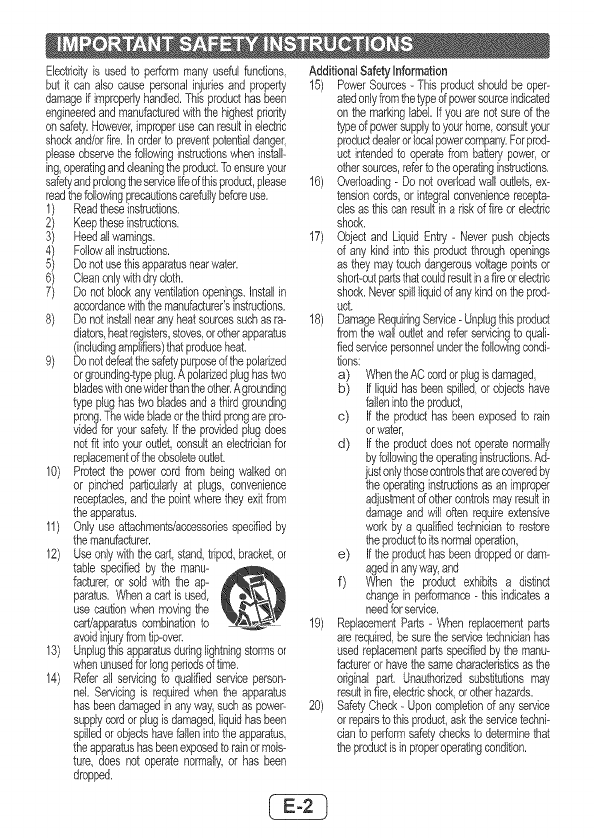
12) Useonlywiththe cart stand,tripod,bracket,or
table specifiedby the manu-
facturer,or sold withthe ap-
paratus.Whena cartisused,
use caution,whenmovingthe
cart!apparatuscombinationto
avoidinjuryfromtip-over.
13) Unplugthisapparatusduringlightningstormsor
whenunusedforlongperiodsdtime.
14) Referall servicingto qualifiedserviceperson-
nel, Servicingis requiredwhenthe apparatus
hasbeendamagedinanyway,suchas powep
supplycordorplugisdamaged,liquidhasbeen
spilledorobjectshavefallenintotheapparatus,
theapparatushasbeenexposedtorainormois-
ture, does notoperatenormally,or has been
dropped.
Additbnal SafetyInformation
15) PowerSources-Thisproductshouldbe oper-
atedonlyfromthetypeofpowersourceindicated
onthe markinglabel.Ifyouarenotsuredthe
typeof powersupplytoyourhome consultyour
productdealerorlocalpowercompany,Forprod-
uct intendedto operatefrombatterypower,or
othersources,referto theoperatinginstructions,
16) Overloading- Donotoverloadwalloutlets,ex-
tensioncords,orintegralconveniencerecepta-
clesasthiscanresultina riskof fireorelectric
shock,
17) Objectand LiquidEntry- Neverpushobjects
of anykindintothisproductthroughopenings
astheymaytouchdangerousvoltagepointsor
short-outpartsthatcouldresultinafireorelectric
shock,Neverspillliquidofanykindontheprod-
uct.
18) DamageRequiringService-Unplugthisproduct
fromthewalloutletandreferservicingto quali-
fiedservicepersonnelunderthefollowingcondi-
tions:
a) WhentheACcordorplugisdamaged,
b) Ifliquidhasbeenspilled,orobjectshave
fallenintotheproduct,
c) Ifthe producthasbeenexposedto rain
orwater,
d) Ifthe productdoesnotoperatenormally
byfollowingtheoperatinginstructions,Ad-
justonlythosecontrolsthatarecoveredby
theoperatinginstructionsas animproper
adjustmentdothercontrolsmayresultin
damageandwilloftenrequireextensive
workby a qualifiedtechnicianto restore
theproducttoitsnormaloperation,
e) Iftheproducthasbeendroppedordam-
agedinany,way,and
f) When the product exhibitsa distinct
changein performance- thisindicatesa
needforservice,
19) ReplacementParts- Whenreplacementparts
arerequiredbesuretheservicetechnicianhas
usedreplacementpartsspecifiedbythemanu-
factureror havethesamecharacteristicsasthe
originalpart, Unauthorizedsubstitutionsmay
resultinfire,electricshockorotherhazards.
20) SafetyCheck- Uponcompletionof anyservice
orrepairstothisproduct,asktheservicetechni-
cianto performsafetychecksto determinethat
theproductisinproperoperatingcondition.
CE@
21) Wallor ceilingmounting- Whenmountingthe
productona vcallorceiling,besureto installthe
productaccordingto themethodrecommended
bythemanufacturer.
22) PowerLbes-Anoutsideantennasystemshould
notbelocatedin thevicinityof overheadpower
linesorotherelectriclightor powercircuits,or
whereitcanfallbto suchpowerlinesorcircuits.
Wheninstallinganoutsideantennasystem,ex-
tremecareshouldbetakento keepfromtouch-
ing suchpowerlinesorcircuitsascontactwith
themmightbefatak
23) ProtectiveAttachmentPlug - The productis
equippedwithanattachmentplughavingover-
load protection.This is a safetyfeature.See
InstructionManualfor replacementor resetting
dprotectivedevice.If replacementdtheplug
is required,be surethesen/icetechnicianhas
usedareplacementplugspecifiedbythemanu-
facturerthathasthesameoverloadprotectionas
theodginalp{ug.
24) Stand- Donotplacetheproductonanunstable
cart,stand,tnpodortable.Placingtheproducton
an unstablebasecancausetheproductto fall
resultingin seriouspersonalinjudesaswellas
damageto the product.Useonlya cart,stand,
tdpod,bracketor table recommendedby the
manufactureror soldwith the product.When
mountingtheproducton a wall,besureto fol-
lowthemanufacturer'sinstructions.Useonlythe
mountinghardwarerecommendedbythemanu-
facturer.
SRSWOWHDTM significantlyimprovestheplayback
qualityofaudio,deliveringadynamic3Dentertainment
experiencewithdeep,richbassand highfrequency
clarityfor crispdetail.
ii!i!i ¸,¸¸!
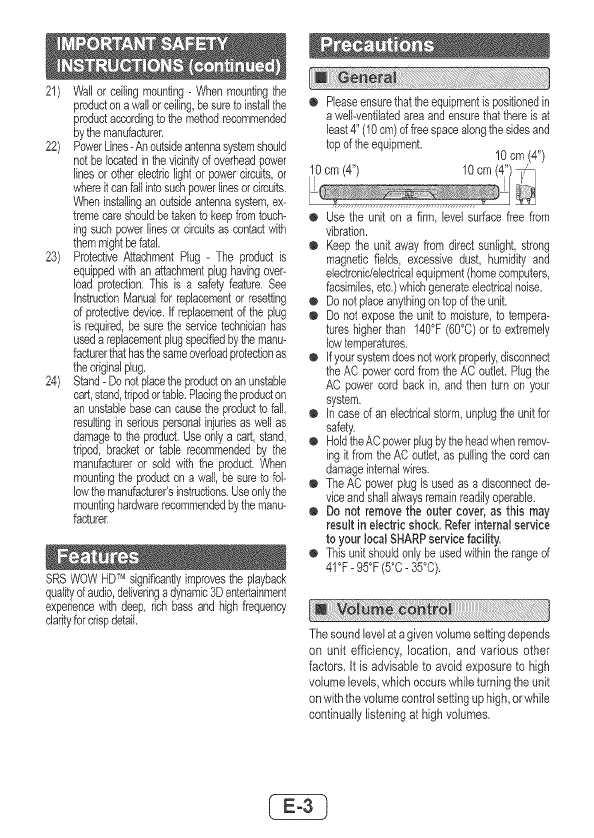
o Pleaseensurethattheequipmentispositionedin
awelkventilatedareaandensurethatthereisat
least4' (10cm)of freespacealongthe sidesand
topof theequipment. 10 cm (4")
o Usethe unit on a firm, levelsurfacefreefrom
vibration.
o Keepthe unitawayfrom directsunlight,strong
magneticfields excessivedust, humidityand
electronic/electricalequipment(homecomputers
facsimiles,etc.)whichgenerateelectricalnoise.
o Donotplaceanythingontopof theunit.
o Donot exposethe unitto moisture,to tempera-
tureshigherthan 140°F(60°C)or to extremely
lowtemperatures.
o Ifyoursystemdoesnotworkproperly,disconnect
theAC powercordfromtheACoutleLPlugthe
ACpovvercordbackin, and thenturn onyour
system.
o in casedan electricalstorm,unplugtheunitfor
safety.
o HoldtheACpowerplugbytheheadwhenremov-
ing it fromtheACoutlet,aspullingthecordcan
damageinternalwires.
@ TheACpowerplugis usedas a disconnectde-
viceandshallalwaysremainreadilyoperable.
o Do not removethe outer cover,as this may
result in electricshock.Referinternalservice
to your localSHARPservicefacility.
@ Thisunitshouldonlybeusedwithintherangeof
41°F- 95°F(500. 35°C).
Thesoundlevelat agivenvolumesettingdepends
on unit efficiency, location,and various other
factors. It isadvisableto avoid exposureto high
volumelevels,whichoccurswhileturningtheunit
onwiththevolumecontrolsettinguphigh,orwhile
continuallylisteningat highvolumes.
CONSUMERLiMiTED WARRANTY
SHARP ELECTRONICS CORPORATION warrants to tile first consumer purchaser that glis Sharp brand product (the
"Product"), when ship }n its original conta}ner, w[[ be free from defecl ve workmanship and materials and agrees that it w[[,
at its opt on, either repair the defect or replace the defectNe Product or pair thereof with a new or remanufac4ured equNalent
at no charge to the purchaser for parts or labor for the period(s) set forth below
This warranty does not apply to any appearance terns of the Product nor to the add t onal excluded item(s) set forth below
nor to any Product the exterior of which has been damaged or defaced, which has been subjected to }mproper vokage or
other ngsuse, abnormal serv ce or handling, or which has been akered or modified in design or construction
In order to enforce the rights under this lim}ted warranty, the purchaser shouH follow the steps set forth below and provide
proof of purchase to the servicer
The limited warranty described heren is in add}ton to whatever implied Warranties may be granted to purchasers by law
ALL IMPMED WARRANTIES INCLUDING THE WARRANTIES OF MERCHANTABIMTY AND FITNESS FOR USE ARE
LIMITED TO THE PERIOD(S) PROM THE DATE OF PURCHASE SET FORTH BELOW Some states do not allow
limitations on how long an implied warranty lasts, so the above lira tat on may not apply to you
Neither the sales personnel of the seller nor any other person is authorized to make any Warrant es other than those
described herein, or to extend the duration of any warrant es beyond the tgne period described herein on behalf of Sharp
The warrant es described herein shall be the sole and exclus ve warrant es granted by Sharp and shall be the sole and
exclus ve remedy available to the purchaser Correct on of defects n the manner and for the period of tgne described
here n, shall const}tute complete fulfillment of all liabilit es and respons bilit es of Sharp to the purchaser wth respect to the
Product and shall const}tute full sat sfac4 on of all cla}ms, whether based on contracl, negligence, strict liability or other_ se
In no event shall Sharp be liable, or in any way respons}ble, for any damages or defects in the Producl which were caused
by repairs or attempted repairs perlormed by anyone other than an authorized serv cer Nor shall Sharp be liable or in any
way responsible for any incidental or consequential econom c or prope[ty damage Some states do not allow the exclusion
of }nc}dental or consequential damages, so the above exclusion may not apply to you
THIS WARRANTY GIVES YOU SPECIFIC LEGAL RIGHTS YOU MAY ALSO HAVE OTHER RIGHTS WHICH VARY
PROM STATE TO STATE
Model Specific Sectior+
Your Product Mode} Numbe+" & Descriptio+_:
Warranty Period for this Product:
Additional item(s) Excluded from Wa+'ranty Coverage
(if al_y):
Whe+'e to Obtai+_ Se+'vice:
NT-SB350(BK) So_nd Ba_" System
(Be sure to have this information ava}lable when you need
serv ce for your Product)
One ( 1) year parts and labor from the date of purchase
Non-funct}onal accessories, supplies, and consumable
items
A_ a Sharp Authorized Serv cer located in the United States
To find a location of the nearest Sharp Authorized Serv}cer,
call Sharp toll free at 1-800-BE+SHARP
SMp prepaid or carry _n your Product to a Sharp Authorized
Servcer Be sure to have Proof of Purchase ava}lable If
you ship the Product, be sure it is insured and packaged
securely
TO OBTAIN SUPPLY, ACCESSORY OR PRODUCT INFORMATION, CALL 1-800 BE SHARP
SHARP ELECTRONICS CORPORATION
SharpPlaza,Mahwah, NewJersey07495+1163
Warning:
o The voltage used must be the same as that
specifiedon thisunit. Usingthis productwith
a higher voJtage other than that which is
specified is dangerousand may result in a
fireorothertypeof accidentcausingdamage.
SHARPwill not be held responsiblefor any
damageresultingfrom use of this unit with a
voltageother thanthat whichis specified.
o The supplied AC/DC adaptor contains
no user serviceable parts. Never remove
covers unlessqualifiedto do so, it contains
dangerousvoltages, always remove mains
plug from the main outlet jack before any
service operation or when not in use for a
longperiod.
o The AC/DC adaptor suppliedwith the H%
SB350(BK) must not be used with other
equipment,
o Never use anAC/DC adaptor other than the
one specified.Otherwise,problemor serious
hazardsmay becreated.
I!!!iJ_ii_:_i_iii¸_!_!_i_i_i_i_i¸i¸I_i¸i_!ii_:!!_:!:_!_!_!_:_!_!:_!i!!_i_i_i_i_i_i!i_i_i_i_ii_ii_i_!_i_i!_i_ii_!i_!i;!_i!iiiiiiiiiiiiiiiii_i_ii_iii_!!i_i_ili!iiiii!ii_i_!_j
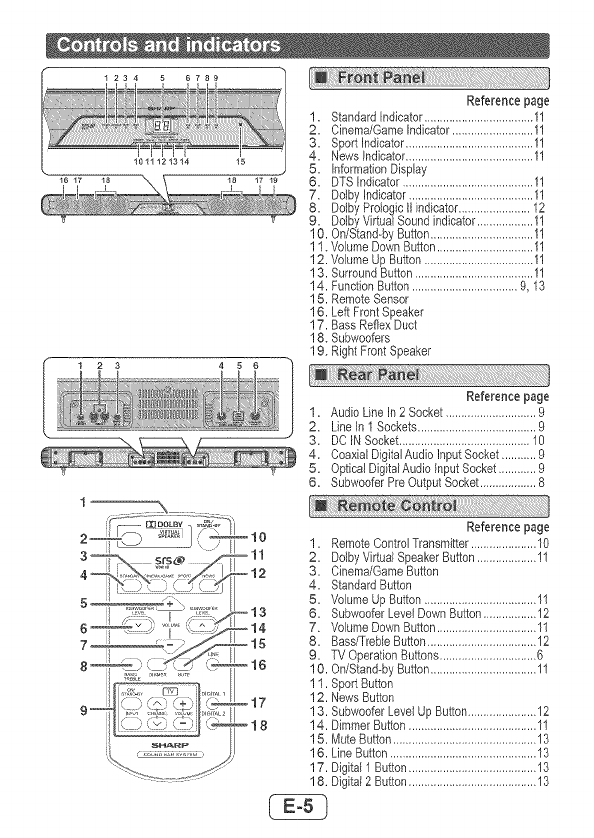
Reference page
1. StandardIndicator...................................11
2. Cinema/GameIndicator..........................11
. SportIndicator.........................................11
. News indicator.........................................11
5. InformationDisplay
6. DTS Indicator..........................................11
7. DolbyIndicator........................................11
8. DolbyPrologicfl indicator.......................12
9. DolbyVirtualSoundindicator..................11
10. On/Stand-bySutton.................................11
11. VolumeDownSutton...............................11
12. VolumeUpSutton...................................11
13. SurroundSutton......................................11
14. FunctionSutton..................................9, 13
15. RemoteSensor
16. Left Front Speaker
17. Bass ReflexDuct
18. Subwoofers
19. Right FrontSpeaker
Reference page
1. Audio LineIn 2 Socket .............................9
2. Line In I Sockets......................................9
3. DC IN Socket..........................................10
4. Coaxial DigitalAudio InputSocket ...........9
5. OpticalDigitalAudioInputSocket............9
6. SubwooferPreOutputSocket..................8
9--
_H_
?'_ t :t..t f ::;; ....
Reference page
_10 1. RemoteControlTransmitter.....................10
-- 11 2. DolbyVirtualSpeakerButton...................11
-- 12 3. Cinema/GameButton
4. StandardSutton
5. VolumeUpButton....................................11
-- 13 6. SubwooferLevelDownButton.................12
14 7. VolumeDownButton................................11
-- 15 8. Bass/TrebleButton...................................12
9. TV OperaflonButtons...............................6
,_ 16 10. On/Stand-byButton..................................11
1I. SportButton
17 12. News Button
13. SubwooferLevelUpButton......................12
18 14. DimmerButton.........................................11
15. MuteButton..............................................13
16. LineButton...............................................13
17. Digital 1Button.........................................13
18. Digital2 Button.........................................13
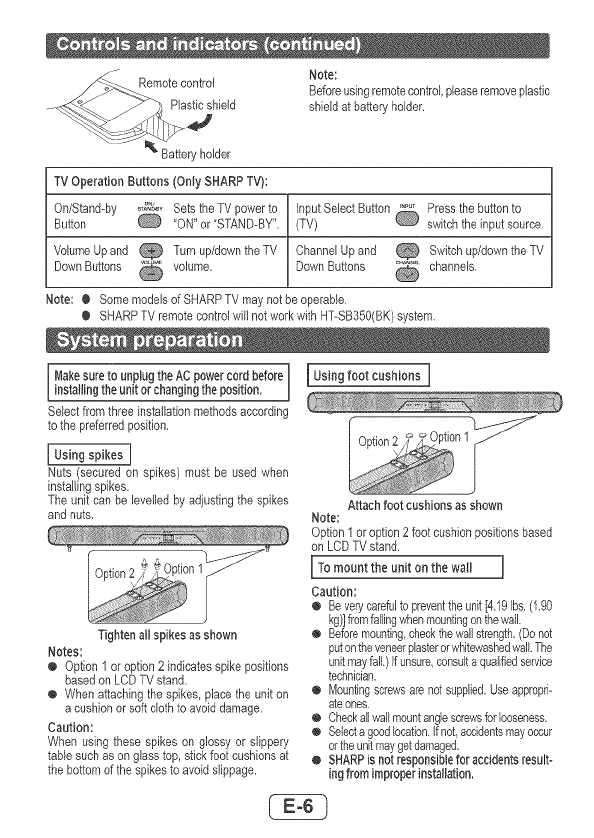
Note:
Remotecontrol Beforeusingremotecontrol,pleaseremoveplastic
Plasticshield shieldatbatteryholder.
.J
holder
TVOperation Buttons (Only SHARPTV):
On/Stand-by _._%_'&YSets theTV powerto InputSelectButton Pressthe buttonto
Button Q 'ON" or"STAND-BY". (TV) Q switchthe inputsource.
VolumeUp and _ Turnup/downthe TV ChannelUp and _ Switchup/downtheTV
DownButtons _ volume. DownButtons _ channels.
Note: ¢ Some modelsofSHARPTV maynotbe operable.
¢ SHARPTV remotecontrolwill notworkwith HT-SB350(BK)system.
I Makesureto unplugtheACpowercord before
installingthe unitor changingthe position.
Selectfrom threeinstallationmethodsaccording
to thepreferredposition.
Nuts (secured on spikes) must be usedwhen
installingspikes.
Theunit can be levelledby adjustingthe spikes
and nuts.
Tightenall spikes as shown
Notes:
o Option 1 or option 2 indicatesspike positions
basedon LCDTV stand.
o When attachingthe spikes,placethe unit on
a cushionorsoft clothto avoiddamage.
Caution:
When usingthese spikes on glossy or slippery
tablesuch ason glass top, st{ckfoot cushionsat
thebottomof thespikesto avoidslippage.
Usingfoot cushions ]
Attachfoot cushionsasshown
Note:
Option1oroption2foot cushionpositionsbased
on LCD TV stand.
[ To mount the unit on the wall J
Caution:
@ Be ventcarefulto preventthe unit[4.19Us.(1.90
kg)]fromfailingwhenmountingonthewall.
@ Beforemounting,checkthewallstrength.(Donot
putontheveneerplasterorwhitewashedwallThe
unitmayfall.)if unsure,consulta qualifiedsen/ice
technician.
@ Mountingscrewsare notsupplied.Useappropri-
ateones.
¢ Checkallwallmountanglescrewsforlooseness.
¢ Selectagoodlocation.Ifnot accidentsmayoccur
ortheunitmaygetdamaged.
¢, SHARPis not responsiblefor accidentsresult-
ing from improperinstallation.
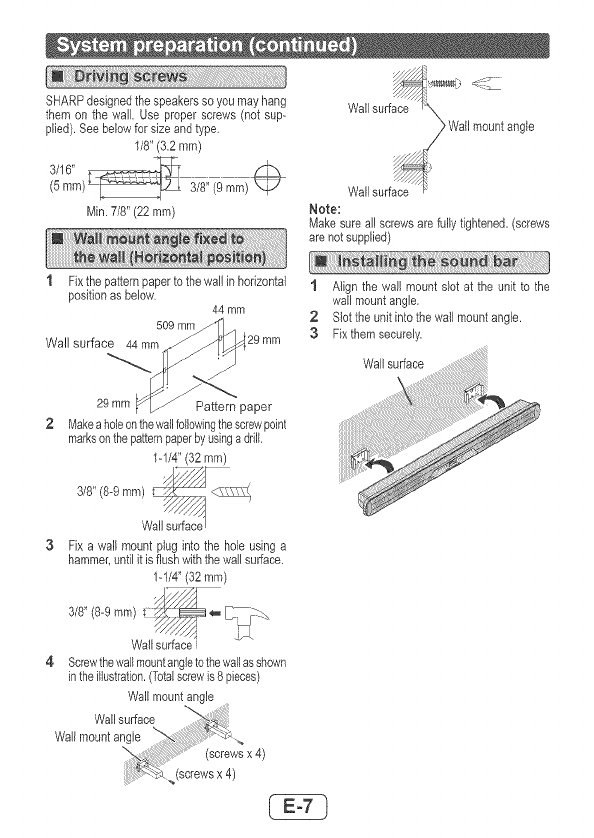
SHARPdesignedthespeakerssoyoumayhang surface_
themonthewailUseproperscrews(notsup- Wall
plied).Seebelowforsizeandtype. ,_ Wallmountangle
1/8"(3.2mm)
Wallsurf_9
Min,7/8"(22ram) Note:
Makesureallscrewsarefullytightened.(screws
arenotsupplied)
1 Fixthepatternpapertothewallinhorizontal1 Alignthewallmountslotattheunittothe
positionasbelow, wallmountangle,
44mm 2 Slottheunitintothewallmountangle.
509mm
Wallsurface44mm 29mm 3 Fixthemsecurely,
wo_surface.......
Pattompaper .....
2 Makeaholeonthewallfollowingthescrewpoint
marksonthepatternpaperbyusinga drill.
1-1/4"(32 ram)
W_urface
3 Fix a wall mount plug into the hole usinga
hammer,untilit is flushwiththewallsurface,
1-1/4"(32 mm)
3/8"/8-gram)_,- I: r_
Wall surface
4 Screwthewallmountangletothewallasshown
intheillustration.(Totalscrewis8 pieces)
Wallmountangle
Wallsurface
Wallmountangle
(screwsx 4)
(screwsx 4)
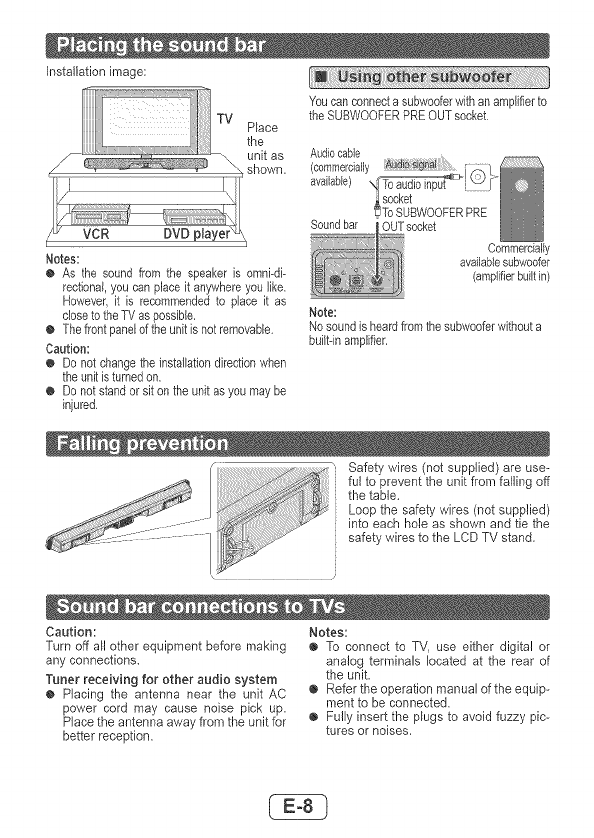
Installationimage:
Place
the
unitas
shown.
Notes:
OAsthesoundfromthespeakerisomni-di-
rectional,youcanplaceitanywhereyoulike.
However,itisrecommendedtoplaceitas
dosetotheTVaspossible.
OThefrontpaneloftheunitisnotremovable.
Caution:
ODonotchangetheinstallationdkectionwhen
theunitisturnedon.
ODonotstandorsitontheunitasyoumaybe
injured.
Youcanconnectasubwooferwithanamplifierto
theSUBWOOFERPREOUTsocket.
Audiocable
(commercially.....
available),
Soundbar socket
'To8UBWOOFERPRE
OUTsocket Commercially
availablesubwoofer
(amplifierbuiltin)
Note:
Nosoundisheardfromthesubwooferwithouta
built-inamplifier.
:_ Safetywires(notsupplied)areuse-
_.s_ _ fultopreventtheunitfromfailingoff
thetable.
Loopthesafetywires(notsupplied)
_ii_ intoeachholeasshownandtiethe
safetywirestotheLCDTVstand.
Caution: Notes:
Turnoffallotherequipmentbeforemakingo ToconnecttoTV,useeitherdigitalor
anyconnections, analogterminalslocatedattherearof
Tunerreceivingforotheraudiosystem theunit.
o PlacingtheantennaneartheunkAC o Refertheoperationmanualoftheequip-
powercordmaycausenoisepickup. menttobeconnected.
Placetheantennaawayfromtheunitfor o Fullyinserttheplugstoavoidfuzzypic-
betterreception, turesornoises.
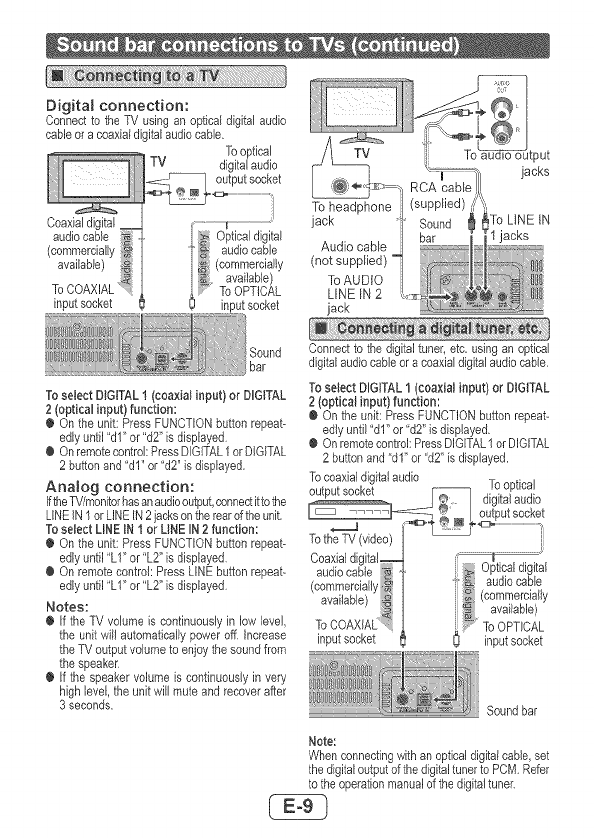
Digitalconnection:
ConnecttotheTVusinganopticaldigitalaudio
cableoracoaxialdigitalaudiocable.
Tooptical
TV digitalaudio
Coaxialdigital
audiocable
(commercially
available)
ToCOAXIAL
inputsocket
Sound
bar
To select DIGITAL! (coaxial input} or DIGITAL
2 (optical input) function:
¢ On the unit: Press FUNCTIONbuttonrepeat-
edlyuntil 'dl" or"d2" isdisplayed.
¢ Onremotecontrol:PressDIGITAL1orDIGITAL
2buttonand "dl" or "d2" is displayed.
Analog connection:
IftheTV/monitorhasanaudiooutput,connectittothe
LiNEIN1 orLINEIN2jacksontherearoftheunit,
To select LINEIN i or LINE IN 2function:
¢ On the unit: Press FUNCTIONbuttonrepeat-
edlyuntil 'LI" or"L2" isdisplayed.
¢ On remotecontrol:Press LINEbuttonrepeat-
edlyuntil "LI" or"L2" is displayed.
Notes:
¢ If theTV volumeis continuouslyin lowlevel,
the unit will automaticallypoweroff. increase
the TVoutput volumeto enjoythe soundfrom
the speaker.
¢ If thespeakervolume is continuouslyin very
highlevel,the unit willmuteand recover after
3seconds.
jack
Connectto the digitaltuner,etc, usingan optical
digitalaudiocableor acoaxialdigitalaudiocable.
To select DIGITAL1(coaxial input} or DIGITAL
2 (optical input} function:
€ On the unit: PressFUNCTIONbuttonrepeat-
edly until "dl" or "d2"is displayed.
€ On remotecontrol:PressDIGITAL1orDIGITAL
2 buttonand "dl" or 'd2" is displayed.
To coaxialdigitalaudio
Soundbar
Note:
Whenconnectingwith anopticaldigitalcable,set
thedigitaloutputof thedigitaltunerto PCM.Refer
to theoperationmanualof thedigitaltuner.
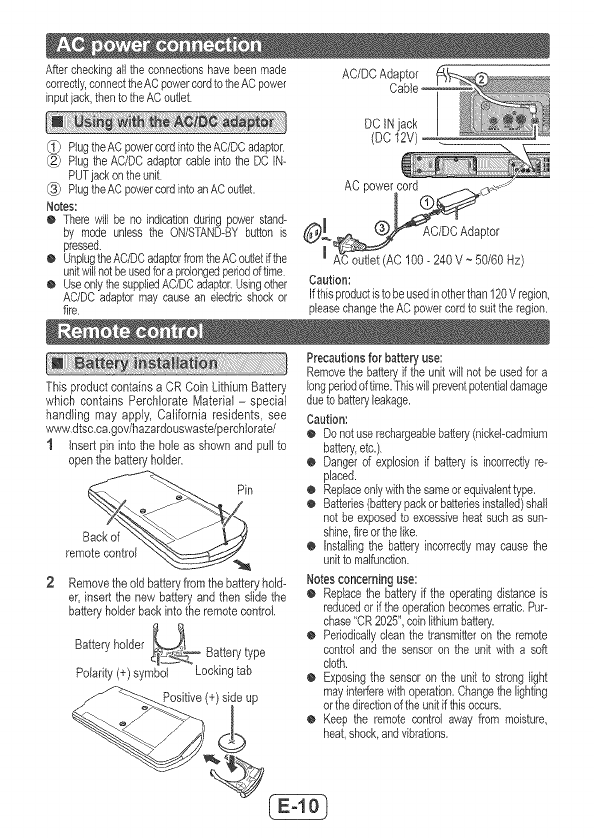
Aftercheckingalltheconnectfonshavebeenmade AC/DCAdaptor
correctly,connecttheACpowercordtotheACpower
inputjack,thentotheACoutlet.
Plug the AC power cord into the AC/DC adaptor
Plug the AC/DC adaptor cable into the DC IN-
PUT jack on the unit
_3_ Plug the AC power cord into an AC outlet.
Notes:
O There w_llbe no indication dunng power stand-
by mode unless the ON/STAND-BY button is
pressed.
O Unplug the AC/DC adaptor ftom the AC outlet ifthe
unit will not be used for a prolonged period of time
O Use only the supplied AC/DC adaptor. Using other
AC/DC adaptor may cause an electric shock or
fire
DC INjack
(DC 12V)
Caution:
Ifthisproductistobeusedinotherthan120V region,
pleasechangetheACpowercordto suittheregion.
Thisproductcontainsa CRCoin LithiumBattery
which contains Perchlorate Matedal - special
handling may apply, California residents, see
www,dtsc.ca.gov/hazardouswaste/perchlo_ate/
1 Insertpin intothe holeas shown and pullto
openthebatteryholder.
remotecontroi __
2 Removetheoldbatteryfrom thebatteryhold-
er, insertthe new batteryand then slidethe
batter,/holderbackintothe remotecontrol.
Batteryholder _T Batterytype
Polarity(+)symbol Lockingtab
Precautionsfor batteryuse:
Removethebatteryif theunkwillnotbe usedfora
longperiodof time.Thiswillpreventpotentfaldamage
dueto batteryleakage.
Caution:
o Donotuserechargeablebattery(nickel-cadmium
battery,etc.).
o Dangerof explosionif batteryis incorrectlyre-
placed.
o Replaceonlywiththesameorequivalenttype.
o Batteries(batterypackorbatteriesinstalled)shall
notbeexposedto excessiveheatsuchassun-
shine,fireorthelike.
o Installingthe batteryincorrectlymaycausethe
unitto malfunction.
Notesconcerninguse:
o Replacethe batteryif theoperatingdistanceis
reducedorif theoperationbecomeserratic.Pur-
chase"CR2025",coinlithiumbatten/.
o Periodicallycleanthe transmitteron the remote
controland the sensoron the unit witha soft
cloth,
o Exposingthesensoron the unitto stronglight
mayfnterferewithoperatfon.Changethelighting
orthedirectionoftheunitifthisoccurs.
o Keepthe remotecontrol away from moisture,
heat,shock,andvfbrations.
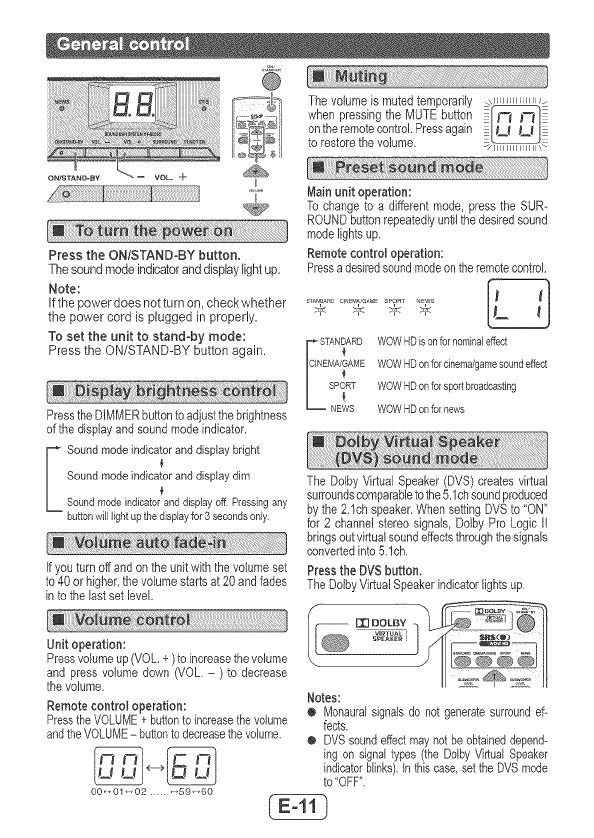
Thevolumeismutedtemporarily_
whenpressingtheMUTEbutton i
ontheremotecontrol.Pressagak_ i [_'_ _J
to restorethevolume. _/1iililli ilil!_
Press the ON/STAND-BY button.
Thesoundmode indicatorand displaylight up.
Note:
ifthe power does notturn on, check whether
the power cord is plugged in properly.
To set the unit to stand-by mode:
Press the ON/STAND-BY button again.
Press the DIMMER button to adjust the brightness
of the display and sound mode indicator.
I ound mode indicator and display bright
Sound mode indicator and display dim
Soundmode indicator anddisplay off Pressingany
buttonwill lightup thedispEayfor 3 secondsonly
Ifyou turnoff andon the unitwith thevolumeset
to 40 or higher,thevolumestartsat 20 andfades
into the lastset level.
Unit operation:
Pressvolumeup(VOL,+) to increasethe volume
and press volumedown (VOL - ) to decrease
thevolume,
Remote control operation:
PresstheVOLUME+ buttonto increasethe volume
andtheVOLUME- buttonto decreasethevolume.
OO,,Ol_O2 ..... _59_60
Main unit operation:
To change to a differentmode, press the SUR-
ROUNDbuttonrepeatedlyuntilthedesiredsound
modelights up.
Remote controJoperation:
Pressadesiredsoundmodeontheremotecontrol.
f_
ST/,NDAr,D CI_E_AG_MESPOF_T_EWS I1 _1
STAN[_ARDWOWHDisonfornominaleffect
EMA,,GAMEWOWHDonforcinema/gamesoundeffect
SPORT WOWHDonforsportbroadcasting
Y
NEWS WOWHDonfornews
The DolbyVirtual Speaker(DVS}createsvirtual
surroundscomparabletothe5.1chsoundproduced
by the2.1chspeaker.WhensettingDVSto "ON"
for 2 channel stereosignals, DolbyPro Logic [I
bringsoutvirtualsoundeffectsthroughthesignals
convertedinto5.1ch.
Pressthe DVSbutton.
TheDolbyVirtual Speakerindicatorlightsup.
Notes:
O Monauralsignalsdo not generatesurroundef-
fects.
• DVSsoundeffectmaynotbe obtaineddepend-
ing on signaltypes(the DolbyVirtualSpeaker
indicatorblinks).In thiscase,settheDVSmode
to"OFF".
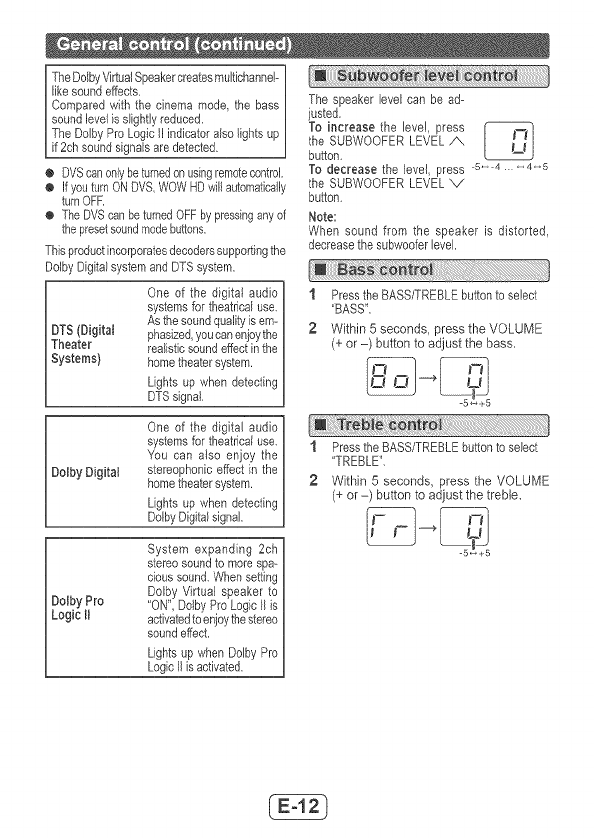
TheDolbyVirtualSpeakercreatesmuJtichanneF
likesoundeffects.
Comparedwiththecinemamode,thebass
soundlevelisslightJyreduced.
TheDoJbyProLogicIIindicatoralsolightsup
if2chsoundsignalsaredetected.
o DVScanonlybeturnedonusingremotecontrol
o IfyouturnONDVS,WOWHDwillautomatically
turnOFR
oTheDVScanbeturnedOFFbypressinganyof
thepresetsoundmodebuttons.
Thisproductincorporatesdecoderssupportingthe
DolbyDigitalsystemandDTSsystem.
Oneofthedigitalaudio]1
systemsfortheatricaluse.U
Asthesoundqualityisem-
DTS(Digita_phasized,youcanenjoythe_ 2
Theater realisticsoundeffectinthe
Systems)hometheatersystem.
Lightsupwhendetecting
DTSsignal J
Oneofthedigitalaudio]
systemsfortheatricaluse.
YoucanalsoenjoytheU1
stereophoniceffectinthe
DolbyDigitalhometheatersystem._ 2
Lightsupwhendetectingn
DolbyDigitalsignal.]
Thespeakerlevelcanbead-
justed,
ToincreasetheJevel,press
theSUBWOOFERLEVEL/X
\
button.
To decrease the level, press -5,,-4
the SUBWOOFERLEVEL x/
button.
Note:
When sound from the speaker is distorted,
decreasethe subwooferlevel
Pressthe BASS/TREBLEbuttonto select
'BASS".
Within 5 seconds, press the VOLUME
(+ or -) button to adjust the bass,
Pressthe BASS/TREBLEbuttonto select
"TREBLE",
Within 5 seconds, press the VOLUME
(+ or -) button to adjust the treble,
Dolby Pro
Logic II
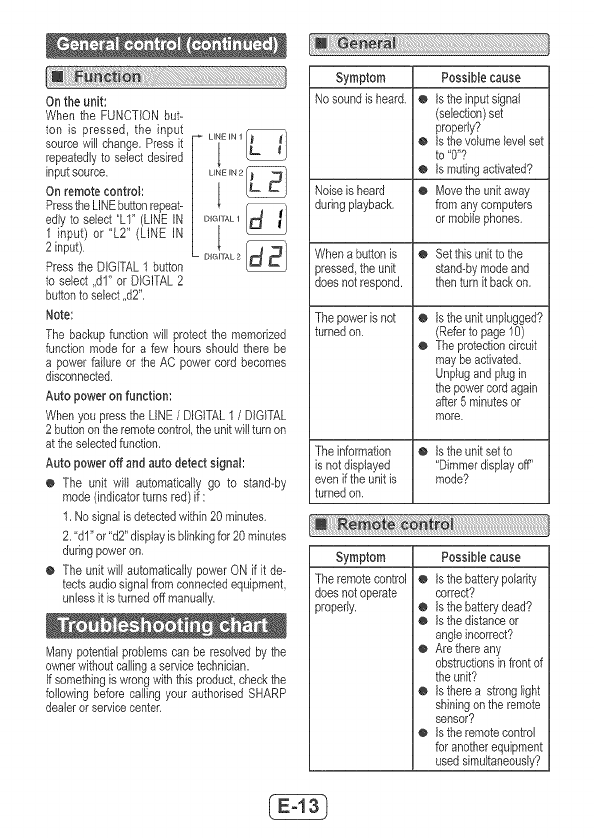
Ontheunit:
WhentheFUNCTIONbut-
tonispressed,theinput
sourcewillchange,Pressit
repeatedlytoselectdesired
inputsource,
Onremotecontrol:
PresstheLINEbuttonrepeat-
edlytoselect"LI'(LINEIN
1input)or"L2"(LINEIN
2input).
PresstheDIGITAL1button
toselect,,dl"orDIGITAL2
buttontoselect,,d2".
Note:
DGIALIJ
o,SAL2
The backupfunction will protectthe memorized
function mode for a few hours should there be
a powerfaiJureor theAC powercord becomes
disconnected.
Auto poweron function:
Whenyou pressthe LINE/DIGITAL1 /DIGITAL
2 buttonon theremotecontrol,theunitwillturnon
at the selectedfunction,
Auto poweroff and auto detect signal:
o The unit will automatically go to stand-by
mode (indbatorturnsred) if :
1, No signalis detectedwithin20 minutes.
2, 'dl" or "d2"dbplay is blinkingfor 20 minutes
duringpoweron.
o The unitwill automaticallypowerON if it de-
tectsaudiosignalfrom connectedequipment,
unlessit is turnedoff manually.
Manypoten%l problemscan be resolvedby the
ownerwkhoutcallingaservicetechnician.
Ifsomethingis wrongwiththis product,checkthe
followingbefore calling your authodsedSHARP
dealeror servicecenter.
Symptom Possible cause
No soundis heard, o is theinput signal
(selection)set
properly?
isthevolumelevelset
to '0"?
ismutingactivated?
Noiseisheard _ Movethe unitaway
duringplayback, from anycomputers
or mobilephones.
Whena buttonis _ Set this unitto the
pressed,theunit stand-bymodeand
does notrespond, thenturnit backon,
Thepowerisnot
turnedon. @ istheunit unplugged?
(Referto page10)
@ Theprotectioncircuit
maybe activated.
Unplugand plugin
the powercordagain
after 5minutesor
more,
Theinformation _ istheunit setto
is notdisplayed "Dimmerdisplayoff"
even if theunitis mode?
turnedon.
Symptom
Theremotecontrol
does notoperate
properly.
Possible cause
isthebatterypoiadty
correct?
isthebatterydead?
isthedistanceor
angleincorrect?
Arethereany
obstructionsin frontof
the unit?
istherea stronglight
shiningon theremote
sensor?
istheremotecontrol
for anotherequipment
used simultaneously?
Symptom Possiblecause
TheunitcannotbeOIstheACpowercord
turnedonwiththe oftheunitpluggedin?
remotecontrol,o isthebattery
inserted?
TVcannotbe o Dependingonthe
operatedwiththe model,someorall
remotecontrol,functionsmaynotbe
operableusingthe
remotecontrolofthis
uniLIntNscase,use
theremotecontrol
suppliedwiththeTM
Suddentemperaturechanges,storageoroperation
inanextremelyhumidenvironmentmaycausecon-
densationinsidethecabinetoronthetransmitter
ontheremotecontrol,
Condensationcancausetheunittomalfunction.
Ifthishappens,leavethepoweronuntilnormal
operationispossible(about1hour).Wipeoffany
condensationonthetransmitterwRhasoftcloth
beforeoperatingtheunit.
Makesuretodisconnectallaudioinputcables
attachedtotheunitbeforeperformingthe
factoryreset.
1.PresstheON/STAND-BYbuttontoenterthe
powerstand-bymode.
2.WhilepressingtheSURROUNDb_ton,press
andholdtheON/STAND-BYbuttonuntil'CL"
appears,
SURROUND ONISTANB BY
=4> _
Caution:
This operation wil! erase all data stored in
memory,
Whenthis productissubjectedto strongexternal
interference(mechanicalshock,excessivestatic
electricity,abnormal supplyvoltagedue to light-
ning, etc.) or if it is operatedincorrectly,it may
malfunction.
If such a problem occurs, do the following:
1 Settheunitto thestand-bymodeandturnthe
poweron again.
2 If the unit is not restored in the previous
operation,unplug and plug in the unit, and
then turnthepoweron,
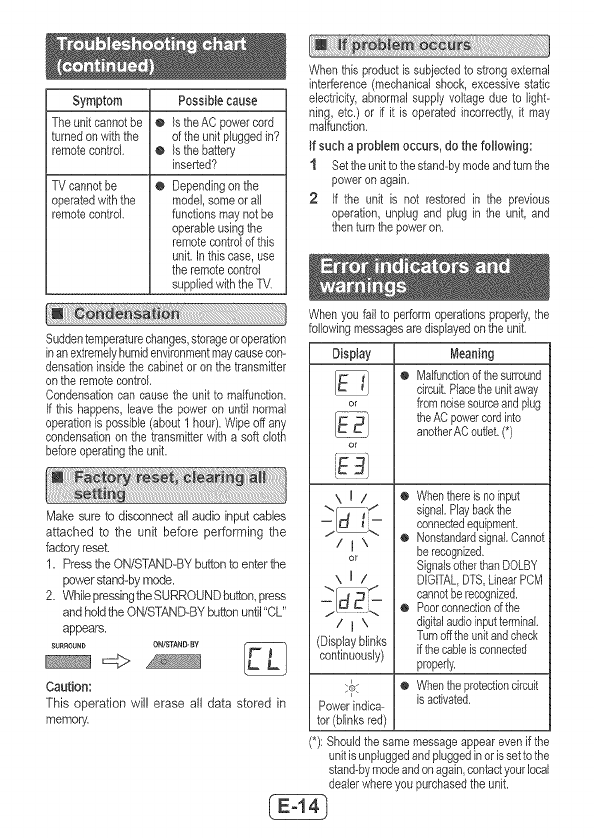
Whenyou fail to performoperationsproperly,the
followingmessagesaredisplayedon theunit.
Display Meaning
o Malfunctionofthesurround
circuit.Placetheunitaway
or fromnoisesourceand plug
theACpowercordinto
anotherACoutlet.(*)
or
\ I iO Whenthereisnoinput
\" "-/ signal,Playbackthe
-_ __.-- connectedequipment.
/j X O Nonstandardsignal,Cannot
or be recognized.
SignalsotherthanDOLBY
\ I /DIGITALDTS,LinearPCM
cannotberecognized,
o Poorconnectionofthe
/j \ digitalaudioinputterminal.
(Displayblinks Turnofftheunitandcheck
continuously) if thecableis connected
properly,
@ Whentheprotectioncircuit
isactivated.
Powerindica-
tor (blinksred)
(*): Shouldthesamemessageappeareven if the
unitisunpluggedandpluggedinorissetto the
stand-bymodeandon again,contactyourlocal
dealerwhereyou purchasedtheunit,
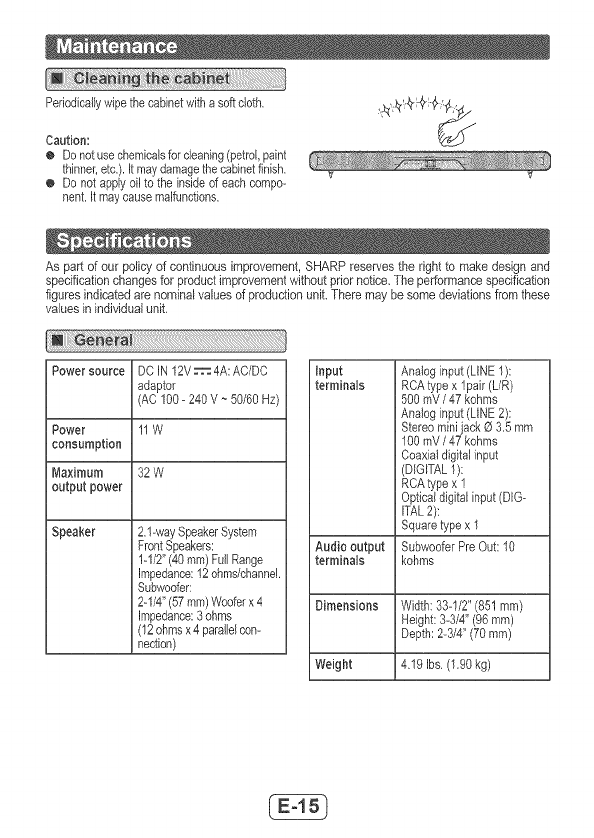
Periodicallywipethecabinetwithasoftcloth,
Caution:
o Donotusechemicalsforcbaning(petrol,paint
thinner,etc.).Itmaydamagethecabinetfinish,
o Donotapplyoiltotheinsideofeachcompo-
nent.itmaycausemalfunctions,
Aspartofourpolicyofcontinuousimprovement,SHARPreservestherighttomakedesignand
specificationchangesforproductimprovementwithoutpriornotice.Theperformancespecification
figuresindicatedarenominalvaluesofproductionunit.Theremaybesomedeviationsfromthese
valuesinindividualunit.
PowersourceDCIN12V_ 4A:AC/DC
adaptor
(AC100-240V_50/60Hz)
Power 11W
consumption
Maximum32W
outputpower
Speaker2.l-waySpeakerSystem
FrontSpeakers:
1-1/2"(40ram)FullRange
Impedance:12ohms/channek
Subwoofer:
2-1/4"(57ram)Wooferx4
Impedance:3ohms
(12ohmsx4paralblcon-
nection)
input
terminals
Audiooutput
terminals
DimensionsWidth:33-1/2"(851ram)
Height:3-3/4"(96mm)
Depth:2-3/4"(70mm)
Weight 4.19[bs.(1,90kg)
Analoginput (LINE1):
RCAtypex 1pair (L/R)
500 mV /47 kohms
Analoginput (LINE2):
Stereomini jack O 3.5mm
100mV /47 kohms
Coaxial digitalinput
(DIGITAL1):
RCAtypex 1
Opticaldigital input(DIG-
ITAL2):
Squaretypex 1
SubwooferPreOut:10
kohms
