Shen Zhen PXN Electronics Technology PXN Speedy Wireless Controller User Manual User s manual

Shen Zhen PXN Electronics Technology Co., Ltd. Speedy Wireless Controller User s manual

User Manual

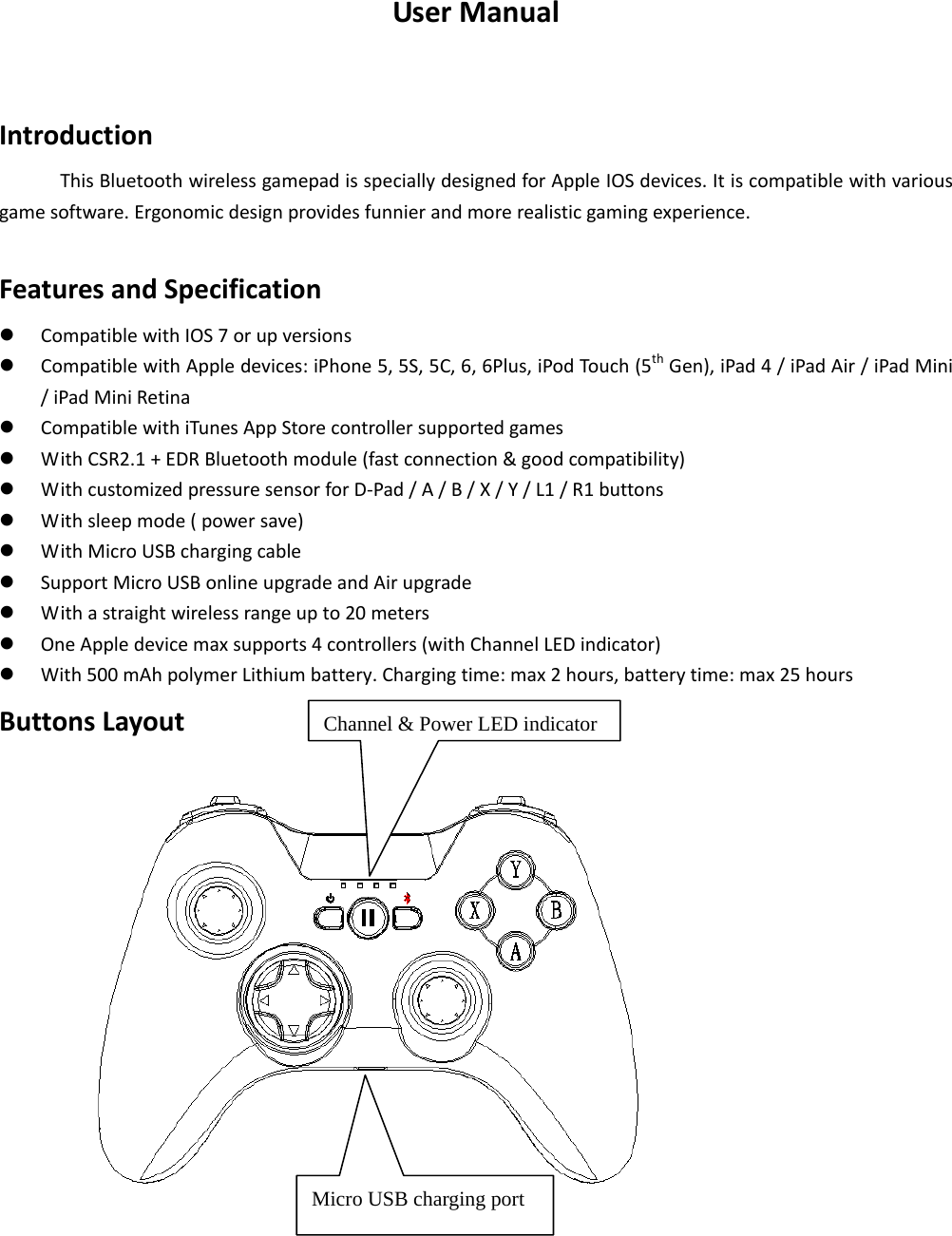
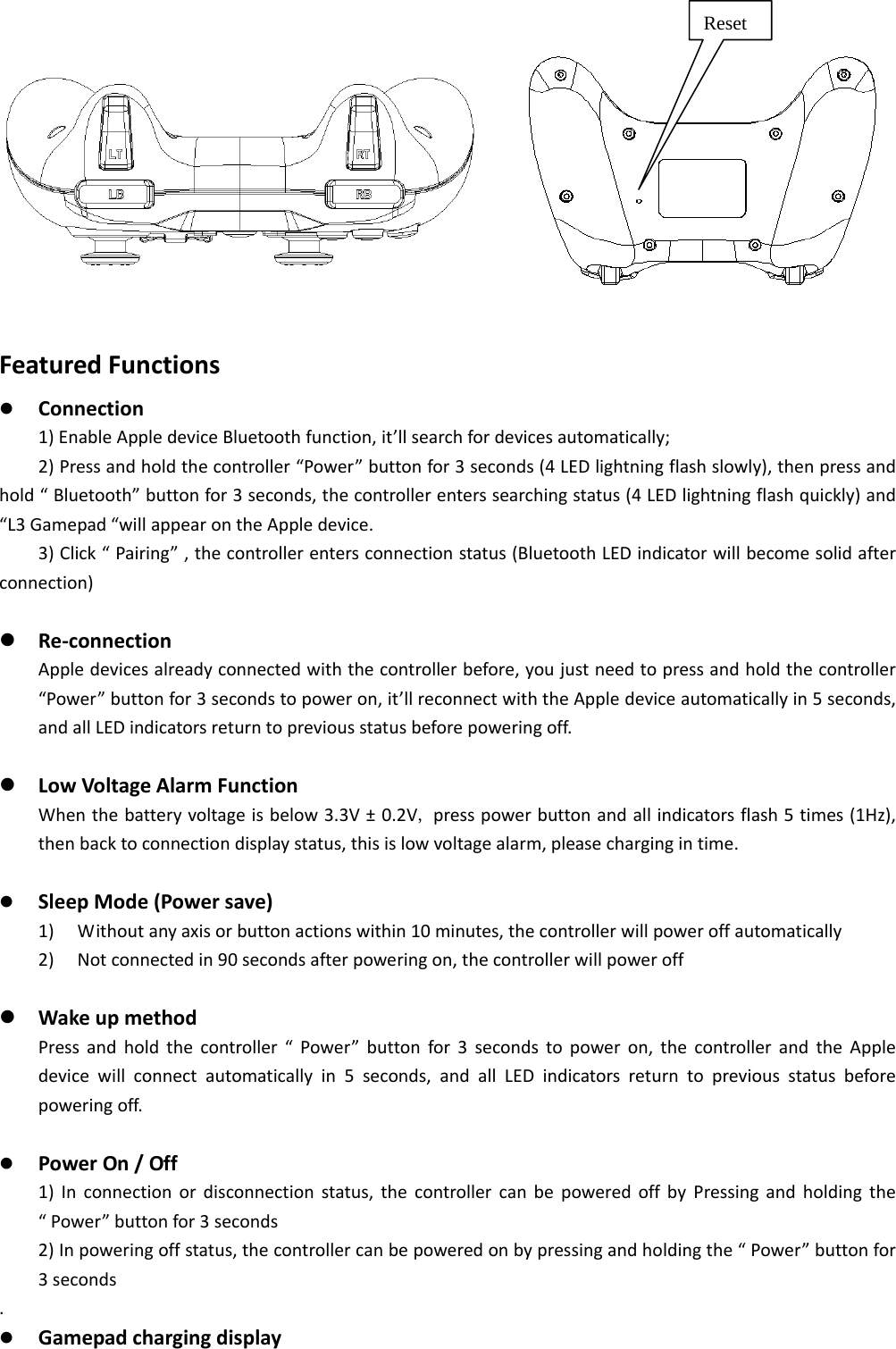
 UserManualIntroductionThisBluetoothwirelessgamepadisspeciallydesignedforAppleIOSdevices.Itiscompatiblewithvariousgamesoftware.Ergonomicdesignprovidesfunnierandmorerealisticgamingexperience.FeaturesandSpecification CompatiblewithIOS7orupversions CompatiblewithAppledevices:iPhone5,5S,5C,6,6Plus,iPodTouch(5thGen),iPad4/iPadAir/iPadMini/iPadMiniRetina CompatiblewithiTunesAppStorecontrollersupportedgames WithCSR2.1+EDRBluetoothmodule(fastconnection&goodcompatibility) WithcustomizedpressuresensorforD‐Pad/A/B/X/Y/L1/R1buttons Withsleepmode(powersave) WithMicroUSBchargingcable SupportMicroUSBonlineupgradeandAirupgrade Withastraightwirelessrangeupto20meters OneAppledevicemaxsupports4controllers(withChannelLEDindicator) With500mAhpolymerLithiumbattery.Chargingtime:max2hours,batterytime:max25hoursButtonsLayout                              Channel & Power LED indicatorMicro USB charging port
              FeaturedFunctions Connection1)EnableAppledeviceBluetoothfunction,it’llsearchfordevicesautomatically;2)Pressandholdthecontroller“Power”buttonfor3seconds(4LEDlightningflashslowly),thenpressandhold“Bluetooth”buttonfor3seconds,thecontrollerenterssearchingstatus(4LEDlightningflashquickly)and“L3Gamepad“willappearontheAppledevice.3)Click“Pairing”,thecontrollerentersconnectionstatus(BluetoothLEDindicatorwillbecomesolidafterconnection) Re‐connectionAppledevicesalreadyconnectedwiththecontrollerbefore,youjustneedtopressandholdthecontroller“Power”buttonfor3secondstopoweron,it’llreconnectwiththeAppledeviceautomaticallyin5seconds,andallLEDindicatorsreturntopreviousstatusbeforepoweringoff. LowVoltageAlarmFunctionWhenthebatteryvoltageisbelow3.3V±0.2V,presspowerbuttonandallindicatorsflash5times(1Hz),thenbacktoconnectiondisplaystatus,thisislowvoltagealarm,pleasechargingintime. SleepMode(Powersave)1) Withoutanyaxisorbuttonactionswithin10minutes,thecontrollerwillpoweroffautomatically2) Notconnectedin90secondsafterpoweringon,thecontrollerwillpoweroff WakeupmethodPressandholdthecontroller“Power”buttonfor3secondstopoweron,thecontrollerandtheAppledevicewillconnectautomaticallyin5seconds,andallLEDindicatorsreturntopreviousstatusbeforepoweringoff. PowerOn/Off1)Inconnectionordisconnectionstatus,thecontrollercanbepoweredoffbyPressingandholdingthe“Power”buttonfor3seconds2)Inpoweringoffstatus,thecontrollercanbepoweredonbypressingandholdingthe“Power”buttonfor3seconds. GamepadchargingdisplayReset
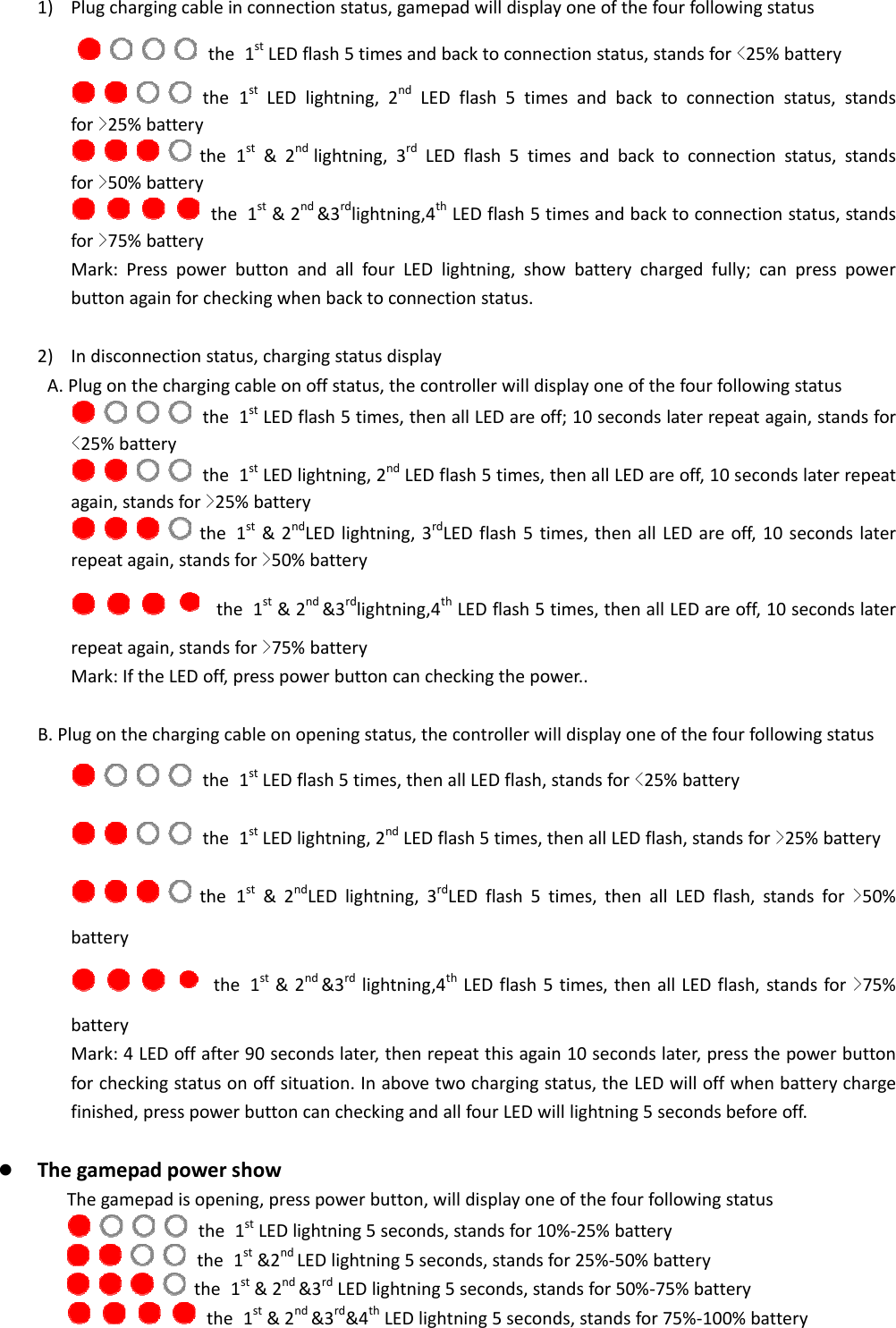
 1) Plugchargingcableinconnectionstatus,gamepadwilldisplayoneofthefourfollowingstatus            the 1stLEDflash5timesandbacktoconnectionstatus,standsfor<25%battery    the 1stLEDlightning,2ndLEDflash5timesandbacktoconnectionstatus,standsfor>25%battery    the 1st&2ndlightning,3rdLEDflash5timesandbacktoconnectionstatus,standsfor>50%battery    the 1st&2nd&3rdlightning,4thLEDflash5timesandbacktoconnectionstatus,standsfor>75%batteryMark:PresspowerbuttonandallfourLEDlightning,showbatterychargedfully;canpresspowerbuttonagainforcheckingwhenbacktoconnectionstatus.2) Indisconnectionstatus,chargingstatusdisplayA.Plugonthechargingcableonoffstatus,thecontrollerwilldisplayoneofthefourfollowingstatus    the 1stLEDflash5times,thenallLEDareoff;10secondslaterrepeatagain,standsfor<25%battery    the 1stLEDlightning,2ndLEDflash5times,thenallLEDareoff,10secondslaterrepeatagain,standsfor>25%battery    the 1st&2ndLEDlightning,3rdLEDflash5times,thenallLEDareoff,10secondslaterrepeatagain,standsfor>50%battery       the 1st&2nd&3rdlightning,4thLEDflash5times,thenallLEDareoff,10secondslaterrepeatagain,standsfor>75%batteryMark:IftheLEDoff,presspowerbuttoncancheckingthepower..B.Plugonthechargingcableonopeningstatus,thecontrollerwilldisplayoneofthefourfollowingstatus    the 1stLEDflash5times,thenallLEDflash,standsfor<25%battery    the 1stLEDlightning,2ndLEDflash5times,thenallLEDflash,standsfor>25%battery    the 1st&2ndLEDlightning,3rdLEDflash5times,thenallLEDflash,standsfor>50%battery       the 1st&2nd&3rdlightning,4thLEDflash5times,thenallLEDflash,standsfor>75%batteryMark:4LEDoffafter90secondslater,thenrepeatthisagain10secondslater,pressthepowerbuttonforcheckingstatusonoffsituation.Inabovetwochargingstatus,theLEDwilloffwhenbatterychargefinished,presspowerbuttoncancheckingandallfourLEDwilllightning5secondsbeforeoff. ThegamepadpowershowThegamepadisopening,presspowerbutton,willdisplayoneofthefourfollowingstatus     the 1stLEDlightning5seconds,standsfor10%‐25%battery           the 1st&2ndLEDlightning5seconds,standsfor25%‐50%battery           the 1st&2nd&3rdLEDlightning5seconds,standsfor50%‐75%battery     the 1st&2nd&3rd&4thLEDlightning5seconds,standsfor75%‐100%battery
 Precautions Pleasereadthroughthisusermanualbeforeuse Avoidstrongvibration Pleasedon’tbreakup,modifyorrepairthecontrollerbyyourself Avoidstorethecontrollerindamp,hightemperature,orsootplaces Anyquestionsorsuggestions,pleasecontactthevendororfactoryThisdevicecomplieswithPart15oftheFCCRules.Operationissubjecttothefollowingtwoconditions:(1)thisdevicemaynotcauseharmfulinterference,and(2)thisdevicemustacceptanyinterferencereceived,includinginterferencethatmaycauseundesiredoperation.changesormodificationsnotexpresslyapprovedbythepartyresponsibleforcompliancecouldvoidtheuser'sauthoritytooperatetheequipment.NOTE:ThisequipmenthasbeentestedandfoundtocomplywiththelimitsforaClassBdigitaldevice,pursuanttoPart15oftheFCCRules.Theselimitsaredesignedtoprovidereasonableprotectionagainstharmfulinterferenceinaresidentialinstallation.Thisequipmentgenerates,usesandcanradiateradiofrequencyenergyand,ifnotinstalledandusedinaccordancewiththeinstructions,maycauseharmfulinterferencetoradiocommunications.However,thereisnoguaranteethatinterferencewillnotoccurinaparticularinstallation.Ifthisequipmentdoescauseharmfulinterferencetoradioortelevisionreception,whichcanbedeterminedbyturningtheequipmentoffandon,theuserisencouragedtotrytocorrecttheinterferencebyoneormoreofthefollowingmeasures:‐‐Reorientorrelocatethereceivingantenna.‐‐Increasetheseparationbetweentheequipmentandreceiver.‐‐Connecttheequipmentintoanoutletonacircuitdifferentfromthattowhichthereceiverisconnected.‐‐Consultthedealeroranexperiencedradio/TVtechnicianforhelp.FCCRFwarningstatement:ThedevicehasbeenevaluatedtomeetgeneralRFexposurerequirement.Thedevicecanbeusedinportableexposureconditionwithoutrestriction.

Navigation menu