ShenZhen HongFa Technology BH513 bluetooth headphone User Manual

ShenZhen HongFa Technology Co., Ltd. bluetooth headphone

User Manual

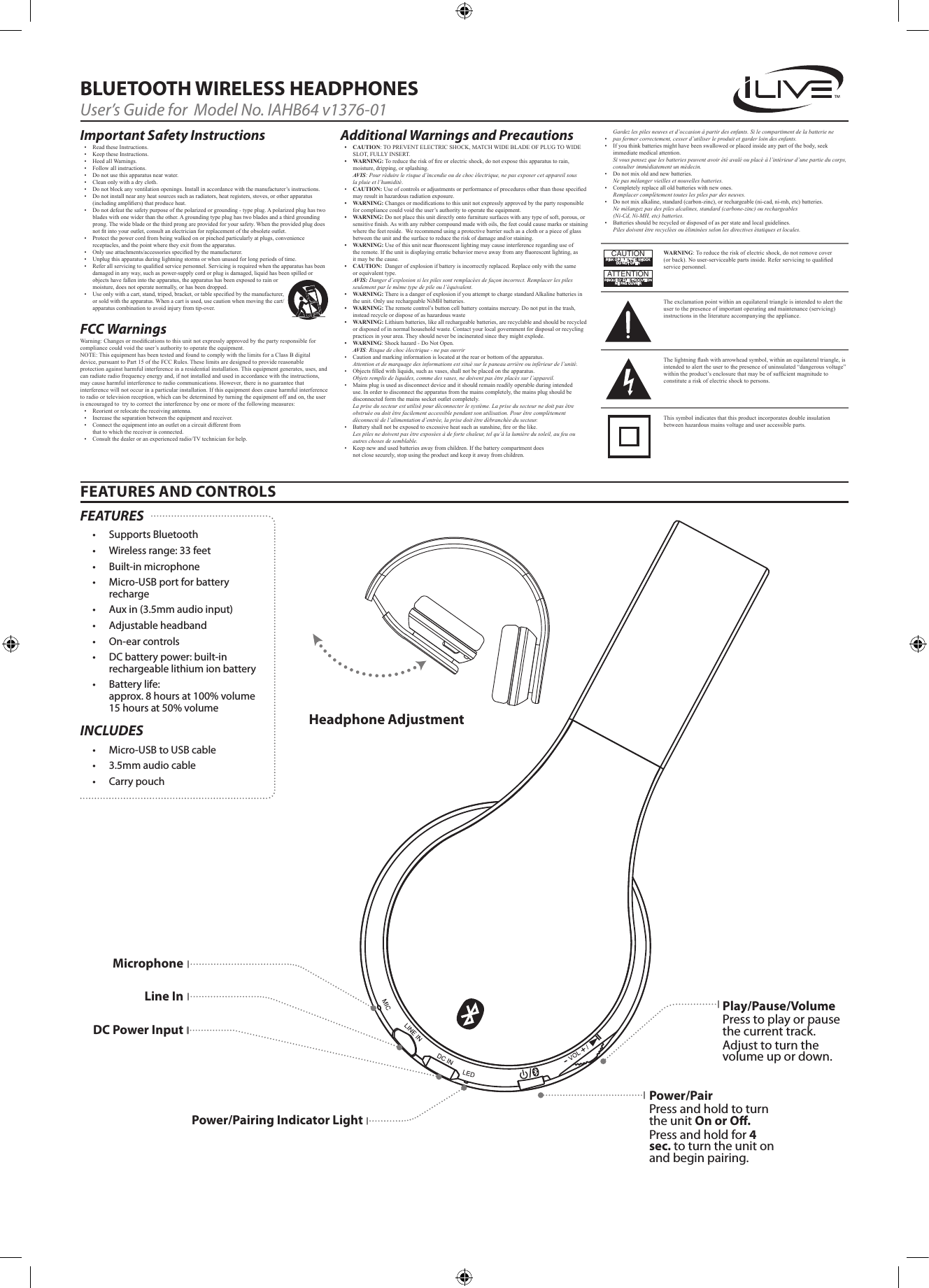
Gardez les piles neuves et d’occasion à partir des enfants. Si le compartiment de la batterie ne• pas fermer correctement, cesser d’utiliser le produit et garder loin des enfants.• Ifyouthinkbatteriesmighthavebeenswallowedorplacedinsideanypartofthebody,seekimmediatemedicalattention.Si vous pensez que les batteries peuvent avoir été avalé ou placé à l’intérieur d’une partie du corps, consulter immédiatement un médecin.• Donotmixoldandnewbatteries.Ne pas mélanger vieilles et nouvelles batteries.• Completelyreplacealloldbatterieswithnewones.Remplacer complètement toutes les piles par des neuves.• Donotmixalkaline,standard(carbon-zinc),orrechargeable(ni-cad,ni-mh,etc)batteries.Ne mélangez pas des piles alcalines, standard (carbone-zinc) ou rechargeables  (Ni-Cd, Ni-MH, etc) batteries.• Batteriesshouldberecycledordisposedofasperstateandlocalguidelines. Piles doivent être recyclées ou éliminées selon les directives étatiques et locales.FEATURES AND CONTROLSBLUETOOTH WIRELESS HEADPHONESUser’s Guide for  Model No. IAHB64 v1376-01Important Safety Instructions• ReadtheseInstructions.• KeeptheseInstructions.• HeedallWarnings.• Followallinstructions.• Donotusethisapparatusnearwater.• Cleanonlywithadrycloth.• Donotblockanyventilationopenings.Installinaccordancewiththemanufacturer’sinstructions.• Donotinstallnearanyheatsourcessuchasradiators,heatregisters,stoves,orotherapparatus(includingampliers)thatproduceheat.• Donotdefeatthesafetypurposeofthepolarizedorgrounding-typeplug.Apolarizedplughastwobladeswithonewiderthantheother.Agroundingtypeplughastwobladesandathirdgroundingprong.Thewidebladeorthethirdprongareprovidedforyoursafety.Whentheprovidedplugdoesnottintoyouroutlet,consultanelectricianforreplacementoftheobsoleteoutlet.• Protectthepowercordfrombeingwalkedonorpinchedparticularlyatplugs,conveniencereceptacles,andthepointwheretheyexitfromtheapparatus.• Onlyuseattachments/accessoriesspeciedbythemanufacturer.• Unplugthisapparatusduringlightningstormsorwhenunusedforlongperiodsoftime.• Referallservicingtoqualiedservicepersonnel.Servicingisrequiredwhentheapparatushasbeendamagedinanyway,suchaspower-supplycordorplugisdamaged,liquidhasbeenspilledorobjectshavefallenintotheapparatus,theapparatushasbeenexposedtorainormoisture,doesnotoperatenormally,orhasbeendropped.• Useonlywithacart,stand,tripod,bracket,ortablespeciedbythemanufacturer,orsoldwiththeapparatus.Whenacartisused,usecautionwhenmovingthecart/apparatuscombinationtoavoidinjuryfromtip-over.FCC Warnings Warning:Changesormodicationstothisunitnotexpresslyapprovedbythepartyresponsibleforcompliancecouldvoidtheuser’sauthoritytooperatetheequipment.NOTE:ThisequipmenthasbeentestedandfoundtocomplywiththelimitsforaClassBdigitaldevice,pursuanttoPart15oftheFCCRules.Theselimitsaredesignedtoprovidereasonableprotectionagainstharmfulinterferenceinaresidentialinstallation.Thisequipmentgenerates,uses,andcanradiateradiofrequencyenergyand,ifnotinstalledandusedinaccordancewiththeinstructions,maycauseharmfulinterferencetoradiocommunications.However,thereisnoguaranteethatinterferencewillnotoccurinaparticularinstallation.Ifthisequipmentdoescauseharmfulinterferencetoradioortelevisionreception,whichcanbedeterminedbyturningtheequipmentoffandon,theuserisencouragedtotrytocorrecttheinterferencebyoneormoreofthefollowingmeasures:• Reorientorrelocatethereceivingantenna.• Increasetheseparationbetweentheequipmentandreceiver.• Connecttheequipmentintoanoutletonacircuitdifferentfromthattowhichthereceiverisconnected.• Consultthedealeroranexperiencedradio/TVtechnicianforhelp.Additional Warnings and Precautions• CAUTION:TOPREVENTELECTRICSHOCK,MATCHWIDEBLADEOFPLUGTOWIDESLOT,FULLYINSERT.• WARNING:Toreducetheriskofreorelectricshock,donotexposethisapparatustorain,moisture,dripping,orsplashing.Avis: Pour réduire le risque d’incendie ou de choc électrique, ne pas exposer cet appareil sous la pluie et l’humidité.• CAUTION:Useofcontrolsoradjustmentsorperformanceofproceduresotherthanthosespeciedmayresultinhazardousradiationexposure.• WARNING:Changesormodicationstothisunitnotexpresslyapprovedbythepartyresponsibleforcompliancecouldvoidtheuser’sauthoritytooperatetheequipment.• WARNING:Donotplacethisunitdirectlyontofurnituresurfaceswithanytypeofsoft,porous,orsensitivenish.Aswithanyrubbercompoundmadewithoils,thefeetcouldcausemarksorstainingwherethefeetreside.Werecommendusingaprotectivebarriersuchasaclothorapieceofglassbetweentheunitandthesurfacetoreducetheriskofdamageand/orstaining.• WARNING:Useofthisunitnearuorescentlightingmaycauseinterferenceregardinguseoftheremote.Iftheunitisdisplayingerraticbehaviormoveawayfromanyuorescentlighting,asitmaybethecause.• CAUTION:Dangerofexplosionifbatteryisincorrectlyreplaced.Replaceonlywiththesameorequivalenttype.Avis: Danger d’explosion si les piles sont remplacées de façon incorrect. Remplacer les piles seulement par le même type de pile ou l’équivalent.• WARNING:ThereisadangerofexplosionifyouattempttochargestandardAlkalinebatteriesintheunit.OnlyuserechargeableNiMHbatteries.• WARNING:Theremotecontrol’sbuttoncellbatterycontainsmercury.Donotputinthetrash,insteadrecycleordisposeofashazardouswaste• WARNING:Lithiumbatteries,likeallrechargeablebatteries,arerecyclableandshouldberecycledordisposedofinnormalhouseholdwaste.Contactyourlocalgovernmentfordisposalorrecyclingpracticesinyourarea.Theyshouldneverbeincineratedsincetheymightexplode.• WARNING:Shockhazard-DoNotOpen.Avis: Risque de choc électrique - ne pas ouvrir• Cautionandmarkinginformationislocatedattherearorbottomoftheapparatus.Attention et de marquage des informations est situé sur le paneau arrière ou inférieur de l’unité.• Objectslledwithliquids,suchasvases,shallnotbeplacedontheapparatus.Objets remplis de liquides, comme des vases, ne doivent pas être placés sur l’appareil.• Mainsplugisusedasdisconnectdeviceanditshouldremainreadilyoperableduringintendeduse.Inordertodisconnecttheapparatusfromthemainscompletely,themainsplugshouldbedisconnectedformthemainssocketoutletcompletely.La prise du secteur est utilisé pour déconnecter le système. La prise du secteur ne doit pas être obstruée ou doit être facilement accessible pendant son utilisation. Pour être complètement déconnecté de l’alimentation d’entrée, la prise doit être débranchée du secteur.• Batteryshallnotbeexposedtoexcessiveheatsuchassunshine,reorthelike.Les piles ne doivent pas être exposées à de forte chaleur, tel qu’à la lumière du soleil, au feu ou autres choses de semblable.• Keepnewandusedbatteriesawayfromchildren.Ifthebatterycompartmentdoesnotclosesecurely,stopusingtheproductandkeepitawayfromchildren.WARNING:Toreducetheriskofelectricshock,donotremovecover(orback).Nouser-serviceablepartsinside.Referservicingtoqualiedservicepersonnel.ATTENTIONRISQUE D' ÉLECTROCUTIONNE PAS OUVRIRCAUTIONRISK OF ELECTRIC SHOCKDO NOT OPENTheexclamationpointwithinanequilateraltriangleisintendedtoalerttheusertothepresenceofimportantoperatingandmaintenance(servicing)instructionsintheliteratureaccompanyingtheappliance.Thissymbolindicatesthatthisproductincorporatesdoubleinsulationbetweenhazardousmainsvoltageanduseraccessibleparts.Thelightningashwitharrowheadsymbol,withinanequilateraltriangle,isintendedtoalerttheusertothepresenceofuninsulated“dangerousvoltage”withintheproduct’senclosurethatmaybeofsufcientmagnitudetoconstituteariskofelectricshocktopersons.Headphone AdjustmentPower/PairPress and hold to turn the unit On or O. Press and hold for 4 sec. to turn the unit on and begin pairing.MicrophoneLine InDC Power InputPower/Pairing Indicator LightPlay/Pause/VolumePress to play or pause the current track.Adjust to turn the volume up or down. FEATURES• Supports Bluetooth• Wireless range: 33 feet• Built-in microphone• Micro-USB port for battery recharge• Aux in (3.5mm audio input)• Adjustable headband• On-ear controls• DC battery power: built-in rechargeable lithium ion battery• Battery life:  approx. 8 hours at 100% volume 15 hours at 50% volumeINCLUDES• Micro-USB to USB cable• 3.5mm audio cable• Carry pouch
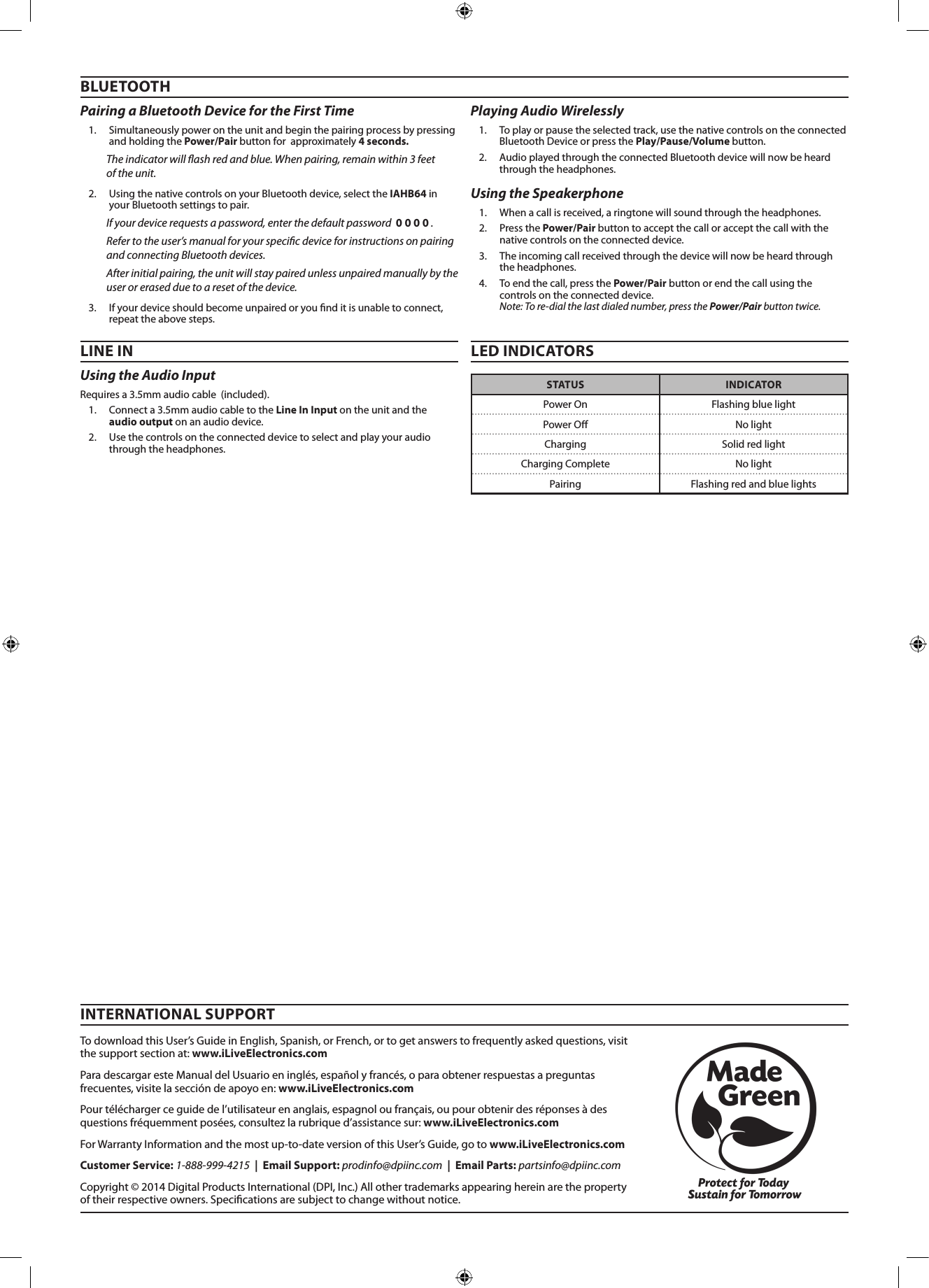
Using the Audio Input Requires a 3.5mm audio cable  (included).1.  Connect a 3.5mm audio cable to the Line In Input on the unit and the  audio output on an audio device. 2.  Use the controls on the connected device to select and play your audio through the headphones.BLUETOOTHPairing a Bluetooth Device for the First Time 1.  Simultaneously power on the unit and begin the pairing process by pressing and holding the Power/Pair button for  approximately 4 seconds. The indicator will ash red and blue. When pairing, remain within 3 feet  of the unit.2.  Using the native controls on your Bluetooth device, select the IAHB64 in your Bluetooth settings to pair.If your device requests a password, enter the default password  0 0 0 0 . Refer to the user’s manual for your specic device for instructions on pairing and connecting Bluetooth devices.After initial pairing, the unit will stay paired unless unpaired manually by the user or erased due to a reset of the device. 3.  If your device should become unpaired or you nd it is unable to connect, repeat the above steps.Using the Speakerphone 1.  When a call is received, a ringtone will sound through the headphones.2.  Press the Power/Pair button to accept the call or accept the call with the native controls on the connected device.3.  The incoming call received through the device will now be heard through the headphones.4.  To end the call, press the Power/Pair button or end the call using the controls on the connected device.  Note: To re-dial the last dialed number, press the Power/Pair button twice. LINE IN LED INDICATORSPlaying Audio Wirelessly 1.  To play or pause the selected track, use the native controls on the connected Bluetooth Device or press the Play/Pause/Volume button.2.  Audio played through the connected Bluetooth device will now be heard through the headphones.  STATUS INDICATORPower On Flashing blue lightPower O No lightCharging Solid red lightCharging Complete No lightPairing Flashing red and blue lightsTo download this User’s Guide in English, Spanish, or French, or to get answers to frequently asked questions, visit the support section at: www.iLiveElectronics.comPara descargar este Manual del Usuario en inglés, español y francés, o para obtener respuestas a preguntas frecuentes, visite la sección de apoyo en: www.iLiveElectronics.comPour télécharger ce guide de l’utilisateur en anglais, espagnol ou français, ou pour obtenir des réponses à des questions fréquemment posées, consultez la rubrique d’assistance sur: www.iLiveElectronics.comFor Warranty Information and the most up-to-date version of this User’s Guide, go to www.iLiveElectronics.comCustomer Service: 1-888-999-4215  |  Email Support: prodinfo@dpiinc.com  |  Email Parts: partsinfo@dpiinc.comCopyright © 2014 Digital Products International (DPI, Inc.) All other trademarks appearing herein are the property of their respective owners. Specications are subject to change without notice.INTERNATIONAL SUPPORT
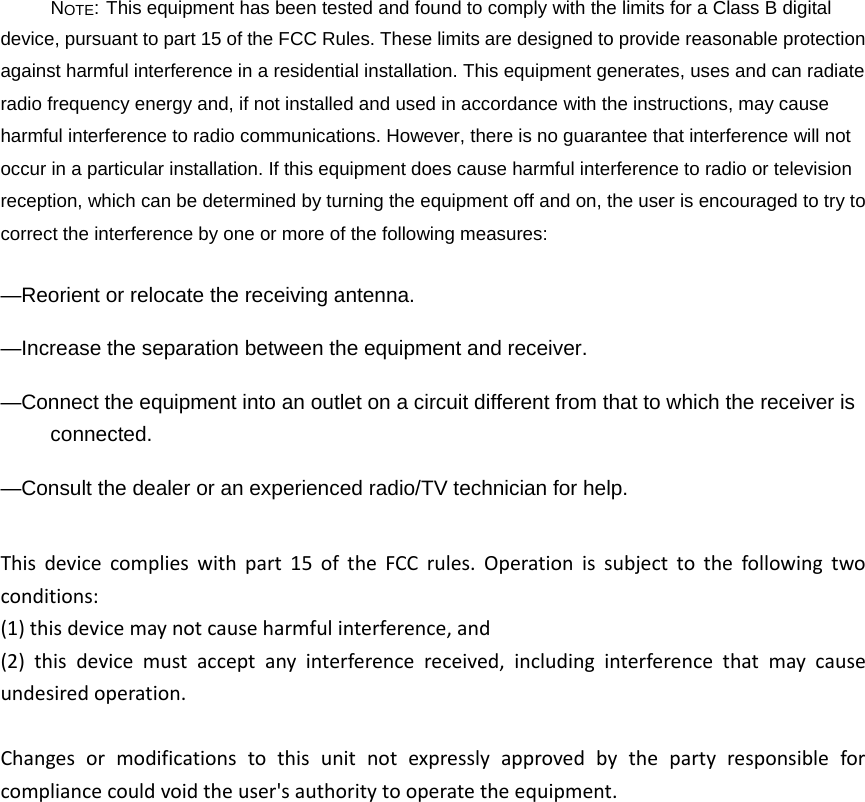
NOTE: This equipment has been tested and found to comply with the limits for a Class B digital device, pursuant to part 15 of the FCC Rules. These limits are designed to provide reasonable protection against harmful interference in a residential installation. This equipment generates, uses and can radiate radio frequency energy and, if not installed and used in accordance with the instructions, may cause harmful interference to radio communications. However, there is no guarantee that interference will not occur in a particular installation. If this equipment does cause harmful interference to radio or television reception, which can be determined by turning the equipment off and on, the user is encouraged to try to correct the interference by one or more of the following measures: —Reorient or relocate the receiving antenna. —Increase the separation between the equipment and receiver. —Connect the equipment into an outlet on a circuit different from that to which the receiver is connected. —Consult the dealer or an experienced radio/TV technician for help. Thisdevicecomplieswithpart15oftheFCCrules.Operationissubjecttothefollowingtwoconditions:(1)thisdevicemaynotcauseharmfulinterference,and(2)thisdevicemustacceptanyinterferencereceived,includinginterferencethatmaycauseundesiredoperation.Changesormodificationstothisunitnotexpresslyapprovedbythepartyresponsibleforcompliancecouldvoidtheuser'sauthoritytooperatetheequipment.

Navigation menu