ShenZhen YaWell intelligent Technology S11 Smart bracelet User Manual
ShenZhen YaWell intelligent Technology Co.,Ltd. Smart bracelet
User Manual

1
欢迎使用智能手环,高性能腕带智能手环为您打造贴心健身体验。
Welcome to use smart bracelet, the high-performance wrist-band s
mart bracelet will create an intimate gym experience for you.
设备保养
Maintenance
在保养您的手环时,请记住以下提示:
Please be reminded of the tips below in bracelet maintenance:
•定期清洁手环,特别是手环内侧,使其保持干爽。
•Clean the bracelet regularly, especially the inner side of it, keep it dry.
•调整手环松紧度,确保空气流通。
•Adjust the tightness of bracelet to ensure aeration.
•佩戴手环的手腕不宜使用过量护肤品。
•Excessive skincare product is undesirable on wrist with a bracelet on.
•如出现皮肤过敏或不适情况,请停止佩戴。
•Please cease wearing in case of skin allergy or any discomfort.
手环充电
Charging
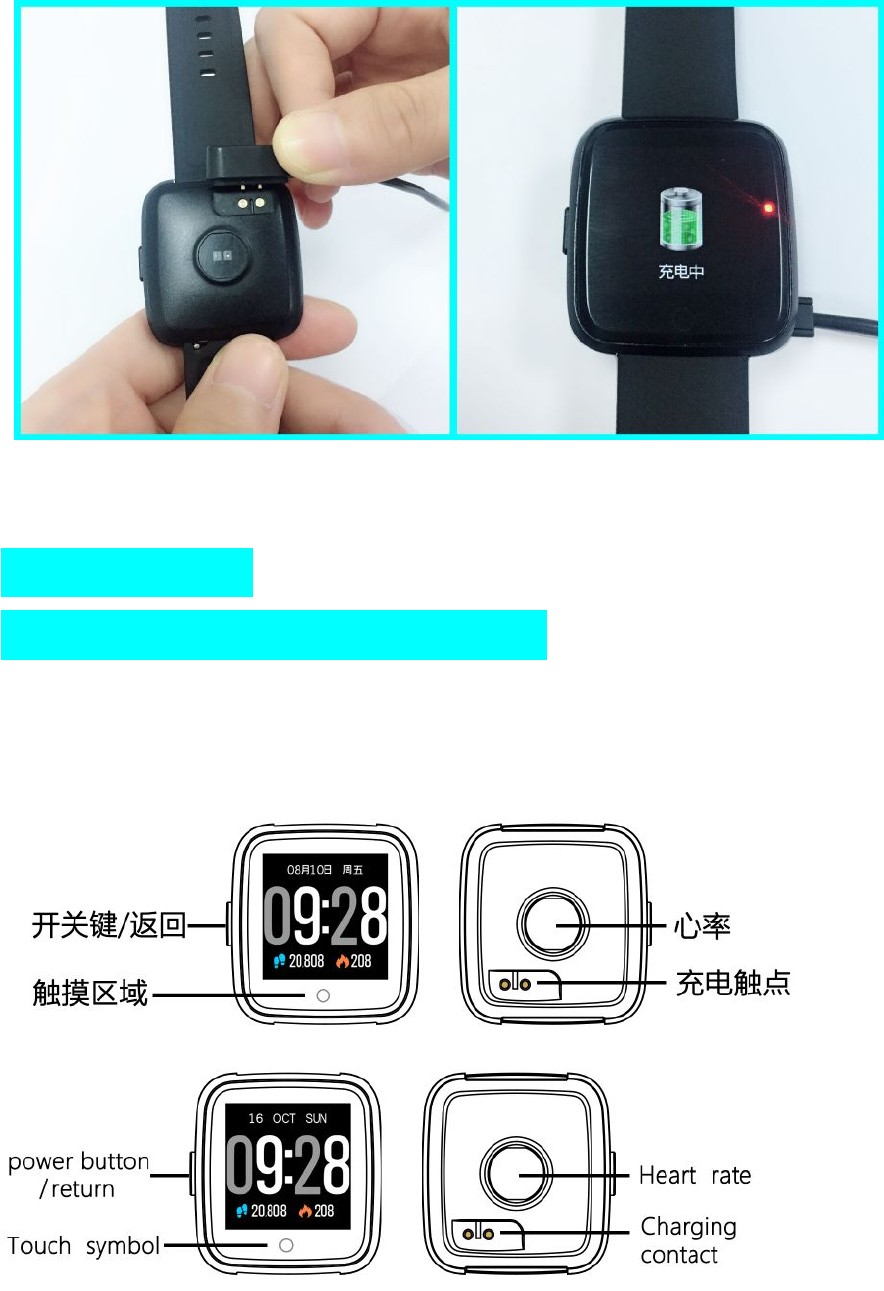
1.使用配备的磁吸充电器吸附到手环背面的金属触点,充电器另一
端插入 USB 充电头或者电脑 USB 接口。翻译五国的( 德法
西意日)
1.Charging the device to active before the first time using;
To charge your device, plug the charging cable into the
adapter or USB port on your computer.
2屏幕上显示充电
2. And it will display charging on the screen
2
手环 APP 下载及绑定
Downloading and Binding of Bracelet APP
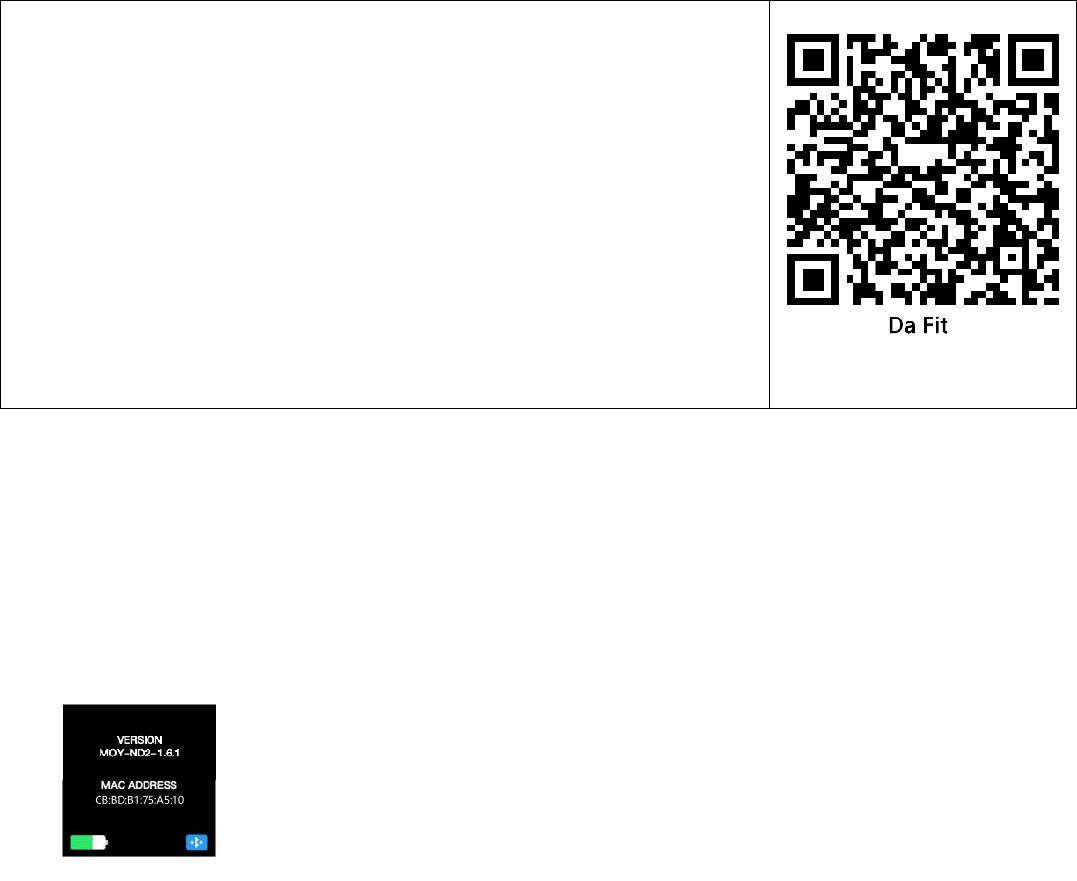
1.手环主机示意图
1. Schematic diagram of main body of bracelet
2. 开机
2. Power-on
长按侧键3秒 或 插上充电器充电
Long-press the side button for 3s or plug in a charger for charging.
3
3. 下载安装 APP
3. Download and Install APP
1.使用手机扫描二维码,下载APP。
1.Scan QR code with mobile phone and download APP.
2.IOS 系统选择 APP store,Android 系统可选择应用宝来下载安装 Da Fit。
2.For IOS system, select APP store; for Android system, it allows to select Application
Treasure to download and install Da Fit.
注意:手机须支持安卓 5.1 或 IOS 8.0 以上,蓝牙 4.0 以上.
Note: Your mobile phone must support Android 5.1 or IOS8.0 or above, and Bluetooth
4.0 or above.
4.查看 mac 地址
主界面长按两秒即可获得手环 MAC。MAC 地址,用来表示手环的硬件地址,是手环的唯一标识符,MAC 地址无法
修改。如手机查找手环时,只需要看 MAC 号,就能找到对应的手环,作用是能快速识别到手环及连接手机。
You can get the bracelet MAC by holding the main interface for two seconds.MAC address, used to indicate the
hardware address of bracelet, is the only one sign of the bracelet. This MAC address can not be modified.If you use a cell
phone to check the bracelet, you can only find the corresponding bracelet by checking the MAC number. The MAC address
is used to identify the bracelet and connected to the mobile phone quickly.
5.APP 绑定手环
5.APP Bind Bracelet
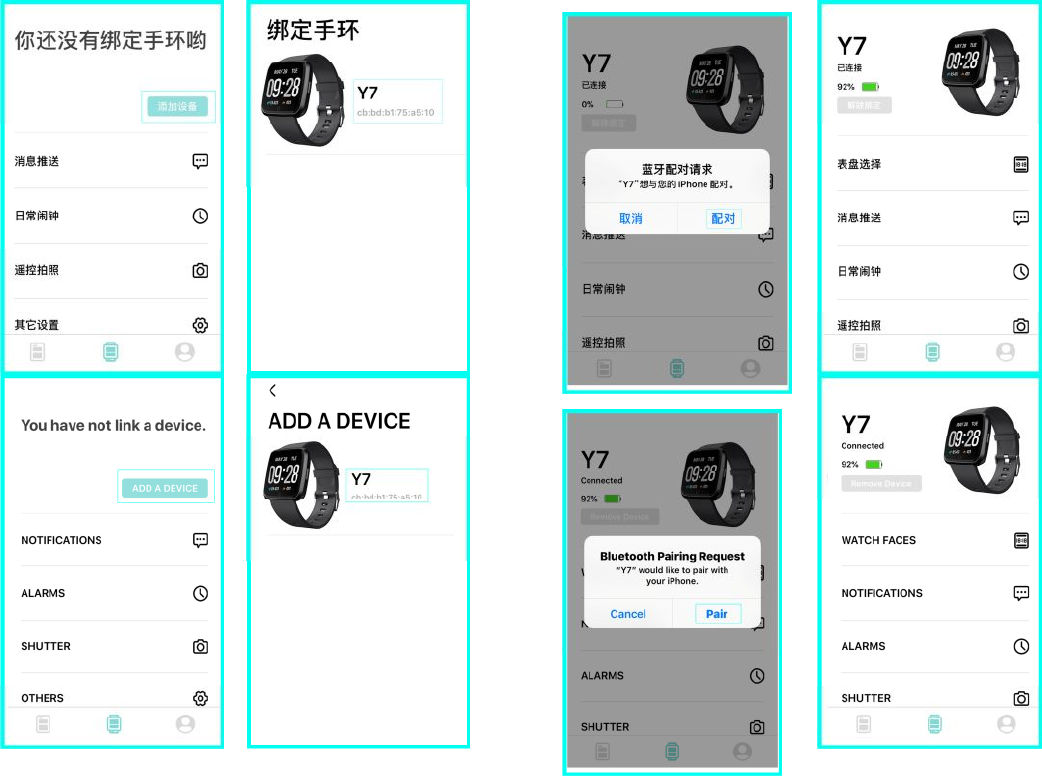
1.切换至设备界面,点击
绑定设备翻译五国的
(德法西意日)
1.Go to the Device,
Click Add a Device
2.在扫描到的设备列表点击你的
设备翻译五国的(德法西意
日)
2.Choose your device on the
scanning list
3. 点击配对(安卓系统
直接连接)。翻译五国
的(德法西意日)
3.Click to pair(The Android
system can be connected
directly)
4.绑定完成。
4.Finish.
4
注:点击绑定设备,Android 只需点击已选设备型号,即可与手机断开。IOS 断开后, 还需要在设置---蓝牙,点
击右边的符号,选择忽略此设备。找y5PRO
Note:For Android, click the binding device, click the selected device type, and Android can be unconnected with your
mobile. For IOS, set the Bluetooth after IOS is unconnected; click the sign on the right to select Ignore This Device.
5
手环功能简介
Smart Watch Features
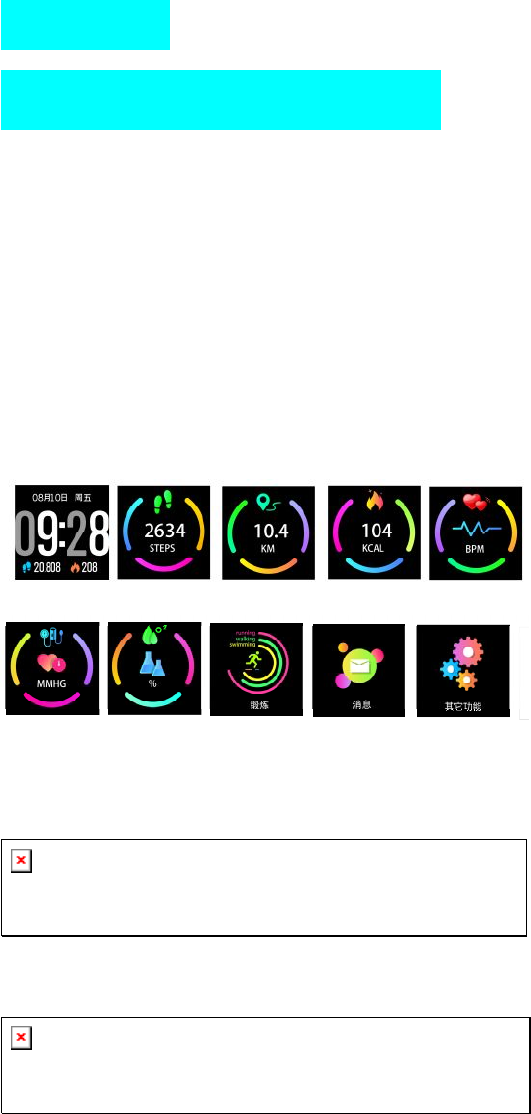
1. 开机状态:
1.Start-up status
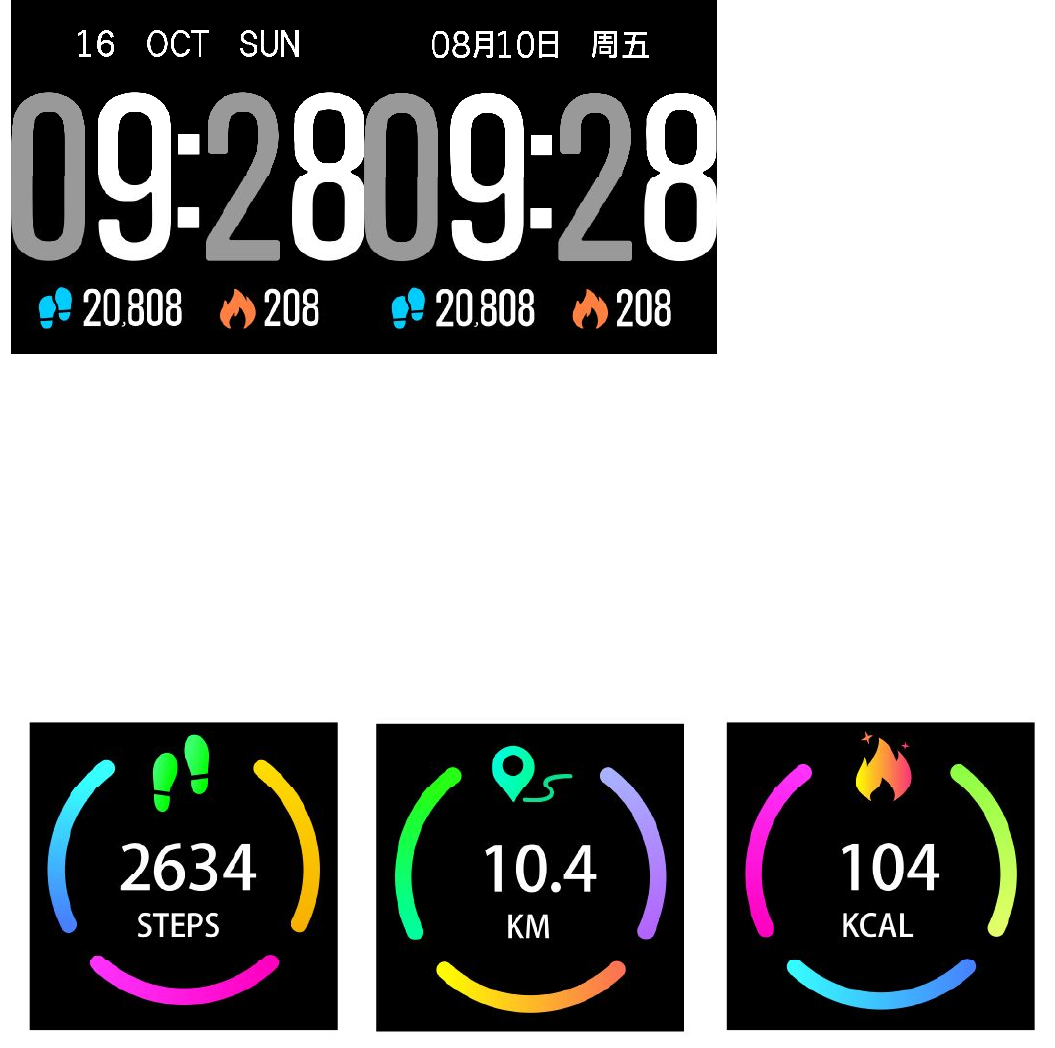
点击触摸符号,主屏菜单界面切换,如下所示的界面等;
Click the touch sign for the menu interfaces switching of main screen, such as the following interfaces;
英文1
英文1
6
2. 主界面功能简介
2. Introduction of main interface functions
当手环和APP 首次配对连接好以后会同步手机的时间、日期、运动步数和卡路里的符号。
After the bracelet and the APP are first paired, it will synchronize the time, date, movement steps, and calorie symbols
of the phone.
3、计步、距离、卡路里
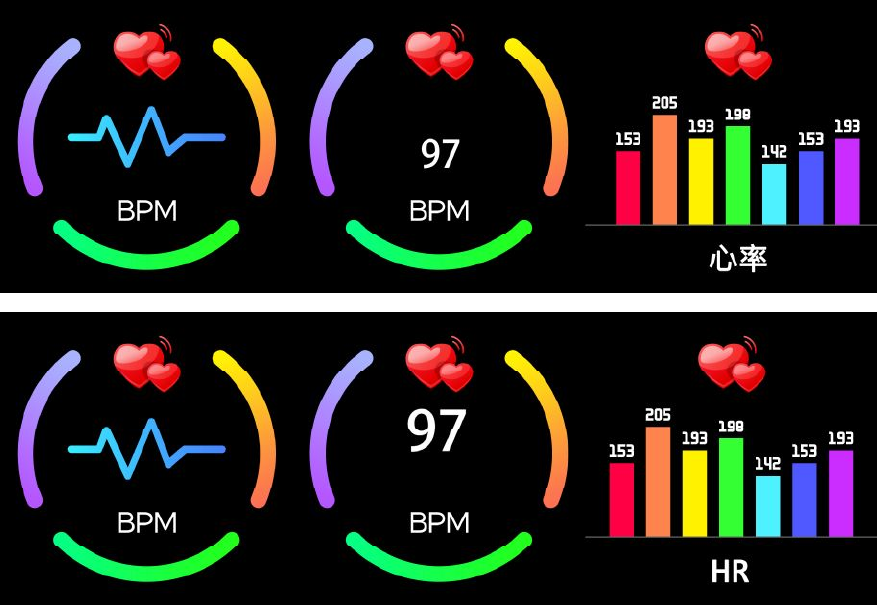
计步界面显示计步,将手环佩戴在手腕上,手环自动记录步数、行走距离和卡路里 消耗等数据。
3.Counting of steps、distance and calorie
The step-counting interface shows number of steps. Wear the bracelet on wrist, and count the number of
steps, walking distance and consumed calories automatically .
7
4. 心率监测
4. Heart rate monitoring
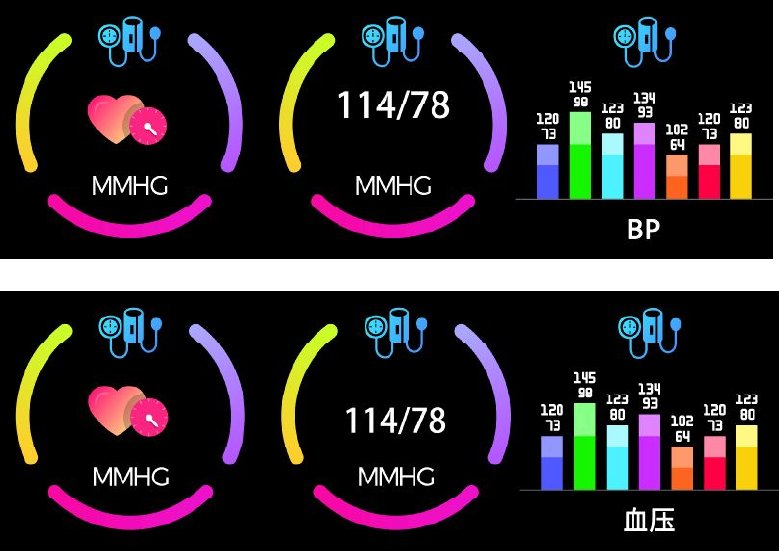
4.1 点击触摸区域,即可切换至心率监测界面,心率界面停留2秒后开始开始进行检测,“开始”
及“结束”心率测试,马达同时会有振动一次提醒。支持实时动态心率了解自己的健康数据。心
率监测模式下,手环的续航时间会降低。长按 2秒即可显示最近七次的心率测量数值。
4.1 If you click on the touch area, it will be switched to the heart rate monitoring interface, the test
will start after the heart rate interface stays for 2 seconds, the heart rate test will "start" and "end", with
the motor vibrating once as a reminder respectively. You can understand your health data through
real-time dynamic heart rate. In the heart rate monitoring mode, the duration of the bracelet will be
reduced, and heart rate measurement value for the last seven times will be displayed if you keep
pressing it.
4.2 测量心率时让心率传感器紧贴皮肤并接触良好,如果佩戴过于松动,传感器光线外露,会导致测量数值不准确。
请勿直视传感器绿光,可能会引起眼睛不适。
4.2 The heart rate sensor shall be closely attached to skin and well contacted with skin in measurement of heart rate. The
sensor light exposure in case of wearing bracelet too loosely can result in inaccurate measured figures. Don’t look steadily
at the green light of sensor which may cause eye irritation.
4.3 本产品虽然为实时动态检测心率,但是在检测心率时请保持身体停止活动,静坐 测量,否则会延长心率测量时
间或测不到数据。待手环测量到数据时再进行运动, 即可查看实时动态心率数据。
4.3Measure the heart rate when keep sitting quietly and the body not moving though this device can measure heat rate in a
real-time and dynamic way; otherwise, the time is delayed for measurement of heart rate, or no data can be measured. The
user should not move until the bracelet measures the figure of heart rate when the data of real-time dynamic heart rates
can be checked.
8
4.4 如果测量数据差异较大,请休息一下重新测量,连续测量5次得到的平均值会比 较准确。
4.4 Measure heart rate after having a rest if there is a big difference in measured data. The average value obtained through
five times of consecutive measurement is more accurate.
4.5 本产品为实时动态心率测量,所以在说话、吃饭、饮酒等状态时的心率都会不同。 请以实际为准。
4.5 This device is used to measure heart rate in a real-time dynamic way. So the heart rate is varied with different conditions
such as speaking, dining and drinking. It shall be subject to the actual case.
4.6 测量时确保心率传感器底部没有脏污,皮肤颜色、毛发浓密度、纹身、伤疤可能会影响检测结果准确,请重新测
量。
4.6 Be sure that there is no dirt at the bottom of the heart rate sensor when conduct measurement. Skin color, hair density,
tattoo and scar may affect the accuracy of the measuring results, in which cases please re-measure the heart rate.
4.7 长时间测量可能导致发热,如遇不适,请将其移除,直至装置降温后再进行佩戴。
4.7 Measurement for a long time may cause heating of the device, in case of any comfort, please remove the device, don’t
wear it until it becomes cool.
4.8 寒冷的天气会影响你的测量结果,请在保暖的情况下测量。
4.8The chilled weather may affect your measuring result; please conduct the measurement in warm condition.
9
5.血压
5.Blood pressure
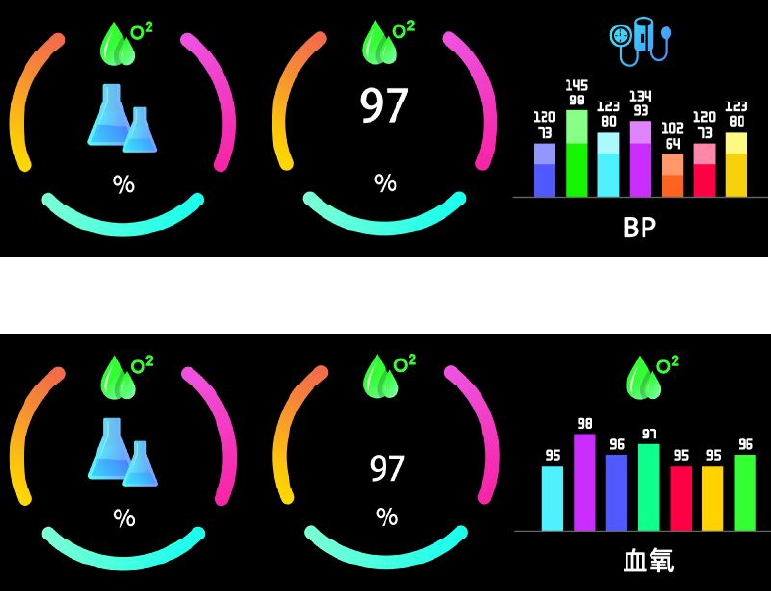
点击触摸区域,即可切换至血压监测界面,血压界面停留2秒后开始开始进行检测,“开
始”及“结束”测试,马达同时会有振动一次提醒。长按 2秒即可显示最近七次的血压测量
数值。
测量血压的环境应安静、温度适当。测量前至少休息 5分钟。避免紧张、焦虑、情绪激
动。应重复测3次,每次相隔 2分钟。取3次读数的平均值记录。
5. If you click on the touch area, it will be switched to the blood pressure monitoring
interface, the test will start after the blood pressure interface stays for 2 seconds, the test will "start"
and "end", with the motor vibrating once as a reminder respectively. The heart rate measurement
value for the last seven times will be displayed if you keep pressing it.
The blood pressure shall be measured in a quiet environment and at proper temperature.
Have a rest for at least 5 minutes before measurement. Avoid nervous, anxious and exciting
feelings; measure three times repeatedly at an interval of 2 minutes. Record the average value of
readings measured three times.
6.血氧
点击触摸区域,即可切换至血氧监测界面,血氧界面停留2秒后开始开始进行检测,“开
始”及“结束”测试,马达同时会有振动一次提醒。
血氧饱和度(Sp〇2)是血液中被氧结合的氧合血红蛋白(Hb〇2)的容量,占全部可
结合的血红蛋白(Hb,hemoglobin)溶量的百分比,即血液中血氧的浓度。
长按 2秒即可显示最近七次的血氧测量数值。
、
10
注:血压、血氧测出的数据仅供参考,不可作为医学相关方面的依据。
6. Blood oxygen
If you click on the touch area, it will be switched to the blood oxygen monitoring interface, the
test will start after the blood oxygen interface stays for 2 seconds, the test will "start" and "end",
with the motor vibrating once as a reminder respectively. The heart rate measurement value for the
last seven times will be displayed if you keep pressing it.
Blood oxygen saturation (Sp 〇2) is the percentage of the amount of Oxyhemoglobin (Hb 〇
2) which has been oxygenated in the blood and the total amount of hemoglobin (Hb, hemoglobin)
which can be oxygenated. It means the concentration of oxygen in blood.
Note: The blood pressure and blood oxygen data are for reference only and should not be used as a
basis in medical aspects.
7. 锻炼
7. Training
在运动界面,长按触摸键三秒进入运动模式,总共有七种运动,步行、跑步,骑
行、跳绳、羽毛球、篮球、足球。如选择“步行”模式,长按触摸键二秒开始记
录运动参数,如需要“暂停”长按触摸键1秒,“退出”短按侧健。
In the sports interface, if you keep pressing the touch key for three seconds, it will get into the
movement mode, and there are a total of seven kinds of sports, including walking, running, riding,
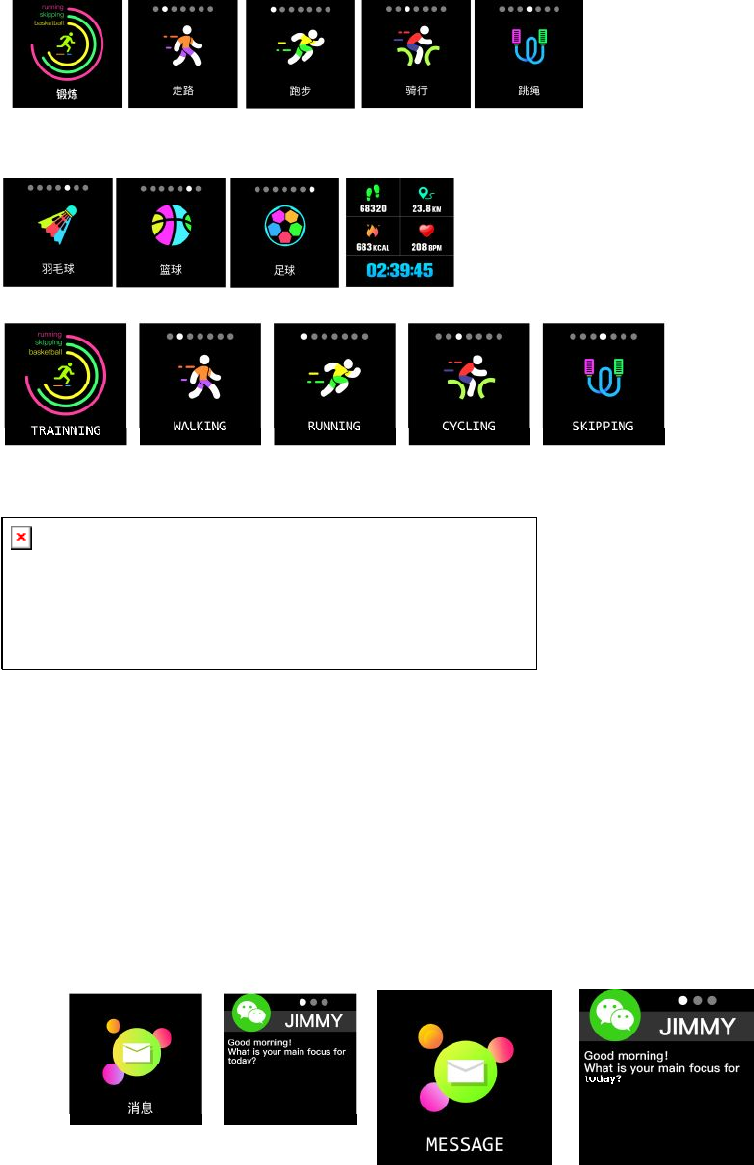
11
skipping rope, badminton, basketball and football. If you choose the "walking" mode, if you hold the
touch key for two seconds, the motion parameters will be recorded, if you need to "pause", you need
to hold the touch key for one second, and you need to press the side key to "exit".
未标题-2
8. 信息
8. Message
切换到信息界面,手 指 长按触摸区域 2 秒进入信息内容,点 击 触 摸区后会切换到下 一条
内容,内容包含短信及聊天软件推送的信息。信息条数量最多可以存储 3条, 信息数量满3
条后,会逐条替换之前显示的信息。
8. Switch to the message interface, and long-press the touch area for 2s by finger to access the
message content; click the touch area to switch to next piece of content; content includes SMS
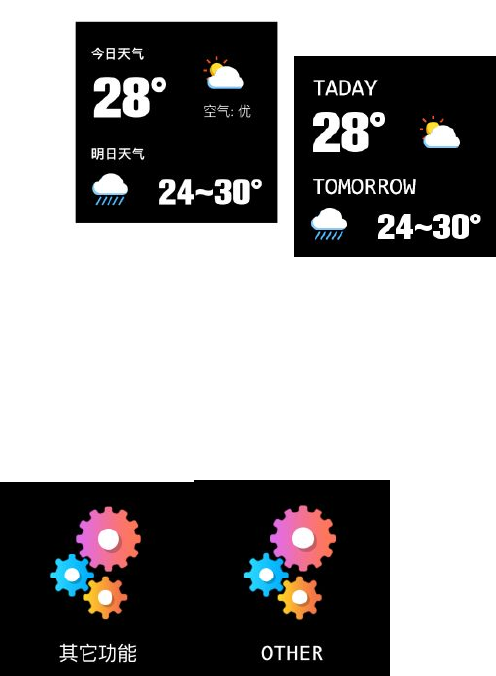
12
and messages from chat software. At most three pieces of messages can be saved. When it is up
to three pieces, the messages displayed before can be substituted one after another.
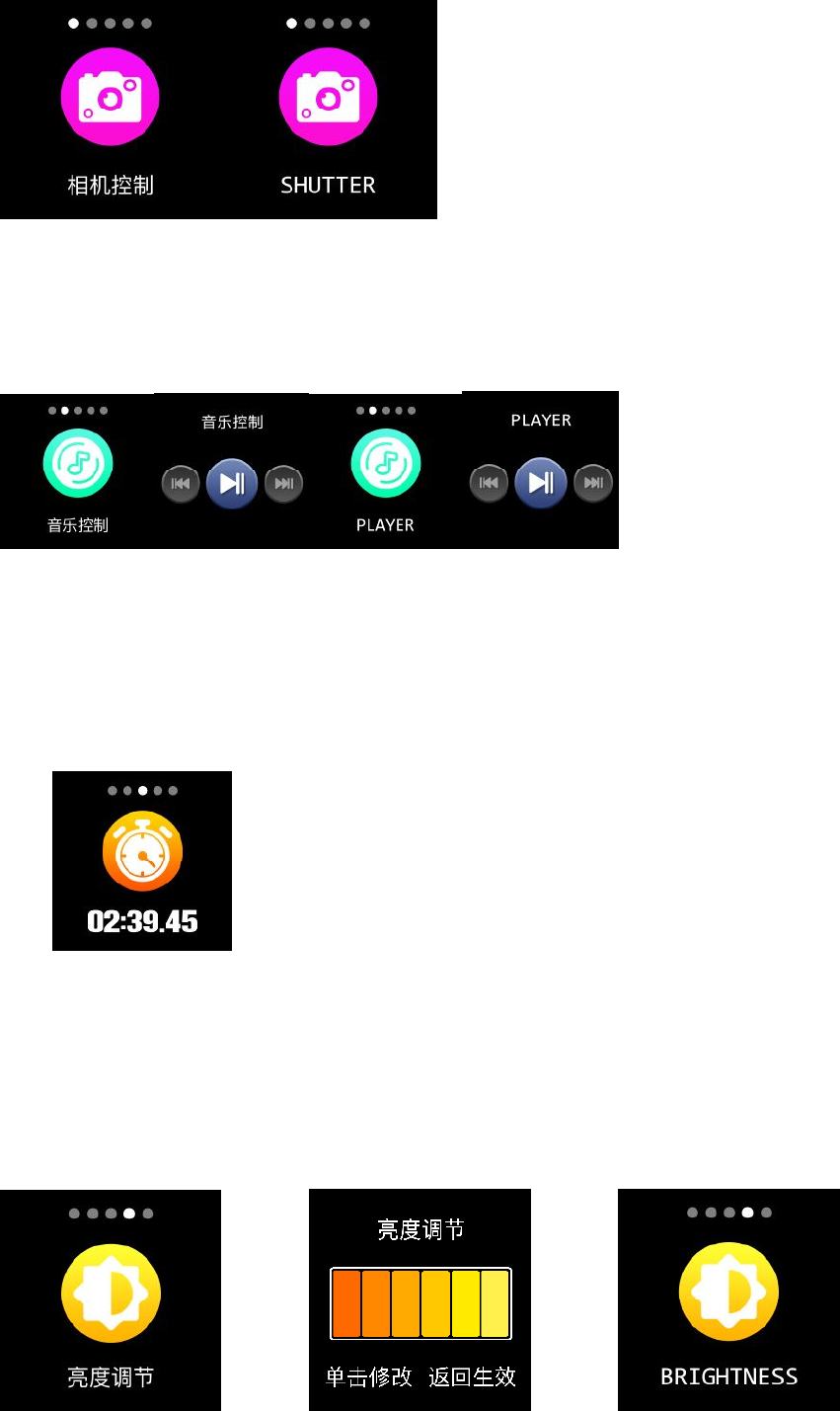
9. 天气 翻译五国的(德法西意日)
天气页面会显示当前的天气、空气质量信息,以及明日的状况。
天气信息需要连接客户端后才可以获取数据,如果长时间断开连接,天气信息将无法更新
9.Weather
It could show the weather info of current and tomorrow on the weather page.
Weather info is synced after connecting with the APP, it will not be updated after
a long disconneted.
10.设置
10.Settings
在"设置〃界面长按进入以下功能界面
Long-press the “Settings” interface long into the following function interfaces:
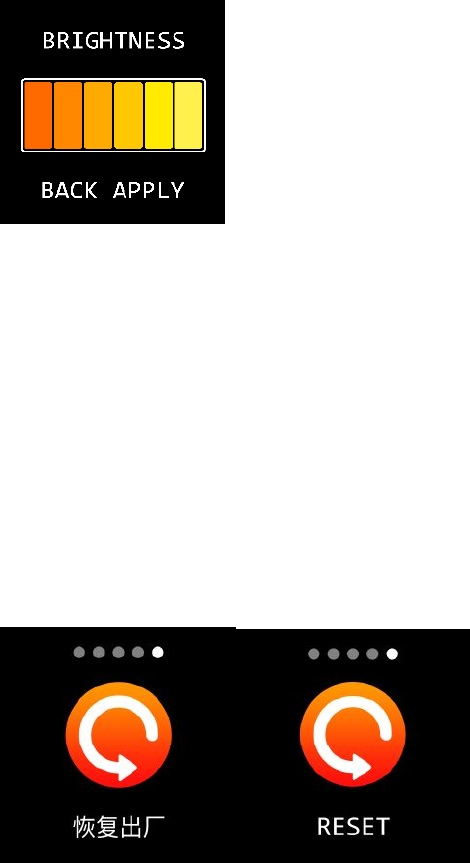
10.1 拍照控制 翻译五国的(德法西意日)
连接手机后,手环可以作为手机相机遥控器。在手机打开相机后,在手环相机控制页面长按
即可触发手机相机快门。
10.1Remote Shutter
After connecting the device can remote contral the camera on your phone.
13
10.2 音乐控制 翻译五国的(德法西意日)
连接手机后,手环可以控制手机的音乐播放器。手机在播放音乐时,可以使用手环控制手机
进行播放/暂停、上一曲、下一曲操作。
10.2 Music Play contraller
After connecting the device can remote contral the music player on your phone.
10.3 秒表
在秒表页面长按即可“开始”一次计时,单点触摸“暂停”计时,再次长按即可“停止”计
时。
10.3 Stopwatch
Long press on the stopwatch page to start timing,You can press the touch key to "pause" timer
and long press again to stop timing.
10.4 亮度调节
长按触摸区,进入亮度页面,单点触摸健选择亮度,短按侧键返回确定。
14
10.4 Luminance regulation
If you hold the touch area, it will enter the brightness page, you can hold the touch key to select
brightness, and press the side key to return.
10.5 恢复出厂设置
10.5Restoring factory settings
长按触摸区 3秒以上,开始清除手环上的所有信息,恢复到默认出厂设置。
Long-press the touch area for over 3s, to start to clear off all messages in bracelet, and restore the
defaulted factory setting.
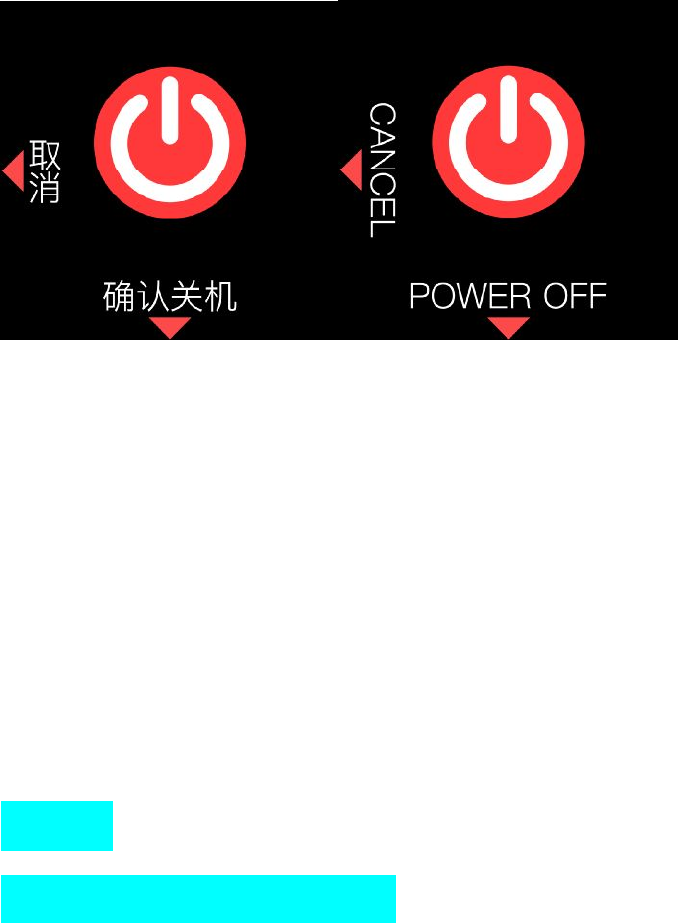
10.6 关机
10.6 Power-off
主界面长按 3秒侧键,会弹出关机界面。长按触摸区 3秒以上,即可关机,短按侧按键
返回到主界面。
15
If you hold the side key for 5 seconds, the main interface will trigger the shutdown interface. If you
hold the touch area for more than 3 seconds, the machine will be turned off and if you press the side
key, it will return to the main interface.
常见问题
Frequently Asked Questions (FAQ)
1. 问:提示搜索不到手环怎么办?
1. Question: What can I do if the bracelet is not searched as prompted?
答:首先,请检查手环是否有电;
Answer: First, check the bracelet is energized or not;
其次,请将手环靠近手机,再次尝试连接手环;
Second, Put the bracelet near the mobile phone, and try connecting the bracelet.
若以上操作依然无法连接,请尝试开关一次手机蓝牙或重启手机。
If you are still unable to connect the bracelet by above operations, try switching off and on the mobile phone
Bluetooth once, or restart the mobile phone.
2. 问:偶尔会出现蓝牙连接不上的情况?
2. Question: Is the Bluetooth not connected accidently?
答:1>. 由于蓝牙无线连接存在信号干扰的问题,可能每次连接的时间会不等,如 果长时间连接不上,请确保操作
在无磁场或无蓝牙设备干扰环境下进行。
16
Answer: 1>The connecting time may be different each time as the signal is disturbed in Bluetooth wireless connection. If it
is not connected for a long time, make sure your operation is done in the place where there is no disturbance of magnetic
field or Bluetooth device.
2>. 部分手机的蓝牙服务再启动时,偶尔会出现异常,导致出现连接不上的问题。
2>. The mobile phone Bluetooth services become abnormal accidentally in re-starting up, so that the Bluetooth may
not be connected.
3>. 通常重新开关手机蓝牙,即可正常建立连接。
3>. The mobile phone Bluetooth is connected normally when you restart the mobile phone.
3.问:设置了来电通知为什么有来电手环没有振动提醒我?
3. Question: Why is there no vibration of the bracelet to remind me after setting the notification of incoming call?
答:首先请确认手机蓝牙是否打开并与手环连接着;
Answer: First check the mobile phone Bluetooth is switched on and the bracelet is connected or not;
其次,Android 及ios 系统,请检查手环 APP 是否运行着(后台运行就可以。)
Second, check the bracelet APP is running (or backstage running) for Android and IOS systems.
提示:一键清理内存及一些管家类软件可能会清理进程或拦截,请将App 加入 白名单。
Note: FLY memory cleaner and some keeper software may clean or intercept tasks, please add APP to the white list.
4.问:为什么手环接收不到消息推送?
答:1>.确认在手机客户端开启了消息推送的开关
2>.确认消息在手机通知栏都可以正常显示,手环消息推送是通过读取手机通知栏消息进行推送;若手机通知栏没有
消息,手环将无法接收推送。(需要在手机设置中找到通知设置,开启微信、QQ、电话、短信、手机客户端的通知开关)
3>.打开手环客户端的辅助功能设置
(在手机设置中找到辅助功能,打开手环客户端的辅助功能设置
苹果手机设置:
1>.确认在手机客户端开启了消息推送的开关
2>.确认消息在手机通知栏都可以正常显示
(需要在手机设置中找到通知设置,开启微信、QQ、电话、短信、手机客户端的通知开关)
4. Question: why doesn't the bracelet receive message push?
Answer: 1> You have to confirms that a switch for message push is opened on the phone client
2 > You have to confirm that message can be displayed normally in the mobile phone notification bar. The message push on
the bracelet is completed by reading the message from the mobile phone notification bar; the bracelet will not receive the
push if there is no message in the mobile phone notification bar. (you need to find notification settings in the mobile phone
settings, turn on the notification switch of Wechat, QQ, phone, SMS and mobile phone client)
3> You have to open the auxiliary function settings of the bracelet client.
(You have to find auxiliary function in mobile phone settings, open the auxiliary function settings of the bracelet client)
The settings for iPhone:
1> You have to confirms that a switch for push notification is opened on the phone client
2 > You have to confirm that notification can be displayed normally in the mobile phone notification bar. (you need to find
notification settings in the mobile phone settings, turn on the notification switch of Wechat, QQ, phone, SMS and mobile
phone client)

17
5.问:为什么我的心率测试失败?
5. Question: Why does my heart rate measure fail?
答:测量心率时,注意保持人处于静止状态,并将手环底部贴紧手臂不留明显缝 隙,测量期间不要晃动手臂。
Answer: Note to keep the user in a quiet status in measuring heart rate, and keep the bottom of bracelet closely attached to
the arm without obvious gap. Don’t wave arms during measurement.
6.问:血压数值为什么跟血压计有偏差?
答:手环和血压计测量数值出现的偏差是由多种因素决定的,血压计测量部位是在肱动脉,手环测量部位是在微动脉
的两个主要分支,正常情况下主动脉血压測量值和微动脉血压测量值会相差三到四十;如果你使用手环和血压计同时
进行测量,由于动脉里流动的是离心方向的血液,血压计測量时绑带使你的肘正中以下部位处于受压状态,暂时血液
无法顺畅的向下面的动脉分支流动;血管紧张感增加,将使上下血压測量值偏差会更大。
6. Question: why do blood pressure values deviate from blood pressure monitor?
Answer: The deviation between the measured values of the bracelet and the blood pressure monitor is determined by many
factors. The blood pressure monitor is located in the brachial artery and the bracelet is located in the two main branches of
the arterioles. Under normal circumstances, there will be a difference between the aortic and arterioles blood pressure
measurements, about 3 to 40; if you use a bracelet and a blood pressure monitor to measure at the same time, because blood
flows in the artery in a centrifugal direction, the bandage of the blood pressure monitor keeps the part right below the middle
of your elbow under pressure and temporarily prevents the blood from flowing smoothly down the lower branch of the artery;
and increases vascular tension, which will cause greater deviation between the upper and lower blood pressure
measurements.
7.问:为什么不能佩戴手环洗热水澡?
答:洗澡水的温度比较高,会产生很多的水蒸气,而且水蒸气是气相的,其分子半径小,容易从手环的壳体空隙渗进去,
当温度降下来后又会重新凝结成液相的水滴,容易造成手环内部线路短路,损伤手环电路板,进而损坏手环。
7. Question: why can't you wear the bracelet to take a hot bath?
Answer: Bath water temperature is relatively high, there will be a lot of vapor, and vapor is in the gas phase, with small
molecular radius, it is easy to infiltrate from the shell gap of the bracelet; when the temperature drops down, it will
condensate into liquid droplets, which will easily cause short circuit inside the bracelet, damage the ring circuit board, and
then damage the bracelet.
警告: Warning:
新的运动项目之前请咨询你的医生,智能手环尽管可以监测实时动态心率,但并不能用作任何医疗用途。
Please consult your doctor before you take part in a new sport. The smart bracelet should not be used for medical purpose
though it may monitor the real-time dynamic heart rate.
FCC Caution:
This device complies with part 15 of the FCC Rules. Operation is subject to the
following two conditions: (1) This device may not cause harmful interference, and (2)
this device must accept any interference received, including interference that may
cause undesired operation.
Any Changes or modifications not expressly approved by the party responsible for
compliance could void the user's authority to operate the equipment.
Note: This equipment has been tested and found to comply with the limits for a Class
B digital device, pursuant to part 15 of the FCC Rules. These limits are designed to
provide reasonable protection against harmful interference in a residential installation.
This equipment generates uses and can radiate radio frequency energy and, if not
installed and used in accordance with the instructions, may cause harmful interference
to radio communications. However, there is no guarantee that interference will not
occur in a particular installation. If this equipment does cause harmful interference to
radio or television reception, which can be determined by turning the equipment off
and on, the user is encouraged to try to correct the interference by one or more of the
following measures:
-Reorient or relocate the receiving antenna.
-Increase the separation between the equipment and receiver.
-Connect the equipment into an outlet on a circuit different from that to which the
receiver is connected.
-Consult the dealer or an experienced radio/TV technician for help.