Siemens Information and Communication Mobile 1408 Spread Spectrum Cordless Phone System User Manual Register

Siemens Information and Communication Mobile LLC Spread Spectrum Cordless Phone System Register

4200 Handset user manual
sBe inspiredOperating Instructionsand safety precautions  !
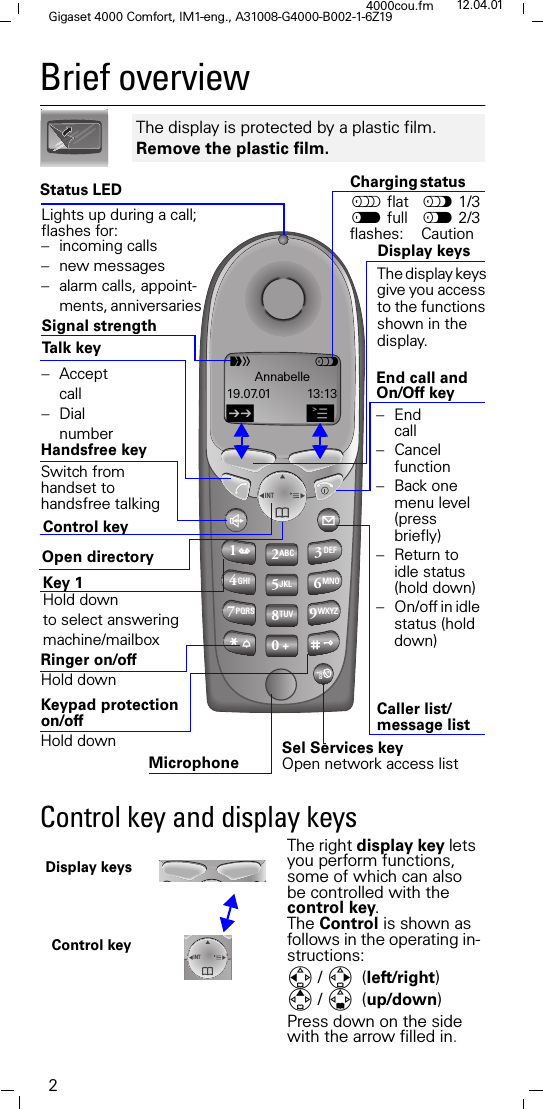
2Gigaset 4000 Comfort, IM1-eng., A31008-G4000-B002-1-6Z194000cou.fm 12.04.01Brief overview Control key and display keys  The display is protected by a plastic film.  Remove the plastic film. 123ABC DEFINT456JKL MNOGHI789TUV WXYZPQRS0Open directory End call and On/Off keyTa l k  key  Sel Services key Open network access listCaller list/message list –End call– Cancel function – Back one menu level (press briefly) – Return to idle status (hold down) – On/off in idle status (hold down)Handsfree key Switch fromhandset to handsfree talkingKeypad protection on/offHold down– Acceptcall –DialnumberRinger on/off Hold down Charging status flat " 1/3 full   2/3 flashes:   Caution The display keysgive you accessto the functionsshown in the display.Signal strength Control key Status LEDDisplay keys Lights up during a call; flashes for: – incoming calls – new messages – alarm calls, appoint-ments, anniversaries Microphone  U"Annabelle19.07.01 13:13/AKey 1 Hold down to select answering machine/mailbox  INTThe right display key lets you perform functions, some of which can also be controlled with the control key.The Control is shown as follows in the operating in-structions:/ (left/right)/ (up/down)Press down on the side with the arrow filled in.  Control key Display keys
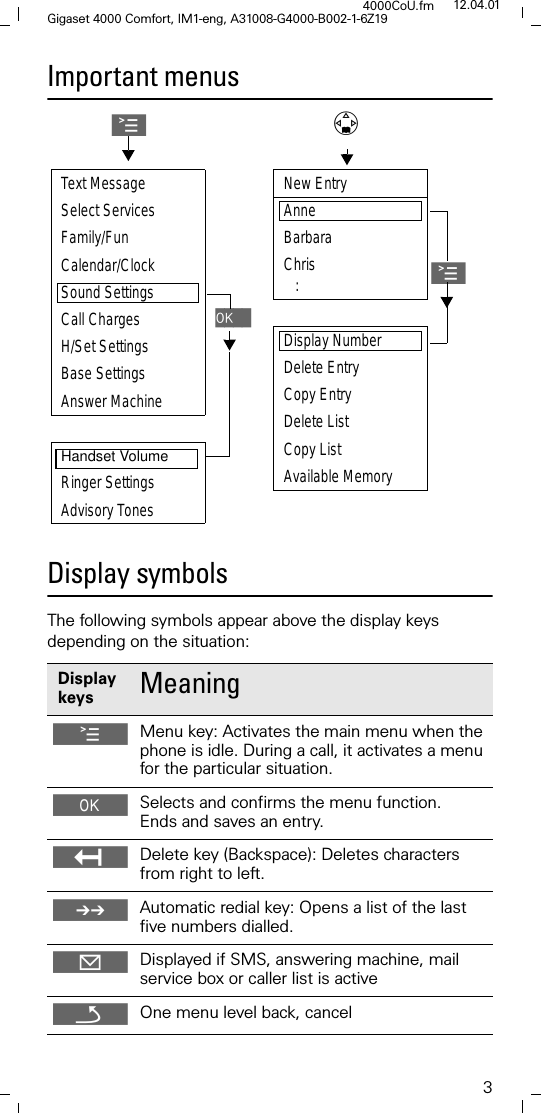
3Gigaset 4000 Comfort, IM1-eng, A31008-G4000-B002-1-6Z194000CoU.fm 12.04.01Important menus Display symbols The following symbols appear above the display keys depending on the situation: Display keys  Meaning @Menu key: Activates the main menu when the phone is idle. During a call, it activates a menu for the particular situation. Selects and confirms the menu function. Ends and saves an entry. Delete key (Backspace): Deletes characters from right to left. 0Automatic redial key: Opens a list of the last five numbers dialled. Displayed if SMS, answering machine, mail service box or caller list is activeROne menu level back, cancelAText MessageSelect Services Family/FunCalendar/ClockSound SettingsCall Charges2.ÖH/Set SettingsBase SettingsAnswer MachineHandset VolumeRinger SettingsAdvisory TonesNew EntryAnne Barbara Chris   :ADisplay NumberDelete EntryCopy EntryDelete ListCopy ListAvailable Memory
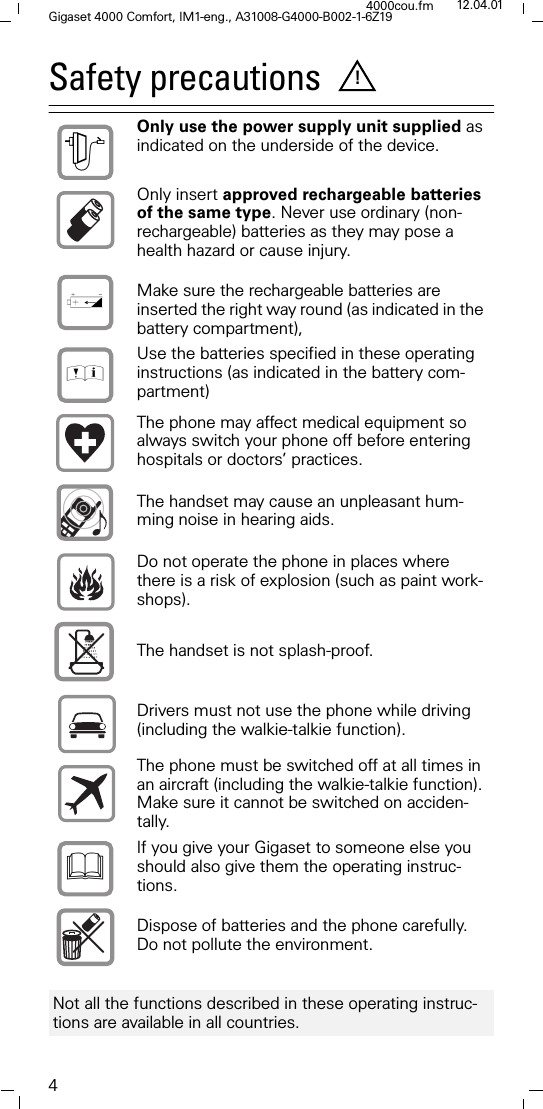
4Gigaset 4000 Comfort, IM1-eng., A31008-G4000-B002-1-6Z194000cou.fm 12.04.01Safety precautions  Only use the power supply unit supplied as indicated on the underside of the device. Only insert approved rechargeable batteries of the same type. Never use ordinary (non-rechargeable) batteries as they may pose a health hazard or cause injury. Make sure the rechargeable batteries are inserted the right way round (as indicated in the battery compartment), Use the batteries specified in these operating instructions (as indicated in the battery com-partment) The phone may affect medical equipment so always switch your phone off before entering hospitals or doctors’ practices.The handset may cause an unpleasant hum-ming noise in hearing aids.Do not operate the phone in places where there is a risk of explosion (such as paint work-shops). The handset is not splash-proof.Drivers must not use the phone while driving (including the walkie-talkie function).  The phone must be switched off at all times in an aircraft (including the walkie-talkie function). Make sure it cannot be switched on acciden-tally.  If you give your Gigaset to someone else you should also give them the operating instruc-tions. Dispose of batteries and the phone carefully. Do not pollute the environment. Not all the functions described in these operating instruc-tions are available in all countries. !785
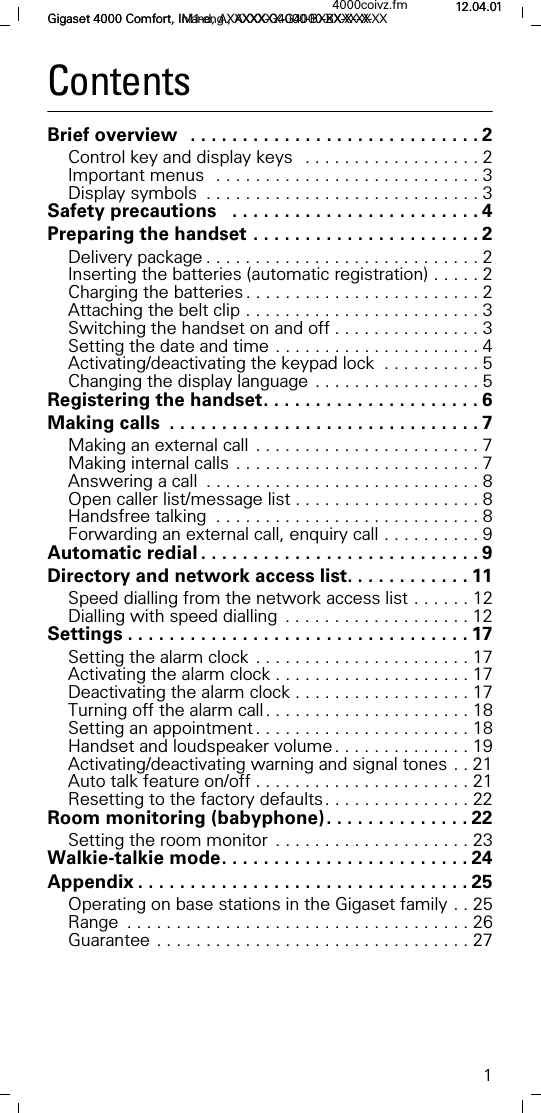
1Gigaset 4000 Comfort, Inland, AXXXXX-G4000-BXXX-X-XX4000coivz.fm 12.04.01Gigaset 4000 Comfort, IM1-eng., AXXXXX-G4000-BXXX-X-XX 12.04.01ContentsBrief overview  . . . . . . . . . . . . . . . . . . . . . . . . . . . . 2Control key and display keys  . . . . . . . . . . . . . . . . . . 2Important menus  . . . . . . . . . . . . . . . . . . . . . . . . . . . 3Display symbols  . . . . . . . . . . . . . . . . . . . . . . . . . . . . 3Safety precautions   . . . . . . . . . . . . . . . . . . . . . . . . 4Preparing the handset . . . . . . . . . . . . . . . . . . . . . . 2Delivery package . . . . . . . . . . . . . . . . . . . . . . . . . . . . 2Inserting the batteries (automatic registration) . . . . . 2Charging the batteries . . . . . . . . . . . . . . . . . . . . . . . . 2Attaching the belt clip . . . . . . . . . . . . . . . . . . . . . . . . 3Switching the handset on and off . . . . . . . . . . . . . . . 3Setting the date and time . . . . . . . . . . . . . . . . . . . . . 4Activating/deactivating the keypad lock  . . . . . . . . . . 5Changing the display language . . . . . . . . . . . . . . . . . 5Registering the handset. . . . . . . . . . . . . . . . . . . . . 6Making calls  . . . . . . . . . . . . . . . . . . . . . . . . . . . . . . 7Making an external call . . . . . . . . . . . . . . . . . . . . . . . 7Making internal calls . . . . . . . . . . . . . . . . . . . . . . . . . 7Answering a call  . . . . . . . . . . . . . . . . . . . . . . . . . . . . 8Open caller list/message list . . . . . . . . . . . . . . . . . . . 8Handsfree talking  . . . . . . . . . . . . . . . . . . . . . . . . . . . 8Forwarding an external call, enquiry call . . . . . . . . . . 9Automatic redial . . . . . . . . . . . . . . . . . . . . . . . . . . . 9Directory and network access list. . . . . . . . . . . . 11Speed dialling from the network access list . . . . . . 12Dialling with speed dialling  . . . . . . . . . . . . . . . . . . . 12Settings . . . . . . . . . . . . . . . . . . . . . . . . . . . . . . . . . 17Setting the alarm clock . . . . . . . . . . . . . . . . . . . . . . 17Activating the alarm clock . . . . . . . . . . . . . . . . . . . . 17Deactivating the alarm clock . . . . . . . . . . . . . . . . . . 17Turning off the alarm call. . . . . . . . . . . . . . . . . . . . . 18Setting an appointment . . . . . . . . . . . . . . . . . . . . . . 18Handset and loudspeaker volume. . . . . . . . . . . . . . 19Activating/deactivating warning and signal tones . . 21Auto talk feature on/off . . . . . . . . . . . . . . . . . . . . . . 21Resetting to the factory defaults. . . . . . . . . . . . . . . 22Room monitoring (babyphone). . . . . . . . . . . . . . 22Setting the room monitor  . . . . . . . . . . . . . . . . . . . . 23Walkie-talkie mode. . . . . . . . . . . . . . . . . . . . . . . . 24Appendix . . . . . . . . . . . . . . . . . . . . . . . . . . . . . . . . 25Operating on base stations in the Gigaset family . . 25Range  . . . . . . . . . . . . . . . . . . . . . . . . . . . . . . . . . . . 26Guarantee . . . . . . . . . . . . . . . . . . . . . . . . . . . . . . . . 27
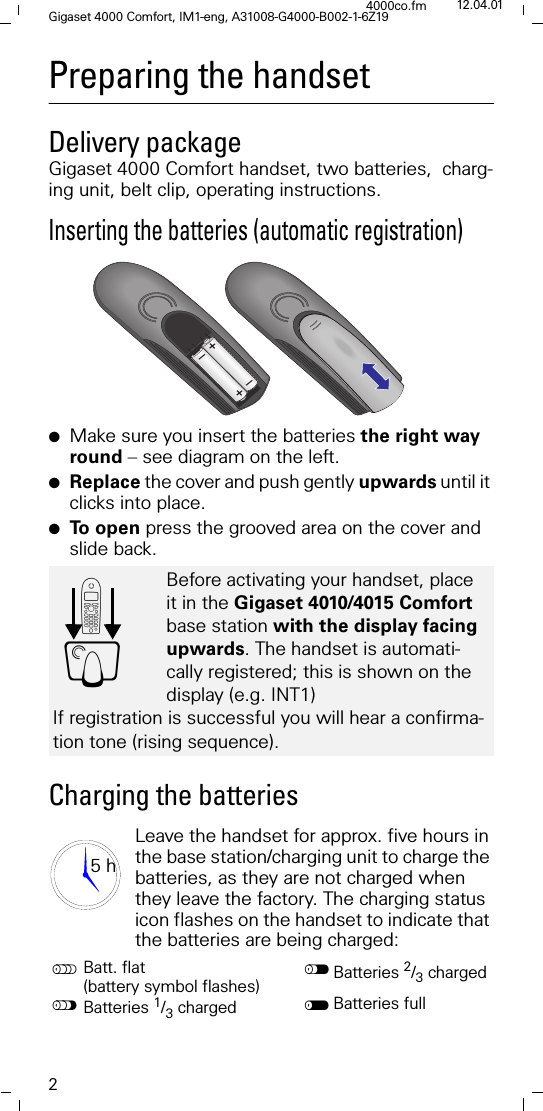
2Gigaset 4000 Comfort, IM1-eng, A31008-G4000-B002-1-6Z194000co.fm 12.04.01Preparing the handsetDelivery packageGigaset 4000 Comfort handset, two batteries,  charg-ing unit, belt clip, operating instructions.Inserting the batteries (automatic registration)●Make sure you insert the batteries the right way round – see diagram on the left.●Replace the cover and push gently upwards until it clicks into place.●To  o p e n  press the grooved area on the cover and slide back.Charging the batteriesLeave the handset for approx. five hours in the base station/charging unit to charge the batteries, as they are not charged when they leave the factory. The charging status icon flashes on the handset to indicate that the batteries are being charged:Before activating your handset, place it in the Gigaset 4010/4015 Comfort base station with the display facing upwards. The handset is automati-cally registered; this is shown on the display (e.g. INT1)If registration is successful you will hear a confirma-tion tone (rising sequence).Batt. flat (battery symbol flashes) Batteries 2/3 charged"Batteries 1/3 charged Batteries full+–+–'Y5 h
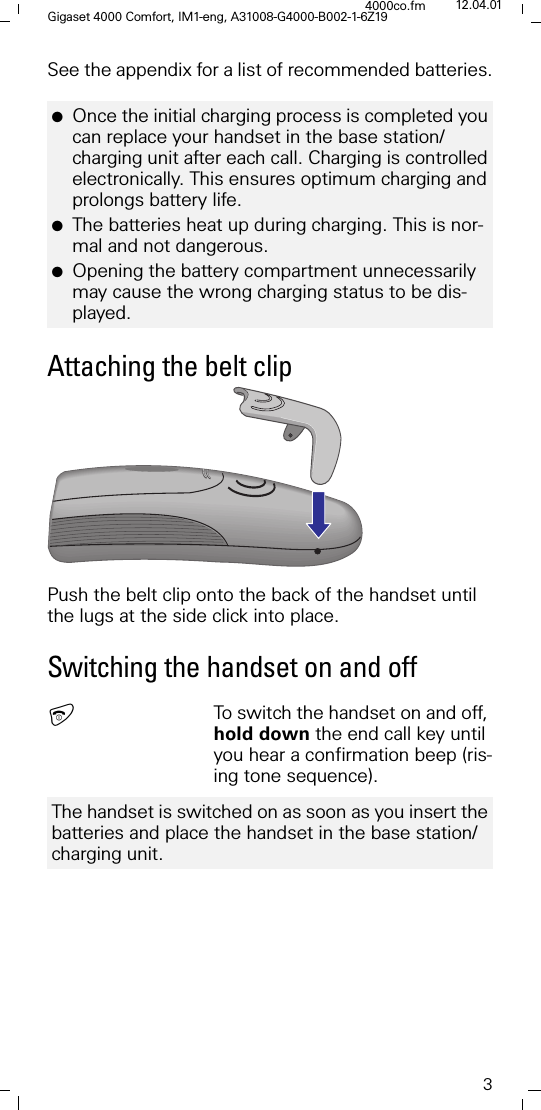
3Gigaset 4000 Comfort, IM1-eng, A31008-G4000-B002-1-6Z194000co.fm 12.04.01See the appendix for a list of recommended batteries.Attaching the belt clipPush the belt clip onto the back of the handset until the lugs at the side click into place.Switching the handset on and offTo switch the handset on and off, hold down the end call key until you hear a confirmation beep (ris-ing tone sequence). ●Once the initial charging process is completed you can replace your handset in the base station/charging unit after each call. Charging is controlled electronically. This ensures optimum charging and prolongs battery life.●The batteries heat up during charging. This is nor-mal and not dangerous.●Opening the battery compartment unnecessarily may cause the wrong charging status to be dis-played.The handset is switched on as soon as you insert the batteries and place the handset in the base station/charging unit.
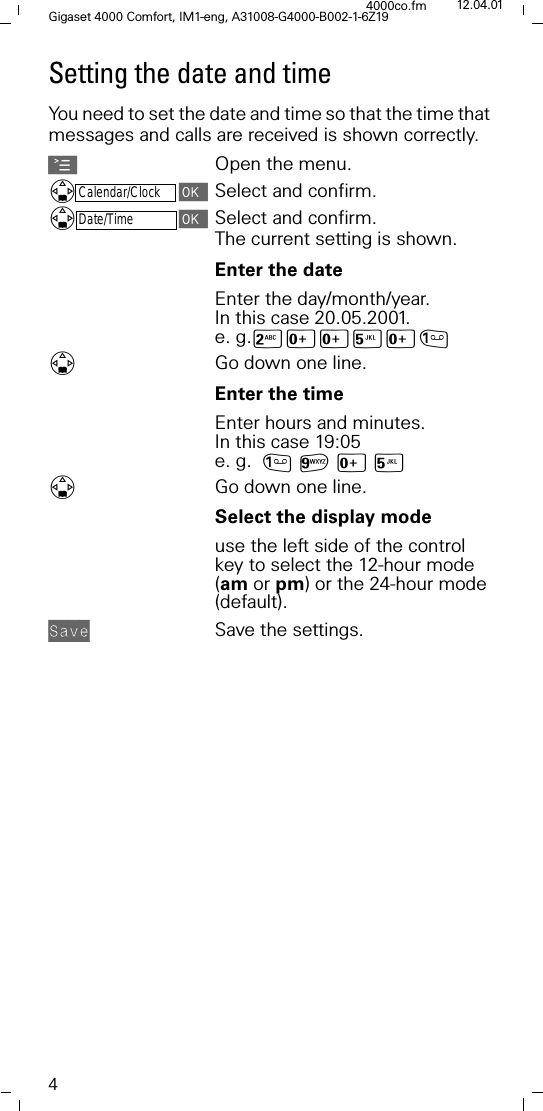
4Gigaset 4000 Comfort, IM1-eng, A31008-G4000-B002-1-6Z194000co.fm 12.04.01Setting the date and timeYou need to set the date and time so that the time that messages and calls are received is shown correctly.AOpen the menu.Calendar/ClockSelect and confirm.Date/TimeSelect and confirm.The current setting is shown. Enter the dateEnter the day/month/year. In this case 20.05.2001. e. g.9[[<[Go down one line.Enter the timeEnter hours and minutes. In this case 19:05 e. g. D[<Go down one line.Select the display mode use the left side of the control key to select the 12-hour mode (am or pm) or the 24-hour mode (default).$,;0 Save the settings.
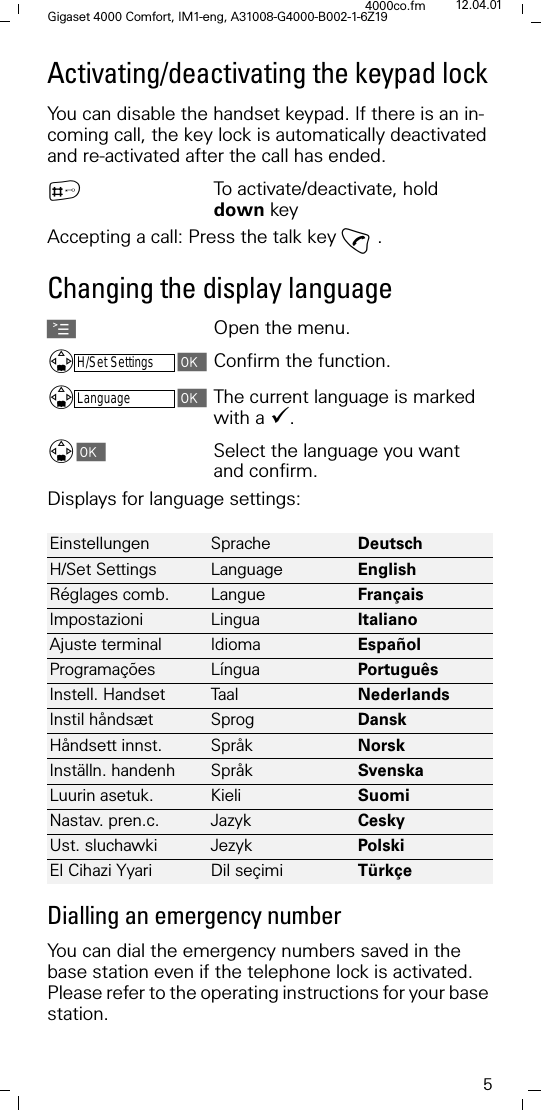
5Gigaset 4000 Comfort, IM1-eng, A31008-G4000-B002-1-6Z194000co.fm 12.04.01Activating/deactivating the keypad lockYou can disable the handset keypad. If there is an in-coming call, the key lock is automatically deactivated and re-activated after the call has ended. }To activate/deactivate, hold down keyAccepting a call: Press the talk key E.Changing the display languageAOpen the menu.H/Set SettingsConfirm the function.LanguageThe current language is marked with a '. Select the language you want and confirm. Displays for language settings:Dialling an emergency numberYou can dial the emergency numbers saved in the base station even if the telephone lock is activated. Please refer to the operating instructions for your base station.Einstellungen Sprache Deutsch H/Set Settings Language English Réglages comb. Langue Français Impostazioni Lingua Italiano Ajuste terminal Idioma Español Programações Língua Português Instell. Handset Ta a l Nederlands Instil håndsæt Sprog Dansk Håndsett innst. Språk Norsk Inställn. handenh Språk Svenska Luurin asetuk. Kieli Suomi Nastav. pren.c. Jazyk Cesky Ust. sluchawki Jezyk PolskiEl Cihazi Yyari Dil seçimi Türkçe
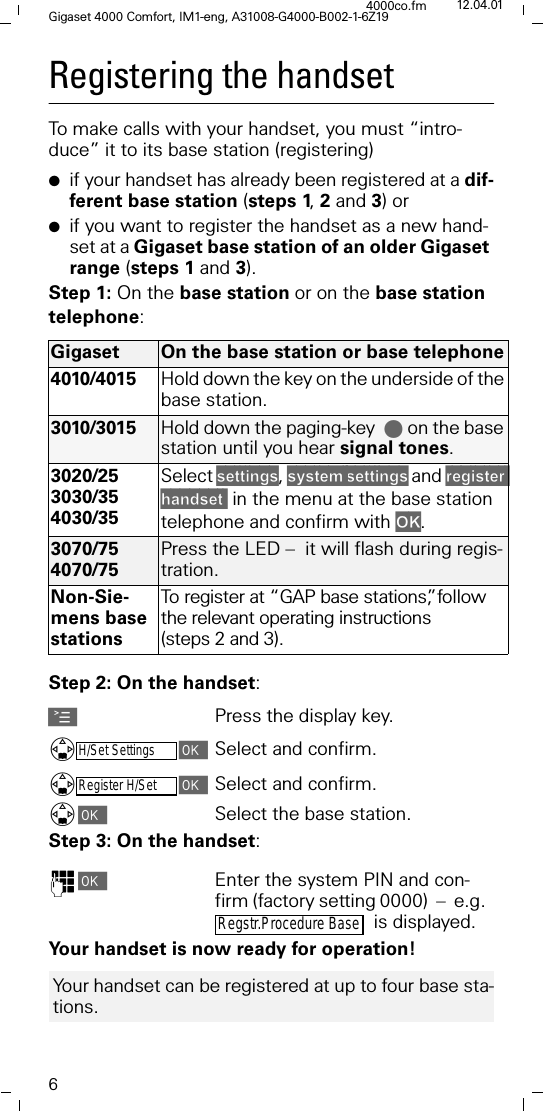
6Gigaset 4000 Comfort, IM1-eng, A31008-G4000-B002-1-6Z194000co.fm 12.04.01Registering the handsetTo make calls with your handset, you must “intro-duce” it to its base station (registering)●if your handset has already been registered at a dif-ferent base station (steps 1, 2 and 3) or●if you want to register the handset as a new hand-set at a Gigaset base station of an older Gigaset range (steps 1 and 3).Step 1: On the base station or on the base station telephone:Step 2: On the handset:APress the display key.H/Set SettingsSelect and confirm.Register H/SetSelect and confirm.Select the base station.Step 3: On the handset:)Enter the system PIN and con-firm (factory setting 0000)  –  e.g.    is displayed.Your handset is now ready for operation!Gigaset On the base station or base telephone4010/4015 Hold down the key on the underside of the base station.3010/3015 Hold down the paging-key. on the base station until you hear signal tones.3020/253030/354030/35Select VHWWLQJV, V\VWHPVHWWLQJV and UHJLVWHUKDQGVHW in the menu at the base station telephone and confirm with 2..3070/754070/75Press the LED –  it will flash during regis-tration.Non-Sie-mens base stationsTo register at “GAP base stations”, follow the relevant operating instructions (steps 2 and 3).Regstr.Procedure Base Your handset can be registered at up to four base sta-tions.
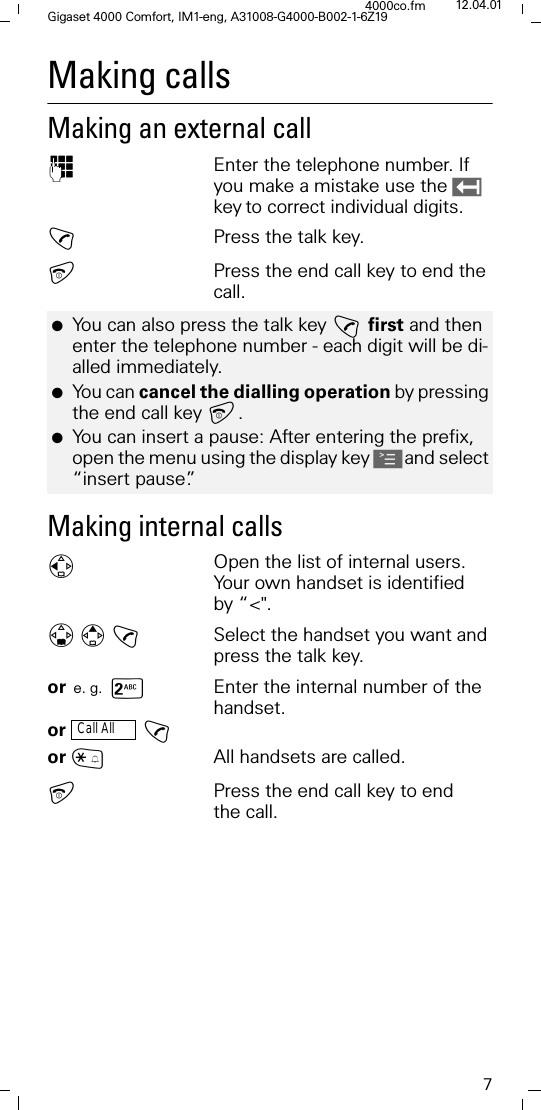
7Gigaset 4000 Comfort, IM1-eng, A31008-G4000-B002-1-6Z194000co.fm 12.04.01Making calls Making an external call )Enter the telephone number. If you make a mistake use the keyto correct individual digits.!Press the talk key.Press the end call key to end the call.Making internal calls)Open the list of internal users. Your own handset is identified by “<".! Select the handset you want and press the talk key.or e. g. sEnter the internal number of the handset.or  !or ~All handsets are called.Press the end call key to end the call.●You can also press the talk key !first and then enter the telephone number - each digit will be di-alled immediately.●You can cancel the dialling operation by pressing the end call key . ●You can insert a pause: After entering the prefix, open the menu using the display key Aand select “insert pause”.Call All
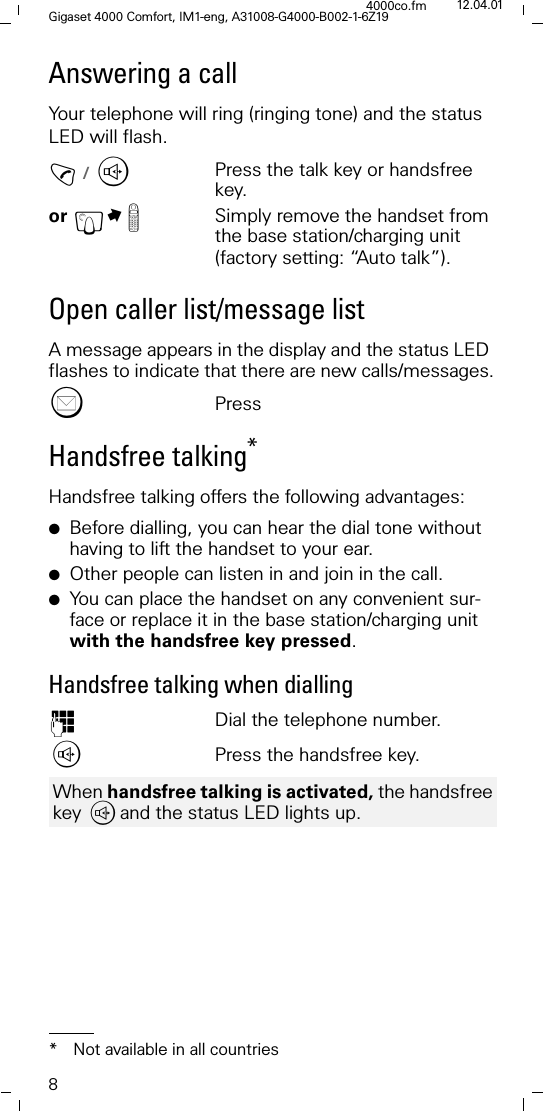
8Gigaset 4000 Comfort, IM1-eng, A31008-G4000-B002-1-6Z194000co.fm 12.04.01Answering a callYour telephone will ring (ringing tone) and the status LED will flash.!/ WPress the talk key or handsfree key.or £M Simply remove the handset from the base station/charging unit (factory setting: “Auto talk”).Open caller list/message list A message appears in the display and the status LED flashes to indicate that there are new calls/messages."PressHandsfree talking*Handsfree talking offers the following advantages:●Before dialling, you can hear the dial tone without having to lift the handset to your ear.●Other people can listen in and join in the call. ●You can place the handset on any convenient sur-face or replace it in the base station/charging unit with the handsfree key pressed. Handsfree talking when dialling)Dial the telephone number.,Press the handsfree key.* Not available in all countriesWhen handsfree talking is activated, the handsfree key ,and the status LED lights up.
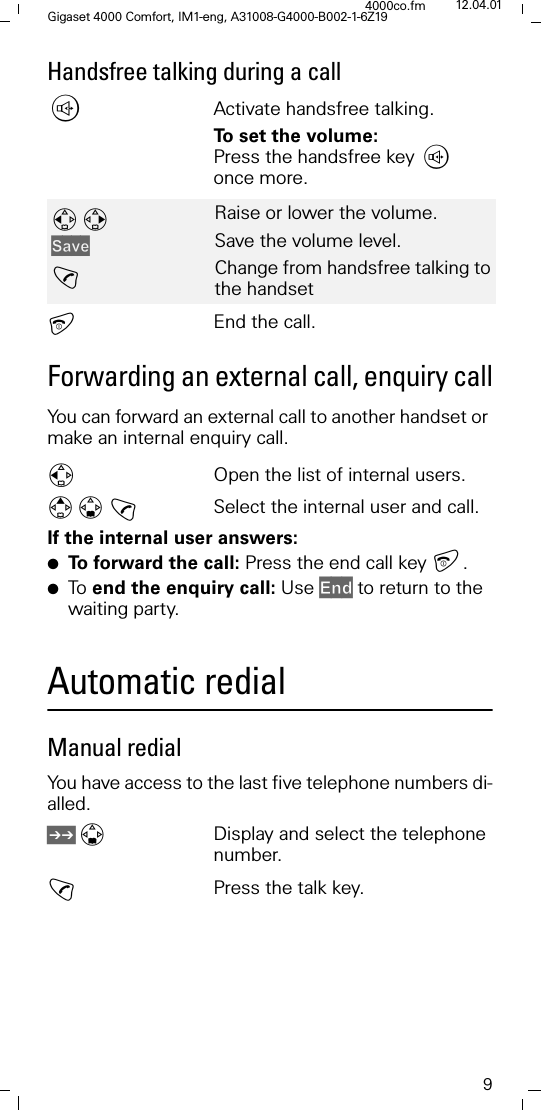
9Gigaset 4000 Comfort, IM1-eng, A31008-G4000-B002-1-6Z194000co.fm 12.04.01Handsfree talking during a call,Activate handsfree talking.To set the volume: Press the handsfree key ,once more.End the call.Forwarding an external call, enquiry callYou can forward an external call to another handset or make an internal enquiry call.)Open the list of internal users. ! Select the internal user and call.If the internal user answers:●To  f o r w a r d  t h e  c a l l :  Press the end call key .●To   end the enquiry call: Use (QG to return to the waiting party.Automatic redialManual redialYou have access to the last five telephone numbers di-alled./Display and select the telephone number.!Press the talk key.6DYH!Raise or lower the volume.Save the volume level.Change from handsfree talking to the handset
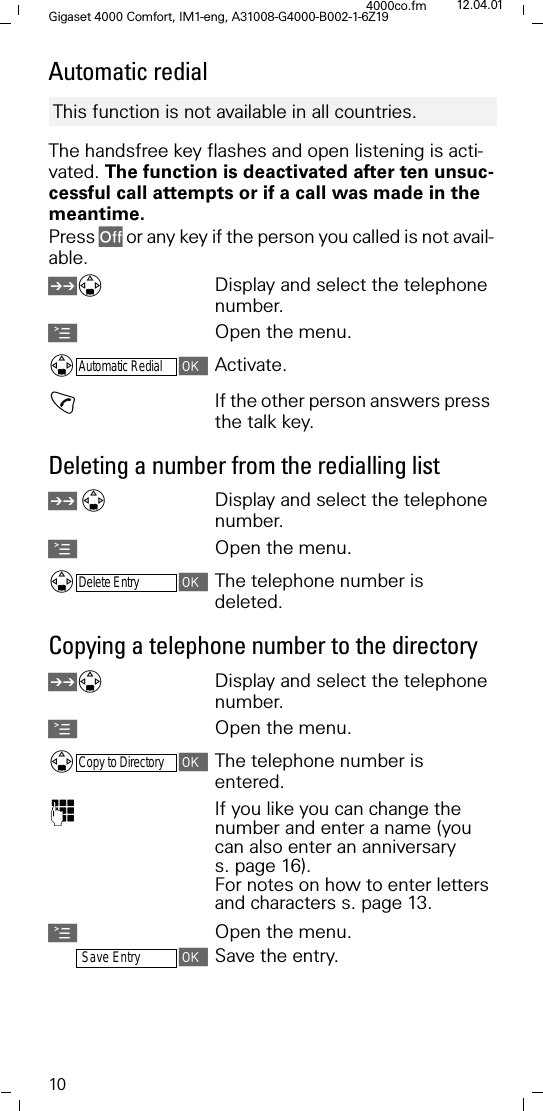
10Gigaset 4000 Comfort, IM1-eng, A31008-G4000-B002-1-6Z194000co.fm 12.04.01Automatic redialThe handsfree key flashes and open listening is acti-vated. The function is deactivated after ten unsuc-cessful call attempts or if a call was made in the meantime.Press 2II or any key if the person you called is not avail-able. /Display and select the telephone number.AOpen the menu.Automatic RedialActivate.!If the other person answers press the talk key.Deleting a number from the redialling list /Display and select the telephone number.AOpen the menu.Delete EntryThe telephone number is deleted. Copying a telephone number to the directory /Display and select the telephone number.AOpen the menu.Copy to DirectoryThe telephone number is entered. )If you like you can change the number and enter a name (you can also enter an anniversary s. page 16).For notes on how to enter letters and characters s. page 13.AOpen the menu.Save EntrySave the entry.This function is not available in all countries.
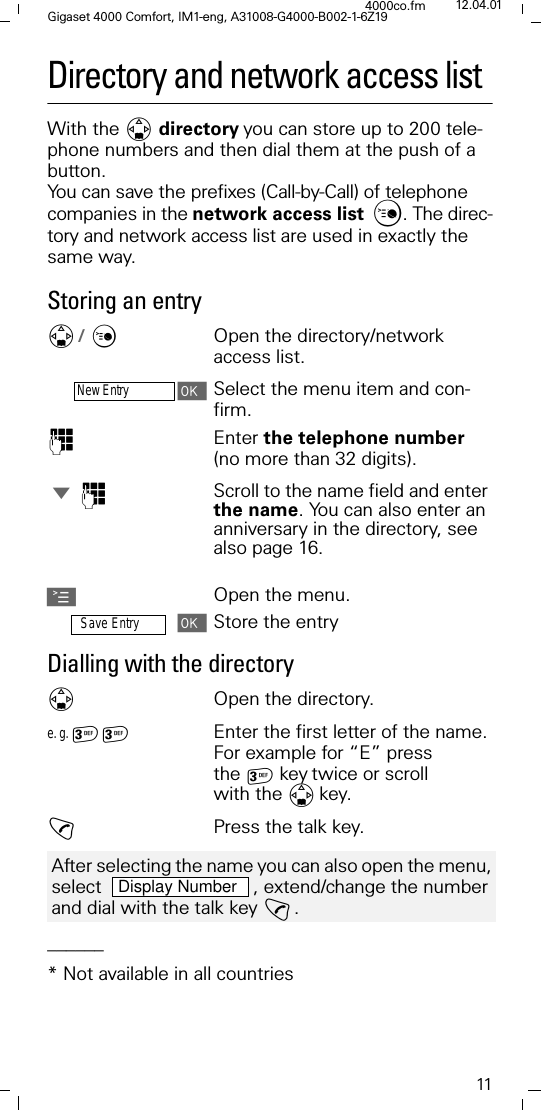
11Gigaset 4000 Comfort, IM1-eng, A31008-G4000-B002-1-6Z194000co.fm 12.04.01Directory and network access listWith the ' directoryyou can store up to 200 tele-phone numbers and then dial them at the push of a button. You can save the prefixes (Call-by-Call) of telephone companies in the network access list . The direc-tory and network access list are used in exactly the same way.Storing an entry'/ &Open the directory/network access list.New EntrySelect the menu item and con-firm.)Enter the telephone number (no more than 32 digits). -)Scroll to the name field and enter the name. You can also enter an anniversary in the directory, see also page 16.AOpen the menu.Save EntryStore the entryDialling with the directory'Open the directory.e. g.  Enter the first letter of the name. For example for “E” press the keytwice or scroll with the 'key. !Press the talk key.______* Not available in all countriesAfter selecting the name you can also open the menu, select    , extend/change the number and dial with the talk key !. Display Number
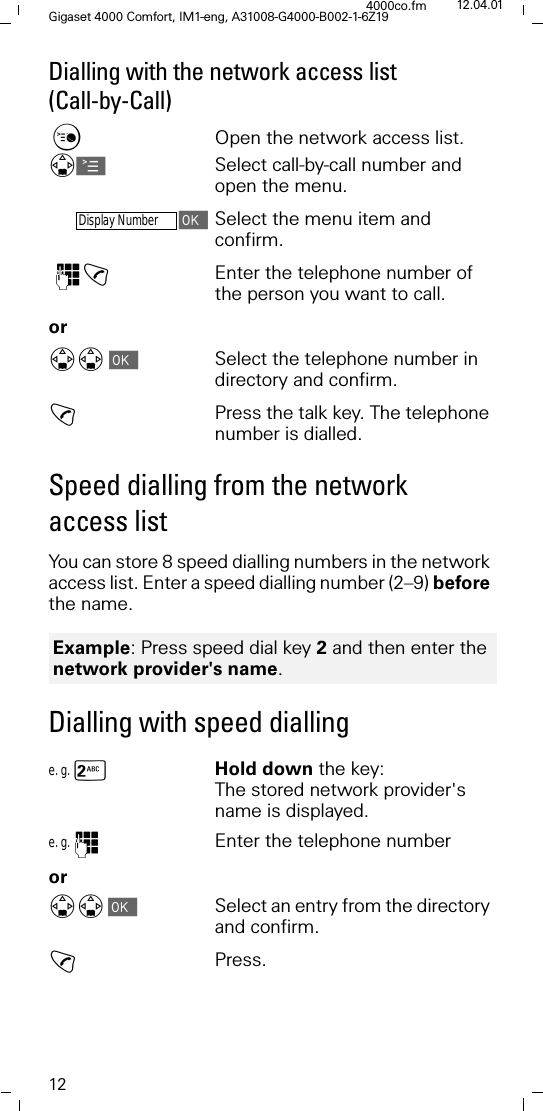
12Gigaset 4000 Comfort, IM1-eng, A31008-G4000-B002-1-6Z194000co.fm 12.04.01Dialling with the network access list (Call-by-Call)&Open the network access list. 'ASelect call-by-call number and open the menu.Display NumberSelect the menu item and confirm. )!Enter the telephone number of the person you want to call. or''Select the telephone number in directory and confirm.!Press the talk key. The telephone number is dialled.Speed dialling from the network access listYou can store 8 speed dialling numbers in the network access list. Enter a speed dialling number (2–9) before the name.Dialling with speed diallinge. g. sHold down the key: The stored network provider's name is displayed.e. g. )Enter the telephone numberor''Select an entry from the directory and confirm.!Press.Example: Press speed dial key 2 and then enter the network provider's name.
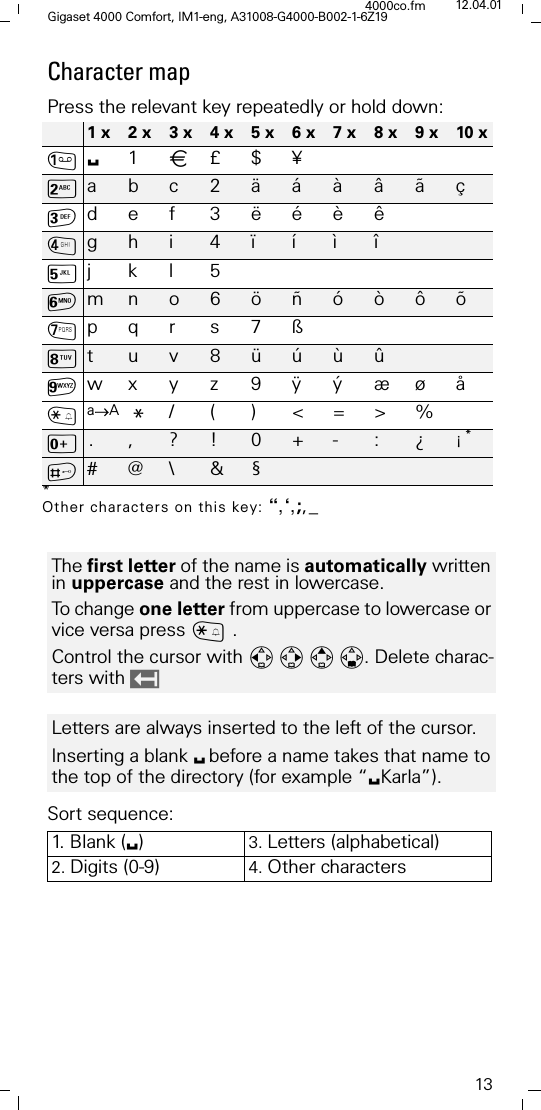
13Gigaset 4000 Comfort, IM1-eng, A31008-G4000-B002-1-6Z194000co.fm 12.04.01Character map Press the relevant key repeatedly or hold down:Sort sequence:1 x 2 x 3 x 4 x 5 x 6 x 7 x 8 x 9 x 10 x61\£$¥9abc2äáàâãçdef 3ëéèê;gh  i 4 ï í ì î<jkl5=mno6öñóòôõ>pqr s7ß?t u v 8 ü ú ù ûDwx y z 9 ÿ ý æø åCa→A* /()<=>%[. , ? ! 0 + - : ¿ ¡ **Other characters on this key: “,‘,;,_B# @ \ & §The first letter of the name is automatically written in uppercase and the rest in lowercase.To change one letter from uppercase to lowercase or vice versa press ~.Control the cursor with . Delete charac-ters with Letters are always inserted to the left of the cursor.Inserting a blank 6before a name takes that name to the top of the directory (for example “6Karla”).1.  B l a n k  ( 6)3. Letters (alphabetical)2. Digits (0-9) 4. Other characters
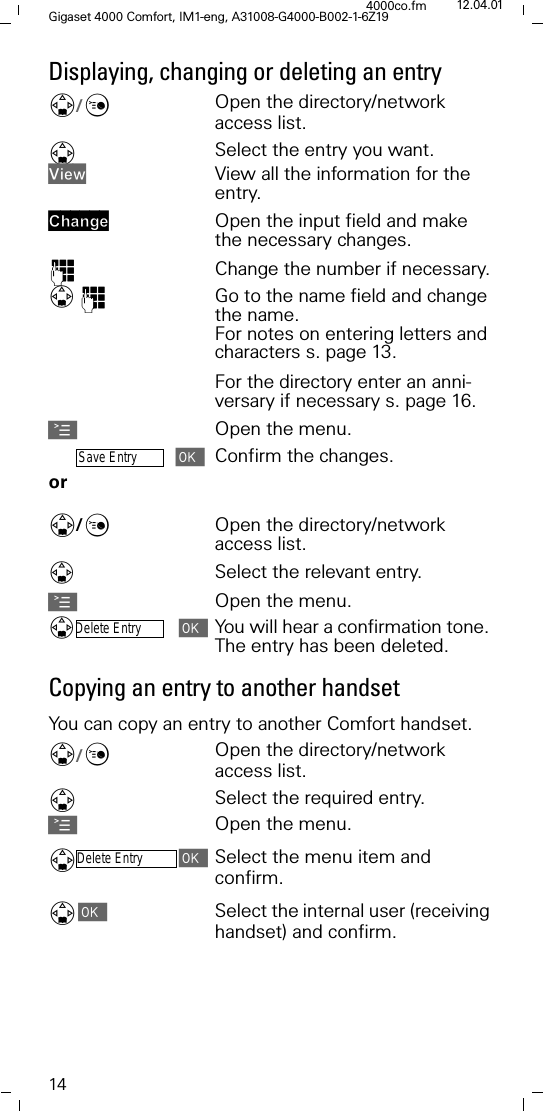
14Gigaset 4000 Comfort, IM1-eng, A31008-G4000-B002-1-6Z194000co.fm 12.04.01Displaying, changing or deleting an entry'/&Open the directory/network access list.'Select the entry you want.9LHZ View all the information for the entry.&KDQJH Open the input field and make the necessary changes.)Change the number if necessary.)Go to the name field and change the name.For notes on entering letters and characters s. page 13.For the directory enter an anni-versary if necessary s. page 16.AOpen the menu.Save EntryConfirm the changes.or '/&Open the directory/network access list.Select the relevant entry.AOpen the menu.Delete EntryYou will hear a confirmation tone. The entry has been deleted.Copying an entry to another handsetYou can copy an entry to another Comfort handset.'/&Open the directory/network access list.'Select the required entry.AOpen the menu.'Delete EntrySelect the menu item and confirm.'Select the internal user (receiving handset) and confirm.
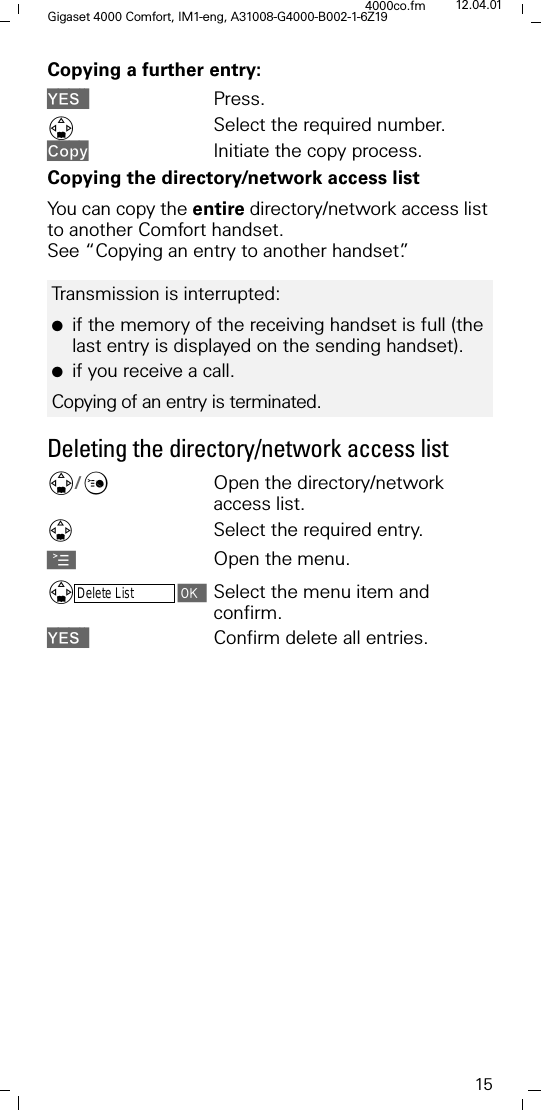
15Gigaset 4000 Comfort, IM1-eng, A31008-G4000-B002-1-6Z194000co.fm 12.04.01Copying a further entry:<(6 Press.'Select the required number.&RS\ Initiate the copy process.Copying the directory/network access listYou can copy the entire directory/network access list to another Comfort handset. See “Copying an entry to another handset”.Deleting the directory/network access list'/&Open the directory/network access list.Select the required entry.AOpen the menu.'Delete ListSelect the menu item and confirm.<(6 Confirm delete all entries.Transmission is interrupted:●if the memory of the receiving handset is full (the last entry is displayed on the sending handset). ●if you receive a call.Copying of an entry is terminated.
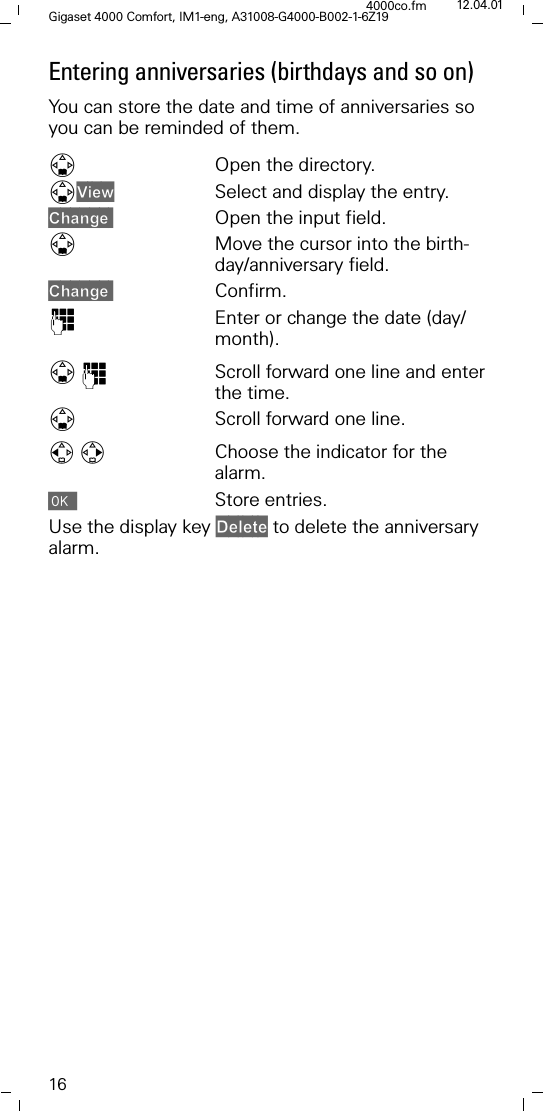
16Gigaset 4000 Comfort, IM1-eng, A31008-G4000-B002-1-6Z194000co.fm 12.04.01Entering anniversaries (birthdays and so on)You can store the date and time of anniversaries so you can be reminded of them.'Open the directory.'9LHZ Select and display the entry.&KDQJH Open the input field.'Move the cursor into the birth-day/anniversary field.&KDQJH Confirm.)Enter or change the date (day/month). ')Scroll forward one line and enter the time.'Scroll forward one line.Choose the indicator for the alarm.Store entries.Use the display key 'HOHWH to delete the anniversary alarm.
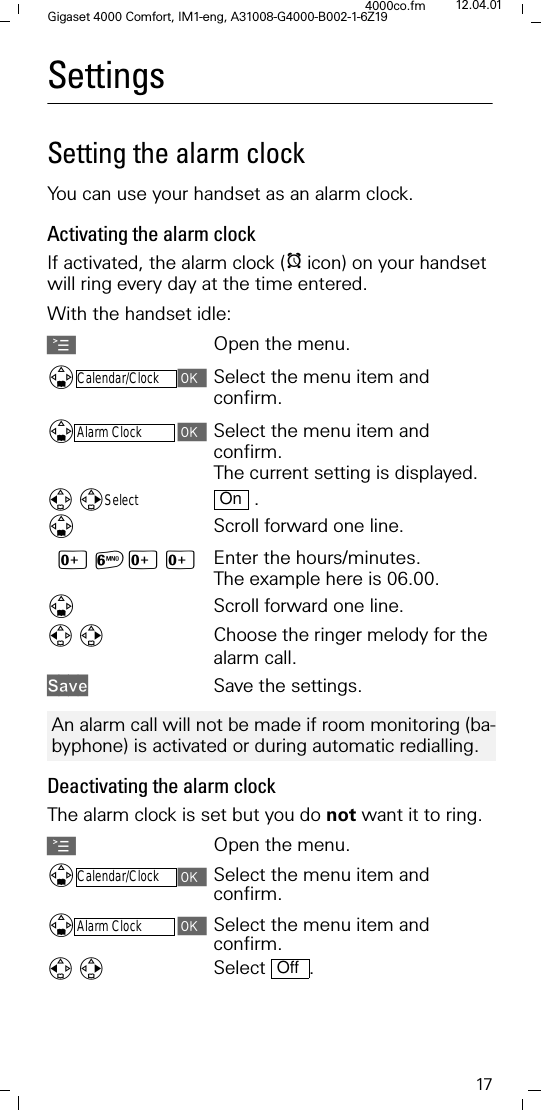
17Gigaset 4000 Comfort, IM1-eng, A31008-G4000-B002-1-6Z194000co.fm 12.04.01SettingsSetting the alarm clockYou can use your handset as an alarm clock.Activating the alarm clockIf activated, the alarm clock (Iicon) on your handset will ring every day at the time entered. With the handset idle: AOpen the menu.'Calendar/ClockSelect the menu item and confirm.'Alarm ClockSelect the menu item and confirm.The current setting is displayed. Select  .'Scroll forward one line.[=[[ Enter the hours/minutes. The example here is 06.00.'Scroll forward one line.Choose the ringer melody for the alarm call.6DYH Save the settings. Deactivating the alarm clockThe alarm clock is set but you do not want it to ring.AOpen the menu.'Calendar/ClockSelect the menu item and confirm.'Alarm ClockSelect the menu item and confirm.Select .OnAn alarm call will not be made if room monitoring (ba-byphone) is activated or during automatic redialling.Off
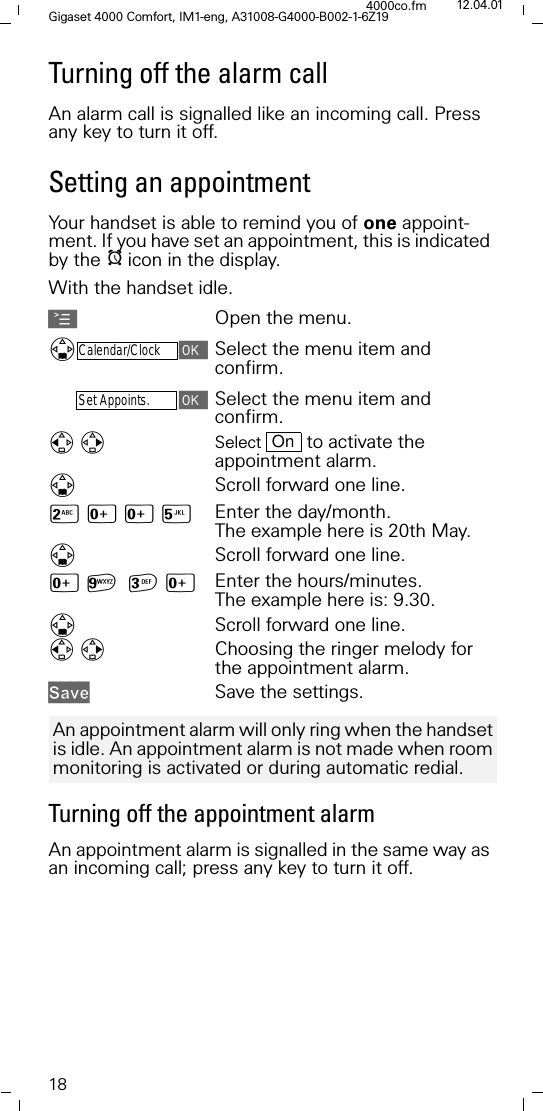
18Gigaset 4000 Comfort, IM1-eng, A31008-G4000-B002-1-6Z194000co.fm 12.04.01Turning off the alarm callAn alarm call is signalled like an incoming call. Press any key to turn it off.Setting an appointmentYour handset is able to remind you of one appoint-ment. If you have set an appointment, this is indicated by the Iicon in the display.With the handset idle.AOpen the menu.'Calendar/ClockSelect the menu item and confirm.Set Appoints.Select the menu item and confirm.Select   to activate the appointment alarm.'Scroll forward one line.9[[< Enter the day/month. The example here is 20th May.'Scroll forward one line.[D[ Enter the hours/minutes. The example here is: 9.30.'Scroll forward one line.Choosing the ringer melody for the appointment alarm.6DYH Save the settings.Turning off the appointment alarmAn appointment alarm is signalled in the same way as an incoming call; press any key to turn it off.OnAn appointment alarm will only ring when the handset is idle. An appointment alarm is not made when room monitoring is activated or during automatic redial.
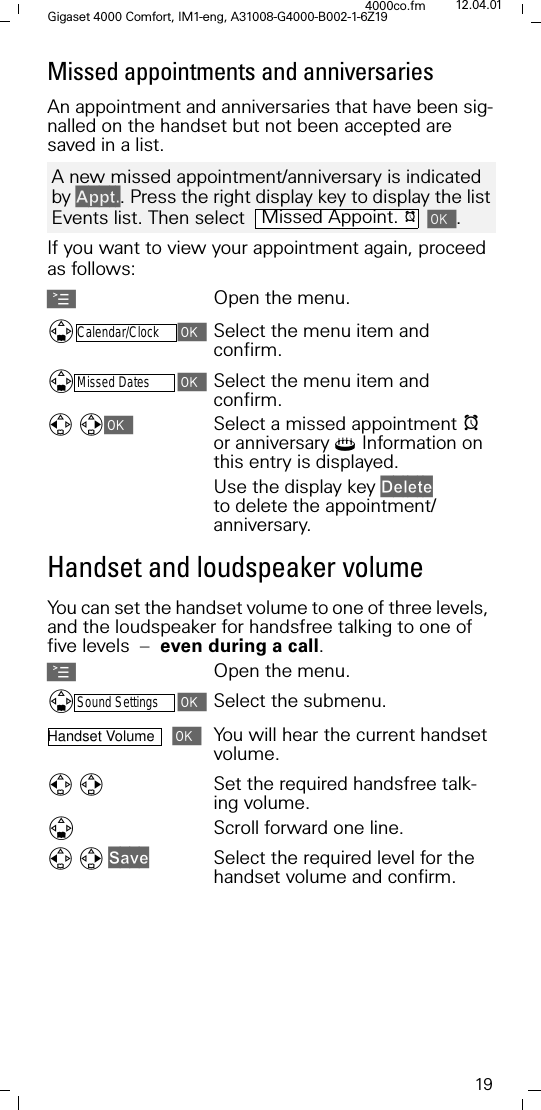
19Gigaset 4000 Comfort, IM1-eng, A31008-G4000-B002-1-6Z194000co.fm 12.04.01Missed appointments and anniversaries  An appointment and anniversaries that have been sig-nalled on the handset but not been accepted are saved in a list.If you want to view your appointment again, proceed as follows:AOpen the menu.'Calendar/ClockSelect the menu item and confirm.'Missed DatesSelect the menu item and confirm.Select a missed appointment Ior anniversary4 Information on this entry is displayed. Use the display key 'HOHWH to delete the appointment/anniversary. Handset and loudspeaker volumeYou can set the handset volume to one of three levels, and the loudspeaker for handsfree talking to one of five levels  –  even during a call.AOpen the menu.'Sound SettingsSelect the submenu.Handset Volume You will hear the current handset volume.Set the required handsfree talk-ing volume.'Scroll forward one line.6DYHSelect the required level for the handset volume and confirm. A new missed appointment/anniversary is indicated by $SSW. Press the right display key to display the list Events list. Then select   .Missed Appoint. I
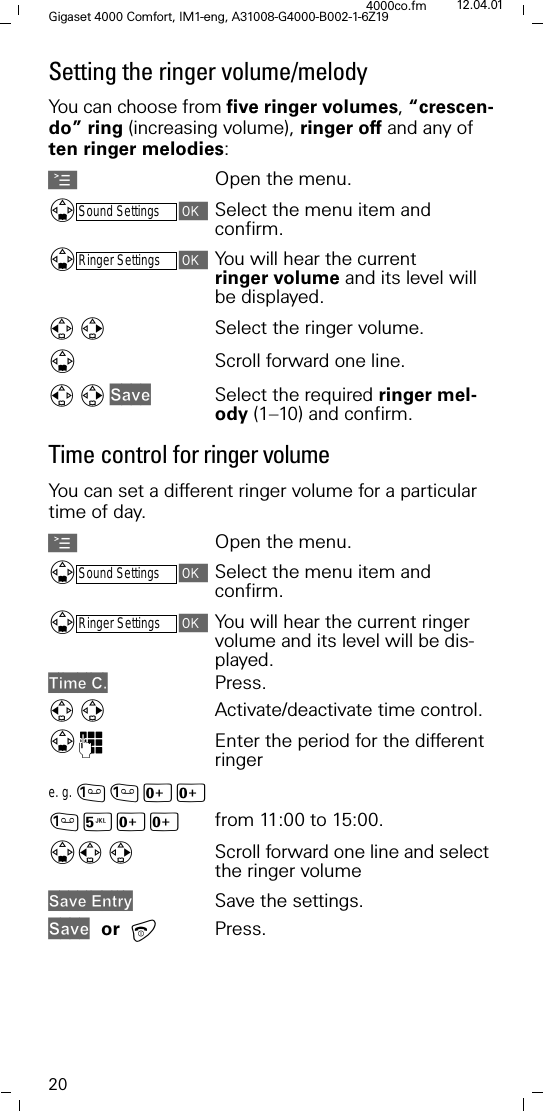
20Gigaset 4000 Comfort, IM1-eng, A31008-G4000-B002-1-6Z194000co.fm 12.04.01Setting the ringer volume/melodyYou can choose from five ringer volumes, “crescen-do” ring (increasing volume), ringer off and any of ten ringer melodies: AOpen the menu.'Sound SettingsSelect the menu item and confirm.'Ringer SettingsYou will hear the current ringer volume and its level will be displayed.Select the ringer volume. 'Scroll forward one line. 6DYHSelect the required ringer mel-ody (1–10) and confirm.Time control for ringer volumeYou can set a different ringer volume for a particular time of day.AOpen the menu.'Sound SettingsSelect the menu item and confirm.'Ringer SettingsYou will hear the current ringer volume and its level will be dis-played.7LPH& Press.Activate/deactivate time control. ')Enter the period for the different ringere. g. [[<[[ from 11:00 to 15:00.'Scroll forward one line and select the ringer volume 6DYH(QWU\ Save the settings.6DYH or Press.
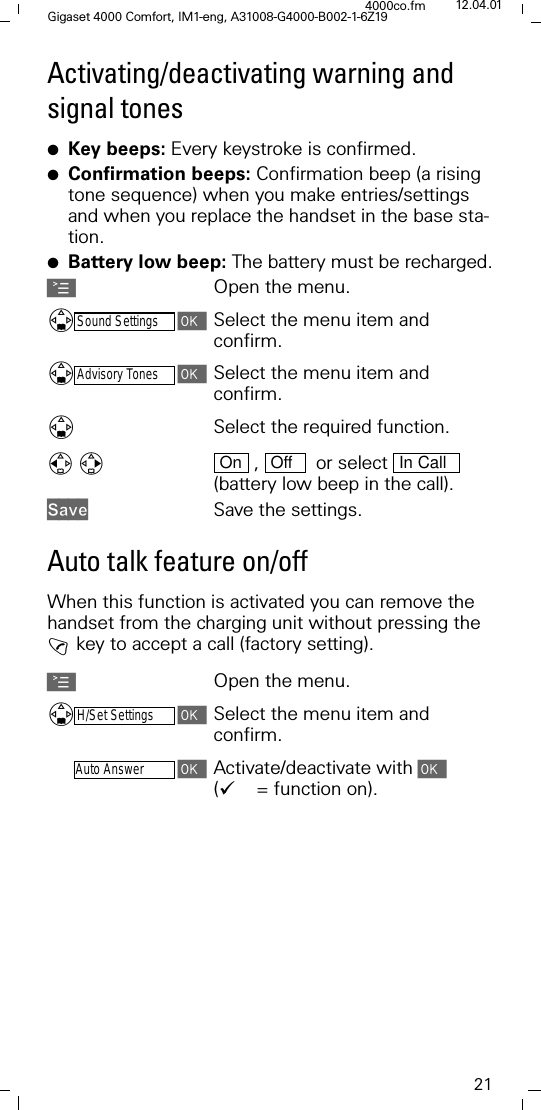
21Gigaset 4000 Comfort, IM1-eng, A31008-G4000-B002-1-6Z194000co.fm 12.04.01Activating/deactivating warning and signal tones●Key beeps: Every keystroke is confirmed.●Confirmation beeps: Confirmation beep (a rising tone sequence) when you make entries/settings and when you replace the handset in the base sta-tion.●Battery low beep: The battery must be recharged.AOpen the menu.'Sound SettingsSelect the menu item and confirm.'Advisory TonesSelect the menu item and confirm.'Select the required function.  ,    or select   (battery low beep in the call). 6DYH Save the settings.Auto talk feature on/offWhen this function is activated you can remove the handset from the charging unit without pressing the ! key to accept a call (factory setting).AOpen the menu.'H/Set SettingsSelect the menu item and confirm.-Auto AnswerActivate/deactivate with ('= function on). On Off In Call
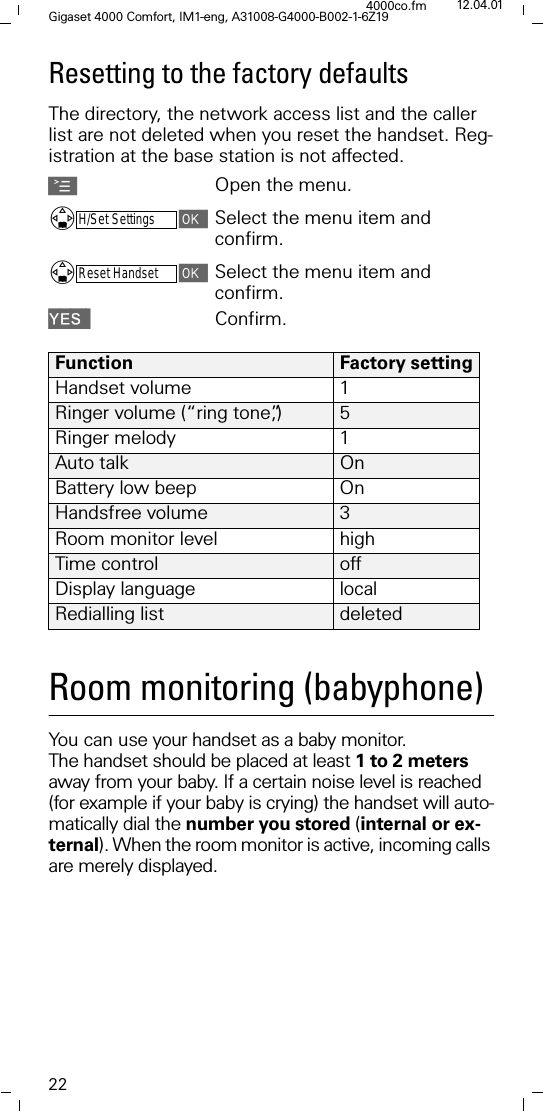
22Gigaset 4000 Comfort, IM1-eng, A31008-G4000-B002-1-6Z194000co.fm 12.04.01Resetting to the factory defaultsThe directory, the network access list and the caller list are not deleted when you reset the handset. Reg-istration at the base station is not affected. AOpen the menu.'H/Set SettingsSelect the menu item and confirm.'Reset HandsetSelect the menu item and confirm.<(6 Confirm.Room monitoring (babyphone)You can use your handset as a baby monitor. The handset should be placed at least 1 to 2 meters away from your baby. If a certain noise level is reached (for example if your baby is crying) the handset will auto-matically dial the number you stored (internal or ex-ternal). When the room monitor is active, incoming calls are merely displayed.Function Factory settingHandset volume 1Ringer volume (“ring tone”,) 5Ringer melody  1Auto talk  OnBattery low beep  OnHandsfree volume 3Room monitor level highTime control offDisplay language  localRedialling list  deleted
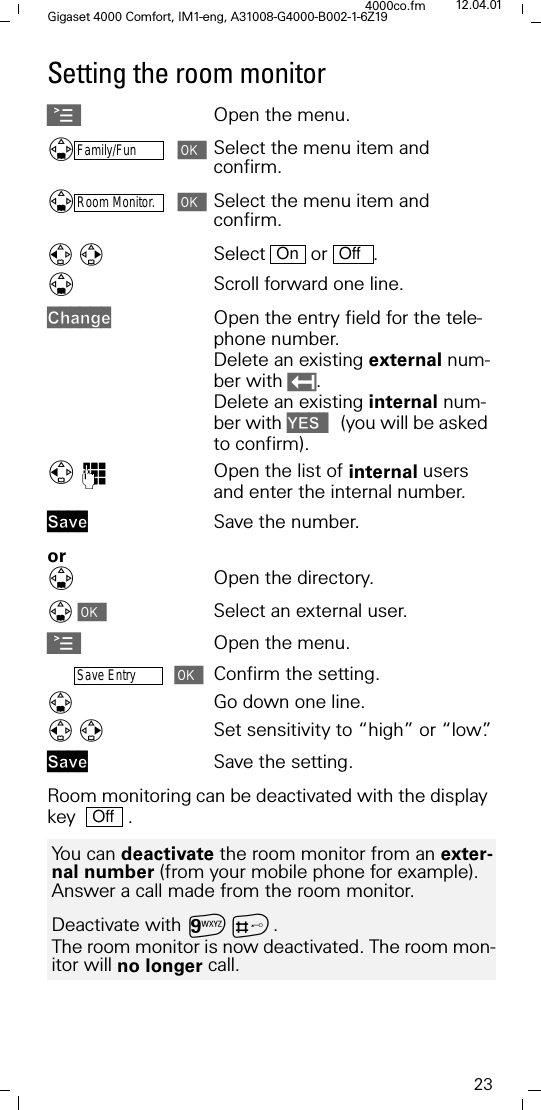
23Gigaset 4000 Comfort, IM1-eng, A31008-G4000-B002-1-6Z194000co.fm 12.04.01Setting the room monitorAOpen the menu.'Family/FunSelect the menu item and confirm. 'Room Monitor.Select the menu item and confirm. Select  or .'Scroll forward one line.&KDQJHOpen the entry field for the tele-phone number. Delete an existing external num-ber with . Delete an existing internal num-ber with <(6  (you will be asked to confirm).)Open the list of internal users and enter the internal number.6DYH Save the number.or'Open the directory.Select an external user.AOpen the menu.Save EntryConfirm the setting.Go down one line. Set sensitivity to “high” or “low”.6DYH Save the setting.Room monitoring can be deactivated with the display key    . On OffYou can deactivate the room monitor from an exter-nal number (from your mobile phone for example). Answer a call made from the room monitor.Deactivate with DB.The room monitor is now deactivated. The room mon-itor will no longer call.Off
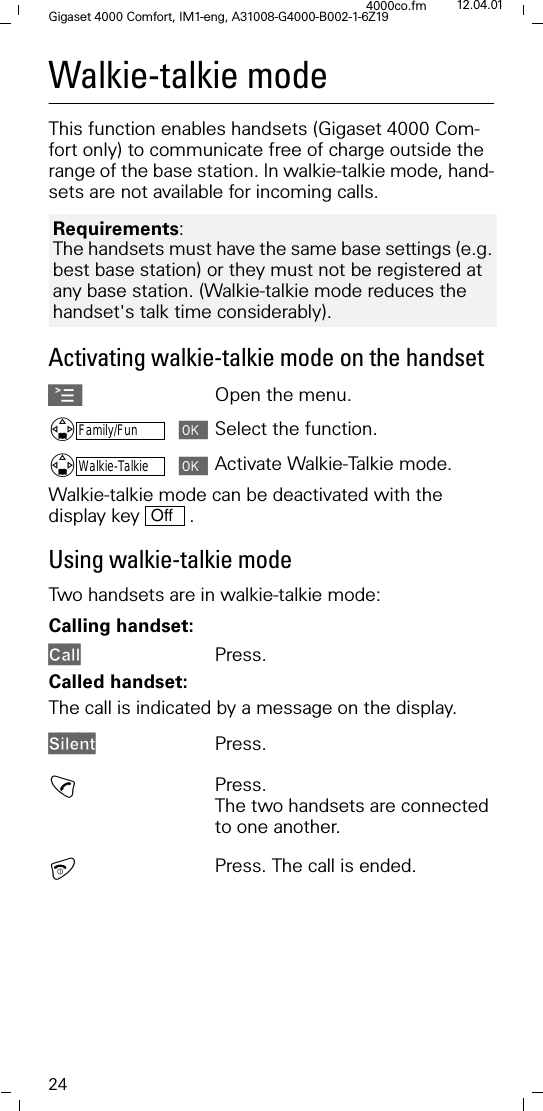
24Gigaset 4000 Comfort, IM1-eng, A31008-G4000-B002-1-6Z194000co.fm 12.04.01Walkie-talkie modeThis function enables handsets (Gigaset 4000 Com-fort only) to communicate free of charge outside the range of the base station. In walkie-talkie mode, hand-sets are not available for incoming calls. Activating walkie-talkie mode on the handsetAOpen the menu.'Family/FunSelect the function.'Walkie-TalkieActivate Walkie-Talkie mode.Walkie-talkie mode can be deactivated with the display key   . Using walkie-talkie modeTwo handsets are in walkie-talkie mode:Calling handset:&DOO Press.Called handset:The call is indicated by a message on the display. 6LOHQWPress.!Press.The two handsets are connected to one another.Press. The call is ended.Requirements: The handsets must have the same base settings (e.g. best base station) or they must not be registered at any base station. (Walkie-talkie mode reduces the handset's talk time considerably).Off
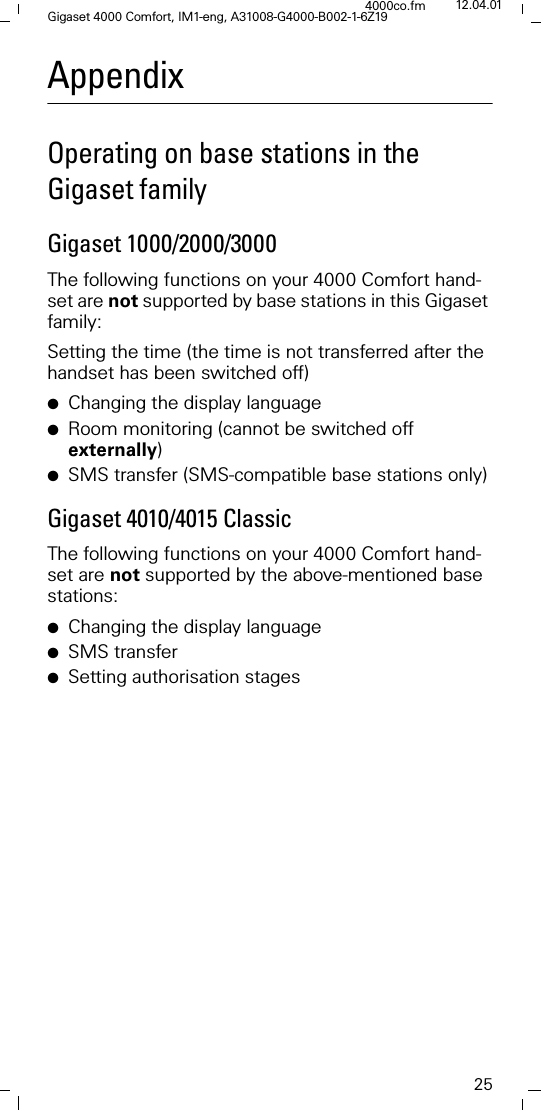
25Gigaset 4000 Comfort, IM1-eng, A31008-G4000-B002-1-6Z194000co.fm 12.04.01AppendixOperating on base stations in the Gigaset familyGigaset 1000/2000/3000The following functions on your 4000 Comfort hand-set are not supported by base stations in this Gigaset family:Setting the time (the time is not transferred after the handset has been switched off)●Changing the display language●Room monitoring (cannot be switched off externally)●SMS transfer (SMS-compatible base stations only)Gigaset 4010/4015 ClassicThe following functions on your 4000 Comfort hand-set are not supported by the above-mentioned base stations:●Changing the display language●SMS transfer●Setting authorisation stages
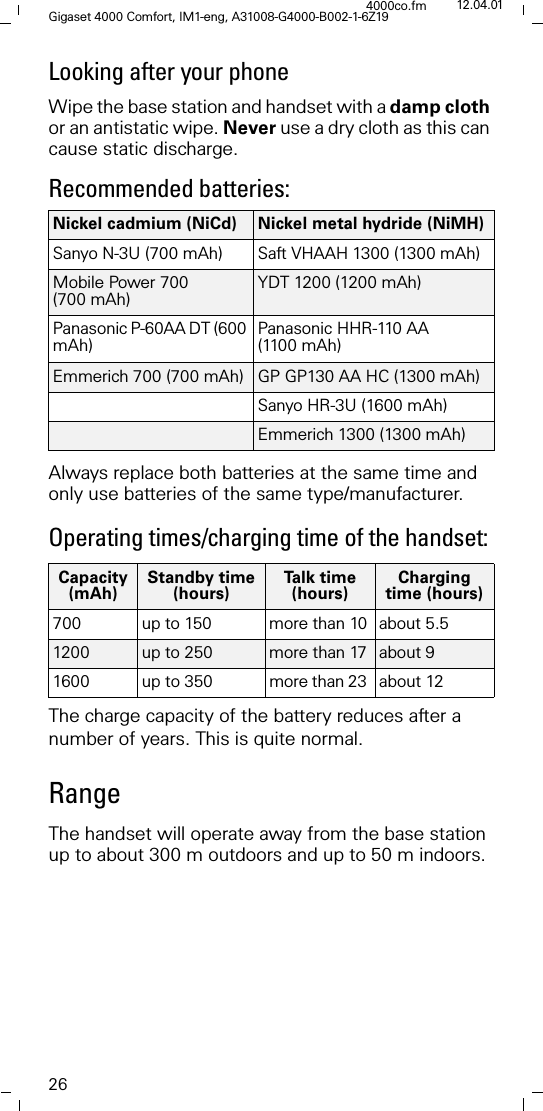
26Gigaset 4000 Comfort, IM1-eng, A31008-G4000-B002-1-6Z194000co.fm 12.04.01Looking after your phoneWipe the base station and handset with a damp cloth or an antistatic wipe. Never use a dry cloth as this can cause static discharge.Recommended batteries:Always replace both batteries at the same time and only use batteries of the same type/manufacturer.Operating times/charging time of the handset:The charge capacity of the battery reduces after a number of years. This is quite normal.RangeThe handset will operate away from the base station up to about 300 m outdoors and up to 50 m indoors. Nickel cadmium (NiCd) Nickel metal hydride (NiMH)Sanyo N-3U (700 mAh) Saft VHAAH 1300 (1300 mAh)Mobile Power 700 (700 mAh)YDT 1200 (1200 mAh)Panasonic P-60AA DT (600 mAh) Panasonic HHR-110 AA (1100 mAh)Emmerich 700 (700 mAh) GP GP130 AA HC (1300 mAh)Sanyo HR-3U (1600 mAh)Emmerich 1300 (1300 mAh)Capacity(mAh)Standby time(hours)Ta l k  t i m e(hours)Charging time (hours)700  up to 150 more than 10 about 5.51200  up to 250 more than 17 about 9 1600  up to 350  more than 23  about 12
27Gigaset 4000 Comfort, IM1-eng, A31008-G4000-B002-1-6Z194000co.fm 12.04.01GuaranteeIf the telephone fails during the guarantee period be-cause of poor workmanship or faulty materials Sie-mens AG will repair or replace it. The guarantee period for Europe is at least 24 months (12 months up to 31.12.2001).The guarantee does not cover damage caused by im-proper use, wear and tear or unauthorised repairs. The guarantee does not cover consumables or defects that have only a negligible effect on the value or oper-ation of the telephone.For information on service telephone numbers see back coverApprovalThe 4000 Comfort handset is approved for use throughout the EU.

Navigation menu