Smart Parts Ion Users Manual
2015-09-01
: Smart-Parts Smart-Parts-Ion-Users-Manual-804629 smart-parts-ion-users-manual-804629 smart-parts pdf
Open the PDF directly: View PDF  .
.
Page Count: 27
ION
1
3
4
6
10
5
7
8
15
211
14
18
16
17
12
13
9
Operation and adjustment instructions
QUICK START
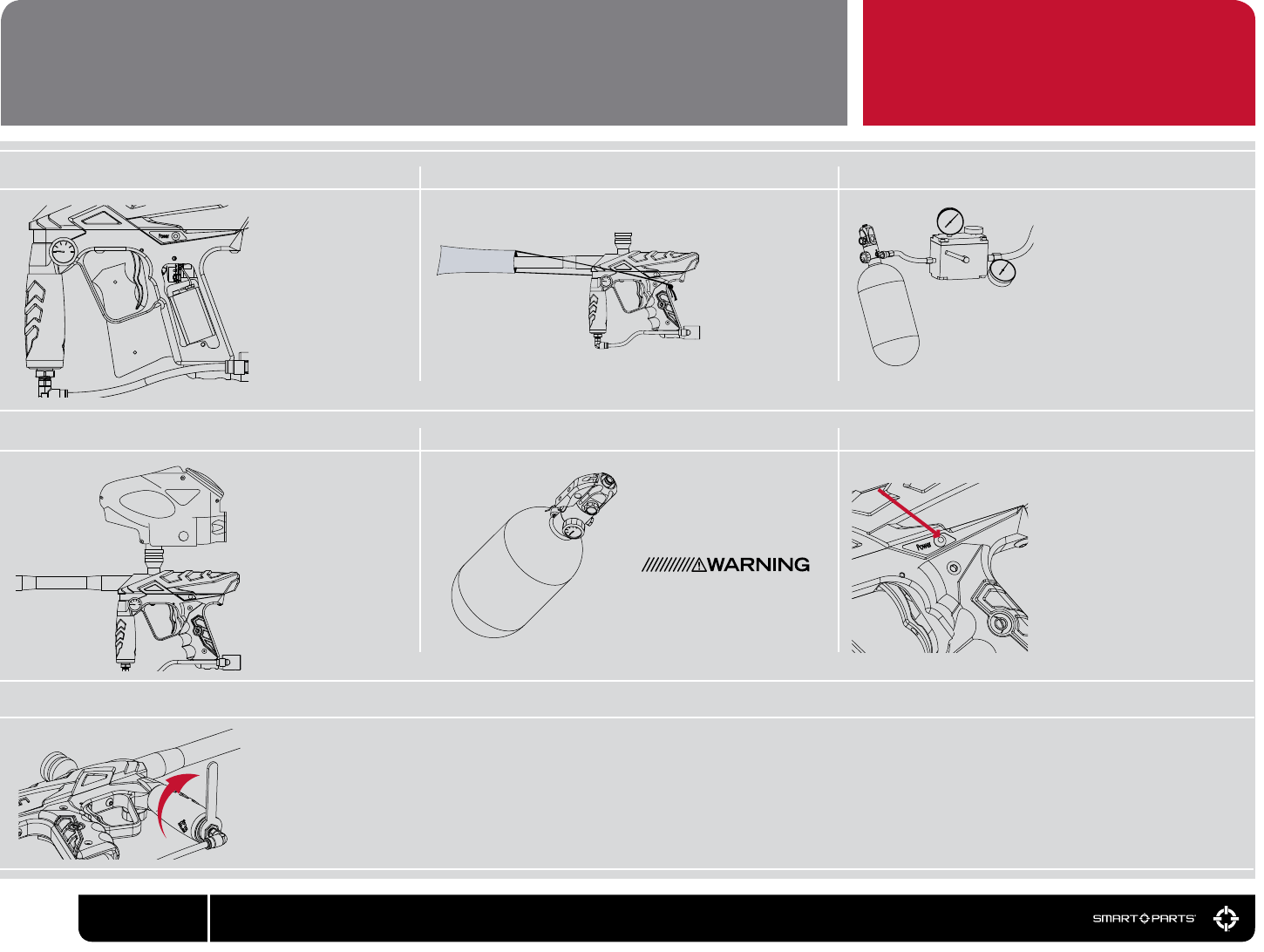
01 02 03
Using a #1 Phillips
Screwdriver, remove
the two screws from the
left side of the rubber
grip and lift the panel
open. Attach a fresh
9-volt alkaline battery
to the battery clip. Posi-
tion the battery in the
grip frame, tucking the
battery wires into the
space above the bat-
tery. Close the grip and
reinstall the screws.
Screw the
included barrel
into the Ion. Put
the supplied barrel
blocker over the
end of the barrel,
securing its cord
as far back on the
Ion body as pos-
sible, and cinching
it tight.
Fill the loader with paint and turn it on. While wearing ASTM compliant paintball goggles, in an area where all bystanders are protected, remove the barrel blocker and re over
a chronograph to measure the velocity. Using a 5/8-inch open-end wrench or adjustable wrench on the ats at the bottom of the vertical regulator, turn clockwise to increase
velocity/pressure, and counter-clockwise to decrease. Take three or four shots after every adjustment to allow the gas pressure inside the Ion to stabilize. Adjust until the marker
is ring consistently within the limits for the eld where you are playing (for safety reasons, never adjust the Ion to re at greater than 300 feet per second.) As you adjust, check
the marker’s pressure gauge to be certain you stay below the Ion’s operating limit of 200 psi. Depending on what modes of re are allowed at the eld where you are playing
(semi-automatic, rebound, etc.) you may need to adjust the Ion’s ring mode. See the Electronic Adjustment section for more information. Shoot out the competition, hang the
ag and win the game.
Insert your loader into the
feedneck and make sure it
is secure. Due to the high
rates of re that the Ion can
achieve, we recommend
the use of a modern high-
performance loader. Be
sure the loader ts securely
and is twist-t in place with
a clockwise motion (see
the Hopper section.)
Gently gas up the marker
by slowly turning on the air
system or ASA’s on/off valve,
or slowly screwing the CO2 or
compressed air system into
the ASA.
A gentle rise in pressure is
important, as a sudden blast
may reduce the service life of
the Ion’s internals.
Turn on the marker by hold-
ing the power button down for
approximately 2 seconds. The
marker will turn on with Vision
mode activated. The light will blink
slowly if there is no paintball in
the breech, or rapidly if there is.
To de-activate Vision mode, press
the power button briey and it will
blink in a double-tap sequence.
Press it briey again to re-activate
Vision mode. Press and hold the
power button for approximately 2
seconds to turn the Ion off.
04 05 06
BATTERY BARREL BLOCKER FILL TANK
LOADER TURN ON AIR TURN ON ION
ADJUST VELOCITY
07
00 800.922.2147 www.smartparts.com
PLEASE READ CAREFULLY
Have your compressed air (HPA)
or CO2 tank lled by a person
who is properly trained to do so.
If using an HPA system with an
on/off valve, such as the Max-Flo
or Max-Flo Micro, make sure it is
in the OFF position.
POWER BUTTON
Quick Start
Getting Familiar
Barrel Blocker/Hopper
Gases
Gas System Mounting
Paint/Velocity
Vision/Degassing
Electronic Adjustment
Dwell
ROF Delay/Fire Modes
Trigger Adjustment
Ion Parts
Disassembly
Reassembly
Solenoid
Regulator
Ball Detents
Troubleshooting
Warranty/Tech Support
CPS Table
00
02
03
04-05
06
07
08
09
10
11
12
13
14-15
16
17
18
19
20-23
23
24
TABLE OF CONTENTS
01
800.922.2147 www.smartparts.com
– THE ION IS NOT A TOY
– MISUSE OF THE ION MAY RESULT IN SERIOUS
INJURY OR DEATH.
– EYE PROTECTION SPECIFICALLY DESIGNED FOR PAINT-
BALL USE MUST BE IN COMPLIANCE WITH ASTM SPECI-
FICATION F1776 AND MUST BE USED BY THE USER AND
ANYONE WITHIN RANGE OF THE ION.
– SMART PARTS RECOMMENDS THAT THE ION ONLY
BE SOLD TO PERSONS 18 AND OLDER.
– THOROUGHLY READ THE ION OPERATION AND
INSTRUCTION MANUAL BEFORE OPERATING.
– TREAT EVERY PAINTBALL MARKER AS IF IT WERE
LOADED.
– NEVER LOOK DOWN THE BARREL OF A PAINTBALL
MARKER.
– KEEP YOUR FINGER OFF THE TRIGGER UNTIL READY TO
SHOOT.
– NEVER POINT THE ION AT ANYTHING YOU DON’T
WISH TO SHOOT.
– KEEP THE ION ON SAFE (POWER OFF) UNTIL
READY TO SHOOT. (SEE QUICK START)
– KEEP THE BARREL BLOCKING DEVICE ON THE
ION’S MUZZLE WHEN NOT SHOOTING.
(SEE BARREL BLOCKER SECTION).
– ALWAYS REMOVE PAINTBALLS AND DEGAS THE
ION BEFORE DISASSEMBLY. (SEE DEGAS-
SING SECTION.)
– STORE AND TRANSPORT THE ION UN-
LOADED AND DEGASSED IN A SECURE PLACE.
– FOLLOW ALL MANUFACTURER’S WARNINGS AND
INSTRUCTIONS FOR PROPELLANT SOURCE HANDLING,
STORAGE, AND FILLING.
– DO NOT SHOOT FRAGILE OBJECTS SUCH AS WINDOWS.
– ALWAYS MEASURE THE VELOCITY OF PAINTBALLS FIRED
BY THE ION BEFORE USE, AND NEVER ADJUST TO
FIRE ABOVE 300FPS (91.44 M/S.)
While every effort has been made to ensure that the information contained in this guide is accurate and complete, no liability can be accepted for er-
rors or omissions. Smart Parts, Inc. reserves the right to change the specications of the Ion at any time without prior notice. The latest version of this
manual may be downloaded free of charge at www.SmartParts.com.
MAINTENANCE
The Ion has been designed with simplicity in mind so that you can concentrate on your game instead of
your marker. It has a minimal number of moving parts and seals so that you can maintain the marker with
little effort. This DOES NOT mean that you should neglect your marker. If you take care of it off the eld,
your Ion will take care of you on the eld. For best performance, clean and grease your Ion frequently.
Many players clean their marker after every use. While this may seem a bit extreme, being vigilant in the
upkeep of your marker will extend its useful life considerably. Playing in the rain will not damage your Ion,
but you should NEVER immerse it in water. If your marker should become waterlogged, remove the barrel,
body cover and rubber grips and allow them to dry out, then follow the disassembly instructions for full
cleaning. Clean out mud and paint with a damp cloth and alcohol. Grease the Ion ONLY with SL33K pneu-
matic grease. For best performance, use high quality paintballs.
STATISTICS
LENGTH/HEIGHT/WEIGHT:
OPERATING PRESSURE:
PAINTBALLS:
POWER SOURCE:
PROPELLANT:
RATE OF FIRE:
OPERATION:
MODES OF FIRE:
ANTI CHOP SYSTEM:
BARREL THREAD:
GAS EFFICIENCY:
LUBRICANT:
18 Inches (with stock 12” barrel) / 8.5 Inches (with ASA) / 2lbs, 2oz (marker only)
Approx. 180 psi, 200 psi max
.68 caliber –Compliant to ASTM F1979 Specication
9-volt alkaline battery
CO2 or Nitrogen/Compressed air
17 bps maximum – 20 bps max with optional Blackheart board
Low pressure electropneumatic
Full Auto, 3-shot burst, Semi automatic and Rebound
Break Beam Vision
Smart Parts (Impulse/Ion)
1200 shots (68ci, 4500psi tank), 800 shots (20oz. ANTI-SIPHON tank) – Efciency will vary with
paint, barrel and setting combinations.
For proper and consistent operation, the Ion should only be lubricated with SL33K lubricating
grease.
GETTING FAMILIAR
02 800.922.2147 www.smartparts.com
PLEASE READ CAREFULLY
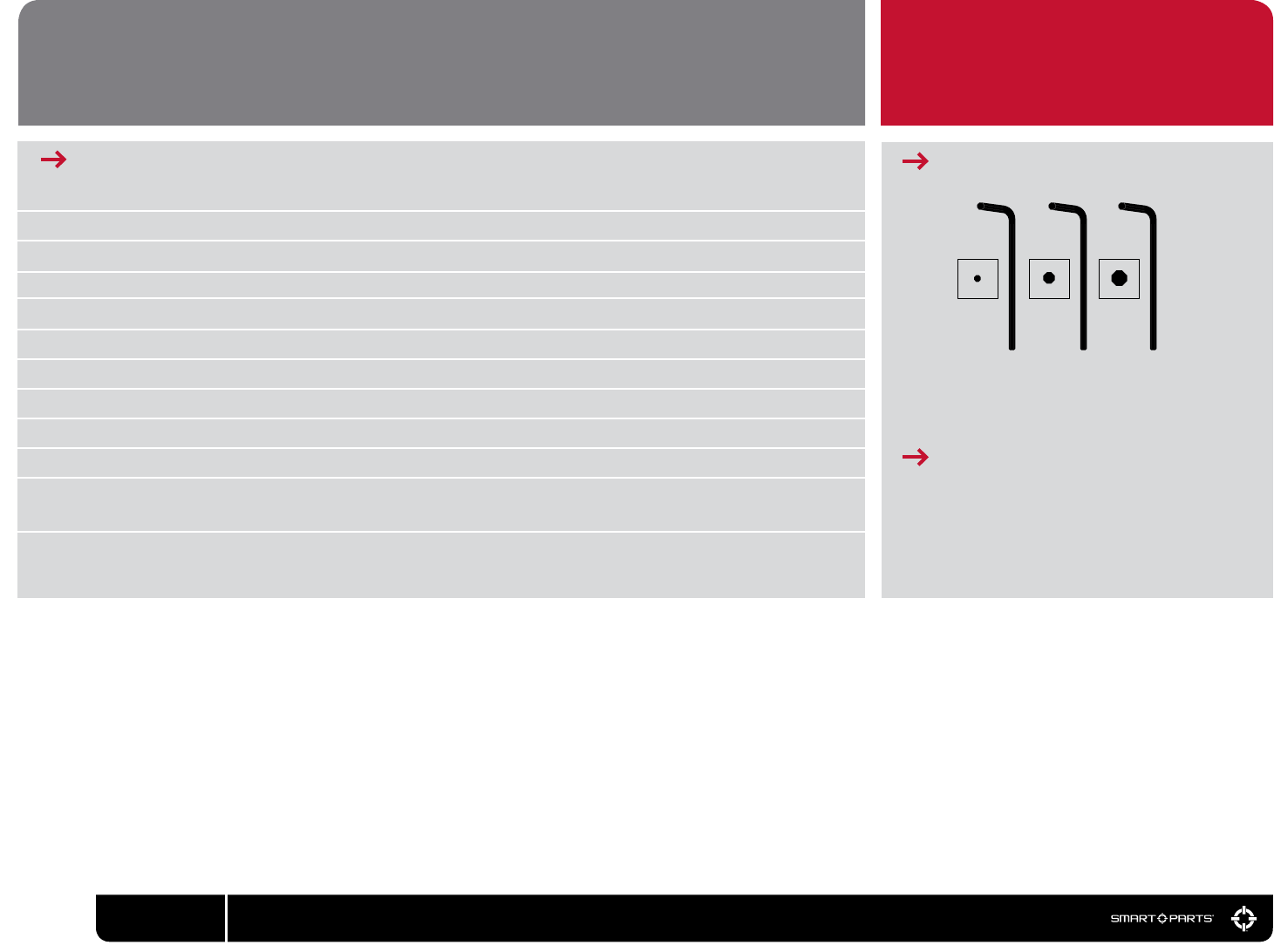
REQUIRED ALLEN WRENCHES
.050” 3/32” 1/8”
· 5/8” OPEN OR ADJUSTABLE END WRENCH
· 9/16” DEEP WALL SOCKET AND WRENCH
· #1 PHILLIPS SCREWDRIVER
ADDITIONAL REQUIRED ITEMS
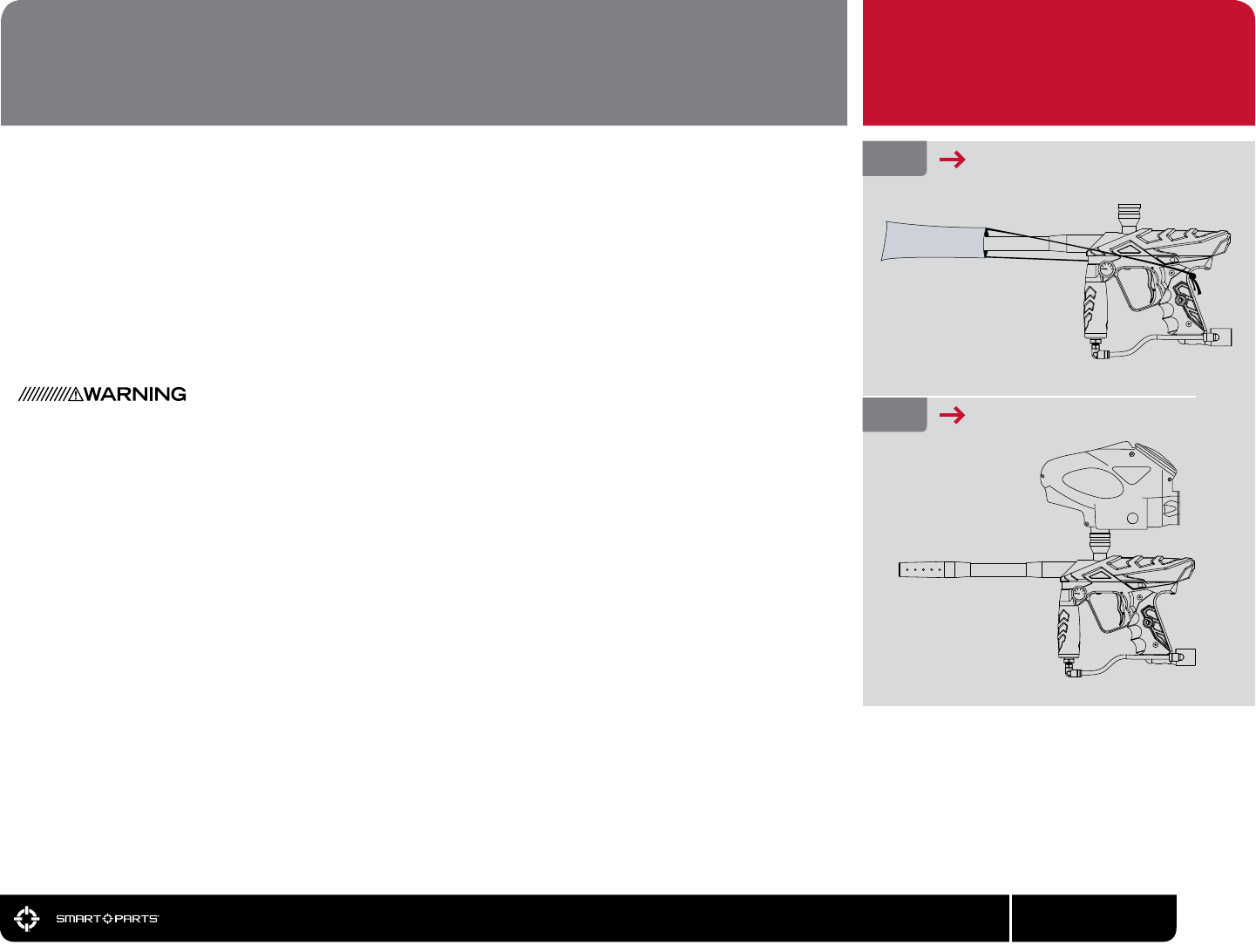
FIG. 1
FIG. 2
BARREL BLOCKER IN USE
USE HIGH PERFORMANCE LOADER
BARREL BLOCKER
The Barrel Blocking Device is a critical piece of paintball safety equipment - nearly as important as
paintball goggles. The Barrel Blocker serves to protect against accidental discharge of a paintball
by catching it before it can cause harm. A Barrel Blocker is included with the Ion, and must be used
every time the marker is handled in an area where people or property are not properly protected by
paintball goggles or paintball eld netting. To use the Barrel Blocker simply slip it over the end of the
barrel and stretch its cord back over the back of the marker or the rearmost part over which it can
be securely looped. Use the strap’s adjuster to cinch the strap tight, so that the Barrel Blocker can
provide protection against accidental discharge of a paintball.
The Barrel Blocker should only be removed when the marker is on a “live” paintball eld and all per-
sons involved are wearing proper paintball protection.
HOPPER
The Ion is a high performance tournament grade paintball marker. The break-beam Vision system
means that you won’t need to worry about chopping paint because your trigger nger is faster than
your hopper. However, if you want to realize the marker’s maximum repower potential, you will need
to use a high performance loader. High performance loaders, especially those which provide force-
feeding, will yield the best results with the Ion.
Depending on the dimensions of your hopper you may choose to remove one or more of the fric-
tion o-rings from inside the feed tube, and or to sand down the hopper’s feed neck. The t should be
snug, but not excessively tight. Always twist hoppers clockwise when installing or removing, to avoid
unscrewing the feedtube from the body breech.
BARREL BLOCKER/HOPPER
03
800.922.2147 www.smartparts.com
PLEASE READ CAREFULLY
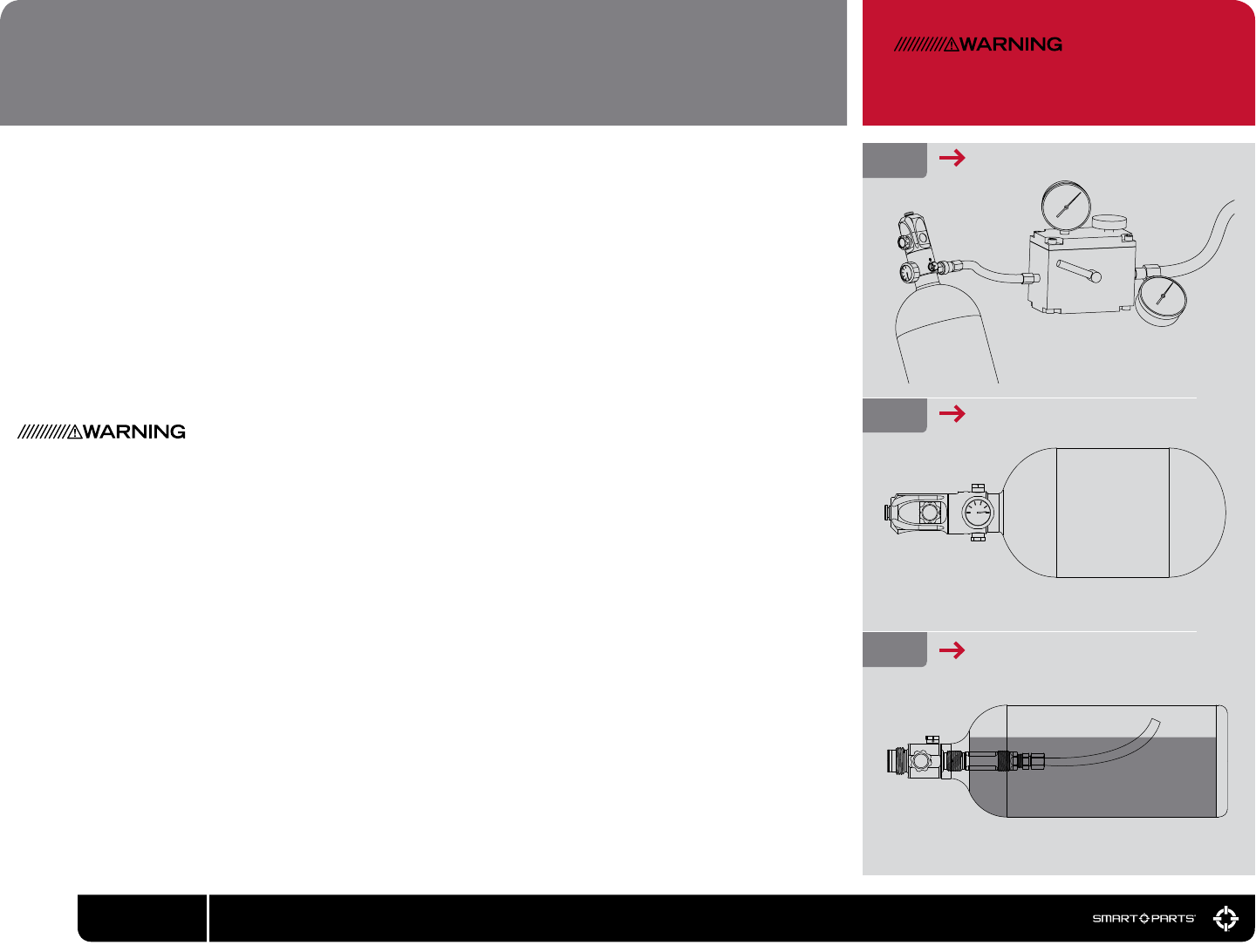
Never put oil in a compressed air regulator or tank—only
apply manufacturer specied lubricants.
The Ion is a low-pressure paintgun. It operates optimally at 180 psi, which means it can function well with
either compressed air or CO2 as a power source. Proper set up of your gas system will help you obtain
the best possible performance.
High Pressure Air systems (HPA) are the most common power source used with the Ion, as they are
unaffected by temperature uctuations and do not have the potential for liquid problems. HPA systems
consist of a tank and a regulator, and are typically rated to store air or nitrogen (while pure nitrogen is
almost never used in paintball, many players call compressed air “nitro” as air is made of more than 70%
nitrogen) at pressures of 3,000 or 4,500 psi.
There are two main types of HPA systems, those on which the output pressure is adjustable, and those
for which their regulator is pre-set to a xed output pressure. HPA systems designed to screw into an
ASA are usually pre-set to deliver either 400 psi (low pressure output) or 800 psi (high pressure output.)
Never use oil or any petroleum based cleaner or lubricant in a compressed air regulator or tank. Ex-
posure to pressurized air increases oil’s ammability and can cause a serious safety hazard. Only use
manufacturer recommended lubricants with compressed air systems, and follow the manufacturer’s
maintenance and operation instructions explicitly.
If you are using your Ion with an adjustable output compressed air system, it should be adjusted to de-
liver about 650 psi to the marker’s vertical regulator. The Ion’s regulator can accommodate a wide range
of input pressures, so exact adjustment of the air system is not critical, and either low output, or high
output pre-set HPA systems may be used as well.
While CO2 can also be used, it is less popular, since its pressure uctuates with temperature and use.
The important thing to remember when using CO2 is that liquid CO2 must not be delivered to the marker.
If liquid CO2 were to make it past the vertical regulator, it could expand into gas form inside the paintgun,
raising the pressure levels high enough to cause damage to internal seals, hoses or the solenoid valve.
Because liquid CO2 is heavier than CO2 gas, it is easily blocked through the use of gravity.
FIG. 3 HPA TANK BEING FILLED
GASES
04 800.922.2147 www.smartparts.com
FIG. 4
FIG. 5
COMPRESSED AIR
CO2 WITH ANTI-SIPHON [CUTAWAY VIEW]

GASES
05
800.922.2147 www.smartparts.com
PLEASE READ CAREFULLY
IMPORTANT
CO2 can also be used with remote hose
with-out Anti-Siphon. [Not Shown]
Two easy ways to properly use CO2 with the Ion are an anti-siphon tank or a remote line.
Anti-siphon tanks have a J shaped tube professionally installed inside. When the tank is screwed into a
bottom line ASA, such as the one that is standard on the Ion, the tube delivers gas only. The anti-siphon
tube works like a diver’s snorkel, repositioning the gas intake from the valve to the top side of the tank.
When an anti-siphon tube is installed in a tank, the airsmith will usually mark the valve, to indicate the
position of the tube. When the tank is screwed into a marker, this mark must be oriented to the top.
A remote hose allows a standard (non-siphoned) CO2 tank to be carried in a player’s pack. Not only does
this reduce the total weight of the marker, but it also allows the tank to be placed vertically, so that its
valve is at the top while gravity holds the liquid CO2 at the bottom. It is important to note that lying down
on the eld or crawling while using a remote can cause liquid CO2 to be fed to the paintgun as the tank is
turned on its side.
Whether using compressed air or CO2 it is important that the marker is not exposed to sudden “pops”
of pressure. If using a standard ASA with a screw in HPA system or CO2 tank, screw the tank in slowly,
so that the valve opens slowly and the pressure rises gently. If using an ASA with a built in on/off valve,
screw in the tank fully, then open the valve slowly. If using an HPA system or CO2 tank with its own on/off
valve, open that valve slowly. Be gentle to the internals of your marker and they will reward you with a
long service life.

FIG. 6 BOTTOM OF GRIP FRAME
The Ion uses paintball industry standard gas system mounting. At the bottom of the grip frame, it has a
pair of 10-32 screw holes.
The Ion is precongured with a standard duckbill style ASA mounted on bottom of the grip frame. To
remove this ASA, degas and unload the marker. Use a 1/8” allen wrench to remove the two ASA mount
screws. The ASA can be replaced with a mounting rail or drop forward to place the gas source in a
position that is most comfortable for you.
GAS SYSTEM MOUNTING
06 800.922.2147 www.smartparts.com
PLEASE READ CAREFULLY

PAINT
Even the best quality paintballs will vary in size from one batch to the next and as weather conditions
change. While your marker will work well even with a poor paint to barrel t, optimal performance will
be achieved with a proper t. Paintgun barrels are available in a variety of bore sizes to allow the user to
select the best possible t, and barrel kits like The Freak allow for easy adjustment to paint of different
diameters.
The ideal t between the paintball and the barrel is when the ball is inserted in the bore (the end that
screws into the marker) and does not slip or roll through to the muzzle (the business end) on its own. The
ball should sit in place, even when the barrel is pointed straight down. If the paintball can roll out on its
own, the t is too loose. The ball should be able to be expelled from the barrel by blowing it out like a
blowgun, using a minimal amount of breath. If the ball is difcult to blow through, the t is too tight, which
can lead to ball breakage.
VELOCITY
The velocity, or speed at which a marker res a paintball, must be measured and adjusted to below the
paintball eld’s velocity limit immediately before each day of play. This is required for player safety. If CO2
is used, velocity should be checked and adjusted multiple times during the day. While wearing proper
paintball specic goggles and protective equipment, and in an area in which all persons and property are
properly protected, re three or four shots over a chronograph and if necessary change the velocity by
adjusting the vertical regulator with a 5/8-inch open-end or adjustable wrench. Turn clockwise to increase
velocity/pressure, and counter-clockwise to decrease. Take three or four shots after every adjustment to
allow the gas pressure inside the marker to stabilize. Adjust until the marker is ring consistently within
the limits for the eld where you are playing. For safety reasons, never adjust the marker to re at greater
than 300 feet per second. As you adjust, check the pressure gauge to be certain you stay within the Ion’s
operating pressure range of 160 to 200 psi. Optimal pressure is 180 psi.
07
800.922.2147 www.smartparts.com
PLEASE READ CAREFULLY
PAINT / VELOCITY
INCREASING VELOCITY
FIG. 9
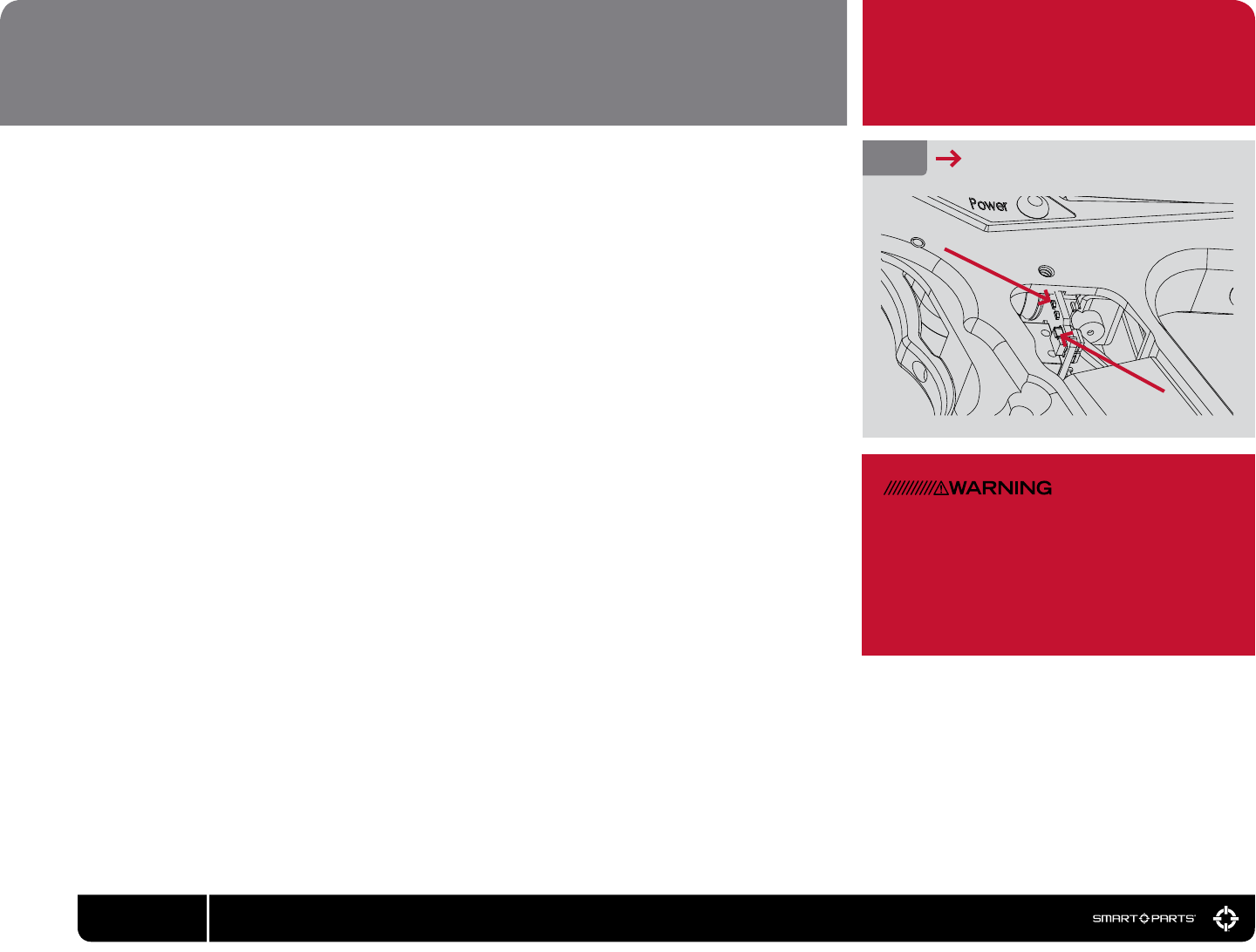
PROGRAMMING BUTTON/LED
FIG. 10
PROGRAMING
BUTTON
LEDs
VISION INSTRUCTIONS
When the Ion is turned on it will be in Vision mode. The internal infra-red eye will be used to detect
whether or not a paintball is in the breech. This feature practically eliminates the possibility of a chopped
paintball. Vision mode is indicated by a rapid blinking of the light in the power button when there is a
paintball in the breech, or a slow blinking when it is empty. Vision mode can be de-activated by pressing
the power button quickly while the marker is on. Vision mode off is indicated by a double-tap blink-
ing pattern on the power button light. Vision mode may be turned back on by once again pressing the
power button briey.
DEGASSING
At the end of each day’s use and before performing maintenance work on your marker, it will need to be
degassed, and all paintballs must be removed. In an area where it is safe to shoot (such as the chrono-
graph area at a paintball eld) and while wearing paintball goggles, remove the hopper from the feed-
neck. By turning the marker upside down, you can empty any extra paintballs from the feedneck into
your hand. Turn the marker on, then deactivate Vision mode by pressing the power button momentarily.
Dry-re 2 or 3 shots in a safe direction to ensure that no paintballs remain in the marker. Turn off the
compressed air system or on/off ASA, or unscrew the compressed air system or CO2 tank far enough to
close its pin valve.
Continue to dry re the marker in a safe direction until all of the gas pressure inside has been released.
At this point the only sound you should hear when you pull the trigger is the click of the solenoid valve.
Turn off the Ion by pressing and holding the power button for two or more seconds.
If using a CO2 tank or screw in HPA system, unscrew it the rest of the way.
If the marker is to be stored for an extended period of time, remove the 9-volt battery from the grip
frame.
VISION/DEGASSING PLEASE READ CAREFULLY
Even with no CO2 tank or compressed air
system attached, the marker may still have
enough gas pressure stored in the regulator
and re chamber to re 2 or more shots. You
must degas your marker before storage or
maintenance.
08 800.922.2147 www.smartparts.com
PROGRAMMING EXAMPLE
To set a dwell value of 18ms, rst press
the programming button as many times as
needed to light the red programming LED
solidly. Then press and hold the power but-
ton until the red LED blinks alone, indicating
that the bottom of the adjustment range
(8ms) has been reached. Press the pro-
gramming button again to cycle through the
programming modes until the yellow LED is
lit solidly indicating Dwell Up function. Then,
press the upper power button 20 times (20
button presses x 0.5ms = 10ms increase or
18ms total.) Pull the trigger to exit the pro-
gramming mode and save the setting.
ELECTRONIC ADJUSTMENT
Dwell, Rate of Fire Delay and Mode adjustments are made using the marker’s programming button and
power button. Removing the two grip screws on the left side of the Ion’s grip frame and folding the grip
back provides access to the programming button. The button is small, gray and rectangular in shape.
It is mounted on the circuit board facing the left edge for easy access. A notch in the board helps to
identify the button and make it easier to press.
Yellow and red light emitting diodes (LEDs) are located on the circuit board just above the programming
button. The patterns which ash on these buttons indicate the function the power button will perform
when pressed.
To enter the programming modes, make sure the Ion is completely degassed and unloaded, with a
barrel blocker properly in place. Turn the marker on and note that the programming LEDs are not lit or
ashing. This indicates that the Ion is in operational mode rather than a programming mode. To select
one of the programming modes, press the programming button and note the sequence of blinking
LEDs to determine which mode you have selected. The yellow LED indicates that you have selected to
increase a setting, and the red LED indicates that you have chosen to decrease a setting. The LED will
be lit solidly for adjustment of the dwell, single blink for adjustment of the ROFDelay and double blink
for adjustment of the ring mode.
To change a particular setting, choose the appropriate mode, then press the power button. Both LEDs
will blink to acknowledge that the adjustment has been made. When only the red LED blinks after
pressing the power button, this indicates that you have reached the lower limit of adjustment. Similarly
only the yellow LED will blink to indicate that the upper adjustment limit has been reached. Pull the trig-
ger to exit the programming mode and save your new settings.
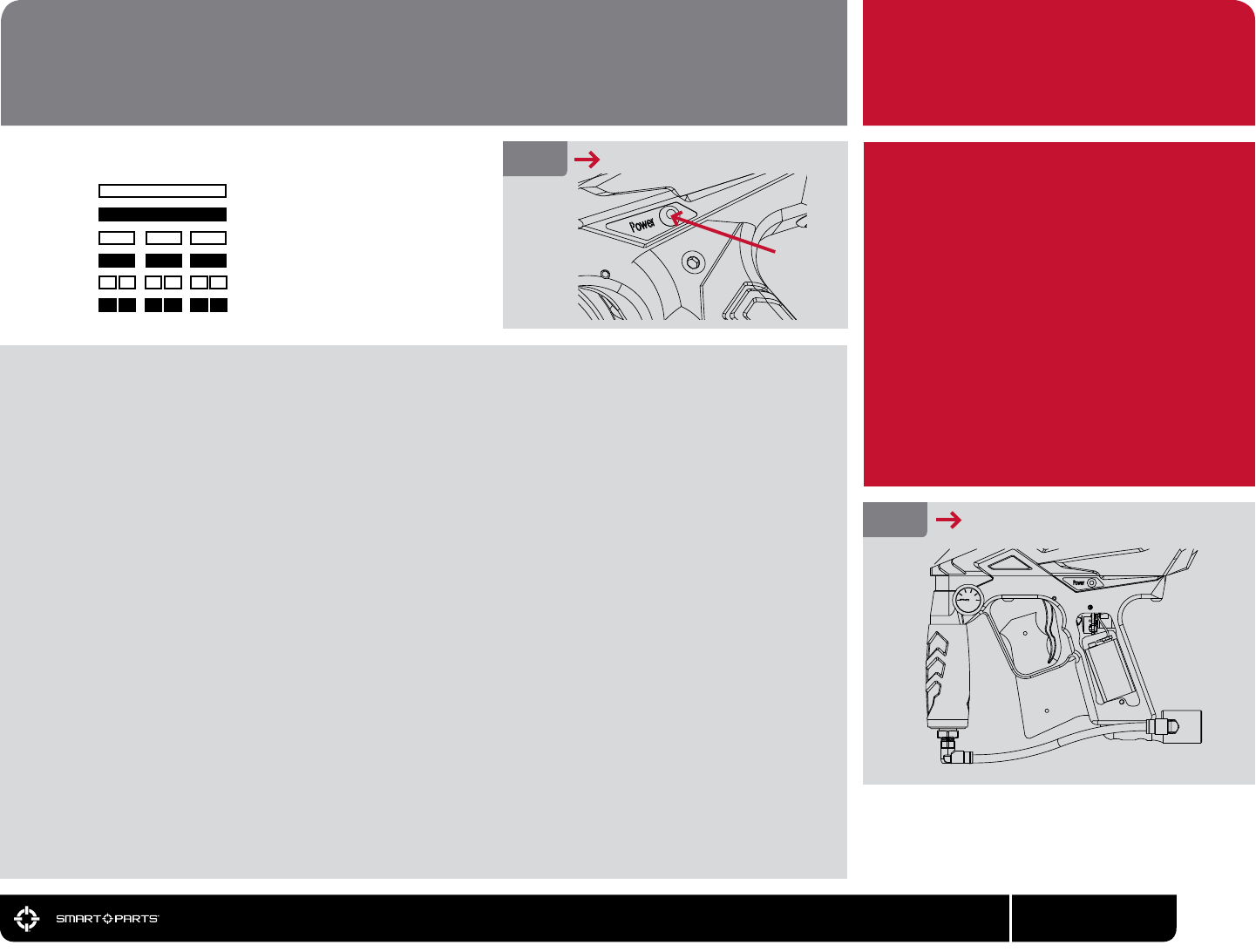
SETTING LIGHT INDICATION MODE FUNCTION
ELECTRONIC ADJUSTMENT
09
800.922.2147 www.smartparts.com
IMPORTANT
ONE
TWO
THREE
FOUR
FIVE
SIX
Dwell Up [solid yellow]
Dwell Down [solid red]
ROF Delay Up [shoot slower/blink yellow]
ROF Delay Down [shoot faster/blink red]
Firing Modes Up [double blink yellow]
Firing Modes Down [double blink red]
REMOVE RUBBER GRIP
FIG. 12
FIG. 11 TURNING ON THE ION
POWER
BUTTON

The dwell setting determines how long the Ion holds open its solenoid valve, which ultimately affects
how much gas is released to re each shot. It is important to balance the dwell and the operating pres-
sure (the setting of the vertical regulator). Too high of a dwell with a low operating pressure will cause
poor gas efciency and velocity drop-off. Too low of a dwell will leave the marker unable to properly
cycle through a full ring sequence. Dwell adjustment should be performed after changing internal com-
ponents such as the bolt or installation of a quick exhaust valve (QEV.) Dwell setting changes should not
be used to adjust velocity.
The dwell value can be adjusted between 8 milliseconds (1ms = 0.001 seconds) and 52ms in 0.5ms
increments. To adjust the dwell, make sure the marker is already turned on, select the proper adjustment
mode for Dwell Up or Dwell Down and press the power button once for every .5ms change desired.
To optimize your dwell setting, wear proper paintball protective goggles and gas up your Ion with a barrel
blocker in place, with no paint or hopper. Turn on the Ion and press the power button once to de-activate
Vision mode. Decrease the dwell time (solid red adjustment mode) until the Ion can no longer complete
a full ring cycle (bolt does not close all the way) each time you pull the trigger. Increase the dwell value
(solid yellow adjustment mode) one button press at a time, test ring after each change until you hear the
Ion re a full volume shot. Increase the dwell by an additional 15 to 20 button presses to reach the set-
ting for best gas efciency.
If your new setting causes an increase in rst shot drop off, where the marker is at rest for an extended
period of time and has reduced velocity or will not re on the rst shot but res ne after that, rst
disassemble, clean and lubricate the Ion bolt assembly and repeat the dwell setting procedure.
If this does not eliminate the problem, further increase the dwell setting until there is no longer a sluggish
rst shot.
DWELL
10 800.922.2147 www.smartparts.com

ROF DELAY
The Rate of Fire Delay (ROFDelay) adjustment determines how long the Ion must wait after it shoots,
before the next shot can be red. This delay allows time for the bolt to return to its rear position, gas
pressure in the re chamber to be recharged, and for a new paintball to fall into the breech. Increasing
the Rate Of Fire Delay setting will decrease the maximum rate of re the marker is capable of achiev-
ing. Many players will set the ROFDelay to its minimum, relying on the Vision system to determine when
the marker is ready to re. Setting a higher ROFDelay can be useful if there is a Vision problem, or when
playing at tournaments or elds which limit players to shooting 15 balls per second or slower.
The Rate of Fire Delay setting is adjustable from 25ms to 70ms in 0.5ms intervals. To change the rate of
re setting, while the Ion is turned on, press the programming button to select the ROFDelay Up mode
(single blink yellow – SLOWER ) or ROFDelay Down mode (single blink red - FASTER.)
As with the dwell settings blink of only the red or yellow light only when the power button is pressed indi-
cates you have reached the limit of adjustment.
FIRING MODES
The Ion features four distinct ring modes which can all be selected by increasing (double blink yellow)
or decreasing (double blink red) the ring mode setting. Mode 0 is Semi-Automatic and res one shot per
trigger pull. Mode 1 is Rebound and res more than one shot per trigger pull when the trigger is pulled at
a constant, rapid pace. Mode 2 is 3-Shot Burst which res up to three consecutive shots when the trigger
is pulled and held. If the trigger is released before the 3 shots have been red, the marker will stop ring.
Mode 3 is Full-Automatic, which will re repeatedly while the trigger is held back. The maximum rates of
re that can be achieved in semi-automatic and Rebound modes will depend on the marker’s Dwell and
Rate of Fire Delay settings. Both 3-shot burst and full-automatic re at a rate of 10 shots per second.
Ions manufactured for the United Kingdom can be identied by a green (instead of red) power button LED
and do not include 3-shot burst or full auto modes.
To select Semi-Auto mode, degas and unload the marker as with other mode adjustments. Turn the
power on, and press the programming button as many times as needed to cycle the programming LEDs
to a red double-blink pattern (Firing Modes Down.) Press and hold the power button until the LEDs blink
red, indicating that the lowest mode (0- Semi-Automatic) is reached. Tap the trigger to exit programming
mode. To select other modes, rst set the Ion to semi-automatic mode, but do not press the trigger. Then
press the programming button 5 times to choose Firing Modes Up (double blink yellow) and press the
power button the number of times needed to select the desired mode – once for Rebound, twice for 3-
Shot Burst, and three times for Full Auto.
RATE OF FIRE
It is important to remember that the ROF
setting is not the same as a rate of re
cap, or the maximum rate of re the Ion
can achieve. The maximum rate of re or
Cycles Per Second (CPS) is calculated
from a combination of the Dwell setting
and the ROF setting.
Cycle Time (milliseconds) = Dwell + ROF
The length of time needed for one com-
plete cycle equals the Dwell time plus
the ROF time (time in milliseconds, not
number of chirps.)
Cycle Time (Seconds) =
Cycle Time (milliseconds) / 1,000
To calculate the maximum CPS, the
cycle time will need to be converted
from milliseconds to seconds. This is
done by dividing it by 1,000.
CPS = 1 Second / Cycle Time (seconds)
The maximum cycle rate of an Ion, for
any given Dwell and ROF settings can
be easily calculated. Divide one second
by the cycle time to arrive at the number
of shots per second.
For elds or tournaments which require
paintguns be limited to a maximum rate
of re, you will need to make sure the
Dwell of your marker is properly adjusted
and then calculate the proper ROF value
to create the desired CPS limit. See the
CPS table for examples.
ROF DELAY/FIRING MODES
11
800.922.2147 www.smartparts.com
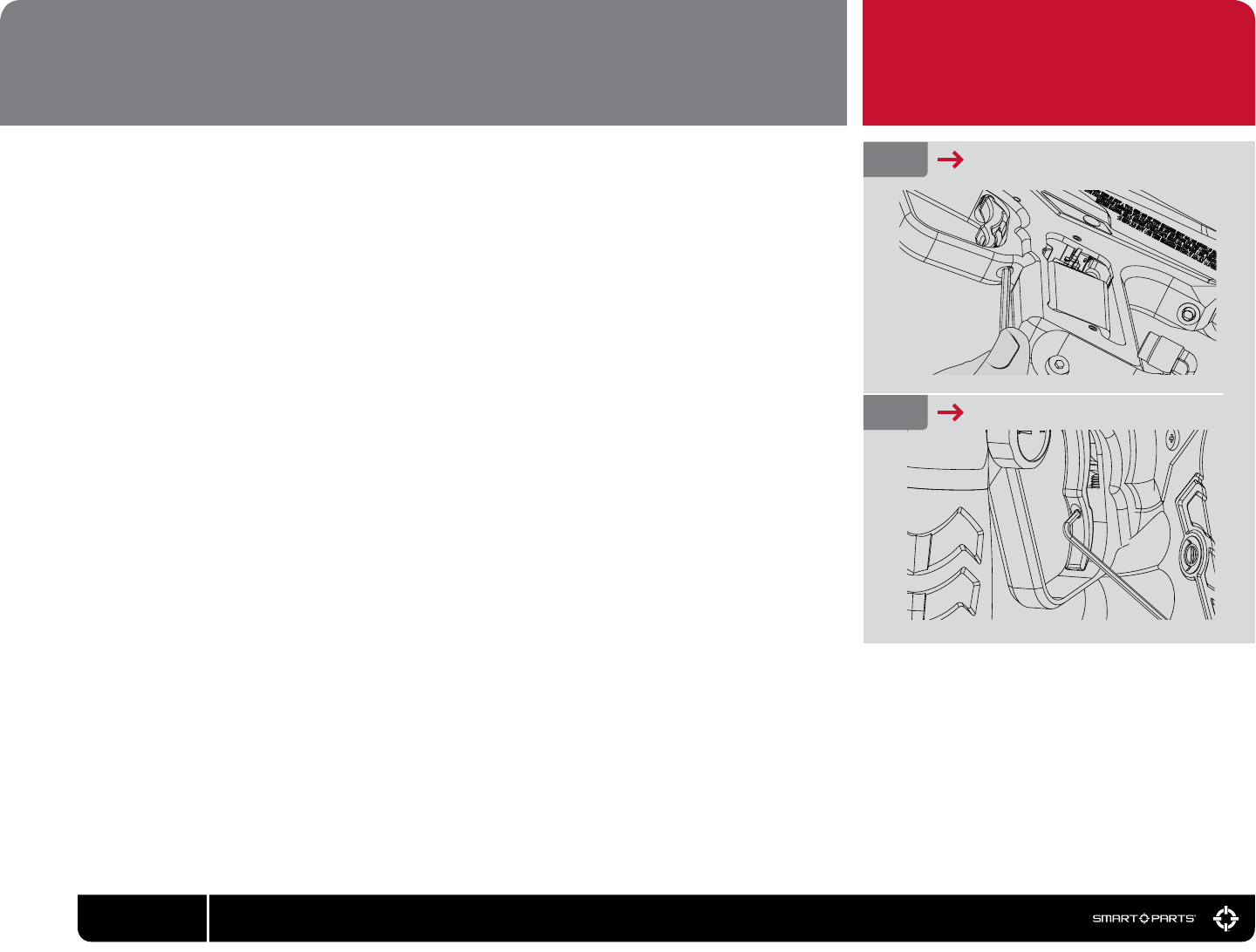
The Ion features two trigger adjustment points to best suit your style of play. It may be tempting to set
your Ion to the shortest trigger pull possible. Many players however, opt for a slightly longer pull. This
allows them to walk the trigger to higher rates of re. Use of Blue Loctite 242 or equivalent thread locker
on the adjustment screws will ensure that trigger adjustments do not vibrate out of place.
PRE-TRAVEL
This adjustment is located in the trigger guard where it meets the grip frame and is adjusted with a 1/8-
inch allen wrench. Turning this adjustment clockwise shortens the distance the trigger travels before it
activates the trigger switch. Counterclockwise adjustment has the reverse effect. Care must be taken not
to adjust this screw in too far or the trigger will not reliably reset after each shot.
POST-TRAVEL
How far the trigger can travel after it activates the trigger switch is determined by the post-travel adjust-
ment screw. This screw is located on the lower front face of the Ion trigger and is adjusted with a 0.050-
inch allen-wrench.
FIG. 13 PRE–TRAVEL ADJUSTMENT
ADJUSTMENT
TRIGGER
FIG. 14 POST–TRAVEL ADJUSTMENT
12 800.922.2147 www.smartparts.com
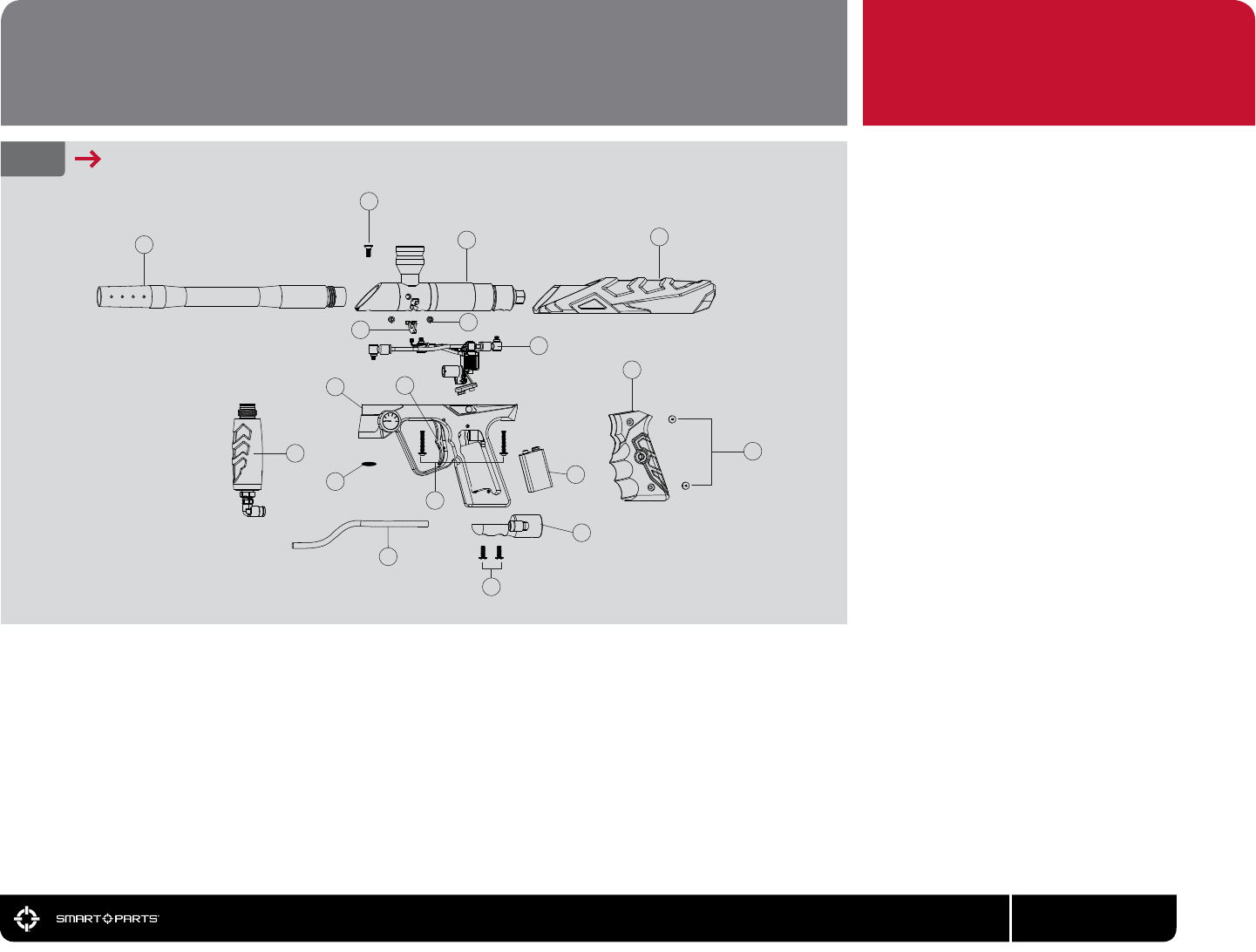
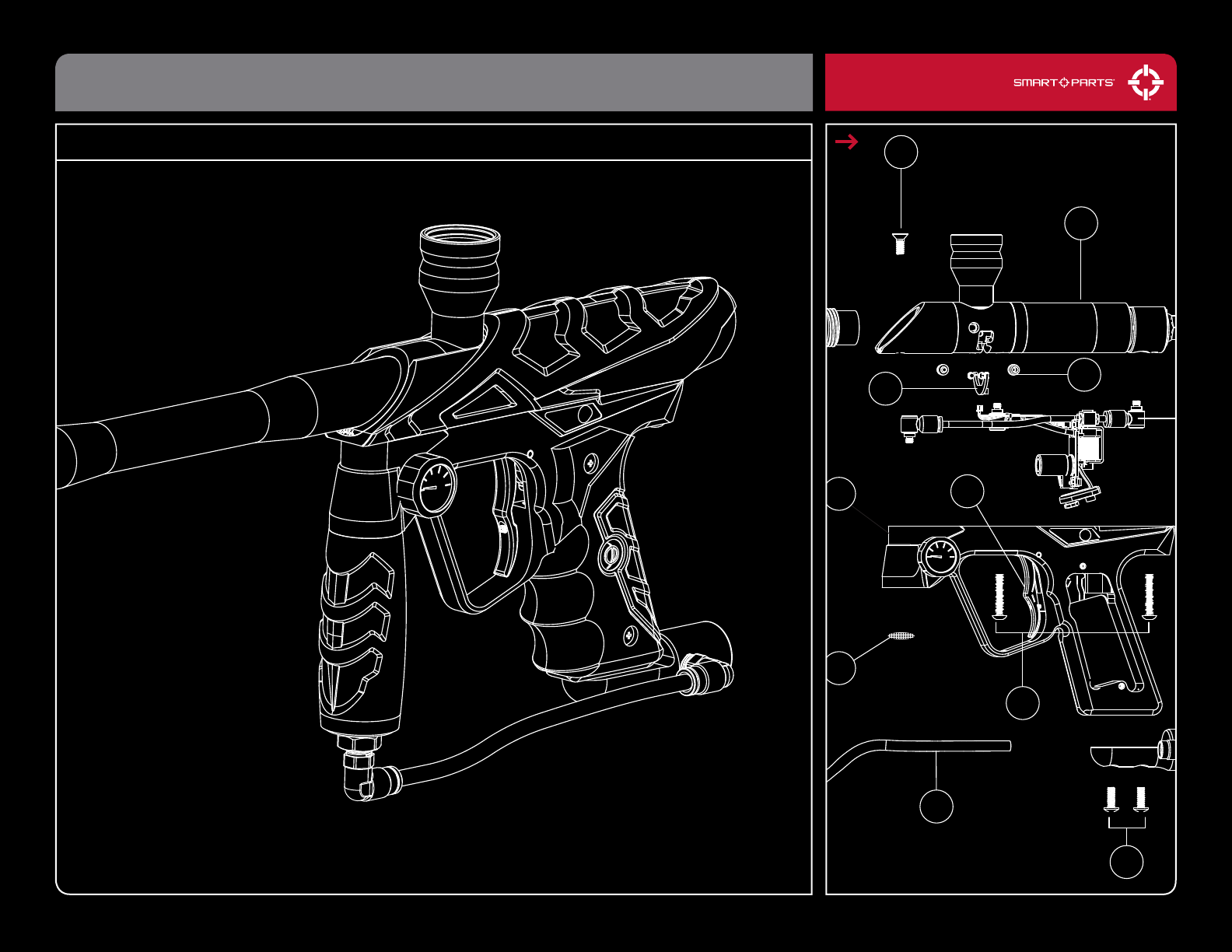
11 ION108 – Ball Detents (2x)
12 SCRN1032X0500BS – 10-32 Button Head Cap Screws (2x)
13 ION107 – Ion Trigger
14 ION106BLK – Ion Grip Frame
15 Ion Vertical Regulator (Page 18)
16 SCRN1032X100BS – Grip Frame Screws (2X)
17 HOST14BLK – Black Macroline Hose
18 ION120 – Body Filter
ION PARTS
1
3
4
6
10
5
7
8
15
211
14
18
16
17
12
13
9
1 ION3012 - Ion Barrel
2 ION117UPRVSN - Ion Vision Board
3 SCRN1032X0500V0 – Body Flat Cap Screw
4 Inner Body Assembly (Page 16)
5 ION101 – Ion Body Cover
6 GRPSTD – Ion Grip
7 SCRN0632X0313XTS – 6-32 Grip Screws (4x)
8 ION130 – Bottom Line
9 Alkaline 9-volt Battery
10 Circuit Board Assembly (Page 17)
13
800.922.2147 www.smartparts.com
FIG. 16 MAJOR ION COMPONENTS
EXPLODED DIAGRAM
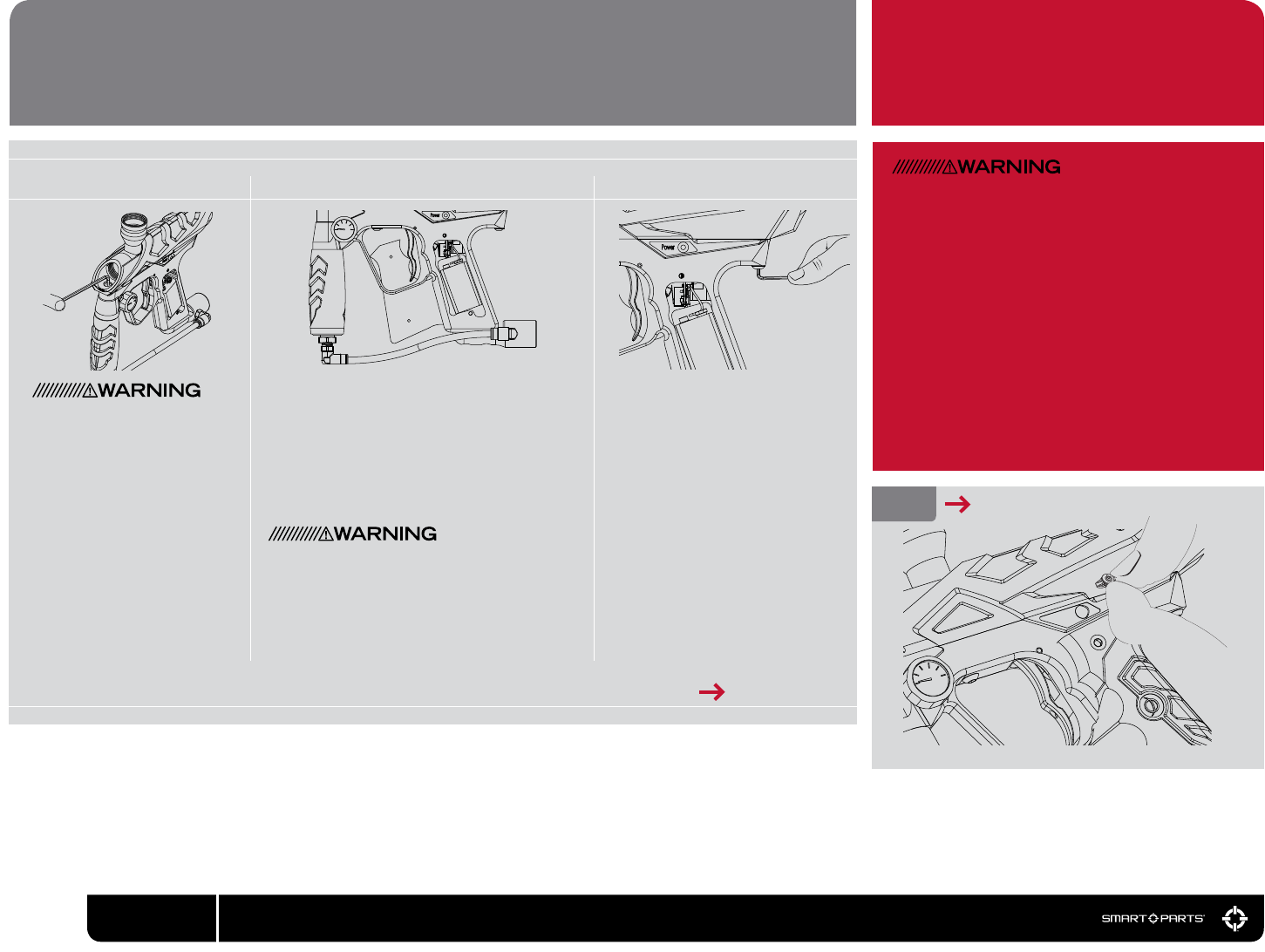
01 02
Remove the front and rear grip
frame screws using a 1/8-inch
allen wrench.
Remove both left side (gauge side) grip screws
with a #2 phillips scredwriver and open the ex-
ible wraparound grip. Remove the battery from
the grip frame. Grasp the battery in one hand
and with the other hand grasp the battery clip by
the sides and unplug it from the battery. Remove
the right side grip screws and the exible grip,
as the upper right grip screw may catch on the
circuit board, making its removal difcult.
Do not pull on the battery wires or circuit board
to unplug the battery as this may cause signi-
cant damage.
Use a 1/8-inch allen wrench to
remove the body at cap screw
which is normally concealed by
the barrel.
DISASSEMBLY PLEASE READ CAREFULLY
03
Before beginning any maintenance or repair pro-
cedures, completely unload and degas the mark-
er following the instructions in the Degassing
section of this manual. Choose a clean, stable
and protected work area where small parts will
not be lost, such as a table covered with a towel
to prevent parts from rolling. Remove the barrel.
Some Ions may be equipped with a hard remov-
able power button, rather than the membrane
style power button. During normal maintenance
the hard power button does not need to be and
should not be removed. If it becomes dam-
aged or requires replacement, grip it between a
ngernail and thumbnail and wiggle it out, rear
side rst.
[ CONTINUED ON PAGE 15 ]
14 800.922.2147 www.smartparts.com
REMOVE HARD POWER BUTTON
FIG. 17
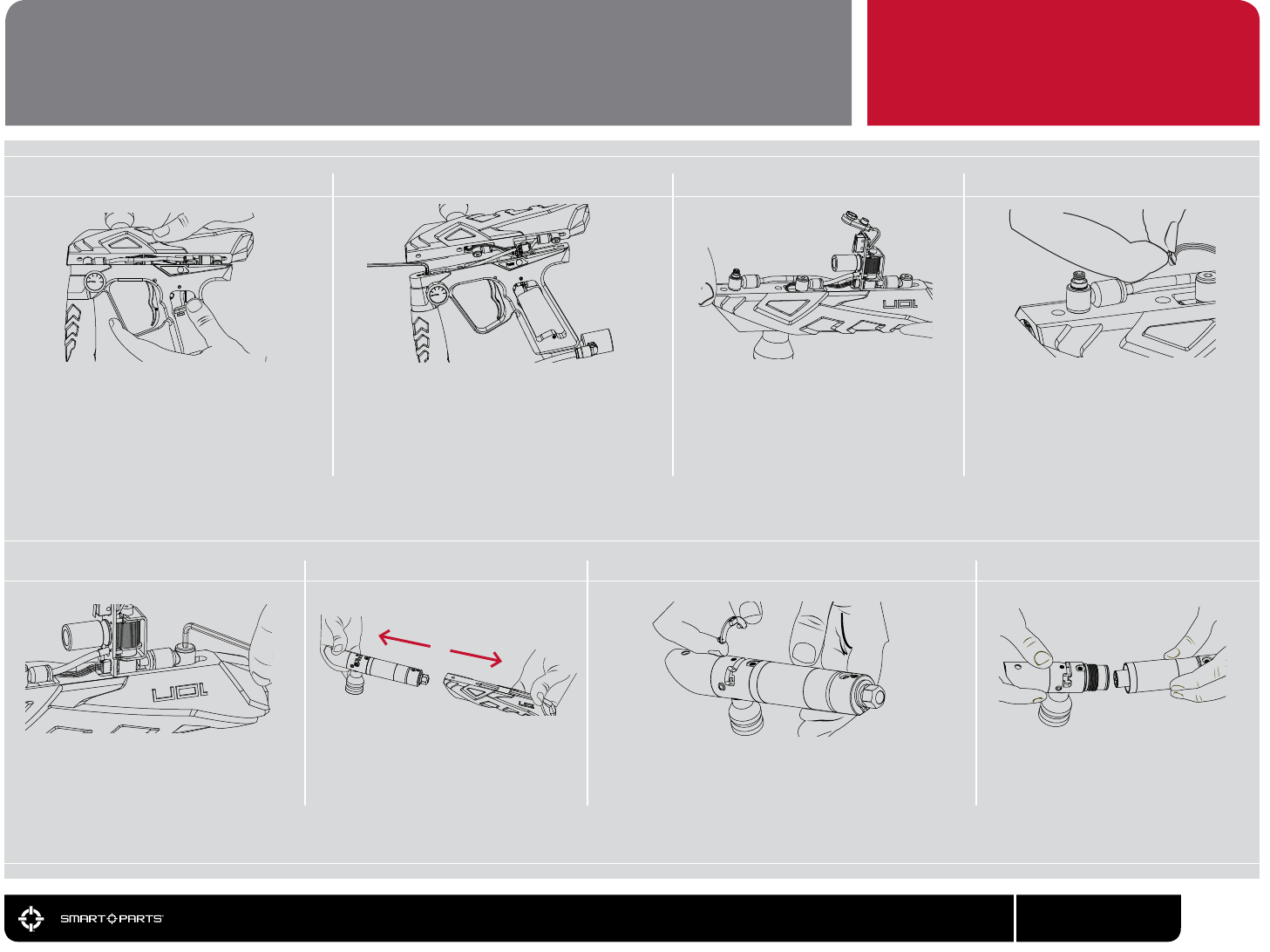
11
Unscrew the body breech from the re
chamber, and remove the bolt from in-
side. If the bolt stop does not come out
with the bolt, pull it out with a nger.
Remove the Vision circuit board from the body breech
and set aside carefully. This circuit board is shaped
like the letter C, and should come easily out of place.
Take care to make sure that the infra-red emitter and
detector (these look like clear LEDs) are not set on
anything that can scratch them.
Keeping the body upside down, slide
the inner receiver components out of
the body cover.
DISASSEMBLY DISASSEMBLY CONTINUED
Remove the remaining two banjo t-
tings from the body with a 1/8-inch
allen wrench.
06
Gently complete the process of sepa-
rating the body from the grip frame.
Take care to make sure that the circuit
board slides out of the grip frame with-
out being strained, and that the battery
wires and battery clip follow without
catching on the grip frame. Set the grip
frame aside, and hold the body upside
down (with the feedneck facing down.)
07
08
Locate the Vision wiring harness. This
group of four black wires runs from
the lower circuit board to the Vision
circuit board in the body breech.
Unplug the Vision wiring harness from
the body end, being careful not to
strain the wires by tugging on them.
As much as possible, pull on the con-
nector directly.
10
05
Remove the front banjo tting from over the
vertical adapter with a 1/8-inch allen wrench.
The center of the banjo tting will turn with the
wrench, pivoting inside the rest of the tting.
09
Grasp the body with one hand and the grip
frame with the other. Slowly pull the body
away from the grip frame, rolling it slightly to
the side, exposing the top of the grip frame
and banjo tting. It can be helpful to gently
push on the bottom of the circuit board with a
thumb, helping it to slide upward.
04
15
800.922.2147 www.smartparts.com
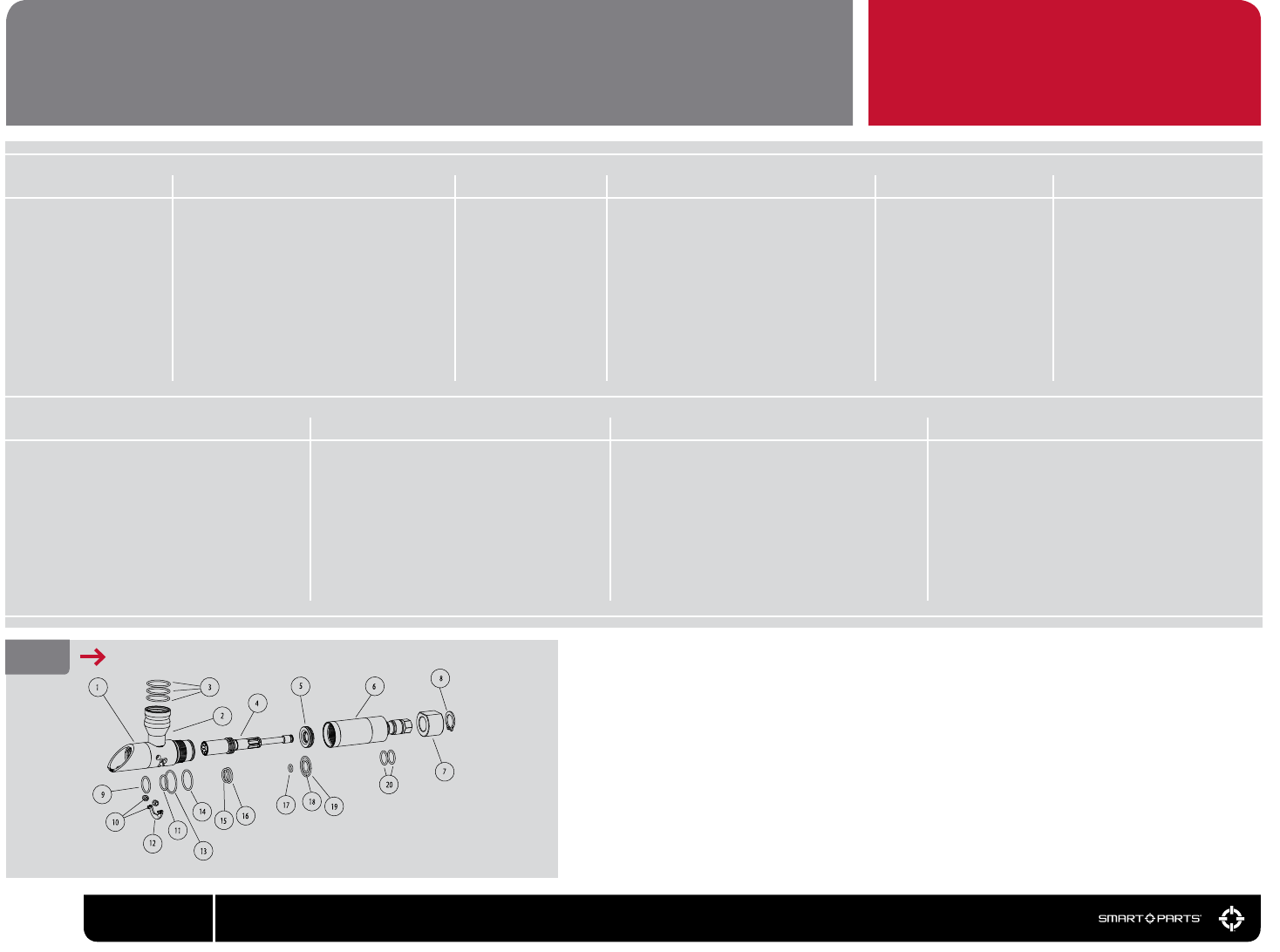
01 02 04 05
1 ION102 – Body Breech
2 ION103 – Feed Tube
3 ORN02552070BU – Feed Tube Friction O-Rings (3x)
4 ION109 – Bolt
5 ION11 – Bolt Stop
6 ION104 – Fire Chamber
7 ION110 – Swivel Donut
8 CLP004 – Donut Clip
9 ORN0179OUR – SFT O-Ring
10 ION108 – Ball Detents (2x)
11 ORN117OHN – Rear Breech O-Ring
12 ION117UPRVSN – Vision Circuit Board
13 ORN02270BU – Body Breach Friction O-Ring)
14 ORN02070BU – Body Breech Seal O-Ring
15 ORN0159OUR – Bolt Bumper
REASSEMBLY CLEANING AND REASSEMBLY
Place the bolt stop inside the re
chamber. Make sure the concave
side of the bolt stop (shaped like the
inside of a cone) faces the back of the
marker.
Use SL33K to
grease all of the
o-rings on the
bolt and bolt stop.
Apply only a thin
coating, do not
over-grease.
Make sure the Vision circuit board and
its components are clean and undam-
aged. Make sure no dirt or debris is
blocking the Vision holes in the body
breech – use a cotton swab to clean
these openings if necessary.
Use a soft cloth to
clean all parts of
paint and dirt as well
as old oil or grease.
03 06
Screw the re chamber into
the body breech.
Slide the bolt into the
bolt stop inside the re
chamber until it stops.
07 08
Reposition the body and grip frame together
being careful not to pinch any wires or hoses.
Reinstall the grip frame screws, and at cap
body screw, then tighten all three with an 1/8-
inch allen wrench. Reinstall the battery, taking
care not to pinch the battery wires, and exible
the rubber grip and its screws.
Carefully pass the battery clip down into the
grip frame and slide the circuit board into
place before reinstalling the forward banjo
tting to its position in the grip frame, again
taking care not to cross-thread.
Slide the inner receiver assembly into
the body cover while holding both up-
side down to prevent the Vision circuit
board from falling out, then plug the
Vision wire harness back into the Vision
circuit board, and reconnect the center
and rear banjo ttings to the receiver,
being careful not to cross thread them.
Place the Vision circuit board into its slot
in the body breech. Its plug should be on
the side of the board facing the rear of the
marker. The clear emitter and detector
should be on the side facing the front of
the body breech.If necessary, rotate the
swivel donut so that its screw holes are on
the bottom of the receiver, lined up with
the screw holes in the body breech.
09 10
FIG. 18 INNER BODY ASSEMBLY 16 ORN0162070HN – Bolt Middle O-Ring
17 ORB01070UR – Bolt Rear O-Ring
18 ORN01470UR – Bolt Stop Inner O-Ring
19 ORN02070BU – Bolt Stop Outer O-Ring
20 ORN0157OUR – Swivel Donut O-Rings (2x)
16 800.922.2147 www.smartparts.com
800.922.2147 www.smartparts.com
The solenoid valve is the heart of the Ion.
When the circuit board supplies it with power,
it redirects gas ow to allow the bolt to close
and re the marker. During normal mainte-
nance the solenoid valve should not need
to be disassembled. However, if it becomes
clogged or develops a leak it is simple to dis-
assemble for cleaning or repair.
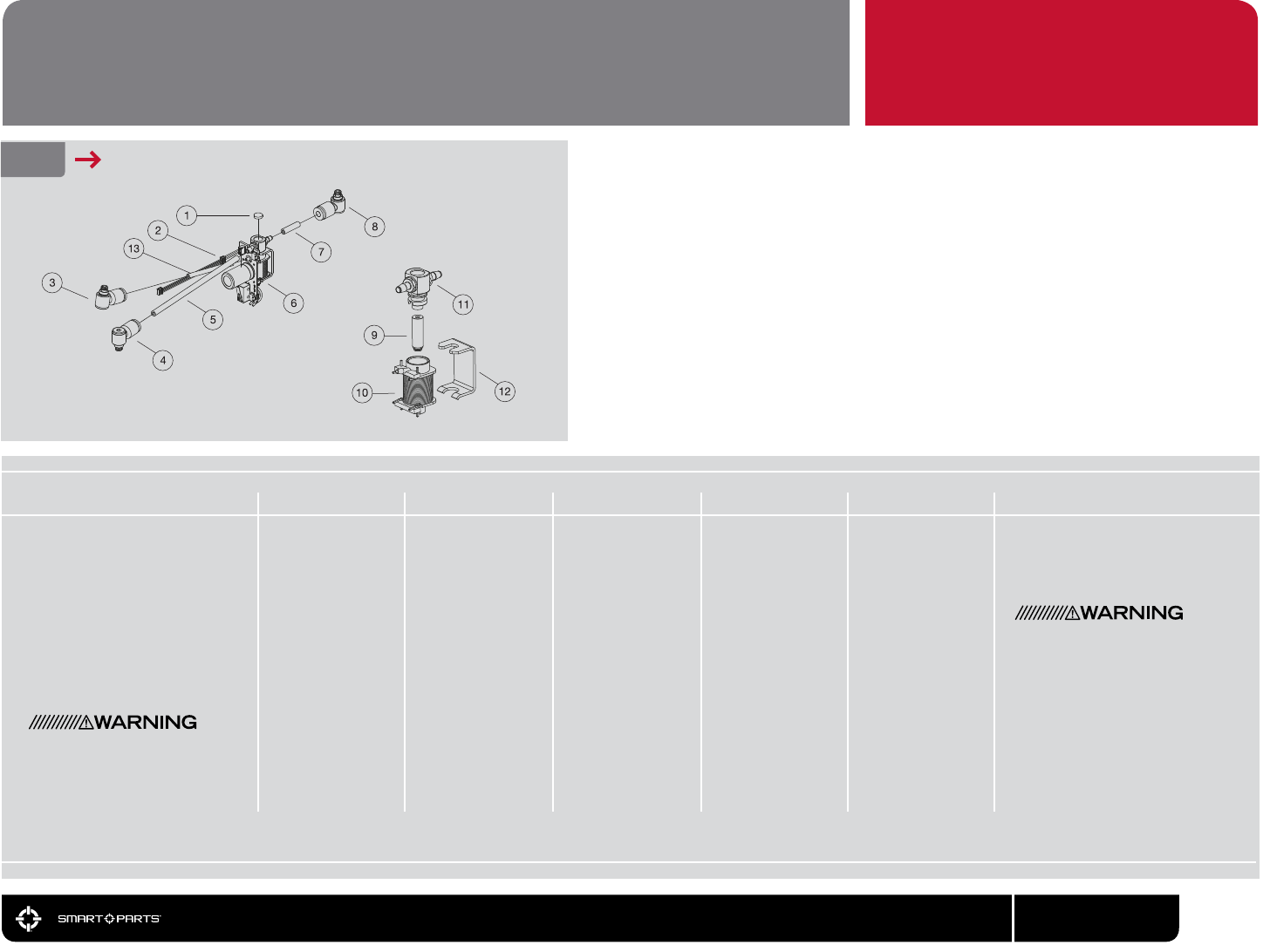
FIG. 20 SOLENOID EXPLODED VIEW
SOLENOID VALVE DISASSEMBLY AND MAINTENANCE
01 02 04 05
Clean the inside
of the solenoid
with a cotton
swab, and clean
the armature
with a soft cloth,
removing any de-
bris, oil or grease.
Tip the circuit
board over and al-
low the armature
to fall into your
hand. The arma-
ture ts loosely in
the center of the
coil, and should
fall out easily.
After the sole-
noid bracket is
removed, lift the
solenoid head
straight out, wig-
gling if necessary
to loosen it.
Follow the disassembly instruc-
tions to remove the circuit board
from the Ion. Using a 3/32-inch
allen wrench, hold the circuit
board and solenoid body then
pry the bracket from the back
of the solenoid valve. Place the
wrench between the bracket and
the upper, black section of the
solenoid valve body.
03 06
Replace the solenoid bracket,
pressing it back into place. The
bent bracket section goes over
the bottom side of the solenoid.
A very light layer of SL33K lubri-
cating the hose barb will make
the installation of new hoses
easier, but extreme care must be
taken that no excess grease is
able to enter the solenoid valve.
Holding the solenoid head with
a box end or small adjustable
wrench over the hose barb will
allow the hose to be pulled away
from the wrench which will hold
back the solenoid head.
Reassemble
the solenoid
valve. Place the
armature back in
the coil with the
armature facing
down.
Push the solenoid
head back into
the solenoid valve
body, making
sure that the long
hoses and Vision
wiring harness
are aligned on the
same side of the
circuit board as
the trigger switch.
07
Do not pry against the red
solenoid coil or the Blackheart
heat shrink coil protector, as
this will cause damage.
1 BUM006 – Foam Disk
2 ION118 – Vision Wiring Harness
3 ELB1032X18PTCBNJ – 1/8” Banjo Fitting
4 ELB1032X532PTCBNJ – 4mm Banjo Fitting
5 HOS4MMCLR4025 – 4mm Ion LP Hose
6 EPY117LOVUSASM – Ion Circuit Board
7 HOS4MMCLR875 – 4mm Ion LP Hose
8 ELB1032X532PTCBNJ – 4mm Banjo Fitting
9 Solenoid Armature
10 SOL3UPG – Solenoid Coil
11 Solenoid Head
12 Solenoid Bracket
13 HOS18CLR1985 – 1/8” Ion LP Hose
17
18 800.922.2147 www.smartparts.com
01 02 03 04
07
0605
Degas the marker, and remove
the macroline hose from the
regulator. Unscrew the regulator
from the Ion’s vertical ASA.
Remove and clean the metal
lter screen which is located
between the regulator and the
vertical ASA. Slide the regula-
tor body out of its sleeve.
Use a 5/8-inch open-end wrench
or adjustable wrench to turn the
adjuster cap on the bottom of the
regulator, as if you were adjusting
velocity, until the safety screw is
visible in the vertical safety screw
slot. The safety screw ensures
that the regulator will not be
unscrewed too far during
normal use.
Use a 3/32-inch Allen wrench to
remove the safety screw.
The adjuster cap is left-hand
threaded. Turn it clockwise to
unscrew it from the vertical regu-
lator body. Use the open end or
adjustable wrench to completely
remove the adjuster cap.
Locate the lock screw halfway up the
side of the regulator body, and remove
it with a 3/32-inch Allen wrench. The
lock screw secures the spring platform
in place. Now that it is unlocked, use a
9/16-inch deep well socket and ratchet to
remove the spring platform by unscrew-
ing it clockwise (the spring platform is
also left-hand threaded.) The hex faces
on the spring platform are short, so you
will need to exert a steady pressure on
the socket to maintain contact.
The regulator spring should fall eas-
ily out of the regulator body once
the spring platform is removed.
The Regulator piston may require
light pressure from an allen
wrench through the top of the
regulator body for removal. Use
a gentle hand here, as the brass
of the regulator piston can be
scratched by hard tools.
Clean all of the regulator parts with
a soft cloth or paper towel. Inspect
all o-rings and the regulator seat
(the clear part on the end of the
piston) for damage, and replace if
necessary. Lubricate the o-rings
on the piston assembly with
SL33K.
Do not lubricate the regulator seat
or the o-ring on the adjuster cap.
08
09 10
When the spring platform is fully seated, it will be visible through the
lock screw hole in the side of the regulator. Lock it in place by reinstall-
ing the lock screw. Reinstall the pressure adjuster cap by screwing it
counter-clockwise into the regulator body. Turn it until the safety screw
aligns with the safety screw slot. Put a small amount of blue Loctite
242 threadlocker or equivalent (even clear ngernail polish can do in a
pinch) on the safety screw. Reinstall the safety screw.
Place the regulator spring on
the regulator piston assembly.
Hold the regulator body ASA
side down, and slide the two
parts into the body. Lower
the spring platform into the
regulator body nut side up,
and use the 9/16-inch deep
well socket to screw it into
place with a counter-clock-
wise motion.
Parts of the Ions’s vertical
regulator use left-handed
threads. These parts must be
turned counter-clockwise to
screw them in, and clockwise
to unscrew them – the opposite
direction of normal screws.
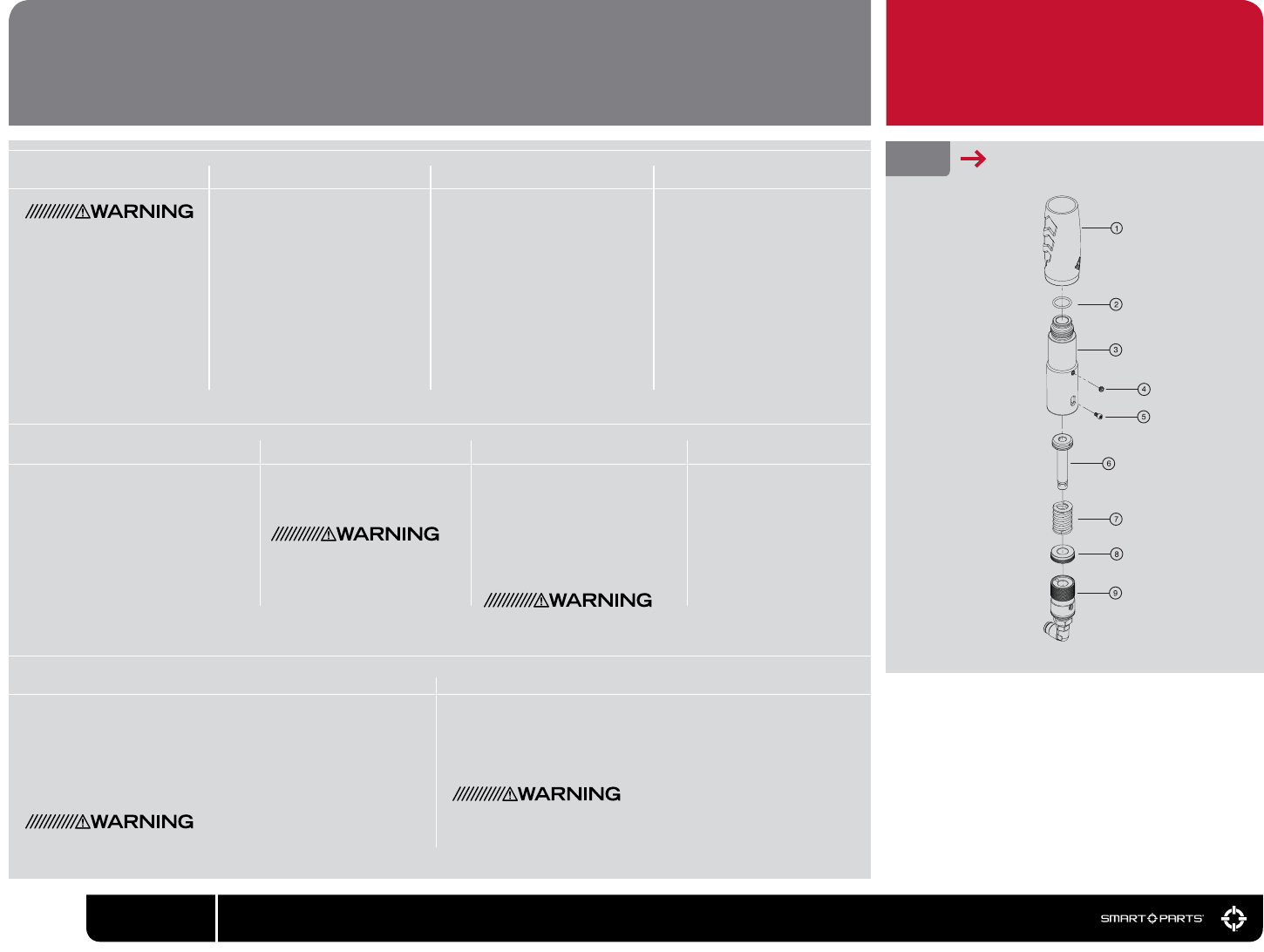
FIG. 21 REGULATOR
1 IRG106 – Vertical Regulator Grip
2 ORN0159OUR – Regulator ASA O-Ring
3 IRG101BLK – Ion Vertical Regulator Body
4 SCRN1032X0125SCO – Lock Screw
5 SCRN0440X0188CO – Safety Screw
6 IRG105ASM – Piston Assembly
7 SPR022 – Ion Regulator Spring
8 IRG 102 – Spring Platform
9 IRG104 ASM – Pressure Adjuster Cap
REGULATOR
Service and adjustments to the regulator will cause changes in its
output pressure. Adjust the regulator to deliver between 160 and
200 psi then repeat the velocity adjustment procedure.Be certain that the safety screw is fully seated and the adjuster cap can
turn freely.
Place the regulator inside the sleeve. Do not lubricate the regulator
body or inside of the sleeve, or the regulator will become extremely
difcult to remove from the Ion. Reinstall the regulator into the vertical
ASA of the Ion. Reconnect the macroline, and be sure to use a chro-
nograph to re-adjust the marker’s velocity before use.
PLEASE READ CAREFULLY
19
800.922.2147 www.smartparts.com
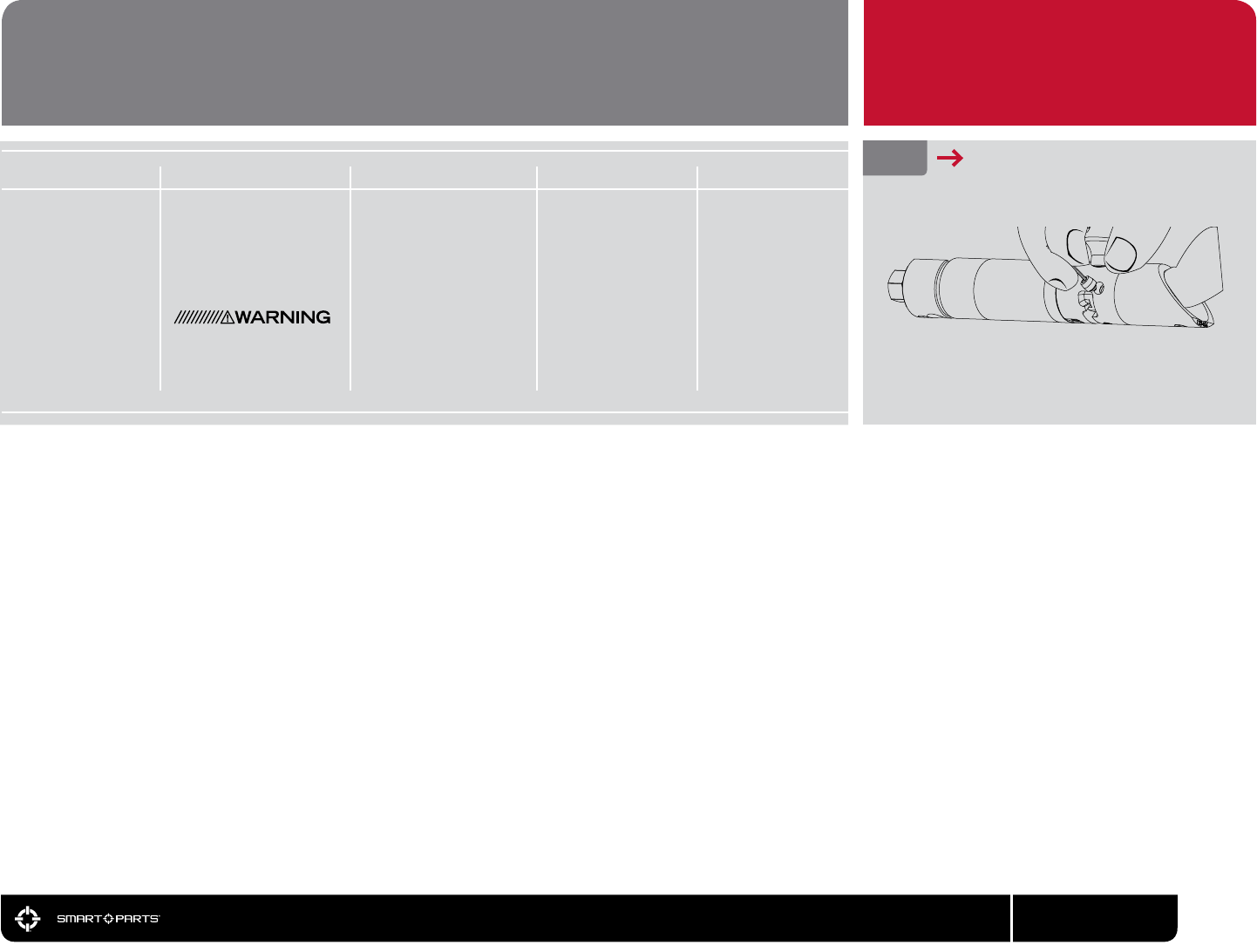
01 02 03 04 05 FIG. 22 PRYING OUT DETENT
BALL DETENTS INSPECTION, CLEANING AND REPLACEMENT
Reassemble the marker.Reinstall the detents by
pressing them into place
with a thumb.
Reach a nger into the
body breech and press
out against the detent. It
may then be removed by
prying or gripping with
ngernails, needle-nosed
pliers, an o-ring pick or even
a 0.050-inch allen wrench.
Inspect the ball detents for
tears or damage. If they are
damaged, replace them. If
not, clean them with a soft
cloth, and clean the detent
openings in the body breech
with a cotton swab.
Look into the body breech.
The tip of each ball detent
should extend approxi-
mately 1/16 of an inch into
the breech area. If either
detent does not reach
this far into the breech, it
should be replaced.
To avoid risk of eye
injury, even while wearing
goggles, do not look into
the barrel or breech of an
assembled marker.
Degas and disassem-
ble the marker (see
disassembly section.)

20 800.922.2147 www.smartparts.com
ION IS LEAKING INTERNALLY.
— Pneumatic hoses may be loose, damaged or not fully connected. Replace hoses with Smart Parts
Ion or Epiphany hoses only.
— One or more of the banjo ttings may be loose or have a damaged seal. Inspect and tighten t-
tings. Replace if necessary with Smart Parts Ion/Epiphany banjo ttings only.
— Solenoid armature is damaged or overpressurized. Make sure operating pressure is under 200psi. In-
spect solenoid valve and replace armature if necessary.
ION IS LEAKING DOWN THE BARREL.
— One or more of the bolt o-rings and/or the bolt stop o-rings are damaged. Inspect and replace.
ION IS LEAKING FROM THE MACROLINE AIR FITTINGS.
— Macroline may not be tted properly. Degas the marker and make sure the macroline is properly
locked into its ttings. If the macroline shows signs of damage, replace it with a new piece. Be sure to
cut clean ends, and if using diagonal cutters, dress the end with a small needle le to be certain
it is not crimped partially closed.
ION IS LEAKING FROM IN OR AROUND THE REGULATOR.
— The ASA o-ring at the top of the regulator may be damaged. Remove the regulator to inspect. If
this o-ring is damaged it may be replaced with a standard CO2 bottle o-ring available at most
paintball shops.
— The regulator seat may be contaminated and/or damaged. Inspect and clean the regulator seat
(see Regulator section of this manual.) If the regulator seat is damaged, it may be ipped over to
use the back side. If both sides are damaged, it must be replaced.
ION EXHIBITS FIRST SHOT DROP-OFF (FSDO).
— FSDO is a low velocity, or non-ring rst shot followed by normal shooting, and is often caused by
debris in the bolt or a poorly lubricated bolt. Clean the bolt, body breech, re chamber and bolt
stop, and lubricate them with SL33K (See the Disassembly section of this manual.)
— FSDO can also be caused by too low of a dwell setting. Follow the procedure for optimal dwell ad-
justment and or increase the dwell setting (see the Electronic Adjustment section of this manual.)
TROUBLESHOOTING IMPORTANT

21
800.922.2147 www.smartparts.com
ION HAS INCONSISTENT VELOCITY OR DROPS SIGNIFICANTLY DURING RAPID FIRING.
— Barrel to paint match may not be correct. Check the t of the paintballs to the barrel (see Paint sec-
tion of this manual.) If it is a poor t, switch paintballs, barrel, or barrel insert for a better t.
— Gas source could be low. Fill gas source and make sure valve is turned on.
— Battery may be low. This will be most noticeable with velocity dropping, and then entire shots not ring
during rapid re. Replace with a name brand alkaline 9-volt battery.
— Regulator seat may be contaminated and/or damaged. Inspect and clean the regulator seat (see
Regulator section of this manual.) If the regulator seat is damaged, it may be ipped over to use the
back side. If both sides are damaged, it must be replaced.
— Pressure may be low. Optimal operating pressure is 180 psi - maximum is 200 psi.
— SFT o-ring may be damaged, swollen or missing. Inspect and if necessary replace the SFT o-ring
(see Assembly diagram.)
— Liquid CO2 may be entering the regulator. Only use CO2 with an anti-siphon tank in the ASA, or a
standard tank placed vertically in a pack with a remote. Alternatively, switch to compressed air.
ION WILL TURN ON BUT WILL NOT FIRE.
— Battery may be low or dead. Replace with a name brand alkaline 9-volt battery.
— Solenoid valve may be blocked with debris. Disassemble solenoid, clean armature, and inside sole-
noid body, then reassemble without lubricant (see Solenoid Disassembly/Maintenance section
of this manual.)
— One or more of the trigger set screws may be mis-adjusted. The trigger switch should be heard click-
ing when the trigger is pulled with the marker turned off. Back pre and post-travel screws out until
trigger will activate the marker then set properly (See the Trigger section of this manual.)
— Trigger switch may be damaged. - Visit your nearest Smart Parts Authorized Dealer or contact Smart
Parts for circuit board repair or replacement.
— Regulator output pressure may be too high (above 200 psi) Decrease the pressure (see Velocity
Adjustment section of this manual.) If pressure slowly rises after being set, inspect, clean and if
necessary replace the regulator seat (See Regulator section of this manual.)
— Liquid CO2 may be entering the regulator. Only use CO2 with an anti-siphon tank in the ASA, or a
standard tank placed vertically in a pack with a remote. Alternatively, switch to compressed air.
TROUBLESHOOTING IMPORTANT

22 800.922.2147 www.smartparts.com
ION’S POWER BUTTON LIGHT FLASHES IN VISION MODE BUT WILL NOT FIRE.
— Possible chamber obstruction. Hold the power button down to put the marker into non-Vision
mode. While wearing paintball mask/googles in an area where it is safe to re, re the marker to clear
any possible chamber obstructions.
— Paint or debris may be blocking the Vision eye from “seeing” the breech. Remove the Vision circuit
board. Carefully clean the infrared emitter and detector with a damp, soft cloth and clean the Vision
ports in the body breech with a cotton swab (see Disassembly section of this manual.)
— Wiring harness may be disconnected. Check to make sure that the wiring harness running from the
solenoid circuit board in the grip frame to the Vision circuit board in the body is plugged in at both
ends, and is not bent, crimped, broken or frayed (See Disassembly section of this manual.)
— Vision reector may be damaged or missing. Inside of polymer Ion body covers on the right hand side
is a reective mylar sticker. This sticker must be clean and intact for proper Vision operation.
THE ION IS BREAKING PAINT.
— Battery may be low or dead. Replace with a name brand 9-volt alkaline battery.
— Ball detents may be worn or damaged. Inspect and if necessary replace (See Ball Detent section of
this manual.)
— Barrel to paint match may not be correct. Check the t of the paintballs to the barrel (see Paint section
of this manual.) If it is a poor t, switch paintballs, barrel, or barrel insert for a better t.
— Dwell setting may be too high. Lower the dwell setting in three click increments and retest, or reset to
the optimum dwell value (see the Dwell section of this manual.)
— Vision mode may be turned off. This will be indicated by a double-blink pattern on the power button.
Turn Vision on by pressing the power button.
— Paint or debris may be partially blocking the Vision eye from properly “seeing” the breech. Remove
the Vision circuit board. Carefully clean the infrared emitter and detector with a damp, soft cloth and
clean the Vision ports in the body breech with a cotton swab (see Disassembly section of this manual.)
— Vision reector may be damaged or missing. Inside of plastic body covers, on the right hand side is a
reective mylar sticker. This sticker must be clean and intact for proper Vision operation.
— Wiring harness may be damaged. Check to make sure that the wiring harness running from the sole-
noid circuit board in the grip frame to the Vision circuit board in the body is plugged in at both ends,
and is not bent, crimped, broken or frayed (See Disassembly section of this manual.)
— Vision board may be damaged from improper installation. Replace Vision board (See Disassembly
section of this manual.)
— Liquid CO2 may be entering the regulator. Only use CO2 with an anti-siphon tank in the ASA, or a
standard tank placed vertically in a pack with a remote. Alternatively, switch to compressed air.
TROUBLESHOOTING IMPORTANT

23
800.922.2147 www.smartparts.com
TECH SUPPORT
Our Technical Support Department is open
Monday through Friday, from 10am to 6pm
EST, and can be reached at 724-539-2660.
Additional support and downloadable product
manuals are available through our web site,
www.smartparts.com.
ROF IS TURNED UP ALL THE WAY AND ION WILL NOT FIRE RAPIDLY.
— The ROFDelay setting of the Ion circuit board controls how long the marker must wait between-
shots. Increasing the delay (yellow blinking) will slow the Ion down. Decreasing the delay (red blin-
ing) will allow it to shoot faster (see Electronic Adjustment section of manual.)
— The Ion’s break-beam Vision system prevents it from ring until a paintball has been properly load-
ed. Non-motorized or agitating hoppers will not feed paintballs as quickly as a modern force-feed
loader, resulting in a restricted rate of re.
AFTER DISASSEMBLING THE ION, THE GRIP FRAME AND BODY BREECH FLAT TOP SCREW HOLES
NO LONGER LINE UP CORRECTLY WITH THE GRIP FRAME.
— If the bolt stop is installed backwards during re-assembly, the body breech can not screw all the
way into the re chamber. This will prevent the two parts from sealing properly and change the
alignment of screw holes to the grip frame. Reinstall the bolt stop with the concave surface facing
into the re chamber.
A REFEREE SAYS THE ION IS SHOOTING TOO FAST (BALLS PER SECOND)
— Some tournaments and paintball elds limit the rate of re allowed. Many tournaments, for exam-
ple, limit players to a maximum of 15 balls per second. The marker’s rate of re can be limited by
increasing the ROFDelay setting (see Electronic Adjustment section of manual and the CPS Table.)
REFEREE SAYS THE ION IS SHOOTING TOO FAST (MORE THAN 1 SHOT PER TRIGGER PULL)
— Many tournaments, scenario games and paintball elds limit players to shooting in true semi-auto-
matic mode. Set the marker’s ring mode to 0-Semi-Automatic (see Electronic Adjustment section
of manual.)
A REFEREE SAYS THE ION NEEDS A TOURNEY CAP.
— Tournaments, scenario games and paintball elds all require that a paintgun’s velocity may not be
adjusted without tools, and do not allow tools on eld. While it is extremely difcult, some referees
may claim that a very strong person will be able to adjust the Ion’s regulator with bare hands. These
referees may require that an additional locking device be used. A velocity locking cap is available for
Smart Parts Authorized Dealers to further secure the regulator setting.
WARRANTY
Smart Parts warrants for one (1) year to initial retail
purchaser that the paintball marker and regulator are free
from defects in materials and workmanship. Disposable
parts (batteries, o-rings, seals, etc.) are not warranted.
The valve assembly is warranted for six (6) months. The
solenoid and electronics on the marker are warranted for
six (6) months, plus an additional warranty of six months
for electronic parts only (installation and labor are not
included.) This warranty does not cover surface damages
(scratches and nicks), misuse, improper disassembly
and re-assembly, attempts made to drill holes or remove
metal from the external surfaces which could degrade
performance and reduce pressure safety factors of the
marker. Do not make changes to the basic marker parts
without written approval. The only authorized lubricant for
the marker is SL33K Lubricant. Use of any other lubricant
could result in voiding your warranty. Paintball mark-
ers are non-refundable. This warranty is limited to repair
or replacement of defective parts with the customer to
pay shipping costs. This warranty is effective only if the
customer returns the warranty registration card enclosed
with the marker. The warranty is non-transferrable. Do not
attempt to alter the trigger assembly in any way, as this
will void your Smart Parts Inc. warranty. Trigger alteration
of any kind may result in serious injury.
TROUBLESHOOTING IMPORTANT
24 800.922.2147 www.smartparts.com
Clicks 0 5 10 15 20 25 30 35 40 45 50 55 60 65 70 75 80 85 88
Clicks Ms 8 10.5 13 15.5 18 20.5 23 25.5 28 30.5 33 35.5 38 40.5 43 45.5 48 50.5 52
0 25.0 17.0 17.0 17.0 17.0 17.0 17.0 17.0 17.0 17.0 17.0 17.0 16.5 15.9 15.3 14.7 14.2 13.7 13.2 13.0
3 26.5 17.0 17.0 17.0 17.0 17.0 17.0 17.0 17.0 17.0 17.0 16.8 16.1 15.5 14.9 14.4 13.9 13.4 13.0 12.7
6 28.0 17.0 17.0 17.0 17.0 17.0 17.0 17.0 17.0 17.0 17.0 16.4 15.7 15.2 14.6 14.1 13.6 13.2 12.7 12.5
9 29.5 17.0 17.0 17.0 17.0 17.0 17.0 17.0 17.0 17.0 16.7 16.0 15.4 14.8 14.3 13.8 13.3 12.9 12.5 12.3
12 31.0 17.0 17.0 17.0 17.0 17.0 17.0 17.0 17.0 16.9 16.3 15.6 15.0 14.5 14.0 13.5 13.1 12.7 12.3 12.0
15 32.5 17.0 17.0 17.0 17.0 17.0 17.0 17.0 17.0 16.5 15.9 15.3 14.7 14.2 13.7 13.2 12.8 12.4 12.0 11.8
18 34.0 17.0 17.0 17.0 17.0 17.0 17.0 17.0 16.8 16.1 15.5 14.9 14.4 13.9 13.4 13.0 12.6 12.2 11.8 11.6
21 35.5 17.0 17.0 17.0 17.0 17.0 17.0 17.0 16.4 15.7 15.2 14.6 14.1 13.6 13.2 12.7 12.3 12.0 11.6 11.4
24 37.0 17.0 17.0 17.0 17.0 17.0 17.0 16.7 16.0 15.4 14.8 14.3 13.8 13.3 12.9 12.5 12.1 11.8 11.4 11.2
27 38.5 17.0 17.0 17.0 17.0 17.0 16.9 16.3 15.6 15.0 14.5 14.0 13.5 13.1 12.7 12.3 11.9 11.6 11.2 11.0
30 40.0 17.0 17.0 17.0 17.0 17.0 16.5 15.9 15.3 14.7 14.2 13.7 13.2 12.8 12.4 12.0 11.7 11.4 11.0 10.9
33 41.5 17.0 17.0 17.0 17.0 16.8 16.1 15.5 14.9 14.4 13.9 13.4 13.0 12.6 12.2 11.8 11.5 11.2 10.9 10.7
36 43.0 17.0 17.0 17.0 17.0 16.4 15.7 15.2 14.6 14.1 13.6 13.2 12.7 12.3 12.0 11.6 11.3 11.0 10.7 10.5
39 44.5 17.0 17.0 17.0 16.7 16.0 15.4 14.8 14.3 13.8 13.3 12.9 12.5 12.1 11.8 11.4 11.1 10.8 10.5 10.4
42 46.0 17.0 17.0 16.9 16.3 15.6 15.0 14.5 14.0 13.5 13.1 12.7 12.3 11.9 11.6 11.2 10.9 10.6 10.4 10.2
45 47.5 17.0 17.0 16.5 15.9 15.3 14.7 14.2 13.7 13.2 12.8 12.4 12.0 11.7 11.4 11.0 10.8 10.5 10.2 10.1
48 49.0 17.0 16.8 16.1 15.5 14.9 14.4 13.9 13.4 13.0 12.6 12.2 11.8 11.5 11.2 10.9 10.6 10.3 10.1 9.9
51 50.5 17.0 16.4 15.7 15.2 14.6 14.1 13.6 13.2 12.7 12.3 12.0 11.6 11.3 11.0 10.7 10.4 10.2 9.9 9.8
54 52.0 16.7 16.0 15.4 14.8 14.3 13.8 13.3 12.9 12.5 12.1 11.8 11.4 11.1 10.8 10.5 10.3 10.0 9.8 9.6
57 53.5 16.3 15.6 15.0 14.5 14.0 13.5 13.1 12.7 12.3 11.9 11.6 11.2 10.9 10.6 10.4 10.1 9.9 9.6 9.5
60 55.0 15.9 15.3 14.7 14.2 13.7 13.2 12.8 12.4 12.0 11.7 11.4 11.0 10.8 10.5 10.2 10.0 9.7 9.5 9.3
63 56.5 15.5 14.9 14.4 13.9 13.4 13.0 12.6 12.2 11.8 11.5 11.2 10.9 10.6 10.3 10.1 9.8 9.6 9.3 9.2
66 58.0 15.2 14.6 14.1 13.6 13.2 12.7 12.3 12.0 11.6 11.3 11.0 10.7 10.4 10.2 9.9 9.7 9.4 9.2 9.1
69 59.5 14.8 14.3 13.8 13.3 12.9 12.5 12.1 11.8 11.4 11.1 10.8 10.5 10.3 10.0 9.8 9.5 9.3 9.1 9.0
72 61.0 14.5 14.0 13.5 13.1 12.7 12.3 11.9 11.6 11.2 10.9 10.6 10.4 10.1 9.9 9.6 9.4 9.2 9.0 8.8
75 62.5 14.2 13.7 13.2 12.8 12.4 12.0 11.7 11.4 11.0 10.8 10.5 10.2 10.0 9.7 9.5 9.3 9.0 8.8 8.7
78 64.0 13.9 13.4 13.0 12.6 12.2 11.8 11.5 11.2 10.9 10.6 10.3 10.1 9.8 9.6 9.3 9.1 8.9 8.7 8.6
81 65.5 13.6 13.2 12.7 12.3 12.0 11.6 11.3 11.0 10.7 10.4 10.2 9.9 9.7 9.4 9.2 9.0 8.8 8.6 8.5
84 67.0 13.3 12.9 12.5 12.1 11.8 11.4 11.1 10.8 10.5 10.3 10.0 9.8 9.5 9.3 9.1 8.9 8.7 8.5 8.4
87 68.5 13.1 12.7 12.3 11.9 11.6 11.2 10.9 10.6 10.4 10.1 9.9 9.6 9.4 9.2 9.0 8.8 8.6 8.4 8.3
90 70.0 12.8 12.4 12.0 11.7 11.4 11.0 10.8 10.5 10.2 10.0 9.7 9.5 9.3 9.0 8.8 8.7 8.5 8.3 8.2
D W E L L
R
O
F
D
E
L
A
Y
NOTE: THE EPIPHANY CIRCUIT BOARD WILL NOT FIRE AT RATES ABOVE 17 CYCLES PER SECOND.
CPS TABLE Stock Dwell Value: 52 clicks from bottom
Stock ROFDelay Value: 50 clicks from bottom
This table provides a cross reference between Ion settings and the resulting maximum pos-
sible cycles per second. To limit an Ion to shoot at or below 15 balls per second, look up
its dwell setting in the dwell column, then look across to find a CPS value that is comfort-
ably below 15, and up to find the appropriate ROFDelay value needed.
NOTE: THE ION CIRCUIT BOARD WILL FIRE AT A MAXIMUM OF 17 CYCLES PER SECOND.

800.922.2147 100 Station St. Loyalhanna, PA 15661 www.smartparts.com manual version 2.0
