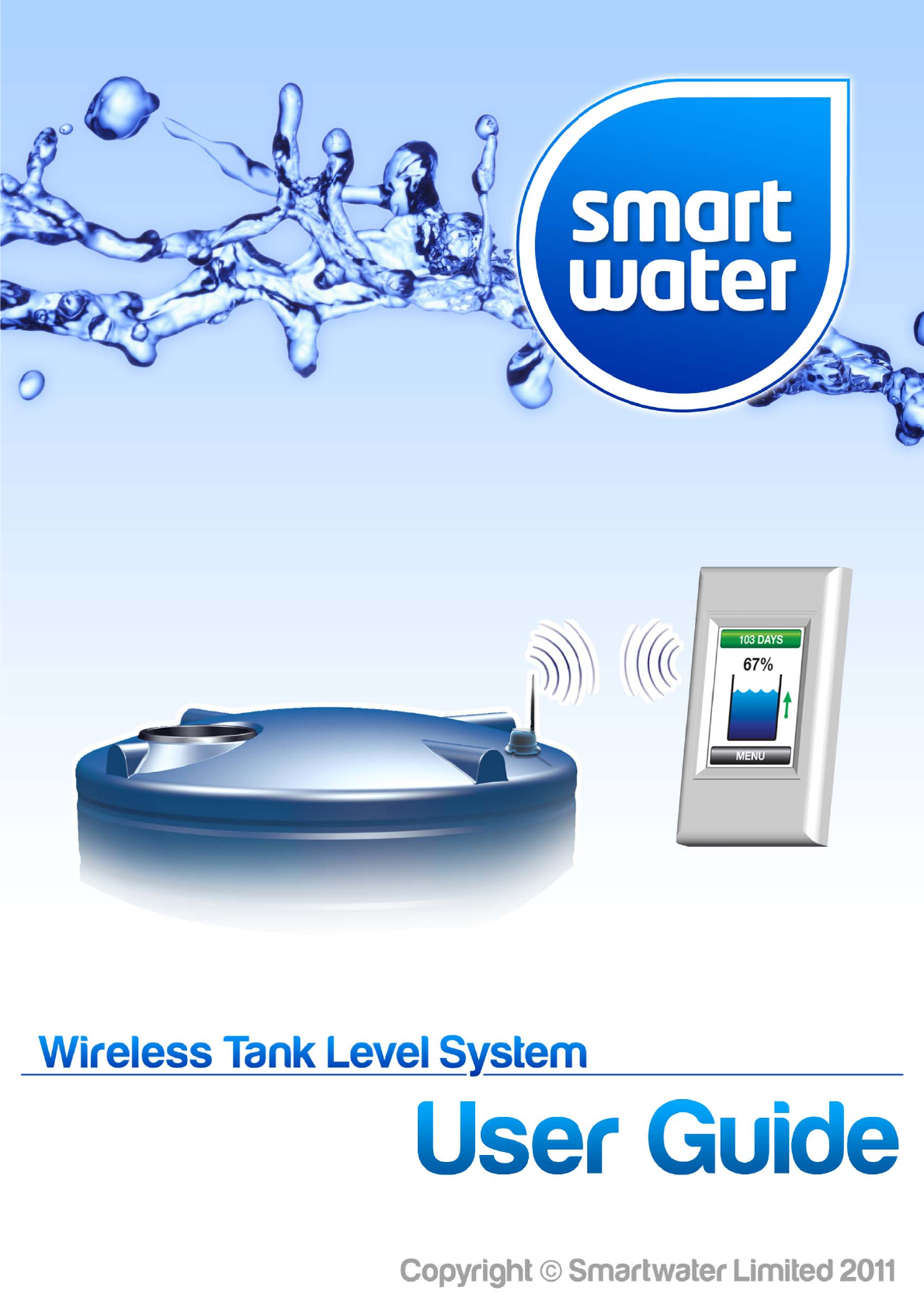
Smart Water Technology SW800DESK Digital Transceiver User Manual
Smart Water Technology Ltd Digital Transceiver
User Manual
Page|1
FEATURES
Themostadvancedandthemostaccuratewatermanagementsystemavailable!
Newandimproved“Version3”technologymeansultra‐longrangeandupto9tankmonitoring
Fullcolour,highresolution,superbright2.8”TFTLCDtouchscreendisplay
Ultra‐longrangewirelessconnectivitywithupgradeoptionsforevengreaterperformance
Easyinstallation,viewoursimpleinstallationDVDinstructionsonline
Wallmount,stylishdeskmountorindustrialversionLCDdisplayoptionsforfullflexibilitywith
yourindividualinstallation
“OneGlance”LCDdisplaygraphicsdesignedfortheultimateinsimple,userfriendlyoperation
“TimetoEmpty”indicationbasedonyouractualwaterusage.Justlikeatripcomputerinyour
car,SmartWaterwilltellyouhowlongyouhaveuntilyourtankwatersupplywillrunout!
SmartWaterwilllearnandmemoriseyourhousehold/commercialwaterusageandassistyou
withthesmartandefficientmanagementofyourwater
“ALERT”featuresforlowdaysremainingandlowtanklevel
“ALERT”featureforabnormalusagewarnsofsystemleaksoranyunusualwaterusagedetected.
SmartWaterwillalertyouifawatersource/outlethasbeenleftrunningorthereisasystemleak
withinonly4hours!
DifferentfluidssuchasMolassesandUreacanbemonitoredbysimplysettingtheSpecific
Gravity(SG)ofthefluidyouaremeasuring
Wirelesspumpcontrolwithusersettablerunperiod(on/off)andautomaticstopfeature
Thepumpcontrollercanbesettoturnon/turnoffatspecifictanklevels.Setitandforgetit!
Watercanbepumpedbetweendifferenttanks,oralternativelyfromunlimitedsourcessuchas
borewater/riverwaterwiththewirelesspumpcontroller
UptoninetankscanbemonitoredwithonlyoneLCDdisplayunit!
Solarpoweredtankmodulemeansminimalmaintenanceandzeroongoingrunningcost(AC
mainspoweredtankmodulesalsoavailableforsitessuchasundergroundtanks)
Filterreplacementtimerwithonscreenfilterreplacementalert
Wirelessreceptionstrengthindicator
Automaticsystemcalibrationof“fulltank”(100%)level
SmartWatercanbecustomisedeasilytodifferenttypesofwatertanks,includingsettingan
offsetforthepositionofthewateroutletonyourtank!
Onscreengraphicdisplayfeatureshowingtankleveltrendsoverthepreceding30days
Highqualityconstructionincluding316StainlessSteelsensorandultra‐highUVresistantplastic
Oneyearfullreplacementwarranty
Page|2
INDEX
FEATURES1
INDEX2
INTRODUCTION5
FCCCOMPLIANCEANDRFRADIATIONEXPOSURESTATEMENT6
INSTALLATIONINSTRUCTIONS7
InstallationInstructions7
MAINSCREEN13
MAINSCREENDEFINITIONS14
MenuButton14
StatusButton14
TankNumber14
TankPercentage15
TankLevel15
TrendIndicator15
TankSignalStrength15
BatteryLowIcon16
FilterReplaceIcon16
WarningIcon16
PumpIcon16
SelectionIcon17
UP/DOWNArrowIcon17
TankHistoryGraph17
MENUSCREEN19
MENU19
TANK‐>ADD19
TANK‐>REMOVE19
TANK‐>MOVE19
TANK‐>SETTINGS‐>HEIGHT19
TANK‐>SETTINGS‐>OUTFLOW20
TANK‐>SETTINGS‐>DENSITY20
TANK‐>SETTINGS‐>FILTER20
PUMP‐>ADD20
PUMP‐>REMOVE20
PUMP‐>CONTROL20
PUMP‐>SETTINGS‐>SOURCE21
PUMP‐>SETTINGS‐>DEST.21
PUMP‐>SETTINGS‐>RUNTIME21
PUMP‐>SETTINGS‐>LEVELS‐>START21
PUMP‐>SETTINGS‐>LEVELS‐>SOURCE21
PUMP‐>SETTINGS‐>LEVELS‐>DEST.22
PUMP‐>SETTINGS‐>LEVELS‐>REPORT22
SETTINGS‐>OPTIONS22
SETTINGS‐>DISPLAY‐>DIMLEVEL22
SETTINGS‐>USAGE‐>RESET22
SETTINGS‐>FACTORY‐>RESTORE23
Page|3
INDEX
HISTORY23
UP/DOWNARROWS23
CLEAN23
ABOUT23
BACK23
MORE23
TANKNUMBER24
APPENDIX25
InstallationNotes25
OperationalNotes26
WARRANTY27
FREQUENTLYASKEDQUESTIONS28
CONTACTDETAILS30

Page|4
Page|5
INTRODUCTION
Congratulationsonpurchasingtheworldsmostadvancedwirelesstanklevelsystem.SmartWaterwill
revolutionisethewayyouusewaterandwillprovideastylishyetfunctionaladditiontoyourhomeorfarm.
Thesystemisperfectforbothdomestichouseholdsandruggedfarmorindustrialapplicationsandhas
beendesignedtowithstandtheharshestenvironments.Theproductismadefromthehighestquality
materialsandissoldtoyouwithaoneyearfullreplacementwarrantyandcompleteaftersalestechnical
support.SmartWaterTechnologyrepresentsworldleadinginnovationanddesignandtheproductis
proudlymanufacturedinNewZealand.
Thelatestrelease“Version3”SmartWatersystemtakesanotherhugestepforwardinfluidmanagement
technology.Thesystemboastsunmatchedwirelessperformancetoeasilyconquereventhetoughestof
installations.NineseparatetankscanbeaccuratelymonitoredthroughonlyoneLCDtouchscreenand
differentfluidssuchasUreaandMolassescanbemeasured.
Pleasetakethetimetoreadthroughthismanualcarefully.Thecorrectinstallationoftheproductis
essentialandwillensuremaximumperformanceandreliablelongtermoperation.
TheSmartWaterwirelesstanklevelsystemwillalwaysprovideyoubasictanklevelinformation,butthe
systemdoeshavethecapabilitytosupportmoreadvancedapplications.Theseincludeanestimated“Time
toEmpty”indication,historicalusagefeature,wirelesspumpcontrolandaseriesofalerts,includingifthe
systemdetectsaleakoranyabnormalusage.Thesefeatureswillallowyoutochangeandmanageyour
waterusagetobecomemoreeconomicalandmaximiseyourefficiency.IfcoupledwiththeSmartWater
wirelesspumpcontrollerthesystemcanprovideacompletesolutiontoyourwatermanagement
requirements.
EnjoyourproductandenjoythepeaceofmindthatSmartWaterwillbringtoyourtankwatersystem.
ThankYouForPurchasingSmartWater

Page|6
FCCCOMPLIANCEANDRFRADIATIONEXPOSURESTATEMENT
TheSmartWaterequipmentcomplieswithFCCRFradiationexposurelimitssetforthforanuncontrolled
environment.Thedevicesandtheirantennaemustnotbeco‐locatedoroperatinginconjunctionwithany
otherantennaortransmitter.
TocomplywithFCCRFexposurecompliancerequirements,theantennausedfortheSmartWater
equipmentmustbeinstalledtoprovideaseparationdistanceofatleast20cmfromallpersons.This
requirementappliestoboththeinitialset‐upofthesystemandongoingoperation.
SmartWaterTechnologyLimited
FCCCode:2ABG2
GCNumber:GC355517
Page|7
INSTALLATIONINSTRUCTIONS
TheSmartWatersystemisverysimpletoinstall.Itishoweverimportantthattheinstructionsarefollowed
insequencestepbystepasillustratedbelowtoguaranteethecorrectfunctionoftheproduct.Not
followingtheseinstructionscouldcausetheproducttofunctionincorrectly.
Step1:
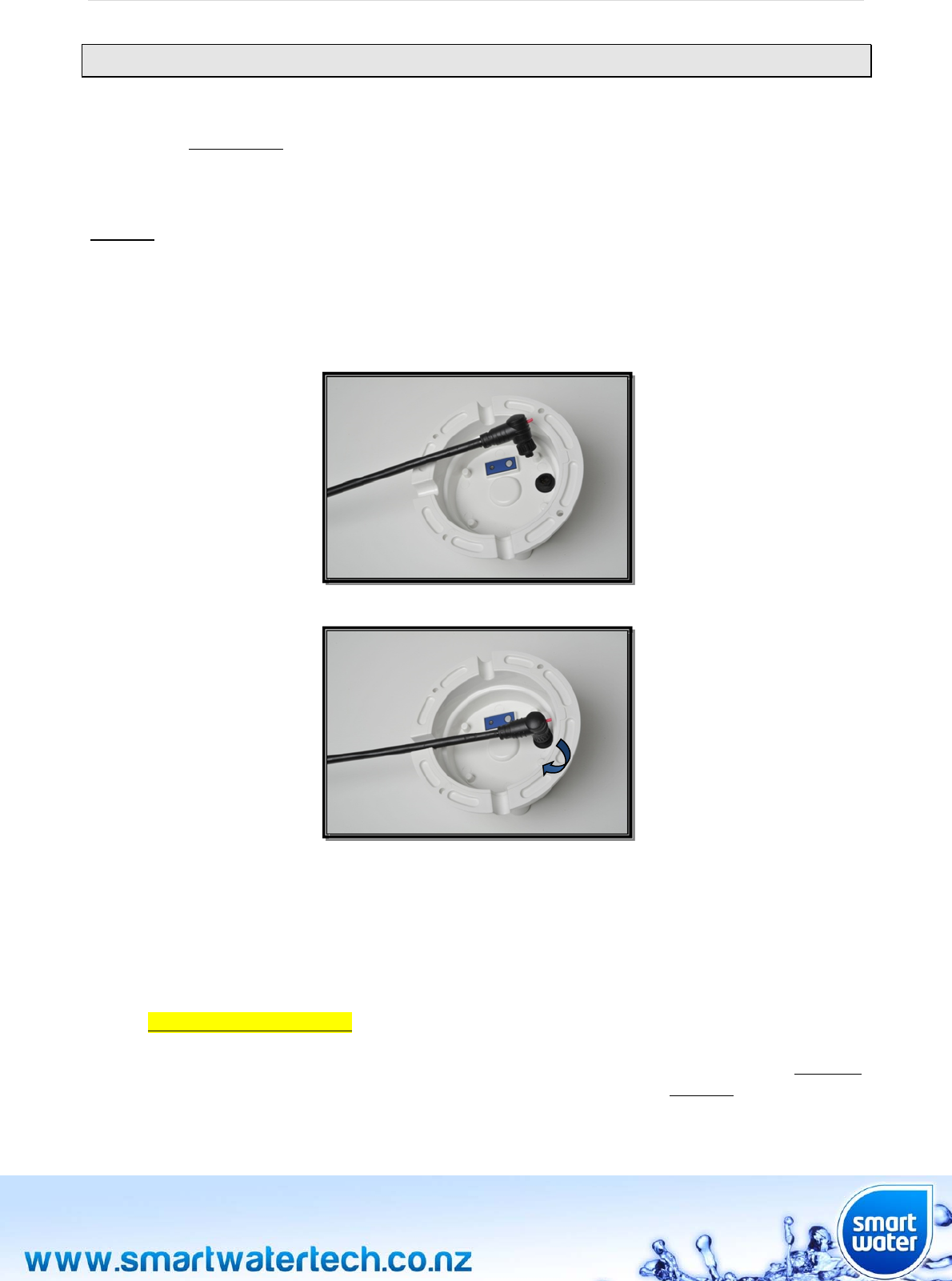
Plugthesensorcableintothetankmodule.Thesensorcableshouldbelockedintopositionbyturningthe
“thumblock”ontheconnectorbody.Turntheconnectorthumblockclockwiseuntilitclicksfirmlyintothe
lockedposition.Itisimportantthattheconnectorislockedasthisprovidestherequiredweatherproofing.
TheLCDmoduleshouldnowbe“poweredup”.PluginthedeskmountLCDpoweradaptortoanACmains
powersupplyandconnectthecabletotherearoftheunit.Ifyouhaveawallmountversion,
wire/terminatethewallmountLCDmodulepoweradaptortoanACmainspowersupply.SmartWater
recommendsthatthewallmountLCDmodulepowersupplyisinstalledbyacertifiedelectrician.Thedesk
mountLCDmodulecanbepluggeddirectlyintoanyNZ/AUSTstandardpoweroutlet.
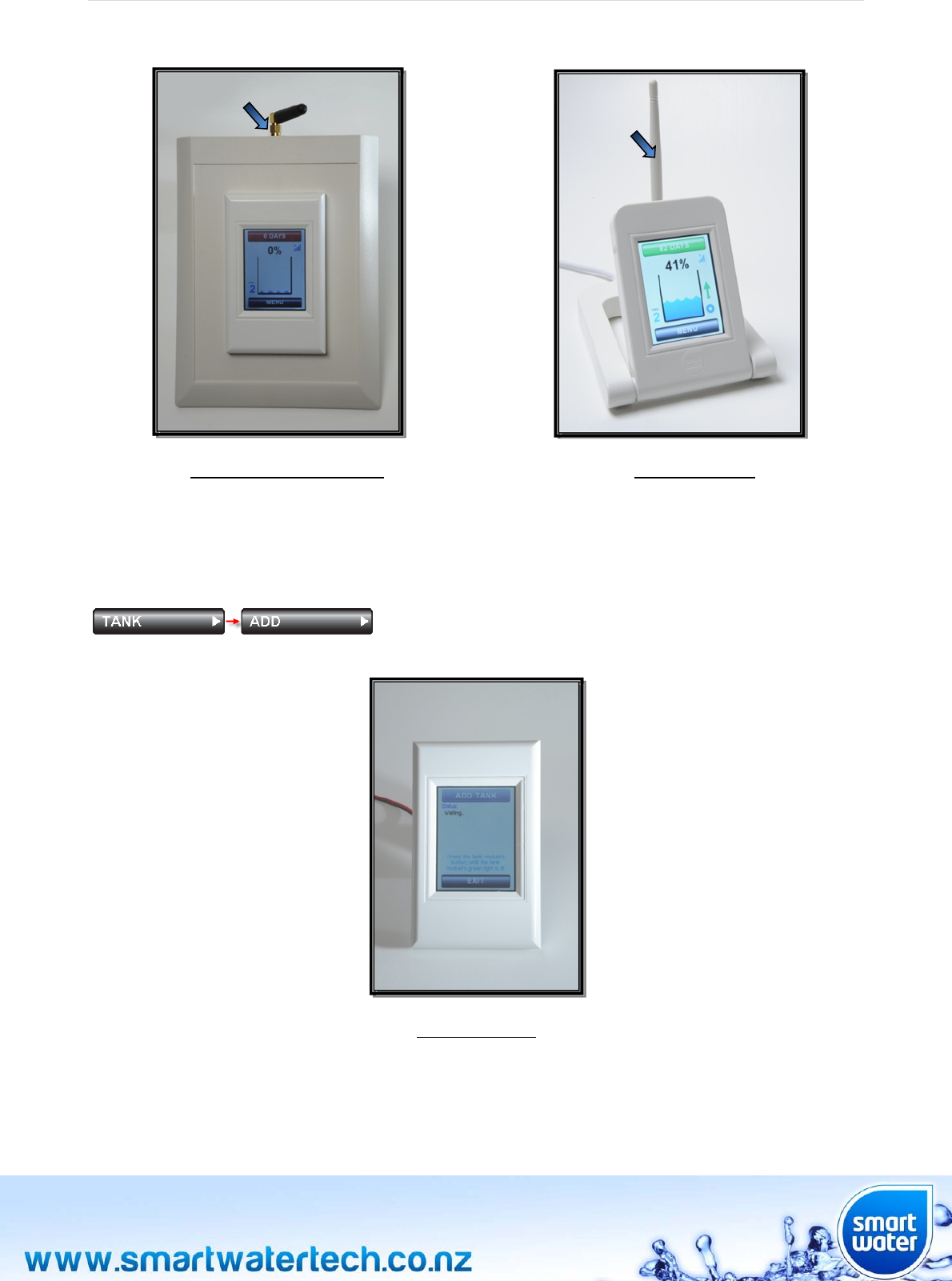
DESKMOUNTversiononly:IfyouhavepurchasedadeskmountLCDmodule;attachthesupplied
antennaontotheGoldantennaconnectorbyscrewingituntilfingertight.Theantennaconnector
hasaGoldplatedthreadandislocatedabovethepowerconnectoronthebackoftheindustrial
deskmountunit,oralternativelynexttotheMicro‐USBconnectoronthestandarddeskmountunit.
Page|8
IndustrialDeskMountLCDDeskMountLCD
AftertheLCDmodule“powersup”itwillautomaticallyshowtheTANK‐>ADDmenuontheLCDscreen.If
thisscreenisnotshownitcanalsobeaccessedmanuallybypressingtheMENUbuttononthemainscreen
andthenTANK‐>ADD
WallMountLCD
Page|9
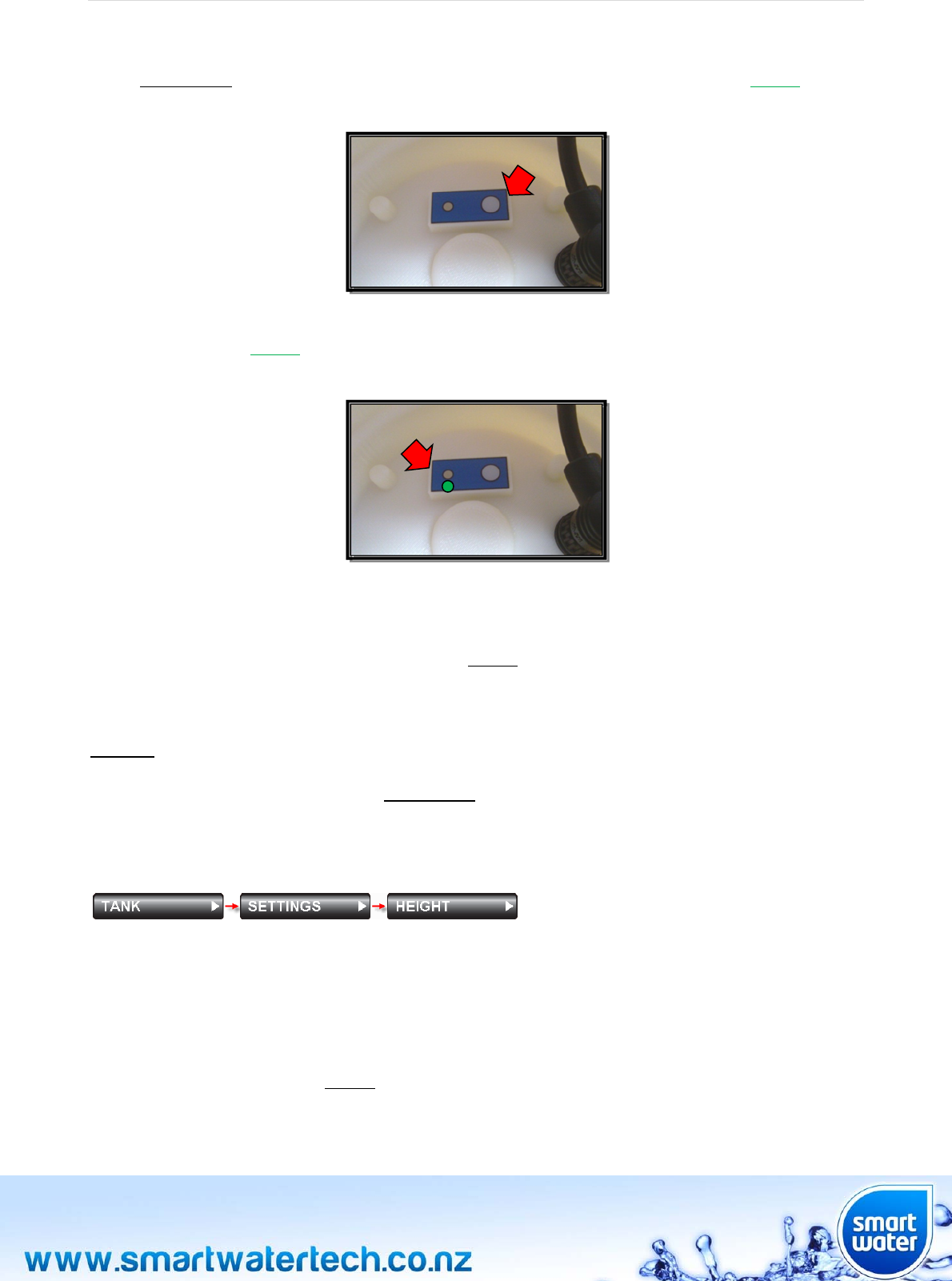
ConfirmtheLCDscreenisshowing“Waiting”,thenpressandholdthecircularpushbuttononthebottom
ofthetankmoduleasshownbelow.OncetheLEDlightnexttothebuttonisilluminatedGREEN,release
thetankmodulebutton:
WhenthetankmoduleissuccessfullyconnectedtotheSmartWatersystem,theLEDlightnexttothe
buttonwillilluminateGREENfor3seconds,theLCDmodulewillbeepandthemessage“TankAdded”will
bedisplayedontheLCDtouchscreen:
Ifadditionaltankmodulesneedtobeconnectedtothesystem(SmartWatercanmonitoruptonine
differenttanks)repeattheaboveprocedurepriortoproceedingtoStep2.
Yourtankmoduleisnowconnectedtothesystem.Donotputthesensorinyourtank,pleaseproceedto
Step2tocontinuetheinstallationprocess.
Step2:
SmartWaterinitiallyneedstoknowtheapproximateheightofyourwatertankbeforeinstallation.Setthe
tankheightofyourwatertankthroughtheMENUscreen.AftertouchingtheMENUbuttononthemain
screen,gototheTANK‐>SETTINGS‐>HEIGHTmenu.
TANK‐>SETTINGS‐>HEIGHT
Thesystemhasadefaulttankheightof2.4metres.Thiscanbecustomisedtoyourexacttankheight
throughthismenu.Onceyourtankbecomes100%fullthesystemwillautomaticallycalibratetoarevised
100%level(maximumtanklevel)foryouractualtankheight.Ifthetankheightmenuisre‐visitedtheheight
shownwillreflectthehighestwaterlevelthatyourtankhaseverreached.Thismaynotbethenumberyou
initiallyentered,howeverthisisnormaloperationandagoodsignthatthesystemisoperatingaccurately
anddisplayingatrue100%(tankfull)level.
Ifthetankheighthaschangeddonotchangeitbacktotheoriginalsettingenteredduringinstallation.
Whenthetankheightischangedmanually,touchtheup/downbuttonsforcustomizedsetting,Touchand
holddowntheup/downbuttonforfastersetting.
Page|10
RECOMMENDEDPROCEDURE:SmartWaterstronglyrecommendsphysicallymeasuringyourtank
height.Thecorrectheighttomeasureistheheightfromthebaseofthewatertanktotheoverflow
outlet.Oncethisheightisknown,reducebyaround20cmandenterthefigureintotheTANK‐>
SETTINGS‐>HEIGHTmenuscreen.Forexampleifyourtankis2.2Mhigh,enter2.0MintotheTANK
‐>SETTINGS‐>HEIGHTscreen.Iftheexactheightisnotknown,enteranapproximateheightwhich
isonthelowersideoftheapproximation,thiswillallowthesystemtocalibratemoreaccurately.
CAUTION:Ifthetankheightissetincorrectlyitispossiblethatthesystemwillnotperform
accurately.SmartWaterstronglyrecommendsthatthetankheightbesetslightlylowerthanthe
actualheightofyourtank.Thesystemwillthenautomaticallycalibratetoaprecise100%level
whenyourtankfillstoitsmaximumlevel.Thistechniquewillprovidethemostaccurateongoing
performance.
Step3:
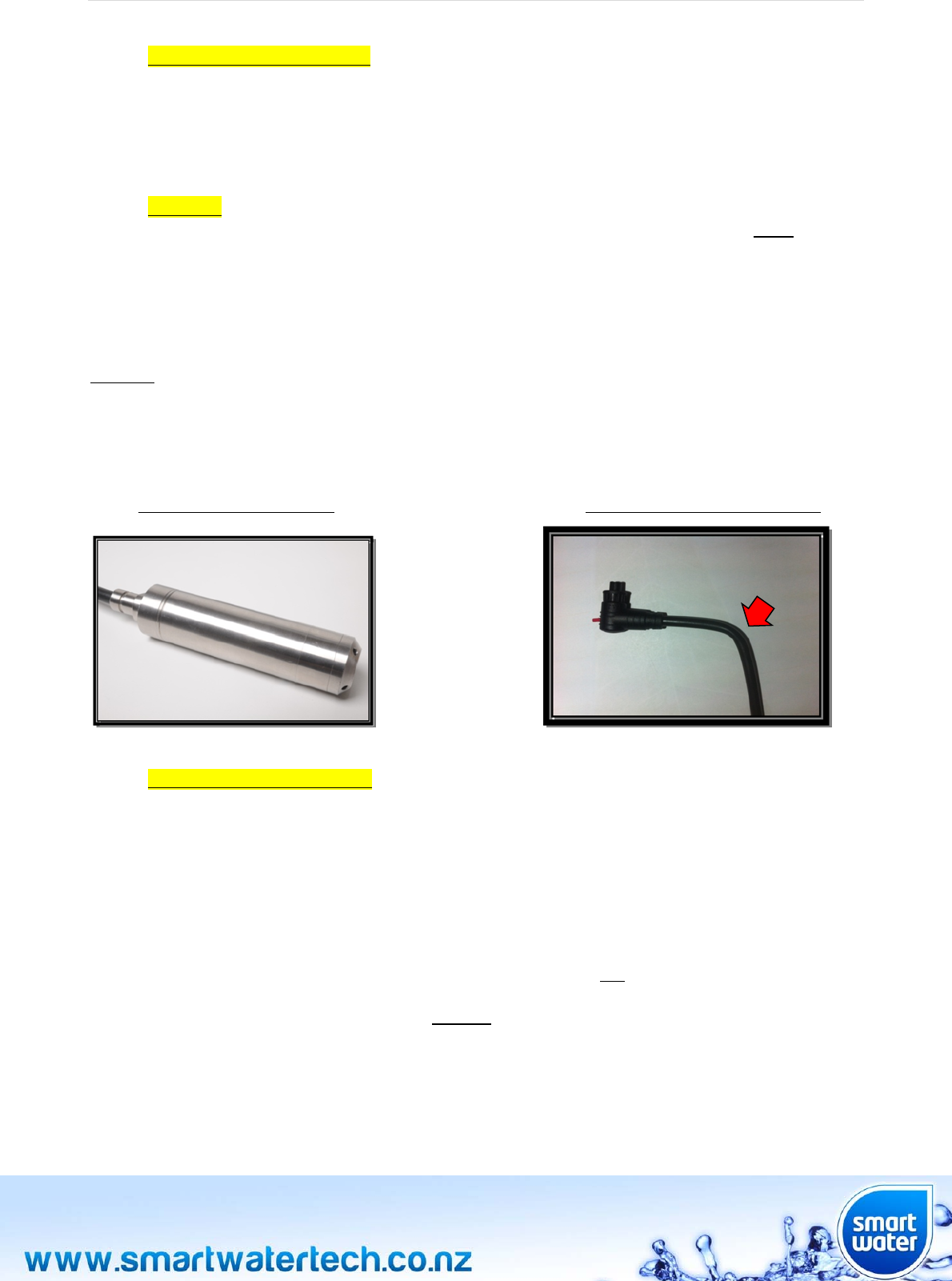
TakethetankmoduleandthesensorcabletoyourtankandlowertheStainlessSteelsensortothebottom.
Pleaseensurethatthesensorislocatedattheverybaseofthetankandawayfromthewateroutflow
(draw‐offposition)onyourtank.
StainlessSteelTankSensorSensorCableBendingTechnique
RECOMMENDEDPROCEDURE:SmartWaterrecommendstophysicallypositionthesensoraway
fromthemainoutflowpipe.Thisstepisnotessentialhoweverwillresultinoptimumsystem
performance.
Thetankmoduleshouldbepositionedontopofthetankformaximumexposuretosunlight.Thiswillassist
inensuringthetankmodulebatteryremainshealthyandsufficientlycharged.Thisisnotrequiredifyou
havepurchasedanACmainspoweredtankmodule(forundergroundtypetanks).
IncludedwiththeSmartWaterproductarefour10mmx25mmStainlessSteelscrews.Theseareusedto
mountthetankmoduletothetopofyourtank.Thetankmoduledoesnotneedtobescrewedtoyourtank
butSmartWaterrecommendsthisaspartofagoodinstallation.Gluecanbeusedasanalternativefor
fixingthetankmoduletothetank.IfusingglueDONOTcoveruptheventinggrooves.
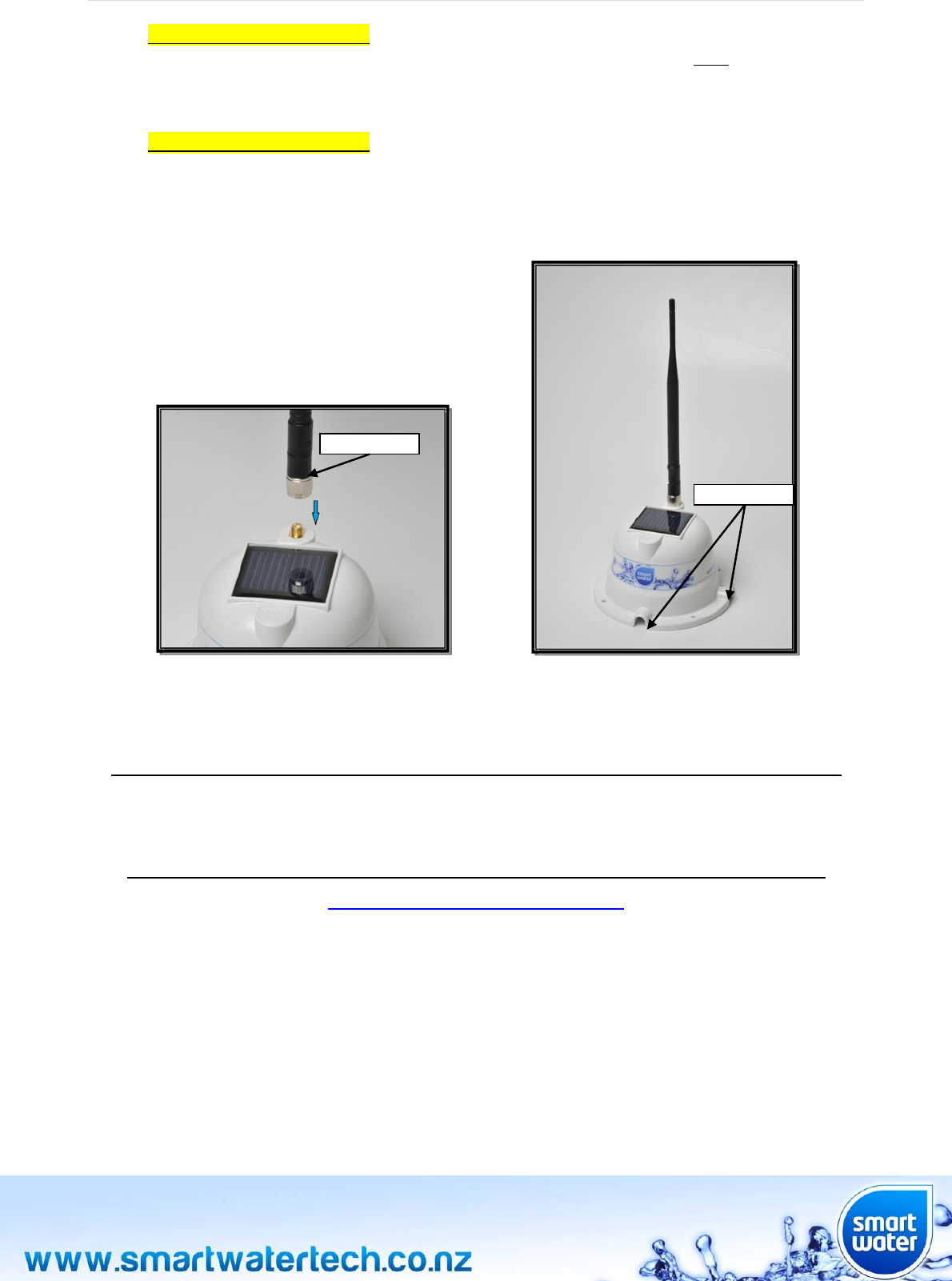
Attachtheblackdipoleantennatothetopofthetankmodule.Theantennashouldbegentlyscrewedinto
positionontheGoldthreadedconnectorlocatedonthetopofthetankmodule(nexttothesolarpanel).
Tightentheantennauntilitisfingertight,thereisnorequirementtoover‐tightentheantennanut.
Page|11
RECOMMENDEDPROCEDURE:Ifthesensorcableisrequiredtoexitbeneaththetankmoduleat90
degrees(directlyunderneaththemodule),manuallybend/shapethecablepriortoconnectingthe
sensorcabletothetankmodule.Ifthecableisbent/shapedonceconnectedtothetankmodulethe
waterproofconnectormaybedamaged.Refertothephotographaboveforthecorrecttechnique.
RECOMMENDEDPROCEDURE:Whenmountingthetankunitensurethatthethreeventinggrooves
aroundthebaseoftheunitaresettoallowwatertodrainawayfreelyfromunderneath.Ifwateris
allowedtoaccumulate/floodaroundtheblacksensorconnectorthiscouldcausetheunittooperate
intermittentlyorpossiblyfail.
Congratulations!YourSmartWatersystemisinstalled!
ForfurtherinformationpleaseviewourinstallationDVDonlineat
www.smartwatertech.co.nz
VentingGrooves
DipoleAntenna

Page|12
Page|13
MAINSCREEN
Page|14
MAINSCREENDEFINITIONS
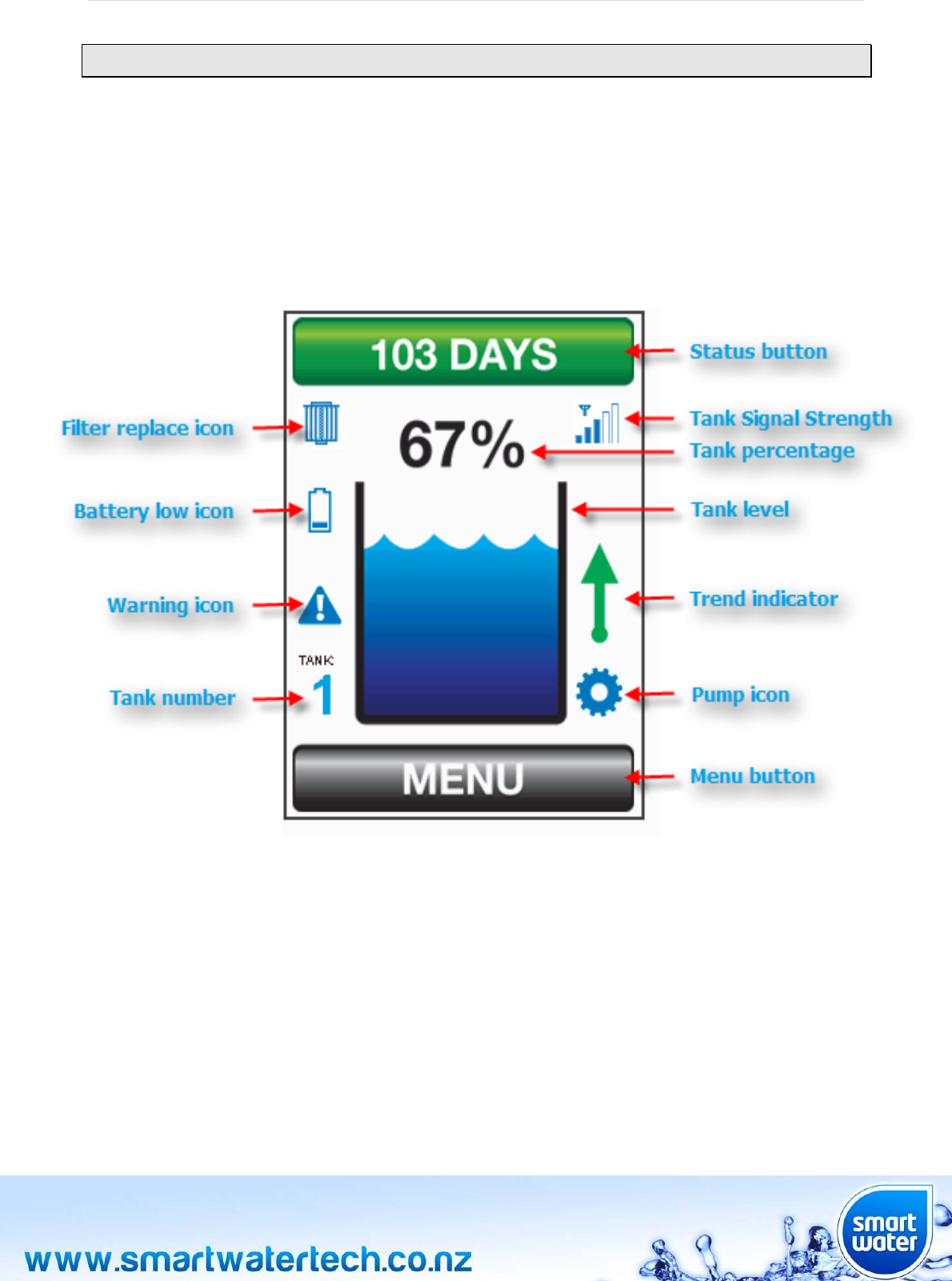
MenuButton
Touchthisbuttontoaccessthefullsetofsystemmenusthatareavailable.
StatusButton
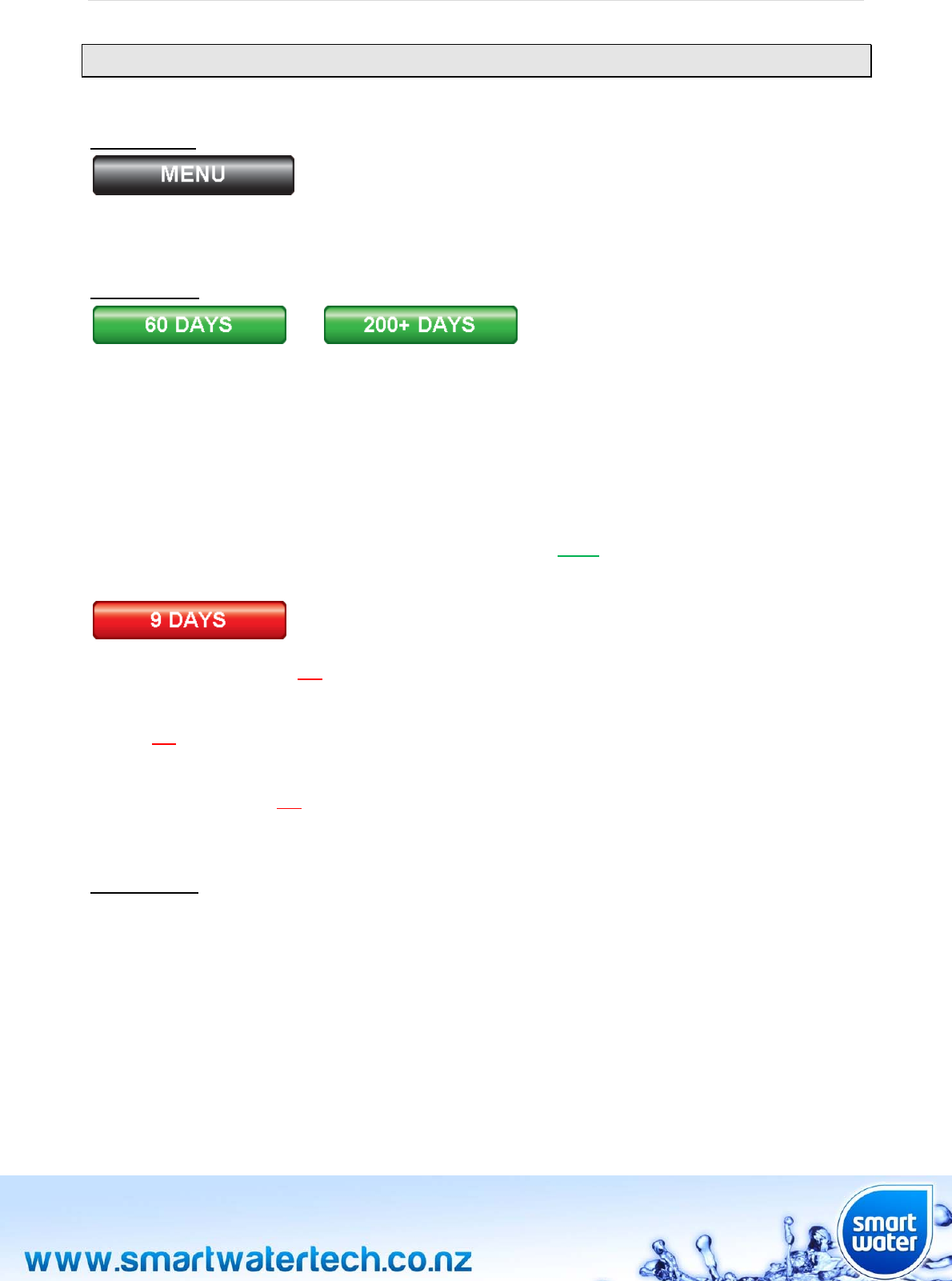
Thisbuttondisplaystheestimated“timetoempty”thatisavailablebeforeyourwatersupplywillrunout
(basedonyourcurrentwaterusageandrainfall).Ifforexampleyouweregettinglowonwaterand
subsequentlybecamemoreefficientwithyourwaterusage,theestimated“timetoempty”wouldincrease.
Themaximum“timetoempty”isdisplayedas200+days.WhenSmartWaterisfirstinstalledthestatus
buttonwilldefaultto200+days,onceyourwaterusagehasbeenlearnedandstoredintomemorybythe
systemthetimetoemptywillupdatetoanewvalue.
Touchthisbuttonalsotoseethesystemstatusandanynotifications.Bytouchingthisiconyouwillbe
takenintothesystemstatusscreen.Whenthestatusbuttonis“green”thestatusofthesystemisnormal.
Thestatusscreenwillshowthetext“NormalOperation”.
Whenthestatusbuttonis“red”thesystemhasdetectedanabnormalconditionorfaultthatshouldbe
checked.Forexampletherecouldbealeakinyourwatertankplumbing,atoiletconstantlyflushingor
simplyataplefton.Thiswouldcauseanabnormalusageforyoursystemandsubsequentlyturnthestatus
button“red”.BypressingthestatusbuttonfurtherinformationonthealertwillbeshownontheSTATUS
screen.
Thebuttonwillalsoturn“red”whentimetoemptybecomescriticallyloworwhenthereisafaultinthe
system.
TankNumber
1
ThetanknumbershowswhichtankiscurrentlydisplayedontheLCDscreen.Ifonlyonetankisconnected
tothesystem,thisnumberwilldefaultto1.Ifmorethanonetankisconnected,thetanknumbericonwill
showthenumberofthetankthatiscurrentlydisplayed.Touchthetanknumbertoselectwhichtankyou
wouldlikedisplayed.Itisalsopossibletoselectothertanksbypressingthetanklevelicon(seebelow).
Pleasenotethatthisfunctionisonlyapplicableifyouhavemorethanonewatertankconnectedtothe
system.AmaximumofninetankscanbeconnectedtoasingleSmartWaterLCDmodule.
Page|15
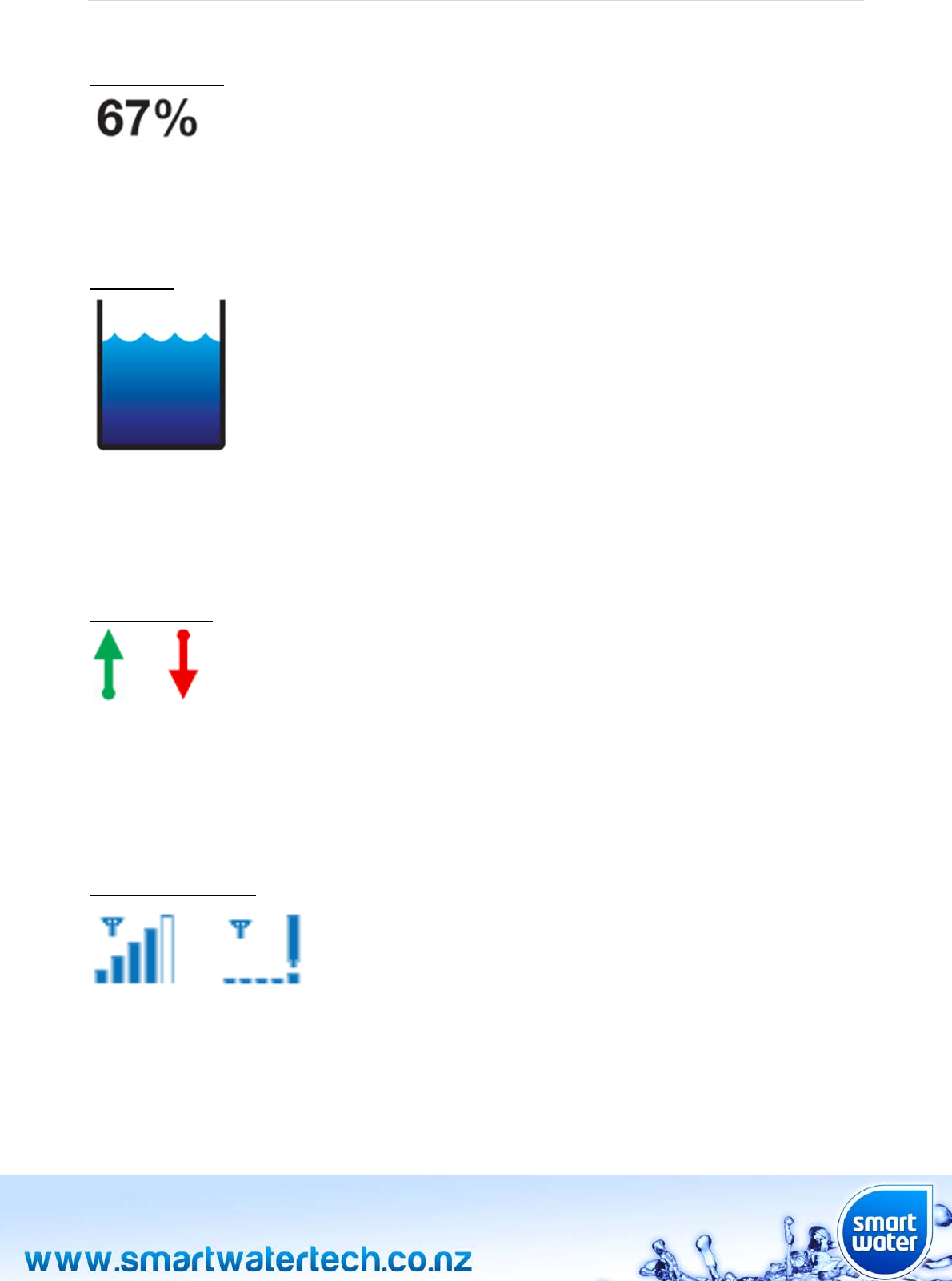
TankPercentage
Thispercentagefigureisanaccuraterepresentationofhowfullyourtankisreferencedtothemaximum
recordedlevelof100%.TouchthetankpercentageicononthescreentoentertheHISTORYscreen.This
screenshowsagraphofthetanklevelforthepreceding30days(alsoseeHISTORYinthemenusection).
TankLevel
Asimple“oneglance”indicationshowingthecurrentlevelofwaterinyourtank.Thisindicationrepresents
thelastmeasuredlevelofwaterintheselectedtank(see“tanknumber”).Thewaterlevelinthisiconwill
riseandfallasthelevelinyourtankchanges.Touchingthetanklevelicononthescreenwillscrollthrough
othertanksthatareconnectedtoyoursystem.
TrendIndicator
or
Asimple“oneglance”indicationshowingifthelevelofwaterinthetankisincreasingordecreasing.Ifthe
trendindicatorisnotdisplayed,thismeansthattherehasbeennochangeintanklevelforthelast12hours.
TouchingandholdingtheMENUbuttonfor2secondswillresetthetrendindicatorforthecurrently
displayedtank.
TankSignalStrength
or
Thetanksignalstrengthindicatordisplaysthesignalstrengthbeingreceivedfromthetankmoduleinthe
formofarising“bargraph”.Ifverylow,orifnosignalisshown,considermovingthetankmoduleorLCD
module,orfittinganexternalhighpowerantenna(availableasanaccessoryfromSmartWater).Ifonebar
isshownthisisnormallyadequateforreliablereception.PleasecontactSmartWateroryourlocalretailer
forfurtherinstallationassistanceonmaximizingreceptionperformance.
Page|16
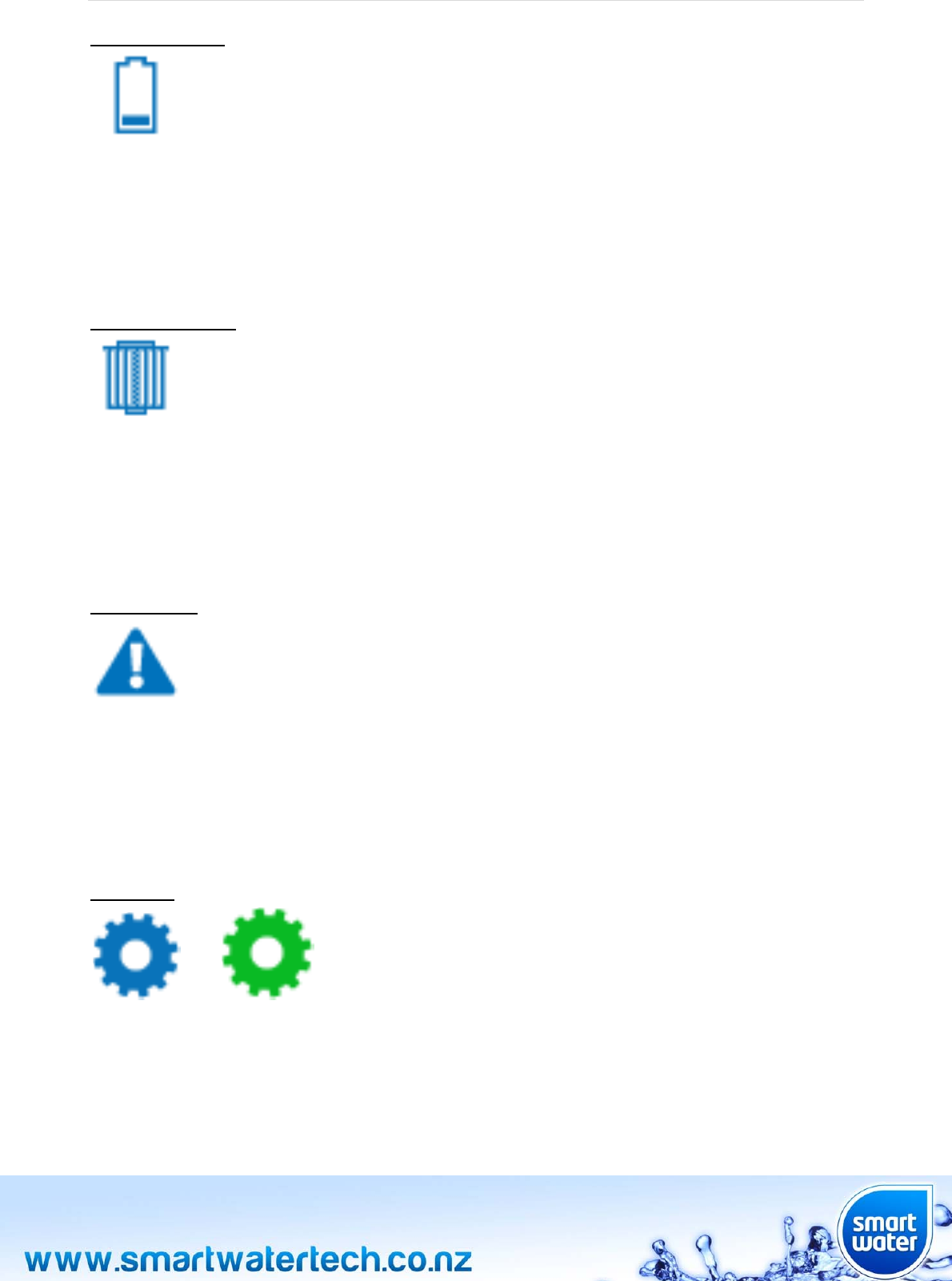
BatteryLowIcon
IndicatesthattheLi‐Ionrechargeablebatteryinthetankmodulehasalowstateofcharge.Ifmultipletanks
areconnectedtothesystem,touchthebatterylowiconorthestatusbuttontodisplaywhichtankhasa
lowbatterylevel.Makesurethatthetankmodulesolarpanelisnotobstructedfromdirectsunlight.Evenif
thetankmodulebatteryhasrunflat,itwillrechargewhenmoved/returnedtoapositionwithexposureto
directsunlight(recharginga“flat”tankmoduletakesapproximately24hrs).
FilterReplaceIcon
Thisiconisdisplayedwhentheperiodoftimesetforfilterreplacementhasexpired.Theperiodoftimefor
filterreplacementcanbesetbytheuserthroughtheTANK‐>SETTINGS‐>FILTERmenuscreen.Tofindout
whichtankfilterneedstobereplaced,touchthe"filterreplace"iconortheSTATUSbutton.
Toclearthefiltertimerwarningindicationresettherelevanttankfiltertimerthathasexpired.
WarningIcon
Whenthewarningiconisdisplayed,thereisaproblemthatneedstoberesolvedurgently.Touchthe
warningiconortheSTATUSbuttontoseewhatiscausingtheproblem.Possiblecausesare:
Batterytoolow
Tankmoduleunexpectedlydisconnectedfromsystem
PumpIcon
or
Thepumpiconisdisplayedwhenawirelesspumpcontrollerhasbeenconnectedtothesystem.Whenthe
greenpumpiconisrotatingthisshowsthatthepumpcontrollerisinoperation.Touchthepumpiconto
controlthepump(alsoseePUMP‐>CONTROLinthemenusection).Apumpcanbeaddedtothesystem
bytheuserthroughthePUMP‐>ADDmenuscreen.
Page|17
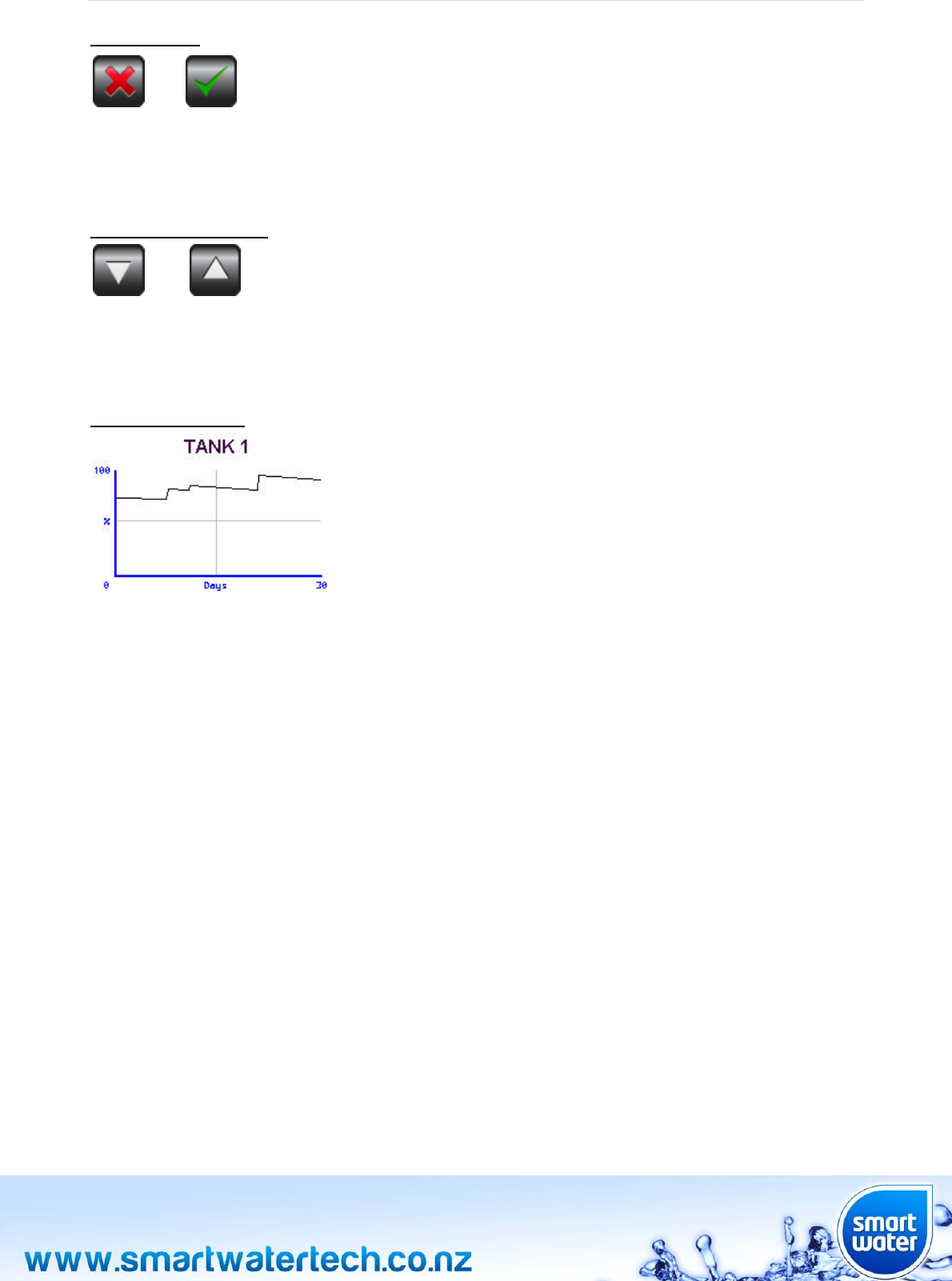
SelectionIcon
or
TheselectioniconsconfirmifauserselectableoptioninthesystemisONorOFF.Theseiconsareself
explanatoryconfirmingiftheusersettingisON(greentick)orOFF(redcross).
UP/DOWNArrowIcon
or
Usedtoincreaseordecreasethevalueoftheselection.Ifthebuttonispressedandheldthenumber
selectionwillincreaseordecreaseatafasterrateofchange.
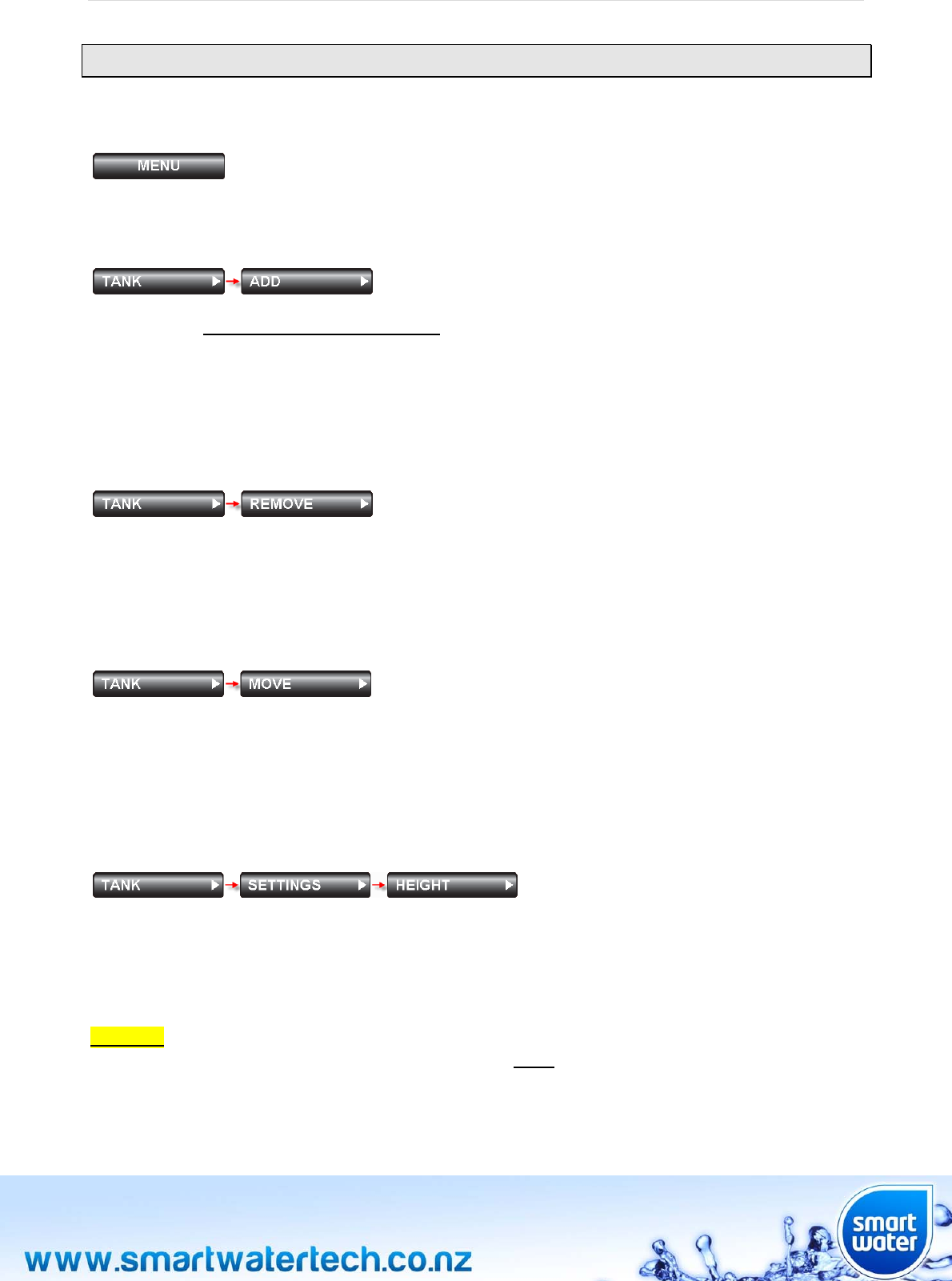
TankHistoryGraph
Thetankhistorygraphcanbeaccessedbypressingthe“TankPercentage”icononthemainscreen,or
throughtheHISTORYbuttoninthemenuscreen.Thisfunctiondisplaysthewaterlevelintheselectedtank
forthepreceding30daysinagraphicalformat.Touchthegraphtoscrollthroughanyadditionaltanks
connectedtothesystem.

Page|18
Page|19
MENUSCREEN
MENU
TouchtheMENUbuttononthemainscreentoaccessallmenuoptionsintheSmartWatersystem.
TANK‐>ADD
Usedtoconnectatankmoduletothesystem.EnsurethatpriortoaddingatankmoduletheStainlessSteel
watersensorisoutofthetankandfreeofwater.Pressandholdthetankmodulebutton(ontheunderside
oftheunit)untiltheLEDlightisilluminatedgreenfor3seconds.Releasethebuttonandconfirmonthe
LCDscreenthatthetankmodulehasbeenadded.Thewatersensorcanbeloweredintothetankafterthis
step.Tankmoduleinstallationisthencomplete.Ifatankmodulealreadyconnectedtothesystemisadded
againinerror,themessage“Tank#alreadybound”willbedisplayed(where#isthetanknumber).
TANK‐>REMOVE
Usedtoremoveatankmodulefromthesystem.WhentheREMOVEbuttonispressedyouwillhavethe
optiontoremoveanyoneofuptoninetanksconnectedtothesystem.Onceatankmoduleisremovedit
willneedtobere‐connectedusingtheTANK‐>ADDfunction.Intheunlikelyeventthatatankmodule
needstobereconnectedorreplaced,itwillneedtoberemovedfirstbyusingthisprocess.
TANK‐>MOVE
Usedtomove/swapatankfromasystemallocatedtanknumbertoanothertanknumber.Forexampleif
threetanksareconnectedtothesystem,Tank3couldbeswappedwithTank1.Thisprocessreallocatesthe
tanknumbersasselectedbytheuser.Tank3wouldbecomeTank1andviceversa.Ifthisfunctionisused
andapumpcontrollerisconnectedtothesystem,pleaseensurethatthepumpsettingsarechecked
carefullytoensurethepumpfunctionsasdesired.
TANK‐>SETTINGS‐>HEIGHT
Atankheightabove2.4metresisdetectedautomatically.Oncethetankisfullthesystemwillautomatically
re‐calibrateto100%(maximumtanklevel)foryourinstallation.Whenthetankheightischangedmanually,
touchtheup/downbuttonsforcustomizedsetting,Touchandholddowntheup/downbuttonforfaster
setting.Themaximumtankheightthatcanbesetis6.4M,theminimumheightis0.2M(20cm).Each
individualtankconnectedtotheSmartWatersystemcanhaveadifferentheightsetifdesired.
CAUTION:Ifthetankheightissettoohighthenitispossiblethatthesystemwillreadincorrectly.Smart
Waterstronglyrecommendsthatthetankheightbesetlowerthantheactualheightofyourtank.The
systemwillthenautomaticallycalibrate100%.Thistechniquewillprovidethemostaccurateperformance.
Page|20
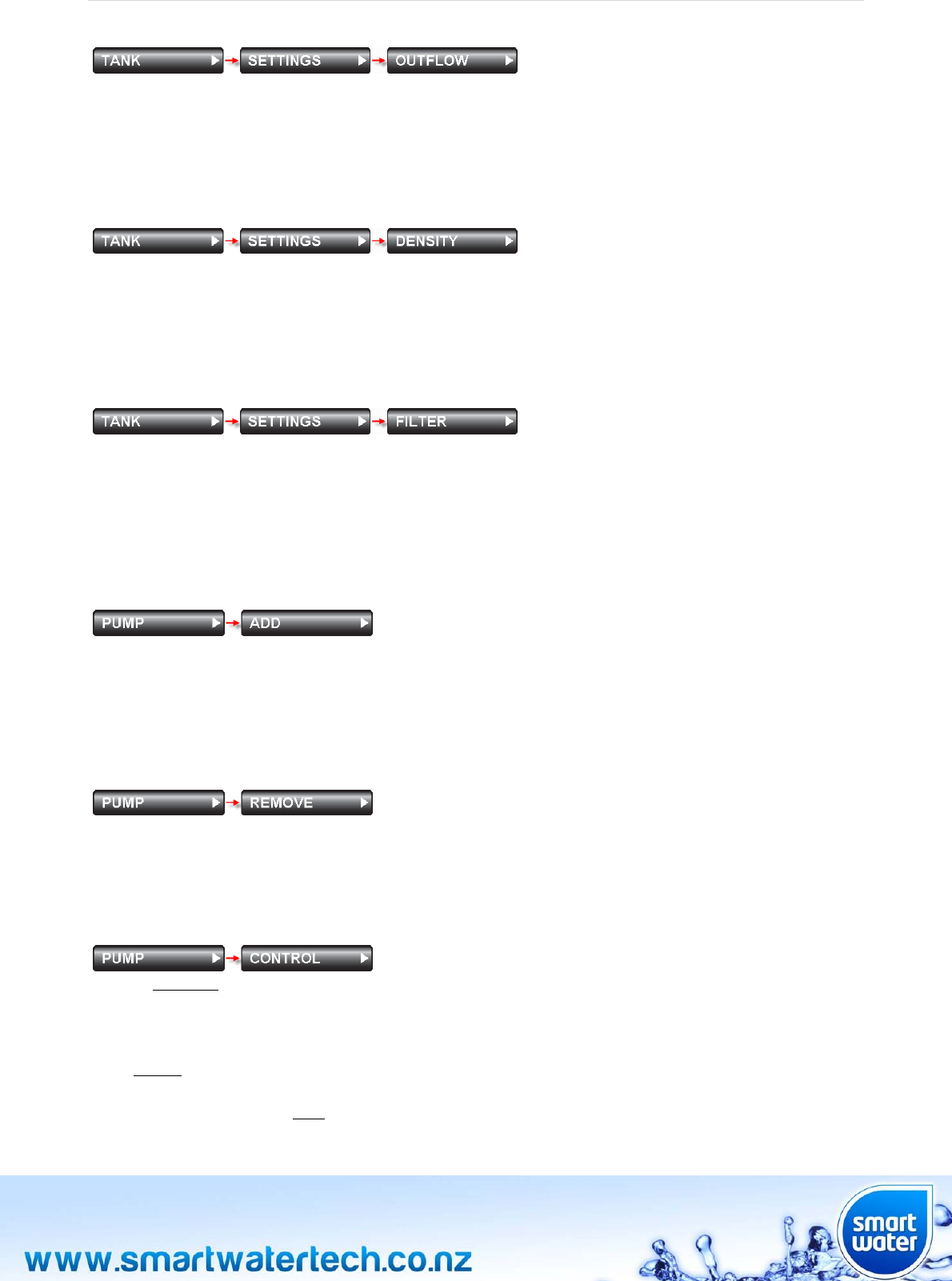
TANK‐>SETTINGS‐>OUTFLOW
Allowsthesettingofthewatertankoutflowpipeheight.Theoutflowheightistheheightabovethebaseof
thetankwherewaterisdrawnoffforsupply.Waterbelowthisleveliseffectivelyunusable.Bysettingthe
outflowheightSmartWaterwillre‐calibratethesystemtorepresentamoreaccurate0%indication.The
systemissuppliedwithadefaultoutflowpipeheightsettingof0.1m(100mm)fromthebaseofthetank.
TANK‐>SETTINGS‐>DENSITY
Thedensityofthefluidbeingmeasuredinaparticulartankcanbemodified.Selectthetanknumberyou
wishtosetandthenusetheupanddownarrowkeystosetthedensity.Forexamplemolassescanbe
measuredbysettingadensityofbetween1.2and1.4.TheSmartWatersystemwillallowarangeof
SpecificGravities(SG)from0.5throughto2.0.Thedefaultfactorydensitysettingis1.0(water).
TANK‐>SETTINGS‐>FILTER
Thisusefulfeaturewillremindyouwhenatankfilterneedstobereplaced.Justselectthenumberof
monthsforreplacementandtouchSET.Thefilterreplaceiconwillbedisplayedwhenthetimerexpires.To
disablethefiltertimer,select0monthsandtouchSET.Touchandholddowntheup/downbuttonforfaster
setting.Themaximumtimethatcanbesetonthefiltertimeris60months(5years)andcanbesetin1
monthincrements.Thedefaultsettingis12months(withthetimerdisabled).
PUMP‐>ADD
Usedtoconnectapumpcontrollermoduletothenetwork.Oncethepumpcontrollerisinstalledand
connectedtoACmainspowerpressandholdthepumpcontroller“Connect”button.TheLEDlightwill
illuminategreenfor3seconds.ReleasethebuttonandconfirmontheLCDscreenthatthepumpcontroller
hasbeenaddedtothesystemwiththeonscreencomment“Pumpadded”.
PUMP‐>REMOVE
Usedtoremoveapumpcontrollermoduleconnectedtothesystem.Onceapumpcontrollerisremovedit
willneedtobere‐connectedusingthePUMP‐>ADDfunction.Intheunlikelyeventthatapumpcontroller
needstobereconnectedorreplaced,itwillneedtoberemovedfirstbyusingthisprocess.
PUMP‐>CONTROL
Usedtomanuallycontrolthewirelesspumpcontrolleron/offfunction.TouchtheONbuttontostartthe
pumprunningfortheusersettimeperiod(seePUMP‐>SETTINGS‐>RUNTIME).Iftheruntimeissetto
0:00(zero)thepumpwillruncontinuously.TouchtheOFFbuttontomanuallystopthepump.
Ifthesourceforthepumpisatank(seePUMP‐>SETTINGS‐>SOURCE),thepumpwillstartautomatically
whenthedestinationtanklevelreachesthelevelsetinthePUMP‐>SETTINGS‐>LEVELS‐>STARTmenu.
ThefactorydefaultSOURCEstoplevelis10percent.Thiswillpreventthepumprunningatankdry.
Page|21
Thestoplevelcanbesetbetween0%and100%in5%increments.Ifthedestinationstartlevelissetto0%
thepumpwillneverstartautomatically(autostartdisable).
Ifthepumpdestinationisatank(seePUMP‐>SETTINGS‐>LEVELS),thenthepumpwillstopautomatically
whenthedestinationtanklevelreachesthelevelsetinthePUMP‐>SETTINGS‐>LEVELS‐>DEST.menu.
ThefactorydefaultDEST.stoplevelis90percent.Thestoplevelcanbesetbetween0%and100%in5%
increments.Ifthedestinationstartlevelissetto0%thepumpwillneverstartautomatically(autostart
disable).
Thepumpcontrolmenucanalsobeaccessedbysimplytouchingthepumpicononthemainscreen.
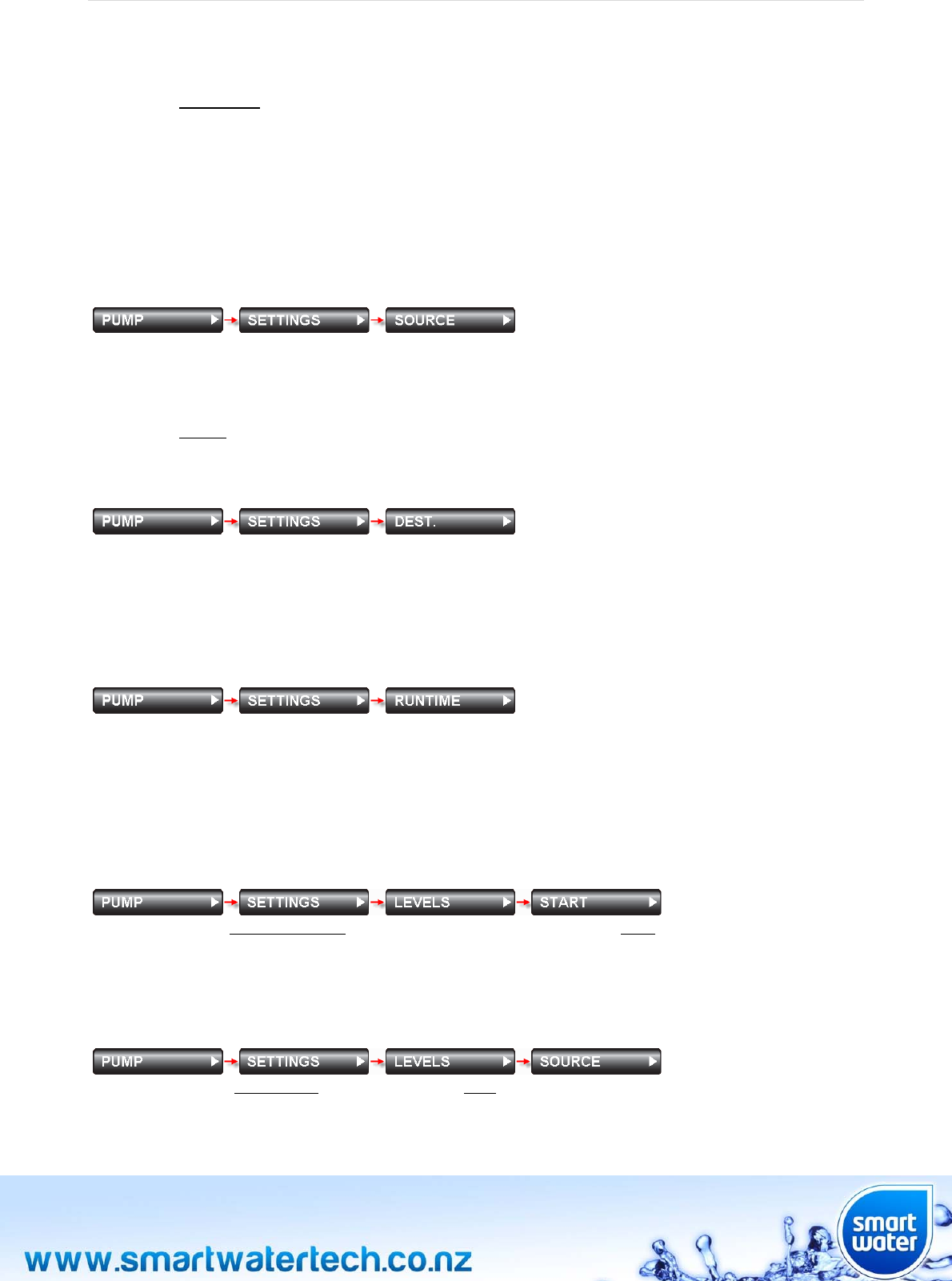
PUMP‐>SETTINGS‐>SOURCE
Usedtosetthesourceofwaterforthepump.Thiscanbean“unlimited”source(ie,streamwater,bore
water)ora“limited”source(ie,anotherwatertankconnectedtothesystem).Anyoneofthetanks
connectedtotheSmartWatersystemcanbeusedasasource.Wheninthismenu,press“SELECTTANK”to
selectthesourcetank,or“NOTATANK”toselectanunlimitedwatersource.Thesystemdefaultsourcefor
thepumpisTank1.
PUMP‐>SETTINGS‐>DEST.
Usedtosetthedestinationofwaterfromthepump.Thiscanbean“unmonitored”destination(ie,nota
tank)oranyoneofthetanksconnectedtothesystem.AnyoneofthetanksconnectedtotheSmartWater
systemcanbeusedasadestination.Wheninthismenu,press“SELECTTANK”toselectthedestination
tank,or“NOTATANK”toselectanunmonitoreddestination.Thedefaultsettingis“NOTATANK”.
PUMP‐>SETTINGS‐>RUNTIME
Usedtosetthemaximumruntimeofthepumpintenminutesteps(seePUMP‐>CONTROL).Iftheruntime
issetto0:00(zerohours)theruntimefeatureisdisabled(thismeansthepumpwillruncontinuouslyonce
manuallyturnedon).Themaximumruntimethatcanbesetis24:00(24hours).Touchandholddownthe
up/downbuttonforfastersetting.Theruntimecanbesetin10minuteincrements.Oncetheruntimeisset,
returntothePUMP‐>CONTROLmenuandstartthepump,itwillthenrunforthespecifiedtimeperiod.
PUMP‐>SETTINGS‐>LEVELS‐>START
Setthelevelofthedestinationtankthatthepumpwillbecommandedtostart.Whenfluidlevelisequalto,
orbelowthislevel(intheselecteddestinationtank)thepumpcontrollerwillstartthepump.Setthislevel
to0%ifthepumpisneverrequiredtostartautomatically(autostartdisable).Thedefaultsettingis0%.
PUMP‐>SETTINGS‐>LEVELS‐>SOURCE
Setthelevelofthesourcetankthatthepumpwillstop.Whenfluidisequalto,orbelowthislevel(inthe
selectedsourcetank)thepumpcontrollerwillstopthepump.Thedefaultfactorysettingis10%.Thepump
willnotstartagainuntilthesourcetanklevelis10%higherthanthelevelsetinthismenu.
Page|22
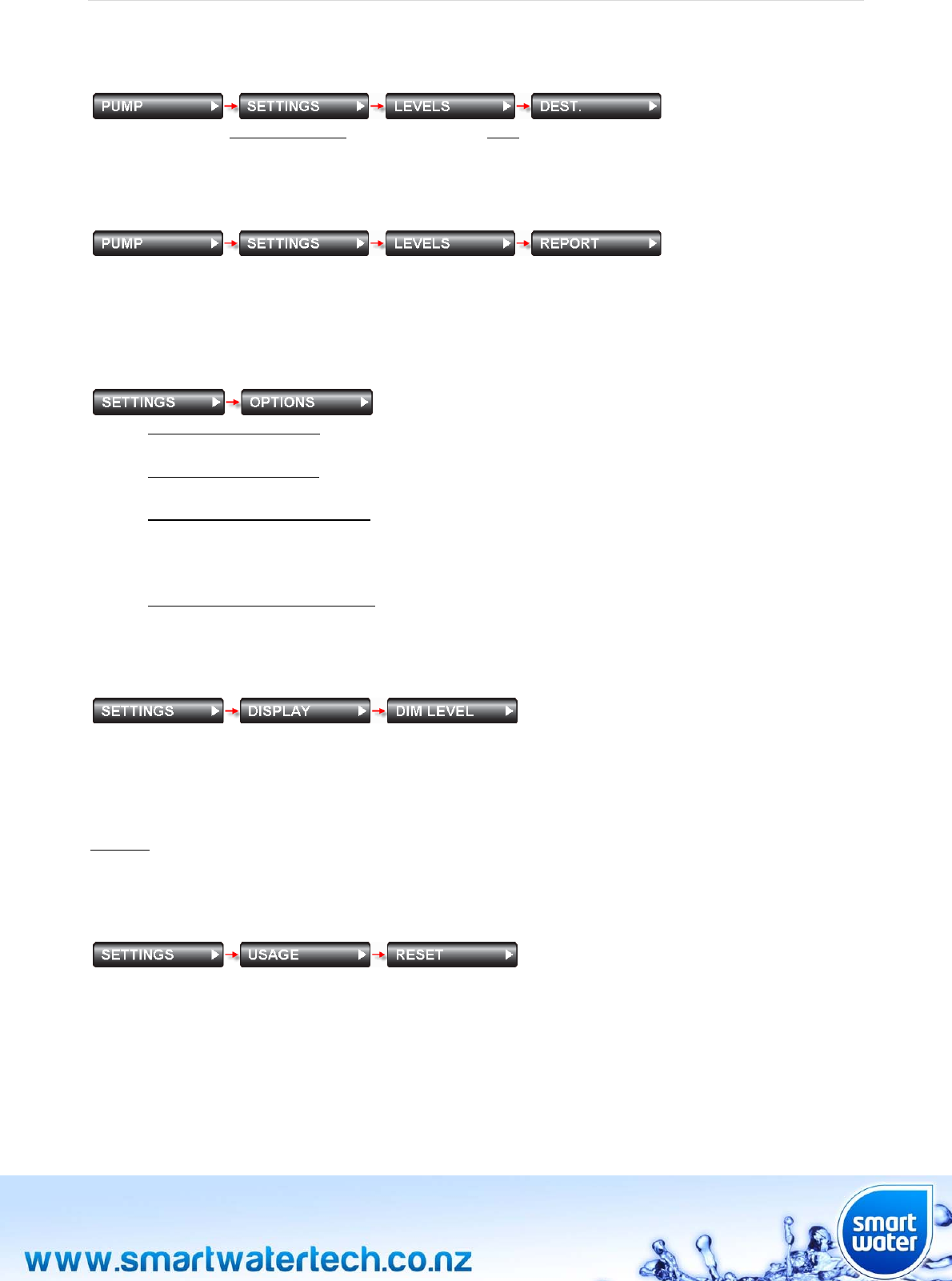
PUMP‐>SETTINGS‐>LEVELS‐>DEST.
Setthelevelofthedestinationtankthatthepumpwillstop.Whenfluidlevelisequalto,orabovethislevel
(intheselecteddestinationtank)thepumpcontrollerwillstopthepump.Thedefaultfactorysettingis90%.
PUMP‐>SETTINGS‐>LEVELS‐>REPORT
Thepumpreportmenuprovidestheuseradetailedreportoftheentirepumpcontrollerset‐up.Smart
Waterrecommendsreviewingthereportonceallsettingsaremadetoensurecorrectpumpcontroller
operation.
SETTINGS‐>OPTIONS
Displaydaysremaining–Enables/disablesthedisplayofthedaysremainingfeatureonthemain
screensstatusbutton.
Displaytrendindicator–Enables/disablesthedisplayofthetrendindicatorfeatureonthemain
screen(displayedontherighthandsideofthetanklevelicon).
Enableabnormalusagealert–Enables/disablesawarningfeaturethatalertstheuserifan
abnormalamountoffluidhasbeenusedfromanytankconnectedtothesystem.Thealertis
calculatedbySmartWaterafteritbuildsadatabaseofthestandardusageforyouractual
installation.Analertwillbegeneratedafterapproximately4hoursofabnormalusage.
Enabletanknotreceivingalert–Enablesawarningfeaturethatalertstheuserifcommunications
withanytankmoduleonthenetworkislost
SETTINGS‐>DISPLAY‐>DIMLEVEL
UsedtosetthebrightnessoftheLCDdisplayafterithasautomaticallydimmed.IftheLCDscreenisnot
touchedforaperiodofoneminutetheLCDscreenwillautomaticallydimtothesetlevel.TheDIMLEVEL
screenwillinitiallyshowthecurrentbrightnesslevelselectedforthedimmode.Dimlevelbrightnesscan
beadjustedbytouchingtheupordownbuttonsandcanbechangedinincrementsof10%.Thebrightness
willadjustaccordinglyupanddown.Ifthebrightnessissettothemaximumlevelof100%thedisplaywill
notdimafteroneminute.Forallotherbrightnesssettingsthescreenwilldimtotheusersetbrightness
levelafteraperiodofoneminute.Thedefaultsettingisabrightnessof100%(noautomaticdimming).
SETTINGS‐>USAGE‐>RESET
Usedtoresetthememoryofhistoricalusageforatankwhichisconnectedtothesystem.Shouldatank
haveanabnormalusagethatleavesitdisplayinganunusualdaysremainingresult,thenthisfunctioncan
beusedtocleartheusagebacktodisplay200+days.TheSmartWatersystemwillautomaticallybeginto
re‐calculatedaysremainingonceusagedatahasbeenaccumulatedandstoredintomemory.Deletingthe
historycannotbereversed,sotakecareinusingthisfunction.
Page|23
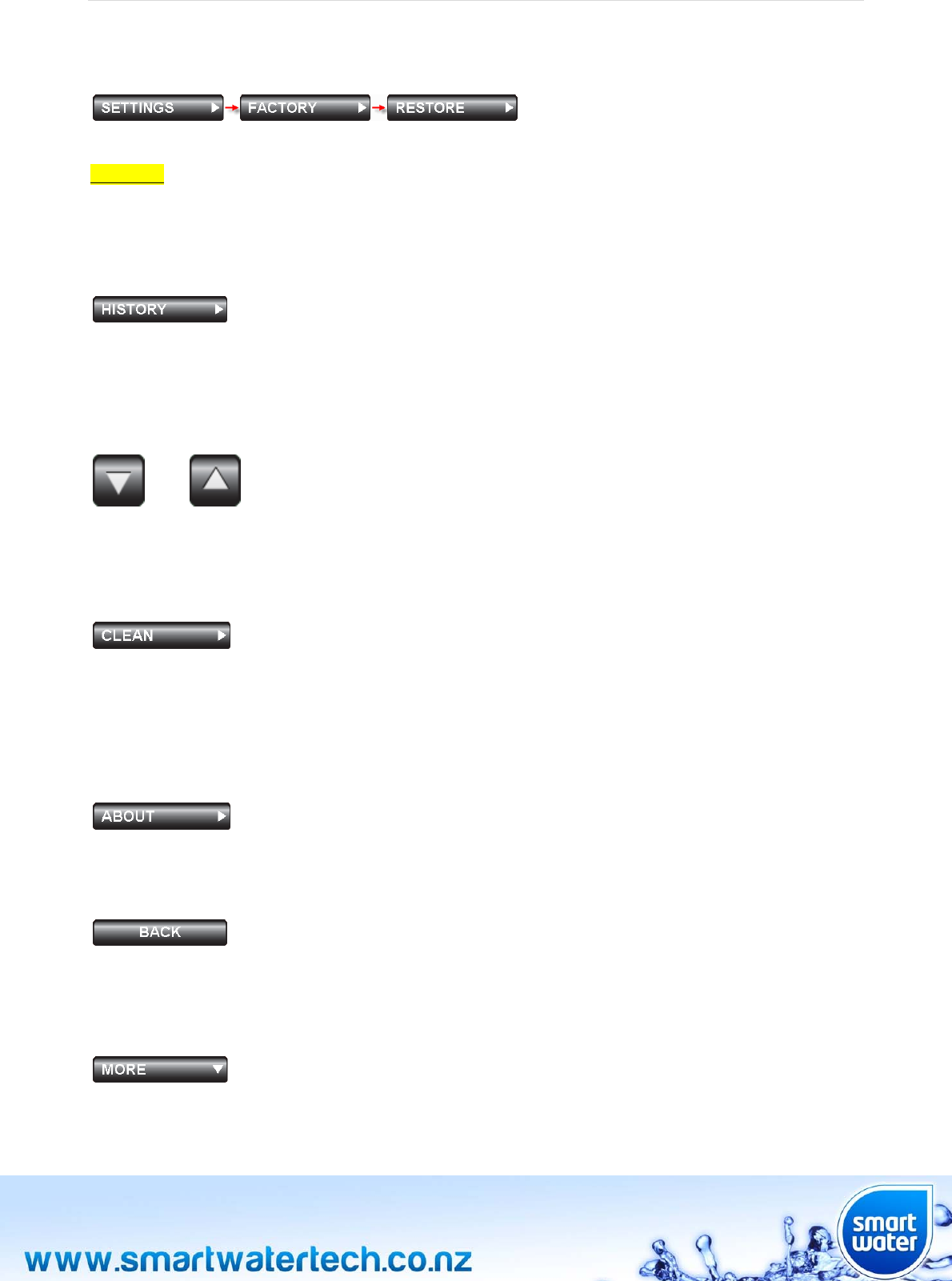
SETTINGS‐>FACTORY‐>RESTORE
UsedtorestoretheLCDkeypadtothefactorydefaultsettings.
CAUTION:Alltankmodulesconnectedtothesystemwillbelostandwillneedtobere‐connectedtothe
system.Thetankmodulesensorsmustbecompletelyremovedfromthetank,asperthetankmodule
connectionprocedure(TANK‐>ADD).
HISTORY
Thisfunctiondisplaysthewaterlevelintheselectedtankforthepreceding30daysinagraphicalformat.
Touchthegraphtoscrollthroughanyadditionaltanksconnectedtothesystem.Thisscreencanalsobe
accessedbysimplytouchingthetankpercentagesymbolonthemainscreen.
UP/DOWNARROWS
or
Usedtoincreaseordecreasethevalueoftheselection.Ifthebuttonispressedandheldthenumber
selectionwillincreaseordecreaseatafasterrateofchange.
CLEAN
AllowsthetouchscreenLCDdisplaysurfacetobecleaned.Itisbesttocleanthescreenwithasoft,slightly
dampcloth(nochemicalcleaners).Thetouchscreen“touch”functionisdisabledduringthistimetoprevent
unwantedbuttoninputs.Thescreencleanmodewillcancelin30secondsandnormaltouchscreenfunction
willberestored.Acount‐downtimerisdisplayedduringthisperiodforyourconvenience.
ABOUT
DisplaystheSmartWatercorporatelogoandthesoftwareversionnumber.
BACK
Pressingthe“BACK”buttonwillreturnthemenutothepreviousscreen.Holdingthe“BACK”buttonfor3
secondsormorewillautomaticallyresetthedisplaytothemainscreen.
MORE
Pressingthe“MORE”buttonwilldisplayfurthermenuoptionsonadditionalpagesofthemenuscreen.
Page|24
TANKNUMBER
Thetanknumbermatrixisdisplayedanytimethesystemrequiresthespecifictanknumbertobeselected
priortomakingachangetothesystemsettings.
Page|25
APPENDIX
InstallationNotes:
Ensuretherearenolargemetalobjectsbetweenthekeypadandthetankmoduleantenna.This
willassistwithoptimumwirelessperformance
Hills,vegetationandbuildingspreventinglineofsightfromtheLCDmoduletothetankmodule
mayrequiretheuseofhighpowerantenna
Ensurethatthetankmoduleisindirectsunlight(unlessusinganACmainspoweredtankmodule)
Ensurethatthetankmoduleventinggroovesarenotblockedandwaterisnotallowedto
accumulateunderneaththetankunitaroundthesensorconnector
Thewatersensorshouldbefreeofwaterandnotsubmergedwheninitiallyconnectedtothe
system.Ifatankmoduleneedstobere‐connectedtothesystemthesensorneedstoberemoved
fromthetankandfreeofanywater
Positionthesensoronthebottomofthetankawayfromthewateroutletpipeposition
Foroptimumwirelessperformanceofthewallmountunitpositionthedipoleantennaawayfrom
thecircuitboardmoduleandawayfromthepowertransformerandanyACmainswiring.
Positioningtheantennaverticallywillalsoassistreceptionperformance
SmartWaterrecommendstheLCDwallmountunitshouldbeinstalledbyaqualified/approved
electrician
WheninstallingthewallmountLCDdonotover‐tightenthetwoscrewsthatholdtheplasticchassis
tothewallorflushbox.Overtighteningthesescrewscouldcausethetouchscreentofunction
incorrectly
Ifthepumpcontrollerismountedinapumpshedorclosed/sealedstructure,SmartWater
recommendstheuseofanexternalantenna
Ifthesensorcableisrequiredtoexitbeneaththetankmoduleat90degrees(directlyunderneath
themodule)pleasemanuallybend/shapethecablepriortoconnectingthesensorcabletothetank
module.Ifthecableisbent/shapedonceconnectedtothetankmodulethewaterproofconnector
maybedamaged.

Page|26
APPENDIX
OperationalNotes:
Increasedtankmodulecommunicationratescanbeactivatedbymomentarilypressingthetank
modulebutton.Thisishelpfulwhenwantingregulartankmoduleupdatestocheckforoptimum
signalstrength.Tankmoduleupdatecommunicationswillbeincreasedforaperiodof30minutes
beforereturningtonormaloperation.Tanklevelcommunicationreportsaresentwhenthegreen
LEDflashesmomentarilyevery10seconds
Ifaredflashinglightisnotedonthetankmodule,recordthenumberofredflashes(1throughto5)
andcontactSmartWater.Refertothelastpageofthisusermanualforcontactdetails
Ensurethatthesensoronceloweredintotankisrestingatthebottomofthetank,awayfromthe
mainwateroutflowpoint
Thetankmodulecanbepowereddown/turnedoffbyunpluggingthesensorcable
Ifthetankmoduleisinstalledinanelevated,exposedlocationtherewillbeanincreasedriskofa
lightningstrike.SmartWaterrecommendsinstallingalightningrodnearthetankmodulewhich
standstallerthananyantenna
Ifapumpcontrollerstatusof“Autostartblocked”isdisplayedthenthepumphasbeen
commandedtostopwhilethedestinationtanklevelisbelowthepumpautomaticstartlevel
and/ortheruntimehasexpired.Thisisasafetyfeaturetoavoidthepumpstartingagainafterithas
beencommandedtostop,orinasituationwherethedestinationtankisnotfillingascommanded.
Tocancelthissafetyfeaturestartthepumpmanuallythroughthemenuscreen(PUMP‐>
CONTROL).Oncethepumpisstartedmanuallythe“Autostartblocked”statusiscleared
automatically.The“Autostartblocked”featureisalsoclearedautomaticallyifthedestinationtank
levelreachestheautomaticstartlevelset
Forfurtherdetailedinformationonpumpcontrolleroperationnotespleaserefertoouradvanced
user“PumpControllerInstallationGuide”whichisavailableontheSmartWaterwebsite
(www.smartwatertech.co.nz)
Page|27
WARRANTY
SmartWaterprovidesafulloneyearworkmanshipwarrantyonitsproducts.TheSmartWaterreplacement
warrantyisvoidiftheproducthasbeentamperedwith,openedordamagedoutsidetherangeofnormal
use(actsofGodetc...).
FulldetailsandacopyofthewarrantyisavailableontheSmartWaterwebsite:www.smartwatertech.co.nz

Page|28
FREQUENTLYASKEDQUESTIONS
WhatisthemaximumwirelessrangeoftheSmartWatersystem?
2km‐4kmisthestandardrange,with10km‐15kmpossibleinlineofsightapplications.
DoIneedtochangethebatteriesinthetankmodule?
No.Thebatteryiscontinuouslyrechargedbytheintegratedsolarpanel.Thetankunitwill
continuetooperateforupto3monthswithoutanydirectsunlight.
Whathappensifthesystemstatusindicatesthebatteryislowoncharge?
Movethetankmoduletoanareaofdirectsunlight.Theunitwillberechargedandoperate
againinapproximately24hrs.Ifyourinstallationhaslittleaccesstosunlightthenconsider
usingtheoptionalACmainspoweredtankmodule.
Whatisthemaximumtankdepththesystemwillworkwith?
6.4Misthestandardmaximumdepth.Howevercustomdepthsystemsareavailableon
request.PleasecontactSmartWaterformoreinformation.
Willthewallmountunitfitintoastandardelectricalflushbox?
TheSmartWaterLCDwallmountunitisdesignedtofiteasilyintoanystandardClipsalor
PDLstyleflushbox.Mountingaccessoriesareprovidedwithyourwallmountstarterpack.
Alternativelya50mmcircularholecanbedrilledandthewallmountunitcanbemounted
directlyontothewallsurface.
CanSmartWatermeasurewaterfrommorethanonetank?
Yes.UptoninetankscanbemonitoredfromoneLCDunit.Eachtankwillneedatank
moduleinstalled.Pleaserefertotheusermanualforaddingadditionaltankstothesystem.
Ihavetwotanks,buttheyareinterconnected.DoIneedtwotankmodules?
No.Ifanytanksareinterconnectedthenyouwillonlyneedonetankmoduleononeofthe
tanks.ThefluidlevelininterconnectedtanksrisesandfallsproportionatelyandasSmart
Waterworksonaproportionatelevelbasis,thesystemwillworkcorrectly.
WillreceptionbereducediftreesorwallsareinbetweenthetankandtheLCDunit?
Anywirelesssystemwillhaverangeandreceptionreducedbyobstacles.Similartothepoor
receptionofradiostationsinvalleysandnearpowerlines.SmartWaterrecommends
minimisingobstructionsinthedirectpathofthewirelesssignal.
Willthebatteryinthetankunitrunflatifitiscloudy?
No.Thebatterywillre‐chargeataslowerrateincloudyconditionsbutitwillnotrunflat.
Exposuretodirectsunlightisofcourserecommendedformaximumsolarcharging
performance.
CanIinstalltheunitmyself?
Yes.TheSmartWatersystemisdesignedtobeveryeasytoinstall.Notechnicalskillsare
required.SmartWaterdoesrecommendreadingthisusermanualandviewingthe
installationDVDonlinepriortostartinganyinstallation.Aswithanydomesticelectrical
outlet,thewallmountLCDunitshouldonlybeconnectedtotheACmainspowersupplybya
qualifiedelectrician.

Page|29
WhathappensifthereisapowercutorthepowertotheLCDisinterrupted?
Nothing.OncepowerisrestoredtheLCDunitwillcommunicatewithyourtankandprevious
readings/dataandhistorywillberestoredtothescreenautomatically.
HowlongdoesSmartWatertaketolearnmywaterusage?
SmartWaterwillstartmemorisingandcalculatingyourwaterusagefromthemomentyou
plugitin.Thelongerthesystemisrunningthemoreintuitiveand“smart”thesystemwill
become.
WhenwillSmartWaterdetectawaterleakinmysystem?
SmartWaterwillprovideauseralertforabnormalusageafterapproximately4hours.The
alertisbasedonthesystemdetectingusagewhichisoutsidethe“normal”rangefora
particularrecordedtankhistory.
Doesthetankunitneedtobeinstalledhorizontallyonthetank?
No,thetankmodulecanbeinstalledonanyangle.Thetankunitcanevenbeinstalledaway
fromthetankifrequiredusingtheoptionalsensorextensioncables.
Doesthetankunithavetobesolarpowered?Whatifmytankhasnodirectsunlight?
No,thetankmodulecanbeACmainspoweredifrequired.Thisisparticularlyusefulfor
customerswithundergroundtanks,ortankswithlittleornoexposuretodirectsunlight.
TheACmainspoweredtankmoduleisavailableforpurchaseonlineorthroughany
authorisedSmartWaterretailerordistributor.
CanImeasuredifferentliquidsotherthanwaterwiththeSmartWatersystem?
Yes.SmartWaterallowsfordifferentliquidstobemeasured.ForexampleUreaand
MolassescanbemeasuredsimplybysettingthefluidsSpecificGravity(SG)throughthe
settingsmenu.
CanIsetthepumpcontrollertoturnonandoffatsettanklevels?
Yes.TheSmartWaterpumpcontrollerisdesignedtobe“setandforget”.Customtanklevels
canbesetsoapumpcanbeturnedonwhenatankgetslowandthenturnedoffoncefilling
iscomplete.Thepumpon/offlevelscanbesetthroughtheLCDscreenmenu.
Ihaveverychallengingterrainaroundmytanks,willSmartWaterstilloperate?
Thesystemdoesfeatureverypowerfulwirelessperformancewhichenablesreliable
operationinmostapplications.Iftherearesignificantterrainorobstacleissuesaffecting
receptionthesecannormallyberesolvedwiththeuseofhigherpowerantennaand/or
passiverepeaters.
Page|30
CONTACTDETAILS
PhysicalAddress:
SmartWaterTechnologyLimited
7HEchelonPlace
EastTamaki2013
Auckland
NEWZEALAND
PostalAddress:
SmartWaterTechnologyLimited
POBox38807
Howick2145
Auckland
NEWZEALAND
NEWZEALAND:
FreePhone: 0800401414
FreeFacsimile: 0800401415
AUSTRALIA:
FreePhone: 1800764725
Phone: +6492786430
Fax: +6495239774
INTERNATIONAL:
Phone: +6492786430
Fax: +6495239774
Web: www.smartwatertech.co.nz
Email: info@smartwatertech.co.nz

COPYRIGHTSMARTWATERTECHNOLOGYLIMITED2012©