Snoppa Technology SPM1 Handheld 3-Axis Gimbal Stabilizator User Manual snoppa M1 guide EN
Snoppa Technology Co., LTD Handheld 3-Axis Gimbal Stabilizator snoppa M1 guide EN
UserManual.wiki
>
Snoppa Technology
>
SPM1 User Manual
User Manual
Navigation menu
Upload a User Manual
Namespaces
Wiki Guide
HTML
PDF
Info
Views
User Manual
Discussion / Help
Navigation
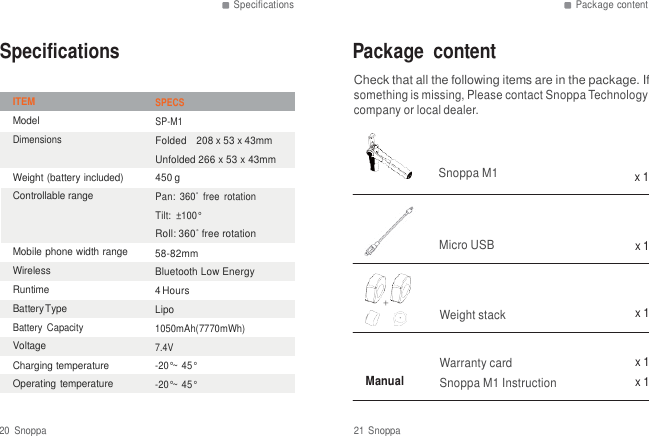
![Introduction Introduction Introduction At a Galance The Snoppa M1 is an advanced 3-axis gimbal that stabilizer and controls your smartphone, desined by Snoppa Tech Company. PAN [1] [2] [3] [4] [5] [6] [7] [8] [9] TILT ROLL [1] PAN Motor [2] TILT Motor [3] weight stack [4] ROLL Motor [6] foldable mobile phone holder [7] bluetooth LED & function button [8] micro usb port [9] Handlebar STARAGED M1 EXPANDED [5] 1/4 screw mount 2 Snoppa 3 Snoppa](https://usermanual.wiki/Snoppa-Technology/SPM1/User-Guide-3295927-Page-2.png)
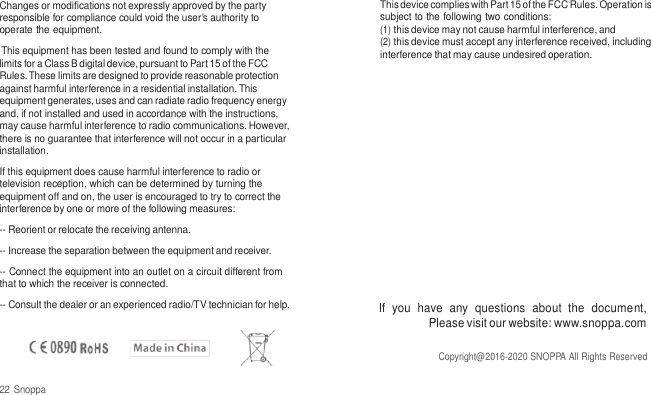
![Modes Install Modes STANDBY WORKING working mode (APP connected or discennected) Install Install Device [1].unfold mobile phone holder [3].balance the mobile phone in the middle hold the tilt motor into handlebar, M1 into standby mode. App disconnected,after 20s, M1 goes into standby mode wake up on standby TILT move tilt motor down to 60 degree or more, M1 will be active. OFF MODE APP discennected, M1 turned off SLEEP MODE After more than 30 minutes without any operation in standby mode,M1 automatically goes into sleep mode, Bluetooth can’t be found. To be reconnected, one short press, Bluetooth will be active again. [2]Clamp smartphone into the holder 4 Snoppa 5 Snoppa](https://usermanual.wiki/Snoppa-Technology/SPM1/User-Guide-3295927-Page-3.png)
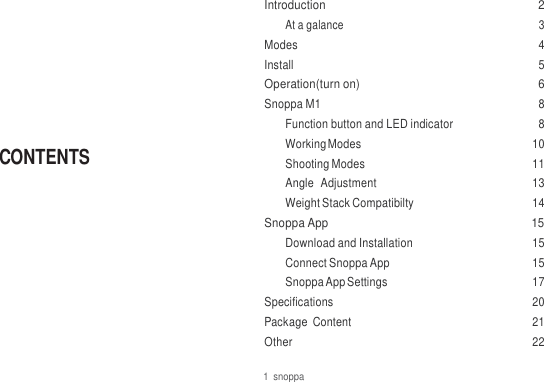
![Operation Operation Operation(turn on) A. WITHOUT SNOPPA APP B. WITH SNOPPA APP [1]. Mount mobile phone,Pull out handbar; CAUTION NIPPING HAND TILT [1] [3] [1]. APP Download and installation iPhone users can sacn the bacode below to intall our APP, or search “snoppa” at APP Store or Google Play and install our APP. [2]. Turn on your Bluetooth on your phone, launch Snoppa APP, select the Bluetooth icon, into bluetooth setting, select your M1 device (default name SNOPPA-xxxx,default passWord: 000000), Pair with moblie phone. [2]. A short press LED indicator (LED starts blink), then long press LED indicator untill LE D keeps on. [3].pull out handlebar, keep the intersection angle between tilt motor and handlebar at least 60, gimbal start working. M1 working as default mode Bluetooth icon [3]. Pull out handlebar, plumb tilt motor, gimbal start working. 6 Snoppa 7 Snoppa](https://usermanual.wiki/Snoppa-Technology/SPM1/User-Guide-3295927-Page-4.png)
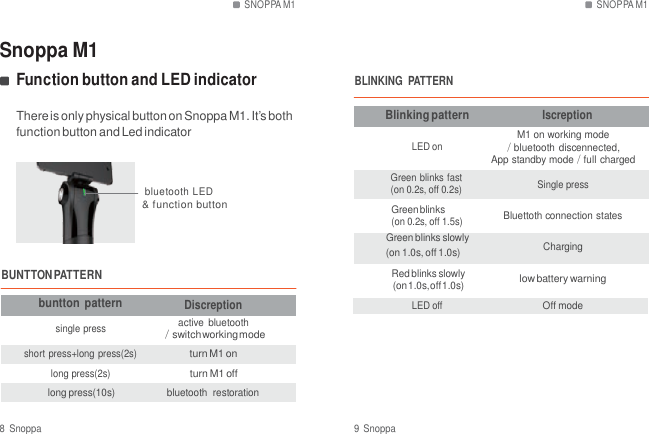
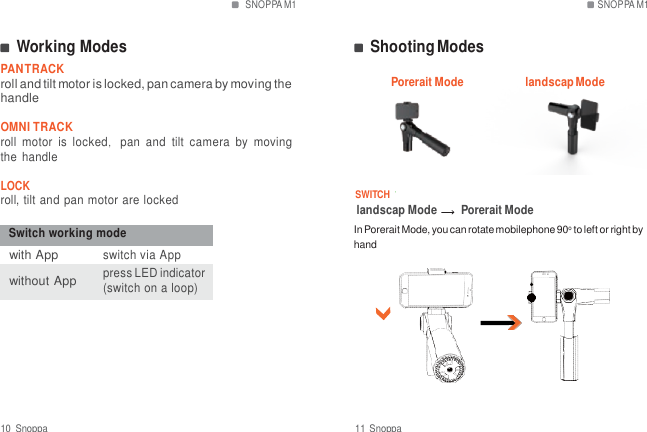
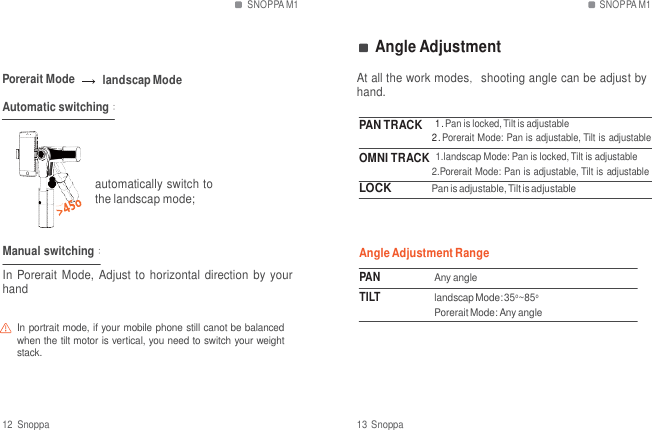
![SNOPPA M1 SNOPPA App Weight Stack Compatibilty SNOPPA App PLACE SMARTPHONE WEIGHT STACK Snoppa M1 works with Snoppa App,user can change camera and M1 settings. With Snoppa App, user can shoot timelapes and panorama easily. Download and Installation iPhone users can sacn the bacode below to intall our APP, or search “snoppa” at APP Store or Google Play and install our APP. WEIGHT STACK COMPATIBILTY weight stack A weight stack B weight stack C Connect Snoppa App [1]. Turn on your Bluetooth on your phone, launch Snoppa APP [2]. Press bluetooth icon,into bluetooth setting + + bluetooth icon plastic metal metal metal metal (Disconnected) compatible with iphone 5/6/7 or similarweight mobile phone compatible with the mobile phone weight between iphone 5/6/7 plus or similar weight mobile phone compatible with iphone 6/7 plus or similar weight mobile phone Connected 14 Snoppa 15 Snoppa](https://usermanual.wiki/Snoppa-Technology/SPM1/User-Guide-3295927-Page-8.png)
![SNOPPA App SNOPPA App Snoppa App Settings [3]. select your M1 device(default name SNOPPA-xxxx, default passWord: 000000), Pair with moblie phone. [1] [2] [3] [4] [5] [6] [7] [8] [9] [10] [1] Camera setting Select camera setting:hutter、flash、WB、 focaldistance、ISO [2] Shooting mode video panorama: Automatic 270o panoramic timelapse 16 Snoppa 17 Snoppa](https://usermanual.wiki/Snoppa-Technology/SPM1/User-Guide-3295927-Page-9.png)
![SNOPPA App SNOPPA App [3] Start shooting first press start recoreding,second press stop;Can be hold in the middle of the shoot. [4] Switch back/front camera [5] Tracking mode [8] Resolution Resolution: 540p HD 60HZ; 720p HD,30HZ ; 1080p HD,30HZ 1080p HD,60HZ ; 2160p HD,30HZ pan track: roll and tilt motor is locked, pan camera by moving the handle omni track: roll motor is locked,pan and tilt camera by moving the handle lock roll, tilt and pan motor are locked [6] Gallary videos will be automaticly saved into Gallary,user can highlight videos by star level,add into selected list [7] Reference line There are three options: None/Grid Line/Grid+Diagonals [9] System Setting BlueTooth Settings Gimbal Settings Horizontal and Vertical follow speed is adjustable; Horizontal and Vertical area settings is adjustable Firmware Info Firmware upgrade The system will be prompted; upgrade process for about three minutes User Guide About Snoppa [10] Bluetooth connection after bluetooth connected, icon dispalys M1 battery level 18 Snoppa 19 Snoppa](https://usermanual.wiki/Snoppa-Technology/SPM1/User-Guide-3295927-Page-10.png)