Societa Per L Elettronica s r l 1K-FA Linear amplifier for radio amateur use User Manual Exhibit6 Manuale

Societa' Per L'Elettronica s.r.l. Linear amplifier for radio amateur use Exhibit6 Manuale

Users Manual

   Via di Monteverde, 33                                    Tel. (39-6) 58209429                     Website  www.linear-amplifier.com  00152 Rome – Italy                                        Fax (39-6) 58209647                       e-mail   info@linear-amplifier.com   Exhibit 6 - Page 1 of 43      Exhibit 6: User’s Manual  External Radio Frequency Linear Amplifier Model Expert 1K-FA
    EXPERT 1K-FA  1KW SOLID STATE FULLY AUTOMATIC LINEAR AMPLIFIER     USER’S MANUAL        Exhibit 6 - Page 2 of 43
 User’s manual  EXPERT 1K-FA  Pag. 2 of 42 Exhibit 6 - Page 3 of 43
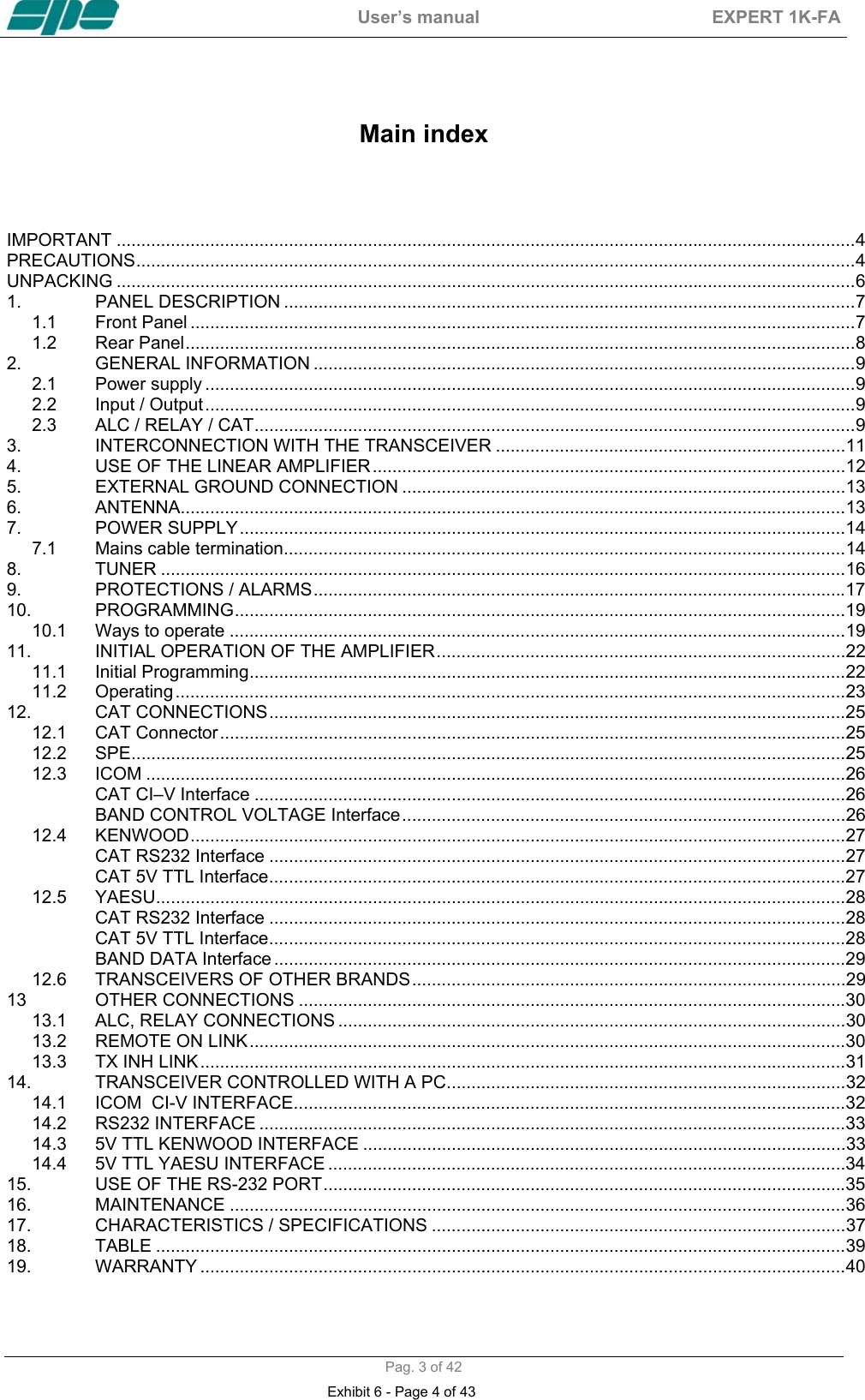
 User’s manual  EXPERT 1K-FA  Pag. 3 of 42   Main index    IMPORTANT ......................................................................................................................................................4 PRECAUTIONS..................................................................................................................................................4 UNPACKING ......................................................................................................................................................6 1. PANEL DESCRIPTION ....................................................................................................................7 1.1 Front Panel .......................................................................................................................................7 1.2 Rear Panel........................................................................................................................................8 2. GENERAL INFORMATION ..............................................................................................................9 2.1 Power supply ....................................................................................................................................9 2.2 Input / Output....................................................................................................................................9 2.3 ALC / RELAY / CAT..........................................................................................................................9 3. INTERCONNECTION WITH THE TRANSCEIVER .......................................................................11 4. USE OF THE LINEAR AMPLIFIER................................................................................................12 5. EXTERNAL GROUND CONNECTION ..........................................................................................13 6. ANTENNA.......................................................................................................................................13 7. POWER SUPPLY...........................................................................................................................14 7.1 Mains cable termination..................................................................................................................14 8. TUNER ...........................................................................................................................................16 9. PROTECTIONS / ALARMS............................................................................................................17 10. PROGRAMMING............................................................................................................................19 10.1 Ways to operate .............................................................................................................................19 11. INITIAL OPERATION OF THE AMPLIFIER...................................................................................22 11.1 Initial Programming.........................................................................................................................22 11.2 Operating........................................................................................................................................23 12. CAT CONNECTIONS.....................................................................................................................25 12.1 CAT Connector...............................................................................................................................25 12.2 SPE.................................................................................................................................................25 12.3 ICOM ..............................................................................................................................................26 CAT CI–V Interface ........................................................................................................................26 BAND CONTROL VOLTAGE Interface..........................................................................................26 12.4 KENWOOD.....................................................................................................................................27 CAT RS232 Interface .....................................................................................................................27 CAT 5V TTL Interface.....................................................................................................................27 12.5 YAESU............................................................................................................................................28 CAT RS232 Interface .....................................................................................................................28 CAT 5V TTL Interface.....................................................................................................................28 BAND DATA Interface ....................................................................................................................29 12.6 TRANSCEIVERS OF OTHER BRANDS........................................................................................29 13 OTHER CONNECTIONS ...............................................................................................................30 13.1 ALC, RELAY CONNECTIONS .......................................................................................................30 13.2 REMOTE ON LINK.........................................................................................................................30 13.3 TX INH LINK...................................................................................................................................31 14. TRANSCEIVER CONTROLLED WITH A PC.................................................................................32 14.1 ICOM  CI-V INTERFACE................................................................................................................32 14.2 RS232 INTERFACE .......................................................................................................................33 14.3 5V TTL KENWOOD INTERFACE ..................................................................................................33 14.4 5V TTL YAESU INTERFACE .........................................................................................................34 15. USE OF THE RS-232 PORT..........................................................................................................35 16. MAINTENANCE .............................................................................................................................36 17. CHARACTERISTICS / SPECIFICATIONS ....................................................................................37 18. TABLE ............................................................................................................................................39 19. WARRANTY ...................................................................................................................................40 Exhibit 6 - Page 4 of 43
 User’s manual  EXPERT 1K-FA  Pag. 4 of 42 Congratulations for choosing the SPE EXPERT 1K-FA linear amplifier It is small, and powerful, it covers the whole frequency range from 1.8 to 50 MHz, completely automatically. All operating conditions (frequency, antenna and tuner) may be controlled from your transceiver. It is possible to connect it to every type of device, it is extremely user-friendly, and offers a product which is best-in-class.   IMPORTANT  Read this instruction manual carefully before attempting to operate the linear amplifier. Keep this manual. It contains important safety and operating instructions for the SPE EXPERT 1K-FA.   PRECAUTIONS  Explicit definitions WORD DEFINITION  WARNING! Risk of  danger of fire or electric shock to persons. Possible damage to the amplifier. NOTE:  Serious problems if not observed. Danger of fire or electric shock for the operator, or damage to the equipment.   WARNING! HIGH VOLTAGE! DO NOT disconnect an antenna from the amplifier during transmission; Electric shock or fire is possible.   WARNING! DO NOT modify the internal wiring of the amplifier. Any modifications will invalidate the warranty,and  may reduce the performance of the linear amplifier or damage it.   WARNING! Before using the linear amplifier, compare the value of voltage of the local mains supply network with the value required by the amplifier, and set it up correctly.   WARNING! DO NOT turn ON the linear amplifier unless it has been properly grounded through the green/yellow conductor of the mains cord. Your dealer will already have provided the correct mains plug for your local electricity network, with the earth pin connected to that conductor. Do not disconnect this under any circumstances, or there is a risk of severe or fatal electric shock.   WARNING! DO NOT use an extension cord with the AC power cable, as if it is not correctly rated there is a risk of fire or electric shock.   WARNING! DO NOT allow metallic objects or wires to enter inside the amplifier.  Exhibit 6 - Page 5 of 43
 User’s manual  EXPERT 1K-FA  Pag. 5 of 42  WARNING! DO NOT obstruct the entries for cooling air at both the sides of the amplifier. Ensure that no object impedes the correct operation of the fans.   WARNING! DO NOT expose the linear amplifier to rain, snow or any liquids.   WARNING! DO NOT instal the linear amplifier in a place without good ventilation. This could limit heat dissipation and the amplifier could be damaged.   WARNING! DO NOT touch the amplifier with damp or wet hands. There is danger of electric shock. Avoid opening it before you have disconnected it from the mains supply, then wait at least 2 minutes for electrolytic capacitors to complete their discharge.  To clean the amplifier DO NOT use chemical agents like alcohol or benzene because the plastic surfaces could be damaged.  AVOID using the amplifier in areas with temperatures below –10° C (+14°F) or above +40°C (+104°F).  AVOID using the linear amplifier in locations that are very dusty, damp or in direct sunlight.  AVOID placing the linear amplifier against walls, the circulation of the air would be obstructed and the noise of the fans would be reflected toward the operator.  AVOID permitting children to play with the amplifier.  If you do not use the linear amplifier for long time, set the back main switch [I/O] to the OFF position [O].  This amplifier should only be operated by persons who have an appropriate radio transmitting licence, and you should observe your licence conditions whilst using it.    Exhibit 6 - Page 6 of 43
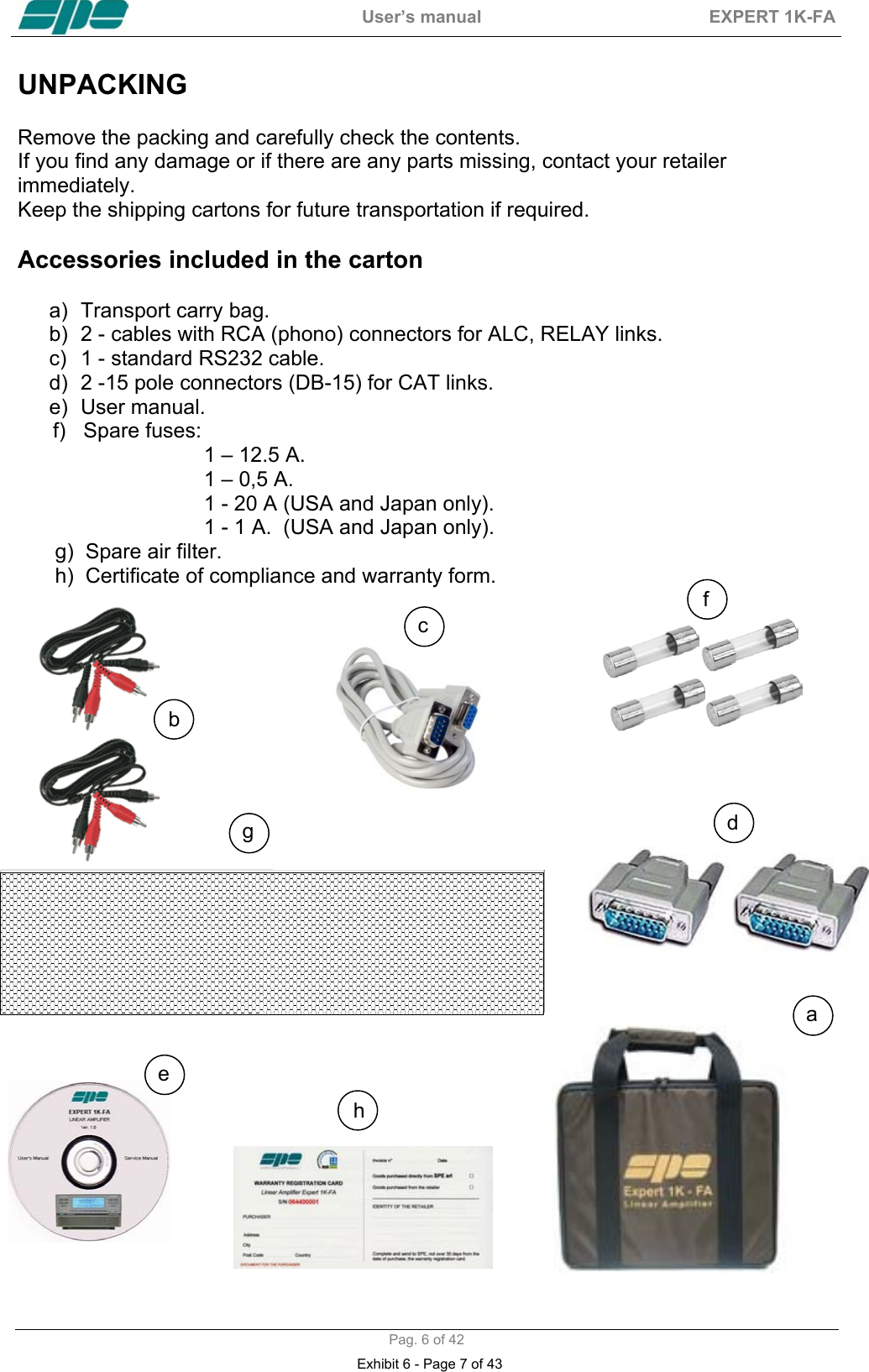
 User’s manual  EXPERT 1K-FA  Pag. 6 of 42 UNPACKING   Remove the packing and carefully check the contents. If you find any damage or if there are any parts missing, contact your retailer immediately.  Keep the shipping cartons for future transportation if required.  Accessories included in the carton  a)  Transport carry bag. b)  2 - cables with RCA (phono) connectors for ALC, RELAY links. c)  1 - standard RS232 cable. d)  2 -15 pole connectors (DB-15) for CAT links. e) User manual.       f)   Spare fuses:  1 – 12.5 A. 1 – 0,5 A. 1 - 20 A (USA and Japan only). 1 - 1 A.  (USA and Japan only).  g)  Spare air filter.  h)  Certificate of compliance and warranty form.                                                                              b cd e ahf g Exhibit 6 - Page 7 of 43
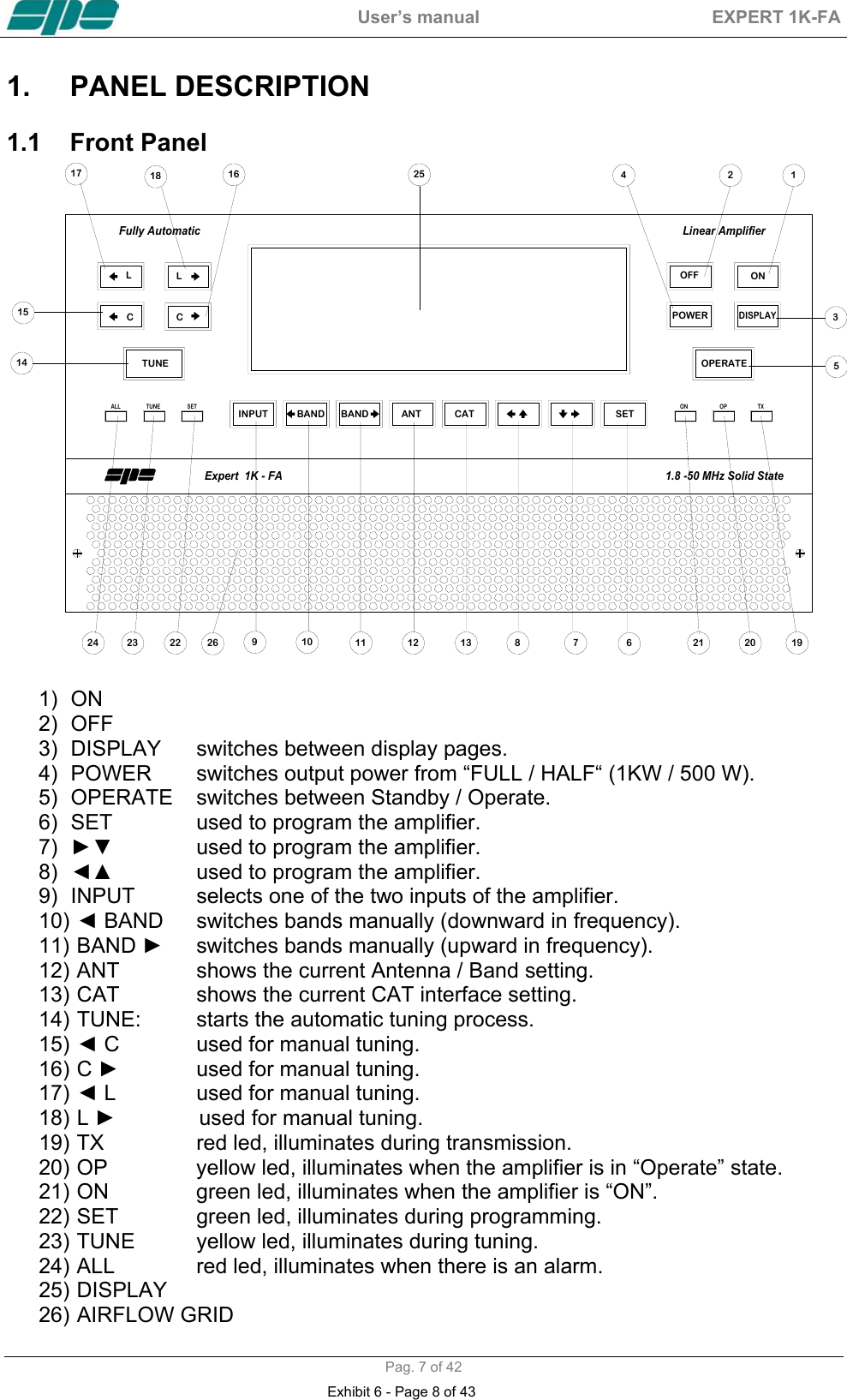
 User’s manual  EXPERT 1K-FA  Pag. 7 of 42 1.  PANEL DESCRIPTION   1.1  Front Panel  SETCATANTBANDBANDINPUTTUNEALL SET ON OP TX12345251.8 -50 MHz Solid StateFully Automatic Linear AmplifierExpert  1K - FA21 20 196781311109222324 261618171514LCCLTUNEOFF ONPOWERDISPLAYOPERATE12  1) ON     2) OFF 3)  DISPLAY  switches between display pages. 4)  POWER   switches output power from “FULL / HALF“ (1KW / 500 W).  5) OPERATE  switches between Standby / Operate. 6)  SET    used to program the amplifier. 7)  ►▼      used to program the amplifier. 8)  ◄▲      used to program the amplifier. 9)  INPUT  selects one of the two inputs of the amplifier. 10)   ◄ BAND  switches bands manually (downward in frequency). 11)   BAND  ►  switches bands manually (upward in frequency). 12)  ANT    shows the current Antenna / Band setting. 13)  CAT    shows the current CAT interface setting. 14)  TUNE:  starts the automatic tuning process. 15)   ◄ C    used for manual tuning. 16)   C  ►    used for manual tuning. 17)   ◄ L    used for manual tuning. 18)   L  ►             used for manual tuning. 19)  TX    red led, illuminates during transmission. 20)  OP    yellow led, illuminates when the amplifier is in “Operate” state. 21)  ON    green led, illuminates when the amplifier is “ON”. 22)  SET    green led, illuminates during programming. 23)  TUNE  yellow led, illuminates during tuning. 24)  ALL    red led, illuminates when there is an alarm. 25)   DISPLAY 26)  AIRFLOW GRID Exhibit 6 - Page 8 of 43
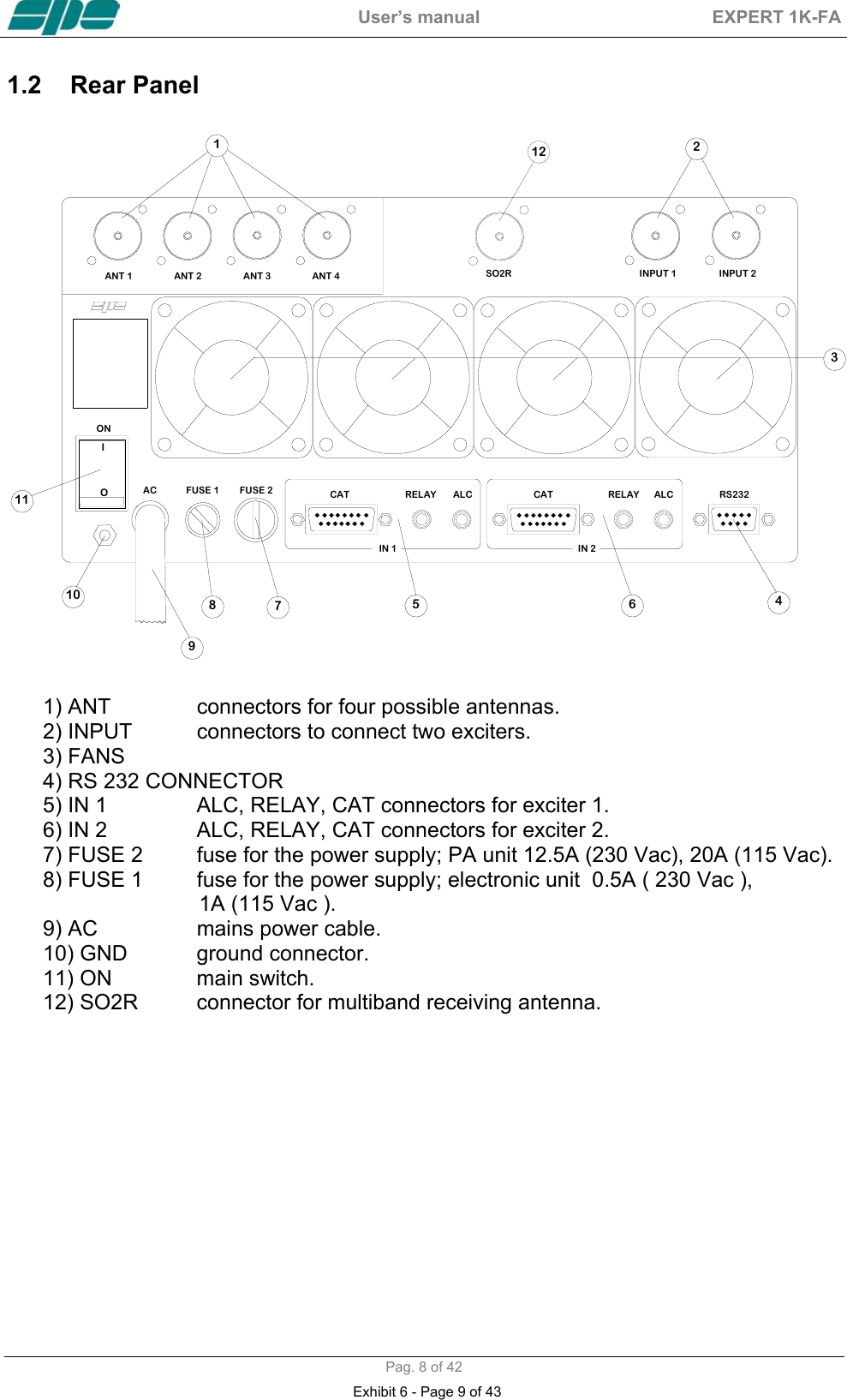
 User’s manual  EXPERT 1K-FA  Pag. 8 of 42 1.2  Rear Panel   ANT 1FUSE 2FUSE 1ACIN 1RELAYCAT ALC CAT ALCRELAY RS232ONANT 2 ANT 4ANT 3 INPUT 1 INPUT 2IN 21246781191035IOSO2R12        1) ANT    connectors for four possible antennas.       2) INPUT   connectors to connect two exciters.       3) FANS       4) RS 232 CONNECTOR       5) IN 1    ALC, RELAY, CAT connectors for exciter 1.       6) IN 2    ALC, RELAY, CAT connectors for exciter 2.       7) FUSE 2  fuse for the power supply; PA unit 12.5A (230 Vac), 20A (115 Vac).       8) FUSE 1  fuse for the power supply; electronic unit  0.5A ( 230 Vac ),                                  1A (115 Vac ).       9) AC    mains power cable.       10) GND   ground connector.       11) ON    main switch.       12) SO2R  connector for multiband receiving antenna.     Exhibit 6 - Page 9 of 43
 User’s manual  EXPERT 1K-FA  Pag. 9 of 42 2.  GENERAL INFORMATION    (Read the specific chapters for more details).   2.1  Power supply  The amplifier’s power supply is 230 / 115 Vac (230 Vac default). The main switch [I/O] is located on the rear panel, in the [O] position all the internal circuitry is powered off, in the [I] position (red led ON) it is possibile turn ON or turn OFF the linear amplifier in one of the following ways: a)  Using the [ON] /[ OFF] keys on the front panel. b)  Applying / removing 9 -15 Vdc on pin (8) of the CAT connector. c)  Using the RS232 port and the management software. It is possible to download this software from the website www.linear-amplifier.com .  NOTE:  When turned ON, almost all transceivers output 13,8 Vdc. With this voltage, the linear amplifier can be turned automatically ON / OFF at the same time as the transceiver.   2.2  Input / Output  The linear amplifier has two inputs (INPUT 1, INPUT 2) to which it is possible to connect two transceivers of any brand or type. These inputs are selected with the [INPUT] key.  It can manage up to four antennas (ANT 1, ANT 2, ANT 3, ANT 4).  The amplifier selects antennas automatically when they have been programmed.    2.3  ALC / RELAY / CAT  There are two transceiver inputs (IN 1, IN 2), to allow two different transceivers to be connected at the same time.   ALC    Is a voltage (0, -11 Vcc) generated by the amplifier, it is used to control the output power of the transceiver. In this way the power from the amplifier may  be automatically controlled. This link is recommended.                   If the ALC port is not connected, it is ncessary to manually regulate the drive power from the transceiver.  RELAY    This essential link allows the amplifier to be put in the transmit state. To do that it is necessary that the inner pin of the phono connector is connected to signal ground. This is normally done at the transceiver with either a close on ground relay, or with a switching transistor. It is important that the voltages at that terminal do not exceed 12 Vdc. On the transceiver this link is often called SEND or TX GND. Refer to your transceiver manual for more details.   CAT  Thanks to this link the linear amplifier will detect the operating frequency of the transceiver and then automatically control changes of band, antenna and automatic antenna tuner. Most modern tranceivers have CAT control. In old models often, analog or digital information are sent for changing band. The SPE Expert 1K-FA, thanks to an efficient frequency counter, constantly controls and verifies data coming from the transceiver. Automatic management of bands, antennas and tuner can be done in the following way: Exhibit 6 - Page 10 of 43
 User’s manual  EXPERT 1K-FA  Pag. 10 of 42 a)  In recent ICOM, YAESU, KENWOOD models, through CAT. b)  In the older ICOM models, through  “Band Control Voltage”. c)  In the YAESU models not listed, or without CAT, through "Band              Data". d)  In every other case through the frequency counter.  NOTE: In case d) the CAT link with the transceiver is not needed because the frequency is detected from the transmitted signal.     Exhibit 6 - Page 11 of 43
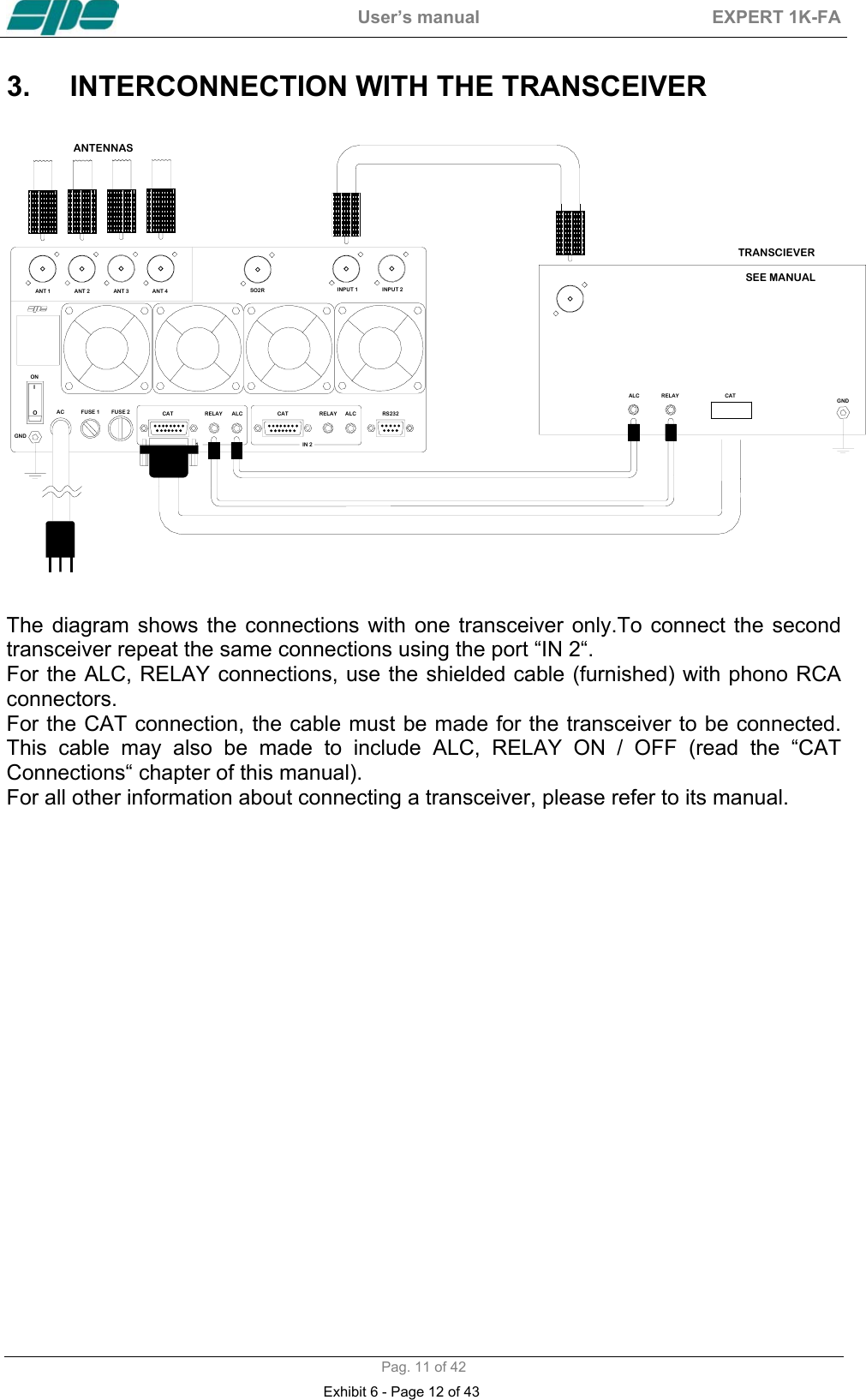
 User’s manual  EXPERT 1K-FA  Pag. 11 of 42 3.  INTERCONNECTION WITH THE TRANSCEIVER                                                               ANT 1FUSE 2FUSE 1AC RELAYCAT ALC CAT ALCRELAY RS232ONIOANT 2 ANT 4ANT 3 INPUT 1 INPUT 2ALC RELAYGNDTRANSCIEVERGNDIN 2   1CATSEE MANUALANTENNASSO2R  The diagram shows the connections with one transceiver only.To connect the second transceiver repeat the same connections using the port “IN 2“. For the ALC, RELAY connections, use the shielded cable (furnished) with phono RCA connectors. For the CAT connection, the cable must be made for the transceiver to be connected. This cable may also be made to include ALC, RELAY ON / OFF (read the “CAT Connections“ chapter of this manual). For all other information about connecting a transceiver, please refer to its manual.  Exhibit 6 - Page 12 of 43
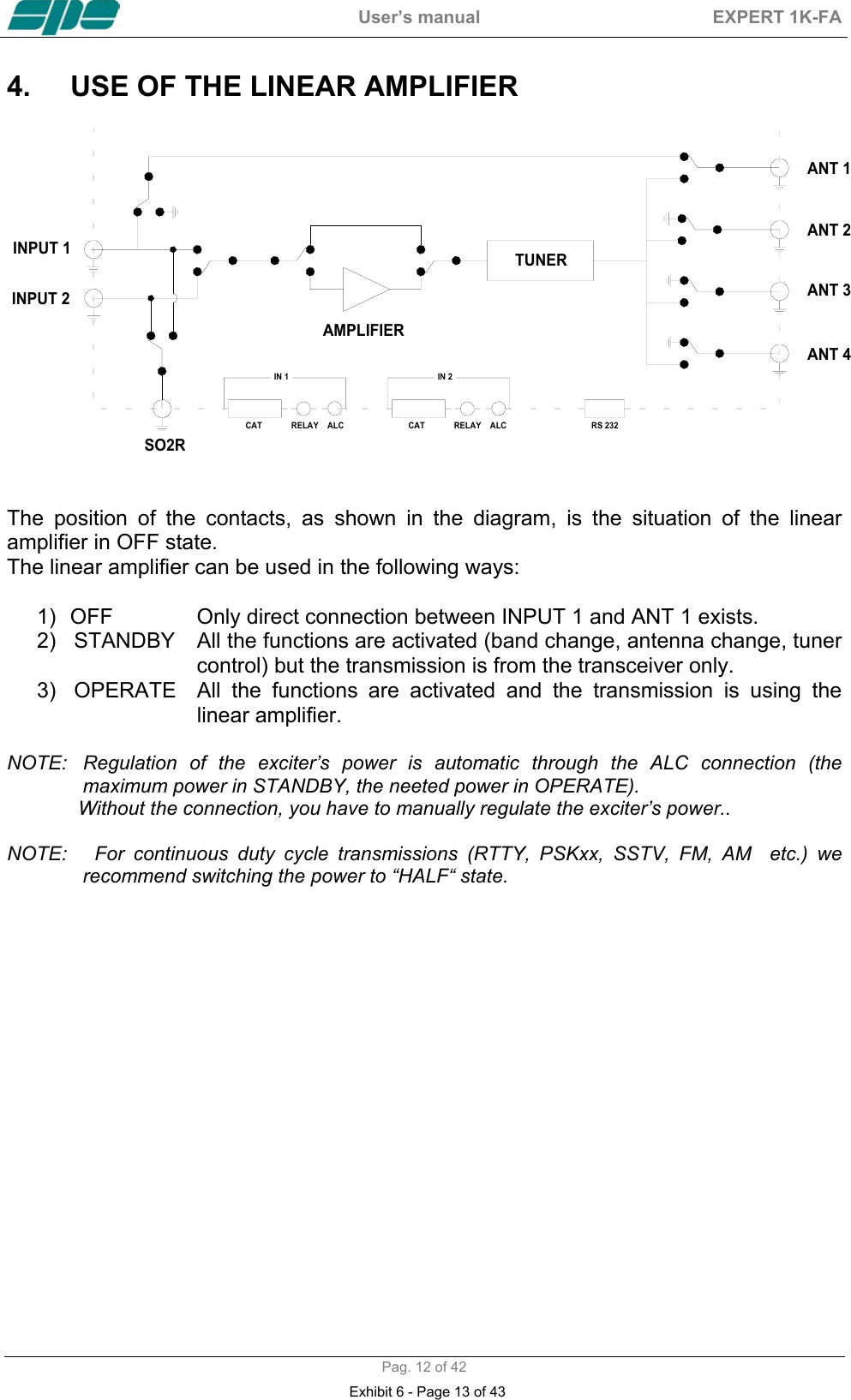
 User’s manual  EXPERT 1K-FA  Pag. 12 of 42 4.  USE OF THE LINEAR AMPLIFIER   TUNERANT 1ANT 2ANT 3ANT 4INPUT 1INPUT 2AMPLIFIERALC RS 232CAT RELAY ALCCAT RELAYIN 1 IN 2SO2R                                                                   The position of the contacts, as shown in the diagram, is the situation of the linear amplifier in OFF state. The linear amplifier can be used in the following ways:       1)  OFF    Only direct connection between INPUT 1 and ANT 1 exists.      2)   STANDBY  All the functions are activated (band change, antenna change, tuner control) but the transmission is from the transceiver only.      3)   OPERATE  All  the  functions  are activated and the transmission is using the linear amplifier.  NOTE:  Regulation of the exciter’s power is automatic through the ALC connection (the maximum power in STANDBY, the neeted power in OPERATE).               Without the connection, you have to manually regulate the exciter’s power..   NOTE:   For continuous duty cycle transmissions (RTTY, PSKxx, SSTV, FM, AM  etc.) we recommend switching the power to “HALF“ state.   Exhibit 6 - Page 13 of 43
 User’s manual  EXPERT 1K-FA  Pag. 13 of 42 5.  EXTERNAL GROUND CONNECTION      WARNING! Before connecting an external ground as described below, check with a qualified electrician that your national wiring codes permit such a connection.  To reduce TVI, BCI and other RF problems it is sometimes helpful to connect the amplifier to a good RF ground. The inductance of such a connection has to be low, so the connection to ground should be as short and direct as possible. Large-section copper conductors should be used for this purpose. Terminating the earth connection with a small metal plate is suggested. The best solution is to have a ground stake, driven into the ground, and used only for the radio station. Often good results can be acheived using correct earthing clamps, connected to the mains water supply pipe (attention, most water pipes are now in plastic). DO NOT use central heating pipework. AVOID the electric circuit ground of the building ( to be used for the  50/60 Hz safety only ).   WARNING!  DO NOT connect to gas pipes because there is danger of explosion !!    6. ANTENNA   Because this is a high-power amplifier, it is necessary to use correctly-rated antennas and feedline cables.  Take special care with antennas with traps, because trap warming can occur during periods of high-power transmission and a high SWR can result. Always use antennas with SWR less than 1,6:1, even if the tuner is able to overcome some mismatches greater than 3:1. With the tuner the PA is matched, but with a high VSWR, the cable is mismatched and there can be consequent loss of power, heating and high voltages present. It is suggested that suitable static protection be given to antenna feeder cables.    Exhibit 6 - Page 14 of 43
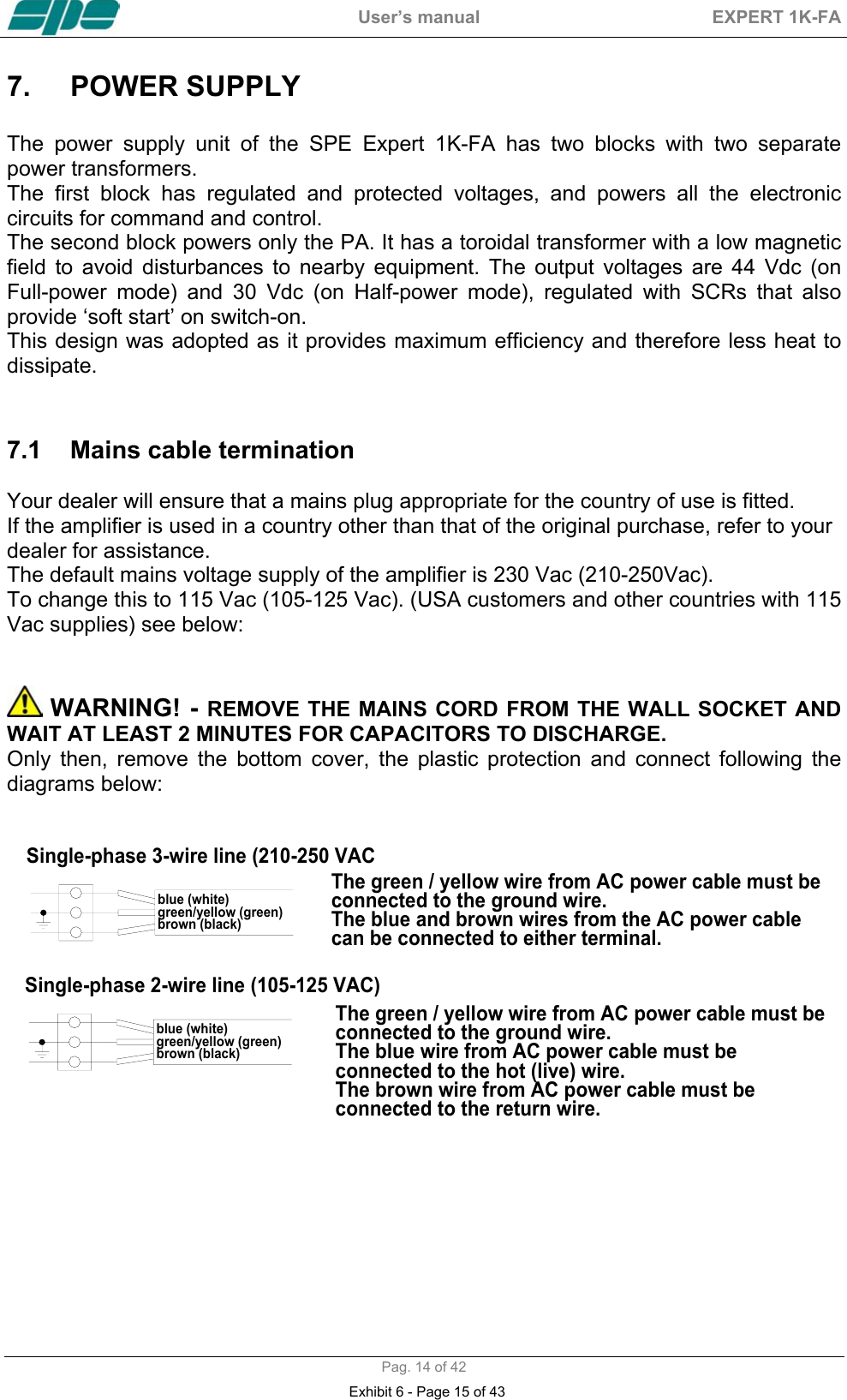
 User’s manual  EXPERT 1K-FA  Pag. 14 of 42 7.  POWER SUPPLY   The power supply unit of the SPE Expert 1K-FA has two blocks with two separate power transformers. The first block has regulated and protected voltages, and powers all the electronic circuits for command and control. The second block powers only the PA. It has a toroidal transformer with a low magnetic field to avoid disturbances to nearby equipment. The output voltages are 44 Vdc (on Full-power mode) and 30 Vdc (on Half-power mode), regulated with SCRs that also provide ‘soft start’ on switch-on. This design was adopted as it provides maximum efficiency and therefore less heat to dissipate.   7.1  Mains cable termination   Your dealer will ensure that a mains plug appropriate for the country of use is fitted.  If the amplifier is used in a country other than that of the original purchase, refer to your dealer for assistance. The default mains voltage supply of the amplifier is 230 Vac (210-250Vac). To change this to 115 Vac (105-125 Vac). (USA customers and other countries with 115 Vac supplies) see below:    WARNING! - REMOVE THE MAINS CORD FROM THE WALL SOCKET AND WAIT AT LEAST 2 MINUTES FOR CAPACITORS TO DISCHARGE.  Only then, remove the bottom cover, the plastic protection and connect following the diagrams below:    blue (white)green/yellow (green)brown (black)The green / yellow wire from AC power cable must be  connected to the ground wire.The blue and brown wires from the AC power cable can be connected to either terminal.The green / yellow wire from AC power cable must be  connected to the ground wire.The blue wire from AC power cable must be  connected to the hot (live) wire.The brown wire from AC power cable must be  connected to the return wire.Single-phase 3-wire line (210-250 VACSingle-phase 2-wire line (105-125 VAC)blue (white)green/yellow (green)brown (black) Exhibit 6 - Page 15 of 43
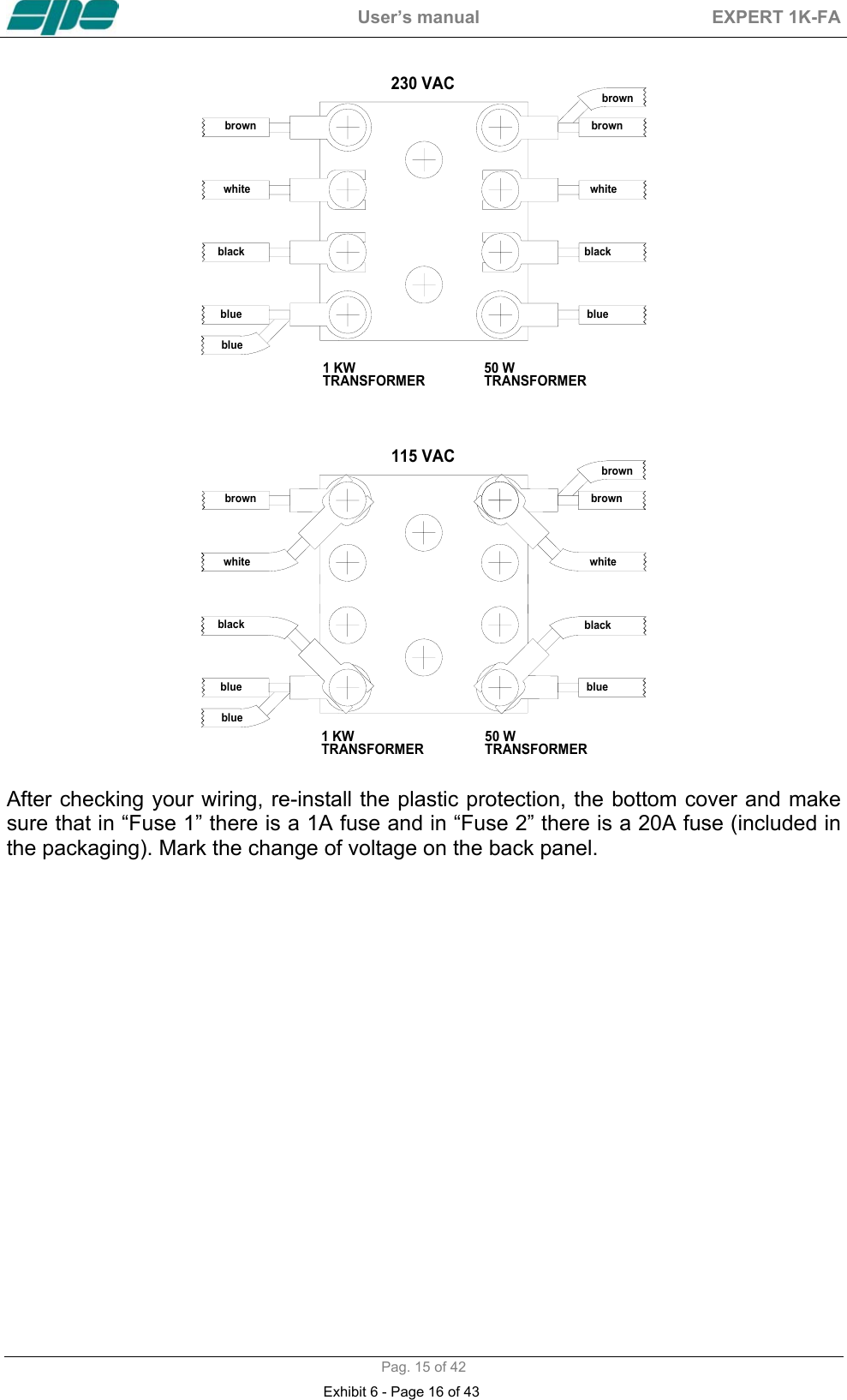
 User’s manual  EXPERT 1K-FA  Pag. 15 of 42 50 WTRANSFORMER1 KWTRANSFORMER230 VACbrown brownbrownwhitewhiteblackblackblueblueblue   115 VAC1 KWTRANSFORMER 50 WTRANSFORMERbrownbrownbrownwhitewhiteblackblackblueblueblue  After checking your wiring, re-install the plastic protection, the bottom cover and make sure that in “Fuse 1” there is a 1A fuse and in “Fuse 2” there is a 20A fuse (included in the packaging). Mark the change of voltage on the back panel. Exhibit 6 - Page 16 of 43
 User’s manual  EXPERT 1K-FA  Pag. 16 of 42 8. TUNER   The amplifier has an automatic tuner that handles load mismatches up to 3:1  VSWR (2,5:1 for 50 MHz). The circuit used is a PI – L network with excellent harmonic suppression. The amplifier contains a look-up table with all the permitted bands.  For tuner management, antenna data and other working data are stored. Every band has a sub-band set, and for each of those, data related to the antenna and auto-ATU tuning is stored. The CAT and the frequency counter detect the operating frequency and the correct   sub-band. Thanks to the stored data, the tuner and the antenna are automatically set correctly. For every input there is a different table. If two exciters are connected at the same time, each exciter can have different configurations. It is possible to use the two different tables when the amplifier operates at two different locations. In fact it is possible to use the INPUT 1 at one and INPUT 2 on the other. In this way repeated reprogrammings are not needed  In the US version, operation on the 12 m and 10 m bands has been inhibited following FCC regulations. Authorized 12/10m operation of the amplifier by licensed radio amateurs will be enabled by the dealer there in accordance with current rules.   The auto-tuner and antenna selection via the amplifier are still enabled even in 12/10m inhibited units. All auto-tuner functions remain, on standby, whilst using the transceiver only. Setting of the match data to write in the tables is performed automatically by pressing the [TUNE]  key The system will then find the correct match for minimum SWR. To achieve a better match than that achieved with the automatic tune routine (most unlikely) it is possible to set the tuning manually by using the keys [◄ C], [C ►], [◄ L],  [L ►]. When manual tuning has been performed, it is possible to read the tuning value, the working frequency and the associated sub-band on the appropriate screen page. Both the types of tuning are always effected in “STANDBY“ state.  NOTE:  The tuner, like all analog circuits, introduces a loss (0,8 dB max.) that may vary with tuning conditions.The power meter of the amplifier does not show this loss as the power is measured at the tuner input where the load resistance is always constant     (50 ohm).  NOTE:  ATTENTION, When the amplifier is on  the ‘STANDBY’ or ‘OPERATE’ modes, always disable the automatic tuner in your transceiver.  Exhibit 6 - Page 17 of 43
 User’s manual  EXPERT 1K-FA  Pag. 17 of 42 9.  PROTECTIONS / ALARMS   The SPE 1K-FA has a sophisticated protection system that constantly controls the amplifier’s most important parameters. These parameters are: Temperature of the heatsink; max. / min. voltage on the PA; max. PA current; SWR; reflected power; max voltage RF on the tuner; input power; power combiner balance.  NOTE:   Unlike all the other linear amplifiers that measure only the reflected power of the antenna, to guarantee a greater protection of the PA, the SPE amplifier measures also the power of harmonics reflected by the band-pass filter.  NOTE:  To guarantee the maximum efficiency with the same output power, the PA has three MRF150 push-pull amplifiers connected through a combiner.  NOTE:  Temperature measurement is used also to control fan speed. The thresholds where the speed changes may be changed from NORMAL (default) or CONTEST (See the “Programming” chapter of this manual).  The protection system is effected in two different ways: 1)  Through hardware circuits to guarantee  minimum intervention time. 2)  Through software, with one of the two CPU’s, to guarantee the maximum precision.  The two results are always compared, every difference produces a protection trip and consequent alarm.  There are three types of protections/alarms:  a)  SIMPLE  This is the most common case. An acoustic warning beep sounds, but no operator intervention is required, as the control system automatically restores the correct operating conditions.  b)  SERIOUS  When automatic system recovery is not possible (e.g. the temperature climbs over the limits due to obstruction of the fans, SWR is too high, etc.). In this case the amplifier switches into standby state and the alarm is stored. Normally transmission can continue with the exciter only.  c)  FATAL  If the amplifier is in the b) situation but the CPU is faulty or it isn’t able to operate, the amplifier is turned OFF with no other warning. To restart the amplifier, the main switch in the rear panel has to be set first to [O], and then to the [I] position  NOTE:  It is possibile to read the alarms file log in the standby state using the [DISPLAY] key. To reset the alarm file log press the [TUNE] and [OPERATE] keys together.  NOTE:  If the acoustic alarm is very frequent during transmission, the possible causes should be investigated.      Exhibit 6 - Page 18 of 43
 User’s manual  EXPERT 1K-FA  Pag. 18 of 42 NOTE:  Before the temperature limits are reached, the output power will change from FULL to  HALF  automatically,  so  that  transmission  with  the  amplifier  may  continue  with               reduced power.   In SSB the use of the compressor, only when necessary, strongly reduces the  increase of the temperature. If the temperature is allowed to rise further, then a “SERIOUS“ alarm will eventually          be activated.  NOTE: During  a  SERIOUS  alarm,  there  is  an  acoustic  alarm  for  30  sec.  Pressing  the               [DISPLAY] key, the system changes to ‘STANDBY’ state immediately.  Exhibit 6 - Page 19 of 43
 User’s manual  EXPERT 1K-FA  Pag. 19 of 42 10. PROGRAMMING   The three [SET], [◄▲] and [►▼] keys, underlined with an orange line, permit programing the amplifier and they can used in the following way:  [SET]  Use it to open the menu page, to validate the choices and to exit from the menu page.  [◄▲], [►▼]    Use these to select the options.  A green led illuminates during the programming process.  To program the system is very easy. You will find your programming choices confirmed by the items shown at the lower part of the display.   NOTE:  Programming is only possible in  ‘STANDBY’ mode.  NOTE:  Programming changes take effect only after exiting from the menu page (the green led extinguishes).   10.1  Ways to operate   Pressing the [SET] key opens the menu page. On the display there are the following options:     a) ANTENNA    An  appropriate  antenna  may be assigned to each band selecting the  (ANT 1, ANT 2, ANT 3, ANT 4) connector.                                  If you don’t have an antenna for a particular band, input “NONE“.   Exhibit 6 - Page 20 of 43
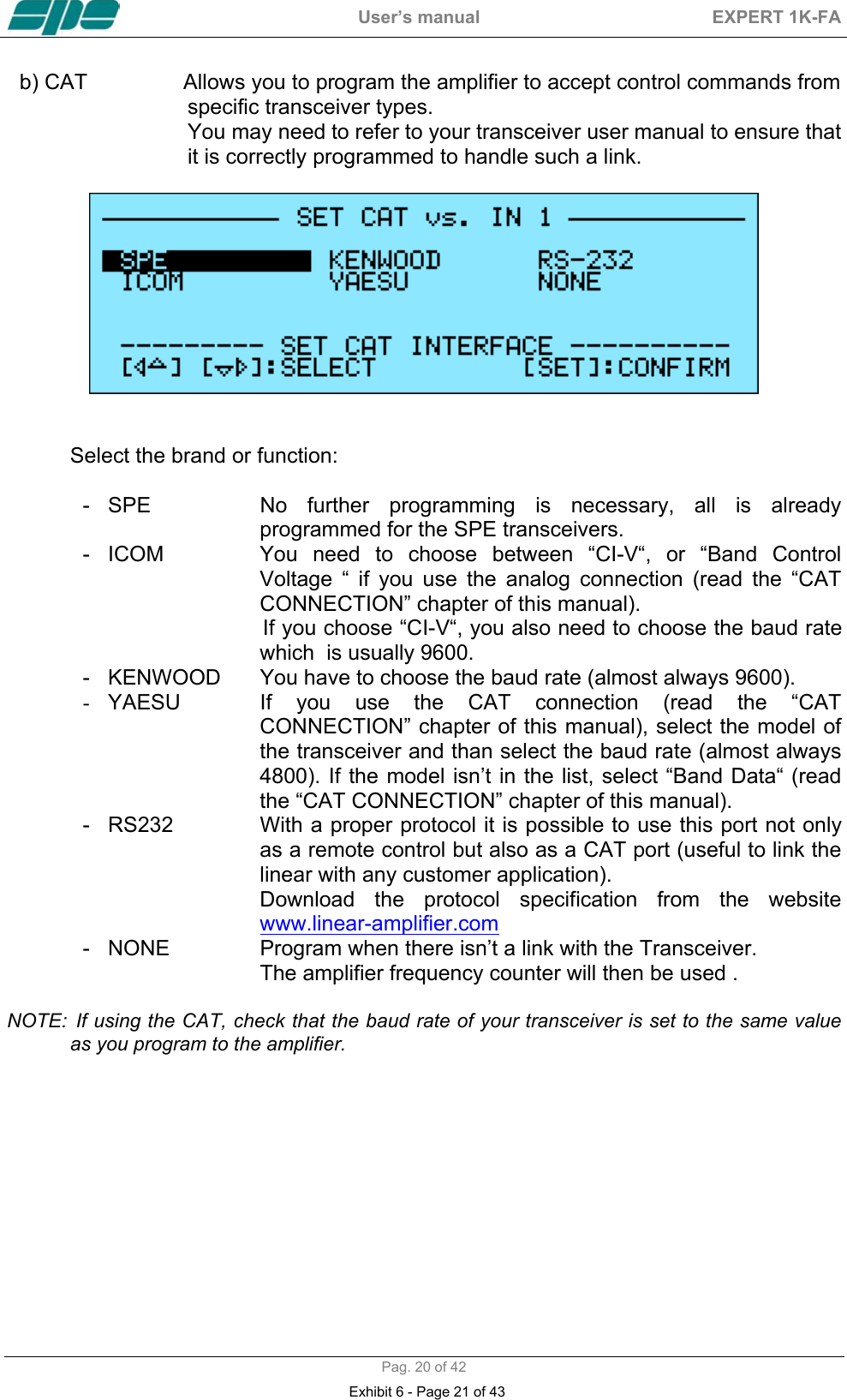
 User’s manual  EXPERT 1K-FA  Pag. 20 of 42 b) CAT                Allows you to program the amplifier to accept control commands from                              specific transceiver types.                              You may need to refer to your transceiver user manual to ensure that                              it is correctly programmed to handle such a link.     Select the brand or function:  - SPE  No further programming is necessary, all is already programmed for the SPE transceivers. -  ICOM  You need to choose between “CI-V“, or “Band Control Voltage “ if you use the analog connection (read the “CAT CONNECTION” chapter of this manual).                                If you choose “CI-V“, you also need to choose the baud rate which  is usually 9600.  -   KENWOOD  You have to choose the baud rate (almost always 9600). -  YAESU  If you use the CAT connection (read the “CAT CONNECTION” chapter of this manual), select the model of the transceiver and than select the baud rate (almost always 4800). If the model isn’t in the list, select “Band Data“ (read the “CAT CONNECTION” chapter of this manual). -   RS232               With a proper protocol it is possible to use this port not only as a remote control but also as a CAT port (useful to link the linear with any customer application).  Download the protocol specification from the website                      www.linear-amplifier.com -   NONE  Program when there isn’t a link with the Transceiver.  The amplifier frequency counter will then be used .  NOTE:  If using the CAT, check that the baud rate of your transceiver is set to the same value as you program to the amplifier.            Exhibit 6 - Page 21 of 43
 User’s manual  EXPERT 1K-FA  Pag. 21 of 42 c) MANUAL TUNE   Allows you to tune the amplifier manually. However, achieving a better setting than that obtained by automatic tuning is very unlikely.      Set your exciter to transmit a continuous RTTY or CW signal. Press the [◄ L], [L ►], [◄ C], [C ►] keys until you obtain the minimum SWR.   The operating frequency and the sub-band are also shown on the display.  NOTE: The tuning process has to be repeated for every entry (INPUT1, INPUT 2).  d) BACKLIGHT  Regulates the backlight of the display.  NOTE:  Display contrast has to be set manually. Remove the upper cover and adjust through the hole at the upper right of the CPU card. Adjust only if it is necessary, and use an insulated screwdriver with care.  e) CONTEST  Permits programming two fan thresholds for  normal  operation                 (Normal) and heavy-use (Contest). off :    Normal  (65 °C, 75 °C).  on :    Contest (60 °C, 70 °C).  f) BEEP  on :    All acoustic warnings alarms operate and a beep confirms a                                             keystroke.   off:      When  you  press  a  key  there  is    no  beep  feedback,  but  for                 all  warning  conditions  and  alarms,  the  acoustic  warnings                 are still functional.    Exhibit 6 - Page 22 of 43
 User’s manual  EXPERT 1K-FA  Pag. 22 of 42 11.  INITIAL OPERATION OF THE AMPLIFIER   Before turning ON the amplifier, the following preliminary operations are necessary:  1)  Read this manual with care.  2)  Be sure that the amplifier is correctly set for the local mains voltage supply. 3)  Connect the linear to ground circuit 4)  Connect the antennas. 5)  Connect the amplifier to the transceiver (read the “CONNECTIONS WITH THE TRANSCEIVER” chapter of this manual)  Operate [I] the main switch on back panel, and press the [ON] key on the front panel.  Select the INPUT for the transceiver, and always carry out programming with the amplifier in STANDBY. If you change INPUT you have to repeat this programming.  NOTE:   You may have to repeat some programming if you change antenna, transceiver,etc.  NOTE:  ATTENTION the ‘RELAY’ and ‘CAT’signals in some types of transceivers are only turned ON from a transceiver MENU. Refer to the user manual.   NOTE:   ATTENTION, when the amplifier is on the ‘STANDBY’ and ‘OPERATE’ modes, always disable the transceiver auto-ATU.   11.1  Initial Programming   You must carry out the next steps in the sequence below:  a) Set Antenna. Press [SET] and open the “ANTENNA“ menu page. Assign an appropriate antenna for the band concerned. If you don’t have an antenna for a band, input “NONE“. When all the antennas are programmed, exit and go back to STANDBY. To verify the correctness of the programming, press the [ANT] key, the    band / antenna programmed will be shown.  b) Set CAT. Press [SET] and enter the “CAT“ menu page. Select the transceiver brand and progress with programming according to the type of connection between the amplifier and the transceiver (read the “CAT CONNECTIONS” chapter of this manual). At the end of  programming, exit and go back in STANDBY. To verify the correctness of programming, press the [CAT] key, and all the data stored will appear on the display.   To verify the correct “CAT” operation, press [SET] and  select  “MANUAL TUNE”, While changing your transceiver VFO, you should see the amplifier frequency display follow.  Then return to STANDBY.  Exhibit 6 - Page 23 of 43
 User’s manual  EXPERT 1K-FA  Pag. 23 of 42 In the same way, if “BAND CONTROL VOLTAGE“ or “BAND DATA“ are connected, check that the amplifier follows band changes at the transceiver. If it does not, verify that your programming (or your link) has been done correctly.   d) Use of Automatic Tuner To complete the programming it is necessary to match the antennas to the  amplifier  by operating  “TUNE“ (read the “TUNER“ chapter of this manual). We  recommend  you  to  select  each  band  (with  available  antenna)  and  then                program the tuner for the sub-bands within which you will operate.  Refer to the table in section 18 of this manual to select the appropriate        sub-bands for your operating preferences.   Progress as follows: 1)  Find the central frequency of the sub-band to tune in the table (refer to  section 18 of this manual) and set the transceiver to that frequency. 2)  Press the [TUNE] key. 3)  Set your transceiver to transmit a continuous tone in RTTY or CW. The procedure for automatic tuning will start and then it will stop when SWR is at a minimum. Sometimes it is possible to improve tuning by pressing the [TUNE] key  again. 4)  Repeat the previous steps for all bands and sub-bands you want.                       NOTE:  If the ALC link is not used, it is preferable to reduce the transceiver power to about 50 Watts during this operation.                       NOTE:   As  a default,  the  table  is  programmed  for  standard 50  ohm out. If,  for a band, you want to reset to default programming,progress as follows:    - Go to the “ANTENNA“ menu page  and set this band to “NONE“,  then exit from that page. -  Go  to  the  “ANTENNA“  menu  page  again,  assign  the    appropriate                   antenna  to this band, then exit from that page. The programming will be reset for 50 ohm output.                    The initial programming concludes after steps a), b), c).   11.2 Operating   You need few precautions when using the amplifier thanks its high level of automation. SPE reminds you that it is better to lose a fraction of dB in transmitted power, by slightly reducing the drive power, than to over-drive the amplifier and have a poor quality transmission.  During transmission check the parameters on the display always, because SPE has selected, designed and adjusted them with care. SPE recommends (using the ALC link) that the transceiver should be set to its maximum drive power.  To reduce the amplifier output, if required, it is then necessary only to set the amplifier to “HALF” power state rather than changing the transceiver drive power.  Of course you may also regulate continuously the amplifier output power by changing the level of drive power from your transceiver. If less output power than 500 Watts is desired, it is preferable, for best efficiency, to start to reduce drive from the “HALF” power state. Exhibit 6 - Page 24 of 43
 User’s manual  EXPERT 1K-FA  Pag. 24 of 42 SETTING DRIVE LEVELS  a)  SSB:  Regulate the “MIC GAIN” of the transceiver until, speaking normally into the microphone, the signal peaks on the display don't quite reach the maximum rated output power. Monitoring the transmission is a good way of checking your settings. If there is however some distortion, decrease the “mic gain” or decrease the power of the transceiver until a small reduction of the output power of the amplifier is seen.  b)  CW:  In key down, you get the maximum output power automatically. Check the “PW REV”. If it shows more than 120/140 Watts, decrease the power of the transceiver until that value or less is noted.  c)  RTTY, DIGITAL MODES, SSTV, FM: SPE recommends you operate in ‘HALF’ mode because these types of transmission have a very high duty cycle. Check “PW REV”, and if it shows more than 120/140 Watts, decrease the power from the transceiver. In case of very heavy use, it is advisable to work in “Contest” condition to take advantage of the greater efficiency of the fans.  d)  AM  This transmission mode radiates a continuous carrier which is 25 % of its PEP value (400W PEP AM = 100W carrier power). SPE recommends you always operate in ‘HALF’ mode for AM. To get an output signal without distortion, proceed as follows: transmit the AM carrier only, with your transceiver “MIC GAIN” set to zero, and no modulation. Set  the transceiver without exceeding 125W of carrier output from the amplifier. Then, speaking into the microphone normally, set the” MIC GAIN” of the transceiver until the peak output power, on speech peaks, as shown on the amplifier display, is no more than 500W. Note that because of the modulation characteristics of AM, the average value shown will normally be much less. SPE suggests you monitor your transmission to check that the “MIC GAIN” setting is correct. In case of very heavy use, it is advisable to work in “Contest” condition to take advantage of the greater efficiency of the fans.  NOTE:  If  you choose to  set the output  power of the  amplifier by  varying the output power of              the transceiver, the ALC connection is not required.   NOTE:  ATTENTION, never stress uselessly the amplifier with long periods in key-down, it can                be a possible cause of damage.  NOTE:  ATTENTION, in SSB the use of the compressor, only when necessary, strongly reduces                  the increase of the temperature.   Exhibit 6 - Page 25 of 43
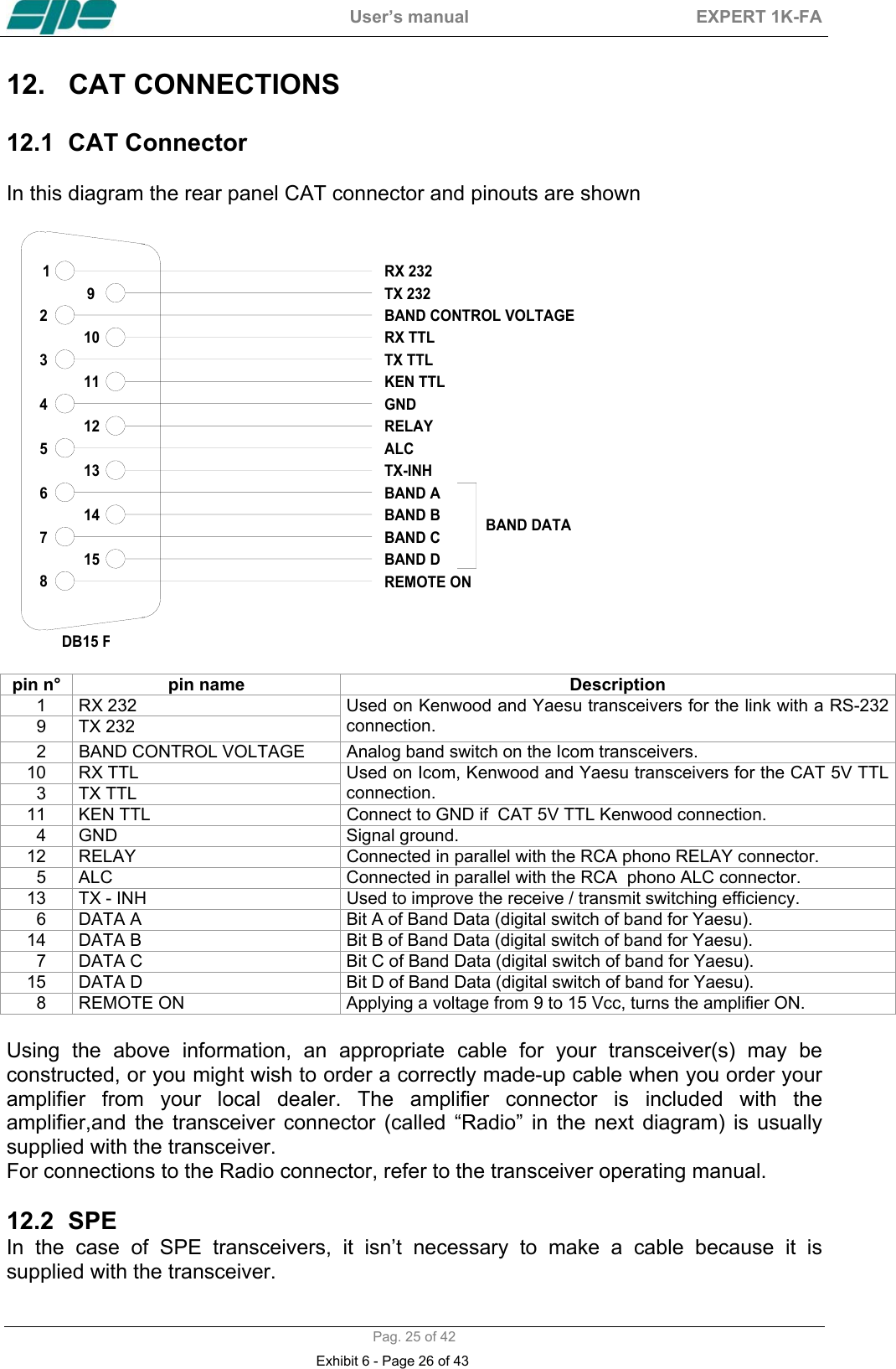
 User’s manual  EXPERT 1K-FA  Pag. 25 of 42 12.  CAT CONNECTIONS   12.1  CAT Connector   In this diagram the rear panel CAT connector and pinouts are shown              432156789121314111015GNDRELAYALCBAND DATADB15 FRX 232TX 232RX TTLTX TTLKEN TTLBAND ABAND BBAND CBAND DREMOTE ONBAND CONTROL VOLTAGETX-INH                                                  pin n°  pin name  Description   1  RX 232     9  TX 232 Used on Kenwood and Yaesu transceivers for the link with a RS-232 connection.   2  BAND CONTROL VOLTAGE  Analog band switch on the Icom transceivers. 10 RX TTL   3  TX TTL Used on Icom, Kenwood and Yaesu transceivers for the CAT 5V TTL connection. 11  KEN TTL  Connect to GND if  CAT 5V TTL Kenwood connection.   4  GND  Signal ground. 12  RELAY  Connected in parallel with the RCA phono RELAY connector.   5  ALC  Connected in parallel with the RCA  phono ALC connector. 13  TX - INH  Used to improve the receive / transmit switching efficiency.   6  DATA A  Bit A of Band Data (digital switch of band for Yaesu). 14  DATA B  Bit B of Band Data (digital switch of band for Yaesu).   7  DATA C  Bit C of Band Data (digital switch of band for Yaesu). 15  DATA D  Bit D of Band Data (digital switch of band for Yaesu).   8  REMOTE ON     Applying a voltage from 9 to 15 Vcc, turns the amplifier ON.  Using the above information, an appropriate cable for your transceiver(s) may be constructed, or you might wish to order a correctly made-up cable when you order your amplifier from your local dealer. The amplifier connector is included with the amplifier,and the transceiver connector (called “Radio” in the next diagram) is usually supplied with the transceiver. For connections to the Radio connector, refer to the transceiver operating manual.  12.2 SPE  In the case of SPE transceivers, it isn’t necessary to make a cable because it is supplied with the transceiver. Exhibit 6 - Page 26 of 43
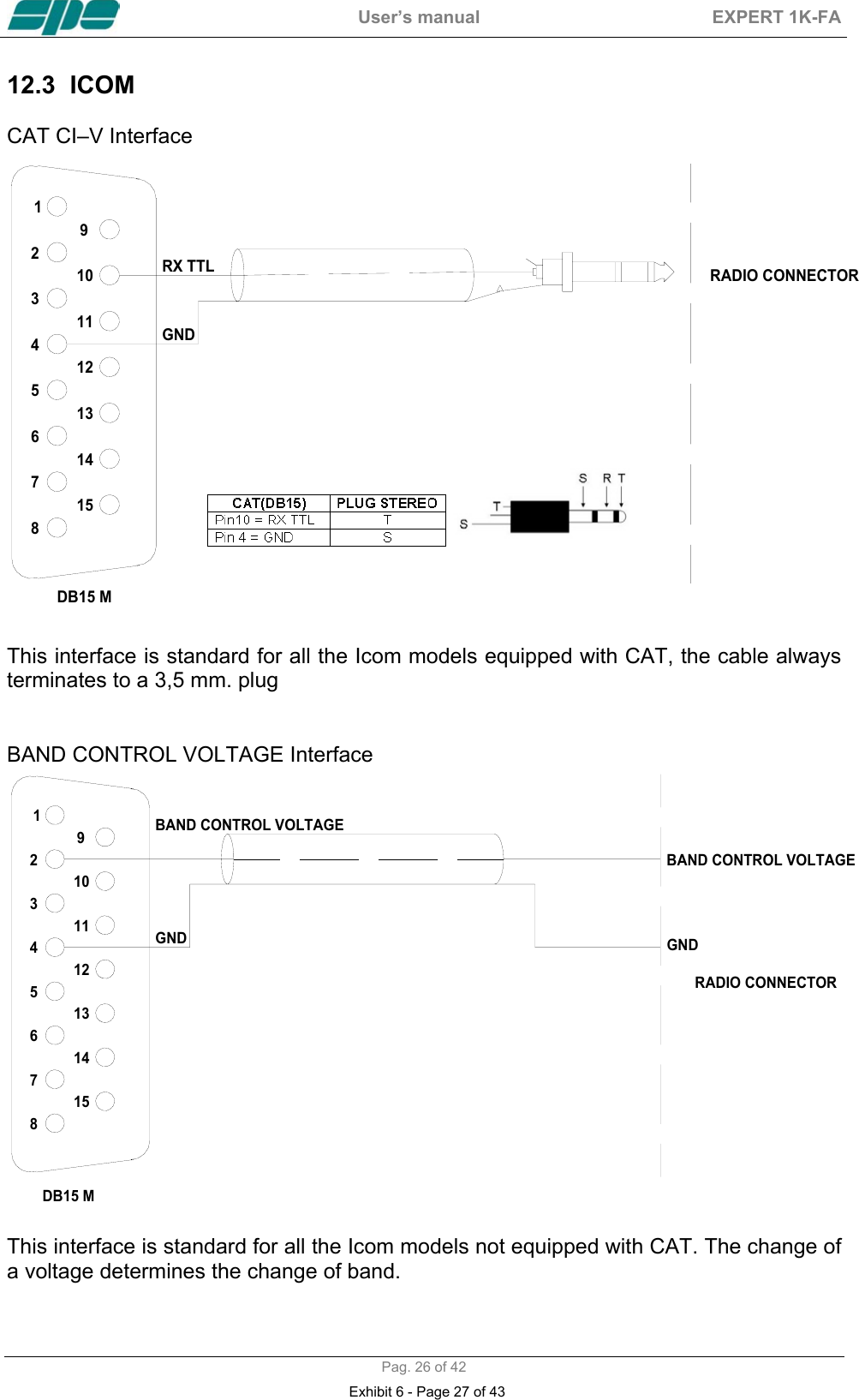
 User’s manual  EXPERT 1K-FA  Pag. 26 of 42 12.3 ICOM   CAT CI–V Interface  432156789121314111015GNDDB15 MRX TTL RADIO CONNECTOR  This interface is standard for all the Icom models equipped with CAT, the cable always terminates to a 3,5 mm. plug    BAND CONTROL VOLTAGE Interface  432156789121314111015GND GNDRADIO CONNECTORDB15 MBAND CONTROL VOLTAGEBAND CONTROL VOLTAGE  This interface is standard for all the Icom models not equipped with CAT. The change of a voltage determines the change of band. Exhibit 6 - Page 27 of 43
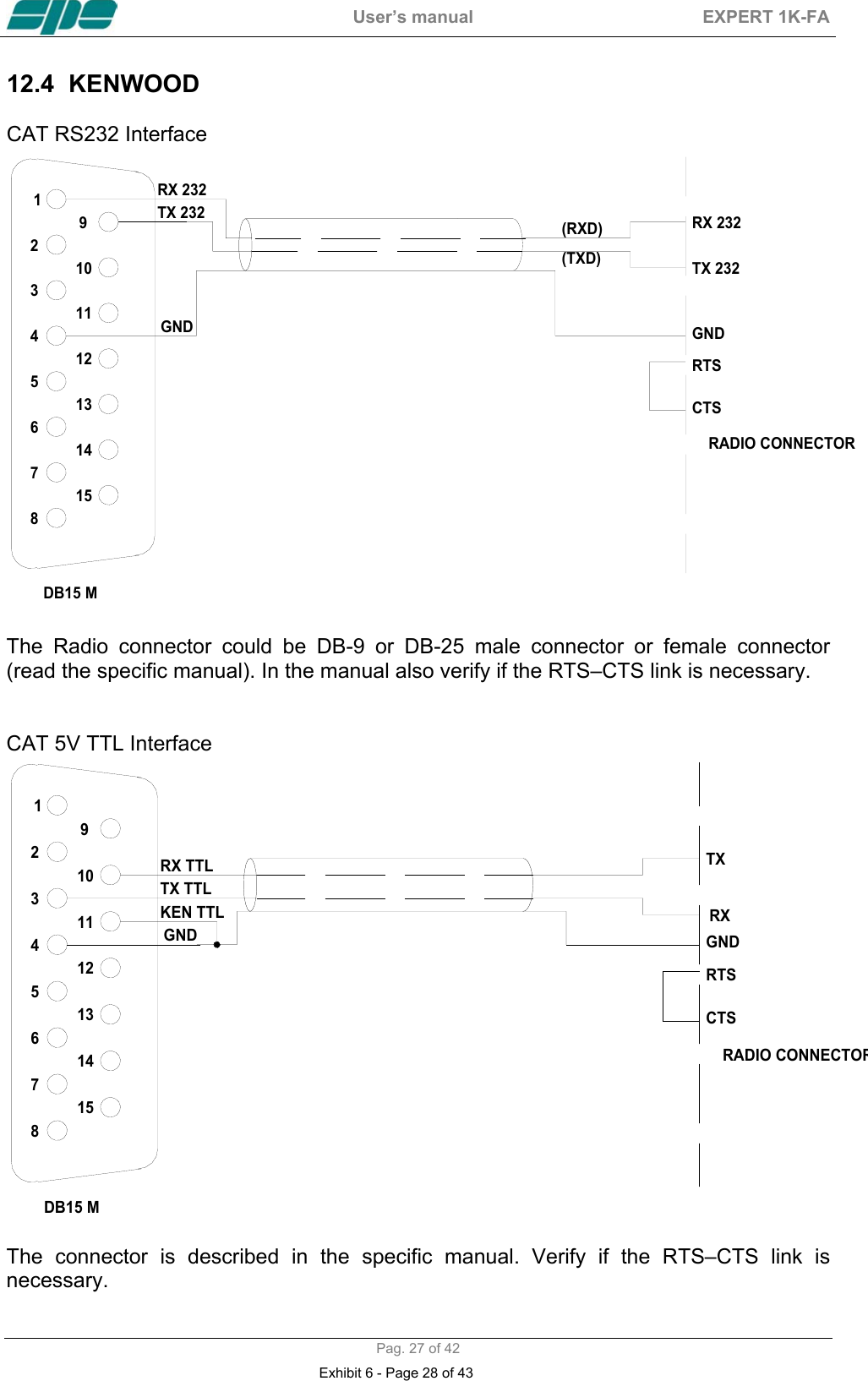
 User’s manual  EXPERT 1K-FA  Pag. 27 of 42 12.4 KENWOOD   CAT RS232 Interface  432156789121314111015GND GNDRADIO CONNECTORDB15 MRX 232TX 232 RX 232TX 232RTSCTS(RXD)(TXD)  The Radio connector could be DB-9 or DB-25 male connector or female connector (read the specific manual). In the manual also verify if the RTS–CTS link is necessary.   CAT 5V TTL Interface  432156789121314111015GND GNDRADIO CONNECTORRXTXDB15 MRX TTLTX TTLKEN TTLRTSCTS  The connector is described in the specific manual. Verify if the RTS–CTS link is necessary.  Exhibit 6 - Page 28 of 43
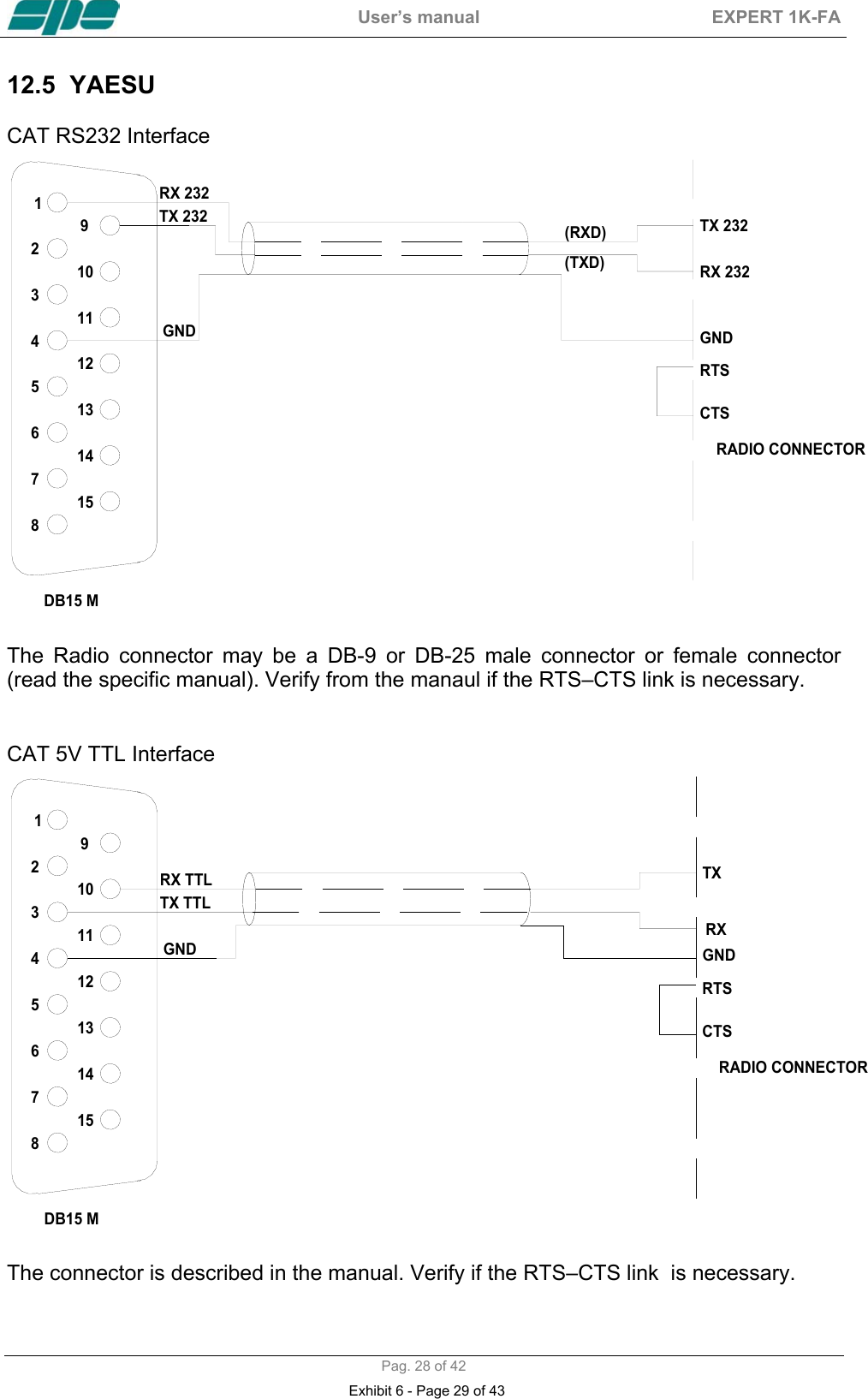
 User’s manual  EXPERT 1K-FA  Pag. 28 of 42 12.5 YAESU   CAT RS232 Interface  432156789121314111015GND GNDRADIO CONNECTORDB15 MRX 232TX 232 TX 232RX 232RTSCTS(RXD)(TXD)  The Radio connector may be a DB-9 or DB-25 male connector or female connector (read the specific manual). Verify from the manaul if the RTS–CTS link is necessary.   CAT 5V TTL Interface  432156789121314111015GND GNDRADIO CONNECTORRXTXDB15 MRX TTLTX TTLRTSCTS  The connector is described in the manual. Verify if the RTS–CTS link  is necessary.  Exhibit 6 - Page 29 of 43
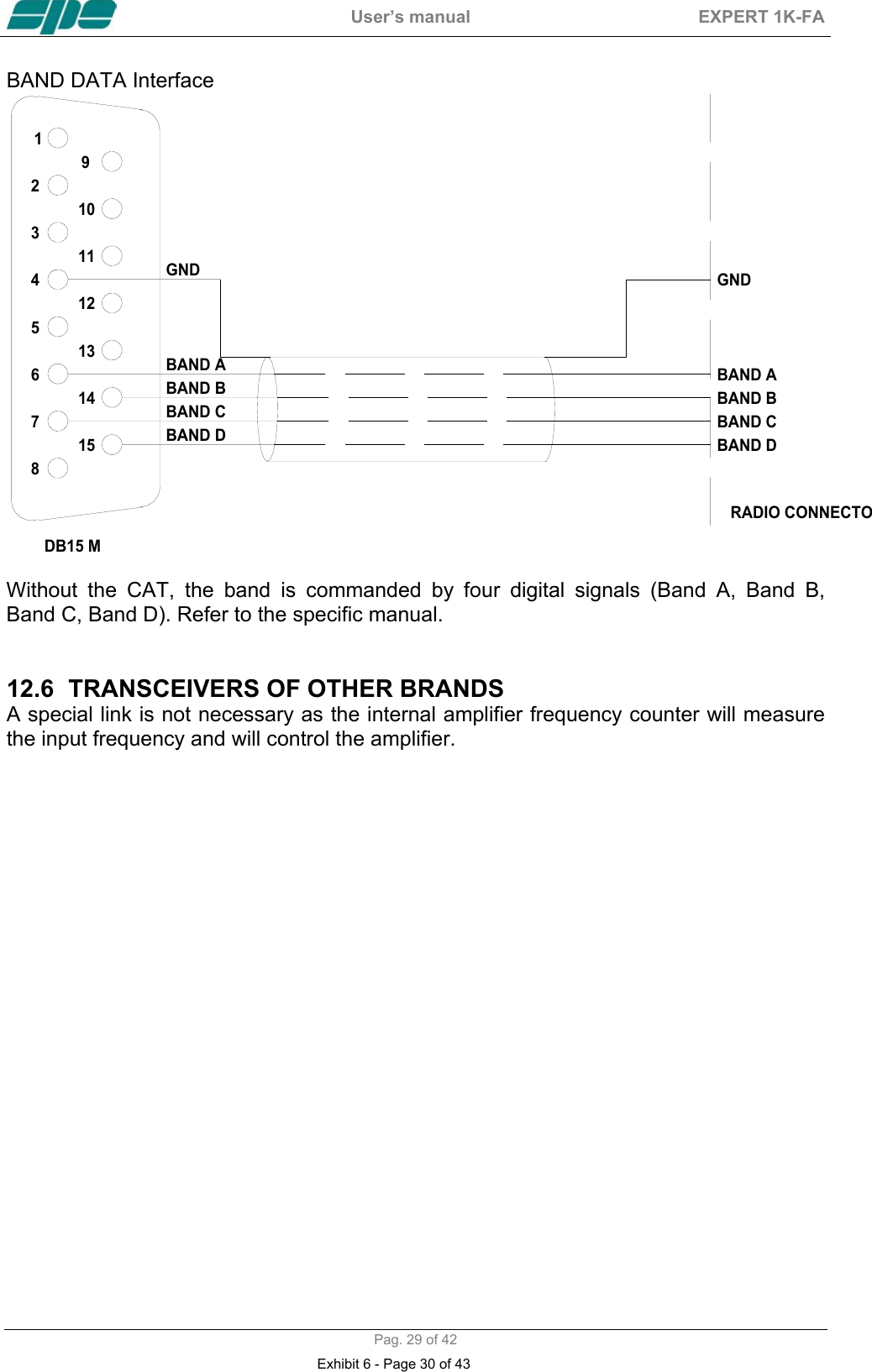
 User’s manual  EXPERT 1K-FA  Pag. 29 of 42 BAND DATA Interface  432156789121314111015GNDRADIO CONNECTOGNDDB15 MBAND ABAND BBAND CBAND DBAND ABAND BBAND CBAND D  Without the CAT, the band is commanded by four digital signals (Band A, Band B,  Band C, Band D). Refer to the specific manual.   12.6  TRANSCEIVERS OF OTHER BRANDS  A special link is not necessary as the internal amplifier frequency counter will measure the input frequency and will control the amplifier.   Exhibit 6 - Page 30 of 43
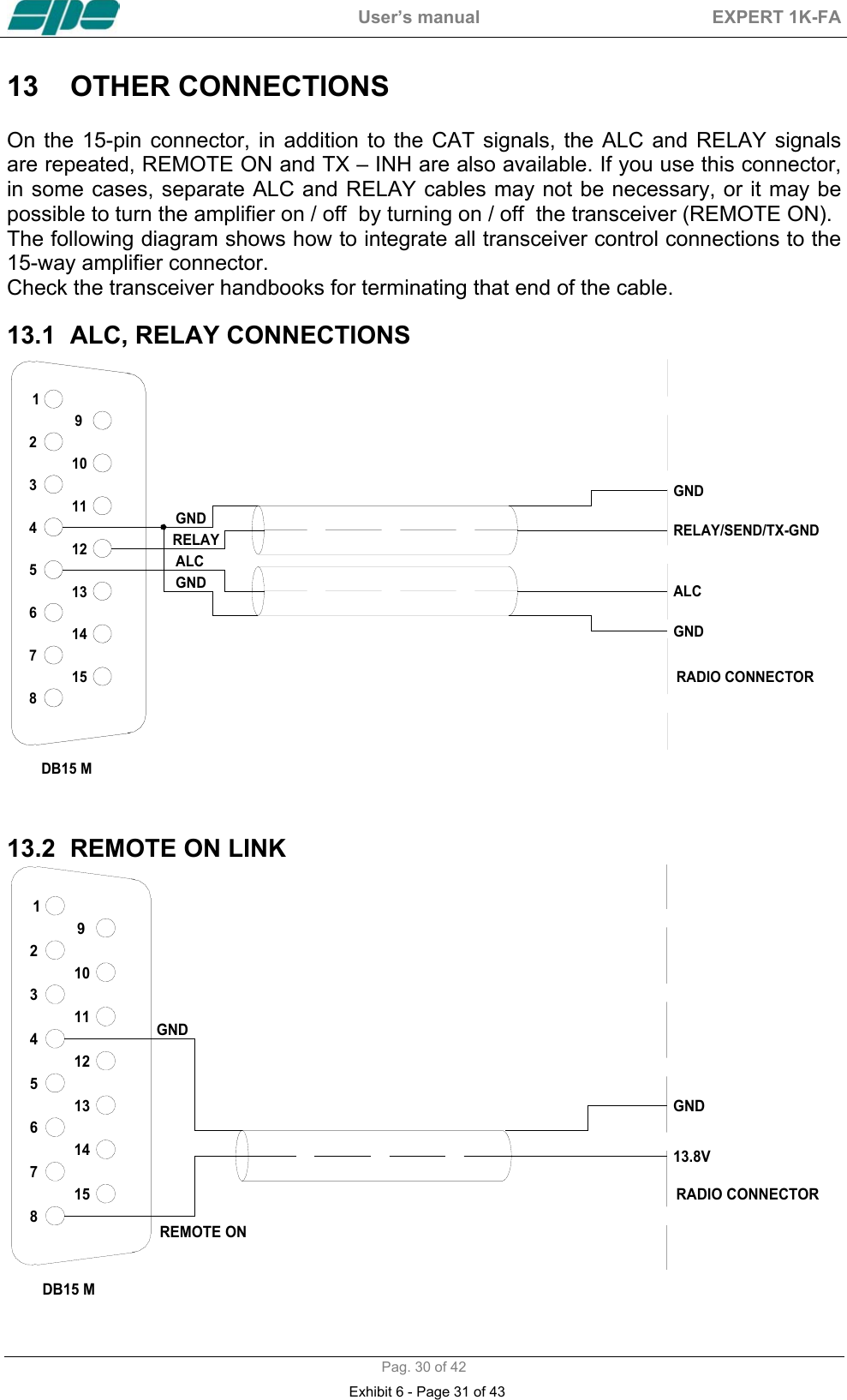
 User’s manual  EXPERT 1K-FA  Pag. 30 of 42 13  OTHER CONNECTIONS   On the 15-pin connector, in addition to the CAT signals, the ALC and RELAY signals are repeated, REMOTE ON and TX – INH are also available. If you use this connector, in some cases, separate ALC and RELAY cables may not be necessary, or it may be possible to turn the amplifier on / off  by turning on / off  the transceiver (REMOTE ON). The following diagram shows how to integrate all transceiver control connections to the 15-way amplifier connector.  Check the transceiver handbooks for terminating that end of the cable.    13.1  ALC, RELAY CONNECTIONS  GNDRELAYGNDALCGNDGNDRADIO CONNECTORALCRELAY/SEND/TX-GND432156789121314111015DB15 M   13.2  REMOTE ON LINK  432156789121314111015 RADIO CONNECTORGND13.8VDB15 MREMOTE ONGND Exhibit 6 - Page 31 of 43
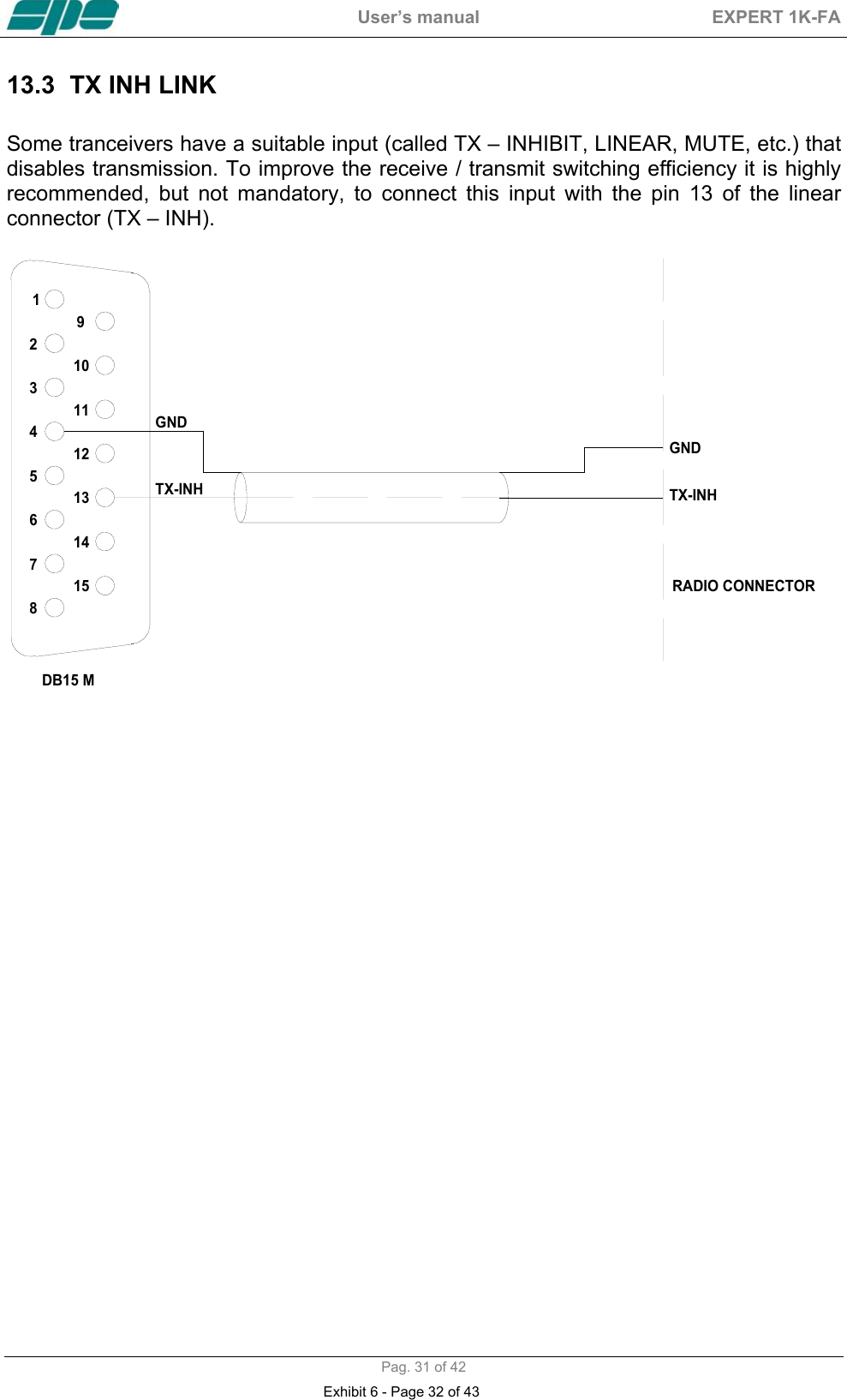
 User’s manual  EXPERT 1K-FA  Pag. 31 of 42 13.3  TX INH LINK   Some tranceivers have a suitable input (called TX – INHIBIT, LINEAR, MUTE, etc.) that disables transmission. To improve the receive / transmit switching efficiency it is highly recommended, but not mandatory, to connect this input with the pin 13 of the linear connector (TX – INH).   432156789121314111015DB15 MGNDTX-INHGNDTX-INHRADIO CONNECTOR                           Exhibit 6 - Page 32 of 43
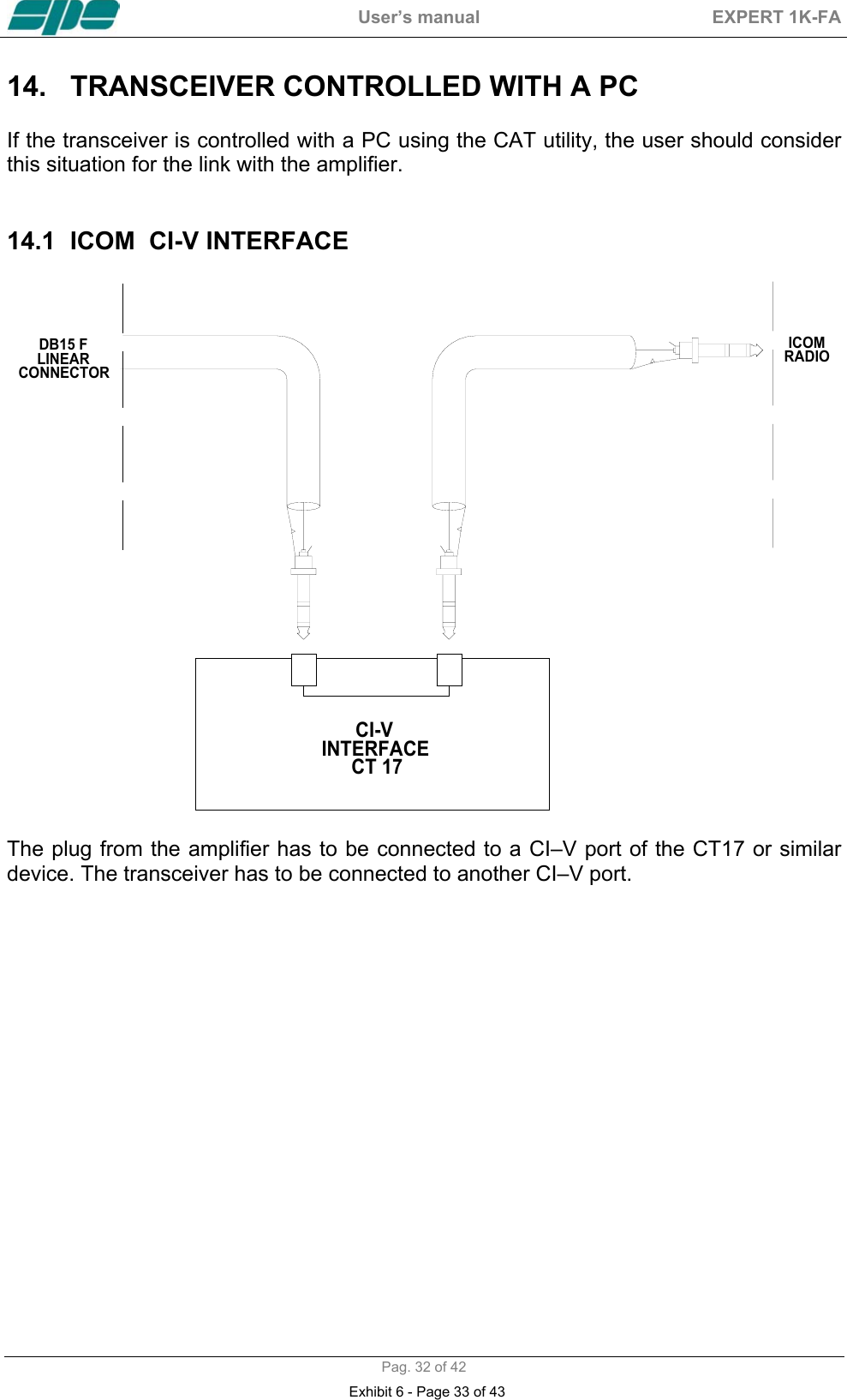
 User’s manual  EXPERT 1K-FA  Pag. 32 of 42 14.  TRANSCEIVER CONTROLLED WITH A PC   If the transceiver is controlled with a PC using the CAT utility, the user should consider this situation for the link with the amplifier.   14.1  ICOM  CI-V INTERFACE  CI-V INTERFACE CT 17ICOMRADIODB15 FLINEARCONNECTOR The plug from the amplifier has to be connected to a CI–V port of the CT17 or similar device. The transceiver has to be connected to another CI–V port.  Exhibit 6 - Page 33 of 43
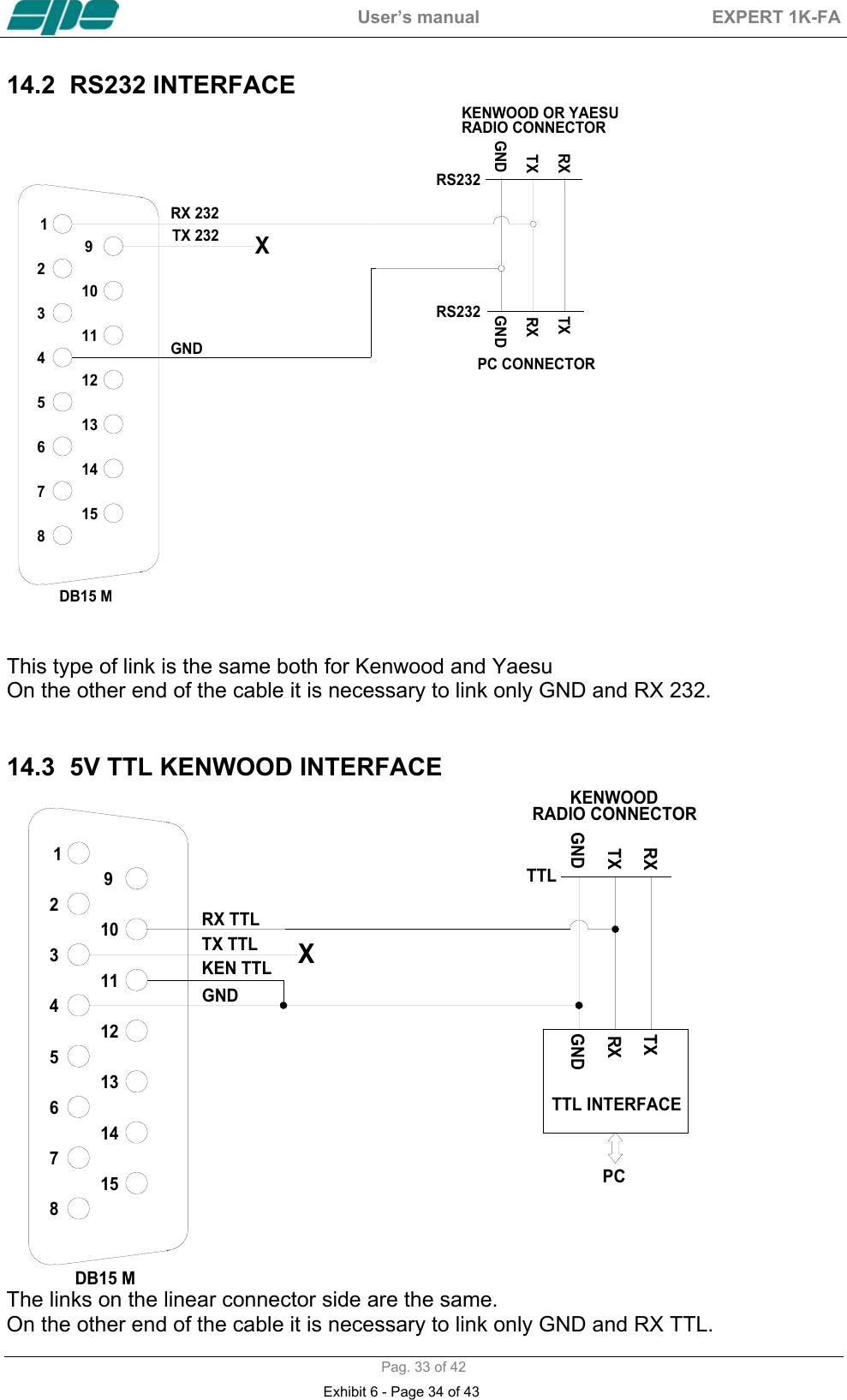
 User’s manual  EXPERT 1K-FA  Pag. 33 of 42 14.2  RS232 INTERFACE  432156789121314111015GNDTXRXGNDKENWOOD OR YAESURADIO CONNECTORPC CONNECTORTXRXRS232RS232DB15 MRX 232TX 232XGND   This type of link is the same both for Kenwood and Yaesu  On the other end of the cable it is necessary to link only GND and RX 232.   14.3  5V TTL KENWOOD INTERFACE  432156789121314111015GNDTXRXTTL INTERFACEPCGNDTXRXTTLKENWOODRADIO CONNECTORDB15 MRX TTLTX TTLKEN TTL XGND The links on the linear connector side are the same. On the other end of the cable it is necessary to link only GND and RX TTL. Exhibit 6 - Page 34 of 43
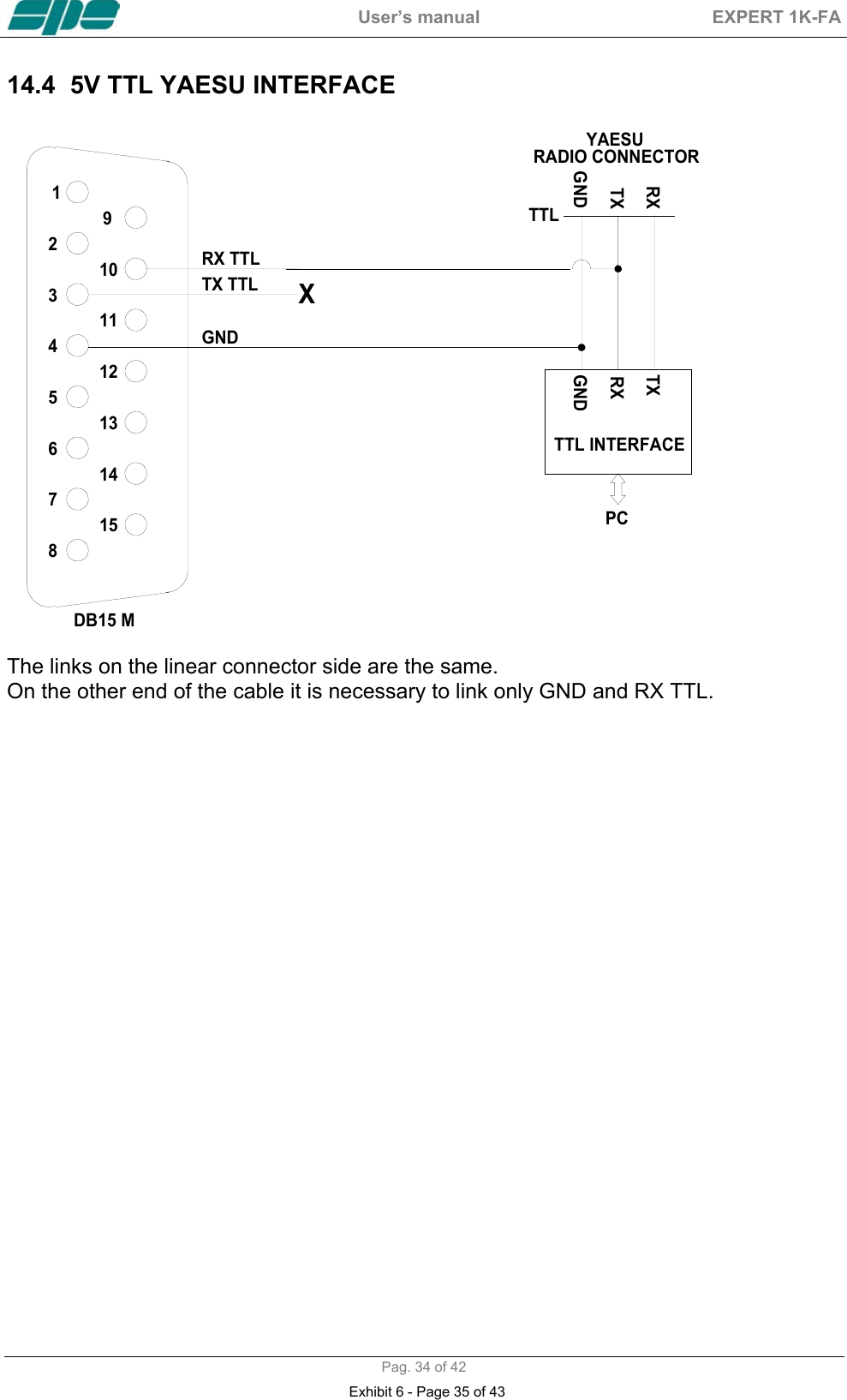
 User’s manual  EXPERT 1K-FA  Pag. 34 of 42 14.4  5V TTL YAESU INTERFACE   432156789121314111015GNDTXRXTTL INTERFACEPCGNDTXRXTTLYAESURADIO CONNECTORDB15 MRX TTLTX TTLXGND  The links on the linear connector side are the same. On the other end of the cable it is necessary to link only GND and RX TTL.    Exhibit 6 - Page 35 of 43
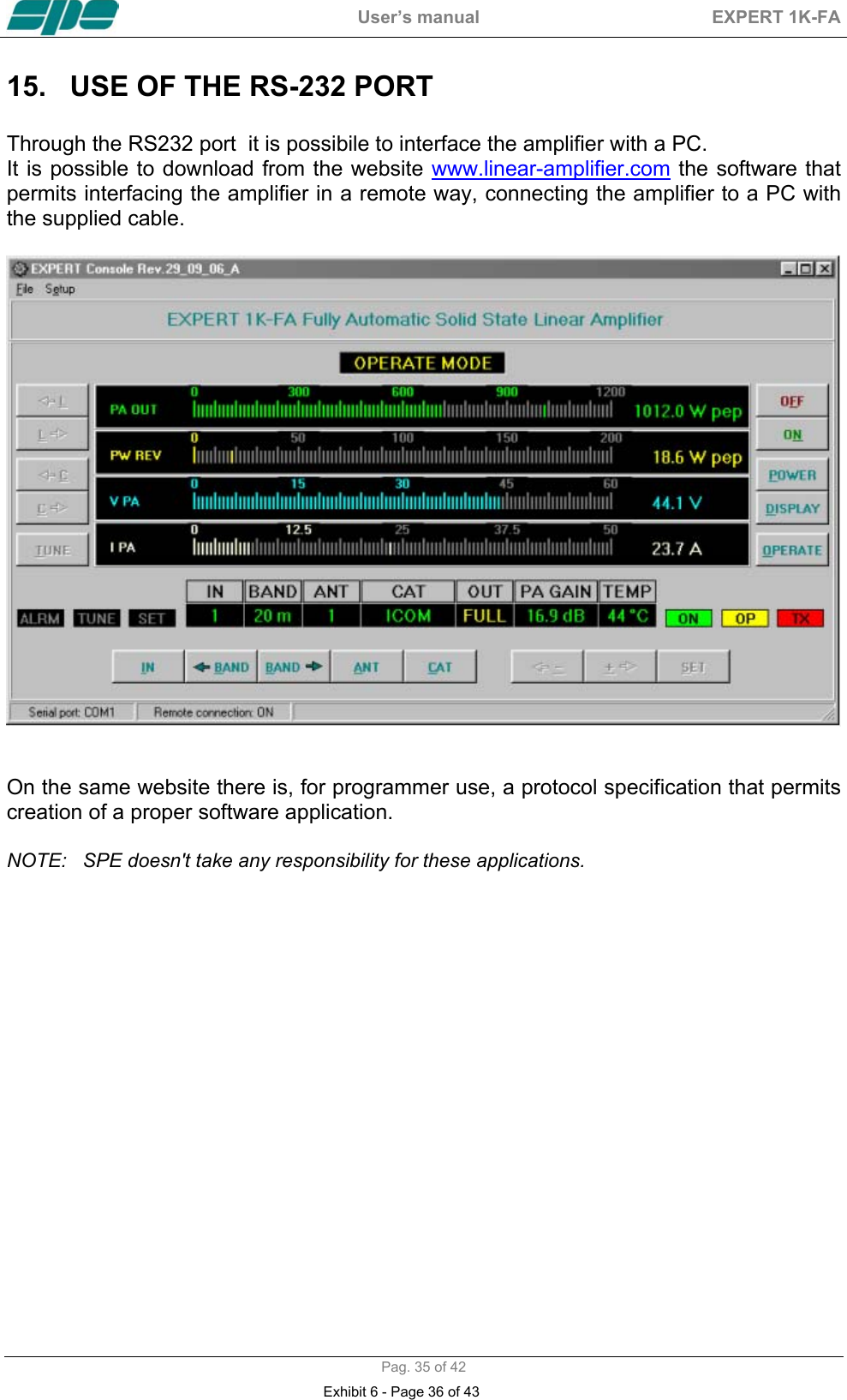
 User’s manual  EXPERT 1K-FA  Pag. 35 of 42 15.  USE OF THE RS-232 PORT   Through the RS232 port  it is possibile to interface the amplifier with a PC. It is possible to download from the website www.linear-amplifier.com the software that permits interfacing the amplifier in a remote way, connecting the amplifier to a PC with the supplied cable.     On the same website there is, for programmer use, a protocol specification that permits creation of a proper software application.  NOTE:  SPE doesn't take any responsibility for these applications.   Exhibit 6 - Page 36 of 43
 User’s manual  EXPERT 1K-FA  Pag. 36 of 42 16. MAINTENANCE   The Expert 1K-FA linear amplifier doesn’t need internal maintenance because it has a cover without ventilation holes. No tube-type EHT is used so the high voltages present in tube amplifiers, which sometimes attract dirt, are not present.  The user has only to periodically check the cleaning of the air filter on the front panel.  The frequency of such operation depends how dusty the amplifier location is and how much it is used. We recommend monthly cleaning of the filter.   To clean the filter a)  Remove the front grid. b)  Remove the filter and clean it with care. c)  Reassemble the filter and the grid after having carefullly cleaned the mechanical structure that includes them.  NOTE:  Check the filter if an unexpected rise of temperature is noticed.  NOTE:  Never operate without the filter, as dust could be deposited on the surface of the heatsink limiting its ability to cool.   NOTE:  To allow the most efficient heat-dissipation, large copper parts have been used.  Exhibit 6 - Page 37 of 43
 User’s manual  EXPERT 1K-FA  Pag. 37 of 42 17.  CHARACTERISTICS / SPECIFICATIONS    -  The smallest in the world  Built-in Power supply and Automatic Antenna Tuner.  Dimension: w 28, h 14, d 32 cm. (connectors included).  Weight: approx. 20 Kg  (18,5 Kg typ.).  -  The most technologically advanced in the world  Two CPUs are used, one of which is dedicated to the transceiver interface requirements (CAT).  Pi-L output circuit.  Over 13000 lines of software for performance that cannot be found in any other amplifier. -  Fully Automatic  Easy connection with all models "ICOM, YAESU, KENWOOD" for immediate management of the bands, tuner and antennas.  Same performance with all makes or homemade rigs.  The operator has only to move the “Frequency Tuning Knob” in the transceiver!!! -  Wide frequency coverage  1.8 MHz to 50 MHz including WARC bands (US version available).  -  Fully solid state  1 KW pep SSB output; 900 W pep CW out (typ.) ; 700 W pep out. (typ.) on  50 MHz.  FULL / HALF power selected according to the operator SSB/CW power requirement, for digital modes and for linear protection (automatic).  No heating time, immediately ready! Virtually limitless life of the amplification devices (MOSFETs). -  Automatic Antenna Tuner built-in  Capable of matching 3:1 SWR on HF, and 2.5:1 SWR on 6 meters.  Capable of programmable switching of 4 antennas (SO239 connectors).  Bands, Antennas, Tuning conditions are changed in 10 msec.  Bands, Antennas and Tuning conditions are managed also in “STBY“ to support the exciter only. -  Two  inputs available  SO239 connectors. -  Driving Power  20 W  (typ.) / 60 W ( typ.) US version In “OPERATE“ the required drive power is automatically set with an ALC connection and in “STANDBY“ the exciter is then automatically reset to full power.          -  Very clean and low distortion output! Spurious emissions less than -50 dB ( 50 MHz –60 dB ).  3rd order distortion (two tone test) 36 dB typ. -  Input 50 ohm always perfectly matched  SWR less than 1.2:1. -  Fully protected  Temperature, Over-Voltage, Over-Current, SWR, Reflected Power, Max RF Tuner Voltage, Over-Drive, Amp. The correct parameters are continuously monitored.  Exhibit 6 - Page 38 of 43
 User’s manual  EXPERT 1K-FA  Pag. 38 of 42 The same protection is realized in two different ways:  · Via hardware circuits  (HW) to assure great speed.  · Via the software (SW), to assure great accuracy.  Thanks to the SW, transmit relay changeover is carried out with zero current at    the contacts. -  Full break-in operation (QSK) -  Normal / Contest operation to optimize performance -  Very quiet operation Seven quiet three-speed cooling fans: ·  150 CFM maximum total air flow. Temperature thresholds for speed change: · 65 deg. and 75 deg. (normal mode). · 60 deg. and 70 deg. (contest mode). Noise level:  · 39 dBa at maximum blower speed. -  Continuous use  “FULL” mode: SSB unlimited, key down 3 minutes. “HALF” mode: SSB unlimited, key down 10 minutes. -  Regulated power supply,  input 230 / 115 Vac  With both input voltages the output power doesn't change.  A well designed grain-oriented, tape-wound toroidal transformer reduces magnetic fields around the amplifier . -  The linear can be switched ON / OFF also switching  ON / OFF the exciter -  With a large LCD display is possible to have a great deal of information  W pep out, V pa, I pa, W pep reflected, Power gain, Temperature, SWR, Input setting, CAT setting, Band and other indications including an alarms log. -  Easy to operate  Powerful SW gives you a user-friendly unit. -  RS 232 port for PC control  SW is supplied to remote the linear front  panel.         With a proper protocol it is possible to use this port not only as a remote control but           also as a CAT port (useful to link the linear with any customer application).  -  Easy transportation  A sturdy carry-bag is supplied for “QSY, FIELD DAY, DX’ PEDITIONS etc.“.   -  Certifications :  CE, (FCC are pending).  These specifications are subject to change without notice.     Exhibit 6 - Page 39 of 43
 User’s manual  EXPERT 1K-FA  Pag. 39 of 42 18. TABLE     BAND TABLE, SUB-BAND, CENTRAL FREQUENCY SUB-BAND  [   0]  1785 [   1]  1795 [   2] 1805 [   3]  1815 [   4]  1825 [   5]  1835 [   6]  1845 [   7]  1855 [   8] 1865 [   9]  1875 [ 10]  1885 [ 11]  1895 [ 12]  1905 [ 13]  1915 [ 14]  1925 [ 15]  1935 [ 16]  1945 [ 17]  1955 160 m [ 18]  1965 [ 19]  1975 [ 20]  1985 [ 21]  1995 [ 22]  2005 [ 23]  2015 [ 24]  3470 [ 25]  3490 [ 26]  3510 [ 27]  3530 [ 28]  3550 [ 29]  3570 [ 30]  3590 [ 31]  3610 [ 32]  3630 [ 33]  3650 [ 34]  3670 [ 35]  3690 [ 36]  3710 [ 37]  3730 [ 38]  3750 [ 39]  3770 [ 40]  3790 [ 41]  3810 [ 42]  3830 [ 43]  3850 [ 44]  3870 [ 45]  3890 [ 46]  3910 [ 47]  3930   80 m [ 48]  3950 [ 49]  3970 [ 50]  3990 [ 51]  4010 [ 52]  4030   [ 53]  6963 [ 54]  6988 [ 55]  7013 [ 56]  7038 [ 57]  7063 [ 58]  7088 [ 59]  7113 [ 60]  7138 [ 61]  7163 [ 62]  7188 [ 63]  7213 [ 64]  7238   40 m [ 65]  7263 [ 66]  7288 [ 67]  7313 [ 68]  7338       30 m  [ 69] 10075 [ 70] 10125 [ 71] 10175        [ 72] 13975 [ 73] 14025 [ 74] 14075 [ 75] 14125 [ 76] 14175 [ 77] 14225   20 m  [ 78] 14275 [ 79] 14325 [ 80] 14375         17 m  [ 81] 18075 [ 82] 18125 [ 83] 18165       [ 84] 20975 [ 85] 21025 [ 86] 21075 [ 87] 21125 [ 88] 21175 [ 89] 21225   15 m  [ 90] 21275 [ 91] 21325 [ 92] 21375 [ 93] 21425 [ 94] 21475     12 m  [ 95] 24891 [ 96] 24963 [ 97] 25038       [ 98] 27950 [ 99] 28050 [100] 28150 [101] 28250 [102] 28350 [103] 28450 [104] 28550 [105] 28650 [106] 28750 [107] 28850 [108] 28950 [109] 29050 [110] 29150 [111] 29250 [112] 29350 [113] 29450 [114] 29550 [115] 29650   10 m [116] 29750            [117] 49750 [118] 50250 [119] 50750 [120] 51250 [121] 51750 [122] 52250    6 m  [123] 52750 [124] 53250 [125] 53750 [126] 54250           NOTE:   [sub-band] Central frequency KHz       Exhibit 6 - Page 40 of 43
 User’s manual  EXPERT 1K-FA  Pag. 40 of 42 19. WARRANTY   SPE warrants to the original purchaser that this product shall be free from defects or workmanship. SPE warrants for two (2) years from the date of original purchaser that will provide free of charge all parts and labor necessary to correct defects in material or workmanship. The purchaser has to pay only the cost of shipping for warranty work.   To obtein such warranty service, the original purchaser must:  1)  Complete and send to SPE, not over 30 days from the date of purchase, the warranty registration card. 2) Notify SPE or its nearest authorized service facility, immediately the defect discovered sending: a)  The model and the serial number of the amplifier; b)  The identity of the seller and the date of purchase c)  The description of the defect.  The warranty does not apply to any defect that SPE determines is due to: a)  Improper maintenance or repair by persons not authorised by SPE to carry out such work, including the installation of parts or accessories that do not conform to the quality and specifications of the original parts. b)  Misuse, abuse, neglet or improper installation. c)  Carelessness, accidental or intentional damage.  SPE warranties aforesaid items only, and the purchser shall have no remedy and no claim for incidental or consequential damages. Particular agreements between retailer and purchaser or particular obligations imposed in other countries are matters for the local retailer and not for SPE.  SPE recommends you record this information: -  Model of the amplifier -  Serial number -  Date of purchse -  Name and address of the retailer -  Date of mailing of the Warranty Card.    Exhibit 6 - Page 41 of 43
 User’s manual  EXPERT 1K-FA  Pag. 41 of 42 Notes:Exhibit 6 - Page 42 of 43
 User’s manual  EXPERT 1K-FA  Pag. 42 of 42                                             SPE s.r.l. Via di Monteverde, 33   00152  Rome (Italy) Tel.  +390658209429 Fax. +390658209647 E-mail:    info@linear-amplifier.com Website: http://www.linear-amplifier.com  Ver. 1.3  Copyright © 2006 S.P.E. srl  All rights reserved Exhibit 6 - Page 43 of 43

Navigation menu