Sondpex of America RBS-E15 Bluetooth Speaker User Manual Reverb Manua l

Sondpex Corporation of America Bluetooth Speaker Reverb Manua l

User manual

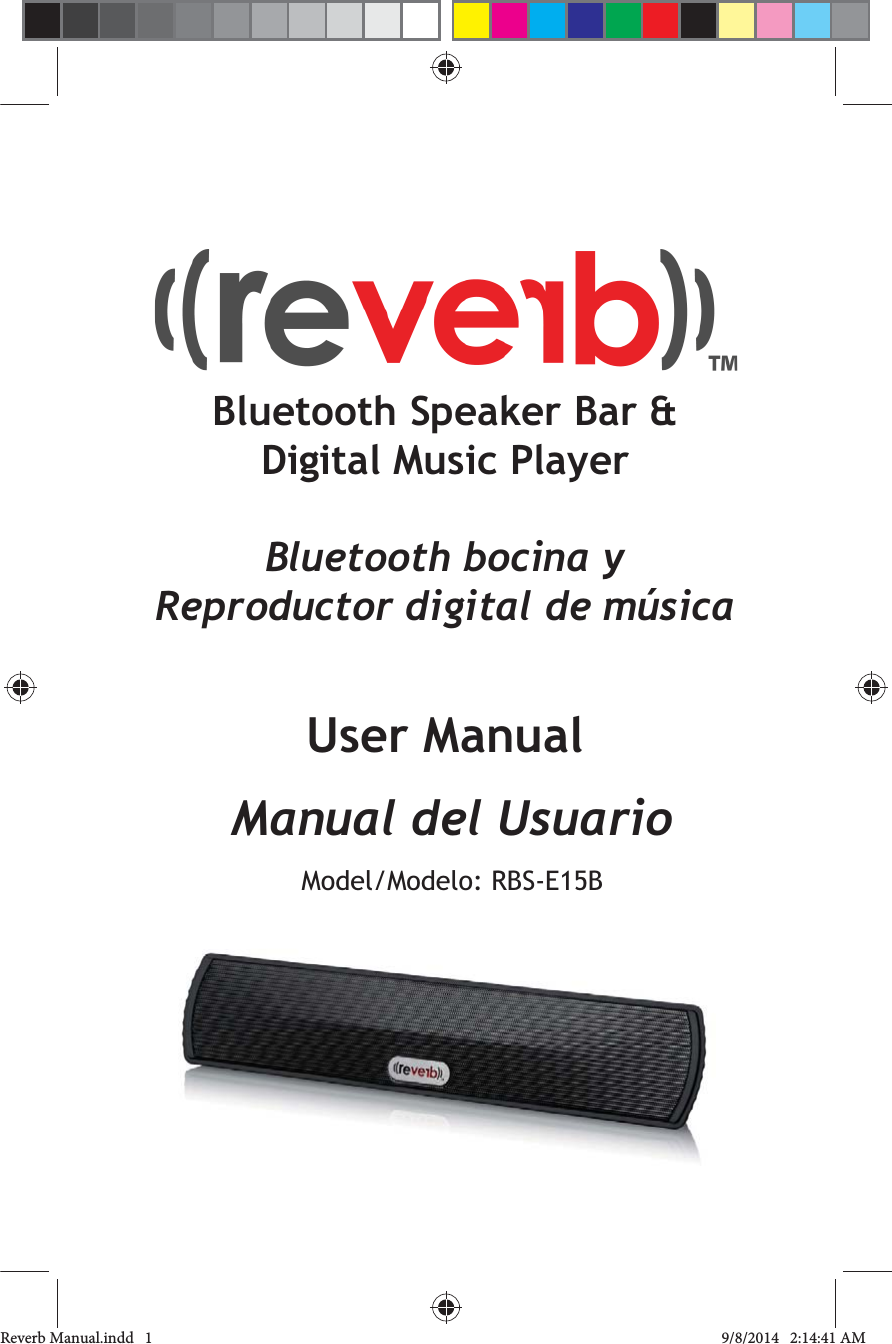
Bluetooth Speaker Bar & Digital Music PlayerBluetooth bocina yReproductor digital de músicaUser ManualManual del UsuarioModel/Modelo: Reverb Manual.indd   1 9/8/2014   2:14:41 AM
Table of ContentsOverview                                                        6Charging                            10Bluetooth                                  ______________11microSD                                                         12AUX Mode                                                            13Troubleshooting_____                                     14                                 16Warranty Information                                    17Reverb Manual.indd   2-3 9/8/2014   2:14:41 AM
Tabla de contenidosGeneralidades                                               20Carga____                 24Bluetooth_________________                        25Modo microSD                                                       26Modo AUX                                                          27Solución de problemas                               ___28                                                  30Garantía                                                            31Please read this manual carefully before use to avoid damaging and to prolong the life of your Reverb.  Any damage resulting from negligent use of the Reberb is not covered by the warranty.Por favor lea este manual cuidadosamente para evitar dañar y también prolongar la vida de su Reverb. Cualquier daño que resulte del uso negligente del Reverb no estará cubierto por la garantía.Reverb Manual.indd   4-5 9/8/2014   2:14:41 AM
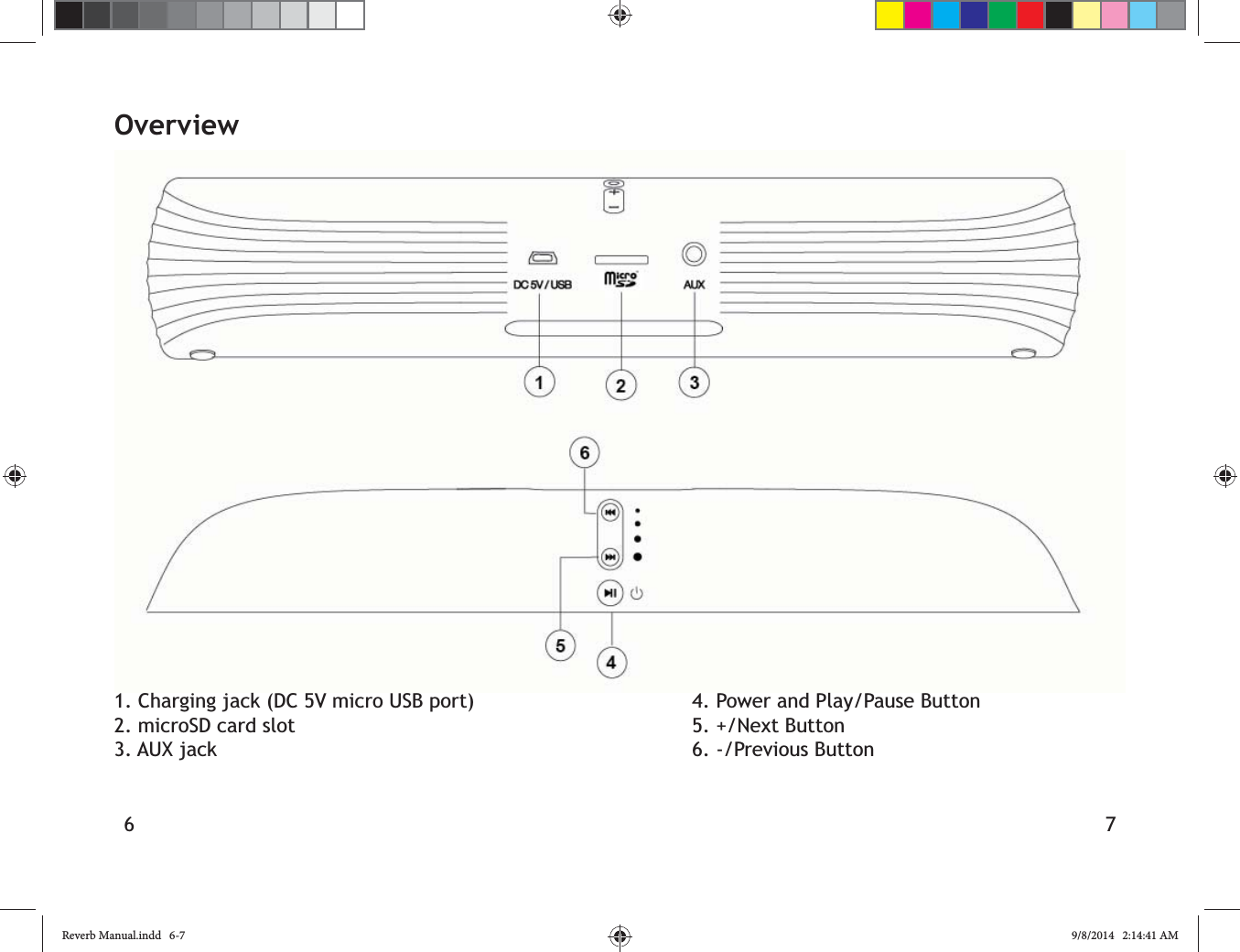
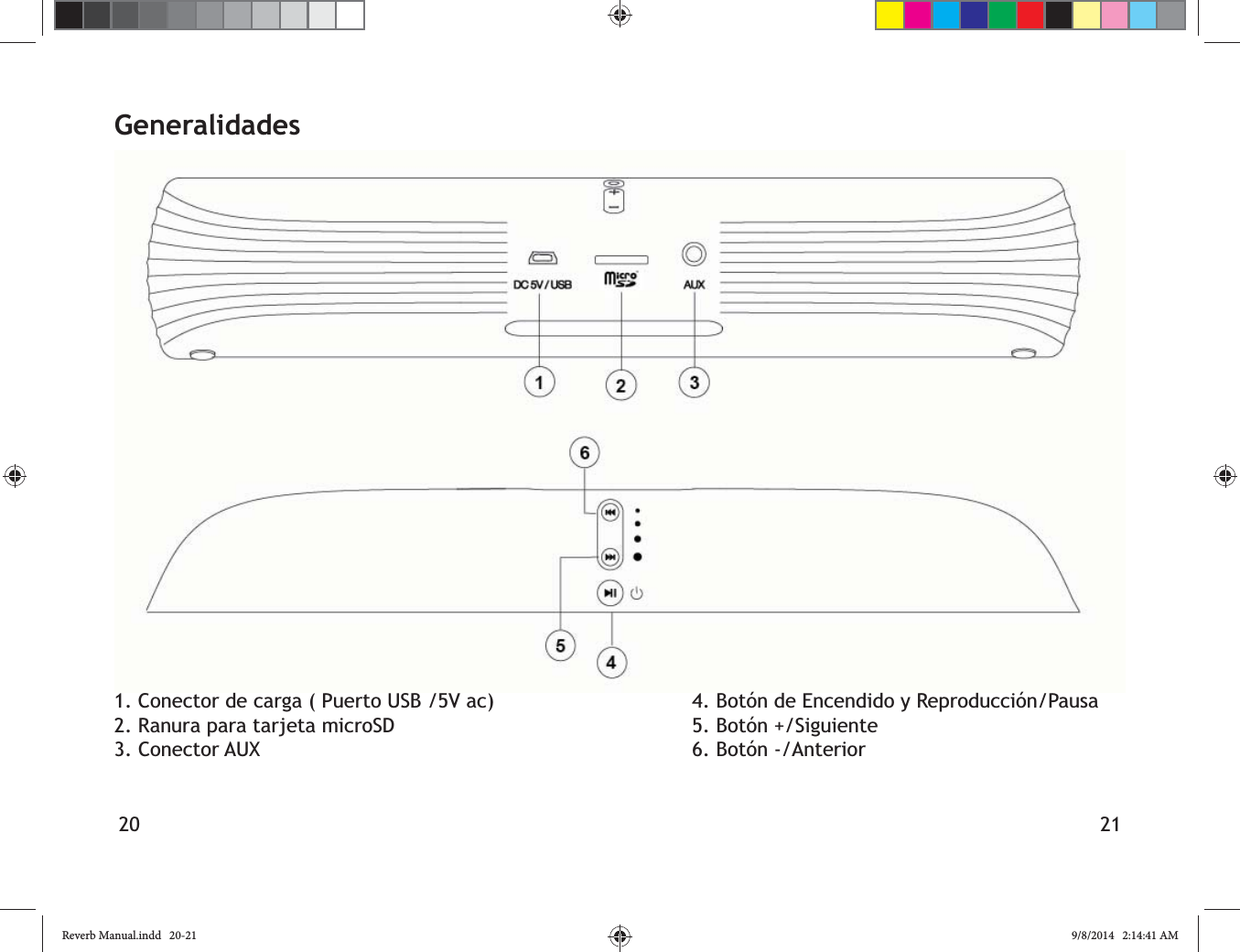
6 7Overview1. Charging jack (DC 5V micro USB port)2. microSD card slot3. AUX jack4. Power and Play/Pause Button5. +/Next Button6. -/Previous ButtonReverb Manual.indd   6-7 9/8/2014   2:14:41 AM
8 9Packing List1 Reverb Bluetooth speaker bar & digital music player1 AUX (3.5mm) cable1 USB charging cable1 User Manual_________________________________________Features1. Plays music from microSD, and through Bluetooth and AUX connections2. Bluetooth phone call function through built in microphone3. Audio decoder chip for superior sound4. Hi-Fi Speakers5. Voice guidance for easier operationFirst Steps1. Ensure that your Reverb is fully charged 2. Hold the Power button down for 3 seconds to turn on your Reverb.3. Hold down the + and – buttons down simul-taneously to toggle between languages. The toggle order is English-Spanish-French.and alerts5. Reverb will enter into sleep mode if it is left idle for more than 5 minutes.  Press any key on the speaker to wake it up.Reverb Manual.indd   8-9 9/8/2014   2:14:41 AM
10 11Bluetooth1. Reverb begins in Bluetooth mode each time it is turned on.2. Turn on the Bluetooth function on your mobile device, and pair with “reverb”.  Once the connection is successfully established, 3. Use the +/Next and -/Previous buttons to adjust the volume and change tracks.4. To answer a phone call, press the Power button. Press the Power button again to end the call, and resume playing music.  Reverb has a built in microphone.  For best call quality, ensure that your phone is close to Reverb, and that you are speaking into Reverb from no more than 12 inches away.Note:Reverb has a Bluetooth range of up to 30 obstacles, and altitude.  For best results, ensure that there is the clearest possible line of sight between your Bluetooth device and Reverb.ChargingUse the included USB charging cable. Charge your Reverb from a 5V wall charger, or use the USB port of a PC.  To avoid damage to your Reverb, please do not use wall chargers that output more than 5V and 2.1A.Please charge the battery completely before If your Reverb is charging, a red light will be visible around the Power button.  When Reverb Expected charging time is 3 hours.  When playing music in Bluetooth mode at a medium volume, you can expect 6 hours of battery life.CAUTIONAvoid using your Reverb in very wet or humid conditions. Reverb may explode if exposed temperature environment.Reverb Manual.indd   10-11 9/8/2014   2:14:41 AM
12 13microSD1. Music will begin playing automatically after a microSD card is inserted. Use the +/Next and -/Previous buttons to adjust the volume and change tracks.2. Ensure that the microSD card is inserted so that the gold contacts are facing upwards.3. Reverb will return to Bluetooth mode after the microSD card is removed.AUX Mode1. Insert one end of AUX cable line into the “AUX” port of your Reverb.  Insert the other end into the 3.5mm jack of your mobile device, MP3 player, PC, or any other compatible device.2.  Please remove the AUX cable after turning your speaker again.3.  When in AUX mode, use the controls directly on your phone, mobile device, or other compatible device to change tracks and adjust the volume.  You can still use the + and – buttons to control the volume of the Reverb itself.Reverb Manual.indd   12-13 9/8/2014   2:14:41 AM
14 15TroubleshootingIf you encounter any of the following scenarios, please run through the following troubleshooting steps before contacting support.No Sound:a. Check if Reverb is powered on.b. Check if the battery is dead.c. See if the AUX cable is snugly connected to both your external device and Reverb. Make sure that the microSD card is snugly inserted, with the gold contacts facing upwards.  Check if your external device has successfully established a Bluetooth connection with Reverb.Distortion:a. Check if the battery is low.b. See if the AUX cable is snugly connected to both your external device and Reverb. Make sure that the microSD card is snugly inserted, with the gold contacts facing upwards.  Check if your external device has successfully established a Bluetooth connection with Reverb.c. If you are using Bluetooth, try moving your audio source closer to Reverb, or establish a clearer line of sight between the two devices.NoteProduct appearance, features, and packaging are subject to change.Reverb Manual.indd   14-15 9/8/2014   2:14:41 AM
16 17Speaker Output Power:Frequency Response: 120Hz-18 KHzS/N:Distortion: <0.5%Bluetooth v2.1+EDR: supports A2DP V1.2, Bluetooth Range (Max): 30ft (10m)Battery Capacity: 1200mAhFully Charged Battery Life: 4-8 hours (depending on volume)Dimensions: 11” x 2 1/8” x 1 5/8” (280 x 55 x 40mm)Net weight: 18.9oz (536g) WarrantyThe Reverb is designed and manufactured by SONDPEX CORP. OF AMERICA.  As part of our commitment to excellence, SONDPEX guarantees that is its products are free from defects in material and workmanship for 180 days from the date of original purchase.  SONDPEX regularly improves the designs, materials, and production methods of its existing products.  We reserve the right to make such changes without notice, as it is impractical to publicize all changes to every product.CONDITIONS OF WARRANTYIf during the 180 day warranty period, your new product is found to be defective, SONDPEX will        without charge for parts or labor subject to the following conditions:1.  All repairs must be performed by SONDPEX 2.  The equipment must have not been altered or damaged through negligence, accident, or improper operation.3.  The replacement of parts are exempted Reverb Manual.indd   16-17 9/8/2014   2:14:41 AM
18 19from this warranty when replacement is necessary due to normal wear and tear.4. All warranty claims must be accompanied by a copy of the sales receipt or proof of purchase.5. Repair or replacement parts supplied by SONDPEX under this warranty are protected only for the unexpired portion of the original warranty.6. This warranty does not extend to the elimination of car static; correction of antenna problems; costs incurred for the removal or reinstallation of the products; damage to tapes, speakers, accessories or car electrical systems.7.  SONDPEX will not be responsible for any charge incurred for installation.PLEASE DO NOT RETURN TO PLACE OF SALE.  For warranty service related inquiries or questions, please call toll free 1-877-997-7888 from 9:00am-5:30pm EST, Monday-Friday (US & CANADA ONLY).  Or, email us at support@sondpex.com.To get the fastest possible service, please have a copy of your sales receipt or proof of purchase on hand, and be ready to give a detailed description of the problems you’re having.If your product is found by SONDPEX to have a defect in material or workmanship within the warranty period, it will be repaired or replaced at no charge and returned to you prepaid.  Where permitted by law, SONDPEX liability shall be limited to that set forth in this warranty.  This warranty shall be the exclusive remedy of the purchaser.SONDPEX CORP. OF AMERICA makes no other warranty of any kind, expressed or implied.  All implied warranties are hereby disclaimed by SONDPEX and excluded from this warranty.       distributor, and seller, shall not be liable for any injury, loss or damage, incidental or consequential, arising out of the use or intended use of the product.Reverb Manual.indd   18-19 9/8/2014   2:14:41 AM
20 21Generalidades1. Conector de carga ( Puerto USB /5V ac)2. Ranura para tarjeta microSD3. Conector AUX4. Botón de Encendido y Reproducción/Pausa5. Botón +/Siguiente6. Botón -/AnteriorReverb Manual.indd   20-21 9/8/2014   2:14:41 AM
22 23Contenido del empaque1 Reverb con Bluetooth Bocina y Reproductor digital de música1 Cable AUX (3,5mm)1 Cable de carga USB1 Manual del Usuario_________________________________________Características1. Reproduce música desde tarjetas micro SD, y del micrófono incorporado.superior4. Bocinas Hi-Fi5. Con voz de orientación para facilitar la operaciónPrimeros Pasoscargado antes del primer uso.2. Presione y mantenga presionado el botón de Encendido por 3 segundos para encender el Reverb.3. Mantenga presionados los botones + y – simultáneamente para alternar entre los 4. Escuche la voz de orientación para 5. El Reverber entrará en el modo reposo si se deja inactivo por más de 5 minutos. Presione cualquier tecla de la bocina para salir del modo reposo.Reverb Manual.indd   22-23 9/8/2014   2:14:41 AM
24 25Bluetooth1. El Reverb comienza en el modo Bluetooth cada vez que se enciende.2. Encienda la función Bluetooth de su 3. Use los botones  +/Siguiente y  -/Anterior para ajustar el volumen y cambiar las pistas.4. Para responder una llamada telefónica, presione el botón de Encendido. Presione el botón de Encendido nuevamente para de música. El Reverb tiene un micrófono incorporado. Para una mejor calidad de al Reverb a no más de 30 cm de distancia.Nota:El Reverb tiene un rango de alcance de Bluetooth de hasta 9 m. Esto se verá afectado por el relieve del terreno, los obstáculos y la altura. Para obtener mejores resultados, asegúrese de que la línea de visibilidad entre despejada posible.CargaUse el cable de carga USB incluido.Cargue su Reverb con un cargador a la pared de 5V , o use el puerto USB de la PC.Para evitar daños a su Reverb, por favor no use cargadores a la pared  que generen más de  5 V y 2,1 A.Por favor cargue la batería completamente antes del primer uso.Si su Reverb está cargando, una luz roja se hará visible alrededor del botón de Encendido.Cuando el Reverb haya terminado de cargar, la luz se volverá verde. El tiempo de carga estimado es de 3 horas. Cuando reproduzca música en el modo Bluetooth a un volumen medio, la batería puede durar hasta 6 horas.PRECAUCIÓNEvite usar su Reverb en sitios mojados o húmedos. El Reverb puede explotar si se lo con altas temperaturas.Reverb Manual.indd   24-25 9/8/2014   2:14:41 AM
26 27Modo microSD1. La música de la tarjeta microSD comenzará a reproducirse automáticamente una vez que Siguiente y  -/Anterior para ajustar el volumen y cambiar las pistasinsertada de manera que los contactos dorados miren hacia arriba.3. El Reverb  volverá al modo Bluetooth una vez que la tarjeta microSD sea removida.Modo AUX1. Inserte un extremo del cable de la línea AUX en el puerto “AUX” de su Reverb. Inserte el otro extremo en el conector de 3,5 mm de su dispositivo móvil, reproductor MP3, PC, o cualquier otro dispositivo compatible.volver a encender su bocina.3. Una vez en el modo AUX, use directamente móvil  o cualquier otro dispositivo compatible, para cambiar las pistas y ajustar el volumen. Usted todavía puede usar los botones  + y  – para controlar el volumen del Reverb mismo.Reverb Manual.indd   26-27 9/8/2014   2:14:41 AM
28 29Solución de problemasSi usted se encuentra en alguna de las situaciones siguientes, por favor recorra estos pasos de solución a problemas antes de contactar el servicio al cliente.No hay sonido: conectado a su dispositivo externo y al Reverb. su dispositivo externo haya establecido una conexión Bluetooth satisfactoria con el Reverb.Distorsión:conectado a su dispositivo externo y al Reverb. su dispositivo externo haya establecido una conexión Bluetooth satisfactoria con el Reverb.c. Si Ud. está usando Bluetooth, intente mover su fuente de audio más cerca del Reverb, o establezca una línea de visibilidad más despejada entre los dos dispositivos.Nota:La apariencia, las características y el empaque del producto están sujetos a cambio.Reverb Manual.indd   28-29 9/8/2014   2:14:41 AM
30 31Potencia de salida de la Bocina: Respuesta de Frecuencia: 120Hz-18 KHzS/N ( Señal/Ruido) : Distorsión: <0.5%Bluetooth v2.1+EDR: V1.2, AVRCP V1.4 Bluetooth Rango (Máx): 30ft (10m)Capacidad batería: 1200mAhTiempo de duración de la Batería con carga completa: 4-8 horas (depende del volumen)Dimensiones: 11” x 2 1/8” x 1 5/8” (280 mm x 55 mm x40 mm)Peso Neto: 18.9oz (536g)El Reverb está diseñado y fabricado por SONDPEX CORP. OF AMERICA.  Como parte de nuestro compromiso con la excelencia, SONDPEX garantiza que sus productos están libres de defectos en materiales y mano de obra por 180 días desde la fecha de compra original.  SONDPEX regularmente mejora sus diseños, materiales,        productos. Nos reservamos el derecho de hacer tales cambios sin aviso, ya que sería poco práctico publicitar todos los cambios de cada producto. Si durante el período de garantía de 180 días, su producto nuevo es hallado defectuoso, SONDPEX reparará tal defecto, o le ofrecerá un reemplazo, sin cargo por partes o labor sujeto a las siguientes condiciones:1.  Todas las reparaciones deberán ser hechas EUA.2.  El equipo no debe haber sido alterado o dañado por causa de negligencia, accidente, u operación inapropiada.3. El reemplazo de partes se encuentra exento de esta garantía cuando el mismo sea necesario por causa del uso y desgaste GarantíaReverb Manual.indd   30-31 9/8/2014   2:14:41 AM
32 33normales.4.  Todos los reclamos bajo la garantía deben estar acompañados por una copia del recibo de venta o una prueba de compra.5.  Las partes para reparación o reemplazo suministradas por SONDPEX bajo esta  garantía están solo protegidas por la porción no expirada de la garantía original.6.  Esta garantía no se hace extensiva a la eliminación de la corriente estática del carro; corrección de antena problemas; costos incurridos por la remoción o reinstalación de los productos; danos a cintas, bocinas, 7.  SONDPEX no será responsable por ningún cargo incurrido por la instalación.POR FAVOR NO LO REGRESE AL SITIO DE COMPRA.  Para comentarios o preguntas relacionadas con el servicio en garantía, por favor, llame gratis al 1-877-997-7888 o 732-940-4430 y elija la opción 2, de 9:00am-5:30pm Hora del Este, de Lunes a Viernes (Válido solo para EUA y CANADÁ).  O, envíenos un e-mail a: support@sondpex.com.por favor, tenga a mano su copia del recibo de         para darnos una descripción detallada de los problemas que estuviera teniendo.Si su producto es hallado por SONDPEX defectuoso en materiales o mano de obra, dentro del período de la garantía, será reparado o reemplazado sin cargo, y regresado a Ud. con envío pago. Donde está permitido por la ley, la responsabilidad de SONDPEX estará limitada a la establecida en esta garantía.  Esta garantía será el exclusivo remedio del comprador.SONDPEX CORP. OF AMERICA no hace otra garantía de ningún tipo, expresa o implícita. Todas las garantías implícitas se encuentran de esta manera exentas de responsabilidad por parte de SONDPEX y excluidas de esta garantía.  SONDPEX        vendedor, no serán responsables de ninguna lesión pueda devenir del uso o del uso intencional del producto.Reverb Manual.indd   32-33 9/8/2014   2:14:42 AM
Reverb Manual.indd   34-35 9/8/2014   2:14:42 AMFCC Warning StatementChanges or modifications not expressly approved by the party responsible for compliance could voidthe user’s authority to operate the equipment.This equipment has been tested and found to comply with the limits for a Class B digital device, pursuant to Part 15 of the FCC Rules. These limits are designed to provide reasonable protection against harmful interference in a residential installation. This equipment generates uses and can radiate radio frequency energy and, if not installed and used in accordance with the instructions, may cause harmful interference to radio communications. However, there is no guarantee that interference will not occur in a particular installation. If this equipment does cause harmful interference to radio or television reception, which can be determined by turning the equipment off and on, the user is encouraged to try to correct the interference by one or more of the following measures: Reorient or relocate the receiving antenna.Increase the separation between the equipment and receiver. Connect the equipment into an outlet on a circuit different from that to which the receiver is connected. Consult the dealer or an experienced radio/TV technician for help.
Sondpex Corporation of AmericaUSA1-877-997-7888732-940-4430support@sondpex.comwww.sondpex.com©2014 Sondpex Corp. of America®All designs, logos, and images are the exclusive property of Sondpex Corp. of Reverb Manual.indd   36 9/8/2014   2:14:42 AM

Navigation menu