Sony ICD UX523 UX522/UX522F/UX523/UX523F User Manual Quick Start Guide ICDUX522 UX522F UX523F Qs EN ES
User Manual: Sony ICD-UX523 Quick Start Guide
Open the PDF directly: View PDF  .
.
Page Count: 2
ICD-UX522/UX522F/UX523/UX523F 4-293-031-71(2)
IC Recorder
Quick Start Guide
4-293-031-71(2)
© 2011 Sony Corporation Printed in China
ICD-UX522/UX522F/UX523/UX523F
GB
ES
Let’s try out your new IC recorder
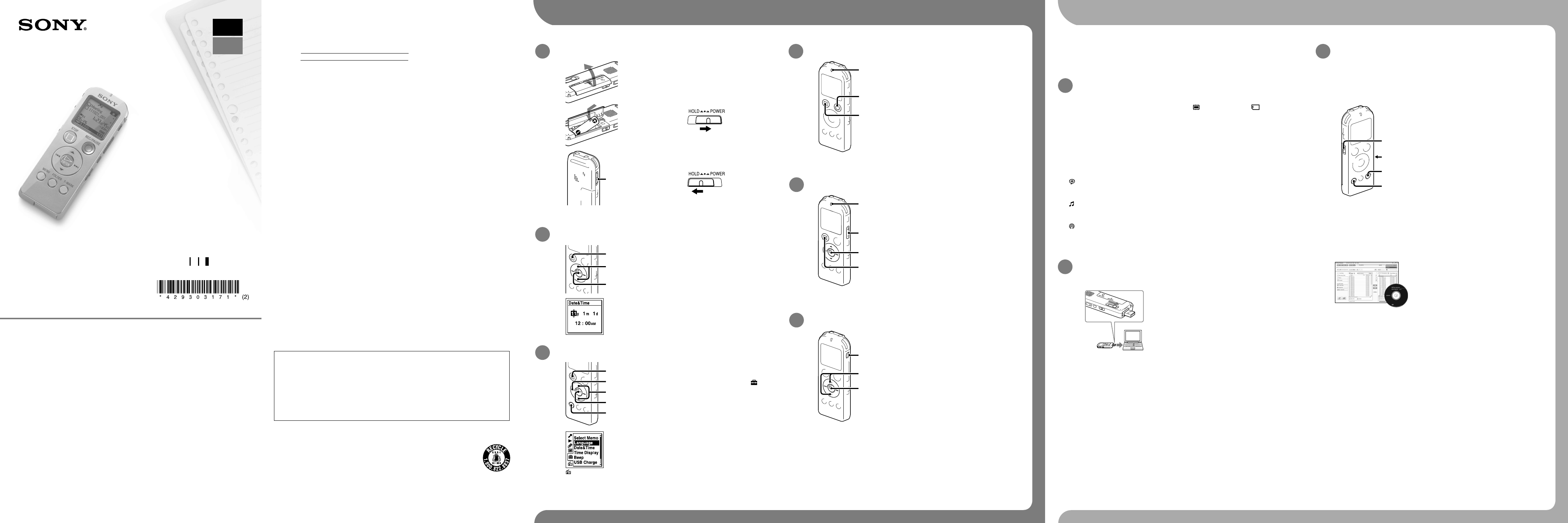
1. Power on.
Insert a battery with the correct polarity.
Turn the power on.
Slide and hold the HOLD•POWER switch in the
direction of “POWER” until the window display
appears.
To turn the power off, slide and hold the HOLD•POWER
switch in the direction of “POWER” until “Power Off”
animation is displayed.
To prevent unintentional operations (HOLD)
To release the IC recorder from the HOLD status, slide the
HOLD•POWER switch towards the center.
2. Set the date and time.
Press or to set the year (the last
two digits of the year), and then press
/ENTER. Repeat this procedure to
set month, day, hour, and minute in
sequence.
When you set the minute and press /ENTER, the
clock reflects the setting.
Press STOP.
3. Select the menu language.
(The tab is displayed only on the
ICD-UX522F/UX523F.)
Press MENU.
Press , press or to select , and
then press /ENTER.
Press or to select “Language,” and
then press /ENTER.
Press or to select the language that
you want to use in the display window,
and then press /ENTER.
You can select the following languages:
English, Español (Spanish), Français (French)
Press STOP.
4. Record.
Operation
indicator
Before you start using the IC recorder, make sure that you
slide the HOLD•POWER switch towards the center to release
the HOLD status.
Press REC/PAUSE.
Recording starts and the operation indicator lights
in red.
You can pause recording by pressing REC/PAUSE.
Press REC/PAUSE again to restart recording.
Press STOP to stop recording.
Recording stops and the operation indicator
flashes in orange.
5. Listen.
Operation
indicator
Press /ENTER.
Playback starts and the operation indicator lights
in green.
Adjust the volume by pressing VOL –/+.
Press STOP to stop playback.
6. Erase.
Once a file is erased, you cannot restore it.
Press ERASE.
“Erase?” is displayed and the file to be erased is
played back for confirmation.
Select “Execute” using or , and then
press /ENTER.
“Erasing…” is displayed while the selected file is
being erased.
You can select a tab and a folder in which you
are going to record a file. You can also specify
the file to be played back or erased in the
selected folder.
Select a tab.
1. Press FOLDER to display the folder
selection window.
2. Press and press or to select
a tab, and then press /ENTER.
(Voice): Recordable area to be used
to manage files recorded with the IC
recorder.
(Music): Playback-only area to be used
to manage music files transferred from
your computer.
(Podcast): Playback-only area to be
used to manage podcast files transferred
from your computer.
(Built-in memory) or (Memory
card): Memory to be used. You can
switch between the built-in memory and
memory card.
Select a folder.
Press or to select a folder, and then
press /ENTER.
To display the files contained in the
selected folder, press .
Select a file.
When the file selection window is
displayed, press or to select the
desired file, and then press /ENTER.
When the stop mode window is
displayed, you can switch files by
pressing and .
Selecting a memory/tab/folder/file
What to do next
The operating instructions explaining all the
features and functions of the IC recorder are
stored as PDF files in the built-in memory of
the IC recorder.
You can also download the operating
instructions from the Sony support home page:
For customers in the U.S.A.:
http://www.sony.com/recordersupport
For customers in Latin America:
http://www.sony-latin.com/index.crp
Connect the IC recorder to your
computer.
Open the “Instructions” folder on
your computer.
On Windows: Click [My Computer]
or [Computer] - [IC RECORDER]
- [Instructions].
On Macintosh: Click [IC RECORDER] on
the finder - [Instructions].
Drag and drop the files of the
operating instructions from the
“Instructions” folder to the local
disk on your computer.
The file names of the operating
instructions are as follows:
Product name_language name_version.
pdf (e.g. ICD-UX522_UX522F_UX523_
UX523F_English_11.pdf)
Disconnect the IC recorder from
your computer.
To read the operating instructions, double-click
the PDF file you want to read.
Copying the operating instructions to your
computer
On power
Operate the unit only on 1.2 V or 1.5 V DC.
Use an NH-AAA rechargeable battery or an
LR03 (size AAA) alkaline battery.
On safety
Do not operate the unit while driving, cycling
or operating any motorized vehicle.
On handling
Do not leave the unit in a location near
heat sources, or in a place subject to direct
sunlight, excessive dust or mechanical
shock.
Should any solid object or liquid fall into
the unit, remove the battery and have the
unit checked by qualified personnel before
operating it any further.
If you have any questions or problems
concerning your unit, please consult your
nearest Sony dealer.
Precautions
Owner’s Record
The model number is located at the rear panel and the serial number is located inside the
battery compartment. Record these numbers in the space provided below. Refer to these
numbers whenever you call upon your Sony dealer regarding this product.
Model No.
Serial No.
WARNING
Do not expose the batteries (battery pack or batteries installed) to excessive heat such as
sunshine, fire or the like for a long time.
CAUTION
Risk of explosion if battery is replaced by an incorrect type.
Dispose of used batteries according to the instructions.
Capacity (User available capacity)
ICD-UX522/UX522F : 2 GB (approx. 1.80 GB = 1,932,735,283 Byte)
ICD-UX523/UX523F : 4 GB (approx. 3.60 GB = 3,865,470,566 Byte)
A part of the memory capacity is used as a management area.
The following FCC statement applies only to the version of this model manufactured for sale in
the USA. Other versions may not comply with FCC technical regulations.
INFORMATION
This equipment has been tested and found to comply with the limits for a Class B digital device,
pursuant to Part 15 of the FCC Rules. These limits are designed to provide reasonable protection
against harmful interference in a residential installation. This equipment generates, uses and can
radiate radio frequency energy and, if not installed and used in accordance with the instructions,
may cause harmful interference to radio communications.
However, there is no guarantee that interference will not occur in a particular installation. If
this equipment does cause harmful interference to radio or television reception, which can be
determined by turning the equipment off and on, the user is encouraged to try to correct the
interference by one or more of the following measures:
Reorient or relocate the receiving antenna.
Increase the separation between the equipment and receiver.
Connect the equipment into an outlet on a circuit different from that to which the receiver is
connected.
Consult the dealer or an experienced radio/TV technician for help.
You are cautioned that any changes or modifications not expressly approved in this manual
could void your authority to operate this equipment.
If you have any questions about this product, you may call: Sony Customer Information Service
Center 1-800-222-7669 or http://www.sony.com/
Declaration of Conformity
Trade Name : SONY
Model : ICD-UX523
Responsible Party : Sony Electronics Inc.
Address : 16530 Via Esprillo, San Diego, CA 92127 USA
Telephone Number : 858-942-2230
This device complies with part 15 of the FCC Rules. Operation is subject to the following
two conditions: (1) This device may not cause harmful interference, and (2) this device must
accept any interference received, including interference that may cause undesired operation.
For the customers in the U.S.A.
RECYCLING NICKEL METAL HYDRIDE BATTERIES
Nickel metal hydride batteries are recyclable.
You can help preserve our environment by returning your used rechargeable
batteries to the collection and recycling location nearest you.
For more information regarding recycling of rechargeable batteries, call toll free
1-800-822-8837, or visit http://www.rbrc.org/.
Caution: Do not handle damaged or leaking nickel metal hydride batteries.
IC Recorder (1)
Stereo headphones (1)
USB connection support cable (1)
NH-AAA (size AAA) rechargeable battery
(1)
Battery case (1)
Application software, Sound Organizer
(CD-ROM) (1)
Operating Instructions (Stored in the
built-in memory)
Check the supplied items.
Congratulations! You have set up your IC recorder and enjoyed your first recording. Let’s step
up to the next stage. There are some more useful functions and information that you can use to
fully utilize your IC recorder.
For details on each operation, refer to the
PDF operating instructions copied to your
computer.
NOISE CUT
MENU
T-MARK
DPC (SPEED
CTRL)
Scene selection
You can select the menu items for recording
to the most appropriate settings according to
various recording scenes.
NOISE CUT
Reduces ambient noise to make the playback
sound clearer.
T-MARK
Adds a track mark to set the starting point
when recording or playing back a file.
DPC (SPEED CTRL)
Adjusts the playback speed.
MENU
Sets various menu items, such as REC Mode,
Mic Sensitivity, etc.
FM radio*
Allows you to tune in and record an FM
radio station using the menu. You can preset
stations for easy tuning, or change reception
settings.
* for ICD-UX522F/UX523F only
More advanced features
Sound Organizer (PC application
software**)
Various operations can be performed using
Sound Organizer on your computer. You can
import files recorded with the IC recorder
into Sound Organizer to edit. You can import
music files of a music CD or podcast files to
transfer to the IC recorder. You can also burn
CDs of the music you like.
** for Windows only
Electret condenser microphone ECM-CS10,
ECM-CZ10, ECM-CS3, ECM-TL3
Audio connecting cable RK-G136, RK-G139
Rechargeable battery NH-AAA-B2KN
USB AC adaptor AC-U501AD (excluding
Argentina), AC-U50AG (For the Latin
American countries only excluding
Argentina)
Compact charger & 2-pc AAA Multi-Use
Premium batteries BCG-34HS2KAN
Optional accessories
Welcome to your new Sony IC recorder!
This is the Quick Start Guide, which provides you with instructions on the
basic operations of the IC recorder.
Please read it carefully. We hope you enjoy using your new Sony IC recorder.
ICD-UX522/UX522F/UX523/UX523F 4-293-031-71(2)
IC Recorder
Guía de inicio rápido
ICD-UX522/UX522F/UX523/UX523F
ES
GB
Vamos a probar la nueva grabadora IC
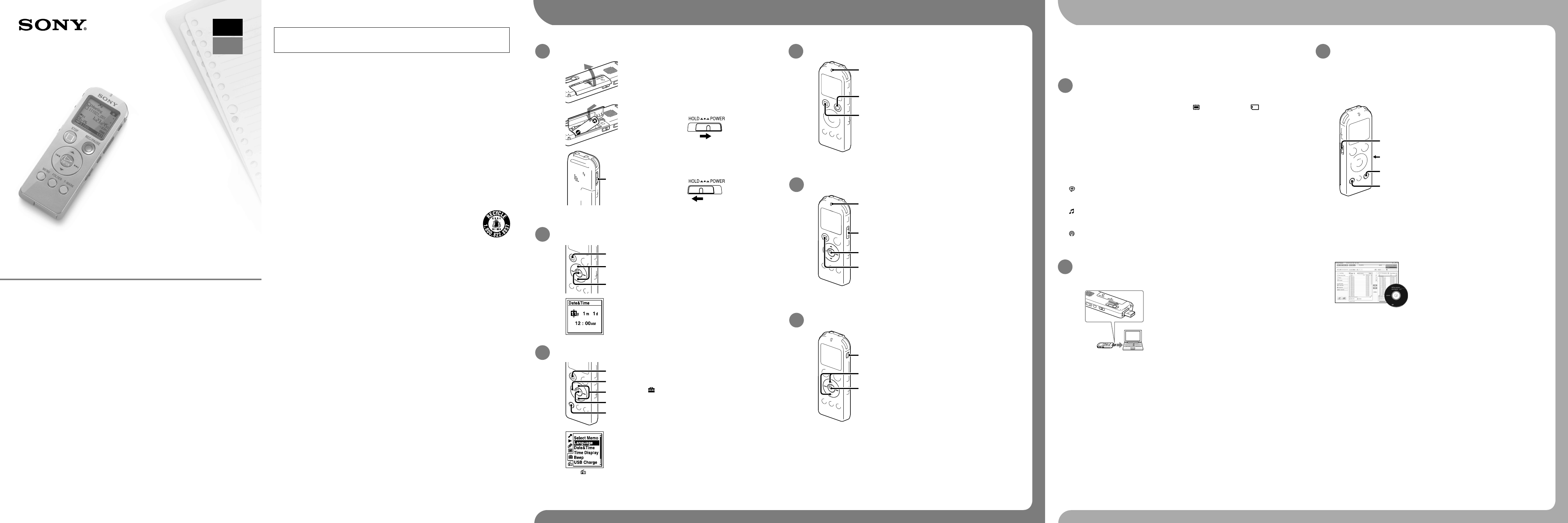
1. Encender.
Inserte una pila con la polaridad
correcta.
Encienda la grabadora.
Deslice y sujete el interruptor HOLD•POWER en el
sentido de “POWER” hasta que aparezca la ventana
de visualización.
Para apagar la grabadora deslice y sujete el interruptor
en el sentido de “POWER” hasta que aparezca la
animación “Power Off”.
Para evitar el funcionamiento no intencionado (HOLD)
Para desactivar el estado HOLD de la grabadora IC, deslice el
interruptor HOLD•POWER hacia el centro.
2. Ajustar la fecha y la hora.
Pulse
o
para ajustar el año (los
dos últimos dígitos del año) y, a
continuación, pulse
/ENTER. Repita
este proceso para ajustar el mes, el día, la
hora y los minutos en este orden.
Cuando haya ajustado los minutos y pulse
/ENTER, el reloj reflejará el ajuste.
Pulse STOP.
3. Seleccionar el idioma del menú.
(La pestaña se muestra solo en el
modelo ICD-UX522F/UX523F).
Pulse MENU.
Pulse , pulse o para seleccionar
y, a continuación, pulse /ENTER.
Pulse o para seleccionar “Language”
y, a continuación, pulse /ENTER.
Pulse o para seleccionar el idioma
que desea utilizar en el visor y, a
continuación, pulse /ENTER.
Puede seleccionar los siguientes idiomas:
English (inglés), Español, Français (francés)
Pulse STOP.
4. Grabar.
Indicador de
funcionamiento
Antes de empezar a utilizar la grabadora IC, asegúrese de
deslizar el interruptor HOLD•POWER hacia el centro para
desactivar el estado HOLD.
Pulse REC/PAUSE.
La grabación comienza y el indicador de
funcionamiento se ilumina en rojo.
Puede pausar la grabación pulsando REC/PAUSE. Pulse
REC/PAUSE de nuevo para volver a iniciar la grabación.
Pulse STOP para detener la grabación.
La grabación se detiene y el indicador de
funcionamiento parpadea en naranja.
5. Escuchar.
Indicador de
funcionamiento
Pulse /ENTER.
La reproducción comienza y el indicador de
funcionamiento se ilumina en verde.
Ajuste el volumen pulsando VOL –/+.
Pulse STOP para detener la
reproducción.
6. Borrar.
Una vez borrado un archivo, no es posible recuperarlo.
Pulse ERASE.
Aparece “Erase?” y el archivo que se va a borrar se
reproduce para su confirmación.
Seleccione “Execute” mediante o y, a
continuación, pulse /ENTER.
Aparece “Erasing…” mientras que el archivo
seleccionado se está borrando.
Puede seleccionar una pestaña y una carpeta
en la que vaya a grabar un archivo. Puede
también especificar el archivo que se vaya a
reproducir o borrar en la carpeta seleccionada.
Seleccionar una pestaña.
1. Pulse FOLDER para mostrar la
ventana de selección de carpeta.
2. Pulse y pulse o para
seleccionar una pestaña y, a
continuación, pulse /ENTER.
(voz): Área grabable utilizada para
administrar los archivos grabados con la
grabadora IC.
(música): Área solo de reproducción
utilizada para administrar los archivos de
música transferidos desde el ordenador.
(podcast): Área solo de reproducción
utilizada para administrar los archivos de
podcast transferidos desde el ordenador.
(memoria interna) o (tarjeta
de memoria): La memoria que se va
a utilizar. Puede intercambiar entre la
memoria interna y la tarjeta de memoria.
Seleccionar una carpeta.
Pulse o para seleccionar la carpeta
deseada y, a continuación, pulse
/ENTER.
Para mostrar los archivos que contiene la
carpeta seleccionada, pulse .
Seleccionar un archivo.
Cuando se muestre la ventana de
selección de archivo, pulse o para
seleccionar el archivo deseado y, a
continuación, pulse /ENTER.
Cuando se muestre la ventana del modo
de parada puede cambiar entre los
archivos pulsando y .
Seleccionar una memoria/pestaña/carpeta/archivo
Qué hacer a continuación
El manual de instrucciones en el que se
explican todas las características y funciones
de la grabadora IC se encuentra almacenado
como archivos PDF dentro de la memoria
interna de la grabadora IC.
Puede también descargar el manual de
instrucciones a través de la página principal de
soporte técnico de Sony:
Para clientes en los EE.UU.:
http://www.sony.com/recordersupport
Para clientes en Latinoamérica:
http://www.sony-latin.com/index.crp
Conecte la grabadora IC al
ordenador.
Abra la carpeta “Instructions” en
el ordenador.
En Windows: Haga clic en [Mi PC] o
[Equipo] - [IC RECORDER] - [Instructions].
En Macintosh: Haga clic en [IC RECORDER]
en el escritorio - [Instructions].
Arrastre y coloque los archivos
del manual de instrucciones
desde la carpeta “Instructions” al
disco local del ordenador.
Los nombres de los archivos del manual
de instrucciones son los siguientes:
Nombre del producto_nombre del
idioma_versión.pdf
(p.ej. ICD-UX522_UX522F_UX523_
UX523F_English_11.pdf)
Desconecte la grabadora IC del
ordenador.
Para leer el manual de instrucciones, haga doble
clic en el archivo PDF que desee leer.
Copiar el manual de instrucciones al
ordenador
Alimentación
Utilice la unidad sólo con cc de 1,2 V o 1,5 V.
Utilice una pila recargable NH-AAA o una pila
alcalina LR03 (tamaño AAA).
Seguridad
No utilice la unidad mientras conduce, va
en bicicleta o utiliza cualquier vehículo
motorizado.
Manejo
No deje la unidad cerca de fuentes de
calor, ni en lugares expuestos a la luz solar
directa, polvo excesivo o golpes mecánicos.
Si se introduce algún objeto sólido o
líquido en la unidad, extraiga las pilas y
hágala revisar por personal cualificado
antes de seguir utilizándola.
Si tiene problemas o preguntas acerca de
esta unidad, consulte al distribuidor Sony
más cercano.
Precauciones
Grabadora IC (1)
Auriculares estéreo (1)
Cable auxiliar para la conexión USB (1)
Pila recargable NH-AAA (tamaño AAA) (1)
Funda de la pila (1)
Software de la aplicación Sound Organizer
(CD-ROM) (1)
Manual de instrucciones (almacenado en la
memoria interna)
Compruebe los componentes incluidos.
¡Enhorabuena! Ya ha configurado su grabadora IC y disfrutado de su primera grabación. Demos
el siguiente paso. Hay más funciones prácticas e información que puede utilizar para aprovechar
al máximo su grabadora IC.
Para más información sobre cada operación
consulte el manual de instrucciones del PDF
que ha copiado al ordenador.
NOISE CUT
MENU
T-MARK
DPC
(SPEED CTRL)
Selección de escena
Puede seleccionar los elementos del menú
para efectuar la grabación con los ajustes
más apropiados en función a las diferentes
escenas de grabación.
NOISE CUT
Reduce el ruido ambiente para aportar
claridad al sonido de reproducción.
T-MARK
Añade una marca de pista para definir el
punto inicial al grabar o reproducir un archivo.
DPC (SPEED CTRL)
Ajusta la velocidad de reproducción.
MENU
Ajusta los diferentes elementos del menú,
tales como REC Mode, Mic Sensitivity, etc.
Radio FM*
Permite sintonizar y grabar una emisora de
radio FM con el menú. Puede preajustar las
emisoras para sintonizarlas fácilmente o
cambiar los ajustes de recepción.
* solo para el modelo ICD-UX522F/UX523F
Más funciones avanzadas
Sound Organizer (Software de la
aplicación para el PC**)
Se pueden llevar a cabo diversas operaciones
mediante Sound Organizer en el ordenador.
Puede importar archivos grabados con
la grabadora IC en Sound Organizer para
editarlos. Puede importar archivos de música
de un CD de música o archivos de podcast
para transferirlos a la grabadora IC. Puede
también grabar CD de la música que le guste.
** Sólo para Windows
Micrófono de condensador de electreto
ECM-CS10, ECM-CZ10, ECM-CS3, ECM-TL3
Cable de conexión de audio RK-G136,
RK-G139
Pila recargable NH-AAA-B2KN
Adaptador de CA USB AC-U501AD (a
excepción de Argentina), AC-U50AG (para
los países de Latinoamérica a excepción de
Argentina solamente)
Cargador compacto y 2 pilas AAA de
primera calidad para usos múltiples
BCG-34HS2KAN
Accesorios opcionales
Le damos la bienvenida a su nueva Grabadora IC
de Sony
Esta es la Guía de inicio rápido en la cual se ofrecen instrucciones sobre las
operaciones básicas de la grabadora IC.
Le rogamos leerla detenidamente. Esperamos que disfrute utilizando su
nueva grabadora IC de Sony.
Grabadora IC
POR FAVOR LEA DETALLADAMENTE ESTE MANUAL DE INSTRUCCIONES ANTES DE CONECTAR
Y OPERAR ESTE EQUIPO. RECUERDE QUE UN MAL USO DE SU APARATO PODRÍA ANULAR LA
GARANTÍA.
ADVERTENCIA
No exponga las pilas (el cartucho de pilas o las pilas instaladas) a un calor excesivo tal como la
luz del sol, fuego o algo similar durante un periodo largo de tiempo.
PRECAUCIÓN
Riesgo de explosión si la pila se sustituye por un tipo incorrecto.
Deseche las pilas usadas de acuerdo con las instrucciones.
Capacidad (capacidad disponible para el usuario)
ICD-UX522/UX522F : 2 GB (aprox. 1,80 GB = 1 932 735 283 bytes)
ICD-UX523/UX523F : 4 GB (aprox. 3,60 GB = 3 865 470 566 bytes)
Una parte de la capacidad de la memoria es usada como área de control.
Requisitos de alimentación
Una pila recargable NH-AAA (suministrada): cc de 1,2 V
Una pila alcalina LR03 (tamaño AAA) (no suministrada): cc de 1,5 V
Para clientes de los EE UU
RECYCLADO DE BATERIAS DE NÍQUEL HIDRURO METALICO
Las bateriías de níquel hidruro metalico son reciclables.
Usted podrá ayudar a conservar el medio ambiente devolviendo las bateriías
usadas al punto de reciclaje mas cercano.
Para más información sobre el reciclado de baterías, llame al número gratuito
1-800-822-8837, o visite http://www.rbrc.org/
Precaución: No utilice baterías de níquel hidruro metalico dañadas o con fugas.
