Sony KDL 22EX308 SU WL100 User Manual Additional Informatino For Using Sony® Wall Mount Bracket (SU WL100) Flyer ADNU100111
User Manual: Sony KDL-22EX308 Additional Informatino for Using Sony® Wall-Mount Bracket (SU-WL100)
Open the PDF directly: View PDF  .
.
Page Count: 5

− 1 −
Additional Information for Using Sony Wall-Mount Bracket (SU-WL100)
Additional Information for
Using Sony Wall-Mount Bracket (SU-WL100)
Compatible TV models for this Wall-Mount Bracket information:
KDL-22EX308
For product protection and safety reasons, Sony strongly recommends that you use the
Wall-Mount Bracket model designed for your TV and that the wall-mounting of your TV
is performed by Sony dealers or licensed contractors.
To Customers
Please provide your licensed contractor with this installation supplement as well as the instructions
(supplied with the SU-WL100 Wall-Mount Bracket). Read these documents carefully for safety and proper
installation.
To Sony Dealers and Contractors
Provide full attention to safety during the installation, periodic maintenance and examination of this
product.
Sufficient expertise is required in installing this product, especially to determine the strength
of the wall for withstanding the TV’s weight. Be sure to entrust the attachment of this product
to the wall to Sony dealers or licensed contractors and pay adequate attention to safety during
the installation. Sony is not liable for any damage or injury caused by mishandling or improper
installation.
For proper installation, follow your wall-mount bracket instructions and the directions below.
A-DNU-100-11(1)
− 2 −
Additional Information for Using Sony Wall-Mount Bracket (SU-WL100)
Installing the Wall-Mount Bracket
Install the Base Plate and Mounting Hooks.
1 Open the Wall-Mount Bracket package and check for all the required parts
along with the Instructions.
2 Adjust the position of the holders of the Base Plate.
Refer to the Instructions for SU-WL100.
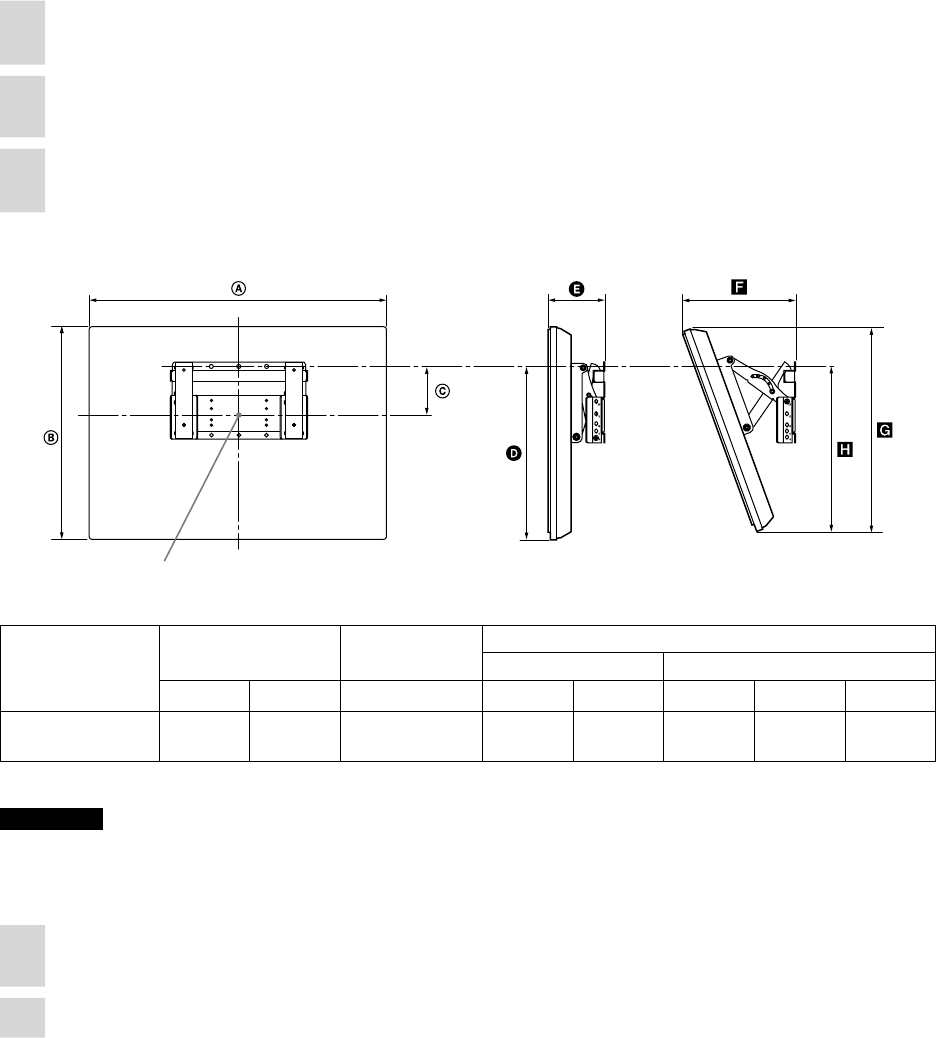
3 Decide where you want to install your TV. Refer to the TV installation
dimensions table.
Dimension Table
Screen center point
Unit: inches (mm)
Model Name Display
dimensions
Screen center
dimensions
Length for each mounting angle
Angle (0°) Angle (20°)
KDL-22EX308 21 3/4
(551)
14 1/2
(367)
5 1/4
(133)
13
(329)
5 3/4
(143)
8 3/4
(222)
13 3/4
(348)
13
(328)
Figures in the above table may dier slightly depending on the installation.
CAUTION
e wall that the TV will be installed on should be capable of supporting a weight of at least four times that of the TV.
Refer to your TV’s operating instructions for its weight.
4 Install the Base Plate on the wall.
Refer to the Instructions for SU-WL100.
5 Disconnect all the cables from the TV.
− 3 −
Additional Information for Using Sony Wall-Mount Bracket (SU-WL100)
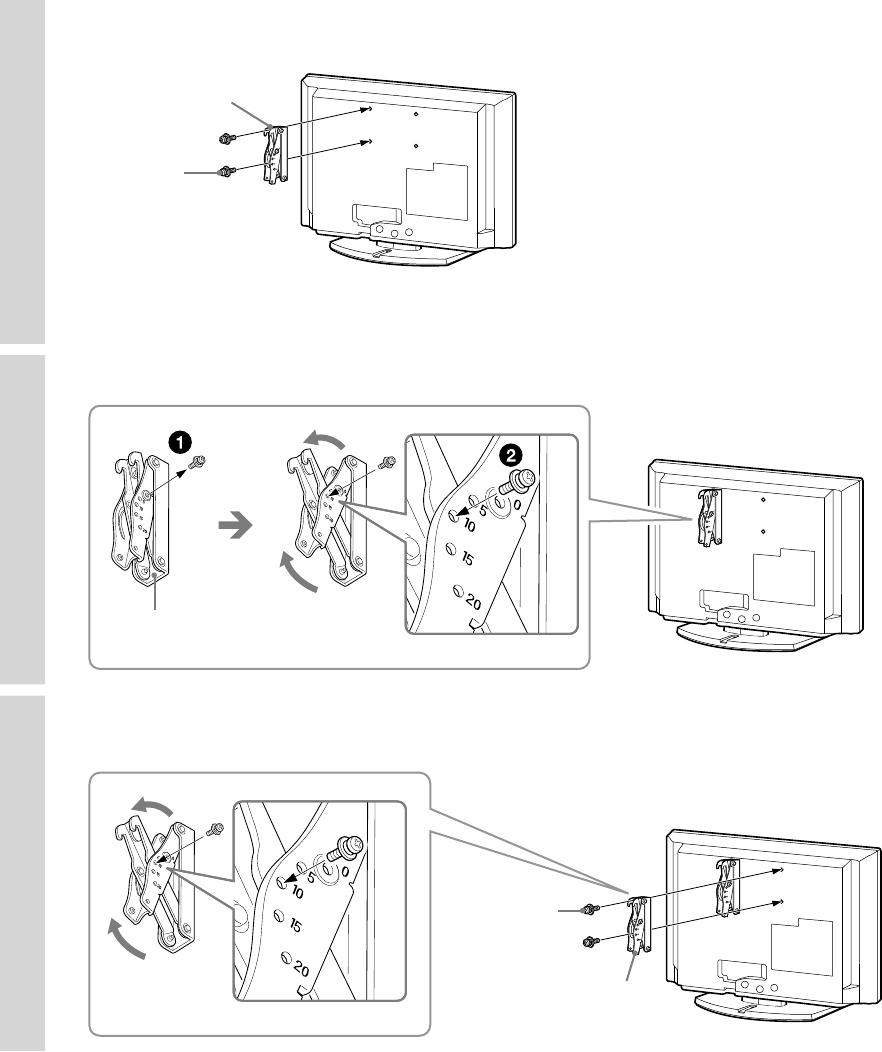
6 Secure the Mounting Hook to the left side of the rear of the TV.
Secure it to the TV using two screws (supplied with SU-WL100).
Screw
(+PSW4 × 12)
Mounting Hook
✍
• Place the TV on the Table-Top Stand, when securing the Mounting Hook.
• e availability of this Wall-Mount Bracket (SU-WL100) varies depending on the country/region.
7 Adjust the angle of the Mounting Hook.
Mounting Hook
8Secure the Mounting Hook to the right side of the rear of the TV.
Secure it to the TV using two screws (supplied with SU-WL100).
Screw
(+PSW4 × 12)
Mounting Hook
− 4 −
Additional Information for Using Sony Wall-Mount Bracket (SU-WL100)
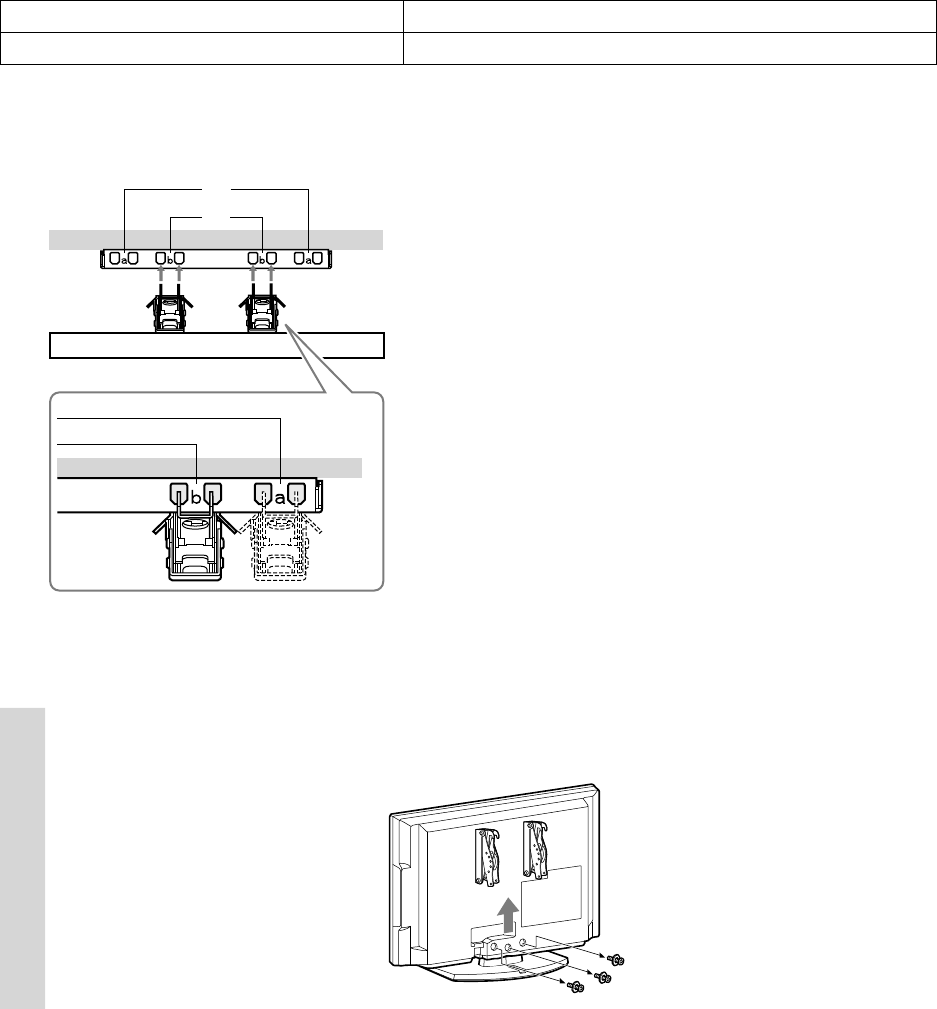
Hook Location
When installing the TV onto the Base Bracket.
a*
b
* Hook position “a” cannot be used for the
models in the table above.
9 Remove the screws from the back of the TV.
Do not remove any other screws from the TV.
Hook Locations Diagram/Table
Model Name Hook Location
KDL-22EX308 b
− 5 −
Additional Information for Using Sony Wall-Mount Bracket (SU-WL100)
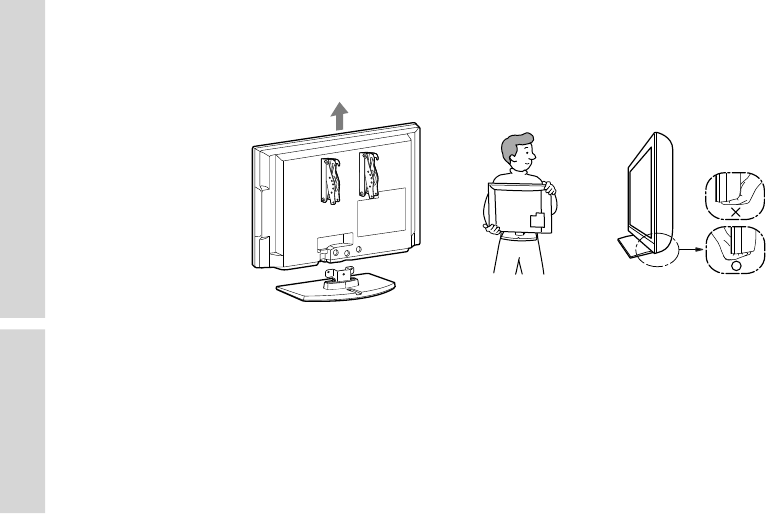
10 Lift the TV o the stand.
Do not attempt to li the TV by yourself.
For holding and carrying the TV, refer to your TV’s instructions.
11 Install the TV on the Wall.
Refer to the Instructions for SU-WL100.
Connect the AC power cord and cables to the corresponding inputs on the rear of the TV.
For details on the cable connection, refer to the Operating Instructions for your TV.
Install the TV onto the Base Plate.
Be sure to secure the TV to the Base Plate.
