Sony 3D Bloggie Mhs Fs3 Users Manual FS3/FS3K
Sony-Bloggie-Mhs-Fs3-Instruction-Manual-797267 sony-bloggie-mhs-fs3-instruction-manual-797267
Sony-Mhs-Fs3-Instruction-Manual-797178 sony-mhs-fs3-instruction-manual-797178
MHS-FS3 Instruction Manual MHSFS3
User manual MHSFS3 Sony Bloggie HD Camera MHS-FS3/B user guide User Manuals and Instruction Guides
MHS-FS3K to the manual 762df386-0497-48b6-b085-b721b9db72fb
2015-01-24
: Sony Sony-3D-Bloggie-Mhs-Fs3-Users-Manual-290548 sony-3d-bloggie-mhs-fs3-users-manual-290548 sony pdf
Open the PDF directly: View PDF  .
.
Page Count: 2
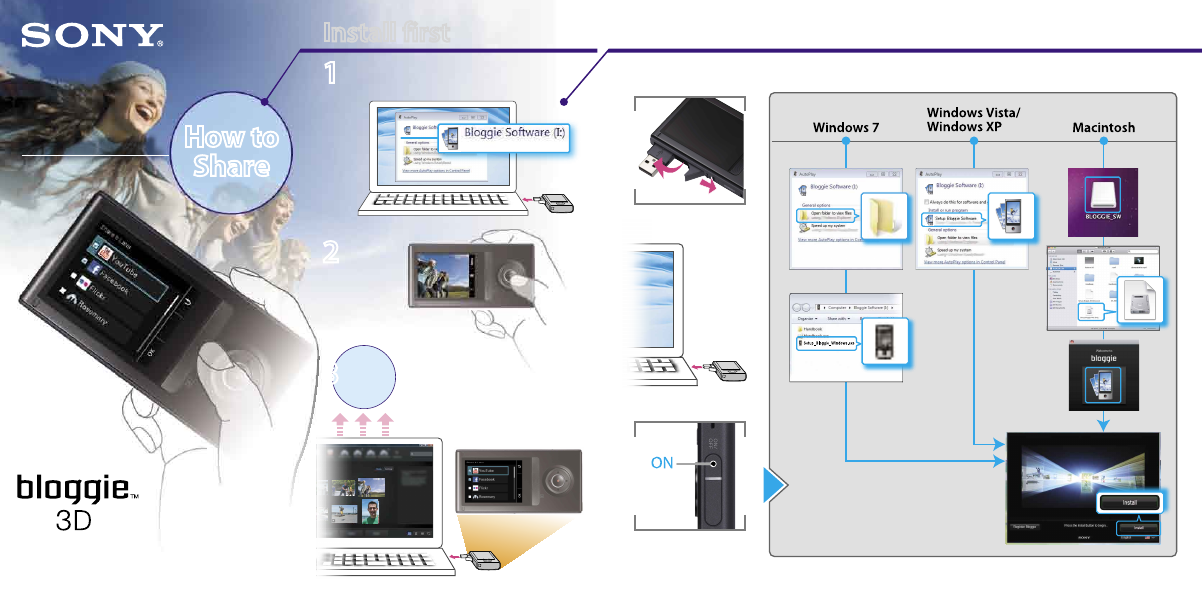
Install firstInstall first
How to
Share
Mobile HD Snap Camera
If the AutoPlay screen does not appear,
click [Start] [Computer] (in Windows
XP, [My Computer]), then double-click
[Bloggie Software] “Setup_Bloggie_
Windows.exe.”
How to install
MHS-FS3/FS3K
How to
Share
1
1
Select images and media
services to upload.
Connect to the computer.
Turn off the camera
while charging.
Install built-in Bloggie Software
Shoot
Share
2
2
3
3
1
2
3
4-277-405-11(1)
Instruction Manual
Reading full manual
Install [Bloggie Handbook] (PDF) on your computer.
Windows:
Click [Start] [Computer] (in Windows XP, click [My
Computer]) double-click [Bloggie Software]
[Handbook.exe] click [Install].
Macintosh:
Select the [BLOGGIE_SW] folder and copy “Handbook.
pdf” stored in the [GB] folder to your computer.
Supplied accessories
USB connection support cable (1)
(Sony Corporation 4-277-105-)
Wrist Strap (1)
Instruction Manual (this manual)
Important Notice (1)
360 Video Lens VCL-BPP3 (1)/360 Video Lens case (1)
(MHS-FS3K only)
Capture 360-degree images, playable on Bloggie
Software.
Built-in supplies
Battery/Bloggie Software/Bloggie Handbook
If the camera becomes unresponsive:
Press and hold the ON/OFF (Power) button for at least
7 seconds, and reboot the camera.
Network services depend on location areas.
Share (Bloggie Software)Basic operations
© 2011 Sony Corporation Printed in China
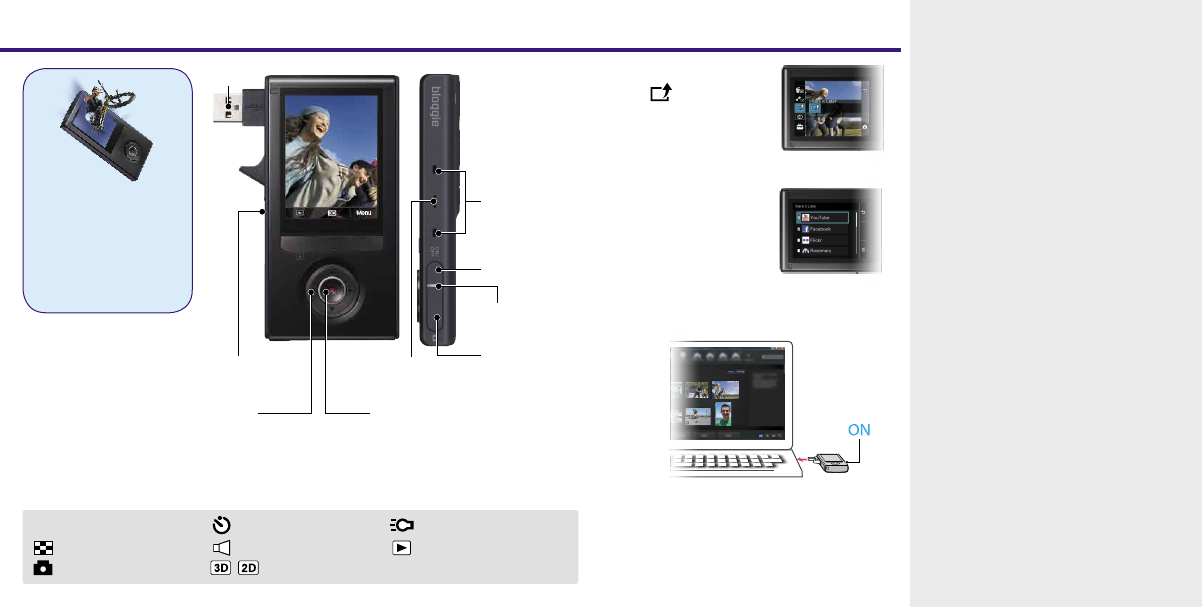
Movie (Start/Stop)/
Enter
Select [Menu]
in playback
mode.
1
T/W Zooming Self-Timer Light
Go to index view mode Volume Go to playback mode
Go to shooting mode /Go to 3D/2D mode
When it detects your camera,
Bloggie Software will launch and help you
import and share your photos and videos.
You must install Bloggie Software first to use the
camera’s “Share it Later” function.
Select images and
the sharing site to
upload.
2
Connect to the computer.
3
On-screen icons
Microphone
Photo
When shooting or playing back
HDMI OUT
jack
Speaker
ON/OFF(Power)
Charge lamp
USB jack
You can shoot/play back
3D images with this
camera.
Hold the camera
horizontal when
shooting/playing back
3D images.
