Sound Crush SC-530 Bluetooth speaker User Manual

Sound Crush Company Limited Bluetooth speaker Users Manual

User Manual

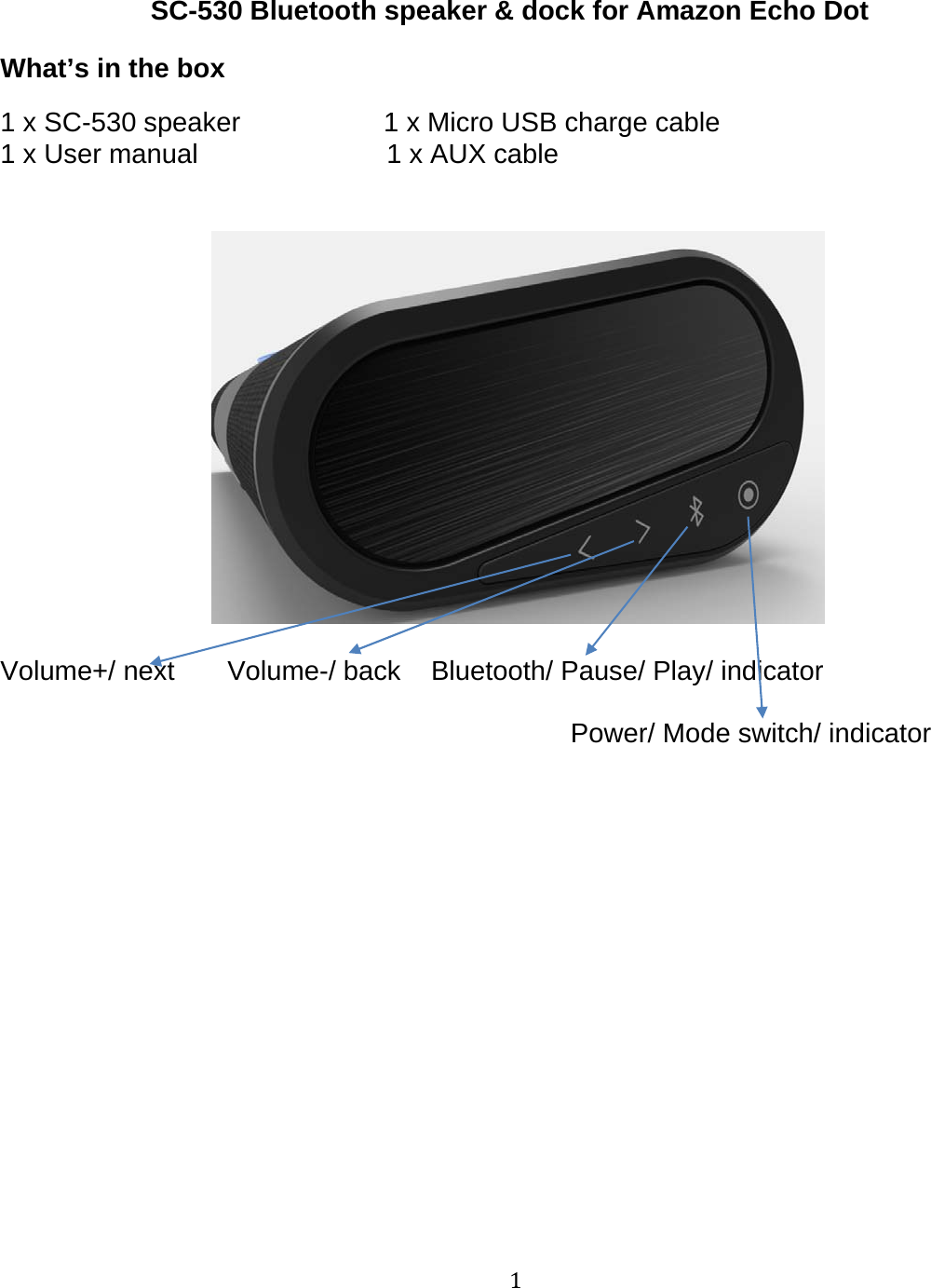
1SC-530 Bluetooth speaker & dock for Amazon Echo DotWhat’s in the box1 x SC-530 speaker 1 x Micro USB charge cable1 x User manual 1 x AUX cableVolume+/ next Volume-/ back Bluetooth/ Pause/ Play/ indicatorPower/ Mode switch/ indicator
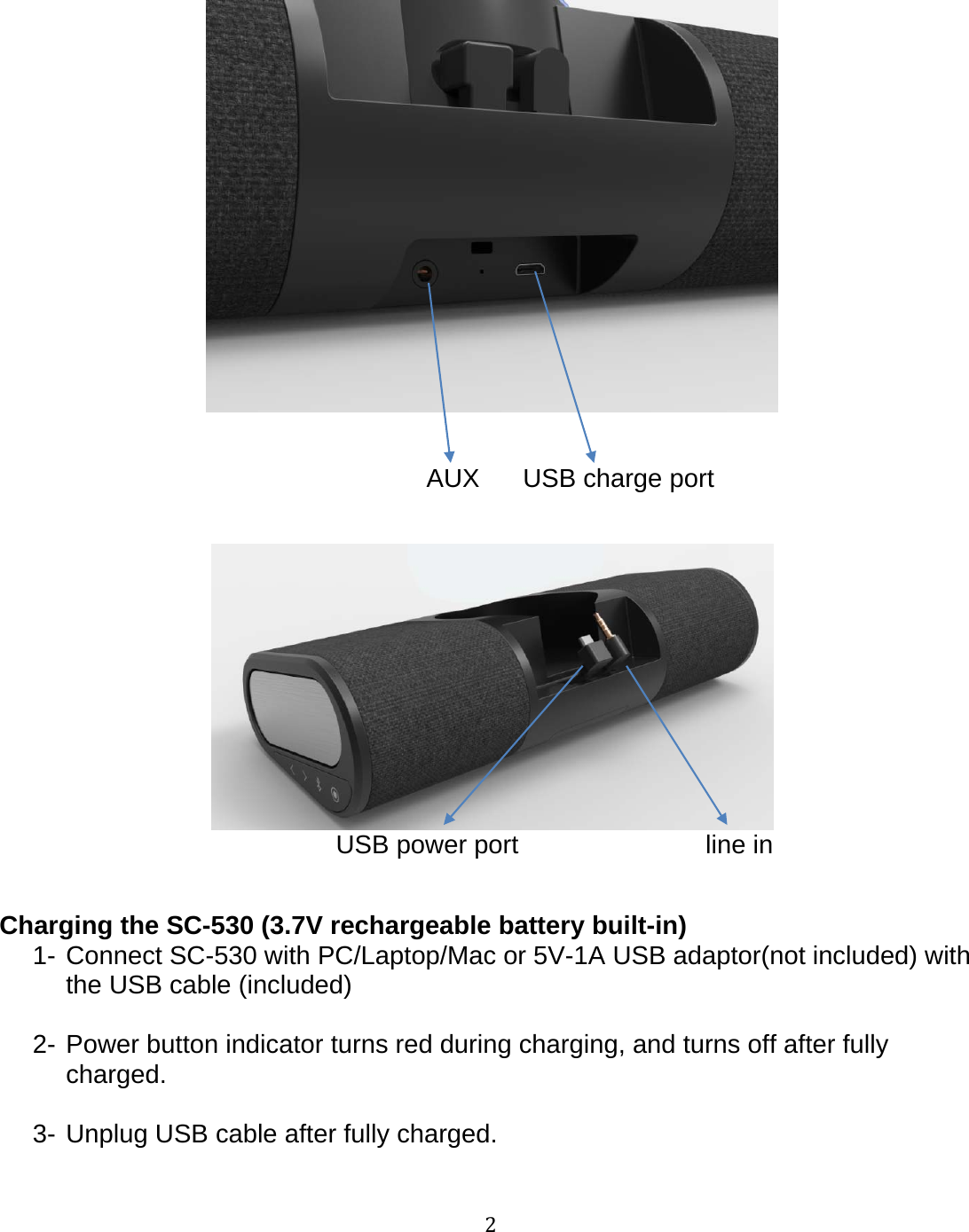
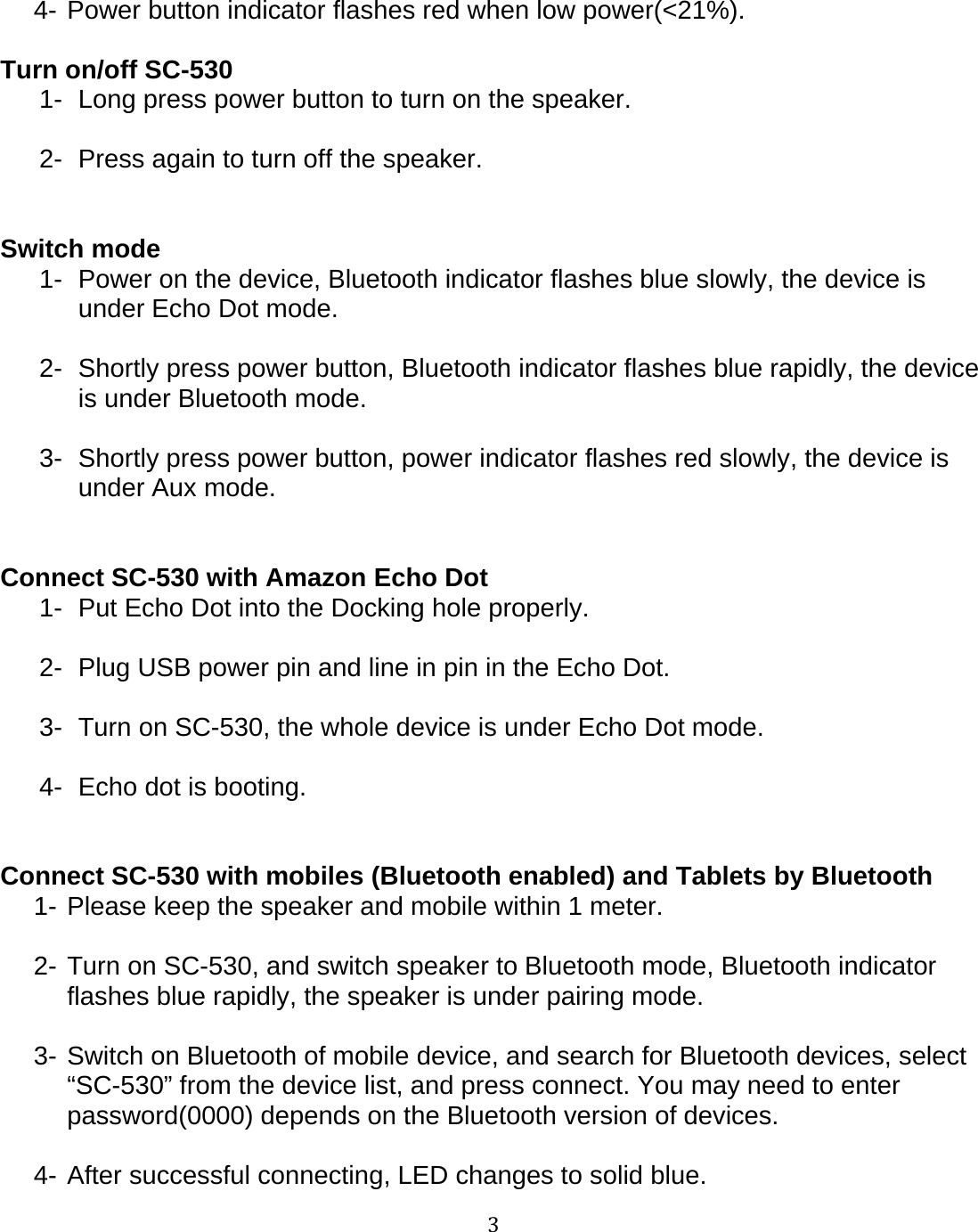
2AUX USB charge portUSB power port line inCharging the SC-530 (3.7V rechargeable battery built-in)1- Connect SC-530 with PC/Laptop/Mac or 5V-1A USB adaptor(not included) withthe USB cable (included)2- Power button indicator turns red during charging, and turns off after fullycharged.3- Unplug USB cable after fully charged.
34- Power button indicator flashes red when low power(<21%).Turn on/off SC-5301- Long press power button to turn on the speaker.2- Press again to turn off the speaker.Switch mode1- Power on the device, Bluetooth indicator flashes blue slowly, the device isunder Echo Dot mode.2- Shortly press power button, Bluetooth indicator flashes blue rapidly, the deviceis under Bluetooth mode.3- Shortly press power button, power indicator flashes red slowly, the device isunder Aux mode.Connect SC-530 with Amazon Echo Dot1- Put Echo Dot into the Docking hole properly.2- Plug USB power pin and line in pin in the Echo Dot.3- Turn on SC-530, the whole device is under Echo Dot mode.4- Echo dot is booting.Connect SC-530 with mobiles (Bluetooth enabled) and Tablets by Bluetooth1- Please keep the speaker and mobile within 1 meter.2- Turn on SC-530, and switch speaker to Bluetooth mode, Bluetooth indicatorflashes blue rapidly, the speaker is under pairing mode.3- Switch on Bluetooth of mobile device, and search for Bluetooth devices, select“SC-530” from the device list, and press connect. You may need to enterpassword(0000) depends on the Bluetooth version of devices.4-After successful connecting, LED changes to solid blue.
45- Hold press Bluetooth button, Bluetooth LED flashes blue rapidly, the speakerand mobile device is disconnected.Note:1- If the pairing is not successful, turn off the speaker and re-pair it again.2- Once SC-530 is paired withyour mobile device, it will connect automaticallyjust as long as the Bluetooth device and speaker are turned on.3- To pair with new devices, please see above steps of pairingwith mobiles.Play/ Pause music1- Shortly press “Bluetooth” button to pause music.2- Press again to replay music.Next and Previous songs1- Shortly press forward button to next song.2- Shortly press backward button to previous song.Volume control1- Hold press forward button to increase volume, Hold press backward button todecrease volume.2- Control the volume by paired device itself.AUX port1- Switch speaker to AUX in mode.2- Connect speaker with any AUX enabled devices via the AUX cable (included).3- Play music through the devices connected.TOUBLE SHOTTING / Q & AQ1: I can not pair the speaker to my deviceA1: Turn off the speaker and turn on again, then re-pair.
5Q2: The sound is low or completely silent.A2: Make sure the connection (either Bluetooth or AUX) is fully functioning andsecure.If you are using the AUX port, make sure the cable is connected properly.Check the volume of speaker and device is turned on.Q3: My device cannot find the speakerA3: Make sure the Bluetooth of device is turned on, and the speaker is not paired withanother device.Safety & Maintenance1- Do not use this device near any heat sources such as radiators, heaters, stoves orother heat producing machinery.2- Do not leave SC-530 in direct sunlight.3- Keep SC-530 out of children’s sight to avoid a choking hazard.4- Clean with a soft cloth. Do not use harsh chemicals to clean.5- Do not clean this device when it is charging. Always unplug from the power sourceand ensure the protective rubber cover is tightly sealed before cleaning.6- Do not insert any metal object into device. Risk of short circuiting.7- Do not try to repair or open this device by yourself. Contact our customer service.8- Do not submerge SC-530 under water. Changes in pressure can cause water toleak in to the device and potentially damage the speaker.9- Do not charge with a USB charger that provide more than 1 Amp(1A) of electricity.
6Designed by:S&CCo., Ltd7-11-14, Honcho202Funabashi-shi, Chiba, 273-0005JapanMade in China
7FCC STATEMENT :This device complies with Part 15 of the FCC Rules. Operation is subject to the followingtwo conditions:(1) This device may not cause harmful interference, and(2) This device must accept any interference received, including interference that maycause undesired operation.Warning: Changes or modifications not expressly approved by the party responsible forcompliance could void the user's authority to operate the equipment.NOTE: This equipment has been tested and found to comply with the limits for a Class Bdigital device, pursuant to Part 15 of the FCC Rules. These limits are designed to providereasonable protection against harmful interference in a residential installation.This equipment generates uses and can radiate radio frequency energy and, if notinstalled and used in accordance with the instructions, may cause harmful interference toradio communications. However, there is no guarantee that interference will not occur in aparticular installation. If this equipment does cause harmful interference to radio ortelevision reception, which can be determined by turning the equipment off and on, theuser is encouraged to try to correct the interference by one or more of the followingmeasures: Reorient or relocate the receiving antenna. Increase the separation between the equipment and receiver. Connect the equipment into an outlet on a circuit different from that to which thereceiver is connected. Consult the dealer or an experienced radio/TV technician for help.RF warning statement:The device has been evaluated to meet general RF exposure requirement. The devicecan be used in portable exposure condition without restriction.

Navigation menu