Southco P3200 Electronic Access Solution Mifare Controller User Manual J EA P3 200 M revBx

Southco,. Inc Electronic Access Solution Mifare Controller J EA P3 200 M revBx

Users Manual

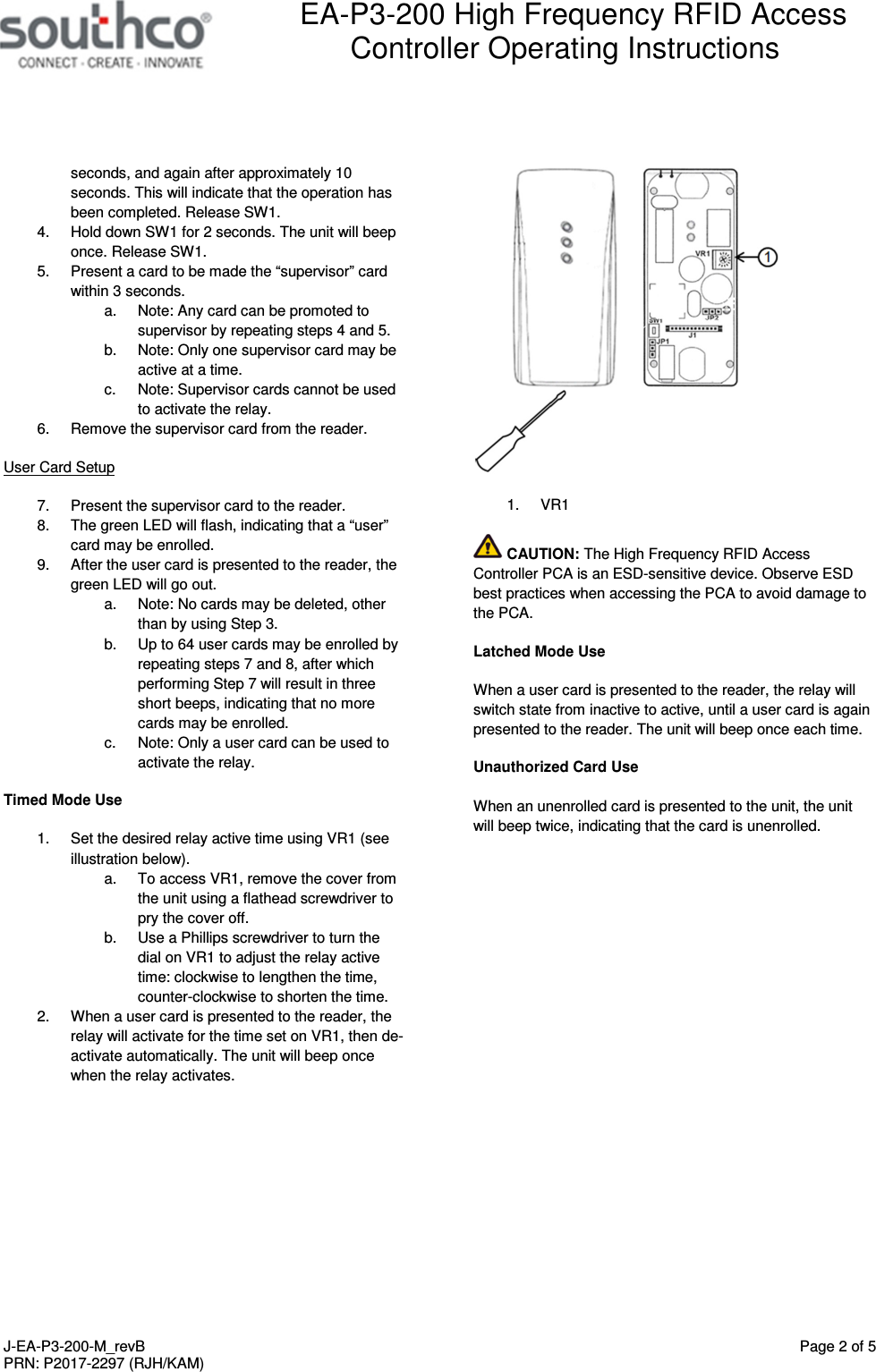
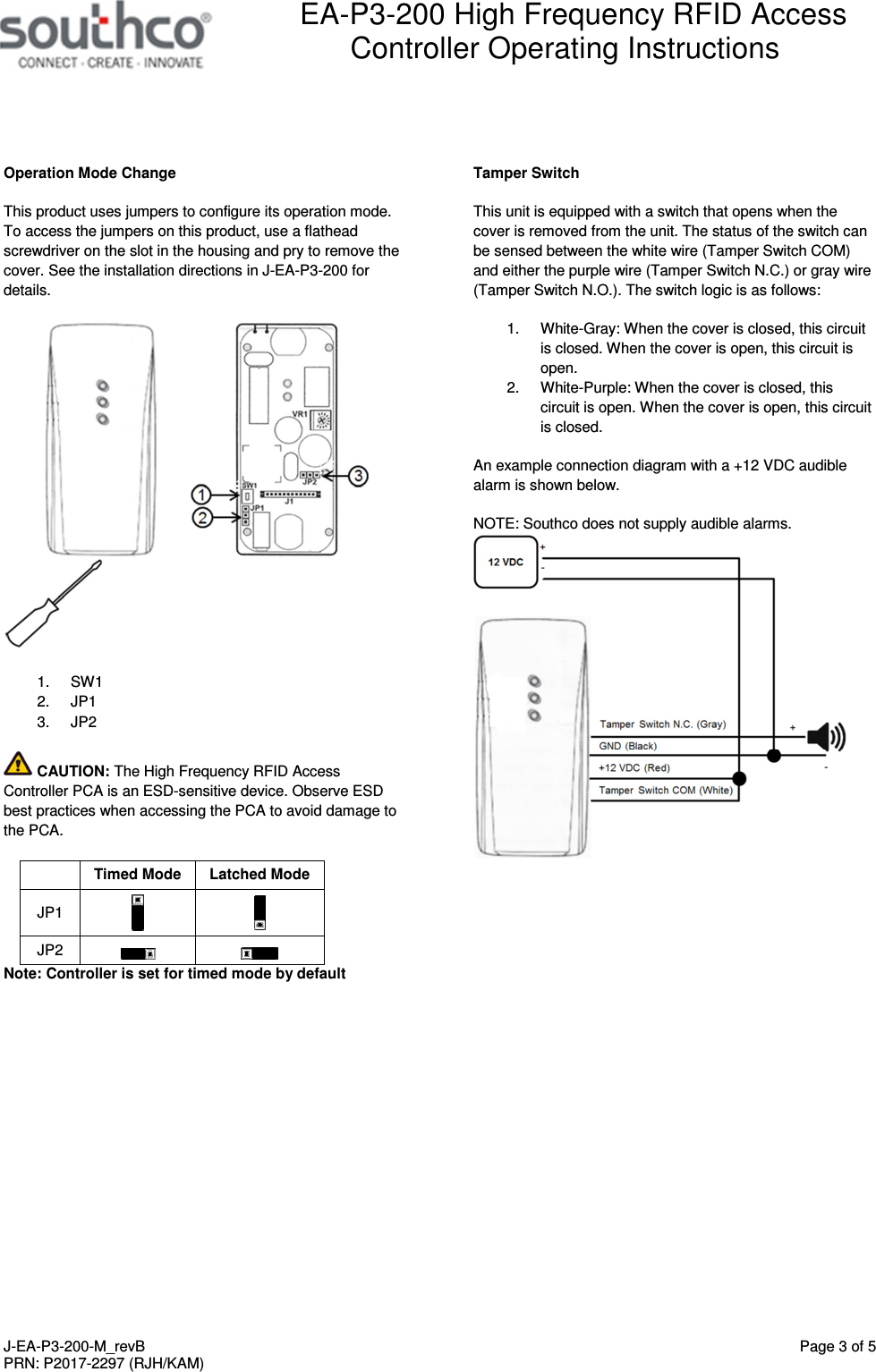
 EA-P3-200 High Frequency RFID Access Controller Operating Instructions   J-EA-P3-200-M_revB  Page 1 of 5 PRN: P2017-2297 (RJH/KAM)  1)Package Contents •  EA-P3-200 Proximity Reader •  Wire Harness •  Mounting Screws (x2) •  Operating Instructions EA-P3-200 Proximity Reader  1.  Status LED 2.  Power LED 3.  Loopback LED Features •  LED and buzzer indicators •  Two operation modes: o  Timed mode with 10 user-selectable operation times between 1-13s o  Latched mode •  Tamper switch •  Auxiliary Input Specifications Supply Voltage:    12VDC ± 10% Supply Current:  160 mA maximum (no attached devices)     Transmit Frequency:   13.56 MHz (ISO 14443A) Card Reading Range:  up to 5 cm (depending on installation) Operating Temperature:  -15 to 55 °C Dimensions:     94 mm x 43 mm x 15 mm  Note: Read range distance may vary depending on card type, mounting conditions, or environmental conditions. In some cases, the card may need to make contact with, or be moved across, the RFID reader.  CAUTION: The High Frequency RFID Access Controller PCA is an ESD-sensitive device. Observe ESD best practices when accessing the PCA to avoid damage to the PCA. Reader Mounting and Installation Please refer to Southco trade drawing J-EA-P3-200 for mounting and installation details. Wire Descriptions The EA-P3-200 has a 12-wire stripped and tinned harness, as described below: Color Description Red  +12 VDC Black  GND Brown  Relay N.O. Orange  Relay COM Yellow  Relay N.C. Green  No function (cut this wire) Blue  Auxiliary Input Light Green  Loopback LED GND Pink  Loopback LED Control (+12 VDC) Purple  Tamper Switch N.C. Gray  Tamper Switch N.O. White  Tamper Switch COM  An example connection diagram is shown below.   Default Settings Operation Mode: Timed Mode Default Access Time: Approximately 5 seconds  Set Up 1.  Choose operation mode, timed or latched, using the jumper settings shown in section “Operation Mode Change”. The default setting is timed mode. See sections “Timed Mode Use” and “Latched Mode Use” for specific details on each mode. 2.  Apply power to unit. Supervisor Card Setup 3.  Hold down SW1 for at least 10 seconds. This will clear the reader memory of all cards. During this time, the unit will beep once after approximately 2
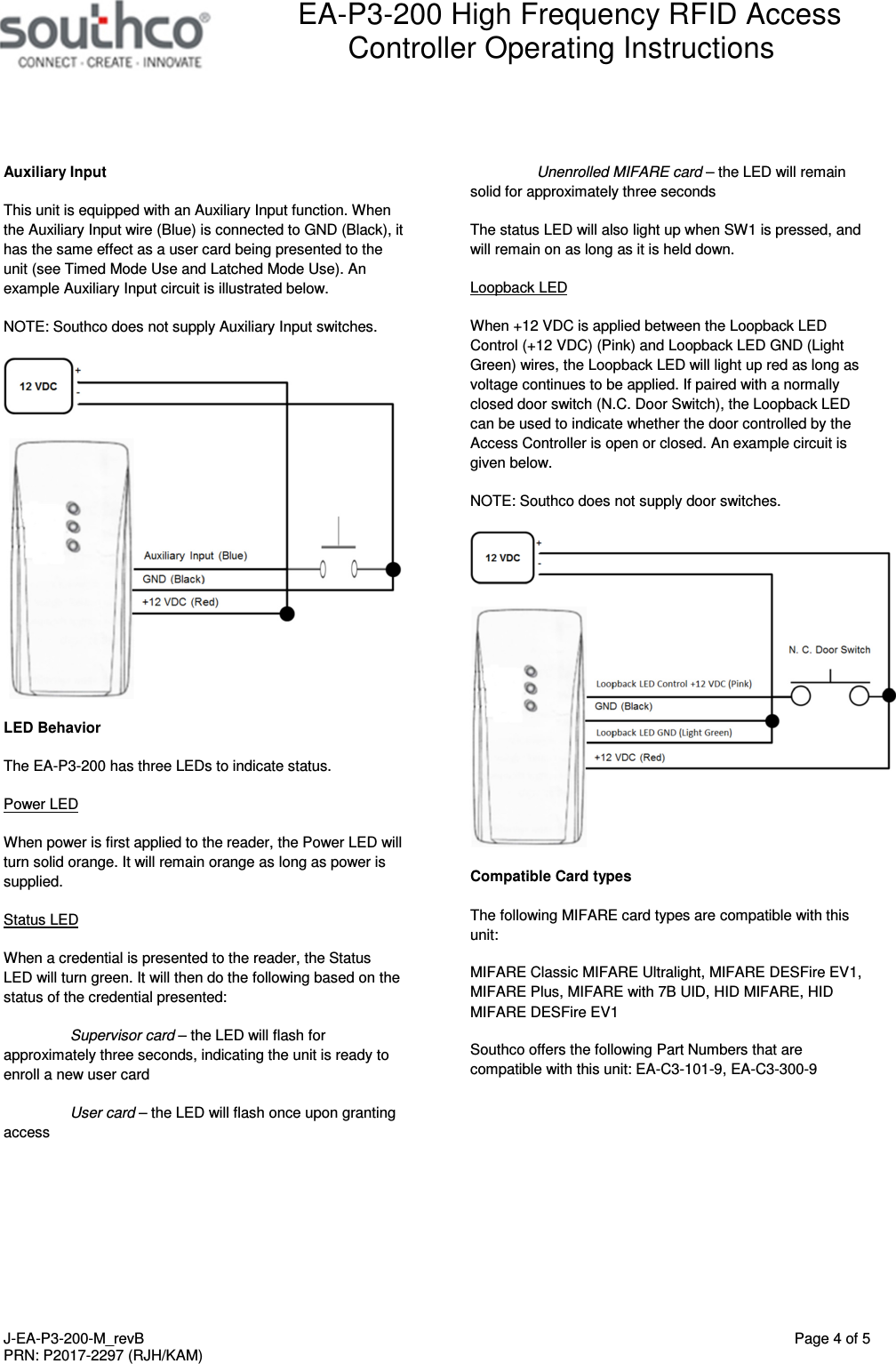
 EA-P3-200 High Frequency RFID Access Controller Operating Instructions   J-EA-P3-200-M_revB  Page 2 of 5 PRN: P2017-2297 (RJH/KAM)  seconds, and again after approximately 10 seconds. This will indicate that the operation has been completed. Release SW1. 4.  Hold down SW1 for 2 seconds. The unit will beep once. Release SW1. 5.  Present a card to be made the “supervisor” card within 3 seconds. a.  Note: Any card can be promoted to supervisor by repeating steps 4 and 5. b.  Note: Only one supervisor card may be active at a time. c.  Note: Supervisor cards cannot be used to activate the relay. 6.  Remove the supervisor card from the reader. User Card Setup 7.  Present the supervisor card to the reader. 8.  The green LED will flash, indicating that a “user” card may be enrolled. 9.  After the user card is presented to the reader, the green LED will go out. a.  Note: No cards may be deleted, other than by using Step 3. b.  Up to 64 user cards may be enrolled by repeating steps 7 and 8, after which performing Step 7 will result in three short beeps, indicating that no more cards may be enrolled. c.  Note: Only a user card can be used to activate the relay. Timed Mode Use 1.  Set the desired relay active time using VR1 (see illustration below).  a.  To access VR1, remove the cover from the unit using a flathead screwdriver to pry the cover off.  b.  Use a Phillips screwdriver to turn the dial on VR1 to adjust the relay active time: clockwise to lengthen the time, counter-clockwise to shorten the time.  2.  When a user card is presented to the reader, the relay will activate for the time set on VR1, then de-activate automatically. The unit will beep once when the relay activates.   1.  VR1  CAUTION: The High Frequency RFID Access Controller PCA is an ESD-sensitive device. Observe ESD best practices when accessing the PCA to avoid damage to the PCA. Latched Mode Use When a user card is presented to the reader, the relay will switch state from inactive to active, until a user card is again presented to the reader. The unit will beep once each time. Unauthorized Card Use When an unenrolled card is presented to the unit, the unit will beep twice, indicating that the card is unenrolled.
 EA-P3-200 High Frequency RFID Access Controller Operating Instructions   J-EA-P3-200-M_revB  Page 3 of 5 PRN: P2017-2297 (RJH/KAM)  Operation Mode Change This product uses jumpers to configure its operation mode. To access the jumpers on this product, use a flathead screwdriver on the slot in the housing and pry to remove the cover. See the installation directions in J-EA-P3-200 for details.   1.  SW1 2.  JP1 3.  JP2  CAUTION: The High Frequency RFID Access Controller PCA is an ESD-sensitive device. Observe ESD best practices when accessing the PCA to avoid damage to the PCA.   Timed Mode  Latched Mode JP1    JP2     Note: Controller is set for timed mode by default  Tamper Switch This unit is equipped with a switch that opens when the cover is removed from the unit. The status of the switch can be sensed between the white wire (Tamper Switch COM) and either the purple wire (Tamper Switch N.C.) or gray wire (Tamper Switch N.O.). The switch logic is as follows: 1.  White-Gray: When the cover is closed, this circuit is closed. When the cover is open, this circuit is open. 2.  White-Purple: When the cover is closed, this circuit is open. When the cover is open, this circuit is closed. An example connection diagram with a +12 VDC audible alarm is shown below. NOTE: Southco does not supply audible alarms.
 EA-P3-200 High Frequency RFID Access Controller Operating Instructions   J-EA-P3-200-M_revB  Page 4 of 5 PRN: P2017-2297 (RJH/KAM)  Auxiliary Input This unit is equipped with an Auxiliary Input function. When the Auxiliary Input wire (Blue) is connected to GND (Black), it has the same effect as a user card being presented to the unit (see Timed Mode Use and Latched Mode Use). An example Auxiliary Input circuit is illustrated below.  NOTE: Southco does not supply Auxiliary Input switches.  LED Behavior The EA-P3-200 has three LEDs to indicate status. Power LED When power is first applied to the reader, the Power LED will turn solid orange. It will remain orange as long as power is supplied. Status LED When a credential is presented to the reader, the Status LED will turn green. It will then do the following based on the status of the credential presented:  Supervisor card – the LED will flash for approximately three seconds, indicating the unit is ready to enroll a new user card  User card – the LED will flash once upon granting access Unenrolled MIFARE card – the LED will remain solid for approximately three seconds The status LED will also light up when SW1 is pressed, and will remain on as long as it is held down. Loopback LED When +12 VDC is applied between the Loopback LED Control (+12 VDC) (Pink) and Loopback LED GND (Light Green) wires, the Loopback LED will light up red as long as voltage continues to be applied. If paired with a normally closed door switch (N.C. Door Switch), the Loopback LED can be used to indicate whether the door controlled by the Access Controller is open or closed. An example circuit is given below.  NOTE: Southco does not supply door switches.  Compatible Card types The following MIFARE card types are compatible with this unit: MIFARE Classic MIFARE Ultralight, MIFARE DESFire EV1, MIFARE Plus, MIFARE with 7B UID, HID MIFARE, HID MIFARE DESFire EV1 Southco offers the following Part Numbers that are compatible with this unit: EA-C3-101-9, EA-C3-300-9
 EA-P3-200 High Frequency RFID Access Controller Operating Instructions   J-EA-P3-200-M_revB  Page 5 of 5 PRN: P2017-2297 (RJH/KAM)   FCC Compliance Statement This device complies with Part 15 of the FCC Rules. Operation is subject to the following two conditions: 1)  This device may not cause harmful interference, and  2)  This device must accept any interference received, including interference that may cause undesired operation. This equipment has been tested and found to comply with the limits for a Class B digital device, pursuant to Part 15 of the FCC Rules. These limits are designed to provide reasonable protection against harmful interference in a residential installation. This equipment generates, uses and can radiate radio frequency energy and, if not installed and used in accordance with the instructions, may cause harmful interference to radio communications. However, there is no guarantee that interference will not occur in a particular installation. If this equipment does cause harmful interference to radio or television reception, which can be determined by turning the equipment off and on, the user is encouraged to try to correct the interference by one of the following measures: •  Reorient or relocate the receiving antenna. •  Increase the separation between the equipment and receiver. •  Connect the equipment into an outlet on a circuit different from that to which the receiver is connected. •  Consult the dealer or an experienced radio/TV technician for help.  FCC Caution: To assure continued compliance, any changes or modifications not expressly approved by the party responsible for compliance could void the user's authority to operate this equipment. (Example - use only shielded interface cables when connecting to computer or peripheral devices).  Industry Canada Compliance Statement This device complies with Industry Canada licence-exempt RSS standard(s). Operation is subject to the following two conditions:  1)  this device may not cause interference, and  2)  this device must accept any interference, including interference that may cause undesired operation of the device. Le présent appareil est conforme aux CNR d’Industrie Canada applicables aux appareils radio exempts de licence. L’exploitation est autorisée aux deux conditions suivantes:  1)  l’appareil ne doit pas produire de brouillage, et  2)  l’utilisateur de l’appareil doit accepter tout brouillage radioélectrique subi, même si le brouillage est susceptible d’en compromettre le fonctionnement.  Trademark Statements MIFARE, MIFARE Classic, MIFARE Ultralight, MIFARE DESFire EV1 and MIFARE Plus are trademarks of NXP B.V. HID is a registered trademark of HID Global  For technical support of this product contact: info@southco.com or visit: southco.com.

Navigation menu