Spectec Computer SDJ731ZD SDJ-731 User Manual manual
Spectec Computer Co., Ltd SDJ-731 manual
manual
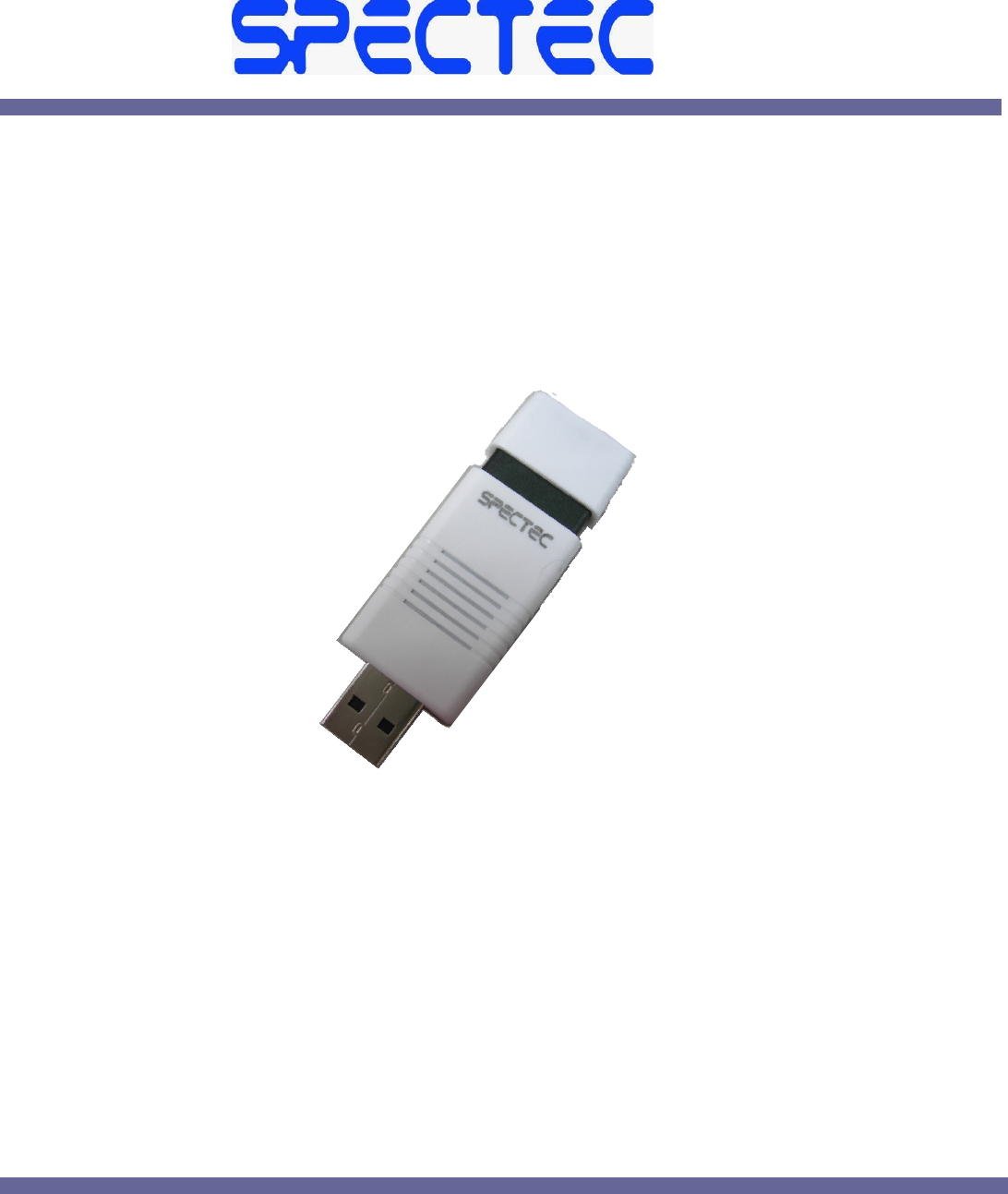
SDJ‐731USBDongle
datasheet
頁1
頁2
INDEX
1
1Introduction.................................................................................................................................................................................3
2
2HardwareOverview.....................................................................................................................................................................3
3
3 Programming...........................................................................................................................................................................4
4
4.接收操作 .....................................................................................................................................................................................5
5
5.傳輸操作 ...................................................................................................................................................................................11
頁3
1 Introduction
1.1 Overview
The IEEE 802.15.4 USB Dongle provides an easy way of interfacing a host machine (such as
a PC) to a wireless network based on the IEEE 802.15.4 protocol standard, where this network
may additionally employ the ZigBee PRO or JenNet networking protocol. The dongle
incorporates the Jennic JN5148 wireless microcontroller, allowing a direct USB connection
between the host machine and the JN5148 device, which then provides the radio interface to
the wireless network.
1.2 Features
The IEEE 802.15.4 USB Dongle provides the following features:
• USB 2.0 Full-Speed Compatible Interface
• Blue LED
• 32-kHz crystal oscillator
2 Hardware Overview
2.1 USB Connection
The USB connector is a standard USB Type A male connector. This allows connection to the3
power and serial data connections from the USB host.
2.2 USB Interface Device
TheUSBinterfacedeviceisanFTDIFD232RLdevice.Itisusedtointerfacebetweenthedata
connectionsoftheusbportandthestandarduartconnections
forUART0oftheJN5148device.WiththeFTDIroyalty‐freedrivers,theUSBdonglewillappear
asaCOMportonaWindowsPC.Therefore,formanyapplicationsthereisnorequirementto
develop
2.3Power Supply
ThepowerforthedongleissourcedfromtheUSBconnector.Thewirelessmicrocontroller
cannotbedirectlyconnectedtotheWSBport.TheUSBinterfacedevicegeneratestherequired
voltagelevelsfortheJN5148.
2.4Wireless Microcontroller
The wireless microcontroller on the dongle board is the Jennic JN5148, which isdetailed in the
JN5148 Data Sheet (JN-DS-JN5148).
頁4
2.5 Serial Flash Device
TheapplicationcodefortheJN5148isstoredinaserialFlashmemorydevicewhichisprovided
onthedongle.Thisistypicallya4‐Mbitdevice,suchastheW25x40
2.6 32kHz Crystal Oscillator
TheJN5148hasaninternal32kHzRCoscillator.Inordertoprovidemoreaccuratesystem
timingsanexternal32kHzcrystalcanbeusedwuththedevice.ThisisprovidedontheUSB
dongleandcanbeenabledusingtheintegratedPeripheralsApilibray.refertoIntegrated
PeripheralsAPIReferenceManual
3 Programming
When the IEEE 802.15.4 USB Dongle is powered up, it attempts to load an application from the
serial Flash device and then run the application. This may be a self-contained application that
sends and receives wireless data, and which does not need to communicate with the host.
Alternatively, it may communicate via the USB to an application running on the host, such as a
Windows program, and communicate with a wireless device or network.
4.接收操作
頁5
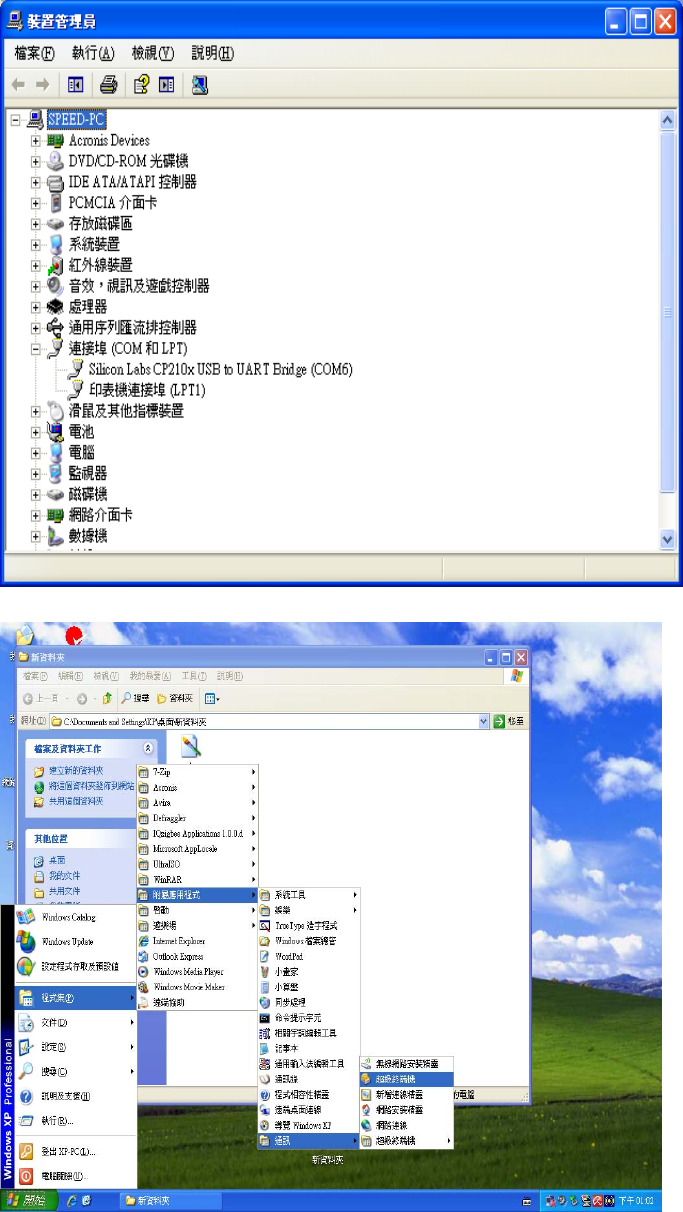
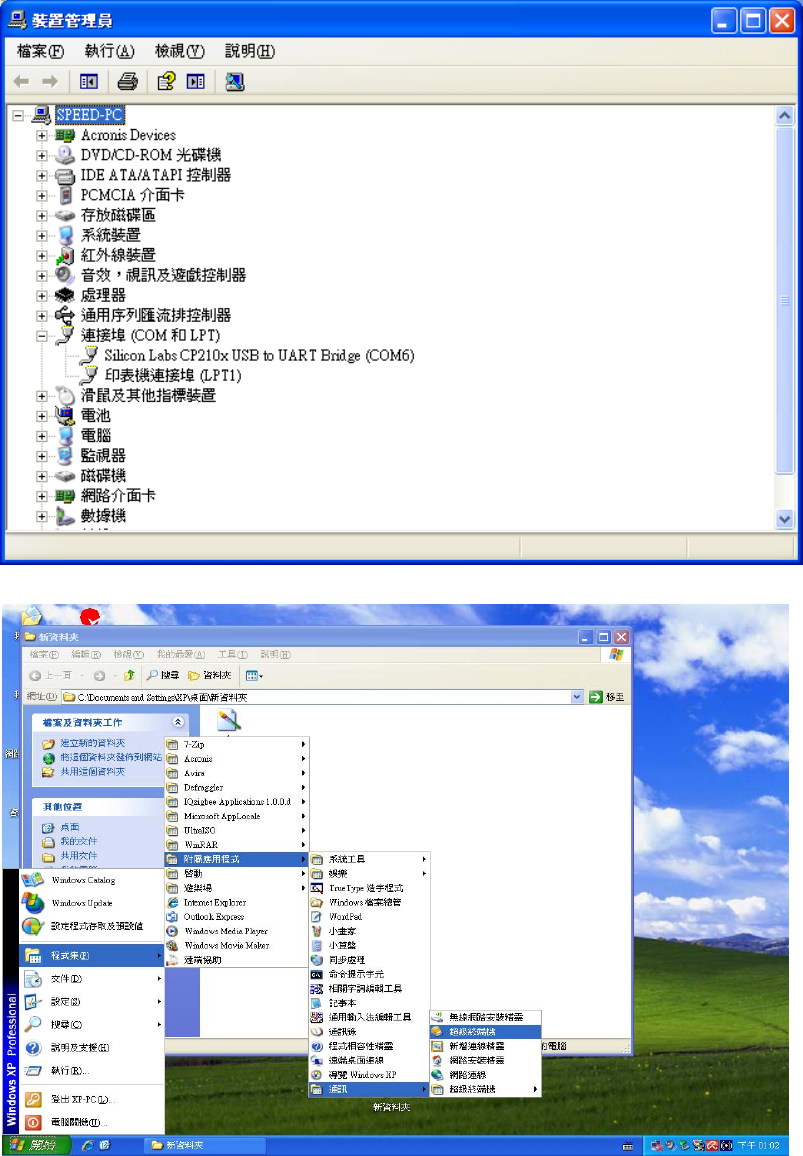
安裝 CustomCP210xDriverInstall 中的 CP210xVCPInstaller.exe 驅動程式後,執行下列步驟
4.1 插入 USB Dongle 開啟裝置管理員,
檢視Silicon Labs CP210x USB to UART Bridge 為 COM 多少
4.2 開啟超級終端機
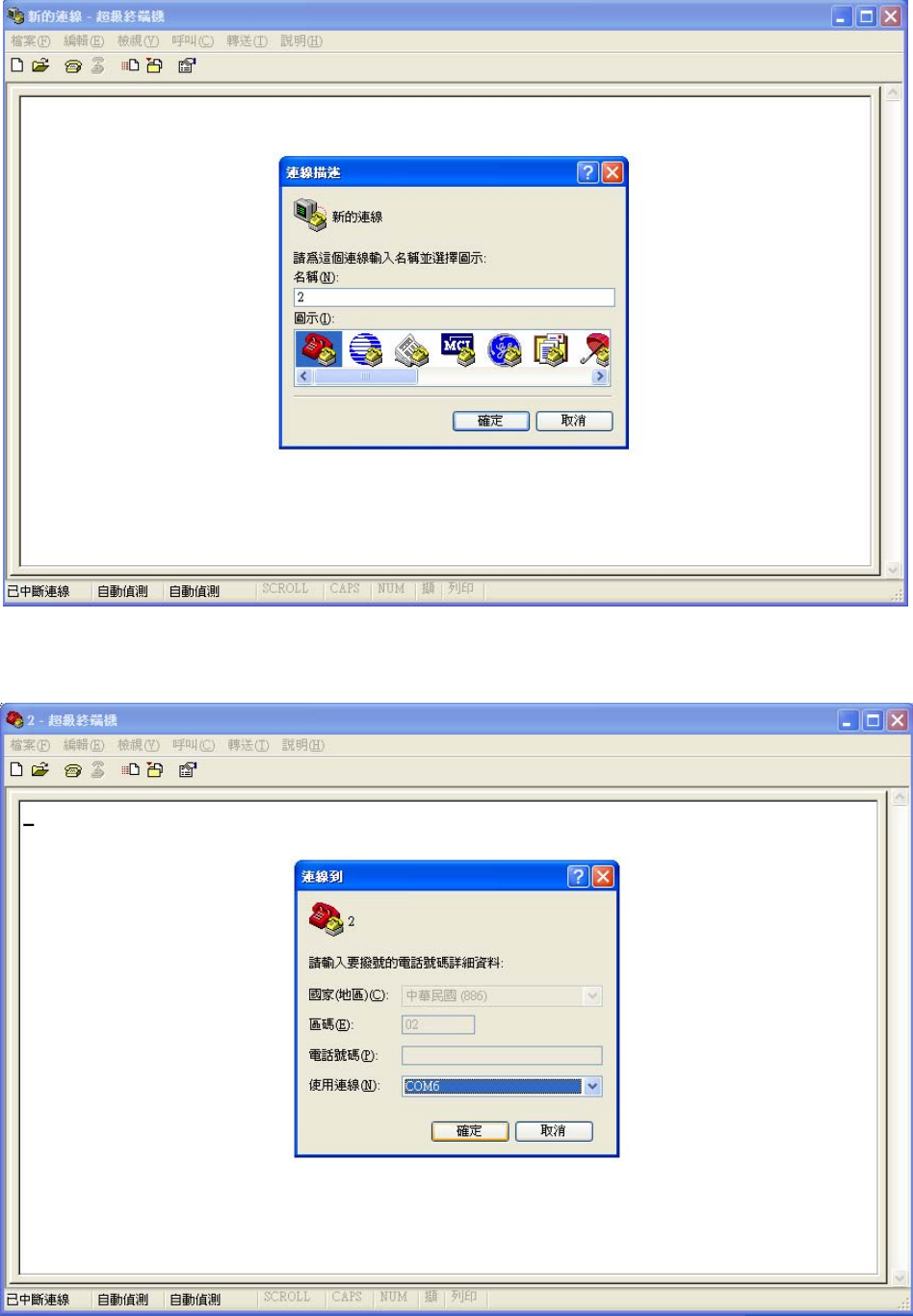
頁6
4.3 任意輸入名稱
4.4 使用連線選擇裝置管理員顯示的 COM PORT,按確定
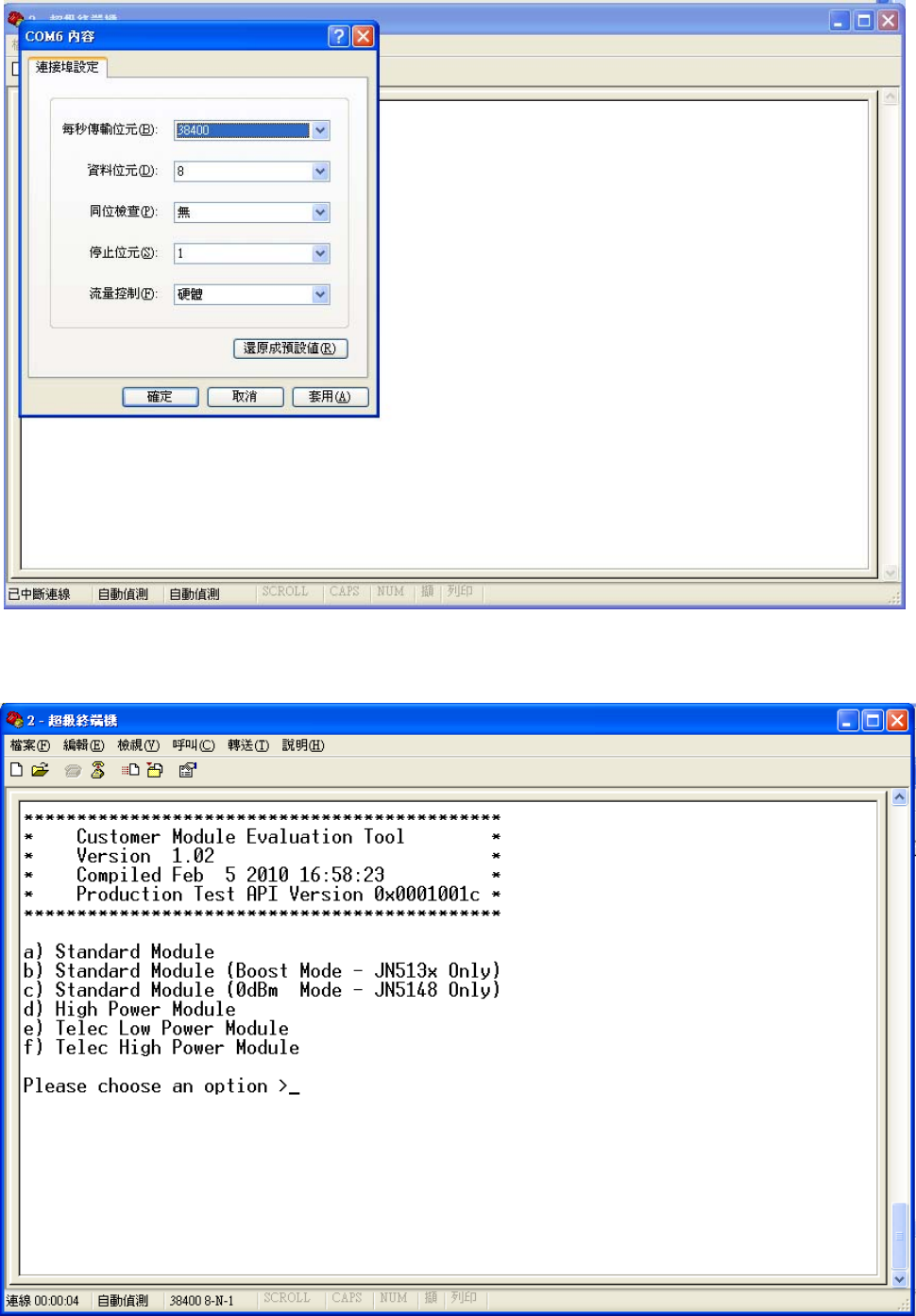
頁7
4.5 每秒傳輸位元選擇 38400,按確定
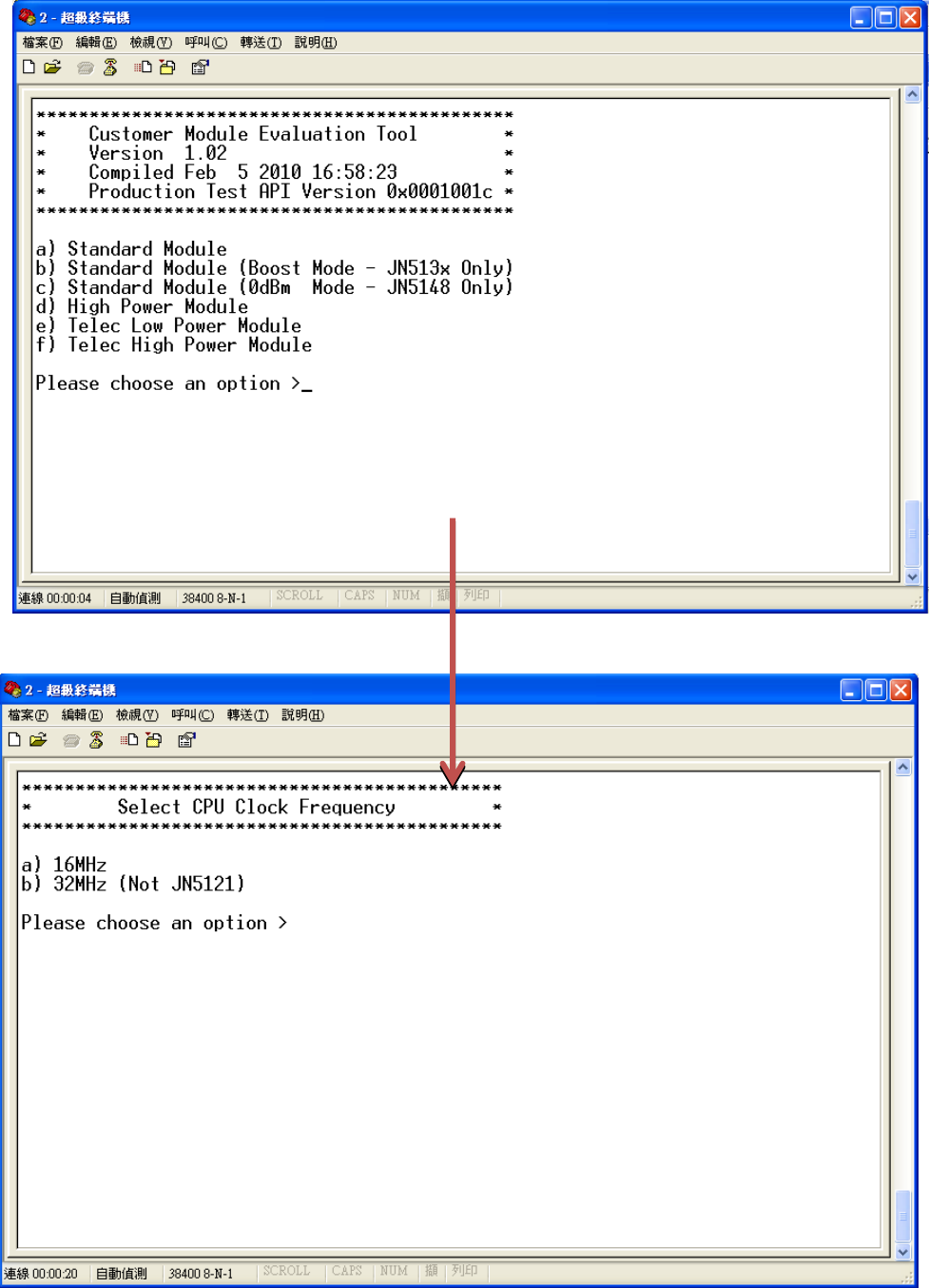
4.6 按 F5,顯示如下畫面
頁8
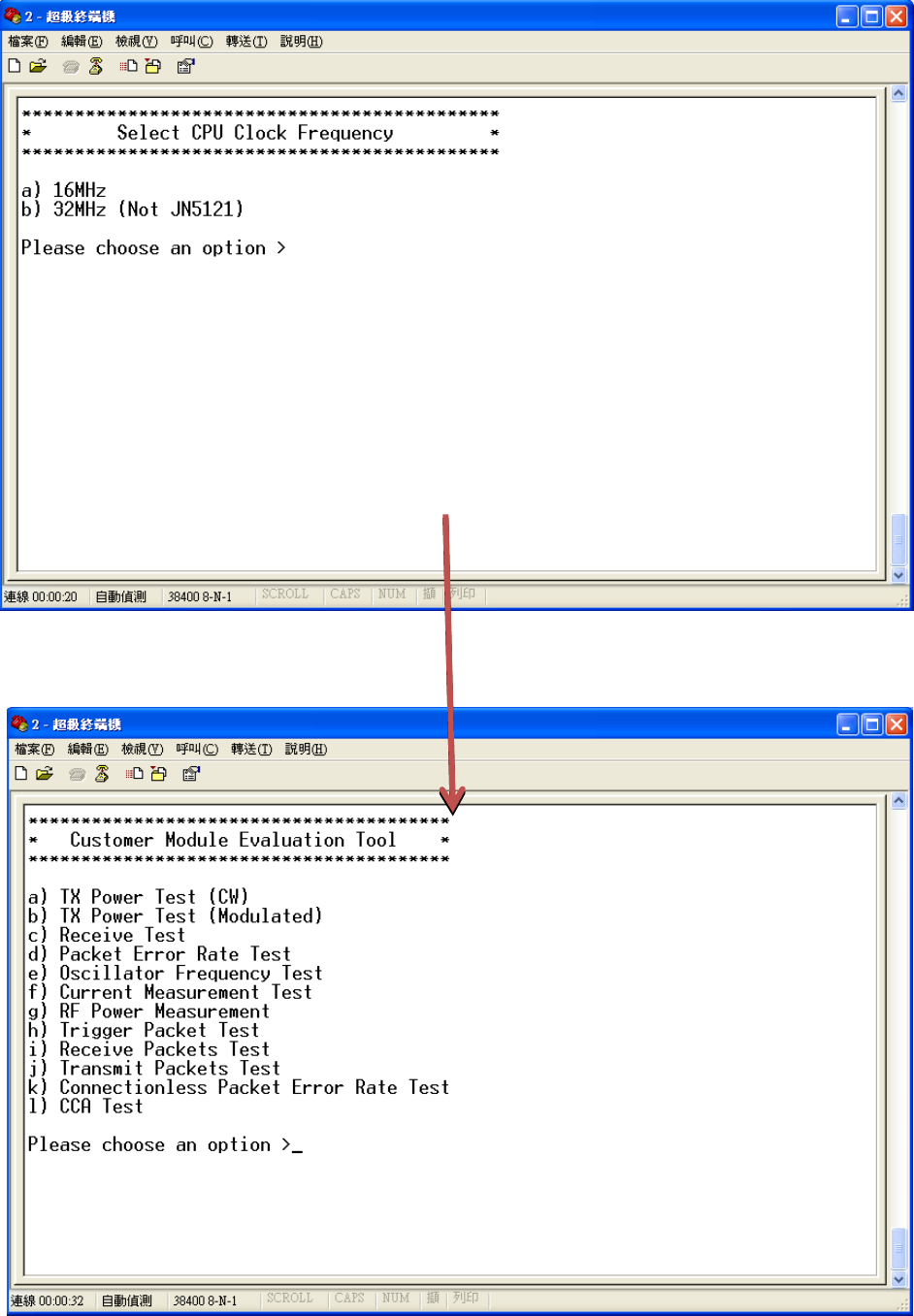
4.7 按下 D 顯示下方畫面
頁9
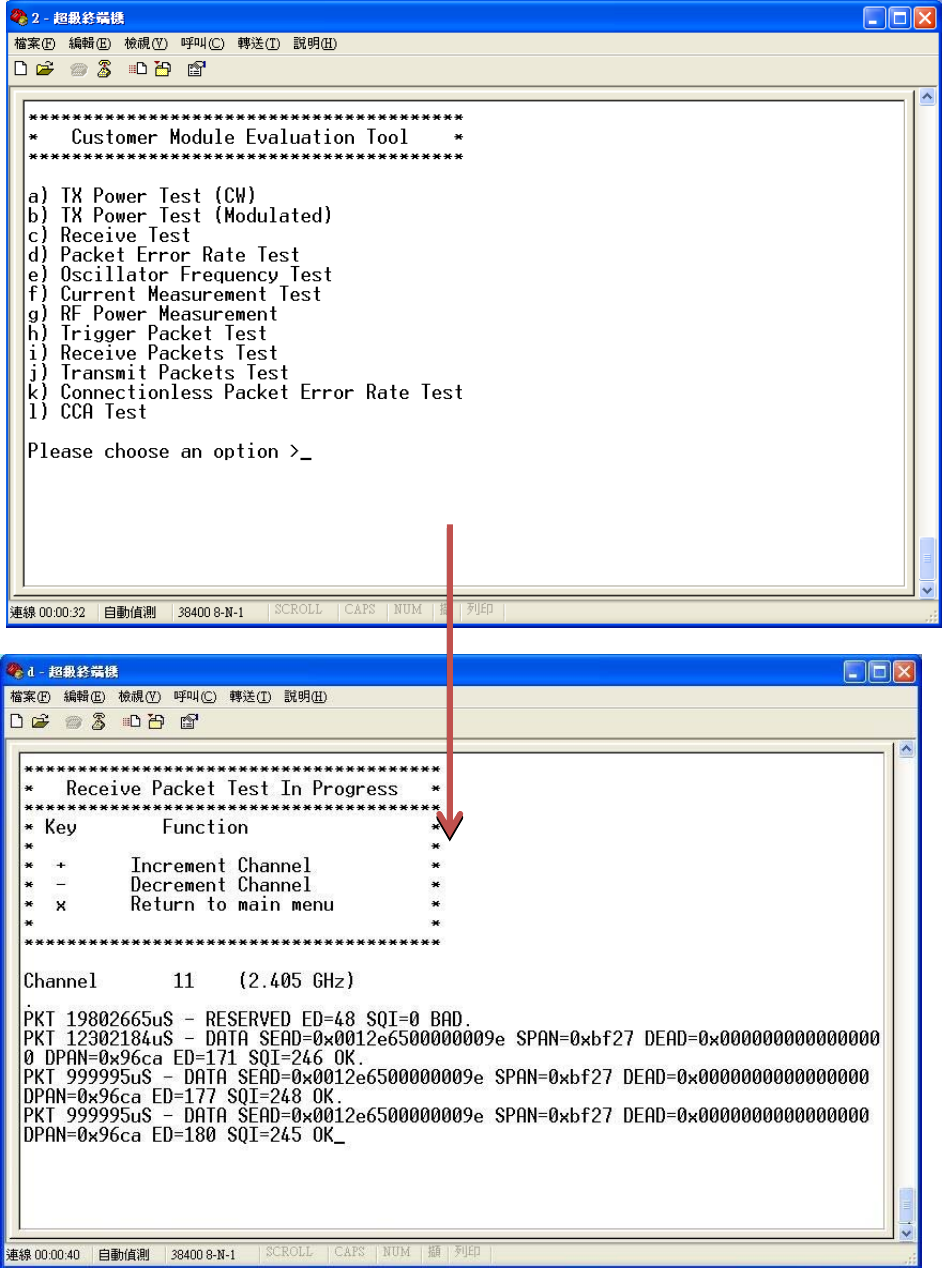
4.8 按下 B 顯示下方畫面
頁 10
4.9 按下 i 顯示下方畫面
4.10 按+-切換 Channel
5.傳輸操作
頁 11
安裝 CustomCP210xDriverInstall 中的 CP210xVCPInstaller.exe 驅動程式後,執行下列步驟
5.1 插入 USB Dongle,開啟裝置管理員
檢視Silicon Labs CP210x USB to UART Bridge 為 COM 多少
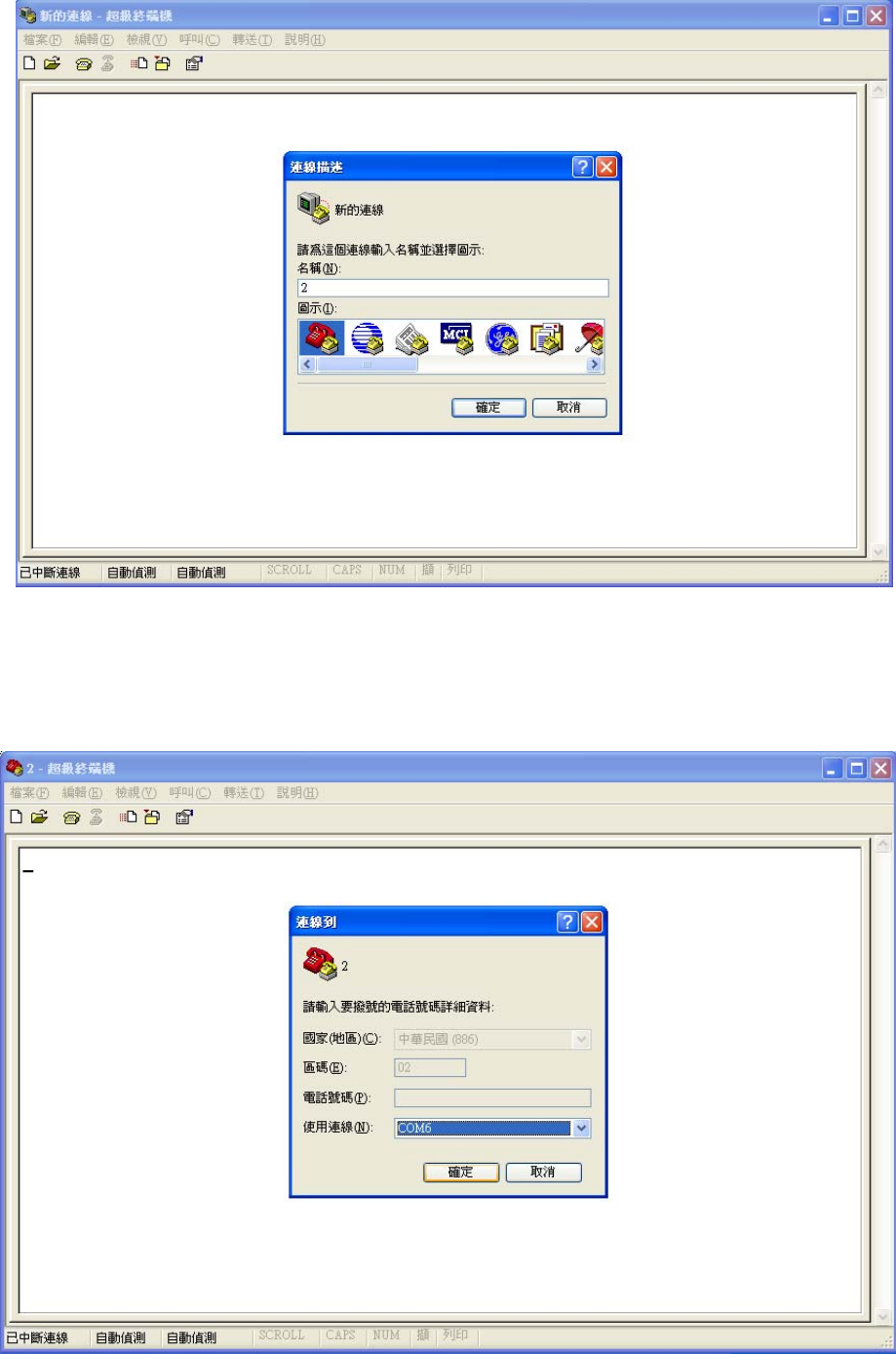
5.2 開啟超級終端機
頁 12
5.3 任意輸入名稱
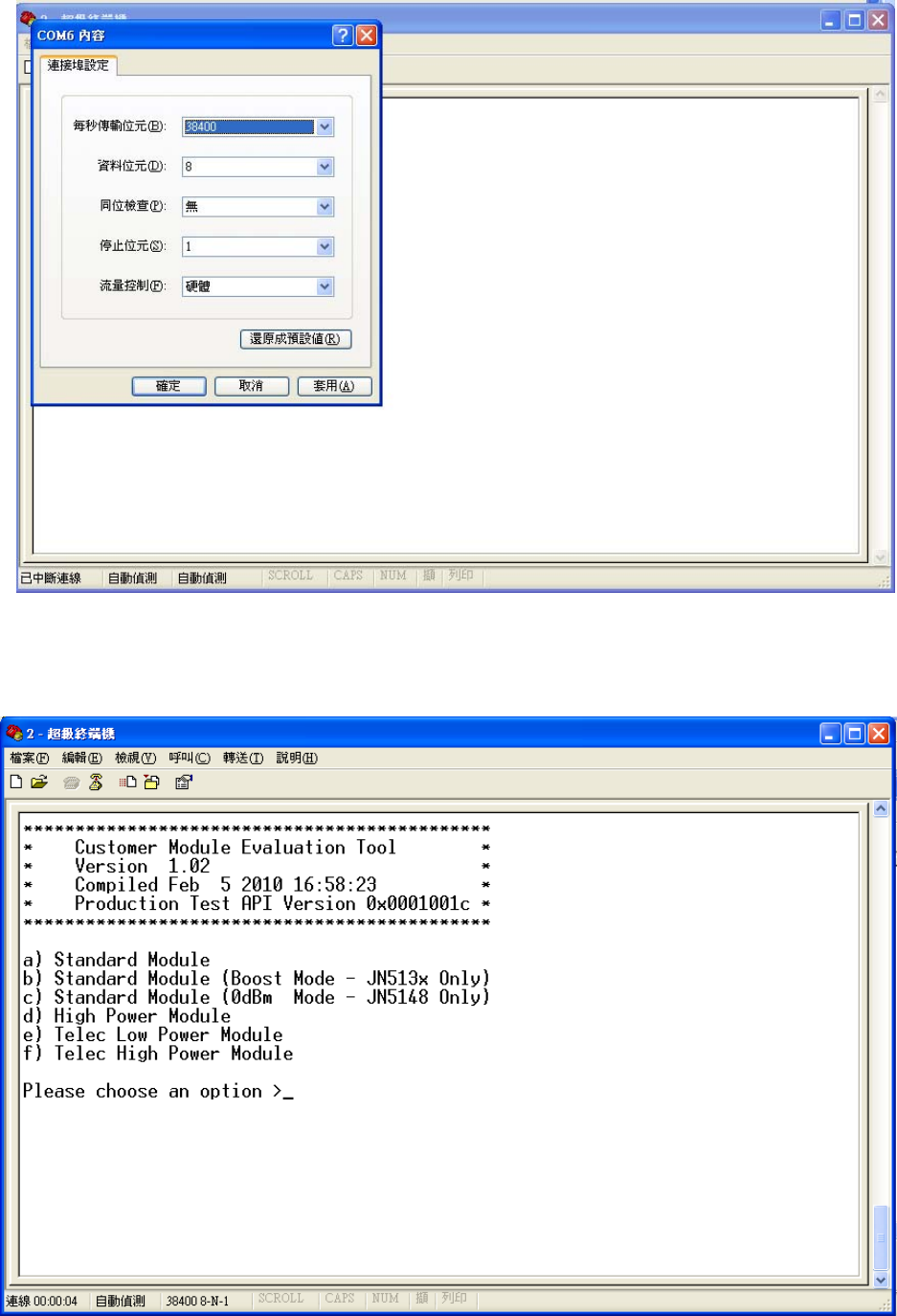
5.4 使用連線選擇裝置管理員顯示的 COM PORT,按確定
頁 13
5.5 每秒傳輸位元選擇 38400,按確定
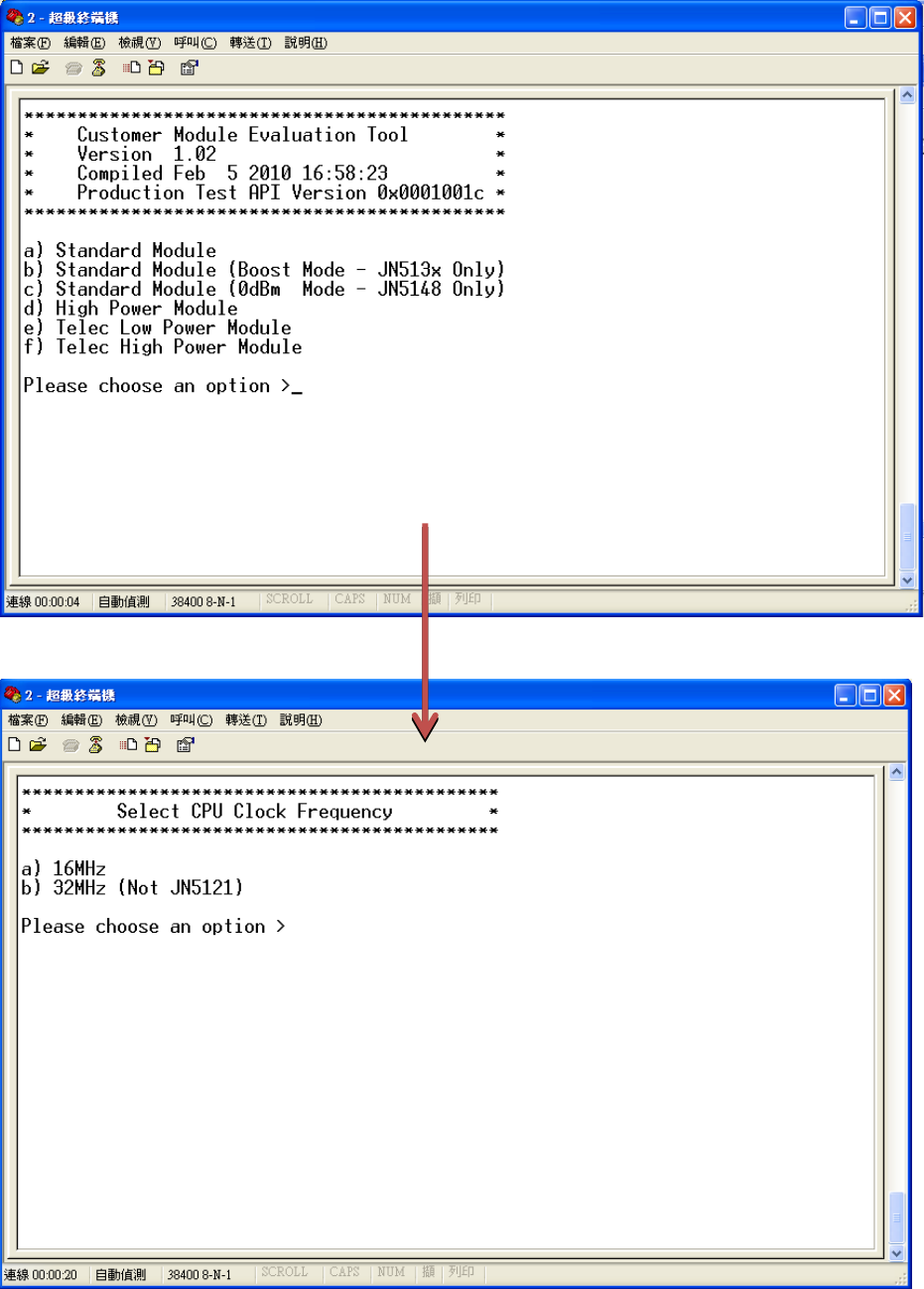
5.6 按 F5,顯示如下畫面
頁 14
5.7 按下 D 顯示右側畫面
頁 15
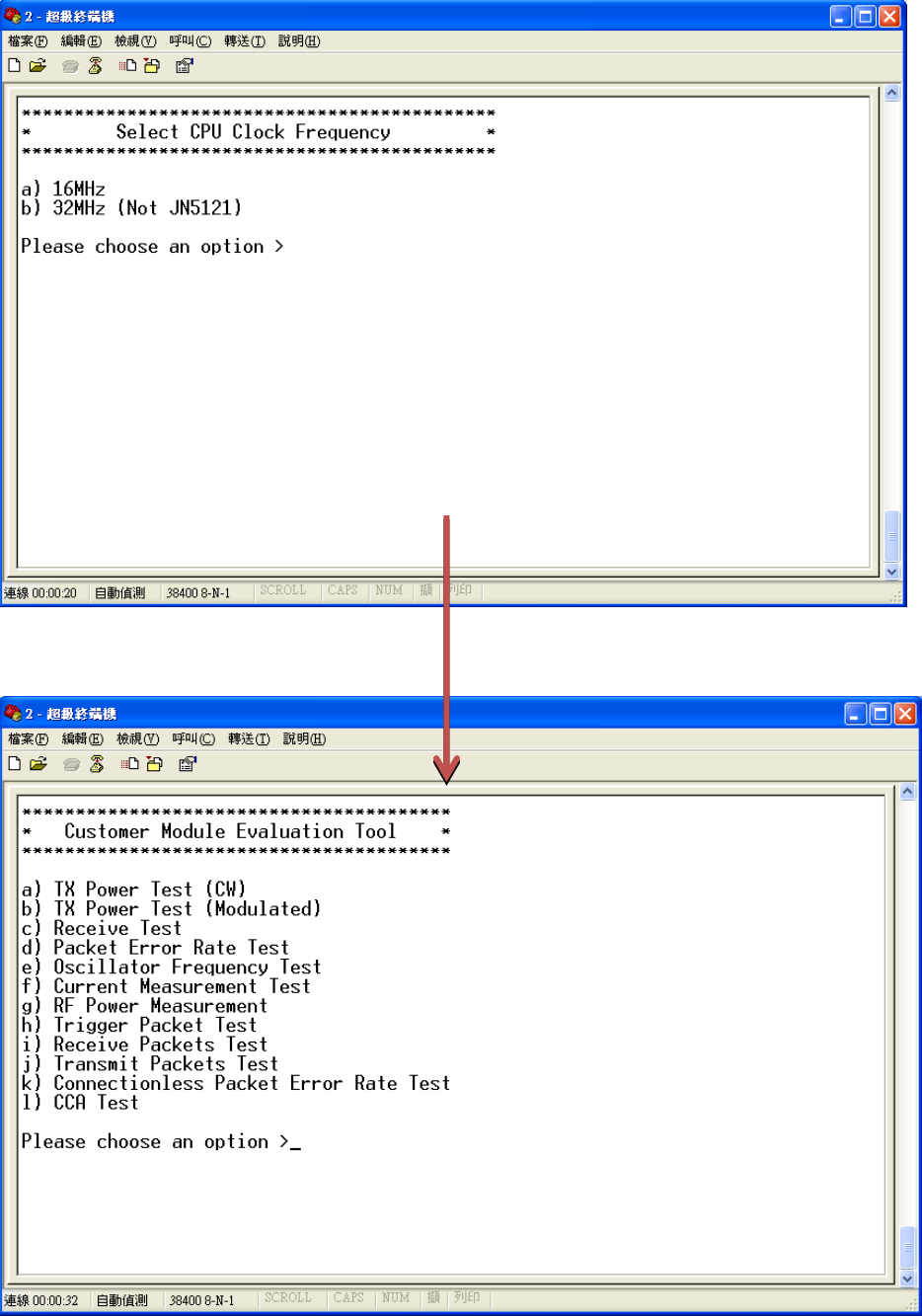
5.8 按下 B 顯示右側畫面
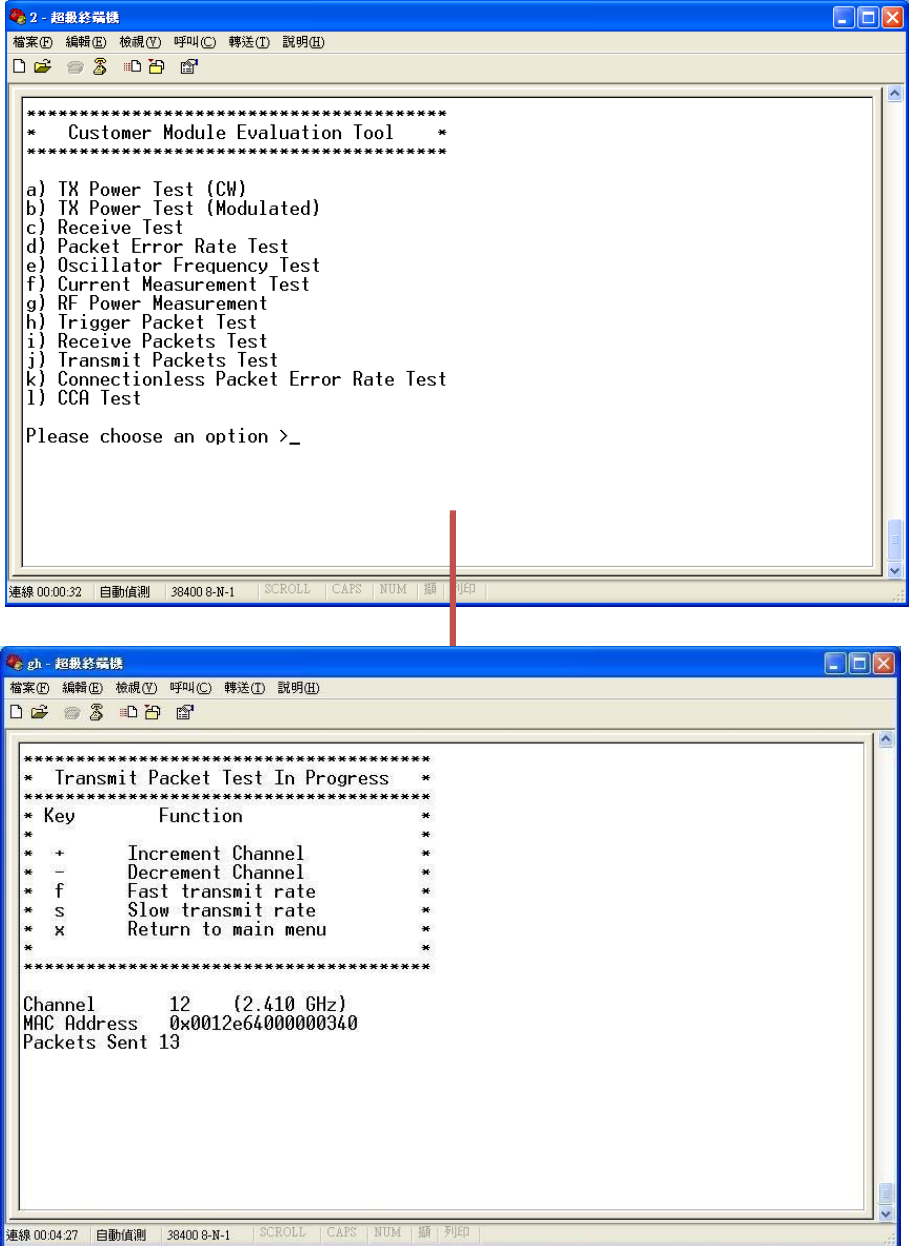
頁 16
5.9 按下 j 顯示右側畫面
5.10 按+-切換 Channel
頁 17
FederalCommunicationsCommission(FCC)Statement
15.21
Youarecautionedthatchangesormodificationsnotexpresslyapprovedbythepartresponsiblefor
compliancecouldvoidtheuser’sauthoritytooperatetheequipment.
15.105(b)
ThisequipmenthasbeentestedandfoundtocomplywiththelimitsforaClassBdigitaldevice,pursuant
topart15oftheFCCrules.Theselimitsaredesignedtoprovidereasonableprotectionagainstharmful
interferenceinaresidentialinstallation.Thisequipmentgenerates,usesandcanradiateradiofrequency
energyand,ifnotinstalledandusedinaccordancewiththeinstructions,maycauseharmfulinterference
toradiocommunications.However,thereisnoguaranteethatinterferencewillnotoccurinaparticular
installation.Ifthisequipmentdoescauseharmfulinterferencetoradioortelevisionreception,whichcan
bedeterminedbyturningtheequipmentoffandon,theuserisencouragedtotrytocorrectthe
interferencebyoneormoreofthefollowingmeasures:
‐Reorientorrelocatethereceivingantenna.
‐Increasetheseparationbetweentheequipmentandreceiver.
-Connect the equipment into an outlet on a circuit different from that to which the receiver is connected.
‐Consultthedealeroranexperiencedradio/TVtechnicianforhelp.
ThisdevicecomplieswithPart15oftheFCCRules.Operationissubjecttothefollowingtwo
conditions:
1)thisdevicemaynotcauseharmfulinterferenceand
2)thisdevicemustacceptanyinterferencereceived,includinginterferencethatmaycauseundesired
operationofthedevice.
FCCRFRadiationExposureStatement:
ThisequipmentcomplieswithFCCradiationexposurelimitssetforthforanuncontrolledenvironment.
EndusersmustfollowthespecificoperatinginstructionsforsatisfyingRFexposurecompliance.This
transmittermustnotbeco‐locatedoroperatinginconjunctionwithanyotherantennaortransmitter.
IndustryCanada(IC)Statement
ThisdevicecomplieswithIndustryCanadalicence‐exemptRSSstandard(s).
Operationissubjecttothefollowingtwoconditions:(1)thisdevicemaynotcauseinterference,and
(2)thisdevicemustacceptanyinterference,includinginterferencethatmaycauseundesiredoperationof
thedevice.
頁 18
Canada, avis d'Industry Canada (IC)
Cet appareil numérique de classe B est conforme aux normes canadiennes ICES-003 et RSS-210.
Son fonctionnement est soumis aux deux conditions suivantes : (1) cet appareil ne doit pas causer d'interférence et
(2) cet appareil doit accepter toute interférence, notamment les interférences qui peuvent affecter son
fonctionnement.
Informations concernant l'exposition aux fréquences radio (RF)
La puissance de sortie émise par l’appareil de sans fil SPECTEC est inférieure à la limite d'exposition aux fréquences
radio d'Industry Canada (IC). Utilisez l’appareil de sans fil SPECTEC de façon à minimiser les contacts humains lors
du fonctionnement normal.