Spectec Computer SDWLAN11BGN SDW-829 User Manual WiFi SD 1 engx
Spectec Computer Co., Ltd SDW-829 WiFi SD 1 engx
user manual

1.P
2.T
it’s
a
3.T
o
Wi
F
tak
e
lugWiFi‐S
D
urnondigi
t
a
nindicato
o
establish
F
idevicess
u
e
belowact
a.Enter“
v
b.Seekb
e
camera.
c.Remov
e
d.Aserie
s
e.WiFifu
n
3‐1The
W
“Peer‐to‐
P
3‐1‐
1
Wi
F
D
cardinto
S
t
alstillcam
e
rofWiFi‐S
D
PeertoPe
e
u
chasPC,a
ions:
v
iewingstil
l
e
lowimage
e
aboveim
a
s
beeperso
n
ctionof
W
W
iFiSDcard
P
eer”mod
e
1
Connectt
o
F
i‐SDCar
d
S
Dsocketo
f
e
rapower,
t
D
cardboot
s
e
r(P2P)Wi
notherDS
C
l
imagesm
o
withforwa
a
gewithDS
undswillc
o
W
iFiSDcard
nowisrea
d
e
fordatae
x
o
PCwith
W
d
Operati
n
f
DigitalStil
t
wobeepe
r
s
‐upsucce
s
Ficonnecti
o
C
loadedwi
t
o
de”ofDS
C
rdorback
w
C’s“delete
o
meoutaf
t
isturnedo
d
ytoconn
e
x
changewi
t
W
iFiconnec
t
n
gInstruc
t
lCamera.
r
soundswi
s
sfull
y
.
o
nbetwee
n
t
hWiFiSD
c
C
.
w
ardcontr
o
image”pr
o
t
erdeletet
h
nafterbee
e
ctwithoth
t
hfollowin
g
t
ivity‐
t
ion
llcomeout
n
WiFiSDc
a
c
ardorSm
a
lkeypadof
o
cedures.
h
isspecific
i
p
ersounds
erWiFide
v
g
operation
t
in5secon
d
a
rdandoth
a
rtphone,
p
f
digitalstill
i
magepict
u
stop.
v
icesat
methods”:
d
s,
er
p
ls.
u
re.
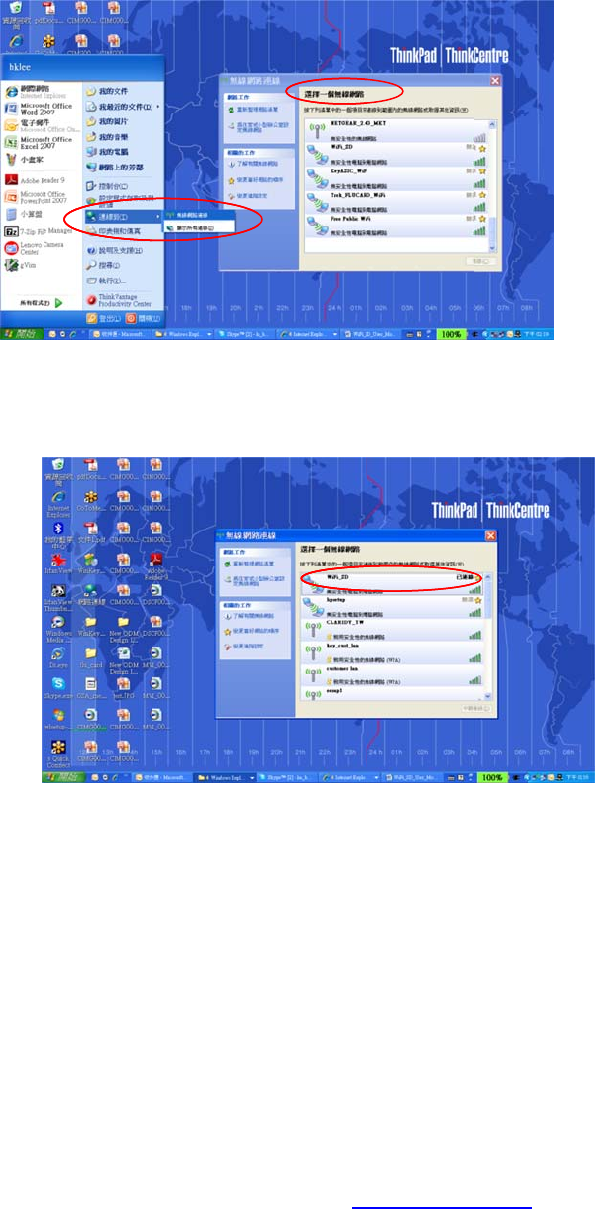
Click
Net
w
Dou
b
tosh
OpenIEo
view/do
w
“Start”‐>
”
w
ork”
b
leclick“W
ow“conne
c
nPCandk
e
w
nload/upl
o
”
Connectt
o
iFi_SD”ID
w
c
ted”mark
e
y‐inweba
d
o
adimage
o
o
”‐>“WiFi
c
w
ithinWiFi
d
dressofh
t
o
rvideofile
s
c
onnectivit
y
NetworkS
e
t
tp://192.1
6
s
toandfro
y
”‐>“Selec
t
e
lectionM
e
6
8.1.1to
mDSCtoP
C
taWiFi
e
nuandwa
C
i
tPC
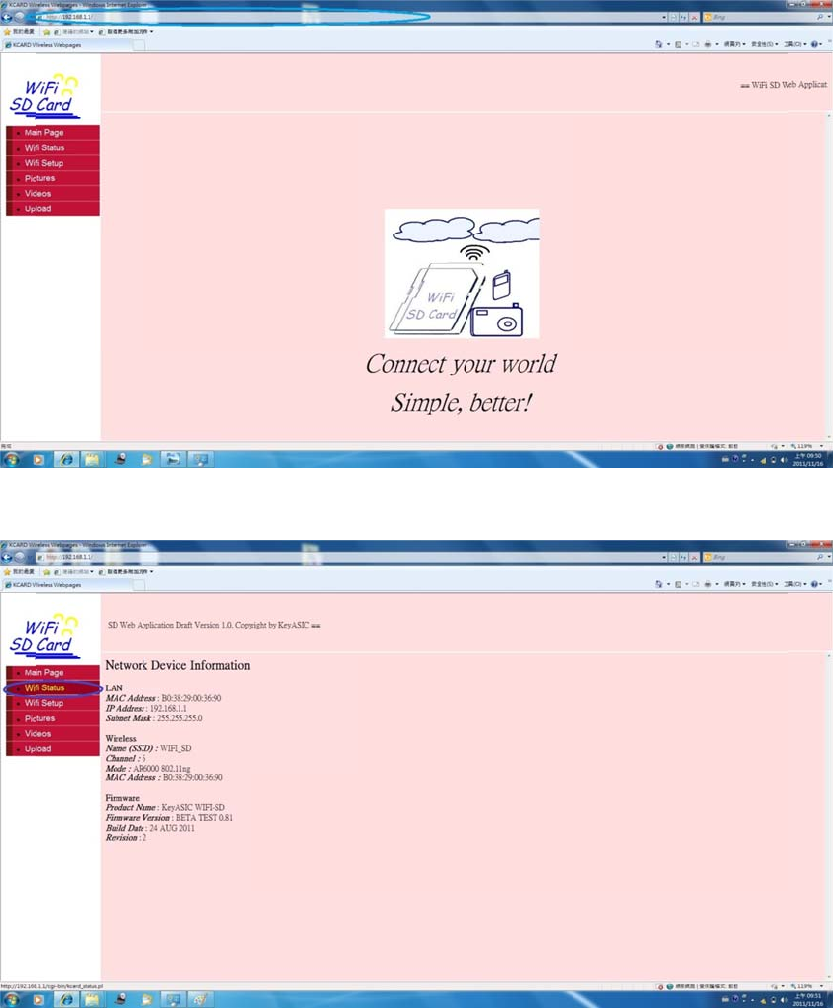
Inth
e
Click
uplo
a
e
webpag
e
“QuickSet
u
a
dutilizati
o
e
,click“Sta
t
u
p”todefi
n
o
nmode
t
us”toget
W
n
eSSID&f
t
W
iFiconne
c
t
paccounti
c
tioninfor
m
nformation
m
ation
n
forserver
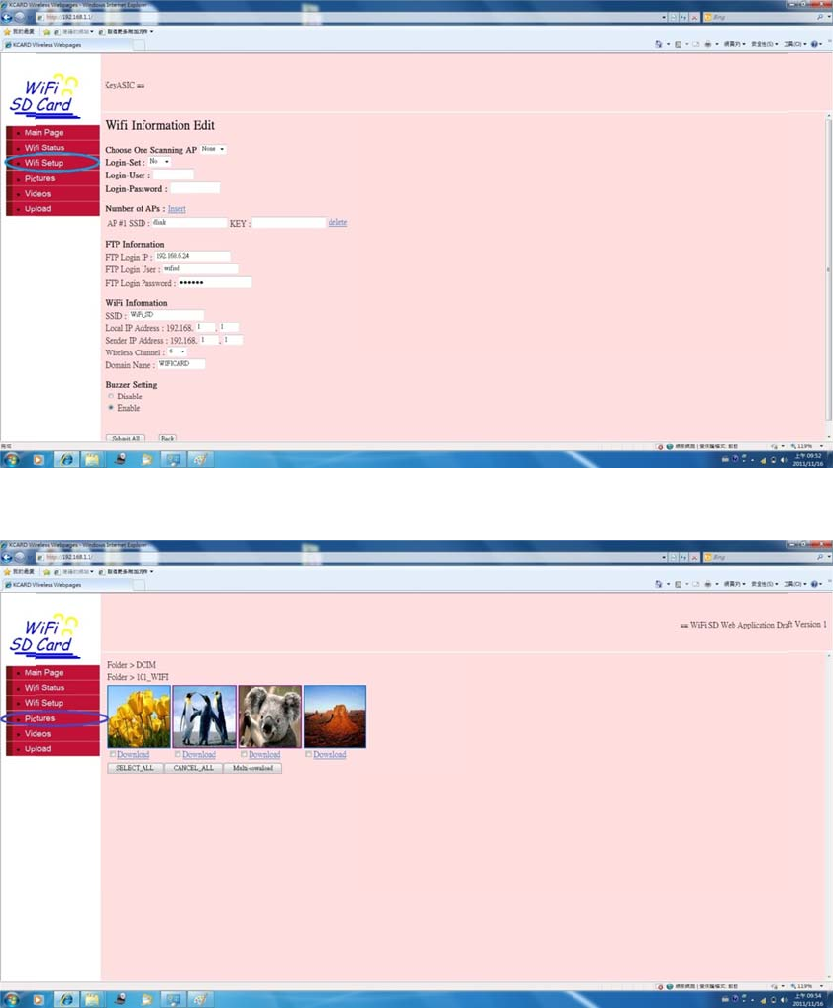
Click
Click“Vid
e
“Photo”to
e
o”tovie
w
view&do
w
w,
playback
a
w
nloadim
a
a
nddownl
o
a
gefilesfr
o
o
advideofil
mDSCtoP
esfromDS
C
P
C
CtoPC
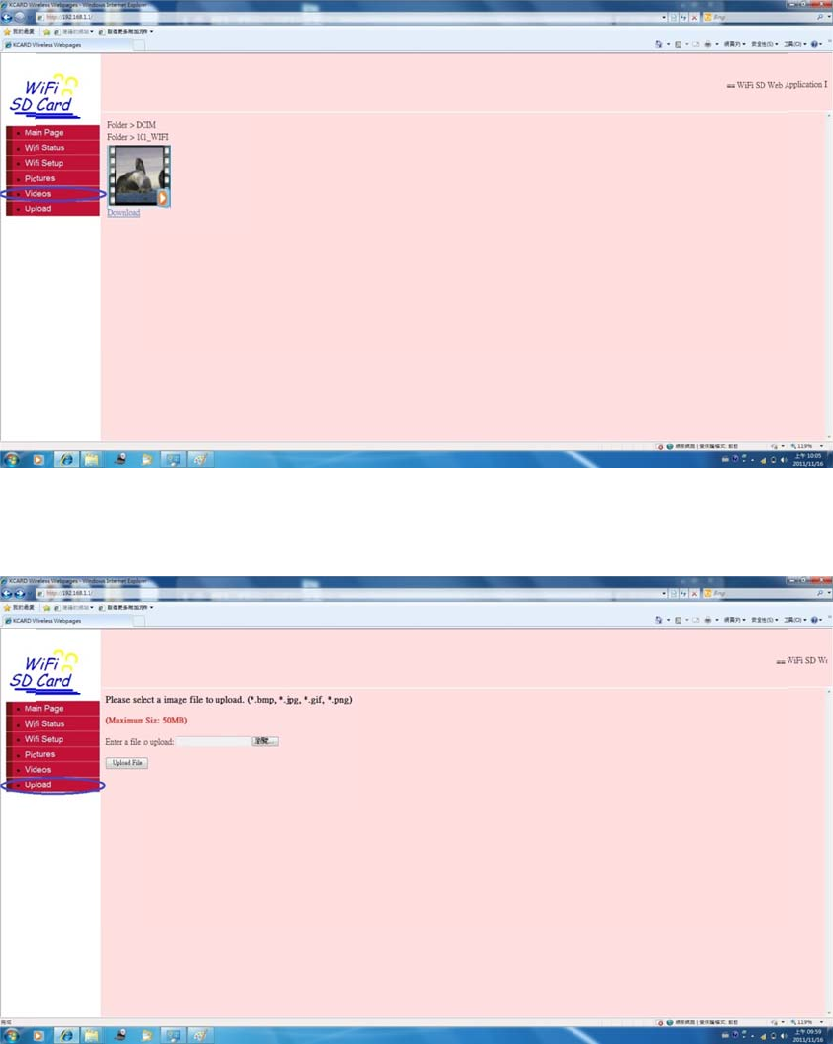
4.T
o
bel
o
Click
o
uploadi
m
o
wactions:
a.Enter“
v
b.Seekb
e
stillcam
e
“Upload”t
m
ageorvid
e
v
iewingstil
l
e
lowimage
e
ra.
ocopyima
g
e
ofilestor
e
l
imagesm
o
withforwa
g
efilesfro
m
e
moteserv
e
o
de”ofDS
C
rdorback
w
m
PCtoDS
C
e
rviaAcce
s
C
.
w
ardcontr
o
C
s
sPoint(AP
lkeypadof
P
),pls.take
f
digital

5.T
o
loa
d
c.Remov
e
d.Aserie
s
e.WiFifu
n
f.DSCwill
theimag
e
o
sendima
g
d
edbyWiF
i
a.Enter“
v
b.Seekb
e
stillcam
e
e
aboveim
a
s
beeperso
n
ctionof
W
startuplo
a
e
filewhich
g
eorvideo
i
SDcard,t
o
v
iewingstil
l
e
lowimage
e
ra.
a
gewithDS
undswillc
o
W
iFiSDcard
a
dingallim
a
hasexisted
filesfrom
W
o
o:
l
imagesm
o
withforwa
C’s“delete
o
meoutaf
t
isturnedo
a
gefilesst
o
inserver
w
W
iFiSDcar
d
o
de”ofDS
C
rdorback
w
image”pr
o
t
erdeletet
h
nafterbee
o
redinWiFi
w
illNOTbe
t
d
overtoth
C
.
w
ardcontr
o
o
cedures.
h
isspecific
i
p
ersounds
SDcardto
t
ransmitte
d
eotherdig
lkeypadof
i
magepict
u
stop.
remotese
r
d
again.
italstillca
m
f
digital
u
re.
r
ver,
m
era

©
K
Fed
15.
2
You
res
p
15.
1
Thi
s
digi
t
pro
v
inst
and
int
e
int
e
c.Remov
e
d.Inthe
o
imagesm
o
e.Seekb
e
stillcam
e
f.Remov
e
modewill
K
ey ASIC. All
r
eralComm
2
1
arecautio
n
p
onsiblefo
r
1
05(b)
s
equipmen
taldevice,
p
v
idereaso
n
allation.Th
,ifnotinst
a
e
rferencet
o
e
rferencew
e
aboveim
a
o
therdigita
l
o
de”ofDS
C
e
lowimage
e
ra.
e
aboveima
starttrans
r
ights reserve
d
unications
n
edthatch
a
r
complianc
thasbeen
p
ursuantt
o
n
ableprote
c
isequipme
a
lledandu
s
o
radiocom
m
illnotoccu
r
a
gewithDS
l
stillcamer
C
.
withforwa
gewithDS
C
m
ittingfile
s
d
. Informatio
n
Commissi
o
a
ngesorm
o
ecouldvoi
d
t
estedand
o
part15of
c
tionagain
s
ntgenerat
e
s
edinacco
r
m
unication
r
inapartic
C’s“delete
r
aloadedb
y
rdorback
w
C
’s“delete
i
s
totheoth
n
in this docu
m
o
n(FCC)St
a
o
dification
s
d
theuser’
s
foundtoc
o
theFCCrul
s
tharmfuli
n
e
s,usesan
d
r
dancewit
h
s.Howeve
r,
c
ularinstall
a
image”pr
o
y
WiFiSDc
a
w
ardcontro
i
mage”pro
c
erDSCin“
r
m
ent is subje
c
tement
s
notexpre
s
s
authority
t
o
mplywith
es.Theseli
n
terferenc
e
d
canradiat
e
h
theinstru
c
r,
thereisn
o
a
tion.Ifthi
s
o
cedures.
a
rd,enter“
v
lkeypadof
c
edures,th
e
r
eceive”m
o
c
t to change
w
s
slyapprov
e
t
ooperate
t
t
helimitsf
o
mitsarede
e
inareside
e
radiofre
q
c
tions,may
o
guarante
e
s
equipmen
t
v
iewingstil
digital
eDSCin“s
e
o
de.
w
ithout notic
e
e
dbythep
a
t
heequip
m
o
raClassB
e
signedto
e
ntial
q
uencyene
r
y
causehar
m
e
that
tdoescau
s
l
e
nd”
e
.
a
rt
m
ent.
r
gy
m
ful
e
harmfulinterferencetoradioortelevisionreception,whichcanbedeterminedby
turningtheequipmentoffandon,theuserisencouragedtotrytocorrectthe
interferencebyoneormoreofthefollowingmeasures:
‐Reorientorrelocatethereceivingantenna.
‐Increasetheseparationbetweentheequipmentandreceiver.
-Connect the equipment into an outlet on a circuit different from that to which the
receiver is connected.
‐Consultthedealeroranexperiencedradio/TVtechnicianforhelp.
ThisdevicecomplieswithPart15oftheFCCRules.Operationissubjecttothe
followingtwoconditions:
1)thisdevicemaynotcauseharmfulinterferenceand
2)thisdevicemustacceptanyinterferencereceived,includinginterferencethatmay
causeundesiredoperationofthedevice.
FCCRFRadiationExposureStatement:
ThisequipmentcomplieswithFCCradiationexposurelimitssetforthforan
uncontrolledenvironment.Endusersmustfollowthespecificoperatinginstructions
forsatisfyingRFexposurecompliance.Thistransmittermustnotbeco‐locatedor
operatinginconjunctionwithanyotherantennaortransmitter.