Standard Motor PR1001 TOOL User Manual

Standard Motor Products, Inc. TOOL Users Manual

Users Manual

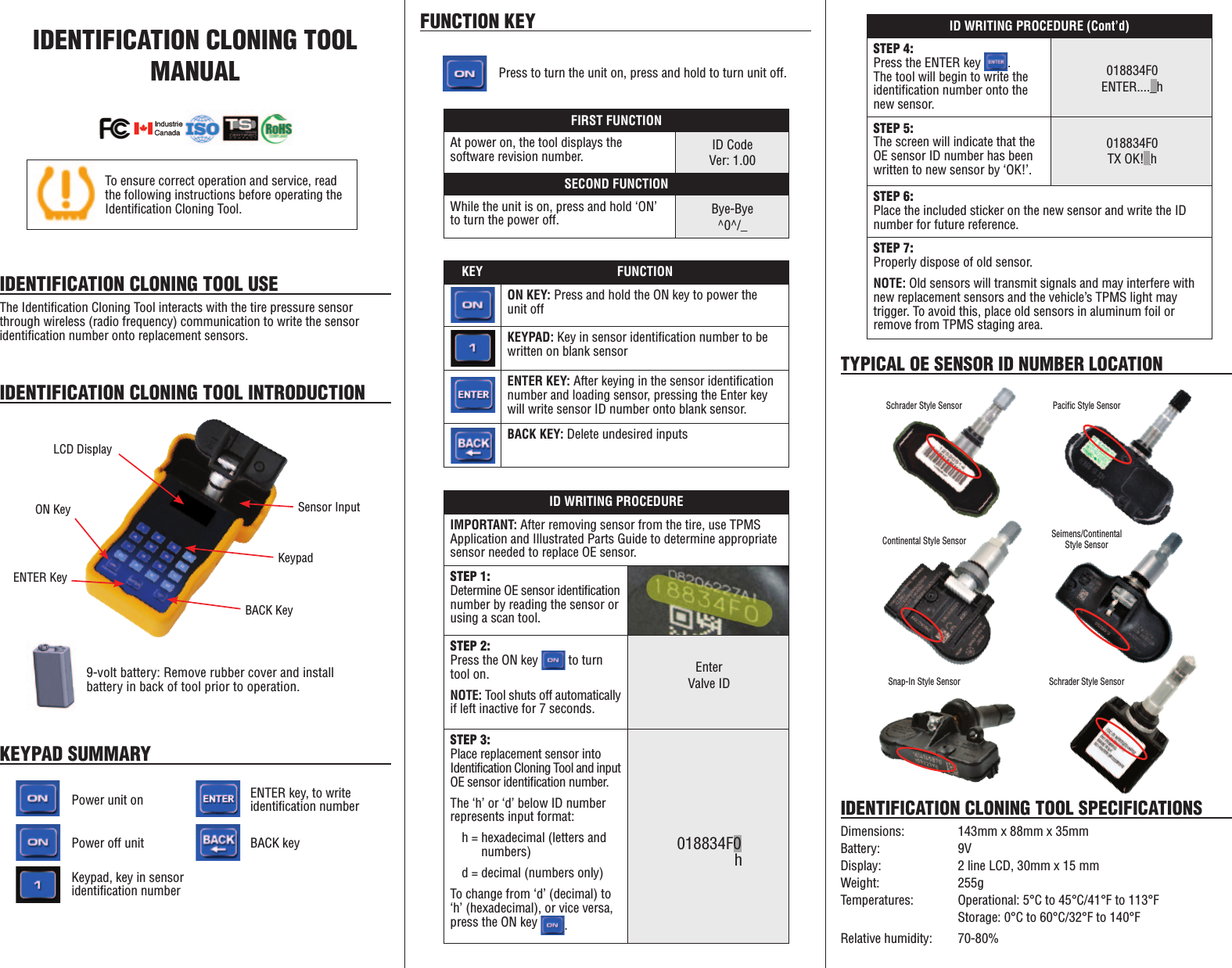
IDENTIFICATION CLONING TOOL  MANUALIDENTIFICATION CLONING TOOL USEThe Identification Cloning Tool interacts with the tire pressure sensor through wireless (radio frequency) communication to write the sensor identification number onto replacement sensors.IDENTIFICATION CLONING TOOL INTRODUCTIONLCD DisplaySensor InputBACK KeyENTER KeyKeypadON Key9-volt battery: Remove rubber cover and install battery in back of tool prior to operation.KEYPAD SUMMARYFUNCTION KEYPower unit onPress to turn the unit on, press and hold to turn unit off.ENTER key, to write identification numberPower off unit BACK keyKeypad, key in sensor identification numberKEY FUNCTIONON KEY: Press and hold the ON key to power the unit offKEYPAD: Key in sensor identification number to be written on blank sensorENTER KEY: After keying in the sensor identification number and loading sensor, pressing the Enter key will write sensor ID number onto blank sensor.BACK KEY: Delete undesired inputsID WRITING PROCEDURE (Cont’d)STEP 4:Press the ENTER key  .  The tool will begin to write the identification number onto the new sensor.STEP 5:The screen will indicate that the OE sensor ID number has been written to new sensor by ‘OK!’.STEP 6:Place the included sticker on the new sensor and write the ID number for future reference.STEP 7:Properly dispose of old sensor.NOTE: Old sensors will transmit signals and may interfere with new replacement sensors and the vehicle’s TPMS light may trigger. To avoid this, place old sensors in aluminum foil or remove from TPMS staging area.018834F0TX OK!_h018834F0ENTER...._hTo ensure correct operation and service, read the following instructions before operating the Identification Cloning Tool.IDENTIFICATION CLONING TOOL SPECIFICATIONSDimensions:  143mm x 88mm x 35mmBattery:   9VDisplay:    2 line LCD, 30mm x 15 mmWeight:   255gTemperatures:  Operational: 5°C to 45°C/41°F to 113°F    Storage: 0°C to 60°C/32°F to 140°FRelative humidity:   70-80%TYPICAL OE SENSOR ID NUMBER LOCATIONID WRITING PROCEDUREIMPORTANT: After removing sensor from the tire, use TPMS Application and Illustrated Parts Guide to determine appropriate sensor needed to replace OE sensor.STEP 1: Determine OE sensor identification number by reading the sensor or using a scan tool.STEP 2:Press the ON key   to turn tool on.NOTE: Tool shuts off automatically if left inactive for 7 seconds.STEP 3:Place replacement sensor into Identification Cloning Tool and input OE  sensor  identification  number.                               The ‘h’ or ‘d’ below ID number represents input format:h = hexadecimal (letters and     numbers)d = decimal (numbers only)To change from ‘d’ (decimal) to ‘h’ (hexadecimal), or vice versa, press the ON key  .018834F0 hEnterValve IDFIRST FUNCTIONAt power on, the tool displays the  software revision number.SECOND FUNCTIONWhile the unit is on, press and hold ‘ON’ to turn the power off.ID CodeVer: 1.00Bye-Bye^0^/_Schrader Style Sensor Pacific Style SensorSnap-In Style SensorContinental Style SensorSchrader Style SensorSeimens/Continental  Style Sensor
WHEN… NOTE...Removing old sensor from vehicleRemove from area or wrap in aluminum foil,  damaged sensors will continue to  transmit signals.Vehicle does not recognize sensorsMay require over-inflating tire and then  reducing psi to proper level to activate sensor.Checking if spare tire is equipped with TPMSEnsure proper air pressure and  functioning sensor.No sensor is detectedEnsure correct sensor is being used via the TPMS Application and Illustrated Parts Guide.Verify that the OE part number in the TPMS Application and Illustrated Parts Guide  matches the OE part number of the sensor  on the vehicle.SWITCH ON SAFELY: Do not switch on the device when wireless tool is prohibited or when it may cause interference or danger.SWITCH OFF WHEN REFUELING: Do not use the device when filling vehicle with gasoline. Do not use near fuel or chemicals.SWITCH OFF NEAR BLASTING: Adhere to any restrictions. Do not use the tool when blasting is in progress.USE SENSIBLY: Use only in normal conditions as indicated in product instructions.  Do not touch the antenna unnecessarily.QUALIFIED SERVICE: Only qualified personnel may install or repair this device.ENHANCEMENTS AND BATTERIES: Use only approved enhancements and batteries for the Identification  Cloning Tool. Do not connect incompatible products.WATER RESISTANCE: This tool is not water resistant – keep it dry.CONNECTING TO OTHER DEVICES: When connecting to any other device, read user guide for detailed safety instructions. Do not connect incompatible products.TROUBLESHOOTING GUIDE APPENDIXThe Identification Cloning Tool is a product of superior design and craftsmanship and should be treated with care.  Follow the suggestions below to help maintain warranty coverage: •   Keep the device dry. Precipitation, humidity and all types of moisture may contain minerals that will corrode electronic circuits. If device does get wet, remove the battery and allow the device to dry completely before replacing. •   Do not use or store the tool in dusty, dirty areas to keep electronic components clean. •   Do not store the device in hot areas. High temperatures can shorten the life of electronic devices, damage batteries and warp or melt certain plastics. •   Do not store the device in cold areas. When the device returns to its normal temperature, moisture can form inside the device and damage electronic circuit boards. •   Do not attempt to open the device other than instructed in this guide. •   Do not drop, knock or shake the device. Rough handling can break  Internal circuit boards and mechanics. •   Do not use harsh chemicals, cleaning solvent or strong detergent to clean the device. Do not paint the device. Paint can clog the moving parts and prevent proper operation. •   Do not touch the main display with hard or angular materials. Objects like earrings or jewelry may scratch the display. •   Use a soft, clean and dry cloth to clean the device. •  Use only the supplied antenna. Unauthorized antennas, modifications or attachments could damage the device and may violate regulations governing radio devices. All of the above suggestions apply equally to your device, battery or any  enhancements. If device is not working properly, contact Product  Assistance Group, 1-800-566-8334.LIMITED WARRANTYYour new product is warranted to you, the original customer to be free of defects in material and workmanship (as determined solely by Standard Motor Products, Inc.) for 1 year from the date of purchase, subject to the limitations below. Standard Motor Products, Inc. will repair or replace, at its option, the product if it is proven defective under normal use and service. The product must be shipped prepaid. Proof of the date of sale to the original customer may be required. This warranty does not include labor or cover the cost of any other  components or labor required to restore the motor vehicle to its proper operating condition.This warranty does not apply to products that have been: 1) altered;  2) improperly installed, maintained or repaired or installed on a second engine or motor vehicle; 3) damaged by accident, negligence or misuse; 4) used in commercial, fleet, heavy duty, off road, public or governmental vehicles; or 5) returned with missing components or parts that were originally included in the package.THE WARRANTIES SET FORTH HEREIN ARE IN LIEU OF ALL OTHER WARRANTIES, WHETHER EXPRESS OR IMPLIED. ALL IMPLIED WARRANTIES, INCLUDING WARRANTIES OF MERCHANTABILITY AND FITNESS FOR A PARTICULAR PURPOSE ARE EXCLUDED AFTER THREE (3) YEARS. STANDARD MOTOR PRODUCTS, INC. IS NOT RESPONSIBLE FOR INJURY, PROPERTY DAMAGE OR OTHER INCIDENTAL OR CONSEQUENTIAL DAMAGES ARISING DIRECTLY OR INDIRECTLY OUT OF THE USE OF THIS PRODUCT (REGARDLESS OF THE FORM OF ACTION), NOTWITHSTANDING THE FACT THAT SAID INJURY, PROPERTY DAMAGE OR OTHER INCIDENTAL OR CONSEQUENTIAL DAMAGES AROSE DIRECTLY OR INDIRECTLY FROM AN ACTUAL OR ALLEGED DEFECT IN MATERIAL AND/OR WORKMANSHIP.Some states do not allow limitations on how long an implied warranty lasts, or the exclusion of limitation of incidental or consequential damages, so the above limitations or exclusions may not apply to you. This warranty gives you specific legal rights. You may also have other rights that vary from state to state.For further information regarding this Limited Warranty, contact Standard Motor Products, Inc., 37-18 Northern Boulevard, Long Island City, N.Y. 11101-1616, Attention Product Assistance Group, 1-800-566-8334.RF NOTICEThis device meets guidelines for exposure to radio waves. This device is a radio transmitter. It is designed not to exceed the limits for exposure to radio waves recommended by international guidelines. These guidelines were developed by the independent scientific organization ICNIRP and include safety margins designed to assure the protection off all persons, regardless of age and health. The SAR value for this device is less than 5A/m. This value is the reference level for general public exposure to time varying electric and magnetic fields (unperturbed rms values) for the 3-150 kHz frequency range.  IDENTIFICATION CLONING TOOL SAFETY TIPSThis device is a radio transmitter.10542FCC NOTICEThis device complies with Part 15 of the FCC Rules and Industry Canada licence-exempt RSS-210 standard. Operation is subject to the following two conditions: (1) this device may not cause interference, and(2) this device must accept any interference, including interference  that may cause undesired operation of the device.WARNING: Any changes or modifications in construction of this device which are not expressly approved by the party responsible for compliance could void the user’s authority to operate the equipment.

Navigation menu