Sun Cupid 0SCI1000004 Wave User Manual Manual
Sun Cupid (ShenZhen) Electronic Ltd. Wave Manual
Manual
Contents:
Getting Started .................................................................. 2
Specications ..................................................................... 8
Troubleshooting ................................................................. 8
Contact Support ................................................................. 10
Warnings ............................................................................ 10
FCC Statements .................................................................... 12
Warranty Information ........................................................ 13
2
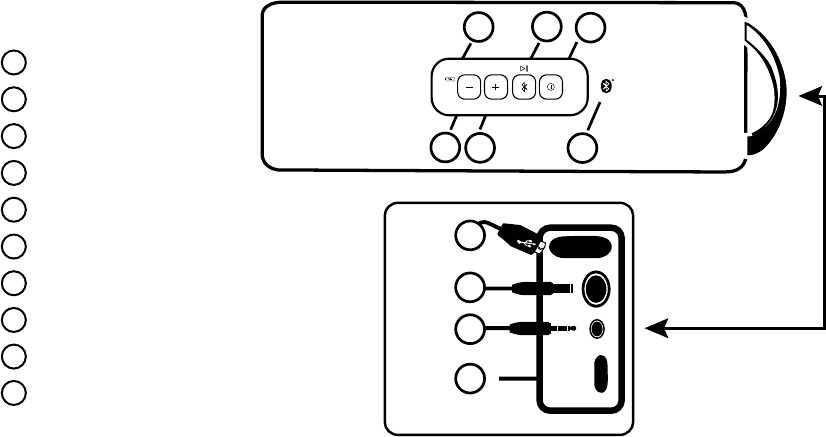
GETTING STARTED
Bluetooth Status LED
On/O Switch
Action Button
Volume Up
Volume Down
Battery Status LED
USB Charge Port
DC Input
3.5mm AUX-IN
Micro USB Input
b
c
d
e
h
i
j
g
f
a
a
b
c
d
e
f
g
h
i
j
3
Bluetooth Status LED
This is a small LED next to the On/O switch that illuminates to show the current status of the Wave’s Bluetooth connection.
• Flashing Slowly and Intermittently: The Wave is on and is not in pairing mode. This is also the indicator for
“auto-reconnect”, where the Wave attempts to connect with the last paired Bluetooth device immediately after it
is powered on.
• Flashing Quickly and Steadily: Pairing mode.
• Solidly Lit: Paired and connected.
On/O Switch
Press and hold the switch for ~3 seconds to turn the NUU Wave on. You will hear a two-tone (low-high) sound,
indicating that the speaker is on.
Press and hold the switch for ~3 seconds to turn the NUU Wave o. You will hear a two-tone (high-low) sound,
indicating that the speaker has been switched o.
NOTE: The Bluetooth Status LED will light when the Wave is on, and go dark when it is o.
a
b
4
Action Button
The Action button has the Bluetooth symbol pressed into it as well as a Play/Pause icon silkscreened above it .
This button controls:
• Pairing of Bluetooth device • Play/Pause • Re-connect
TO PAIR THE WAVE WITH YOUR BLUETOOTH DEVICE:
1. Switch on the NUU Wave. The Bluetooth Status LED will ash slowly.
2. Press and hold the Action Button for about 3 seconds. You will hear a double-beep (low-low) and the
Bluetooth Status Light will ash quickly. The NUU Wave is now in pairing mode.
3. Enable Bluetooth on your phone or other device.* Then select “ Wave” from the list of discoverable devices.
4. If prompted for a PIN code, enter “0000” (4 zeros).
5. It will take between 10-15 seconds for the NUU Wave to pair with your device. When pairing is successful, you will
hear a two-tone (low-high) sound and the Bluetooth Status LED will remain steadily lit.
*NOTE: Procedures for activating Bluetooth will vary across devices. Consult the documentation that came with your
phone or other device for further information.
c
5
PLAYBACK:
The Action Button doubles as a “Play/Pause” button. While music is playing, press and release the Action Button to
pause the music. Press and release again to resume playback.
RE-CONNECTION:
If you press the Action Button while no Bluetooth device is connected, the NUU Wave will attempt to re-connect with the
last paired device and resume playback.
Volume Up Volume Down
CONTROLLING VOLUME
Press or hold the volume keys / to adjust the volume. The NUU Wave will beep at with each change in volume.
When you reach maximum volume, you will hear a high-pitched beep. When you reach minimum volume, you will hear a
faint low-pitched beep.
NOTE: Volume may only be adjusted while the NUU Wave is paired and connected with a Bluetooth Device.
de
6
Battery Status LED
The Battery Status LED will glow steadily to show that the Wave’s internal battery is charging. When it turns off,
the battery is fully charged and will have up to 7 hours of playback time.
NOTE: Battery life varies by volume and audio content.
USB Charge Port
This port provides a standard USB-A socket with which to charge your USB devices. Just plug in your device’s USB
charging cable and go.
NOTE: While smartphones should charge normally whether asleep or awake, larger devices such as tablets may need to be
asleep in order to charge from the Wave’s charge port.
NOTE: Charging your USB device with the NUU Wave will impact battery life.
DC Input
CHARGING THE WAVE’S BATTERY:
For best results, ensure the NUU Wave is fully charged before use.
f
g
h
7
Connect the supplied AC power adapter to the DC Input , and plug it into your wall outlet. The Battery LED
will glow steadily while the Wave is charging, and will turn off when fully charged. The NUU Wave may be used
while it is charging.
3.5mm AUX-IN – Plug & Play
The NUU Wave can connect to any device with a 3.5mm headphone jack. Use the supplied 3.5mm input cable to plug and
play, no Bluetooth required.
Audio content via 3.5mm stereo input will override audio streamed via Bluetooth.
Micro USB Input
This is used solely by Technical Support. Do NOT plug anything into this port.
i
j
8
SPECIFICATIONS
• IP57 waterproof & dustproof rating • 2 x 2.5” woofer + 2 x 1.4” tweeter • 15V AC/DC charging input
• Pairs with any Bluetooth 2.0 device • 1 x Passive bass radiator • Up to 7 hours of playback time
• 3.5mm AUX-IN • DSP to improve bass performance
• 2 x 10W audio output power • 11.1V 2200 mAh rechargeable Li-ion battery
IP57 Denition:
Solid particle protection level 5 - Ingress of dust is not entirely prevented, but it must not enter in sucient quantity to
interfere with the satisfactory operation of the equipment; complete protection against contact.
Liquid ingress protection level 7 - Ingress of water in harmful quantity shall not be possible when the enclosure is immersed
in water under dened conditions of pressure and time (up to 3 feet of submersion for 30 minutes).
TROUBLESHOOTING
• Unable to pair with your Bluetooth device?
1. Ensure that your phone/device is Bluetooth compatible, and that Bluetooth has been correctly enabled on
your device. (Check the documentation that came with your phone/device for further instructions).
2. Ensure that your phone/device is within a few feet the NUU Wave.
9
3. If your phone/device is connected to a number of other Bluetooth devices, disconnect some of them before
pairing with the NUU Wave.
4. Turn Bluetooth o and then on again in your phone/device. If the NUU Wave still won’t pair, remove it from
the list of discoverable devices and retry the pairing process from the start.
5. Ensure that both devices are suciently charged.
• Problems with the sound?
1. For sound distortion, try lowering the volume on the NUU Wave and/or your phone/device.
2. Move the NUU Wave closer to your phone/device.
3. Connect your phone/device to the NUU Wave via the 3.5mm input cable rather than Bluetooth. Ensure that
the cable is fully inserted at both ends.
4. Check that both devices are suciently charged.
• NUU Wave not responding to commands such as volume change, play/pause, pair, etc.?
1. Switch the NUU Wave o and then on again.
2. If there is still no response after step 1, connect the unit to the supplied power adapter or computer USB
port and repeat step 1.
3. Check that your phone or other device are suciently charged.
10
CONTACT SUPPORT
We want to help solve whatever issues you may encounter when using your NUU Wave. If at any time you are not satised,
please call or e-mail our dedicated customer support specialists and they will be more than happy to assist you.
For further technical support and information, please visit gonuu.com/support, support@gonuu.com or
US Customer Support CALL: Noetic, Inc. E-MAIL: Noetic, Inc.
507-529-1441
8am - 4:30pm (CT) M-F
support@noeticinc.com
e-mails will be answered within 1 business day
WARNINGS
Read all instructions and warnings before using this product to ensure your personal safety and prevent property damage.
• The NUU Wave has a water resistance rating of IP57 (Ingress of water in harmful quantity shall not be possible when
the enclosure is immersed in water under dened conditions of pressure and time (up to 3 feet of submersion for
30 minutes). Do not expose the product to more than 3 feet of water or for longer than 30 minutes.
• Do not expose this product to re or other sources of excessive heat.
11
• Do not leave this product in direct sunlight for extended periods of time.
• Do not block any ventilation openings.
• Do not disassemble this product or attempt to modify it in any manner. Unauthorized alterations may
compromise safety, regulatory compliance, product performance, and will void the warranty
• Do not expose this product to excessive impact or other physical abuse.
• Do not insert anything into this product unless otherwise specied in the user manual.
• Do not use abrasive cleaners on this product. Wipe it with a soft, water-dampened cloth.
• Only charge the battery in accordance with the user manual supplied. Use only the manufacturer supplied
charger. Using other chargers could result in electric shock and/or damage the NUU Wave. Using other chargers
will void the warranty.
• Do not charge the NUU Wave in damp areas or in extremely high or low temperatures, as this could result in
electric shock.
• Do not attempt to replace the product’s built-in battery. Attempts to disassemble the unit or replace internal
battery will void the warranty.
12
• Obey all signs and displays that require an electrical device or RF radio product to be switched o in designated areas.
• Do not place the NUU Wave on high surfaces. During music playback, the product may move or shift, causing it to fall.
• Do not dispose of the NUU Wave in a re. The battery could explode causing injury or death.
• Dispose of the NUU Wave with its battery in accordance with local regulations. Do not dispose of the NUU Wave with
regular household waste.
FCC INFORMATION
FCC STATEMENT
This device complies with Part 15 of the FCC Rules. Operation is subject to the following two conditions:
1. This device may not cause harmful interference, and
2. This device must accept any interference received, including interference that may cause undesired operation.
Changes or modications not expressly approved by the party responsible for compliance could void the user’s authority to operate the equipment.
NOTE: This equipment has been tested and found to comply with the limits for a Class B digital device, pursuant to Part 15 of the FCC Rules. These limits
are designed to provide reasonable protection against harmful interference in a residential installation. This equipment generates, uses and can radiate
radio frequency energy and, if not installed and used in accordance with the instructions, may cause harmful interference to radio communications.
However, there is no guarantee that interference will not occur in a particular installation. If this equipment does cause harmful interference to radio or
television reception, which can be determined by turning the equipment off and on, the user is encouraged to try to correct the interference by one or

13
more of the following measures:
• Reorient or relocate the receiving antenna.
• Increase the separation between the equipment and receiver.
• Connect the equipment into an outlet on a circuit dierent from that to which the receiver is connected.
• Consult the dealer or experienced radio/TV technician for help.
FCC RF Warning Statement
The device has been evaluated to meet general RF exposure requirement. The device can be used in portable exposure condition without restriction.
WARRANTY INFORMATION
Limited One Year Warranty Information
NUU Limited (hereafter referred to as NUU), warrants this product to be free from defects in workmanship and materials, under normal use and conditions, for a period of one (1) year from the
date of original purchase.
If you are experiencing any problems with the operation or function of your product, please make sure you have downloaded our full owner’s manual from our website for reference or contact
the authorized local distributor (information of the authorized distributors are listed on www.gonuu.com). Should this fail to resolve the matter and service is still required by reason of any
defect or malfunction during the warranty period, NUU will repair or, at its discretion, replace this product without charge. This decision is subject to verication of the defect or malfunction
upon delivery of this product to a designated factory service center. The product must include proof of purchase, including date of purchase.
14
To obtain the Warranty Service, Customer must contact the authorized local distributor within the applicable warranty period to obtain warranty service authorization. Dated proof of original
purchase from the authorized reseller will be required. NUU is not responsible for Customer’s products or parts received without a warranty service authorization. Products or parts shipped by
Customer to local distributor must be sent prepaid and packaged appropriately for safe shipment, and it is recommended that they be insured or sent by a method that provides for tracking of
the package.
THIS WARRANTY SHALL NOT BE EXTENDED, ALTERED OR VARIED EXCEPT BY A WRITTEN INSTRUMENT DULY SIGNED BY NUU WARRANTIES EXCLUSIVE. IF THIS PRODUCT DOES NOT OPERATE AS WAR-
RANTED ABOVE, CUSTOMER’S SOLE REMEDY FOR BREACH OF THAT WARRANTY SHALL BE REPLACEMENT OR REPAIR OF THE PRODUCT OR PART OR REFUND OF THE PURCHASE PRICE PAID, AT NUU.
THIS WARRANTY IS IN LIEU OF ALL OTHER WARRANTIES (OR CONDITIONS), EXPRESSED OR IMPLIED, INCLUDING (WITHOUT LIMITATION), ANY WARRANTIES OF MERCHANTABILITY, NON-INFRINGE-
MENT, OR FITNESS FOR A PARTICULAR PURPOSE. NUU SHALL NOT BE LIABLE FOR LOSS OF PROFITS OR ANY SPECIAL, INCIDENTAL, OR CONSEQUENTIAL DAMAGES WHICH THE PURCHASER MAY
SUSTAIN. IN NO EVENT SHALL NUU’S LIABILITY EXCEED THE PURCHASE PRICE OF THE DEFECTIVE PRODUCT. NUU NEITHER ASSUMES NOR AUTHORIZES ANY OTHER PERSON TO ASSUME FOR IT ANY
OTHER LIABILITY IN CONNECTION WITH THE SALE, INSTALLATION, MAINTENANCE OR USE OF ITS PRODUCTS. NUU SHALL NOT BE LIABLE UNDER THIS WARRANTY IF ITS TESTING AND EXAMINATION
DISCLOSE THAT THE ALLEGED DEFECT OR MALFUNCTION IN THE PRODUCT DOES NOT EXIST OR WAS CAUSED BY CUSTOMER’S OR ANY THIRD PERSON’S MISUSE, NEGLECT, IMPROPER INSTALLATION
OR TESTING, UNAUTHORIZED ATTEMPTS TO OPEN, REPAIR, OR MODIFY THE PRODUCT, OR ANY OTHER CAUSE BEYOND THE RANGE OF THE INTENDED USE, OR BY ACCIDENT, FIRE, LIGHTNING, OTHER
HAZARDS, OR ACTS OF GOD. THIS WARRANTY DOES NOT COVER PHYSICAL DAMAGE TO THE SURFACE OF THE PRODUCT, INCLUDING CRACKS OR SCRATCHES ON OUTSIDE CASING. THIS WARRANTY
DOES NOT APPLY WHEN THE MALFUNCTION RESULTS FROM THE USE OF THIS PRODUCT IN CONJUNCTION WITH ACCESSORIES, OTHER PRODUCTS, OR ANCILLARY OR PERIPHERAL EQUIPMENT AND
NUU DETERMINES THAT THERE IS NO FAULT WITH THE PRODUCT ITSELF. THIS WARRANTY DOES NOT APPLY TO ANY MALFUNCTION OR FAILURE OF THE PRODUCT OR PART DUE TO ANY COMMUNICA-
TION SERVICE CUSTOMER MAY SUBSCRIBE TO OR USE WITH THE PRODUCT. WARRANTY IS VOID IF THE WARRANTY STICKER IS REMOVED.
LIMITATION OF LIABILITY: TO THE FULL EXTENT ALLOWED BY LAW, NUU ALSO EXCLUDES FOR ITSELF AND ITS SUPPLIERS ANY LIABILITY, WHETHER BASED IN CONTRACT OR TORT (INCLUDING
NEGLIGENCE), FOR INCIDENTAL, CONSEQUENTIAL, INDIRECT, SPECIAL, OR PUNITIVE DAMAGES OF ANY KIND, OR FOR LOSS OF REVENUE OR PROFITS, LOSS OF BUSINESS, LOSS OF INFORMATION OR
DATA, OR OTHER FINANCIAL LOSS ARISING OUT OF OR IN CONNECTION WITH THE SALE, INSTALLATION, MAINTENANCE, USE, PERFORMANCE, FAILURE, OR INTERRUPTION OF THIS PRODUCT, EVEN IF
NUU OR ITS AUTHORIZED RESELLER HAS BEEN ADVISED OF THE POSSIBILITY OF SUCH DAMAGES, AND LIMITS ITS LIABILITY TO REPLACEMENT, REPAIR, OR REFUND OF THE PURCHASE PRICE PAID, AT
NUU’S DISCRETION. THIS DISCLAIMER OF LIABILITY FOR DAMAGES WILL NOT BE AFFECTED IF ANY REMEDY PROVIDED HERE-IN SHALL FAIL OF ITS ESSENTIAL PURPOSE.
Disclaimer: Some countries, states, or provinces do not allow the exclusion or limitation of implied warranties or the limitation of incidental or consequential damages for certain products
supplied to consumers, or the limitation of liability for personal injury, so the above limitations and exclusions may be limited in their application to you. When the implied warranties are not
allowed to be excluded in their entirety, they will be limited to the duration of the applicable written warranty. This warranty gives you specic legal rights which may vary depending on local
law.
15
Governing Law: This Limited Warranty shall be governed by the laws of the Hong Kong Special Administrative Region excluding its conicts of laws principles and excluding the United Nations
Convention on Contracts for the International Sale of Goods.
NUU Service Center
3111 19th Street NW
Rochester, MN 55901-6606 USA