Sunniwell K140A IP SET-TOP BOX User Manual
Sunniwell Co., Ltd. IP SET-TOP BOX
User manual
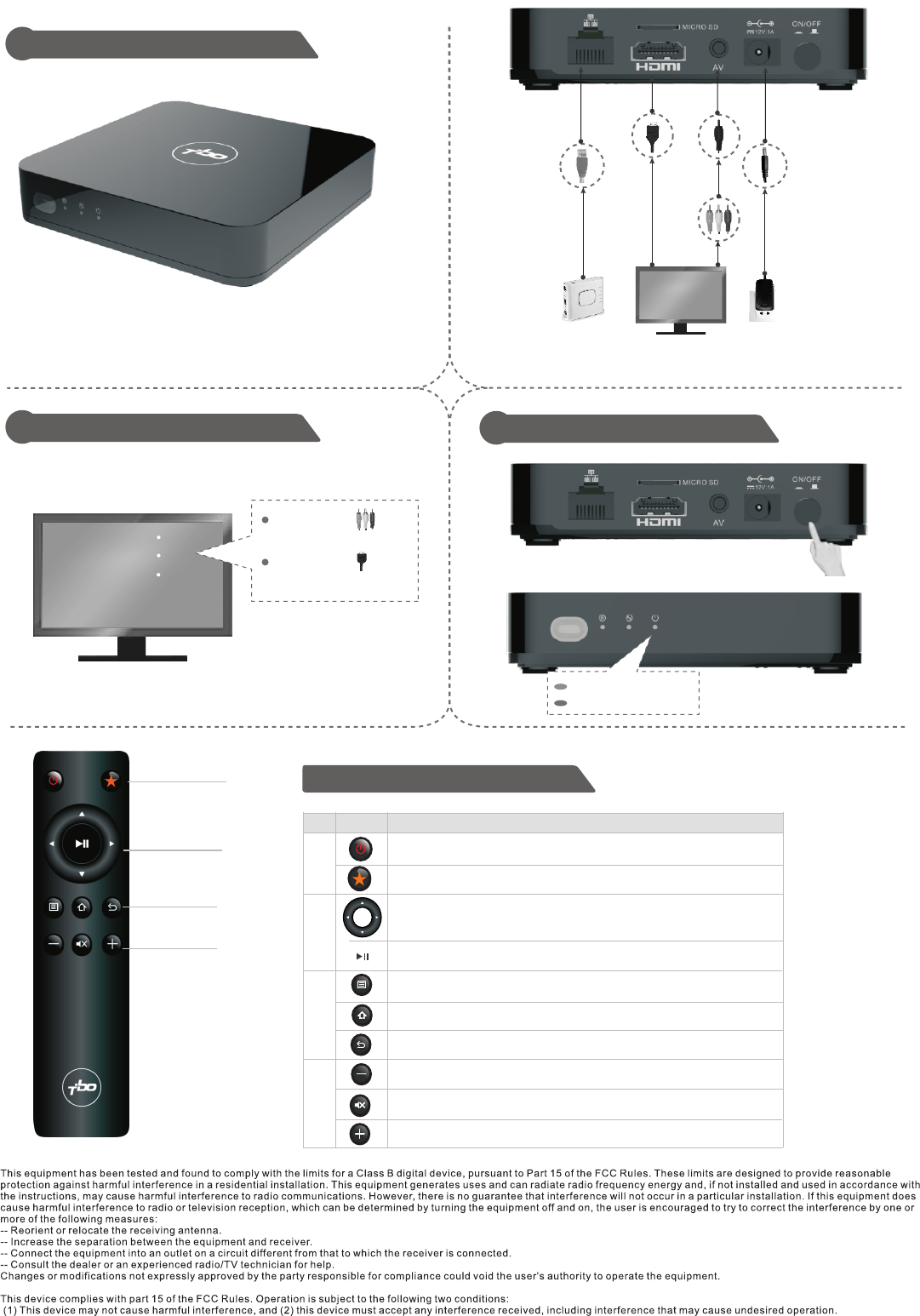
TBO PLAY IPTV STB User Guide
2Select the TV Signal Source 3Starting the STB
Appearance and Connecting Cables
1
TV
AV
HDMI
Remote Control
Connect the ,
choose the TV or AV
Connect the ,
choose the HDMI.
green light: working
red light: standby
1
2
3
4
1
2
3
4
DescriptionItemNo.
Switch the status of TV Set between working and standby.
* You can select a wireless network. This function is applicable only to STBs
with built-in Wi-Fi.
Mute/resume the audio.
Shortcut to homepage.
Return to previous menu.
Move the cursor upward, downward, leftward or rightward in EPG.
Confirm an operation.
Reserved key (defined by EPG).
Show more options menu.
Change audio volume of STB.
Power switch
Power adapter
RJ45
cable
Home gateway
HDMI
cable
Mini AV
cable
Change audio volume of STB.
The distance between user and products should be no less than 20cm