Superior Electronics 919TP4J Transmitter User Manual SK 910R3Q R4Q MuFcc 150428

Superior Electronics Corporation Transmitter SK 910R3Q R4Q MuFcc 150428

User manual

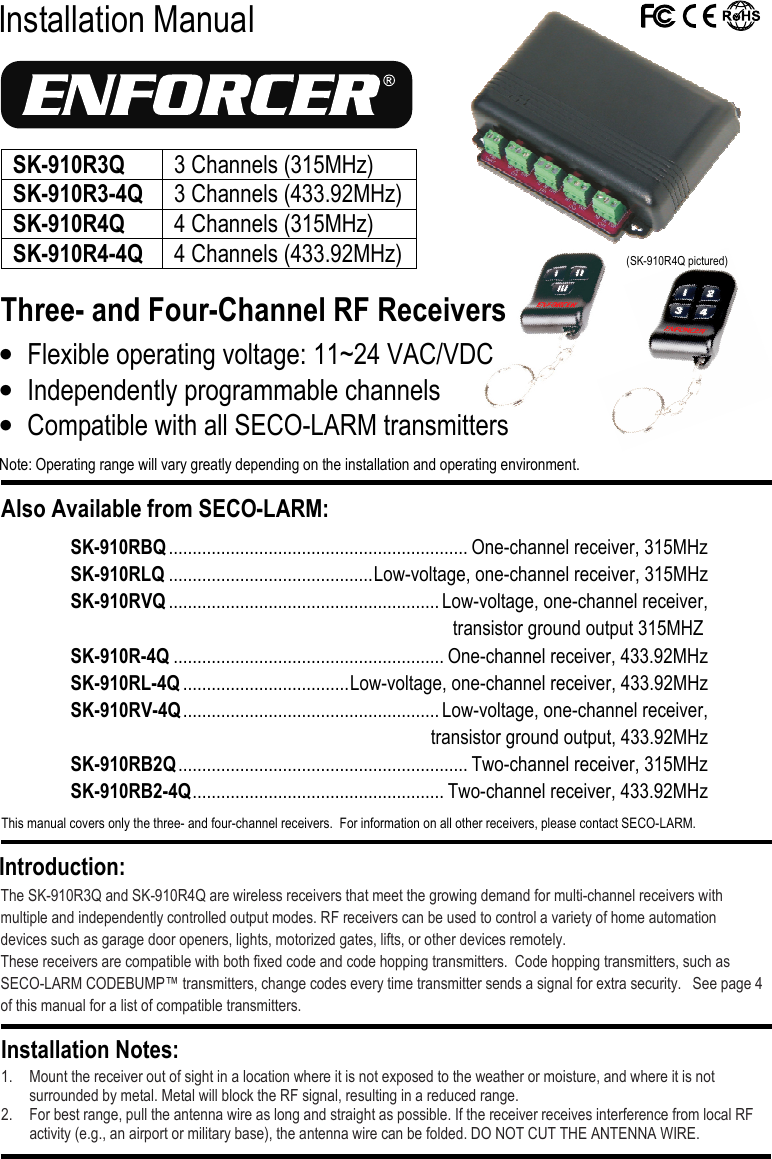
 Installation Manual Three- and Four-Channel RF Receivers  The SK-910R3Q and SK-910R4Q are wireless receivers that meet the growing demand for multi-channel receivers with multiple and independently controlled output modes. RF receivers can be used to control a variety of home automation devices such as garage door openers, lights, motorized gates, lifts, or other devices remotely. These receivers are compatible with both fixed code and code hopping transmitters.  Code hopping transmitters, such as SECO-LARM CODEBUMP™ transmitters, change codes every time transmitter sends a signal for extra security.   See page 4 of this manual for a list of compatible transmitters.  1. Mount the receiver out of sight in a location where it is not exposed to the weather or moisture, and where it is not surrounded by metal. Metal will block the RF signal, resulting in a reduced range. 2. For best range, pull the antenna wire as long and straight as possible. If the receiver receives interference from local RF activity (e.g., an airport or military base), the antenna wire can be folded. DO NOT CUT THE ANTENNA WIRE. Installation Notes: Introduction: • Flexible operating voltage: 11~24 VAC/VDC • Independently programmable channels • Compatible with all SECO-LARM transmitters Note: Operating range will vary greatly depending on the installation and operating environment. Also Available from SECO-LARM:  This manual covers only the three- and four-channel receivers.  For information on all other receivers, please contact SECO-LARM.  SK-910RBQ ............................................................... One-channel receiver, 315MHz SK-910RLQ ........................................... Low-voltage, one-channel receiver, 315MHz SK-910RVQ ......................................................... Low-voltage, one-channel receiver,  transistor ground output 315MHZ SK-910R-4Q ......................................................... One-channel receiver, 433.92MHz SK-910RL-4Q ................................... Low-voltage, one-channel receiver, 433.92MHz SK-910RV-4Q ...................................................... Low-voltage, one-channel receiver,    transistor ground output, 433.92MHz SK-910RB2Q ............................................................. Two-channel receiver, 315MHz SK-910RB2-4Q ..................................................... Two-channel receiver, 433.92MHz  (SK-910R4Q pictured) SK-910R3Q  3 Channels (315MHz) SK-910R3-4Q 3 Channels (433.92MHz) SK-910R4Q 4 Channels (315MHz) SK-910R4-4Q 4 Channels (433.92MHz)
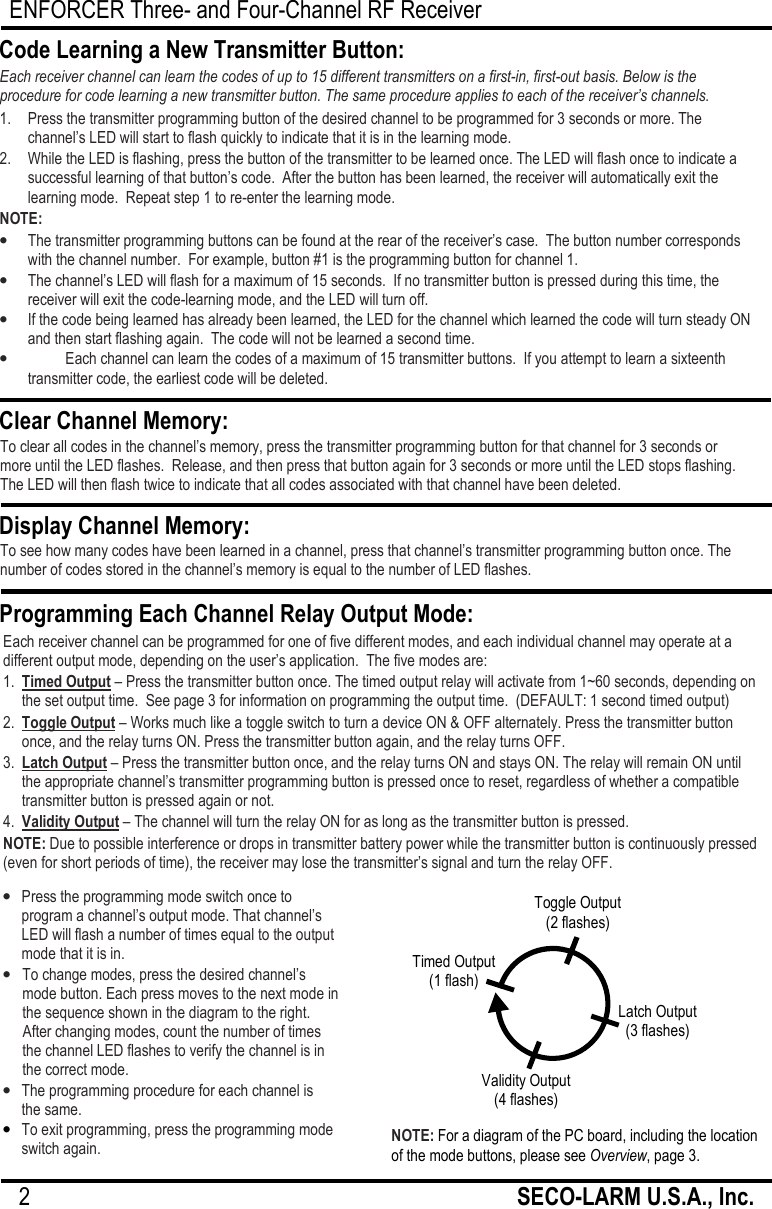
ENFORCER Three- and Four-Channel RF Receiver 2                                                         SECO-LARM U.S.A., Inc.   Each receiver channel can be programmed for one of five different modes, and each individual channel may operate at a different output mode, depending on the user’s application.  The five modes are: 1.  Timed Output – Press the transmitter button once. The timed output relay will activate from 1~60 seconds, depending on the set output time.  See page 3 for information on programming the output time.  (DEFAULT: 1 second timed output) 2.  Toggle Output – Works much like a toggle switch to turn a device ON & OFF alternately. Press the transmitter button once, and the relay turns ON. Press the transmitter button again, and the relay turns OFF. 3.  Latch Output – Press the transmitter button once, and the relay turns ON and stays ON. The relay will remain ON until the appropriate channel’s transmitter programming button is pressed once to reset, regardless of whether a compatible transmitter button is pressed again or not. 4.  Validity Output – The channel will turn the relay ON for as long as the transmitter button is pressed.  NOTE: Due to possible interference or drops in transmitter battery power while the transmitter button is continuously pressed (even for short periods of time), the receiver may lose the transmitter’s signal and turn the relay OFF.  1.   Press the transmitter programming button of the desired channel to be programmed for 3 seconds or more. The channel’s LED will start to flash quickly to indicate that it is in the learning mode. 2.   While the LED is flashing, press the button of the transmitter to be learned once. The LED will flash once to indicate a successful learning of that button’s code.  After the button has been learned, the receiver will automatically exit the learning mode.  Repeat step 1 to re-enter the learning mode. NOTE: • The transmitter programming buttons can be found at the rear of the receiver’s case.  The button number corresponds with the channel number.  For example, button #1 is the programming button for channel 1. • The channel’s LED will flash for a maximum of 15 seconds.  If no transmitter button is pressed during this time, the receiver will exit the code-learning mode, and the LED will turn off. • If the code being learned has already been learned, the LED for the channel which learned the code will turn steady ON and then start flashing again.  The code will not be learned a second time. • Each channel can learn the codes of a maximum of 15 transmitter buttons.  If you attempt to learn a sixteenth transmitter code, the earliest code will be deleted. Code Learning a New Transmitter Button: Each receiver channel can learn the codes of up to 15 different transmitters on a first-in, first-out basis. Below is the procedure for code learning a new transmitter button. The same procedure applies to each of the receiver’s channels. Clear Channel Memory: To clear all codes in the channel’s memory, press the transmitter programming button for that channel for 3 seconds or more until the LED flashes.  Release, and then press that button again for 3 seconds or more until the LED stops flashing. The LED will then flash twice to indicate that all codes associated with that channel have been deleted.  Display Channel Memory: To see how many codes have been learned in a channel, press that channel’s transmitter programming button once. The number of codes stored in the channel’s memory is equal to the number of LED flashes.  Programming Each Channel Relay Output Mode: • Press the programming mode switch once to program a channel’s output mode. That channel’s LED will flash a number of times equal to the output mode that it is in. • To change modes, press the desired channel’s mode button. Each press moves to the next mode in the sequence shown in the diagram to the right. After changing modes, count the number of times the channel LED flashes to verify the channel is in the correct mode. • The programming procedure for each channel is  the same. • To exit programming, press the programming mode switch again. NOTE: For a diagram of the PC board, including the location of the mode buttons, please see Overview, page 3. Toggle Output (2 flashes) Validity Output (4 flashes) Timed Output (1 flash) Latch Output (3 flashes)
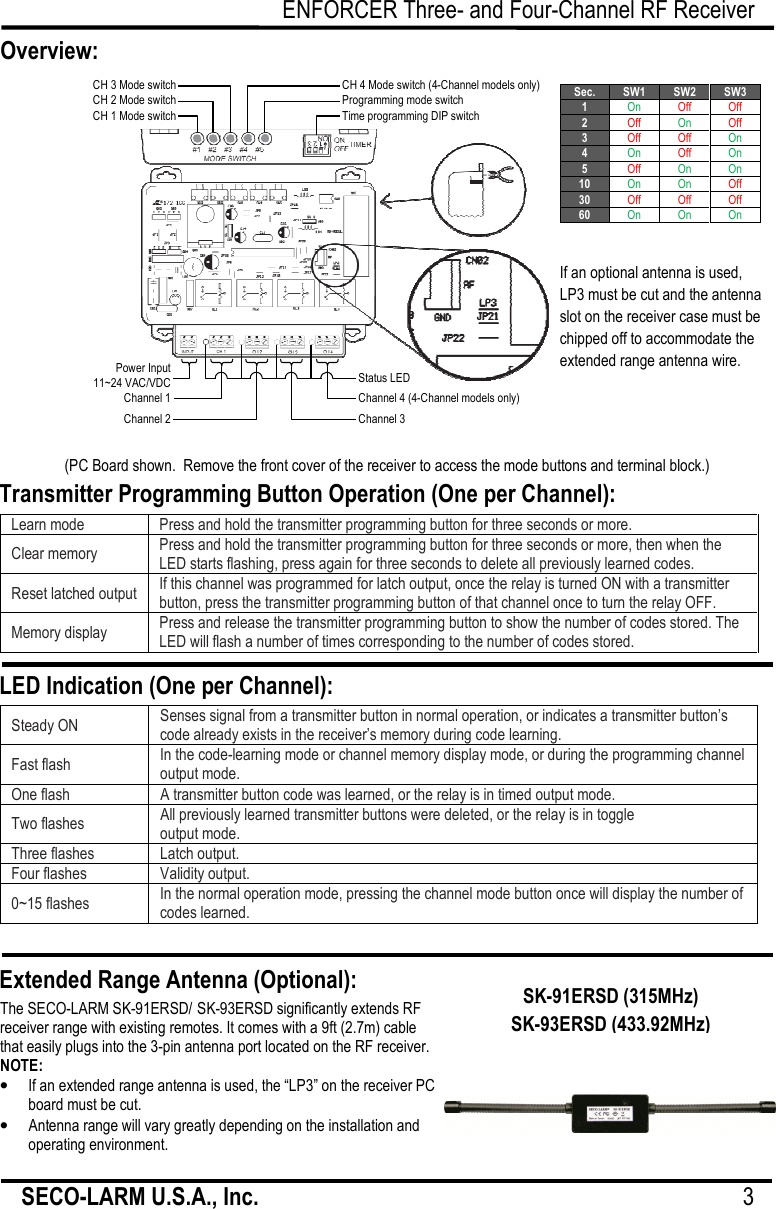
ENFORCER Three- and Four-Channel RF Receiver SECO-LARM U.S.A., Inc.                                                                                     3                        Transmitter Programming Button Operation (One per Channel): LED Indication (One per Channel): Extended Range Antenna (Optional): The SECO-LARM SK-91ERSD/ SK-93ERSD significantly extends RF receiver range with existing remotes. It comes with a 9ft (2.7m) cable that easily plugs into the 3-pin antenna port located on the RF receiver. NOTE: • If an extended range antenna is used, the “LP3” on the receiver PC board must be cut. • Antenna range will vary greatly depending on the installation and operating environment.  SK-91ERSD (315MHz) SK-93ERSD (433.92MHz) Overview: (PC Board shown.  Remove the front cover of the receiver to access the mode buttons and terminal block.) Learn mode Press and hold the transmitter programming button for three seconds or more. Clear memory Press and hold the transmitter programming button for three seconds or more, then when the LED starts flashing, press again for three seconds to delete all previously learned codes. Reset latched output If this channel was programmed for latch output, once the relay is turned ON with a transmitter button, press the transmitter programming button of that channel once to turn the relay OFF. Memory display Press and release the transmitter programming button to show the number of codes stored. The LED will flash a number of times corresponding to the number of codes stored.  Steady ON Senses signal from a transmitter button in normal operation, or indicates a transmitter button’s code already exists in the receiver’s memory during code learning. Fast flash In the code-learning mode or channel memory display mode, or during the programming channel output mode. One flash A transmitter button code was learned, or the relay is in timed output mode. Two flashes All previously learned transmitter buttons were deleted, or the relay is in toggle  output mode. Three flashes Latch output. Four flashes Validity output. 0~15 flashes In the normal operation mode, pressing the channel mode button once will display the number of codes learned.  Sec. SW1 SW2 SW3 1 On Off Off 2 Off On Off 3 Off Off On 4 On Off On 5 Off On On 10 On On Off 30 Off Off Off 60 On On On  CH 3 Mode switchCH 2 Mode switchCH 1 Mode switchCH 4 Mode switch (4-Channel models only) Programming mode switch Time programming DIP switch Power Input11~24 VAC/VDCChannel 1Channel 2Channel 3 Channel 4 (4-Channel models only) Status LED If an optional antenna is used, LP3 must be cut and the antenna slot on the receiver case must be chipped off to accommodate the extended range antenna wire.
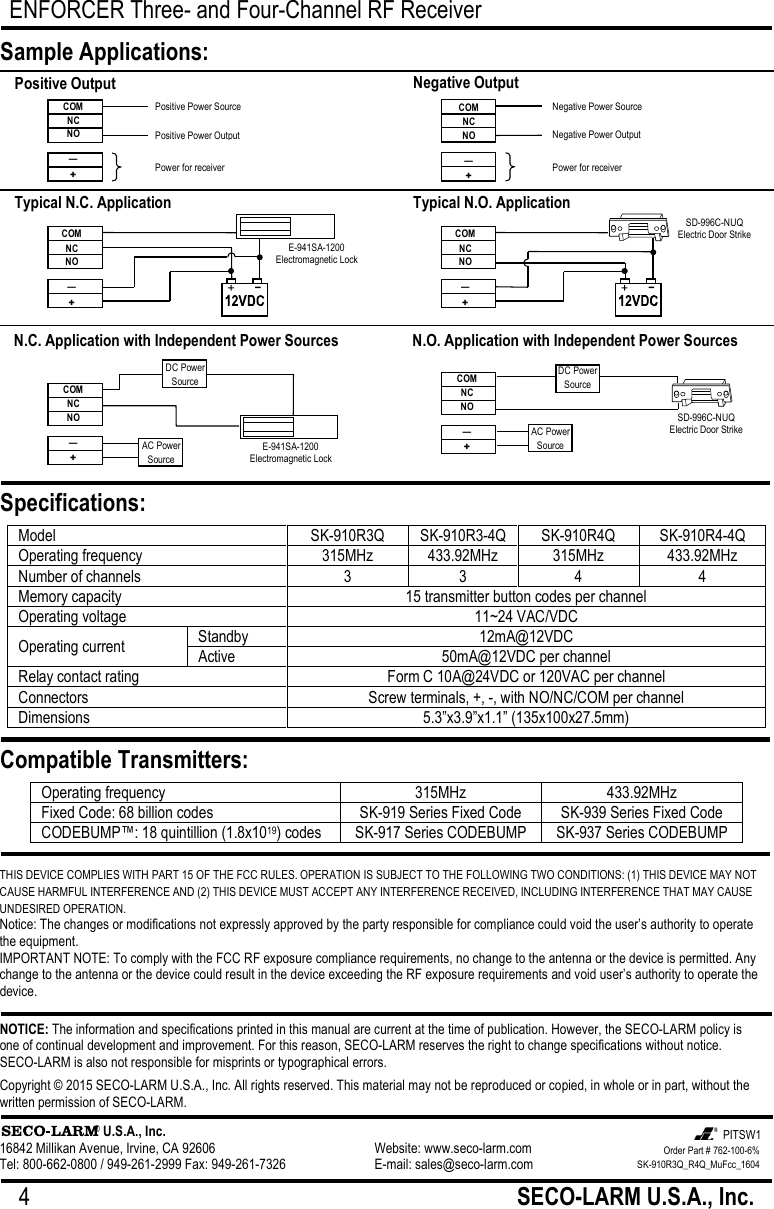
ENFORCER Three- and Four-Channel RF Receiver 4                                                         SECO-LARM U.S.A., Inc.           THIS DEVICE COMPLIES WITH PART 15 OF THE FCC RULES. OPERATION IS SUBJECT TO THE FOLLOWING TWO CONDITIONS: (1) THIS DEVICE MAY NOT CAUSE HARMFUL INTERFERENCE AND (2) THIS DEVICE MUST ACCEPT ANY INTERFERENCE RECEIVED, INCLUDING INTERFERENCE THAT MAY CAUSE UNDESIRED OPERATION. Notice: The changes or modifications not expressly approved by the party responsible for compliance could void the user’s authority to operate the equipment. IMPORTANT NOTE: To comply with the FCC RF exposure compliance requirements, no change to the antenna or the device is permitted. Any change to the antenna or the device could result in the device exceeding the RF exposure requirements and void user’s authority to operate the device. NOTICE: The information and specifications printed in this manual are current at the time of publication. However, the SECO-LARM policy is one of continual development and improvement. For this reason, SECO-LARM reserves the right to change specifications without notice. SECO-LARM is also not responsible for misprints or typographical errors. Copyright © 2015 SECO-LARM U.S.A., Inc. All rights reserved. This material may not be reproduced or copied, in whole or in part, without the written permission of SECO-LARM.                      ® U.S.A., Inc. 16842 Millikan Avenue, Irvine, CA 92606       Website: www.seco-larm.com Tel: 800-662-0800 / 949-261-2999 Fax: 949-261-7326      E-mail: sales@seco-larm.com  Model SK-910R3Q SK-910R3-4Q SK-910R4Q SK-910R4-4Q Operating frequency 315MHz 433.92MHz 315MHz 433.92MHz Number of channels 3 3 4 4 Memory capacity 15 transmitter button codes per channel Operating voltage 11~24 VAC/VDC Operating current Standby 12mA@12VDC Active 50mA@12VDC per channel Relay contact rating Form C 10A@24VDC or 120VAC per channel Connectors Screw terminals, +, -, with NO/NC/COM per channel Dimensions 5.3”x3.9”x1.1” (135x100x27.5mm)  Sample Applications: Specifications: Compatible Transmitters: Operating frequency 315MHz 433.92MHz Fixed Code: 68 billion codes SK-919 Series Fixed Code SK-939 Series Fixed Code CODEBUMP™: 18 quintillion (1.8x10¹⁹) codes SK-917 Series CODEBUMP SK-937 Series CODEBUMP  Positive Output COM NC NO — + Positive Power Source Positive Power Output Power for receiver Negative Output N.C. Application with Independent Power Sources DC Power Source COM NC NO — + AC Power Source N.O. Application with Independent Power Sources COM NC NO — + Typical N.C. Application COM NC NO — + E-941SA-1200 Electromagnetic Lock Typical N.O. Application SD-996C-NUQ Electric Door Strike DC Power Source AC Power Source E-941SA-1200 Electromagnetic Lock SD-996C-NUQ Electric Door Strike COM NC NO — + COM NC NO — + Negative Power Source Negative Power Output Power for receiver Order Part # 762-100-6% SK-910R3Q_R4Q_MuFcc_1604  PITSW1

Navigation menu