Factory Cat Micromini 17 20 Walk Behind Scrubber Operators Manual
2017-01-05
: Sweepscrub Factory-Cat-Micromini-17-20-Walk-Behind-Scrubber-Operators-Manual factory-cat-micromini-17-20-walk-behind-scrubber-operators-manual 1953 file product_file
Open the PDF directly: View PDF  .
.
Page Count: 28
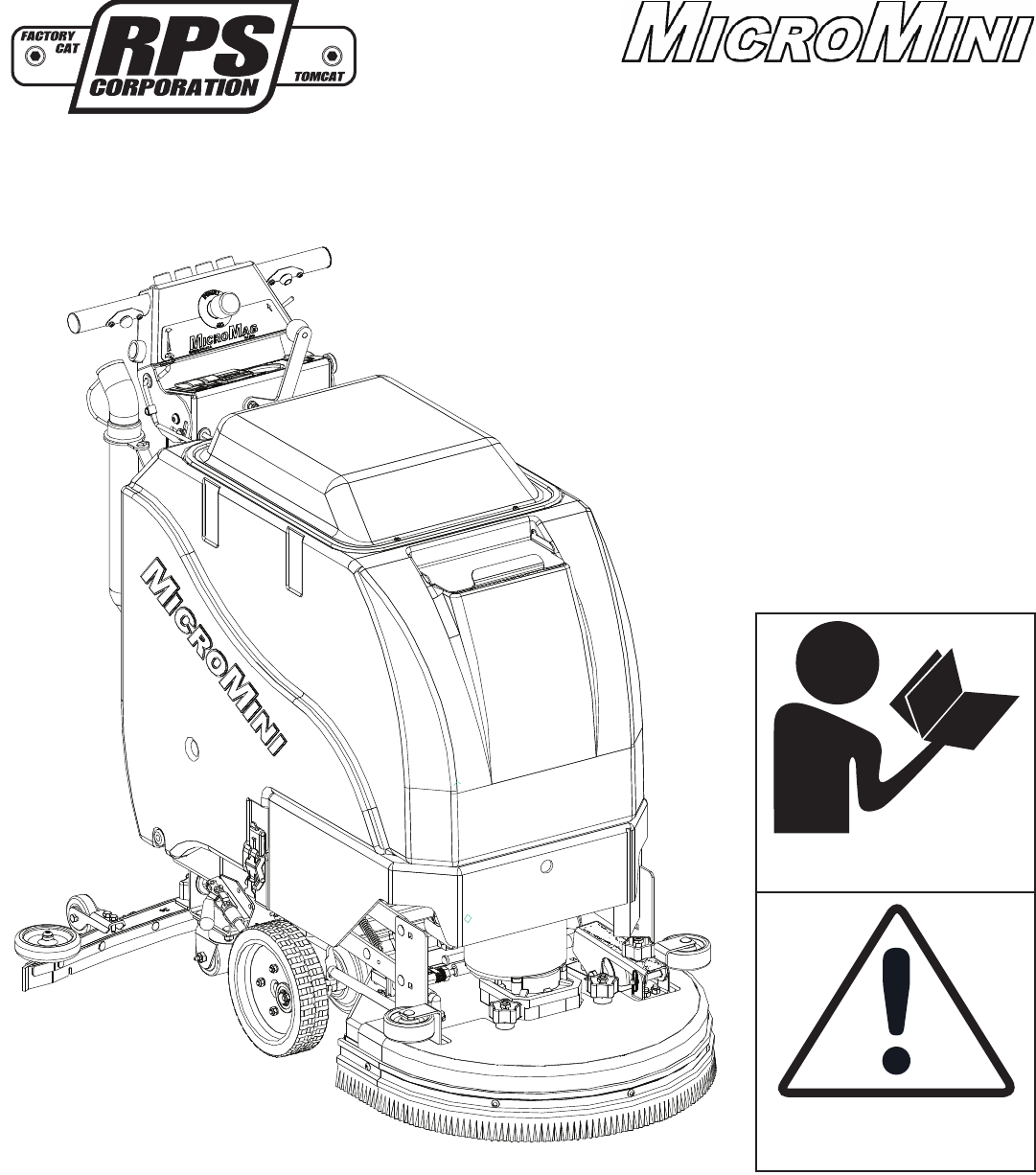
Operating Instructions (EN)
MODELS:
20'' Disk Traction
20'' Disk Pad Assist
20'' Orbital Traction
24'' Orbital Traction
www.rpscorporation.com
1711 South Street
Racine, WI 53404 (USA)
(800) 450-9824 | (+001) 262-681-6470 VERSION 16.055
© 2016 RPS Corporation MICROMINI-OP-EN
Read the Operators Manual
before using the machine.
Read the Safety Messages
before servicing machine.
- 2 - MICROMINI-OP-EN
INTRODUCTION
This manual is furnished with each new machine. This manual will allow the Operator to get the best performance out of
your RPS manufactured Scrubber-Drier, Sweeper, Burnisher, or Orbital Scrubber. Read this manual thoroughly before
operating or servicing the machine.
This machine will provide excellent performance, but the best results will be obtained at the most minimum costs if:
• The machine is regularly maintained - per the machine Preventative Maintenance instructions provided.
• The machine is operated with reasonable care and caution.
• The machine is maintained with manufacturer supplied parts.
ABOUT THIS MANUAL
Table of Contents: Tells you where to look in the manual.
Safety: Section contains important information regarding hazard or unsafe practices of the machine. Levels of hazards
are identifi ed that could result in product or personal injury, or severe injury resulting in death.
Machine Controls: Shows you the different machine controls and features.
Machine Setup: Tells you how to setup machine from un-crating to installing Squeegee and Brushes.
Operations: Section is to familiarize the operator with the operation and function of the machine.
Battery Charging: Shows you how to charge the Batteries (on-board and off board charging).
Maintenance: This section contains preventative maintenance to keep the machine and it’s components in good working
condition. They are listed in this general order:
• Batteries
• Scrub Brushes
• Adjusting Squeegee
• Service Schedule
• Machine Trouble Shooting
Trouble Shooting: A list of common problems that may occur.
Machine Install Form: Should be fi lled out upon machine installation and faxed to 1-866-632-6961 or online at
www.rpscorporation.com.
Warranty Policy: Tells you coverage, exclusions and limitations to warranty.
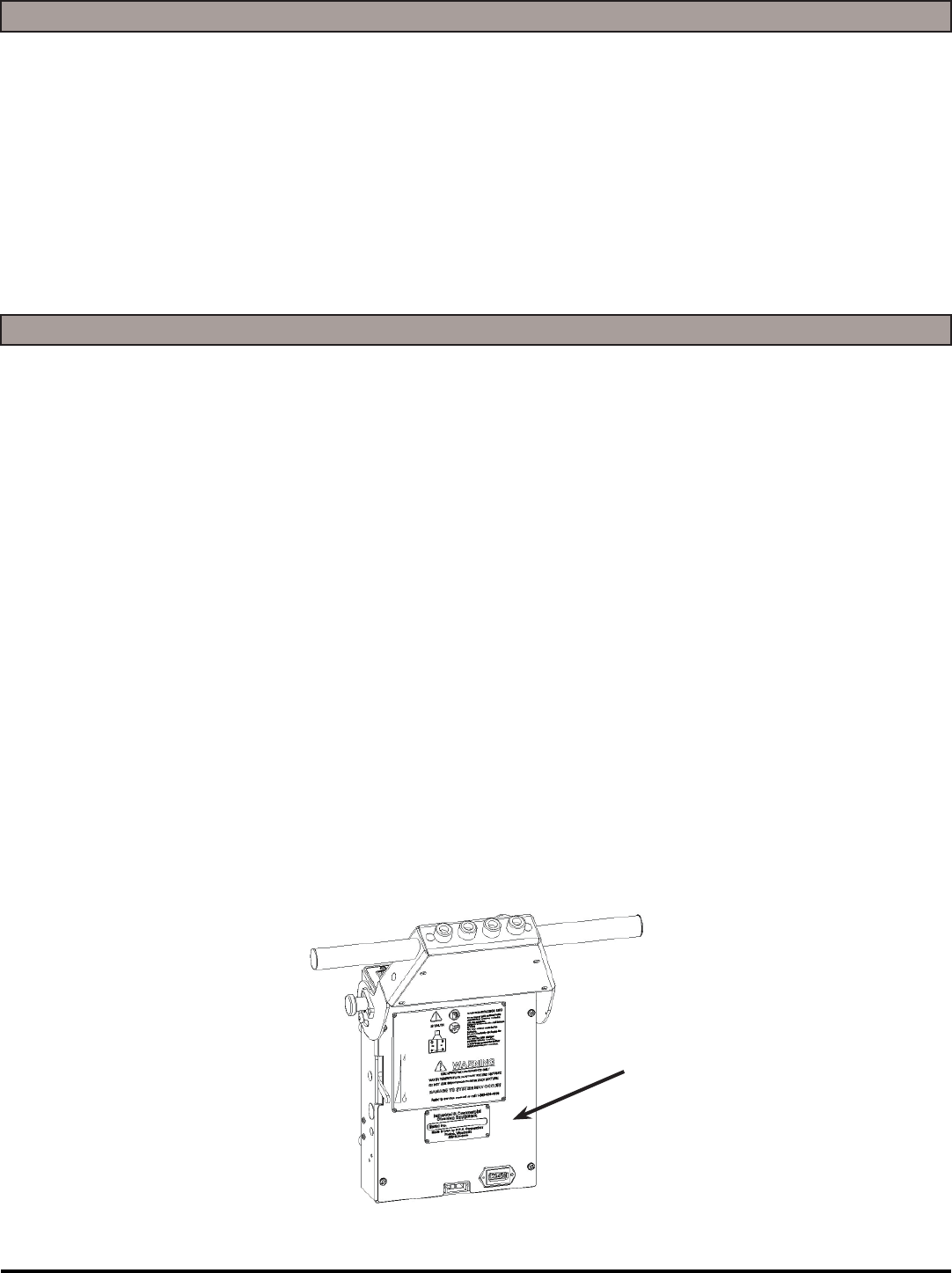
NOTE: The Serial Number of your machine is located on the lower half of the control panel of the machine.
AS OUR POLICY IS ONE OF CONSTANT IMPROVEMENT - ALL INFORMATION AND
SPECIFICATIONS ARE SUBJECT TO CHANGE WITHOUT NOTICE.
Serial Number

MICROMINI-OP-EN - 3 -
TABLE OF CONTENTS
Introduction 2
About This Manual 2
Table of Contents 3
Safety Messages 4
Safety Label Locations 6
Operation Controls 7
Machine Components 8
Machine Components 9
Machine Setup 10
Un-Crating Machine: 10
Connecting Batteries: 10
Attaching Squeegee: 10
Adjusting Squeegee: 11
Removing Squeegee: 11
Replacing or Rotating Squeegee Blades: 11
Installing EDGE Pads: 12
Leveling EDGE Decks: 12
Machine Operation 13
Pre-Cleaning Checklist: 13
Operating Hints: 13
One Pass Scrubbing: 14
Scrub Only: 14
Vacuum Only: 14
Adjust Solution Flow: 15
Draining Solution Tank: 15
Draining Recovery Tank: 15
Open Recovery Lid: 15
Flush Recovery Tank: 16
Clean “Drain Saver”: 16
Clean Vacuum Screen: 16
Tip Tank: 17
Squeegee Up: 17
Squeegee Down: 17
Vacuum Motor: 18
Solution Filter: 18
Cleaning Solution Filter: 18
Battery Charging 19
External Battery Charging: 19
On-Board Charger 20
On-Board Battery Charging (Optional): 20
Battery Maintenance Guide 21
Safety: 21
Inspection and Cleaning: 21
Storage: 21
Watering: 21
Maintenance 22
Daily Maintenance: 22
Weekly Maintenance: 22
Monthly maintenance: 22
Yearly Maintenance: 22
Storing Machine: 22
Checking Battery Specifi c Gravity: 22
MicroMini PM Records 23
Common Wear Parts 25
EDGE Pads and Screens: 25
Squeegee Blade Kits & Complete Squeegee
Assemblies: 26
- 4 - MICROMINI-OP-EN
SAFETY MESSAGES
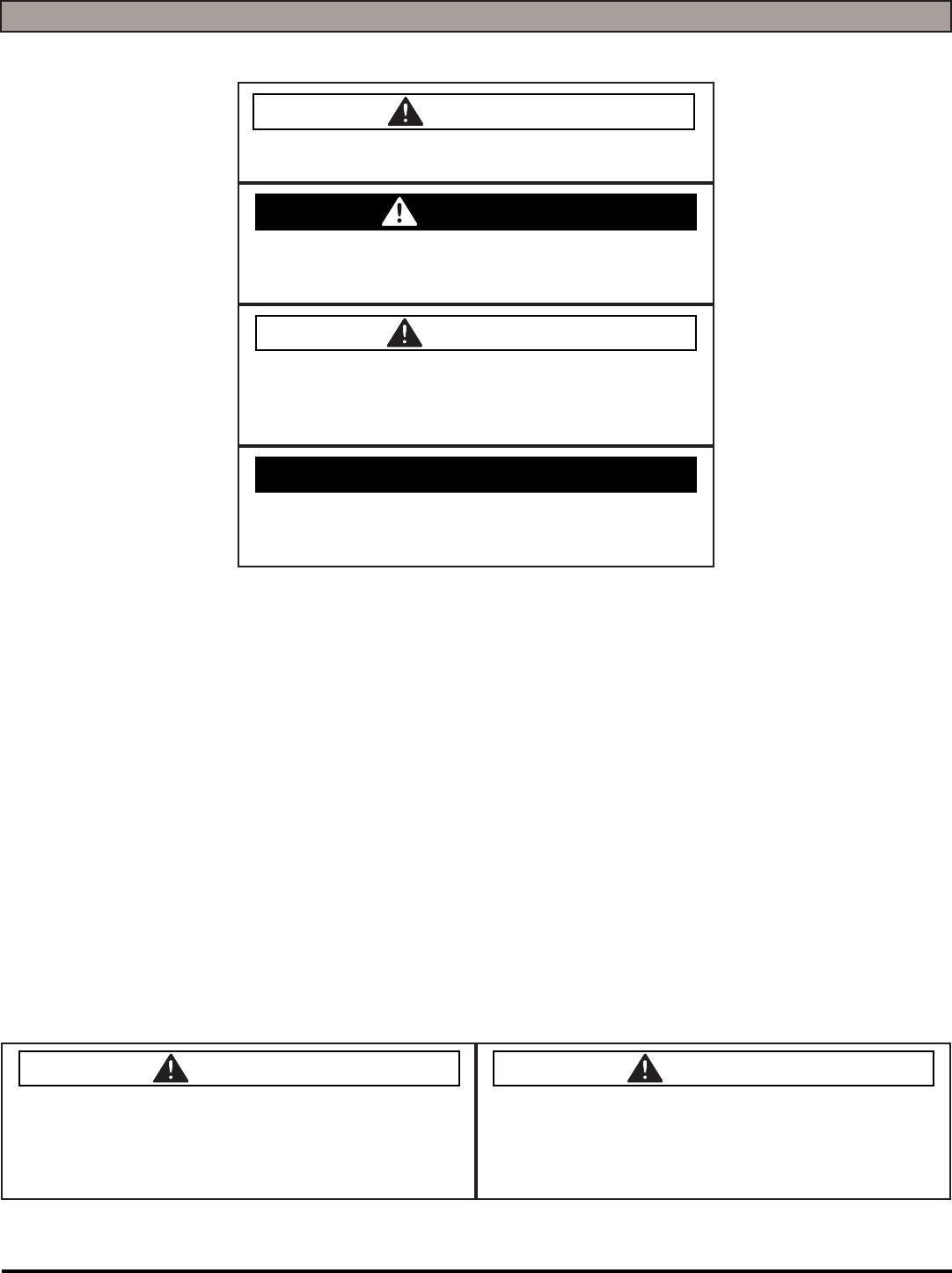
You will see four kinds of safety reminders in this manual:
DANGER
DANGER indicates a hazardous situation which, if not
avoided, will result in death or serious injury.
WARNING
WARNING indicates a potentially hazardous situation
which, if not avoided, could result in death or serious
injury.
CAUTION
CAUTION indicates a potentially hazardous situation
which, if not avoided, could result in minor or moderate
injury or damage to this machine or nearby objects. CAU-
TION also can be used to alert against unsafe practices.
NOTICE
NOTICE indicates information considered important, but
not hazard-related. This safety message may be related
to property damage or warranty warnings.
Your safety, and that of others, is very important. Operating this machine safely is an important responsibility.
DO NOT OPERATE THIS MACHINE:
• Unless you are trained and authorized to do so
• Unless you have read and understood this Operator’s Manual
• On surfaces with greater than a 2% grade unless this machine is equipped with a functional parking brake
• On surfaces with greater than an 8% grade at any time
• On Loading Docks
WHEN OPERATING THIS MACHINE:
• Remove loose objects from the fl oor that could be projected from the rotating Brushes
• Keep your hands and feet away from the rotating Brushes
• Do not operate this machine where fl ammable liquids are present
• Use caution when maneuvering
BEFORE LEAVING THE MACHINE:
• Park the machine on a level surface
• Turn the machine OFF
BEFORE SERVICING THE MACHINE:
• Disconnect the Batteries
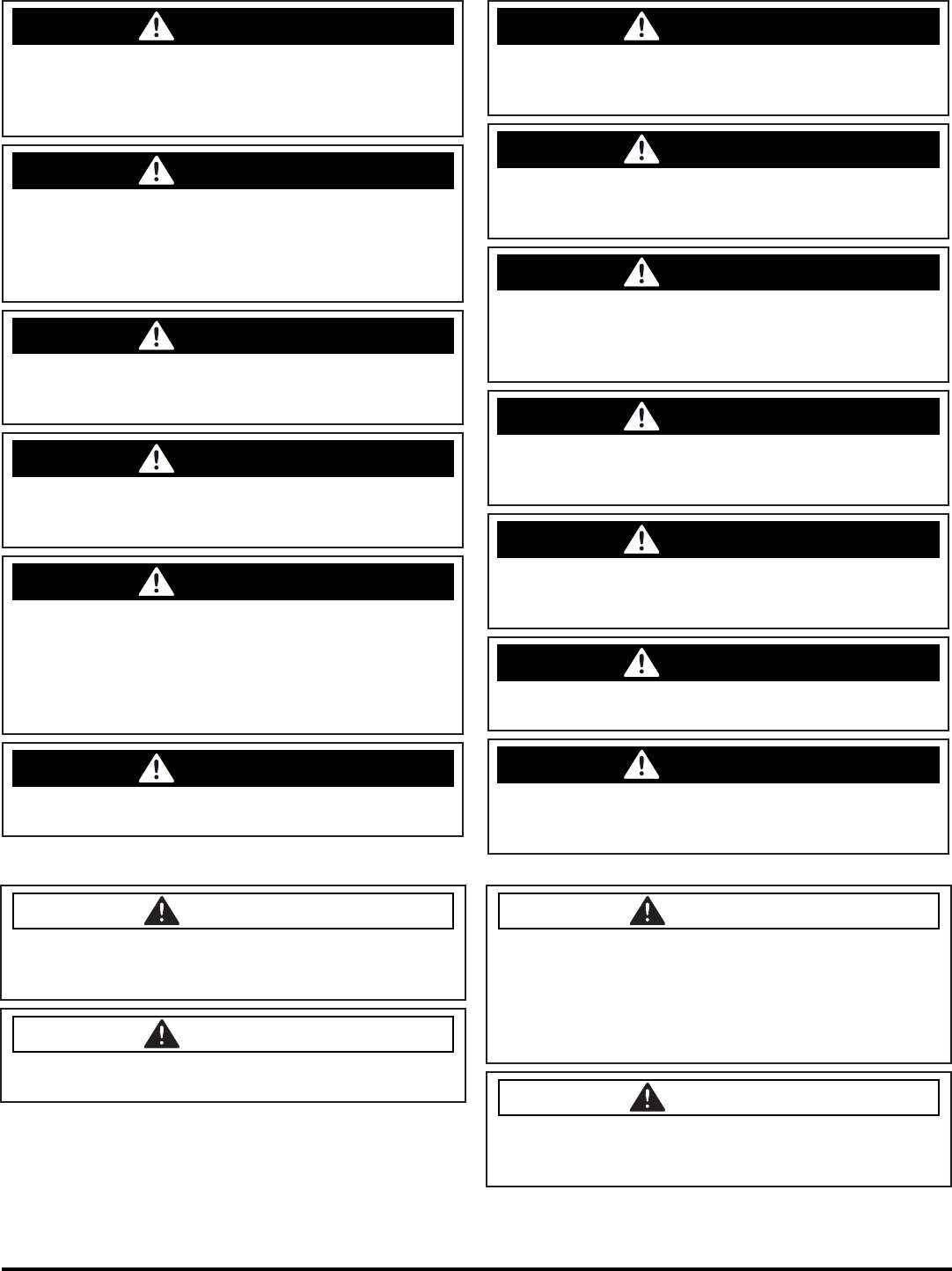
DANGER
Explosive hydrogen gas forms when Batteries are
charging. An open fl ame or spark can cause this gas
to explode. Serious personal injury or property damage
could occur. Only charge the Batteries in this machine in
a well ventilated area.
DANGER
Flammable materials can cause an explosion or fi re. Do
not use fl ammable materials in tank or pick up.
MICROMINI-OP-EN - 5 -
WARNING
The Batteries in this machine produce hazardous
voltage which can cause electrical shock, burns and/
or electrocution. Always disconnect Batteries before
servicing this machine.
WARNING
When climbing or descending ramps, always drive
machine forward. To avoid overturning the machine, Do
not back down ramps. Do not drive across inclines. Do
not turn while ascending or descending ramps. Over-
turning the machine can cause serious injury or death.
WARNING
Do not use water that exceeds 135°F / 57°C. If wa-
ter is above said temperature, this will void the Tank
Warranty.
WARNING
Do not park this machine on ramps or slopes. Always
park this machine on a level, hard surface. Do not oper-
ate this machine outdoors or on uneven surfaces.
WARNING
The batteries in this machine contain sulfuric acid,
which causes burns to skin. If battery acid contacts
clothing or skin, rinse the effected area with cold water
immediately. If battery acid gets on your face or in your
eyes, fl ush the area immediately with cold water and
seek medical attention.
WARNING
To avoid electrical shock, do not operate this machine
over electrical fl oor outlets.
WARNING
Dress safely. Do not wear rings or metal wrist watches
when servicing this machine, as they can cause an
electrical short circuit which can cause serious burns.
WARNING
Do not remove, paint over or destroy warning decals. If
warning decals become damaged, call 1-262-681-3583
for free replacements.
WARNING
Dress safely. Do not wear a neck tie, scarf, or any
loose or dangling clothing while operating this machine.
Loose or dangling clothing or neck-wear can tangle in
rotating parts, causing serious injury or death.
WARNING
Always turn off this machine before leaving it unat-
tended. Do not allow untrained persons to operate this
machine.
WARNING
NO RIDERS. Do not carry passengers on this ma-
chine. Do not use this machine as a stepladder or work
platform.
WARNING
Understand the dynamic braking system before you
operate the machine on ramps. Machine may coast.
WARNING
Before you service a Battery, always wear face protec-
tion, protective gloves and protective clothing. Battery
acid or battery explosion can cause serious injuries.
CAUTION
To avoid damage to this machine, use only cleaning
solutions and replacement parts recommended by the
manufacturer.
CAUTION
Do not operate this machine if any parts have been
damaged or removed.
CAUTION
Always use the automatic battery charger provided by
the manufacturer of this machine to charge the batter-
ies of this machine. It is designed to charge the batter-
ies at the appropriate rate. If you must use a different
charger, disconnect the Batteries before charging to
avoid damage to the electronic speed controller.
CAUTION
To avoid damage to the electronic control components
of this machine, Do not store this machine outdoors. Do
not pressure wash this machine.
- 6 - MICROMINI-OP-EN
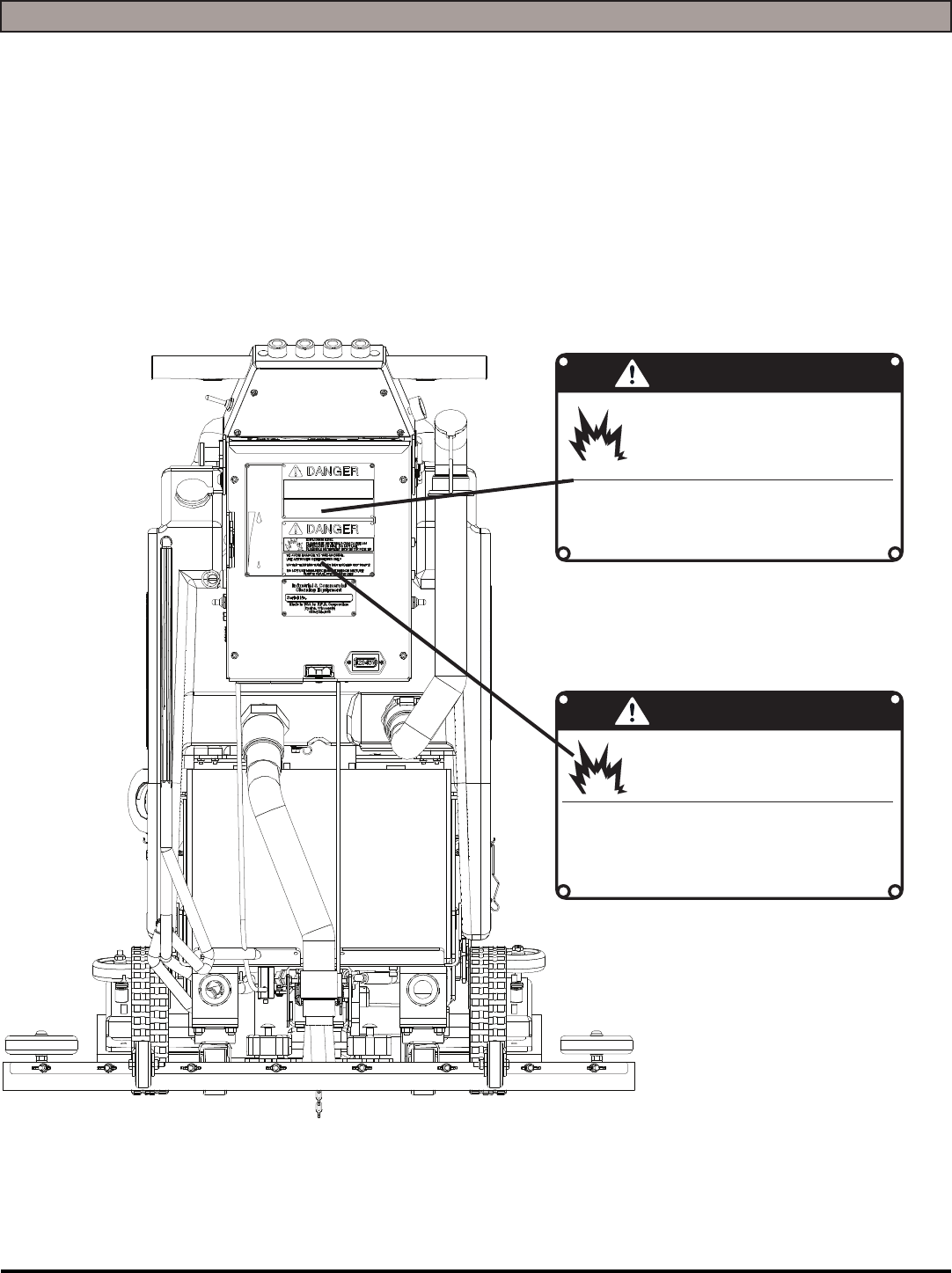
SAFETY LABEL LOCATIONS
Read and obey all Safety Labels on your MICROMINI Floor Scrubber. If you have questions about these labels, ask your
supervisor.
These images indicate where on the MICROMINI Safety Labels are located. If ever the labels become illegible, worn off, or
torn, promptly report it to your supervisor and replace it.
USE ONLY DISTILLED WATER IN THE BATTERIES. USE
ONLY THE OEM CHARGER PROVIDED WITH THE MA-
CHINE. ALWAYS DISCONNECT THE BATTERY BEFORE
SERVICING THE MACHINE.
REFER TO MANUAL OR CALL +011-262-681-3583
DANGER
EXPLOSION RISK!
EXPLOSIVE HYDROGEN GAS FORMS WHEN
BATTERIES ARE CHARGING. AN OPEN FLAME
OR SPARK CAN CAUSE THIS GAS TO EXPLODE.
ONLY CHARGE THE BATTERIES IN THIS MA-
CHINE IN A WELL VENTILATED AREA.
TO AVOID DAMAGE TO THIS MACHINE:
s53%!002/6%$$%4%2'%.43/.,9
s7!4%24%-0%2!452%-534./4%8#%%$˚F/ 54˚#
s$/./453%()'(0%2#%.4!'%",%!#(-)8452%
REFER TO MANUAL OR CALL +011-262-681-3583
DANGER
EXPLOSION RISK!
&,!--!",%-!4%2)!,3#!.#!53%!.
%80,/3)/./2&)2%$/./453%&,!-
-!",%-!4%2)!,3).4!.+/20)#+50
BATTERY CHARGING LABEL
PART #: 253-7280
TANK LABEL
PART #: 5-728
MICROMINI-OP-EN - 7 -
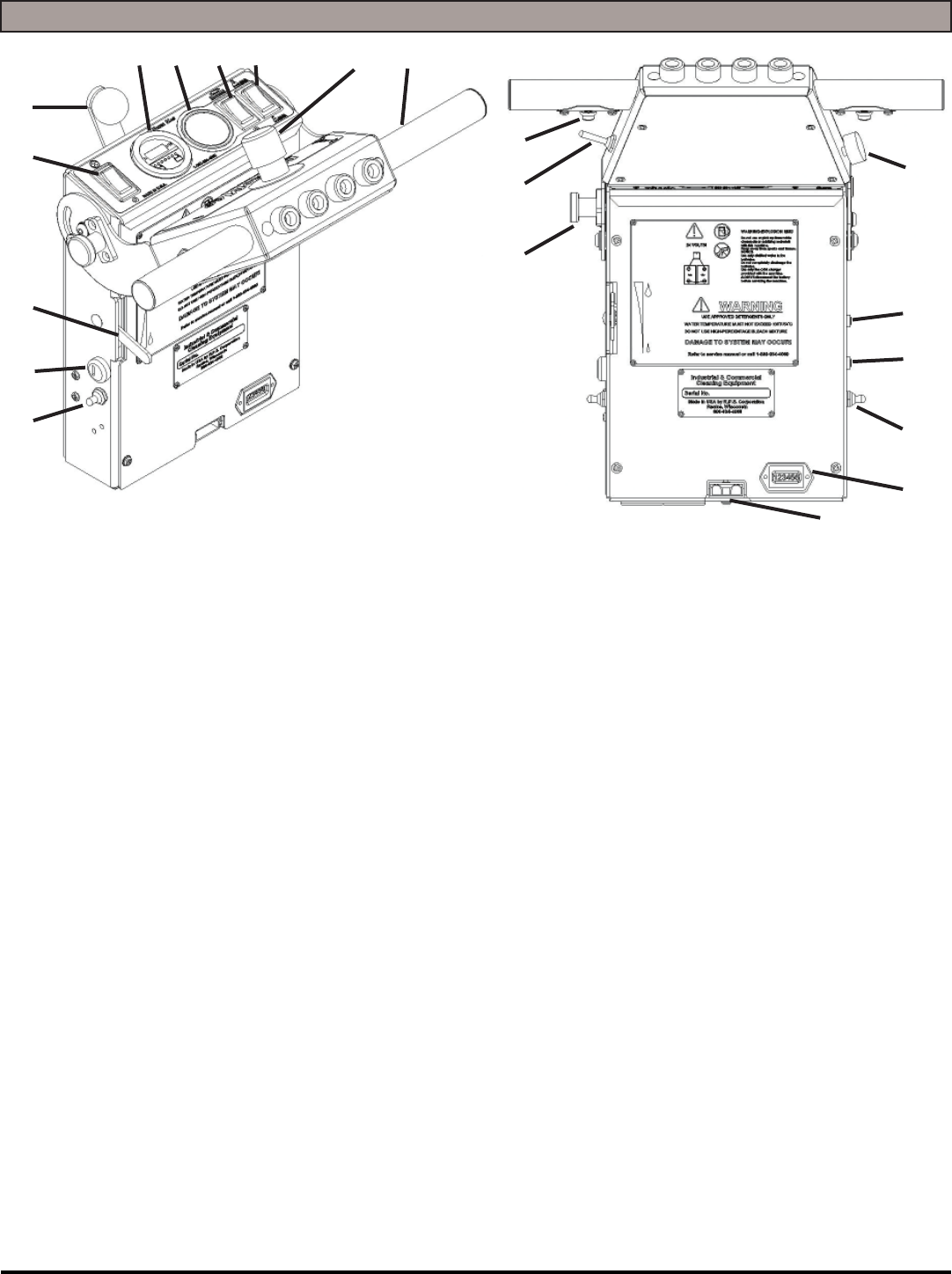
OPERATION CONTROLS
1. MAIN POWER SWITCH (OPTIONAL): Turns the machine ON and OFF
2. POWER SWITCH: Turns power on to the machine
3. SOLUTION CONTROL LEVEL: Controls solution fl ow (Up = MORE, Down = LESS)
4. VACUUM SWITCH: Turns the Squeegee Vacuum Motor ON and OFF
5. SQUEEGEE LIFT LEVER: Raises and lowers the Squeegee
6. BATTERY GAUGE / HOUR METER: Indicates the amount of Battery charge
remaining
7. SCRUBDECK DOWN PRESSURE GAUGE (OPTIONAL): Shows the amount of
down pressure applied to Scrubdeck
8. SCRUBDECK SWITCH: Turns the Scrubdeck ON or OFF & UP or DOWN
9. SOLUTION FLOW SWITCH: Turns solution fl ow ON or OFF
10. EMERGENCY SHUT OFF SWITCH (OPTIONAL): Shuts OFF the machine in case
of emergency
11. HANDLE BAR: Adjustable Handlebar
12. ADJUSTABLE HANDLE BAR LOCK: Pull out to adjust Handlebar and release to
lock the Handlebar in place
13. REVERSE SWITCH: Pull back for reverse
14. DRIVE BUTTON: Press to drive forward, release to stop
15. SPEED CONTROL KNOB: Controls the speed of the Traction Drive - Turn counter-
clockwise to reduce speed
16. CIRCUIT BREAKER: 25 AMP resettable circuit breaker for Vacuum Motor
17. CIRCUIT BREAKER: 40 AMP resettable circuit breaker for Scrub Motor
18. SPRAY JET [BLUE BOOT] (OPTIONAL): Activates Spray Pump for remote Spray
Wand
19. RECHARGE CYCLE METER: Shows the amount of charges on a machine
20. CHARGER PORT: Red 50 used to receive charger input for optional external
charger - 24V ONLY!
1
2
3
4
5
67 8910 11
12
13
14
15
16
17
18
19
20
- 8 - MICROMINI-OP-EN
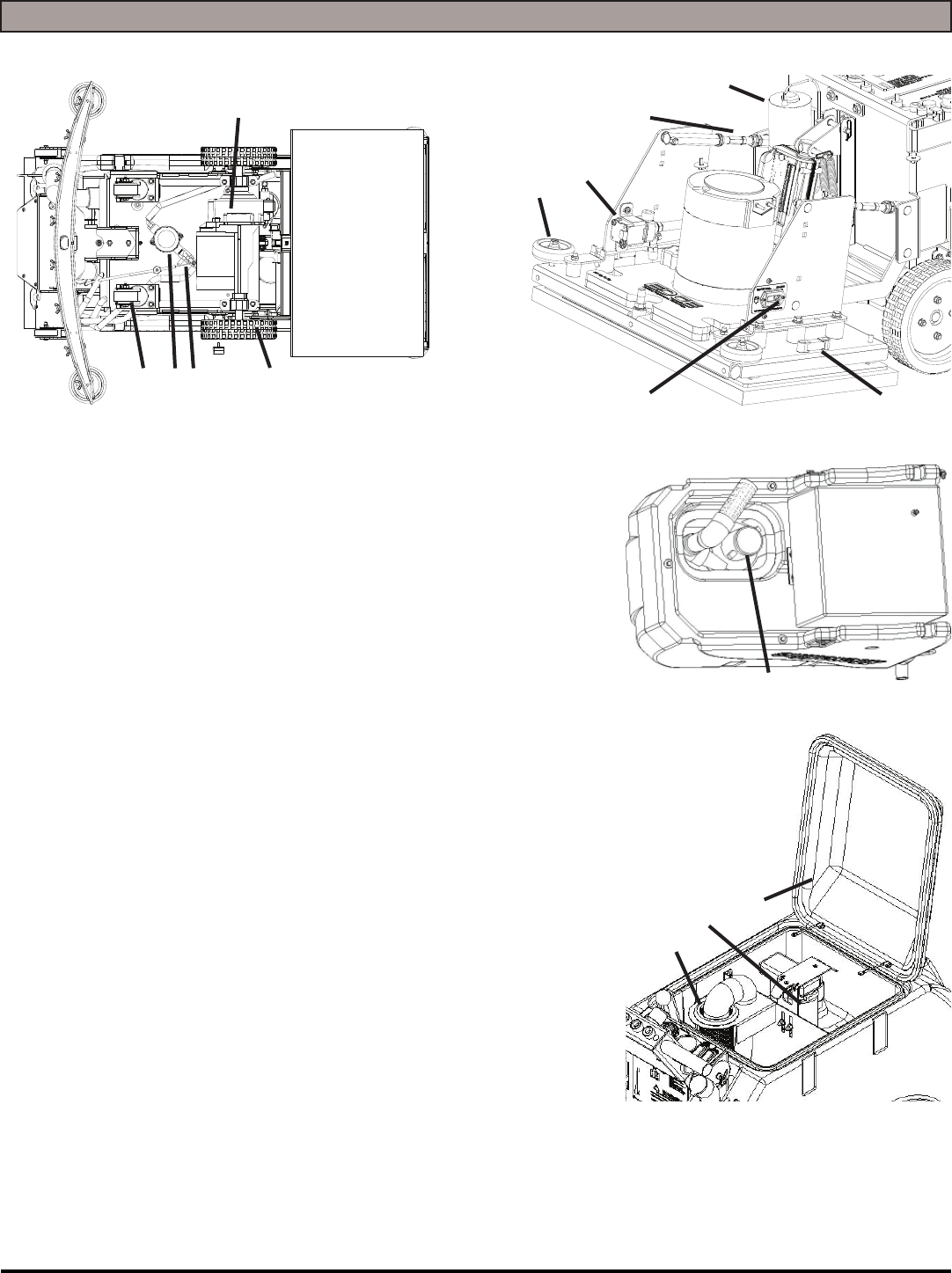
MACHINE COMPONENTS
1. CASTER: Twin casters for stability
2. SOLUTION FILTER: Filters water solution prior to scrubbing
3. SOLUTION FLOW SHUT OFF VALVE: Meters solution rate
(GPM)
4. MAIN TIRES: Drive Tires
5. TRACTION DRIVE: Propels machine forward/reverse
6. WALL ROLLERS: Helps protect machine when scrubbing
near walls
7. SOLUTION FLOW VALVE: Turns solution ON / OFF (Turns
off when motor stops)
8. DECK ADJUSTMENT ARMS: Determines the pitch / level of
the machine deck
9. SPRAY JET MOTOR (OPTIONAL): Motor for the Spray Jet
Spray Nozzle
10. ISOLATOR HOUR METER: Hour meter specifi cally for how
long the Motor has run to determine replacement of Isolators
Change Isolators < 250 Hours
11. DECK LEVEL: Displays the Level of the Deck while machine
is scrubbing - For best performance, use machine only with
working, level deck
12. VACUUM MOTOR: Creates vacuum for Tank / Squeegee
13. “DRAIN SAVER” STRAINER: Helps prevent clogging of
drain ports
14. VAC SCREEN: Protects Vacuum Motor from debris
15. RECOVERY LID: Used for fl ushing out Recovery Tank area with fresh water
123 4
5
67
8
9
10 11
12
13
14
15
MICROMINI-OP-EN - 9 -
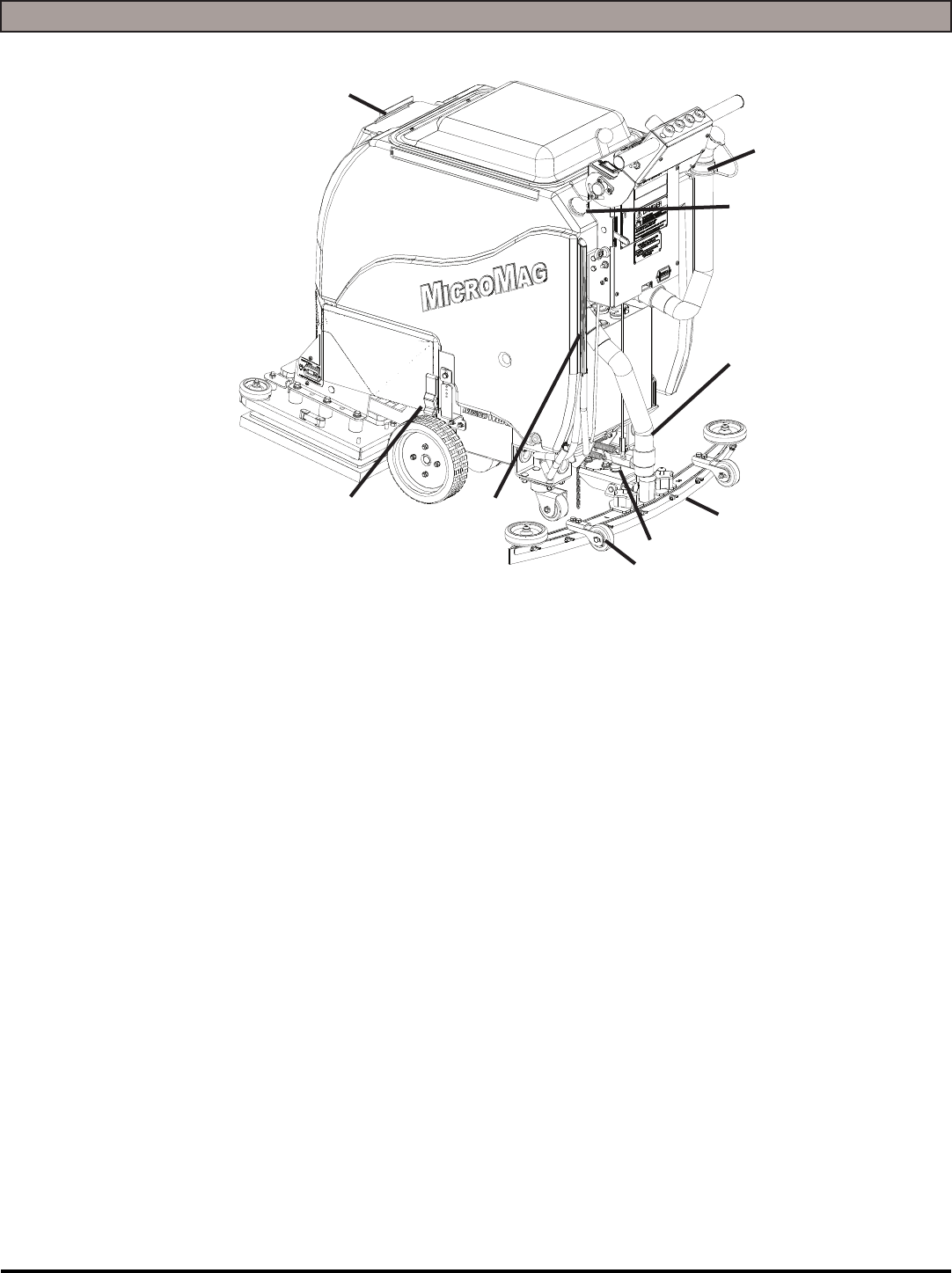
MACHINE COMPONENTS
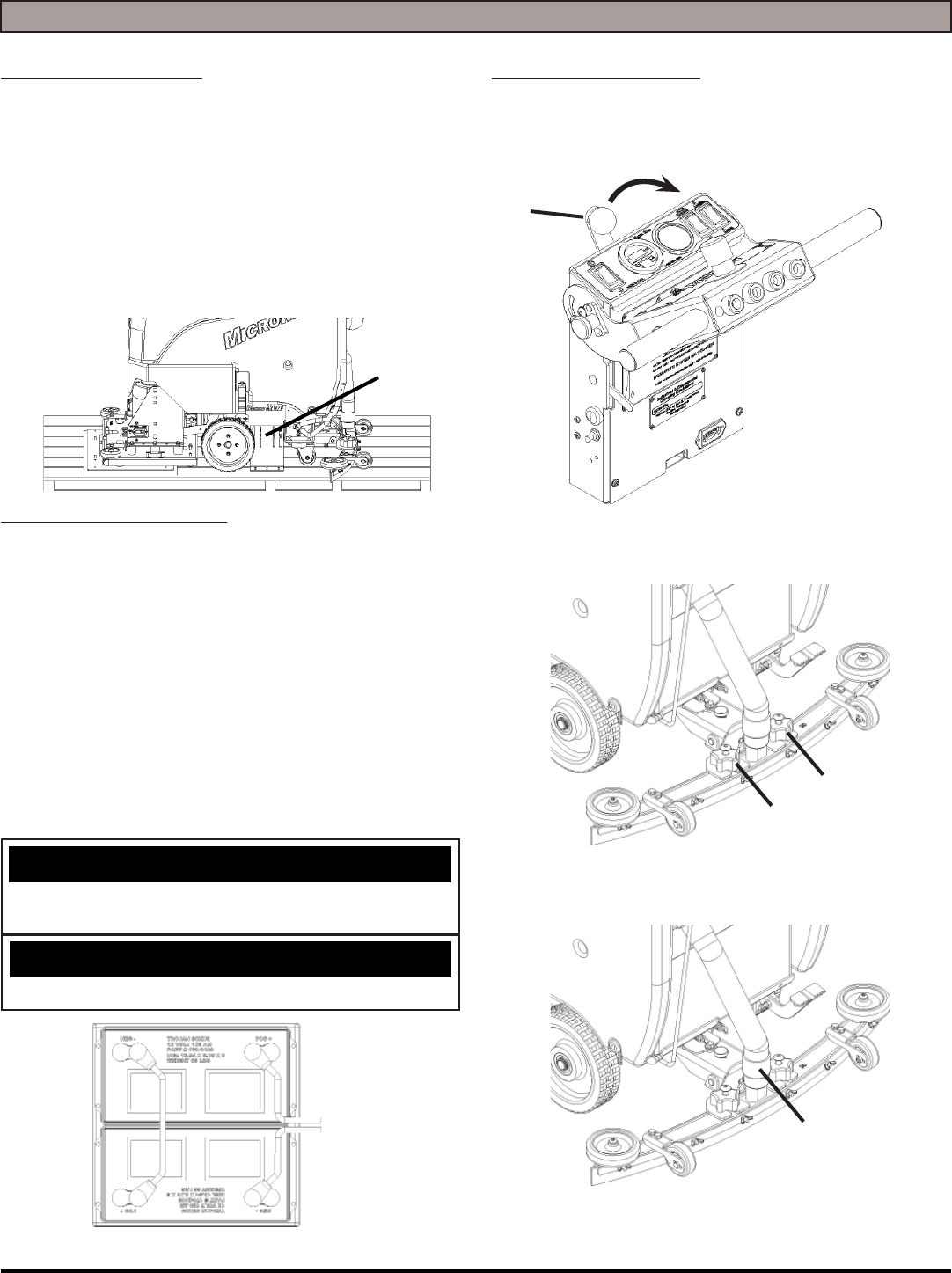
1. FRONT SOLUTION FILL POINT/LID: Front fi ll port for fi lling Solution Tank
2. TANK LATCH: Secures Tank to frame
3. SOLUTION SIGHT TUBE AND DRAIN HOSE: Displays how much clean water is in the
Tank and drains clean water
4. ADJUSTABLE SQUEEGEE HEIGHT WHEELS: Height of wheels adjust to height of
Squeegee
5. SQUEEGEE PITCH ADJUSTMENT: Adjusts pitch of Squeegee - Defl ection should be
even across entire Blade
6. SQUEEGEE BLADE: Recovers dirty water from fl oor to be recovered by Vacuum Hose
7. VACUUM HOSE: Creates vacuum for Squeegee (NOTE: Keep free and clear of
blockage)
8. REAR SOLUTION FILL POINT: Rear fi ll port for fi lling Solution Tank
9. RECOVERY DRAIN HOSE: Allows for controlled draining of Recovery Tank
1
23
4
5
6
7
8
9
- 10 - MICROMINI-OP-EN
MACHINE SETUP
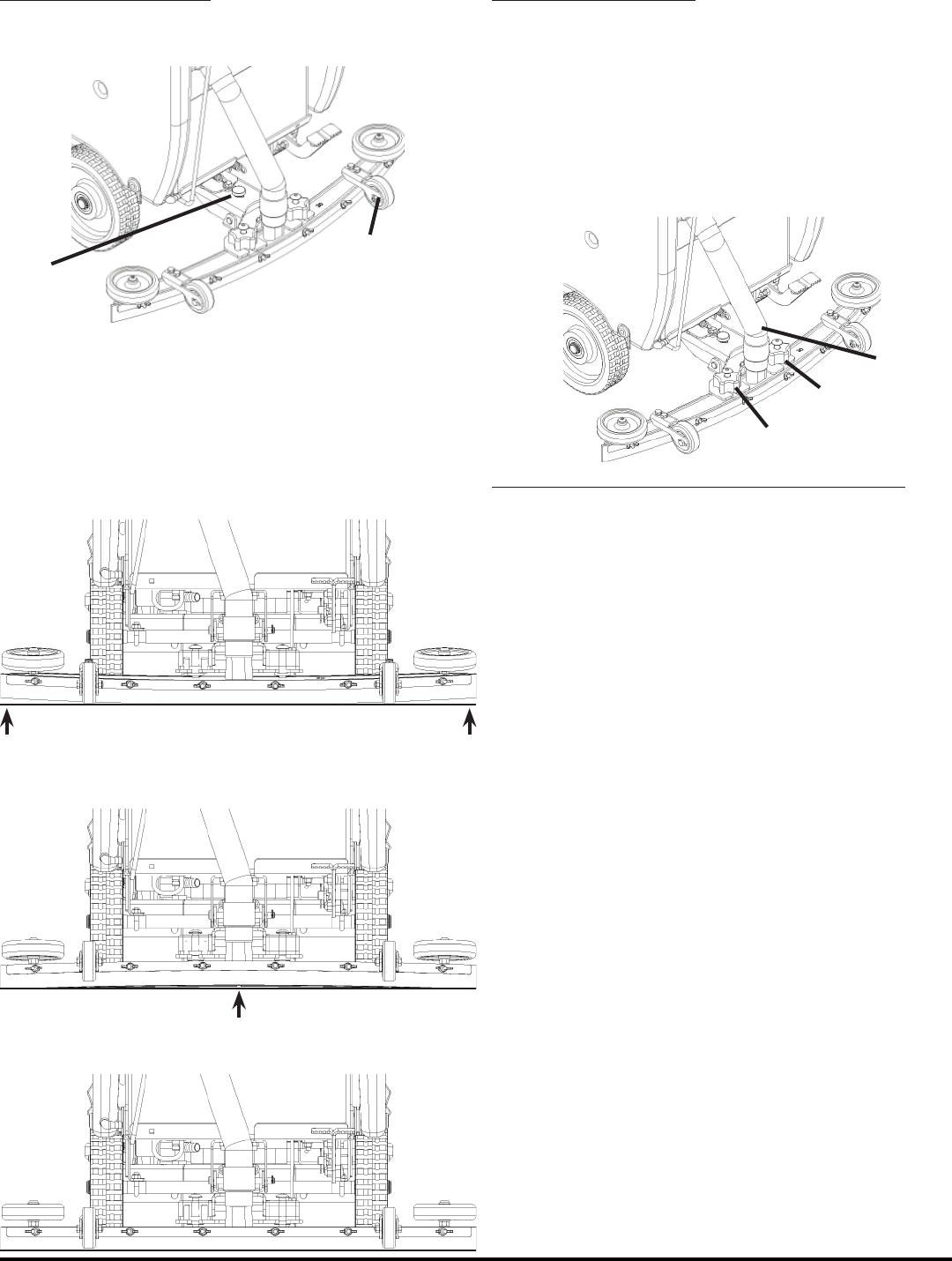
UN-CRATING MACHINE:
Carefully check the crate for any signs of damage and that
the Batteries are in the unit.
To un-crate the machine, remove banding strips from
around the crate. Take off the top and sides and dispose
properly. Remove brackets (A) from machine frame. Re-
move bolts from pallet, then remove board. Carefully roll
the machine off of the base. Notify the carrier immediately
if concealed damage is discovered.
CONNECTING BATTERIES:
Your machine is equipped with (2×) 12-Volt/ 130 AH, or
(2×) 12-Volt/ 150 AH Wet Lead Acid, AGM, or Deep Cycle
Batteries which form a 24 Volt system.
(SEE PICTURE BELOW FOR CORRECT CABLE CON-
NECTIONS)
1. Turn all switches to the OFF position and remove Key
(if machine is equipped with optional key switch).
2. Attach Battery Cables as shown below.
3. Turn ON main power switch and check the battery
condition meter to ensure correct installation. Charge
Batteries if needed (SEE BATTERY CHARGING).
NOTICE
Batteries are a possible environmental hazard. Consult
your Battery supplier for safe disposal methods.
NOTICE
Orientation of Batteries is critical for cables to reach.
ATTACHING SQUEEGEE:
1. Lower the Squeegee Mounting Plate by rotating the
Squeegee Lift Lever (A) in a clockwise motion (SEE
BELOW).
2. Loosen the two knobs (B) on the squeegee and slide
them into the slots in the Squeegee Mounting Plate
(SEE BELOW).
3. Tighten the two knobs and connect the Vacuum Hose
(C) from the machine to the Squeegee (SEE BELOW).
4. You may have to adjust the Squeegee Pitch (SEE AD-
JUSTING SQUEEGEE ON THE NEXT PAGE)
24 VOLTS
A
B
B
C
A
MICROMINI-OP-EN - 11 -
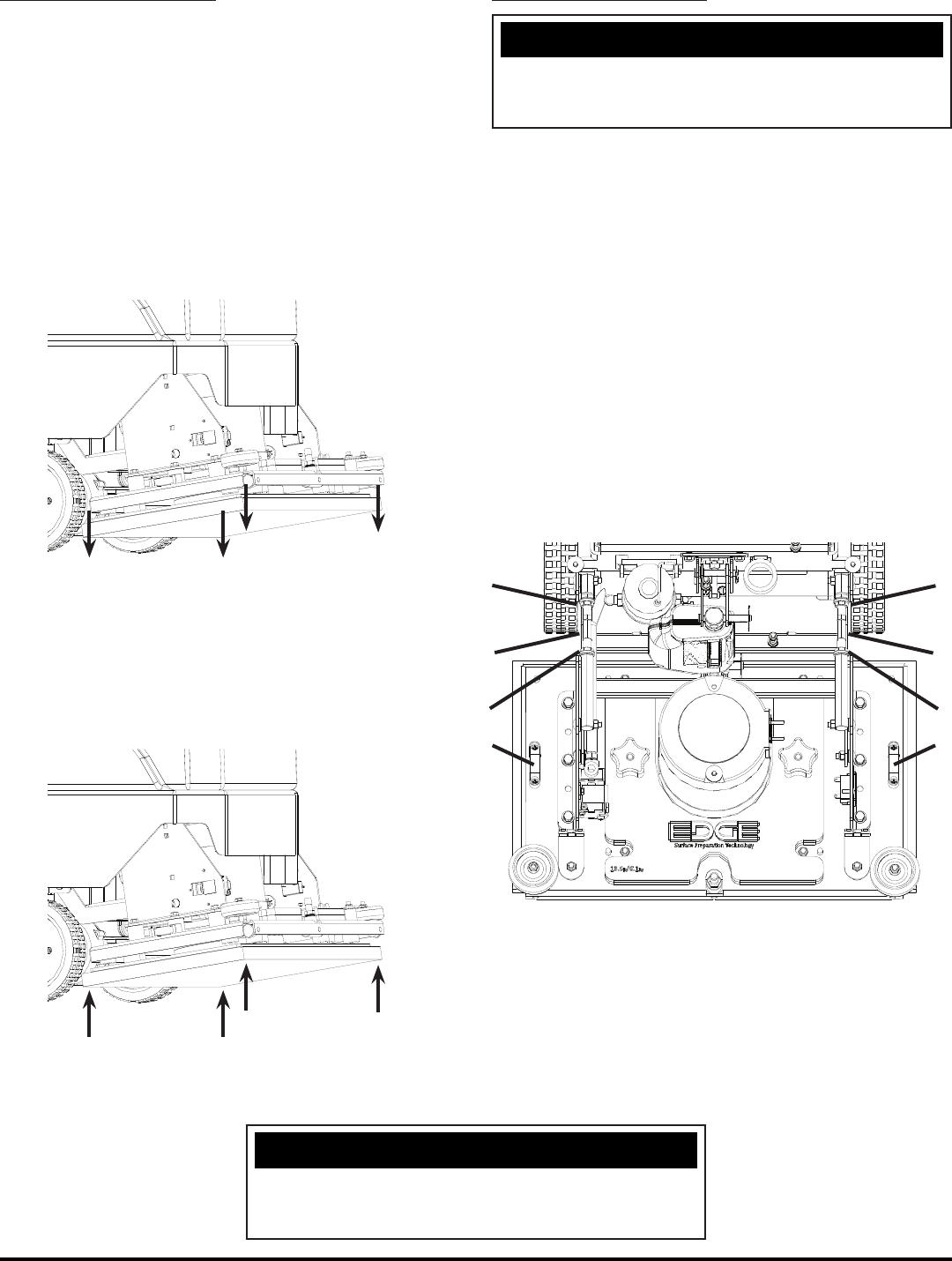
ADJUSTING SQUEEGEE:
1. Turning adjustment knob (A) clockwise (tightening) will
lower tips and raise the center of the Squeegee (SEE
BELOW).
2. Adjustable Wheel (B) (SEE ABOVE) has 3 holes. The
closer to the machine the wheel is, the further from the
ground the wheel becomes. The farther from the ma-
chine the wheel is, the closer to the ground the wheel
becomes.
3. This Squeegee is adjusted too far back and will not
pick up on the corners (SEE BELOW).
NOTE: Tips off of the fl oor.
4. This Squeegee is adjusted too far forward and will not
pick up in the center (SEE BELOW).
NOTE: Center spaced off the fl oor.
5. This squeegee is adjusted just right with good defl ec-
tion across the entire rear blade (SEE BELOW).
REMOVING SQUEEGEE:
1. With the Squeegee in the up position, turn machine
power off.
2. Disconnect Vacuum Hose (A) from Squeegee and
loosen both knobs (B) (SEE BELOW).
3. Pull Squeegee assembly backward from the lifting
carrier.
4. Inspect or repair as needed and reinstall.
REPLACING OR ROTATING SQUEEGEE BLADES:
FOR SAFETY: Before leaving or servicing the machine,
stop on a level surface, turn off machine and remove Key.
1. Remove the Squeegee assembly from the machine.
Remove Blade retainer strap and remove Squeegee
Blade.
2. Rotate the Squeegee to new edge position or replace
as required.
3. Install Blade on the locating pins of Squeegee assem-
bly.
4. Install squeegee retainer strap.
5. Fasten and lock knobs, starting in the center and mov-
ing outwards.
A
B
B
B
A
- 12 - MICROMINI-OP-EN
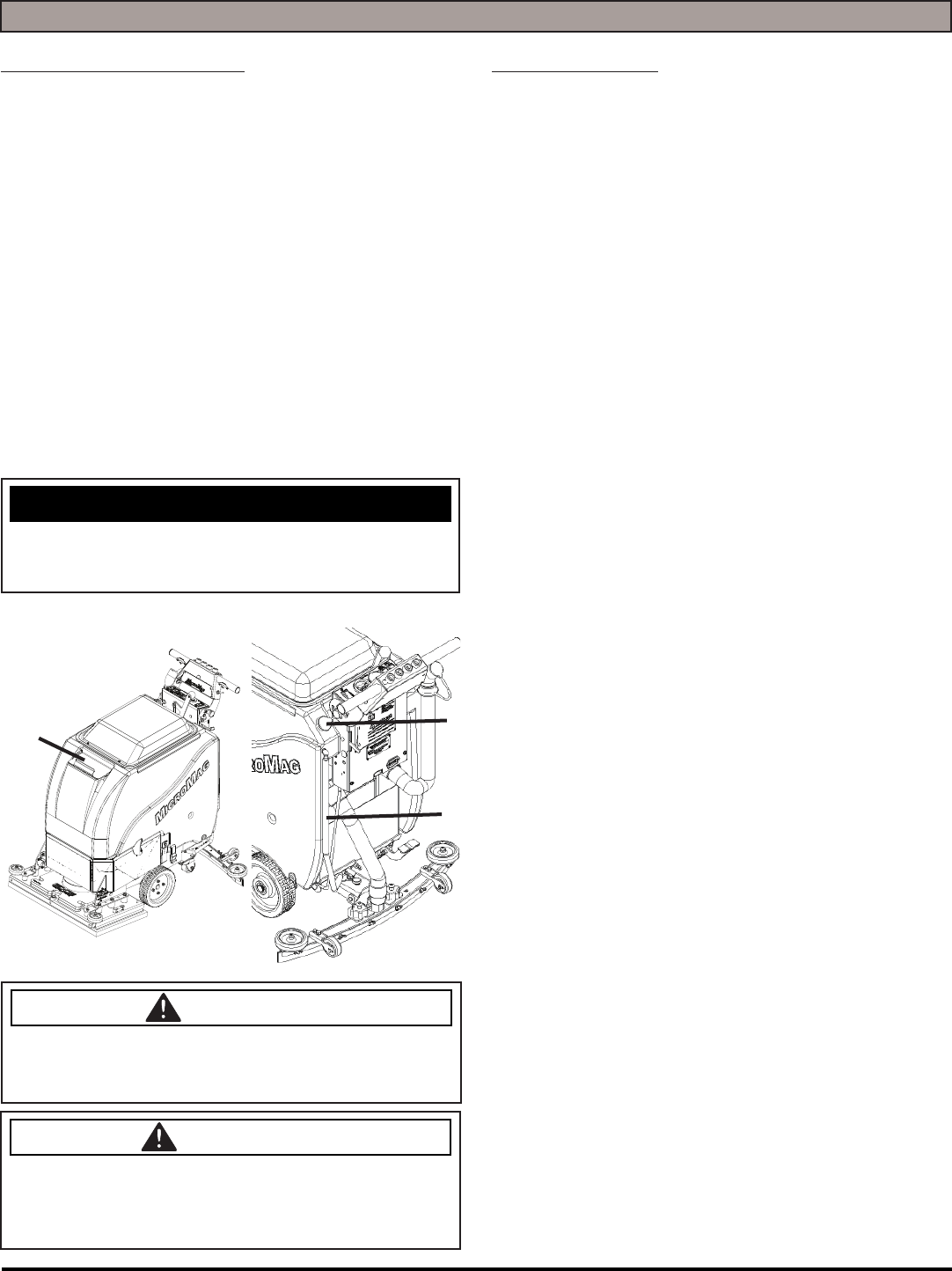
INSTALLING EDGE PADS:
1. Turn on machine power.
2. Raise the Scrubdeck by depressing the Brush switch
to the UP and OFF position and turn machine power
back OFF.
3. Select the correct Pads that best meet your cleaning
application. Consult your local dealer for assistance.
4. Remove any Pad previously attached to the EDGE/
ORBITZ Grip Face by pulling down from the corners
(SEE BELOW).
5. Once Grip Face is clear of any Pads, place pad want-
ed for application centered on the Grip Face (This will
leave a ½'' overhang on all sides).
6. Press upwards on the Pad to secure it in place (SEE
BELOW).
7. With Pad attached securely to Grip Face of EDGE/
ORBITZ Deck, the machine is ready to use.
LEVELING EDGE DECKS:
NOTICE
All Scrubdeck’s should be level at time of machine
delivery. If machine Scrubdeck is not level - Contact your
Servicing Dealer.
1. Drive machine to a fl at level surface and raise the
Machine Deck by depressing on the Scrubdeck Switch
on the control panel.
2. Turn Machine OFF.
NOTE: Deck should be equipped with a Red Buff Pad
or a Blue Cleaner Pad if not already.
3. With the correct Pad attached to the machine, press
the Scrubdeck Switch and lower the machine deck just
until it touches the fl oor, then turn off the machine.
4. Using Deck Levels (A) located on the sides of the
Deck, make sure that the Deck is level. If not, loosen
the Adjustable Arms attached to the EDGE/ORBITZ
deck by loosen the locking Nuts (B) and turning the
hexagonal arm (C) on each side of the Scrubdeck to
level it (SEE BELOW).
5. Extending the adjustable arms raise the front and low-
er the rear of the Scrubdeck.
6. Once Scrubdeck is level - retighten and raise Scrub-
deck.
B
B
C
B
B
C
AA
NOTICE
NEVER place aggressive Pads (Maroon Prep, Dominator
HD Strip, etc.) directly onto the Grip Face. Always use
Red or Blue Spacer pad to prevent Grip Face damage.
MICROMINI-OP-EN - 13 -
MACHINE OPERATION
PRE-CLEANING CHECKLIST:
Read and understand the Safety Messages section on
Pages 6 and 7 before operating the machine.
1. Check Battery Condition Gauge on the Control Panel.
Make sure Batteries are fully charged before using.
2. Check the condition of the Pads.
3. Check the condition of the Squeegee Blades.
4. Raise the Scrubdeck and Squeegee before transport-
ing then transport the machine to the fi lling station.
5. Turn the machine OFF.
6. Fill the tank with up to 10 gallons of clean water either
at the front fi ll port (A) or rear fi ll port (B) (SEE BE-
LOW).
7. Add APPROVED cleaning chemical to the tank. Use
the proper dilution ratio indicated on the bottle. Con-
tact us at 1(800)-634-4060 or +011-262-681-3583 if
unsure.
NOTICE
The clear tube (Solution Sight Tube) (C) at the rear of the
machine indicates the amount of water in the tank (SEE
BELOW).
DANGER
EXPLOSION RISK! Flammable materials can
cause an explosion or fi re. Do NOT use fl ammable
materials in Tank or pick up.
CAUTION
TO AVOID DAMAGE TO THIS MACHINE:
• Use approved Detergents only
• Water temperaturemust not exceed 130˚F/54˚C
• Do NOT use high-percentage Bleach mixture
OPERATING HINTS:
1. Observe the amount of solution the machine is
dispensing on the fl oor and adjust to the desired fl ow.
To increase the solution fl ow rate, pull the Solution
Control Lever up. To shut the solution OFF completely,
just release the Drive button, or use dash mounted
switch.
2. Keep an eye on the clear Vacuum cover to make sure
that there is not any foamy buildup in the Recovery
Tank. If excess foam begins to develop, pour a
recommended foam control solution into the Recovery
Tank. Foam is usually an indication of excessive soap.
3. Always operate at lower speeds when scrubbing
around walls and objects. You should reduce the
speed to maintain control when turning.
4. If Squeegee starts to streak, raise and wipe the blades
with a clean cloth. if the problem continues, check the
Squeegee Blades for wear or damage and rotate if
needed. You may need to pre-sweep before scrubbing.
(Only Use OEM Parts)
5. Change or turn over Pads when dirty.
6. Stay clear of objects protruding from the fl oor such as
sockets, grates, etc, for they will damage the Pads and
Squeegee Blades.
7. Always keep an eye on your gauges. They let you
know the status of a particular system at a glance.
If your battery gauge is reading low you much stop
immediately and recharge. Running the Batteries
dead will result in damage to the Batteries.
8. When you run out of solution, raise the Scrubdeck and
continue to Vacuum the remaining water until it is all
consumed. The Solution Sight Tube is used to indicate
the level of detergent remaining in the Tank.
9. When you are ready to stop, raise the Scrubdeck, turn
OFF the solution switch, raise the Squeegee and drive
the machine back to the charging area. Be sure to
drain both Tanks before storing the machine.
AB
C
- 14 - MICROMINI-OP-EN
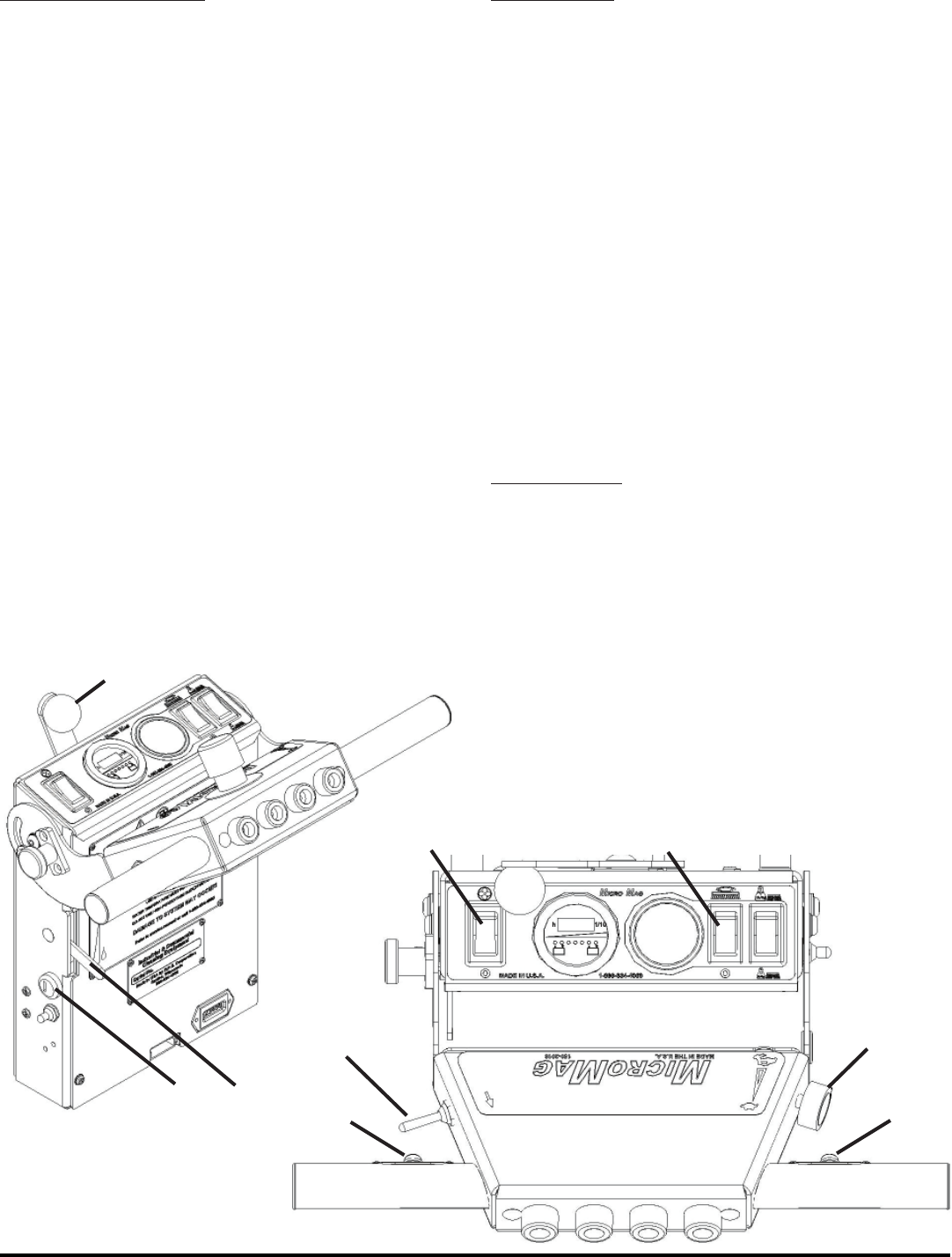
ONE PASS SCRUBBING:
1. Turn on machine Power Switch (A), make sure the
Speed Control Knob (B) is at a lower setting.
2. Lower the Squeegee by rotating the Squeegee Lift
Lever (C) all the way to the right. Turn on Vacuum
Motor with Vacuum Switch on Control Panel (D).
3. Lower Scrubdeck head to the fl oor by pressing
the Scrubdeck Switch on the Control Panel (E).
4. Move the Solution Flow Lever (F) to
regulate the amount of solution fl ow.
5. Begin scrubbing by pressing one of the green
Drive Buttons (G) on the Handlebars. Adjust the
Speed Control Knob (B) to the desired setting.
6. To operate the machine in reverse, simply
pull the Reverse switch (H) back towards
the Handlebar. The reverse speed is set to
approximately 50% of the forward speed.
7. To stop the machine, let go of the Drive Buttons (G).
SCRUB ONLY:
1. Turn on machine Power Switch (A) while making sure
the Speed Control Knob (B) is at a lower setting.
2. Lower Scrubdeck head to the fl oor by pressing
the Scrubdeck Switch on the Control Panel (E).
3. Move the Solution Control Lever (F) to
regulate the amount of solution fl ow.
4. Begin scrubbing by pressing one of the green
Drive Buttons (G) on the Handlebars. Adjust the
Speed Control Knob (B) to the desired setting.
5. To operate the machine in reverse, simply
pull the Reverse Switch (H) back towards
the Handlebar. The reverse speed is set to
approximately 50% of the forward speed.
6. To stop the machine, let go of the Drive Buttons (G).
VACUUM ONLY:
1. Turn on machine Power Switch (A) while making sure
the Speed Control Knob (B) is at a lower setting.
2. Lower the Squeegee by rotating the Squeegee Lift
Lever (C) all the way to the right. Turn on Vacuum
Motor with Vacuum Switch on Control Panel (D).
3. Begin vacuuming by pressing one of the green
Drive Buttons (G) on the Handlebars.
A
C
F
DE
B
H
G
G
MICROMINI-OP-EN - 15 -
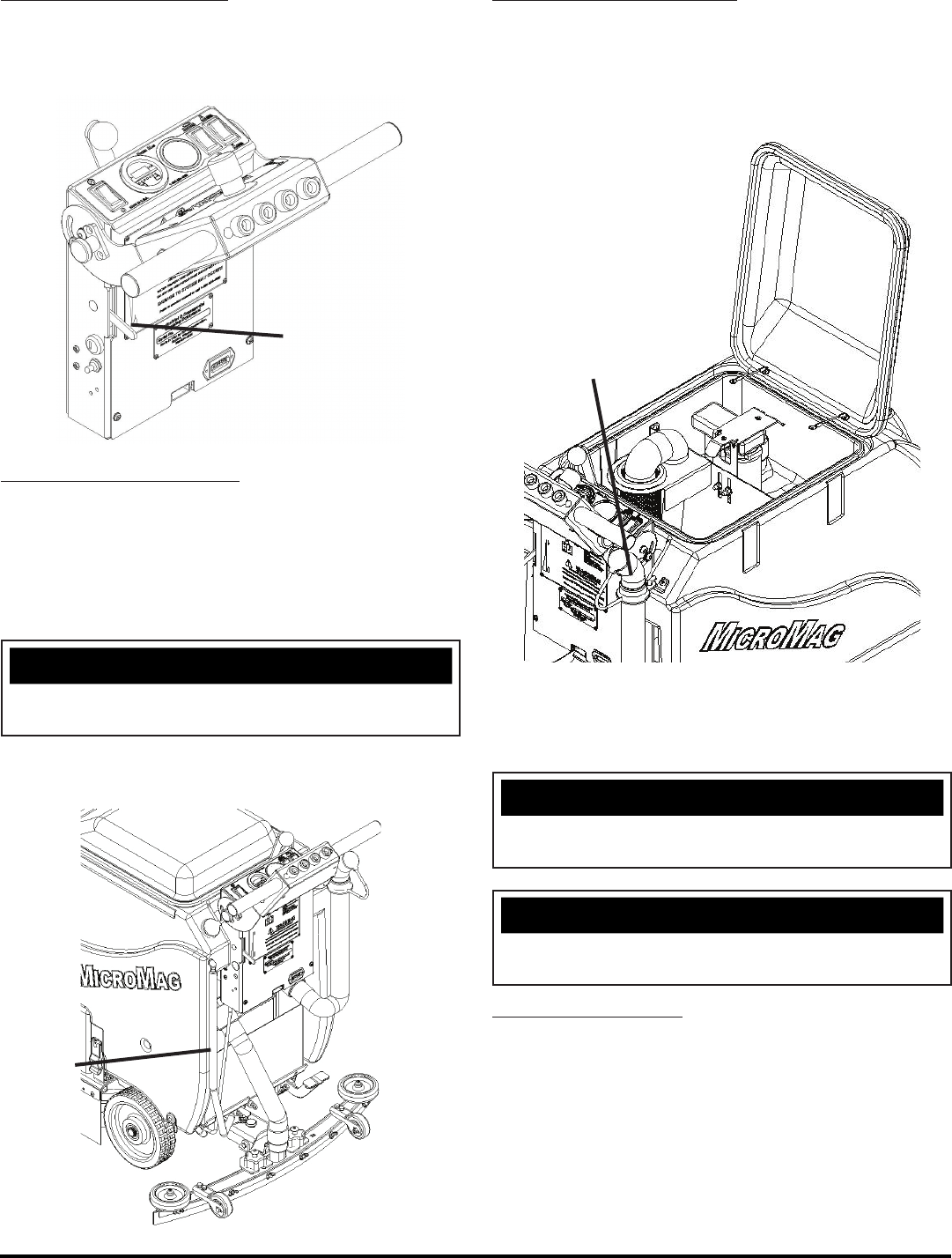
ADJUST SOLUTION FLOW:
1. Push down on the Solution Flow Lever (A) to decrease
the solution fl ow and push up on the lever to increase
solution fl ow (SEE BELOW).
DRAINING SOLUTION TANK:
To drain unwanted cleaning solution from the Solution
Tank, perform the following steps:
(SEE BELOW)
1. Pull the clear Sight Tube/Drain
Hose (B) off barbed fi tting.
NOTICE
Get Supervisor APPROVAL fi rst and drain at
APPROVED locations only.
2. Rinse out Tank and solution fl ow
system with clean water.
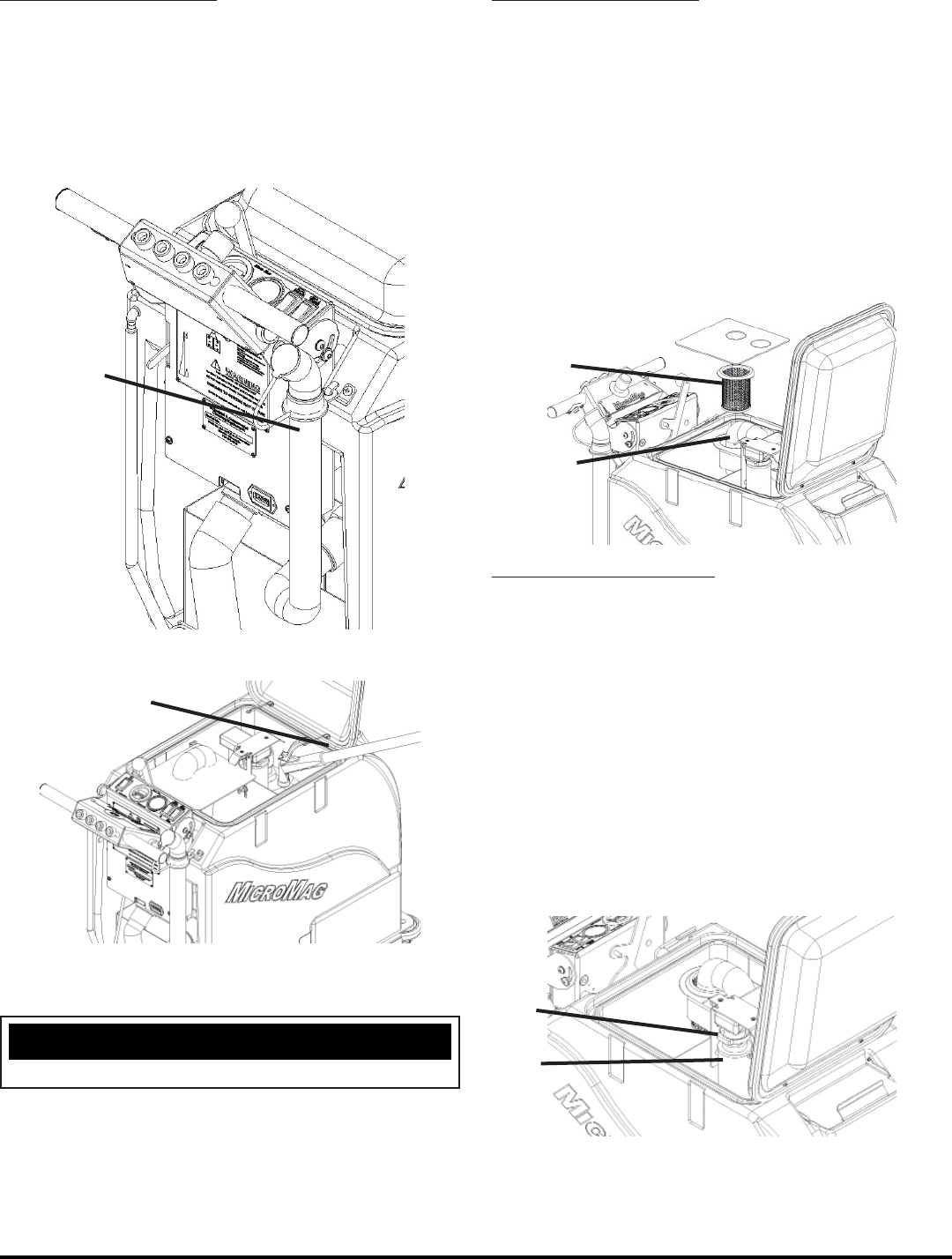
DRAINING RECOVERY TANK:
Always empty Recovery Tank when refi lling the Solution
Tank. You can refi ll the Solution Tank while the Recovery
Tank is draining. To drain the Recovery Tank remove Drain
Hose (C) from hook at rear of Tank and pop off cap (SEE
BELOW). Rinse with fresh water.
NOTICE
Leave Recovery Lid open while draining Tanks. Rinse
thoroughly.
NOTICE
Get Supervisor APPROVAL fi rst and drain at
APPROVED locations only.
OPEN RECOVERY LID:
1. Rotate Tank Lid (C) forward and full open to rest
in a tipped open position (SEE ABOVE).
A
B
C
- 16 - MICROMINI-OP-EN
FLUSH RECOVERY TANK:
1. Rinse the Recovery Tank after every use
(A). This will prevent heavy build-up on the
bottom of the Tank, foul odors as well as
clogging of the Drain Hose (SEE BELOW).
2. Remove Drain Hose (B) and open to allow for
drainage of the Recovery Tank (SEE BELOW).
3. Flush Recovery Tank with water hose.
4. After rinsing, reattach the Drain Hose
(B) on hook (SEE ABOVE).
NOTICE
Keep water off of Control Panel.
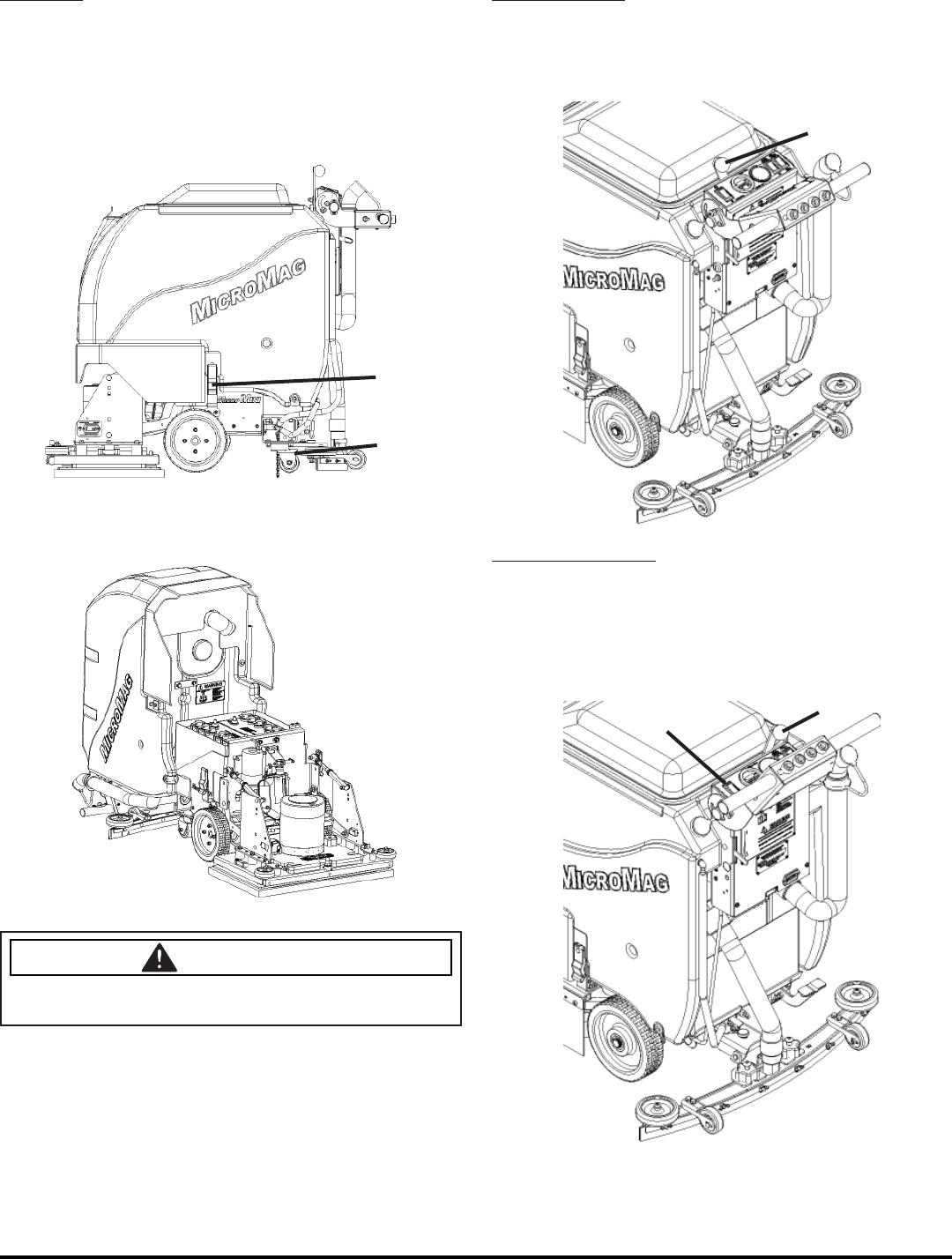
CLEAN “DRAIN SAVER”:
With Recovery Lid open and Tank fully drained:
1. Remove 2'' Squeegee Intake Hose (A) from
“Drain Saver” strainer (B) (SEE BELOW).
2. Remove stainless screen and dispose of debris.
3. Rinse screen with fresh water from the
outside while holding the screen upside
down. This will allow for better cleaning.
4. Replace the screen into the bracket.
5. Replace 2'' Squeegee Intake Hose.
CLEAN VACUUM SCREEN:
With Recovery Lid open and Tank fully drained:
1. Remove Vacuum Screen retaining
clip (C) (SEE BELOW).
2. Pull Vacuum Screen and fl oat ball
assembly (D) off of the Vacuum box.
3. Rinse with hot water.
4. Dry thoroughly.
5. Replace the Vacuum Screen onto box.
6. Replace and tighten retaining clip.
A
BB
A
C
D
MICROMINI-OP-EN - 17 -
TIP TANK:
1. Fully drain Solution Tank and the Recovery Tank.
2. Remove Squeegee or place in center.
3. Unlatch Tank Latch (A) on each side
of the machine (SEE BELOW).
4. Tip Tank Back carefully until supported
by strap (SEE BELOW).
CAUTION
Casters need to be swiveled back (B) as shown, other-
wise machine may tip.
SQUEEGEE UP:
1. To raise the Squeegee off the fl oor, rotate
Squeegee Lift Lever (A) counter-clockwise
all the way to the left (SEE BELOW).
SQUEEGEE DOWN:
1. To Lower the Squeegee to the fl oor, rotate Squeegee
Lift Lever (B) clockwise all the way to the right. To
turn on Vacuum Motor use the Vacuum Switch
(C) on the Control Panel (SEE BELOW).
A
A
B
B
C
- 18 - MICROMINI-OP-EN
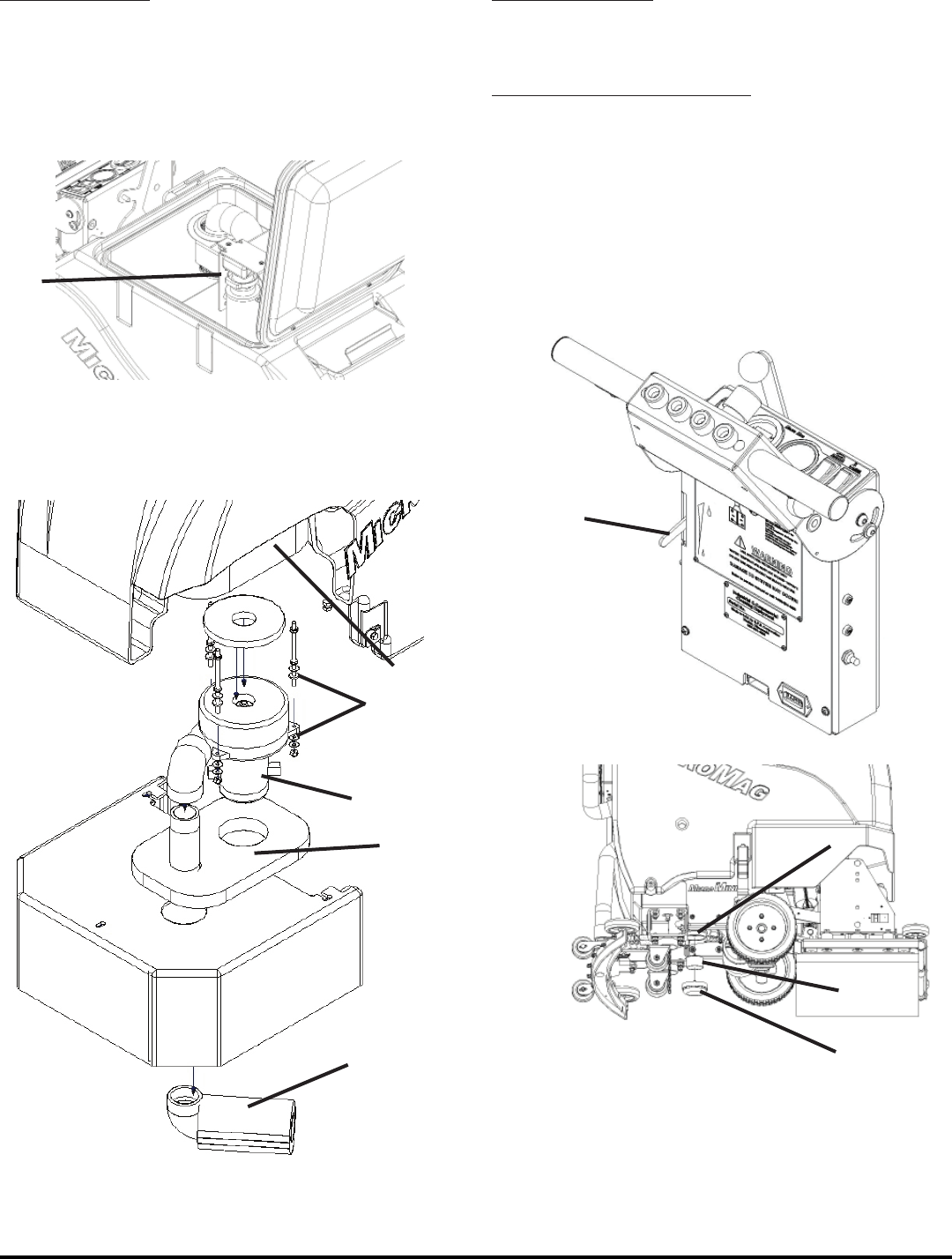
VACUUM MOTOR:
1. The machine is equipped with a 24 volt,
.75HP Vacuum Motor (A) (SEE BELOW).
2. If foam or water gets past the Recovery Tank’s
Vac Screen/Ball system, adjust the bracket
(B) in the Tank upwards (SEE BELOW).
3. The Vacuum Motor has an (standard)
“Foam Muffl er” (C), sound reduction walls
(D) and vibration dampeners (E) that are
available to quiet machine operation.
SOLUTION FILTER:
The solution system has an “Inline Filter” (A) to fi lter out
cleaning solution prior to scrubbing (SEE BELOW).
CLEANING SOLUTION FILTER:
1. To clean the Solution Filter, fi rst close Solution Flow
Valve by moving lever (B) down. Then unscrew
the clear cap (C) from house (A) and remove
the stainless steel screen (E) (SEE BELOW).
2. Rinse any debris from the screen with clean water.
3. Reinstall screen and screw cap back on tightly.
4. Re-open valve.
B
C
D
A
E
D
B
A
E
C
MICROMINI-OP-EN - 19 -
BATTERY CHARGING
Charger Specifi cations
• Output voltage of 24 Volts
• Output current of 12 amps max
• Input voltage of 110 Volts/ 60 Hz
(220V/50 Hz available)
• Automatic shut off circuit
• Made for Deep Cycle Batteries
DANGER
Explosive hydrogen gas forms when Batteries are
charging. An open fl ame or spark can cause this gas
to explode. Serious personal injury or property damage
could occur. Only charge the Batteries in this machine
in a well ventilated area.
WARNING
Before you service a Battery, always wear face protec-
tion, protective gloves and protective clothing. Battery
acid or battery explosion can cause serious injuries.
WARNING
The Batteries in this machine contain sulfuric acid,
which causes burns to skin. If battery acid contacts
clothing or skin, rinse the effected area with cold water
immediately. If battery acid gets on your face or in your
eyes, fl ush the area immediately with cold water and
seek medical attention.
CAUTION
Always use the automatic battery charger provided by
the manufacturer of this machine to charge the batter-
ies of this machine. It is designed to charge the Batter-
ies at the appropriate rate. If you must use a different
charger, disconnect the Batteries before charging to
avoid damage to the electronic speed controller.
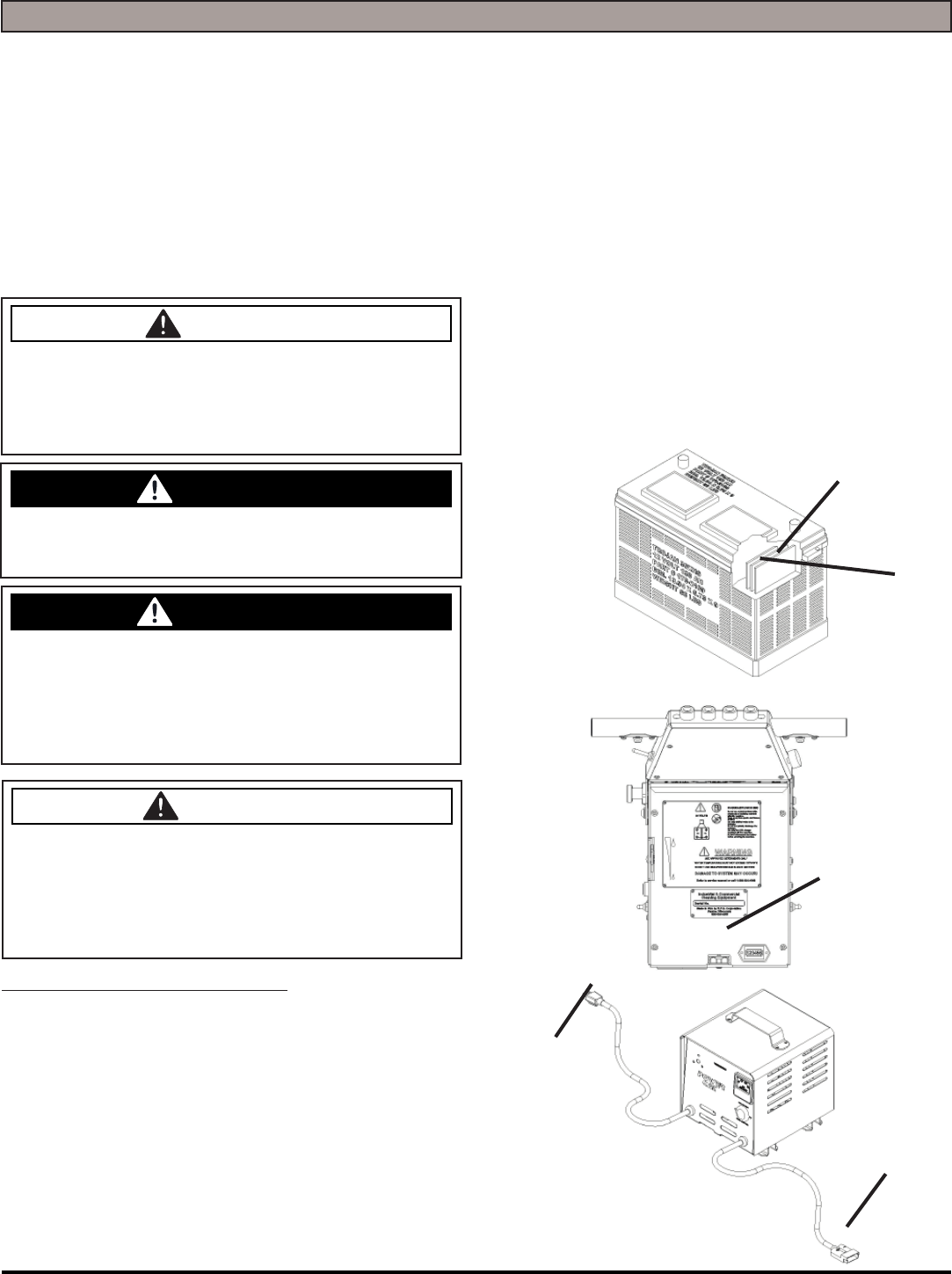
EXTERNAL BATTERY CHARGING:
1. Transport machine to a well ventilated area for
charging.
2. Turn the machine off. Tip Tank back.
3. Check the water in each battery (1). Do not charge
the machine unless the water is slightly higher than
the plates. If needed, add enough distilled water to
just slightly cover the plates. Be careful not to over fi ll.
Batteries can overfl ow during charging. Replace caps
before charging.
4. First, plug the red 50 Charger plug into the machine’s
Charger Port (2). While the Charger plug is connected,
plug the Charger Power Cord into a grounded 110 Volt
standard wall outlet (3).
5. The Charger will automatically begin charging and
automatically shut off when fully charged (check
Battery gauge).
6. After the Charger has turned off - First, unplug the
Charger from the wall outlet. Second, unplug the red
50 Charger plug from the machine.
7. Recheck the cell level after charging. If needed, add
distilled water up to the correct level. Be certain to
replace the caps securely and to wipe off the top of the
Batteries with a clean cloth.
WATER LEVEL SHOULD BE
1/8'' ABOVE PLATES
1
2
2
3
- 20 - MICROMINI-OP-EN
ON-BOARD CHARGER
Charger Specifi cations
• Output voltage of 24 Volts
• Output current of 12 amps max
• Input voltage of 110 Volts/ 60 Hz
(220V/50 Hz available)
• Automatic shut off circuit
• Made for Deep Cycle Batteries
DANGER
Explosive hydrogen gas forms when Batteries are
charging. An open fl ame or spark can cause this gas
to explode. Serious personal injury or property damage
could occur. Only charge the Batteries in this machine
in a well ventilated area.
WARNING
Before you service a Battery, always wear face protec-
tion, protective gloves and protective clothing. Battery
acid or battery explosion can cause serious injuries.
WARNING
The Batteries in this machine contain sulfuric acid,
which causes burns to skin. If battery acid contacts
clothing or skin, rinse the effected area with cold water
immediately. If battery acid gets on your face or in your
eyes, fl ush the area immediately with cold water and
seek medical attention.
CAUTION
Always use the automatic battery charger provided by
the manufacturer of this machine to charge the Batter-
ies of this machine. It is designed to charge the Batter-
ies at the appropriate rate. If you must use a different
charger, disconnect the Batteries before charging to
avoid damage to the electronic speed controller.
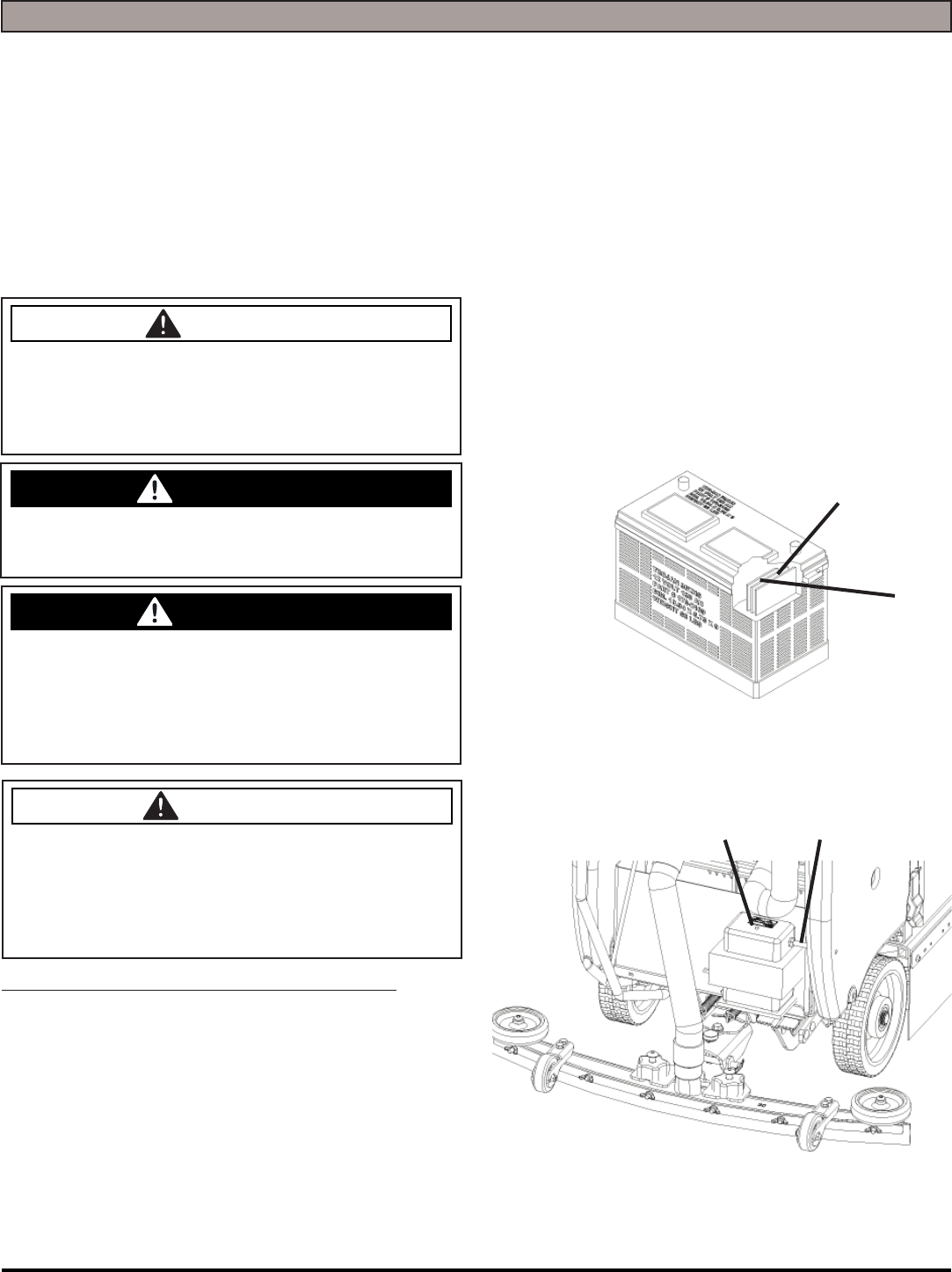
ON-BOARD BATTERY CHARGING (OPTIONAL):
1. Transport machine to a well ventilated area for
charging.
2. Turn the machine off.
3. Check the water in each battery. (1). Do not charge
the machine unless the water is slightly higher than
the plates. If needed, add enough distilled water to
just slightly cover the plates. Be careful not to over fi ll.
Batteries can overfl ow during charging. Replace caps
before charging.
4. Plug the Charger Power Cord into a grounded
standard wall outlet (2).
5. The green Indicator Light (3) will come on and the
Charger will automatically begin charging. When
fi nished, the Charger will automatically shut off as well
as the green indicator light (check Battery gauge).
6. After the Charger has turned off, unplug the Charger
from the wall outlet.
7. Recheck the cell level after charging. If needed, add
distilled water up to the correct level. Be certain to
replace the caps securely and to wipe off the top of the
Batteries with a clean cloth.
WATER LEVEL SHOULD BE
1/8'' ABOVE PLATES
1
23
MICROMINI-OP-EN - 21 -
BATTERY MAINTENANCE GUIDE
SAFETY:
DANGER
Explosive hydrogen gas forms when batteries are
charging. An open fl ame or spark can cause this gas
to explode. Serious personal injury or property damage
could occur. Only charge the Batteries in this machine
in a well ventilated area.
WARNING
The Batteries in this machine produce hazardous
voltage which can cause electrical shock, burns and/
or electrocution. Always disconnect Batteries before
servicing this machine.
WARNING
Before you service a Battery, always wear face protec-
tion, protective gloves and protective clothing. Battery
acid or battery explosion can cause serious injuries.
WARNING
The Batteries in this machine contain sulfuric acid,
which causes burns to skin. If battery acid contacts
clothing or skin, rinse the effected area with cold water
immediately. If battery acid gets on your face or in your
eyes, fl ush the area immediately with cold water and
seek medical attention.
WARNING
Dress safely. Do not wear rings or metal wrist watches
when servicing this machine, as they can cause an
electrical short circuit which can cause serious burns.
INSPECTION AND CLEANING:
• Keep Batteries clean and dry from residue
• Check that all vent caps are tight
• Use a solution of baking soda and water to clean if
acid residue on Batteries or corrosion on the terminals
• Protective spray of petroleum jelly should be applied to
terminals to reduce corrosion
STORAGE:
• Batteries should be fully charged prior to and during
storage
• Never store discharged Batteries
• Store batteries in a cool, dry place but never below
freezing - Recharge in storage a minimum of every 30
days
• Recharge Batteries before putting them back into
service
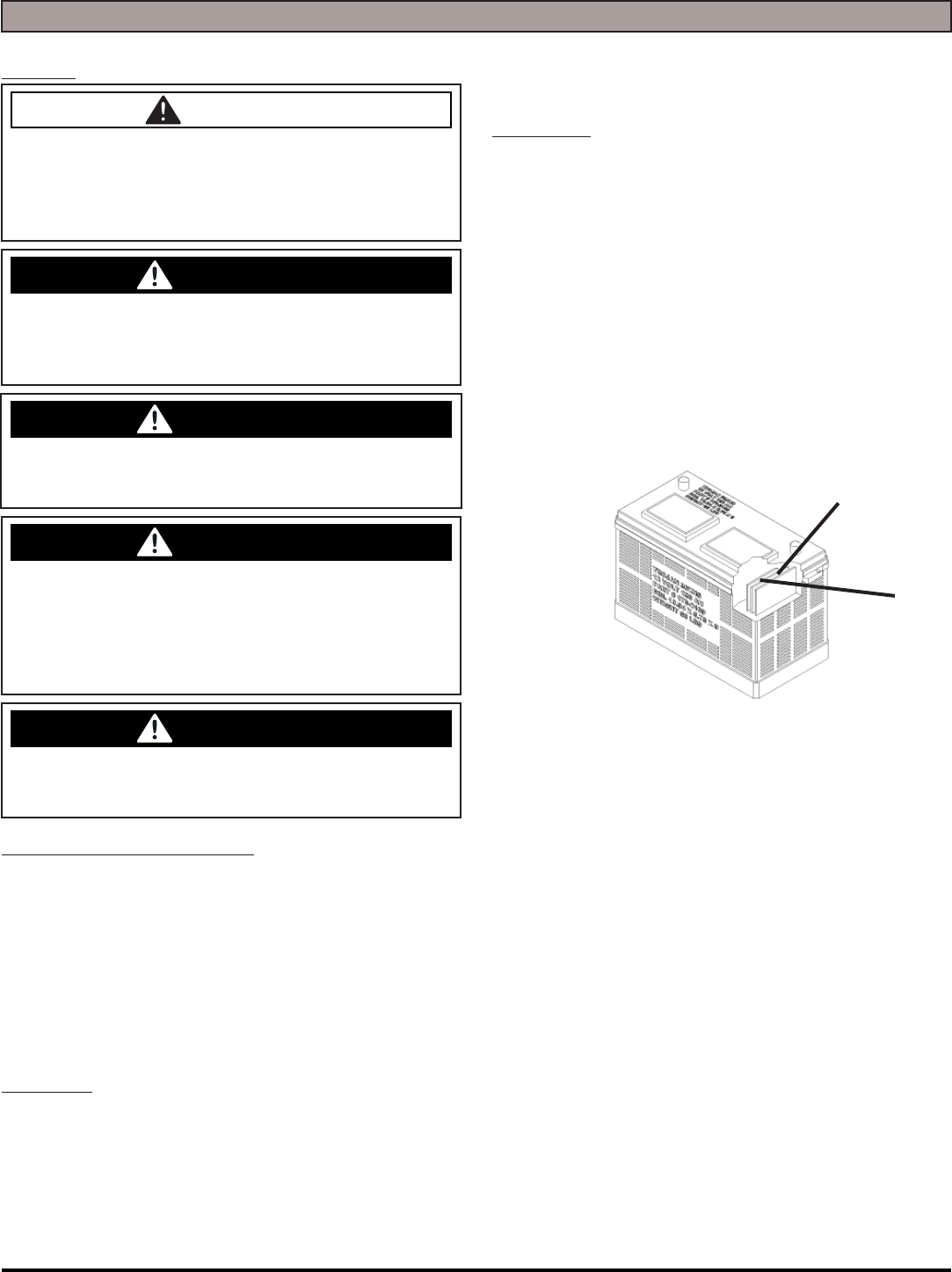
WATERING:
• Add water, NEVER ACID, to cells (distilled water
recommended)
• Do not over water
• Before charging the Batteries, only add water if the
plates are exposed. Add just enough water to cover
the plates, then charge the Batteries. Once fully
charged, add water to the proper level as indicated
below.
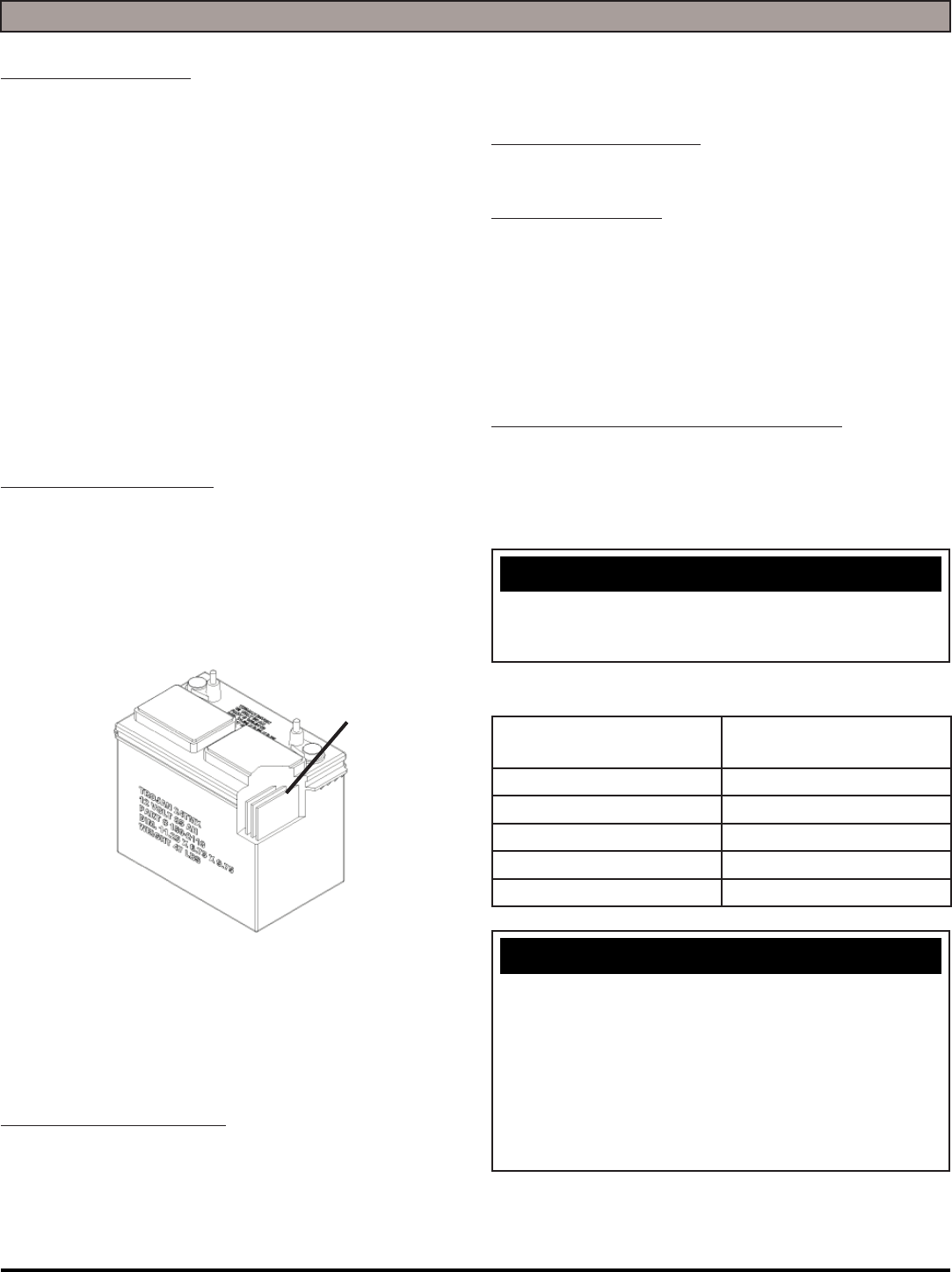
• For full charge plus series Batteries add water to the
maximum water level indicator (1)
• Water watering, secure vent caps back on Batteries.
WATER LEVEL SHOULD BE
1/8'' ABOVE PLATES
1
- 22 - MICROMINI-OP-EN
MAINTENANCE
DAILY MAINTENANCE:
1. Remove the clean Pads / Brushes. Never use soiled
Pads / Brushes when cleaning. Replace Pads /
Brushes when they become packed with residue.
2. Remove and clean debris from the fl oat shut-off screen
and Drain Saver located inside the Recovery Tank.
3. Drain and rinse Tanks thoroughly and fl ush out solution
feed to Scrubdeck.
4. Inspect Vacuum Hose for any objects obstructing the
air fl ow.
5. Raise Squeegee and wipe Blades with a clean cloth.
Store Squeegee in the raise position to prevent
damage or setting of the Blades.
6. Wipe down machine if needed. Use a non-abrasive,
non-solvent cleaner or a clean damp cloth.
7. Recharge the Batteries if needed.
WEEKLY MAINTENANCE:
1. Check Battery water level in each cell of the Batteries
and fi ll as needed. Always use distilled water to refi ll
Batteries. Batteries should be fi lled approximately
3/4'' to 1'' above the plates. Overfi lling will cause
the Batteries to leak during charging. The charging
process creates gas bubbles inside the Battery, which
effectively increases the volume of the electrolyte.
2. Clean Battery tops to prevent corrosion.
3. Flip EDGE pads.
4. Drain and rinse tanks thoroughly. To thoroughly fl ush
out any solution chemicals in solution line valves, refi ll
Solution Tank with a few gallons of warm, clean water
and run the machine until Tank is empty.
MONTHLY MAINTENANCE:
1. Check Scrubhead and Squeegee lifting cables for
wear and spring tension.
2. Check machine for water leaks and loose nuts and
bolts.
3. Check to see if Battery cables are tightened. Tighten,
if needed, 8-10 ft/lb MAX.
4. Grease caster swivel and Squeegee pivot point.
YEARLY MAINTENANCE:
Call your local dealer for yearly maintenance.
STORING MACHINE:
1. Be sure to fl ush the tanks out completely. To
thoroughly fl ush out any solution chemicals in solution
line and valves, refi ll Solution Tank with a few gallons
of warm clean water and run machine until Tank is
empty.
2. Open the Recovery Tank lid to promote air circulation.
3. Raise Scrubdeck and Squeegee.
CHECKING BATTERY SPECIFIC GRAVITY:
Use a hydrometer to check the Battery specifi c gravity.
Checking Gravity:
• Hydrometer
• Battery
NOTICE
Do not take readings immediately after adding distilled
water. If water and acid are not thoroughly mixed, the
reading may not be accurate.
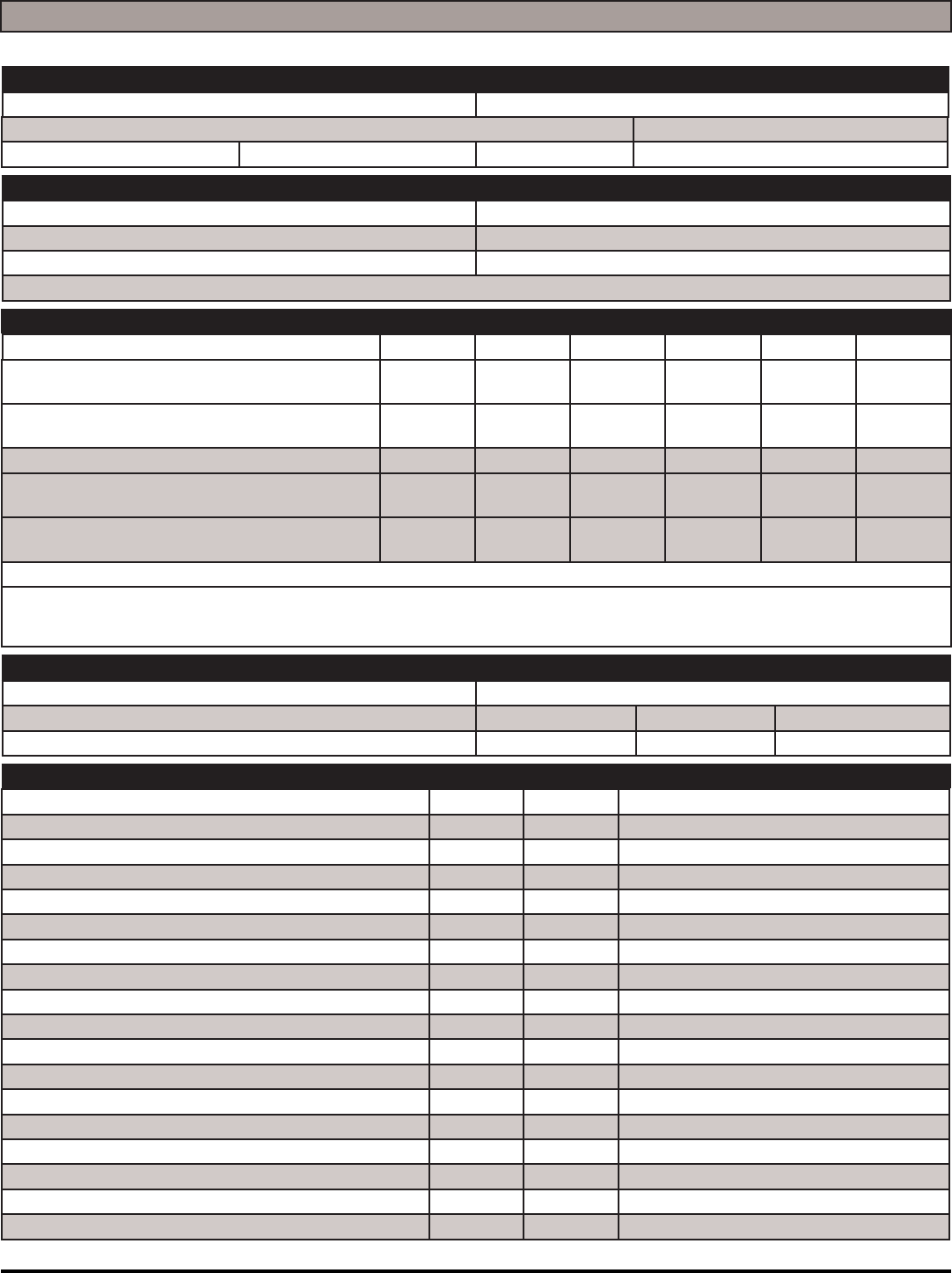
Check the hydrometer against this chart
SPECIFIC GRAVITY
@ 80°F (27°C)
BATTERY
CONDITION
1.265 100% Charged
1.225 75% Charged
1.190 50% Charged
1.155 25% Charged
1.120 Discharged
NOTICE
If the readings are taken when the battery electrolyte
is any temperature other than 80°F(27°C), the reading
must be temperature corrected. To fi nd the corrected
specifi c gravity reading when the temperature of the
battery electrolyte is other than 80°F(27°C): add (+) to
the specifi c gravity reading 0.004 (4 points), for each
10°F(6°C) above 80°F(27°C). Subtract (-) from the
specifi c reading 0.004 (4 points), for each 10°F(6°C)
below 80°F(27°C).
WATER LEVEL SHOULD BE
1/8'' ABOVE PLATES
MICROMINI-OP-EN - 23 -
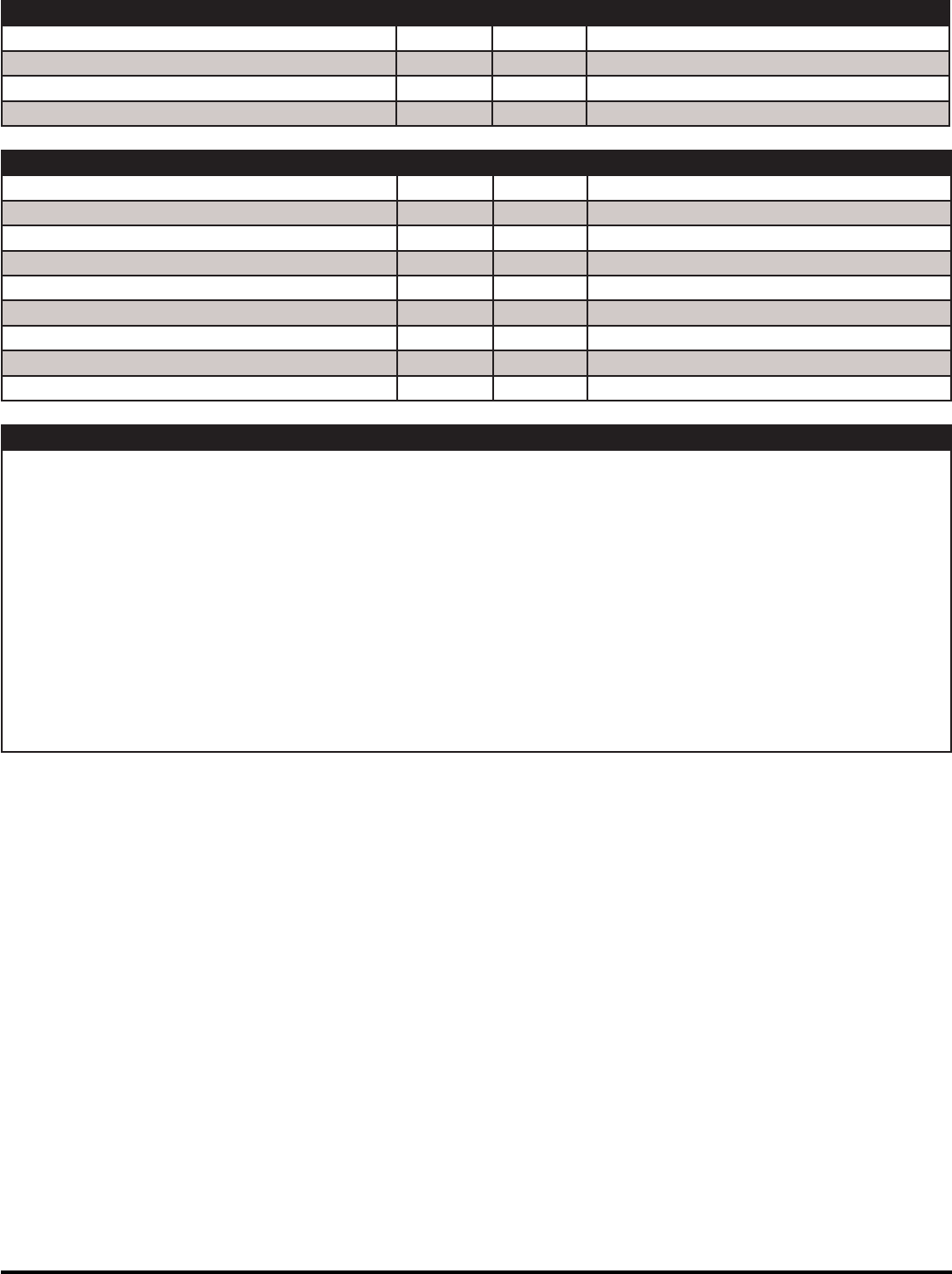
MICROMINI PM RECORDS
CUSTOMER INFORMATION
CUSTOMER EMAIL
ADDRESS PHONE
CITY STATE ZIP CONTACT
MACHINE INFORMATION
MODEL #: SERIAL #:
WORK ORDER#: RE-CHARGE COUNTER:
CHASSIS HOUR METER: ISOLATOR HOUR METER:
NOTE: Isolators need to be replaced on Scrubber Machines at 1000 Hours or Annually
BATTERY CONDITION CELL 1 CELL 2 CELL 3 CELL 4 CELL 5 CELL 6
BATTERY 1 HYDROMETER
BATTERY 1 ELECTROLYTE CLARITY
(Clear, Cloudy, Particulate, Dark)
BATTERY 1 WATER LEVEL
(Overfi lled, Full, Low, Dry)
BATTERY 2 HYDROMETER
BATTERY 2 ELECTROLYTE CLARITY
(Clear, Cloudy, Particulate, Dark)
BATTERY 2 WATER LEVEL
(Overfi lled, Full, Low, Dry)
CLEAN BATTERY TOPS. CHECK BATTERY CABLE AND TERMINAL CONDITION.
NOTES:
PAD CONDITION
SCRUB BRUSH FIBER LENGTH ROTATED BRUSHES
DISK PAD DRIVER GOOD WORN NEEDS REPLACEMENT
EDGE PAD GRIP FACE GOOD WORN NEEDS REPLACEMENT
CHECK OPERATION AND CONDITION OF: IN SPEC REPAIR PROBLEM
KEY SWITCH (OPTIONAL)
BATTERY GAUGE
BRUSH SWITCH ON / OFF
REVERSE SWITCH (DRIVE ONLY)
SOLUTION LEVER
SOLUTION SOLENOID
SCRUBDECK ACTUATOR
BRUSH MOTOR
VACUUM SWITCH
VACUUM MOTOR PREFORMANCE
SQUEEGEE LIFT SYSTEM
SQUEEGEE ADJUSTMENT CABLE “HEIGHT”
SQUEEGEE BLADES
DRAIN HOSE AND PLUG
SPRAY JET PUMP, HOSE & NOZZLE (OPTIONAL)
BATTERY CHARGER CONNECTORS & FUNCTION
PITCH OF SCRUB DECK (MUST BE LEVEL)
PITCH OF EDGE DECK (MUST BE LEVEL)
- 24 - MICROMINI-OP-EN
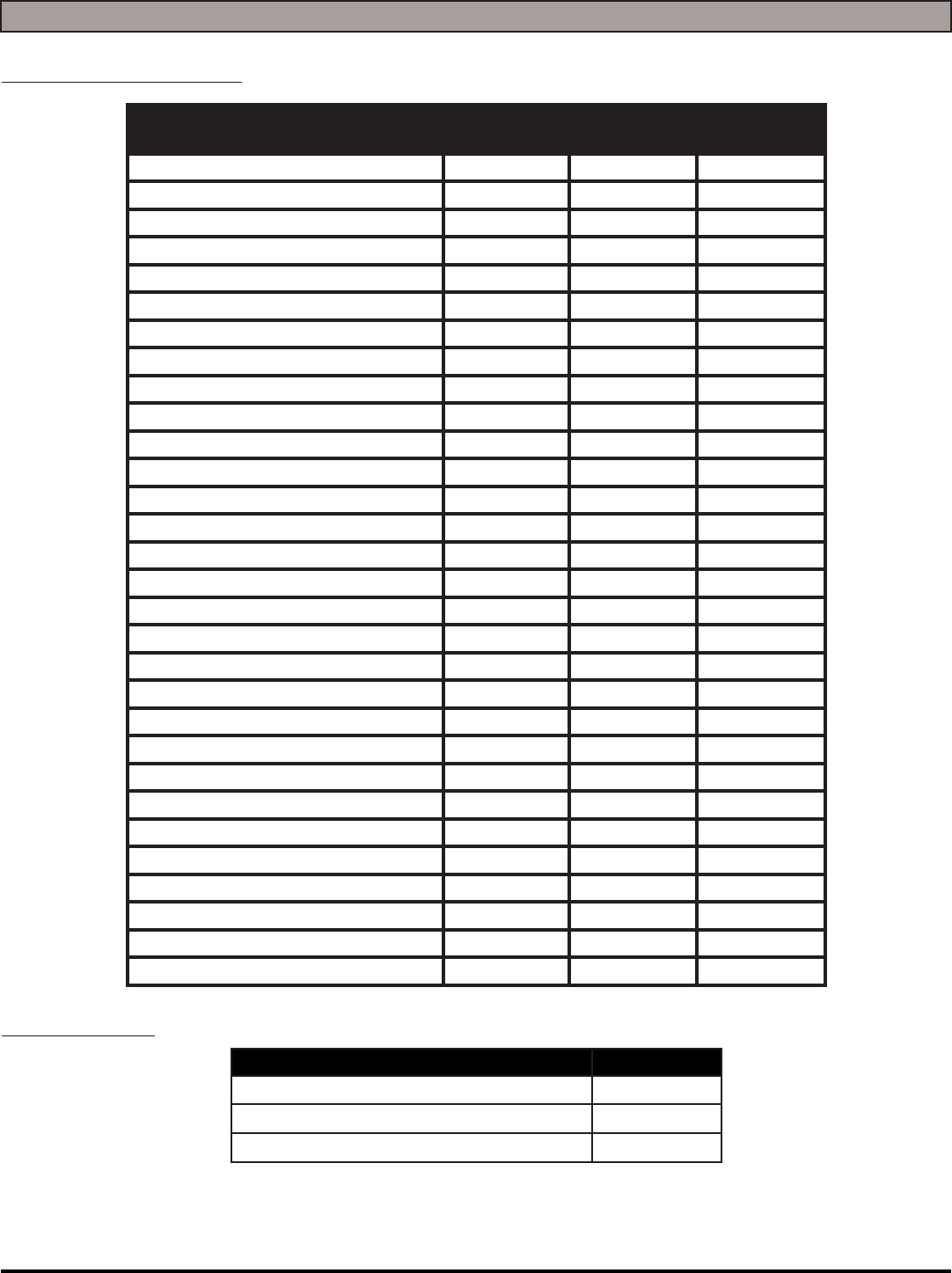
CLEAN AND / OR LUBRICATE IN SPEC REPAIR PROBLEM
SOLUTION TANK CONDITION
SQUEEGEE PIVOT POINTS & KNOBS
SOLUTION FILTER CLEANING
SCRUB DECK LINKAGE
VISUALLY INSPECT IN SPEC REPAIR PROBLEM
DRAIN SAVER
VACUUM FLOATS & SCREENS
VACUUM HOSES
SOLUTION HOSES
BLADE RETAINERS & HARDWARE
SQUEEGEE WHEELS
BRUSH SKIRTS
CASTER CONDITION
DRIVE WHEELS CONDITION
COMMENTS
SERVICING DISTRIBUTOR: ____________________________________
TECHNICIAN’S NAME: _______________________ DATE: ____________ SIGNATURE: ____________________
CUSTOMER’S NAME: ________________________ DATE: ____________ SIGNATURE: ____________________
MICROMINI-OP-EN - 25 -
COMMON WEAR PARTS
EDGE PADS AND SCREENS:
DESCRIPTION 24''×14''
SCRUBDECK
20''×14''
SCRUBDECK
13''×19''
White Pad N/A EDGE-4005 N/A
Red Pad EDGE-2404 EDGE-4004 N/A
Blue Pad EDGE-2403 EDGE-4003 N/A
Green Pad EDGE-2402 EDGE-4002 N/A
Black Pad EDGE-2401 EDGE-4001 N/A
White Driver Pad N/A EDGE-4025 EDGE-4019
60 Grit Sand Screen N/A EDGE-4026 EDGE-4020
80 Grit Sand Screen N/A EDGE-4027 EDGE-4021
100 Grit Sand Screen N/A EDGE-4028 EDGE-4022
120 Grit Sand Screen N/A EDGE-4029 EDGE-4023
150 Grit Sand Screen N/A EDGE-4030 EDGE-4024
20 Grit Sand Paper N/A EDGE-4031 N/A
36 Grit Sand Paper N/A EDGE-4032 N/A
60 Grit Sand Paper N/A EDGE-4033 N/A
80 Grit Sand Paper N/A EDGE-4034 N/A
100 Grit Sand Paper N/A EDGE-4035 N/A
100 Grit Diamond Polishing Pad N/A EDGE-4012 N/A
400 Grit Diamond Polishing Pad N/A EDGE-4013 N/A
800 Grit Diamond Polishing Pad N/A EDGE-4014 N/A
1500 Grit Diamond Polishing Pad N/A EDGE-4015 N/A
3000 Grit Diamond Polishing Pad N/A EDGE-4016 N/A
6000 Grit Diamond Polishing Pad N/A EDGE-4070 N/A
Tile/Grout Renovator Pad N/A EDGE-4018 N/A
Microfi ber Pad N/A EDGE-4036 N/A
Abrader Plate N/A N/A EDGE-4011
Dominator HD Strip Pad N/A EDGE-4006 N/A
Maroon ECO Prep Pad EDGE-2407 EDGE-4007 N/A
Remover Burnishing Pad N/A EDGE-4008 N/A
Porko Burnishing Pad N/A EDGE-4017 N/A
Velcro Pad N/A 300-4023 N/A
EDGE GRIP FACE:
DESCRIPTION PART#
20'' Velcro Grip Face 300-1037
24'' Velcro Grip Face 300-1038
20'' Mighty Lok Grip Face 300-01037Z
- 26 - MICROMINI-OP-EN
SQUEEGEE BLADE KITS & COMPLETE SQUEEGEE ASSEMBLIES:
SQUEEGEE
SIZE
MODEL 24''
EDGE
GUM RUBBER
BLADE KIT
LINATEX BLADE
KIT
COMPLETE
SQUEEGEE
ASSEMBLIES
26'' Squeegee Optional 130-770G 130-770L 130-7180
30'' Squeegee Optional 150-770G 150-770L 150-7180
34'' Squeegee Standard 180-770G 180-770L 180-7180
NOTICE
Squeegee blade kits include (1) Rear Blade, (1) Front
Blade, and (2) Backup Wheels with hardware.
NOTICE
Squeegee Assemblies (complete) listed above all come
with Linatex blades.
NOTICE
Size is stamped into the top of the painted steel
squeegee body on all squeegee's.
NOTICE
The 26'' squeegee is designed for narrow aisles and may
not have the same water control around tight turns as
the large squeegees.
BLANK
THIS PAGE WAS INTENTIONALLY LEFT BLANK

© RPS Corporation 2016
1711 South Street
Racine, WI 53404
www.rpscorporation.com
www.factorycat.com
www.tomcatequip.com
Tel. US: 800-634-4060
Tel. Int: (001) 262-681-3583
