Windsor Sensor Upright Vacuum Operators Manual
Windsor-Sensor-Xp-Upright-Vacuum-Operators-Manual windsor-sensor-xp-upright-vacuum-operators-manual windsor-sensor-xp-upright-vacuum-operators-manual 1921 file product_file sweepscrub
2017-01-04
: Sweepscrub Windsor-Sensor-Upright-Vacuum-Operators-Manual windsor-sensor-upright-vacuum-operators-manual 1915 file product_file
Open the PDF directly: View PDF  .
.
Page Count: 3
WINDSOR
MAINTENANCE
86372520
SenSor S and SenSor XP
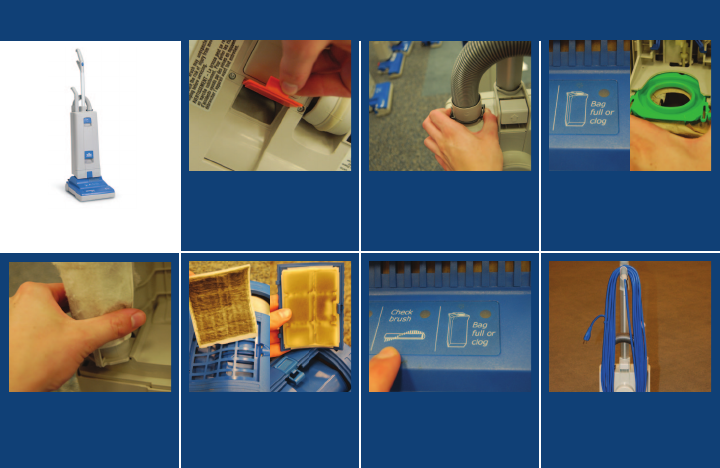
01) Unclog the machine.
05) Replace exhaust lter
quarterly or every 90
bags. From left to right:
Sensor S and Sensor XP.
04) Replace the motor lter
quarterly.
02)
To remove a clog from the
hose press the buttons to
remove the hose and clean
with a broom handle.
06) If check brush light
comes on clean the
brush.
03) Replace vacuum bag
when clog or bag full light
comes on.
07) Wrap cord for storage,
being careful not to pull
too hard on the strain
relief of the cord.
WINDSOR
MAINTENANCE
00000000
Product name
WINDSOR
OPERATION
86372520
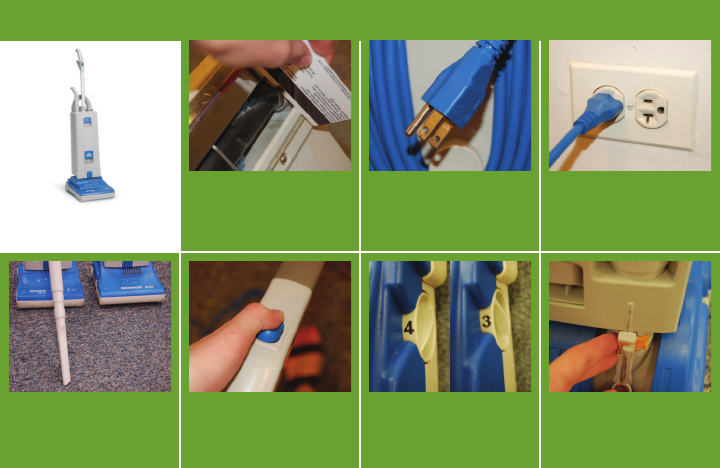
01) Inspect brushes for wear us-
ing a credit card and replace
if necessary. The card should
touch the bristles when you
run the card over the plate.
05) Turn the machine on.
04) Attach the optional
accessory tool if
necesary.
02) Check that all three prongs
are on the main body of the
cord. IF ONE OF THE PRONGS
IS MISSING, NOTIFY YOUR
SUPERVISOR.
06) SENSOR S ONLY: adjust the brush
height. Starting at the highest
setting, adjust the height setting by
setting until you hear the brush hit
the carpet.
03) Plug the cord into an
outlet.
07) Move the orange switch
to the right for body to
oor cleaning and to the
left to cross thresholds.
SenSor S and SenSor XP

WINDSOR
MAINTENANCE
00000000
Product name
WINDSOR
OPERATION
86372520
08) Unplug the cord from the
wall.
09) Hold the strain relief in an
upright position so that
the strain relief will not be
damaged when the cord is
wrapped.
10)
Wrap the cord for storage
starting from the base.
Wrapping the cord properly
will help prevent cord failure.
SenSor S and SenSor XP
