SwipeSense HUB520 Location Hub User Manual
SwipeSense Location Hub
User Manual

SwipeSense, Inc.
4619 N Ravenswood Ave.
Suite 202
Chicago, IL. 60640
(847) 440-6215
Location Hub Model: 520.0
Confidential
Page 1 of 6
May 2016
Location Hub
User Manual

SwipeSense, Inc.
4619 N Ravenswood Ave.
Suite 202
Chicago, IL. 60640
(847) 440-6215
Location Hub Model: 520.0
Confidential
Page 2 of 6
May 2016
Safety and Regulatory Information
This equipment has been tested and found to comply with the limits for a Class B digital device, pursuant
to part 15 of the FCC Rules.
This device complies with Part 15 of the FCC rules and with Industry Canada license-exempt RSS
standard(s). Operation is subject to the following two conditions:
(1) This device may not cause harmful interference, and
(2) This device must accept any interference received, including interference that may cause undesired
operation.
Le présent appareil est conforme aux CNR d'Industrie Canada applicables aux appareils radio exempts de
licence. L'exploitation est autorisée aux deux conditions suivantes :
(1) l'appareil ne doit pas produire de brouillage, et
(2) l'appareil doit accepter tout brouillage radioélectrique subi, même si le brouillage est susceptible d'en
compromettre le fonctionnement.
This equipment generates, uses and can radiate radio frequency energy and, if not installed and used in
accordance with the instructions, may cause harmful interference to radio communications. However,
there is no guarantee that interference will not occur in a particular installation. If this equipment does
cause harmful interference to radio or television reception, which can be determined by turning the
equipment off and on, the user is encouraged to try to correct the interference by one or more of the
following measures:
Reorient or relocate the receiving antenna.
Increase the separation between the equipment and receiver.
Connect the equipment into an outlet on a circuit different from that to which the receiver is
connected.
Consult the dealer or an experienced radio/TV technician for help
Your device is a radio transmitter and receiver. It is designed and manufactured not to exceed the emission
limits for exposure to radio frequency (RF) energy set by the Federal Communications Commission of the
U.S. Government. The FCC has established criteria for the amount of radio frequency energy various
products may produce depending on their intended usage. This product has been evaluated and found to
comply with the FCC’s exposure criteria. For body worn operation, the FCC RF exposure guidelines were
also met when used with the accessories supplied or designed for this product. Use of other accessories
may not ensure compliance with FCC RF exposure guidelines and should be avoided.
This device must not be co-located with other transmitters.

SwipeSense, Inc.
4619 N Ravenswood Ave.
Suite 202
Chicago, IL. 60640
(847) 440-6215
Location Hub Model: 520.0
Confidential
Page 3 of 6
May 2016
The installer of this radio equipment must ensure that the antenna is located or pointed such that it does
not emit RF field in excess of Health Canada limits for the general population; consult Safety Code 6,
obtainable from Health Canada’s website www.hc-sc.gc.ca/rpb
IMPORTANT NOTE
In order to comply with FCC RF Exposure requirements, the antennas used for the transmitter must be
installed to provide a separation distance of at least 20 cm from all persons and must not be located or
operating in conjunction with any other antenna or transmitter.
Les antennes utilisées pour ce transmetteur doivent être installé en considérant une distance de
séparation de toute personnes d’au moins 20 cm et ne doivent pas être localisé ou utilisé en conflit avec
tout autre antenne ou transmetteur.
Warnings
This Device is for indoor use only.
This Device is only to be installed by trained SwipeSense personnel.
Do not open the Device as there are no user serviceable parts inside
and this product is powered at all times.
Do not use if the case is cracked or worn.
Caution
Changes or modifications not expressly approved by the party responsible for
compliance could void the user’s authority to operate the equipment.
SwipeSense, Inc.
4619 N Ravenswood Ave.
Suite 202
Chicago, IL. 60640
(847) 440-6215
Location Hub Model: 520.0
Confidential
Page 4 of 6
May 2016
System Description
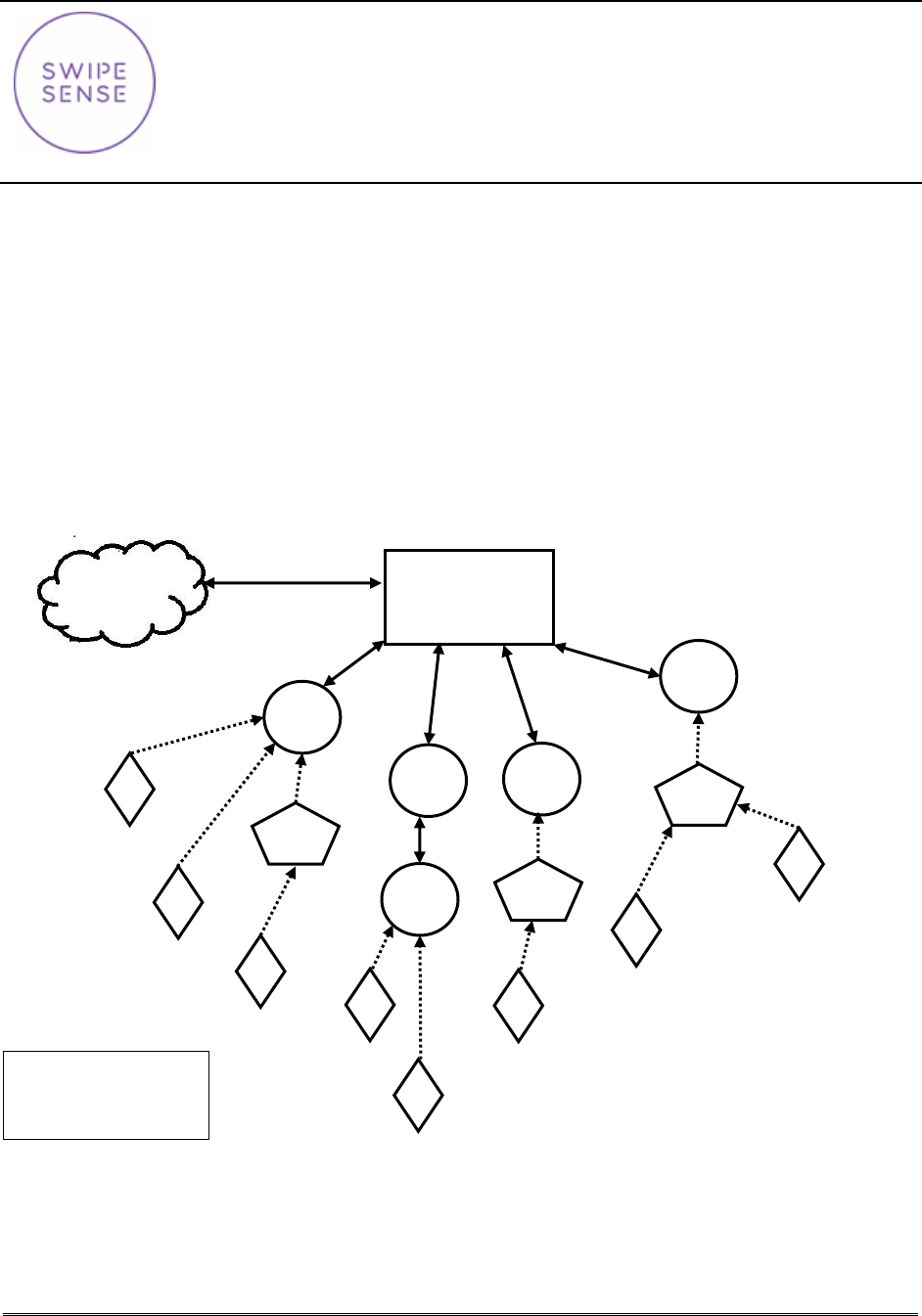
The SwipeSense System combines point-of-care hand hygiene with real-time usage data to eliminate
dependency on manual observations and increase compliance with infection control procedures.
Our fully integrated system seamlessly provides real-time hand hygiene data from across the enterprise
with exceptional clarity. The SwipeSense System creates a “mesh network” that provides flexibility for
compiling and communicating hygiene practices of employees within your facility. The mesh network is
composed of badges worn on individual employees, hygiene sensors mounted to hygiene dispensers’
tracks employee hand sanitation frequency, location hubs monitor an employee’s presence in patient
rooms and a communication hub located in each nurses collects the data generated within the network
and transmits to the cloud. Once the data is uploaded to the cloud, it is accessible to all administrators.
Cloud
Communication
Hub
LH = Location Hub
HS = Hygiene Sensor
B = Badges
LH
LH
B
B
B
B
B
HS
HS
LH
B
HS
LH
B
B
LH
SwipeSense, Inc.
4619 N Ravenswood Ave.
Suite 202
Chicago, IL. 60640
(847) 440-6215
Location Hub Model: 520.0
Confidential
Page 5 of 6
May 2016
Product Description
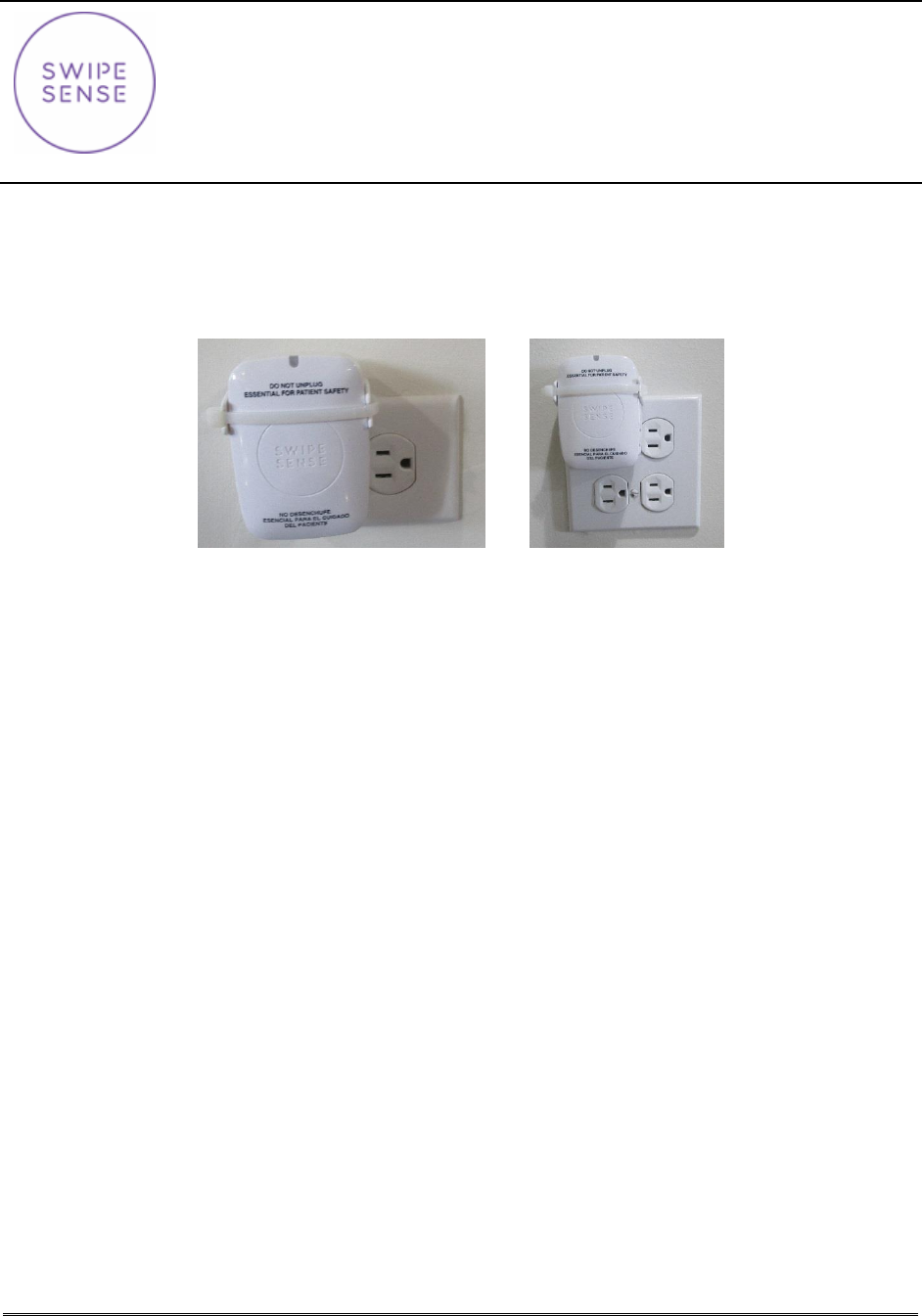
This is a wall-mounted device that is placed inside each of the patient areas and non-patient areas. This
device measures signal strength of badges located near it and transmits the information to the
communication hub for processing. A picture of an installed Location Hub is provided in Figure 1.
Figure 1: Installed Location Hub
Installation Procedures
Proper usage of the Location Hub is dependent upon proper placement within the designated room. This
is identified by choosing a location within the room that a healthcare provider will be facing when
interacting with the patient.
1. Locate and identify the predetermined outlet/power supply as defined by the comprehensive
assessment provided by SwipeSense.
NOTE: If a comprehensive assessment has not been completed, go to Location Optimization.
2. Scan and record the serial number of the Location Hub using the SwipeSense Mobile App.
3. Enter all assignment-related information for the Location hub to the SwipeSense Mobile App.
4. Use the pre-applied mounting tape and bracket to ensure solid connectivity to the power outlet.
5. Make sure the Location Hub is aligned correctly, so that the blue LED light is pointed towards the
ceiling.
NOTE: Install either in the top outlet for two outlet fixtures or the top left outlet for four outlet
fixtures.
6. The blue light will light and stop flashing once it is communicating with the communication hub.
SwipeSense, Inc.
4619 N Ravenswood Ave.
Suite 202
Chicago, IL. 60640
(847) 440-6215
Location Hub Model: 520.0
Confidential
Page 6 of 6
May 2016
Location Optimization
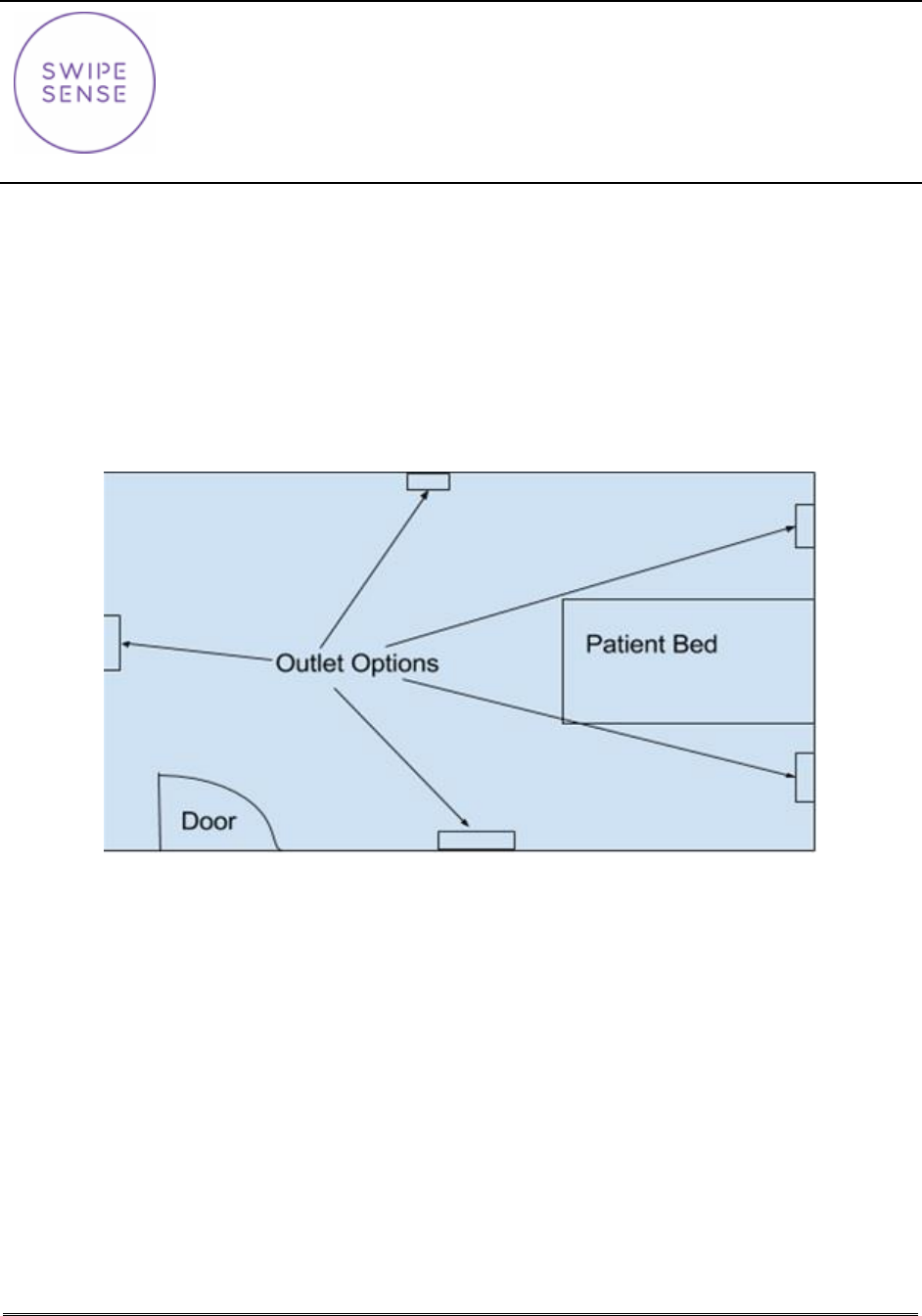
If a comprehensive assessment has not been completed, identify the outlet/power supply as needed.
Refer to Figure 2, for a diagram identifying the best options, which are the ones closest to the patient.
Choose locations:
with a clear line of sight of the patient,
that the healthcare provider is likely to face while interacting with the patient,
avoid obstructions like medical or patient equipment and belongings, and
that are not in the corners which will reduce the monitoring field of the Location Hub.
Figure 2: Patient Room