TAIDOC TECHNOLOGY 3261GMC55I BLOOD GLUCOSE PLUS BLOOD PRESSURE MONITORING SYSTEM User Manual
TAIDOC TECHNOLOGY CORP. BLOOD GLUCOSE PLUS BLOOD PRESSURE MONITORING SYSTEM Users Manual
Users Manual
A1-1
FORA D40
Blood Glucose plus Blood Pressure
Monitoring System
Owner’s Manual
09/2009
Version 1.0
01
A1-2
Dear FORA D40 System Owner:
Thank you for purchasing the FORA D40 Blood Glucose plus Blood Pressure
Monitoring System. This manual provides important information which helps
you to operate this system smoothly. Before using this product, please read
the following contents thoroughly and carefully.
According to the clinical studies from American Diabetes Association, elevated
blood pressure often accompanies adult diabetes patients. These studies also
suggest that diabetes patients could reduce the risk of cardiovascular diseases
by managing their blood glucose levels and blood pressure. Therefore, with
the compact size and easy operation of this FORA D40 Blood Glucose plus
Blood Pressure Monitoring System, you can easily monitor your blood glucose
levels and blood pressure by yourself. In addition, this system can help you
and your healthcare professionals to monitor and adjust your treatment plans,
and keep your diabetes and blood pressure under control.
If you have other questions regarding this product, please contact the place of
purchase or the local customer service.
02
A1-3
IMPORTANT SAFETY INSTRUCTIONS
READ THIS BEFORE USE
The following basic safety precautions should always be taken.
1. Use the device only for the intended use described in this manual.
2. Do not use accessories which are not supplied by the manufacturer.
3. Keep the equipment and its flexible cord away from hot surfaces.
4. Do not use the equipment where aerosol sprays are being used, or where
oxygen is being administered.
5. Do not use the device if it is not working properly or has been damaged.
6. Before using product to test your blood glucose, read all instructions
thoroughly and practice the test. Do all quality control checks as directed
and consult with a diabetes healthcare professional.
KEEP THESE INSTRUCTIONS
03
A1-4
Table of Contents
BEFORE YOU START 06
Warnings and Precautions 06
Health Information 07
Blood Glucose 07
Blood Pressure 08
ABOUT ALTERNATIVE SITE TESTING (AST) 09
ABOUT THIS SYSTEM 11
Intended Use 11
Principle of Measurement 11
Major Features 11
Content of the System 13
Appearance and Key Functions of the Monitor 14
LCD Screen 15
Speaking Function 16
Test Strip Description 19
PREPARATIONS BEFORE USE 20
Battery and DC adaptor 20
Battery Installation and Replacement 21
Use of the DC Adaptor 22
Setting the Monitor 23
User Number Selection 25
BLOOD GLUCOSE MEASUREMENT 26
Important Information 26
Quality Control with FORA Control Solutions 27
Important Control Solution Information 28
Performing a Control Solution Test 29
Testing Your Blood Glucose 31
Special Message 37
Comparing Monitor and Laboratory Results 38
04
A1-5
BLOOD PRESSURE MEASUREMENT 39
Suggestions before Measuring 39
Applying the Pressure Cuff 40
Proper Measurement Position 41
Take a Reading 42
Measurement Average Mode 44
MONITOR MEMORY 45
Viewing Results on the Monitor 45
Reading the Average of Blood Glucose Results 47
Viewing Results on a Personal Computer 49
Data Transmission via Bluetooth 50
Data Transmission via GPRS 51
TAKING CARE OF YOUR MONITOR & STRIP 52
Cleaning 53
Storage 54
TROUBLESHOOTING 55
SPECIFICATIONS 59
FCC STATEMENT 60
05
A1-6
BEFORE YOU START
Warnings and Precautions
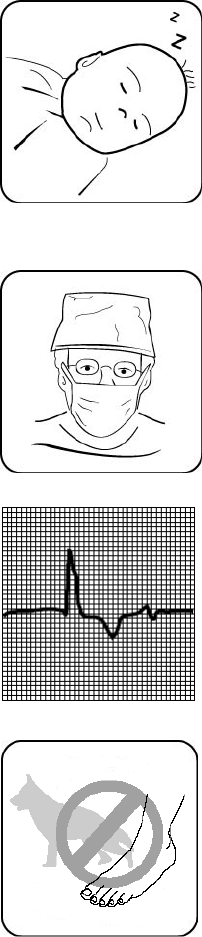
The FORA D40 system is designed for use on
individuals age 16 and above. It shall NOT be
used under any circumstances on newborns,
infants or persons who cannot communicate.
This device does NOT serve as a cure for any
symptoms or diseases. The data measured are
for reference only. Always consult your physician
to have the results interpreted.
This device is NOT able to take measurements in
the presence of common arrhythmia, such as
arterial or ventricular premature beats or arterial
fibrillation. It may produce reading error.
Do NOT use the device for purposes other than
measuring blood glucose and blood pressure for
human beings.
Do NOT apply the cuff to areas other than your
arm.
06
A1-7
Health Information
Blood Glucose
Blood glucose monitoring plays an important role in diabetes control. A
long-term study showed that keeping blood glucose levels close to normal
can reduce the risk of diabetes complications by up to 60%*1.
The results you acquire with the FORA D40 system can help you and your
healthcare professionals monitor and adjust your treatment plan to gain better
control of your diabetes.
Time of day Normal plasma glucose range for
people without diabetes
Fasting and before meal Less than 100 mg/dL
(5.6 mmol/L)
2 hours after meals Less than 140 mg/dL
(7.8 mmol/L)
Source: American Diabetes Association (2008). Clinical Practice Recommendations. Diabetes
Care, 31 (Supplement 1): S1-108.
Time of day Plasma glucose range for people
with diabetes
Your target
range
Fasting and before meal 70 mg/dL -130 mg/dL
(3.9 mmol/L -7.2 mmol/L)
2 hours after meals Less than180 mg/dL
(10.0 mmol/L)
Source: American Diabetes Association (2008). Standards of Medical Care in Diabetes.
Diabetes Care, 31 (Supplement 1): S12–S54.
Please work with your doctor to determine a target range that works best for
you.
*1: American Diabetes Association position statement on the Diabetes Control and
Complications Trial (1993).
07
A1-8
Blood Pressure
Clinical studies show that the adult diabetes is often accompanied by elevated
blood pressure. People with diabetes can reduce their heart risk by managing
their blood pressure along with diabetes treatment*5.
Knowing your routine blood pressure trend tells whether your body is in good
condition or not. Human blood pressure naturally increases after reaching
middle age. This symptom is a result of continuous aging of the blood vessel.
Further causes include obesity, lack of exercise, and cholesterol (LDL)
adhering to the blood vessels. Rising of blood pressure accelerates hardening
of the arteries, and the body becomes more susceptible to apoplexy and
coronary infarction. The recommended blood pressure range is as below:
Classification Systolic Pressure (mmHg) Diastolic Pressure(mmHg)
Hypotension*3 Less than 90 Less than 60
Normal*4 Less than 120 Less than 80
Prehypertension*4 120 – 139 80 – 89
Stage 1 Hypertension*4 140 – 159 90 – 99
Stage 2 Hypertension*4 160 or more 100 or more
*3 National Heart, Lung, and Blood Institute, Diseases and Conditions
*4 The Seventh Report of the Joint National Committee on Prevention, Detection, Evaluation,
and Treatment of High Blood Pressure. NIH Publication. 2003. No. 03-5233
*5: American Diabetes Association: The Diabetes-Heart Disease Link Surveying Attitudes,
Knowledge and Risk (2002)
08
A1-9
ABOUT ALTERNATIVE SITE TESTING (AST)
Important: There are limitations for doing AST.
Please consult your healthcare professional before you do AST.
What is AST?
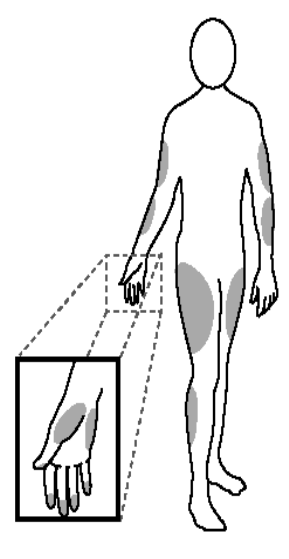
Alternative site testing (AST) means that
people use parts of the body other than
fingertips to check their blood glucose levels.
This system provides you to test on the palm,
the forearm, the upper arm, the calf, or the
thigh with equivalent results to fingertip testing.
What’s the advantage?
Fingertips feel pain more readily because they
are full of nerve endings (receptors). At other
body sites, since nerve endings weren’t so
condensed, you won’t feel as much pain as at
the fingertip.
When to use AST?
Food, medication, illness, stress and exercise can affect blood glucose levels.
Capillary blood at fingertip reflects these changes faster than capillary blood at
other sites. Therefore when testing blood glucose during or immediately after
meal, physical exercise, or any other event, take blood sample from your
finger only.
We strongly recommend that you do AST ONLY in the following intervals:
In a pre-meal or fasting state (more than 2 hours since the last meal).
Two hours or more after taking insulin.
Two hours or more after exercise.
09
A1-10
Do NOT use AST if:
You think your blood glucose is low.
You are unaware of hypoglycemia.
Your AST results do not match the way you feel.
You are testing for hyperglycemia.
Your routine glucose results are often fluctuating.
How to increase the accuracy?
Stimulating blood perfusion by rubbing the puncture site prior to blood
extraction has a significant influence on the glucose value obtained.
Blood from the site without rubbing exhibits a measurably different glucose
concentration than blood from the finger. When the puncture site was rubbed
prior to blood extraction, the difference was significantly reduced.
Please follow suggestions below before getting a drop of blood:
Rub the puncture site about 20 seconds before penetration.
Use a clear cap (included in the kit) instead while setting the lancing device.
10
A1-11
ABOUT THIS SYSTEM
Intended Use
The FORA D40 system is a 2 in 1 system designed to measure blood glucose
and to measure blood pressure non-invasively (in vitro diagnostic use.) It is
intended for use at home and at clinical settings. It shall not be used for the
diagnosis of diabetes or hypertension, or for the testing of newborns.
Principle of Measurement
Blood glucose is based on the measurement of electrical current generated by
the reaction of glucose with the reagent of the strip. The monitor measures the
current and displays the corresponding blood glucose level. The strength of
the current produced by the reaction depends on the amount of glucose in the
blood sample.
Blood pressure is measured non-invasively at the arm based on the
Oscillometric method.
Both functions work independently of each other (one measurement, either
blood glucose or blood pressure, at one time) in order to avoid any interference
problems.
Major Features
This system has the following distinguishing features and allows you to perform
your measurements effectively.
1. Talking function – Instructions will be given throughout the measurement.
The settings and test results will be repeated as well.
2. No calibration required – Users do not need to calibrate the monitor.
3. AC/PC/QC records – Glucose AC is the glucose value before meal and PC
is the glucose value after meal. QC is the control solution value which users
perform to check if the system works effectively.
4. Multi-user function – It provides different users to store their results in the
memory individually.
5. Data transmission options – It helps users to manage their test results
easily and efficiently.
11
A1-12
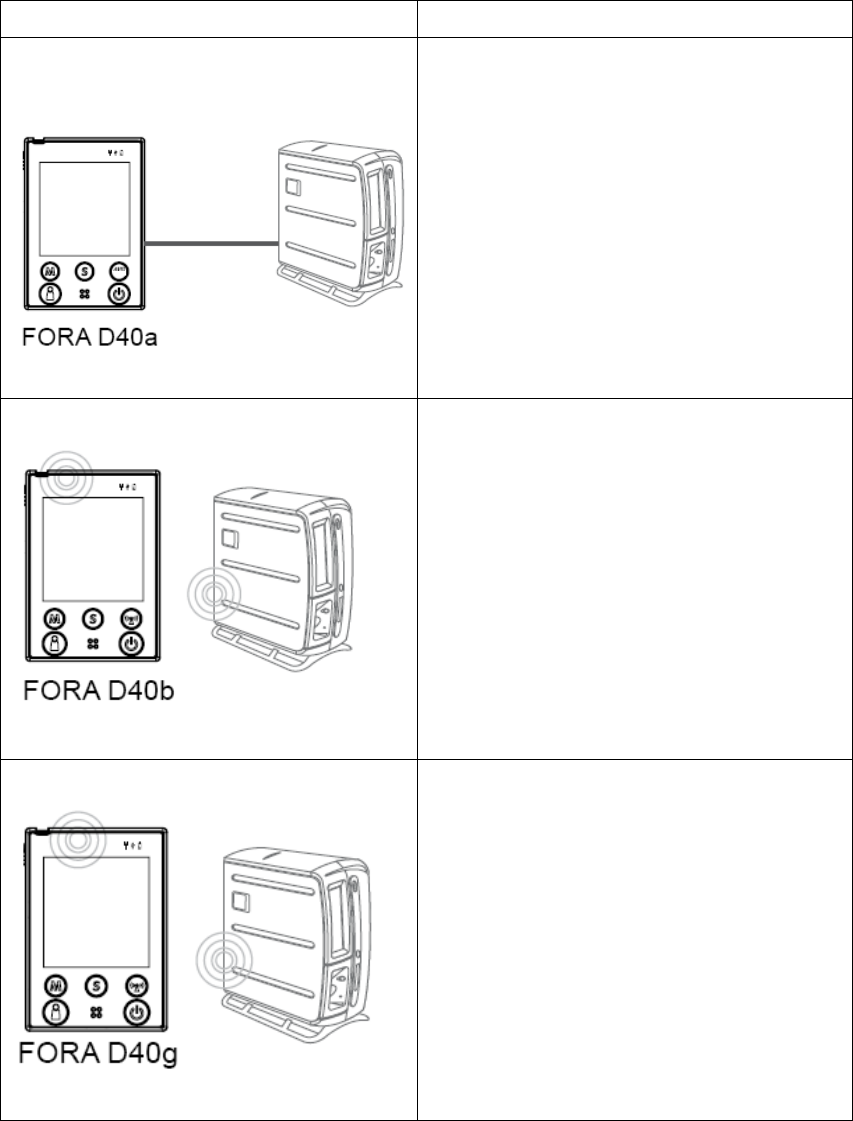
There are three subtypes of FORA D40 system available. Each one of them
offers a different way to transmit allowing users to choose their own desired
ways to manage their test results. The data transmissions are listed below:
Model Data Transmission Function
Test results can be viewed on the PC
through the cable connection.
Test results can be viewed on the PC
through a wireless connection by using
Bluetooth technology.
Test results can be viewed on the PC
through a wireless connection by using
GPRS technology.
12
A1-13
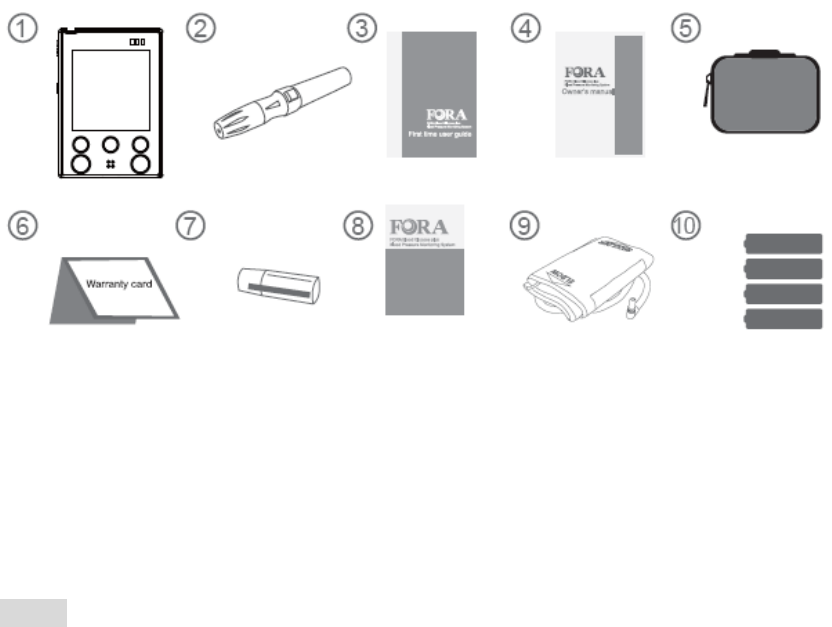
CONTENT OF THE SYSTEM
1 Blood glucose plus blood pressure
monitor
6Warranty card
2 Lancing device 7A clear cap
3 First time user guide 8Daily log book
4 Owner’s manual 9An arm cuff
5 Sporty bag Batteries
These products have been designed, tested, and proven to work together as a
system to produce accurate blood glucose test results. Use only FORA D40
test strips and control solution with your FORA D40 monitor.
NOTE
One 3.7V rechargeable Li-ion battery is included in the kit of FORA D40g
instead of alkaline batteries. Use ONLY rechargeable Li-ion battery for FORA
D40g (battery pack no.S14500 1S4P).
Make sure your system is properly packaged prior to use and that it includes
all components listed above. If not, please return your system to the place of
purchase.
Please note that test strips, control solutions and lancets are not included in
the standard kit. Please ask your local agent or the place of purchase for
availability.
13
A1-14
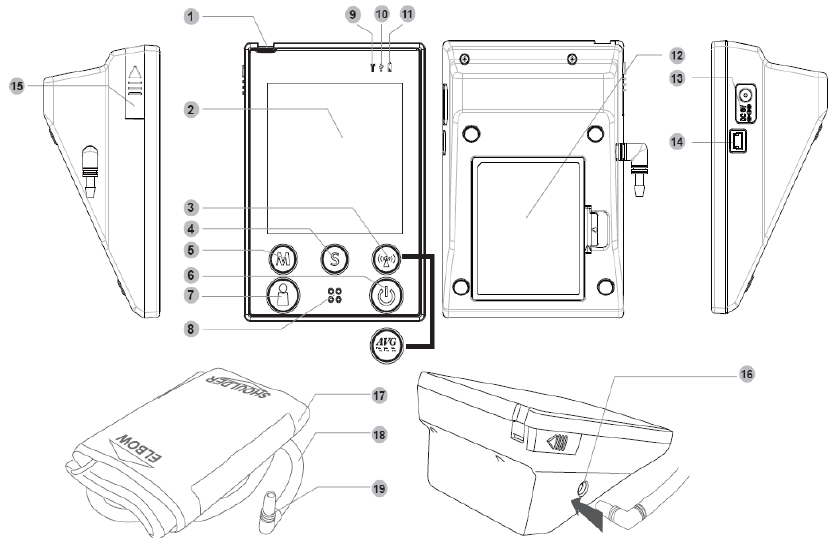
Appearance and Key Functions of the Monitor
1. TEST SLOT- is where you insert the test strip.
2. LCD SCREEN- guides you through the test using symbols and simple
messages.
3. RF BUTTON- assists you with wireless data transmission.
AVERAGE BUTTON- assists you with blood pressure average mode.
4. S BUTTON- is used to set up the monitor.
5. M BUTTON- is used to turn on the monitor and enter the memory.
6. ON/OFF BUTTON
7. USER SELECTION BUTTON- assists you with user number selection.
8. SPEAKER
9. RF INDICATOR- lights up for data transmission.
10. USB INDICATOR- lights up for data transmission.
11. POWER INDICATOR
12. BATTERY COMPARTMENT
13. AC ADAPTER PORT- is for power supply.
14. USB LINK PORT- For data transmission.
15. STRIP-EJECTION BUTTON- is where the used strip will be automatically
ejected after you push up the button.
16. Air jack
17. Arm Cuff
18. Air Tube
19. Air Plug- connects to air jack.
14
A1-15
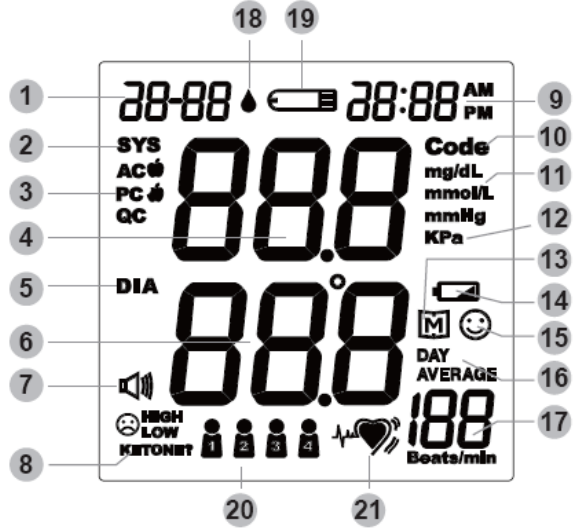
LCD Screen
1. Date
2. Systolic Pressure Symbol
3. PC Mode
4. & 6. Test Result Area
5. Diastolic Pressure Symbol
7. Voice Volume
8. Ketone Warning
9. Time
10. Code Number
11. Unit of Measurement in Blood Glucose
12. Unit of Measurement in Blood Pressure
13. Memory
14. Battery Symbol
15. Smile Symbol
16. Day Average
17. Pulse Rate
18. Blood Drop Symbol
19. Test Strip Symbol
20. User Number
21. Pulse Symbol
15
A1-16
Speaking Function
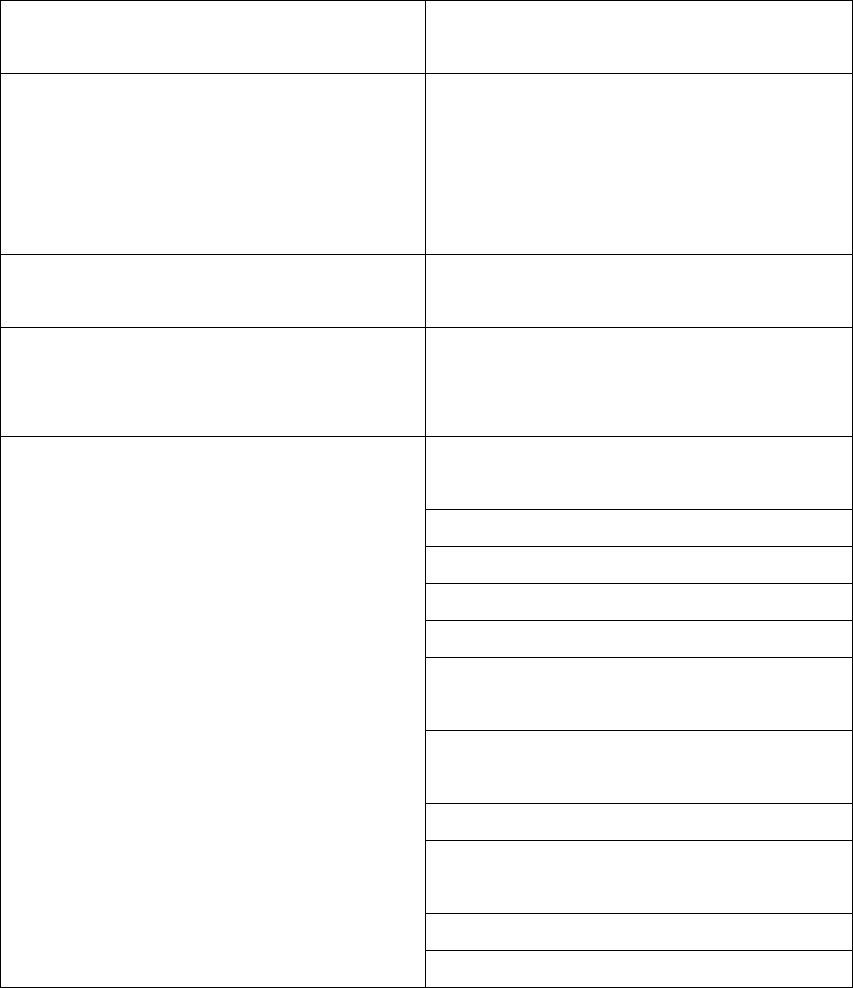
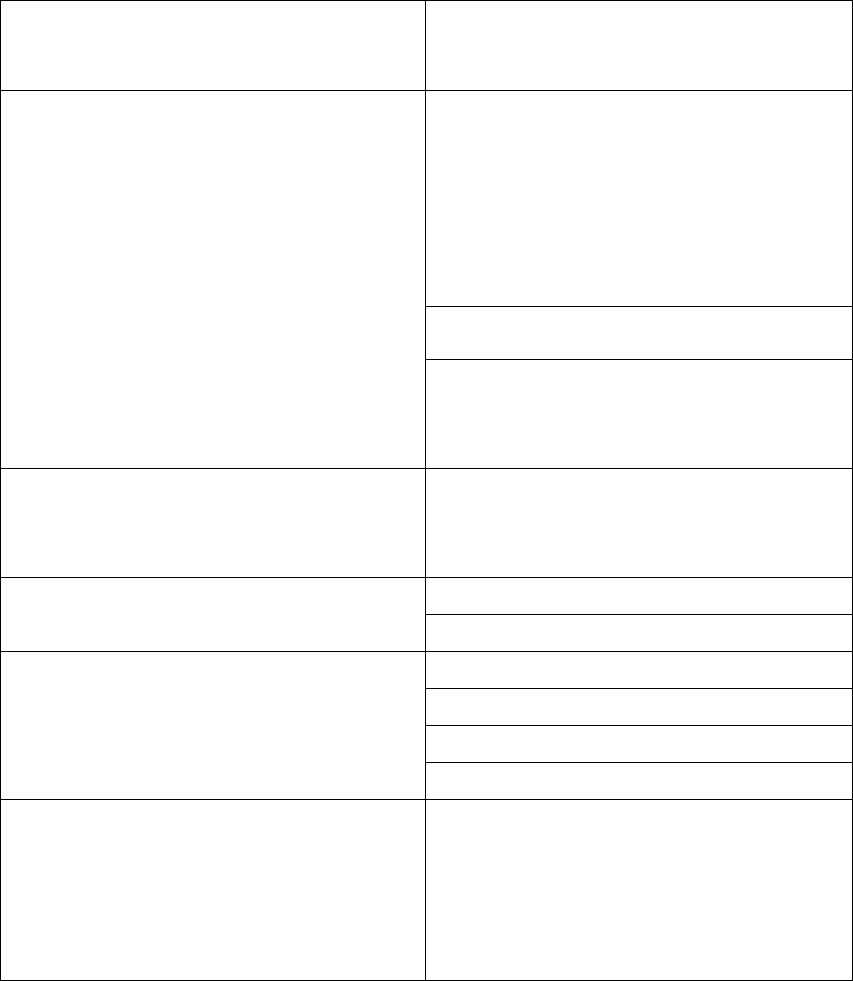
The monitor “speaks” aloud step-by-step instructions on how to test your blood
glucose and blood pressure. The following table tells you when and what the
monitor“speaks”.
WHEN
does the monitor speak?
WHAT
does the monitor speak?
When the monitor is turned on.
Thank you for using this product.
The user’s number is one, please
select the user’s number.
The user’s number is one, please
relax during measurement.
When room temperature is outside
operating range of 10-40ºC.
Room temperature out of range,
unable to measure.
When the glucose test is completed
(the result appears on display).
The blood glucose is (number)
milligram per deciliter/ millimole per
liter.
You are now in setting mode. The
Year is (number).
The month is (number).
The day is (number)
The hour is (number).
The minute is (number).
Blood glucose unit is milligrams per
deciliter/ millimole per liter.
Temperature unit is degrees
Fahrenheit/ Celsius.
Voice volume is (number).
Delete memory record function, press
the key the clear all the records.
Repeat all the setting status.
When the monitor is in the setting
mode.
Have a nice day.
16
A1-17
WHEN
does the monitor speak?
WHAT
does the monitor speak?
Thank you for using this product.
Test strip is inserted. Today’s day is
(number), the time is (number), the
room temperature is (number), the
user’s number is one, please apply
blood onto the test strip.
Now testing.
When the test strip is inserted into the
monitor.
The user’s number is one. Your blood
glucose is (number) milligram per
deciliter/ millimole per liter.
When the glucose test result is
outside measurement range of
20-600 mg/dL.
The blood glucose is out of range,
unable to measure.
Battery is low, please recharge
When power is insufficient. Battery is dead, please recharge
You are now in testing mode.
This is before meal measurement.
This is after meal measurement.
When the monitor is in blood glucose
measurement mode.
You are now in control solution mode.
When the blood pressure test is
completed (the result appears on
display).
Your systolic blood pressure is
(number) millimeter of mercury, the
diastolic blood pressure is (number)
millimeter of mercury and the heart
rate is (number) beats per minute.
17

A1-18
WHEN
does the monitor speak?
WHAT
does the monitor speak?
Thank you for using this product.
Today’s date is (number), the time is
(number), you are now in memory
mode, the user’s number is one,
please select the user’s number.
When the monitor is in memory mode.
Memory record for (Time), your blood
glucose is (number) milligram per
deciliter/ millimole per liter. Your
memory record for (Time). Your
systolic blood pressure is (number)
millimeter of mercury, the diastolic
blood pressure is (number) millimeter
of mercury and the heart rate is
(number) beats per minute.
Thank you for using this product.
You are now in day average mode, the
user’s number is one, please select
the user’s number.
When the monitor is in day average
memory mode. The user’s number is (number), the
7-,14-,21-,28,,60-,90- day blood
glucose average is (number)
18
A1-19
Test Strip Description
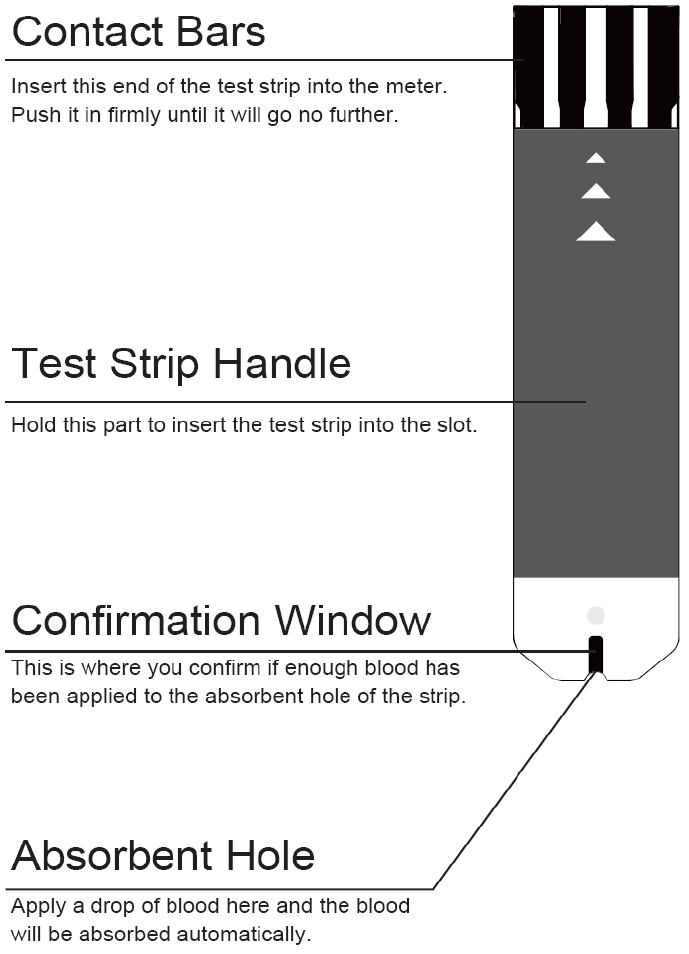
Your system measures the amount of sugar (glucose) in whole blood. Blood is
applied to the absorbent hole of the test strip and is automatically drawn into
the reaction cell where the reaction takes place.
The test strip contains the following parts:
See section “Testing Your Blood Glucose” for complete instructions.
19
A1-20
PREPARATIONS BEFORE USE
Battery and DC adapter
The monitor is powered by batteries or a DC adapter.
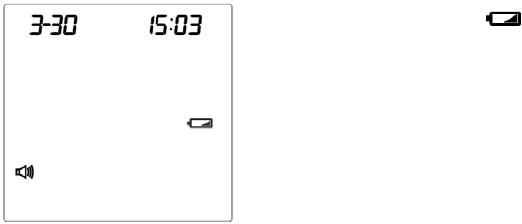
Low Power Signal
When the power is low, the monitor will remind you by displaying two
messages:
When the flashing “ ” symbol is displayed on the
main screen, this indicates that batteries are dead
and it is time to change the batteries.
The power indicator located above the main screen
would light up in red as well.
20
A1-21
Battery Installation and Replacement
Make sure the monitor is off when replacing the batteries.
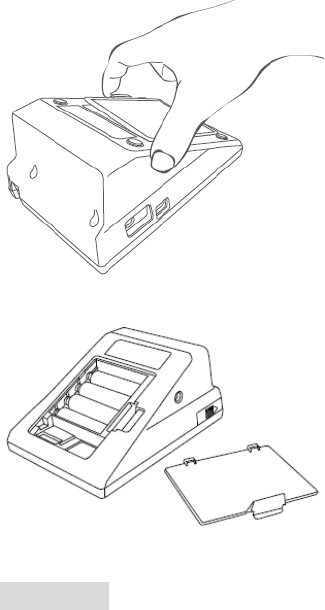
STEP 1- Press the edge of the battery cover
and pull up. Lift the battery cover and remove
the batteries inside.
STEP 2 - Insert four 1.5V AA size alkaline
batteries or one 3.7V rechargeable Li-ion
battery. (Please refer to CAUTION for use).
Make sure the + (positive) and – (negative)
marks match as indicated in the battery
compartment.
CAUTION
FORA D40a and FORA D40b can use either four 1.5V AA size alkaline
batteries or one 3.7V rechargeable Li-ion battery, whereas FORA D40g can
use Li-ion rechargeable battery ONLY (battery pack no.S14500 1S4P.)
If the battery is replaced by an incorrect type, it may cause risk of explosion.
Do not use different type, date or brand name batteries together. Use only
new batteries of the required size and type.
Replacing the batteries does not affect previous test results stored in the
monitor. But you may need to update the settings.
Batteries might leak chemicals if not used for a long time. Remove the
batteries if you are not going to use the device for an extended period (i.e., 3
months or more).
As with all small batteries, the batteries should be kept away from small
children who still put things in their mouths. If they are swallowed, promptly
see a doctor for help.
Discard batteries according to your local regulations.
21
A1-22
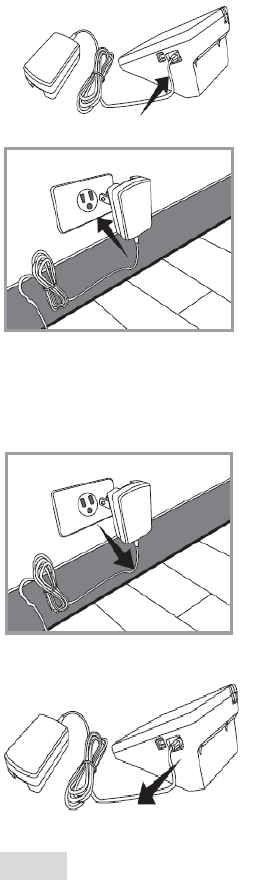
Use the AC Adapter
Connect the AC adapter to the monitor.
1. Connect the AC adapter plug to the AC adapter
jack of the monitor.
2. Plug the AC adapter power plug into an electrical
outlet. You can press the ON/OFF button to start the
measurement.
Remove the AC adapter from the monitor.
1. When the monitor is off, remove the AC adapter
power plug from the electrical outlet.
2. Disconnect the AC adapter plug from the AC
adapter jack of the monitor.
NOTE
FORA D40 with the Li-ion battery must be recharged by connecting the AC
adapter to an electrical outlet. Only this 3.7V rechargeable Li-ion battery
(battery pack no. S14500 1S4P) can be recharged with FORA D40 by the
connection of AC adapter. Any other kind of rechargeable battery is not
allowed or it may damage the monitor.
When alkaline batteries are used for FORA D40a or FORA D40b, these
batteries cannot be recharged with the monitor by AC adapter connection.
The used alkaline batteries must be replaced by new ones.
22
A1-23
Setting the Monitor
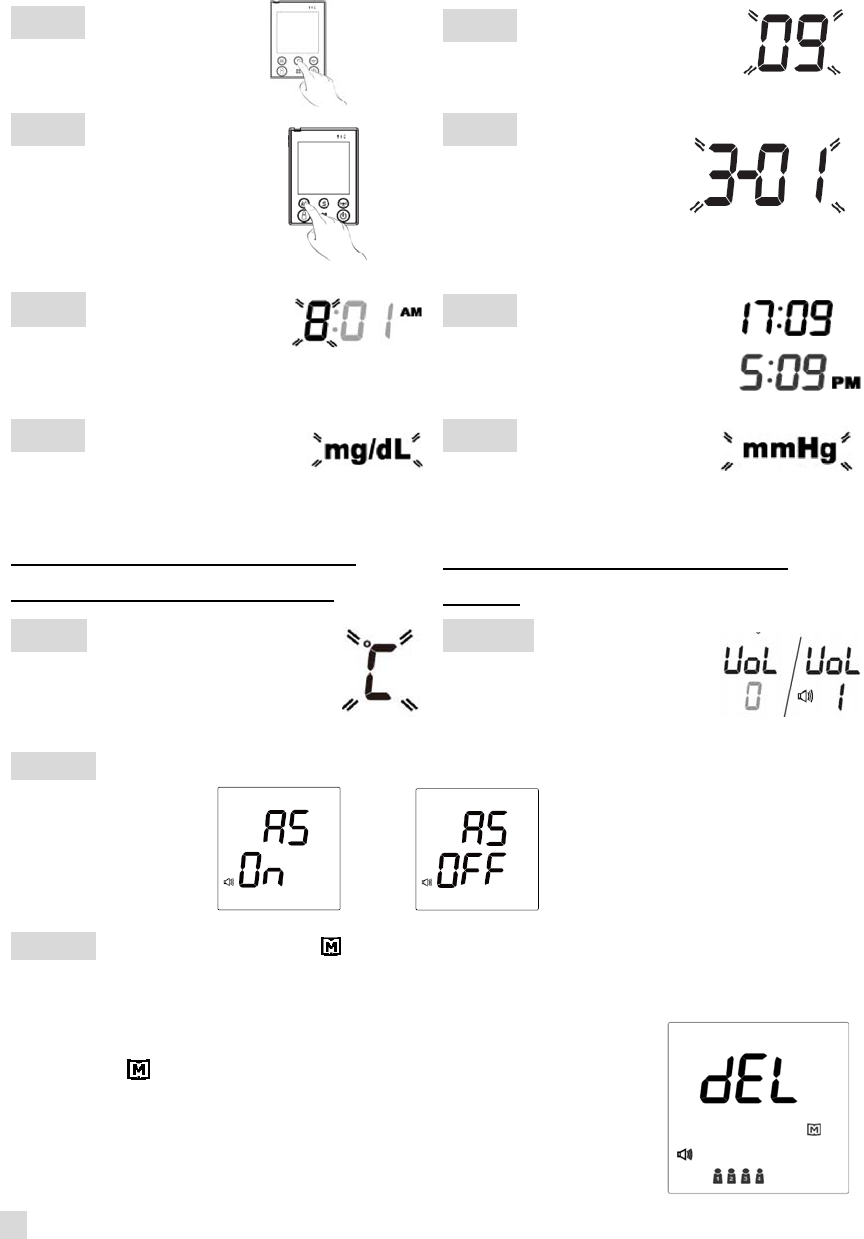
Time, date, units of measurement, memory deletion, volume and language can
be set in the monitor. Two keys are involved: S button and M button.
Step 1 Press the S
button to start setting.
Step 2 Year will flash first.
Step 3 Press M button
to make changes.
Press S button to
advance to next setting.
Step 4 Date will
flash. Follow Step 3
for changes.
Step 5 Time will flash.
Follow Step 3 for changes.
Step 6 12H/24H mode
selection. Follow Step 3
for changes.
Step 7 Unit of glucose
concentration will flash.
Follow Step 3 for changes.
*Please note: The default unit is
milligram per deciliter (mg/dL).
Step 8 Unit of blood
pressure will flash.
Follow Step 3 for changes.
*Please note: The default unit is
mmHg.
Step 9 Unit of temperature
will flash. Follow Step 3 for
changes.
Step 10 Voice volume
will flash. Follow Step 3
for changes.
Step 11 Auto send will flash. Follow Step 3 for changes.
Step 12 “dEL” and flashing “ “ will display on the screen for memory deletion.
If you do not want to delete memory, press S button to skip this step.
If you’d like to delete memory, press M button again
so that “ ” will start flashing. Press M button again
to delete ALL memory. The monitor will repeat all
the settings you just finished and then the monitor
will turn off.
23

A1-24
NOTE
While setting speaking volume, number 0 indicates that the speaking
function is off. “ ” will not display. Numbers 1 to 7 indicate speaking volume
from low to high. They will be displayed together with “ .”
The time, date, speaking volume and memory deletion can ONLY be
changed in the setting mode. Therefore, these parameters cannot be
changed while performing tests.
During the setting mode, you can press On/Off button to turn off the monitor.
While the monitor is in the setting mode, it will turn off automatically if left idle
for three minutes.
24
A1-25
User Number Selection
This FORA D40 system provides up to four users for both measuring functions,
and each user has his/her own individual memory storage.
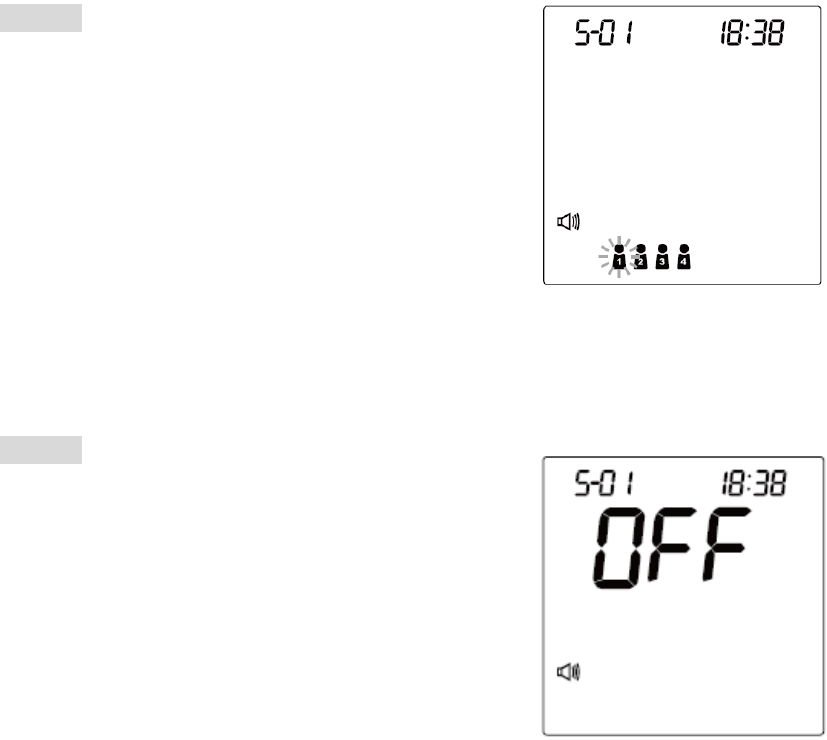
STEP 1
Press the user selection button to select the
desired user number. You can change the user
number by pressing the user selection button.
STEP 2
When you have finished the user selection, press
S button to confirm the setting. The monitor will
repeat the user number you just selected and
then turn off automatically.
25
A1-26
BLOOD GLUCOSE MEASUREMENT
Important Information
1. Severe dehydration and excessive water loss may cause inaccurate results.
If you believe you are suffering from severe dehydration, consult a
healthcare professional immediately.
2. If your blood glucose results are lower or higher than usual, and you do not
have symptoms of illness, first repeat the test. If you have symptoms or
continue to get results higher or lower than usual, follow the treatment
advice from your healthcare professional.
3. Apply only capillary whole blood sample to test your blood glucose.
Applying other substances will cause inaccurate results.
4. If you are experiencing symptoms that are inconsistent with your blood
glucose test results and you have followed all instructions described in this
owner’s manual, call your healthcare professional.
5. Severely hypotensive individuals, patients in shock and individuals in a
hyperglycemic-hyperosmolar state, with or without ketosis, may experience
inaccurate results. Critically ill patients should not be tested with a glucose
meter.
6. Please refer to your test strip package insert for important additional
information.
26
A1-27
Quality Control with FORA Control Solutions
FORA control solutions contain a known amount of glucose that reacts with
test strips. By comparing your control solution test results with the expected
range printed on the test strip vial label, it is able to check that the monitor and
the test strips are working together as a system and that you are performing
the test correctly. It is very important that you do this simple check routinely to
make sure you get accurate results.
When you use this system to test your blood for the first time, practice the
procedure using control solution. When you can do three tests in a row that
are within the expected range, you are ready to test your blood.
To routinely check the monitor and test strips, perform a single test for each
level of control solution at least once a week.
When should the control solution test be performed?
When you first get your monitor.
When you begin using a new vial of test strips.
Whenever you suspect that the monitor or test strips are not working
properly.
When your blood glucose test results are inconsistent with how you feel, or
when you think your results are inaccurate.
When your test strips are exposed to extreme environmental conditions (See
TAKING CARE OF YOUR MONITOR & STRIP section of this manual)
When you want to practice running the test.
If you drop the monitor.
27

A1-28
Important Control Solution Information
Use only FORA control solutions.
Check the expiration date on the control solution vial. Do not use if expired.
It is recommended to use the control solutions between the temperatures of
20℃ and 25℃ (68℉ and 77℉.)
Shake the vial, discard the first drop of control solution, and wipe off the
dispenser tip to ensure a good sample and an accurate result.
Use only within 3 months after first opening. Record the discard date (date
opened plus 90 days) on the control solution vial. Discard on this date.
Store the control solution tightly closed at temperatures 2℃ - 30℃ (36℉ -
86℉). Do not freeze.
NOTE
The control solution range printed on the test strip vial is for FORA control
solution only. It is used to test monitor and test strip performance. It is not the
recommended range for your blood glucose level.
28
A1-29
Performing a Control Solution Test
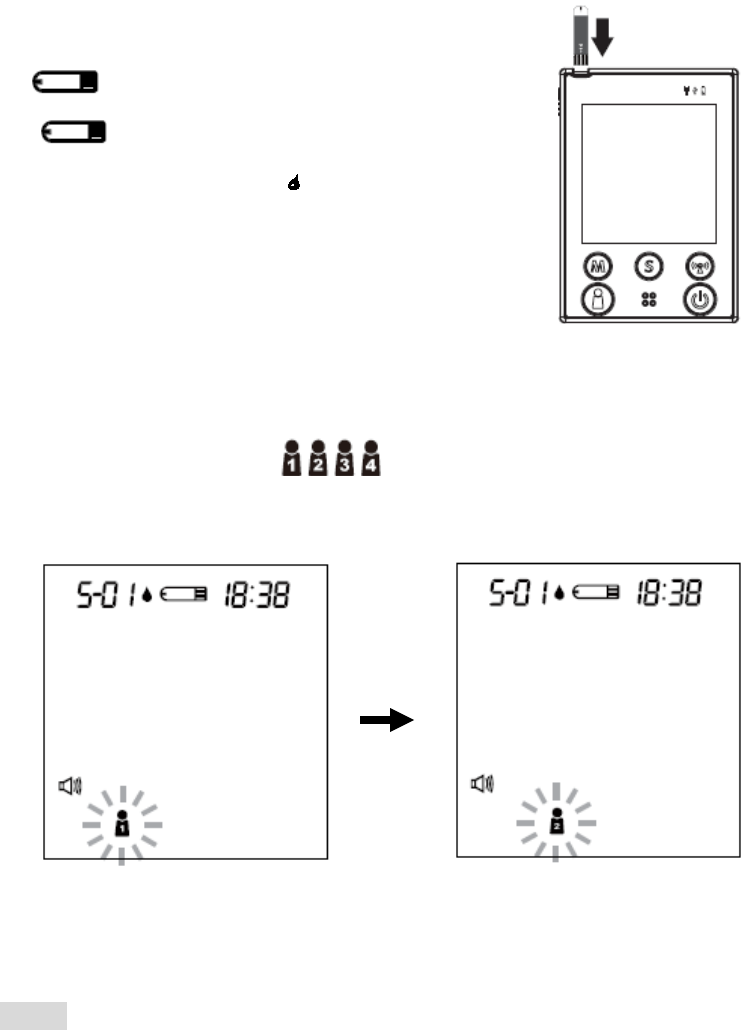
STEP 1. Insert a test strip with contact bars end first and facing up, into the test
slot. The monitor turns on automatically and displays the followings in
sequence:
“” and the ambient temperature
Î ” ” with the user’s number,
and a flashing “ .“
STEP 2. Select the User Number
After the test strip is fully inserted into the test slot, press the user selection
button to select the user (numbers from1 to 4) whose test reading
will be stored in its memory.
NOTE
You can also select the user’s number in advance by pressing the user
selection button. Please refer to page 25 for detailed information about your
user’s number selection.
29
A1-30
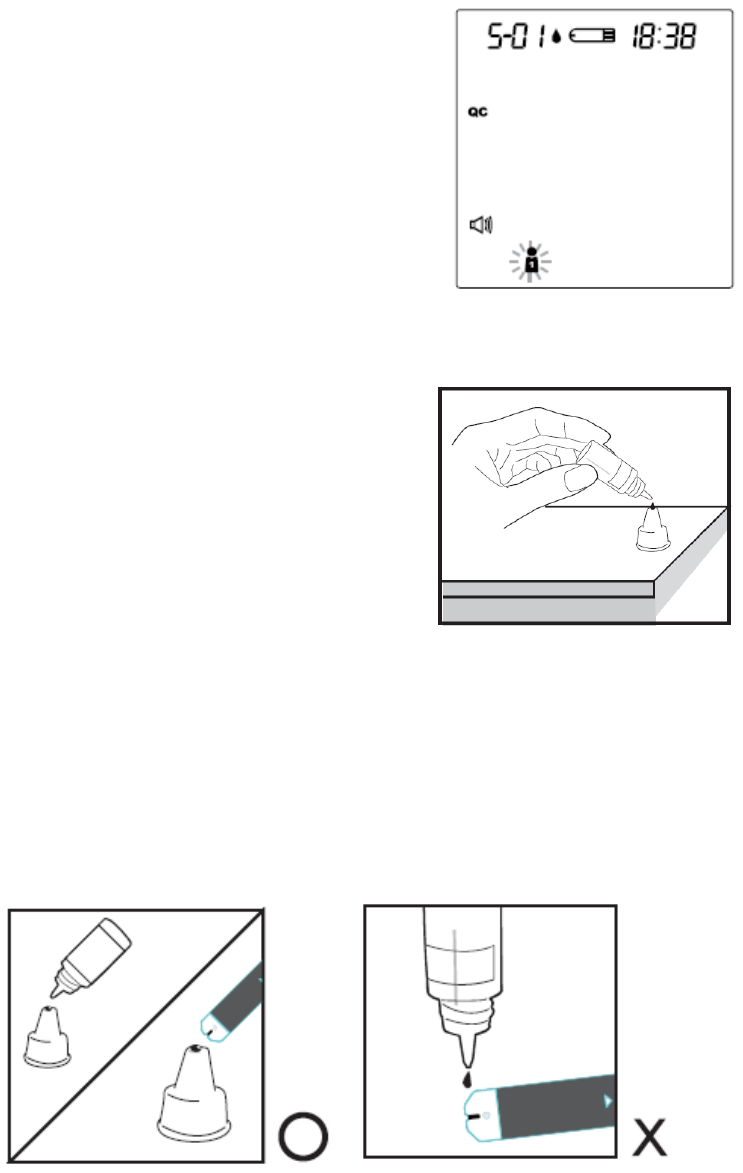
STEP 3. Press M button and select the symbol "QC." When you do this, this
reading will be stored as a control solution data.
STEP 4. Obtain Control Solution
Shake the control solution vial well.
Remove the cap from the control
solution bottle. Place cap on flat
surface. Squeeze the vial, discard the
first drop, and wipe off the dispenser tip
to prevent contamination. Squeeze the
vial again to produce another drop and
place this drop on the top of cap.
STEP 5. Apply Control Solution.
While holding the monitor, move the absorbent hole of the test strip to touch
the drop of control solution. Then the drop will be automatically drawn into the
test strip. Make sure the confirmation window fills completely. The meter
begins counting down.
30
A1-31
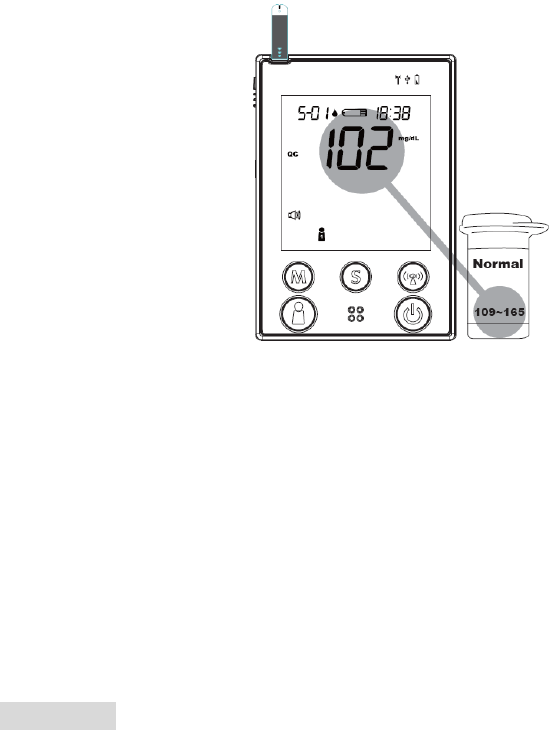
STEP 6. The monitor will begin countdown. After 5 seconds, the control
solution test result will appear. The result should fall within the range
printed on the test strip vial.
Out-of-range results
If test results fall outside the printed range, check the “Operating Problem”
section in the troubleshooting guide and repeat the test. If your results
continue to be out-of-range, the system may not be working properly. Do NOT
test your blood. Please contact your local customer service for help.
WARNING
Contact bars must be inserted all the way into the monitor or your test results
may be inaccurate.
Every time you perform a control solution test, you must enter into the “QC”
test mode so that the test result with QC symbol will be stored in the monitor
memory. Failure to do so will confuse the blood glucose test result with the
control solution test result in memory.
31
A1-32
Testing Your Blood Glucose
Be sure to read carefully this section and the test strip package insert found in
the test strip box before testing. Make sure you have all items needed to test:
the monitor, test strips, lancing device, and sterile lancet.
WASH AND DRY YOUR HANDS FIRST BEFORE STARTING.
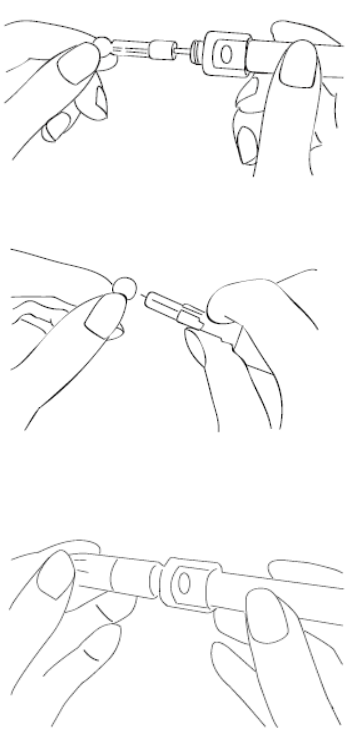
STEP 1. Set the Lancing Device
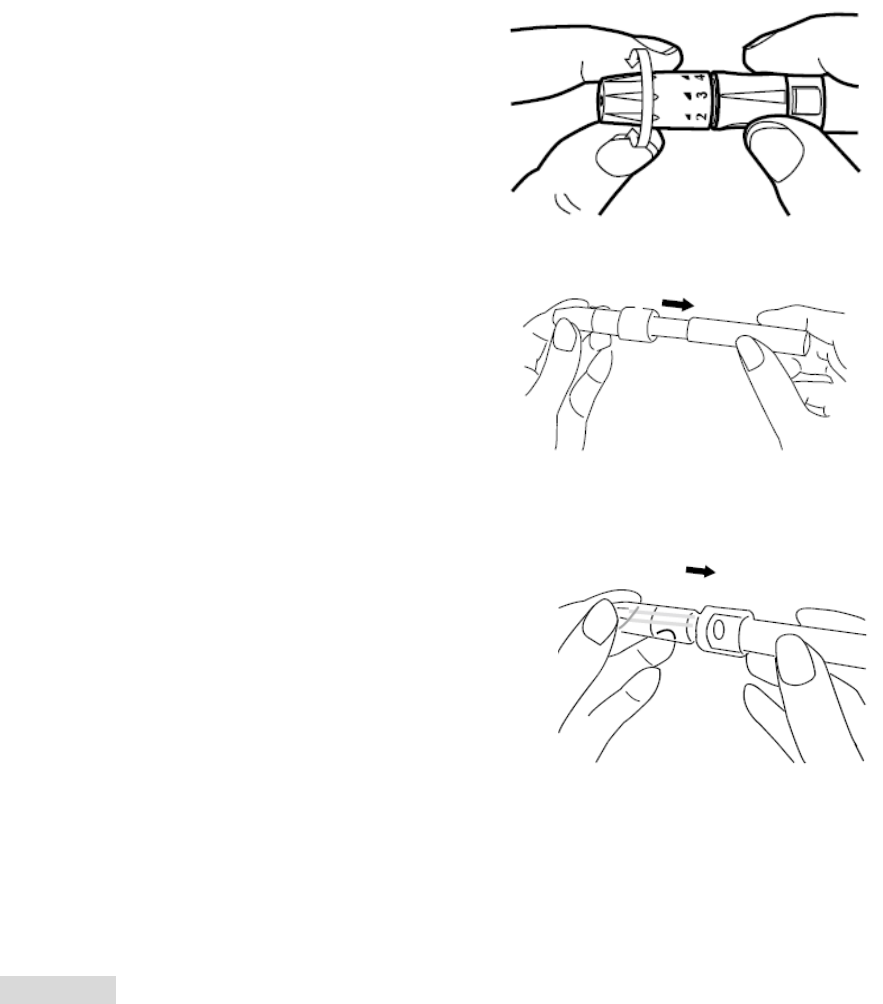
Screw off the cap of the lancing device. Insert a
lancet into the lancet holder and push down
firmly until it is fully seated.
Twist the protective disk until it separates from
the lancet.
Replace the lancing device cap. Turn the cap
until it is snug but not too tight.
32
A1-33
The adjustable tip offers 5 levels of skin
penetration. Twist the adjustable tip in either
direction until the number lines up with the
arrow:
1-2 for soft or thin skin, 3 for average skin,
4-5 for thick or calloused skin.
Slide the ejection/cocking control back until it
clicks. If it does not click the device may have
been cocked when the lancet was inserted.
Blood from sites other than the fingertip
A clear cap, together with the kit, make it easier to
get a drop of blood for AST. When you want to
obtain blood from sites other than the finger,
replace the lancing device cap with the clear
cap. Turn the clear cap until it is snug but not too
tight, and then slide the ejection/cocking control
back until it clicks.
The lancing device is now ready for use. Set aside for later use.
WARNING
To reduce the chance of infection:
Never share a lancet or the lancing device.
Always use a new, sterile lancet. Lancets are for single use only.
Avoid getting hand lotion, oils, dirt, or debris in or on the lancets and the
lancing device.
33
A1-34
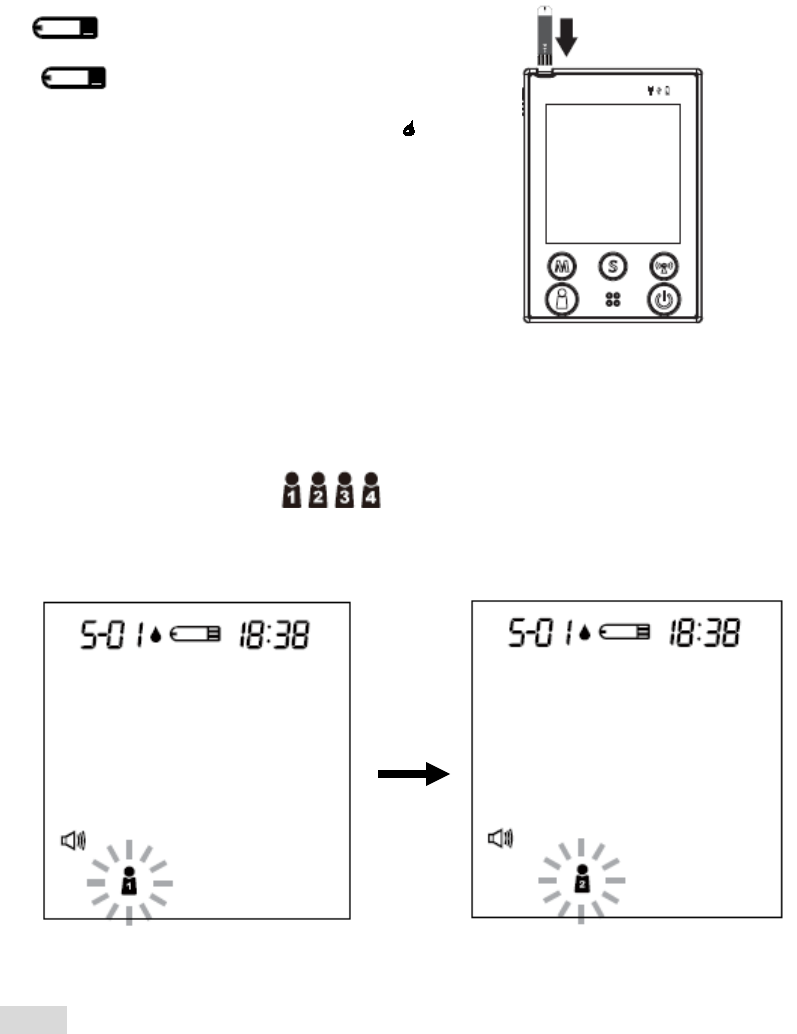
STEP 2. Insert the Test Strip
Insert a test strip with contact bars end first and facing up, into the test slot.
The monitor turns on automatically and displays the followings in sequence:
“ ” and the ambient temperature
Î ” ” with the code number,
the user’s number and a flashing “ .“
STEP 3. Select the User Number
After the test strip is fully inserted into the test slot, press the user selection
button to select the user (numbers from1 to 4) whose test reading
will be stored in its memory.
NOTE
You can also select the user’s number in advance by pressing the user
selection button. Please refer to page 25 for detailed information about your
user’s number selection.
34
A1-35
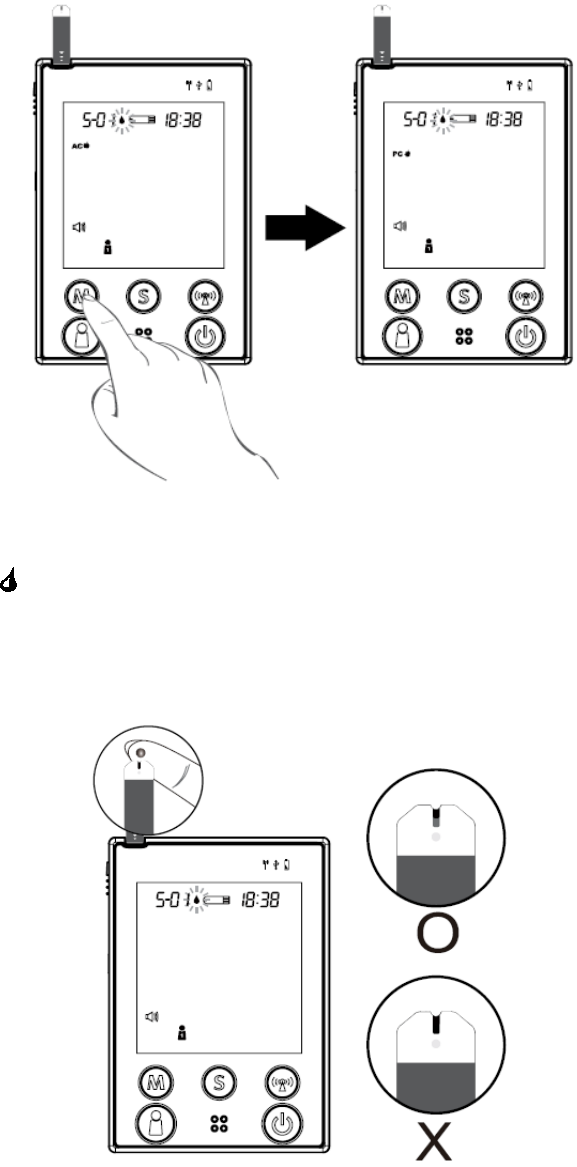
STEP 4. Select AC/PC
Press M button to select AC/PC mode, or just perform a general test. Select
“AC” if performing a blood glucose test before meal, or “PC” for performing a
test after meal.
STEP 5. Apply Blood into the Test Strip
When the “ “ symbol is flashing on the LCD display, apply a drop of blood to
the absorbent hole of the test strip. Do not push your finger against the test
strip or try to apply a smeared sample.
35
A1-36
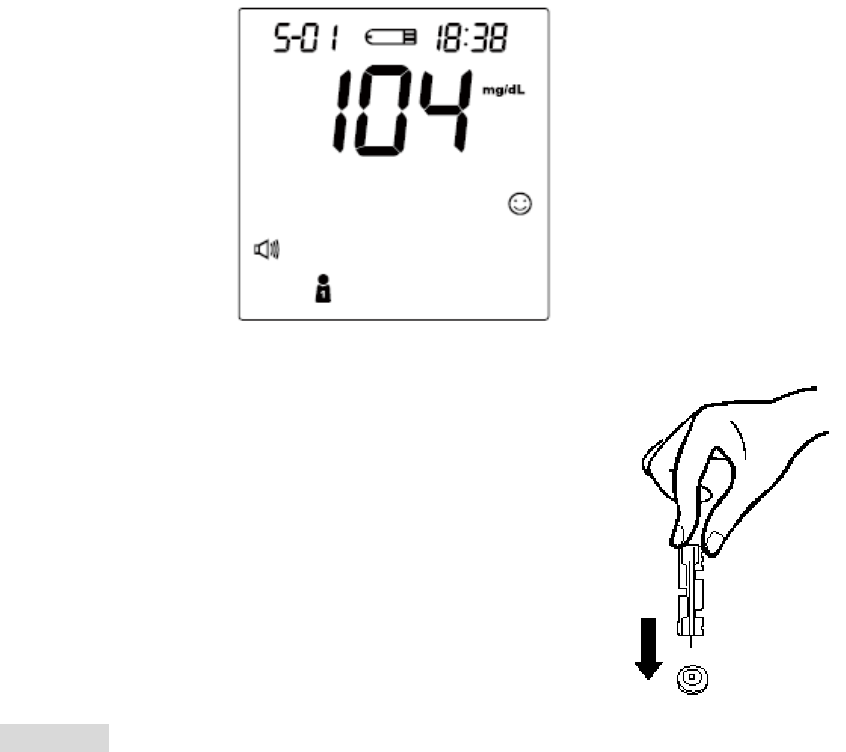
STEP 6. Obtain an Accurate Result in 5 Seconds
Read the test result after 5 seconds. The test result will be automatically stored
in the monitor memory. Turn the monitor off by removing the test strip.
STEP 7. Discard the Used Lancet
Remove the lancing device cap and the lancet. Place
the disk on a hard surface and push the exposed needle
tip into the protective disk. Always use caution when
removing the lancet.
CAUTION
If you do not apply blood sample within 3 minutes, or if you accidentally turn
off the monitor by pressing the On/Off button, the monitor will alert you with
flashing test strip symbol and continuous beeping. You will need to turn the
monitor off by removing the test strip.
To start a blood pressure test after performing a blood glucose test, make
sure that the test strip is removed from the monitor. Then turn the monitor off
and refer to "BLOOD PRESSURE MEASUREMENT".
36
A1-37
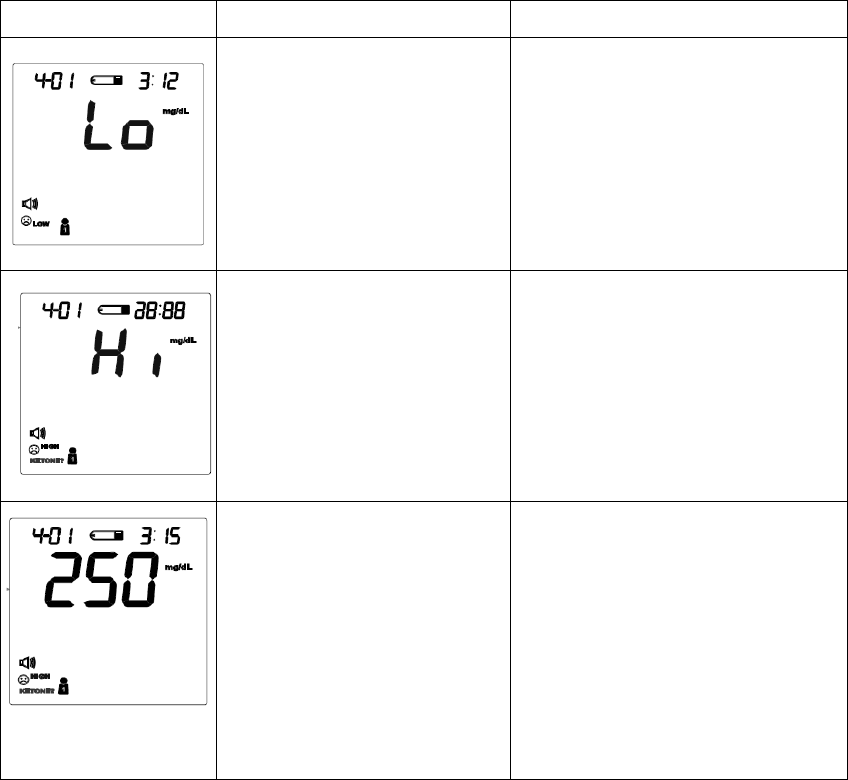
Special Message
MESSAGE WHAT IT MEANS ACTION
Appears when your result
is below measurement
limit, which is less than 20
mg/dL.
This indicates hypoglycemia
(low blood glucose.)
You should immediately treat
hypoglycemia as
recommended by your
healthcare professional.
Appears when your result
is above measurement
limit, which is over 600
mg/dL.
This indicates severe
hyperglycemia (high blood
glucose).
You should seek immediate
medical assistance.
KETONE? appears when
your result is equal to or
higher than 240 mg/dL.
This indicates there is a
possibility of ketone
accumulation if you have type
1 diabetes.
Please seek immediate
medical assistance.
37
A1-38
Comparing Monitor and Laboratory Results
The monitor provides you with whole blood equivalent results. The result you
obtain from your monitor may differ somewhat from your laboratory result due
to normal variation. Monitor results can be affected by factors and conditions
that do not affect laboratory results in the same way (see test strip package
insert for typical accuracy and precision data, and for important information on
limitations). To make an accurate comparison between monitor and laboratory
results, follow the guidelines below.
Before you go to the lab:
Perform a control solution test to make sure that the monitor is working
properly.
It is best to fast for at least eight hours before doing comparison tests.
Take your monitor with you to the lab.
While being at the lab:
Make sure that the samples for both tests (the monitor test and the lab test) are
taken and tested within 15 minutes of each other.
Wash your hands before obtaining a blood sample.
Never use your monitor with blood that has been collected in a gray-top test
tube.
Use fresh capillary blood only.
You may still have a variation from the result because blood glucose levels can
change significantly over short periods, especially if you have recently eaten,
exercised, taken medication, or experienced stress*6. In addition, if you have
eaten recently, the blood glucose level from a finger stick can be up to 70
mg/dL (3.9 mmol/L) higher than blood drawn from a vein (venous sample)
used for a lab test*7.Therefore, it is best to fast for eight hours before doing
comparison tests. Factors such as the amount of red blood cells in the blood (a
high or low hematocrit) or the loss of body fluid (severe dehydration) may also
cause a meter result to be different from a laboratory result.
References
*6: Surwit, R.S., and Feinglos, M.N.: Diabetes Forecast (1988), April, 49-51.
*7: Sacks, D.B.: “Carbohydrates. “ Burtis, C.A., and Ashwood, E.R.( ed.), Tietz Textbook of
Clinical Chemistry. Philadelphia: W.B. Saunders Company (1994), 959.
38
A1-39
BLOOD PRESSURE MEASUREMENT
Suggestions before Measuring
Avoid caffeine, tea, alcohol, and cigarette at least 30 minutes before
measurement.
Wait 30 minutes after exercising or bathing before measurement.
Sit or lie down for at least 10 minutes before measuring.
Do not measure when feeling anxious or tense.
Take a 5-10 minute break between measurements. This break can be
longer if necessary, depending on your physical conditions
Keep the records for your physician as reference.
Blood pressure varies from two hands naturally. Always measure your
blood pressure on the same arm.
39
A1-40
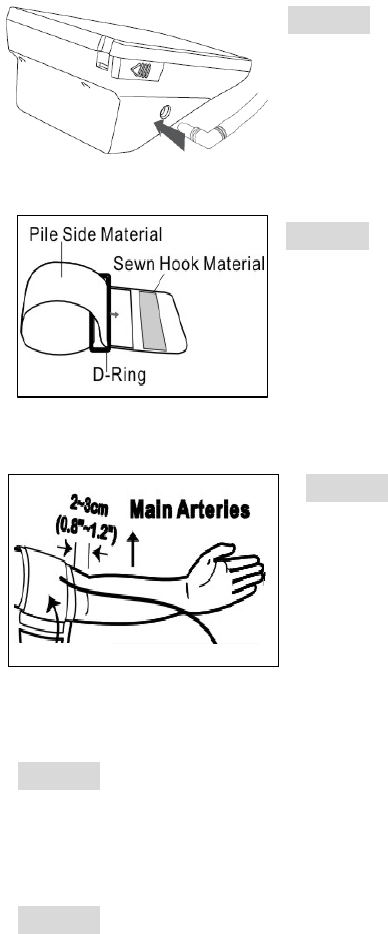
Applying the Pressure Cuff
STEP 1 Connect the air plug of the tubing to the
air jack at the side of the monitor.
STEP 2 Assemble the cuff as the left figure. The
smooth surface is on the inside of the cuff loop and
the metal D-ring should not touch your skin.
STEP 3 Extend your left arm in front of you with
your palm facing up. Slide the cuff onto your left
arm, above your elbow. The red line on the edge of
the cuff should be approximately 0.8 inch to 1.2
inch (2 cm to 3 cm) above your elbow. Align the
tubing over the main arteries at the inside of your
arm.
STEP 4 When the cuff is positioned correctly, pull the end of the cuff to tighten
the cuff snugly around your upper arm. You should be able to fit your index
finger between the cuff and your arm.
STEP 5 Press the hook material firmly against the pile material. The top and
bottom edges of the cuff should be tightened evenly around your upper arm.
40
A1-41
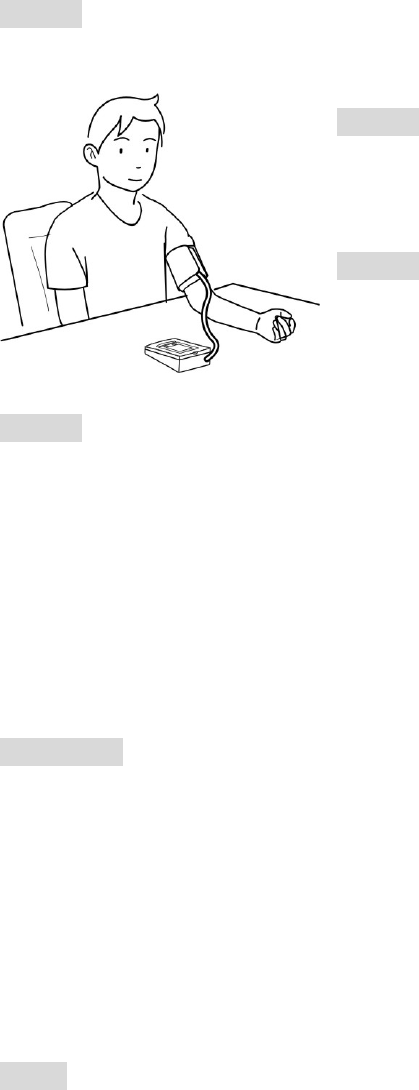
Proper Measurement Position
STEP 1 Sit down for at least 10 minutes before measuring.
STEP 2 Place your elbow on a table or
other object. Relax your hand with the palm
facing up.
STEP 3 Relax and make sure the cuff is at
the same height as your heart. Press the
On/Off button. Then, press the user selection
button to select the user’s number.
STEP 4 Measurement is in progress.
After the monitor turns on, all the LCD display symbols will appear with a long
“beep” sound. Then the cuff will begin to inflate automatically.
Remain still and do not talk or move during the measurement.
WARINING
It is extremely important that the cuff is at the same height as the heart. If the
cuff is relatively lower (higher) than the heart, the blood pressure measured will
be higher (lower) than the actual value. A 15 cm difference in height may result
in an error of 10 mmHg.
NOTE
You can either press On/Off button to take one measurement, or press and
hold the On/Off button for 3 seconds to enter measurement average mode.
41
A1-42
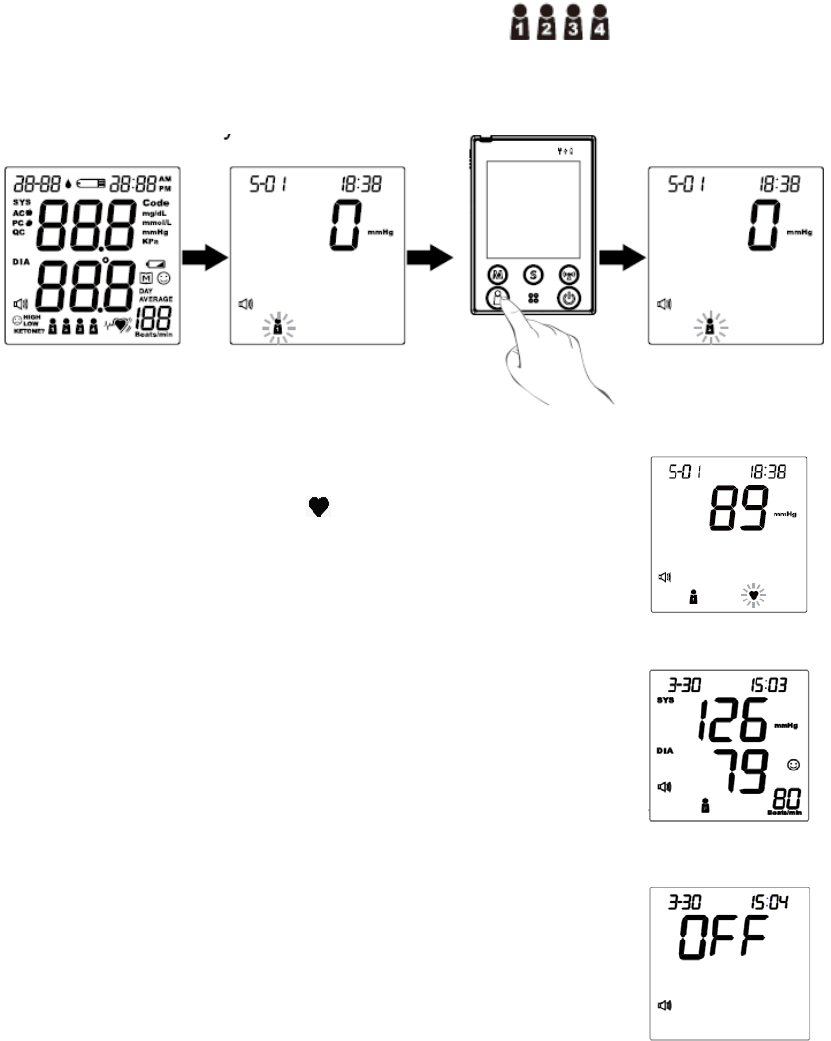
Take a Reading
Read "Suggestions before Measuring" and "Applying the Pressure Cuff"
before you take a reading. Always apply the pressure cuff before turning
on the monitor.
STEP 1. Press the On/Off button. All the LCD symbols will appear.
Press the user selection button to select user (numbers from1 to
4) whose test reading will be stored in its memory. Then the cuff will begin to
inflate automatically.
STEP 2. After the cuff pressure is reached, the cuff begins
deflation. The pulse symbol “ ” will flash when pulse is
detected.
STEP 3. After the measurement, the monitor displays
the systolic pressure, diastolic pressure, and pulse rate.
STEP 4. Press the On/Off button to switch off. Or it will
switch off automatically after 3 minutes.
42

A1-43
NOTE
This monitor can record up to 4 users’ measurements.
If you press the On/Off button during the measurement, the monitor will turn
off.
If the pulse rate symbol showed as “ ” instead of “ ”, this suggests
that the monitor has detected an irregular pulse rate.
43
A1-44
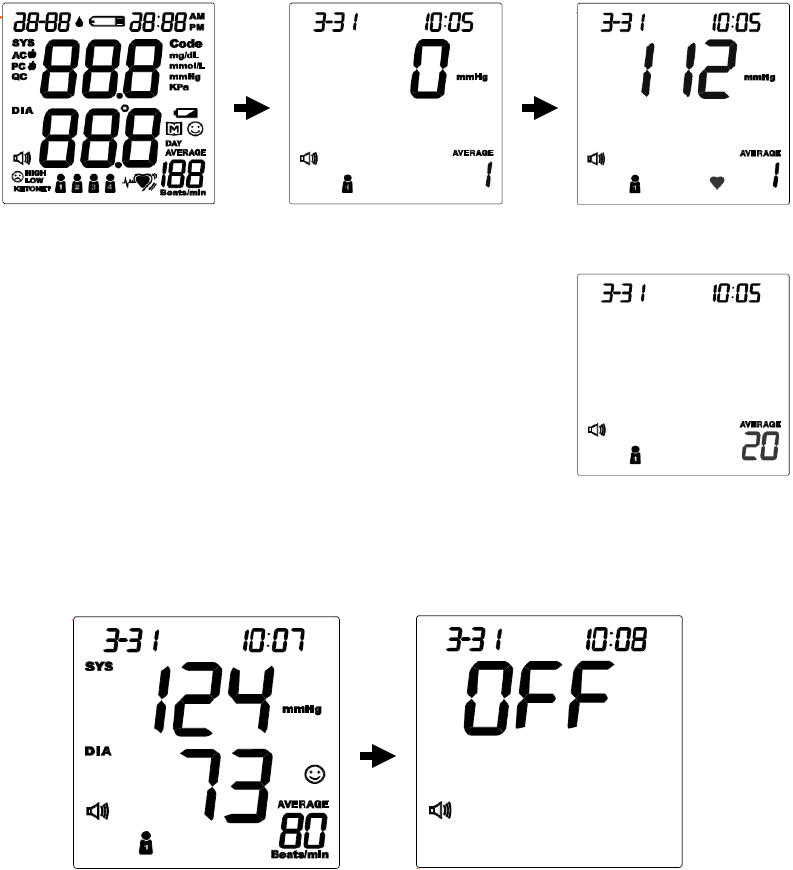
Measurement Average Mode
Always apply the pressure cuff before turning on the monitor.
STEP 1. Press and hold the On/Off button for three (3) seconds. The monitor
will turn on and enter the average mode. Then the cuff will begin to inflate
automatically.
STEP 2. The monitor will take three (3) measurements
consecutively with an interval of 20 seconds. The
number on the right represents the remaining
countdown between each measurement.
STEP 3. The monitor will calculate the average of all three measurements and
display the average value. Press the On/Off button to turn off the monitor.
44
A1-45
MONITOR MEMORY
Your monitor stores 864 the most recent results, and also provides the average
of blood glucose test results. Please follow the steps below to review those
results.
Viewing Results on the Monitor:
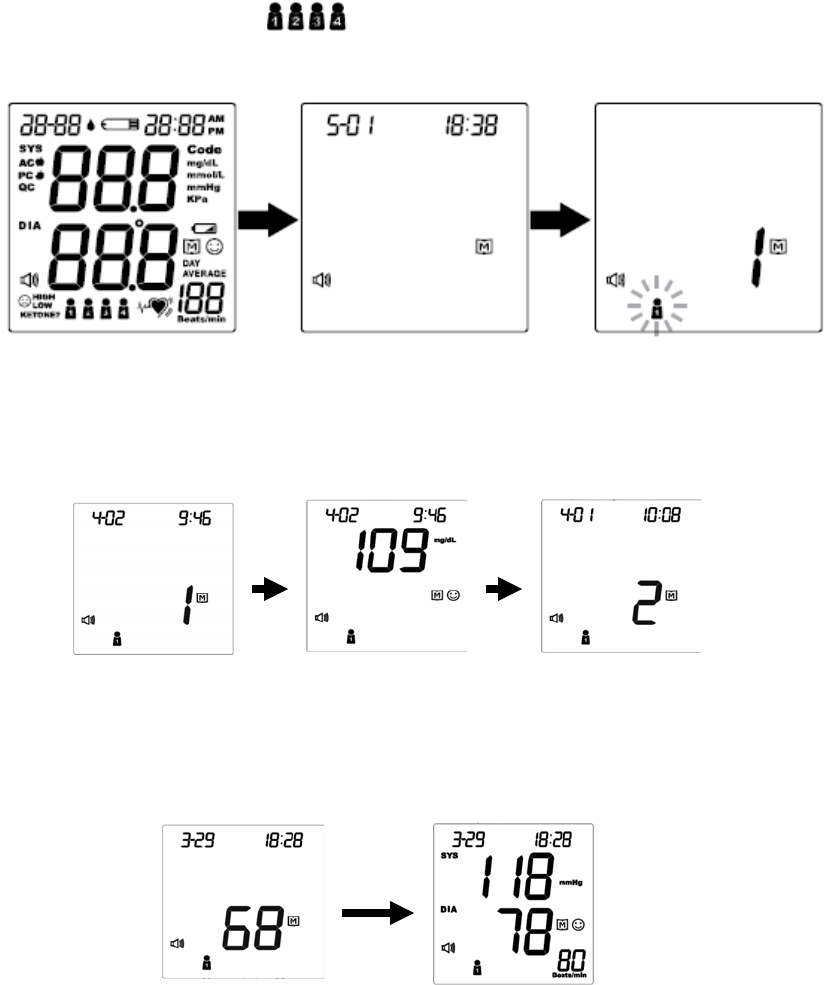
STEP 1. When the monitor is off, press and release the M button. The
monitor will enter the memory mode. Press the user selection button to select
the desired user symbol (numbers from1 to 4) which you used to store
in the memory.
STEP 2. “1” appears first and then the latest blood glucose result or blood
pressure result along with date/time showed on the screen. Press the M button
to review the next result.
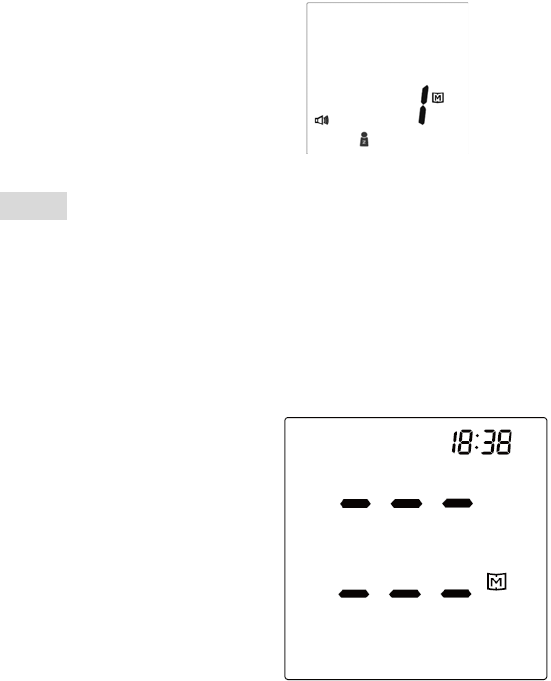
STEP 3. Press the M button or the S button to recall the remaining test
results stored in the monitor consecutively. For example, the test result
showed below is the sixty-eighth memory record of user number 1.
45
A1-46
STEP 4. Press the user selection button to select another user’s number and
to view the test results stored in the monitor memory (i.e. user number 2).
NOTE
If you’d like to exit from the memory, press the On/Off button to turn off the
monitor or leave it idle for 3 minutes for auto-shut down.
When using the monitor for the first time, “---” appears, showing that there is
no test result stored in memory.
46

A1-47
Reading the Day Average of Blood Glucose Results
STEP 1 When the monitor is off, keep pressing the M button for 3
seconds to enter the memory mode.
STEP 2 Select the user’s number by pressing the user selection button.
After the display, press the S button to switch and review blood glucose
or blood pressure test results.
STEP 3 Press the M button to review the 14-, 21-, 28-, 60- and 90-day
average in order.
STEP 4 After viewing the 90-day average, press the M button again to
resume to the 7-day average.
STEP 5 View the day average results of another user’s number by
pressing the user selection button and selecting another one.
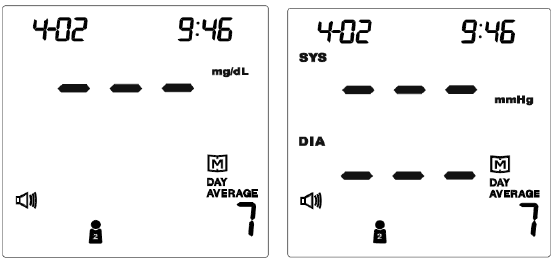
1 The day average of blood glucose tests.
2 The user’s number is 1.
3 The average was calculated from the test results of
the last 7 days.
4 Memory symbol interpretation: The average of user
number 1‘s glucose tests in the last 7 days is 115 mg/dL.
1 The day average of blood pressure tests.
2 The user’s number is 1.
3 The average was calculated from the test results of
the last 7 days.
4 Memory symbol interpretation: The last 7 days
average of user number 1‘s systolic pressure is 126
mmHg and diastolic pressure is 76 mmHg.
NOTE
If you’d like to exit from the memory, press the On/Off button to turn off the
monitor or wait without pressing for 3 minutes for auto-shut down.
47
A1-48
When using the monitor for the first time, “---” appears, showing that there are
no test result in memory.
48
A1-49
Viewing Results on a Personal Computer
Stored results in memory can be transmitted to a personal computer via either
USB cable or wireless connection. An interface cable and the pairing software
system will be needed for the data transmission. Please visit our website at
http://www.foracare.ch/products.html and install the Health Care System
Software first. If you have any question about this function, please ask the local
customer service for assistance.
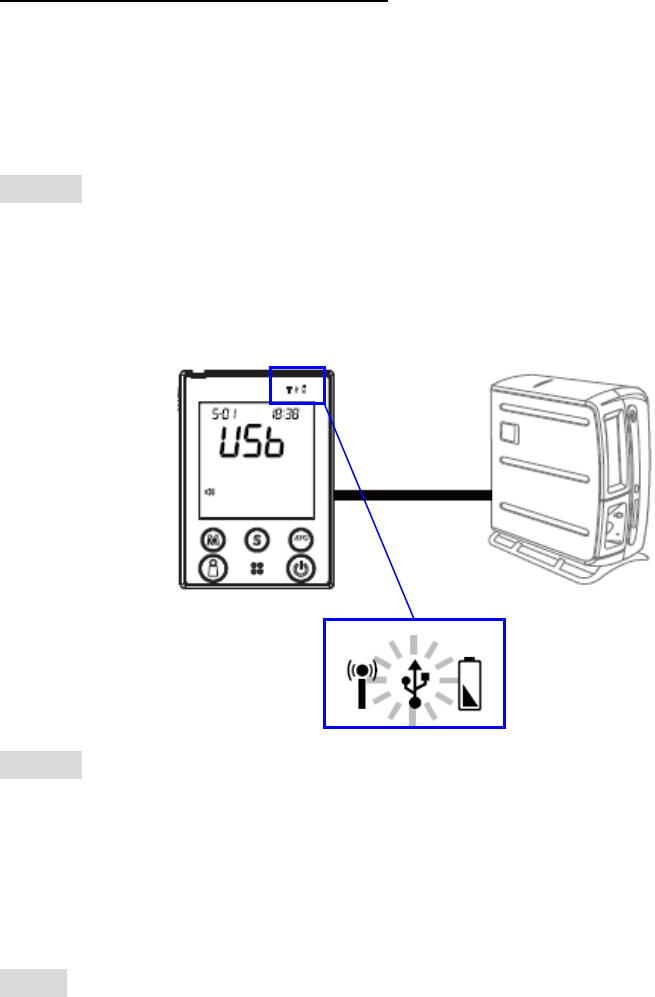
Data transmission via cable (For all FORA D40)
STEP 1
Connect the interface cable to a serial port on your computer. With the monitor
turned off, connect the interface cable to the data port located at the side of the
monitor. “USb” will appear on the display and the USB indicator will light up in
green, indicating that the monitor is ready to transmit data.
STEP 2
Follow the instructions provided in the software to transmit data (results and
their corresponding dates and times). Remove the cable or press the On/Off
button and the monitor will turn off.
NOTE
The monitor is unable to perform a blood glucose or blood pressure test while
connecting to the PC or the server.
49
A1-50
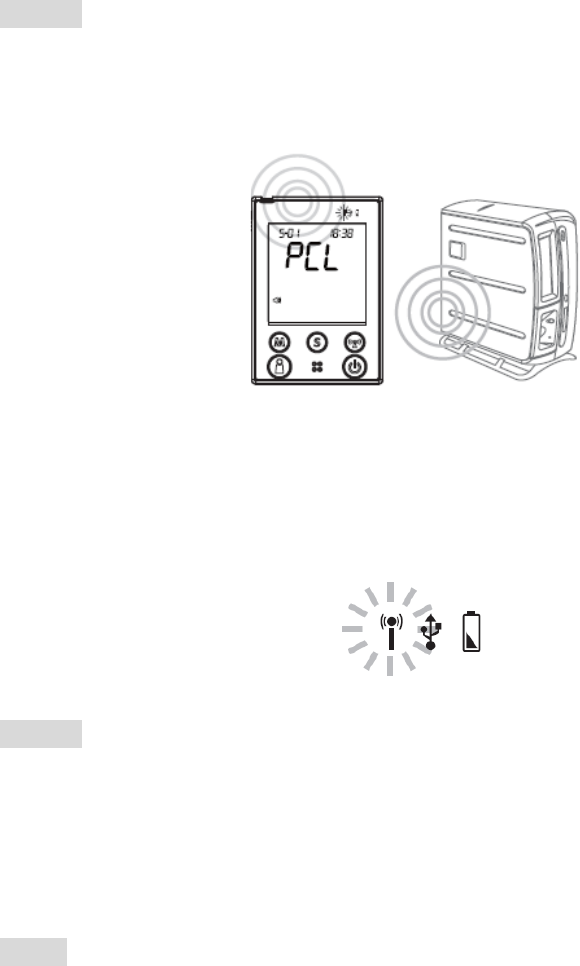
Data transmission via Bluetooth (For FORA D40b only)
STEP 1
With the monitor turned off, press the RF button to initiate the data
transmission of the monitor. “PCL” will appear on the display and the RF
indicator will light up in blue.
When the RF indicator is blinking fast, indicating the monitor is still searching
for pairing. When the RF indicator is blinking slowly, indicating the monitor has
found the pairing computer. When the RF indicator is in steady blue light,
indicating the monitor is online and ready for data transmission.
STEP 2
Follow the instructions provided in the software to transmit data (results and
their corresponding dates and times). Press the RF button or the On/Off
button and the monitor will turn off.
NOTE
Make sure your PC has Bluetooth before transmitting the data and the
monitor is within the receiving range.
When reviewing the test result by pressing the M button (page 45), you can
press the RF button and just upload one single test result.
Only one data transmission is allowed at one time. If the RF button has been
pressed while the USB cable is still connecting the monitor with PC, the
monitor can only communicate through USB cable rather than the wireless
transmission.
50
A1-51
Data transmission via GPRS (For FORA D40g only)
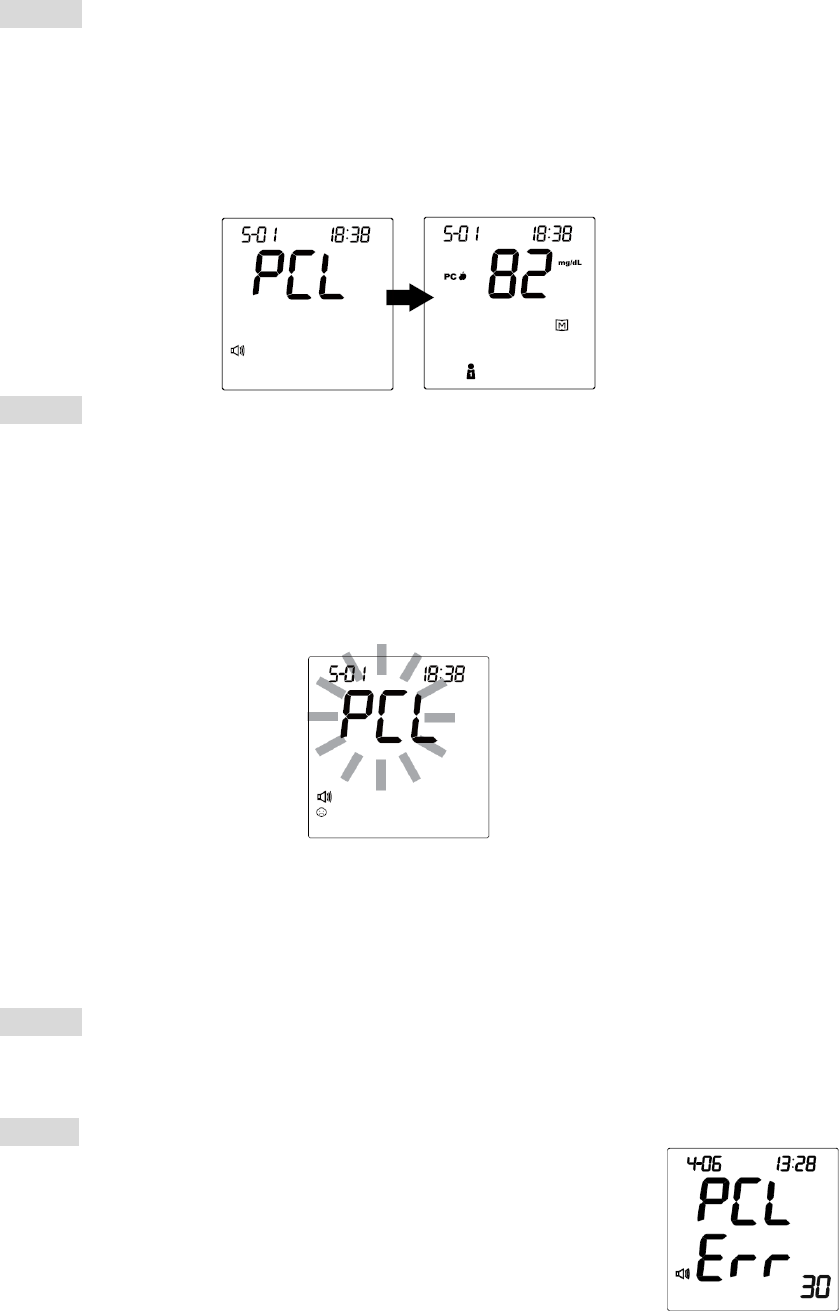
STEP 1
With the monitor turned off, press the RF button to initiate the data
transmission from the monitor. “PCL” will appear on the display and the RF
indicator will light up in blue. Then test results which have not been uploaded
will display on the screen and initiate the transmission in sequence of the
user’s number by GPRS service.
STEP 2
Follow the instructions provided in the software and insert the SIM card at the
bottom of the monitor battery compartment to transmit data (results that have
not been uploaded and their corresponding dates and times).
If the SIM card is not inserted, the “PCL” will start blinking, as the figure
showed below, and the monitor will turn off automatically after blinking for 30
seconds.
When the RF indicator is blinking in blue light, indicating the data transmission
has started. When the RF indicator shows yellow light, indicating the GPRS
service is online.
STEP 3
Press the RF button or the On/Off button and the monitor will turn off.
NOTE
If the monitor displayed a message like one on the right while
connecting to the server, please start over and try again. If
the problem still persists, please contact the place of
purchase for help.
51
A1-52
TAKING CARE OF YOUR MONITOR & STRIP
To protect the monitor and test strips from dirt, dust and other
contaminants, please wash and dry your hands thoroughly before use.
Cleaning
1. To clean the monitor exterior, wipe with a cloth moistened with tap water or a
mild cleaning agent, then dry it with a soft, dry cloth. Do not flush with water.
2. Do not use organic solvents to clean the monitor and cuff.
3. The cuff can be cleaned by wiping with a moistened cloth and soap. Do not
immerse in water.
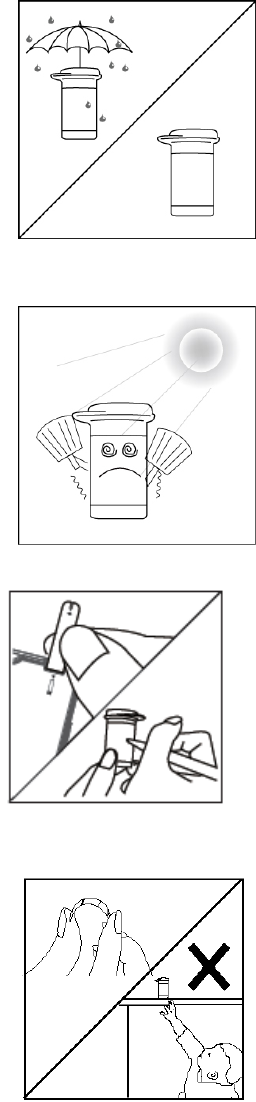
Storage
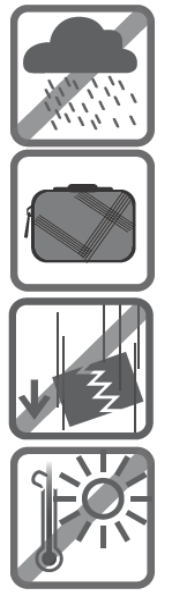
1. Meter Storage
Storage condition: -20 oC to 60oC (-4℉ to 140℉), below
95% relative humidity.
Always store or transport the monitor in its original
storage case.
Avoid dropping and strong impact.
Avoid direct sunlight and humidity.
52
A1-53
2. Strip Storage
Storage conditions: 4 oC to 40oC (39.2℉ to 104℉),
below 85% relative humidity. Do not freeze.
Store your test strips in their original vial only. Do not
transfer to other container.
Store test strip packages in a cool, dry place. Keep
away from direct sunlight and heat.
After removing a test strip from the vial, immediately
replace the vial cap and close it tightly.
Touch the test strip with clean and dry hands.
Use each test strip immediately after removing it
from the vial.
Write the first opening date on the vial label when
you first opened it. Discard remaining test strips 3
months after the first opening date.
Do not bend, cut, or alter a test strip in any way.
Keep the strip vial away from children since the cap
and the test strip may be a choking hazard. If
swallowed, promptly see a doctor for help.
53
A1-54
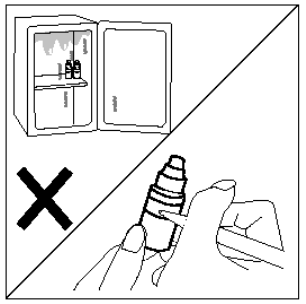
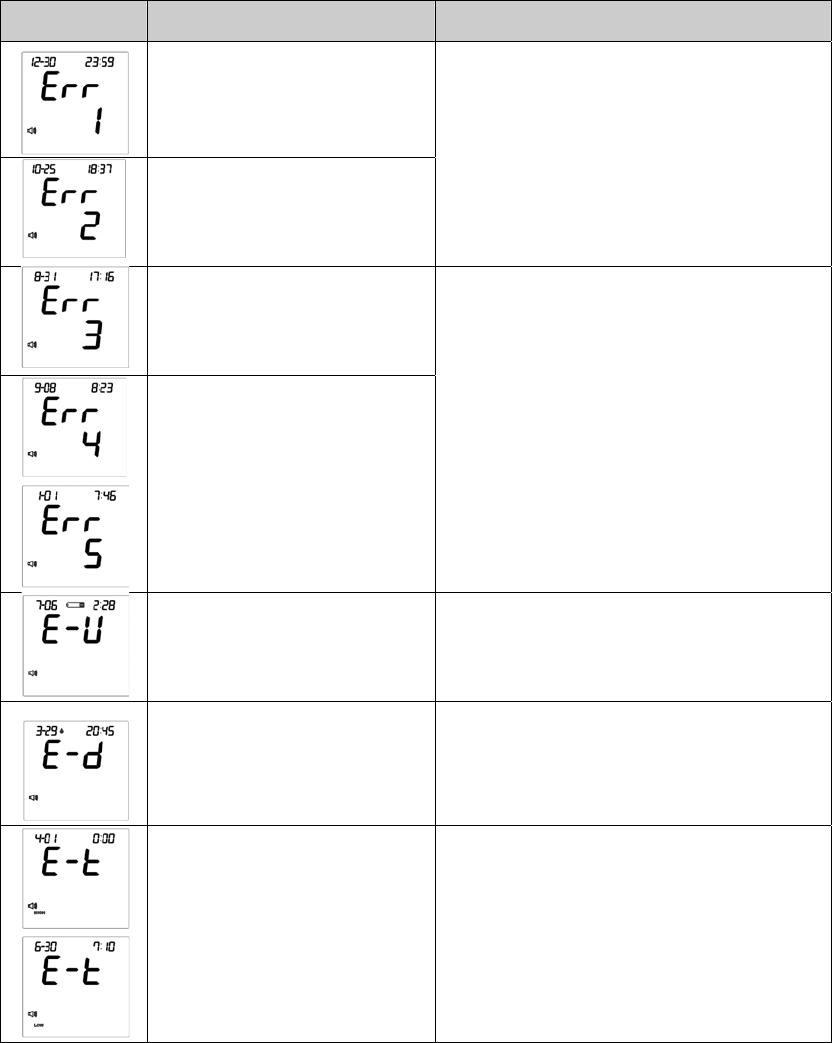
3. Control Solution Storage
Storage conditions: Store the control
solution tightly closed at temperatures 2℃ to
30℃ (4℉ to 86℉). Do not freeze.
Record the first opening date on the control
solution vial. Discard it after 3 months.
54
A1-55
TROUBLESHOOTING
If you follow the recommended action but the problem persists, or error
messages other than the ones below appear, please call your local customer
service. Do not attempt to repair by yourself.
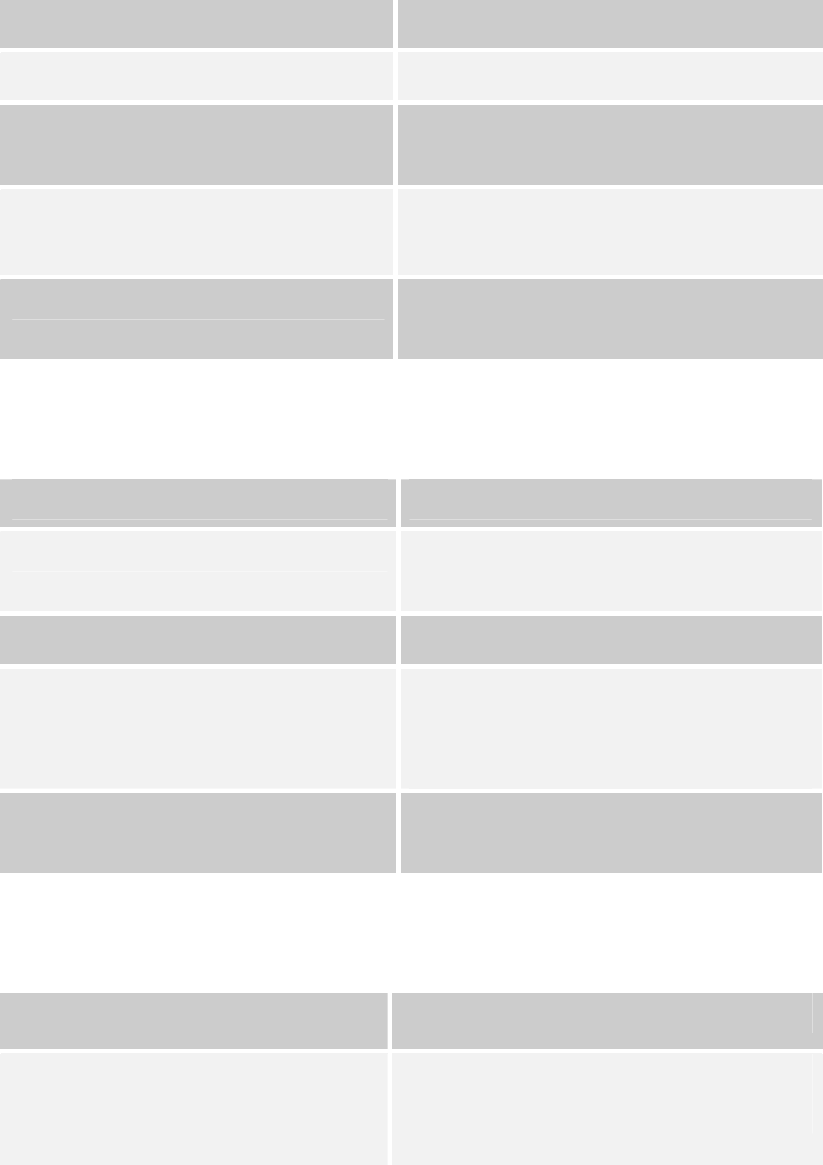
MESSAGE CAUSE WHAT TO DO
Inflation or pressure error
Deflation error
Please contact local customer
service for help.
Cuff pressure is too high.
No pulse rate detected or
the pulse rate is too low.
Refit cuff tightly and correctly. Relax
and the repeat measurement. If error
still remains, Please contact local
customer service for help.
Strip has been used. Repeat the test with a new strip.
Blood sample insufficient. Review the instructions and repeat
the test with a new strip.
Environmental
temperature is out of the
system operational range.
System operational range is 10°C -
40°C (50°F -104°F). Repeat the test
after the monitor and test strip have
reached the above temperature.
55
A1-56
Operating Problem
1. Blood Glucose Measurement
What happened?
The monitor does not display a message after inserting a test strip.
POSSIBLE CAUSE WHAT TO DO
Batteries exhausted. Replace the batteries.
Batteries incorrectly installed or
absent.
Check to see if the batteries are
correctly installed.
Test strip inserted upside down or
incompletely.
Insert the test strip correctly with the
contact bars end first.
Defective monitor. Please contact your local customer
service.
What happened?
The test does not start after applying the sample.
POSSIBLE CAUSE WHAT TO DO
Insufficient blood sample. Repeat the test with a new test strip
and a larger sample.
Defective test strip. Repeat the test with a new test strip.
Sample was applied at a time when
“6” was not flashing on the display.
Repeat the test with a new test strip.
Apply sample only when “6” appears
on the display.
Defective monitor. Please contact your local customer
service.
What happened?
You turned off the monitor but it makes a beeping sound.
POSSIBLE CAUSE WHAT TO DO
The strip is still inside the slot.
Remove the strip. If you need to test
blood glucose, insert an unused strip.
56
A1-57
What happened?
The control solution test result is out of range.
POSSIBLE CAUSE WHAT TO DO
Error in performing the test. Read the instructions thoroughly and
repeat the test.
Control solution vial shaken poorly. Shake the control solution vigorously
and repeat the test.
Expired or contaminated control
solution.
Check the expiration and discard
dates of the control solution.
Control solution that is too warm or
too cold.
It is recommended to use the control
solution between temperatures of
20℃ and 25℃ (68℉ and 77 ).℉
Test strip deterioration. Repeat the test with a new test strip.
Monitor malfunction. Please contact your local customer
service.
57
A1-58
2. Blood Pressure Measurement
What happened?
No display after pushing the On/Off button.
POSSIBLE CAUSE WHAT TO DO
Batteries exhausted. Replace the batteries.
Batteries incorrectly installed or
absent.
Check that the batteries are correctly
installed.
What happened?
Heart rate is higher/lower than user’s average.
POSSIBLE CAUSE WHAT TO DO
Moving during measurement. Repeat measurement.
Measuring right after exercise. Rest at least 30 minutes before
measurement.
What happened?
A result is higher/lower than user’s average measurement.
POSSIBLE CAUSE WHAT TO DO
May not be in correct position
while measuring.
Adjust to the correct position to
measure.
Blood pressure naturally varies
from time to time.
Keep in mind for next measurement.
What happened?
Cuff inflates again while measuring.
POSSIBLE CAUSE WHAT TO DO
Cuff is not fastened. Fasten the cuff again.
58
A1-59
SPECIFICATIONS
System performance
Power source: Four 1.5V AA alkaline batteries
Size of monitor w/o cuff: 147 (L) x 105 mm (W) x 80 mm (H), 500g with
batteries.
Memory: Total 864 memory records
Power saving: Automatic power off if system idle for 3 minutes
(normal mode) or 5 minutes (RF mode).
System operating condition: 10℃- 40℃ (50 -104℉), below 85% RH
Meter storage condition: -20℃ - 60℃ (-4 -140℉), 5 - 95% RH
Power Supply Input: DC +6V / 1A (max) via Power Plug
Blood glucose measurement performance
Measurement unit: mg/dL or mmol/L
Linear range: 1.1 mmol/L - 33.3 mmol/L
(20 mg/dL - 600 mg/dL)
Precision: ±5 % (CV)
Accuracy: ±15mg/dL when glucose <75mg/dL
±20% when glucose 75mg/dL≧
Ketone warning: glucose value is over 240 mg/dL
Blood pressure measurement performance
Pressure range: 0 - 300 mmHg
Pulse rate range: 40 -199 beat per minute
Measurement unit: mmHg or KPa
Systolic Measurement Range: 55 mmHg -260 mmHg
Diastolic Measurement Range: 25 mmHg -195 mmHg
Pulse Rate Measurement Range: 40 -199 beats / minute
Maximum inflation pressure: 280 mmHg
Accuracy of Pressure: ±3 mmHg or ±2% of reading
Accuracy of Pulse rate: ±4% of reading
Measurement unit: Either mmHg or KPa
This device has been tested to meet the electrical and safety requirements of:
EN 60601-1, EN 61010-1-2, EN 61010-1, EN 61010-2-101, EN 60601-1-2, EN
61326, EN 300 328
59
A1-60
Federal Communications Commission (FCC) Statement
15.21
You are cautioned that changes or modifications not expressly approved by the
part responsible for compliance could void the user’s authority to operate the
equipment.
15.105(b)
Federal Communications Commission (FCC) Statement
This equipment has been tested and found to comply with the limits for a Class B
digital device, pursuant to part 15 of the FCC rules. These limits are designed to
provide reasonable protection against harmful interference in a residential installation.
This equipment generates, uses and can radiate radio frequency energy and, if not
installed and used in accordance with the instructions, may cause harmful interference
to radio communications. However, there is no guarantee that interference will not
occur in a particular installation. If this equipment does cause harmful interference to
radio or television reception, which can be determined by turning the equipment off
and on, the user is encouraged to try to correct the interference by one or more of the
following measures:
-Reorient or relocate the receiving antenna.
-Increase the separation between the equipment and receiver.
-Connect the equipment into an outlet on a circuit different from that to which
the receiver is connected.
-Consult the dealer or an experienced radio/TV technician for help.
This device complies with Part 15 of the FCC Rules.Operation is subject to the
following two conditions:
1) this device may not cause harmful interference and
2) this device must accept any interference received,, including interference that may
cause undesired operation of the device.
FCC RF Radiation Exposure Statement:
1. This Transmitter must not be co-located or operating in conjunction with any other
antenna or transmitter.
2. This equipment complies with FCC RF radiation exposure limits set forth for an
uncontrolled environment. This equipment should be installed and operated with a
minimum distance of 20 centimeters between the radiator and your body.
60
A1-61
CAUTION
RISK OF EXPLOSION IF BATTERY IS REPLACED
BY AN INCORRECT TYPE.
DISPOSE OF USED BATTERIES ACCORDING TO THE INSTRUCTIONS.
61