TAIDOC TECHNOLOGY 4111ABEM2 Blood Glucose Meter User Manual Ideal Blood Gluco Manual

TAIDOC TECHNOLOGY CORP. Blood Glucose Meter Ideal Blood Gluco Manual

user manual

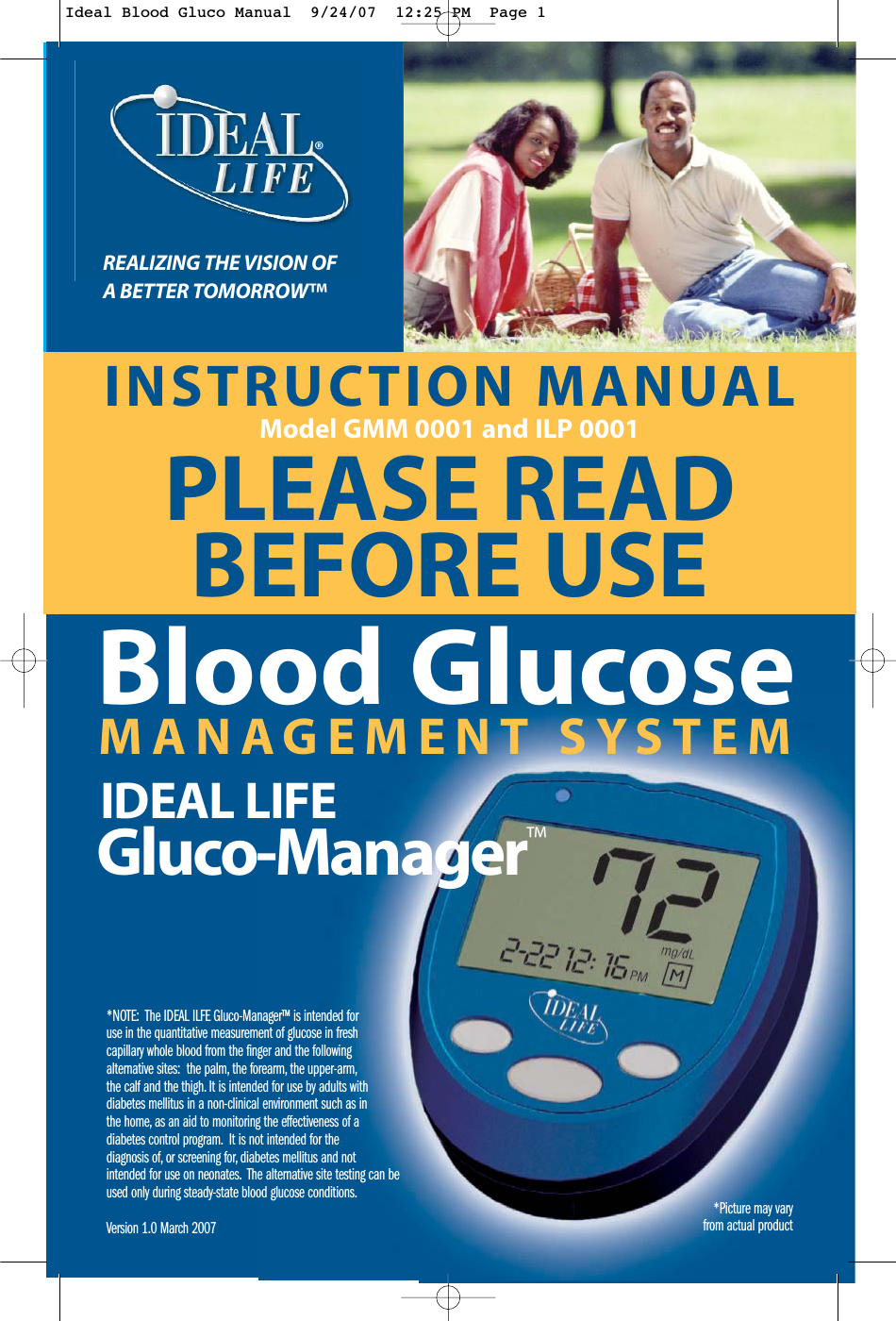
INSTRUCTION MANUALModel GMM 0001 and ILP 0001PLEASE READBEFORE USEREALIZING THE VISION OFA BETTER TOMORROW™*NOTE:  The IDEAL ILFE Gluco-Manager™ is intended foruse in the quantitative measurement of glucose in freshcapillary whole blood from the finger and the followingalternative sites:  the palm, the forearm, the upper-arm,the calf and the thigh. It is intended for use by adults withdiabetes mellitus in a non-clinical environment such as inthe home, as an aid to monitoring the effectiveness of adiabetes control program. It is not intended for thediagnosis of, or screening for, diabetes mellitus and notintended for use on neonates. The alternative site testing can beused only during steady-state blood glucose conditions.Version 1.0 March 2007   MANAGEMENT SYSTEMBlood GlucoseIDEAL LIFEGluco-Manager™®*Picture may vary from actual productIdeal Blood Gluco Manual  9/24/07  12:25 PM  Page 1
Table of ContentsIDEAL LIFE Gluco-Manager™2TABLE OF CONTENTS  2INTRODUCTION 3Preface 3Contraindications 3Precautions 4Important Information 4ABOUT ALTERNATIVE SITE TESTING(AST) 5PACKAGE CONTENTS 6REQUIREMENTS 9IDEAL LIFE Pod™LOCATION/INTERFERANCE 9BEFORE YOU START 10Your IDEAL LIFE Gluco-Manager™ 10Your IDEAL LIFE Pod™ 11Test Strip Description 12Important Test Strip Information 12INSTALLATION 13Connecting Your IDEAL LIFE Pod™ 13Using an RJ11 Jack 13Powering Up Your IDEAL LIFE Gluco-Manager™ 14Installing the Batteries (included) 14First Time Power Up and Activation 15Calibration 16About Control Solution 18Important Control Solution Test Information 18How to do a control Solution Test 19FUNCTIONS 21Main Screen 21Taking Your Blood Glucose Reading 22Looking at Previously Taken Readings 28Looking at Graphs 29Looking at Messages 30Options 31Beeper 31Connection 31- Transmission 31- Dialing Pattern 33- Line Access 34Using a Bluetooth® Enabled Cellular Phone or Device 35Factory Default 39COMPARING METER ANDLABORATORY RESULTS 40CARE AND MAINTENANCE 41SPECIFICAITONS 42PROBLEM SOLVING GUIDE 43Troubleshooting 43 Error Message 44 SUMMARY OF OPERATION  45FCC STATEMENT 46CUSTOMER INFORMATION 47WARRANTY 47Table of Contents©2007-001 IDEAL LIFE INC.All rights reserved. IDEAL LIFE is a registered trademark in the United States for blood glucose meters, blood pressure cuffs and meters,heart monitors. IDEAL LIFE GLUCO-MANAGER, IDEAL LIFE BP-MANAGER, IDEAL LIFE POD, REALIZING THE VISION OF A BETTER TOMORROW,Leveraging the Power of Communication and Solutions for better healthcare through advanced communication technology, are allproprietary trademarks of IDEAL LIFE INC. Contents covered by one issued U.S. patent and one or more U.S. patents pending.Manufactured and Distributed by IDEAL LIFE INC., Toronto ON M4R 1A3, and made in Taiwan. Products may vary from pictures shown.Ideal Blood Gluco Manual  9/24/07  12:25 PM  Page 2
IntroductionPrefaceThank you for purchasing the IDEAL LIFE Gluco-Manger™, or GMM 0001 and IDEAL LIFE Pod™, or ILP0001. This completely automatic system measures your blood glucose, captures subjectiveinformation and manages everything automatically so that you can better manage your blood glucosewith your care provider. Your measurement reading is clearly displayed on a large screen on the IDEALLIFE Gluco-Manager™ after each measurement, and later stored for a more detailed analysis in theform of tables for easy viewing and graphs for easy interpretation. Your new IDEAL LIFE Gluco-Manager™ provides you with accurate, whole blood test results for blood glucose. The system iscompact with convenient operation so it is simple to use.The IDEAL ILFE Gluco-Manager™ is intended for use in the quantitative measurement of glucose infresh capillary whole blood from the finger and the following alternative sites:  the palm, the forearm,the upper-arm, the calf and the thigh. It is intended for use by adults with diabetes mellitus in a non-clinical environment such as in the home, as an aid to monitoring the effectiveness of a diabetescontrol program. It is not intended for the diagnosis of, or screening for, diabetes mellitus and notintended for use on neonates. The alternative site testing can be used only during steady-state bloodglucose conditions.The IDEAL LIFE Gluco-Manager™ can be used alone to measure your blood glucose.If you would like to transmit blood glucose information for display on a personal computer, theoptional IDEAL LIFE Pod™ can be purchased.CAUTION: Before using any product to test your blood glucose, read all instructions thoroughlyand practice the test. Do all quality control checks as directed and consult with a diabeteshealthcare professional. For proper interpretation of blood glucose measurements, make sure toconsult a physician.Contraindications**Warning: This system is designed for use outside the human body. It is not recommended foruse on infants and is not intended for and should not be used to try and measure the blood glucoseof infants as it may not be accurate and/or relied upon.Do NOT use the device for purposes other than measuring blood glucose.This unit does not serve as a cure of any symptoms or disease. The data measured are only forreference. Always consult your physician to have the results interpreted.IntroductionInstruction Manual 3Ideal Blood Gluco Manual  9/24/07  12:25 PM  Page 3
Precautions•Do not drop this unit. Please avoid strong impact. Disassembly or modification of the unit maylead to permanent reading error.•The device might not meet its performance specifications if stored or used beyond the specifiedtemperature and humidity ranges.•Operating conditions:  10°C - 40°C, below 85% RH•System storage: 4-40°C, below 85% RH•Be sure to keep this manual for future reference • NOTE:  Before using any product to test your blood sugar (blood glucose), read all instructionsand practice the test. Do all quality control checks as directed and consult with a diabeteshealthcare professional.Important Information•Severe dehydration and excessive water loss may cause false low results. If you believe you aresuffering from severe dehydration, consult a healthcare professional immediately.•Test results below 60mg/dL (3.3 mmol/L) indicate hypoglycemia, or low glucose. Test resultshigher than 240 mg/dL (13.3 mmol/L) indicate hyperglycemia, or high glucose. Consult yourphysician when one of these results is shown repetitively.•If you are experiencing symptoms that are not consistent with your blood glucose test results andyou have followed all instructions described in this owner's manual, call your healthcareprofessional.•Inaccurate results may occur in severely hypotensive individuals or patients in shock. Inaccuratelow results may occur for individuals experiencing a hyperglycemic-hyperosmolar state, with orwithout ketosis. Critically ill patients should not be tested with blood glucose meters.•Please refer to your test strip package insert for additional important information.•Always follow the operation procedures described in the manual in order to obtain correct results.For any questions or comments, please call an IDEA LIFE™ customerrepresentative at 1-888-IDEAL-41 (888-433-2541) Introduction IDEAL LIFE Gluco-Manager™4Ideal Blood Gluco Manual  9/24/07  12:25 PM  Page 4
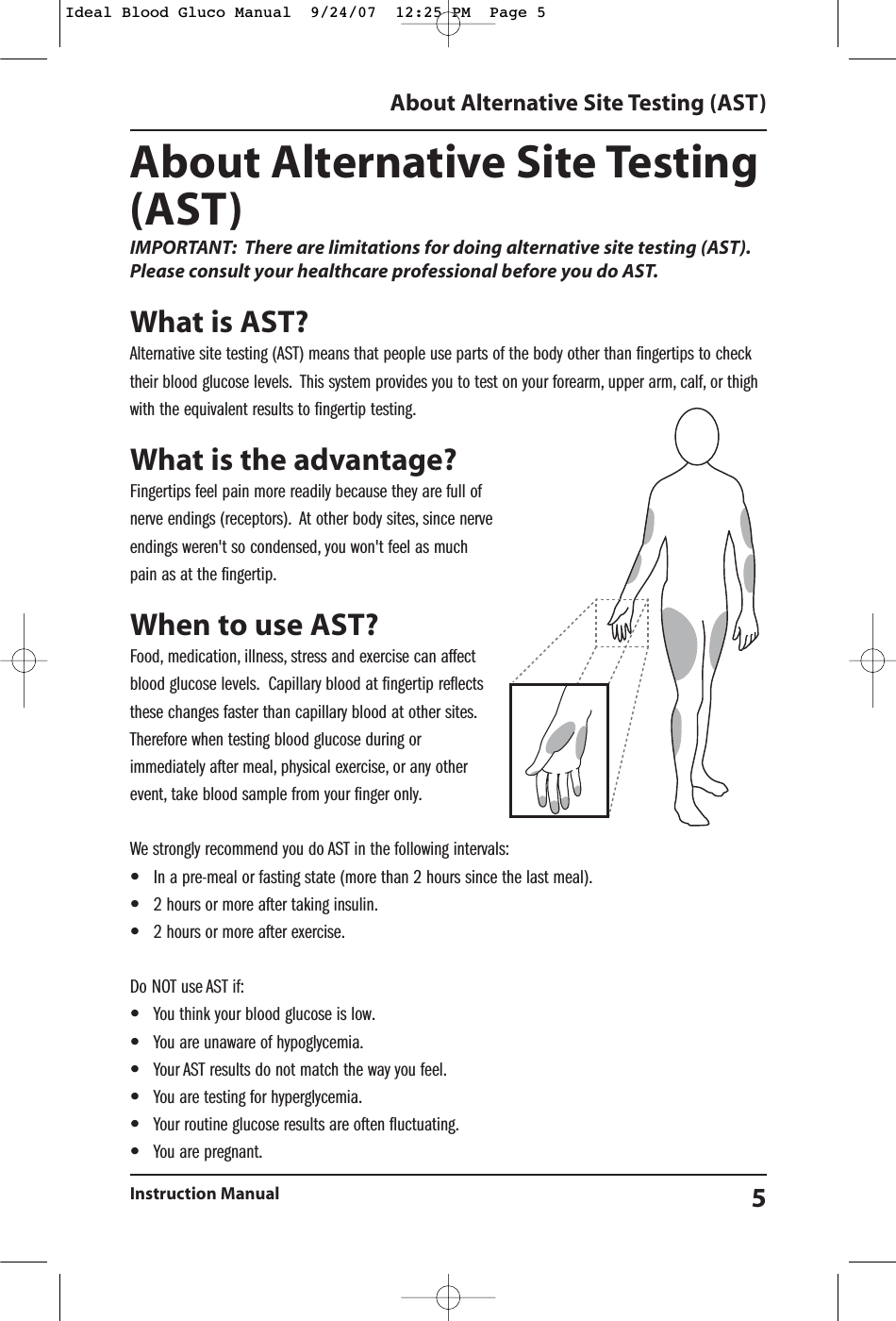
About Alternative Site Testing(AST)IMPORTANT: There are limitations for doing alternative site testing (AST).Please consult your healthcare professional before you do AST.What is AST?Alternative site testing (AST) means that people use parts of the body other than fingertips to checktheir blood glucose levels. This system provides you to test on your forearm, upper arm, calf, or thighwith the equivalent results to fingertip testing.What is the advantage?Fingertips feel pain more readily because they are full ofnerve endings (receptors). At other body sites, since nerveendings weren't so condensed, you won't feel as muchpain as at the fingertip.When to use AST?Food, medication, illness, stress and exercise can affectblood glucose levels. Capillary blood at fingertip reflectsthese changes faster than capillary blood at other sites.Therefore when testing blood glucose during orimmediately after meal, physical exercise, or any otherevent, take blood sample from your finger only.We strongly recommend you do AST in the following intervals:•In a pre-meal or fasting state (more than 2 hours since the last meal).•2 hours or more after taking insulin.•2 hours or more after exercise.Do NOT use AST if:•You think your blood glucose is low.•You are unaware of hypoglycemia.•Your AST results do not match the way you feel.•You are testing for hyperglycemia.•Your routine glucose results are often fluctuating.•You are pregnant.About Alternative Site Testing (AST)Instruction Manual 5Ideal Blood Gluco Manual  9/24/07  12:25 PM  Page 5
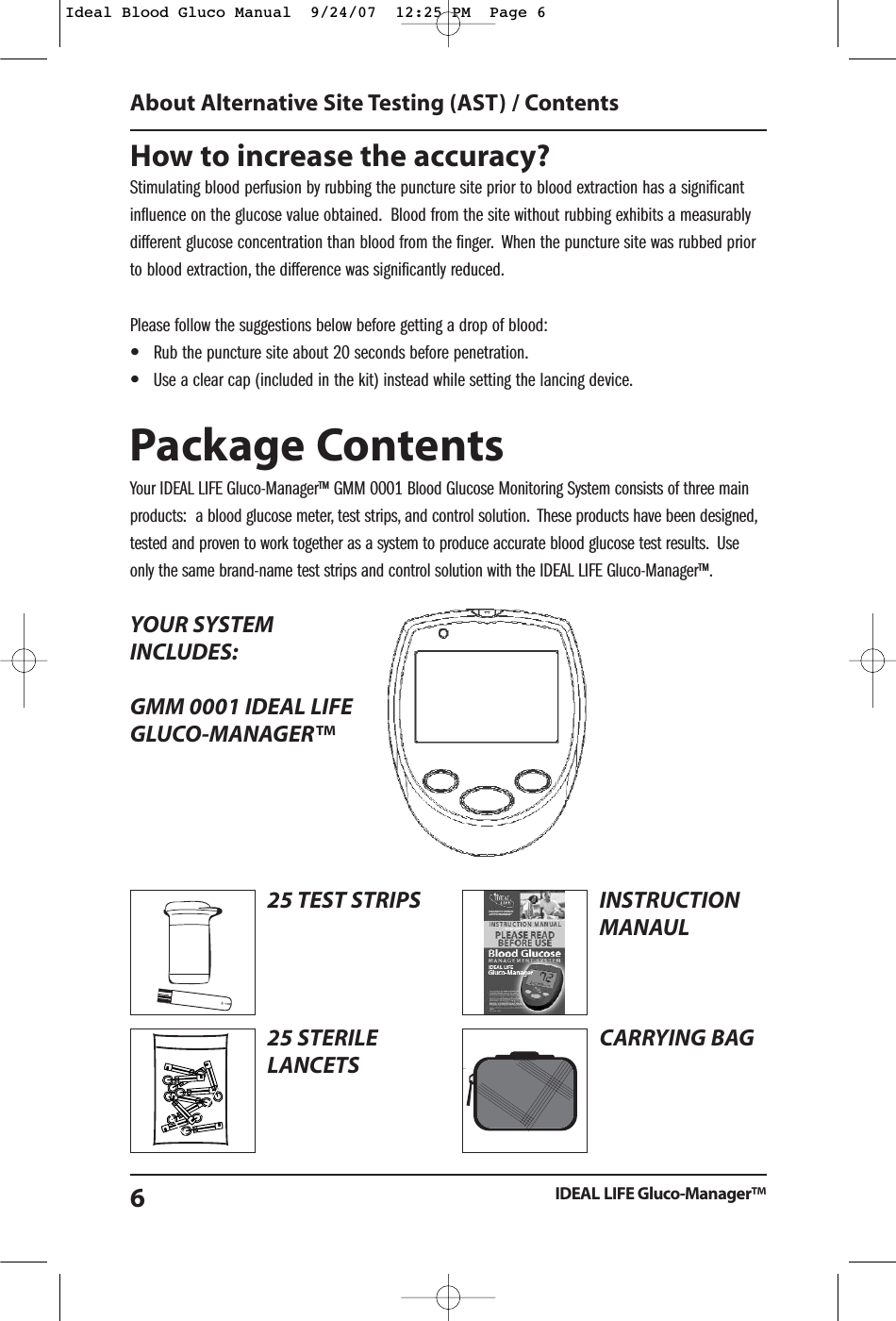
How to increase the accuracy?Stimulating blood perfusion by rubbing the puncture site prior to blood extraction has a significantinfluence on the glucose value obtained. Blood from the site without rubbing exhibits a measurablydifferent glucose concentration than blood from the finger. When the puncture site was rubbed priorto blood extraction, the difference was significantly reduced.Please follow the suggestions below before getting a drop of blood:•Rub the puncture site about 20 seconds before penetration.•Use a clear cap (included in the kit) instead while setting the lancing device.Package ContentsYour IDEAL LIFE Gluco-Manager™ GMM 0001 Blood Glucose Monitoring System consists of three mainproducts:  a blood glucose meter, test strips, and control solution. These products have been designed,tested and proven to work together as a system to produce accurate blood glucose test results. Useonly the same brand-name test strips and control solution with the IDEAL LIFE Gluco-Manager™.YOUR SYSTEMINCLUDES:GMM 0001 IDEAL LIFE GLUCO-MANAGER™About Alternative Site Testing (AST) / ContentsIDEAL LIFE Gluco-Manager™625 TEST STRIPS25 STERILELANCETSrstTimeUsing Guiderst Time eINSTRUCTIONMANAULCARRYING BAGIdeal Blood Gluco Manual  9/24/07  12:25 PM  Page 6
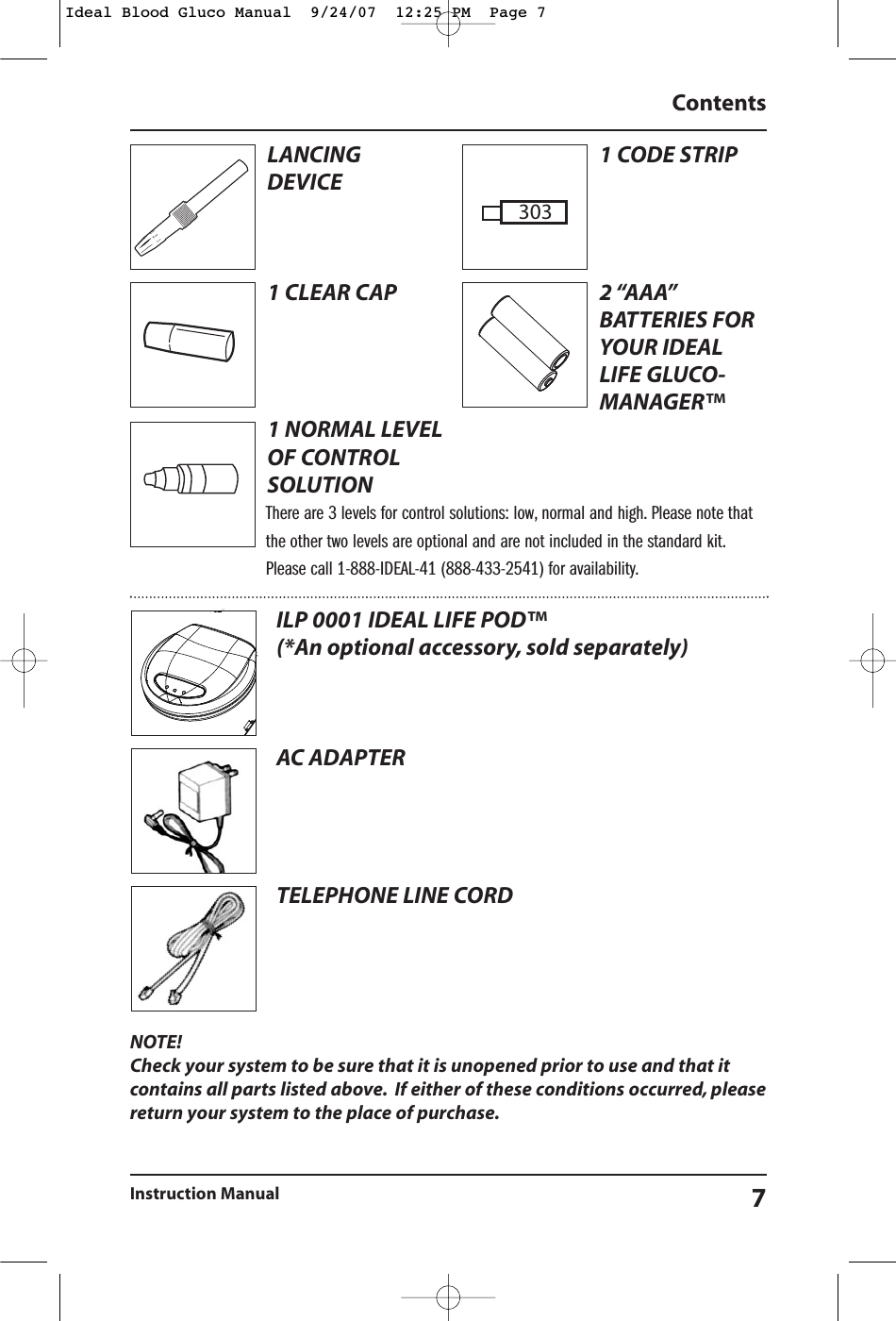
NOTE!Check your system to be sure that it is unopened prior to use and that itcontains all parts listed above. If either of these conditions occurred, pleasereturn your system to the place of purchase.ContentsInstruction Manual 7ILP 0001 IDEAL LIFE POD™ (*An optional accessory, sold separately)AC ADAPTERTELEPHONE LINE CORDLANCING DEVICE1 CLEAR CAP1 NORMAL LEVELOF CONTROLSOLUTION1 CODE STRIP2 “AAA”BATTERIES FORYOUR IDEALLIFE GLUCO-MANAGER™ There are 3 levels for control solutions: low, normal and high. Please note thatthe other two levels are optional and are not included in the standard kit.Please call 1-888-IDEAL-41 (888-433-2541) for availability.303Ideal Blood Gluco Manual  9/24/07  12:25 PM  Page 7
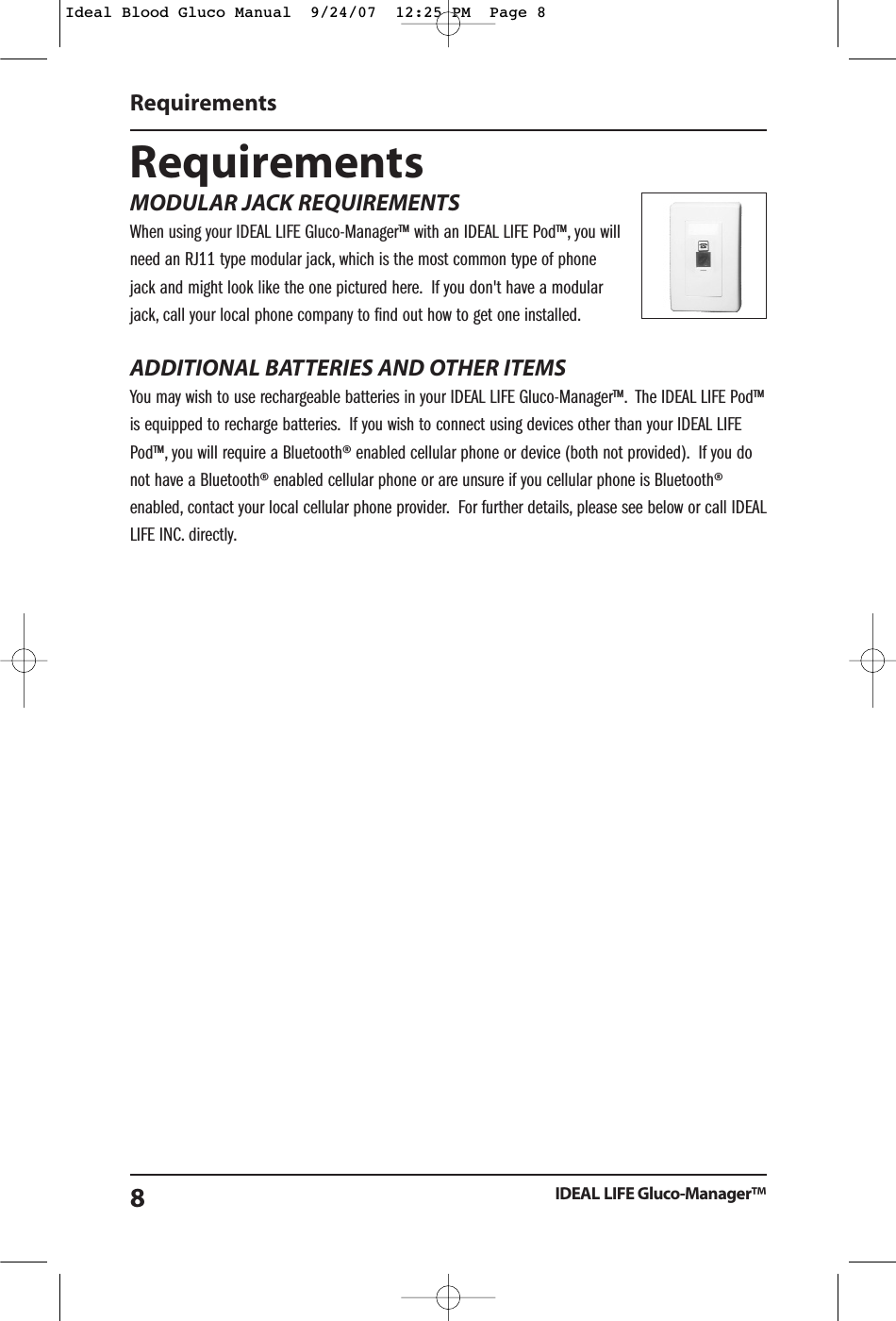
RequirementsMODULAR JACK REQUIREMENTSWhen using your IDEAL LIFE Gluco-Manager™ with an IDEAL LIFE Pod™, you willneed an RJ11 type modular jack, which is the most common type of phonejack and might look like the one pictured here. If you don't have a modularjack, call your local phone company to find out how to get one installed.ADDITIONAL BATTERIES AND OTHER ITEMSYou may wish to use rechargeable batteries in your IDEAL LIFE Gluco-Manager™. The IDEAL LIFE Pod™is equipped to recharge batteries. If you wish to connect using devices other than your IDEAL LIFEPod™, you will require a Bluetooth® enabled cellular phone or device (both not provided). If you donot have a Bluetooth® enabled cellular phone or are unsure if you cellular phone is Bluetooth®enabled, contact your local cellular phone provider. For further details, please see below or call IDEALLIFE INC. directly.RequirementsIDEAL LIFE Gluco-Manager™8Ideal Blood Gluco Manual  9/24/07  12:25 PM  Page 8
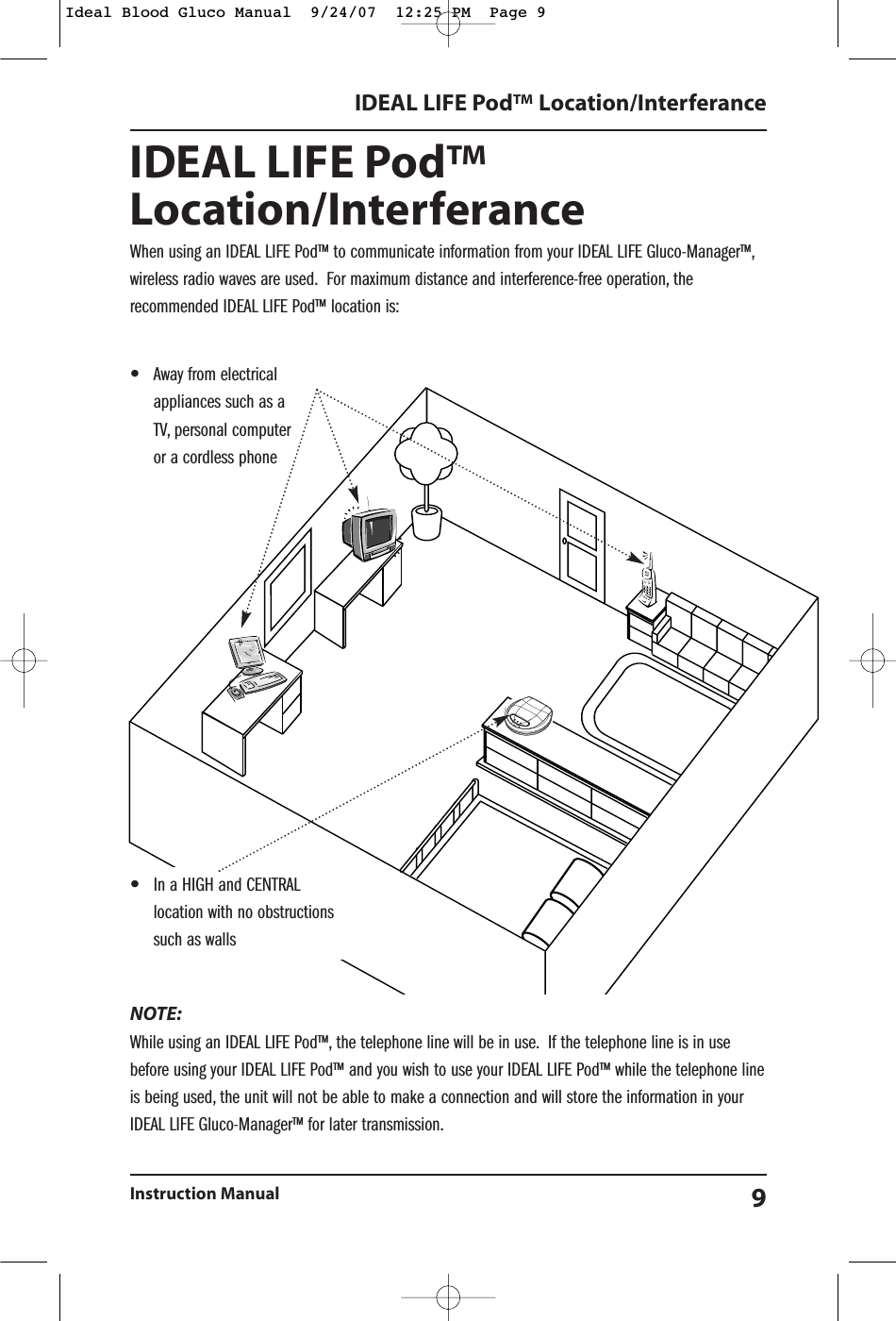
IDEAL LIFE Pod™Location/InterferanceWhen using an IDEAL LIFE Pod™ to communicate information from your IDEAL LIFE Gluco-Manager™,wireless radio waves are used. For maximum distance and interference-free operation, therecommended IDEAL LIFE Pod™ location is:NOTE:While using an IDEAL LIFE Pod™, the telephone line will be in use. If the telephone line is in usebefore using your IDEAL LIFE Pod™ and you wish to use your IDEAL LIFE Pod™ while the telephone lineis being used, the unit will not be able to make a connection and will store the information in yourIDEAL LIFE Gluco-Manager™ for later transmission.IDEAL LIFE Pod™ Location/InterferanceInstruction Manual 9•In a HIGH and CENTRALlocation with no obstructionssuch as walls•Away from electricalappliances such as aTV, personal computeror a cordless phoneIdeal Blood Gluco Manual  9/24/07  12:25 PM  Page 9
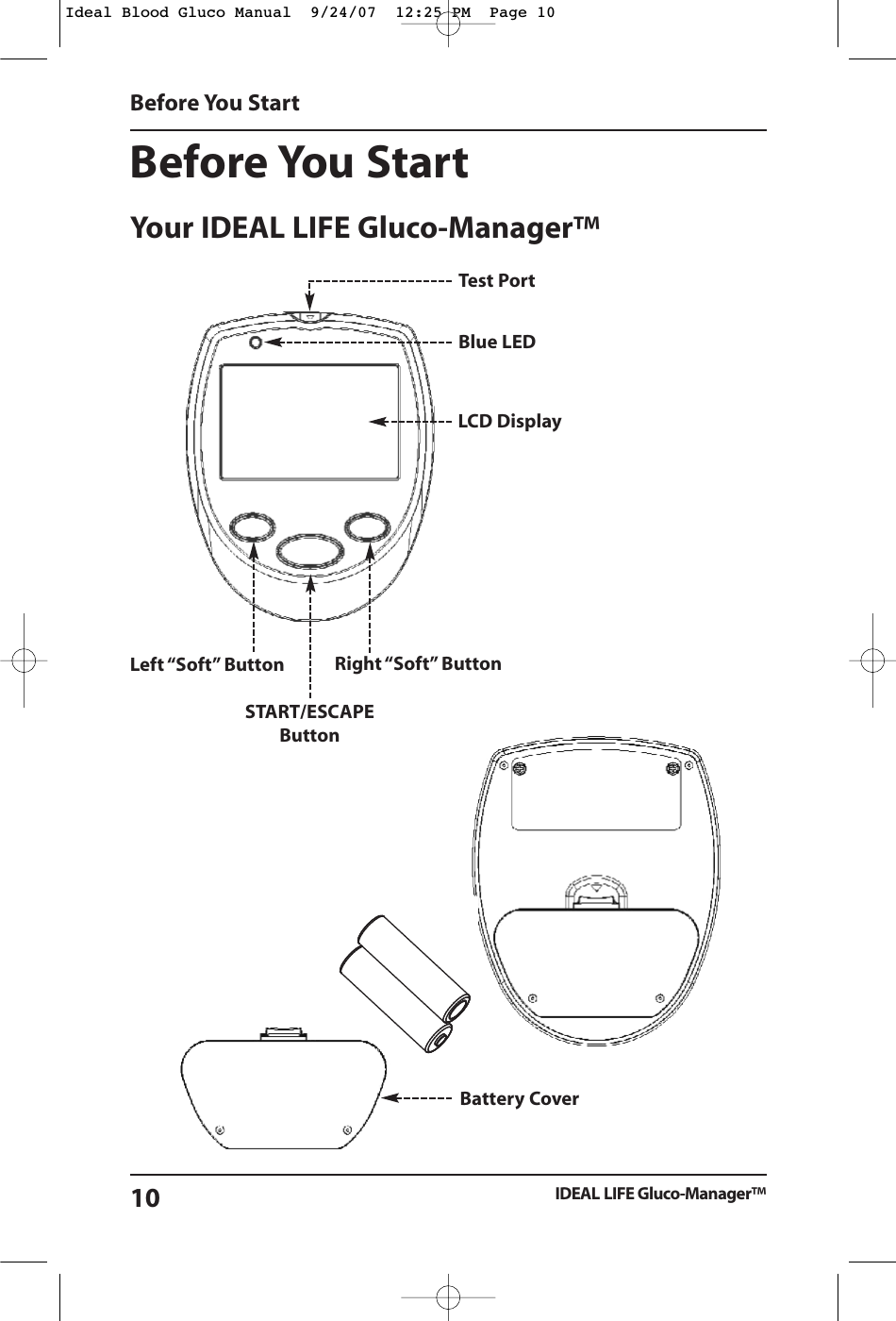
Before You StartYour IDEAL LIFE Gluco-Manager™Before You StartIDEAL LIFE Gluco-Manager™10LCD DisplayTest PortBlue LEDLeft “Soft” ButtonSTART/ESCAPE ButtonRight “Soft” ButtonBattery CoverIdeal Blood Gluco Manual  9/24/07  12:25 PM  Page 10
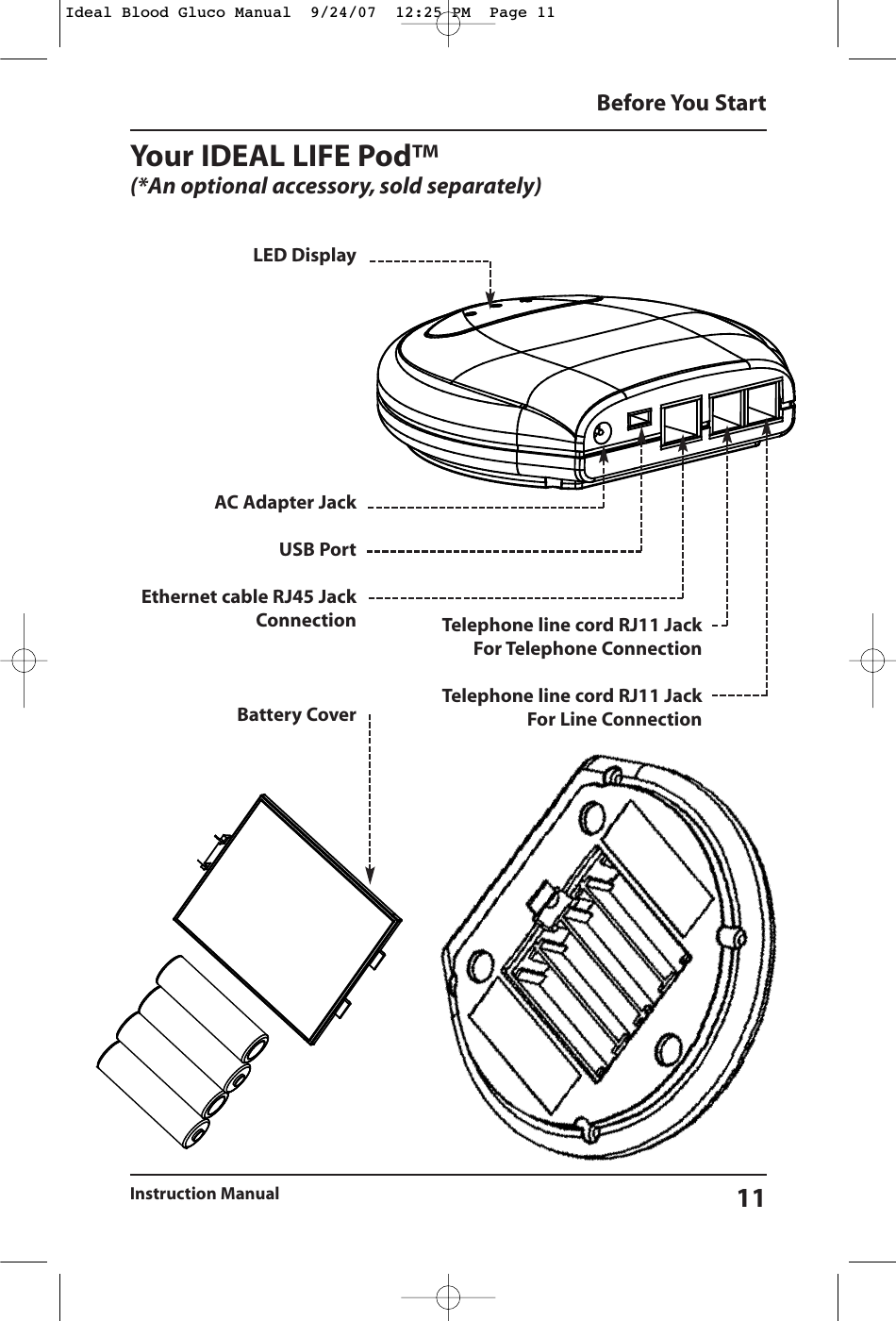
Your IDEAL LIFE Pod™(*An optional accessory, sold separately)Before You StartInstruction Manual 11LED DisplayAC Adapter JackUSB PortEthernet cable RJ45 JackConnectionBattery CoverTelephone line cord RJ11 JackFor Telephone ConnectionTelephone line cord RJ11 JackFor Line ConnectionIdeal Blood Gluco Manual  9/24/07  12:25 PM  Page 11
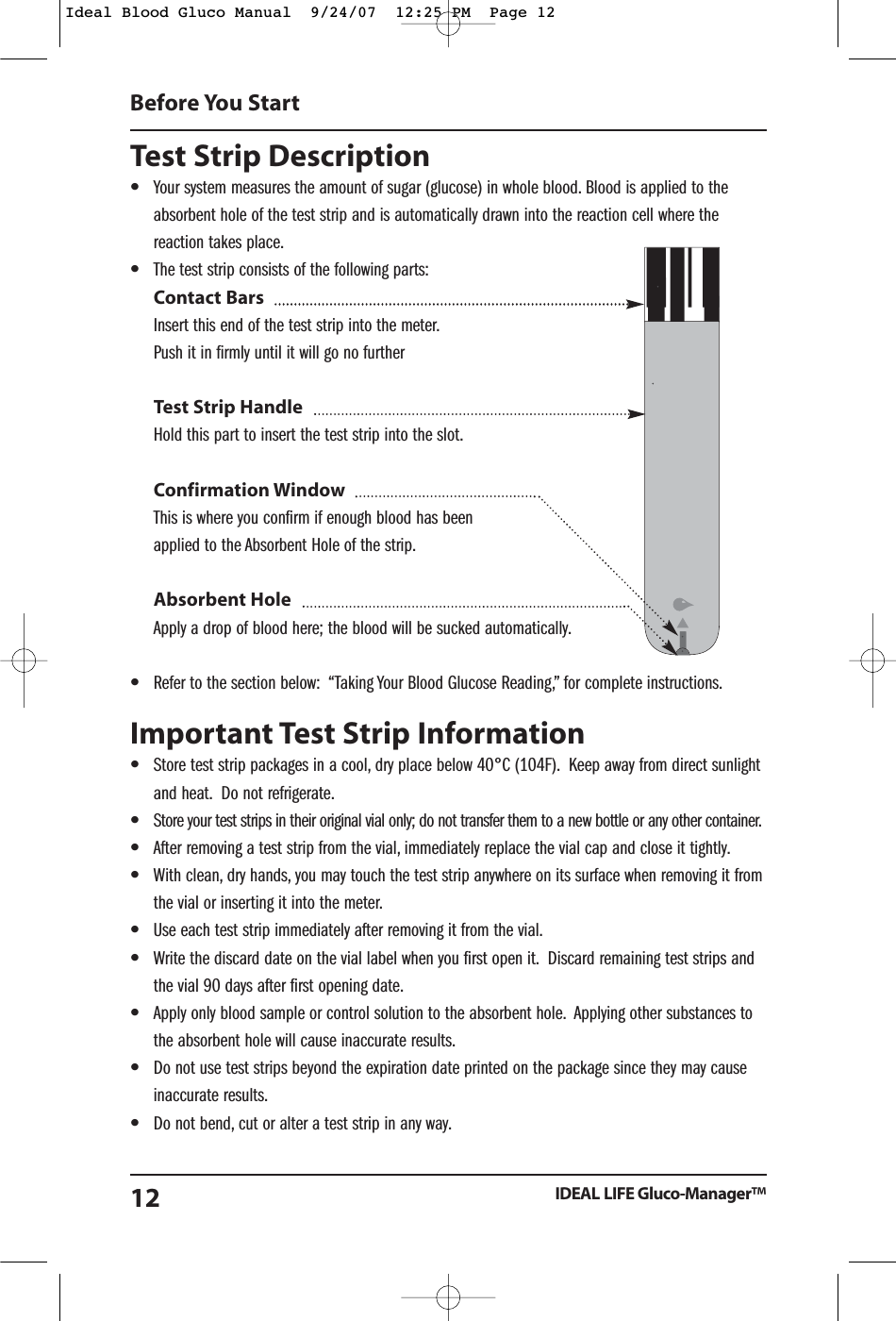
Test Strip Description•Your system measures the amount of sugar (glucose) in whole blood. Blood is applied to theabsorbent hole of the test strip and is automatically drawn into the reaction cell where thereaction takes place.•The test strip consists of the following parts:Contact BarsInsert this end of the test strip into the meter.Push it in firmly until it will go no furtherTest Strip HandleHold this part to insert the test strip into the slot.Confirmation WindowThis is where you confirm if enough blood has been applied to the Absorbent Hole of the strip.Absorbent HoleApply a drop of blood here; the blood will be sucked automatically.•Refer to the section below:  “Taking Your Blood Glucose Reading,” for complete instructions.Important Test Strip Information •Store test strip packages in a cool, dry place below 40°C (104F). Keep away from direct sunlightand heat. Do not refrigerate.•Store your test strips in their original vial only; do not transfer them to a new bottle or any other container.•After removing a test strip from the vial, immediately replace the vial cap and close it tightly.•With clean, dry hands, you may touch the test strip anywhere on its surface when removing it fromthe vial or inserting it into the meter.•Use each test strip immediately after removing it from the vial.•Write the discard date on the vial label when you first open it. Discard remaining test strips andthe vial 90 days after first opening date.•Apply only blood sample or control solution to the absorbent hole. Applying other substances tothe absorbent hole will cause inaccurate results.•Do not use test strips beyond the expiration date printed on the package since they may causeinaccurate results.•Do not bend, cut or alter a test strip in any way.Before You StartIDEAL LIFE Gluco-Manager™12Ideal Blood Gluco Manual  9/24/07  12:25 PM  Page 12
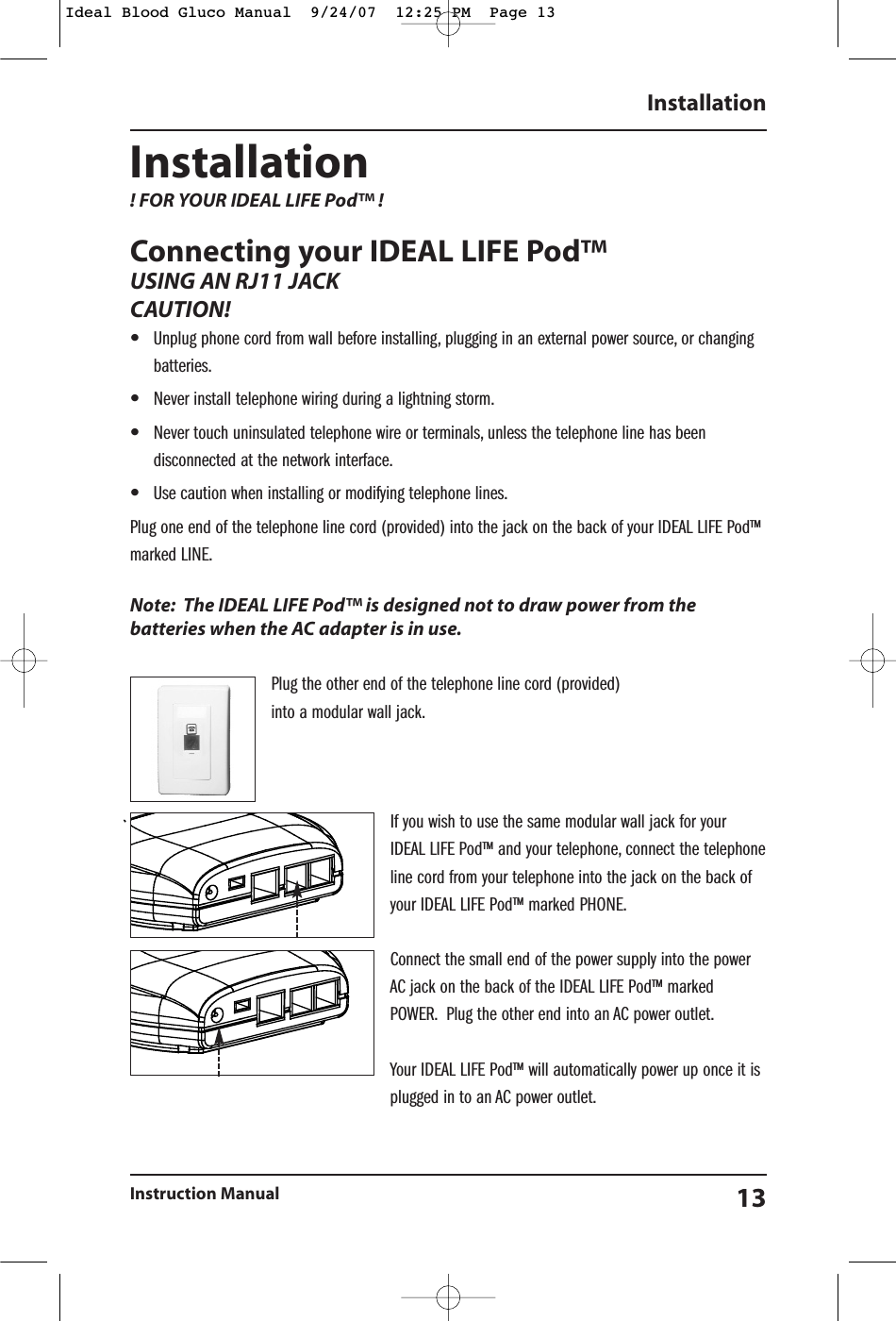
Installation ! FOR YOUR IDEAL LIFE Pod™ ! Connecting your IDEAL LIFE Pod™USING AN RJ11 JACKCAUTION!  •Unplug phone cord from wall before installing, plugging in an external power source, or changingbatteries.•Never install telephone wiring during a lightning storm.•Never touch uninsulated telephone wire or terminals, unless the telephone line has beendisconnected at the network interface.•Use caution when installing or modifying telephone lines.Plug one end of the telephone line cord (provided) into the jack on the back of your IDEAL LIFE Pod™marked LINE.Note: The IDEAL LIFE Pod™ is designed not to draw power from thebatteries when the AC adapter is in use.Plug the other end of the telephone line cord (provided) into a modular wall jack.If you wish to use the same modular wall jack for yourIDEAL LIFE Pod™ and your telephone, connect the telephoneline cord from your telephone into the jack on the back ofyour IDEAL LIFE Pod™ marked PHONE.Connect the small end of the power supply into the powerAC jack on the back of the IDEAL LIFE Pod™ markedPOWER. Plug the other end into an AC power outlet.Your IDEAL LIFE Pod™ will automatically power up once it isplugged in to an AC power outlet.InstallationInstruction Manual 13Ideal Blood Gluco Manual  9/24/07  12:25 PM  Page 13
RECHARGING BATTERIES WITH YOUR IDEAL LIFE POD™:•Remove the battery compartment door on the bottom of your IDEAL LIFE Pod™ by pushing gentlyin the direction shown on the battery cover.•Place the rechargeable batteries as marked.•Replace the battery compartment door and push the compartment door shut in the oppositedirection shown on the battery cover.•When using rechargeable batteries with your IDEAL LIFE Gluco-Manager™, simply place them inyour IDEAL LIFE Pod™ for 10 hours to recharge when battery status is low as indicated on yourIDEAL LIFE Gluco-Manager™Powering Up Your IDEAL LIFE Gluco-Manager™INSTALLING THE BATTERIES (INCLUDED)•Remove the battery compartment door on your IDEAL LIFE Gluco-Manager™ by lifting the batterydoor using the notch•Place the batteries as instructed on the device•Replace the battery compartment door and click into place•NOTE:  Replacing the battery does not affect previous test results stored in memory of the meter.However, the time and date settings may need to be updated if batteries are not in the device foran extended period of time. Use only new batteries of the required size and the recommendedtype. For best performance and the longest life, alkaline batteries are recommended. Do not mixdifferent type, date or brand name batteries together. Be sure to follow the instructions wheninstalling the batteries. Since batteries can leak Chemicals that damages electronic parts, leavingthe battery in the housing for a long period without using the device may damage the main unit.Please remove the batteries if you are not going to use the device for an extended period of time(i.e., 3 months or more). The batteries should be kept away from small children as they pose achoking hazard. If swallowed, promptly see a doctor for help.InstallationIDEAL LIFE Gluco-Manager™14Ideal Blood Gluco Manual  9/24/07  12:25 PM  Page 14
FIRST TIME POWER UP AND ACTIVATION WHEN USING ANIDEAL LIFE POD™ (*an optional accessory, sold separately)To use the IDEAL LIFE Gluco-Manager™ with your IDEAL LIFE Pod™ you must call an IDEAL LIFEcustomer representative to activate. Make sure to call IDEAL LIFE before you begin. Then make surethat the IDEAL LIFE Pod™ is connected to a telephone line cord and RJ11 jack, and “Powered ON”!Hold down any button on your IDEAL LIFE Gluco-Manager™for 3 seconds to Power upREAD THROUGH THE IDEAL LIFE INC. TERMSAND CONDITIONS FIRST, THEN PROCEEDAND FOLLOW THE PROMPTS ON THESCREEN AS SHOWN HERE:First select the appropriate language using the buttons labeledand OK.Then Answer the question on the following screen regardingterms and conditions using the YES and NO labeled buttons.To gain full advantage of all the features your IDEAL LIFE Gluco-Manager™ has to offer, you will need to LINK your IDEAL LIFEGluco-Manager™ and IDEAL LIFE Pod™. To ensure that yourIDEAL LIFE Gluco-Manager™ and IDEAL LIFE Pod™ are LINKEDproperly, you will need to call IDEAL LIFE directly to activate. Toensure that the steps are followed correctly, you should firstsetup your IDEAL LIFE Pod™, power it up, and then begin thesteps of powering up your IDEAL LIFE Gluco-Manager™. Duringyour activation call with IDEAL LIFE, an IDEAL LIFE customer representative will verify your IDEAL LIFE Gluco-Manager™ and IDEAL LIFE Pod™ ID numbers. and you will be ready to take full advantage of allyour IDEAL LIFE Gluco-Manager™ has to offer. For a detailed description of all the features andfunctions continue to the FUNCTIONS section of this manual.InstallationInstruction Manual 15LANGUAGEENGLISHESPANOLFRANCAISOK      PLEASE CALL888-IDEAL-41TO ACTIVATEOK         Ideal Blood Gluco Manual  9/24/07  12:25 PM  Page 15
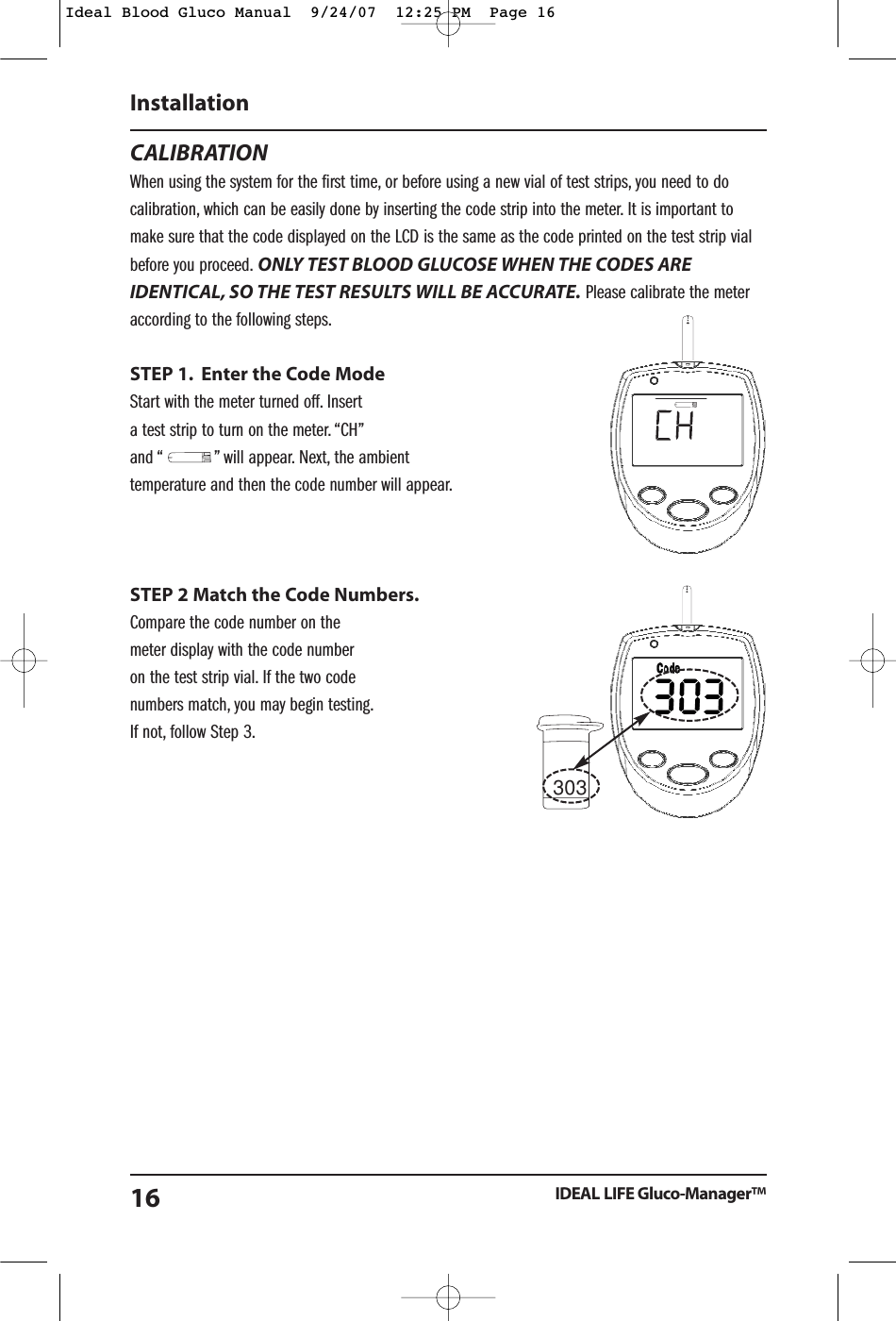
303CALIBRATIONWhen using the system for the first time, or before using a new vial of test strips, you need to docalibration, which can be easily done by inserting the code strip into the meter. It is important tomake sure that the code displayed on the LCD is the same as the code printed on the test strip vialbefore you proceed. ONLY TEST BLOOD GLUCOSE WHEN THE CODES AREIDENTICAL, SO THE TEST RESULTS WILL BE ACCURATE. Please calibrate the meteraccording to the following steps.STEP 1. Enter the Code ModeStart with the meter turned off. Insert a test strip to turn on the meter. “CH”and “           ” will appear. Next, the ambient temperature and then the code number will appear.STEP 2 Match the Code Numbers.Compare the code number on the meter display with the code number on the test strip vial. If the two code numbers match, you may begin testing.If not, follow Step 3.InstallationIDEAL LIFE Gluco-Manager™16Ideal Blood Gluco Manual  9/24/07  12:25 PM  Page 16
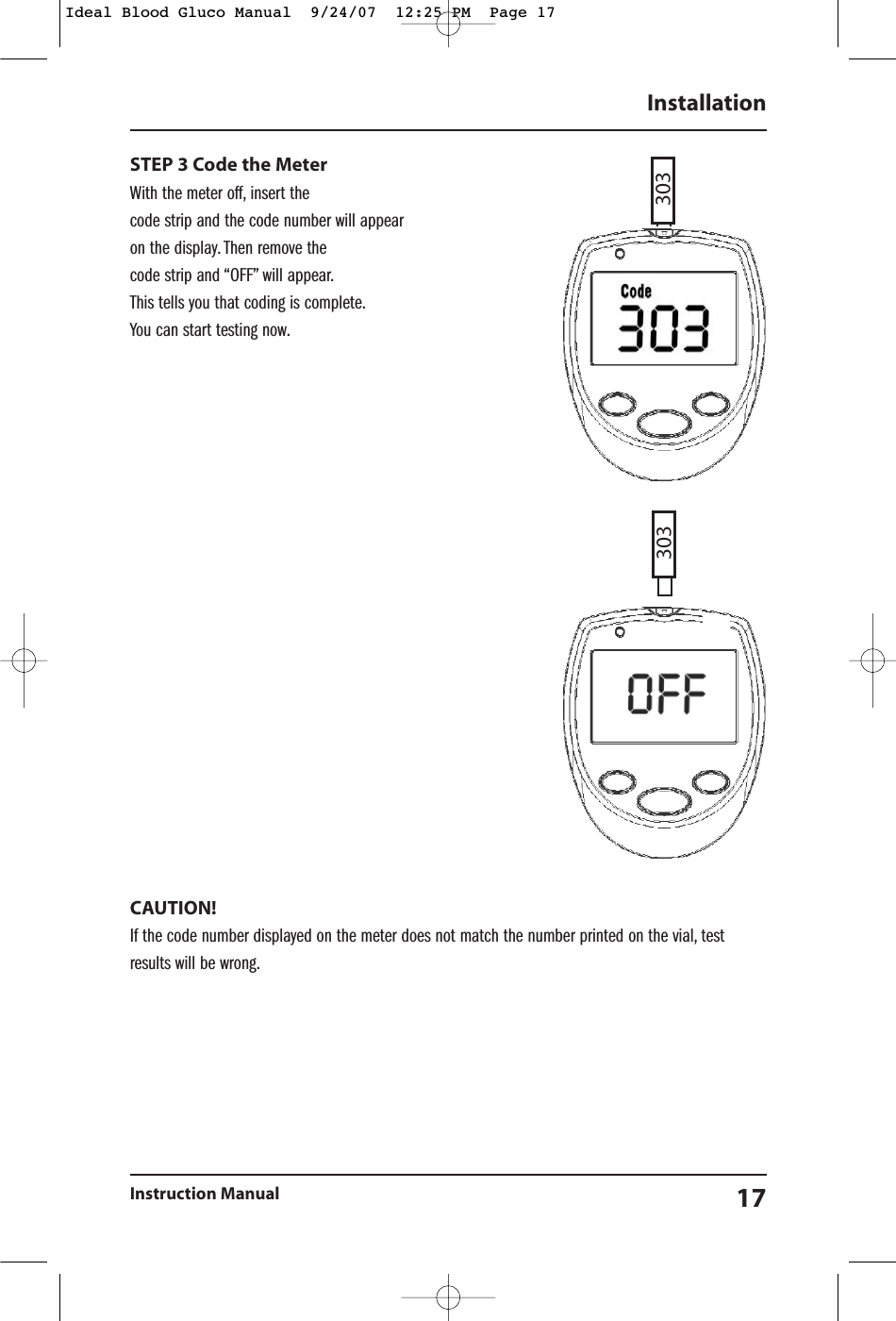
STEP 3 Code the Meter With the meter off, insert the code strip and the code number will appearon the display. Then remove the code strip and “OFF” will appear.This tells you that coding is complete.You can start testing now.CAUTION!  If the code number displayed on the meter does not match the number printed on the vial, testresults will be wrong.InstallationInstruction Manual 17303303Ideal Blood Gluco Manual  9/24/07  12:25 PM  Page 17
ABOUT CONTROL SOLUTIONControl solutions contain a known amount of glucose that reacts with test strips. By comparing yourcontrol solution test results with the expected range printed on the test strip vial label, it is able to checkthat the meter and the test strips are working together as a system and that you are performing the testcorrectly. It is very important that you do this simple check routinely to make sure you get accurate results.How often should the control solution test be performed?•When you use this system to test your blood for the first time, practice the procedure usingcontrol solution. When you can do three tests in a row that are within the expected range, you areready to test your blood.•Routinely check the meter and test strips, so perform a single test for each level of controlsolution at least once a weekWhen should the control solution test be performed?•When you first get your IDEAL LIFE Gluco-Manager™•When you begin using a new vial of test strips.•Whenever you suspect that the meter or test strips are not working properly.•When your blood glucose test results are not consistent with how you feel, or when you think yourresults are inaccurate.•When your test strips are expeose to extreme environmental conditions (See “Important Test StripInformation” below)•When you want to practice running the test.•If you drop the meter.IMPORTANT CONTROL SOLUTION TEST INFORMATION•Use the same branded control solutions as the test strips•Check the expiry date on the control solution vial. Do not use if expired.•Control solution, meter, and test strips should come to room temperature (20°C - 25°C / 68°F - 77°F) before testing.•Shake the vial before use. Discard the first drop of control solution. After squeezing, wipe off thedispenser tip to avoid contamination. The above tips ensure you get a good sample and anaccurate result.•Use a period of 90 days from the date that you first open it. Record the discard date (dateopened plus 90 days) on the control solution vial. Discard after 90 days.InstallationIDEAL LIFE Gluco-Manager™18Ideal Blood Gluco Manual  9/24/07  12:25 PM  Page 18
•Store the control solution tightly closed at temperature below 30°C (86°F) and do not refrigerate.NOTE!  The control solution range printed on the test strip vial is forappropriately branded control solution only. It is used to test meter andtest strip performance. It is not the recommended range for your bloodglucose level.HOW TO DO A CONTROL SOLUTION TEST?Step 1. Insert a Test StripInsert a test strip with contact bars end first and facing up into the test slot. (Contact bars must beinserted all the way into the meter or you may get an inaccurate test result.) The meter turns onautomatically. The screen will display a “CH” and “               ” first, then the ambient temperaturenext and finally a code number will appear on the display with the “     ” symbol. Be sure the codenumber on the display matches the code number on the test strip vial. If the code numbers do notmatch, please refer to the “Calibration” section above for the correct code selection.After the “     ” symbol appears on the display, press the Left Soft Button to allow for the screen todisplay CTL. With CTL on the screen, the meter will not store your test result in memory. If you decidenot to perform a control solution test, press the Left Soft Button and the CTL screen will disappear.NOTE!  Every time you perform a control solution test, you must enter intothe “CTL” test mode so that the test result will not be stored in the metermemory.InstallationInstruction Manual 19Ideal Blood Gluco Manual  9/24/07  12:25 PM  Page 19
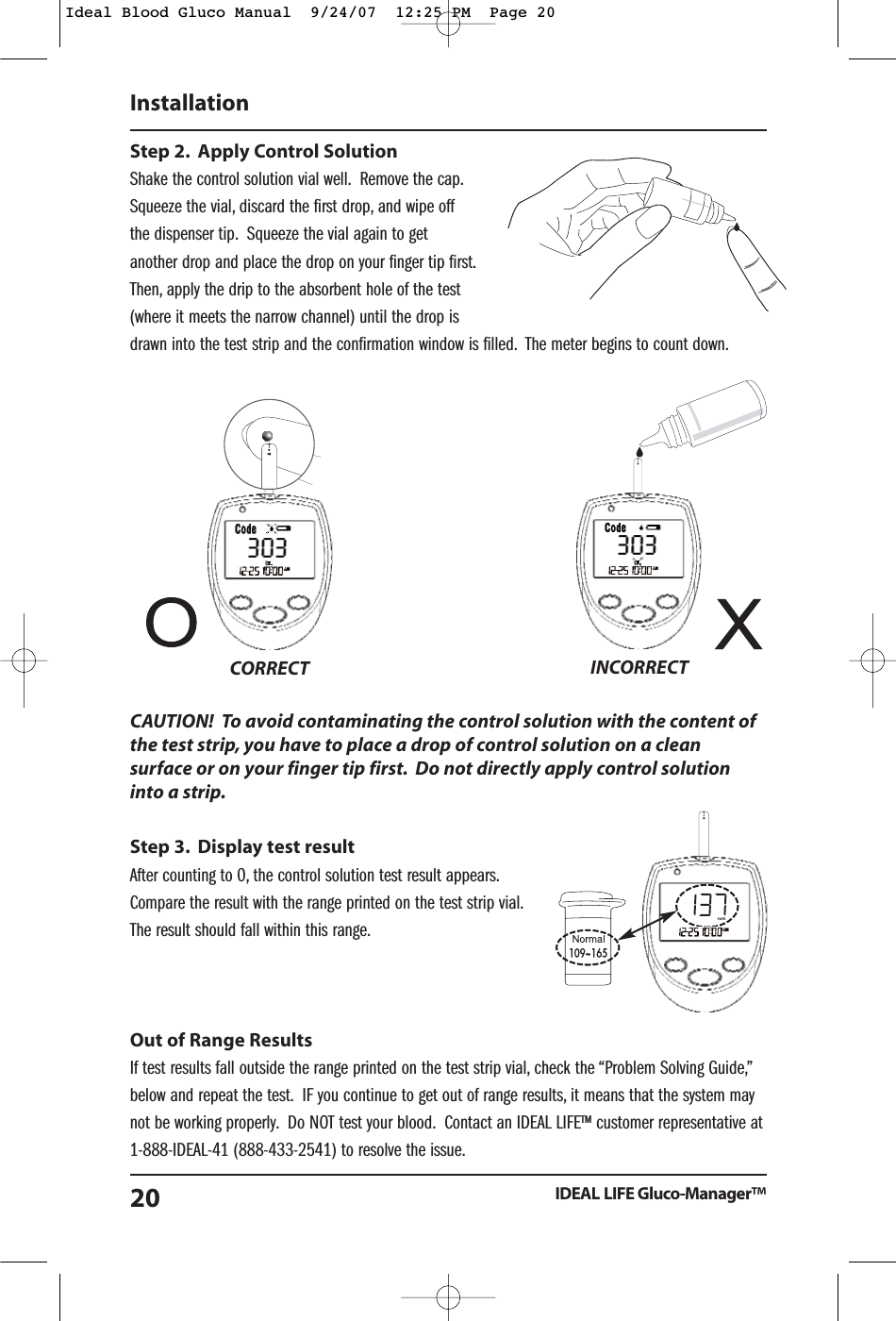
Step 2. Apply Control SolutionShake the control solution vial well. Remove the cap.Squeeze the vial, discard the first drop, and wipe offthe dispenser tip. Squeeze the vial again to getanother drop and place the drop on your finger tip first.Then, apply the drip to the absorbent hole of the test(where it meets the narrow channel) until the drop isdrawn into the test strip and the confirmation window is filled. The meter begins to count down.CAUTION!  To avoid contaminating the control solution with the content ofthe test strip, you have to place a drop of control solution on a cleansurface or on your finger tip first. Do not directly apply control solutioninto a strip.Step 3. Display test resultAfter counting to 0, the control solution test result appears.Compare the result with the range printed on the test strip vial.The result should fall within this range.Out of Range ResultsIf test results fall outside the range printed on the test strip vial, check the “Problem Solving Guide,”below and repeat the test. IF you continue to get out of range results, it means that the system maynot be working properly. Do NOT test your blood. Contact an IDEAL LIFE™ customer representative at1-888-IDEAL-41 (888-433-2541) to resolve the issue.InstallationIDEAL LIFE Gluco-Manager™20CORRECT INCORRECTIdeal Blood Gluco Manual  9/24/07  12:25 PM  Page 20
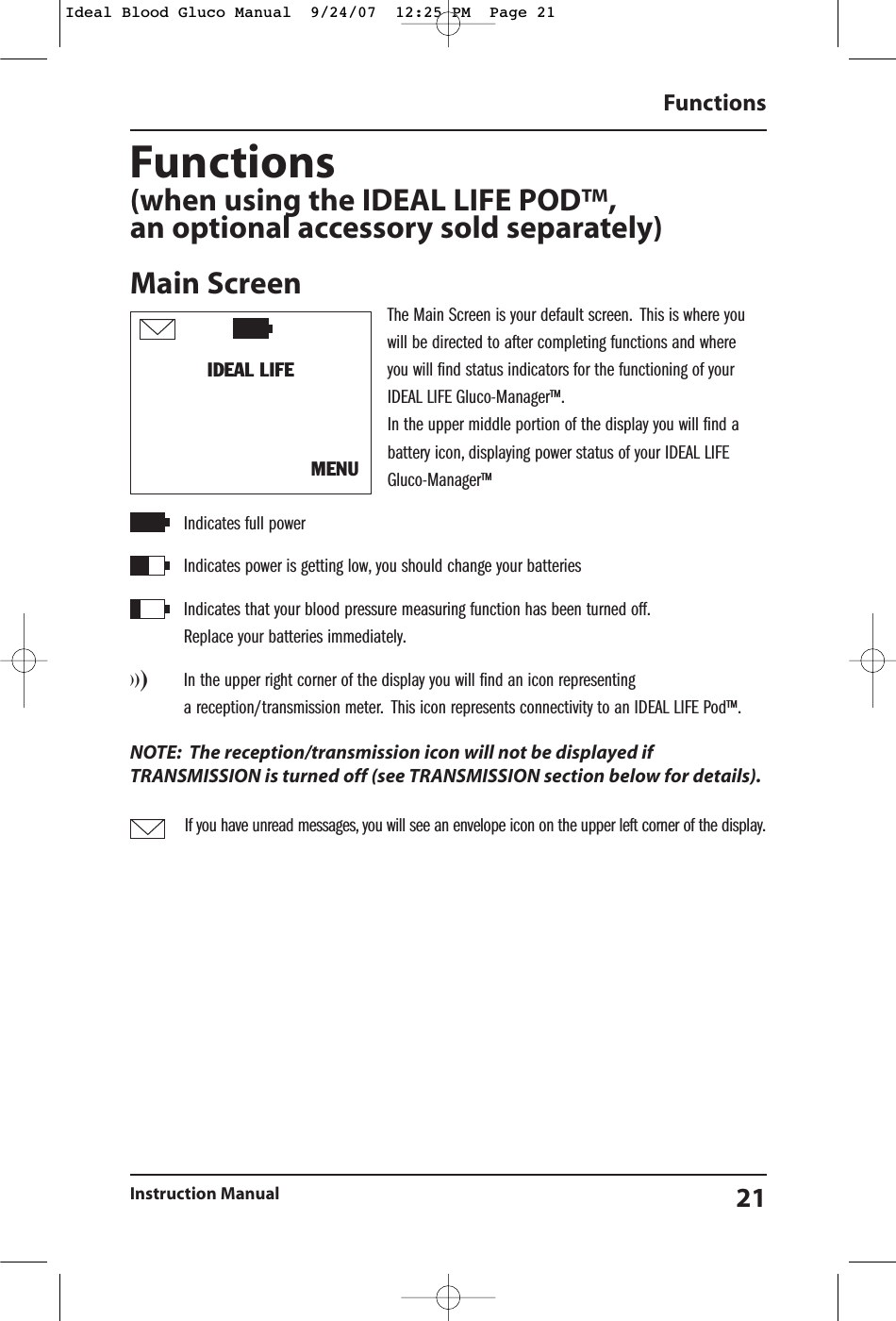
Functions(when using the IDEAL LIFE POD™,an optional accessory sold separately)Main ScreenThe Main Screen is your default screen. This is where youwill be directed to after completing functions and where you will find status indicators for the functioning of your IDEAL LIFE Gluco-Manager™.In the upper middle portion of the display you will find abattery icon, displaying power status of your IDEAL LIFEGluco-Manager™Indicates full powerIndicates power is getting low, you should change your batteries  Indicates that your blood pressure measuring function has been turned off.Replace your batteries immediately.)))In the upper right corner of the display you will find an icon representing a reception/transmission meter. This icon represents connectivity to an IDEAL LIFE Pod™.NOTE: The reception/transmission icon will not be displayed ifTRANSMISSION is turned off (see TRANSMISSION section below for details).If you have unread messages, you will see an envelope icon on the upper left corner of the display.FunctionsInstruction Manual 21IDEAL LIFE MENUIdeal Blood Gluco Manual  9/24/07  12:25 PM  Page 21
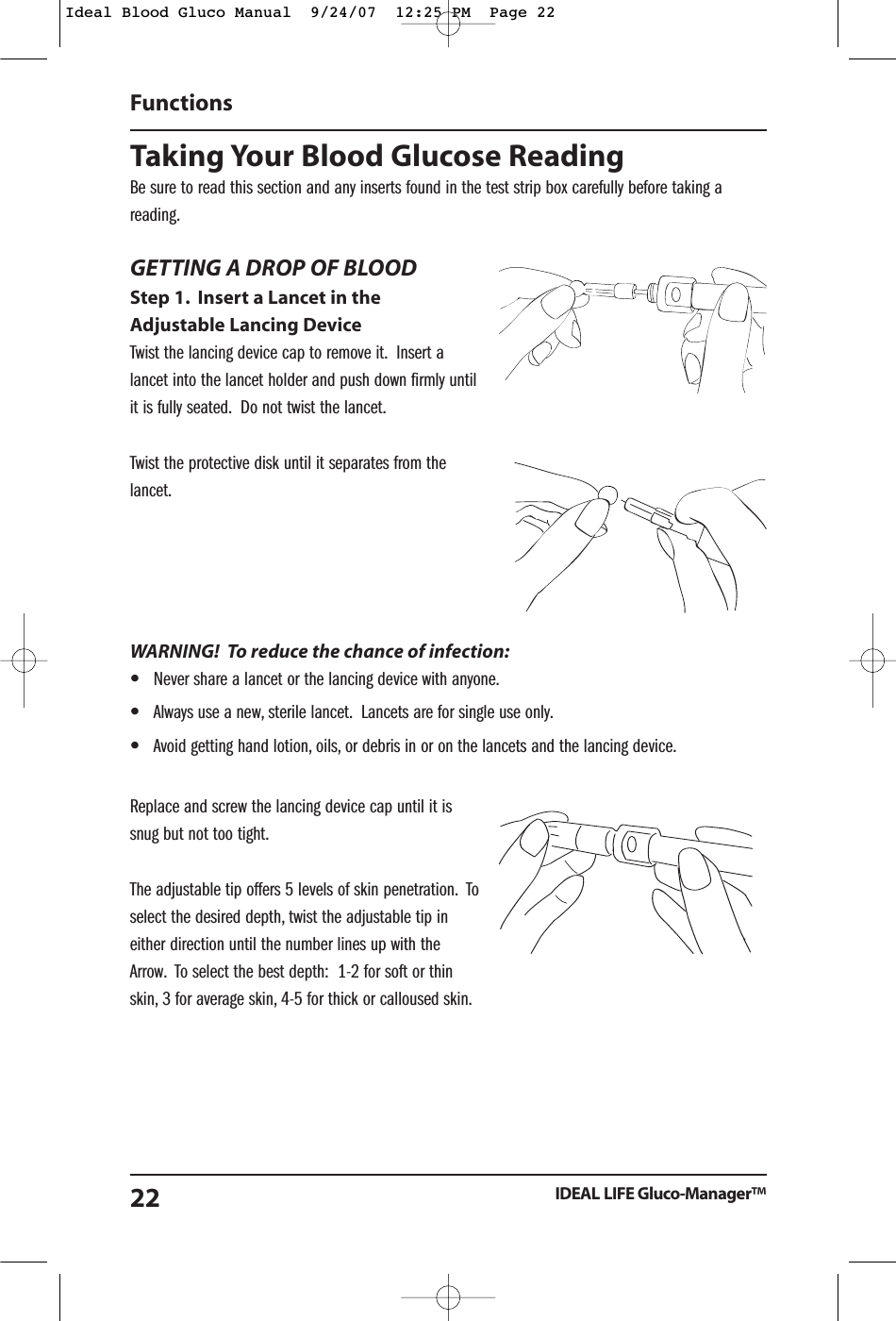
Taking Your Blood Glucose ReadingBe sure to read this section and any inserts found in the test strip box carefully before taking areading.GETTING A DROP OF BLOODStep 1. Insert a Lancet in theAdjustable Lancing DeviceTwist the lancing device cap to remove it. Insert alancet into the lancet holder and push down firmly untilit is fully seated. Do not twist the lancet.Twist the protective disk until it separates from thelancet.WARNING!  To reduce the chance of infection:•Never share a lancet or the lancing device with anyone.•Always use a new, sterile lancet. Lancets are for single use only.•Avoid getting hand lotion, oils, or debris in or on the lancets and the lancing device.Replace and screw the lancing device cap until it issnug but not too tight.The adjustable tip offers 5 levels of skin penetration. Toselect the desired depth, twist the adjustable tip ineither direction until the number lines up with theArrow. To select the best depth:  1-2 for soft or thinskin, 3 for average skin, 4-5 for thick or calloused skin.Functions IDEAL LIFE Gluco-Manager™22Ideal Blood Gluco Manual  9/24/07  12:25 PM  Page 22
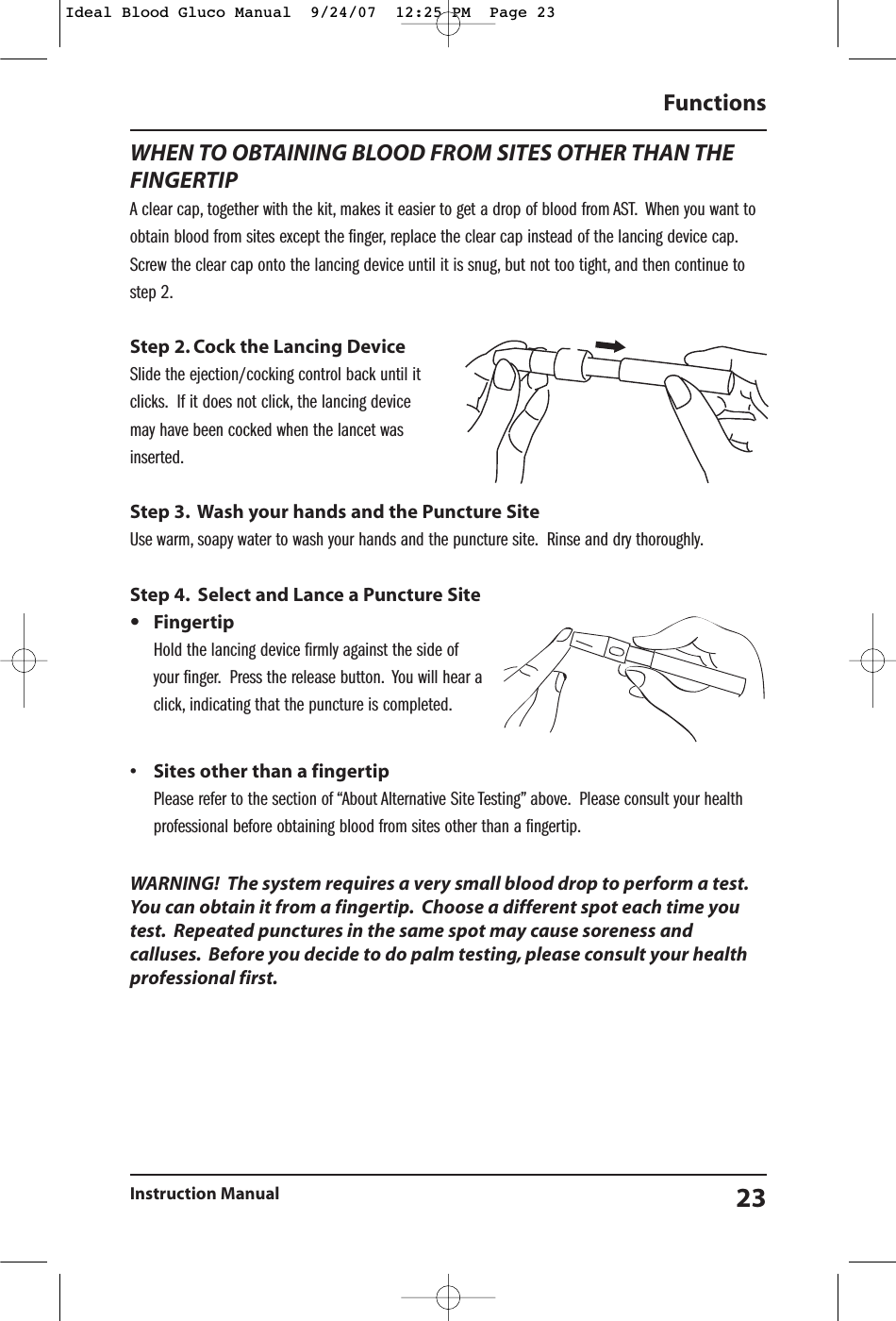
WHEN TO OBTAINING BLOOD FROM SITES OTHER THAN THEFINGERTIPA clear cap, together with the kit, makes it easier to get a drop of blood from AST. When you want toobtain blood from sites except the finger, replace the clear cap instead of the lancing device cap.Screw the clear cap onto the lancing device until it is snug, but not too tight, and then continue tostep 2.Step 2. Cock the Lancing DeviceSlide the ejection/cocking control back until itclicks. If it does not click, the lancing device may have been cocked when the lancet wasinserted.Step 3. Wash your hands and the Puncture SiteUse warm, soapy water to wash your hands and the puncture site. Rinse and dry thoroughly.Step 4. Select and Lance a Puncture Site•FingertipHold the lancing device firmly against the side ofyour finger. Press the release button. You will hear aclick, indicating that the puncture is completed.• Sites other than a fingertipPlease refer to the section of “About Alternative Site Testing” above. Please consult your healthprofessional before obtaining blood from sites other than a fingertip.WARNING!  The system requires a very small blood drop to perform a test.You can obtain it from a fingertip. Choose a different spot each time youtest. Repeated punctures in the same spot may cause soreness andcalluses. Before you decide to do palm testing, please consult your healthprofessional first.Functions Instruction Manual 23Ideal Blood Gluco Manual  9/24/07  12:25 PM  Page 23
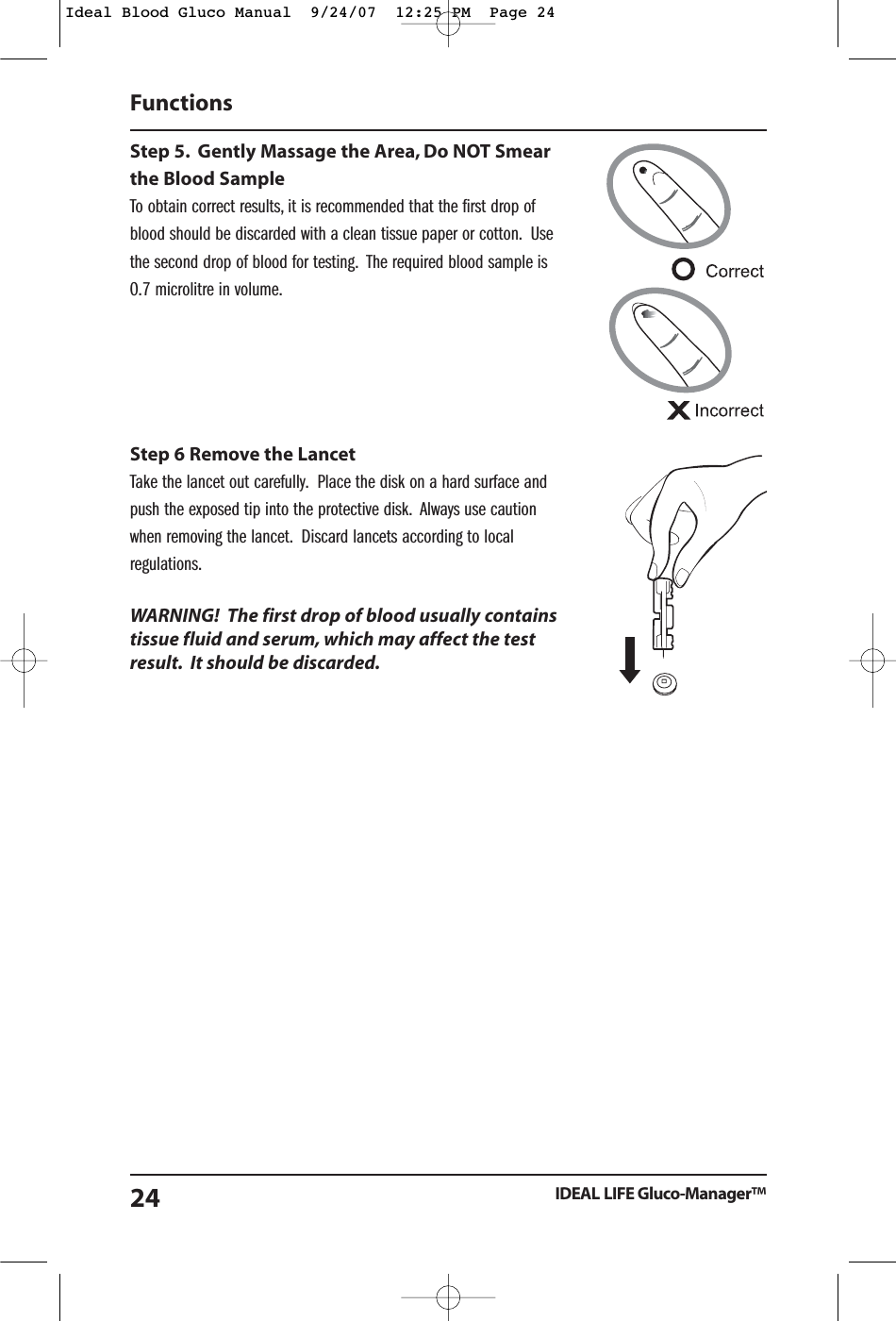
Step 5. Gently Massage the Area, Do NOT Smearthe Blood SampleTo obtain correct results, it is recommended that the first drop ofblood should be discarded with a clean tissue paper or cotton. Usethe second drop of blood for testing. The required blood sample is0.7 microlitre in volume.Step 6 Remove the LancetTake the lancet out carefully. Place the disk on a hard surface andpush the exposed tip into the protective disk. Always use cautionwhen removing the lancet. Discard lancets according to localregulations.WARNING!  The first drop of blood usually containstissue fluid and serum, which may affect the testresult. It should be discarded.Functions IDEAL LIFE Gluco-Manager™24Ideal Blood Gluco Manual  9/24/07  12:25 PM  Page 24
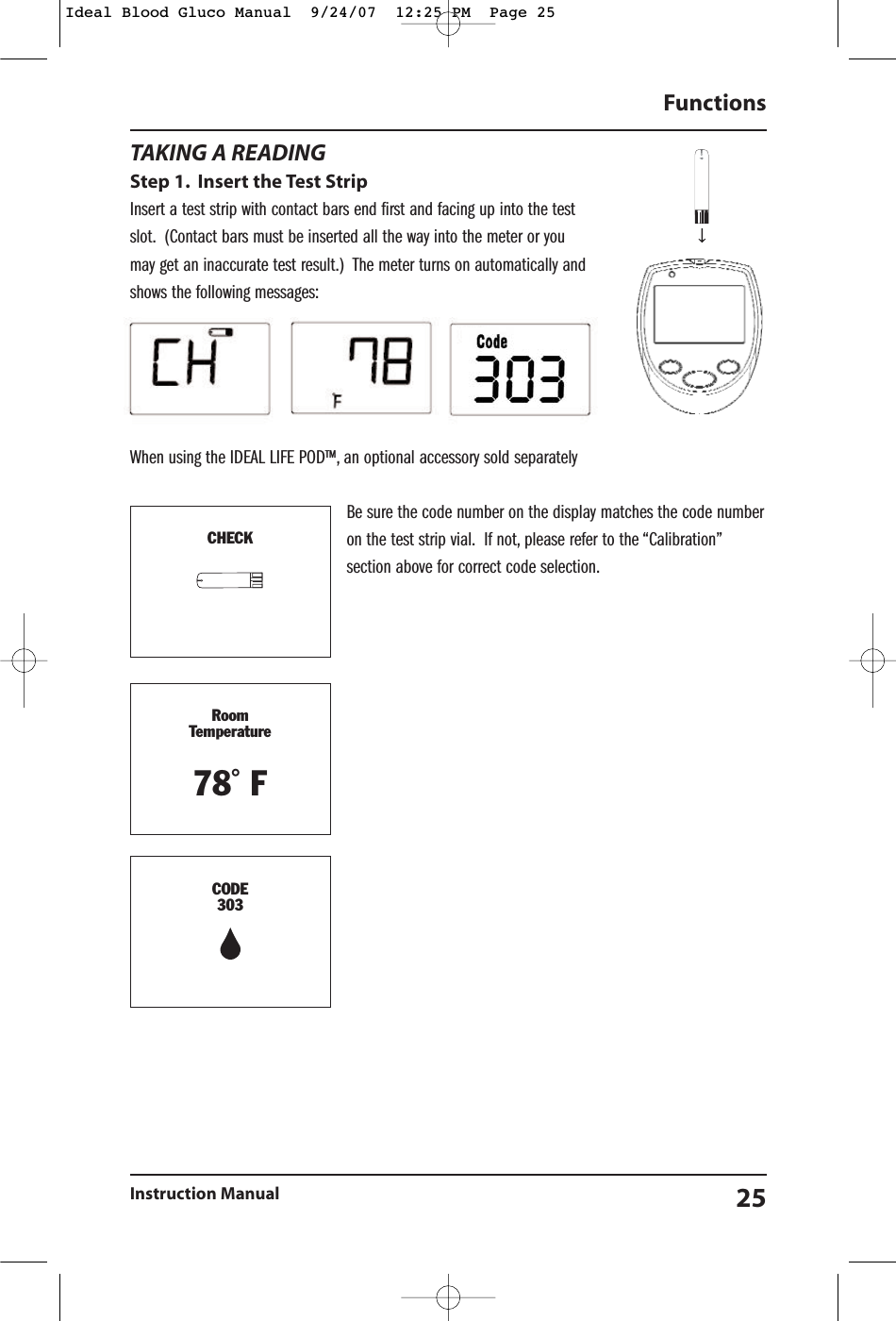
TAKING A READINGStep 1. Insert the Test StripInsert a test strip with contact bars end first and facing up into the testslot. (Contact bars must be inserted all the way into the meter or youmay get an inaccurate test result.)  The meter turns on automatically andshows the following messages:When using the IDEAL LIFE POD™, an optional accessory sold separatelyBe sure the code number on the display matches the code numberon the test strip vial. If not, please refer to the “Calibration”section above for correct code selection.Functions Instruction Manual 25TD-4227CHECKRoomTemperature78˚ FCODE303Ideal Blood Gluco Manual  9/24/07  12:25 PM  Page 25
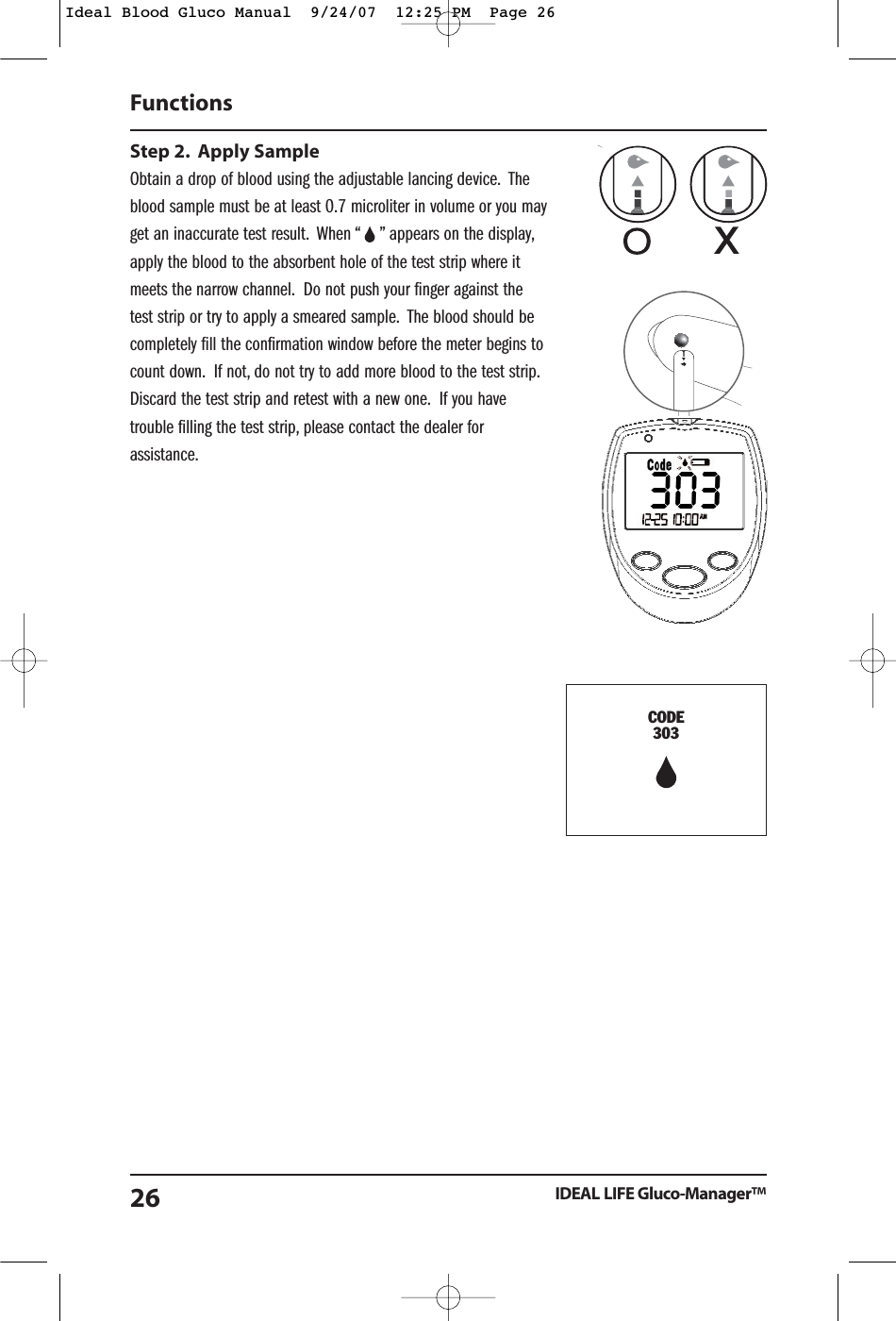
Step 2. Apply SampleObtain a drop of blood using the adjustable lancing device. Theblood sample must be at least 0.7 microliter in volume or you mayget an inaccurate test result. When “    ” appears on the display,apply the blood to the absorbent hole of the test strip where itmeets the narrow channel. Do not push your finger against thetest strip or try to apply a smeared sample. The blood should becompletely fill the confirmation window before the meter begins tocount down. If not, do not try to add more blood to the test strip.Discard the test strip and retest with a new one. If you havetrouble filling the test strip, please contact the dealer forassistance.Functions IDEAL LIFE Gluco-Manager™26CODE303Ideal Blood Gluco Manual  9/24/07  12:25 PM  Page 26
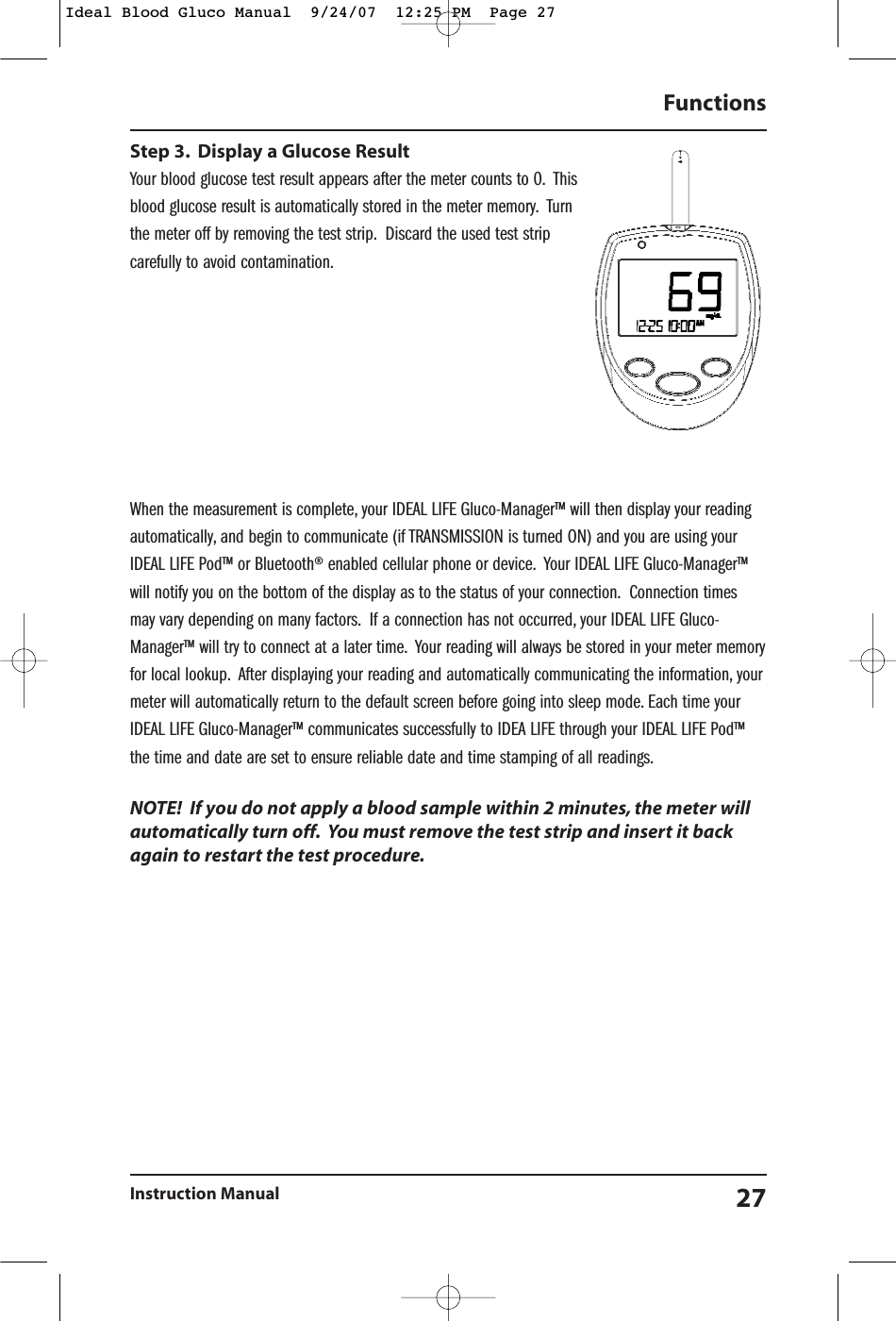
Step 3. Display a Glucose ResultYour blood glucose test result appears after the meter counts to 0. Thisblood glucose result is automatically stored in the meter memory. Turnthe meter off by removing the test strip. Discard the used test stripcarefully to avoid contamination.When the measurement is complete, your IDEAL LIFE Gluco-Manager™ will then display your readingautomatically, and begin to communicate (if TRANSMISSION is turned ON) and you are using yourIDEAL LIFE Pod™ or Bluetooth® enabled cellular phone or device. Your IDEAL LIFE Gluco-Manager™will notify you on the bottom of the display as to the status of your connection. Connection timesmay vary depending on many factors. If a connection has not occurred, your IDEAL LIFE Gluco-Manager™ will try to connect at a later time. Your reading will always be stored in your meter memoryfor local lookup. After displaying your reading and automatically communicating the information, yourmeter will automatically return to the default screen before going into sleep mode. Each time yourIDEAL LIFE Gluco-Manager™ communicates successfully to IDEA LIFE through your IDEAL LIFE Pod™the time and date are set to ensure reliable date and time stamping of all readings.NOTE!  If you do not apply a blood sample within 2 minutes, the meter willautomatically turn off. You must remove the test strip and insert it backagain to restart the test procedure.Functions Instruction Manual 27Ideal Blood Gluco Manual  9/24/07  12:25 PM  Page 27
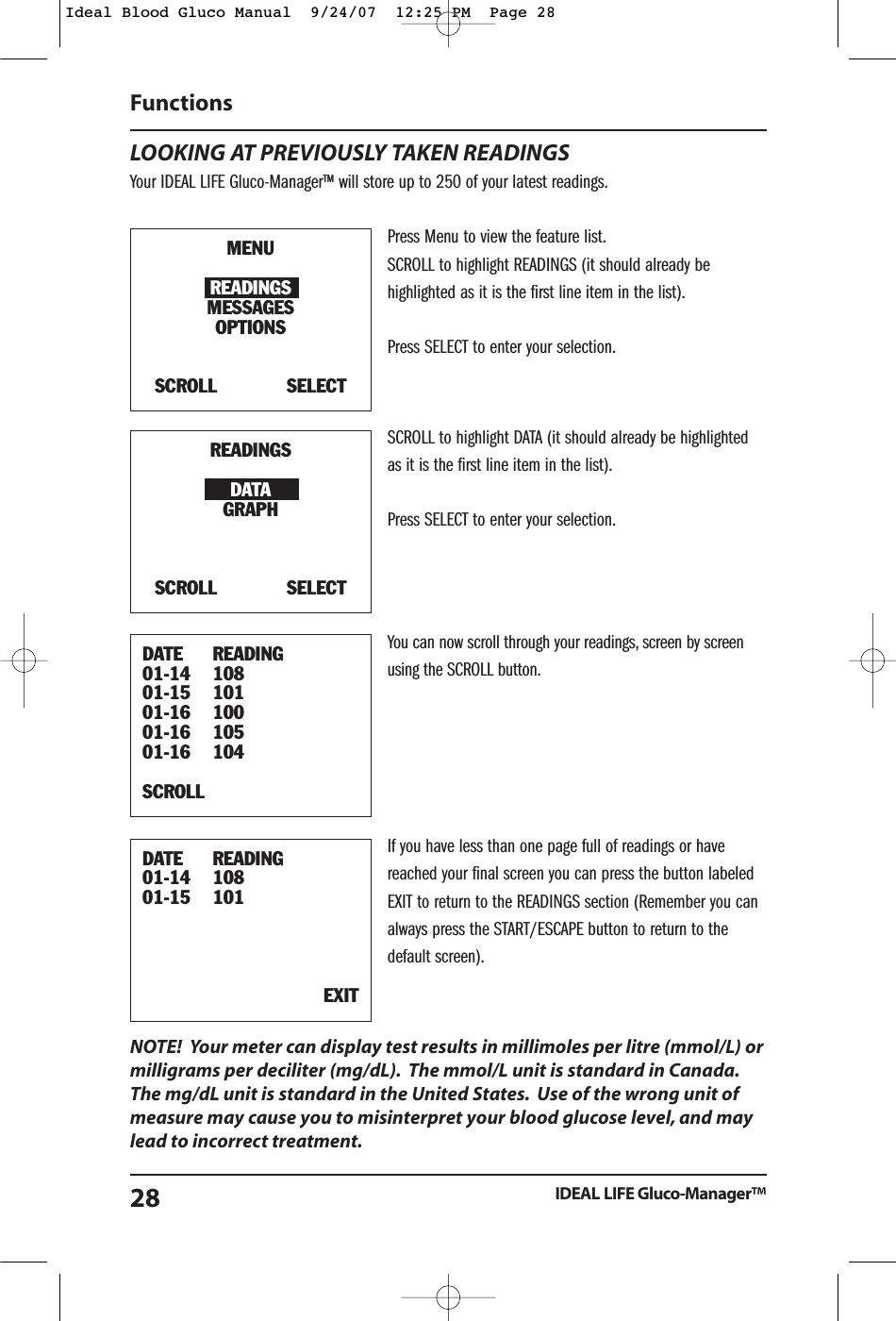
LOOKING AT PREVIOUSLY TAKEN READINGSYour IDEAL LIFE Gluco-Manager™ will store up to 250 of your latest readings.Press Menu to view the feature list.SCROLL to highlight READINGS (it should already behighlighted as it is the first line item in the list).Press SELECT to enter your selection.SCROLL to highlight DATA (it should already be highlightedas it is the first line item in the list).Press SELECT to enter your selection.You can now scroll through your readings, screen by screenusing the SCROLL button.If you have less than one page full of readings or havereached your final screen you can press the button labeledEXIT to return to the READINGS section (Remember you canalways press the START/ESCAPE button to return to thedefault screen).NOTE!  Your meter can display test results in millimoles per litre (mmol/L) ormilligrams per deciliter (mg/dL). The mmol/L unit is standard in Canada.The mg/dL unit is standard in the United States. Use of the wrong unit ofmeasure may cause you to misinterpret your blood glucose level, and maylead to incorrect treatment.Functions IDEAL LIFE Gluco-Manager™28MENUREADINGSMESSAGESOPTIONSSCROLL            SELECTREADINGSDATAGRAPHSCROLL            SELECTDATE READING01-14 10801-15 10101-16 10001-16 10501-16 104SCROLL                DATE READING01-14 10801-15 101EXITIdeal Blood Gluco Manual  9/24/07  12:25 PM  Page 28
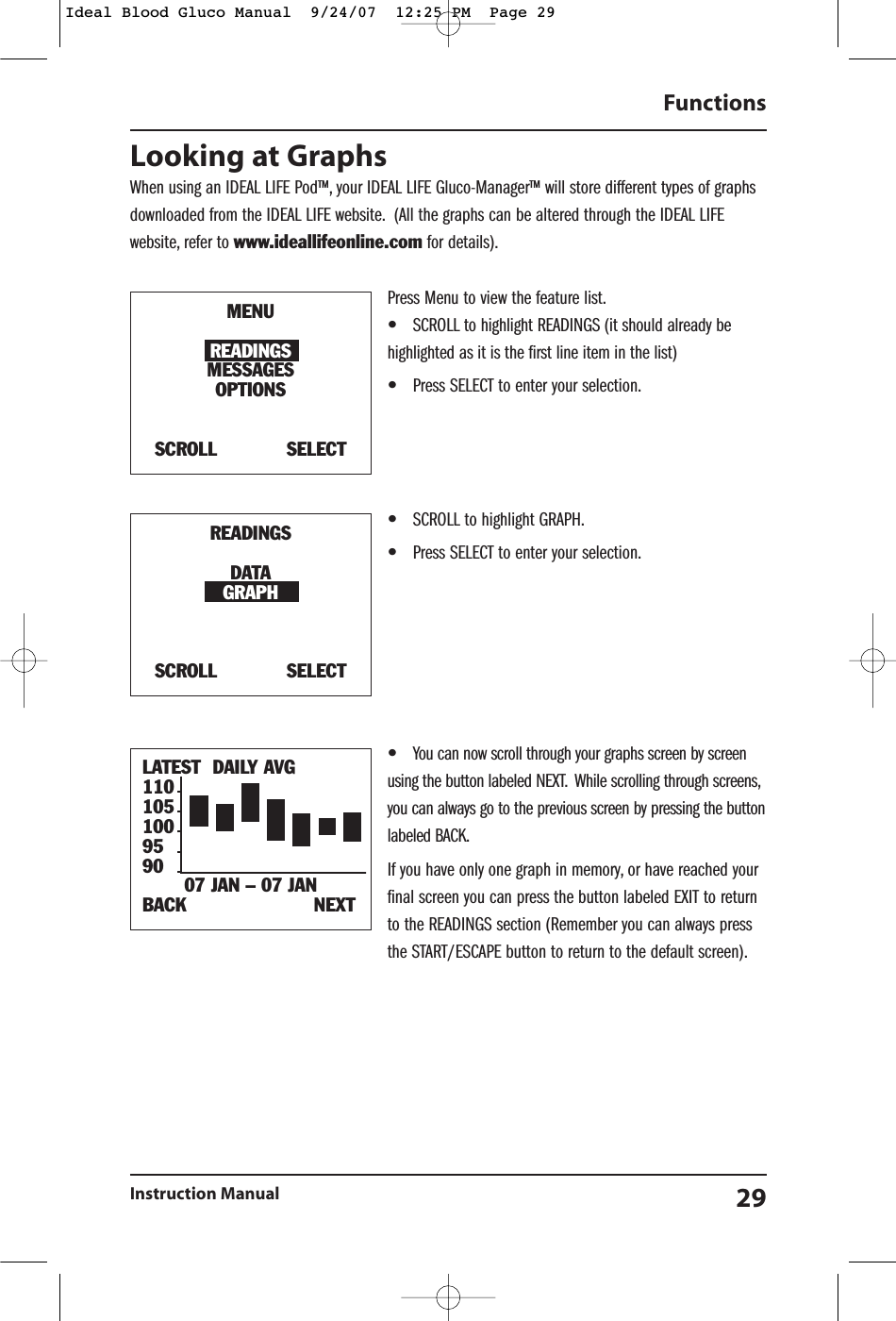
Looking at GraphsWhen using an IDEAL LIFE Pod™, your IDEAL LIFE Gluco-Manager™ will store different types of graphsdownloaded from the IDEAL LIFE website. (All the graphs can be altered through the IDEAL LIFEwebsite, refer to www.ideallifeonline.com for details).Press Menu to view the feature list.•SCROLL to highlight READINGS (it should already behighlighted as it is the first line item in the list)•Press SELECT to enter your selection.•SCROLL to highlight GRAPH.•Press SELECT to enter your selection.•You can now scroll through your graphs screen by screenusing the button labeled NEXT. While scrolling through screens,you can always go to the previous screen by pressing the buttonlabeled BACK.If you have only one graph in memory, or have reached yourfinal screen you can press the button labeled EXIT to returnto the READINGS section (Remember you can always pressthe START/ESCAPE button to return to the default screen).Functions Instruction Manual 29LATEST DAILY AVG110105100959007 JAN – 07 JANBACK                      NEXTMENUREADINGSMESSAGESOPTIONSSCROLL            SELECTREADINGSDATAGRAPHSCROLL            SELECTIdeal Blood Gluco Manual  9/24/07  12:25 PM  Page 29
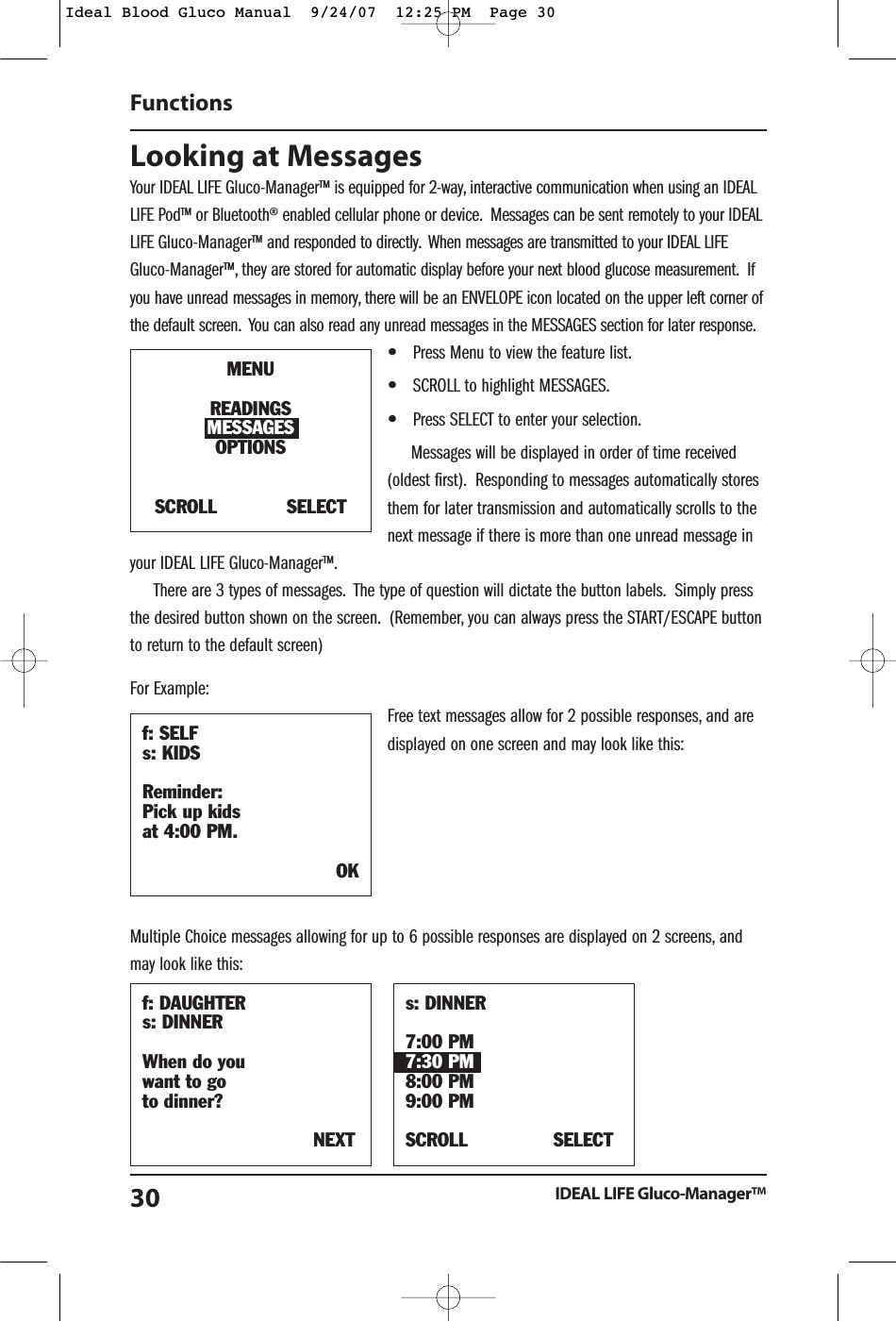
Looking at Messages Your IDEAL LIFE Gluco-Manager™ is equipped for 2-way, interactive communication when using an IDEALLIFE Pod™ or Bluetooth® enabled cellular phone or device. Messages can be sent remotely to your IDEALLIFE Gluco-Manager™ and responded to directly. When messages are transmitted to your IDEAL LIFEGluco-Manager™, they are stored for automatic display before your next blood glucose measurement. Ifyou have unread messages in memory, there will be an ENVELOPE icon located on the upper left corner ofthe default screen. You can also read any unread messages in the MESSAGES section for later response.•Press Menu to view the feature list.•SCROLL to highlight MESSAGES.•Press SELECT to enter your selection.Messages will be displayed in order of time received(oldest first). Responding to messages automatically storesthem for later transmission and automatically scrolls to thenext message if there is more than one unread message inyour IDEAL LIFE Gluco-Manager™.There are 3 types of messages. The type of question will dictate the button labels. Simply pressthe desired button shown on the screen. (Remember, you can always press the START/ESCAPE buttonto return to the default screen)For Example:Free text messages allow for 2 possible responses, and aredisplayed on one screen and may look like this:Multiple Choice messages allowing for up to 6 possible responses are displayed on 2 screens, andmay look like this:FunctionsIDEAL LIFE Gluco-Manager™30f: DAUGHTERs: DINNERWhen do you want to go to dinner?NEXTs: DINNER7:00 PM7:30 PM8:00 PM9:00 PMSCROLL SELECTf: SELFs: KIDSReminder:Pick up kids at 4:00 PM.OKMENUREADINGSMESSAGESOPTIONSSCROLL            SELECTIdeal Blood Gluco Manual  9/24/07  12:25 PM  Page 30
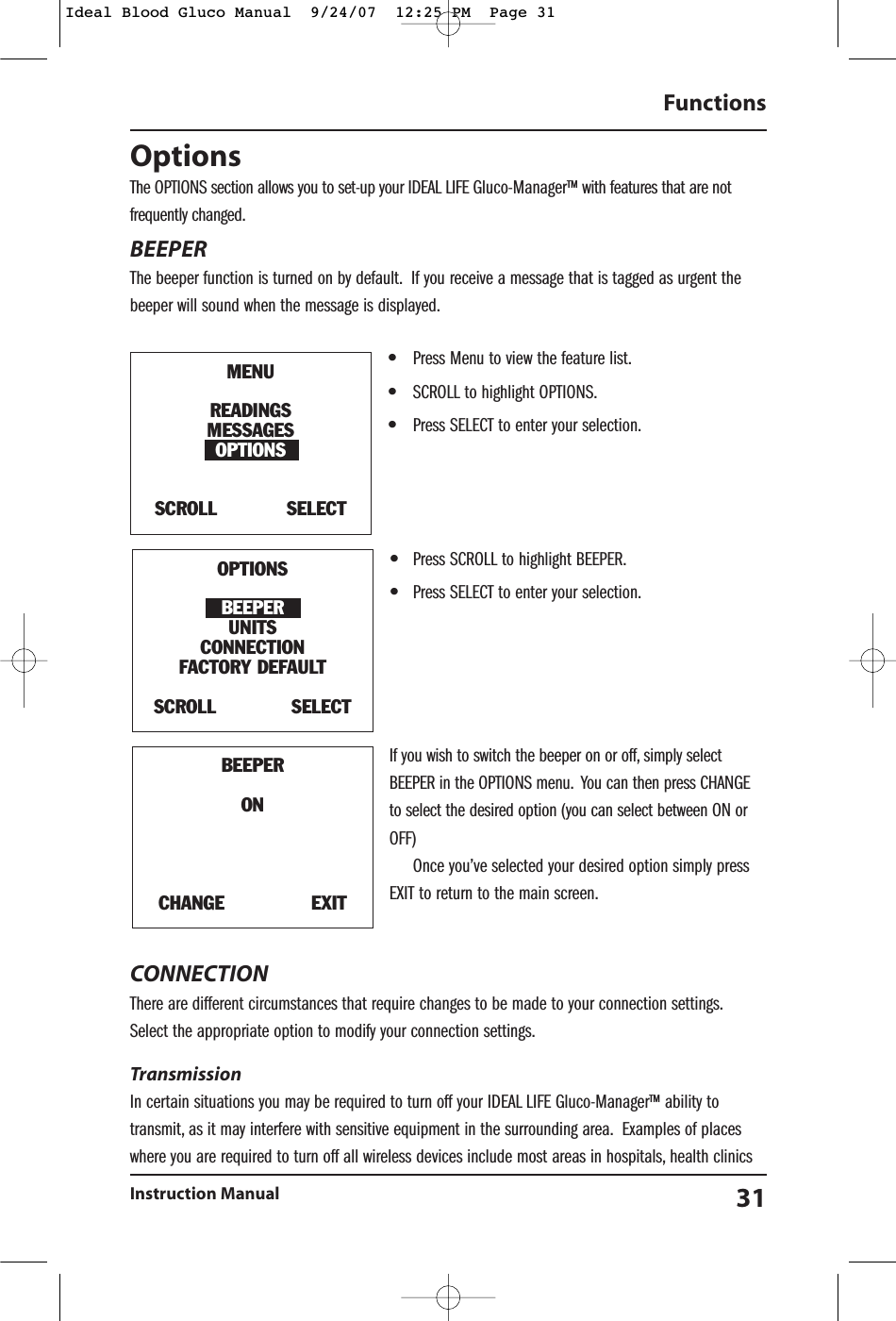
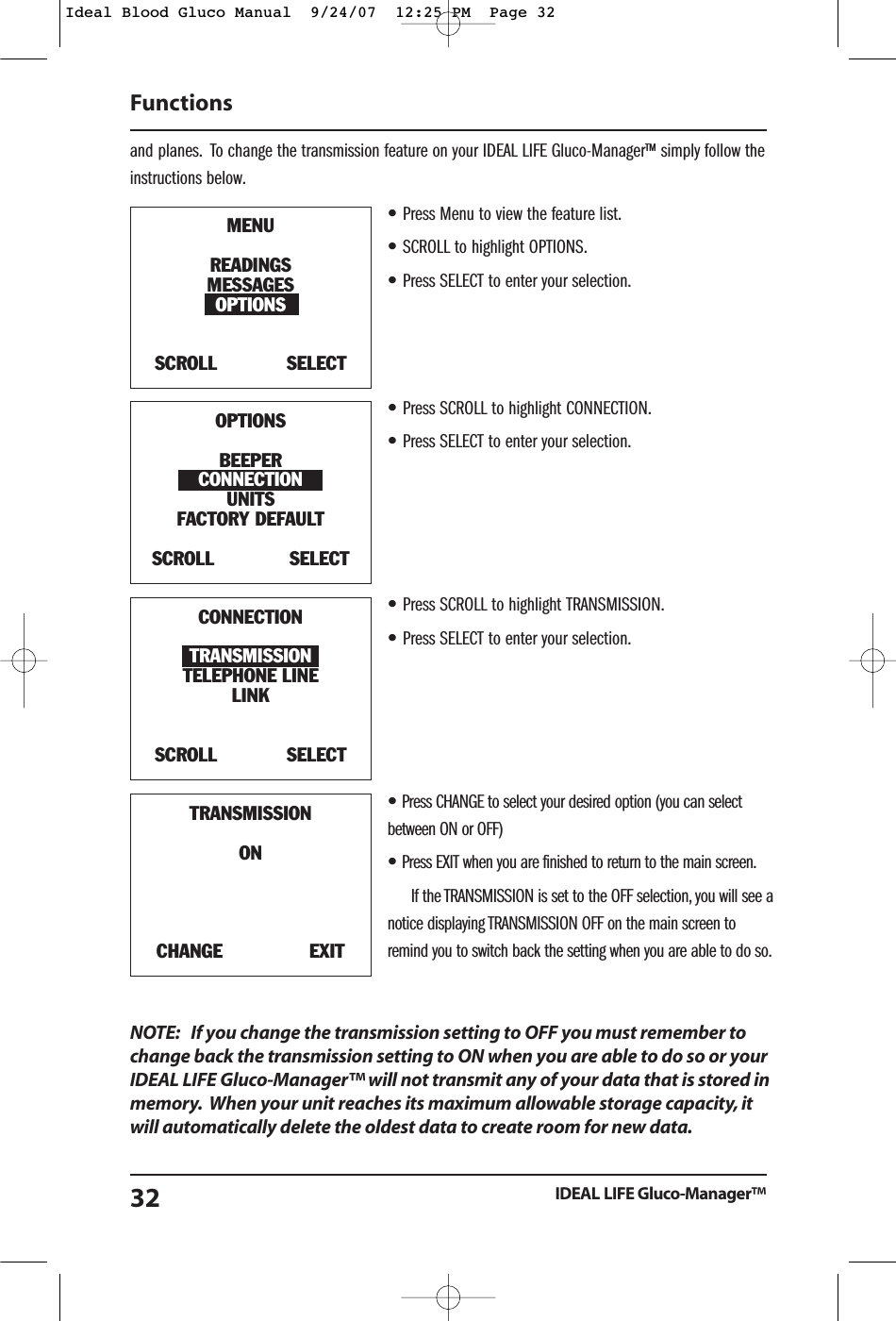
OptionsThe OPTIONS section allows you to set-up your IDEAL LIFE Gluco-Manager™ with features that are notfrequently changed.BEEPERThe beeper function is turned on by default. If you receive a message that is tagged as urgent thebeeper will sound when the message is displayed.•Press Menu to view the feature list.•SCROLL to highlight OPTIONS.•Press SELECT to enter your selection.•Press SCROLL to highlight BEEPER.•Press SELECT to enter your selection.If you wish to switch the beeper on or off, simply selectBEEPER in the OPTIONS menu. You can then press CHANGEto select the desired option (you can select between ON orOFF)Once you’ve selected your desired option simply pressEXIT to return to the main screen.CONNECTION There are different circumstances that require changes to be made to your connection settings.Select the appropriate option to modify your connection settings.Transmission In certain situations you may be required to turn off your IDEAL LIFE Gluco-Manager™ ability totransmit, as it may interfere with sensitive equipment in the surrounding area. Examples of placeswhere you are required to turn off all wireless devices include most areas in hospitals, health clinicsFunctionsInstruction Manual 31BEEPERONCHANGE               EXITMENUREADINGSMESSAGESOPTIONSSCROLL            SELECTOPTIONSBEEPERUNITSCONNECTIONFACTORY DEFAULT SCROLL             SELECTIdeal Blood Gluco Manual  9/24/07  12:25 PM  Page 31
and planes. To change the transmission feature on your IDEAL LIFE Gluco-Manager™ simply follow theinstructions below.•Press Menu to view the feature list.•SCROLL to highlight OPTIONS.•Press SELECT to enter your selection.•Press SCROLL to highlight CONNECTION.•Press SELECT to enter your selection.•Press SCROLL to highlight TRANSMISSION.•Press SELECT to enter your selection.•Press CHANGE to select your desired option (you can selectbetween ON or OFF)•Press EXIT when you are finished to return to the main screen.If the TRANSMISSION is set to the OFF selection, you will see anotice displaying TRANSMISSION OFF on the main screen toremind you to switch back the setting when you are able to do so.NOTE: If you change the transmission setting to OFF you must remember tochange back the transmission setting to ON when you are able to do so or yourIDEAL LIFE Gluco-Manager™ will not transmit any of your data that is stored inmemory. When your unit reaches its maximum allowable storage capacity, itwill automatically delete the oldest data to create room for new data.FunctionsIDEAL LIFE Gluco-Manager™32TRANSMISSIONONCHANGE               EXITMENUREADINGSMESSAGESOPTIONSSCROLL            SELECTOPTIONSBEEPERCONNECTIONUNITSFACTORY DEFAULT SCROLL             SELECTCONNECTIONTRANSMISSIONTELEPHONE LINELINKSCROLL            SELECTIdeal Blood Gluco Manual  9/24/07  12:25 PM  Page 32
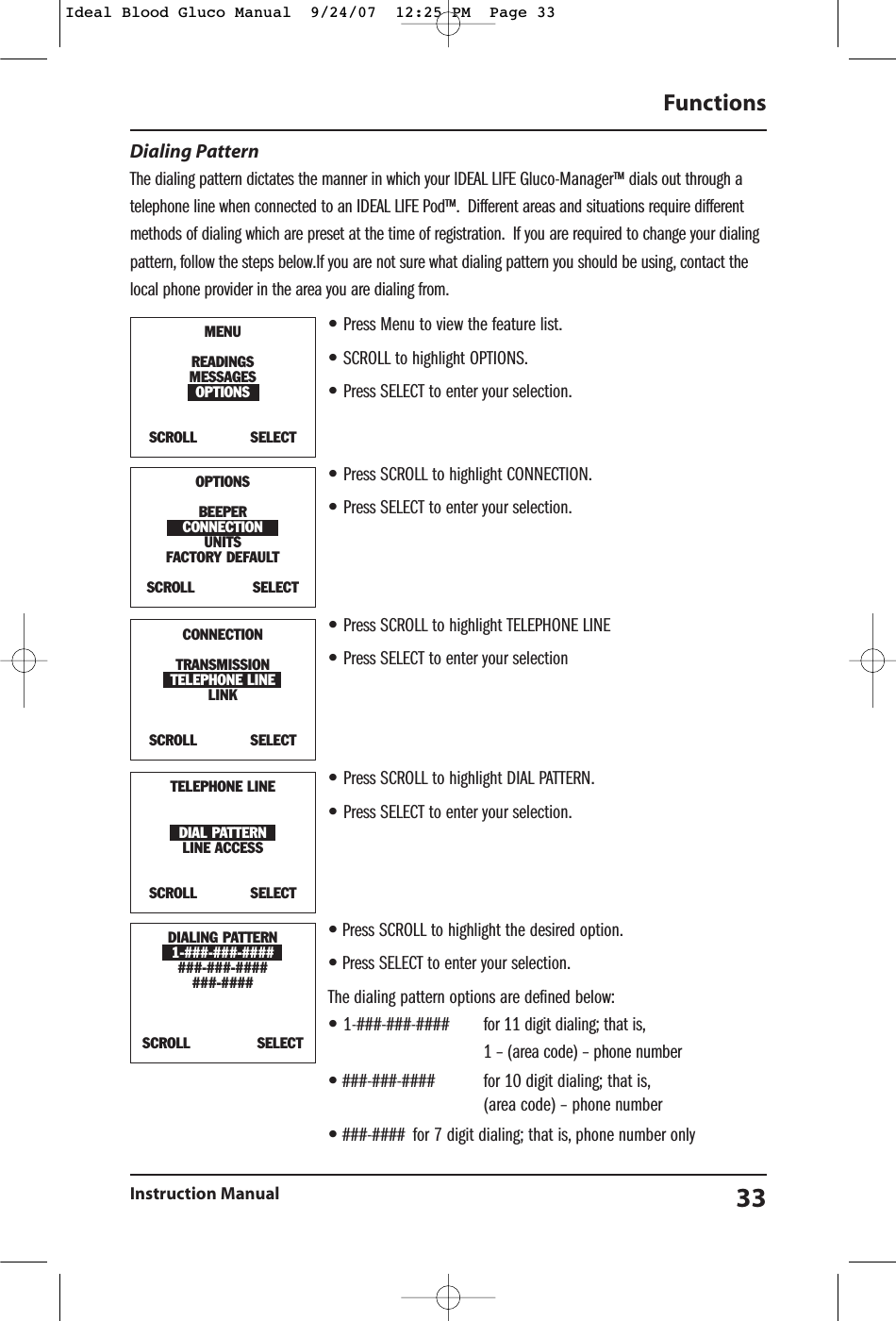
Dialing PatternThe dialing pattern dictates the manner in which your IDEAL LIFE Gluco-Manager™ dials out through atelephone line when connected to an IDEAL LIFE Pod™. Different areas and situations require differentmethods of dialing which are preset at the time of registration. If you are required to change your dialingpattern, follow the steps below.If you are not sure what dialing pattern you should be using, contact thelocal phone provider in the area you are dialing from.•Press Menu to view the feature list.•SCROLL to highlight OPTIONS.•Press SELECT to enter your selection.•Press SCROLL to highlight CONNECTION.•Press SELECT to enter your selection.•Press SCROLL to highlight TELEPHONE LINE•Press SELECT to enter your selection•Press SCROLL to highlight DIAL PATTERN.•Press SELECT to enter your selection.•Press SCROLL to highlight the desired option.•Press SELECT to enter your selection.The dialing pattern options are defined below:•1-###-###-#### for 11 digit dialing; that is,1 – (area code) – phone number•###-###-#### for 10 digit dialing; that is,(area code) – phone number•###-#### for 7 digit dialing; that is, phone number onlyFunctionsInstruction Manual 33DIALING PATTERN1-###-###-#######-###-#######-####SCROLL               SELECTMENUREADINGSMESSAGESOPTIONSSCROLL            SELECTOPTIONSBEEPERCONNECTIONUNITSFACTORY DEFAULT SCROLL             SELECTTELEPHONE LINEDIAL PATTERNLINE ACCESSSCROLL            SELECTCONNECTIONTRANSMISSIONTELEPHONE LINELINKSCROLL            SELECTIdeal Blood Gluco Manual  9/24/07  12:25 PM  Page 33
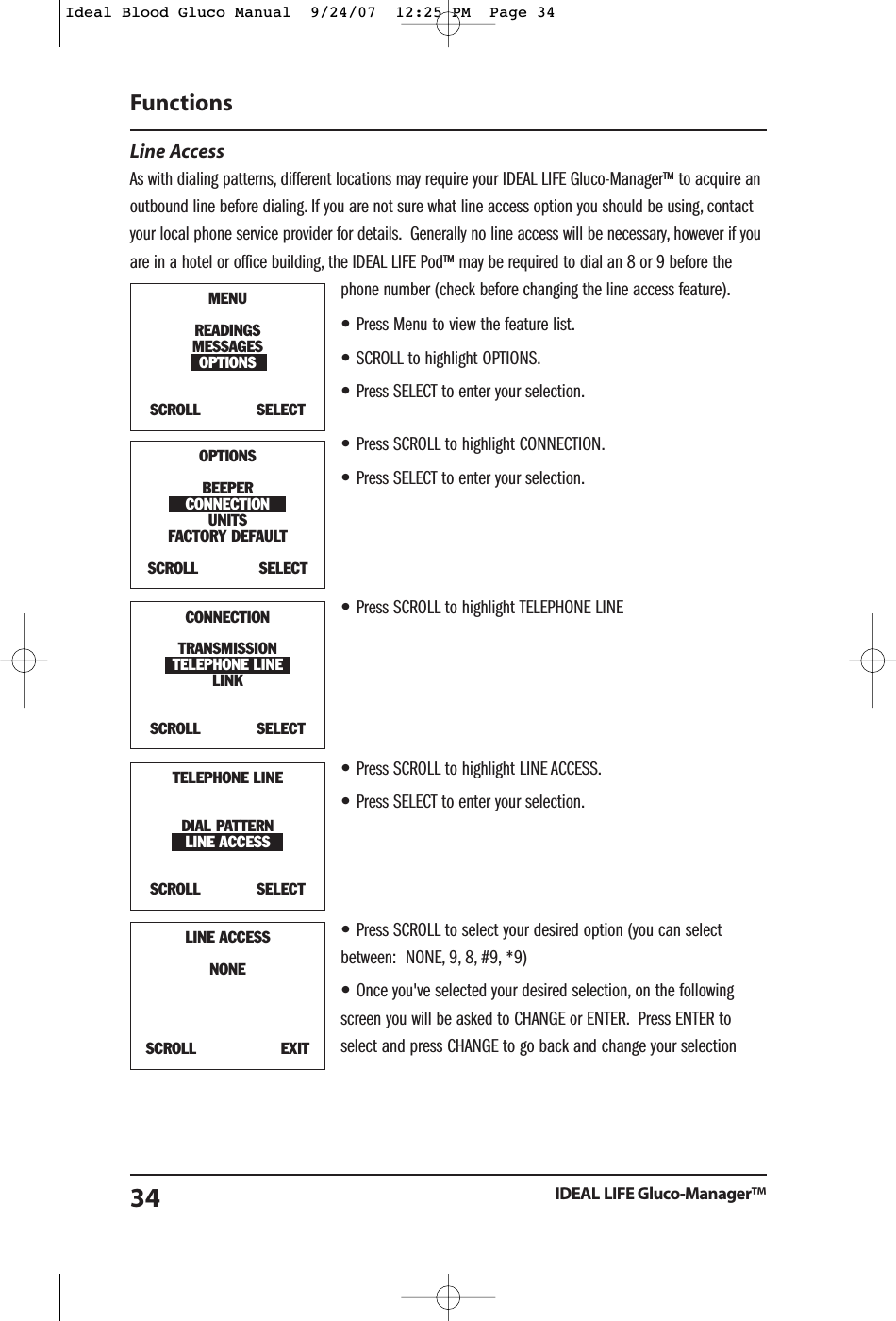
Line Access As with dialing patterns, different locations may require your IDEAL LIFE Gluco-Manager™ to acquire anoutbound line before dialing. If you are not sure what line access option you should be using, contactyour local phone service provider for details. Generally no line access will be necessary, however if youare in a hotel or office building, the IDEAL LIFE Pod™ may be required to dial an 8 or 9 before thephone number (check before changing the line access feature).•Press Menu to view the feature list.•SCROLL to highlight OPTIONS.•Press SELECT to enter your selection.•Press SCROLL to highlight CONNECTION.•Press SELECT to enter your selection.•Press SCROLL to highlight TELEPHONE LINE•Press SCROLL to highlight LINE ACCESS.•Press SELECT to enter your selection.•Press SCROLL to select your desired option (you can selectbetween:  NONE, 9, 8, #9, *9)•Once you've selected your desired selection, on the followingscreen you will be asked to CHANGE or ENTER. Press ENTER toselect and press CHANGE to go back and change your selectionFunctionsIDEAL LIFE Gluco-Manager™34MENUREADINGSMESSAGESOPTIONSSCROLL            SELECTOPTIONSBEEPERCONNECTIONUNITSFACTORY DEFAULT SCROLL             SELECTTELEPHONE LINEDIAL PATTERNLINE ACCESSSCROLL            SELECTLINE ACCESSNONESCROLL                  EXITCONNECTIONTRANSMISSIONTELEPHONE LINELINKSCROLL            SELECTIdeal Blood Gluco Manual  9/24/07  12:25 PM  Page 34
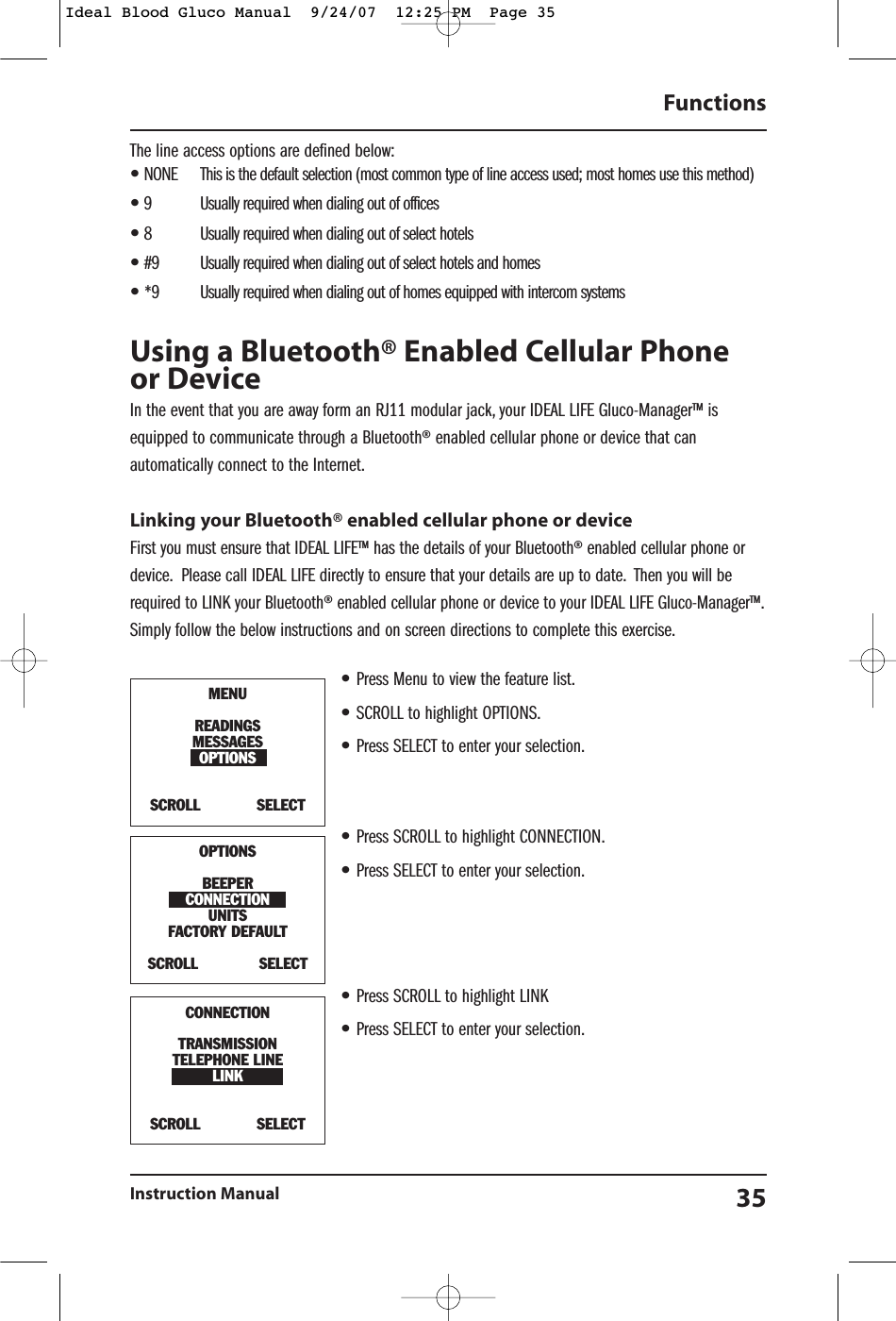
The line access options are defined below:•NONE This is the default selection (most common type of line access used; most homes use this method)•9 Usually required when dialing out of offices•8 Usually required when dialing out of select hotels•#9 Usually required when dialing out of select hotels and homes•*9 Usually required when dialing out of homes equipped with intercom systemsUsing a Bluetooth® Enabled Cellular Phoneor DeviceIn the event that you are away form an RJ11 modular jack, your IDEAL LIFE Gluco-Manager™ isequipped to communicate through a Bluetooth® enabled cellular phone or device that canautomatically connect to the Internet.Linking your Bluetooth® enabled cellular phone or deviceFirst you must ensure that IDEAL LIFE™ has the details of your Bluetooth® enabled cellular phone ordevice. Please call IDEAL LIFE directly to ensure that your details are up to date. Then you will berequired to LINK your Bluetooth® enabled cellular phone or device to your IDEAL LIFE Gluco-Manager™.Simply follow the below instructions and on screen directions to complete this exercise.•Press Menu to view the feature list.•SCROLL to highlight OPTIONS.•Press SELECT to enter your selection.•Press SCROLL to highlight CONNECTION.•Press SELECT to enter your selection.•Press SCROLL to highlight LINK•Press SELECT to enter your selection.FunctionsInstruction Manual 35MENUREADINGSMESSAGESOPTIONSSCROLL            SELECTOPTIONSBEEPERCONNECTIONUNITSFACTORY DEFAULT SCROLL             SELECTCONNECTIONTRANSMISSIONTELEPHONE LINELINKSCROLL            SELECTIdeal Blood Gluco Manual  9/24/07  12:25 PM  Page 35
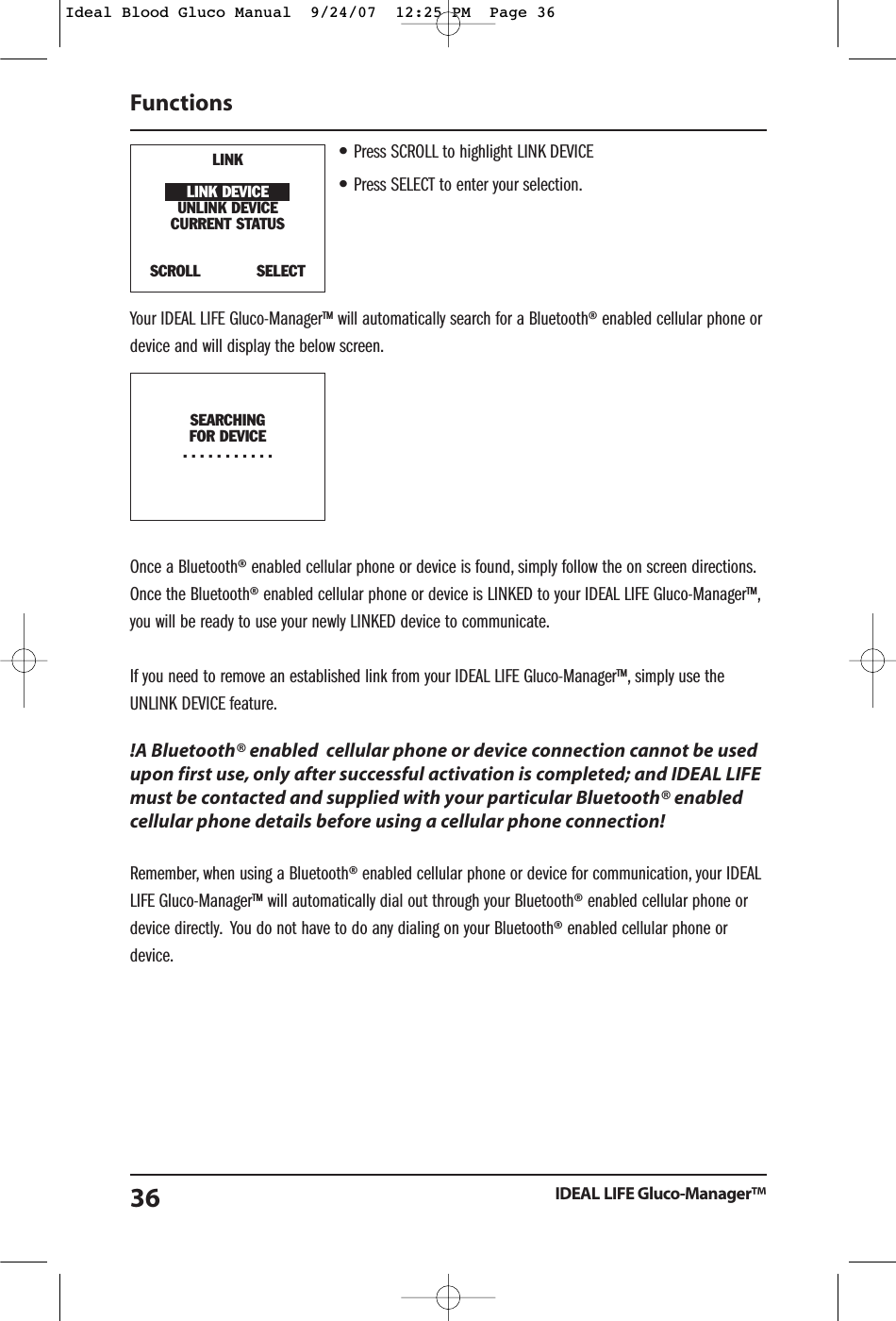
•Press SCROLL to highlight LINK DEVICE•Press SELECT to enter your selection.Your IDEAL LIFE Gluco-Manager™ will automatically search for a Bluetooth® enabled cellular phone ordevice and will display the below screen.Once a Bluetooth® enabled cellular phone or device is found, simply follow the on screen directions.Once the Bluetooth® enabled cellular phone or device is LINKED to your IDEAL LIFE Gluco-Manager™,you will be ready to use your newly LINKED device to communicate.If you need to remove an established link from your IDEAL LIFE Gluco-Manager™, simply use theUNLINK DEVICE feature.!A Bluetooth® enabled  cellular phone or device connection cannot be usedupon first use, only after successful activation is completed; and IDEAL LIFEmust be contacted and supplied with your particular Bluetooth® enabledcellular phone details before using a cellular phone connection!Remember, when using a Bluetooth® enabled cellular phone or device for communication, your IDEALLIFE Gluco-Manager™ will automatically dial out through your Bluetooth® enabled cellular phone ordevice directly. You do not have to do any dialing on your Bluetooth® enabled cellular phone ordevice.FunctionsIDEAL LIFE Gluco-Manager™36LINKLINK DEVICEUNLINK DEVICECURRENT STATUSSCROLL            SELECTSEARCHINGFOR DEVICE...........Ideal Blood Gluco Manual  9/24/07  12:25 PM  Page 36
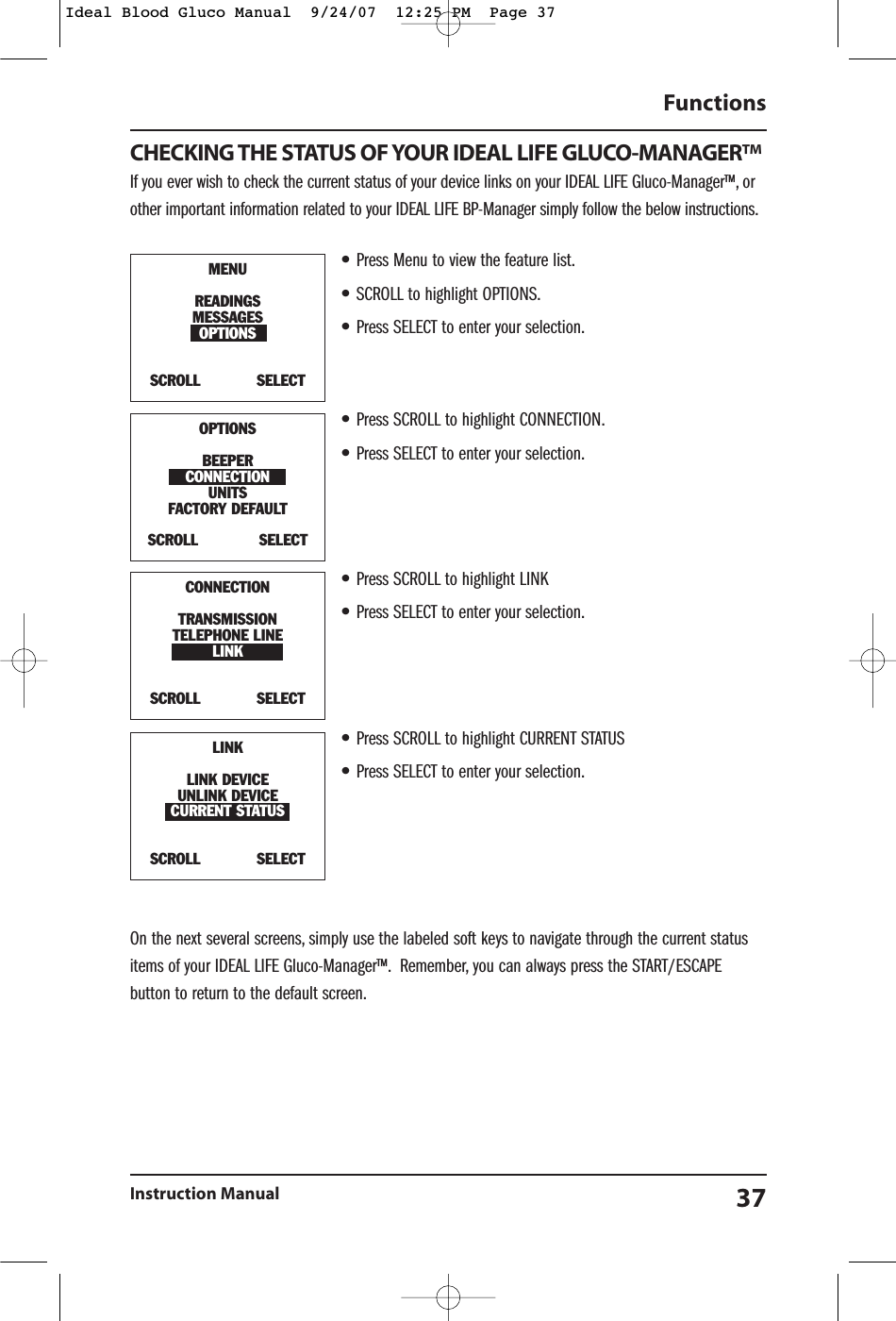
CHECKING THE STATUS OF YOUR IDEAL LIFE GLUCO-MANAGER™If you ever wish to check the current status of your device links on your IDEAL LIFE Gluco-Manager™, orother important information related to your IDEAL LIFE BP-Manager simply follow the below instructions.•Press Menu to view the feature list.•SCROLL to highlight OPTIONS.•Press SELECT to enter your selection.•Press SCROLL to highlight CONNECTION.•Press SELECT to enter your selection.•Press SCROLL to highlight LINK•Press SELECT to enter your selection.•Press SCROLL to highlight CURRENT STATUS•Press SELECT to enter your selection.On the next several screens, simply use the labeled soft keys to navigate through the current statusitems of your IDEAL LIFE Gluco-Manager™. Remember, you can always press the START/ESCAPEbutton to return to the default screen.FunctionsInstruction Manual 37MENUREADINGSMESSAGESOPTIONSSCROLL            SELECTOPTIONSBEEPERCONNECTIONUNITSFACTORY DEFAULT SCROLL             SELECTCONNECTIONTRANSMISSIONTELEPHONE LINELINKSCROLL            SELECTLINKLINK DEVICEUNLINK DEVICECURRENT STATUSSCROLL            SELECTIdeal Blood Gluco Manual  9/24/07  12:25 PM  Page 37
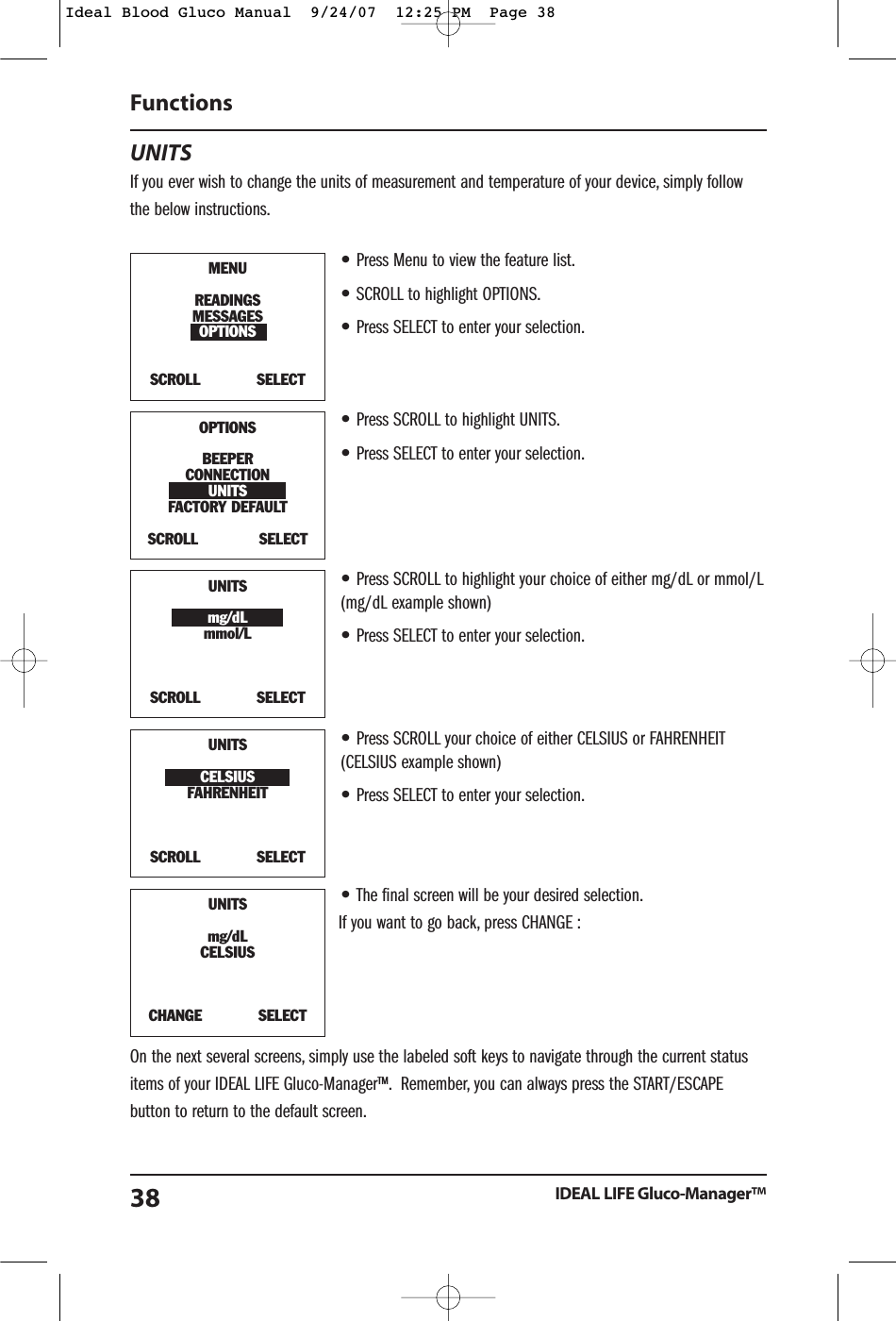
UNITSIf you ever wish to change the units of measurement and temperature of your device, simply followthe below instructions.•Press Menu to view the feature list.•SCROLL to highlight OPTIONS.•Press SELECT to enter your selection.•Press SCROLL to highlight UNITS.•Press SELECT to enter your selection.•Press SCROLL to highlight your choice of either mg/dL or mmol/L(mg/dL example shown)•Press SELECT to enter your selection.•Press SCROLL your choice of either CELSIUS or FAHRENHEIT(CELSIUS example shown)•Press SELECT to enter your selection.•The final screen will be your desired selection.If you want to go back, press CHANGE :On the next several screens, simply use the labeled soft keys to navigate through the current statusitems of your IDEAL LIFE Gluco-Manager™. Remember, you can always press the START/ESCAPEbutton to return to the default screen.Functions IDEAL LIFE Gluco-Manager™38MENUREADINGSMESSAGESOPTIONSSCROLL            SELECTOPTIONSBEEPERCONNECTIONUNITSFACTORY DEFAULT SCROLL             SELECTUNITSmg/dLmmol/LSCROLL            SELECTUNITSCELSIUSFAHRENHEIT SCROLL            SELECT UNITSmg/dLCELSIUSCHANGE            SELECT Ideal Blood Gluco Manual  9/24/07  12:25 PM  Page 38
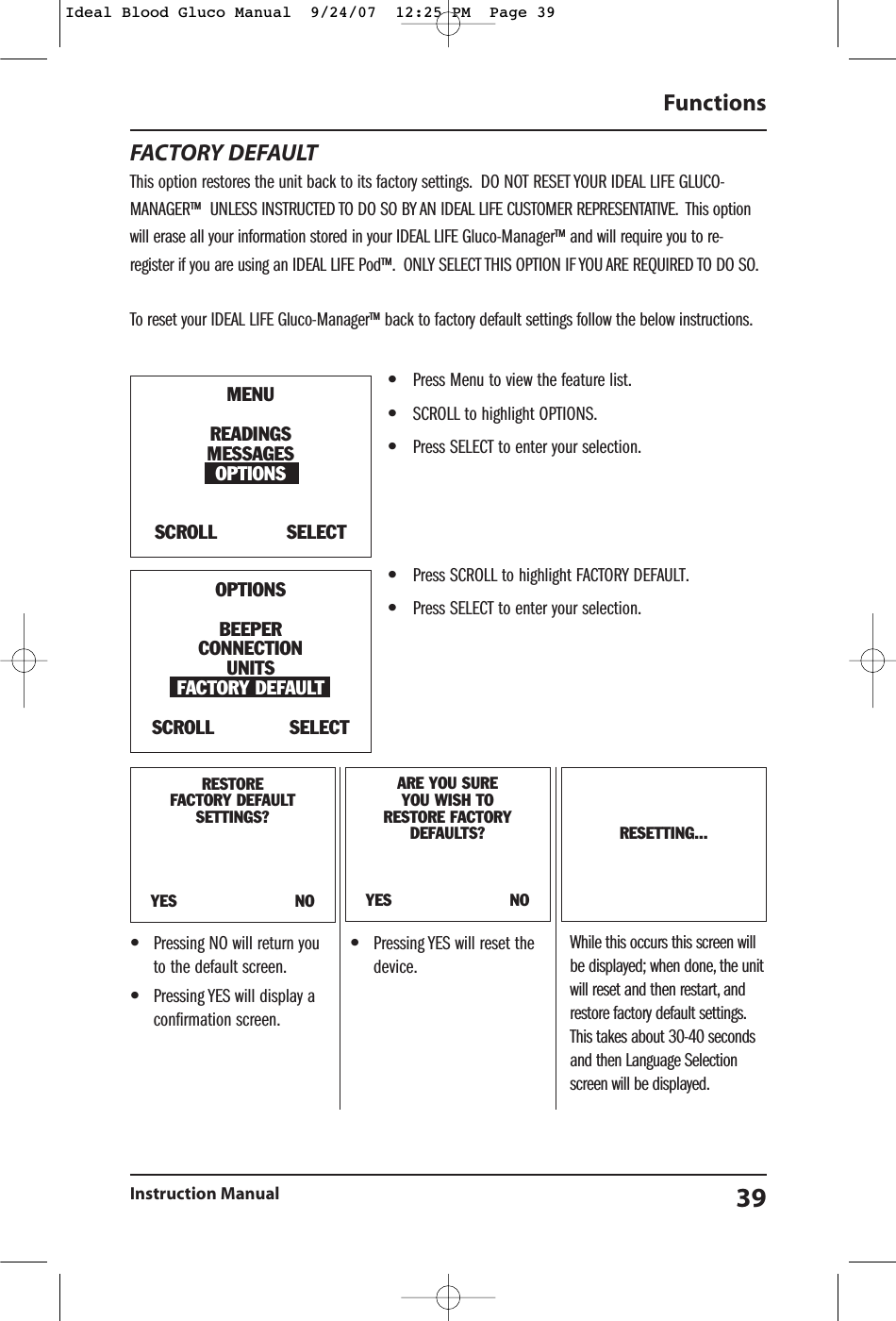
FACTORY DEFAULTThis option restores the unit back to its factory settings. DO NOT RESET YOUR IDEAL LIFE GLUCO-MANAGER™ UNLESS INSTRUCTED TO DO SO BY AN IDEAL LIFE CUSTOMER REPRESENTATIVE. This optionwill erase all your information stored in your IDEAL LIFE Gluco-Manager™ and will require you to re-register if you are using an IDEAL LIFE Pod™. ONLY SELECT THIS OPTION IF YOU ARE REQUIRED TO DO SO.To reset your IDEAL LIFE Gluco-Manager™ back to factory default settings follow the below instructions.•Press Menu to view the feature list.•SCROLL to highlight OPTIONS.•Press SELECT to enter your selection.•Press SCROLL to highlight FACTORY DEFAULT.•Press SELECT to enter your selection.Functions Instruction Manual 39RESTOREFACTORY DEFAULT SETTINGS?YES                        NOARE YOU SUREYOU WISH TO RESTORE FACTORYDEFAULTS?YES                        NORESETTING...MENUREADINGSMESSAGESOPTIONSSCROLL            SELECTOPTIONSBEEPERCONNECTIONUNITSFACTORY DEFAULT SCROLL             SELECT•Pressing NO will return youto the default screen.•Pressing YES will display aconfirmation screen.•Pressing YES will reset thedevice.While this occurs this screen willbe displayed; when done, the unitwill reset and then restart, andrestore factory default settings.This takes about 30-40 secondsand then Language Selectionscreen will be displayed.Ideal Blood Gluco Manual  9/24/07  12:25 PM  Page 39
Comparing Meter AndLaboratory ResultsThe result you obtain from your meter may different somewhat from your laboratory result due tonormal variation. Meter results can be affected by factors and conditions that do not affectlaboratory results in the same way (see test strip package insert for typical accuracy and precisiondata and for important information on limitations). To make an accurate comparison between meterand laboratory results, follow the guidelines below.Before you go to the lab:•Perform a control solution test to make sure that the meter is working properly.•It is best to fast for at least eight hours before doing comparison tests.•Take your meter with you to the lab.While at the lab:•Make sure that the samples for both tests (the meter test and the lab test) are taken and testedwithin 15 minutes of each other.•Wash your hands before obtaining a blood sample.•Never use your meter with blood that has been collected in a gray-top test tube.•Use fresh capillary blood only.You may still have variation from the result because blood glucose levels can change significantly overshort periods, especially if you have recently eaten, exercised, taken medication, or experiencedstress1. In addition, if you have eaten recently, the blood glucose level from a finger stick can be upto 70mg/dL (3.9 mmol/L) higher than blood drawn from a vein (venous sample) used for a lab test2.Therefore, it is best to fast for eight hours before doing comparison tests. Factors such as the amountof red blood cells in the blood (a high or low hematocrit) or the loss of body fluid (severedehydration) may also cause a meter result to be different from a laboratory result.References1. Surwit, R.S., and Feinglos, M.N.:  Diabetes Forecast (1988), April, 49-512. Sacks, D.B.: “Carbohydrates. “Burtis, S.A., and Ashwood, E.R. (ed.), Tietz Textbook of Clinical Chemistry. Philadelphia:  W.B. Saunders Company (1994), 959.Comparing Meter And Laboratory ResultsIDEAL LIFE Gluco-Manager™40Ideal Blood Gluco Manual  9/24/07  12:25 PM  Page 40
Care And MaintenanceYour meter does not require special maintenance. As no blood or control solution comes in contactwith the meter, there is no special cleaning required. Take care to avoid getting dirt, dust, blood,control solution or water inside the meter through the test port. Store the meter in its carrying caseafter each use. A cloth dampened with water and mild detergent can be used to wipe down theoutside of the meter. Your meter is a precision instrument. Please handle it with care.Care And MaintenanceInstruction Manual 41Ideal Blood Gluco Manual  9/24/07  12:25 PM  Page 41
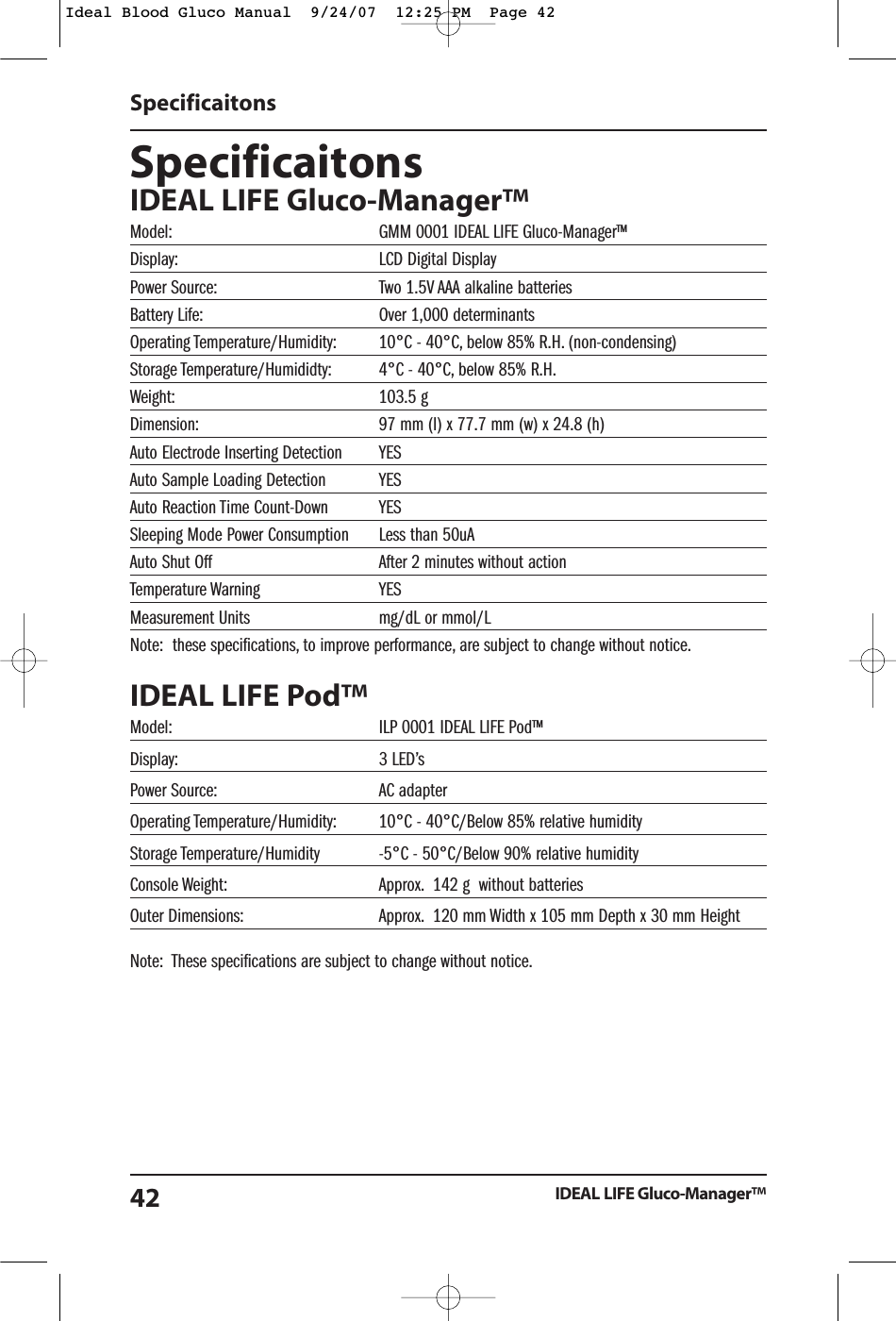
SpecificaitonsIDEAL LIFE Gluco-Manager™Model: GMM 0001 IDEAL LIFE Gluco-Manager™Display: LCD Digital DisplayPower Source: Two 1.5V AAA alkaline batteries Battery Life: Over 1,000 determinantsOperating Temperature/Humidity: 10°C - 40°C, below 85% R.H. (non-condensing)Storage Temperature/Humididty: 4°C - 40°C, below 85% R.H.Weight: 103.5 gDimension: 97 mm (l) x 77.7 mm (w) x 24.8 (h)Auto Electrode Inserting Detection YESAuto Sample Loading Detection YESAuto Reaction Time Count-Down YESSleeping Mode Power Consumption Less than 50uAAuto Shut Off After 2 minutes without actionTemperature Warning YESMeasurement Units mg/dL or mmol/LNote:  these specifications, to improve performance, are subject to change without notice.IDEAL LIFE Pod™Model: ILP 0001 IDEAL LIFE Pod™Display: 3 LED’sPower Source: AC adapterOperating Temperature/Humidity: 10°C - 40°C/Below 85% relative humidityStorage Temperature/Humidity -5°C - 50°C/Below 90% relative humidityConsole Weight: Approx. 142 g  without batteriesOuter Dimensions: Approx. 120 mm Width x 105 mm Depth x 30 mm HeightNote:  These specifications are subject to change without notice.SpecificaitonsIDEAL LIFE Gluco-Manager™42Ideal Blood Gluco Manual  9/24/07  12:25 PM  Page 42
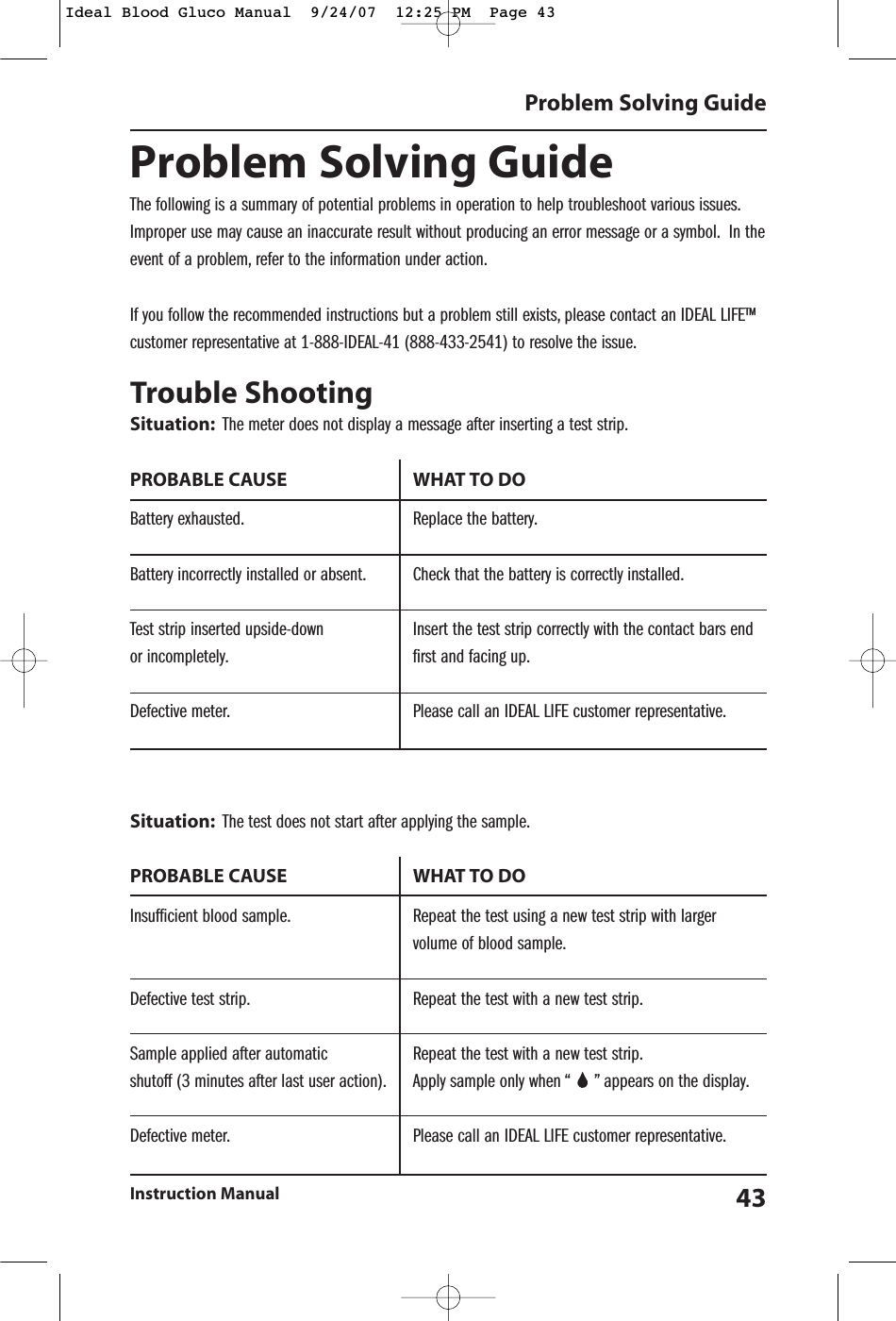
Problem Solving GuideThe following is a summary of potential problems in operation to help troubleshoot various issues.Improper use may cause an inaccurate result without producing an error message or a symbol. In theevent of a problem, refer to the information under action.If you follow the recommended instructions but a problem still exists, please contact an IDEAL LIFE™customer representative at 1-888-IDEAL-41 (888-433-2541) to resolve the issue.Trouble ShootingSituation: The meter does not display a message after inserting a test strip.PROBABLE CAUSE  WHAT TO DOBattery exhausted. Replace the battery.Battery incorrectly installed or absent. Check that the battery is correctly installed.Test strip inserted upside-down Insert the test strip correctly with the contact bars end or incompletely. first and facing up.Defective meter. Please call an IDEAL LIFE customer representative.Situation: The test does not start after applying the sample.PROBABLE CAUSE  WHAT TO DOInsufficient blood sample. Repeat the test using a new test strip with larger volume of blood sample.Defective test strip. Repeat the test with a new test strip.Sample applied after automatic Repeat the test with a new test strip.shutoff (3 minutes after last user action). Apply sample only when “     ” appears on the display.Defective meter. Please call an IDEAL LIFE customer representative.Problem Solving GuideInstruction Manual 43Ideal Blood Gluco Manual  9/24/07  12:25 PM  Page 43
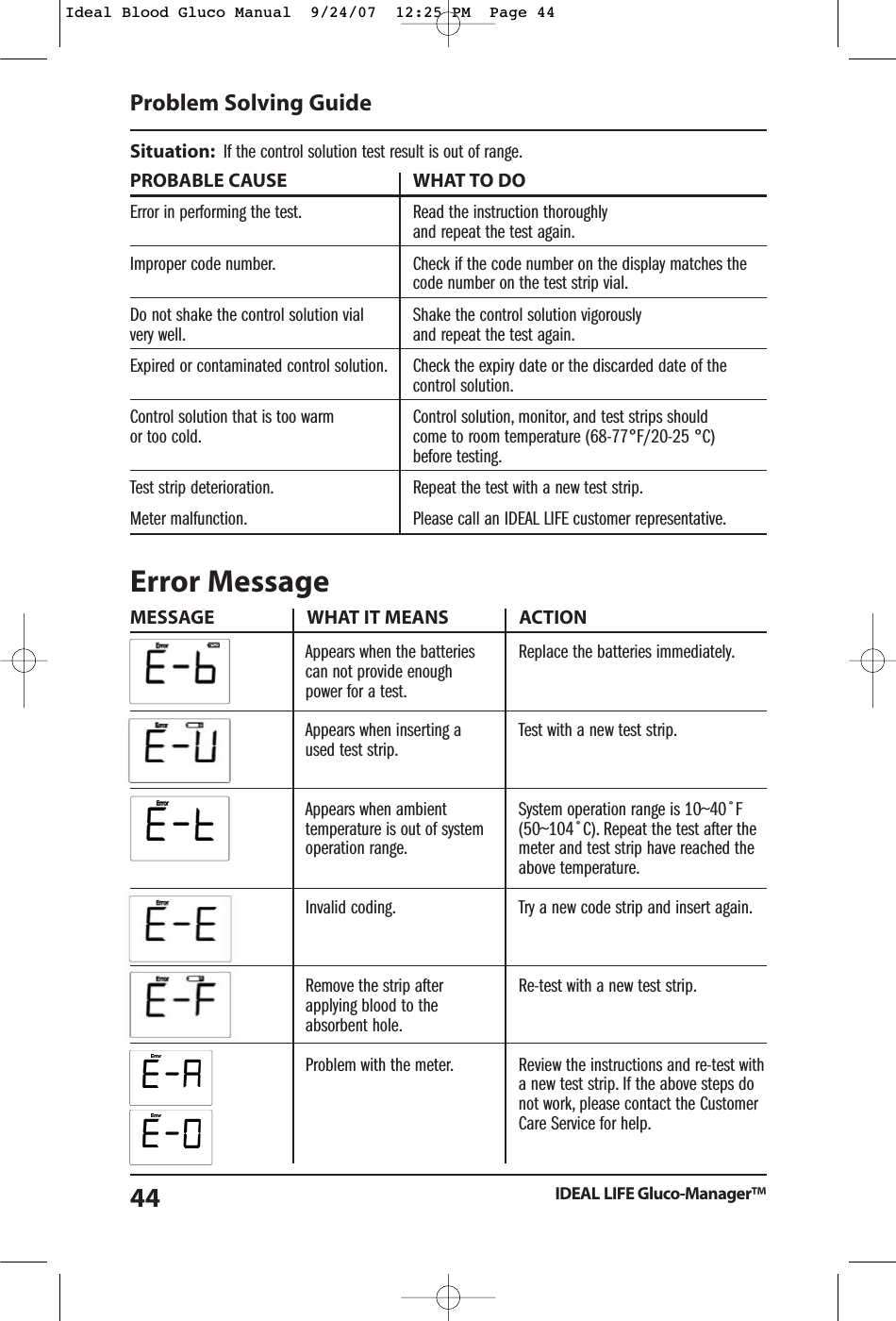
Situation: If the control solution test result is out of range.PROBABLE CAUSE  WHAT TO DOError in performing the test. Read the instruction thoroughlyand repeat the test again.Improper code number. Check if the code number on the display matches the code number on the test strip vial.Do not shake the control solution vial  Shake the control solution vigorously very well. and repeat the test again.Expired or contaminated control solution. Check the expiry date or the discarded date of the control solution.Control solution that is too warm  Control solution, monitor, and test strips shouldor too cold. come to room temperature (68-77°F/20-25 °C) before testing.Test strip deterioration. Repeat the test with a new test strip.Meter malfunction. Please call an IDEAL LIFE customer representative.Error Message MESSAGE WHAT IT MEANS ACTIONProblem Solving GuideIDEAL LIFE Gluco-Manager™44Appears when the batteriescan not provide enoughpower for a test.Appears when inserting aused test strip.Appears when ambienttemperature is out of systemoperation range.Invalid coding.Remove the strip afterapplying blood to theabsorbent hole.Problem with the meter.Replace the batteries immediately.Test with a new test strip.System operation range is 10~40˚F(50~104˚C). Repeat the test after themeter and test strip have reached theabove temperature.Try a new code strip and insert again.Re-test with a new test strip.Review the instructions and re-test witha new test strip. If the above steps donot work, please contact the CustomerCare Service for help.Ideal Blood Gluco Manual  9/24/07  12:25 PM  Page 44
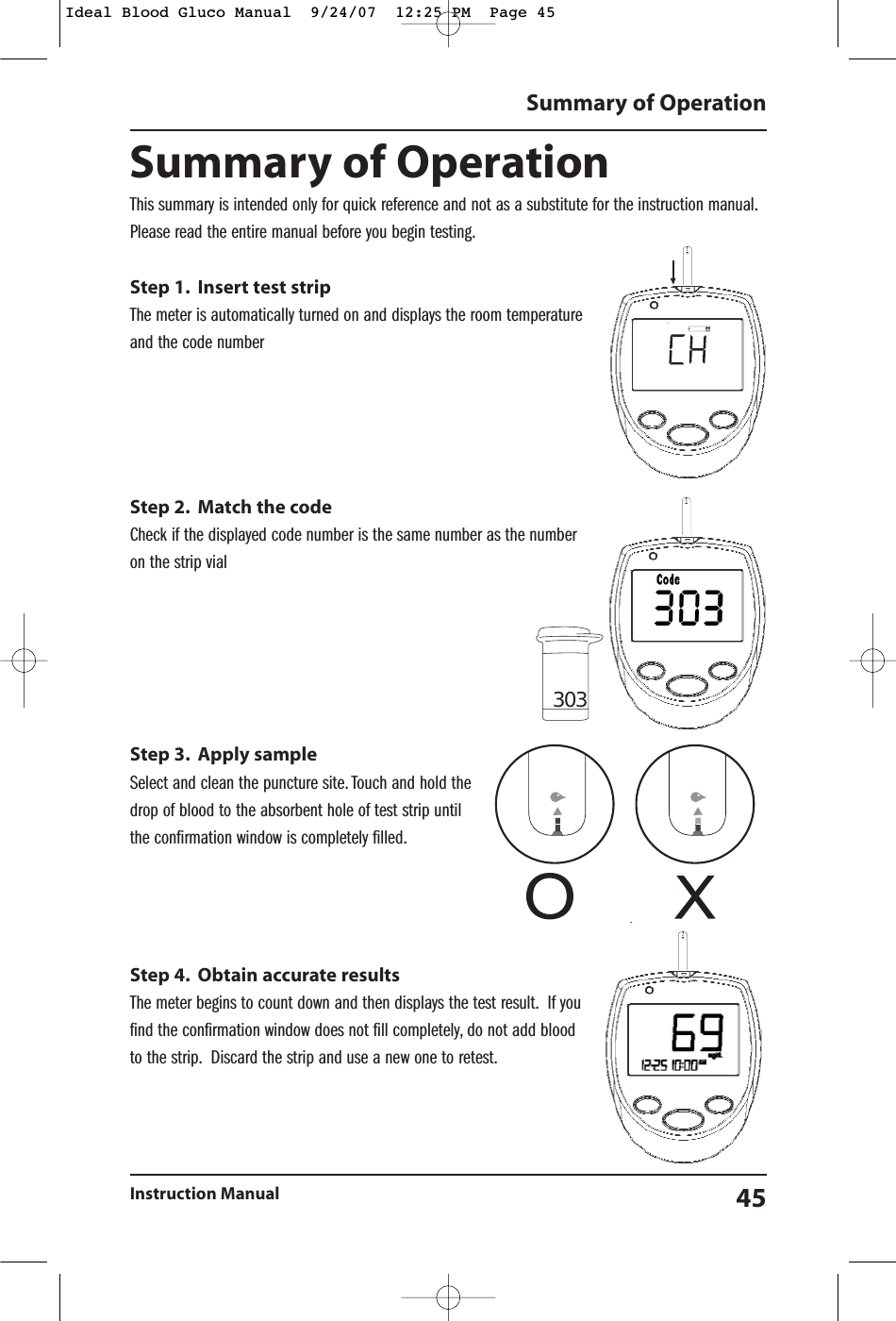
Summary of OperationInstruction Manual 45Summary of OperationThis summary is intended only for quick reference and not as a substitute for the instruction manual.Please read the entire manual before you begin testing.Step 1. Insert test stripThe meter is automatically turned on and displays the room temperatureand the code numberStep 2. Match the codeCheck if the displayed code number is the same number as the numberon the strip vialStep 3. Apply sampleSelect and clean the puncture site. Touch and hold thedrop of blood to the absorbent hole of test strip untilthe confirmation window is completely filled.Step 4. Obtain accurate resultsThe meter begins to count down and then displays the test result. If youfind the confirmation window does not fill completely, do not add bloodto the strip. Discard the strip and use a new one to retest.303Ideal Blood Gluco Manual  9/24/07  12:25 PM  Page 45
Federal Communications Commission (FCC) Statement 15.21You are cautioned that changes or modifications not expressly approved by the part responsible for compliance could void the user’s authority to operate the equipment. 15.105(b)This equipment has been tested and found to comply with the limits for a Class B digital device, pursuant to part 15 of the FCC rules. These limits are designed to provide reasonable protection against harmful interference in a residential installation. This equipment generates, uses and can radiate radio frequency energy and, if not installed and used in accordance with the instructions, may cause harmful interference to radio communications. However, there is no guarantee that interference will not occur in a particular installation. If this equipment does cause harmful interference to radio or television reception, which can be determined by turning the equipment off and on, the user is encouraged to try to correct the interference by one or more of the following measures: -Reorient or relocate the receiving antenna. -Increase the separation between the equipment and receiver. -Connect the equipment into an outlet on a circuit different from that to which the receiver is connected.-Consult the dealer or an experienced radio/TV technician for help. Operation is subject to the following two conditions: 1) this device may not cause interference and 2) this device must accept any interference, including interference that may cause undesired operation of the device. FCC RF Radiation Exposure Statement: This equipment complies with FCC radiation exposure limits set forth for an uncontrolled environment. End users must follow the specific operating instructions for satisfying RF exposure compliance. This transmitter must not be co-located or operating in conjunction with any other antenna or transmitter.
©2007-001 IDEAL LIFE INC.All rights reserved. IDEAL LIFE is a registered trademark in the United States for blood glucose meters, blood pressure cuffsand meters, heart monitors. IDEAL LIFE GLUCO-MANAGER, IDEAL LIFE BP-MANAGER, IDEAL LIFE POD, REALIZING THE VISIONOF A BETTER TOMORROW, Leveraging the Power of Communication and Solutions for better healthcare through advancedcommuni-cation technology, are all proprietary trademarks of IDEAL LIFE INC. Contents covered by one issued U.S. patentand one or more U.S. patents pending. Manufactured and Distributed by IDEAL LIFE INC., Toronto ON M4R 1A3, and madein Taiwan. Products may vary from pictures shown.IDEAL LIFE INC.110 Eglinton Avenue West, Suite 303, Toronto, Ontario M4R 1A3Tel: 416-489-1494 • Fax: 416-489-3009 • www.IDEALLIFEonline.com®Ideal Blood Gluco Manual  9/24/07  12:25 PM  Page 48

Navigation menu