TE Group BLUEVISION Bluetooth Car Kit User Manual M BlueVision Cover pmd

TE Group Bluetooth Car Kit M BlueVision Cover pmd

User Manual

DECLARATION OF CONFORMITYWe, the undersigned,Company: TEGROUP nvAddress: Kapelsestraat 61, 2950 Kapellen  BELGIUMdeclare, that the following equipment:Product Name: mr Handsfree BLUE VISIONProduct Type: Bluetooth® SpeakerphoneConforms with the requirements of European Council Directive 99/5/EC, 89/336/EEC amendedwith 92/31/EEC.
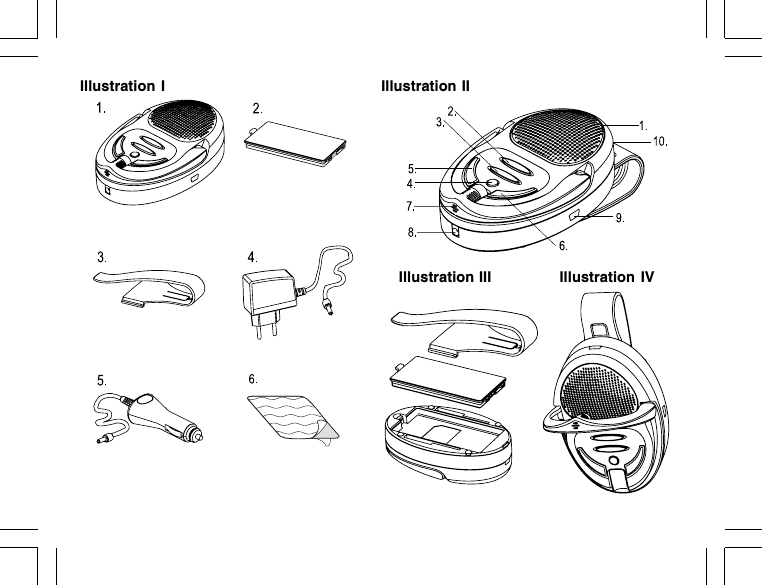
Illustration I Illustration IIIllustration III Illustration IV
TABLE OF CONTENTSSAFETY INSTRUCTIONS ................................................................................ 2WHAT DOES MR HANDSFREE BLUE VISION INCLUDE? ............................. 2OVERVIEW ...................................................................................................... 2GETTING STARTED ........................................................................................ 3OPERATION ..................................................................................................... 6TROUBLE-SHOOTING ..................................................................................... 9BLUETOOTH®................................................................................................ 10TECHNICAL DATA ......................................................................................... 10CARE AND MAINTENANCE ........................................................................... 10GUARANTEE .................................................................................................. 11
GB 2SAFETY INSTRUCTIONS1. Make sure that the operation of the carkit will never influence your safety.2. Make sure not to impact the steering or braking system or other key systems essential for properoperation of the car when installing the carkit. Make sure that the deployment of the airbag isnot blocked or impaired in any way.3. The carkit may only be used at an operating voltage of 12-24V with the minus pole earthed.Failure to observe this requirement may result in damage to the car’s electronics system.4. Make sure that the visor mounting cannot cause any damage to your body in case of anaccident.WHAT DOES MR HANDSFREE BLUE VISION INCLUDE?See Illustration I1. Handsfree unit with built-in speaker2. Lithium-Polymer rechargeable battery3. Clip for sun visor fixation4. AC adapter for connecting the Blue Vision to the mains power (100V – 240V)5. Cigarette plug for connecting the Blue Vision to the power supply of the car via cigarette lighter(12 – 24V)6. VELCRO-partsOVERVIEWSee Illustration II1. Speaker
GB 32. Volume Up button:• Increase the volume• Office mode3. Volume Down button:• Decrease the volume• Car mode4. Power On/Off button5. Talk button:• Answering calls• Pairing6. Reject button:• Ending calls• Rejecting calls7. Built-in microphone8. Charging socket9. Service socket10. Battery status indicatorGETTING STARTEDThe mr Handsfree Blue Vision is compatible with most Bluetooth® mobile phones.Since devices with Bluetooth® technology communicate through radio waves, your carkit and yourmobile phone do not need to be in direct line-of-sight. The 2 devices only need to be within amaximum of 10 meters of each other, so you do not need to take your phone out of your pocket or bagto make and receive calls via the carkit.Since Bluetooth® phones produced by different manufacturers provide various functionalities, somefunctions described in this user’s manual could be different or may not be available.
GB 4CHARGING THE BATTERYSee Illustration IIIThe mr Handsfree Blue Vision comes with a Lithium-Polymer rechargeable battery. The battery ischarged preliminary, but nevertheless we recommend charging it before using the carkit for the firsttime.Insert the battery in the battery compartment as indicated in the illustration.  Attach the sun visorclip to your Blue Vision if you are going to use the carkit in your car by fixing it on the sun visor. Plug the adapter jack into the carkit and the AC adapter or the cigarette plug into a power socket. A red or green light will light under the power button (4) when the charging process begins.  If thepower button (4) lights red, the carkit should be charged until the button will light green.  Unplugthe AC adapter or the vehicle charger from the carkit.Note:• To obtain a fully charged battery and to get the maximum characteristics of talk time andstandby time, we recommend continuing the charging process one hour extra from the momentthat the power button starts to light green.• You can use the Blue Vision during the charging process.Warning:Using an AC adapter other than the one provided may damage or destroy your carkit.We recommend using only original mr Handsfree accessories.TURNING THE CARKIT ON/OFFTo turn on the carkit, press and hold the power button (4) for 5 seconds until all buttons will light andyou will hear a melody.  The battery status indicator (10) will start to flash. If the light is green, thebattery charging level is high. If it is red, the level is low.To turn off the carkit, press and hold the power button (4) for 5 seconds until all buttons will light andyou will hear a melody.
GB 5PAIRINGYou are required to pair the Blue Vision with your mobile phone before using it.Your Blue Vision can store pairing information for up to 2 different Bluetooth® telephones. When anattempt to pair more than 2 devices is made, the oldest paired device is removed from the memory.When any of the paired devices is in the range of 10 meters and the Blue Vision is turned on, theBlue Vision will automatically initiate a connection with the last mobile phone it was connected to.In case this phone is not available, the Blue Vision will automatically search for the second pairedphone for connection. The Blue Vision can have one active connection.Make sure that your phone and the carkit are switched on.  Press and hold the Talk button (5) formore than 5 seconds until you hear a melody and buttons 2, 3 and 5, 6 flash alternately. The pairingmode is now activated for two minutes (during these 2 minutes, the buttons will keep on flashing). Enter your phone’s Bluetooth® menu and make sure that the Bluetooth® feature is activated.  Enterthe submenu where you can set the phone to search for Bluetooth® devices and start the search. The phone will search all Bluetooth® devices within about 10 meters and display them as a list. Select the Blue Vision from the list.  Enter the passkey “0000” to pair and connect the Blue Visionto your phone.  The carkit’s buttons will stop blinking and “Blue Vision” appears in the phone menuwhere you can view the Bluetooth® devices that are currently paired with your phone.Note:You only need to pair the Blue Vision and your phone once. Each time the carkit is switched on, itwill try to restore the connection with the mobile phone.The Bluetooth® connection between the Blue Vision and your mobile phone will automaticallydisconnect when one of the devices has been switched off or when one of the devices is out of range.To restore the connection between your mobile phone and the Blue Vision, both devices need to beturned on and they should be within 10 meters of each other. The following step depends on yourmobile phone type:
GB 6• Some phones will restore the connection automatically.• For most mobile phones, you should press the Talk button (5) of the Blue Vision to restore theconnection.• For other phones it is necessary to restore the connection via the phone’s menu.Note:For all mobile phone types, it is recommended to set “Trust” or “Authorized” for Blue Vision in theBluetooth® menu of your mobile phone. Please refer to the manual of your mobile phone for moredetailed information.OPERATIONBefore using the mr Handsfree Blue Vision make sure that:• The carkit is paired and connected to your phone.• The phone’s Bluetooth® feature is on; see your phone’s user’s manual.• The carkit is switched on and the battery status indicator is blinking.INSTALLATION IN THE CARSee Illustration IVFix the carkit on the sun visor using the special clip and turn the microphone (7) to your mouth.This is the main working position of the microphone holder: the front microphone should be directedto your mouth and the rear microphone to the speaker phone metal shield.Note:We advise not to change the microphone position during the activated call, since an echo effectcould appear. If you follow this advice, you will have a comfortable duplex communication mode ofyour phone conversation.
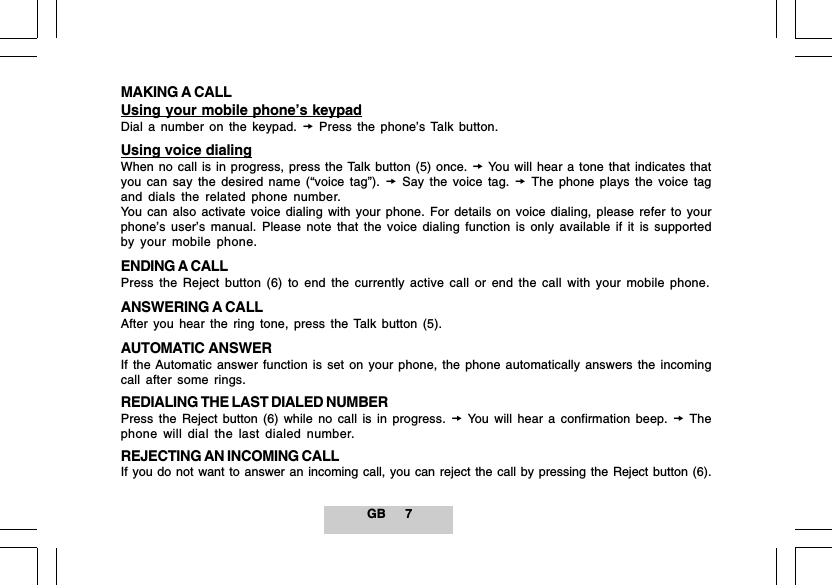
GB 7MAKING A CALLUsing your mobile phone’s keypadDial a number on the keypad.  Press the phone’s Talk button.Using voice dialingWhen no call is in progress, press the Talk button (5) once.  You will hear a tone that indicates thatyou can say the desired name (“voice tag”).  Say the voice tag.  The phone plays the voice tagand dials the related phone number.You can also activate voice dialing with your phone. For details on voice dialing, please refer to yourphone’s user’s manual. Please note that the voice dialing function is only available if it is supportedby your mobile phone.ENDING A CALLPress the Reject button (6) to end the currently active call or end the call with your mobile phone.ANSWERING A CALLAfter you hear the ring tone, press the Talk button (5).AUTOMATIC ANSWERIf the Automatic answer function is set on your phone, the phone automatically answers the incomingcall after some rings.REDIALING THE LAST DIALED NUMBERPress the Reject button (6) while no call is in progress.  You will hear a confirmation beep.  Thephone will dial the last dialed number.REJECTING AN INCOMING CALLIf you do not want to answer an incoming call, you can reject the call by pressing the Reject button (6).
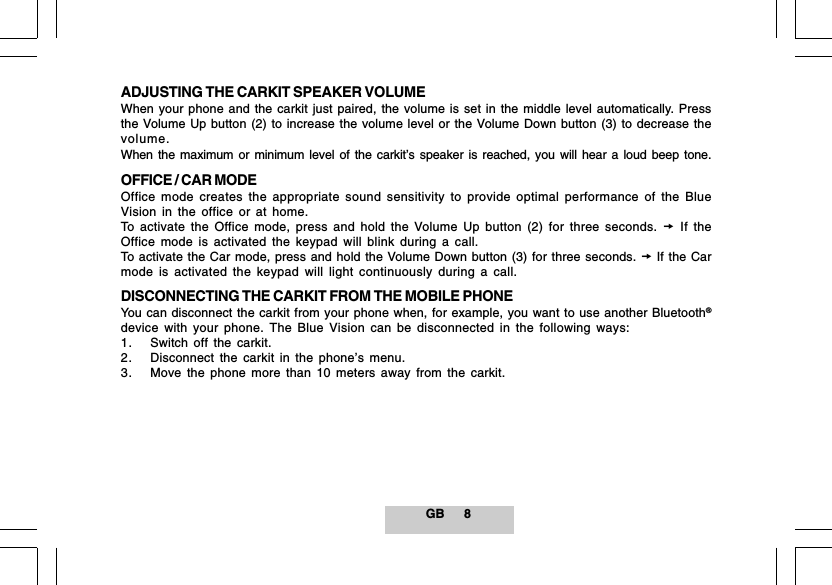
GB 8ADJUSTING THE CARKIT SPEAKER VOLUMEWhen your phone and the carkit just paired, the volume is set in the middle level automatically. Pressthe Volume Up button (2) to increase the volume level or the Volume Down button (3) to decrease thevolume.When the maximum or minimum level of the carkit’s speaker is reached, you will hear a loud beep tone.OFFICE / CAR MODEOffice mode creates the appropriate sound sensitivity to provide optimal performance of the BlueVision in the office or at home.To activate the Office mode, press and hold the Volume Up button (2) for three seconds.  If theOffice mode is activated the keypad will blink during a call.To activate the Car mode, press and hold the Volume Down button (3) for three seconds.  If the Carmode is activated the keypad will light continuously during a call.DISCONNECTING THE CARKIT FROM THE MOBILE PHONEYou can disconnect the carkit from your phone when, for example, you want to use another Bluetooth®device with your phone. The Blue Vision can be disconnected in the following ways:1. Switch off the carkit.2. Disconnect the carkit in the phone’s menu.3. Move the phone more than 10 meters away from the carkit.
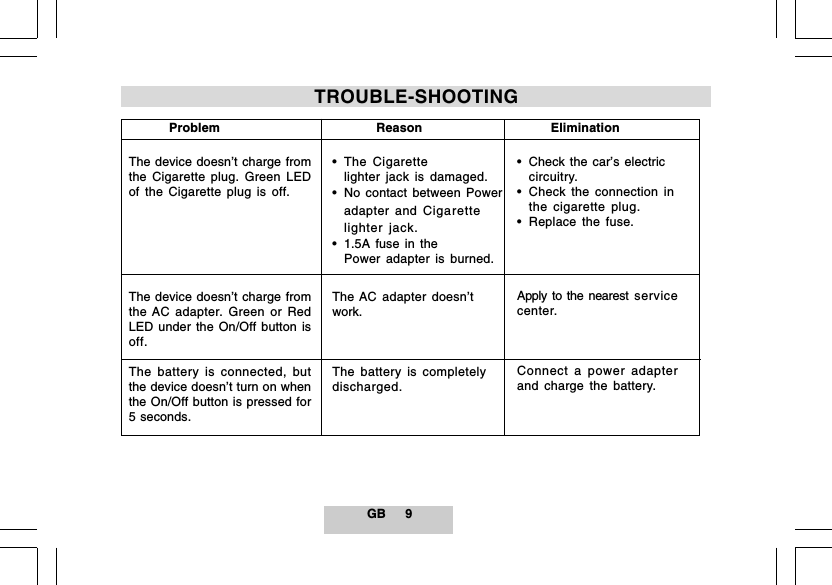
GB 9          ProblemThe device doesn’t charge fromthe Cigarette plug. Green LEDof the Cigarette plug is off.The device doesn’t charge fromthe AC adapter. Green or RedLED under the On/Off button isoff.The battery is connected, butthe device doesn’t turn on whenthe On/Off button is pressed for5 seconds.           Reason• The Cigarettelighter jack is damaged.• No contact between Poweradapter and Cigarettelighter jack.• 1.5A fuse in thePower adapter is burned.The AC adapter doesn’twork.The battery is completelydischarged.        Elimination• Check the car’s electriccircuitry.• Check the connection inthe cigarette plug.• Replace the fuse.Apply to the nearest servicecenter.Connect a power adapterand charge the battery.TROUBLE-SHOOTING
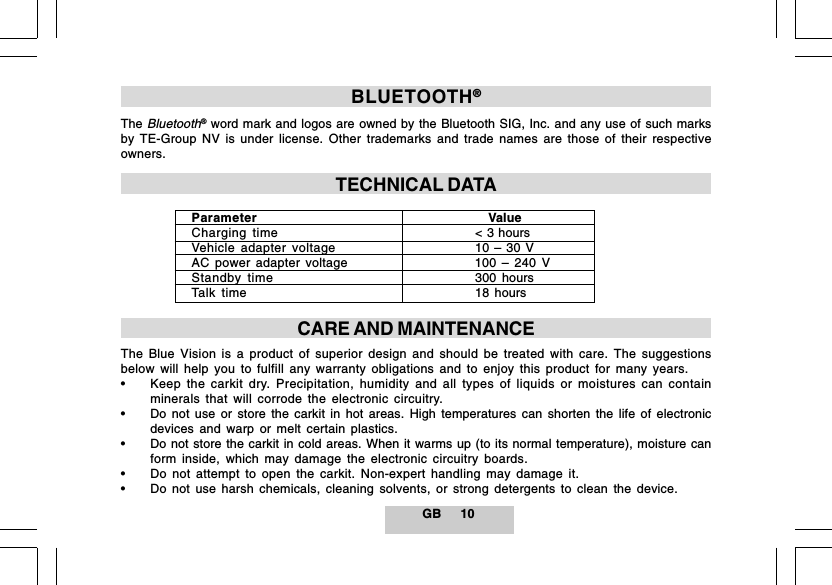
GB 10BLUETOOTH®TheBluetooth® word mark and logos are owned by the Bluetooth SIG, Inc. and any use of such marksby TE-Group NV is under license. Other trademarks and trade names are those of their respectiveowners.TECHNICAL DATAParameter    ValueCharging time < 3 hoursVehicle adapter voltage 10 – 30 VAC power adapter voltage 100 – 240 VStandby time 300 hoursTalk time 18 hoursCARE AND MAINTENANCEThe Blue Vision is a product of superior design and should be treated with care. The suggestionsbelow will help you to fulfill any warranty obligations and to enjoy this product for many years.• Keep the carkit dry. Precipitation, humidity and all types of liquids or moistures can containminerals that will corrode the electronic circuitry.• Do not use or store the carkit in hot areas. High temperatures can shorten the life of electronicdevices and warp or melt certain plastics.• Do not store the carkit in cold areas. When it warms up (to its normal temperature), moisture canform inside, which may damage the electronic circuitry boards.• Do not attempt to open the carkit. Non-expert handling may damage it.• Do not use harsh chemicals, cleaning solvents, or strong detergents to clean the device.
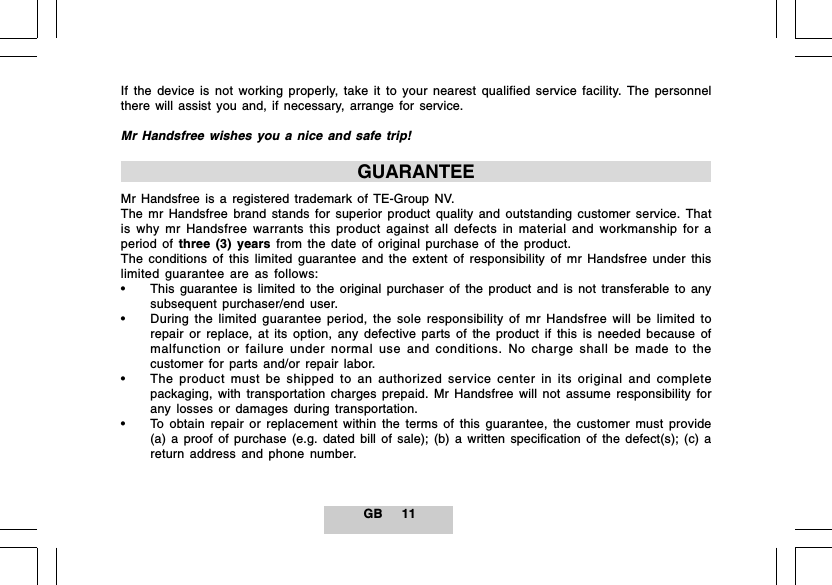
GB 11If the device is not working properly, take it to your nearest qualified service facility. The personnelthere will assist you and, if necessary, arrange for service.Mr Handsfree wishes you a nice and safe trip!GUARANTEEMr Handsfree is a registered trademark of TE-Group NV.The mr Handsfree brand stands for superior product quality and outstanding customer service. Thatis why mr Handsfree warrants this product against all defects in material and workmanship for aperiod of three (3) years from the date of original purchase of the product.The conditions of this limited guarantee and the extent of responsibility of mr Handsfree under thislimited guarantee are as follows:• This guarantee is limited to the original purchaser of the product and is not transferable to anysubsequent purchaser/end user.• During the limited guarantee period, the sole responsibility of mr Handsfree will be limited torepair or replace, at its option, any defective parts of the product if this is needed because ofmalfunction or failure under normal use and conditions. No charge shall be made to thecustomer for parts and/or repair labor.• The product must be shipped to an authorized service center in its original and completepackaging, with transportation charges prepaid. Mr Handsfree will not assume responsibility forany losses or damages during transportation.• To obtain repair or replacement within the terms of this guarantee, the customer must provide(a) a proof of purchase (e.g. dated bill of sale); (b) a written specification of the defect(s); (c) areturn address and phone number.
GB 12• This limited guarantee does not cover and is void with respect to the following:(a) Products which have been subjected to improper installation, unauthorized repair, impropermaintenance, unauthorized modifications or other acts which are not the fault of mr Handsfree;(b) Products which have been subjected to misuse, abuse, neglect, improper handling andstorage, an accident or physical damage; (c) Products which have been subjected to fire, water,excessive humidity, sand, dirt, extreme changes in temperature or other conditions which arebeyond the control of mr Handsfree; (d) Products which have been used with non-mr Handsfreeapproved accessories; (e) Products which have the serial number altered, defaced or removed;(f) Products which have been opened, altered, repaired or modified by any unauthorizedservice center.• Excluded from any guarantee are consumable items which may need replacing due to normalwear and tear, such as batteries, ear cushions, decorative parts and other accessories.• This limited guarantee gives you specific legal rights, and you may also have other rights whichvary from country to country.
FCC Statements   This device complies with part 15 of the FCC Rules. Operation is subject to the following two conditions: (1) This device may not cause harmful interference; and (2) This device must accept any interference received, including interference that may cause undesired operation.   WARNING: Changes or modifications to this unit not expressly approved by the party responsible for compliance could void the user's authority to operate the equipment.    NOTE: This equipment has been tested and found to comply with the limits for a Class B digital device, pursuant to Part 15 of the FCC Rules. These limits are designed to provide reasonable protection against harmful interference in a residential installation. For body worn operation, this phone has been tested and meets the FCC RF exposure guidelines when used with the belt clip supplied or designated for this product. Use of other accessories may not ensure compliance with FCC RF exposure guidelines. This equipment generates, uses and can radiate radio frequency energy and, if not installed and used in accordance with the instructions, may cause harmful interference to radio communications. However, there is no guarantee that interference will not occur in a particular installation. If this equipment does cause harmful interference to radio or television reception, which can be determined by turning the equipment off and on, the user is encouraged to try to correct the interference by one or more of the following measures:  -  Reorient or relocate the receiving antenna. -  Increase the separation between the equipment and receiver. -  Connect the equipment into an outlet on a circuit different from that to which the receiver is connected. -  Consult the dealer or an experienced radio/TV technician for help.

Navigation menu