TECH CAST MFG TC5001B Transmitter User Manual TC2740CA manual1 rev
Tech Cast Mfg Corp Transmitter TC2740CA manual1 rev
Users Manual
1
TC5001 Operation Manual
Name & List of Parts:
1. TC2740B MAIN UNIT *1 7. 2P WIRE FOR KILLER *1
2. 4 BUTTON TRANSMITTER *2 8. LED INDICATOR *1
3. SHOCK SENSOR (2 stage) *1 9. PIN SWITCH *2
4. SPEAKER *1 10. MANUAL *1
5. 12P HARNESS *1 11. SCREW PACK *1
6. 6P HARNESS *1 12. OVERRIDE SWITCH *1
Changing TX battery
After changing the battery on the code-learned
Transmitter, please press any key twice continuously
for main unit recognizing the TX.
Instruction:
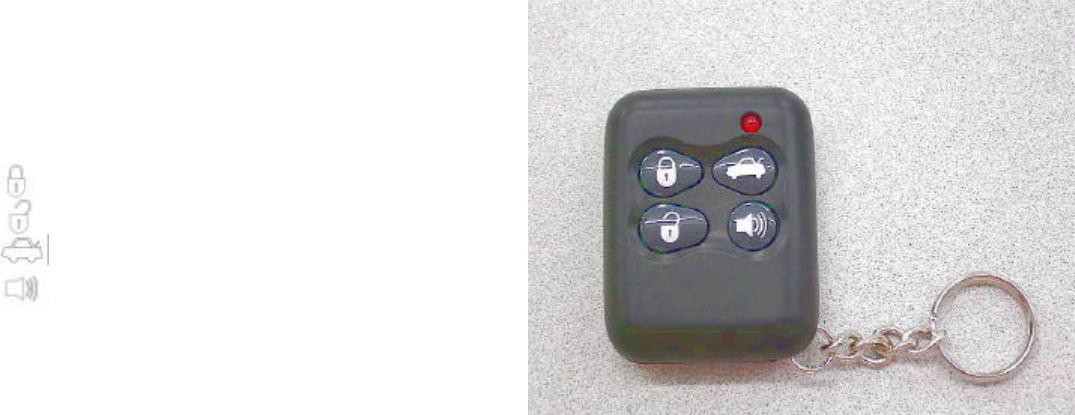
1. Definition of Transmitter’s Buttons:
Button •
Button ‚
Button ƒ
Button „
Button•:
a). Arming.
b). Silent Arming (Press the button
continuously 1.5sec)
c). Remote door locking.
Buttons ‚:
a). Disarming.
b). Silent disarming (Press the button continuously 1.5sec)
c). Remote door unlocking
d). 2 stage disarming while alarm’s triggered
Button ƒ: Remote trunk release.
Button „: Car-searching/Panic.
Button• + ƒ: anti-robbery
Button• + ‚: optional functions
This remote control transmitter provides 2 billions of digital codes with an operative range up to 100
feet, (The operative range will be shorten when system is interrupted or out of power) and also contains
Anti-Duplicating & Anti Scanning which is the most secure tool.
2. Micro-Code Learning:
Please follow below procedures of code-learning, when renewing or adding more transmitters –
a). Turn the car key to the “ON” position, close the car door.
b). Make sure all doors are in close position. Press the override switch one time, siren wails and
indicator (parking) light blink once in 10 seconds then press override switch two times continuously.
c). Siren wails 2 times, LED light flashes rapidly. (Means into code-learning mode)
d). Press any button on transmitter once in 10 seconds, when siren wails once means the 1st code
learning is done. After that, press another transmitter any button once in 10 seconds, when siren
wails twice means the 2nd code learning is done. Following the same procedure, it can learn 6
different transmitter’s code.
REMARK:If the transmitter doesn‘t receive any input in 10 seconds, LED light will distinguish. System
will leave the code-learning mode and enter to user mode automatically.
PP05AAJS
2
3. Disarming-Code set-up and renewing:
When disarming, if you are going to renew or add the new transmitter, please follow the following
procedures-
a). Turn the key to the “ON” position, close the car door.
b). Press the override switch one time, siren wails and indicator light blink once in 10 seconds then
press override switch 2 times continuously.
c). Siren wails 2 times and LED light flashes rapidly (means into code-learning mode)
d). Press any button on transmitter in 10 seconds, siren wails 1 time which means the 1st new
transmitter is code-learned.
REMARKS: If the transmitter doesn't receive any input numbers or you don't finish the code renewing
in 10 seconds while in the code renewing mode, LED light will distinguish. The system will leave the
code renewing mode and enter to the user mode automatically. The original code won’t be changed.
4. System will Memorize Status Records Prior to Electricity Cut-Off:
Prior to system’s electricity cut-off, system will memorize the status prior to cut-off. At any time,
when the electricity is resumed, system will immediately enter into the status prior to cut-off. If
system’s electricity is cut-off during override status, then system will immediately enter into “override
mode” upon the electricity is resumed. If system’s electricity is cut-off during arming status, then
system will immediately enter into “alarm triggering mode” upon the electricity is resumed.
5. Arming:
Pressing transmitter button •, arming mode is set when releasing the button and finds --
a). Siren wails once.
b). Central Door Locks locked.
c). Indicator (parking) lights blink once.
d). Killer enabled.
e). Anti-theft status indicator, LED, flashes rapidly After 7 seconds , flashes slowly.
f). When connected to power window module, then all power windows will automatically close.
6. Disarming
Pressing transmitter button ‚ and releasing, you'll find the following conditions.
a). siren wails 2 times
b). Central door locks unlocked
c). Indicator (parking) light blinks 2 times
d). Killer disabled
e). Anti-theft status indicator, LED, distinguished
f). Interior dome-light stays on for 20 seconds then distinguishes. (If within 20 seconds, key on or
system re-enters anti-theft mode, then interior dome-light distinguishes).
7. Silent Arming:
Pressing transmitter’s button • for more than 1.5 second then release and you will find --
a). Central Door Locks locked.
b). Indicator (parking) lights blink once.
c). Killer enabled.
d). Anti-theft status indicator, LED, flashes rapidly After 1 minute, flashes slowly.
e). When connected to power window module, then all power windows will automatically close.
8. Silent Disarming:
Pressing transmitter button ‚ for more than 1.5 second then release, and you'll find--
a). Central door locks unlocked
b). Indicator (parking) light blinks 2 times
c). Killer disabled
d). Anti-theft status indicator, LED, distinguished
e). Interior dome-light stays on for 20 seconds then distinguishes. (If within 20 seconds, key on or
system re-enters anti-theft mode, then interior dome-light distinguishes).
9. Car Searching/Panic:
Under the arming mode, press transmitter button „ then finds siren wails and indicator (parking)
3
lights and interior dome light blink for 6 seconds then stop. Press button ‚or„ for early quitting of
this mode.
10. Remote anti-robbery
When user meets the robbery and the car key is in “on” position and within the remote distance,
press the button • + ƒ for 3 sec., the siren wails and indicator light blinks once which means it’s
entering the “remote anti-robbery” mode. When there’s no other action within 30sec., siren will keep
on wailing and indicator light blinking. This warning signal will be lasting 30 sec. then “engine
cut-off” function will be started. Press button ‚, siren and indicator light stop, “engine cut-off”
function riddance which means the “remote anti-robbery” function is disarming.
11. Passive Arming with/without Locking door (refer to point 23 optional feature):
In auto security arming mode, car key is turned from “ON” to “OFF” position, opens car door and
then closes all doors, then LED will blink. 30 seconds later, system enters into arming mode
automatically (with/without locking doors depends on the function setting). If any of the vehicle’s
doors is ajar during this 30 seconds, then countdown stops. When re-closing all doors, countdown
will re-start, and 30 seconds later, siren wail and indicator (parking) lights blink once, system enters
into arming mode automatically.
12. Automatic Rearming:
When system is disarmed, and door is not opened within 60 seconds, then system will re-enter
Arming mode automatically, siren wails and indicator (parking) lights blink once, doors locked.
13. Automatic Rearming After Tempering:
After 1 second, when door or trunk is tempered with, siren wails and lights blink. This continues for
30 seconds and stop for 2 seconds before re-starting for another 30 seconds. This cycle repeats for
3 times. If during this cycle, the system is back to normal, then siren and lights automatically stop,
and the system automatically re-enters arming mode. If the system is not back to normal, then
siren and lights stop after the 3
rd cycle, and the system automatically re-enters arming mode. The
detected tempered point is automatically by-passed.
14. Doors locked automatically when Ignition is on:
After system is disarmed, doors open and close, car key is turned from “OFF” to “ON”, Central Door
Locks are locked after 5 seconds for safety reason. If door is ajar during this 5 seconds interval or
open the door prior to key on then close the door, this feature is disabled in case the car key is still in
the vehicle.
15. Doors Unlocked automatically when Engine is Turned Off:
Engine is turned off, Central Door Locks System unlock automatically for passenger’s convenience
to exit the vehicle.
16. Remote Trunk Opening:
If electric trunk release device (TT8000) is equipped, press transmitter’s button ƒ, trunk will open
automatically. And after 1 second, indicator (parking) lights will continuously blink. If it’s under
arming, the system will stop shock sensor and all other detecting functions except door switch and
key-on points. When you close the trunk and press any button or turn the car key from “OFF” to “ON”,
the indicator (parking) lights stop blinking.
17. Remote Central Door Locks:
When car key is at “ON” position or after entering valet-parking (OVERRIDE) feature setup, remote
control can only remotely control Central Door Locks. System will not enter anti-theft mode. When
car key is at “ON” position, press transmitter’s button• doors locking. press transmitter’s button ‚,
doors unlocking. When entering valet-parking (OVERRIDE) feature setup, press transmitter’s
button•, indicator (parking) lights will blink once to indicate doors locking. Press transmitter’s
button‚, indicator (parking) lights will blink twice to indicate doors unlocking.
18. 2 Stage unlock (Refer to point 23 optional feature)
When using lock/unlock function, the system will send out a 0.5sec pause, and another pause in
every 0.5 sec.

4
19. Self Diagnostics (Door or Trunk not been closed properly):
When entering arming mode, siren will wail once and indicator (parking) lights will blink once.
System will automatically detect all points, including doors, hood and trunk. When door、hood
defective points is not functioning normally, after 1 minute siren wails 4 times and lights blink 4 times.
When other detective point is functioning abnormally, siren wails 5 times and lights blink 5 times
immediately. System began to detect when defective points are resumed.
20. Auto By-Pass:
The system automatically by-passes detective points which are not working normally while the
remaining points are still executing until defective points are repaired.
21. Enters into Valet-Parking (OVERRIDE) Feature Setup:
In case of a valet-parking situation and needing to temporarily disable anti-theft feature, you can
turn car key to “ON” position and press valet/override switch once or press transmitter’s button • &
‚ simultaneously till siren wail and indicator(parking) light blink once, and anti-theft status indicator,
LED, will steady “ON” to indicate the entering of override feature setup. Under this mode, system’s
anti-theft feature will be disabled then only have capability to remote Central Door Locks. One more
time, turning car key from “OFF” to “ON” position and press the valet/override switch once again or
turn the car key On/Off 10 times till siren wail and indicator (parking) lights blink 3 times, LED
distinguished to indicate that the override feature is disabled and alarm’s anti-theft feature is
resumed.
REMARK: System will quit valet-parking (override)mode automatically after key OFF/ON 10 times.
22. Tamper alert with memory & LED indication:
If the alarm system has been tempered under arming mode, when you disarming the system,
siren wails 3 times, indicator (parking) lights blink 3 times. Meanwhile the anti-theft indicator, LED,
will change indication and memorize records automatically as follow,
STATUS LED INDICATION EXPLANATION
Armed Blinks slowly System is armed and your car is under protection
Disarmed Blank System is disarmed with no triggering during arming
mode.
Enter code
Learning Mode Flash rapidly System being in code-learning or renewing mode. (pls.
Refer to 2./3. Micro-code learning/disarming-code
renewing function description)
Valet/Override
mode Steady on System being in valet (override) mode.
(pls. Refer to 19. functions description)
Power shutdown
Triggered Blinks 5 times, stop,
then blinks 5 times
System power has been shutdown during arming
mode. Turn the car key to “ON” position, LED indicator
is reset.
Door/Hood
Triggered Blinks 2 times, stop,
then blinks 2 times Door/Hood been opened during arming mode. Turn the
car key to “ON” position, LED indicator is reset.
Key ON
Triggered Blinks 4 times, stop,
then blinks 4 times Key been turned on during arming mode. Turn the car
key to “ON” position, LED indicator is reset.
Shock Sensor
Triggered Blinks 3 times, stop,
then blinks 3 times System been touched lightly during arming mode. Turn
the car key to “ON” position, LED indicator is reset.
23. Meaning of Numbers that Siren Wails and Indicator (Parking) Lights Flash:
No. of Wails and Blinks Meaning
Wails 2 times Enters code-learning/disarming, code renewing mode
Wails 1 time, Blinks 1 time Alarm setup/Enter override mode
Wails 2 times, Blinks 2 times Alarm disables
Wails 1 time, Blinks 1 time then
Wails 2 times, Blinks 2 times Prior to disabling the alarm, system had been tempered
Wails 3 times, Blinks 3 times Quit valet(override) mode
Wails 4 times, Blinks 4 times Door/hood detective point broken/ajar (no function when it
connects to voice module)
Wails 5 times, Blinks 5 times Detective point broken/ajar (no function when it connects
to voice module)

5
Wails 1 times Code renew / function set up
Blinks 1 time Silent arming/Remote door locking
Blinks 2 times Silent disarming
Blinks 1 time then Blinks 2 times Prior to disabling the silent arming mode tem had been
tempered
Wails for 3 sec., Blinks for 3 sec. Car-searching, panic
Wails for 30 sec., Blinks for 30 sec. Alarm is triggered
Wails for 90 sec., Blinks for 90 sec. Alarm is triggered and door、hood、trunk not back to normal
Blinking continuously Remote opening trunk
24. Optional features setting:
When you want to change the optional features setting, entering the override mode, press button
•+‚ till siren wails and indication (parking) light blinks 3 times. The LED flash rapidly, then you can
follow the indication list to change the setting. If there‘s no other function input within 10 sec., the
system will back to the normal function.
Button Time of press Function
Button 1 1 Auto security arming
Button 1 2 Auto security re-arming (by remote)
Button 2 1 Auto re-arming with door lock
Button 2 2 Auto re-arming without door lock
Button 3 1 CDLS trigger pause 0.5sec
Button 3 2 CDLS trigger pause 4 sec
Button 4 1 One section unlock
Button 4 2 Two section unlock (only when trigger pause is o.4 sec.)
Remark: Ex-Work setting.
THIS DEVICE COMPLIES WITH PART 15 OF THE FCC RULES. OPERATION IS SUBJECT TO THE FOLLOWING TWO
CONDITIONS: (1) THIS DEVICE MAY NOT CAUSE HARMFUL INTERFERENCE AND (2) THIS DEVICE MUST ACCEPT
ANY INTERFERENCE RECEIVED, INCLUDING INTERFERENCE THAT MAY CAUSE UNDESIRED OPERATION.
Notice :
The changes or modifications not expressly approved by the party responsible
for compliance could void the user’s authority to operate the equipment.
IMPORTANT NOTE:
To comply with the FCC RF exposure compliance requirements, no change to the antenna or the device is
permitted. Any change to the antenna or the device could result in the device exceeding the RF exposure
requirements and void user’s authority to operate the device.