TEVII TECHNOLOGY G201RX wireless HDMI receiver User Manual
TeVii Technology Co.,Ltd. wireless HDMI receiver
User Manual
1
WHD1001
Wireless HDMI sender
User Guide
2
Disclaimer
Pictures, images and product specifications herein are for references only. To improve
internal design, operational function, and/or reliability, we reserve the right to make changes
to the products described in this document without obligation to notify any person or
organization of such revisions or changes. we do not assume any liability that may occur due
to the use or application of the product or circuit layout(s) described herein. Every effort has
been made in the preparation of this document to ensure accuracy of the contents, but all
statements, information and recommendations in this document do not constitute the
warranty of any kind, express or implied.
3
Important Safety Instructions
1. Do not open this product or attempt to service it; it may expose you to dangerous high
voltage or other risks.
2. Do not operate this product near water.
3. Do not place or operate this product near a radiator or a heat register.
4. Do not expose this product to dampness, dust or corrosive liquids.
5. Do not connect this product or disconnect it from a wall socket during a lightning or a
thunderstorm.
6. Do not block the ventilation slots of this product, for insufficient airflow may harm it.
7. Do not put anything on this product.
8. Place the connecting cables properly so that people won’t stumble or walk on it.
9. This product should be operated from the type of power indicated on the marking label. If
you are not sure of the type of power available, consult the qualified technician.
10. Unplug this product from the mains and refer the product to qualified service personnel
for the following conditions:
1) If liquid has been spilled on the product.
2) If the product has been exposed to rain or water.
11. Unplug this product from the wall socket before cleaning. Use a damp cloth for cleaning.
Do not use liquid cleaners or aerosol cleaners.
12. The Operating temperature is 0℃~40℃(32℉~104℉). The Storage temperature is
-40℃~70℃(-40℉~158℉).
4
Preface
Thank you for choosing our products! Please read this user guide before you start! This
user guide instructs you to install and configure your device. This user guide applies to
wireless HDMI sender.
Chapter 1 Introduction
1.1 Product Overview
Congratulations on your purchase of this outstanding wireless HDMI sender. The
wireless HDMI Sender is a private protocol-based end-to-end solution for interactive,
multi-room wireless display and home video distribution. which allows end users to play any
video remotely on another screen with no discernable lag even if the device is located in a
different room.
The product includes a Wireless HDMI Transmitter (TX) box and Wireless HDMI
Receiver (RX) box. Wireless HDMI Transmitter (TX) is a wireless HD streaming device that
can wirelessly send video from PC/DVD player/Set top box/game console to other display.
Wireless HDMI Receiver (RX) is a wireless HD streaming device that can wirelessly receive
video sent from a TX.
5
The TX/RX compatible with any devices with a HDMI output, like set-top boxe, DVD &
Blu-Ray player, PC, game console, etc.
1.2 Product Feature
TX
SPEC
Video output resolution:
1080p60,1080p50,1080p24,720p60,720p50,576p50,480p60,
1080i60,1080i50
Video input resolution:
1080p60,1080p50,1080p24,720p60,720p50,576p50,480p60,
1080i60,1080i50
Video input/ouput:
HDMI 1.4a
Digital Audio support:
48/44.1KHz, 16bit, Digital audio compliant
Any Devices
Compatible with any devices with a HDMI, like set-top
box, DVD & Blu-Ray player, PC, game console, etc.
Any Where
Multi-room wireless display and home video distribution center
Coverage up to 150-200 meters
No Delay
No detectable delay
The lowest latency and most stable WiFi-based HD
transmission solution
interactive
End user can control the devices in different room by IR
remote control/mouse/keyboard.
Private Protocol
Private protocol-based solution
Stable, advanced capabilities

6
Latency
16ms (TX+RX, 720P@60f); 60ms(TX+ Smart phone)
Power amplify:
20 dBm
Connectivity
2.4GHz
Distance
About 200-300 meter (no wall and in good environment)
Support:
IR extending function Keyboard/mouse extending function
HDCP
Compatible
AC/DC adapter
5V/2.5A
POWER consumption:
Max 12.5 w
RX
SPEC
Video Output resolution:
1080p60,1080p50,1080p24,720p60,720p50,576p50,480p60,
1080i60,1080i50
Video output:
HDMI 1.4a
Digital Audio support:
48/44.1KHz, 16bit, Digital audio compliant
Latency
16ms (TX+RX)
Power amplify:
20 dBm
Connectivity
2.4GHz
Distance
About 200-300 meter (no wall and in good environment)
Support:
IR extending function Keyboard/mouse extending function
HDCP
Compatible
AC/DC adapter
5V/2.5 A
POWER consumption:
Max 7.5w
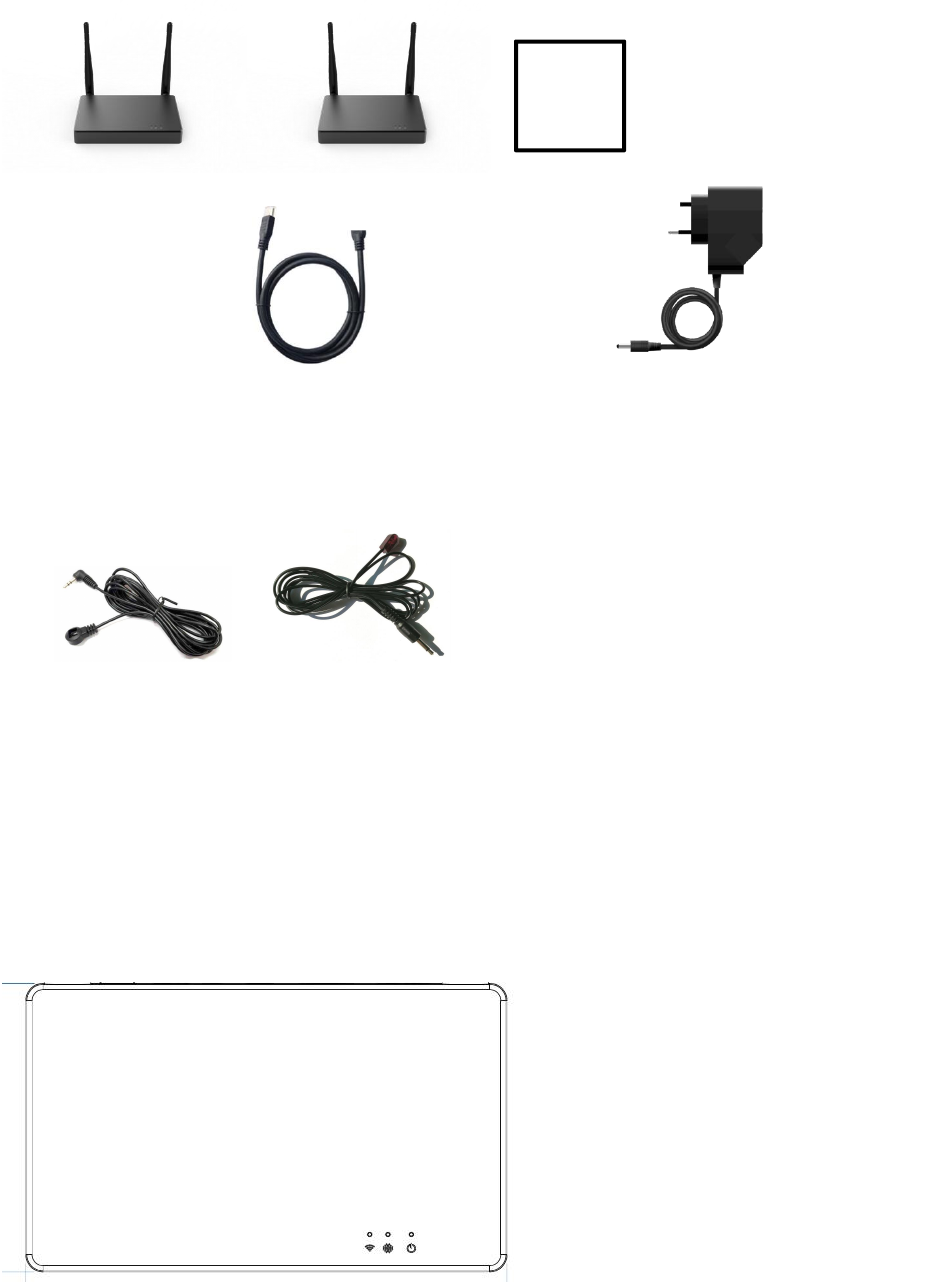
1.3 package includes:
7
Chapter 2 Connecting Mechanism
2.1 Appearance
2.1.1 WHD1001TX front panel
LED indicators (from right to left)
Power: Red lights after powered on, and become to blue when detected HDMI in.
User
Guide
WHD1001R RX User Guide
WHD1001T TX
HDMI Cable x2 AC/DC adapter x 2
IR Emitter cable (For TX) IR receiver cable(For RX)
8
Pair: Blinking when unpaired, blue light when paired.
WiFi: Lighting when wifi works, flickering when data transferring.
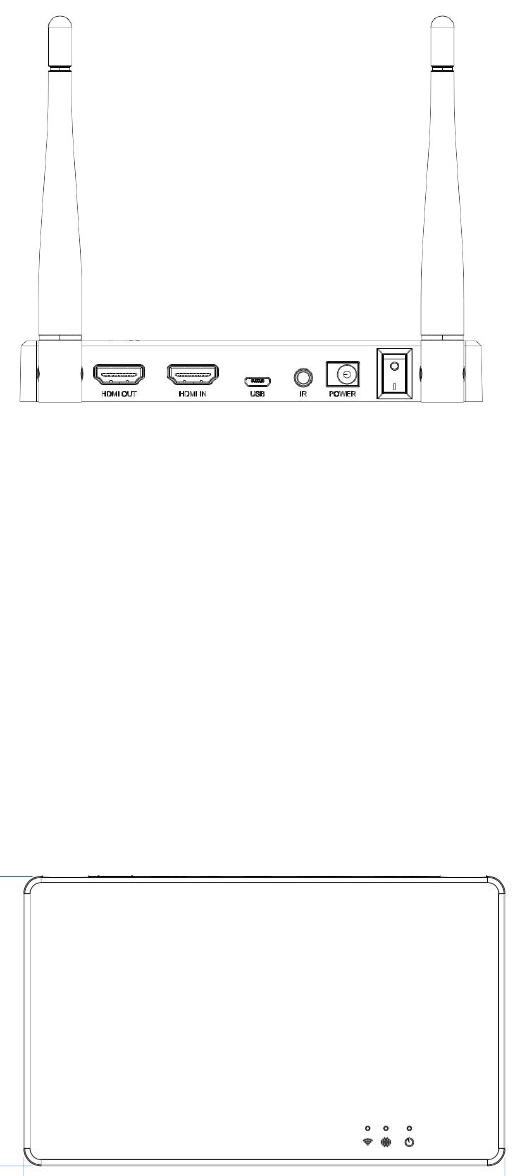
2.1.2 WHD1001TX rear panel
HDMI out: connect with TV/display
HDMI in: connect with any device with HDMI jack (PC/DVD Player/set top box/game console ....)
USB: keyboard/mouse signal extending function
IR:IR signal extendingfunction, to insert the IR emitter cable which includes in the box.
Power: DC in (5V, 2.5A)
ON/OFF button
2.2.1 WHD1001RX front panel
9
LED indicators (from right to left)
Power: Red lights after powered on, and become to blue when detected HDMI in.
Pair: Blinking when unpaired, blue light when paired.
WiFi: Lighting when wifi works, flickering when data transferring.
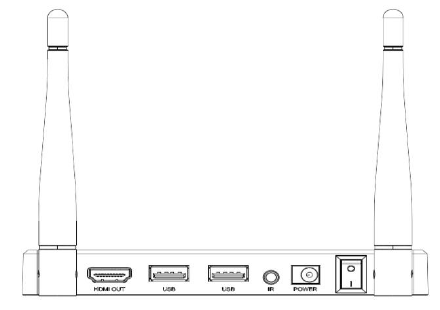
2.2.1 WHD1001RX rear panel
HDMI out: connect with TV/display
USB: keyboard/mouse signal extending function
IR:IR signal extendingfunction, to insert the IR receiver cable which includes in the
box.
Power: DC in (5V, 2.5A)
ON/OFF button
2.3 Connection Instruction
How to transfer the video from TX to RX:
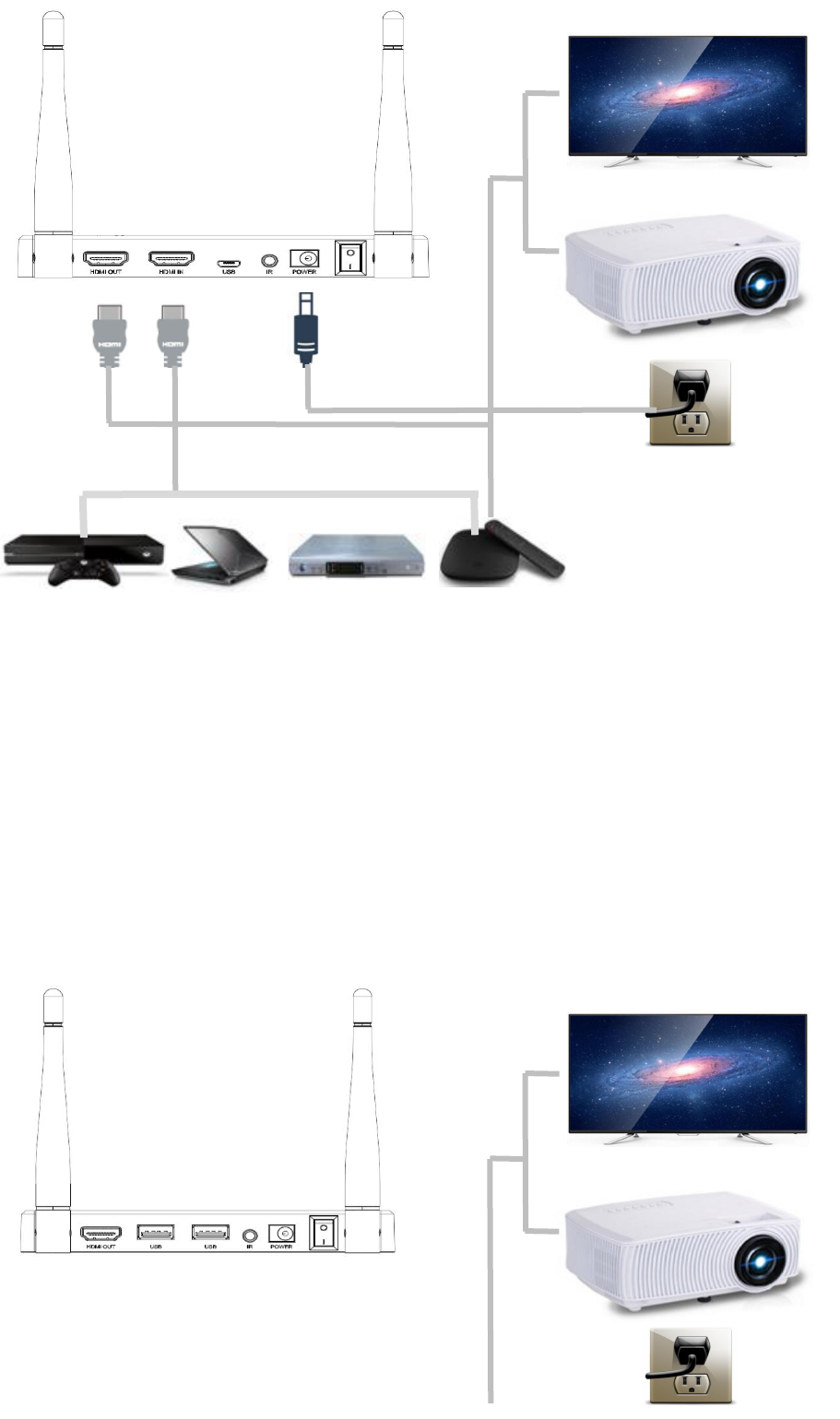
2.31 install WHD1001T TX box:
10
Step 1: connect the power adapter (5V/2.5A) with the TX and wall socket, press the button to “ON”,
the power light will become red when power on.
Step 2: connect with TV/display/projector through HDMI out jack through HDMI cable
Step 3: connect DVD player/set top box/PC or other devices with TX through HDMI IN through
HDMI cable
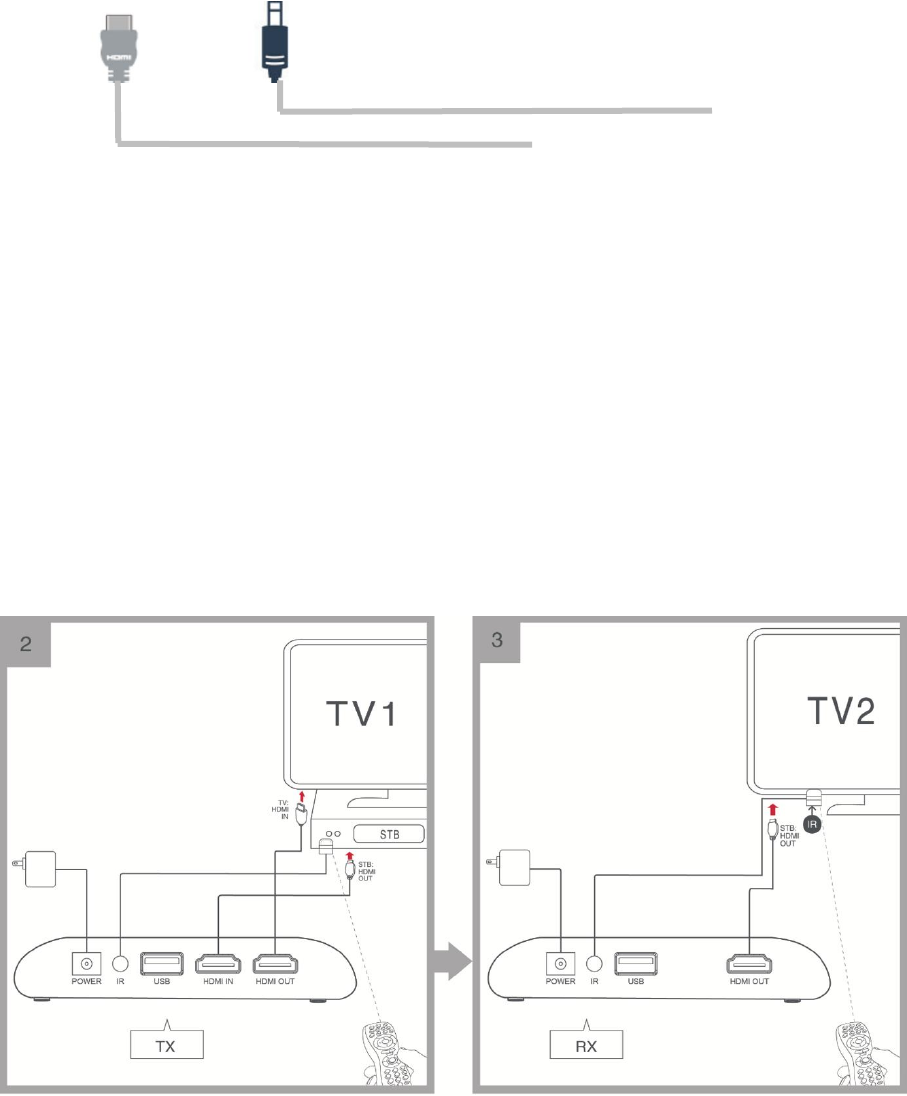
2.32 install WHD1001R
11
Step 1: connect the power adapter (5V/2.5A) with the RX and wall socket, press the button to “ON”,
the power light will become red when power on.
Step 2: connect with RV/display/projector through HDMI out jack through HDMI cable
2.33 How to control the device in a different room by using remote control?
1.Connect the IR emitter cable with the TX IR jack, and stick the IR probe in front of the IR window
of the source device.
2.Connect the IR receiver cable with RX IR jack, and stick the IR probe in front of TV.
3.Use the source device remote control point the IR receiver probe to control the source device, the
distance between this IR receiver probe and remote control should be within 5m.
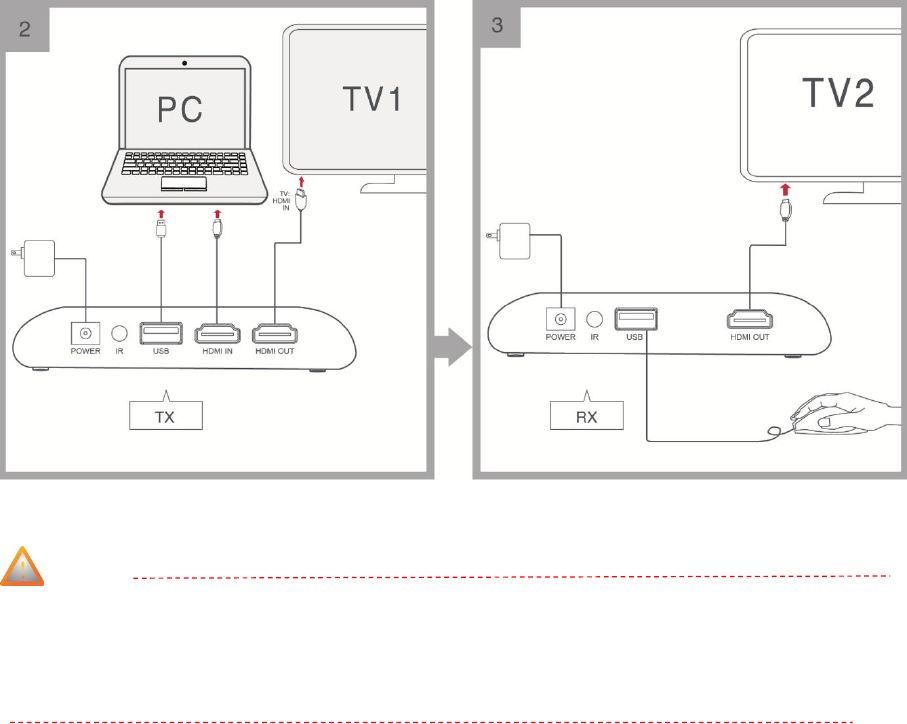
2.34 How to control the device in a different room by using mouse/keyboard?
Step1: connect the PC usb jack and TX usb jack by using USB cable.
Step2: connect the RX jack with a mouse or game controller.
Step3: then you can use the mouse or game controller to control the PC in other room.
12
Note
Environmental factor will have influence on the distance of wireless transmission.
Please use the matched power adapter otherwise it will damage the router.
Chapter 3 Trouble shooting
1. which kind of devices compatible with Wireless HDMI Sender?
Almost all the device with a HMDI out. For example, set-top boxes, DVD & Blu-Ray players, PC,
game console, etc.
2. No picture on the second screen
Pls refer to the quick start and make sure all of the connection is correct.
3. Bad or incorrect picture on the second screen
pls make sure to use the high-quality HDMI cable, because bad HDMI cable don’t have shield which
will easily be interfered.
Pls make usre the video source resolution is compatibles by our device, pls refer the specification in
chapter 1.

13
If still not solved problems, pls power off to re-start the Wireless HDMI Sender and receiver.
4.Picture is not stable, or picture is stuck.
this device is using 2.4GHz connectivity, which will interfere by other wireless devices, like wifi
router, microwave, so pls keep the TX/RX away from those interferences.This distance between
TX/RX can be about 200-300 M in good wifi condition and no wall, if wifi environment is not good,
the distance will be much shorter. pls also place the TX/RX at other location with less interference.
Unplug the power cable of TX/RX and restart it.
Also the distance between TX and RX should be at least 1 meter to decrease the interference.
5. why I can’t control the device in different room by using the remote control?
pls use the original remote control of the source device.Pls stick the IR emitter probe in the surface
of IR LED place of the source device
pls point the remote control to the IR receiver probe within 5m in directly.
Chapter 4 Safety and Emission Statement
Warning: Changes or modifications to this unit not expressly approved by the party
responsible for compliance could void the user’s authority to operate the equipment.
Note: This equipment has been tested and found to comply with the limits for a Class B
digital device, pursuant to Part 15 of the FCC Rules. These limits are designed to provide
reasonable protection against harmful interference in a residential installation. This
equipment generates, uses and can radiate radio frequency energy and, if not installed and
used in accordance with the instructions, may cause harmful interference to radio
communications. However, there is no guarantee that interference will not occur in a
particular installation. If this equipment does cause harmful interference to radio or television
reception, which can be determined by turning the equipment off and on, the user is
encouraged to try to correct the interference by one or more of the following measures:
Reorient or relocate the receiving antenna.

14
Increase the separation between the equipment and receiver.
Connect the equipment into an outlet on a circuit different from that to which the receiver
is connected.
Consult the dealer or an experienced radio/TV technician for help.
“This equipment complies with FCC RF radiation exposure limits set forth for an uncontrolled
environment. This equipment should be installed and operated with a minimum distance of
20 centimeters between the radiator and your body.”
FCC ID:XXX-XXXXX
This device complies with Part 15 of the FCC Rules. Operation is subject to the following two
conditions:
(1)This device may not cause harmful interference, and
(2)This device must accept any interference received, including interference that may cause
undesired operation.

15
FCC Information and Copyright
This equipment has been tested and found to comply with the limits for a Class B digital device,
pursuant to part 15 of the FCC Rules. These limits are designed to provide reasonable protection
against harmful interference in a residential installation. This equipment generates, uses and can
radiate radio frequency energy and, if not installed and used in accordance with the instructions,
may cause harmful interference to radio communications. However, there is no guarantee that
interference will not occur in a particular installation. If this equipment does cause harmful
interference to radio or television reception, which can be determined by turning the equipment off
and on, the user is encouraged to try to correct the interference by one or more of the following
measures:
—Reorient or relocate the receiving antenna.
—Increase the separation between the equipment and receiver.
—Connect the equipment into an outlet on a circuit different from that to which the receiver is
connected.
—Consult the dealer or an experienced radio/TV technician for help.
This device complies with part 15 of the FCC Rules. Operation is subject to the following two
conditions: (1)This device may not cause harmful interference, and (2) this device must accept any
interference received, including interference that may cause undesired operation.
changes or modifications not expressly approved by the party responsible for compliance could void
the user's authority to operate the equipment. This equipment complies with FCC radiation
exposure limits set forth for an uncontrolled environment. The device has been evaluated to meet
general RF exposure requirement. The device can be used in portable exposure condition without
restriction.
FCC Information and Copyright
This equipment has been tested and found to comply with the limits for a Class B digital device,
pursuant to part 15 of the FCC Rules. These limits are designed to provide reasonable protection
against harmful interference in a residential installation. This equipment generates, uses and can
radiate radio frequency energy and, if not installed and used in accordance with the instructions,
may cause harmful interference to radio communications. However, there is no guarantee that
interference will not occur in a particular installation. If this equipment does cause harmful
interference to radio or television reception, which can be determined by turning the equipment
off and on, the user is encouraged to try to correct the interference by one or more of the
following measures:
—Reorient or relocate the receiving antenna.
—Increase the separation between the equipment and receiver.
—Connect the equipment into an outlet on a circuit different from that to which the receiver is
connected.
—Consult the dealer or an experienced radio/TV technician for help.
This device complies with part 15 of the FCC Rules. Operation is subject to the following two
conditions: (1)This device may not cause harmful interference, and (2) this device must accept
any interference received, including interference that may cause undesired operation.
changes or modifications not expressly approved by the party responsible for compliance could
void the user's authority to operate the equipment. This equipment complies with FCC radiation
exposure limits set forth for an uncontrolled environment. The device has been evaluated to
meet general RF exposure requirement. The device can be used in portable exposure condition
without restriction.