TopTech 2G4HZ AIR MOUSE User Manual

TOP-TECH INTERNATIONAL (H.K.) LIMITED AIR MOUSE Users Manual

User Manual

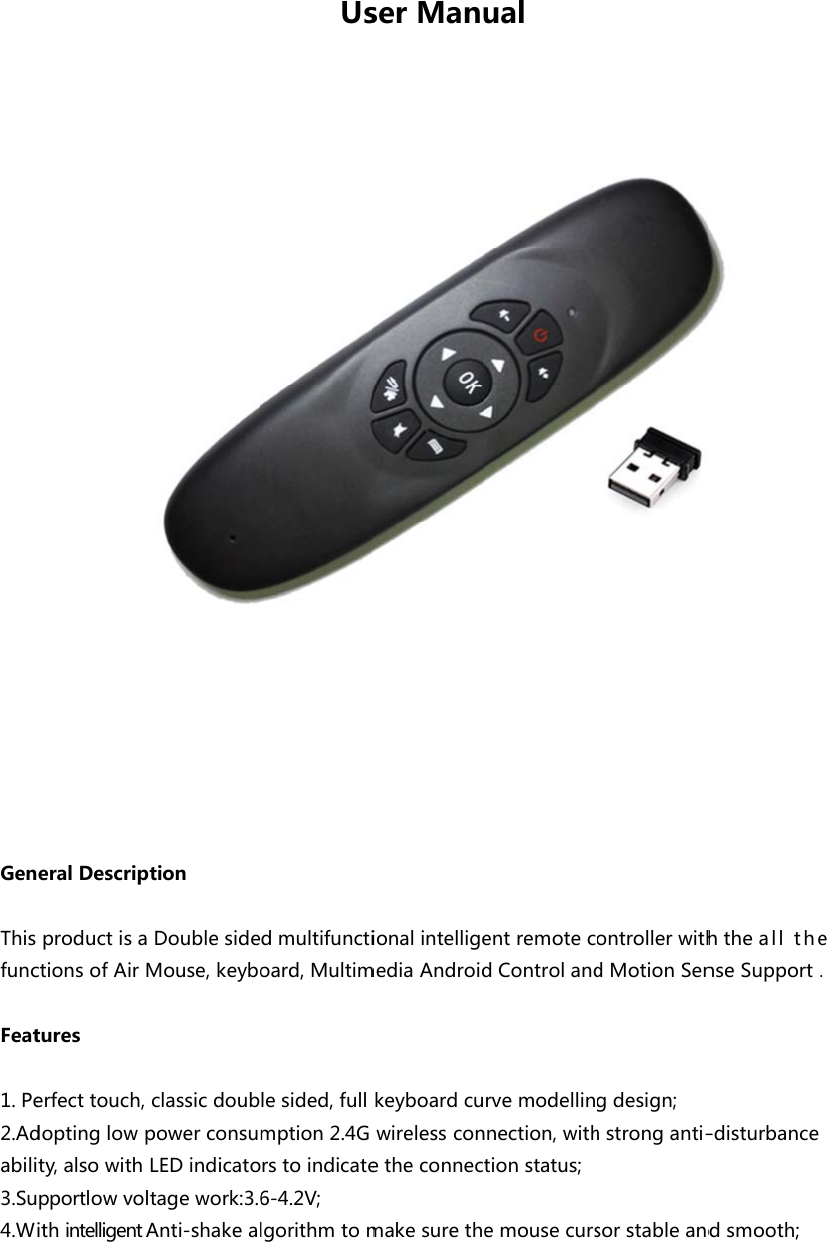
GenThisfuncFeat1. Pe2.Adabili3.Su4.WeralDescripproductisactionsofAirMtureserfecttouch,doptinglowpty,alsowithpportlowvolithintelligentAtionDoublesideMouse,keyboclassicdoubpowerconsumLEDindicatotagework:3.6Anti-shakealUsdmultifunctioard,Multimlesided,fullmption2.4Grstoindicate6-4.2V; lgorithmtomserManuionalintelligemediaAndroidkeyboardcuwirelessconetheconnectmakesuretheualentremotecdControlandrvemodellinnection,withtionstatus;emousecursontrollerwithdMotionSengdesign;hstronganti-sorstableandhtheallthenseSupport.-disturbancedsmooth;e.
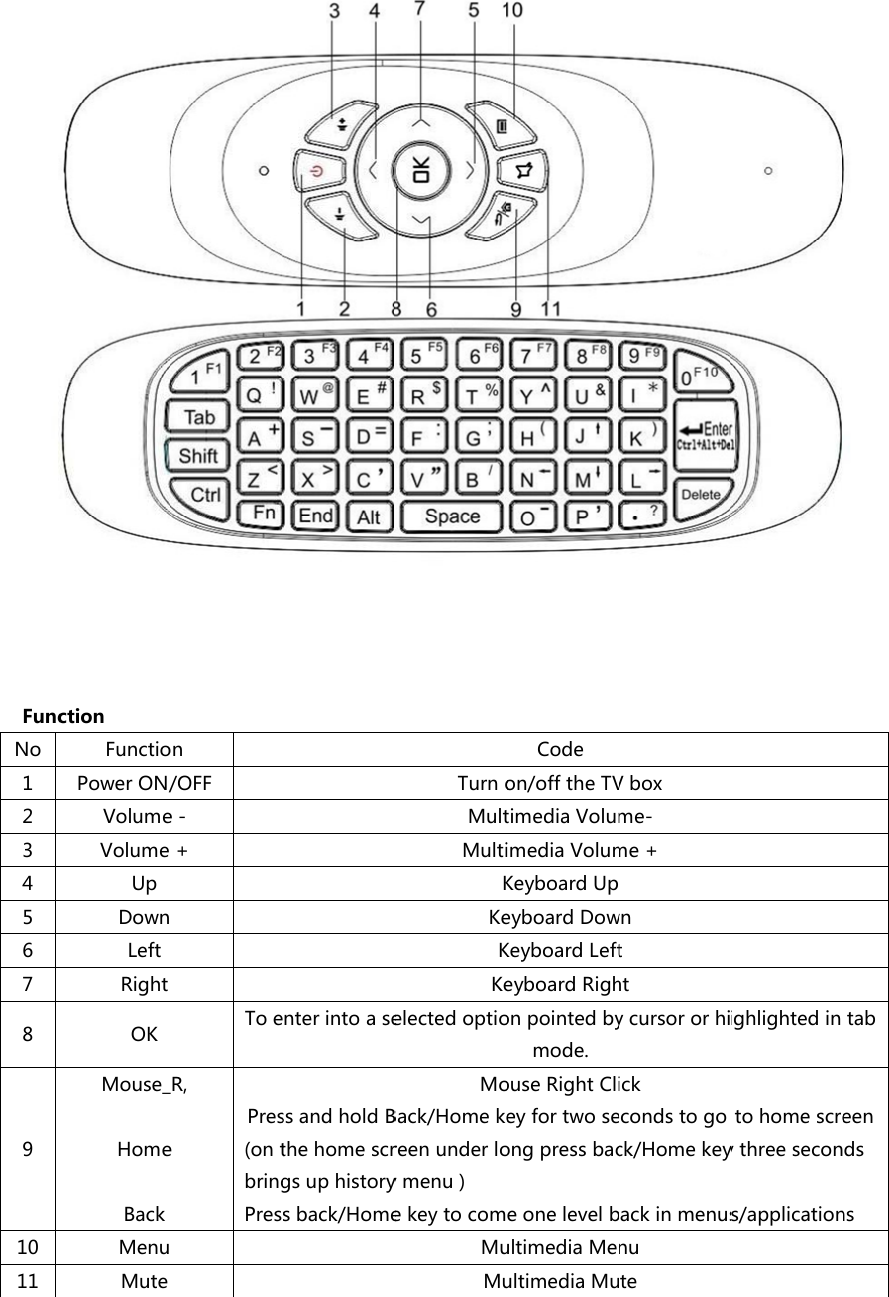
FuncNo1234567891011ction FunctioPowerON/VolumeVolumeUpDownLeftRightOKMouse_HomeBackMenuMuten/OFFe-+ToeR,ePres(ontbringPresnterintoasessandholdBthehomescrgsuphistorysback/HomeTurnoMultMultiKKeKKeelectedoptioMoBack/Homekereenunderloymenu)ekeytocomMuMuCodeon/offtheTVtimediaVolumimediaVolumKeyboardUpeyboardDowKeyboardLefteyboardRighonpointedbymode.ouseRightClieyfortwoseongpressbaceonelevelbultimediaMeultimediaMuVboxme-me+wnthtycursororhiickecondstogock/Homekeyackinmenusnuteighlightedintohomescreythreesecons/applicationtabeendsns
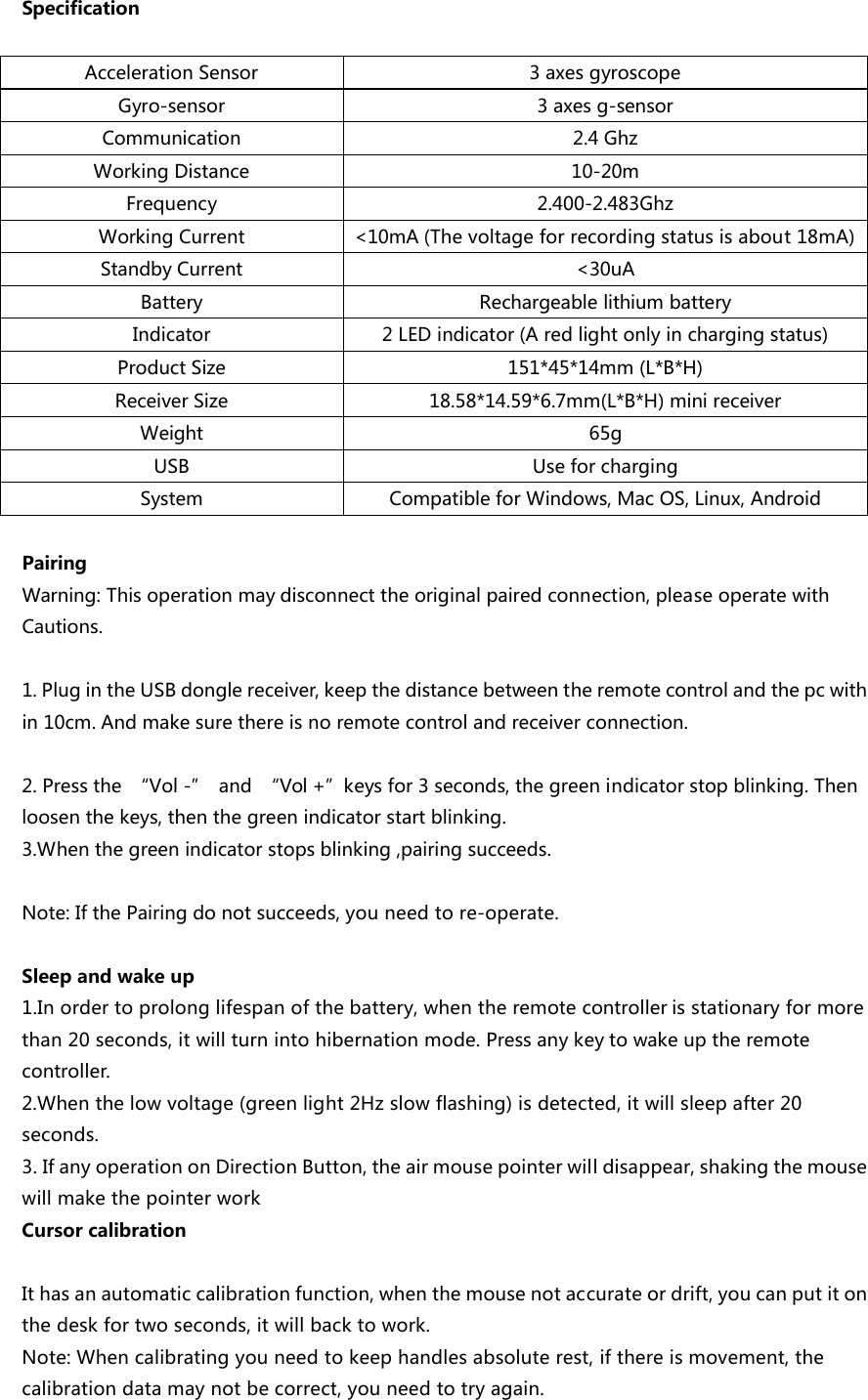
SpecificationAccelerationSensor 3axesgyroscopeGyro-sensor 3axesg-sensorCommunication 2.4GhzWorkingDistance 10-20mFrequency 2.400-2.483GhzWorkingCurrent <10mA(Thevoltageforrecordingstatusisabout18mA)StandbyCurrent <30uABattery RechargeablelithiumbatteryIndicator 2LEDindicator(Aredlightonlyinchargingstatus)ProductSize 151*45*14mm(L*B*H)ReceiverSize 18.58*14.59*6.7mm(L*B*H)minireceiverWeight 65gUSB UseforchargingSystem CompatibleforWindows,MacOS,Linux,AndroidPairingWarning:Thisoperationmaydisconnecttheoriginalpairedconnection,pleaseoperatewithCautions.1.PlugintheUSBdonglereceiver,keepthedistancebetweentheremotecontrolandthepcwithin10cm.Andmakesurethereisnoremotecontrolandreceiverconnection.2.Pressthe “Vol-” and “Vol+”keysfor3seconds,thegreenindicatorstopblinking.Thenloosenthekeys,thenthegreenindicatorstartblinking.3.Whenthegreenindicatorstopsblinking,pairingsucceeds.Note:IfthePairingdonotsucceeds,youneedtore-operate.Sleepandwakeup1.Inordertoprolonglifespanofthebattery,whentheremotecontrollerisstationaryformorethan20seconds,itwillturnintohibernationmode.Pressanykeytowakeuptheremotecontroller.2.Whenthelowvoltage(greenlight2Hzslowflashing)isdetected,itwillsleepafter20seconds.3.IfanyoperationonDirectionButton,theairmousepointerwilldisappear,shakingthemousewillmakethepointerworkCursorcalibrationIthasanautomaticcalibrationfunction,whenthemousenotaccurateordrift,youcanputitonthedeskfortwoseconds,itwillbacktowork.Note:Whencalibratingyouneedtokeephandlesabsoluterest,ifthereismovement,thecalibrationdatamaynotbecorrect,youneedtotryagain.
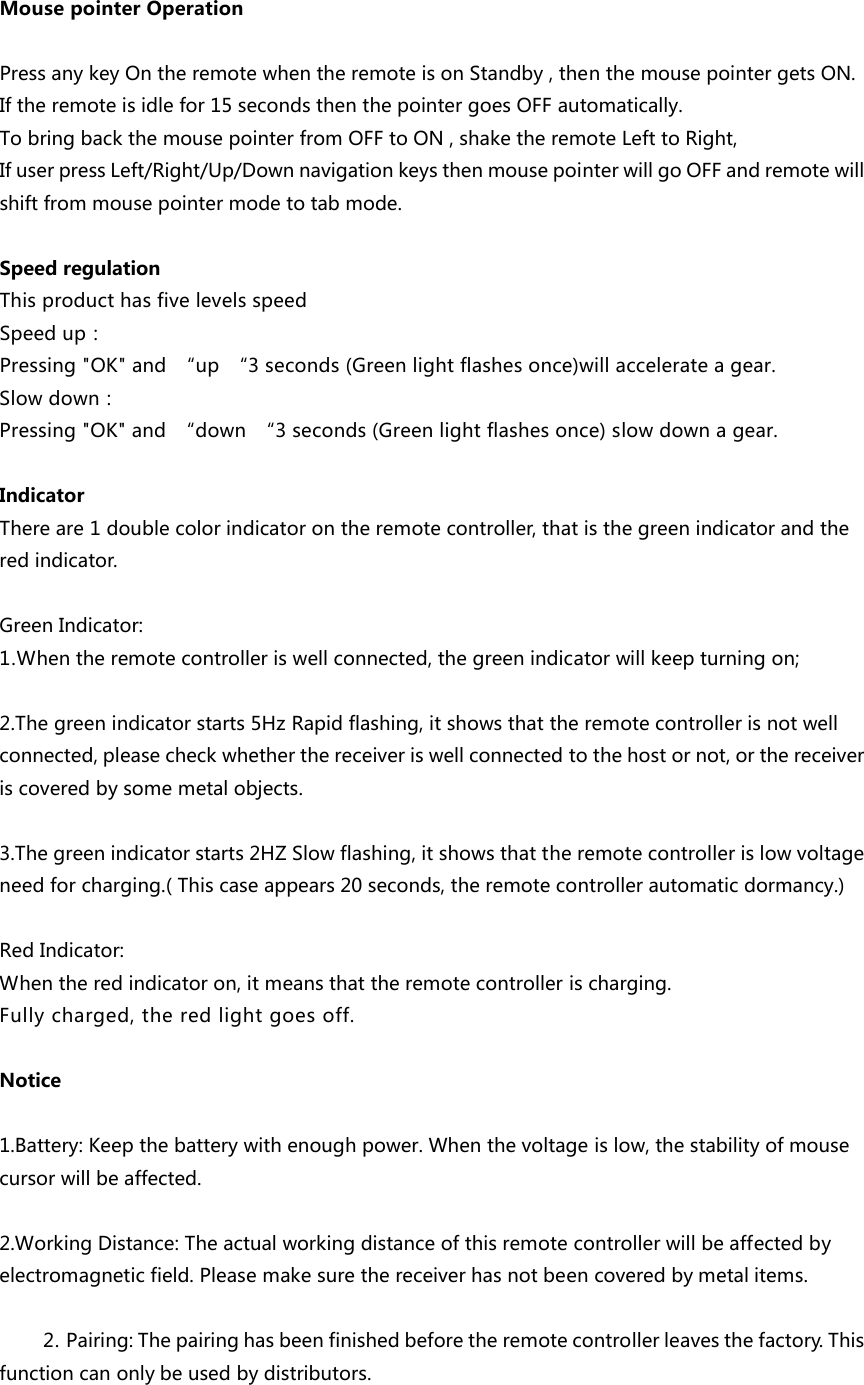
MousepointerOperationPressanykeyOntheremotewhentheremoteisonStandby,thenthemousepointergetsON.Iftheremoteisidlefor15secondsthenthepointergoesOFFautomatically.TobringbackthemousepointerfromOFFtoON,shaketheremoteLefttoRight,IfuserpressLeft/Right/Up/DownnavigationkeysthenmousepointerwillgoOFFandremotewillshiftfrommousepointermodetotabmode.SpeedregulationThisproducthasfivelevelsspeed Speedup:Pressing"OK"and “up “3seconds(Greenlightflashesonce)willaccelerateagear.Slowdown:Pressing"OK"and “down “3seconds(Greenlightflashesonce)slowdownagear.IndicatorThereare1doublecolorindicatorontheremotecontroller,thatisthegreenindicatorandtheredindicator.GreenIndicator:1.Whentheremotecontrolleriswellconnected,thegreenindicatorwillkeepturningon;2.Thegreenindicatorstarts5HzRapidflashing,itshowsthattheremotecontrollerisnotwellconnected,pleasecheckwhetherthereceiveriswellconnectedtothehostornot,orthereceiveriscoveredbysomemetalobjects.3.Thegreenindicatorstarts2HZSlowflashing,itshowsthattheremotecontrollerislowvoltageneedforcharging.(Thiscaseappears20seconds,theremotecontrollerautomaticdormancy.)RedIndicator:Whentheredindicatoron,itmeansthattheremotecontrollerischarging.Fullycharged,theredlightgoesoff.Notice1.Battery:Keepthebatterywithenoughpower.Whenthevoltageislow,thestabilityofmousecursorwillbeaffected.  2.WorkingDistance:Theactualworkingdistanceofthisremotecontrollerwillbeaffectedbyelectromagneticfield.Pleasemakesurethereceiverhasnotbeencoveredbymetalitems.2. Pairing:Thepairinghasbeenfinishedbeforetheremotecontrollerleavesthefactory.Thisfunctioncanonlybeusedbydistributors.
FCCCautionThisdevicecomplieswithpart15oftheFCCRules.Operationissubjecttothefollowingtwoconditions:(1)Thisdevicemaynotcauseharmfulinterference,and(2)thisdevicemustacceptanyinterferencereceived,includinginterferencethatmaycauseundesiredoperation.NOTE1:Anychangesormodificationstothisunitnotexpresslyapprovedbythepartyresponsibleforcompliancecouldvoidtheuser'sauthoritytooperatetheequipment.

Navigation menu