TopTech 2G4HZ AIR MOUSE User Manual
TOP-TECH INTERNATIONAL (H.K.) LIMITED AIR MOUSE Users Manual
TopTech >
User Manual
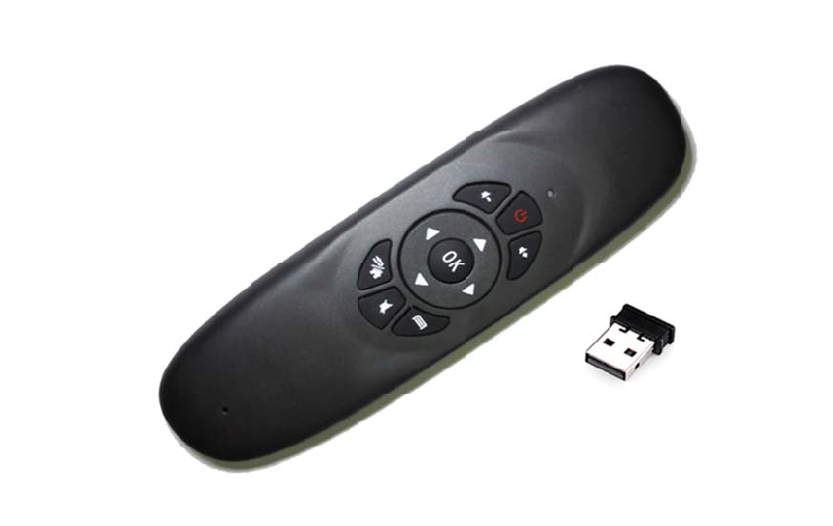
Gen
This
fun
c
Fea
t
1. P
e
2.A
d
abili
3.Su
4.W
eralDescrip
productisa
c
tionsofAir
M
t
ures
e
rfecttouch,
d
optinglow
p
ty,alsowith
pportlowvol
ithintelligent
A
tion
Doubleside
M
ouse,keyb
o
classicdoub
p
owerconsu
m
LEDindicato
tagework:3.
6
A
nti-shakea
l
U
s
dmultifunct
i
o
ard,Multi
m
lesided,full
m
ption2.4G
rstoindicat
e
6
-4.2V;
l
gorithmto
m
s
erMan
u
i
onalintelli
ge
m
ediaAndroi
d
ke
y
boardcu
wirelesscon
e
theconnec
t
m
akesureth
e
u
al
e
ntremotec
d
Controlan
d
rvemodellin
nection,wit
h
t
ionstatus;
e
mousecur
s
o
ntrollerwit
h
d
MotionSe
n
g
desi
g
n;
h
stron
g
anti
-
s
orstablean
d
h
theallth
e
n
seSupport
.
-
disturbance
dsmooth;
e
.
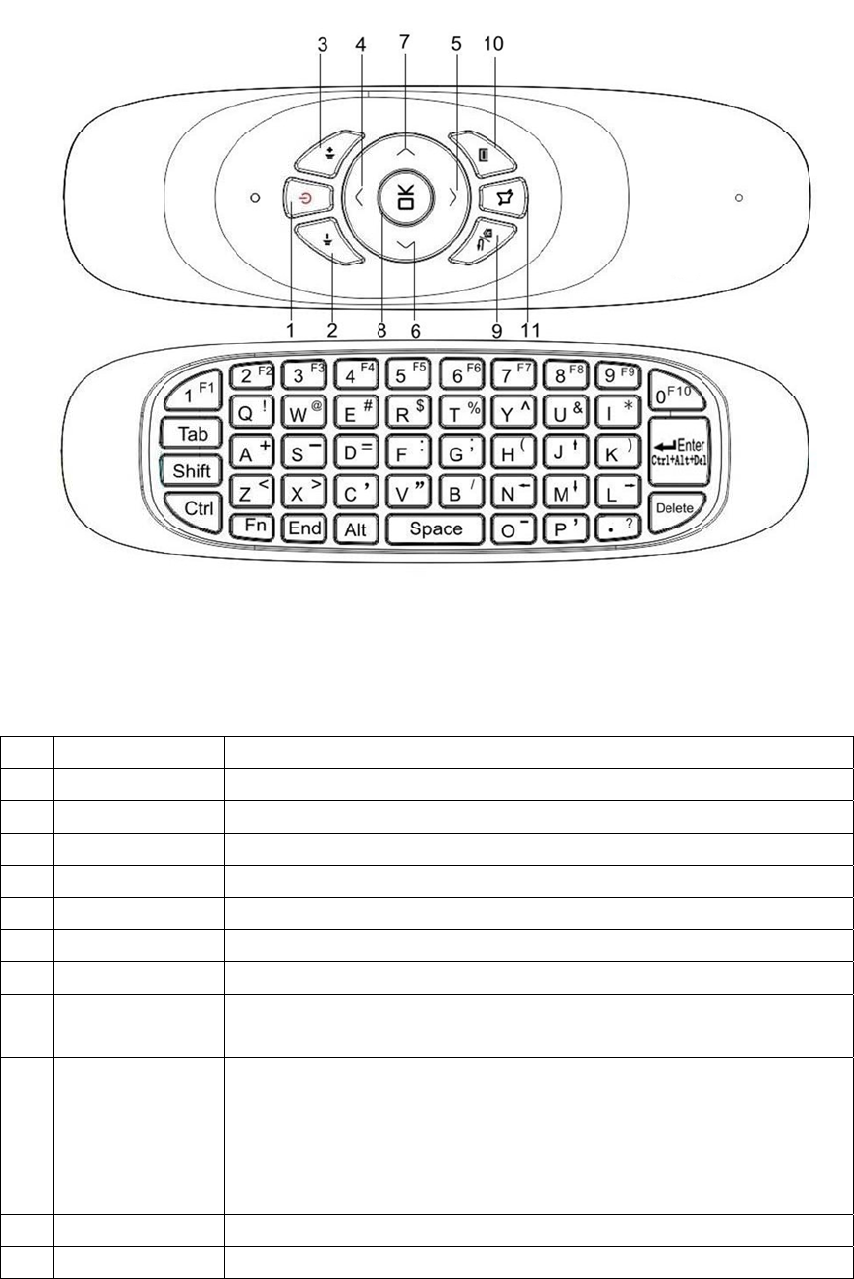
Fun
c
No
1
2
3
4
5
6
7
8
9
10
11
c
tion
Functio
PowerON
/
Volum
e
Volume
Up
Down
Left
Right
OK
Mouse_
Hom
e
Back
Menu
Mute
n
/
OFF
e
-
+
Toe
R,
e
Pre
s
(on
t
brin
g
Pres
nterintoas
e
s
sandhold
B
t
hehomesc
r
g
suphistor
y
s
back/Hom
e
Turn
o
Mul
t
Mult
i
K
K
e
K
K
e
e
lectedopti
o
M
o
B
ack/Homek
e
r
eenunderl
o
y
menu)
e
ke
y
tocom
M
u
M
u
Code
o
n/offtheT
V
t
imediaVolu
m
i
mediaVolu
m
K
eyboardUp
e
yboardDo
w
K
eyboardLef
t
e
yboardRi
gh
o
npointedb
y
mode.
o
useRi
g
htCl
i
ey
fortwos
e
o
n
g
pressba
c
eonelevel
b
u
ltimediaMe
u
ltimediaM
u
V
box
m
e-
m
e+
w
n
t
h
t
y
cursororhi
i
ck
e
condstogo
c
k/Homeke
y
ackinmenu
s
n
u
te
ig
hli
g
htedin
tohomescr
e
y
threesecon
s/applicatio
n
tab
e
en
ds
n
s

Specification
AccelerationSensor 3axesgyroscope
Gyro-sensor 3axesg-sensor
Communication 2.4Ghz
WorkingDistance 10-20m
Frequency 2.400-2.483Ghz
WorkingCurrent <10mA(Thevoltageforrecordingstatusisabout18mA)
StandbyCurrent <30uA
Battery Rechargeablelithiumbattery
Indicator 2LEDindicator(Aredlightonlyinchargingstatus)
ProductSize 151*45*14mm(L*B*H)
ReceiverSize 18.58*14.59*6.7mm(L*B*H)minireceiver
Weight 65g
USB Useforcharging
System CompatibleforWindows,MacOS,Linux,Android
Pairing
Warning:Thisoperationmaydisconnecttheoriginalpairedconnection,pleaseoperatewith
Cautions.
1.PlugintheUSBdonglereceiver,keepthedistancebetweentheremotecontrolandthepcwith
in10cm.Andmakesurethereisnoremotecontrolandreceiverconnection.
2.Pressthe “Vol-” and “Vol+”keysfor3seconds,thegreenindicatorstopblinking.Then
loosenthekeys,thenthegreenindicatorstartblinking.
3.Whenthegreenindicatorstopsblinking,pairingsucceeds.
Note:IfthePairingdonotsucceeds,youneedtore-operate.
Sleepandwakeup
1.Inordertoprolonglifespanofthebattery,whentheremotecontrollerisstationaryformore
than20seconds,itwillturnintohibernationmode.Pressanykeytowakeuptheremote
controller.
2.Whenthelowvoltage(greenlight2Hzslowflashing)isdetected,itwillsleepafter20
seconds.
3.IfanyoperationonDirectionButton,theairmousepointerwilldisappear,shakingthemouse
willmakethepointerwork
Cursorcalibration
Ithasanautomaticcalibrationfunction,whenthemousenotaccurateordrift,youcanputiton
thedeskfortwoseconds,itwillbacktowork.
Note:Whencalibratingyouneedtokeephandlesabsoluterest,ifthereismovement,the
calibrationdatamaynotbecorrect,youneedtotryagain.
MousepointerOperation
PressanykeyOntheremotewhentheremoteisonStandby,thenthemousepointergetsON.
Iftheremoteisidlefor15secondsthenthepointergoesOFFautomatically.
TobringbackthemousepointerfromOFFtoON,shaketheremoteLefttoRight,
IfuserpressLeft/Right/Up/DownnavigationkeysthenmousepointerwillgoOFFandremotewill
shiftfrommousepointermodetotabmode.
Speedregulation
Thisproducthasfivelevelsspeed
Speedup:
Pressing"OK"and “up “3seconds(Greenlightflashesonce)willaccelerateagear.
Slowdown:
Pressing"OK"and “down “3seconds(Greenlightflashesonce)slowdownagear.
Indicator
Thereare1doublecolorindicatorontheremotecontroller,thatisthegreenindicatorandthe
redindicator.
GreenIndicator:
1.Whentheremotecontrolleriswellconnected,thegreenindicatorwillkeepturningon;
2.Thegreenindicatorstarts5HzRapidflashing,itshowsthattheremotecontrollerisnotwell
connected,pleasecheckwhetherthereceiveriswellconnectedtothehostornot,orthereceiver
iscoveredbysomemetalobjects.
3.Thegreenindicatorstarts2HZSlowflashing,itshowsthattheremotecontrollerislowvoltage
needforcharging.(Thiscaseappears20seconds,theremotecontrollerautomaticdormancy.)
RedIndicator:
Whentheredindicatoron,itmeansthattheremotecontrollerischarging.
Fullycharged,theredlightgoesoff.
Notice
1.Battery:Keepthebatterywithenoughpower.Whenthevoltageislow,thestabilityofmouse
cursorwillbeaffected.
2.WorkingDistance:Theactualworkingdistanceofthisremotecontrollerwillbeaffectedby
electromagneticfield.Pleasemakesurethereceiverhasnotbeencoveredbymetalitems.
2. Pairing:Thepairinghasbeenfinishedbeforetheremotecontrollerleavesthefactory.This
functioncanonlybeusedbydistributors.
FCCCaution
Thisdevicecomplieswithpart15oftheFCCRules.Operationissubjecttothefollowingtwo
conditions:(1)Thisdevicemaynotcauseharmfulinterference,and(2)thisdevicemustaccept
anyinterferencereceived,includinginterferencethatmaycauseundesiredoperation.
NOTE1:Anychangesormodificationstothisunitnotexpresslyapprovedbytheparty
responsibleforcompliancecouldvoidtheuser'sauthoritytooperatetheequipment.