TOPMORE TECHNOLOGY BS-01 ROCK PLANET User Manual

TOPMORE TECHNOLOGY INC. ROCK PLANET

User Manual

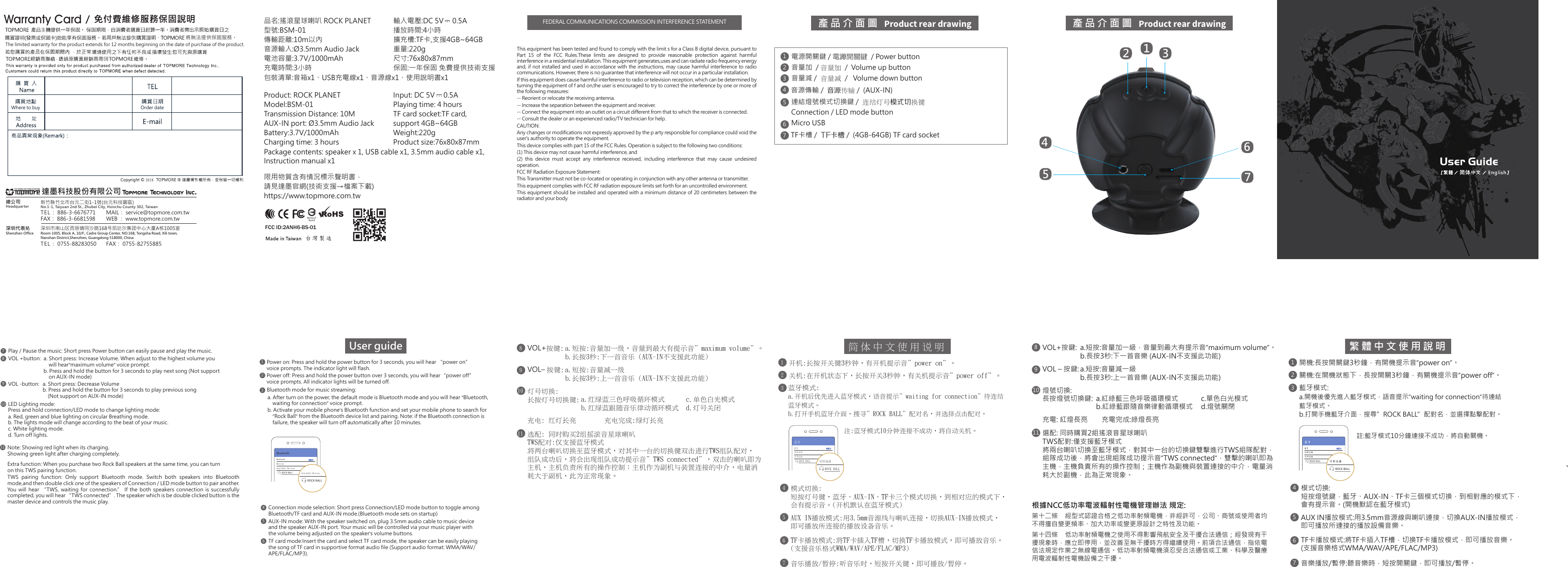
產品介面圖  產品介面圖  21345671234567電源開關鍵 / 電源開關鍵 / Power button音量加  / 音量加  /  Volume up button音量減 /  音量減 /  Volume down button音源傳輸 /  音源傳輸 /  (AUX-IN)TF卡槽 /  TF卡槽 /  (4GB-64GB) TF card socket連結燈號模式切換鍵 /  連結燈號模式切換鍵Connection / LED mode buttonMicro USB開機:長按開關鍵3秒鐘,有開機提示音”power on”。藍牙藍牙設備名稱可用設備可用設備註:藍牙模式10分鐘連接不成功,將自動關機。ROCK BALLROCK BALLBluetoothBluetoothDevicesAvailable DevicesAvailable DevicesROCK BALLROCK BALL繁體中文使用說明1關機:在開機狀態下,長按開關3秒鐘,有關機提示音”power off”。2音樂播放/暫停:聽音樂時,短按開關鍵,即可播放/暫停。7VOL+按鍵:89VOL – 按鍵:燈號切換:長按燈號切換鍵:1011藍牙模式:a.開機後優先進入藍牙模式,語音提示”waiting for connection”待連結藍牙模式。b.打開手機藍牙介面,搜尋”ROCK BALL”配對名,並選擇點擊配對。3AUX IN播放模式:用3.5mm音源線與喇叭連接,切換AUX-IN播放模式,即可播放所連接的播放設備音樂。TF卡播放模式:將TF卡插入TF槽,切換TF卡播放模式,即可播放音樂。(支援音樂格式WMA/WAV/APE/FLAC/MP3)56模式切換:短按燈號鍵,藍牙、AUX-IN、TF卡三個模式切換,到相對應的模式下,會有提示音。(開機默認在藍牙模式)4c.單色白光模式d.燈號關閉選配: 同時購買2組搖滾音星球喇叭TWS配對:僅支援藍牙模式將兩台喇叭切換至藍牙模式,對其中一台的切換鍵雙擊進行TWS組隊配對,組隊成功後,將會出現組隊成功提示音”TWS connected”,雙擊的喇叭即為主機,主機負責所有的操作控制;主機作為副機與裝置連接的中介,電量消耗大於副機,此為正常現象。a.短按:音量加一級,音量到最大有提示音”maximum volume”。b.長按3秒:下一首音樂 (AUX-IN不支援此功能)a.短按:音量減一級b.長按3秒:上一首音樂 (AUX-IN不支援此功能)a.紅綠藍三色呼吸循環模式b.紅綠藍跟隨音樂律動循環模式充電: 紅燈長亮        充電完成:綠燈長亮根據NCC低功率電波輻射性電機管理辦法 規定:第十二條    經型式認證合格之低功率射頻電機,非經許可,公司、商號或使用者均不得擅自變更頻率、加大功率或變更原設計之特性及功能。  第十四條  低功率射頻電機之使用不得影響飛航安全及干擾合法通信;經發現有干擾現象時,應立即停用,並改善至無干擾時方得繼續使用。前項合法通信,指依電信法規定作業之無線電通信。低功率射頻電機須忍受合法通信或工業、科學及醫療用電波輻射性電機設備之干擾。VOL+按鍵:89VOL– 按鍵:燈號切換:長按燈號切換鍵:1011開機:長按開關鍵3秒鐘,有開機提示音"power on"。藍牙藍牙設備名稱可用設備可用設備註:藍牙模式10分鐘連接不成功,將自動關機。ROCK BALLROCK BALL簡體中文使用說明1關機:在開機狀態下,長按開關3秒鐘,有關機提示音"power off"。2音樂播放/暫停:聽音樂時,短按開關鍵,即可播放/暫停。7藍牙模式:a.開機後優先進入藍牙模式,語音提示"waiting for connection"待連結藍牙模式。b.打開手機藍牙介面,搜尋"ROCK BALL"配對名,並選擇點擊配對。3AUX IN播放模式:用3.5mm音源線與喇叭連接,切換AUX-IN播放模式,即可播放所連接的播放設備音樂。TF卡播放模式:將TF卡插入TF槽,切換TF卡播放模式,即可播放音樂。(支援音樂格式WMA/WAV/APE/FLAC/MP3)56模式切換:短按燈號鍵,藍牙、AUX-IN、TF卡三個模式切換,到相對應的模式下,會有提示音。(開機默認在藍牙模式)4c.單色白光模式d.燈號關閉選配: 同時購買2組搖滾音星球喇叭TWS配對:僅支援藍牙模式將兩台喇叭切換至藍牙模式,對其中一台的切換鍵雙擊進行TWS組隊配對,組隊成功後,將會出現組隊成功提示音"TWS connected",雙擊的喇叭即為主機,主機負責所有的操作控制;主機作為副機與裝置連接的中介,電量消耗大於副機,此為正常現象。a.短按:音量加一級,音量到最大有提示音"maximum volume"。b.長按3秒:下一首音樂 (AUX-IN不支援此功能)a.短按:音量減一級b.長按3秒:上一首音樂 (AUX-IN不支援此功能)a.紅綠藍三色呼吸循環模式b.紅綠藍跟隨音樂律動循環模式充電: 紅燈長亮 充電完成:綠燈長亮Power on: Press and hold the power button for 3 seconds, you will hear “power on”voice prompts. The indicator light will flash.User guide1Power off: Press and hold the power button over 3 seconds, you will hear“power off”voice prompts. All indicator lights will be turned off.2Play / Pause the music: Short press Power button can easily pause and play the music.7VOL +button: 89VOL -button:LED Lighting mode:Press and hold connection/LED mode to change lighting mode:103AUX-IN mode: With the speaker switched on, plug 3.5mm audio cable to music deviceand the speaker AUX-IN port. Your music will be controlled via your music player withthe volume being adjusted on the speaker’s volume buttons.TF card mode:Insert the card and select TF card mode, the speaker can be easily playingthe song of TF card in supportive format audio file (Support audio format: WMA/WAV/APE/FLAC/MP3).56Connection mode selection: Short press Connection/LED mode button to toggle amongBluetooth/TF card and AUX-IN mode.(Bluetooth mode sets on startup) 4a. Short press: Increase Volume. When adjust to the highest volume you    will hear“maximum volume” voice prompt. b. Press and hold the button for 3 seconds to play next song (Not supporton AUX-IN mode)a. Short press: Decrease Volumeb. Press and hold the button for 3 seconds to play previous song    (Not support on AUX-IN mode)a. Red, green and blue lighting on circular Breathing mode.b. The lights mode will change according to the beat of your music.c. White lighting mode.d. Turn off lights.Bluetooth mode for music streaming: a. After turn on the power, the default mode is Bluetooth mode and you will hear “Bluetooth, b. Activate your mobile phone’s Bluetooth function and set your mobile phone to search for waiting for connection” voice prompt.”Rock Ball” from the Bluetooth device list and pairing. Note: if the Bluetooth connection is failure, the speaker will turn off automatically after 10 minutes.11Extra function: When you purchase two Rock Ball speakers at the same time, you can turnon this TWS pairing function.Note: Showing red light when its charging. Showing green light after charging completely.TWS  pairing  function:  Only  support  Bluetooth  mode.  Switch  both  speakers  into  Bluetooth mode,and then double click one of the speakers of Connection / LED mode button to pair another. You  will  hear  “TWS,  waiting  for  connection.”  If  the  both  speakers  connection  is  successfully completed, you will hear“TWS connected”. The speaker which is be double clicked button is the master device and controls the music play.This equipment has been tested and found to comply with the limit s for a Class B digital device, pursuant to Part  15  of  the  FCC  Rules.These  limits  are  designed  to  provide  reasonable  protection  against  harmful interference in a residential installation. This equipment generates,uses and can radiate radio frequency energy and, if not installed and used in accordance with the instructions, may cause harmful interference to radio communications. However, there is no guarantee that interference will not occur in a particular installation.If this equipment does cause harmful interference to radio or television reception, which can be determined by turning the equipment of f and on,the user is encouraged to try to correct the interference by one or more of the following measures:-- Reorient or relocate the receiving antenna.-- Increase the separation between the equipment and receiver.-- Connect the equipment into an outlet on a circuit different from that to which the receiver is connected.-- Consult the dealer or an experienced radio/TV technician for help.CAUTION:Any changes or modifications not expressly approved by the p arty responsible for compliance could void the user's authority to operate the equipment.This device complies with part 15 of the FCC Rules. Operation is subject to the following two conditions:(1) This device may not cause harmful interference, and(2)  this  device  must  accept  any  interference  received,  including  interference  that  may  cause  undesired operation.FCC RF Radiation Exposure Statement:This Transmitter must not be co-located or operating in conjunction with any other antenna or transmitter.This equipment complies with FCC RF radiation exposure limits set forth for an uncontrolled environment.This equipment should be installed and operated with a minimum distance of 20 centimeters between the radiator and your body.品名:搖滾星球喇叭 ROCK PLANET型號:BSM-01傳輸距離:10m以內音源輸入:Ø3.5mm Audio Jack電池容量:3.7V/1000mAh充電時間:3小時包裝清單:音箱x1、USB充電線x1、音源線x1、使用說明書x1Package contents: speaker x 1, USB cable x1, 3.5mm audio cable x1, Instruction manual x1台灣製造FCC ID:2ANH6-BS-01輸入電壓:DC 5V     0.5A播放時間:4小時擴充槽:TF卡,支援4GB~64GB重量:220g尺寸:76x80x87mm保固:一年保固 免費提供技術支援Product: ROCK PLANETModel:BSM-01Transmission Distance: 10MAUX-IN port: Ø3.5mm Audio JackBattery:3.7V/1000mAhCharging time: 3 hours限用物質含有情況標示聲明書,請見達墨官網(技術支援→檔案下載)https://www.topmore.com.twInput: DC 5V     0.5A Playing time: 4 hoursTF card socket:TF card,support 4GB~64GBWeight:220gProduct size:76x80x87mm將無法提供保固服務。The limited warranty for the product extends for 12 months beginning on the date of purchase of the product.Where to buy2018TEL: 0755-88283050 FAX: 0755-82755885新竹縣竹北市台元二街1-1號(台元科技園區)No.1-1, Taiyuan 2nd St., Zhubei City, Hsinchu County 302, TaiwanTEL: 886-3-6676771WEB : www.topmore.com.twFAX: 886-3-6681598MAIL: service@topmore.com.tw深圳市南山区西丽镇同沙路168号凯达尔集团中心大厦A栋1005室Room 1005, Block A, 10/F., Cadre Group Center, NO.168, Tongsha Road, Xili town, Nanshan District,Shenzhen, Guangdong 518000, China總公司Headquarter深圳代表处Shenzhen Office達墨科技股份有限公司 Warranty CardOrder dateFEDERAL COMMUNICATIONS COMMISSION INTERFERENCE STATEMENT•尺寸582x94mm•雙面印刷 雪銅100磅•彈簧5摺正 封底 97mm94mm封面正反97mm94mm

Navigation menu