TOPWAY EM ENTERPRISE GC-T006 Over Ear Bluetooth Headphone User Manual
TOPWAY EM ENTERPRISE LTD. Over Ear Bluetooth Headphone
User Manual
USER MANUAL
MODEL : GC-T006
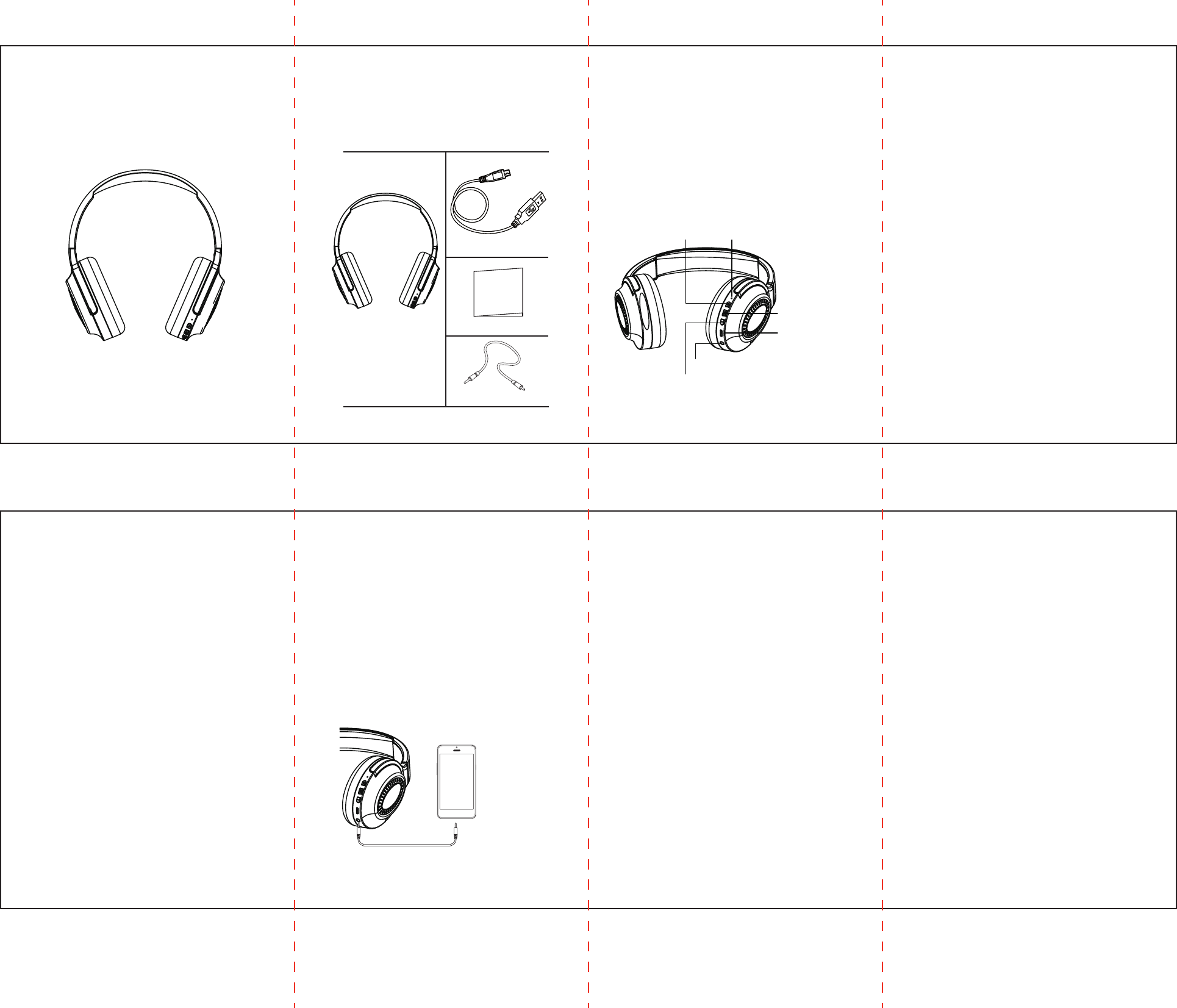
Package Content: Product Description:
Product Schematic:
Troubleshooting:
1. Headphones won’t power on: The battery is drained,
charge the headphones for 30 minutes before attempting
to power on again.
2. Phone can’t find the headphones: Make sure any
previously paired devices are turned off or are out of
range. If the indicator light is not flashing red and blue,
restart both the headphones and the device before
attempting to pair again.
3. Headphones disconnect automatically when pairing:
The battery is very low or the headphones are out of range.
4. No sound when a call is answered:
a. Make sure the phone is connected to your
headphones but not another device.
b. Try to increase the volume on your headphones or on
your phone.
c. Check to see if the wireless mode has been activated
on your device.
d. Check to see if you have chosen the headphones
mode on your phone
5. No sound when playing music: Try to increase the
volume on your headphones or your device.
6. Will not charge: Make sure the charging cable is well
connected. Charging cable may be damaged.
7. No sound when audio cable is plugged in: Try to
increase the volume on the headphones or on the
phone. Make sure the audio cable is connected.
The audio cable may be damaged.
FCC Warning:
This equipment has been tested and found to comply with the limits
for a Class B digital device, pursuant to part 15 of the FCC Rules.
These limits are designed to provide reasonable protection against
harmful interference in a residential installation. This equipment
generates uses and can radiate radio frequency energy and, if not
installed and used in accordance with the instructions, may cause
harmful interference to radio communications. However, there is no
guarantee that interference will not occur in a particular installation.
If this equipment does cause harmful interference to radio or
television reception, which can be determined by turning the
equipment off and on, the user is encouraged to try to correct the
interference by one or more of the following measures:
• Reorient or relocate the receiving antenna.
• Increase the separation between the equipment and receiver.
• Connect the equipment into an outlet on a circuit different from
that to which the receiver is connected.
• Consult the dealer or an experienced radio/TV technician for help.
Changes or modifications not expressly approved by the party
responsible for compliance could void the user's authority to
operate the equipment. This device complies with Part 15 of the
FCC Rules. Operation is subject to the following two conditions:
(1) this device may not cause harmful interference, and (2) this
device must accept any interference received, including
interference that may cause undesired operation.
Test Your Connection:
1 x Wireless headphone
1 x USB charge cable
1 x User manual
1 x Audio cable
USB charge cable
Wireless headphone User manual
Audio cable
1.Wireless version: 4.1
2.Model No: GC-T006
3.Battery: Rechargeable lithium 250mAH battery
4.Charge method: USB charge DC ~5v
5.Talk time: 11-12 hours
6.Play time: 11-12 hours
7.Stand by time: Up to 110 hours
8.Operating distance: Up to 33ft
VOL+/NEXT
VOL- / PRE
LINE IN
Operating Instructions:
Power on: Hold the power button for 2 seconds to turn
on; the LED indicator light will flash blue. A voice prompt
will confirm you have “power on.”
Power off: When the headphones are powered on, hold
the power button for 3 seconds. The indicator light will
flash blue before turning off. A voice prompt will state
“power off” before powering off.
When the headphones are left idle without being paired or
connected, they will turn off automatically after 5 minutes.
Pairing: For the best pairing results, make sure your
headphones and device are within 33ft of each other.
When the headphones are on, hold the power button
until the indicator light flashes red and blue to indicate
it is in pairing mode.
When the headphones are off, hold the power on button
for 3 seconds until the indicator light flashes red and blue.
A voice prompt will confirm the headphones are “pairing.”
Turn on the wireless feature on the device you would like
to pair. Search for “GC-T006” on your wireless device to
connect. A voice prompt will confirm you are “connected.”
If unsuccessful, repeat the steps. If issue persists, read
through the “troubleshooting” section of this manual.
Put the headphones on and call a number on your
connected device. If you hear a ring, you have
successfully paired your device.
Reconnect:
After initially pairing your headphones to your device, the
device used will automatically connect when the
headphones are turned on.
Call Function:
Answer a call: Click the power button
Ending a call: Click the power button
Rejecting a call: Press and hold the power button for
2 seconds
Redialing the last call number: From standby state,
double click the power button
Music Functions:
Play/pause: Click the power button to play and pause
music.
Volume +/next track: Click the + button to increase the
volume. When you reach the maximum volume, a voice
prompt will state you have reached the “maximum volume”
and the indicator light will briefly flash blue. Press and hold
the + button for about 1 second to go to the next track.
Volume -/previous track: Click the - button to
decrease the volume. When you have reached the
minimum volume, a voice prompt will confirm and the
blue indicator light will briefly flash. Press and hold the
- button for about 1 second to go to the previous track.
Battery Life:
The indicator light will flash red to indicate the battery
is low. A voice prompt will confirm “battery low.” When
the battery power is too low or less than 3.0v, the
headphones will shut down automatically.
When charging, the red indicator will be lit until the
headphones are fully charged. The indicator light will
turn blue once the headphones are fully charged.
LED STATUS INDICATOR
POWER BUTTON
USB CHARGING
DOOR
The device has been evaluated to meet general RF exposure
requirement. The device can be used in portable exposure
condition without restriction.