TOPWAY EM ENTERPRISE ONN008 FM Transmitter for wireless headphones User Manual

TOPWAY EM ENTERPRISE LTD. FM Transmitter for wireless headphones Users Manual

user manual

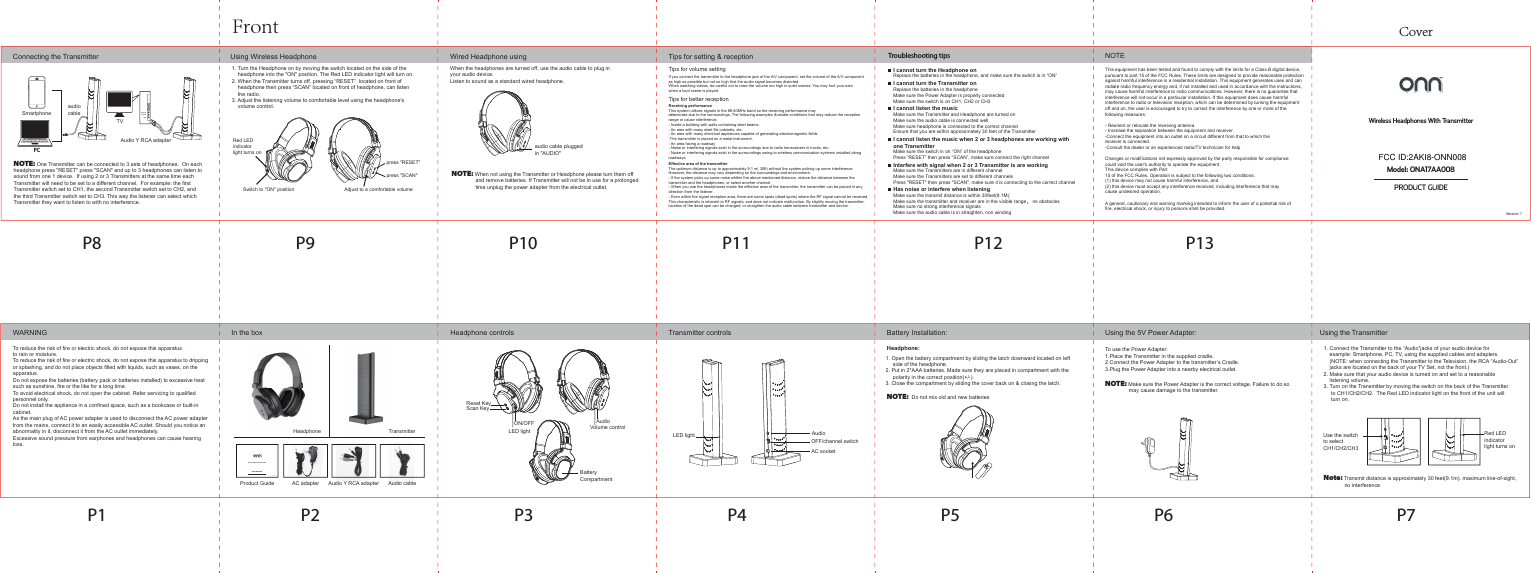
WARNING Headphone controls Transmitter controlsIn the boxTroubleshooting tipsI cannot turn the Headphone onReplace the batteries in the headphone, and make sure the switch is in “ON”Receiving performanceThis system utilizes signals in the 88-40MHz band so the receiving performance maydeteriorate due to the surroundings. The following examples illustrate conditions that may reduce the receptionrange or cause interference.- Inside a building with walls containing steel beams.- An ares with many steel file cabinets, etc.- An area with many electrical appliances capable of generating electromagnetic fields-The transmitter is placed on a metal instrument.- An area facing a roadway- Noise or interfering signals exist in the surroundings due to radio transceivers in trucks, etc.- Noise or interfering signals exist in the surroundings owing to wireless communication systems installed alongroadways.Effective area of the transmitterThe optimum distance is up to approximately 9.1 m( 30ft) without the system picking up some interference.However, the distance may vary depending on the surroundings and environment.- If the system picks up some noise whthin the above mentioned distance, reduce the distance between thetransmitter and the headphones, or select another channel.- When you use the headphones inside the effective area of the transmitter, the transmitter can be placed in anydirection from the listener.- Even within the signal reception area, there are some spots (dead spots) where the RF signal cannot be received.This characteristic is inherent to RF signals, and does not indicate malfunction. By slightly moving the transmitter,location of the dead spot can be changed. or straighten the audio cable between transmitter and device.Using the TransmitterConnecting the TransmitterRed LED indicatorlight turns onUse the switch to select CH1/CH2/CH3Using Wireless Headphone  Wired Headphone using Tips for setting & receptionTips for better receptionTips for volume settingBattery Installation:Switch to "ON" positionRed LED indicatorlight turns onpress "SCAN" press "RESET"Adjust to a comfortable volumeCoverP1 P2 P3 P4 P5P8 P9 P10 P11 P12 P13P6 P71. Turn the Headphone on by moving the switch located on the side of the     headphone into the "ON" position. The Red LED indicator light will turn on.2. When the Transmitter turns off, pressing “RESET”  located on front of     headphone then press “SCAN” located on front of headphone, can listen     the radio.3. Adjust the listening volume to comfortable level using the headphone's     volume control.NOTE: One Transmitter can be connected to 3 sets of headphones.  On each headphone press "RESET" press "SCAN" and up to 3 headphones can listen to sound from one 1 device.  If using 2 or 3 Transmitters at the same time each Transmitter will need to be set to a different channel.  For example: the first Transmitter switch set to CH1, the second Transmitter switch set to CH2, and the third Transmitter switch set to CH3. This way the listener can select which Transmitter they want to listen to with no interference.  audio cable pluggedin "AUDIO"yellowwhiteredHeadphone:1. Open the battery compartment by sliding the latch downward located on left      side of the headphone.2. Put in 2*AAA batteries. Made sure they are placed in compartment with the      polarity in the correct position(+/-).3. Close the compartment by sliding the cover back on & closing the latch.Using the 5V Power Adapter:To use the Power Adapter:1.Place the Transmitter in the supplied cradle.2.Connect the Power Adapter to the transmitter’s Cradle.3.Plug the Power Adapter into a nearby electrical outlet.NOTE: Make sure the Power Adapter is the correct voltage. Failure to do so                 may cause damage to the transmitter. 1. Connect the Transmitter to the “Audio”jacks of your audio device for     example: Smartphone, PC, TV, using the supplied cables and adapters.     (NOTE: when connecting the Transmitter to the Television, the RCA “Audio-Out”     jacks are located on the back of your TV Set, not the front.)2. Make sure that your audio device is turned on and set to a reasonable     listening volume.3. Turn on the Transmitter by moving the switch on the back of the Transmitter      to CH1/CH2/CH2.  The Red LED indicator light on the front of the unit will      turn on.  NOTE: When not using the Transmitter or Headphone please turn them off                 and remove batteries. If Transmitter will not be in use for a prolonged                 time unplug the power adapter from the electrical outlet.TransmitterHeadphoneAC adapter  Audio Y RCA adapter  Audio cableProduct GuideReset KeyScan KeyVolume controlAudioBattery CompartmentLED lightON/OFFLED lightOFF/channel switchAC socketAudio This equipment has been tested and found to comply with the limits for a Class B digital device, pursuant to part 15 of the FCC Rules. These limits are designed to provide reasonable protection against harmful interference in a residential installation. This equipment generates uses and can radiate radio frequency energy and, if not installed and used in accordance with the instructions,may cause harmful interference to radio communications. However, there is no guarantee that interference will not occur in a particular installation. If this equipment does cause harmful interference to radio or television reception, which can be determined by turning the equipment off and on, the user is encouraged to try to correct the interference by one or more of the following measures:- Reorient or relocate the receiving antenna.- Increase the separation between the equipment and receiver.-Connect the equipment into an outlet on a circuit different from that to which thereceiver is connected.-Consult the dealer or an experienced radio/TV technician for helpChanges or modifications not expressly approved by the party responsible for compliancecould void the user's authority to operate the equipment. This device complies with Part15 of the FCC Rules. Operation is subject to the following two conditions:(1) this device may not cause harmful interference, and(2) this device must accept any interference received, including interference that maycause undesired operation.A general, cautionary and warning marking intended to inform the user of a potential risk of fire, electrical shock, or injury to persons shall be provided.If you connect the transmitter to the headphone jack of the A/V component, set the volume of the A/V component as high as possible but not so high that the audio signal becomes distorted.When watching videos, be careful not to raise the volume too high in quiet scenes. You may hurt your ears when a loud scene is played.NOTESmartphoneaudio cablePCTV Audio Y RCA adapter When the headphones are turned off, use the audio cable to plug in your audio device.  Listen to sound as a standard wired headphone.Note: Transmit distance is approximately 30 feet(9.1m). maximum line-of-sight,               no interferenceNOTE:  Do not mix old and new batteriesWireless Headphones With TransmitterModel: ONA17AA008PRODUCT GUIDEWireless Headphones With TransmitterModel: ONA17AA008PRODUCT GUIDEFrontI cannot turn the Transmitter onReplace the batteries in the headphoneMake sure the Power Adapter is properly connectedMake sure the switch is on CH1, CH2 or CH3I cannot listen the musicMake sure the Transmitter and Headphone are turned onMake sure the audio cable is connected well Make sure headphone is connected to the correct channelEnsure that you are within approximately 30 feet of the TransmitterI cannot listen the music when 2 or 3 headphones are working with one TransmitterMake sure the switch in on “ON” of the headphonePress “RESET” then press “SCAN”, make sure connect the right channelInterfere with signal when 2 or 3 Transmitter is are workingMake sure the Transmitters are in different channelMake sure the Transmitters are set to different channelsPress "RESET" then press "SCAN", make sure it is connecting to the correct channelHas noise or interfere when listeningMake sure the transmit distance is within 30feet(9.1M)Make sure the transmitter and receiver are in the visible range, no obstaclesMake sure no strong interference signalsMake sure the audio cable is in straighten, non windingTo reduce the risk of fire or electric shock, do not expose this apparatusto rain or moisture.To reduce the risk of fire or electric shock, do not expose this apparatus to drippingor splashing, and do not place objects filled with liquids, such as vases, on theapparatus.Do not expose the batteries (battery pack or batteries installed) to excessive heatsuch as sunshine, fire or the like for a long time.To avoid electrical shock, do not open the cabinet. Refer servicing to qualifiedpersonnel only.Do not install the appliance in a confined space, such as a bookcase or built-incabinet.As the main plug of AC power adapter is used to disconnect the AC power adapterfrom the mains, connect it to an easily accessible AC outlet. Should you notice anabnormality in it, disconnect it from the AC outlet immediately.Excessive sound pressure from earphones and headphones can cause hearing loss.Version 1Version 1FCC ID:2AKI8-ONN008?FCC ID:2AKI8-ONN008

Navigation menu