TOPWAY EM ENTERPRISE ONNBTINEAR BLUETOOTH IN-EAR HEADPHONES User Manual 16CY01

TOPWAY EM ENTERPRISE LTD. BLUETOOTH IN-EAR HEADPHONES 16CY01

User Manual

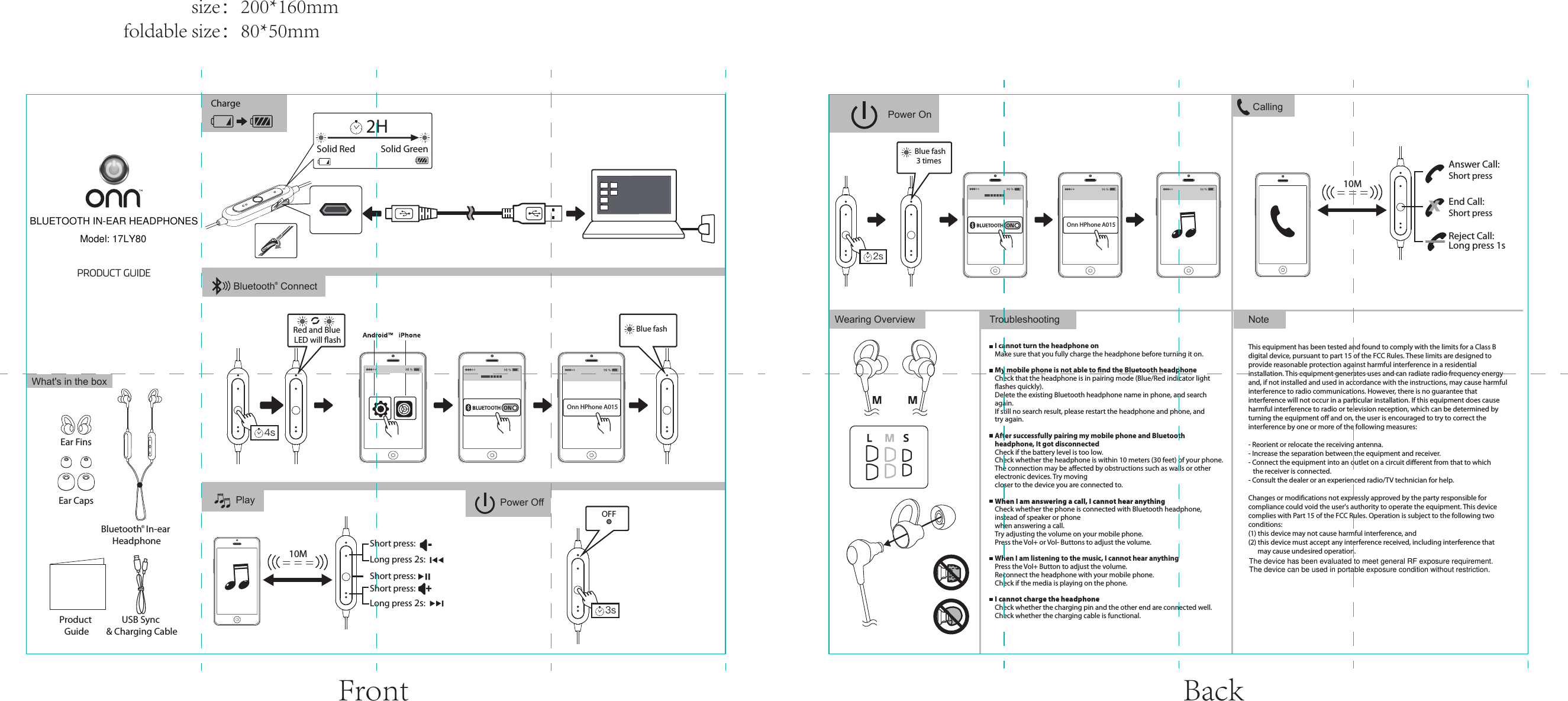
PRODUCT GUIDENoteTroubleshootingThis equipment has been tested and found to comply with the limits for a Class B digital device, pursuant to part 15 of the FCC Rules. These limits are designed to provide reasonable protection against harmful interference in a residential installation. This equipment generates uses and can radiate radio frequency energy and, if not installed and used in accordance with the instructions, may cause harmful interference to radio communications. However, there is no guarantee that interference will not occur in a particular installation. If this equipment does cause harmful interference to radio or television reception, which can be determined by turning the equipment off and on, the user is encouraged to try to correct the interference by one or more of the following measures:- Reorient or relocate the receiving antenna.- Increase the separation between the equipment and receiver.- Connect the equipment into an outlet on a circuit different from that to which    the receiver is connected.- Consult the dealer or an experienced radio/TV technician for help.Changes or modifications not expressly approved by the party responsible for compliance could void the user's authority to operate the equipment. This device complies with Part 15 of the FCC Rules. Operation is subject to the following two conditions:(1) this device may not cause harmful interference, and(2) this device must accept any interference received, including interference that       may cause undesired operation.I cannot turn the headphone onMake sure that you fully charge the headphone before turning it on.My mobile phone is not able to find the Bluetooth headphoneCheck that the headphone is in pairing mode (Blue/Red indicator light flashes quickly).Delete the existing Bluetooth headphone name in phone, and search again.If still no search result, please restart the headphone and phone, and try again.After successfully pairing my mobile phone and Bluetooth headphone, It got disconnectedCheck if the battery level is too low.Check whether the headphone is within 10 meters (30 feet) of your phone.The connection may be affected by obstructions such as walls or other electronic devices. Try moving closer to the device you are connected to. When I am answering a call, I cannot hear anythingCheck whether the phone is connected with Bluetooth headphone, instead of speaker or phone when answering a call.Try adjusting the volume on your mobile phone.Press the Vol+ or Vol- Buttons to adjust the volume.When I am listening to the music, I cannot hear anythingPress the Vol+ Button to adjust the volume.Reconnect the headphone with your mobile phone.Check if the media is playing on the phone.I cannot charge the headphoneCheck whether the charging pin and the other end are connected well.Check whether the charging cable is functional.Wearing OverviewPlayWhat's in the boxProduct GuideUSB Sync & Charging CableEar CapsEar FinsCharge CallingShort pressShort press= = =10MAnswer Call:End Call:XReject Call: Long press 1sOnn HPhone A015Power On= = =10MShort press:Short press:Long press 2s:Long press 2s:Short press:-+Bluetooth  In-ear Headphone®Solid Red Solid GreenRed and Blue LED will flashBlue fash4s2HPower Off3sOnn HPhone A015Blue fash 3 times2sOFFBluetooth  Connect®Front Back                size:200*160mmfoldable size:80*50mmBLUETOOTH IN-EAR HEADPHONESModel: 17LY80The device has been evaluated to meet general RF exposure requirement.The device can be used in portable exposure condition without restriction.

Navigation menu