TYCOFETY KANTECH P600 Long Range RFID Reader User Manual P600 IoProx Long Range

TYCO SAFETY PRODUCTS / KANTECH Long Range RFID Reader P600 IoProx Long Range

User Manual

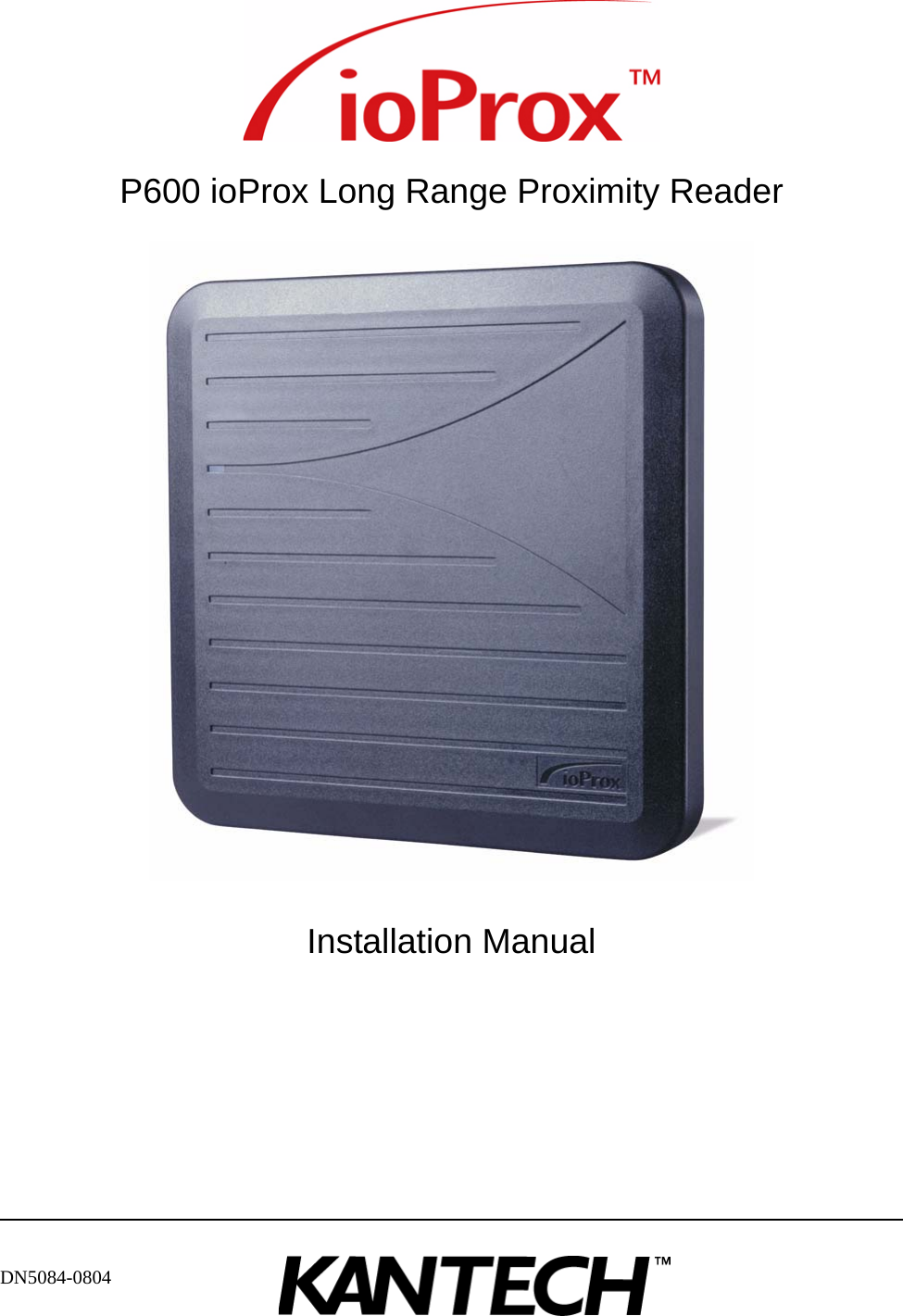
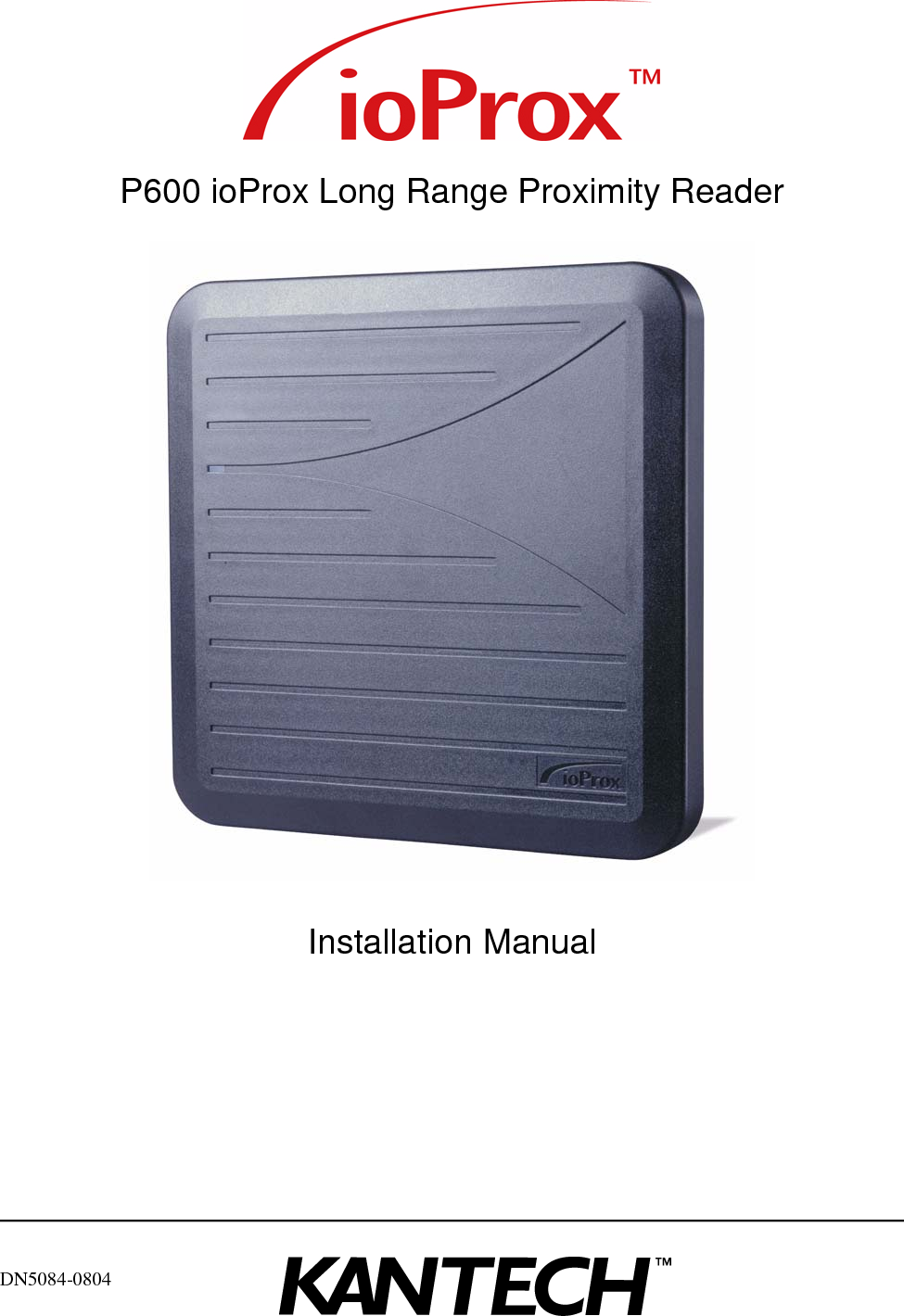
DN5084-0804P600 ioProx Long Range Proximity ReaderInstallation Manual
Copyright © 2008 Tyco International Ltd. and its Respective Companies. All Rights Reserved. All specifications were current as of publication date and are subject to change without notice.
DN5084-0804 iiiSafety InstructionsThe P600 ioProx Long Range Reader is designed to be INSTALLED and MAINTAINED by SERVICE PERSONNEL ONLY. Service personnel must have appropriate technical training and experience necessary to be aware of the hazards to which they are exposed and of measures to minimize the danger to themselves or other persons.The Equipment is a FIXED Class III equipment designed for CONTINUOUS OPERATION. It shall be installed in NON HAZARDOUS LOCATIONS ONLY, OVERVOLTAGE CATEGORY II, and it shall be powered via a LIMITED POWER SOURCE as it is defined within the Clause 2.5 EN60950:2000. The equipment shall be interconnected with other equipment by using cables insulated with PVC, TFE, PTFE, FEP, neoprene or polymide and which are RATED for the intended environment.The ENCLOSURE of the P600 ioProx Long Range Reader must be secured to the building structure before operation.The connection to the mains supply must be made as per the local authorities’ rules and regulations. An appropriate disconnect device shall be provided as part of the building Installation; Where it is not possible to rely on the identification of the NEUTRAL in the AC MAINS SUPPLY, the disconnecting device shall disconnect both poles simultaneously (LINE and NEUTRAL).Regarding the power supply:• It shall be PERMANENTLY CONNECTED, • In European Union countries, it shall meet the applicable requirements of the Low Voltage Directive and protected, as per the EN60950 Standard,• In all other countries, it shall be of an approved type acceptable to the local authorities.If during the installation, OPENINGS are made in the PLASTIC ENCLOSURE, it is the installer’s responsibility to ensure that the same degree of protection for the ENCLOSURE as it has before will be provided, by the use of bushings, fittings, adequate sealant, etc. (These must be appropriate for the expected environmental conditions).Internal wiring shall be routed in a manner that prevents:• Excessive strain on wires and on terminal connections,• Loosening of terminal connections,• Damage of conductor insulation. It is the end-user’s and/or installer’s responsibility to ensure that used batteries are disposed according to the waste recovery and recycling regulations applicable to the intended market. The intended to be used batteries shall be in full conformance with 91/157/EEC Directive.ATTENTION: THERE IS HIGH VOLTAGE (UP TO 900 VAC) BETWEEN SAFETY EXTRA LOW POWER CIRCUIT AND THE ANTENNA: RISK OF ELECTRIC SHOCK, DO NOT TOUCH BOTH CIRCUITS AT THE SAME TIME. DISCONNECT THE POWER WHEN SERVICING THE READER CIRCUIT.CE Compliance Notice for EN 50130-4:Please note that 18AWG shielded cable must be used to comply with EN 50130-4.FCC compliance notice:Changes or modifications not expressly approved by the party responsible for compliance could void the user's authority to operate the equipment.
iv DN5084-0804This equipment has been tested and found to comply with the limits for a Class B digital device, pursuant to part 15 of the FCC Rules. These limits are designed to provide reasonable protection against harmful interference in a residential installation. This equipment generates, uses and can radiate radio frequency energy and, if not installed and used in accordance with the instructions, may cause harmful interference to radio communications. However, there is no guarantee that interference will not occur in a particular installation. If this equipment does cause harmful interference to radio or television reception, which can be determined by turning the equipment off and on, the user is encouraged to try to correct the interference by one or more of the following measures:• Reorient or relocate the receiving antenna.• Increase the separation between the equipment and receiver.• Connect the equipment into an outlet on a circuit different from that to which the receiver is connected.
P600 ioProx Long Range Reader Installation ManualDN5084-0804 vTable of ContentsSystem Overview ...................................................................................................7Specifications .................................................................................................................7Operations .....................................................................................................................8Installing the P600 Proximity Long Range Reader  ................................................9Opening the Enclosure  ................................................................................................... 9Setting the Data Format ................................................................................................ 10Installing the Strain Relief and Connecting Cables  ......................................................... 11Mounting the P600  ..............................................................................................13Installing the P600 on a Wall ......................................................................................... 14Installing the P600 on an Electrical Box  ......................................................................... 14Installing the P600 on an Electrical Post ........................................................................ 14Installing the P600 on a Gooseneck ............................................................................... 15Weatherproofing the P600  ............................................................................................ 16Wiring the P600  ...................................................................................................17Wiring .......................................................................................................................... 17Closing the Enclosure ................................................................................................... 18 Applying the Power ...................................................................................................... 18Testing ........................................................................................................................19Installation Notes and Guidelines  .......................................................................21Power Supply  ............................................................................................................... 21Installation Near Metal .................................................................................................. 21Radio Frequency Interference  ....................................................................................... 22Transponder Type  ........................................................................................................ 22
Installation Manual P600 ioProx Long Range Readervi DN5084-0804
P600 ioProx Long Range Proximity Reader Installation ManualDN5084-0804 7Chapter 1 • System OverviewThe P600 Long Range Reader is a self-contained and weather sealed proximity reader designed for outdoor and indoor use. The two-piece polycarbonate cover fits tightly over a foam gasket, offering security against weather. A cable fitting (strain relief) seals the cable entry. The reader uses a non-shielded 18AWG to 22 AWG cable. The P600 Long Range Proximity Reader can be powered from 12VDC to 28VDC. A bi-color LED and audible tone provide user feedback. A single dipswitch gives field configuration for Kantech Extended Secure Format (XSF) or 26-bit Wiegand data output format.A tamper switch alerts the host (controller) of intrusion. Closing the cover activates the tamper switch by pressing down the post on the lever of the switch. 1.1 SpecificationsTypical read range..............................Up to 29" (73 cm) Input voltage ......................................12 to 28 VDCMaximum peak current......................1ADimensions (H x W x D) in ..............11.25 x 11.25 x 1.25Dimensions (H x W x D) cm .............28.5 x 28.5 x 3.15Color ..................................................BlackTransmit frequency ............................125 KHzLED indicator ....................................Bicolor (red and green)Piezo buzzer.......................................IntegratedTamper switch....................................Integrated (normally closed when secured)Operating temperatures......................-35ºC to 65ºC (-30ºF to 150ºF)Reader format ....................................26-bit Wiegand or Kantech XSF format (field selectable)Cable ..................................................18 AWG or 22 AWG wires (For details, refer to Table “Cable Length and Reading Range” on page 11)Compatible cards ...............................P10SHL, P20DYE, P30DMG, P40KEY.Certification .......................................FCC Part 15, Class B; ICES-003; UL294; CE approved (EN 55022, EN 50130-4, EN 60950)Note For best reading results it is strongly recommended to use 18 AWG non-shielded cable such as BELDEN 5304UE (six wires) or BELDEN 5306UE (eight wires) when the tamper switch is used. Best reading results are obtained when a 12 VDC power supply is used.
Installation Manual P600 ioProx Long Range Proximity Reader8DN5084-08041.2 OperationsAt power-up the P600 emits beeps and flashes the LED. The number of beeps and flashes depends on the dipswitch mode selection, Kantech XSF or Wiegand. If the reader is set to 26-bit Wiegand, it sounds four beeps and the LED flashes three times. If it is set to Kantech XSF format, it sounds two beeps and the LED flashes two times. When a card is presented, the reader evaluates the card ID for a standard Kantech format. If the card is valid, the data are sent to the controller for user identification and a beep is heard while the LED turns solid green for a minimum of 1/4 second (extended duration depends on the controller setting). If permission is granted, the door unlocks. The next card can be read only after the current card is moved out of the field (36 inches minimum from the reader) for a period of at least one second. Note The best read range is achieved with P10SHL cards; there will be a reduced read range with P20DYE, P30DMG and P40KEY cards.
P600 ioProx Long Range Proximity Reader Installation ManualDN5084-0804 9Chapter 2 • Installing the P600 Proximity Long Range ReaderIn choosing a location for mounting the reader, keep the following considerations in mind: no metallic and PC monitor should be near the P600 location (10 m (30 feet) minimum).The reader can be installed on:• A wall, • A single or double gang electrical box,• An electrical post,• A goose neck or pedestal.The P600 can be mounted and installed in seven easy steps:1. Opening the enclosure,2. Setting the required data format (Kantech XSF or 26-bit Wiegand),3. Installing the strain relief and connecting the cable, 4. Mounting the reader to its location, 5. Closing the enclosure, 6. Powering up the power supply and the host (12 or 24VDC), 7. Verifying the reading with a transponder (card).2.1 Opening the EnclosureIt is easy to open and close the enclosure. Three sets of attachments allow you to open and close the casing as illustrated by Figure 1.• Two hinges on the top of the unit that give an angular movement of 15º from the base, • A notch on the bottom of the case that temporarily holds the cover over the base, • Two screws that insure the robustness and seal of the enclosure.
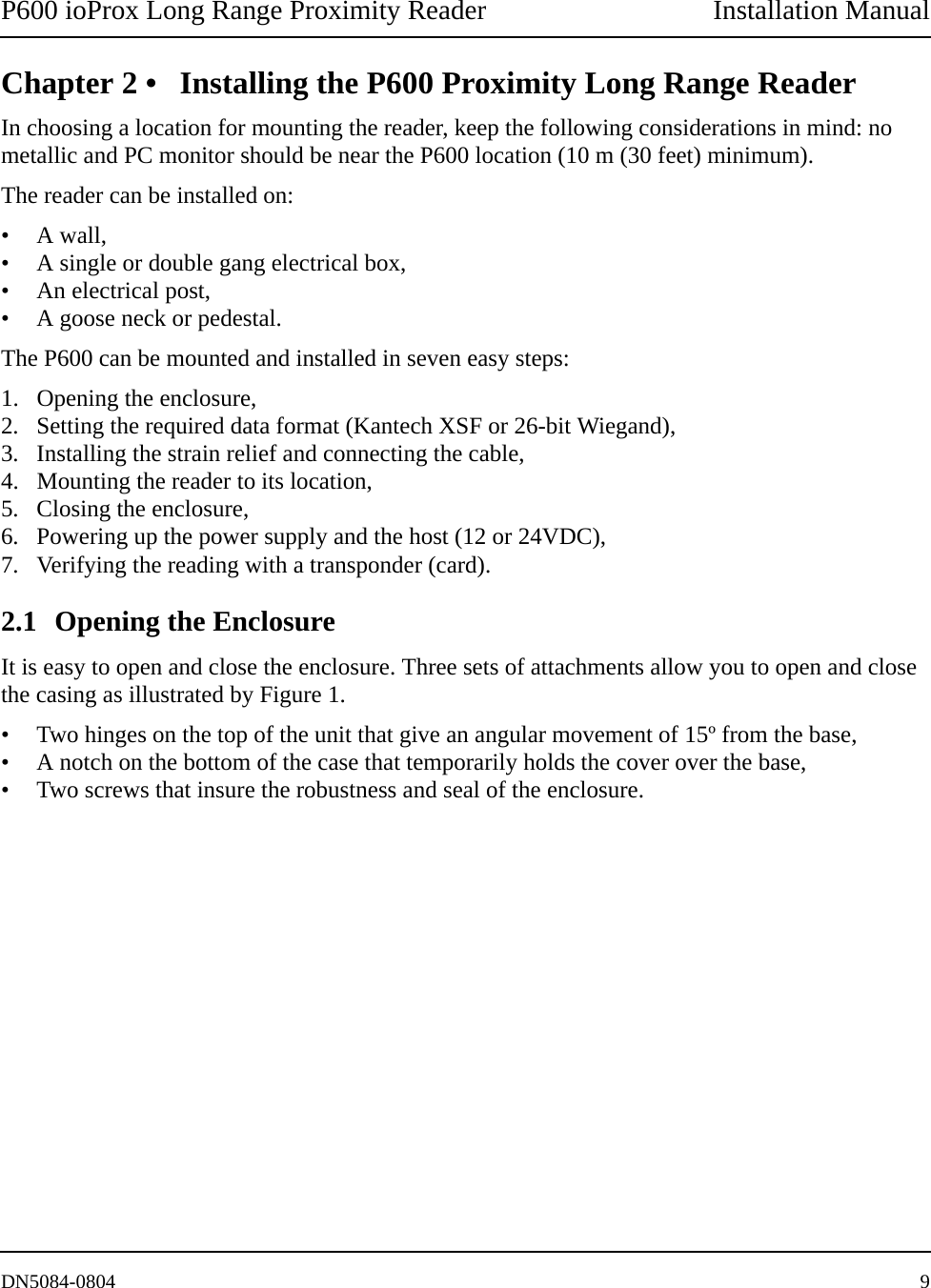
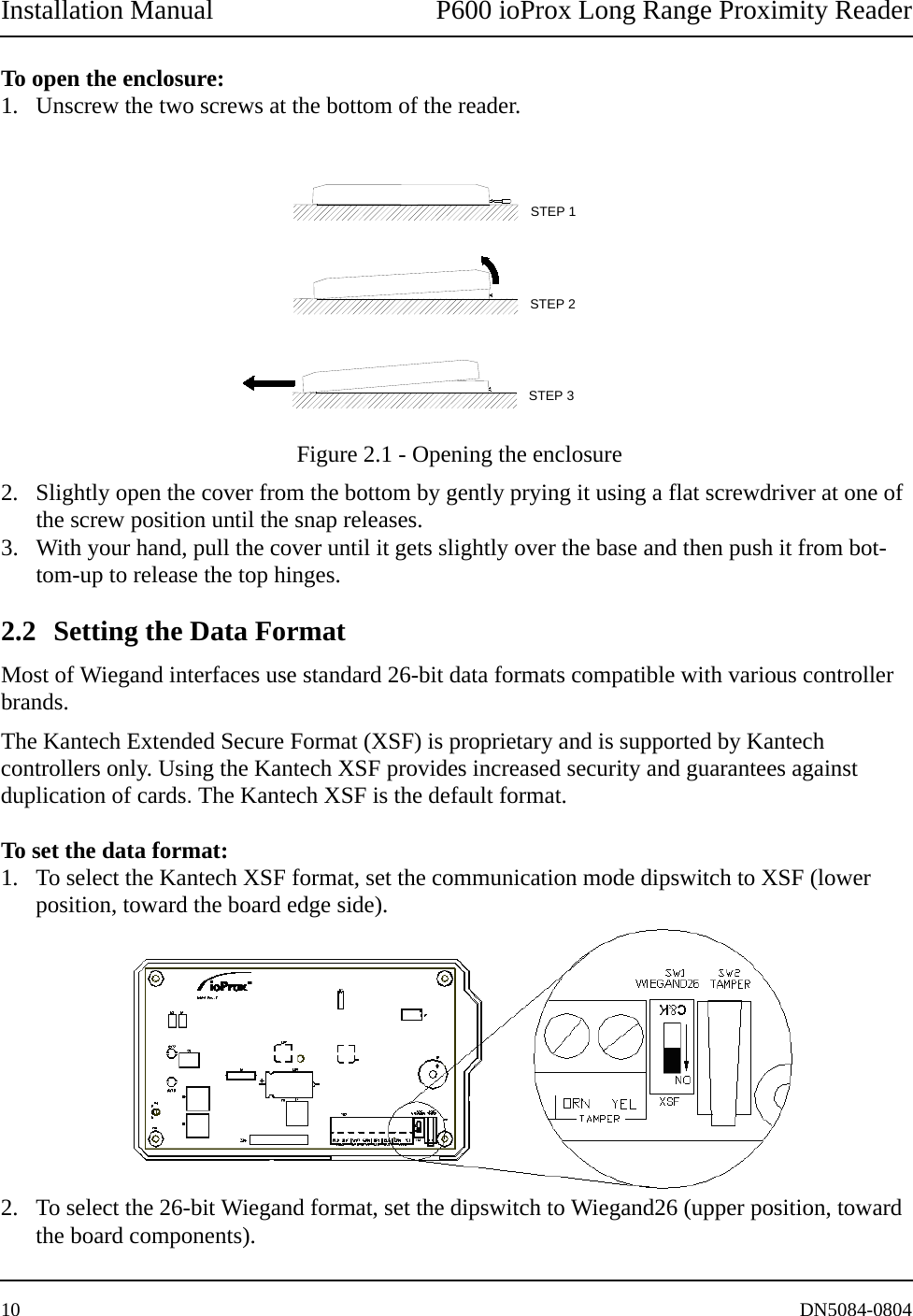
Installation Manual P600 ioProx Long Range Proximity Reader10 DN5084-0804To open the enclosure: 1. Unscrew the two screws at the bottom of the reader.  Figure 2.1 - Opening the enclosure2. Slightly open the cover from the bottom by gently prying it using a flat screwdriver at one of the screw position until the snap releases. 3. With your hand, pull the cover until it gets slightly over the base and then push it from bot-tom-up to release the top hinges. 2.2 Setting the Data Format Most of Wiegand interfaces use standard 26-bit data formats compatible with various controller brands. The Kantech Extended Secure Format (XSF) is proprietary and is supported by Kantech controllers only. Using the Kantech XSF provides increased security and guarantees against duplication of cards. The Kantech XSF is the default format.To set the data format:1. To select the Kantech XSF format, set the communication mode dipswitch to XSF (lower position, toward the board edge side).2. To select the 26-bit Wiegand format, set the dipswitch to Wiegand26 (upper position, toward the board components).STEP 3STEP 2STEP 1
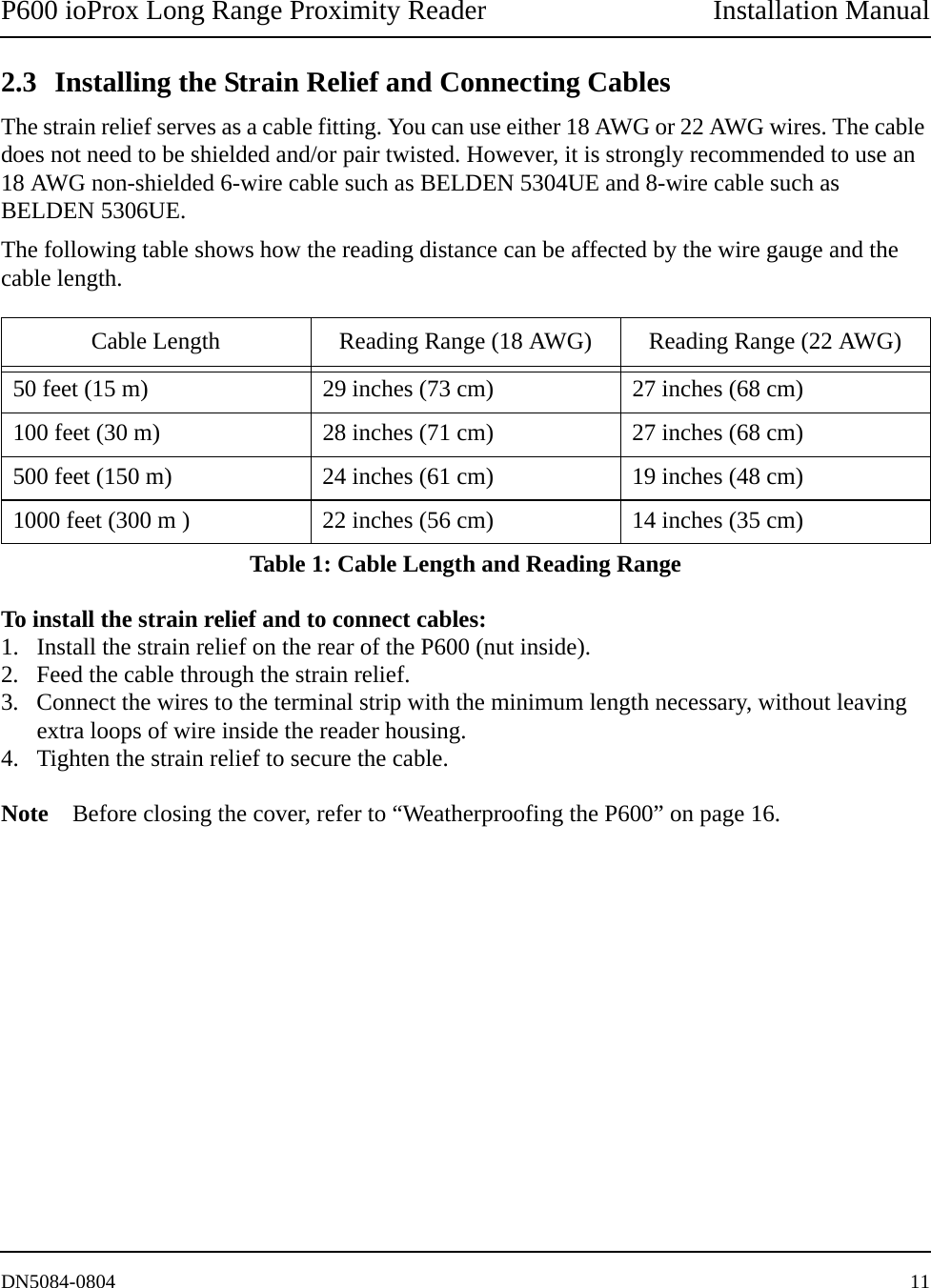
P600 ioProx Long Range Proximity Reader Installation ManualDN5084-0804 112.3 Installing the Strain Relief and Connecting CablesThe strain relief serves as a cable fitting. You can use either 18 AWG or 22 AWG wires. The cable does not need to be shielded and/or pair twisted. However, it is strongly recommended to use an 18 AWG non-shielded 6-wire cable such as BELDEN 5304UE and 8-wire cable such as BELDEN 5306UE.The following table shows how the reading distance can be affected by the wire gauge and the cable length.To install the strain relief and to connect cables:1. Install the strain relief on the rear of the P600 (nut inside). 2. Feed the cable through the strain relief.3. Connect the wires to the terminal strip with the minimum length necessary, without leaving extra loops of wire inside the reader housing.4. Tighten the strain relief to secure the cable.Note Before closing the cover, refer to “Weatherproofing the P600” on page 16.Cable Length Reading Range (18 AWG) Reading Range (22 AWG)50 feet (15 m) 29 inches (73 cm) 27 inches (68 cm)100 feet (30 m) 28 inches (71 cm) 27 inches (68 cm)500 feet (150 m) 24 inches (61 cm) 19 inches (48 cm)1000 feet (300 m ) 22 inches (56 cm) 14 inches (35 cm)Table 1: Cable Length and Reading Range
Installation Manual P600 ioProx Long Range Proximity Reader12 DN5084-0804
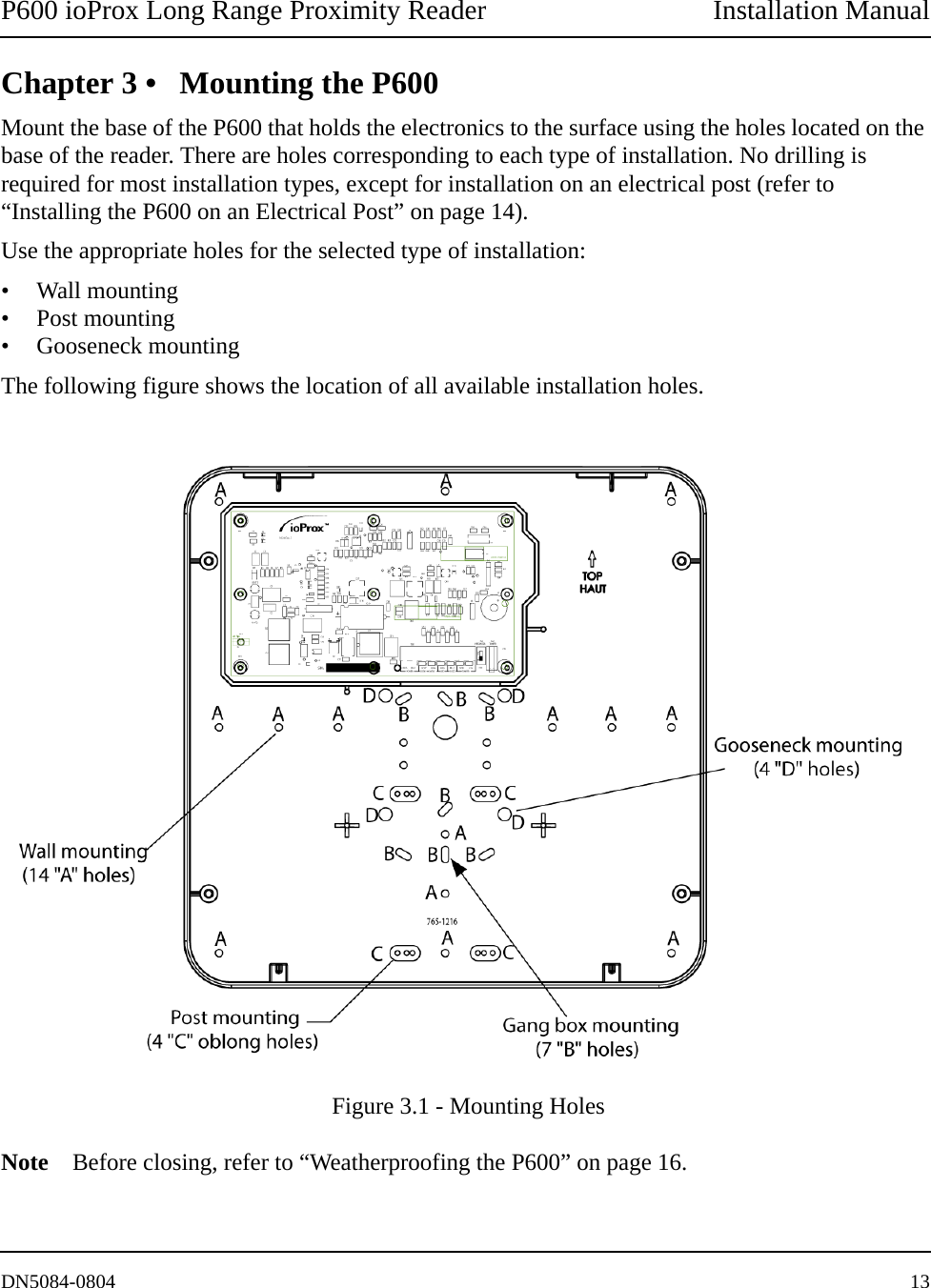
P600 ioProx Long Range Proximity Reader Installation ManualDN5084-0804 13Chapter 3 • Mounting the P600Mount the base of the P600 that holds the electronics to the surface using the holes located on the base of the reader. There are holes corresponding to each type of installation. No drilling is required for most installation types, except for installation on an electrical post (refer to “Installing the P600 on an Electrical Post” on page 14).Use the appropriate holes for the selected type of installation:• Wall mounting• Post mounting• Gooseneck mountingThe following figure shows the location of all available installation holes.  Figure 3.1 - Mounting HolesNote Before closing, refer to “Weatherproofing the P600” on page 16.
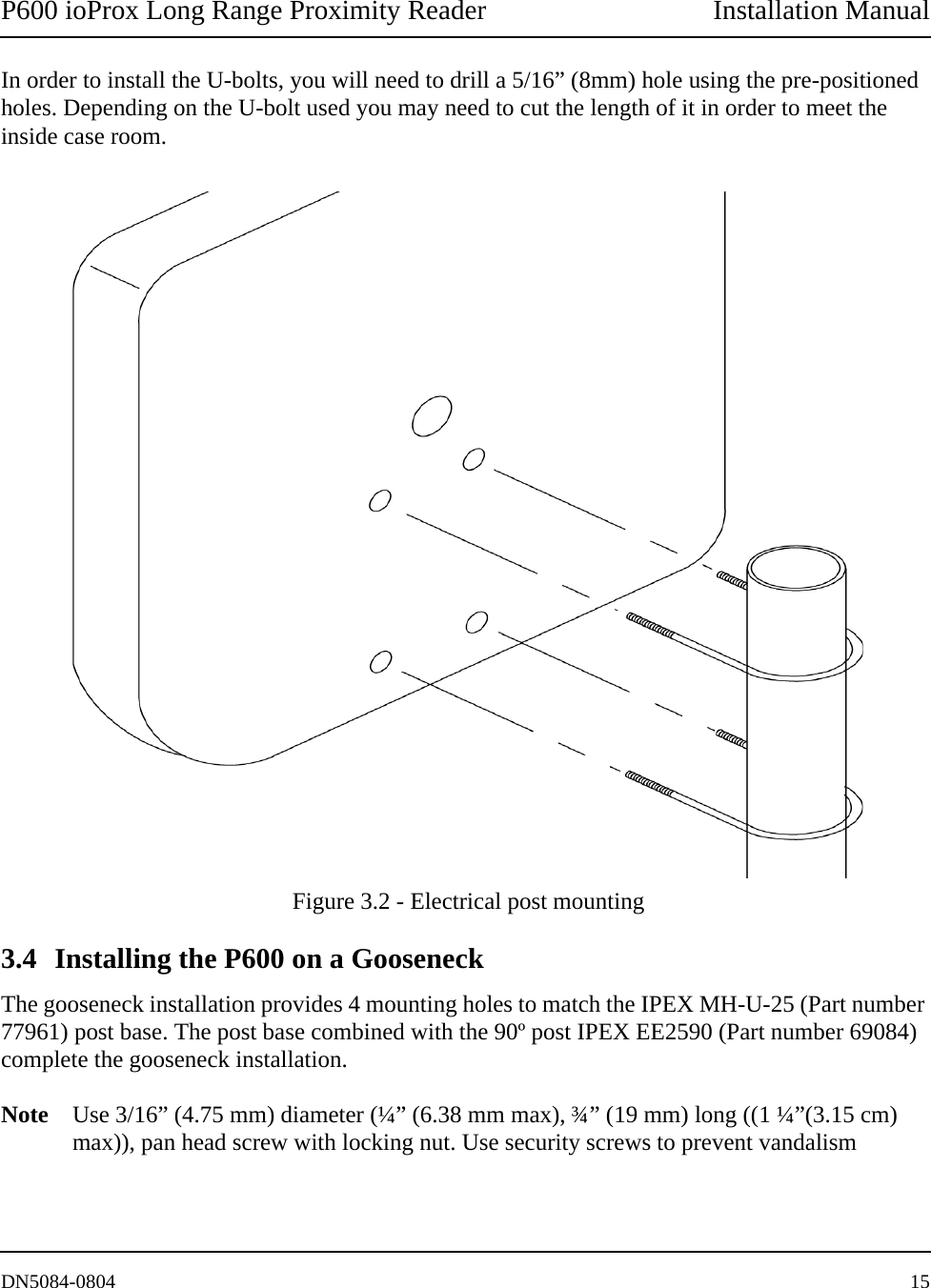
Installation Manual P600 ioProx Long Range Proximity Reader14 DN5084-08043.1 Installing the P600 on a WallWall mounting is preferably done onto a flat surface. There are 14 well distributed holes for easy installation on a wall. Caution! If you are mounting the reader on a brick wall, care should be taken not to force the screws in a manner to curve the casing. This could reduce the efficiency of the seal from the base to the top.No drill is required as a little pressure with a screwdriver or the screw will pierce any excess plastic left over. Refer to Figure 3.1 for all 14 “A” hole positions.3.2 Installing the P600 on an Electrical BoxFor electrical box installation, there are 11 holes to satisfy the North American single and double gang box and the European single gang box. Refer to Figure 3.1 for the 11 “B” hole positions. 3.3 Installing the P600 on an Electrical PostTwo U-bolts allow for installation on an electrical post. There are four oblong mounting areas (two per U-bolts) to accommodate three different post diameters with pre-positioned holes to satisfy U-bolts of 1 ½” (3.8 cm), 1 ¼” (3.15 cm) and 1" (2.5 cm). Refer to Figure 3.1 for all “C” hole positions. The suggested installation is to bring the top of the PVC post up to the strain relief and run the cable through the strain relief and the post. For mounting the P600 on an electrical post, refer to “Electrical post mounting” on page 15.
P600 ioProx Long Range Proximity Reader Installation ManualDN5084-0804 15In order to install the U-bolts, you will need to drill a 5/16” (8mm) hole using the pre-positioned holes. Depending on the U-bolt used you may need to cut the length of it in order to meet the inside case room. Figure 3.2 - Electrical post mounting3.4 Installing the P600 on a GooseneckThe gooseneck installation provides 4 mounting holes to match the IPEX MH-U-25 (Part number 77961) post base. The post base combined with the 90º post IPEX EE2590 (Part number 69084) complete the gooseneck installation. Note Use 3/16” (4.75 mm) diameter (¼” (6.38 mm max), ¾” (19 mm) long ((1 ¼”(3.15 cm) max)), pan head screw with locking nut. Use security screws to prevent vandalism
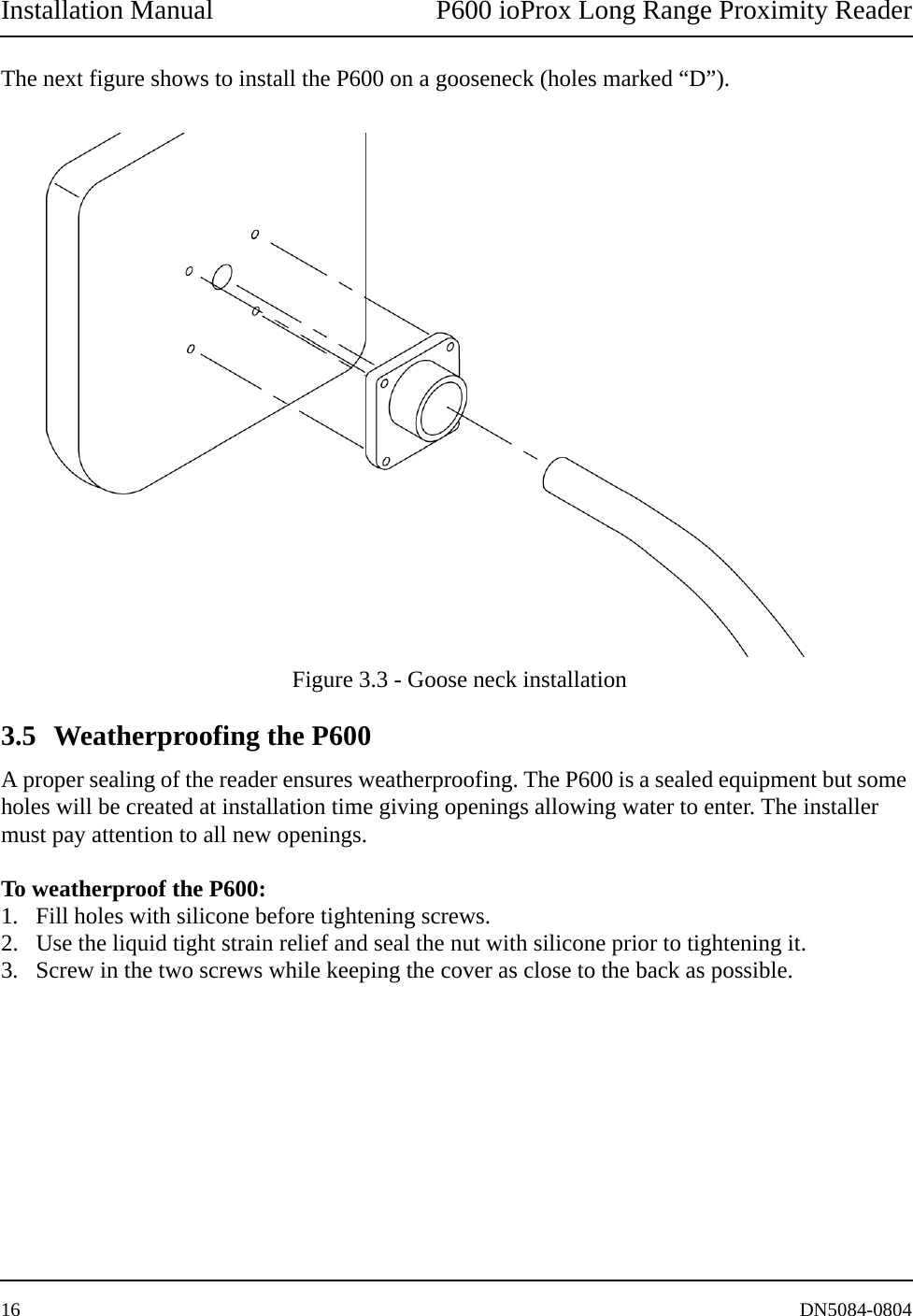
Installation Manual P600 ioProx Long Range Proximity Reader16 DN5084-0804The next figure shows to install the P600 on a gooseneck (holes marked “D”). Figure 3.3 - Goose neck installation3.5 Weatherproofing the P600A proper sealing of the reader ensures weatherproofing. The P600 is a sealed equipment but some holes will be created at installation time giving openings allowing water to enter. The installer must pay attention to all new openings. To weatherproof the P600:1. Fill holes with silicone before tightening screws. 2. Use the liquid tight strain relief and seal the nut with silicone prior to tightening it. 3. Screw in the two screws while keeping the cover as close to the back as possible.
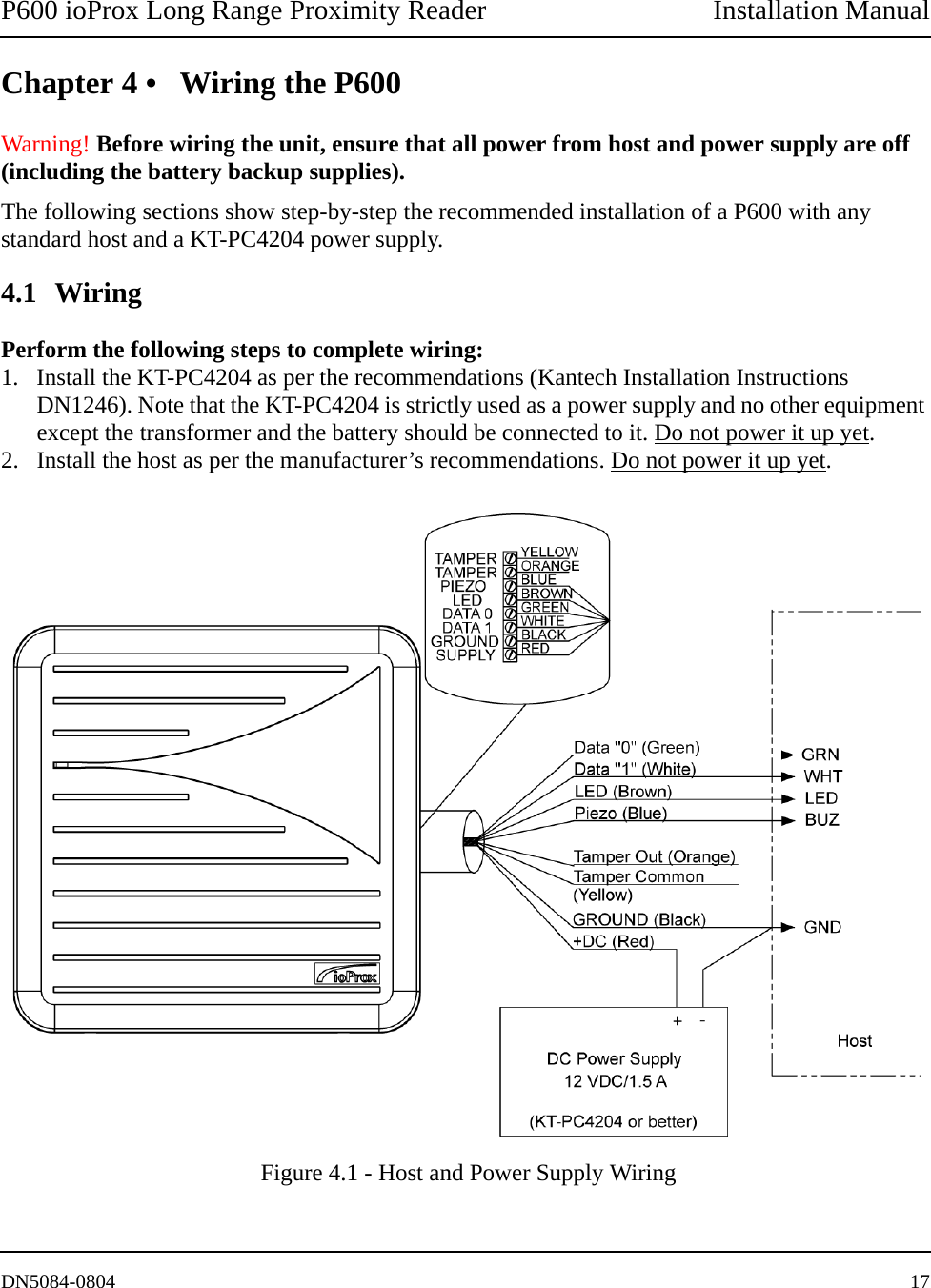
P600 ioProx Long Range Proximity Reader Installation ManualDN5084-0804 17Chapter 4 • Wiring the P600Warning! Before wiring the unit, ensure that all power from host and power supply are off (including the battery backup supplies).The following sections show step-by-step the recommended installation of a P600 with any standard host and a KT-PC4204 power supply.4.1 WiringPerform the following steps to complete wiring:1. Install the KT-PC4204 as per the recommendations (Kantech Installation Instructions DN1246). Note that the KT-PC4204 is strictly used as a power supply and no other equipment except the transformer and the battery should be connected to it. Do not power it up yet.2. Install the host as per the manufacturer’s recommendations. Do not power it up yet. Figure 4.1 - Host and Power Supply Wiring
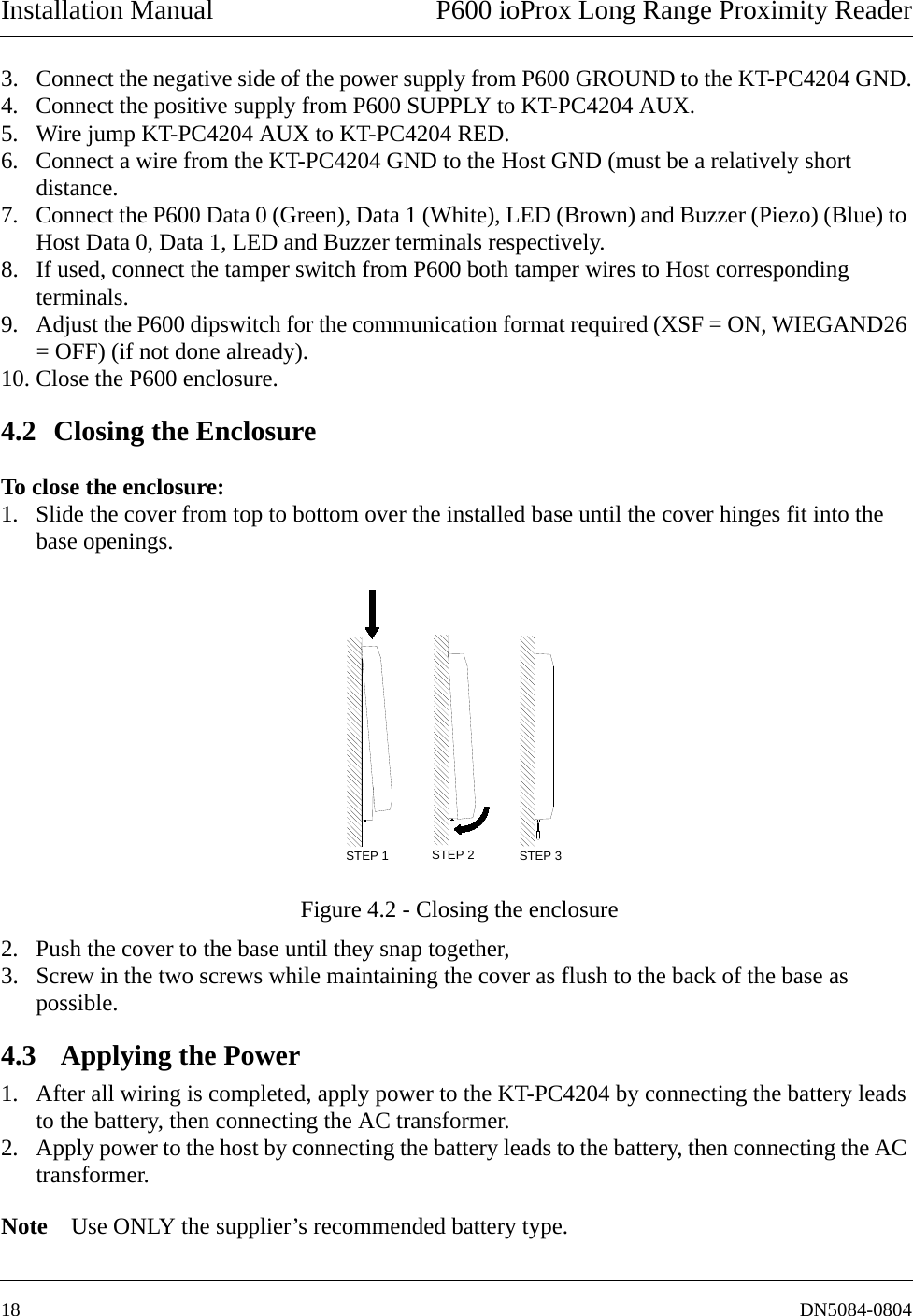
Installation Manual P600 ioProx Long Range Proximity Reader18 DN5084-08043. Connect the negative side of the power supply from P600 GROUND to the KT-PC4204 GND.4. Connect the positive supply from P600 SUPPLY to KT-PC4204 AUX.5. Wire jump KT-PC4204 AUX to KT-PC4204 RED.6. Connect a wire from the KT-PC4204 GND to the Host GND (must be a relatively short distance.7. Connect the P600 Data 0 (Green), Data 1 (White), LED (Brown) and Buzzer (Piezo) (Blue) to Host Data 0, Data 1, LED and Buzzer terminals respectively. 8. If used, connect the tamper switch from P600 both tamper wires to Host corresponding terminals. 9. Adjust the P600 dipswitch for the communication format required (XSF = ON, WIEGAND26 = OFF) (if not done already).10. Close the P600 enclosure.4.2 Closing the EnclosureTo close the enclosure:1. Slide the cover from top to bottom over the installed base until the cover hinges fit into the base openings. Figure 4.2 - Closing the enclosure2. Push the cover to the base until they snap together, 3. Screw in the two screws while maintaining the cover as flush to the back of the base as possible. 4.3  Applying the Power1. After all wiring is completed, apply power to the KT-PC4204 by connecting the battery leads to the battery, then connecting the AC transformer. 2. Apply power to the host by connecting the battery leads to the battery, then connecting the AC transformer.Note Use ONLY the supplier’s recommended battery type.STEP 2STEP 1 STEP 3
P600 ioProx Long Range Proximity Reader Installation ManualDN5084-0804 194.4 TestingTest for read range with a valid Kantech proximity card (P10 SHL). It is important to understand that the Host must be configured in order to accept the data from the reader. If the reader does not work properly, refer to “Troubleshooting” on page 23.
Installation Manual P600 ioProx Long Range Proximity Reader20 DN5084-0804
P600 ioProx Long Range Proximity Reader Installation ManualDN5084-0804 21Chapter 5 • Installation Notes and GuidelinesVarious factors may affect the read range of the P600:• Installation near metal,• Radio frequency interference,• Transponder type.The following sections will enable you to find solutions should the read range of the P600 be reduced.5.1 Power SupplyThe recommended power supply is 12VDC, nominal 1.5A current rating, linear regulated with 7Amps/hour battery backup. The P600 can also work with a power supply up to 28VDC but the reading distance will decrease. Note The above are recommended installation procedures. All local, state and national electri-cal codes have precedence.Warning!Do not use a switching power supply:• This type of supply does not provide adequate response to rapid transient current loads and also generates radio frequency (RF) interference in the same band where the reader receives data,• This type of power supply may generate enough noise to be transmitted or conducted to the P600”. This may interfere with the reception of a card signal as some switching power supplies are not suitable to provide adequate regulation to the P600 reader.5.2 Installation Near MetalThe P600 generates a electromagnetic field on all sides of the reader. Any metal that conducts electricity, especially metal that contains iron, steel, aluminium or copper will interfere with the field and will reduce the effective read range (this will happen even if the metal is behind the reader). Note The typical read range specification refers to operation without metal in the vicinity of the reader. The distance will be reduced if metal is installed nearby.Read range will be reduced if the P600 is located on metal surfaces or in vicinity of metal objects. The amount of reduction will depend on the amount of metal and the distance between the P600 and the metal. Metal near the reader absorbs energy from the reader excite field and affects the signal being received from the card by re-directing excite field transmissions into the receiver circuitry.
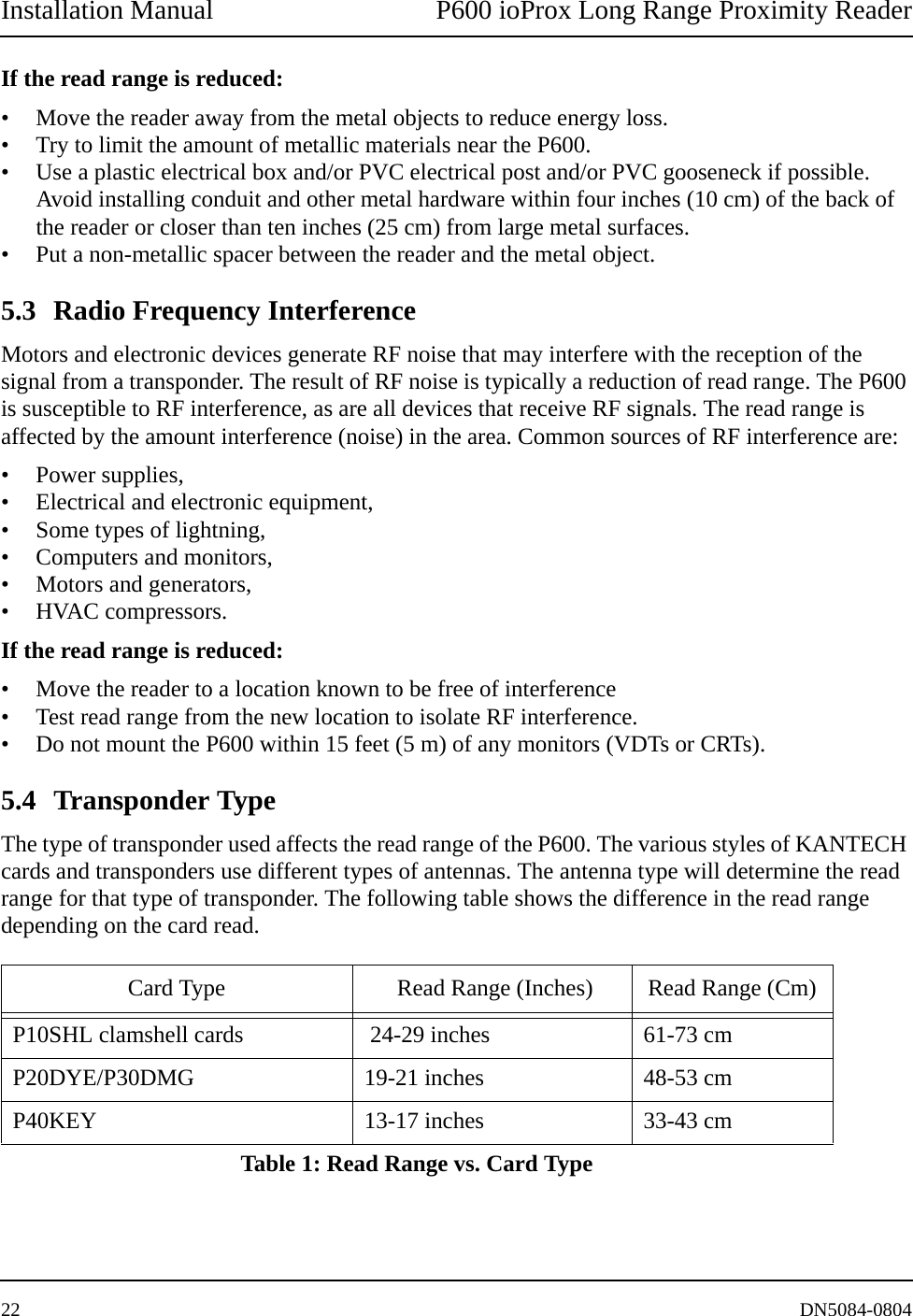
Installation Manual P600 ioProx Long Range Proximity Reader22 DN5084-0804If the read range is reduced:• Move the reader away from the metal objects to reduce energy loss.• Try to limit the amount of metallic materials near the P600. • Use a plastic electrical box and/or PVC electrical post and/or PVC gooseneck if possible. Avoid installing conduit and other metal hardware within four inches (10 cm) of the back of the reader or closer than ten inches (25 cm) from large metal surfaces.• Put a non-metallic spacer between the reader and the metal object. 5.3 Radio Frequency InterferenceMotors and electronic devices generate RF noise that may interfere with the reception of the signal from a transponder. The result of RF noise is typically a reduction of read range. The P600 is susceptible to RF interference, as are all devices that receive RF signals. The read range is affected by the amount interference (noise) in the area. Common sources of RF interference are:• Power supplies, • Electrical and electronic equipment, • Some types of lightning, • Computers and monitors, • Motors and generators,• HVAC compressors. If the read range is reduced:• Move the reader to a location known to be free of interference• Test read range from the new location to isolate RF interference.• Do not mount the P600 within 15 feet (5 m) of any monitors (VDTs or CRTs). 5.4 Transponder TypeThe type of transponder used affects the read range of the P600. The various styles of KANTECH cards and transponders use different types of antennas. The antenna type will determine the read range for that type of transponder. The following table shows the difference in the read range depending on the card read.Card Type  Read Range (Inches) Read Range (Cm)P10SHL clamshell cards  24-29 inches 61-73 cmP20DYE/P30DMG 19-21 inches 48-53 cmP40KEY 13-17 inches 33-43 cmTable 1: Read Range vs. Card Type
P600 ioProx Long Range Proximity Reader Installation ManualDN5084-0804 23TroubleshootingWarning! Troubleshooting should be performed by qualified service personnel only. Before calling the Technical support, verify the following:Reader doesn’t read1. Verify that no other proximity cards are in the reading field (up to 36 inches (91 cm) from the reader).2. Is a linear voltage regulated power supply being used with a backup battery? (12V@1.5A). The use of switching power supplies is not recommended.3. Is a DC common connected between the external power supply and the door controller?4. Is the correct proximity card being used? (P10SHL, P20DMG, P30DMG, P40KEY).5. Is the recommended cable being used? And is the maximum length respected?6. Is the LED amber? If yes, there is not sufficient power for the reader. Verify the power supply and wiring.7. Verify the voltage at the terminals RED BLK. It should measure between 12.0-13.7VDC for a 12V supply and 24.0-27.6VDC for a 24V supply.8. Verify that no other proximity cards are in the reading field (up to 36 inches (91 cm) from the reader).9. Is there ice buildup on the printed circuit or antenna posts? If yes, return the reader.Reader has reduced read range1. Is a linear voltage regulated power supply being used with a backup battery? (12V@1.5A) The use of switching power supplies is not recommended.2. Is the reader installed on a beam, pole, pedestal or other metallic material, which could cause interference?3. Is there a computer monitor (CRT) within 15 feet (5 m)? Note also that dye sub cards (P20DMG, P30DMG) and keyfobs (P40KEY) will have less read range than their clamshell counterpart (P10SHL) because of their smaller antenna.4. Is the reader concealed in a box, cabinet, or behind a wall, which may interfere?5. Verify the voltage at the terminals RED BLK. It should measure between 12.0-13.7VDC. Though the reader works up to 27.6VDC, optimal performance is in the 12VDC range to accommodate the antenna tuning.6. Is there a DC common GND connected between the power supply and the door controller? LED doesn’t flash or change color upon a card approach1. Verify that no other proximity cards are in the reading field (up to 36” from the reader).2. Verify that the “brown” wire or LED terminal is connected to the door controller's output.3. Verify that the door controller's output programming is ok.
Installation Manual P600 ioProx Long Range Proximity Reader24 DN5084-08044. The LED must turn green when connecting the “BRN” or LED terminal to the reader’s ground. If not, return the reader.Reader BUZZER doesn’t sound1. Verify that the “blue” wire or Buzzer terminal is connected to the door controller's output.2. Verify that the door controller's output programming is ok.3. The BUZZER must be heard when connecting the “BLU” or Piezo terminal to ground. If not, return the readerReader doesn't read correct card number1. Verify that the XSF/W26 switch is in the correct position.2. Verify that the door controller's reader type (XSF or Weigand 26 bits) is properly pro-grammed.3. Verify that the correct proximity card is being used (P10SHL, P20DMG, P30DMG, P40KEY).4. Verify that there is communication between the reader and the door controller.Reader works intermittently1. Is it working in a harsh environment such as machine shop or construction site?2. Is there ice buildup on the printed circuit or antenna posts? If so, return the reader.3. Is there water leakage or evidence of water on the printed circuit or antenna posts? If yes, return the reader.4. Is the power supply dedicated?5. Is the reader installed near an air conditioning or HVAC unit, which comes on (causing induc-tive kickback) at different times of day?6. Is there an intercom unit located near the reader, whose wires or operation may interfere?
Tel: +1(450) 444-2030 • Toll Free: US & Canada: +1 888 222-1560 • Fax: +1(450) 444-2029www.kantech.comkantechsupport@tycoint.comCopyright © 2008 Tyco International Ltd. and its Respective Companies. All Rights Reserved. All specifications were current as of publication date and are subject to change without notice.DN5084-0804

Navigation menu