TandD 50040 WIRELESS CO2 RECORDER User Manual RTR 576 US ENG 1 indd
TandD Corporation WIRELESS CO2 RECORDER RTR 576 US ENG 1 indd
TandD >
Users Manual
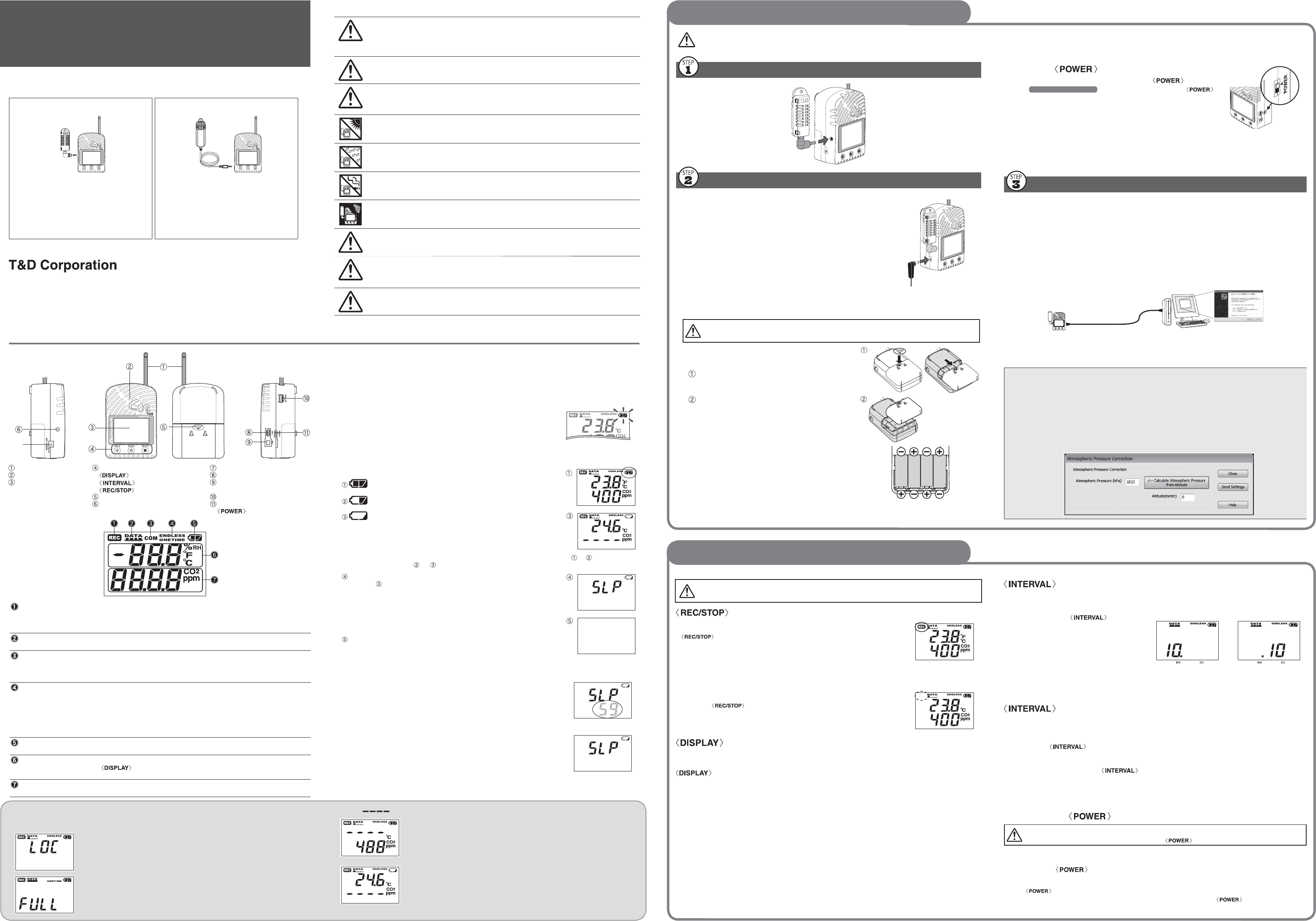
Part Names and LCD Display
Thank you for purchasing our product. To ensure safe and proper operation, please
read this manual thoroughly before use.
RTR-576 Package Contents RTR-576 -H Package Contents
• Wireless CO2 Recorder (RTR-576)
• Temperature/Humidity Sensor (THA-3001)
• AC Adaptor (AD-0638)
• USB Communication Cable (US-15C)
• AA Alkaline Battery x 4
• User's Manual (Warranty Included)
• Wireless CO2 Recorder (RTR-576)
• High Precision Temperature/Humidity
Sensor (HHA-3151)
• AC Adaptor (AD-0638)
• USB Communication Cable (US-15C)
• AA Alkaline Battery x 4
• User's Manual (Warranty Included)
http://www.tandd.com/
© Copyright T&D Corporation. All rights reserved. 2012.07. 1650480XXXX 1st Edition
Printed on recycled paper.
Notes about Operation
This product has been designed for use in normal living conditions, and is not suited
for controlled environments such as a CO2 incubator. When measuring outdoors,
avoid exposure to sunlight, dust, rain, or wind. Also make sure to use in the
operating environment indicated in the specifi cations.
This product cannot measure CO or O2. Do not use it for purposes such as avoiding
O2 defi ciency, CO intoxication or any other health related purpose.
For one to two weeks after installation of the unit, CO2 concentration measurements
may fl uctuate suddenly. This is due to the normal operation of Auto Calibration and
is not a malfunction of the RTR-576.
Do not use or store the unit in areas exposed to direct sunlight and abrupt changes
in temperature.
Do not allow the unit to become wet. Do not use or store the unit in places where
condensation occurs.
To help prevent deterioration of the unit, do not use or store the unit in areas
exposed to cigarette smoke, gas, and dust in the air.
Do not expose the Unit to a strong impact. This will adversely affect measurement
accuracy and may cause the case to break resulting in bodily injury.
The measurement accuracy of the CO2 sensor can not be guaranteed for CO2
concentrations of 5,000ppm or more.
As a Remote Unit, RTR-576 requires a Base Unit to carry out wireless
communication.
(Compatible Base Units: RTR-500, RTR-500NW/500AW, RTR-500DC)
Please set up the Base Unit fi rst before the RTR-576.
⑦
Antenna
CO2 Sensor Area
(Internal)
LCD Display
Operation Buttons
Button
Button
Button
Battery Cover
Temperature and Humidity Sensor
Jack
AC Adaptor Jack
USB Communication Cable Jack
Serial Communication Cable
Jack (RS-232C)
External Alarm Terminal (EXT
ALM)
Switch
[REC] Mark Shows recording status
ON: Recording in progress
BLINKING: Waiting for programmed start
OFF: Recording stopped
Data Scale After every 2,000 readings the scale will be marked from left to right. Logging
capacity is 8,000 readings.
[COM] Mark Shows communication status but not displayed normally.
ON: The unit is connected to a PC with a USB cable.
RAPID BLINKING: The unit is in communication with the computer via USB or
infrared communication.
Rec. Mode Recording mode settings can be made by using the supplied software.
Endless: Upon reaching the logging capacity of 8,000 readings, the oldest data will be
overwritten and recording will continue.
One Time: Upon reaching the logging capacity of 8,000 readings, recording will
automatically stop and in the LCD the current measurement and the word “FULL”
will alternately appear.
Battery Mark Shows source of power and voltage level. (See "Interpreting the Battery Mark"
for details.)
Current Tempera-
ture and Humidity
Readings Area
Shows the current readings for temperature (°C / °F) and humidity (%RH). Press-
ing the button will change the measurement item to be displayed.
This area is also used to display messages.
Current CO2
Readings Area
Shows the current readings for CO2 concentration (ppm). This area is also used
to display messages.
Wireless CO2 Recorder
RTR-576 User's Manual
Setting up the RTR-576
Button Operations
Do not connect an RTR-576 to your computer before fi rst installing the supplied software that comes with the Base Unit you are using.
Connect the Sensor
Turn ON the Power
AC Adaptor
When measuring and recording over long periods of time, please
use a supplied AC adaptor.
Four AA Alkaline Batteries
If running on only batteries, the estimated battery life is about two
days. Keeping batteries in the unit allows a backup source of
power for when and if electrical power is cut from the AC adaptor.
• Note: When using batteries as a backup power supply, it is
recommended to replace them approximately once every two years to
avoid battery leakage.
Install the Battery
If battery power is lost, all recorded data stored in the unit will be erased. Do not
leave the unit without batteries.
1.
Remove the battery cover from the back of the
unit.
While pressing down on the triangular mark, slide
the cover to the bottom of the unit.
Lift off the cover.
2.
Insert the supplied batteries.
• Make sure to use new batteries of the same kind.
• Make sure not to mistake + / -.
• Do not insert or change batteries with wet hands.
• Be sure to completely close the cover.
Messages and Display on the LCD
Settings Messages
Button Lock
When "Button Lock" has been set to ON in the CO2 Recorder for Windows,
operational buttons are not active.
Memory Full
When recording mode has been set to “One Time” and the unit reaches its
logging capacity of 8,000 readings, the measurement and the message [FULL]
will alternately appear in the LCD. Stop recording and download the recorded
data before re-starting recording. "Endless" mode does not have the Memory
Full status.
Turn on the switch.
After setting up the power supply, turn on the switch.
• See Button Operations for notes about turning off the
switch.
"ON" position
Warm-up Time for CO2 Sensor
After switching on the unit, it will take about one minute to display the normal CO2
concentration.
Register Remote Units
Register RTR-576 as a Remote Unit by using the software supplied with the Base
Unit. After connecting an RTR-576 to your computer via USB cable, carry out
registration using your software: Settings Utility * - [Remote Unit Settings] Menu -
[Register] Button
*includes [RTR-500W Settings Utility], [RTR-500 Settings Utility], and [RTR-500DC Settings Utility].
When the wizard window appears:
If upon USB connection, the [New Hardware Detection Wizard] opens, it is necessary to follow
directions to install the USB Device Driver.
USB Connection
Wizard Window
• If you have connected a unit without having installed the software supplied with the Base Unit, and
the New Hardware Wizard has opened, please close the wizard window and disconnect the USB
cable from your computer.
• For details see the Introductory Manual that came with your Base Unit.
Atmospheric Pressure Correction:
Measurement results of CO2 concentration are affected by atmospheric pressure. When high
measurement accuracy is required, we recommend that Atmospheric Pressure Correction be
carried out before a recording session is started.
Enter Atmospheric Pressure at Measurement Location:Directly enter the pressure (hpa) in the
[Atmospheric Pressure] fi eld.
Calculate Atmospheric Pressure from Altitude:
This setting can also be made by having the software calculate the estimated pressure at the altitude
(meters) entered by the user.
Interpreting the Battery Mark
Checking the Power Supply Condition
Whether the battery mark is "blinking" or "on" indicates the source of power. This mark will not
appear when batteries are not installed.
BLINKING (Running on battery):
The battery mark will blink on the LCD display when measuring and
recording by battery power.
Mark blinks when running on
battery power.
ON (Running on external power):
The battery mark will blink on the LCD display when measuring and
recording by battery power.
Checking the Battery Level
The battery level will be shown in three stages as below.
Battery Power - OK
Battery Power - Getting Low
It is recommended to change the batteries as soon as possible.
Battery Power - Too Low
When the battery power has become low running on batteries
only, it is impossible to measure and record CO2 concentration
at this stage. Also, wireless communication may result in error.
• When running on batteries only, it will take about 24 hours to go from Stage to and another
24 hours from Stage to .
Sleep Mode (stopping measurement and recording)
After Stage , if the battery is not changed but it remains in use, the Unit
will enter sleep mode and stop measurement and recording in order to
protect recorded data until this point.
• By replacing the batteries with new ones, the display will return to the
current readings display mode.
• If the Unit is already in sleep mode, download the recorded data into the
PC before re-starting recording.
Erasing recorded data
If the battery is further left unchanged, the display will automatically shut off
and all previously recorded data will be lost.
Recording settings will remain.
Removing the Batteries during Recording
1.
If the batteries are removed when running on battery power only,
the Unit will start a sixty-second countdown.
2.
To continue recording, before the countdown comes to an end,
insert new batteries or connect the AC adaptor to supply power.
3.
If power is not supplied within 60 seconds, the Unit will enter
sleep mode.
Countdown
When [ ] appears in the following:
Temperature and Humidity Display Area
This appears when the temperature/humidity sensor is not connected to the
RTR-576, the connection is loose, the wire is broken, or when power has just
been turned ON. If after re-connecting the sensor, measurements can still not be
displayed, it is very possible that the sensor or the logger is defective or has been
damaged.
CO2 Concentration Display Area
This appears when power has just been turned ON. If measurements don't
appear in the display after waiting for a considerable time, there is a possibility
that the sensor is defective or has been damaged. Also, the CO2 sensor will not
work if battery power is low.
If "Button Lock" has been set to ON in the CO2 Recorder for Windows, the
operational buttons will not be active.
Button: Starting and Stopping Recording
Starting Recording
button for about two seconds until the [REC] mark appears
on the display.
• It is possible to start recording even while waiting for a programmed
recording to start.
• Upon the start of recording, all previously recorded data in the RTR-576
will be deleted.
Stopping Recording
Press the button for about two seconds until the [REC] mark
disappears from the display.
Button: Changing the LCD Display Pattern
It is possible to change the current readings display for temperature and humidity (upper row).
CO2 concentration (lower row) is always displayed.
With each pressing of the button the item on the display will change.
Temperature and
Humidity:
The display will alternate every one
second.
Temperature only
Humidity only
1.
When the desired display pattern appears, stop pressing the button.
Button: Checking Recording Interval
It is possible to check the recording interval during recording or while waiting for a pro-
grammed recording to start.
1.
By pressing the button for
about two seconds, the currently set
recording interval will appear on the
LCD display.
2.
If no operation is carried out after the
recording interval has been displayed,
the current measurement readings will
return to the LCD display.
10 minutes 10 seconds
Button: Changing the Recording Interval Setting
Recording interval settings cannot be changed while a recording session is in progress.
1.
Stop recording.
2.
Press the button for about two seconds to display the currently set recording
interval on the LCD screen.
3.
With each pressing of the button the recording interval time will change; stop
pressing the button when the desired interval appears.
4.
Restart the recording session.
Turning Off the Switch
During recording or when the "Button Lock" is set to ON in the software, the power
cannot be turned off even by pressing the switch.
1.
Stop recording.
2.
Turn off the switch.
• If the RTR-576 is connected to an AC adaptor, standby power will be supplied even after turning off
the switch, allowing the CO2 sensor to continue operation. Therefore,
• When running on battery power only, CO2 sensor stops working if the switch is turned off.
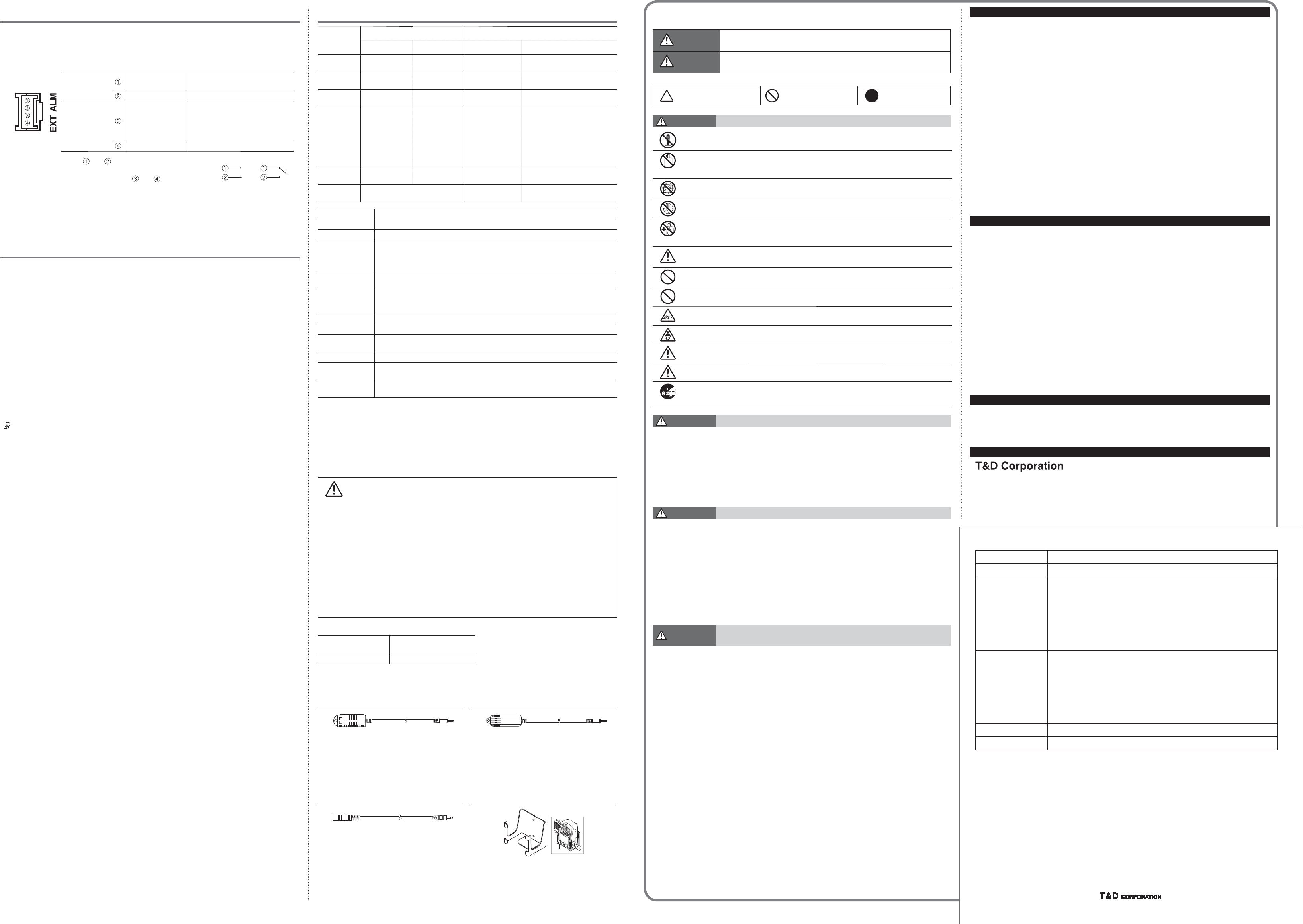
Specifi cations
Temperature/
Humidity Sensor
(External)
THA
-
3001 HHA
-
3151(High-Precision Type)
Thermistor Polymer Resistance Platinum Resistance Electrostatic Capacitance
Measurement
Channels Temperature 1ch Humidity 1ch Temperature 1ch Humidity 1ch
Units of
Measurement °C, °F %RH °C, °F %RH
Measurement
Range (*1) 0 to 55 °C 10 to 95 %RH
-
30 to 80 °C 0 to 99 %RH
Accuracy ±0.5 °C ±5 %RH
[at 25 °C, 50 %RH]
±0.3°C
[at 0 to 50 °C]
±0.5°C
[at all other
temperatures]
±2.5 %RH [at 25 °C, 10 to 85 %RH]
±4.0 %RH [at 25 °C, 0 to 10 % or 85
to 99 %RH]
At temperatures other than 25 °C and
≥ 0 °C, add ±0.1 %RH per degree of
difference from 25.
Humidity Hysteresis: ±1.5 %RH or
lower (*2)
Measurement
Resolution 0.1 °C 1 %RH 0.1 °C 0.1 %RH
Responsiveness Response Time (90%): Approx. 7 min. Response Time (90%):
Approx. 7 min.
Response Time (90%):
Approx. 20 sec.
Logging Capacity 8,000 data sets (One data set consists of readings for all channels in that type of unit.)
Recording Interval Select from 15 choices: 1, 2, 5, 10, 15, 20, 30 sec. or 1, 2, 5, 10, 15, 20, 30, 60 min.
Recording Mode (*4) Endless (Overwrite oldest data when capacity is full) or One Time (Stop recording when capacity is full)
Communication
Interfaces
Wireless Communication (Short Range Radio Communication)
FCC Part15 Section247 / IC RSS
-
210 (Frequency Range: 902 to 928MHz, RF Power: 7mW)
ETSI EN 300 220 (Frequency Range: 869.7 to 870MHz, RF Power: 5mW)
USB Communication"
Wireless Transmission
Range Approx. 150 meters (500 ft) if direct and unobstructed
External Alarm
Terminal
Output Terminal: Open Drain Output
(Voltage when OFF: DC less than 30V / Current when ON: less than 0.1A / Resistance when ON: about
15Ω)
Power AC Adaptor (AD
-
0638 or AD
-
0638-C), AA Alkaline Battery (LR6) x 4
Battery Life (*5) Approx. 2 days (batteries only without AC adaptor)
Dimensions H 96 mm x W 66 mm x D 46 mm (excluding protrusions and sensor)
Antenna Length: 60 mm
Weight Approx. 220 g (including battery, excluding sensor)
Operating
Environment
Temperature: 0 to 45 °C
Humidity: 90 %RH or less (no condensation)
Compatible Base
Units RTR
-
500, RTR
-
500NW/500AW, RTR
-
500DC
*1: Make sure to use the data logger within the operating environment as listed in the specifi cations.
*2: When used in environments where temperature and humidity are over the values of 50°C 75%, 60°C 50%, 70°C 35%, and 80°C 25%,
sensor hysteresis may fl uctuate by values greater than ±1.5%RH. Under certain circumstances, it may take some time to return to nor.
*3: Stated value is the measurement accuracy of the CO2 sensor when Auto Calibration is operating properly. A change in atmospheric
pressure directly infl uences the reading of CO2, which can cause measurement errors; a decrease in pressure by 10hPa result.
*4: Only “Endless” is available when using RTR-500W for Windows.
*5: Battery life varies depending upon the ambient temperature in which it is used, the recording interval, the frequency of communication, and
the battery performance. All estimates are based on operations carried out with a new battery and are in no way.
The specifi cations listed above are subject to change without notice.
Cautions about using the Temperature/Humidity Sensors
• If extremely severe temperature changes occur, the humidity measurements may appear
abnormal. Once the sensor's temperature becomes stable, the measurements will return to
normal.
• Do not connect the sensor to any data logger other than those specifi ed by T&D Corporation.
• Do not expose the sensor to a strong impact. This may adversely affect measurement accuracy
and cause damage or malfunction.
• When the sensor is not to be used for a long period of time, please store it at normal
temperature and humidity.
• Do not use the sensor on the human body.
• Continued use may cause a decrease in the sensor’s accuracy and sensitivity even under
normal operational conditions. We suggest changing the THA-3001 after about one year of use.
If the sensor is being used in a bad environment (smoky or dusty places) it may be necessary to
change the sensor sooner.
• This sensor is not water resistant. Do not allow the sensor to become wet. If the sensor gets
wet, immediately remove the sensor from the unit and wipe it with a clean cloth as soon as
possible. Then allow the sensor to dry in normal room temperature before using it again.
Initial Settings
Recording Conditions Recording Mode: Endless
Recording Interval: 10 min.
LCD Display Pattern Alternating Display
Options
Temperature/Humidity Sensor: THA-3151 High Precision Temperature/Humidity
Sensor: HHA-3151
Measurement Range: Temperature: 0 to 55°C, Humidity:
10 to 95 %RH
Measurement Resolution: Temperature: 0.1°C, Humidity:
1 %RH
Accuracy: Temperature: ± 0.5°C,
Humidity: ± 5 %RH (at 25°C and 50%RH)
Response Time (90%): Approx. 7 min.
Cable Length: 1.5 m
Measurement Range: Temperature:
-
30 to 80°C,
Humidity: 0 to 99 %RH
Long Term Stability: ± 1%RH/yr, ± 0.1°C/yr
(Do not expose to condensation, dampness, dust,
corrosive gases or organic solvents.)
Cable Length: 1.5 m
Sensor Extension Cable: TR-1C30 Wall Attachment: AT-76K
Possible to use up to three extension cables
per sensor
Compatible Sensor: THA
-
3001, THA
-
3151, HHA
-
3151
Temperature Durability:
-
25 to 60°C
Material: Vinyl Coated Electrical Wire
Cable Length: 3 m
Material: Aluminum
Accessories: Screw x 2
Explanation of Symbols
Explanation of Warning Symbols
DANGER These entries are actions that, if taken, may cause serious personal physical
damage or death.
CAUTION These entries are actions that if taken may lead to physical injury or damage to
persons or things.
Explanation of Picture Symbols
Denotes an important
warning or caution.
Denotes a forbidden
action.
Denotes an action that
should be carried out.
DANGER To Prevent Serious Accidents
Do not disassemble, repair or modify the unit and accessories.
Do not use the unit in any environment that is exposed to chemicals and harmful gases. Doing
so may cause corrosion and/or other danger to the unit. Also, coming in contact with hazardous
substances may cause bodily harm to the user or people nearby.
This Unit is not waterproof. If water or a foreign object enters the case, immediately remove
batteries and stop using it.
Do not insert or replace batteries or sensors with wet hands.
This unit has been designed for private and/or industrial use only. It should not be used in
situations where strict safety precautions are necessary such as with medical equipment, or in
systems directly or indirectly connected with human life or well-being.
We shall not guarantee the unit's operation if it has been connected to a PC using a USB hub or
a USB extension cable.
Do not drop or expose the unit to a strong impact.
Do not cut or process the sensor cables. Also, do not twist, pull on or swing any of the cords.
To prevent damage to the unit from static electricity, remove static electricity from your body by
touching metal around you (such as a door knob and window frame) before touching the unit.
Place and store the unit and accessories out of the reach of children.
Further, T&D is not responsible for any damage, malfunction or trouble, whether direct or
indirect, caused by the use of our products.
Do not use any power or sensors other than those specifi ed by T&D Corporation.
If the unit produces heat, emits smoke or a strange smell, or makes unusual noise, immediately
remove the batteries and stop using it.
CAUTION Do not place or store in the following areas:
• Areas exposed to direct sunlight
• Areas subject to high temperatures such as near fi re or heating equipment
• Areas exposed to static electricity
• Areas exposed to strong magnetic fi elds
• Areas exposed to dampness
• Areas subject to condensation or wet areas
• Areas exposed to excessive vibration
• Areas exposed to excessive smoke, dust or dirt.
CAUTION Other Precautions
• Use the unit in the specifi ed operating environment. Do not use it for any purpose other than for which it was
designed.
• Condensation may occur inside the case when a unit is moved from one environment to another where there is
a great difference in temperature. Be careful to avoid condensation.
• Do not use the unit in wet areas or places exposed to water such as bathroom.
• Do not insert any foreign objects into any of the units' jacks.
• If the unit gets dirty, wipe it with a clean cloth.
• Please note that this Introductory Manual has been written based on the presupposition that details about
set-up of any necessary equipment to enable network connection have already been taken care of by the
user and that connection has been confi rmed as workable. T&D Corporation shall not be responsible for any
damages which a contractor, a user or a third party may suffer, whether direct or indirect, due to the inability to
communicate or use communication devices.
CAUTION Notes and Precautions for Installing Wireless Communica-
tion Devices
When installing wireless communication devices take special care in selecting locations so as to ensure
proper communication. Note that even after a successful installation, due to changes in environmental
conditions, communication errors may occur when restarting the system.
• As far as possible, try to keep wireless communication devices away from metals and set them up in high
unobstructed positions.
• Please take note that in many instances, walls, fl oors, stairs, fences and desks will contain metals. In order to
carry out communication between indoor and outdoor units, please locate indoor units near a window so that
radio waves can be easily transmitted.
• Please install the Unit more than 30 cm away from walls or boards containing metal.
• If the Unit is placed in a metal container such as a freezer or refrigerator, the possible wireless communication
range will be shortened. In most cases radio waves are transmitted via doors and door openings so place the
Unit as near to doors as possible.
• As far as possible, keep the Unit away from noise-emitting sources.
• Equipment such as some industrial instruments, electronic devices or fl uorescent lamps generate noise. Please
place the Unit more than 1 meter away from such devices.
• Please place the Unit more than 1 meter away from computers and other devices which emit noise.
• Keep all wires as far away from wireless communication devices as possible. Please be careful about placing
near any wiring or cables such as power supply cables, telephone wires or LAN cables.
• Objects which contain lots of water, such as plants or soil, absorb radio waves. We highly recommend that
such materials should not be placed between or near wireless communication units.
• When measuring temperature in a greenhouse it has been reported that as plants grew, communication errors
also increased.
• Do not place the Unit directly on the ground.
• Do not place Units which are using the same communication frequency channel in the same area. If the same
channel is used for multiple units not only will more communication errors occur, but battery life will also be
shortened.
• If there is a possibility that Units with the same frequency channel will be in wireless communication at the
same time, please make sure to make changes to the frequency channels so they are not the same.
Getting Ready to Use External Alarm Terminal
It is possible to connect an external device such as siren or lamp to the RTR-576.
Please make sure to check specifi cation details of the external alarm terminal before
purchasing or getting an external device ready for connection.
About the External Alarm Terminal (EXT ALM)
Enabling
Warnings
Warning Output
(Enable / Disable)
Internal Pull-up: 3V 100 kΩ
Maximum Input Voltage: 30V
GND
Warning Output
(OUT)
Output Terminals
(Warning Output)
Open Drain Output
Voltage when OFF: DC less than
30V
Current when ON: less than 0.1A
Resistance when ON: 15Ω
GND
The connection between and decides whether Warning Output
is enabled or disabled. If a warning condition occurs while Warning
Output is enabled, a connection between and will be
established and a warning will be output.
Enabled Disabled
About the Compatible Connector
The JST Connector PAP-04V-S is compatible with the external alarm terminal. For questions
concerning sales of the connector, please directly contact JST Mfg. Co., Ltd.
http://www.jst-mfg.com/
Auto Calibration Function for CO2 Sensor Accuracy
What is "Auto Calibration" ?
Auto calibration is a function designed to enable long-term accurate measurements by
adjusting the lowest CO2 concentration measured in a certain period of time to the set
standard measurement in the air (atmospheric CO2 levels of 400 ppm).
• The factory default setting for auto calibration is enabled.
Turning ON and OFF Auto Calibration
Turn off auto calibration (*1) when continuously measuring in an environment where
measurements are greatly different from the standard 400ppm CO2 concentration. Then, to get
more accurate measurement results, place the RTR-576 in general atmospheric environment
and periodically check if the CO2 concentration gets closer to 400ppm or not. If not, we
recommend that you carry out manual calibration (*2).
*1: To change settings, it is necessary to download "Adjustment Tools" application (free) from our website. Detailed info
can be found below.
*2: Manual calibration is expected to be performed no more than once a month. Operational procedures and other
reference info can be found below.
See:
For RTR-500 / 500AW / 500NW
[ Operation Guide] - [How to Use] - [Other Useful Functions] Menu
For RTR-500DC
[RTR-500DC Settings Utility Help] - [ How to Use] - [Basic Settings] - [Remote Unit Registration] Menu
Important Notices and Disclaimers
In order to properly use this product, please carefully read all documents that accompany the product
before using. T&D Corporation accepts no responsibility for any malfunction of and/or trouble with this
product or with your computer that is caused by the improper handling of this product and will deem such
trouble or malfunction as falling outside the conditions for free repair outlined in the attached warranty.
• All rights of the attached documents belong to T&D Corporation. It is prohibited to use, duplicate and/or arrange
a part or whole of the attached documents without the permission of T&D Corporation.
• Microsoft and Windows are registered trademarks of Microsoft Corporation in the United States and/or other
countries.
• Windows Vista is either a registered trademark or trademark of Microsoft Corporation in the United States and/
or other countries.
• All registered trademarks, company names, product names and logos mentioned herein or for products being
used are the property or registered property of T&D Corporation or of their respective owners.
• Specifi cations, design and other contents outlined in the attached documents are subject to change without
notice.
• Please follow the safety precautions outlined in the attached documents carefully. We cannot guarantee nor are
we responsible for safety if this product is used in any manner other than was intended.
• On-screen messages in the attached documents may vary slightly from the actual messages.
• Please notify the shop where you purchased this product or T&D Corporation of any mistakes, errors or unclear
explanations in the attached documents.
T&D Corporation accepts no responsibility for any damage or loss of income caused by the use of our product.
• Accompanying documents cannot be reissued, so please keep them in a safe place.
• Please read the warranty and provisions for free repair carefully.
Compliance Information
FCC Statement
This device complies with Part 15 of the Federal Communications Commission (FCC) rules. Operation is
subject to the following two conditions: (1) This device may not cause harmful interference, and (2) This
device must accept any interference received, including interference that may cause undesired operation.
Caution:
Changes or modifi cations not expressly approved by the party responsible for compliance could void the
user's authority to operate the equipment.
Note about Antenna Usage
This device has been designed to operate with the supplied antenna only. Use of any other antenna is
strictly prohibited.
IC Statement
This device complies with RSS-210 of the Industry Canada (IC). Operation is subject to the following
two conditions: (1) This device may not cause harmful interference; and (2) This device must accept any
interference received, including interference that may cause undesired operation.
Ce dispositif est conforme à la norme RSS 210 d’Industrie Canada.
L’utilisation de ce dispositif est autorisée seulement aux conditions suivantes : (1) il ne doit pas produire
de brouillage et (2) l’utilisateur du dispositif doit être prêt à accepter tout brouillage radioélectrique reçu,
même si ce brouillage est susceptible de compromettre le fonctionnement du dispositif.
Wireless products cannot be used in countries other than where those products have been approved for
use, according to that country's wireless regulations.
Important Notices
Wireless products cannot be used in countries other than where those products have been approved for
use, according to that country's wireless regulations.
T&D Corporation shall in no manner whatsoever take responsibility for the usage of these products, nor
be liable in any manner for legal consequences stemming from the usage of these wireless products in
unapproved areas.
For product information or questions contact us at:
817-1 Shimadachi Matsumoto, Nagano 390-0852 JAPAN
Fax: +81-263-40-3152 E-mail: support@tandd.com
http://www.tandd.com/
We have opened an English Website for your convenience. Here you can fi nd information about our
company, news, products, upcoming events, software and Introductory Manual downloads, as well as,
ther support. Please stop by and see what we have to offer.
Wireless CO2 Recorder RTR-576 Warranty
Guarantee Period 1 year from date of purchase
Date of Purchase
Customer's name
Address
Phone No.
Distributor's name
Address
Phone No.
Object of Repair Main Unit (excluding sensors and any other options.)
Method of Repair Send in for Repair
Provisions for Free Repair
1. If the unit does not work properly despite the fact that the customer used it properly and in line with the manual, the Unit shall be
repaired free of charge through the distributor which sold the unit.
2. If the customer requests free repair because of trouble within the warranty period, bring or send the unit along with the warranty to
the distributor.
3. If you have moved after purchasing, or there are diffi culties contacting the distributor from which you purchased the unit, please
contact T&D directly for service.
4. Free repair is not available in the following cases even though it is within the warranty period:
1. Trouble or damage was caused by careless operation, natural disaster, fi re, public pollution, or use of a power source other than
specifi ed.
2. If repair, adjustment, disassembly or modifi cation of the unit has been carried out by a person other than a T&D authorized
engineer.
3. Trouble or damage was caused by transportation, movement or dropping of the unit after purchase.
4. Failure to submit the warranty or failure to fi ll in all items required in the warranty.
5. The warranty cannot be reissued.
This warranty only promises customers free repair within the period and conditions clarifi ed in this warranty. Therefore, the
customer's legal rights will not be limited by this warranty. For further information on repair and other service questions after the
termination of the warranty period, contact your distributor.